


My Honest Fathom Review After Using It For +3 Months (2026)
I used Fathom numerous times over the past three years, but I am now committed to it and have been using it continuously for the past 3 months to see how it performs.
In this Fathom review, I will share my experience after using it for 10+ calls to help you decide whether it is worth it for you, and show its best alternatives.
Let’s dive in!
Verdict
Here’s the quick verdict if you don’t want to read the full review:
🎯 Best for: Simple AI note-taking with free core features
🚫 Not ideal for: If you require more advanced features
⭐ Biggest strength: Accurate transcriptions and well-structured meeting notes for free
⚠️ Biggest weakness: No mobile app
⚖️ Verdict: It is best for users who need the essential features for free and need a simple AI note-taker
🏆 Score: 4.4 / 5
✅ Tested with our review & scoring methodology ✅ Real-world testing ✅ Unbiased evaluation
Fathom Review
Summary
Fathom is an amazing AI meeting assistant that transcribes, records, and summarizes online meetings. It works with 38 languages, and Fathom will take notes on Microsoft Teams, Zoom, and Google Meet calls. With its outstanding free plan and reliable transcriptions, it is among the top tools in the AI note-taker market.
|
|
Oustanding free plan
|
|
|
Accurate transcriptions
|
|
|
Top-notch customer service
|
|
|
Simple user interface
|
|
|
You can access the meeting templates only with teams plan
|
|
|
It does not transcribe files
|
|
|
No mobile app
|
How We Test AI Note-Takers
To keep our reviews and final scores fair and consistent, we evaluate every AI note-taking tool using a standardized testing framework built on real-world usage and hands-on experience.
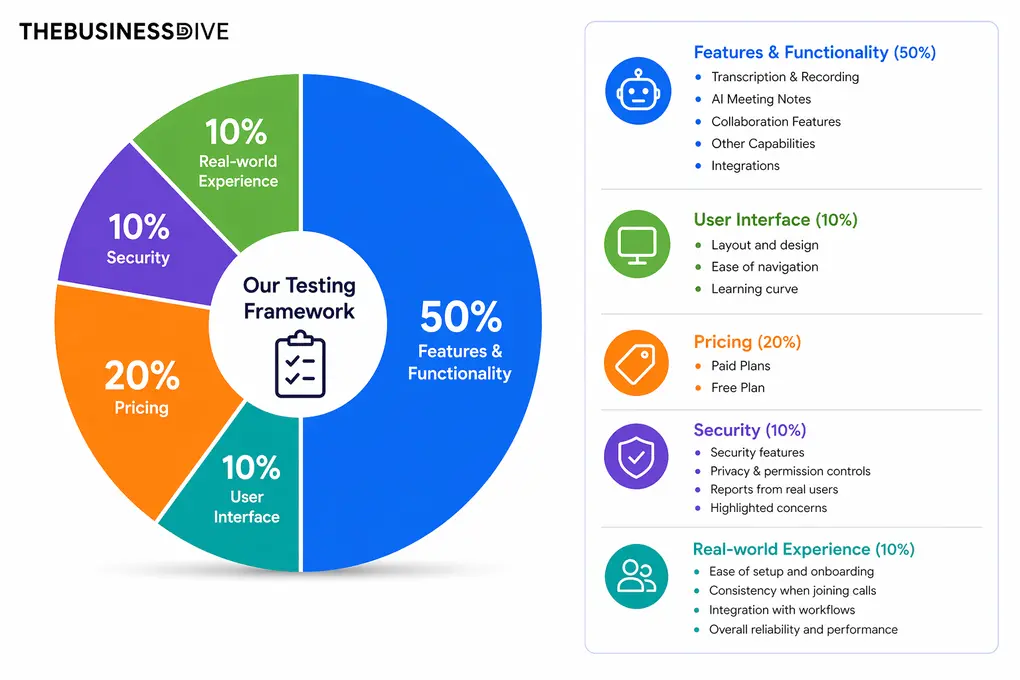
Our scoring breakdown after testing 20+ AI note-takers:
🤖 Features & functionality — 50%
🖥️ User interface — 10%
💰 Pricing — 20%
🔐 Security — 10%
👥 Real-world experience — 10%
Want a detailed breakdown of how we test each category?
Learn exactly how we test tools → Review methodology
Short on time? Here’s a quick overview of Fathom
What is Fathom?
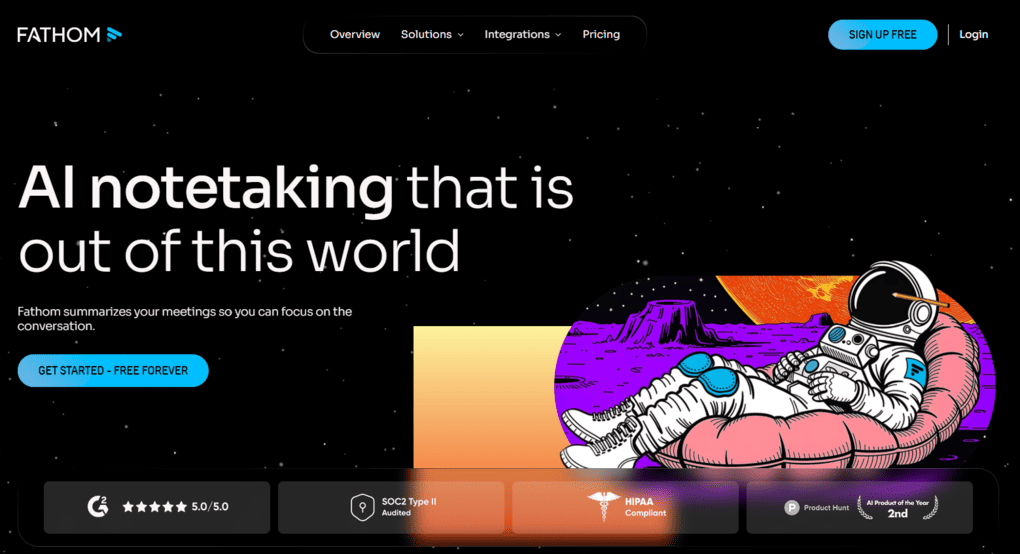
Fathom is an AI meeting assistant that transcribes, records, and summarizes online meetings and audio or video files. It works with 38 languages, and Fathom will take notes on Microsoft Teams, Zoom, and Google Meet calls.
Fathom is one of the earlier players in the AI note-taker market, as it was launched in 2020.
It utilizes technologies like natural language processing and speaker recognition. Natural language processing helps you understand what you are saying during online meetings. At the same time, speaker recognition gives a speaker ID for each participant in the online meetings so you can track who said what.
What I learned from these 3 months using Fathom
Fathom was a pleasant surprise for me when using it for months.
After testing almost all the AI note-taking apps on the market, I found Fathom’s free plan among the best. So, if you don’t want to spend a penny on AI note-takers, Fathom is a top choice. Alternatively, you can consider tl;dv, which also offers an excellent free version.
Fathom focuses on the core features, and does it extremely well. It has solid transcription accuracy (85-90%), well-organized AI notes, and the Ask Fathom works great.
While it does not offer as many features as Fellow or MeetGeek, Fathom’s focus on the basics makes it ideal for those looking for a lightweight, free AI note-taker.
Fathom’s score explained
Fathom achieved a high overall score, largely due to its solid key features (transcription, recording, and AI notes) and its great free plan.
Where it falls behind other AI note-takers is its collaboration tools (3.5/5) and feature depth (3/5). While I appreciate its outstanding and free core features, those who need more advanced features might find Fathom insufficient.
When Fathom makes the most sense
When to consider alternatives to Fathom
If you want to try out Fathom, use this link to get FREE 3 months of premium features without an extra cost. This way, you can have 3X more time to test Fathom’s advanced features and decide whether to upgrade or stay with the free plan.
Key features
Now, I will show you some of the key features I discovered during my Fathom review!
Transcription
When you join online meetings on Microsoft Teams, Zoom, and Google Meet, you can let Fathom’s bot into the call, and it will automatically transcribe the meetings. But do not worry, you can customize this.
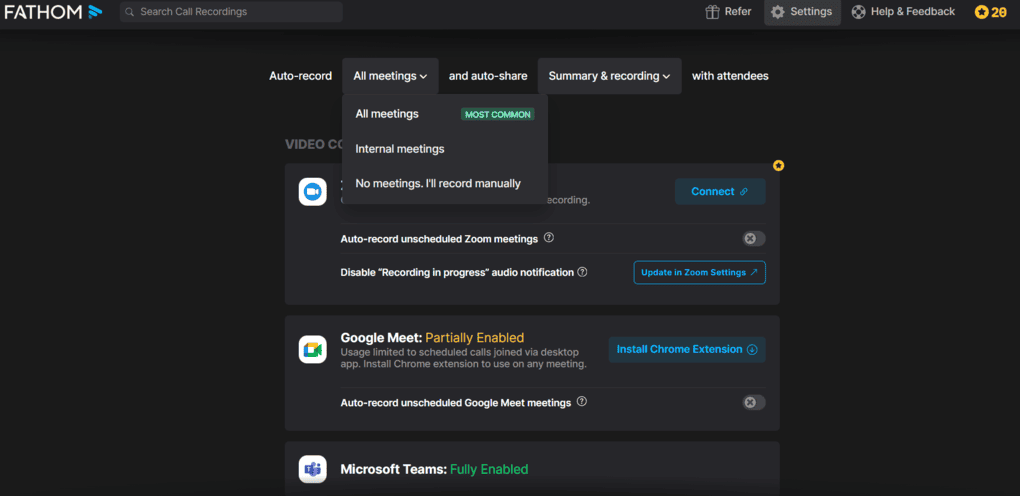
Just go to the settings menu, where you can decide if you want Fathom to auto-join and record all your internal or external meetings. It is also great that you can edit the name of your bot.
Fathom is among the more accurate AI note-takers. When tested across numerous meetings, it was not as accurate as Fellow or MeetGeek, but it offered a solid 85%-90% transcription accuracy, which was higher than I experienced with Fireflies AI or Otter AI.
However, this also depends on the audio quality and your accent, I reached this accuracy with the built-in microphone of my PC.
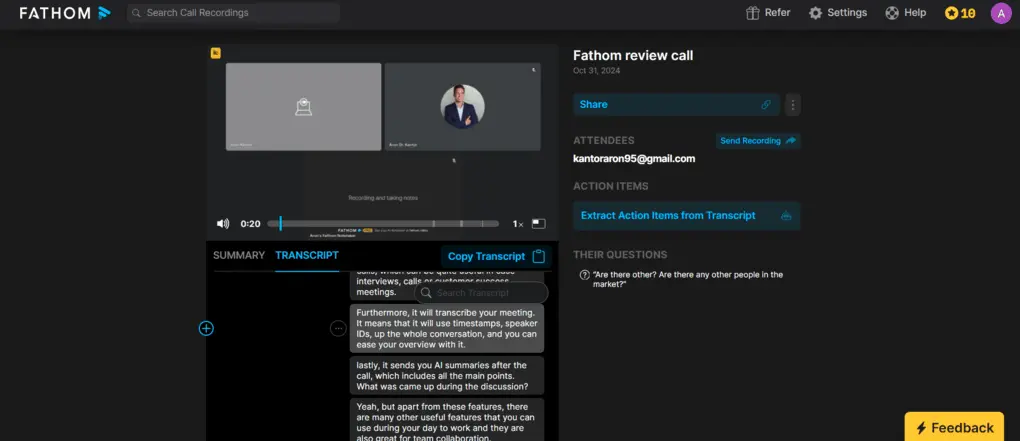
Once the call is over, Fathom will send you the transcription. I love Fathom for how it designed its transcription feature. If you click on one part of the transcription, it will quickly jump into the recording to that point in the online meeting. Furthermore, it is super easy to trim and edit the transcript if Fathom is not accurate for some reason.
I recommend downloading its Google extensions to join the Google Meet calls more easily. Also, if you have Zoom calls, connecting Fathom with your Zoom account makes sense before the meeting.
Overall, Fathom’s transcription feature is accurate and easy to use. It’s a great time saver when it comes to your online meetings and focus on what matters.
Recording
Fathom is an excellent meeting recording tool. Based on your preferences, when you want Fathom to join your meetings, it will participate in your meetings. It offers a high-quality video recording you can easily share with your team members.
The video recording feature is quite useful for recruiting or customer success teams.
AI summary
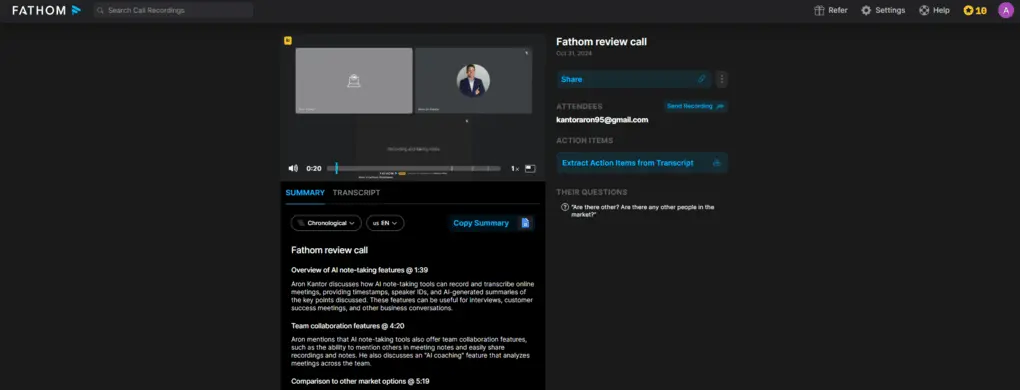
If you do not want to go through the whole transcription or watch the recording, you can quickly review what happened using the meeting notes. Fathom takes notes during the calls and prepares a summary after the meeting is over.
The AI summary shows the key points that were discussed during the online meeting. During this Fathom review, I discovered that the AI summary is shorter and follows a different structure compared to other AI note-takers. But hey, if you like simplicity and short meeting notes, this one can be great for you.
Compared to other AI note-takers, Fathom offers shorter AI meeting notes. On the one hand, this makes summaries easier to scan. However, if you need more extensive meeting notes that Fellow or Bluedot offers, for example, Fathom will not be the best fit for you.
Ask Fathom
The Ask Fathom is Fathom’s AI assistant feature. Quite frankly, it works like ChatGPT or a personal assistant. With this feature, you can interact with your call recordings easily. For example, you can ask questions regarding a Zoom call or ask it to write a follow-up email.
Ultimately, it is a helpful feature that makes you more productive and saves time.
Clips
You can create short audio clips from different parts of the meeting to share with your team. This feature is awesome if you want to share the key moments from sales calls, for instance. If you integrate Fathom with Slack, the clips feature can work great, as you can easily drop the clip in a Slack message.
Meeting templates
If you subscribe to a team plan, you can access 14 templates designed for different types of online meetings, like customer success, stand-ups, or sales calls. Depending on the template you choose, Fathom will structure the AI summaries accordingly.
However, I would prefer that they implement the meeting templates in the Premium plan for people like me. You see, I have different types of meetings, and I do everything from client calls to collaboration requests without a team. So, the meeting templates would also be pretty helpful for me.
Overall, the meeting templates feature is awesome, but it would be great if I could also access it in the Premium plan.
Team collaboration features
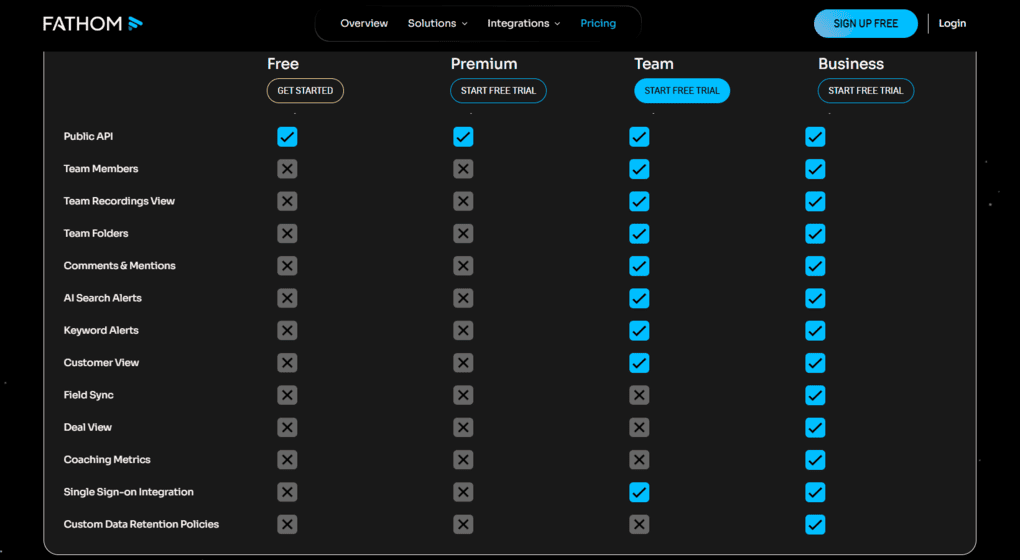
Fathom offers some useful team features to improve collaboration when it comes to online meetings. You can organize your meeting notes and recordings into different folders that your team can access. Also, you can mention and add comments to the meeting notes.
If we look at the advanced team collaboration features, you can access the coaching feature and the deal view. Both of them are great for improving your sales process.
Integrations
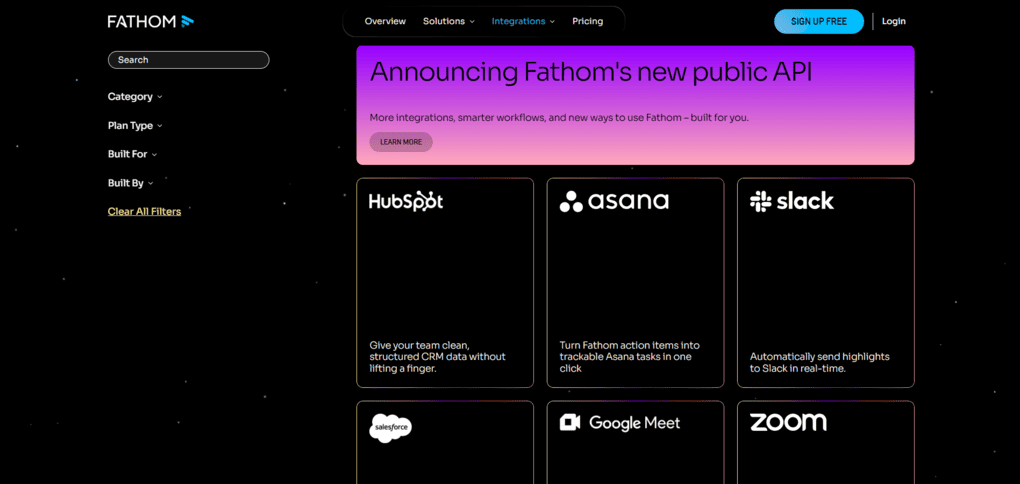
Integrations are crucial for me, so I always check whether I can integrate the app with other tools. During my Fathom review, I was pleased that I found that you can connect Fathom with Zapier. Thanks to the Zapier integration, you can integrate Fathom with over 7000 apps.
Nevertheless, using the Premium or Team Edition plan, you only have limited access to Zapier integrations. Besides the Zapier integration, you can connect Fathom with Asana, Slack, HubSpot, Salesforce, Close, and more.
User interface
Explore our Apps directory
A curated directory of software tools we’ve independently reviewed, with links to full reviews, comparisons, and category guides.
The first word that comes to my mind when I look at Fathom’s user interface is simplicity. Everything is in one place, and you can access all the features with one click.
On the homepage, you can find your previous recordings. If you click on one of your meetings, you will instantly see the meeting transcription, recording, and meeting notes.
Overall, Fathom has an intuitive and simple user interface with a short learning curve.
Pricing
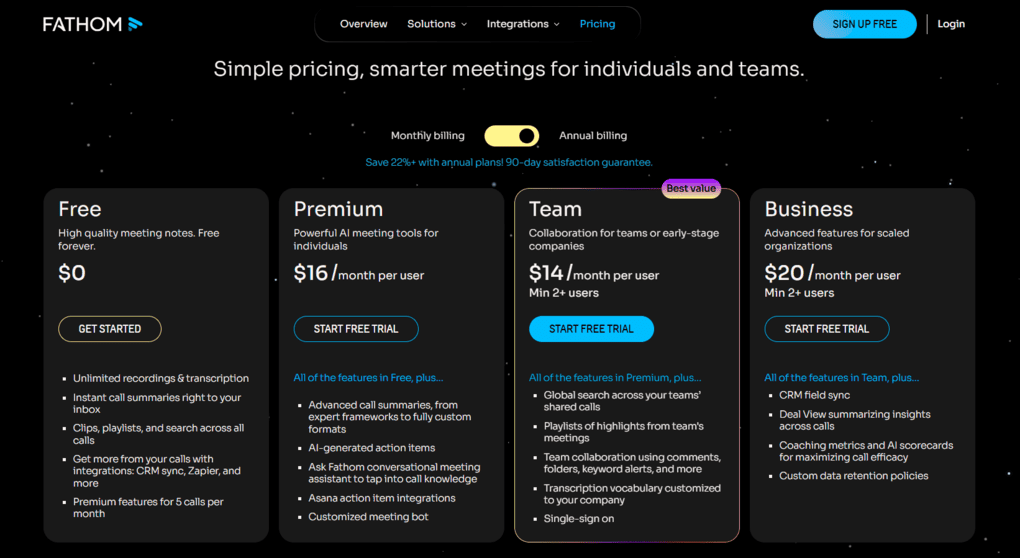
Fathom has a free plan and three paid subscription plans. The free plan includes unlimited recordings, storage, and transcriptions. The free plan offers some integrations, and you can use some basic features like clips. Compared with other tools, Fathom’s free plan is outstanding thanks to the unlimited recordings, transcriptions, and storage capacity.
Ultimately, I recommend the free plan for those who do not want to use advanced features or unlimited Zapier integration.
The Premium plan is ideal for individuals who want to utilize more features. It has all the features in the free plan. However, you can use all the AI features with this plan.
The Team plan was designed for small teams. With this plan, you will access team collaboration features like folders, comments, mentions, and keyword alerts.
If you want powerful features like AI coaching and deal view, you have to pay for the Business plan. If you choose this plan, you will have unlimited integrations, advanced security controls, single sign-on integration, and custom data retention policies.
Overall, Fathom has a generous and outstanding free plan compared to other AI note-taking apps. The Premium Plan is also a good choice and offers much value for the money. The Team and Business plans have reasonable pricing and are ideal for small teams.
If you want to try out Fathom, use this link to get FREE 3 months of premium features without an extra cost. This way, you can have 3X more time to test Fathom’s advanced features and decide whether to upgrade or stay with the free plan.
Pros and cons I discovered during my Fathom review
Let’s dive into the strengths and pain points I discovered during my Fathom review!
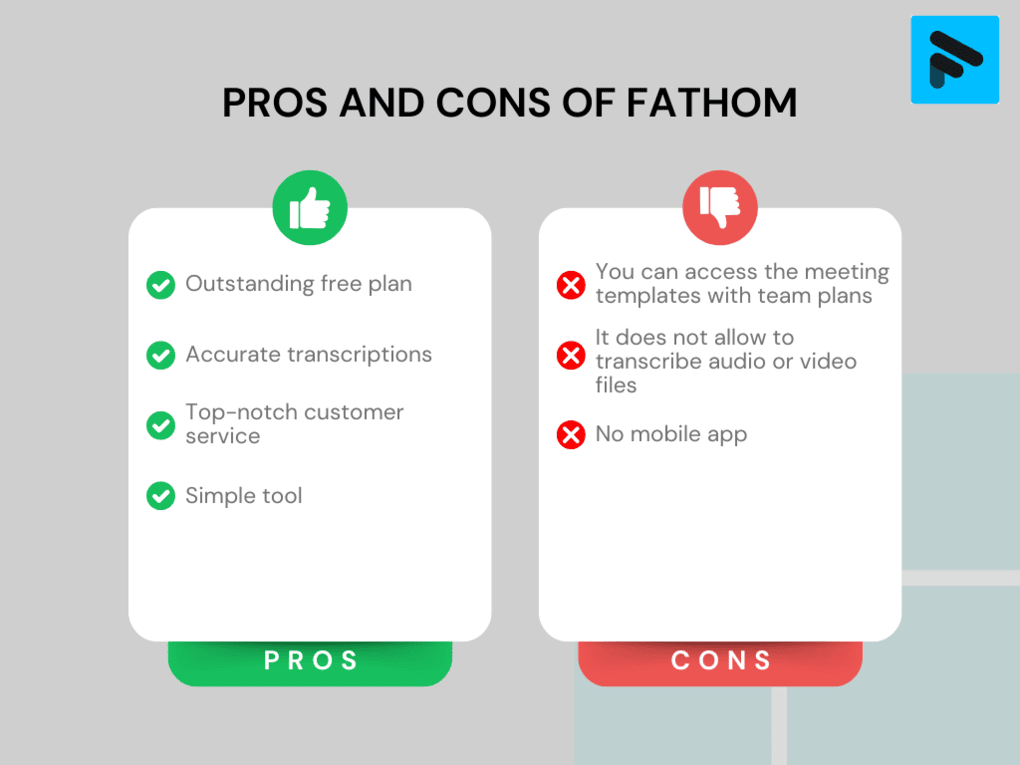
Pros of Fathom
Cons of Fathom
Fathom’s alternatives
If you are still not sure about Fathom or are wondering what other options you have, here is my list of the best AI note-takers:
|
App |
Best for |
Description |
|---|---|---|
|
Fellow |
Best overall |
A top AI note-taker for professionals and teams. This is the one I use for online meetings. |
|
Fireflies AI |
Best budget-friendly option |
A popular and budget-friendly AI meeting assistant for individuals and teams. |
|
Notta |
Best for multi-language transcription |
A unique AI note-taker that allows multi-language transcription, enabling people to speak two different languages during online meetings. |
|
MeetGeek |
Best for multi-language transcription |
A versatile AI note-taking app with the best AI meeting summaries. |
|
tl;dv |
Best simple AI note-taker |
A simple option for individuals with a feature-rich free plan. |
|
Radiant |
Best free AI note-taker for Mac |
It is a 100% free AI bot-less note-taker for Mac users for in-person and online meetings. |
|
Otter AI |
A popular AI note-taker |
One of the most popular AI note-takers for Google Meet, Zoom, and Microsoft Teams. |
|
Granola |
Best for users need a simple bot-less AI note-taker |
Granola is a lightweight AI note-taking app that transcribes and summarizes meetings without bots, with a generous free tier, but it’s basic and lacks advanced features. |
|
Krisp |
Best bot-less AI note-taker supporting high audio quality |
Krisp is a Voice AI platform for clearer communication and more productive meetings, combining real-time audio enhancements with AI note-taking. |
|
Bluedot |
An easy-to-use bot-less AI note-taker |
Bluedot is a straightforward and easy-to-use bot-free AI note-taker. |
|
Zoom AI Companion |
Best for Zoom users needing built-in AI note-taking |
A solid built-in AI assistant for Zoom that offers meeting summaries, basic transcription, and action items, but lacks advanced features. Full Zoom AI Companion review | Quick Zoom AI Companion overview |
|
Tactiq |
Best for individuals and workflow automation |
Tactiq is an AI meeting assistant that provides real-time transcription, customizable summaries, and workflow automation. |
|
Read AI |
Best for teams & individuals who want an all-in-one AI meeting assistant |
Read AI is an AI meeting assistant with solid transcription, summaries, and search, but limited features on lower plans and privacy concerns make it hard to rely on. |
|
Plaud |
Best for in-person conversations |
A unique AI note-taker with dedicated hardware for recording meetings, phone calls, and ideas wherever you are. |
Fathom vs alternatives



Otter AI VS Fathom

Fathom VS tl;dv
Fellow VS Fathom
Fireflies AI VS Fathom
Fathom VS MeetGeek
Wrap-up: Fathom review
Fathom AI note-taker is a great tool when you want to increase productivity and save time during online meetings. If you have to deal with multiple meetings daily, this tool will be a life saver. Based on my Fathom review, I highly recommend it for teams and individuals.
Related articles:
- 6 Best Fathom Alternatives After Testing 20+ AI Note-Takers (2026)
- Best 9 AI-Note Takers | My Top Picks After +2 Years Testing (2026)
I hope I gave you a solid overview in this Fathom review and helped you to decide if this app is for you. I wish you productive online meetings!
If you want to try out Fathom, use this link to get FREE 3 months of premium features without an extra cost. This way, you can have 3X more time to test Fathom’s advanced features and decide whether to upgrade or stay with the free plan.
Looking for similar tools?
Visit our AI note-takers library to explore other apps we’ve reviewed in this space and how they compare.
Why you can trust our reviews
At thebusinessdive.com, our team tests, reviews, and compares hundreds of productivity apps every year — from project management tools to note-taking apps. We dive deep into real-world use cases to help you find the right tools that actually improve your workflow, not just add noise.
Our mission? No fluff, no shortcuts—just honest, hands-on insights from productivity pros.
Discover how we stay transparent, read our review methodology, and let us know about any tools we missed.
Frequently asked questions
Is Fathom AI free?
Fathom has a generous free plan with unlimited recordings, transcriptions, and storage capacity. Based on my 2+ years of experience with AI note-takers, it has one of the best free plans on the market.
Is Fathom safe to use?
Fathom AI note-taker is a safe option. This tool is HIPAA, SOC2 Type II, and GDPR-compliant and has passed extensive security reviews by Zoom. Fathom does not train AI models on your data, including meeting recordings and transcripts.
Can I use Fathom for Zoom meetings?
Yes, Fathom is a great solution for taking notes on Zoom meetings. After your Zoom call, Fathom will send you the transcriptions, AI summaries, and recordings of the conversation.
Is Fathom good for customer success teams?
Fathom will probably be a game-changer tool for customer success teams. Using Fathom, you can dedicate your full attention to your customers, and its features make it easy to review meetings.
Disclosure: I only recommend products I would use myself, and all opinions expressed here are our own. This post may contain affiliate links that, at no additional cost to you, I may earn a small commission. Read the full privacy policy here.

Hey there! I am Aron, the founder of Thebusinessdive. I have been testing productivity apps for almost three years now. I reach 25.000 -50.000 people monthly with the mission to help you find the perfect productivity apps. Subscribe to my YouTube channel, newsletter, and social media to hear more about the best productivity tools. Let’s dive in!