


9 Best eSign Software for 2026 | Bigger Brand ≠ Better Tool
Finding the best eSign software sounds simple—until you start comparing them.
After testing more than 20 eSign platforms, I realized that while most offer similar core features, only a few genuinely make document signing faster, easier, and more efficient.
In this guide, I’ll show you the ones I’d actually recommend based on real testing and not marketing claims.
Let’s dive in!
Quick summary
🏠 Xodo Sign → Best for small businesses
👥 SignNow → Best for unlimited users
🌱 SignWell → Best for ease of use and customer support
💼 Nitro Sign → Best for straightforward business eSigning
💰 Signable → Best for flexible pay-as-you-go pricing
👨💻 DocHub → Best for Google Workspace users
🧾 PandaDoc → Best for sales teams that need an all-in-one proposal-to-signature workflow
🏢 Docusign → Best for large organizations that need reliability, compliance, and deep reporting
⚙️ Adobe Sign → Best for enterprise teams using the Adobe ecosystem
Compare the Best eSign Software in 2026
I summarize here the best software we found based on our testing methodology for signing documents electronically:
|
Tool |
Beyond eSignatures ✍🏻 |
Pricing 💰 |
|---|---|---|
|
PDF editing + AI summaries |
Free + paid from $10/user/month |
|
|
Team collaboration & workflow management |
Trial + paid from $8/user/month |
|
|
24/7 live customer support |
Free + paid from $10/month |
|
|
Multi-document signing |
Trial + paid from $10/user/month |
|
|
Pay-as-you-go pricing |
£1.50/envelope or paid from £29/month |
|
|
Google Workspace integration + AI Assistant |
Free + paid from $8/month |
|
|
Proposal & contract creation |
Free + paid from $19/user/month |
|
|
Reporting & compliance |
Trial + paid from $10/month |
|
|
Workflow automation |
Trial + paid from $13/month |
How do I rank the best e-sign software?
When selecting the best e-sign software, I used our standardized testing framework, developed over 3+ years of testing productivity apps.
The recommendations in this article are based on hands-on testing at every stage of the signing process, including document preparation, signature setup, templates, signing workflows, audit trails, pricing, integrations, security, and overall user experience.
Since every business has different document workflows, I didn’t rank these tools purely by their overall score.
Instead, I organized them based on where they perform best, whether that’s small businesses, occasional document signing, proposal-to-signature workflows, PDF-based document management, enterprise reporting, or organizations already using the Adobe ecosystem.
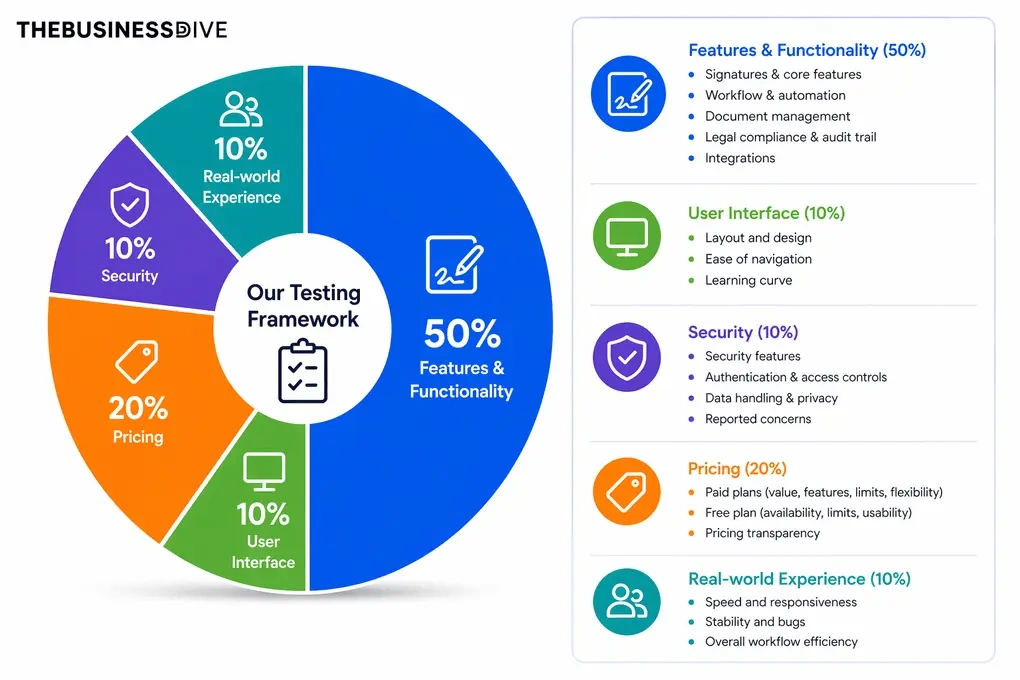
Our scoring breakdown after testing 10+ e-signature apps:
✍️ Features & functionality — 50%
🖥️ User interface — 10%
🔐 Security — 10%
💰 Pricing — 20%
👥 Real-world experience — 10%
Want a detailed breakdown of how we test each category?
Learn exactly how we test tools → Review methodology
Detailed Reviews of the Best E-Signature Software
Wondering how each e-sign app performed during our testing?
Check out our detailed reviews for each option we selected.

Xodo Sign
Xodo Sign is an e-signature platform that combines secure document signing, PDF editing, and document management in one workspace. It also includes templates, reminders, and document tracking for managing documents throughout the signing process.
Quick verdict
Freelancers, small businesses, and professionals who want an affordable e-signature solution with PDF editing, reusable templates, and document management.
You need advanced analytics or highly responsive customer support.
Combines PDF editing, document management, templates, and electronic signatures in a simple, easy-to-use platform.
Analytics are limited on lower-tier plans, and customer support response times can vary.
Why I recommend Xodo Sign for small businesses
I recommend Xodo Sign for small businesses because it covers nearly everything you need to prepare, send, sign, and manage documents without requiring a collection of separate tools.
Between the built-in PDF editor, templates, reminders, audit trails, and document tracking, the platform already includes the features many smaller teams rely on every day.
I also liked that the built-in PDF editor wasn’t limited to adding signature fields. I could edit text, redact sensitive information, leave comments, and even generate AI summaries before sending documents for signature, which covered most of my document preparation in one place.
Another reason I’d recommend it to smaller businesses is the pricing. The free plan is enough to explore the platform, while the Basic plan removes document limits without a large monthly investment, making it easier to grow into the platform as your document volume increases.
Standout features
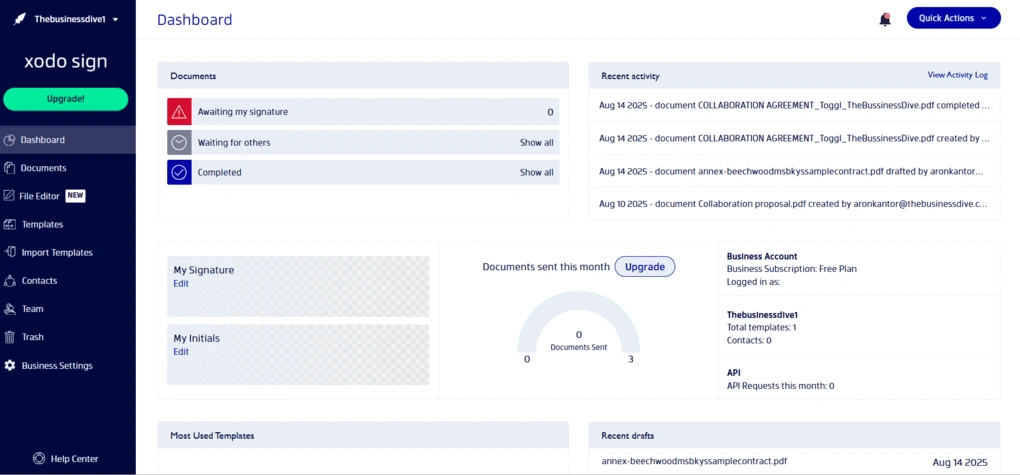
Built-in PDF editor: Edit text, add notes, redact sensitive information, and generate AI summaries without leaving the platform.
Simple document workflow: Upload documents, add signature fields, assign recipients, and track progress from a clean, intuitive dashboard.
Reusable templates: Create templates with predefined fields and roles, or import existing templates from DocuSign to speed up repetitive workflows.v
Automatic reminders and document tracking: Keep signing requests moving with automatic reminders, expiration dates, and detailed audit trails for every document.
Flexible integrations: Connect with Google Drive, Dropbox, OneDrive, Box, Evernote, and more than 8,000 additional apps through Zapier.
My Key Takeaways After Using Xodo Sign
|
What impressed me |
Why it made a difference |
|---|---|
|
Built-in PDF editor and AI summarizer |
I could prepare and review documents without relying on separate PDF software. |
|
Clean and intuitive interface |
Learning the platform took very little time, making everyday document tasks quick and straightforward. |
|
Templates, reminders, and audit trails |
They reduced repetitive work while making it easier to track documents throughout the signing process. |
|
Free plan with essential features |
It provides a practical way to start using the platform before committing to a paid subscription. |
|
Broad integration options |
Connecting Xodo Sign with cloud storage and other business tools helped streamline document workflows. |
|
What I’d improve |
Who it could affect |
|---|---|
|
Customer support response times can vary |
Teams that depend on fast support for time-sensitive document workflows. |
|
Limited analytics on lower-tier plans |
Businesses that need more detailed reporting and document insights. |
Plans & costs
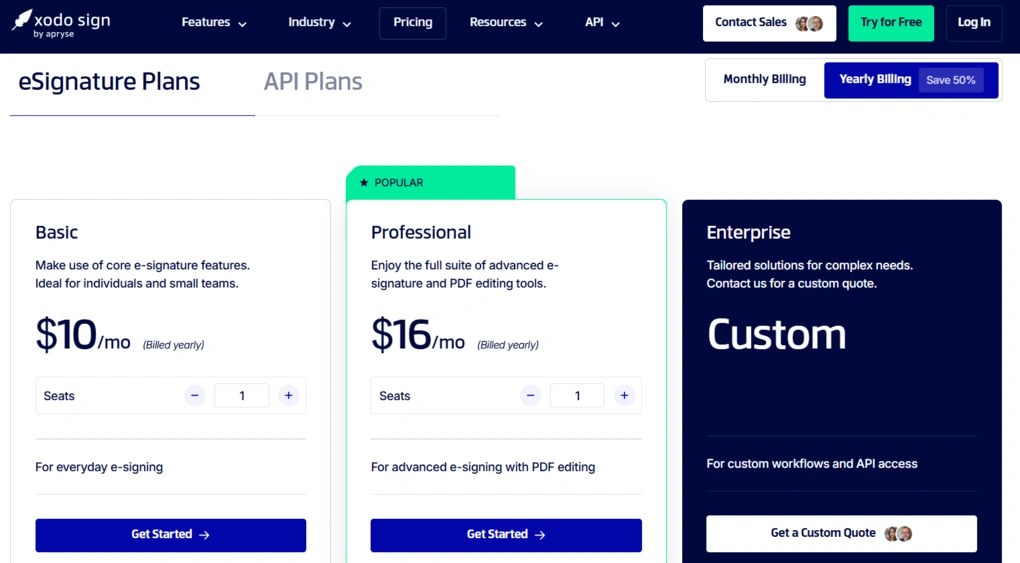
- Free plan available, as well as a 7-day free trial
- Basic plan: $10 per seat/month (annual billing)
- Professional plan: $16 per seat/month (annual billing)
- Enterprise plan: Custom pricing
Xodo Sign vs other tools


Xodo Sign VS Docusign
🔎 Read my full review: Xodo Sign Review 2026: The Best E-Sign Solution?

SignNow
SignNow is an e-signature platform built around team collaboration and scalable document workflows. Alongside electronic signatures, it includes shared templates, signing orders, reporting, document tracking, and team management tools designed for businesses handling recurring paperwork.
Quick verdict
Businesses that need unlimited users without paying for every seat.
You want a free plan or expect all workflow features on the entry-level plan.
Unlimited users, shared workspaces, and document workflows at a lower starting price than many business-focused competitors.
Many advanced workflow features require higher-tier plans, and annual signature invites are limited before pay-as-you-go pricing applies.
Why I recommend SignNow for unlimited users
I recommend SignNow to businesses that need multiple people working with the same documents. During testing, it was easy to create teams, organize shared documents and templates, assign recipient roles, and manage signing orders from the same workspace.
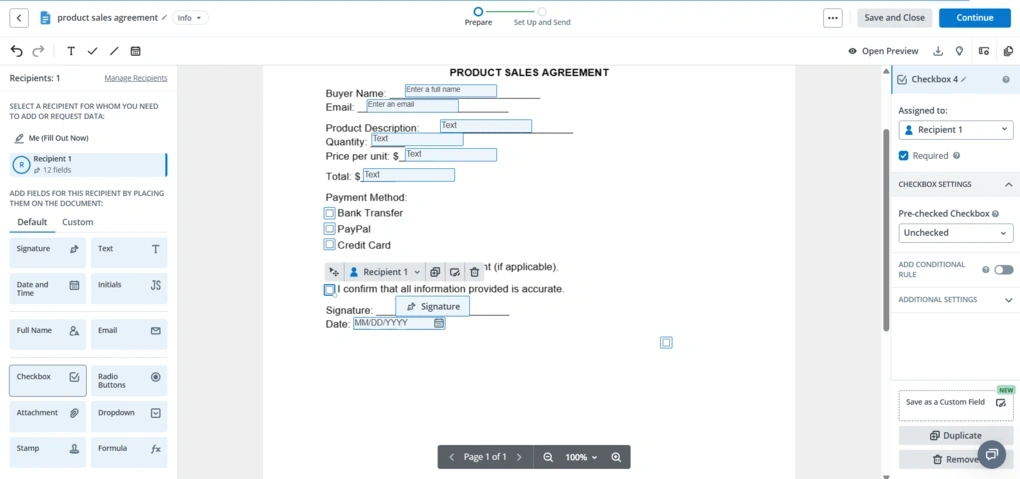
Preparing documents also took very little time. I could upload files from several sources, assign fields to different recipients, preview the document, schedule invitations, and send signature requests by email, SMS, or signing link. Automatic field placement also reduced the amount of manual work when preparing larger documents.
Another reason I’d recommend SignNow is its reporting. The Reports section includes document activity, workspace analytics, team leaderboards, and exportable reports, giving managers a much clearer view of what’s happening across the workspace.
The pricing is also competitive, especially for teams that benefit from unlimited users. However, many collaboration and workflow features are reserved for higher-tier plans, and the unlimited-user model still includes annual limits on signature invites before pay-as-you-go pricing begins.
Standout features
Unlimited users: Invite as many team members as needed while organizing shared workspaces, templates, and documents.
Flexible document workflows: Assign recipient roles, define signing orders, schedule invitations, add payment requests, and deliver documents by email, SMS, or signing links.
Forms Library and templates: Choose from thousands of legal, tax, and business forms or create reusable templates from your own documents.
Automatic field placement: Let SignNow detect where signature fields belong, then adjust or add custom fields before sending documents.
Reporting and workspace analytics: Track document activity, workspace performance, team leaderboards, and export detailed reports for ongoing monitoring.
My Key Takeaways After Using SignNow
|
What impressed me |
Why it made a difference |
|---|---|
|
Unlimited users and shared workspaces |
Teams can collaborate without paying for additional seats. |
|
Automatic field placement |
Preparing documents required fewer manual adjustments before sending. |
|
Flexible signing workflows |
Recipient roles, signing orders, reminders, and scheduled invitations covered a wide range of approval processes. |
|
Forms Library and reusable templates |
Frequently used business documents were available immediately or could be saved for future use. |
|
Reporting and workspace analytics |
Managers can monitor document activity and team performance from one place. |
|
What I’d improve |
Who it could affect |
|---|---|
|
No free plan |
Individuals and smaller businesses evaluating different e-signature platforms. |
|
Many workflow features require higher-tier plans |
Teams that need advanced collaboration while staying on lower-priced plans. |
Plans & costs
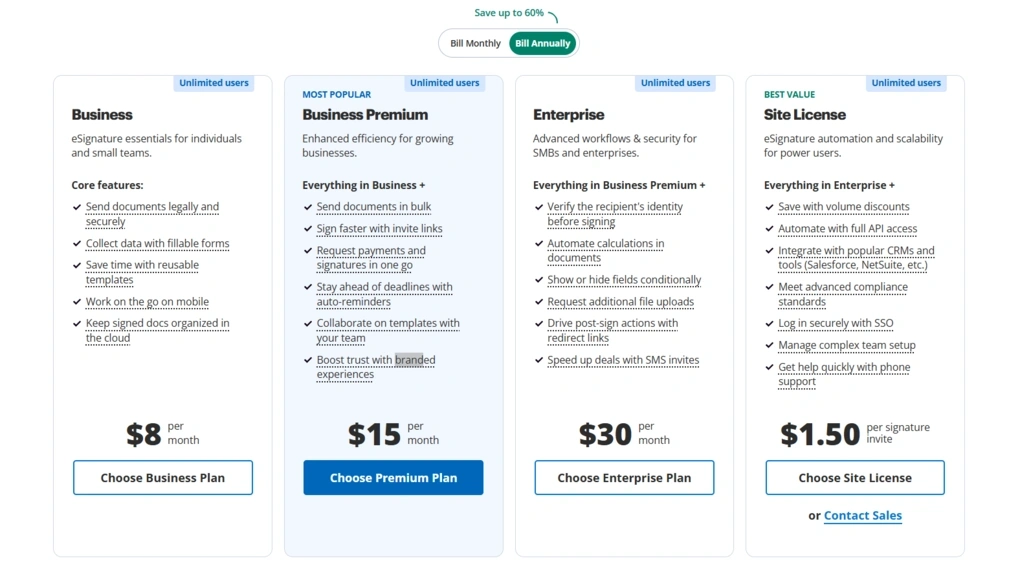
- No free plan available, only a 7-day free trial
- Business plan: $8/month
- Business Premium plan: $15/month
- Enterprise plan: $30/month
- Site license: $1.50/signature invite
🔎 Read my full review: An Honest SignNow Review 2026 | Before You Buy

SignWell
SignWell is an electronic signature platform focused on sending, signing, and managing documents with as little setup as possible. Combined with affordable pricing and responsive support, it covers the features most freelancers and small businesses need for everyday document signing.
Quick verdict
Freelancers, small businesses, and growing teams looking for an e-signature platform that’s quick to learn and backed by responsive customer support.
You want to test the paid plans before subscribing or need more than the free plan offers.
A clean interface and responsive live customer support.
The free plan is limited, and there isn’t a free trial for the paid plans.
Why I recommend SignWell for ease of use and customer support
I recommend SignWell because I never had to spend time figuring out where anything was. The platform opens directly on the Documents page, where I could immediately see every document, its status, and when it was created.
The feature set is also balanced for everyday use. Templates, Bulk Send, reminders, contact management, and team workspaces are all available, so most signing tasks can be handled from the same platform.
The biggest reason I placed SignWell in this category, though, was the customer support. When I reached out to the support team, I quickly got a helpful response from a real person. After testing dozens of eSignature tools, that level of support still stands out.
The biggest downside is that there isn’t a proper free trial for the paid plans. The free version is enough to get started, but you’ll need to upgrade before you can properly evaluate the platform’s more advanced features.
Standout features
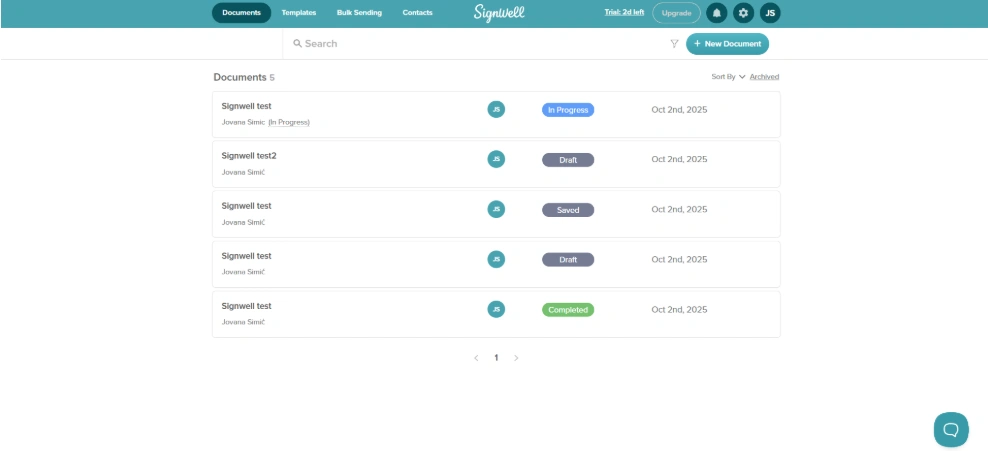
Straightforward document setup: Upload one or more files, assign signers, and add signature fields, dates, or checkboxes from a single document editor.
24/7 live customer support: During testing, the support team replied within minutes and extended my access to the Business plan.
Templates and Bulk Send: Save reusable templates or send the same document to multiple recipients with a CSV file.
Team workspaces: Import contacts, assign Admin or Member roles, and move between workspaces when collaborating with different teams.
QuickBooks, Close CRM, and Zapier integrations: Connect SignWell with accounting, CRM, cloud storage, and thousands of additional business apps.
My Key Takeaways After Using SignWell
|
What impressed me |
Why it made a difference |
|---|---|
|
Clean interface |
Finding documents and preparing signature requests never took more than a few clicks. |
|
24/7 live customer support |
I was able to test paid features after the team extended my trial through live chat. |
|
Templates and Bulk Send |
Repetitive signing requests required much less manual work. |
|
Affordable pricing |
The paid plans include the features most small teams need at a lower price than many competitors. |
|
Team workspaces |
Managing contacts and different user roles stayed organized as more people joined the workspace. |
|
What I’d improve |
Who it could affect |
|---|---|
|
No free trial for paid plans |
Anyone comparing advanced features before deciding on a subscription. |
|
Limited free plan |
Users who regularly send documents for signature. |
Plans & costs
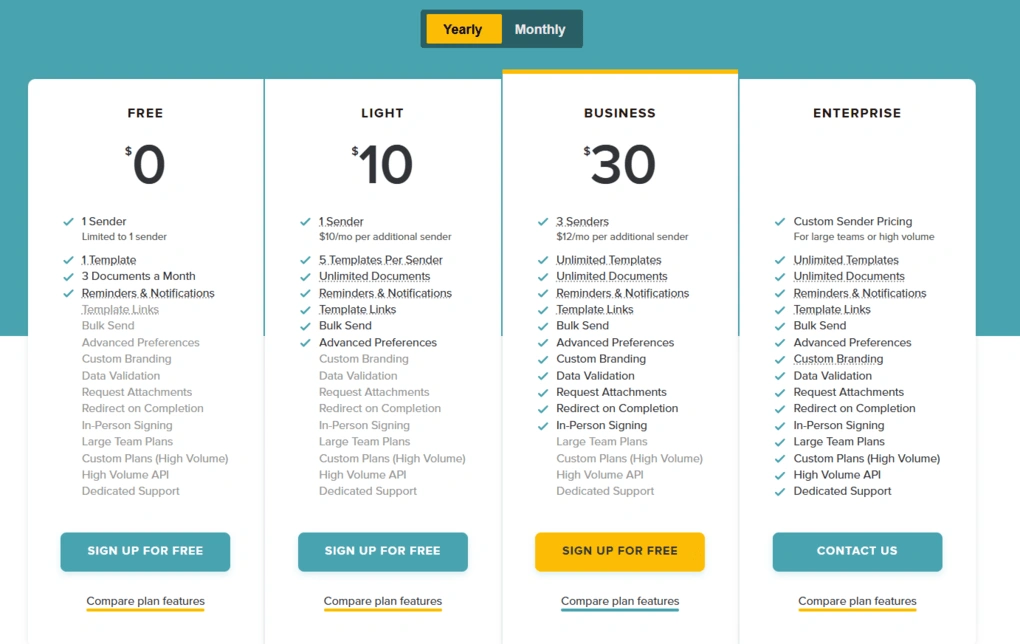
- Free plan available
- Light plan: $10 per month (annual billing)
- Business plan: $30 per month (annual billing)
- Enterprise plan: Custom pricing
SignWell vs other tools

BoldSign VS SignWell

SignWell VS PandaDoc
🔎 Read my full review: SignWell Review 2026: Docusign FINALLY has a Competitor

Signable
Signable is a UK-based e-signature platform built around flexible pricing. Alongside subscription plans, it offers a pay-as-you-go option, allowing you to pay only for the envelopes you send while still including features like reusable templates, Bulk Send, audit trails, and two-factor authentication.
Quick verdict
Freelancers, small businesses, and teams that send documents occasionally and prefer paying per envelope instead of committing to a monthly subscription.
You want a centralized dashboard or need to store multiple signatures.
Flexible pay-as-you-go pricing with unlimited users and templates.
There’s no central dashboard, and signatures can’t be saved for future use.
Why I recommend Signable for flexible pay-as-you-go pricing
I recommend Signable because its pricing gives you more flexibility than most e-signature platforms I tested. If you don’t send documents every day, paying per envelope often makes more sense than paying for a monthly subscription that you won’t fully use.
I tested Signable using the 14-day free trial, which includes 20 envelopes and access to almost every feature. That gave me enough time to create envelopes, send documents, track their progress, test Bulk Send, and explore the platform before looking at the paid plans.
Even without a subscription, Signable includes unlimited users, unlimited templates, advanced electronic signatures, and two-factor authentication, which isn’t something I found with many other e-signature tools.
The two things I missed during testing were a central dashboard and a signature management section. Documents are organized inside the Envelopes page, but I occasionally wanted a broader overview, and having to recreate signatures each time added a few extra steps.
Standout features
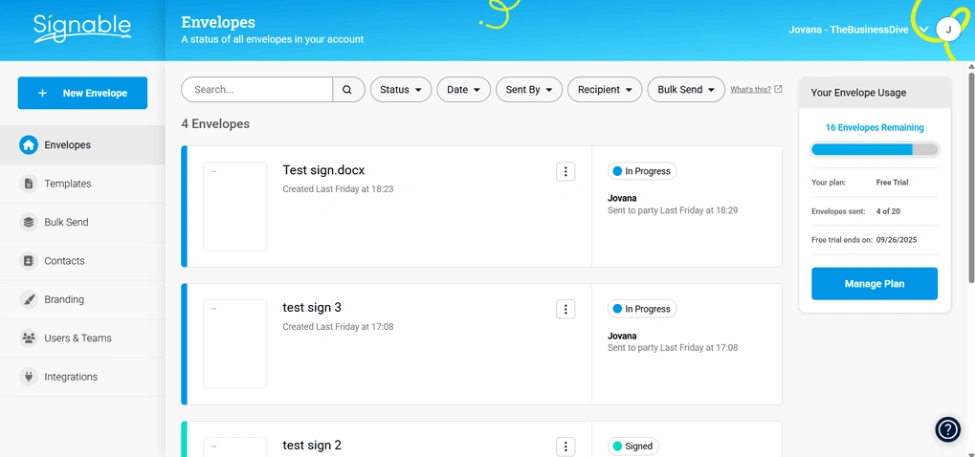
Pay-as-you-go pricing: Pay £1.50 per envelope instead of committing to a monthly subscription, while still getting unlimited users and templates.
Bulk Send during the free trial: Upload a CSV file, choose the signing order, and send the same document to multiple recipients even before subscribing.
Reusable templates: Create templates with reusable fields, prefill information before sending, or embed signing widgets directly on your website.
Detailed audit trails: Every envelope includes a complete audit history, and you can monitor signing progress, download status reports, and set reminders or expiry dates.
Unlimited users across every plan: Add team members with role-based permissions without increasing the cost of your subscription.
My Key Takeaways After Using Signable
|
What impressed me |
Why it made a difference |
|---|---|
|
Pay-as-you-go pricing |
I only paid for the envelopes I sent instead of committing to a monthly subscription. |
|
Bulk Send available during the free trial |
I could test one of the platform’s main features before paying for a plan. |
|
Unlimited users and templates |
Team collaboration wasn’t tied to higher pricing tiers. |
|
Detailed audit trails |
Every document included a clear history of signing activity and status updates. |
|
Clean Envelopes page |
Finding documents and checking their status only took a few clicks. |
|
What I’d improve |
Who it could affect |
|---|---|
|
No central dashboard |
Teams that want a single overview of all document activity. |
|
No signature management section |
Users who regularly switch between multiple saved signatures. |
Plans & costs
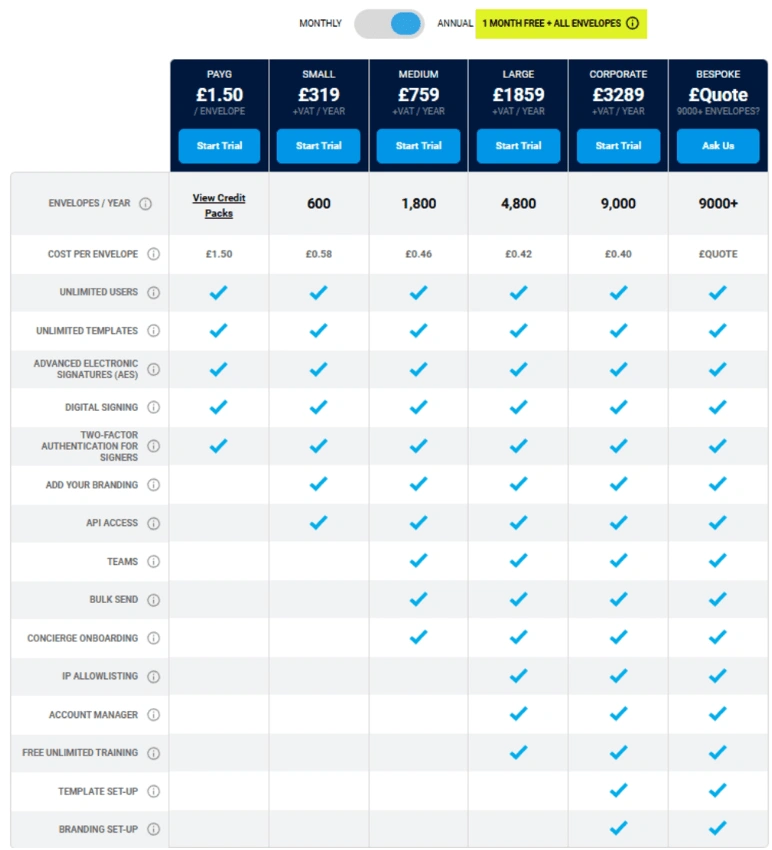
- No free plan available, only a 14-day free trial
- Pay as you go: £1.50 per envelope
- Small plan: £29/month or £319/year
- Medium plan: £69/month or £759/year
- Large plan: £169/month or £1859/year
- Corporate plan: £299/month or £3289/year
- Bespoke plan: Custom pricing
Signable vs other tools
Signable VS Docusign
🔎 Read my full review: Signable Review 2026: Is it too good to be true?

Nitro Sign
Nitro Sign is an eSignature platform for preparing, sending, tracking and managing legally binding signature requests. It is a strong fit for teams that already create documents elsewhere and want a straightforward signing experience with multi-document envelopes, bulk send functionality, reusable templates and detailed audit trails.
Quick verdict
Teams that already have documents ready to send and want a simple, secure eSignature solution with straightforward workflows and predictable usage.
You need a free plan or expect advanced workflow features on the entry-level plan.
Easy-to-use, predictable eSigning based on completed envelopes rather than every request sent.
Lacks some advanced enterprise workflow features, such as conditional routing, web forms, and eWitness.
Why I recommend Nitro Sign for straightforward business eSigning
I recommend Nitro Sign because it handles everyday business eSigning efficiently. During testing, I could easily prepare a document, assign recipients, place signature fields, send the request, and track its progress.
The editor also made multi-signer requests easy to manage. Color-coded recipient fields clearly showed who was responsible for each signature or form field, so even documents involving several people were quick to prepare and review.
I also liked being able to create and switch between multiple saved signatures directly inside the editor. Small touches like that, combined with reusable templates and detailed audit trails, helped streamline repetitive signing tasks.
Another thing I appreciated is Nitro Sign’s usage model. Only fully completed envelopes count toward your plan allowance, while unfinished or canceled requests don’t consume usage. Because of that, it’s easier to predict the cost.
The main limitation is that organizations that need advanced workflow capabilities, such as conditional routing, web forms, or eWitness, may find Nitro Sign less suitable than enterprise-focused alternatives.
Standout features
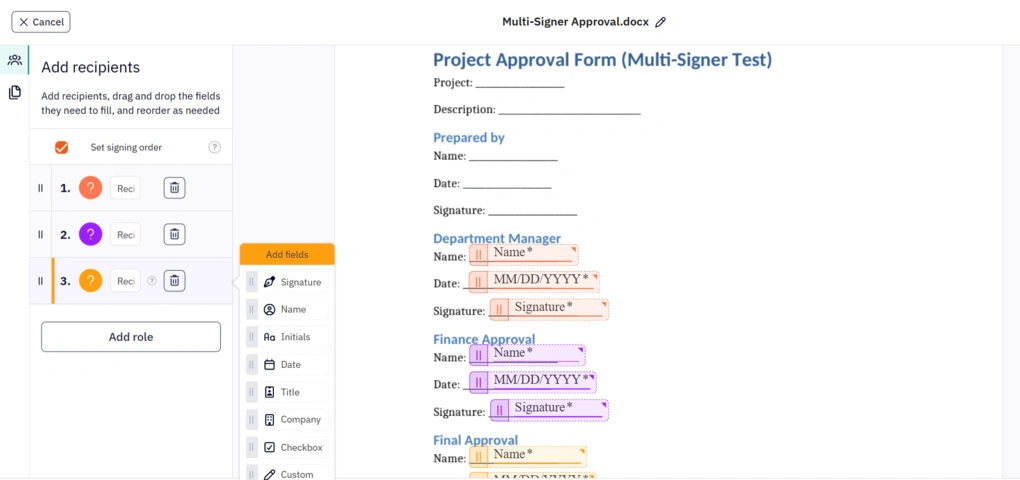
Multi-document signature requests: Send one or several related documents together in an envelope, add multiple recipients, and manage the complete signing process from one request.
Drag-and-drop document editor: Quickly add signature fields, text fields, timestamps, and custom fields while assigning each one to the correct recipient with color-coded visual indicators.
Flexible signing workflows: Use sequential or parallel signing orders, send reminders, and verify recipients with SMS or email one-time passcodes (OTP).
Reusable templates: Save frequently used documents, recipients, and fields as reusable signing templates. On higher-tier plans, templates can also be shared across the team, making recurring signature requests more consistent.
Detailed audit trails: Every document includes a complete, downloadable history of signatures, notifications, and document activity, making compliance and record-keeping much easier.
My Key Takeaways After Using Nitro Sign
|
What impressed me |
Why it made a difference |
|---|---|
|
Easy-to-use drag-and-drop document editor |
Preparing documents took only a few clicks, even when multiple recipients needed different fields. |
|
Completed envelope model |
Only fully completed signature requests count toward the included allowance, so unfinished or cancelled envelopes do not consume usage. |
|
Supports sequential and parallel signing workflows |
It adapts easily to both simple approvals and more complex multi-step signing processes. |
|
Multiple saved signatures |
Switching between different signatures was quick and didn’t interrupt the signing workflow. |
|
Detailed audit trails and recipient authentication (Two-factor and Multi-factor authentication) |
Every action was recorded, making document tracking and compliance much more reliable. |
|
API for custom workflows |
Useful for businesses that want signature requests to be generated automatically from their own systems. |
|
What I’d improve |
Who it could affect |
|---|---|
|
No free plan |
Individuals and small teams that want to use the platform long-term without paying after the trial ends. |
Plans & costs
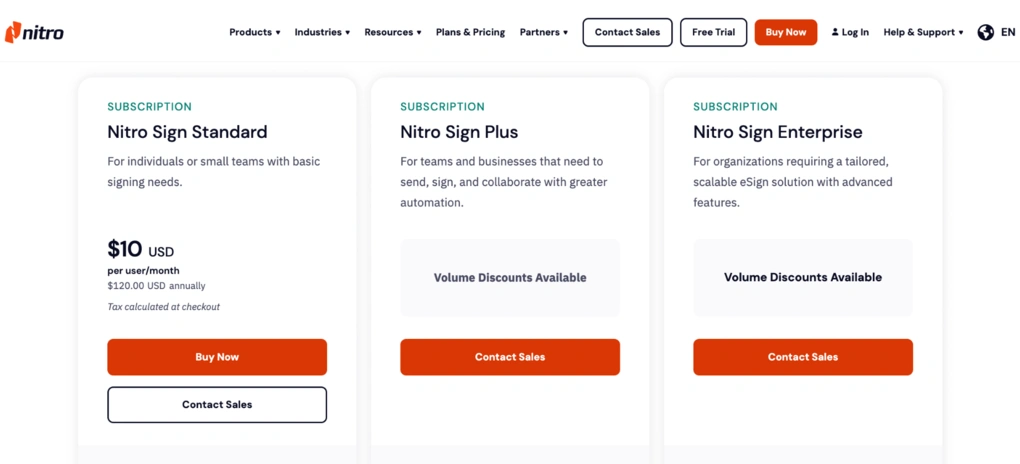
- No free plan available, only a 14-day free trial
- Nitro Sign Standard plan: $10/user/month with annual billing
- Nitro Sign Plus plan: Custom pricing
- Nitro Sign Enterprise plan: Custom pricing

DocHub
DocHub is an e-signature platform built around Google Workspace, combining document signing with PDF annotation, reusable templates, team collaboration, and an AI Assistant. It also offers native Gmail and Google Drive add-ons, allowing documents to move through the signing process directly from Google’s ecosystem.
Quick verdict
Freelancers and teams that manage documents in Google Workspace and want to sign files directly from Google Drive or Gmail.
You need advanced reporting, native PDF text editing, or a large library of ready-made templates.
Native Gmail and Google Drive add-ons that let you edit, sign, and save documents without leaving the Google ecosystem.
The PDF editor is annotation-based, and reporting features are fairly limited.
Why I recommend DocHub for Google Workspace users
The Gmail and Google Drive add-ons were the reason DocHub ended up in this category.
You can open files directly from Drive or your inbox, prepare them for signing, and save everything back to the same location. Since most of the documents I worked with were already stored in Google Workspace, that workflow was much more natural than exporting files between different platforms.
Document preparation also covered everything I needed for everyday signing. I could upload multiple files, merge them into a single envelope, assign fields to recipients, set reminders, and customize messages before sending.
The QR code signing option was another feature I hadn’t seen in many other e-signature platforms, letting me use my phone as a signature pad. I also found myself using the built-in AI Assistant more often than I expected.
The main limitation is the PDF editor. It works well for annotations and signing fields, but it doesn’t support native PDF text editing. I also missed more advanced reporting and a built-in library of ready-made templates.
Standout features
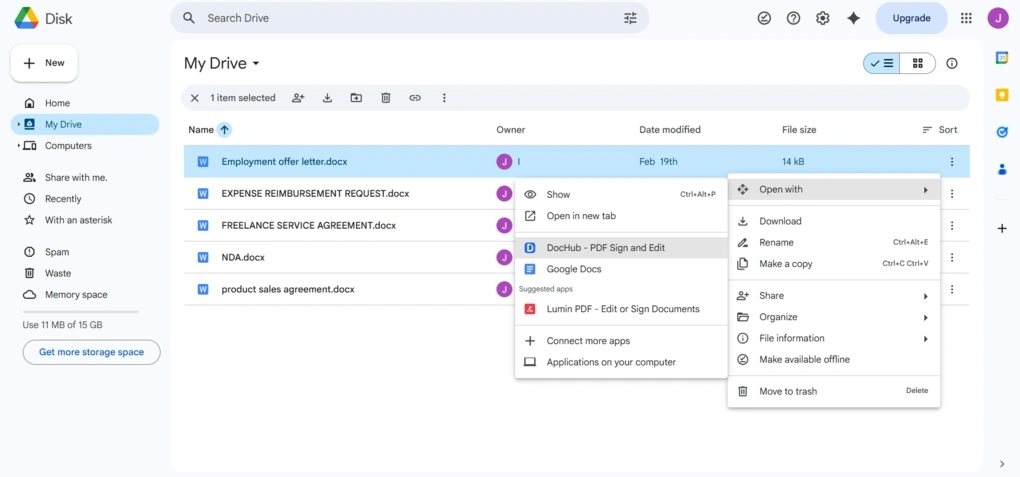
Google Workspace integration: Open documents directly from Gmail or Google Drive, edit and sign them in DocHub, then save them back to the same location.
QR code signing: Generate a QR code and use your phone as a signature pad while preparing documents.
Built-in AI Assistant: Summarize, rewrite, and draft document content without leaving the editor.
Flexible document preparation: Upload multiple documents, merge them into one signing envelope, assign recipient fields, set reminders, and customize messages.
Team collaboration: Organize users, assign permissions, manage shared Rooms, and review downloadable audit trails for every document.
My Key Takeaways After Using DocHub
|
What impressed me |
Why it made a difference |
|---|---|
|
Native Gmail and Google Drive add-ons |
Documents stayed inside my existing Google Workspace workflow from start to finish. |
|
QR code signing |
I could sign documents on my phone without creating the signature in advance. |
|
AI Assistant |
Summarizing and rewriting documents happened inside the editor instead of using a separate AI tool. |
|
Clean dashboard and document tracking |
Activity logs, filters, and document statuses kept files organized throughout the signing process. |
|
Competitive Pro plan |
Unlimited eSignatures, unlimited PDF editing, and bulk sending cover most business workflows. |
|
What I’d improve |
Who it could affect |
|---|---|
|
Annotation-style PDF editing |
Teams that frequently need to modify existing PDF text. |
|
No advanced reporting or analytics |
Organizations that rely on detailed reporting or compliance dashboards. |
Plans & costs
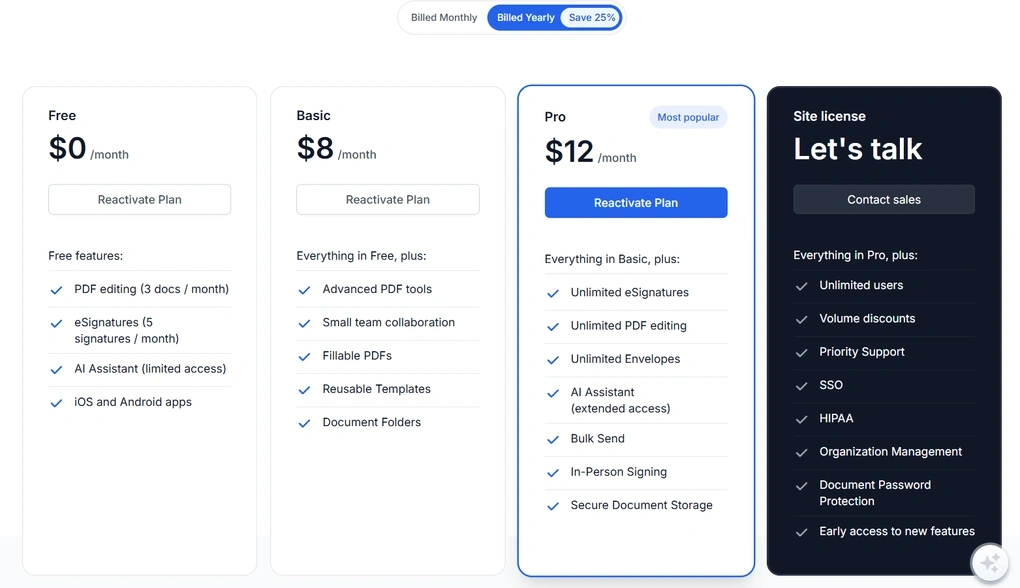
- Free plan available, as well as a 30-day free trial
- Basic plan: $8/month
- Pro plan: $12/month
- Site license: Custom pricing
🔎 Read my full review: DocHub Review 2026 | My Brutally Honest Take
Explore our Apps directory
A curated directory of software tools we’ve independently reviewed, with links to full reviews, comparisons, and category guides.
PandaDoc
PandaDoc combines electronic signatures with tools for creating, editing, sending, and managing proposals, contracts, quotes, and approvals. Rather than focusing only on document signing, it covers the entire document process from drafting to closing a deal.
Quick verdict
Sales teams and growing businesses that create proposals, quotes, and contracts before sending them for signature.
You only need a lightweight e-signature tool or want full access to advanced features during the trial.
Combines document creation, proposals, approvals, and electronic signatures in one platform.
Many of the features that make PandaDoc valuable are only available on the higher-tier plans.
Why I recommend PandaDoc for sales teams
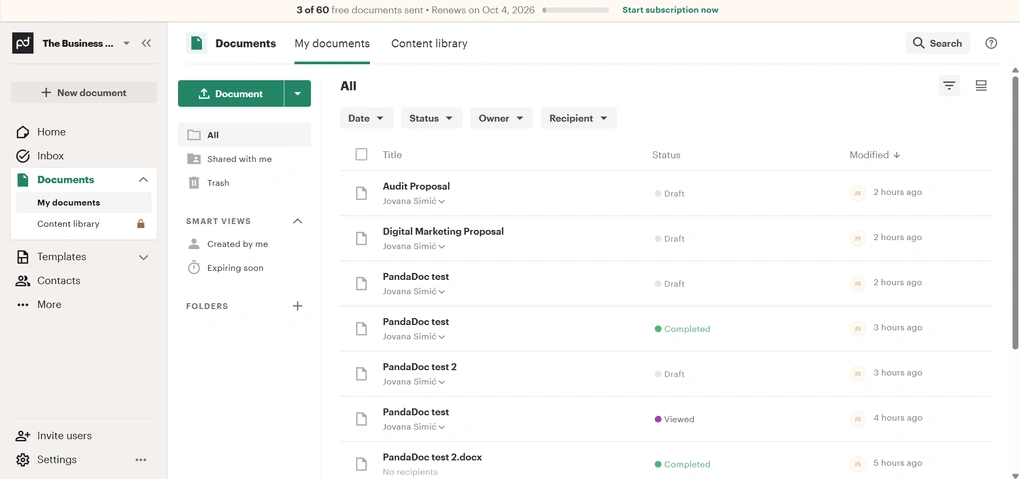
I recommend PandaDoc to sales teams because document creation is just as important as collecting signatures. During testing, I could start with a template, edit the document, organize it inside folders, send it for approval, and track its status from the same platform.
For teams that regularly prepare proposals or quotes, keeping those steps together makes more sense than using separate tools.
The template gallery also reflects that focus. It includes templates for sales proposals, agreements, invoices, HR documents, marketing, and real estate, so there was very little I had to build from scratch.
The biggest frustration came when I tried to evaluate the platform. PandaDoc is impressive once you are on paid tiers, but the entry path is restrictive if you want to evaluate everything properly before the purchase decision.
Standout features
Proposal and document creation: Create proposals, contracts, quotes, and agreements from templates or upload existing files before sending them for signature.
Large template gallery: Browse templates across sales, HR, invoices, marketing, legal, and real estate, with reusable document templates for recurring workflows.
Customizable document organization: Use folders, Smart Views, filters, and document statuses to organize larger document libraries.
Stamps and audit trails: Add official stamps alongside signatures and review a complete audit trail for every signed document.
Business integrations: Connect PandaDoc with Salesforce, HubSpot, Pipedrive, Zoho CRM, Microsoft Teams, Slack, Stripe, PayPal, Zapier, and other business tools.
My Key Takeaways After Using PandaDoc
|
What impressed me |
Why it made a difference |
|---|---|
|
Proposal-to-signature workflow |
Document creation, approvals, and signatures all happened within the same platform. |
|
Large template gallery |
Most common business documents were already available as templates. |
|
Dashboard, folders, and Smart Views |
Finding documents by status, owner, or recipient took very little effort. |
|
Stamps and audit trails |
Formal approvals and document history were built into every signing workflow. |
|
Extensive business integrations |
CRM, payment, and collaboration tools could be connected as the workflow grew. |
|
What I’d improve |
Who it could affect |
|---|---|
|
Free version is very limited |
Anyone trying to evaluate PandaDoc before purchasing. |
|
Personal emails don’t receive the full Starter trial |
Individual users and freelancers testing the platform. |
|
Key features are locked behind higher-tier plans |
Smaller businesses that don’t need the full Business plan but still want advanced functionality. |
Plans & costs
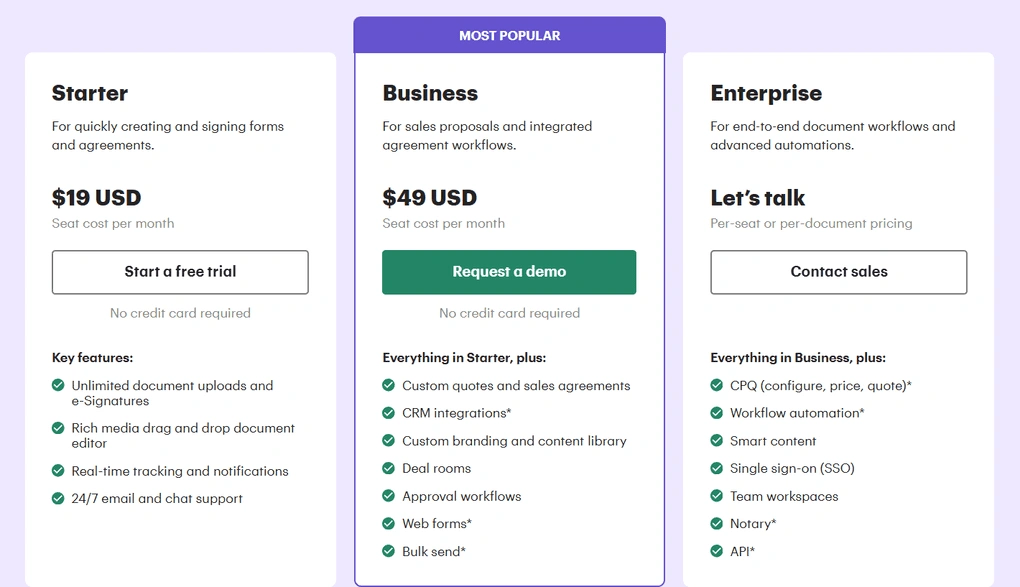
- Free plan available, as well as a free trial
- Starter plan: $19/seat/month with annual billing
- Business plan: $49/seat/month with annual billing
- Enterprise plan: Custom pricing
PandaDoc vs other tools
SignWell VS PandaDoc
BoldSign VS PandaDoc
Docusign VS PandaDoc
🔎 Read my full review: PandaDoc Review: What Nobody Tells You (2026)
Docusign
Docusign combines electronic signatures with reporting, workflow templates, user management, and compliance features built for larger organizations. It also includes extensive integrations and detailed audit trails for teams managing high volumes of agreements.
Quick verdict
Mid-sized and enterprise teams that need detailed reporting, compliance features, workflow templates, and centralized user management.
You want lower pricing, generous envelope limits, or only need a straightforward document signing tool.
Detailed reporting, compliance features, and tools for managing documents and users at scale.
Higher pricing, envelope limits, and a free trial that only covers part of the platform.
Why I recommend Docusign for large organizations
Docusign gives administrators much more visibility into document activity than most of the other platforms I tested. The Reports section goes beyond showing completed documents by tracking envelope history, completion times, recipient activity, and usage across users, groups, and templates.
Managing documents is also well organized. Agreements are grouped by status, while folders, filters, and search tools make larger document libraries easier to navigate.
Another reason I’d recommend it for enterprise teams is user management. Admins can add users, assign permissions, organize groups, and manage access from the same workspace, while detailed audit trails help support compliance requirements.
The tradeoff is the pricing. Envelope limits remain in place across several plans, and the free trial only gives access to part of the platform, so evaluating the more advanced features before purchasing isn’t as straightforward as with some competitors.
Standout features
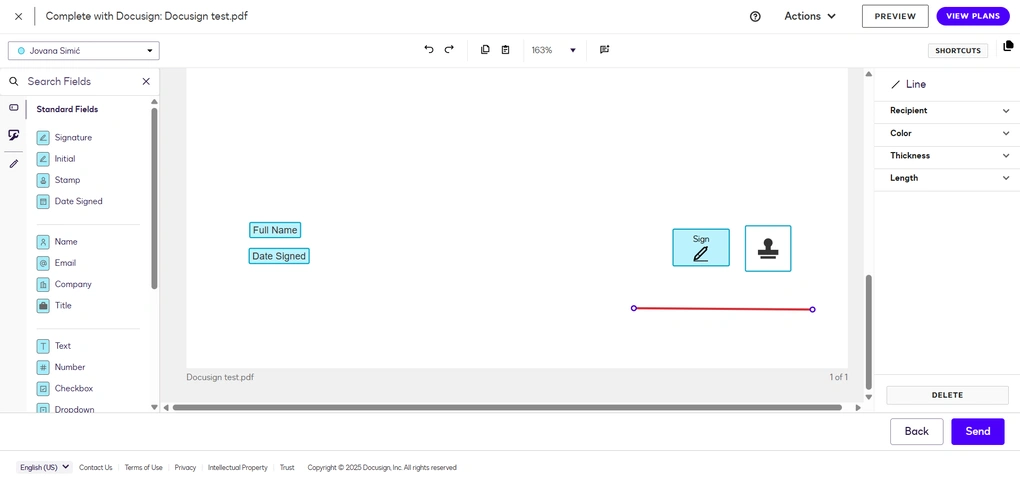
Detailed reporting: Track envelope history, completion times, recipient activity, and usage across users, groups, and templates.
Workflow templates: Create shared templates with predefined recipients, roles, and fields, or choose from industry-specific workflow templates.
Enterprise user management: Add users, assign permissions, organize groups, and manage team access from one place.
Audit trails and compliance: Every agreement includes a detailed audit trail, while the platform supports ESIGN, UETA, GDPR, and other compliance standards.
Extensive business integrations: Connect Docusign with Microsoft 365, Google Workspace, Salesforce, HubSpot, Slack, Box, Dropbox, OneDrive, and many other business tools.
My Key Takeaways After Using Docusign
|
What impressed me |
Why it made a difference |
|---|---|
|
Reporting and analytics |
I could monitor document activity across users, groups, templates, and completion times from one place. |
|
Workflow templates |
Preparing recurring approval processes required much less manual setup. |
|
User and permission management |
Admins can organize teams and control document access as organizations grow. |
|
Detailed audit trails |
Every agreement included a complete signing history for compliance and record-keeping. |
|
Broad integrations |
Connecting Docusign with existing business software required very little additional setup. |
|
What I’d improve |
Who it could affect |
|---|---|
|
Envelope limits |
Teams sending large numbers of agreements each month. |
|
Higher pricing |
Organizations comparing enterprise e-signature platforms on cost. |
|
Limited free trial |
Businesses that want to evaluate advanced reporting and administration features before subscribing. |
Plans & costs
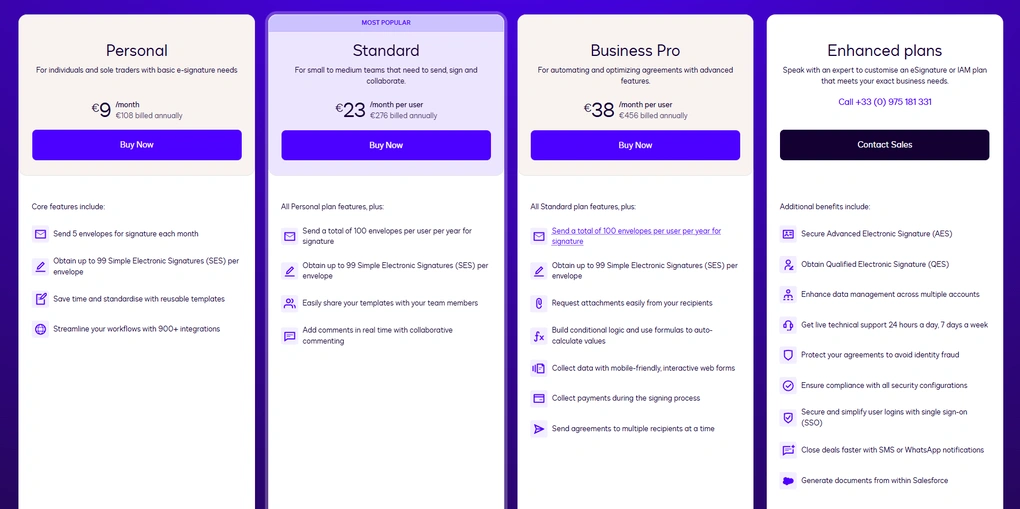
- No free plan available, only a free trial
- Personal plan: €9/user/month
- Standard plan: €23/user/month
- Business Pro Plan: €38/user/month
- Enhanced plan: Custom pricing
- Enterprise plan: Custom pricing
Docusign vs other tools
Xodo Sign VS Docusign
Docusign VS PandaDoc
Signable VS Docusign
🔎 Read my full review: Docusign Review 2026: Justified Red Flags?

Adobe Sign
Adobe Sign combines electronic signatures with workflow automation, reusable templates, document tracking, and compliance features. As part of Adobe Document Cloud, it also connects closely with Adobe Acrobat and Microsoft 365, making it a natural choice for organizations already using those platforms.
Quick verdict
Medium-sized and enterprise teams already using Adobe Acrobat or Microsoft 365 for document management and collaboration.
You only need a basic e-signature tool or are looking for the lowest-priced option.
Workflow automation combined with deep integration across Adobe and Microsoft products.
Many automation and collaboration features are reserved for higher-tier plans.
Why I recommend Adobe Sign for enterprise teams using the Adobe ecosystem
I recommend Adobe Sign to organizations that already rely on Adobe Acrobat or Microsoft 365 for managing documents. It’s more like another part of the Adobe Document Cloud workflow than a standalone eSignature platform, and that becomes clear as soon as you start preparing agreements.
I could define signer roles, set routing paths, reuse templates, monitor document status, and review detailed audit trails from the same workspace. Departments that regularly send the same agreements would also benefit from the shared library templates.
Another reason I’d recommend Adobe Sign is its workflow automation. Automatic reminders, sequential signing, real-time tracking, and predefined routing reduce the amount of manual follow-up once documents have been sent.
The main drawback is that many of those capabilities sit behind the higher-tier plans. For individuals and smaller businesses, the Individual plan may cover basic signing needs, but much of what makes Adobe Sign different becomes available only on the Small Business and Enterprise plans.
Standout features
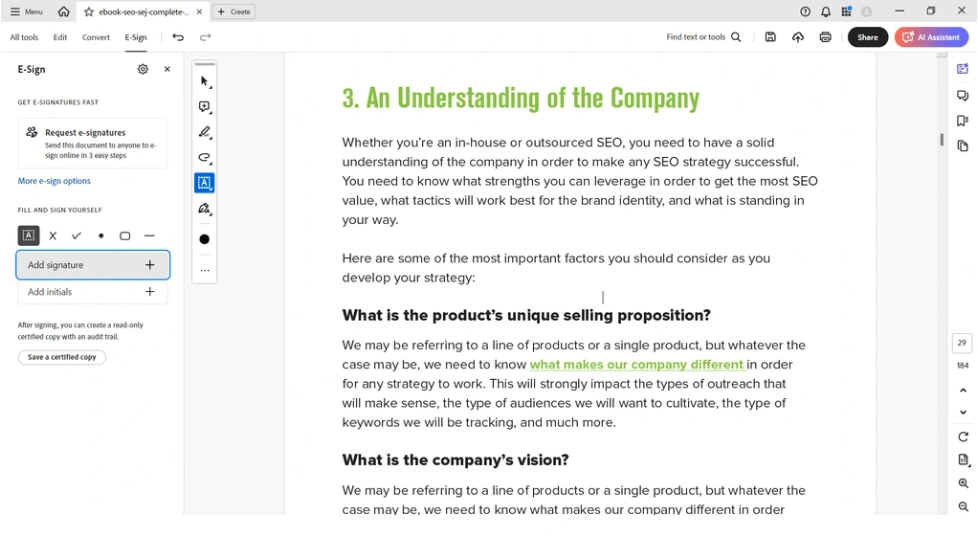
Workflow automation: Define signer roles, routing paths, and approval sequences so documents move automatically between recipients.
Adobe and Microsoft integrations: Connect Adobe Sign with Adobe Acrobat, Microsoft 365, and other business tools already used across the organization.
Shared library templates: Create reusable templates that different departments can access to keep agreements consistent.
Real-time tracking and audit trails: Track document status, signer activity, timestamps, and authentication details throughout the signing process.
Security and compliance: Supports ESIGN, eIDAS, GDPR, advanced electronic signatures, two-factor authentication, and encrypted document storage.
My Key Takeaways After Using Adobe Sign
|
What impressed me |
Why it made a difference |
|---|---|
|
Workflow automation |
Documents continued moving through the approval process after they were sent, reducing manual follow-up. |
|
Adobe and Microsoft integration |
Teams already working in those ecosystems don’t need to change how they manage documents. |
|
Shared library templates |
Departments can reuse the same agreements instead of preparing them from scratch each time. |
|
Real-time tracking and audit trails |
Every agreement includes a detailed history of document activity and signer actions. |
|
Compliance and security features |
It meets the requirements of organizations handling regulated or sensitive documents. |
|
What I’d improve |
Who it could affect |
|---|---|
|
Advanced features require higher-tier plans |
Smaller businesses that only subscribe to the Individual plan. |
|
Premium pricing |
Organizations comparing enterprise e-signature platforms primarily on cost. |
|
Limited free trial |
Teams that want to evaluate workflow automation before purchasing. |
Plans & costs
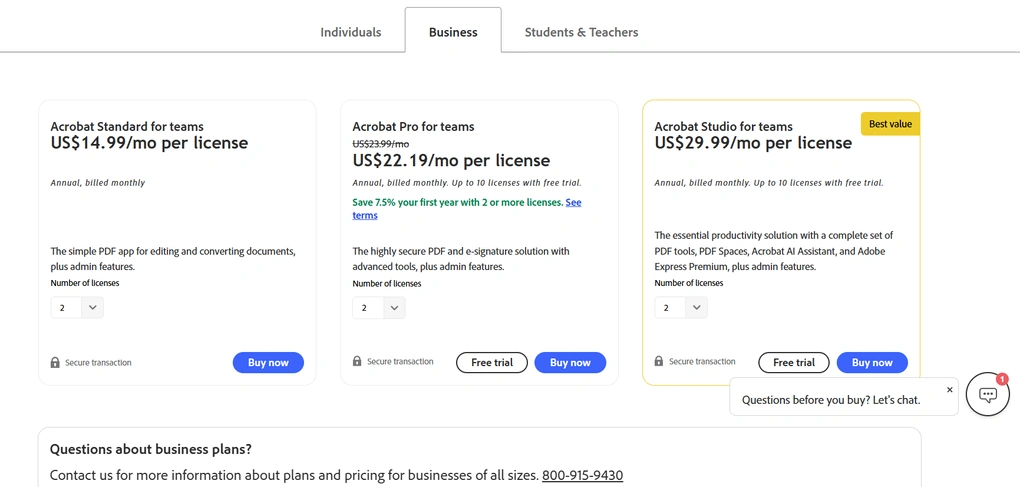
- No free plan available, only a free trial
- Individual plan: $13/month (annual billing)
- Small Business plan: $30/user/month (annual billing)
- Enterprise plan: Custom pricing
Summary: The best e-sign software in 2026
After all my testing and comparisons, these nine stood out as the best e-sign tools in 2026. While there are many options on the market, I recommend checking each tool’s key features (templates, audit trails, automatic reminders, custom branding), ease of use, and pricing before deciding which one fits your workflow best.
I hope this list helps you find the right e-sign software for your needs. As always, I’ll keep it updated to reflect the latest changes in 2026.
Looking for similar tools?
Visit our library of PDF editors to explore other apps we’ve reviewed in this space and how they compare.
Why you can trust our reviews
At thebusinessdive.com, our team tests, reviews, and compares hundreds of productivity apps every year — from project management tools to note-taking apps. We dive deep into real-world use cases to help you find the right tools that actually improve your workflow, not just add noise.
Our mission? No fluff, no shortcuts—just honest, hands-on insights from productivity pros.
Have a question or suggestion? I’d love to hear from you. Feel free to reach out anytime at aronkantor@thebusinessdive.com.
Frequently asked questions
What is the difference between an electronic signature and a digital signature?
An electronic signature shows acceptance of an agreement, while a digital signature uses a digital certificate to verify signer identity and protect documents from tampering. Most businesses can sign documents online with legally binding signatures using standard electronic signature software, while some industries require digital signatures for additional security.
Is e-sign software legally binding?
Yes. Most e-sign software creates legally binding electronic signatures that comply with regulations like ESIGN, UETA, and eIDAS. The best e signature solutions also provide audit trails, electronic records, and multi-factor authentication or SMS authentication to verify signer identity and protect sensitive documents.
What features should I look for in electronic signature software?
Beyond letting you sign electronically, the best electronic signature software should help you prepare documents, request signatures, store signed documents, and manage the entire signing process. Features like reusable templates, automatic reminders, multiple signers, custom branding, and integrations with Google Drive, Google Docs, and Microsoft Word can save time when managing contracts and agreements.
Can e-signature software help sales teams?
Yes. Many e signature tools help sales teams do more than collect signatures. Platforms like PandaDoc help sales reps create proposals, manage sales contracts, sign agreements, and close deals faster, helping shorten sales cycles through a more efficient sales process.
Is cloud-based e-sign software secure?
Most modern e-sign software uses encryption, secure electronic signatures, and enterprise-grade security to protect documents. Features like multi-factor authentication, audit trails, and document access history help verify signer identity, support legal scrutiny, and keep electronic records secure.
Disclosure: I only recommend products I would use myself, and all opinions expressed here are my own. This post may contain affiliate links that, at no additional cost to you, may earn a small commission. Read the full privacy policy here.

Hey there! I am Aron, the founder of Thebusinessdive. I have been testing productivity apps for almost three years now. I reach 25.000 -50.000 people monthly with the mission to help you find the perfect productivity apps. Subscribe to my YouTube channel, newsletter, and social media to hear more about the best productivity tools. Let’s dive in!