


Best 7 Notion Alternatives In 2026 | 100+ Personally Tested Tools
There are 500+ Notion alternatives out there. The question is, which one should you try?
I am gonna be honest. Notion is a great productivity tool, and I have been using it for years. But as much as I love Notion, I know that it’s not the perfect fit for everyone. The good news is that there are many Notion alternatives on the market.
Over the last year, I spent 500+ hours testing more than 100 productivity tools.
Now, using this experience and knowledge, I have decided to put together my list of the best Notion alternatives for 2026.
Let’s dive in!
Best Notion alternatives in 2026 (Quick Picks)
🤝 Best overall Notion alternative: Coda
🎨 Best for visual note-taking: Xtiles
💻 Best for software development teams: Backlog by Nulab
⚡ Best for AI-powered task management: Taskade
📊 Best for complex project management: ClickUp
🛠️ Best open-source Notion alternative: AppFlowy
🛡️ Best for secure & private note-taking: Anytype
How We Selected The Best Notion Alternatives
Notion is one of the most versatile productivity tools, but it isn’t the perfect fit for everyone. Some users need stronger project management features, better offline support, more privacy, or more advanced note-taking features.
While we use standardized testing frameworks for categories like project management and note-taking apps, we cannot compare apples to oranges.
That’s why the scores you see throughout this article come from category-specific testing frameworks and reflect how well each tool performs within its intended category and use case.
Therefore, I selected these Notion alternatives based on the following criteria:
Comparing the top Notion alternatives
|
Notion alternatives |
Ideal for 🎯 |
Biggest Strength⚡ |
Biggest Weakness⚠️ |
Learning curve ✅ |
Pricing starts 💰 |
|---|---|---|---|---|---|
|
Best overall Notion alternative |
Powerful docs + databases |
No desktop app for Windows |
Moderate |
Free plan + paid from $10/user/month billed annually |
|
|
Best for visual note-taking |
Beautiful UI |
Less versatile feature set than Notion |
Easy |
Free plan + paid from $15/month billed annually |
|
|
Best for software development teams |
Built-in Git & issue tracking |
Less flexible for notes |
Moderate |
Free plan + paid from $35 up to 30 users /month billed annually |
|
|
Best for AI-powered task management |
AI agents & automation |
Limited note-taking features |
Easy |
Free plan + paid from $6/user/month billed annually |
|
|
Best for complex project management |
Advanced workflows |
More limited knowledge management experience |
Advanced |
Free plan + paid from $7/user/month billed annually |
|
|
Best open-source Notion alternative |
Offline & self-hosted |
Less extensive feature set |
Moderate |
Free plan + paid from $10/user/month billed annually |
|
|
Best for privacy-focused note-taking |
Offline + encrypted |
Long learning curve |
Advanced |
Free plan + paid from $4/user/month billed annually |
In-Depth Look at the Best Notion Alternatives for 2026
Let’s break down the 7 best Notion alternatives for 2026!

Coda
Coda is an all-in-one collaborative workspace for individuals and teams. It integrates note-taking, task management, project management, document management, and team collaboration features into one platform
Review Summary
Teams and individuals who want a powerful all-in-one workspace with strong automation
Offline-first workflows or users needing a desktop app for Windows
Powerful docs + databases
Coda lacks a dedicated Windows desktop app, unlike Notion
Coda is probably the closest alternative to Notion. It has quite similar features for note-taking. However, it has more advanced project management features, and it is a more user-friendly app than Notion, with a shorter learning curve.
Testing Coda in everyday use
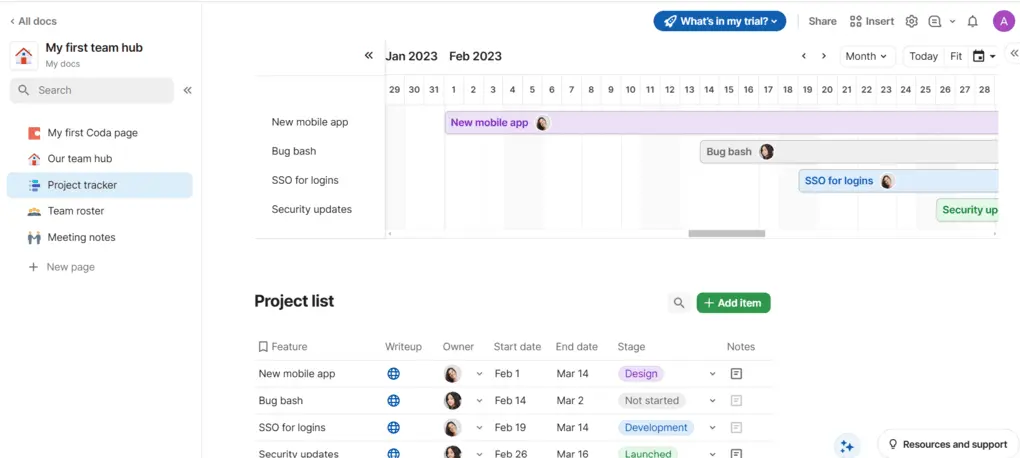
It was a surprise to me, especially its project management features. Its ease of use, wide range of display options, and customization possibilities make Coda a perfect choice.
Coda blends documents, spreadsheets, and apps into a single flexible workspace known for powerful formulas and automation features.
It has many templates for specific use cases, so you can speed up the document creation process. Also, I appreciated that it has powerful note-taking capabilities.
During my Coda.io review, I discovered that Coda is a powerful alternative for building custom pages, with robust database and formula capabilities.
I had only one issue with Coda: it does not have a desktop app for Windows that you can access even without an internet connection.
Overall, my experience with Coda was 10/10, and I highly recommend it to individuals and small teams.
Who Coda is a good fit for
Who Coda is not ideal for
Main features
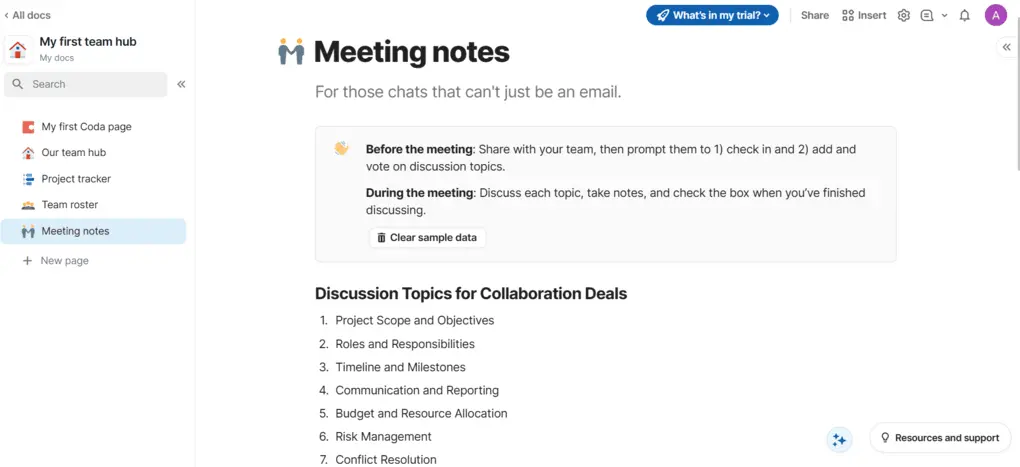
Note-taking tools: Writing notes works similarly to Notion. It uses blocks to structure your content. You can use different paragraph styles, add quotes, callouts, and more. If you click on the “/” tab, you can create blocks. When creating them, you can choose from many formats, from templates, text, tables, images, calendars, and so on.
Project management tools: Coda offers numerous view options that help to visualize dependencies, making the project planning and tracking much smoother. For example, it has tables, grids, boards, calendars, Gantt charts, and many other views.I t is very easy to create customized dashboards and apply filters.
Task management tools: You can add different columns for each task. When adding columns, you can change their types, which is great because it makes filling in data easier. When considering what type you want to add, there is a full list from which you can choose. You can insert text, dates, checkboxes, links, files, assignees, and many other elements.
Templates: Coda’s Gallery includes many templates for project management, meetings, knowledge management, project briefs, OKRs, and more. Templates are great for creating documents and projects faster.
Automation tools: Coda’s automation has two steps: When and Then. However, you can also add the “If” condition to your rules. You can easily create automation with Coda and streamline many workflows.
Collaboration features: You can edit text in real-time, mention and tag others, or assign tasks to your team members. Also, you can share documents easily with your team members with a click, so you can be on the same page. It offers tools for permission management and workflow automation, helping to make your team’s collaboration smoother.
AI tools: Similarly to Notion AI, it has an AI assistant that helps you in many ways when taking notes. For instance, it can summarize, translate, answer questions, or help you brainstorm an idea or convert it into a table. The use cases of Coda AI are almost endless. As you use Coda along the way, you will implement it in more workflows than you think.
Integrations: You can connect Coda with multiple third-party apps, including Zapier. Thanks to the Zapier integrations, Coda supports integrations with more than 8,000 third-party apps.
Mobile app: Coda has a mobile version as well. It is not as versatile as the desktop version and has fewer features, but you can use it to track your projects and tasks and read your notes.
Pricing structure
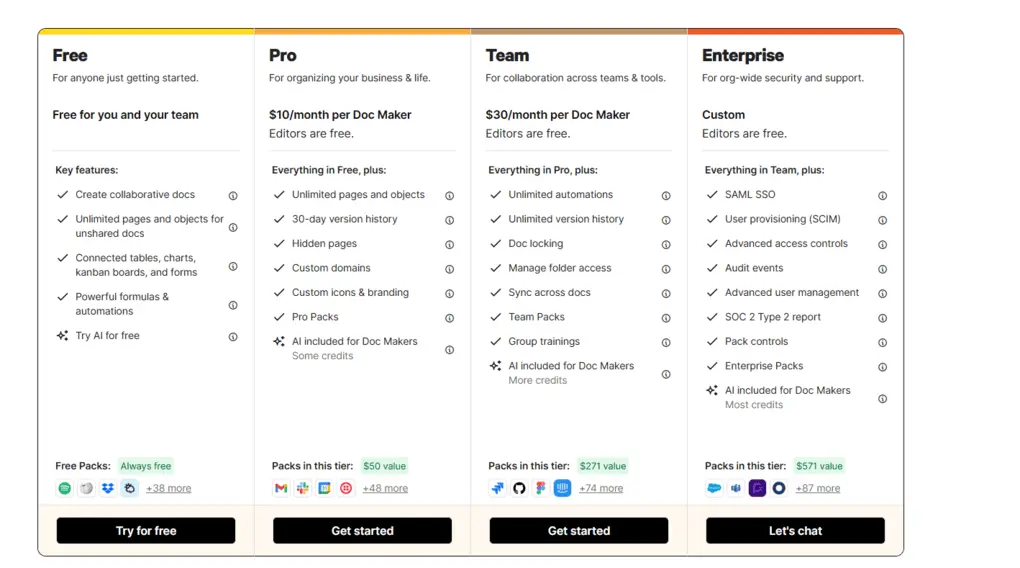
The Free plan includes essential features such as unlimited doc size for unshared docs, collaborative docs, tables, charts, kanban boards, forms, and automation. The free version is ideal for individuals or teams that want to test whether Coda suits the whole team.
The Pro plan is $10 per month and is ideal for small businesses or individuals who need advanced features. This plan includes a 30-day version history, hidden pages, custom domains, branding, icons, and AI credits.
If you want unlimited automation, version history, and AI credits, you should go with the Team plan, which costs $30 per month. Using Coda’s Team plan, you will access the folder access, which can be crucial for teams.
Lastly, Coda offers an Enterprise plan for large businesses with custom pricing.
Coda’s pros and cons
To make your decision easier, here are the main reasons you might choose or skip Coda.
What I Loved
What Could Be Better
Coda vs Notion
If you want a deeper look at how Coda compares to Notion, check out my full side-by-side comparison covering features, pricing, ease of use, and my experience with both apps.


Notion VS Coda
Why is it the best Notion alternative overall?
If you are looking for a tool that is very similar to Notion, with a more user-friendly user interface and a shorter learning curve, even for your team, Coda is a perfect choice.
Its feature set and advanced project management tools make Coda a great Notion alternative.
🔎 Read my full Coda.io Review: Here’s What Surprised Me! (2026)

Xtiles
Xtiles is a visual note-taking app that lets you organize notes and manage your projects and tasks. Xtiles refers to itself as the baby of Notion and Miro, as it uses tiles for note-taking. This Notion alternative was designed for individuals, creators, teams, and people with ADHD.
Review Summary
Best for individuals, teams, and visual thinkers who want to organize ideas, notes, and projects using a flexible tile-based workspace
Advanced project management and knowledge base management
Beautiful UI and easy-to-use functions
Notion has a more robust feature set ideal for more use cases
Xtiles is a visual workspace where you can organize notes and manage your projects and tasks. People refer to Xtiles as the baby of Notion and Miro, and it is somewhat true.
Xtiles lets users build dashboards with visual tiles, making it a more visually appealing option. With Xtiles, you can access your notes offline as well. You can use this note-taking app for personal or business purposes.
How Xtiles performed in my daily workflow
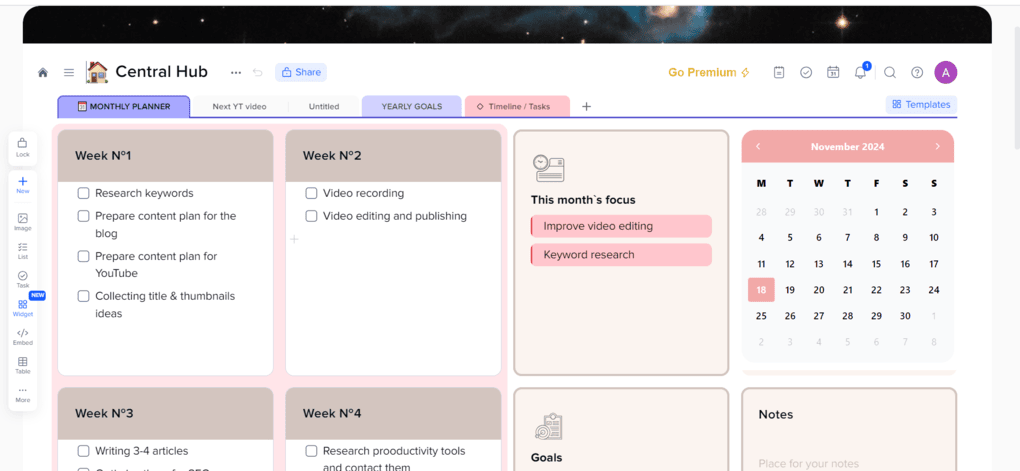
The other main difference between Notion and Xtiles is the user interface and learning curve. Xtiles is a visually appealing app that offers many ways to visually organize your notes. But most importantly, it is a very simple app with a short learning curve compared to Notion.
Although Xtiles is an easy-to-use note-taking app, it offers great flexibility for organizing your notes and tasks. And the best thing is the whole organization process on a visual board similar to Miro.
However, don’t expect Xtiles to have such extensive note-taking capabilities as Anytype or even Notion. Xtiles is not the app that you will use to create complex knowledge management centers, visualize relations, and more.
If we compare it to Notion, Xtiles has significantly fewer use-cases and can’t compete with the feature-set of Notion, at least not yet. But if we consider only the note-taking and collaboration features, Xtiles can be a competent Notion alternative.
Who should choose Xtiles over Notion?
Who should stick with Notion instead?
Feature Breakdown
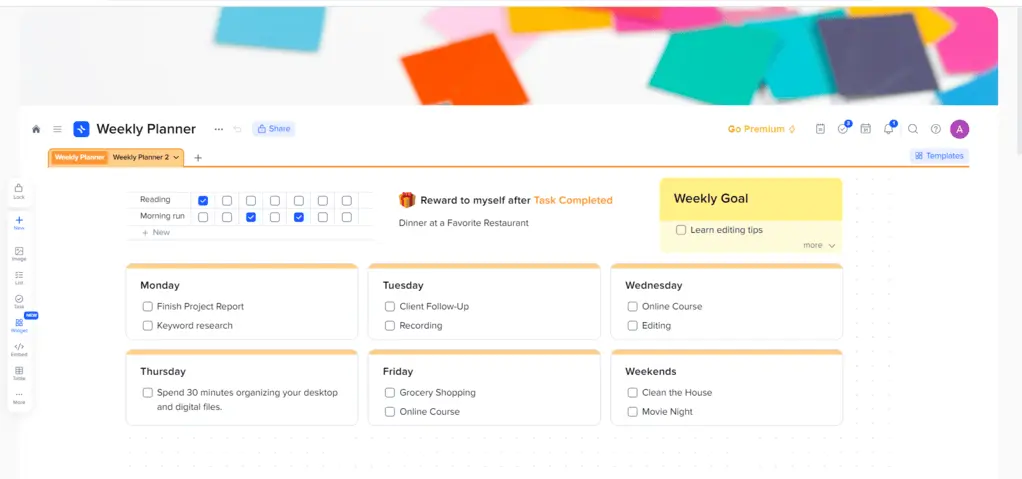
Note-taking tools: The visual boards include tiles, which are the elements on a page to display and organize information. It has a super-easy drag-and-drop interface, so you can create a tile of any size if you click on the canvas. You can add different types of content with Xtiles, such as text, lists, tables, images, videos, code, etc. In the end, it offers a way more personalized experience for your notes than any other app. Luckily, you can create sub-pages, which give you an extra layer for structuring your notes.
Project management tools: Xtiles is an ideal project management app for small teams, individuals, and creatives. It has basic features designed for simple project management, so you will learn it fast. Finally, Xtiles offers various views for databases, including gallery, calendar, table, and board.
Task management tools: You can create to-do lists in Xtiles as well. Using this feature, you can add a task, assign it to your team members or yourself, and give a due date. It is a useful feature for those who do not want to use a different app to handle the to-do list and want to integrate every function into one app.
Templates: Xtiles offers numerous templates, from project trackers to weekly, monthly, or yearly planners. However, there are templates for productivity, education, brainstorming, teams, and meetings. If you click on the template gallery, you will see all the templates, and you can add them with one click.
Automation tools: Xtiles does not have automation tools.
Collaboration features: If you work with others, you can effortlessly share everything with your team and manage your projects from here. Also, you can assign tasks to others easily.
Integrations: You can connect Xtiles to +7000 third-party apps using the Zapier integration. Also, if you have paid plans, Xtiles offers instant syncing with Google Calendar, Google Drive, and Slack.
Mobile app: Xtiles has a mobile version for Android and iOS. The mobile version lacks some features compared to the desktop version.
Pricing explained
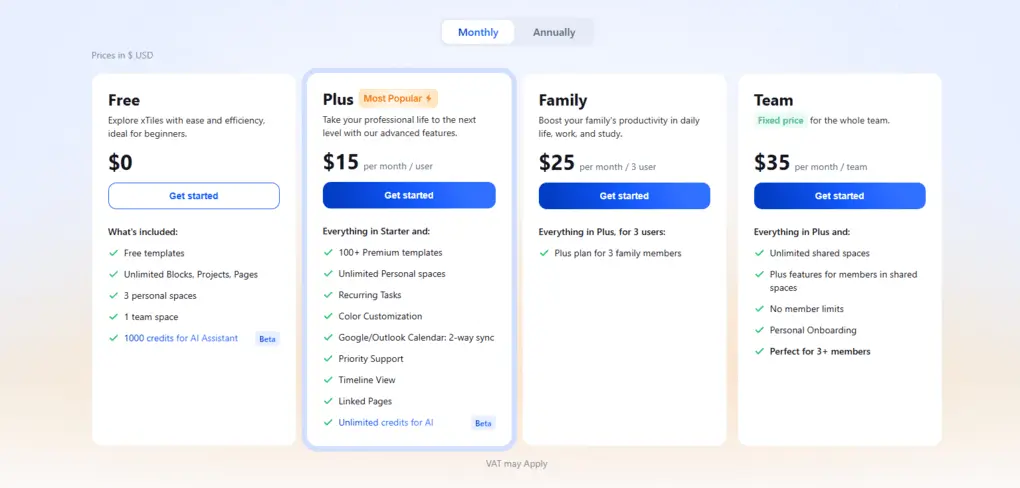
The free plan includes unlimited blocks, projects, free templates, one workspace to share, three personal workspaces, unlimited storage (5MB/file), and five pages per project. The free plan is ideal for individuals, mainly for personal use.
The Plus plan is $15 per month per user. In addition to the features included in the free plan, it offers unlimited personal spaces and pages, premium templates, unlimited storage, recurring task features, and Google Calendar integration.
Furthermore, Xtiles offers the Family plan at $25 per user per month. With this plan, an additional three family members can access the Plus plan’s features.
Lastly, there is a Team plan for $35 per month per team, which is a generous price for small teams. It includes personal onboarding, no member limits, and all the Plus features.
Xtiles’ strengths & weaknesses
Here are the areas where Xtiles stood out the most and where it still needs improvement.
Xtiles’ strengths
Xtiles’ weaknesses
Xtiles vs Notion
I also compared Xtiles vs Notion side by side, including their features, pricing, learning curve, and ideal use cases.

Xtiles VS Notion
Why is it the best Notion alternative for visual note-taking?
Xtiles is a simple but effective Notion alternative for note-taking and even project management. It offers an easy way to organize tasks and notes and has a user-friendly interface.
🔎 Read my full Xtiles Review: Is It The Best Notion Alternative In 2026?
Backlog by Nulab
If you’re managing software projects or working with a tech-heavy team, Backlog by Nulab is a strong Notion alternative. It combines project management, task tracking, documentation, and built-in version control—so teams can plan work, track issues, and collaborate without switching tools.
Review Summary
Best for developer teams combining documentation, task management, and other software development tools in one place
Individuals and non-tech-heavy teams
Centralizing functions for software developers in one place
Notion is a more versatile app covering more use cases
While we did not prepare a dedicated review article for Backlog, we also tested it extensively (find the screenshot below). When testing and selecting the top alternatives to Notion, Backlog didn’t come to mind first, as it’s not a traditional all-in-one app.
However, when testing its capabilities, we surprisingly found it to be quite a competent Notion alternative for tech-heavy teams. Nevertheless, outside of this niche, there are more suitable alternatives on this list.
My hands-on experience with Backlog
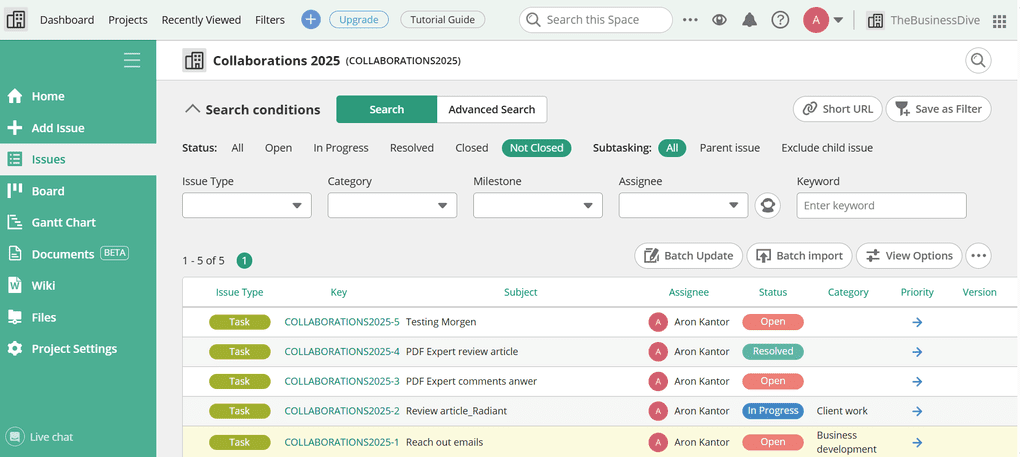
After using Backlog for several weeks, I found it surprisingly adaptable—even for non-technical work sometimes.
While developer-focused features like Git and bug tracking may be more meaningful to engineering teams, Backlog’s project organization and documentation tools make it valuable for a wide range of tech-focused businesses.
Overall, it delivers a smooth experience and keeps projects structured without adding unnecessary complexity.
Who should use Backlog
Who should NOT use Backlog
Capabilities & Tools
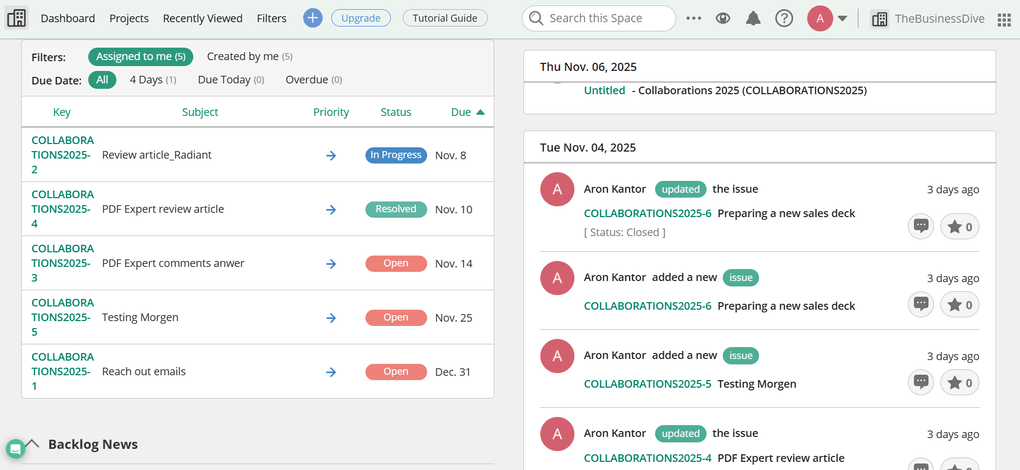
Project management tools: Backlog gives you multiple ways to visualize and track work. You can use Gantt charts, Kanban-style Boards, and detailed Issue views to monitor progress and spot bottlenecks early. Filters help you drill down into specific projects, assignees, and task types, making it easy to stay focused.
Task management features: In Backlog, all work items are created as “issues,” which can represent tasks, bug reports, requests, or custom workflows. Each issue supports priority, assignee, due date, category, estimated hours, file attachments, and more. This makes Backlog much more structured than Notion’s lightweight task databases.
Tools for developers: Backlog shines for engineering teams. It centralizes Git and SVN repositories alongside issues, enabling developers to link commits, pull requests, and code reviews directly to the work they’re completing. The Issues tab also makes it simple to review open bugs, tasks, and requests in one place.
Dashboard: Backlog’s dashboard provides a snapshot of everything happening across projects. If you open a specific project’s Home tab, you’ll get a detailed view of tasks, progress charts, and recent updates.
Team collaboration tools: You can comment on issues, mention teammates, and track conversations as work progresses. Backlog’s Wiki adds an internal knowledge base for guides, processes, troubleshooting steps, or dev documentation. Teams can structure pages easily and include images, links, and code.
File management: Each project includes its own file storage area. You can upload files, organize them into folders, and share direct links to items when needed. Designers, developers, and project managers can keep important assets tied to the work they belong to.
Documents: Backlog’s Documents feature works similarly to Notion’s page editor. It uses a flexible block-based interface for text, images, tables, and subpages—making it easy to take notes, create pages, document processes, or build an internal knowledge center. For teams who love Notion’s structure but need deeper project and issue tracking, this strikes a great balance.
Integrations: You can connect Backlog with Slack, Dropbox, Microsoft Teams, and other tools commonly used in development workflows.
Mobile app: Backlog’s mobile apps for iOS and Android let you check tasks, respond to comments, and stay on top of project updates when you’re away from your desk.
Pricing structure
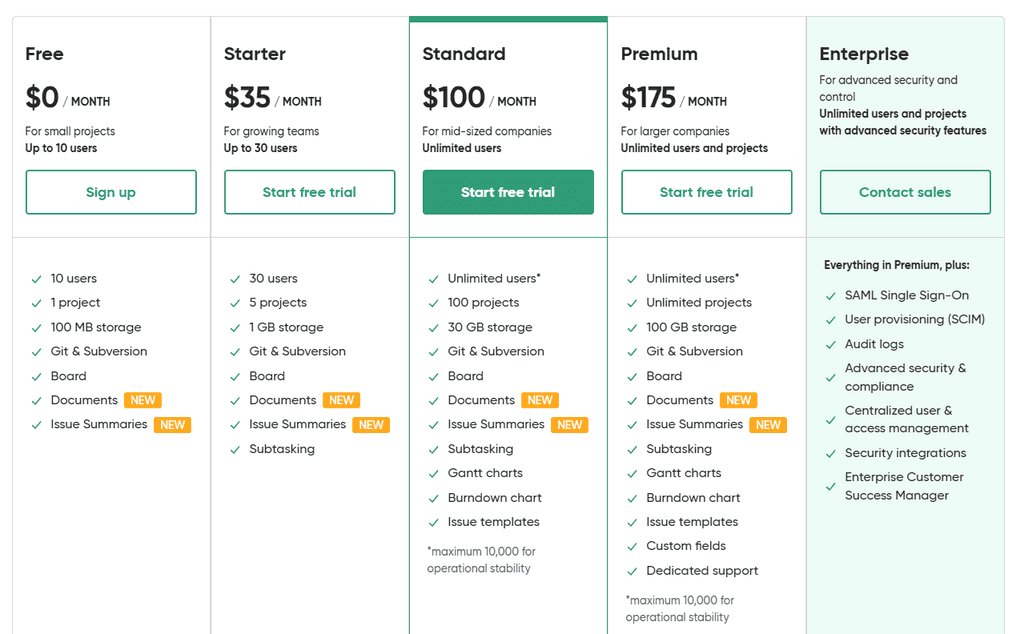
Backlog offers one free plan and four paid plans—each with flat pricing rather than charging per user.
You can use the Free plan, up to 10 users, 1 project, and limited storage. Enough for small teams testing the app.
The Starter plan is $35/month and works up to 30 users, 5 projects, 1GB storage, and subtasking.
The Standard plan is $100/month and includes no user limit, 100 projects, 30GB storage, Gantt/Burndown charts, and issue templates.
Finally, it offers an Enterprise plan with custom pricing for organizations needing advanced security and administration.
Highlights & drawbacks of Backlog
Before replacing Notion with Backlog, these are the pros and cons I think you should know about.
Backlog’s highlights
Backlog’s drawbacks
Why is it the best Notion alternative for developer teams?
Backlog brings together documentation, task management, and software development tools in one place—making it a powerful Notion alternative for engineering and product teams.
It’s simple to use, designed for collaboration, and its flat pricing makes it an especially cost-effective solution for growing organizations.
Explore our Apps directory
A curated directory of software tools we’ve independently reviewed, with links to full reviews, comparisons, and category guides.

Taskade
Taskade is an AI-powered productivity tool for task, work, project management, and note-taking. While its note-taking capabilities are more limited compared to Notion, it has more solid features for automating your workflows, projects, and task management.
Review Summary
Professionals and small teams that need AI-powered task management, automation, and lightweight project workflows
Advanced project management or deep note-taking systems
AI agents & automation
Notion is clearly superior for note-taking & creating a knowledge base
Taskade is an interesting Notion alternative. While its note-taking capabilities are more limited than Notion’s, it offers stronger automation features for workflows, projects, and task management.
In 2026, Taskade launched vibe-coding features as well, but since you are looking for features similar to what Notion offers, I will not cover those below.
What it’s like to use Taskade in the long term
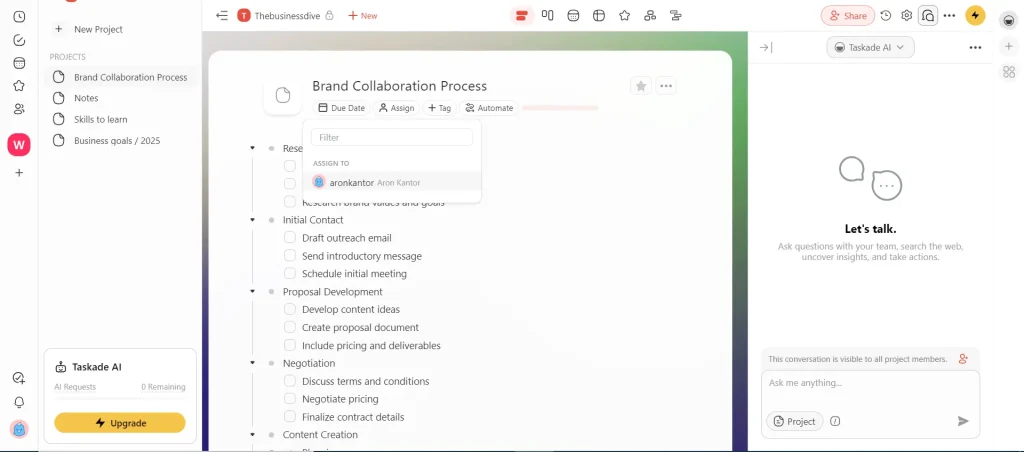
I had a great experience with Taskade during testing, and I think it is the best Notion alternative for task management and automation.
I was skeptical of the AI features, including the agents, but they proved me wrong. Taskade also has great real-time collaboration tools, and I especially enjoyed the chat feature.
To wrap it up, Taskade is a feature-rich Notion alternative. However, unlike Notion, Taskade has a laser focus on AI automation rather than note-taking or creating a second brain.
When Taskade makes the most sense
When you should stay with Notion
Real-World Features
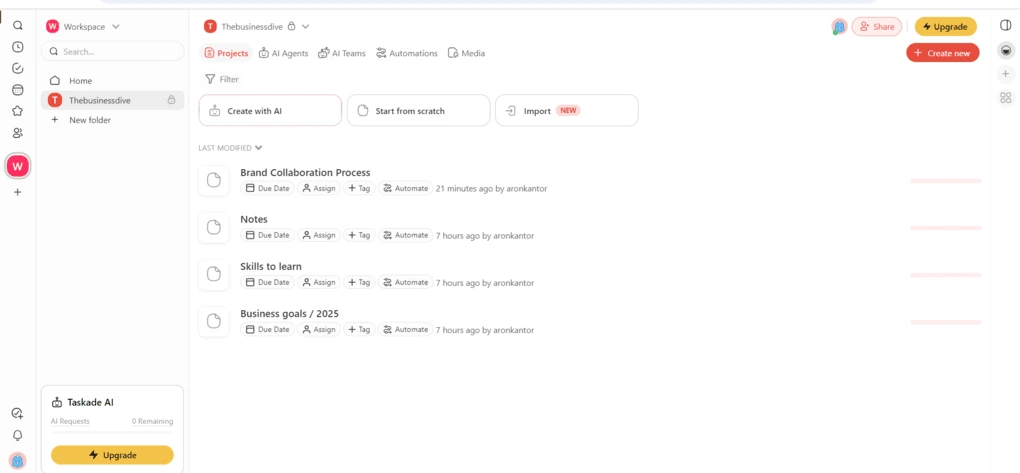
Note-taking tools: Taskade can also work as a note-taking app. Nevertheless, compared to note-taking apps like Notion, Obsidian, Anytype, or Xtiles, Taskade lacks advanced note-taking capabilities. It doesn’t offer features like relational databases and more sophisticated knowledge-management systems. But to be honest, Taskade was not originally designed as a traditional note-taking tool. It uses a task-based structure where most content can easily be turned into actionable items, connected to projects, or automated with workflows.
Project management tools: This is lightweight project management software. I say it is a lightweight project management app because it lacks advanced features, such as time tracking. Also, it is not as complex as ClickUp’s project management app. However, it has many valuable features like numerous view options, advanced automation, and many other tools to enhance project management.
Task management tools: Taskade is a task management software that allows you to manage multiple projects and tasks effectively. You can easily add and assign tasks to your team members. With one click, you can create task lists and give due dates, tags, and notes to each task.
Templates: Taskade offers numerous templates for task management, project management, mind maps, team management, etc. They can save you massive time, as you no longer need to start from scratch when creating a new project.
Automation tools: Taskade’s automation allows you to streamline repetitive tasks by setting up triggers and actions. You can design custom workflows and integrate them with Google Sheets, Slack, or WordPress.
Collaboration features: Taskade offers a shared space for teams to communicate, collaborate, and manage their projects. This app is full of collaboration features. You can easily share your workspaces and projects with your team members. In your projects, Taskade has a built-in chat feature that allows you to communicate with your team members. Also, Taskade has robust features when it comes to real-time collaboration. You can assign tasks to your team members, edit your projects together, and create a knowledge management center for your company.
AI tools: This tool is one of the most polished Notion alternatives when it comes to AI capabilities. Taskade has a common AI assistant that helps you pull out information, summarize documents, and so on. Nevertheless, it has a unique AI tool called AI agents, which is Taskade’s standout feature. They are useful for collecting information, helping you to brainstorm, delegating tasks, and ultimately improving productivity. You can tailor your AI agents to your specific needs by providing them with sources, commands, and instructions.
AI app builder: Taskade also includes an AI app builder that allows you to generate workflows, dashboards, and internal tools from a single prompt. Instead of building everything manually, you can describe what you want and Taskade will generate the structure with tasks, automations, and AI agents.
Integrations: During my Taskade review, I discovered that it offers a wide range of seamless integrations. You can connect Taskade with Zapier, which allows you to integrate Taskade with more than 8000 third-party apps.
Mobile app: Taskade has a mobile version for iOS and Android as well. The mobile app works really great compared to many Notion alternatives.
Free plan & paid options
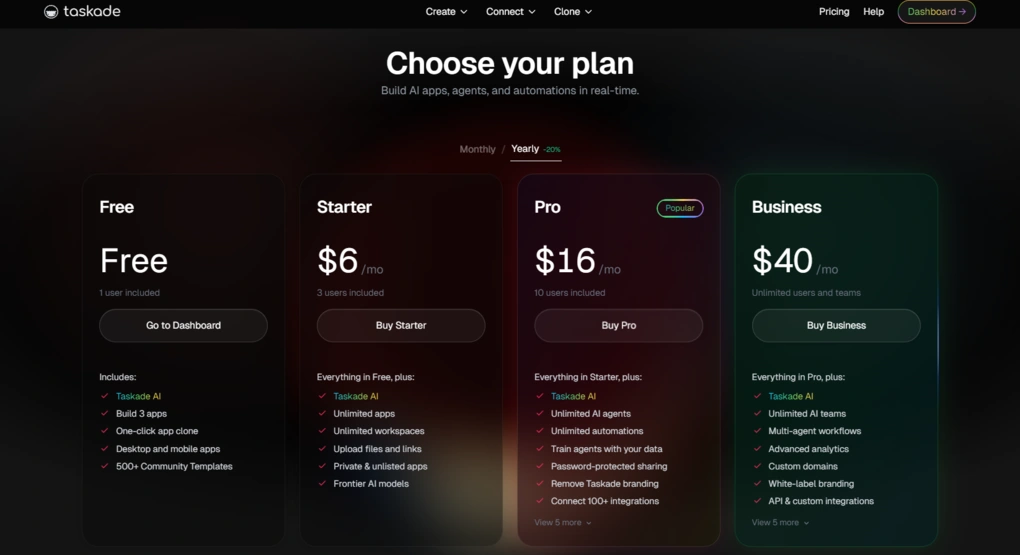
Taskade offers a generous Free plan that allows you to explore the platform and test its core capabilities. It includes one AI agent, and you can invite one teammate and organize projects into one workspace. You will receive 3,000 AI credits (one-time) to build one AI-powered app.
The Starter plan is designed for individuals who want to use Taskade more seriously.
It will get you unlimited workspaces, premium AI models, 100+ integrations, and 10,000 AI credits, enough for around 10 apps. It includes up to 3 AI agents, and you can invite up to 3 team members.
The Pro plan is designed for professionals and power users who rely on Taskade daily. It includes unlimited AI agents and workspaces, and you can invite up to 10 team members. The 50,000 AI credits that you get on this plan can make about 50 apps.
The Business plan expands Taskade’s capabilities for organizations. It includes everything in the Pro plan, plus 3x the AI credits and apps, unlimited team members, a custom domain, and API access.
For large organizations, Taskade offers an Enterprise plan with custom pricing.
One more thing worth mentioning is that you can buy top-up credit packs if you run out of AI credits. This way, it is easy to scale AI usage without upgrading your entire plan.
Pros and cons of Taskade
To summarize my experience, these are the biggest wins and compromises of switching away from Notion to Taskade.
Taskade’s pros
Taskade’s cons
Taskade vs Notion
I also compared Xtiles vs Notion side by side, including their features, pricing, learning curve, and ideal use cases.

Notion VS Taskade
Why is it the best Notion alternative for AI-powered task management?
Taskade is a practical Notion alternative for those who are looking to automate workflows and tasks with AI-powered solutions. Thanks to its recently released vibe coding features, you can create your own workflows.
🔎 Read my full review: Taskade Review: I Nearly Spit Out My Coffee (2026)

ClickUp
ClickUp is project management software designed to help teams organize tasks, collaborate effectively, and manage multiple projects. Besides its advanced project management features, collaboration capabilities, and note-taking capabilities, AI tools make ClickUp a solid Notion alternative.
Review Summary
Teams that need advanced project management features
Users looking for simplicity or a lightweight experience
ClickUp offers more robust project management, task management, and team collaboration features than Notion
Notion is a more advanced app for note-taking and knowledge management
ClickUp is one of the best Notion alternatives for project management. It is an incredibly versatile app and can work as a central hub for project coordination and collaboration.
My experience with ClickUp after 3+ months of daily use (real workflows)
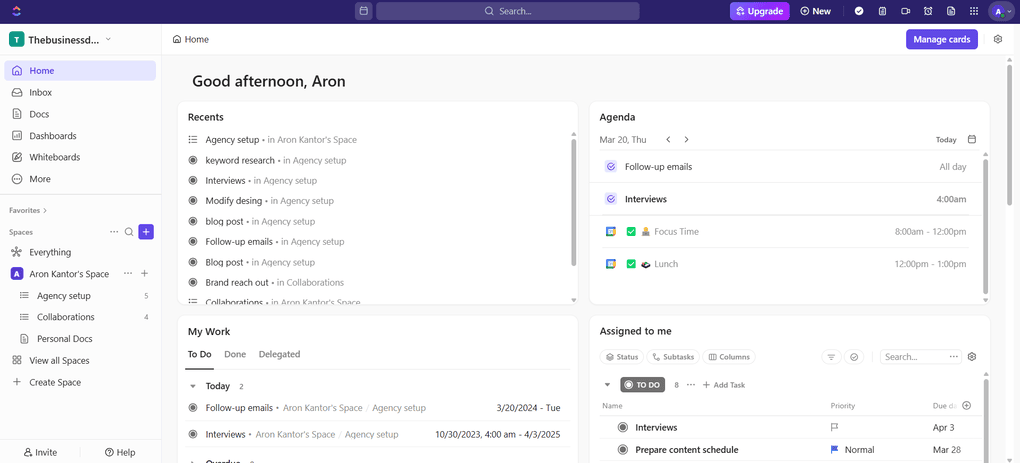
I used ClickUp daily for 3 months to manage real workflows, and I found it to be one of the most feature-rich project management apps. It effectively combines project management, note-taking, AI note-taking, and collaboration into one platform.
And during my ClickUp review, I experienced that it combines these tools with high flexibility, making it a well-rounded choice for more complex project management workflows.
That said, this flexibility comes with a learning curve. It takes time to fully understand how everything works, and I experienced occasional performance issues, for example, when we used the whiteboards with my team.
The mobile app also feels less polished compared to the desktop version.
When to consider switching from Notion to ClickUp?
When to use Notion instead of ClickUp?
Key Features
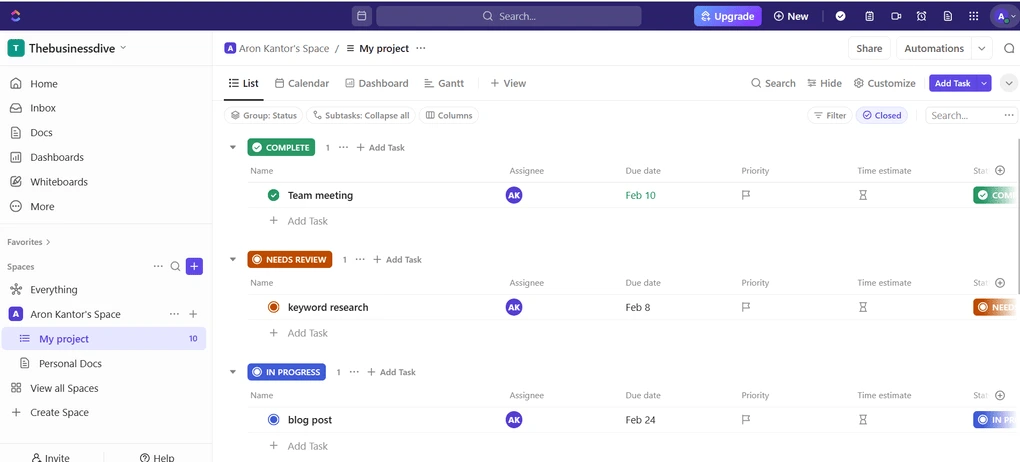
Note-taking tools: ClickUp has pretty solid note-taking features, considering it is a project management software. Using the slash command menu, you can add many types of blocks, such as text, headings, lists, embeds, tables, and more. Ultimately, its note-taking system and functions are similar to Notion.
Project management tools: It has all the project management tools you need to organize complex projects. Your dashboard works as your headquarters. You can customize what you want to see here by adding cards. For example, you can access your task lists, workloads, total and completed tasks, and more here. I enjoyed the extensive customization options here. You can drag-and-drop these cards so you can personalize your dashboard one hundred percent.
Task management tools: ClickUp has many task management tools. You can smoothly assign, track, add deadlines, prepare to-do lists, and so on. Your dashboard is also valuable for organizing all your tasks. With your dashboard, you can get a quick breakdown of other aspects regarding your tasks, like open tasks by the assignee or total tasks by the assignee.
Templates: This project management tool offers numerous templates to create projects, wikis, meeting notes, and many more.
Automation tools: Using ClickUp, you can choose from 100+ automations to streamline workflows and complex processes. It has many templates for automation as well, so you do not have to spend time setting up rules one by one.
Collaboration features: ClickUp is full of collaboration features. It shows if a teammate is simultaneously viewing a task or adding a new comment. Whenever someone makes a change in the document, it updates instantly in real-time. Also, it provides a virtual whiteboard where you can collaborate with your teammates.
AI tools: ClickUp’s Brain connects all the tasks, projects, documents, team members, and your company’s knowledge with AI. It makes ClickUp’s AI feature very powerful, as it has all the data to answer your questions. It offers a great way to increase your productivity and save time.
Integrations: ClickUp offers seamless integration with Zapier and many third-party apps, including Slack, Google Docs, Google Calendar, and some Microsoft apps.
Mobile app: ClickUp has a mobile version for Android and iOS. It covers the most essential project management features, but sometimes I feel it is slow.
Pricing options
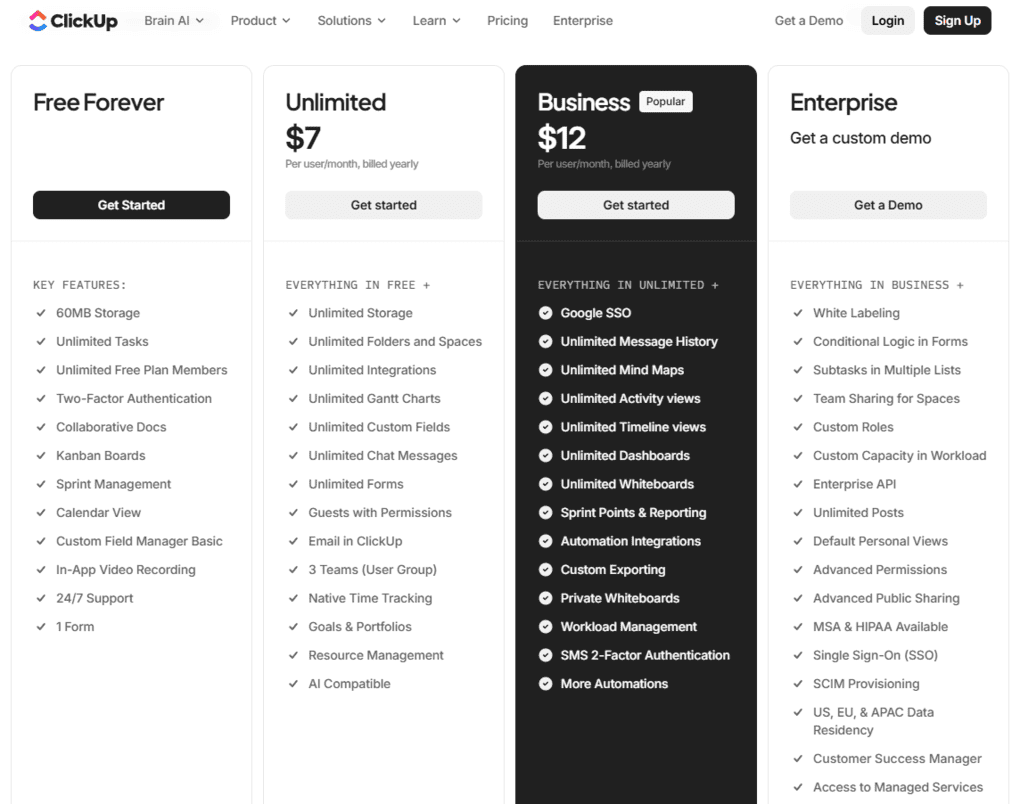
ClickUp offers four pricing plans. The free plan covers 60MB of storage, unlimited tasks, unlimited members, collaborative docs, and many views. Considering other tools, ClickUp has an extensive free plan and is ideal for individuals.
The Unlimited plan is $7 and excellent for small teams who need unlimited storage, integrations, folders and spaces, chat messages, and others.
If you want more features and higher security, you need to go with the Business plan. It is a good choice for medium-sized businesses, as it comes with tools for timesheets and workload management.
Finally, ClickUp offers an Enterprise plan as well for larger teams at custom pricing. They also provide a demo here so you can check whether ClickUp is the right project management tool for you.
It’s also worth noting that ClickUp’s AI features are offered as a separate add-on. ClickUp Brain, AI Notetaker, Super Agents, and other AI-powered workflows are not automatically included in the base plans.
Strengths & limitations of ClickUp
If you are considering using ClickUp instead of Notion, these pros and cons should help you make a decision more quickly.
Strengths of ClickUp
Limitations of ClickUp
ClickUp vs Notion
For a more detailed breakdown, check out my full ClickUp vs Notion comparison covering everything from note-taking and project management to ease of use and customization.

Notion VS ClickUp
Why is it the best Notion alternative for project management?
ClickUp is a great Notion alternative for project management at a reasonable price. It is ideal for any size of business and offers the full tool stack to effectively organize tasks, projects, and data in a centralized place.
🔎 Read my full review: My Honest ClickUp Review After Using It For +3 Months (2026)

AppFlowy
AppFlowy is an open-source AI-driven workspace to bring projects, wikis, and teams together. It has a similar layout to Notion, and it is an easy-to-use app. Thanks to its collaboration, document, and project management features, it is an ideal Notion alternative that you can access with offline mode as well.
Review Summary
Privacy-focused users and small teams who want an open-source Notion alternative with offline access
Teams needing advanced automation, deep integrations, or enterprise-grade collaboration features
Open-source flexibility, local-first data control, and offline functionality
More integrations, templates, and functions
Similar to Backlog, while we tested AppFlowy, we did not prepare a dedicated review article on it, but it made a good impression on us.
Its focus on data privacy, speed, and offline functionality made it a serious contender for those who need an open-source alternative to Notion.
My hands-on experience with AppFlowy
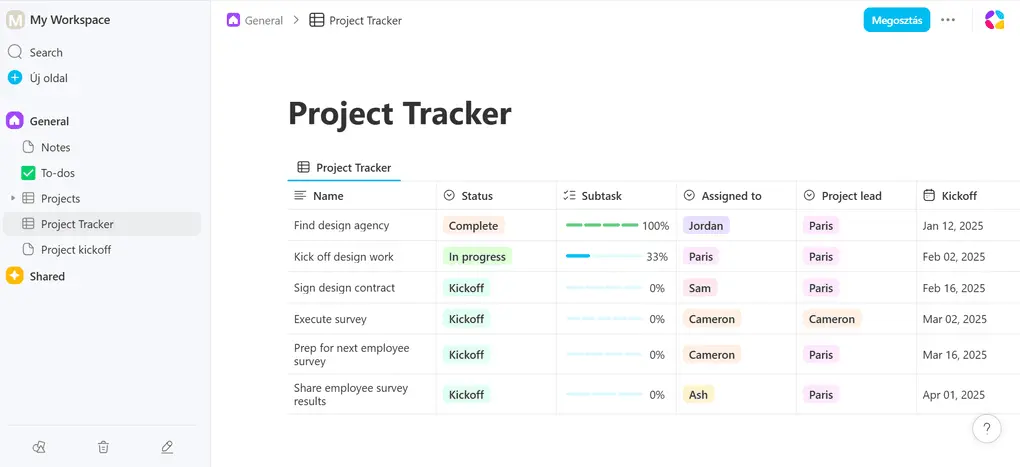
I had a positive experience with AppFlowy. It was easy to navigate its pages and find the key features.
AppFlowy offers a straightforward solution for organizing tasks and projects. It is particularly useful for small teams thanks to its pricing structure.
I particularly found the auto-fill option outstanding during review, which uses AI to turn databases into actionable insights.
When it comes to the AI capabilities, AppFlowy supports top-tier models (GPT, Claude) for generating drafts, expanding on topics, and extracting insights. However, you can access these for internet-based workflows.
If you prioritize 100% data privacy and want to work offline, AppFlowy’s Local AI feature (LAI) supports open-weight models, but you can run them through third-party apps.
Who will benefit most from AppFlowy
Who should skip AppFlowy
Key Functions
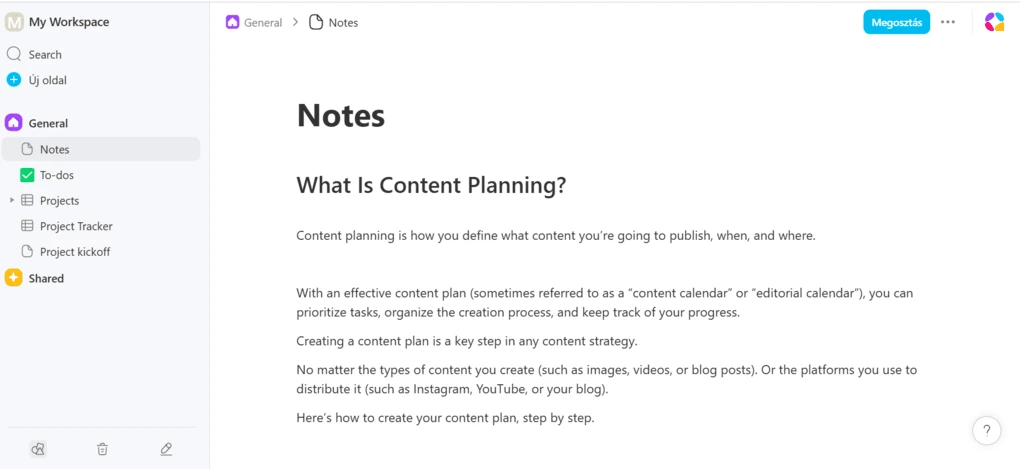
Note-taking tools: Appflowy uses building blocks when creating content. It enables you to use the slash command menu so you can insert headings, text, images, boards, grids, and calendars more quickly. Appflowy is a very capable tool for writing notes or tracking your tasks and projects.
Project management tools: AppFlowy works like a lightweight project management app, and you can organize projects easily. I loved how simple it is to use numerous view options for project management. Also, it is very simple to share your projects with your team members.
Task management tools: With AppFlowy , you can add status, assignees, progress, dates, and many others to each project. It has all the tools you need to effectively manage tasks with your team members.
Templates: AppFlowy has a template gallery where you can find the template that fits you and change the properties.
Collaboration features: AppFlowy has some easy-to-use collaboration features. For instance, you can share projects with your team members and assign tasks to them.
AI tools: AppFlowy has an AI writer feature as well. If you press slash, you can use AI to come up with new ideas, summarize text, or answer questions.
Integrations: It supports Zapier integrations, so you can connect AppFlowy with more than 7000 third-party apps.
Mobile app: AppFlowy has a mobile version as well. You can use this productivity tool on Android and iOS devices.
Plans & pricing
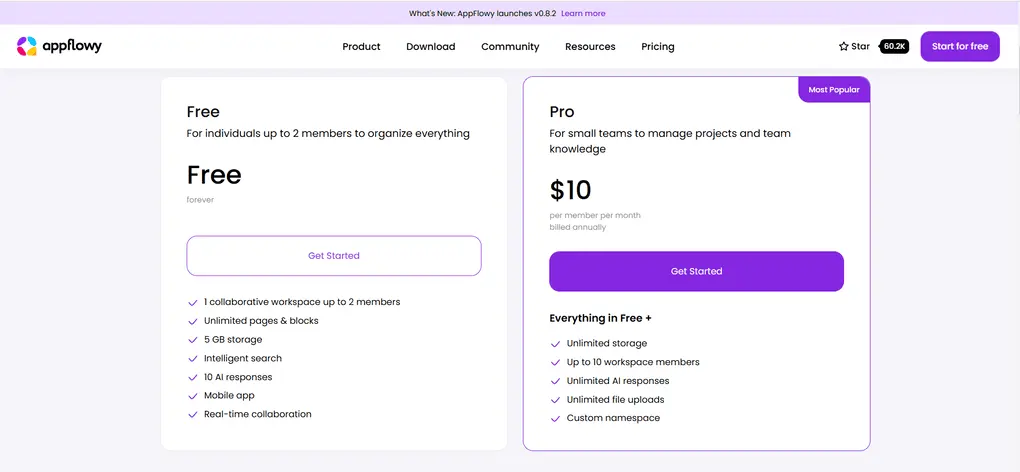
The free plan includes one collaborative workspace for up to two members, unlimited pages & blocks, 5 GB storage, 10 AI responses, Intelligent search, real-time collaboration, and a mobile app.
The Pro plan includes all these features, and you can use it for up to 10 workspace members for $10 per member per month.
AppFlowy also offers self-hosted plans starting at $1/month.
Pros and cons of AppFlowy
After spending days testing this Notion alternative, these were the key strengths and weaknesses I found.
Pros of AppFlowy
Cons of AppFlowy
Why is it the best open-source alternative to Notion?
Unlike Notion, which stores all data on its own servers, AppFlowy offers local-first usage and robust self-hosting. This gives users far more control over their data and eliminates many of the privacy concerns that come with proprietary, cloud-only tools like Notion.
Explore our Apps directory
A curated directory of software tools we’ve independently reviewed, with links to full reviews, comparisons, and category guides.
Anytype
Imagine Anytype as a combination of Notion and Obsidian. It adopted object-based note-taking, which makes it easier to connect ideas and notes. While some people love it, others find it too complex. It has a fantastic community behind it and could become the best Notion alternative in the future for note-taking.
Review Summary
Individuals who want to build a safe knowledge base and visualize connections between notes
Users looking for a simple note-taking app with a short learning curve
Anytype offers more advanced note-taking capabilities than Notion, resulting in almost endless options for creating a knowledge base and connecting your notes
Notion is an all-in-one app ideal for many use cases, while Anytype is niche software for a relatively small user base that doesn’t mind the extremely long learning curve and works for significantly fewer use cases
Anytype is a powerful all-in-one workspace that combines notes and databases into a single platform. Compared to Notion, it offers more robust note-taking capabilities, and you can access it offline on your devices, including your mobile, using its offline mode.
Anytype offers maximum data ownership & privacy. It has a local-first approach that supports on-device end-to-end encryption, and you are the only one with the key to the notes.
It is also worth noting that this is a quite complex note-taking app with a steep learning curve.
My take on Anytype after using it for months (and trying to figure out how it works)
I am not going to lie; Anytype is a complex app and requires a significant investment. Even after helping more than 20,000 people to learn how to use Anytype, I can’t say it for sure, I completely know this note-taking app.
Anytype introduces an object-based approach to note-taking, and while it offers real-time collaboration, it is currently better for personal use.
However, it is one of the best Notion alternatives since it offers a safe place where you can take notes. Anytype implements a decentralized model that emphasizes privacy and security, which makes it one of the most privacy-focused note-taking apps.
Lastly, it has more advanced features for managing and organizing your notes than Notion and most of the note-taking apps.
Who will benefit most from Anytype
Who should stick with Notion
Top features
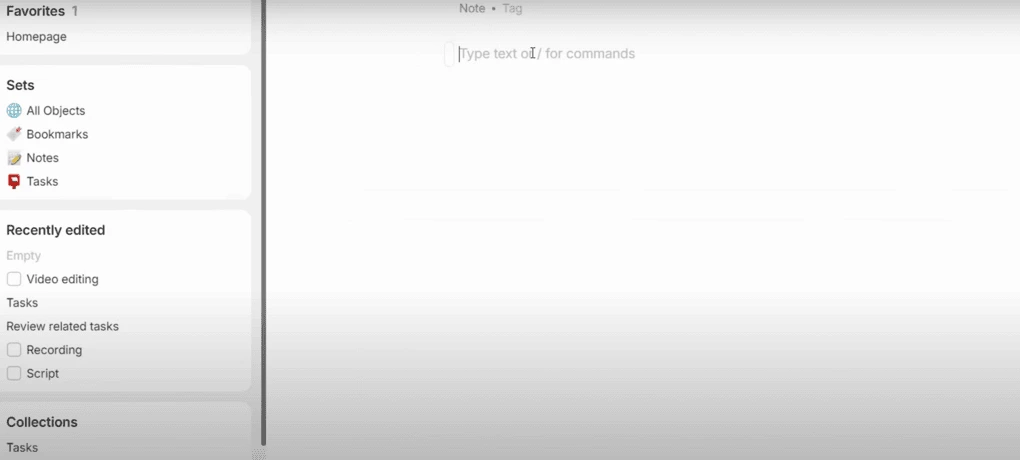
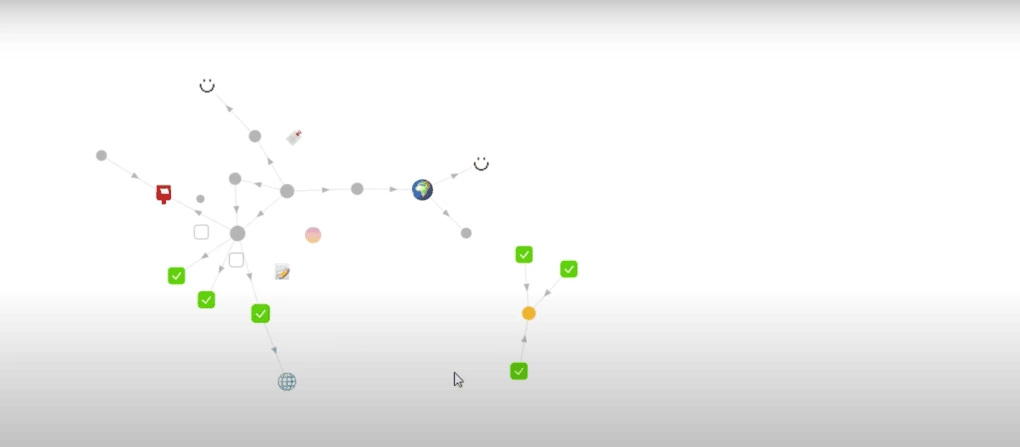
Note-taking tools: Anytype uses object-based note-taking. In the world of Anytype, everything you see and interact with is an object. Whether you add a page, image, text, file, or task, they are all objects in this note-taking app. Similarly to Notion, you can quickly add an object if you press the “slash” button. Anytype uses types to categorize these objects, and you can connect them with links and relations. Using its graph view, you can quickly overview the relations between your objects.
Project management tools: Anytype is an open-source, local application that allows for real-time collaboration. Although it has no project management tools, you can create your own project trackers inside the app.
Task management tools: It has the basic functionality to manage your to-do list. Anytype allows you to create task lists, and you can use different filter options. Although Anytype has task management features, it is a complex tool for those who just want to have a task management app.
Templates: Anytype has some templates prepared by the community. They help you to create and scale your object creation workflows.
Automation tools: Anytype has no automation tools.
Collaboration features: You can share your spaces with your team members, where you can collaborate with each other. Compared to other Notion alternatives, Anytype has very limited features when it comes to team collaboration.
Mobile app: Anytype is available on mobile devices, including iOS and Android. It worked smoothly on my mobile.
Free and paid plans
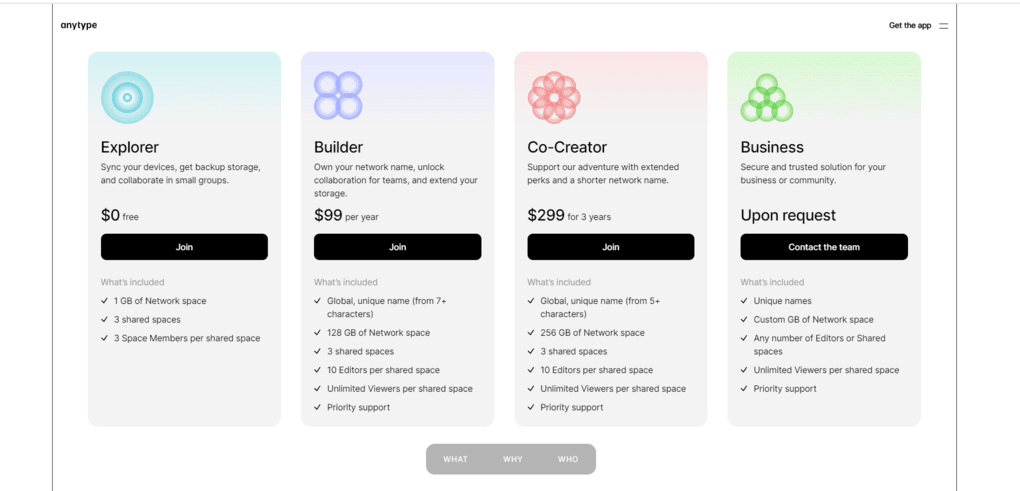
Anytype offers four plans.
The free plan includes 1 GB of network space, three shared spaces, and three space members per shared space. Using the free plan, you can sync your devices, get backup storage, and even collaborate in small groups.
The builder plan provides a unique name for you: 128 GB of network space, three shared spaces, 10 Editors per shared space, unlimited viewers per shared space, and priority support. This plan works great for small teams.
The co-creator plan is quite similar to the builder plan. However, this plan offers 256 GB of network space and a shorter unique name. This plan is ideal for teams.
Lastly, Anytype offers business plans upon request, where you have the option to determine the size of the network space, number of editors, or shared spaces, and gives unlimited Viewers per shared space. This plan could be fit for bigger teams.
Wins & Trade-Offs
Here’s a quick breakdown of what this Notion alternative does really well and where it could improve.
Pros of Anytype
Cons of Anytype
Anytype vs Notion
If you’re still not sure whether to give this Notion alternative a chance, check out a more detailed breakdown below where I compare Anytype to Notion.

Anytype VS Notion
Why is it the best Notion alternative for privacy-focused note-taking?
Anytype is currently the safest note-taking app on the market, and it has an extensive free plan that is sufficient for individuals. With this note-taking app, you can store all your data in a safe place, and it provides almost infinite options for data organization.
Considering all these aspects, Anytype is the best free Notion alternative for individuals who need a safe note-taking app.
🔎 Read my full Anytype Review: The Best Note-Taking App In 2026?
Summary: Best Notion alternatives in 2026
Notion is a fantastic productivity tool overall, and it is hard to beat. But, if you need something else, I think these are the best Notion alternatives in 2026. These Notion alternatives offer a feature-rich set and affordable pricing.
And most importantly, I also had a positive experience with them when testing these tools.
Related articles:
- 6 Best Notion Integrations I Swear By In 2026
- Evernote Vs Notion: An Easier Decision Than You Think (2026)
- Best 6 OneNote Alternatives In 2026 | 100+ Personally Tested Tools
I hope I was able to find the best alternatives to Notion. As always, I will keep updating this list to ensure it reflects reality.
Looking for similar tools?
Visit the link to explore other apps we’ve reviewed in this space and how they compare.
Why you can trust our reviews
At thebusinessdive.com, our team tests, reviews, and compares hundreds of productivity apps every year — from project management tools to note-taking apps. We dive deep into real-world use cases to help you find the right tools that actually improve your workflow, not just add noise.
Our mission? No fluff, no shortcuts—just honest, hands-on insights from productivity pros.
Discover how we stay transparent, read our review methodology, and let us know about any tools we missed.
Frequently asked questions
What are the best Notion alternatives?
If you are not sure if one of the Notion alternatives in the list can help your daily work, check out these options:
- Capacities: One of my favorite Notion alternatives that just barely missed this list. It provides journal pages for quick capturing of daily tasks.
- Airtable: Airtable is often compared to a powerful spreadsheet, excellent for users needing robust database and visualization features.
- Trello: Trello is best for teams who prefer a simple, straightforward Kanban board for visual task management, and don’t need advanced project management tools.
- Monday.com: Monday.com focuses on visual project tracking, work management, and automation, making progress easy to see.
- Asana: Personally, it’s not my favorite, but Asana is a popular choice for managing large-scale projects with features for multiple project views.
- Confluence: Confluence is designed to be a collaborative workspace for teams, ideal for wikis and technical documentation within the Atlassian ecosystem.
- Evernote: Evernote offers powerful search functionality, easy organization via notebooks and tags, and reliable cross-platform syncing. Although it is extremely expensive, it is an okay Notion alternative for note-taking.
- Slite: Slite is strong for teams needing to build an internal wiki, focusing on knowledge management and collaboration.
Is there anything better than Notion?
Notion has undoubtedly become one of the most popular productivity tools. However, there are some capable Notion alternatives that have similar features with even more advanced features. For me, the best overall Notion alternative is Coda.
Related article:
What is better, Notion or Xtiles?
Both Notion and Xtiles are great productivity tools. Xtiles is ideal for people who need a simple note-taking tool that offers a visual representation. It is a powerful tool for creating visually engaging content, whether it is about project management or complex workflows. Although it does not have as many collaboration features as Notion, Xtiles is a cost-effective solution for teams.
If you are looking for a more versatile app that you can use for note-taking, project, task, and database management, Notion is a better alternative. It has a minimalist design with robust collaboration features.
Is Obsidian better than Notion?
Overall, Obsidian is a more powerful app than Notion for personal note-taking. While it is a complex app with a long learning curve, it offers many possibilities to organize your notes and brainstorm ideas. And most importantly, you can do it safely.
Nonetheless, if you are looking for an app for note-taking, project, task management, or team collaboration, Notion is a way better tool than Obsidian. Obsidian is simply not ideal for team collaboration or managing projects within a team.
Related article: Notion Vs Obsidian: Side-by-Side Comparison (2026)
Does Notion or Coda have better project management tools?
If we consider the project management features, Coda is a more powerful productivity tool. It offers more views, customization, and automation features than Notion.
Disclosure: I only recommend products I would use myself, and all opinions expressed here are our own. This post may contain affiliate links that, at no additional cost to you, may earn a small commission. Read the full privacy policy here.

Hey there! I am Aron, the founder of Thebusinessdive. I have been testing productivity apps for almost three years now. I reach 25.000 -50.000 people monthly with the mission to help you find the perfect productivity apps. Subscribe to my YouTube channel, newsletter, and social media to hear more about the best productivity tools. Let’s dive in!
Very useful and informative blog.