



My Honest Morgen Review After 5 Weeks (2026)
TL;DR: In this Morgen review, I’ll share my honest experience after five weeks of using it on desktop and mobile. I’ll show you why I think it’s one of the best calendar apps I’ve tested, the challenges I faced with its AI Planner, and ultimately, whether Morgen is worth paying for.
My Testing Results in Short
Here’s the quick verdict if you don’t want to read the full review:
🎯 Best for: If you need an intuitive unified calendar & task management app
🚫 Not ideal for: If you look for a free tool or advanced AI-driven scheduling
⭐ Biggest strength: Centralizing multiple calendars, tasks, and scheduling in one clean interface that you can access from your mobile as well.
⚠️ Biggest weakness: No free plan
⚖️ Verdict: A top daily planner that brings tasks and calendars into one place with a short learning curve, but not ideal if you need a free app for planning your days.
🏆 Score: 4.2/ 5
✅ Tested with our review & scoring methodology ✅ Real-world testing ✅ Unbiased evaluation
Morgen Review
Summary
Morgen is a cross-platform daily planner that brings your calendars, tasks, and meetings into one place, with apps for Windows, macOS, Linux, web, iOS, and Android. After five weeks of testing, I found it to be one of the most intuitive and reliable calendar apps I’ve used, with excellent mobile support and flexible time blocking. While its AI Planner still needs improvement, Morgen makes organizing busy days significantly easier.
Clean, intuitive interface | |
Tasks and events in one place | |
Fast to get started | |
Multiple calendars in a single view sync reliably | |
Solid integrations with meeting tools and popular task apps | |
Thoughtful features for planning | |
Excellent mobile app |
No permanent free plan, only a 14-day trial | |
AI Planner is still rough around the edges | |
Limited AI automation | |
Lacks project management capabilities |
How We Test Daily Planners
To keep our reviews & final score for each daily planner app fair and consistent, we evaluate every tool using the same testing framework based on real-world usage, feature depth, and overall value.
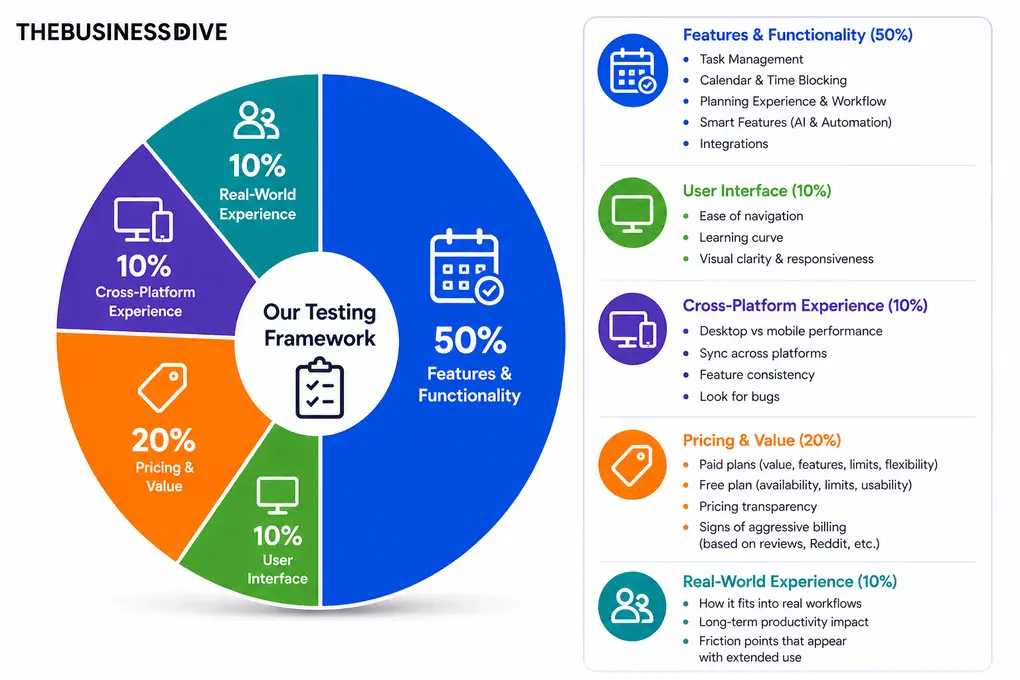
Our scoring breakdown after testing 10+ daily planner apps:
⚙️Features & functionality — 50%
🖥️ User interface — 10%
⚡Cross-platform performance—10%
💰 Pricing — 20%
👥 Real-world experience — 10%
Want a detailed breakdown of how we test each category?
Learn exactly how we test tools → Review methodology
Morgen in a nutshell

Morgen is a cross-platform calendar app that combines multiple calendars, tasks, and scheduling in one place. It helps you plan your day without switching between tools, with apps for Windows, macOS, Linux, web, iOS, and Android.
The company behind it, Morgen AG from Switzerland, focuses on privacy and simplicity. Unlike most web-based planners, Morgen Calendar stores data locally when possible. It integrates directly with tools like Google Calendar, Outlook, iCloud, and Todoist to give you a unified view of your time.
As a privacy-conscious user, I appreciated that Morgen is GDPR-compliant and doesn’t store calendar event data on its servers.
What I Learned After 5 Weeks With Morgen
💡 What I learned after 5 weeks: Morgen made busy Monday mornings less overwhelming by combining my Todoist tasks, Google Calendar events, and available time into one place. It’s useful for ADHD-related planning challenges, when deciding what to tackle first can be harder than completing the tasks.

I spent five weeks using Morgen to manage my daily schedule, from writing deadlines and client meetings to personal tasks. I mainly used the desktop app but often switched to my Android phone for quick changes.
What impressed me most was how easily Morgen brought my calendars and tasks together. I connected my Google Calendar, organized my tasks into separate lists, and dragged them directly onto my calendar.
I didn’t need to switch between Todoist and Google Calendar, and I could see what needed to be done and when I had time to do it.
I particularly loved Frames, which let me reserve time for deep work, administrative tasks, and other activities. Together with the AI Planner, they helped me structure busy days without planning everything manually.
Nevertheless, the AI Planner was a bit hit-or-miss during my testing. Its suggested schedules didn’t always match how I wanted to organize my day, so I occasionally had to make manual adjustments. While it helped me get started on busy Monday mornings, I wouldn’t rely on it to handle my entire schedule automatically.
Another highlight was Morgen’s mobile app. Adding tasks and rearranging my schedule felt incredibly smooth, and syncing between my phone and desktop worked reliably.
To summarize my past five weeks with Morgen, it exceeded my expectations as a calendar app and daily planner, although its AI scheduling still needs some improvement. I can confidently say it’s one of my favorite tools for bringing tasks, meetings, and daily planning into one place.
With this performance, Morgen earned the top spot in the best daily planners roundup and ranked in the top five among the best productivity apps.
What I Liked About Morgen
Where Morgen Falls Short
Why Morgen got a 4.2/5 score
Morgen scored highly because it delivers exactly what it promises: a unified planning experience across calendars, tasks, and scheduling in a clean, intuitive interface.
Morgen lost points primarily in two areas: its AI scheduling capabilities and pricing. While its AI Planner still needs improvement, the lack of a permanent free plan and relatively expensive monthly subscription also affected its final score.
Who Should Use Morgen?
🟢 Morgen is a good fit if… | 🔴 Morgen is not ideal if… |
|---|---|
You want everything in one place: Combine multiple calendars, tasks, and meetings into a single app. | You need a free planner: Morgen only offers a 14-day free trial, with no permanent free plan. |
You regularly schedule meetings: Freelancers and professionals can benefit from its built-in meeting scheduler and booking links. | You expect advanced AI scheduling: Its AI Planner is less sophisticated than alternatives like Motion. |
You work across multiple devices: Morgen offers a smooth experience on desktop and mobile, with reliable syncing. | You need comprehensive project management: Morgen focuses on daily planning rather than managing complex team projects. |
You prefer simplicity: Its intuitive interface and short learning curve make daily planning straightforward. | — |
Is Morgen worth it?
💡 Key takeaway: Morgen offers a comprehensive daily planning experience, but the lack of a permanent free plan is disappointing. I think the annual Pro plan offers good value if you regularly use its calendar, task management, and time-blocking features, though the monthly subscription is expensive.
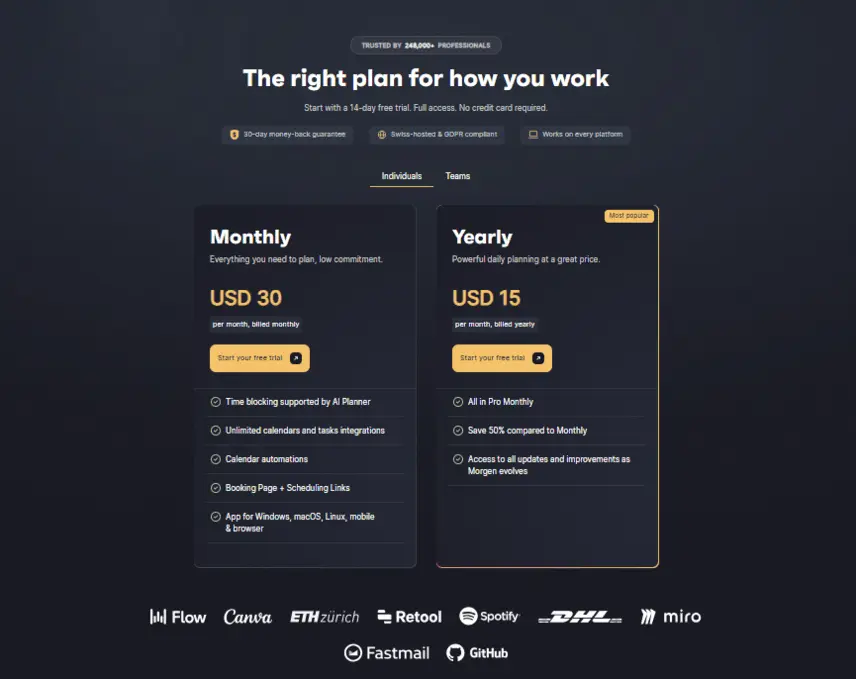
Plan | Price | Best for | Key features |
|---|---|---|---|
Free trial | $0 for 14 days | Testing Morgen before purchasing | Access to all Pro features |
Pro (Monthly) | $30/month | Individuals who prefer monthly flexibility | AI Planner, time blocking, unlimited calendar and task integrations, scheduling links |
Pro (Annual) | $15/month, billed annually (€180/year) | Solo users using Morgen for daily planning | Same Pro features at 50% lower cost |
Team (Monthly) | $25/user/month (minimum 2 users) | Small teams needing flexible billing | Pro features, shared booking pages, team collaboration |
Team (Annual) | $10/user/month, billed annually ($120/user/year) | Teams coordinating schedules and meetings | Pro features, shared booking pages, team collaboration |
Additional pricing details: Morgen offers a 30-day money-back guarantee, a 15% first-year discount for users switching from selected competitors, and a 25% ongoing discount for students, academics, and nonprofits. Regional discounts may also apply.
One more thing: pricing is localized in some regions. From Serbia, for example, I saw a checkout banner with a recurring 40% off code. If you’re outside the EU/US, it’s worth checking the site to see what applies at signup.
My take: I’d choose Morgen Pro at $15/month billed annually if you’re serious about daily planning. However, at $30/month, the monthly plan is harder to justify, especially considering that its AI Planner still needs improvement.
How Morgen’s Features Performed During My Testing
Over five weeks, I tested Morgen’s main features while managing my actual tasks, meetings, and daily schedule.
Here’s what worked well, what surprised me, and where I ran into limitations.
Calendar App: Beautiful Design With Flexible Customization
💡 Key takeaway: I loved how easily I could customize Morgen’s calendar, from color-coded events to personalized views. Dragging tasks and events around felt intuitive, making it one of the most enjoyable calendar apps I’ve tested.

I started by installing the desktop app (though the web version worked perfectly fine on its own) and connecting my Google Calendar. That part was quick and uneventful.
Once everything synced, I could switch between day, week, two-week, month, or agenda, and even save a custom view.
You can even customize it further with additional options, like showing weekends, widening the current day, and dimming past events. And on top of that, you can color-code everything. Talk about great visual organization!

Adding or changing something takes a click on the calendar grid. The same pop-up lets you set tags and colors, invite people, add a location or meeting link, choose reminders, and make it recurring.
A task can become an event and back again, and if plans move, you can just drag and drop the block to a new spot, and it will update.
With its modern and elegant interface, Morgen’s calendar app offers not only a simple but a visually appealing way to quickly organize events and tasks.
Calendar View | Best For | Limitations |
|---|---|---|
Day | Planning individual tasks, meetings, and focused work sessions | Difficult to see upcoming deadlines or plan several days ahead |
Week | Balancing meetings, tasks, and available focus time throughout the week | Can become cluttered when you have many scheduled tasks |
Month | Getting a high-level monthly grid overview of all synchronized calendars | Not ideal for detailed time blocking or daily task planning |
Agenda | Quickly reviewing upcoming events and commitments in chronological order | Doesn’t provide the same visual overview of available time |
Task Management: Simple, Flexible, but With a Few Quirks
💡 Key takeaway: I loved how easily I could organize tasks by priority and drag them directly onto my calendar. Nevertheless, scheduled tasks sometimes disappeared from the sidebar, which confused me until I discovered the right setting.

Morgen Calendar handles both basic and advanced task management, letting you create to-do lists and subtasks in one unified calendar.

You can add tasks from the calendar grid or the left sidebar. The sidebar is the control center: you can view tasks by folders and lists, then filter them in a way that matches how you work. I set mine to surface what’s urgent first, which makes the priority list obvious.
My setup stayed simple: work, personal, and other lists. Each task can have a due date, tags, a color, and subtasks. Subtasks help break a bigger item into steps you can actually finish.
If you prefer to rearrange by hand, switch the sort to manual, and you can drag items into the order you want.

There is one setting worth noting if your task lists look empty while the calendar is full. Tasks with a due date are treated as scheduled and may be hidden from the sidebar until you enable Show scheduled tasks.
Turning that on brings the sidebar and the calendar into alignment, so dated tasks appear in both places.
Moving work between the list and the calendar is straightforward. When something needs time, I drag the task onto the grid, and it becomes an event. You can also open the item and switch its type from task to event in the pop-up.
That works best for items created inside Morgen Calendar itself; imported calendar events usually stay fixed to their type, especially if they already have attendees. Color and tags carry through either way, so a long list still reads at a glance.
Overall, I found its task management features simple and effective during my Morgen review. It offers a smarter way to handle busy schedules.
Meeting Scheduler: Booking Without the Complexity
💡 Key takeaway: I found Morgen’s meeting scheduler flexible, especially its booking buffers, availability settings, and automatic meeting links. It’s more than enough for freelancers and small teams, although dedicated scheduling tools offer more advanced options.

Setting up meetings in Morgen is quick and clear, utilizing its meeting scheduler feature. When you create an event, you can add a Zoom, Google Meet, or Teams link, invite attendees, and set reminders from the same window.
There’s also an ‘Open Invites’ feature that lets others book a time slot based on your availability.

The invite setup is very detailed. You can define how far in advance people can book, how close to the current time they’re allowed to schedule, add buffers between slots, or choose slot lengths.
It also respects your existing busy times across connected calendars, so no double-booking happens in the background.

Once shared, the link leads to a clean booking page with your available times. It’s not as advanced as full scheduling tools, but for freelancers or small teams, it’s more than enough. Combined with automatic meeting links and reminders, Morgen covers the basics of collaboration.
AI Planner: Promising, but Works Better With Frames
💡 Key takeaway: Morgen’s AI Planner helped me structure busy days, but its scheduling suggestions were sometimes hit-or-miss. Combining it with Frames made a noticeable difference, producing schedules that better matched how I actually work.

Morgen comes with an AI Planner that can automatically place tasks around existing meetings. In theory, it’s meant to help you build a balanced day without manual scheduling.
In practice, the suggestions were a bit hit-or-miss for me. Compared to AI-first tools like Motion or Reclaim AI, Morgen’s AI Planner feels more lightweight and is still evolving. To be fair, the AI Planner is still in beta, so a few rough edges are expected.
Still, the logic behind it makes sense, and after a small improvement in the future, it will probably be a game-changer in day-to-day working.
The planner reads your current events, looks at the gaps, and fills them with unscheduled tasks based on priority and duration. With proper setup, it could probably offer better results than the default “auto plan” I tested.
The automation is there, but it benefits from a bit of human oversight. If Morgen expands the customization options and learns from user behavior over time, this feature could easily become one of its biggest strengths.

An additional tool I loved is the Frames, which are predefined blocks like deep work, admin, or outreach that you can shape to match how you actually work.
During my testing, I found that combining Frames with task priorities and estimated durations noticeably improved the AI Planner’s suggestions compared with using it without that structure. The resulting schedule felt more realistic and required fewer manual adjustments.
Ultimately, I found some imperfections in Morgen’s AI planner, but it left a good impression on me overall.
Other Features: Small Details That Make Daily Planning Easier
💡 Key takeaway: I appreciated Morgen’s keyboard shortcuts, reliable cross-platform syncing, and ability to manage multiple calendars. However, its collaboration features are better suited to coordinating schedules than managing complex team projects.

Morgen Calendar is packed with small details. Keyboard shortcuts, natural time blocking, and cross-platform sync all work as expected. Multiple calendars can run side by side, so personal and work accounts stay visible but separate, and notifications can be tuned down to the minute.
For teams, Morgen offers a lightweight collaboration layer through Morgen Team and shared workflows. It’s meant more for coordination than full project management, though. You can invite teammates, align schedules, and share booking links, but it doesn’t try to replace a full workspace.
During my Morgen review, I discovered that it is packed with small, useful tools to improve my personal productivity, which I really appreciated.
Morgen Mobile App: Fast and Even Easier Than Desktop
💡 Key takeaway: Morgen’s Android app was one of the highlights of my testing. Adding and editing tasks sometimes felt faster than on desktop, while syncing was reliable, notifications arrived on time, and even the weekly calendar view worked well on a small screen.

In the course of my Morgen review, I also wanted to take a closer look at its mobile app. Let’s see what you can expect from it!
Morgen’s mobile app is available for both iOS and Android. I tested it on Android, and it has everything I needed: adding or editing tasks, creating events, setting reminders, and linking meetings or locations.
Sync with the desktop version was quick and smooth.

What I liked most was how fast everything felt. It took me less time to add or tweak something than on the desktop, and notifications popped up exactly when they should.
The interface is clean, dark mode looks great, and even the week view feels comfortable on a small screen.

Overall, the mobile app is simple, reliable, and easy to use. It’s perfect for quick edits on the go or planning between meetings, and it stays in step with the rest of the app.
With this solid mobile experience, Morgen also made our list of the best productivity apps for iPhone. Although I primarily tested Morgen on Android, Aron, the founder of TheBusinessDive, tested the iOS version and had an equally positive experience.
Testing Morgen user interface

Morgen’s UI design is beautiful, and I honestly enjoyed making a schedule. As I already mentioned, you can customize and color-code almost anything, so it’s not only visually appealing but also very organized.
Plus, you can switch between light and dark mode (you can see in my screenshots which one I liked better).

It’s also straightforward to work with. Most edits happen in one place: click an item and a pop-up lets you adjust title, time, reminders, recurrence, location, and meeting links without opening another page. Drag-and-drop feels natural, and keyboard shortcuts generally let you move faster than the mouse.
However, there are a few quirks to keep in mind. Some options live behind small toggles, and filters can hide what you expect to see.
Also, the detail pop-up sometimes opens in “event mode” when an item comes from an external calendar, which limits type switching.
None of this breaks the flow, but it’s good to know where the switches are.
Explore our Apps directory
A curated directory of software tools we’ve independently reviewed, with links to full reviews, comparisons, and category guides.
Morgen integrations

Morgen supports a wide set of integrations across calendars, tasks, and calls.
On the calendar side, you can connect Google, Outlook/Microsoft 365, iCloud/Exchange, Fastmail, and other CalDAV sources.
For tasks and projects, it plugs into Todoist, Notion, ClickUp, Linear, Apple Reminders, Google Tasks, Obsidian, Microsoft To Do, and even flagged Outlook emails. For meetings, you can add Zoom, Google Meet, Microsoft Teams (and even Webex) links directly to events.
I connected Google Calendar in no time. You can pull in other accounts too, show them side by side, and hide one when you need focus. Meeting links live in the same event pop-up, and Todoist tasks appear so you can plan them against your week.
Morgen alternatives
If you are still unsure whether Morgen Calendar is the right fit for you, check out these alternatives:
App | Best for | Description |
|---|---|---|
Akiflow | Best for time blocking | A calendar-centered productivity app that brings all your tasks, events, and inbox items into one place for structured daily planning and time blocking. |
Todoist | Best for task management | A popular alternative that offers a free plan and is great for task management and collaboration. |
Notion Calendar | Best for flexible planning | A flexible calendar built into Notion’s workspace, great for users who already manage projects, notes, and tasks there and want task integration within one platform. |
Motion | Best AI daily planner | An AI-powered planner that automatically fills your professional and personal schedule using real-time scheduling links and auto-adjusted events. |
Reclaim AI | Best for smart calendar automation | Reclaim offers task management and advanced AI-powered time blocking capabilities. |
ClickUp | Best for complex workflows | It is another alternative that provides extensive features for project management, but has a steeper learning curve. |
Routine | Best minimalist planner | Routine is a minimalist productivity app that combines calendars, tasks, notes, and simple journaling in one place. |
Sunsama | Best for mindful planning | A mindful productivity tool designed to help you create balanced days and focus on priorities, with built-in task scheduling and reflective daily planning. |
Wrap up: Morgen review
After five weeks of testing Morgen, I can confidently say it’s one of the best daily planner apps I’ve used. Bringing my calendars, tasks, and meetings into one place made planning my days significantly easier, especially when juggling writing deadlines, meetings, and personal responsibilities.
What impressed me most was its intuitive calendar, flexible time blocking with Frames, and excellent mobile app. These features helped me spend less time organizing my schedule and more time actually getting things done.
However, Morgen’s AI Planner still needs improvement. While it helped me get started on busy mornings, its scheduling suggestions sometimes required manual adjustments. The lack of a permanent free plan is another downside worth considering.
⚖️My final verdict: If you’re looking for a reliable calendar app that combines task management, time blocking, and meeting scheduling, Morgen is an excellent choice. However, if advanced AI scheduling is your main priority, I’d consider alternatives like Motion or Reclaim AI.
Related articles:
- 11 Best Daily Planner Apps | 20+ Personally Tested Tools (2026)
- 9 Best Motion Alternatives | I Tried 20+ Apps (2026)
Looking for similar tools?
Visit the link to explore other apps we’ve reviewed in this space and how they compare.
Why you can trust our reviews
At thebusinessdive.com, our team tests, reviews, and compares hundreds of productivity apps every year — from project management tools to note-taking apps. We dive deep into real-world use cases to help you find the right tools that actually improve your workflow, not just add noise.
Our mission? No fluff, no shortcuts—just honest, hands-on insights from productivity pros.
Discover how we stay transparent, read our review methodology, and let us know about any tools we missed.
Frequently asked questions
What is the Morgen priority factor?
The Morgen priority factor is a scoring system in the Morgen Calendar app that ranks tasks by urgency, due date, estimated duration, and importance. It helps the AI Planner decide what to schedule first during time blocking so your high-impact work appears at the top of your daily planner.
When combined with clear estimates and tags, it improves time management across multiple calendars.
How much does the Morgen calendar cost?
Morgen Calendar offers a 14-day free trial. The Pro plan is $30/month or $15/month when billed yearly; the Team plan is $25/seat per month or $10/seat yearly.
Both include scheduling links, support for multiple calendars (e.g., Google Calendar, Outlook, iCloud), core task management, task integration, and cross-platform apps (desktop plus mobile). The Pro tier also pairs well with AI Planner and time blocking for advanced time management.
Does Morgen support multiple calendars?
Yes, Morgen shows multiple calendars in a unified calendar view. You can connect Google Calendar, Outlook, iCloud, and other CalDAV accounts to balance your professional and personal schedule without switching tools.
Can Morgen automatically schedule my tasks?
Yes. Morgen’s AI Planner can suggest time blocks for your tasks based on your existing calendar events, priorities, and estimated durations. During my testing, it worked best when combined with Frames, although I occasionally needed to adjust its suggestions manually
Is Morgen good for daily planning?
Morgen is a reliable daily planner that combines calendars, tasks, and a lightweight meeting scheduling feature. With task integration, time blocking, and scheduling links, it keeps all your calendars and to-dos organized in one place.
Disclosure: I only recommend products I would use myself, and all opinions expressed here are my own. This post may contain affiliate links that, at no additional cost to you, may earn a small commission. Read the full privacy policy here.

Hey! I’m Jovana, a content writer who loves writing, researching, and testing new productivity apps. With a background in philosophy, I bring a thoughtful but no-bullshit approach to everything I do. Let’s connect on Linkedin!