


What I Learned After Carrying Plaud Every Day (Plaud Review 2026)
While I have tested 20+ AI note-takers so far, this Plaud review will be different. I not only used my Plaud NotePin for my meetings but also wore it and carried it with me every day for a week.
I used it when driving, commuting, or just capturing my ideas. So, basically everywhere.
Stay here, because I will break down how it performed day-to-day and reveal where it worked and where it failed.
Let’s dive in!
TL;DR: Should You Buy or Skip Plaud?
🎯 Best for: Professionals, founders, and consultants who frequently record in-person meetings, phone calls, and ideas on the go
🚫 Not ideal for: Users who only attend virtual meetings or don’t need a dedicated recording device
⭐ Biggest strength: Effortless wearable recording with accurate AI summaries and transcription
⚠️ Biggest weakness: Lacks advanced conversation intelligence and coaching analytics
⚖️ Verdict: A premium AI note-taker that combines a voice memo app with reliable transcription and AI summaries, making it one of the best solutions for capturing conversations beyond virtual meetings.
🏆 Score: 4.5 / 5
✅ Tested with our review & scoring methodology ✅ Real-world testing ✅ Unbiased evaluation
Plaud Review
Summary
Plaud offers a unique combination of wearable recording, reliable AI transcription, and detailed meeting summaries. It delivers an excellent experience for recording in-person meetings, phone calls, and everyday ideas, although it lacks advanced conversation intelligence features.
One-button recording | |
Excellent transcription accuracy | |
Well-structured AI summaries | |
Ask Plaud feature | |
Built-in voice editor | |
Offline recording support | |
Lightweight, comfortable design |
No conversation intelligence or coaching features | |
The initial setup was less intuitive than expected | |
No quick way to assign AI-generated action items to teammates | |
The dedicated hardware is only worth it if you record frequently |
How We Test AI Note-Takers
To keep our reviews and final scores fair and consistent, we evaluate every AI note-taking tool using a standardized testing framework built on real-world usage and hands-on experience.
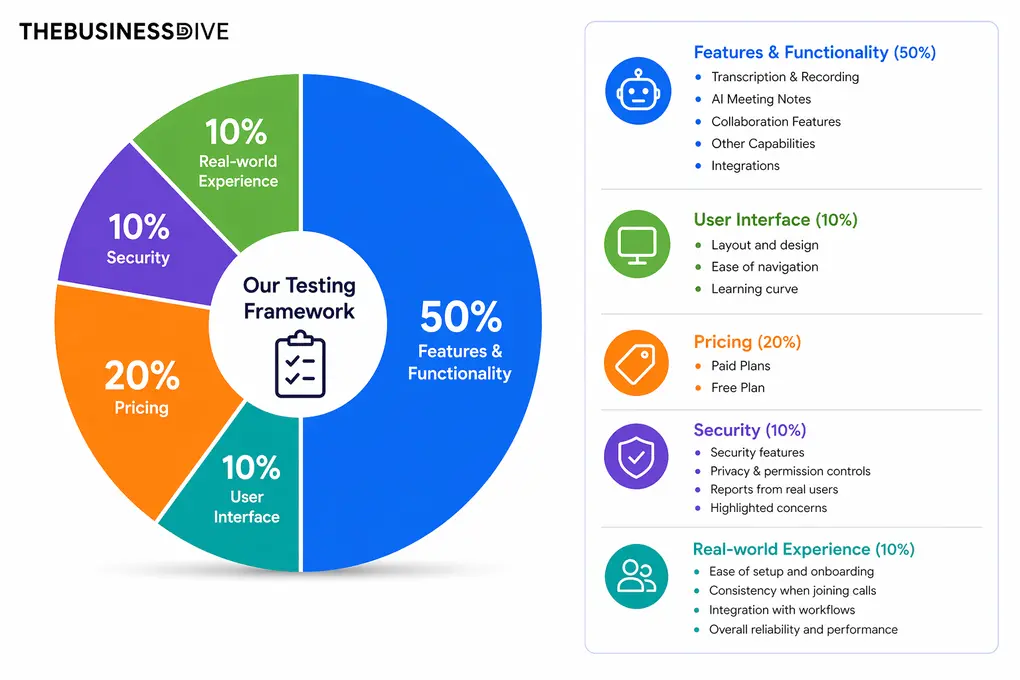
Our scoring breakdown after testing 20+ AI note-takers:
🤖 Features & functionality — 50%
🖥️ User interface — 10%
💰 Pricing — 20%
🔐 Security — 10%
👥 Real-world experience — 10%
Want a detailed breakdown of how we test each category?
Learn exactly how we test tools → Review methodology
Short on time? Here’s a quick overview of Plaud
What Impressed Me (and What Didn’t)
This is where Plaud genuinely impressed me or saved a lot of time:
This is where Plaud did not perform that well:
How Plaud Fits Into My Daily Workflow (Detailed Review)
Here, I guide you through the daily workflows where I mainly used Plaud.
Recording meetings and phone calls
Where It Saved Me Time
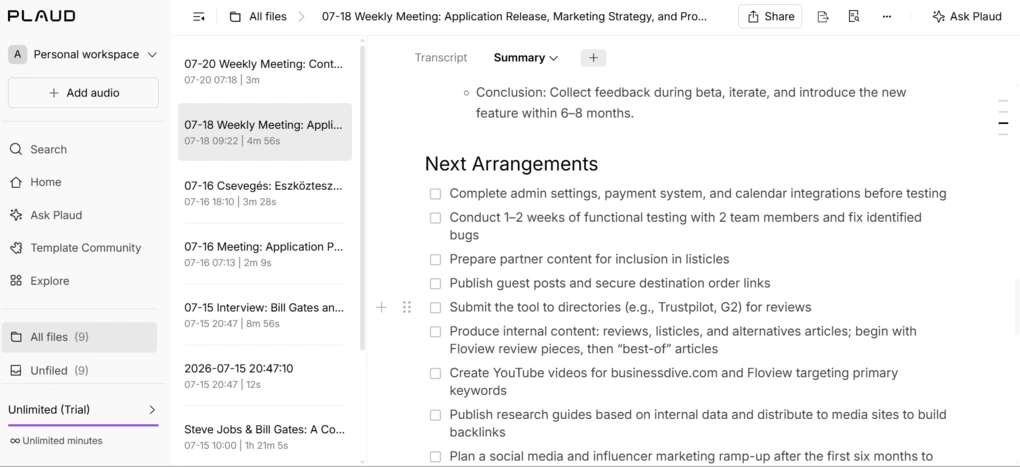
Plaud prepares AI meeting notes with key points and next arrangements. Depending on the recording length, it usually took 5–10 minutes to upload, transcribe, and generate the AI summary.
The structured notes provide you with a quick overview of what you discussed, and Plaud picked up the relevant points from my meetings and phone calls well.
I could add, remove, or rewrite points, and even generate different versions using built-in templates such as meeting minutes, highlights, quantitative analysis, intent analysis, or concept insights. Nevertheless, there are many other templates you can use.
Since Plaud supports many languages, I also tested it in my native language, Hungarian. I was genuinely impressed by how accurately it transcribed conversations and generated summaries, despite Hungarian being a challenging language for most AI note-takers.
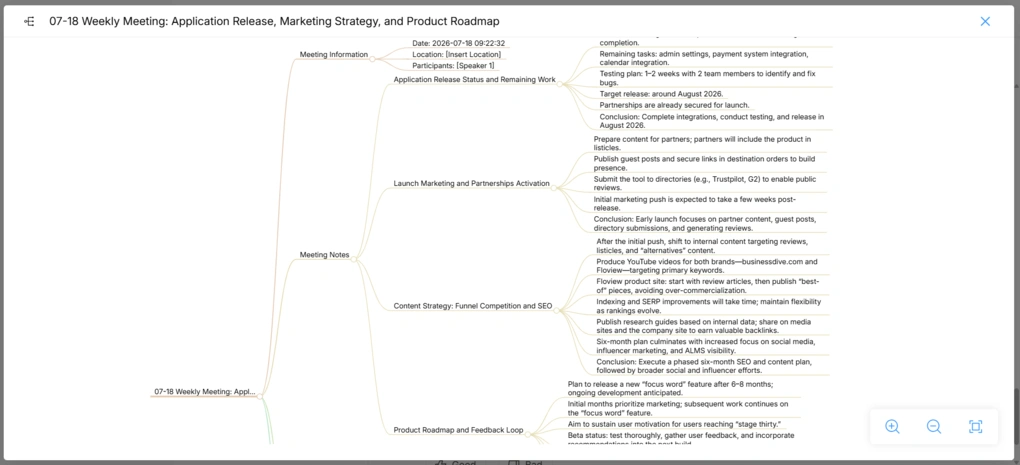
Furthermore, Plaud generates mind maps from your discussions, which is a useful feature for visual thinkers. However, the feature I used most is Ask Plaud.
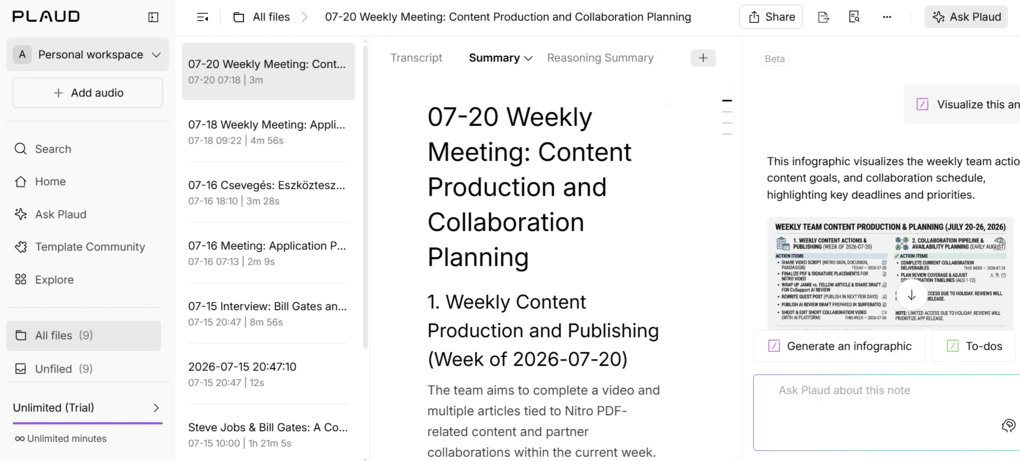
Instead of searching through the transcript manually, I simply asked questions like:
- What deadlines were mentioned?
- What tasks do I need to complete this week?
- What decisions were made during the meeting?
The responses were generated in just a few seconds. What impressed me most was that Plaud didn’t always return long paragraphs. When possible, it organized the answers into tables with priorities, making them much faster to review and act on.
Where It Struggled
In terms of AI-generated summaries and transcription, Plaud did an excellent job. The main feature I missed is a conversational intelligence tool to analyze my calls.
As someone who enjoys analyzing my own meetings, I’d love to see insights such as:
- speaking vs. listening ratio,
- filler words,
- talk time,
- sentiment trends,
- coaching recommendations,
- objection analysis for sales calls.
These kinds of analytics would make Plaud even more valuable for sales professionals, managers, and anyone looking to continuously improve their communication skills.
Brainstorming While Driving
Where It Saved Me Time
Compared to most AI note-takers, which require you to take out your phone, open the app, and start recording, Plaud made capturing ideas much faster. I simply pressed the button on my NotePin and started talking, which felt both quicker and safer, especially while driving.
I often recorded longer monologues with short pauses in between, and Plaud did a great job organizing the transcription into logical blocks instead of one long wall of text.
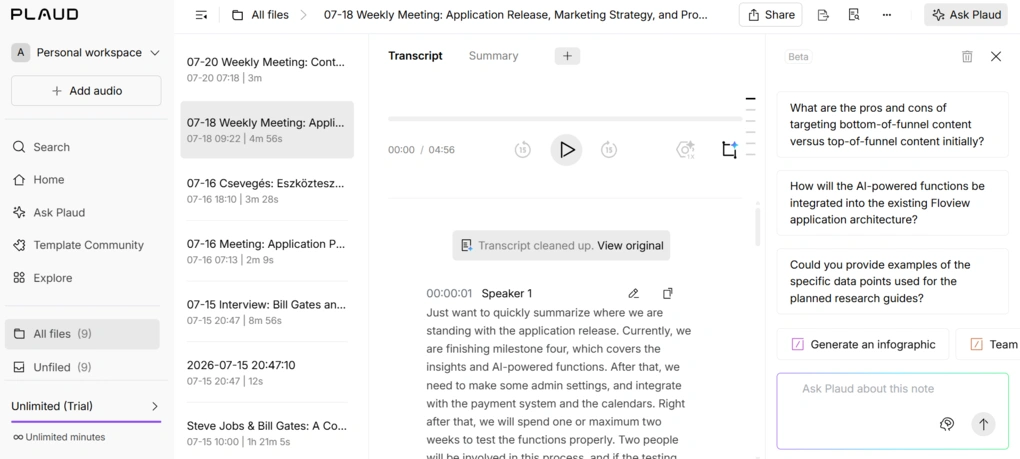
While the AI notes covered most of what I talked about, the transcription outline helped me find some of the key ideas I had, so I could read them completely and ensure I could follow that line of thinking.
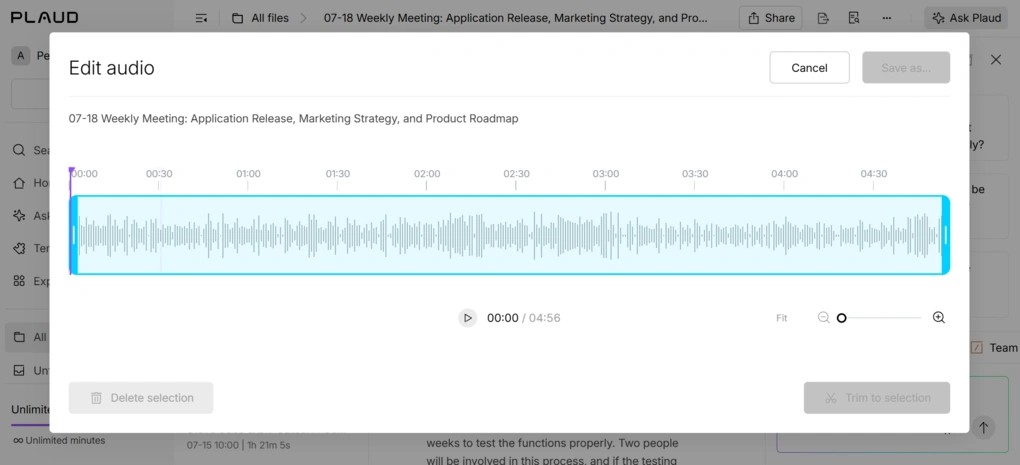
One example was when I came up with a new idea for Floviu while driving and wanted to share it with my developer. This is when I found its built-in voice editor that allows me to remove silence, trim, and delete parts of the voice recording.
Although I did not use this feature more than once, it can still be a valuable addition for these workflows, and no other AI note-takers offer this.
Finally, Plaud let me organize my recordings into different folders. So, I could create folders for different topics and save my brainstorming in the related folder.
Where It Struggled
Honestly, I didn’t run into any significant issues using Plaud to capture ideas while driving. Nonetheless, if you rarely record ideas or conversations throughout the day, you probably won’t benefit from carrying a dedicated device instead of using your phone.
Capturing Ideas on the Go
Where It Saved Me Time
One thing I quickly appreciated about Plaud was how effortless it was to capture ideas. I simply clipped the NotePin to my T-shirt, pressed the record button, and started talking. It just makes it easy and convenient to grasp an idea without unlocking my phone.
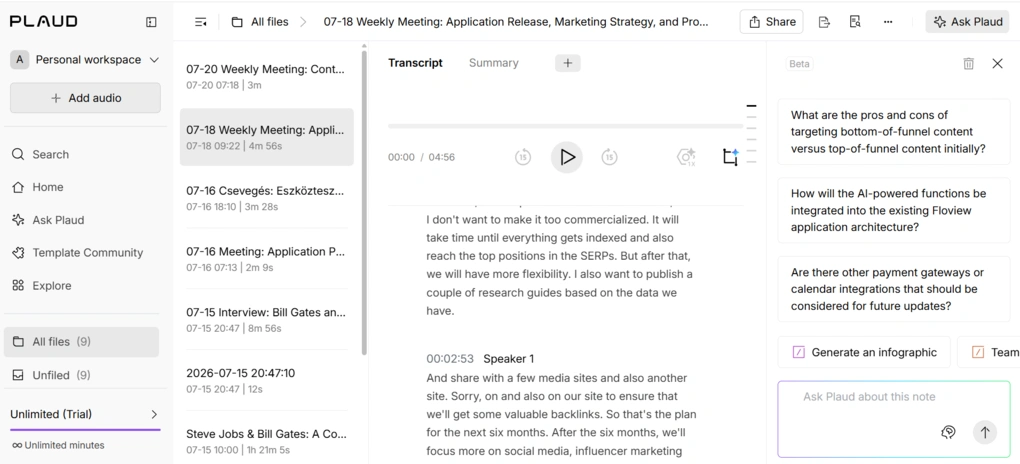
I used my NotePin numerous times while commuting, and even in noisy environments, Plaud captured what I said. The transcription accuracy was high, and I particularly valued that Plaud cleaned my transcript, so there were no filler words.
Its summarization features were a huge time-saver for me, since they quickly broke down the key action items from 15-20 minutes of brainstorming, during which at least 10 minutes were irrelevant.
Lastly, I loved that Plaud NotePin can record offline too.
Where It Struggled
The one thing I missed here is the option to quickly assign action points to my team members. For example, sometimes I come up with content ideas, and it would be useful for me to quickly pin my team to work on it.
Design, Battery Life & Everyday Use
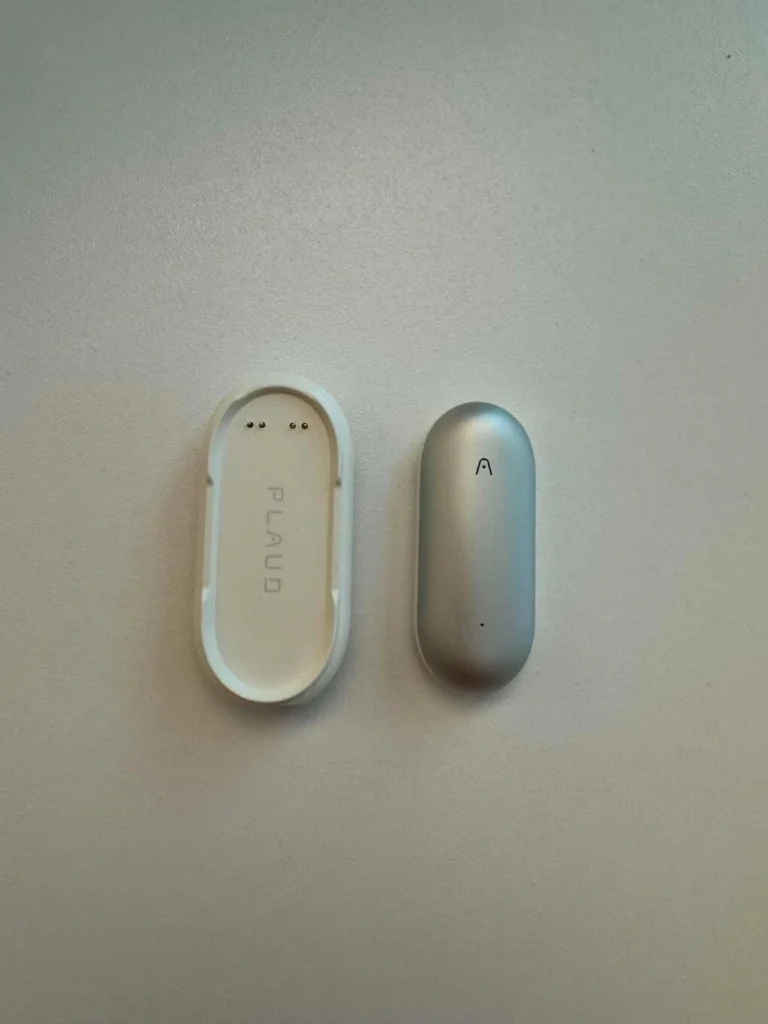
As mentioned, I used Plaud NotePin. Its design is minimalist, premium, and subtle. Since I chose a color close to my T-shirts, it blended in nicely instead of drawing attention, which I personally preferred.
The Plaud app itself is really straightforward and has no learning curve at all. Within a few minutes, I knew where everything was.
Nonetheless, the setup process of the Plaud device took more time than I expected. I first had to fully charge the device, and during my first recording, I repeatedly tapped the record button without realizing it required a firmer press to start recording.
Honestly, it took 10-15 minutes to figure out, which was a bit frustrating, but after my first day of use, it became second nature. The device shows the recording status (a red light indicates recording), so you will always know when it’s on.
Based on my experience, the battery life of my Plaud NotePin was somewhere between 20 – 35 hours depending on how much time I recorded. Nonetheless, the device does not show the battery status.
A quick note on shipping. I ordered it from Hungary, Europe, and it took around 5-7 workdays to receive it. I know it can vary significantly depending on your location, but I had a good experience here.
Overall, Plaud has exceptional design, and after a few days, wearing the NotePin became as natural as putting on a watch.
Explore our Apps directory
A curated directory of software tools we’ve independently reviewed, with links to full reviews, comparisons, and category guides.
What You Need to Know About Pricing
Before using Plaud, you must purchase the device and select a plan.
Let’s start with the devices!
Devices
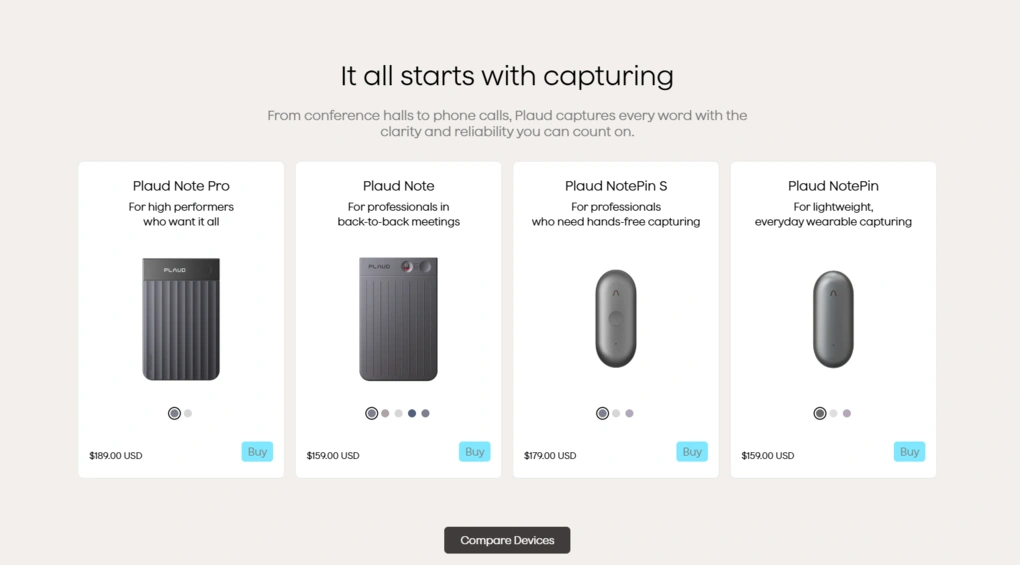
The one I used (Plaud NotePin) is the lightweight version that includes a magnetic pin and clip, ideal for everyday wearable capturing. Above, I already described how effortless it was to wear and use it on a daily basis, so I had a great experience with NotePin.
Plaud also offers other device options for different use cases. The NotePin S is a refreshed version of the NotePin with a slightly different design. Since I haven’t tested it myself, I can’t comment on its real-world performance.
For users who frequently record phone calls, Plaud offers the Plaud Note, a card-sized recorder that lets you switch between phone call and in-person recording modes. The Plaud Note Pro is the company’s most advanced AI note taker and comes as a magnetic phone case with additional recording capabilities.
Subscription plans
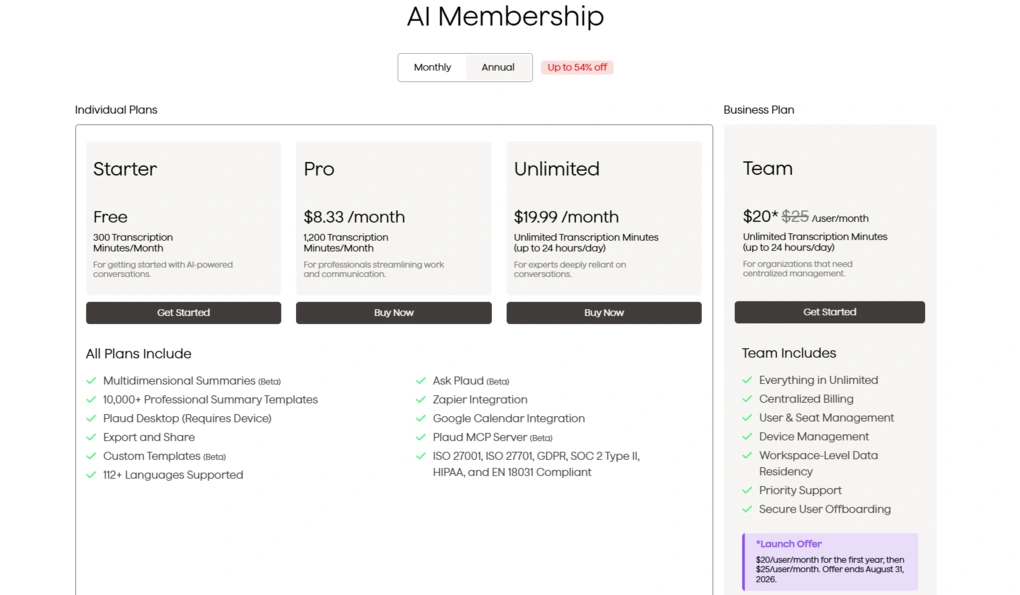
The free Starter plan includes 300 transcription minutes per month, making it a good option if you only record occasionally.
The Pro plan is $8.33 per month with annual billing and includes 1,200 transcription minutes per month. Based on my experience, it should be enough for most users.
For heavy users, Plaud also offers an Unlimited plan for $19.99/month (annual billing), which removes the transcription limit. This is the plan I used during my testing.
Also, Plaud offers a Team plan for $20 per user per month with annual billing that includes centralized billing, user management, priority support, and more.
Cost vs. value
Compared to other AI transcription tools, Plaud’s subscription pricing is competitive. There are cheaper, but significantly more expensive AI note-takers.
The main consideration is that, unlike purely software-based alternatives, you’ll need to purchase the hardware as well.
While that increases the upfront cost, I found it more convenient to wear a dedicated recorder than to use my phone for call recording. This can be especially useful for professionals who have numerous in-person conversations and phone calls each day.
How Secure Is Plaud?
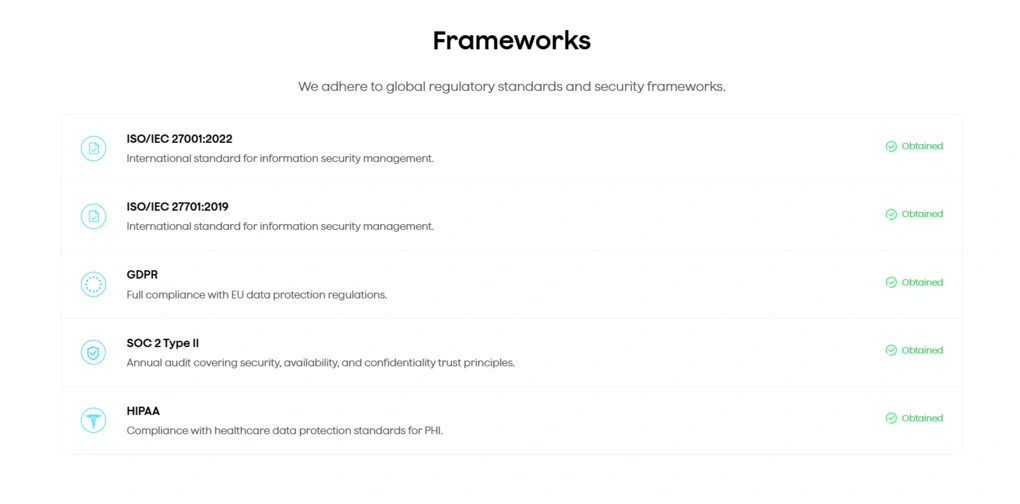
The short answer: Plaud is a secure AI note-taking platform that complies with major security and privacy standards, including ISO/IEC 27001:2022, ISO/IEC 27701:2019, GDPR, SOC 2 Type II, and HIPAA.
The main consideration isn’t the platform itself, but how you use it. When recording in-person meetings or phone calls, it’s your responsibility to inform participants and comply with applicable local laws and company policies.
Unlike many AI meeting assistants for online meetings, Plaud doesn’t automatically notify others that a recording is taking place.
Final thoughts
Plaud genuinely surprised me and exceeded my expectations. Before testing it, I relied on the mobile apps of AI note-takers to capture ideas and meetings, and I didn’t think I needed a dedicated recording device.
After using the NotePin for a few weeks, my perspective changed. The combination of its lightweight design, one-button recording, accurate transcription, and well-structured AI summaries made it much easier to capture conversations and ideas without interrupting the moment.
If you mainly attend virtual meetings, a traditional AI meeting assistant may already cover your needs. But if your day involves in-person meetings, phone calls, commuting, or capturing ideas on the go, Plaud offers a noticeably smoother experience than reaching for your phone every time.
Looking for similar tools?
Visit our AI note-takers library to explore other apps we’ve reviewed in this space and how they compare.
Why you can trust our reviews
At thebusinessdive.com, our team tests, reviews, and compares hundreds of productivity apps every year — from project management tools to note-taking apps. We dive deep into real-world use cases to help you find the right tools that actually improve your workflow, not just add noise.
Our mission? No fluff, no shortcuts—just honest, hands-on insights from productivity pros.
Discover how we stay transparent, read our review methodology, and let us know about any tools we missed.
Frequently asked questions
Is Plaud Note worth the investment?
I would recommend Plaud to professionals, founders, consultants, and entrepreneurs who regularly have important conversations and want a reliable way to ensure no valuable ideas, action items, or decisions are forgotten.
For them, Plaud Note definitely is worth the investment.
Is using Plaud legal?
Yes, Plaud complies with all the major regulations, including ISO/IEC 27001:2022, ISO/IEC 27701:2019, GDPR, SOC 2 Type II, and HIPAA.
Is Fireflies AI or Plaud better?
The answer completely depends on your use case. If you have numerous in-person meetings, phone calls, and love to capture ideas while commuting or driving, Plaud is a more capable solution, as it can replace your voice memo app and AI note-taker at once.
However, if you only have virtual meetings and don’t want to invest heavily, Fireflies AI is a more practical choice.
Disclosure: I only recommend products I would use myself, and all opinions expressed here are my own. This post may contain affiliate links that, at no additional cost to you, may earn a small commission. Read the full privacy policy here.

Hey there! I am Aron, the founder of Thebusinessdive. I have been testing productivity apps for almost three years now. I reach 25.000 -50.000 people monthly with the mission to help you find the perfect productivity apps. Subscribe to my YouTube channel, newsletter, and social media to hear more about the best productivity tools. Let’s dive in!