


Fireflies AI Review 2026: My Opinion After 10+ Meetings
After using Fireflies AI for 10+ meetings for more than three years, I realized something interesting: it’s probably one of the most balanced AI note-takers on the market.
It’s not the most advanced. It doesn’t have the best transcription accuracy. And it’s certainly not the most generous free tool either.
But compared to 20+ competitors I tested, Fireflies AI consistently delivered where it mattered most: reliable transcriptions, solid meeting summaries, broad platform support, and pricing that actually makes sense.
In this Fireflies AI review, I’ll break down where it genuinely impressed me, where it still falls behind compared to some of its alternatives, and whether it’s worth paying for in 2026.
Verdict
Here’s the quick verdict if you don’t want to read the full review:
🎯 Best for: Budget-friendly meeting transcription & note-taking
🚫 Not ideal for: If you are looking for an extensive free plan
⭐ Biggest strength: Language and platform support
⚠️ Biggest weakness: Limited free plan
⚖️ Verdict: A versatile AI note-taker with reasonable pricing and reliable core features
🏆 Score: 4.4 / 5
✅ Tested with our review & scoring methodology ✅ Real-world testing ✅ Unbiased evaluation
Fireflies AI Review
Summary
Fireflies AI provides automated note-taking for over 10 million people on platforms like Zoom, Microsoft Teams, Google Meet, Webex, and others. Fireflies is one of the best AI note-takers you can find. Whether you have internal or external meetings, Fireflies is an ideal addition to your tool stack to save time and money.
|
|
Supports 100+ languages and most major meeting platforms
|
|
|
Accurate transcriptions
|
|
|
Well-structured meeting summaries
|
|
|
Solid collaboration features
|
|
|
Affordable paid plans
|
|
|
Limited free plan
|
|
|
Fireflies AI’s bot joined late in the meeting sometimes
|
How We Test AI Note-Takers
To keep our reviews and final scores fair and consistent, we evaluate every AI note-taking tool using a standardized testing framework built on real-world usage and hands-on experience.
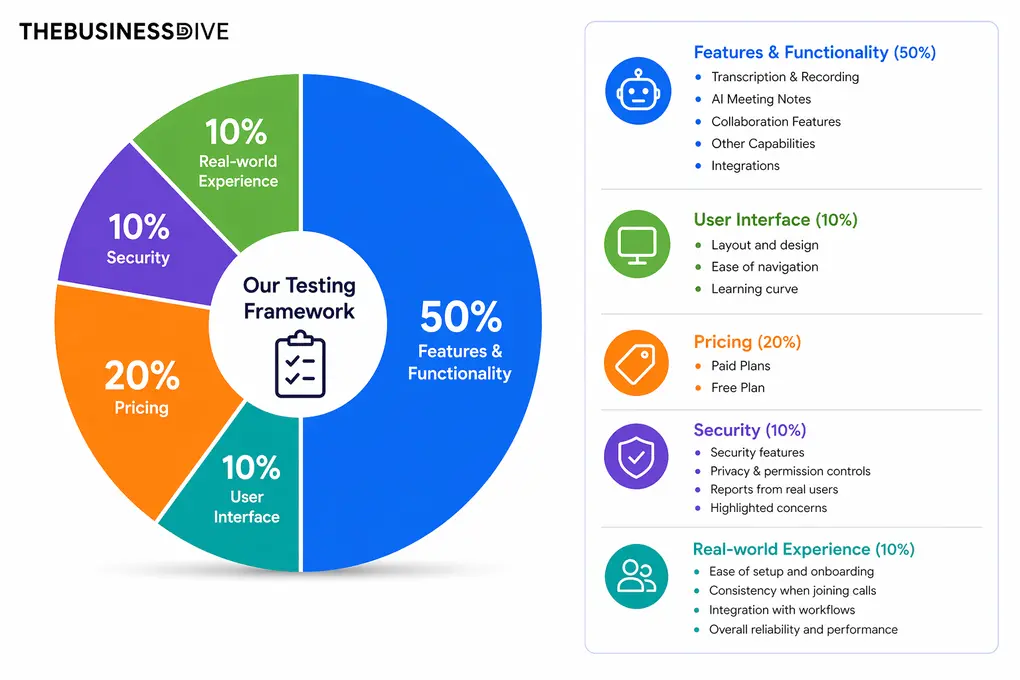
Our scoring breakdown after testing 20+ AI note-takers:
🤖 Features & functionality — 50%
🖥️ User interface — 10%
💰 Pricing — 20%
🔐 Security — 10%
👥 Real-world experience — 10%
Want a detailed breakdown of how we test each category?
Learn exactly how we test tools → Review methodology
Short on time? Here’s a quick overview of Fireflies AI
What is Fireflies AI?
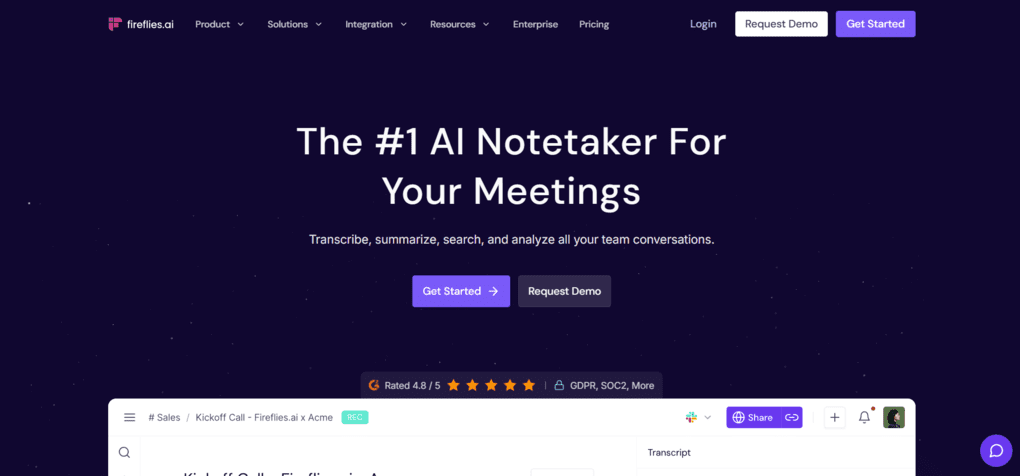
Fireflies AI provides automated note-taking for over 10 million people on platforms like Zoom, Microsoft Teams, Google Meet, Webex, and others.
It utilizes technologies like natural language processing and speaker recognition. Natural language processing helps you understand what you are saying during online meetings.
At the same time, speaker recognition gives a speaker ID for each meeting participant so you can track who said what in the meeting transcription.
Besides the extensive meeting platform support, it understands and transcribes most languages in the AI note-taker market. Normally, the best AI note-takers can take notes in 20-30 languages; in contrast, Fireflies transcribes online meetings in over 100 languages.
How Fireflies AI performed in my daily workflow (3 years of experience)
My overall experience with Fireflies AI was solid, especially considering how easy it is to get started. Setup took only a few minutes, and it worked reliably across different platforms, which made it easy to integrate into my existing workflow.
The transcription accuracy wasn’t on the same level as Fellow in my testing. Still, it consistently outperformed one of its most popular alternatives, Otter AI, in both transcript reliability and summary quality.
For me, Fireflies AI stands out because it balances usability, transcription quality, integrations, and pricing better than most competitors, including Otter AI.
Overall, Fireflies AI is not the most advanced tool in any single category. Still, it offers a strong mix of usability, features, and pricing, which makes it a very practical choice for everyday meeting workflows.
How we arrived at Fireflies AI’s final rating
Fireflies AI performed well in terms of features. The only area where it gets only 4 points out of 5 is its other capabilities, because I would expect more from a leading AI note-taker, for example, meeting agendas.
It received the maximum score for the paid plans, as it is one of the most budget-friendly solutions for professionals and teams. Nevertheless, its free plan is only mediocre (3/5).
Who Would be a Good Fit for Fireflies AI?
Who Would be a Bad Fit for Fireflies AI?
The features that mattered most during testing
These were the parts of Fireflies AI that mattered most in real meetings.
Transcription tool
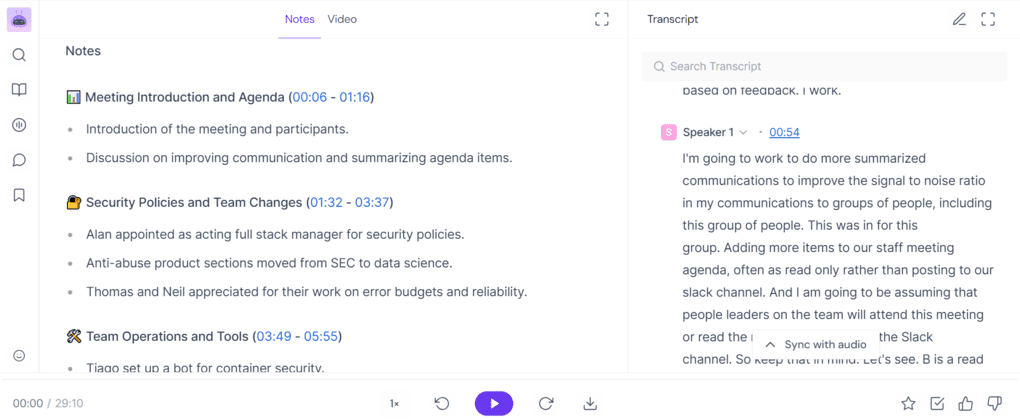
Fireflies AI can transcribe meetings and video or audio files. When you transcribe meetings or files, you will see the meeting transcripts on the right side. It also supports bot-less video capture, which is a useful addition.
In my experience, it is a reliable transcription tool with between 85% and 95% accuracy. Compared to Fellow, it did not achieve the same level of transcription accuracy, but it was found to be less error-prone than Otter AI, another popular choice.
Once the virtual meeting starts, Fireflies automatically joins and transcribes it. The meeting transcription is divided up using the speaker IDs, making it easier to review and track the key topics discussed.
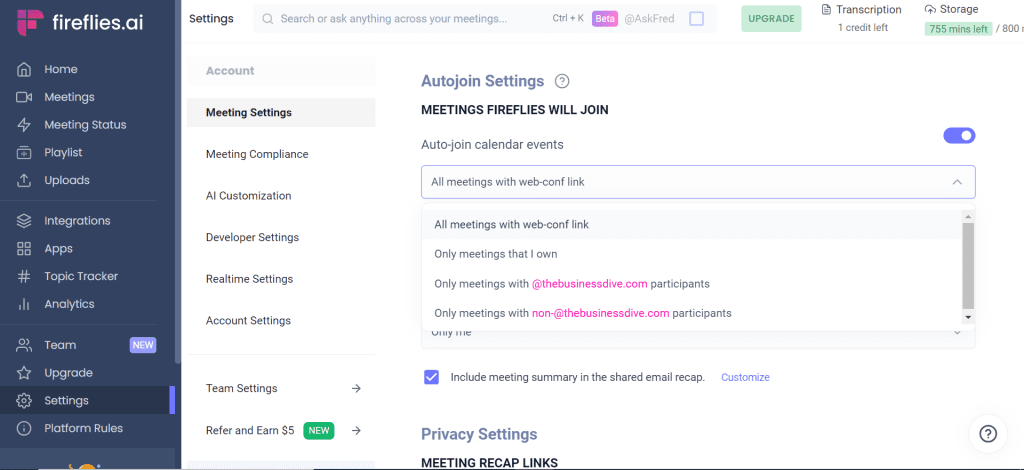
In the settings menu, you can select when you want Fireflies AI to join your meetings or send you AI summaries. This high-level customization option lets you fully control when you want Fireflies AI to join your meetings.
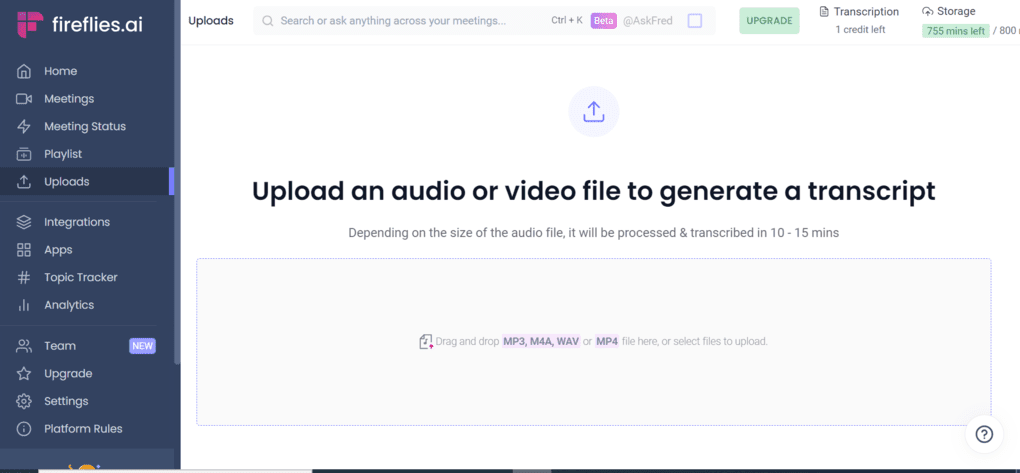
You can also transcribe video and audio files. It takes around 10-15 minutes, and you will have access to an accurate transcription of the file with a summary.
Automated meeting summaries
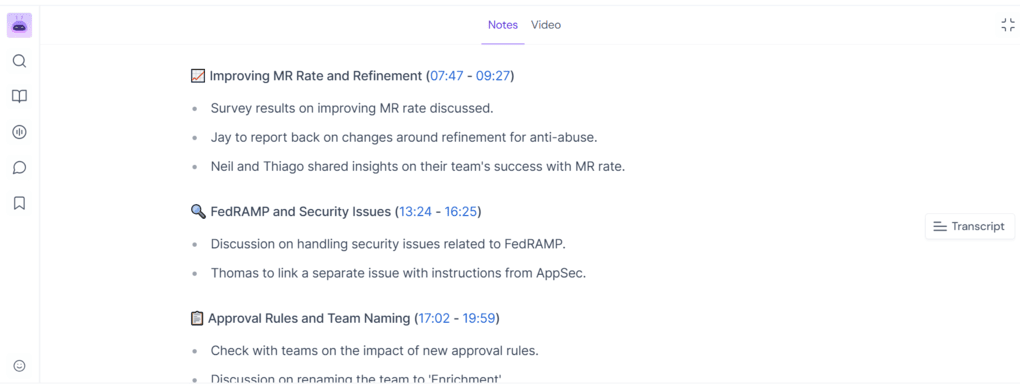
Once the virtual meetings are over, Fireflies AI will send you the meeting recaps, which include an overview, key points with timestamps, and action items. These recaps have all the important details you need to quickly review what happened during the meeting.
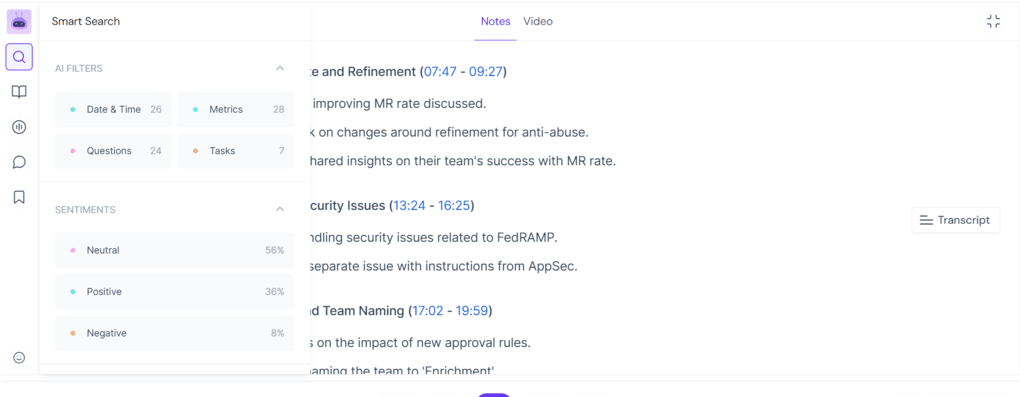
Fireflies AI’s smart search feature can filter specific points from the meeting, such as questions, key metrics, dates, and more. This allows you to quickly filter on topics that interest you.
Additionally, you can easily edit and share meeting notes with a few clicks. Besides the meeting notes, Fireflies AI will also send the meeting recording and transcription.
Compared to other AI note-takers, Fireflies AI’s meeting notes are among the better ones for sure. However, if you need detailed AI notes, you might want to check out MeetGeek, as, based on my experience, it provides more extensive meeting notes. But if you are looking for customization, Fellow could be a good choice.
Live assist
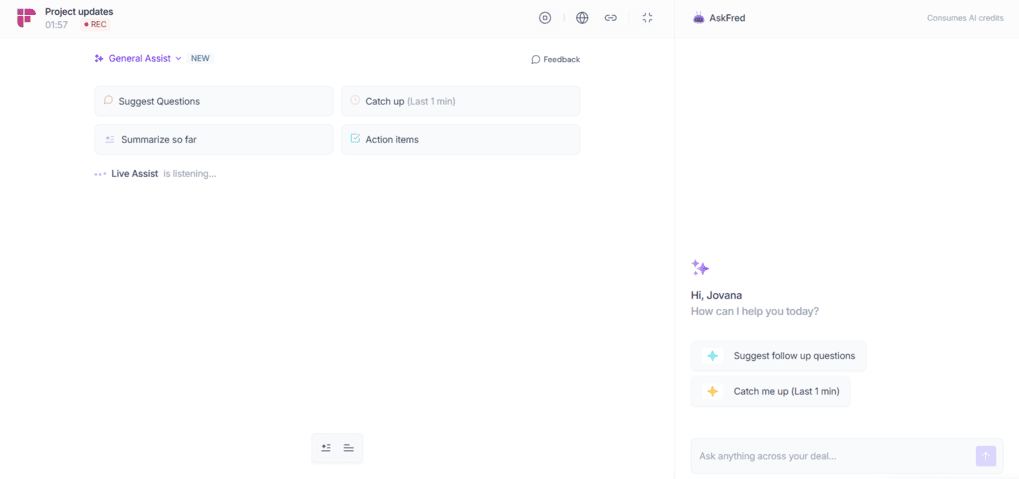
In addition to post-meeting summaries, Fireflies AI can also help you during meetings with its Live Assist feature.
For example, this feature can quickly summarize what’s been discussed so far, point out action items as they come up, or help you catch up if you join a meeting late. This is a lifesaver in longer meetings, where it’s easy to lose focus or miss a few important moments.
It’s not a feature I used in every single meeting. But when I needed it, it saved me from rewatching the whole meeting later.
Recordings
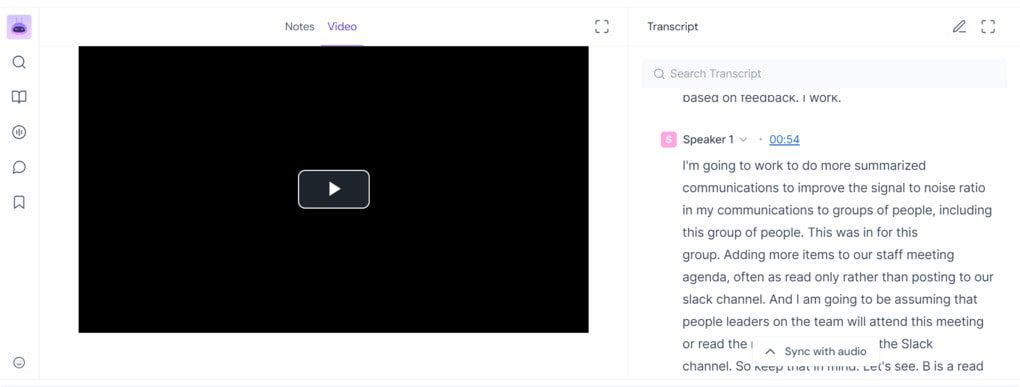
Fireflies AI will automatically join and record meetings when they start. The meeting recording is easily accessible after the meeting. You just click on the meetings tab to find the recording with the transcription and the notes.
Collaboration features
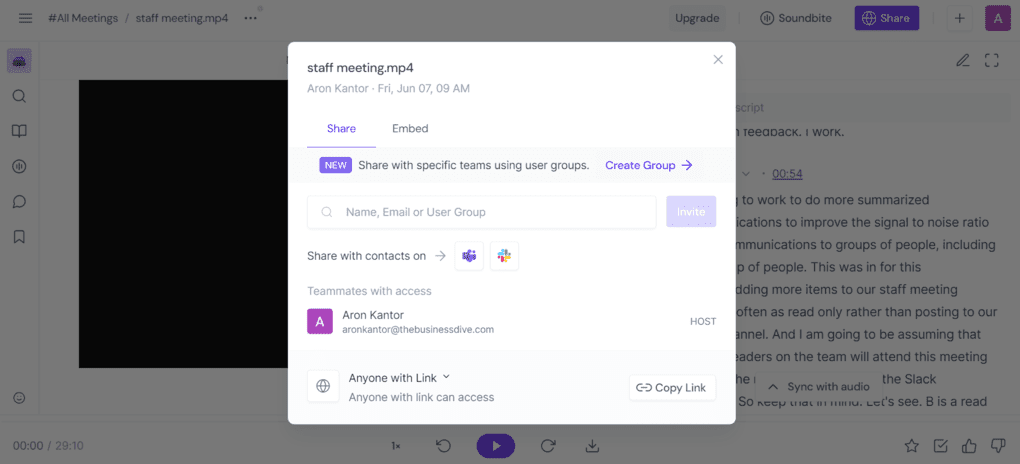
One of the main reasons Fireflies AI is one of the best note-taker apps for teams is the collaboration features. You can organize your team’s meeting notes, recordings, and transcriptions in one single place.
Also, you can easily share and edit your meeting notes with others, so you will not miss any important details from voice conversations. Team members can also leave comments and reactions on specific parts of the transcript.
Conversation intelligence
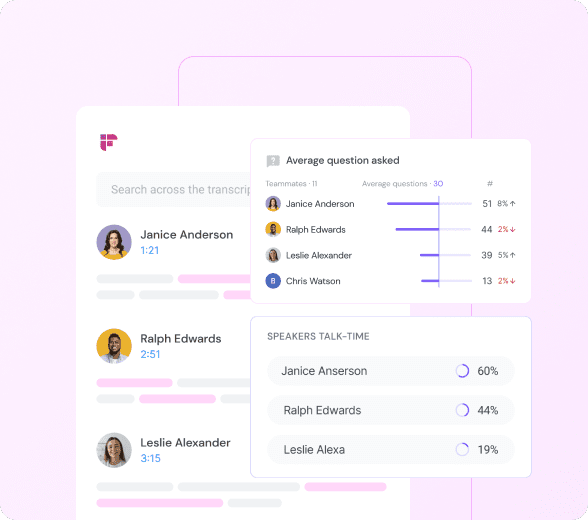
Analytics is an excellent feature to improve your meeting performance or coach teammates. You can track speaker talk time and access other key metrics like the sentiment of the meeting.
This feature can be particularly useful for sales calls. Accessing and analyzing these valuable insights will make you and your entire team more efficient.
Other useful features
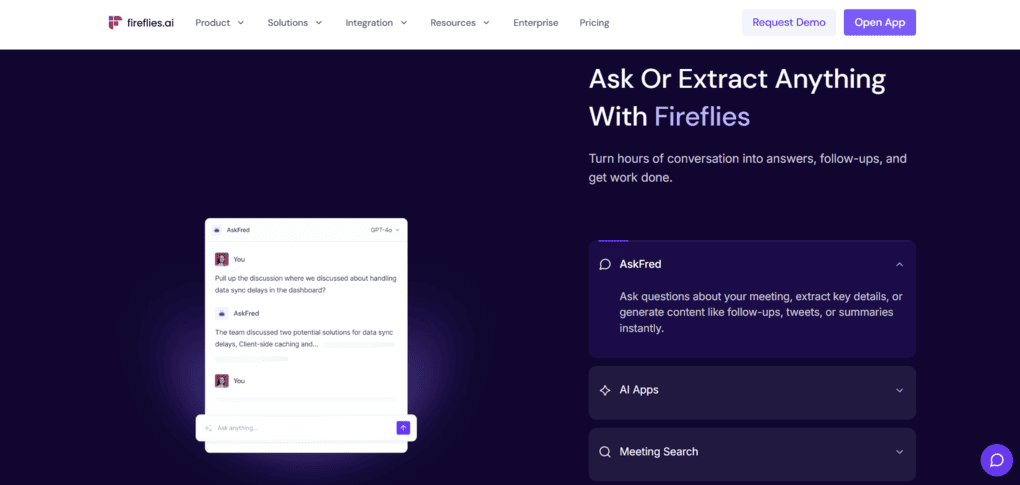
There were also a few smaller features I ended up using more than expected. For example, it has an AI assistant called Fred. You can ask anything about an online meeting, and it will find the answer in seconds.
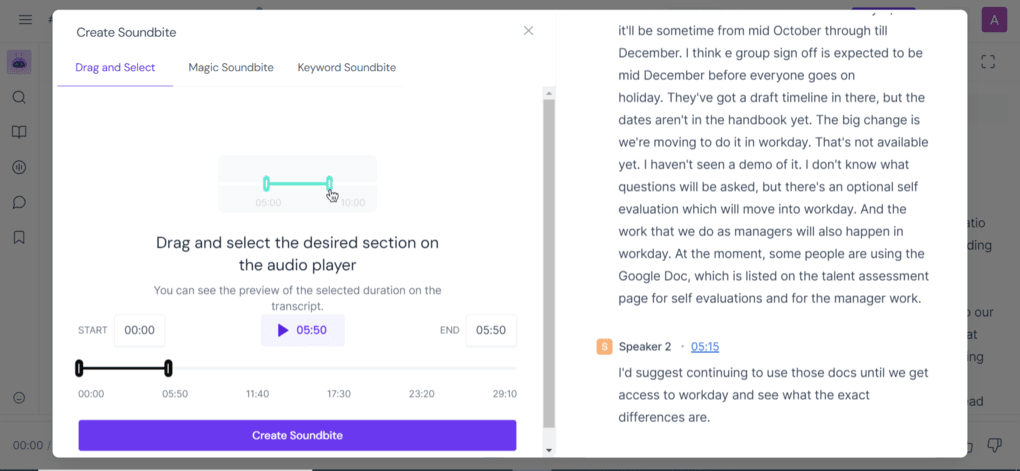
Also, you can create short audio clips from different parts of the call to share with your team. These audio snippets are called Soundbites, and they can be helpful when you want to share the most memorable moments of an hour-long meeting.
For example, when you want to share the key moments from an interview, such a feature can come in handy.
Connecting Fireflies AI with your existing workflow
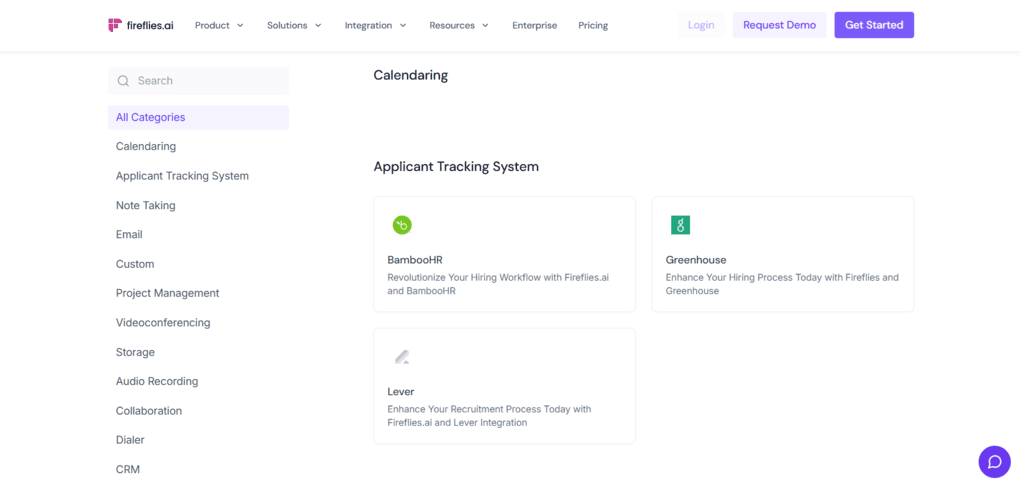
Fireflies AI offers seamless integration with various third-party applications. The must-have integrations you need to start with are Google Calendar & Google Meet to ensure you will see the calendar events and join them easily.
Furthermore, you can connect project management tools, customer relationship management (CRM) systems, collaboration apps, and various other tools. For instance, you can integrate it with tools like Notion, ClickUp, monday.com, Slack, Google Docs, and Asana to keep meeting notes connected to your daily workflows.
Explore our Apps directory
A curated directory of software tools we’ve independently reviewed, with links to full reviews, comparisons, and category guides.
Ease of use and navigation
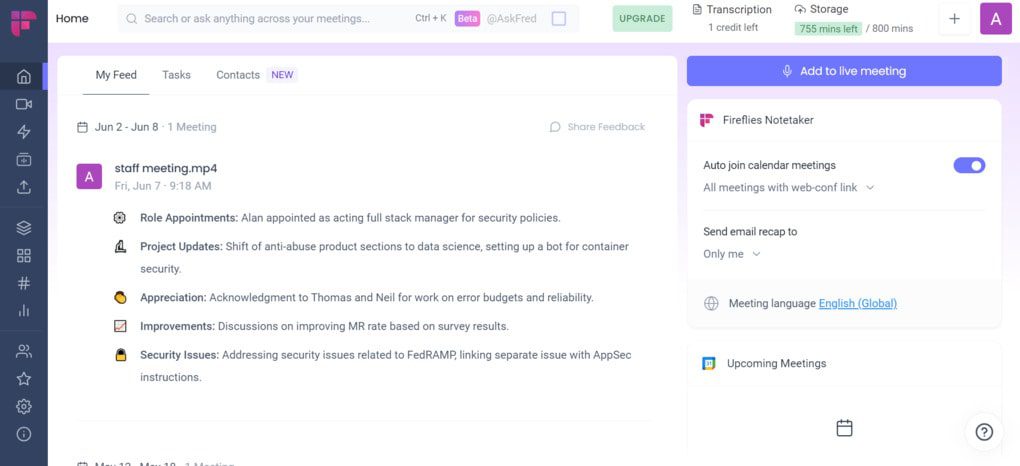
Let’s talk about the user interface. Fireflies has a user-friendly interface, and you can easily access every essential feature with a few clicks. Even a beginner with these tools can smoothly navigate and utilize Fireflies AI’s function.
Fireflies is available on web, mobile, and desktop, so you can record, transcribe, summarize, and search meetings across different devices, depending on how you prefer to work.
Overall, Fireflies AI gave me a pleasant surprise in terms of user interface and accessibility.
Free plan & paid options
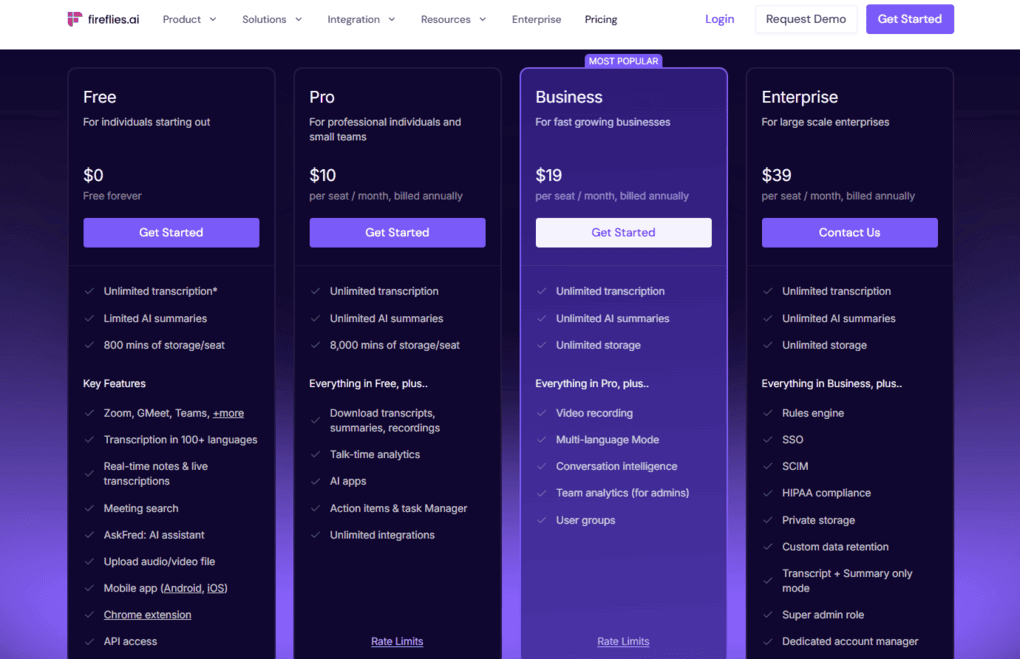
Fireflies AI offers four plans for individuals and small and large teams.
The free plan includes unlimited storage capacity and transcription for shared bot meetings. Fireflies AI’s free plan is usable, but not especially generous compared to tools like Fathom or tl;dv.
If you want to transcribe files, you are only allowed to transcribe three meetings for free. Also, you can transcribe recordings below 100 megabytes.
I recommend the free plan for those who have just a couple of meetings in a month and do not want to spend time on meeting notes.
Compared to many other AI meeting assistants, Fireflies’ paid plans are reasonably priced, especially if you rely on meetings every day. The Pro plan costs $10 per seat per month, the Business plan is priced at $19 per seat per month, and the Enterprise plan starts at $39 per seat per month, all billed annually.
The Pro plan is ideal for people or small teams having many meetings in a month. It includes unlimited transcription minutes and meeting recaps. You will also have access to the AI assistant feature and the smart searching filters.
If you want the conversation intelligence feature, which includes meeting analysis functions and team insights, you must go with the Business plan. The Business plan is perfect for small and large teams that can utilize these extra features.
The enterprise plan is for large-scale enterprises. You will get a dedicated support team and an onboarding program here.
Ultimately, Fireflies AI’s free plan is only decent compared to other AI note-takers. Most of the juice comes with the Pro and Business plans. The good news is that these plans are quite budget-friendly solutions when considering the pricing of other AI tools.
Where Fireflies AI works well (and where it falls short)
Here’s what worked well for me and where I still think Fireflies AI falls behind competitors.
Where Fireflies AI works really well
Where Fireflies AI still falls short
Fireflies AI’s alternatives
If Fireflies AI doesn’t fully match your workflow, these alternatives are worth considering.
|
App |
Best for |
Description |
|---|---|---|
|
Fellow |
Best overall |
A top AI note-taker for professionals and teams. This is the one I use for online meetings. |
|
Notta |
Best for multi-language transcription |
A unique AI note-taker that allows multi-language transcription, enabling people to speak two different languages during online meetings. |
|
MeetGeek |
Best for multi-language transcription |
A versatile AI note-taking app with the best AI meeting summaries. |
|
tl;dv |
Best simple AI note-taker |
A simple option for individuals with a feature-rich free plan. |
|
Fathom |
Best free AI note-taker |
An accurate AI note-taker with an extensive free plan. |
|
Radiant |
Best free AI note-taker for Mac |
It is a 100% free AI bot-less note-taker for Mac users for in-person and online meetings. |
|
Otter AI |
A popular AI note-taker |
One of the most popular AI note-takers for Google Meet, Zoom, and Microsoft Teams. |
|
Granola |
Best for users need a simple bot-less AI note-taker |
Granola is a lightweight AI note-taking app that transcribes and summarizes meetings without bots, with a generous free tier, but it’s basic and lacks advanced features. |
|
Krisp |
Best bot-less AI note-taker supporting high audio quality |
Krisp is a Voice AI platform for clearer communication and more productive meetings, combining real-time audio enhancements with AI note-taking. |
|
Bluedot |
An easy-to-use bot-less AI note-taker |
Bluedot is a straightforward and easy-to-use bot-free AI note-taker. |
|
Zoom AI Companion |
Best for Zoom users needing built-in AI note-taking |
A solid built-in AI assistant for Zoom that offers meeting summaries, basic transcription, and action items, but lacks advanced features. Full Zoom AI Companion review | Quick Zoom AI Companion overview |
|
Tactiq |
Best for individuals and workflow automation |
Tactiq is an AI meeting assistant that provides real-time transcription, customizable summaries, and workflow automation. |
|
Read AI |
Best for teams & individuals who want an all-in-one AI meeting assistant |
Read AI is an AI meeting assistant with solid transcription, summaries, and search, but limited features on lower plans and privacy concerns make it hard to rely on. |
|
Plaud |
Best for in-person conversations |
A unique AI note-taker with dedicated hardware for recording meetings, phone calls, and ideas wherever you are. |
Related articles:
Compare Fireflies AI vs alternatives

Fireflies AI VS Otter AI
Notta VS Fireflies AI
Fellow VS Fireflies AI
Fireflies AI VS MeetGeek

Fireflies AI VS Fathom
The bottom line on Fireflies AI
After testing Fireflies AI for years and seeing how this AI note-taker evolves, I think its biggest advantage is balance.
It may not dominate a single category like Fathom (free plan)or MeetGeek (AI meeting notes), but it consistently performs well across transcription, integrations, collaboration, language support, and pricing.
That combination makes it one of the easiest AI note-takers to recommend for teams and professionals who want reliability without paying too much.
Looking for similar tools?
Visit our AI note-takers library to explore other apps we’ve reviewed in this space and how they compare.
Why you can trust our reviews
At thebusinessdive.com, our team tests, reviews, and compares hundreds of productivity apps every year — from project management tools to note-taking apps. We dive deep into real-world use cases to help you find the right tools that actually improve your workflow, not just add noise.
Our mission? No fluff, no shortcuts—just honest, hands-on insights from productivity pros.
Discover how we stay transparent, read our review methodology, and let us know about any tools we missed.
Frequently asked questions
Is Fireflies.ai free?
Fireflies AI has a free plan that includes unlimited storage capacity and transcription for shared bot meetings. Nevertheless, the advanced features come with the Pro and Business Plans. So, the free plan is ideal for those who just have a few meetings in a month and want to dedicate their full attention to the meeting participants by offloading note-taking to Fireflies AI.
Does Fireflies AI work with Google Meet?
Fireflies AI works with Google Meet, MS Teams, Zoom, Webex, GoToMeeting, Skype, Lifesize, and Dialpad Meetings. You can transcribe meetings on these video conferencing platforms with Fireflies AI in over 69 languages.
Is Fireflies.ai safe to use?
Fireflies.ai is a cloud-based tool that encrypts data both at rest and in transit to protect user privacy. As a cloud-based tool, Fireflies.ai can be accessed from any device with an internet connection. Its high data security standards ensure that all your data, including every audio recording, transcript, and meeting summary, is secured.
Is Otter AI better than Fireflies AI?
Otter and Fireflies are among the most popular meeting assistants. While Otter and Fireflies have similar technology backgrounds and can significantly increase individual and team productivity, there are differences. Fireflies offers additional features like meeting summaries and action items, which go beyond basic transcription.
In this Fireflies AI Vs Otter AI comparison, I also found that Fireflies AI has higher transcription accuracy based on user reports, and is a more versatile app.
How accurate are Fireflies AI’s meeting notes?
Personally, I experienced that the transcription accuracy is over 95%. However, it is important to remember that the accuracy may vary depending on the audio quality, background noise, and individual speaking styles.
If you are looking for some bot-free options, check out this article: 5 Best Bot-Free AI Note-Takers In 2026 (NOT What You’d Think)
Disclosure: I only recommend products I would use myself, and all opinions expressed here are my own. This post may contain affiliate links that, at no additional cost to you, may earn a small commission. Read the full privacy policy here.

Hey there! I am Aron, the founder of Thebusinessdive. I have been testing productivity apps for almost three years now. I reach 25.000 -50.000 people monthly with the mission to help you find the perfect productivity apps. Subscribe to my YouTube channel, newsletter, and social media to hear more about the best productivity tools. Let’s dive in!
Solid review of Fireflies. One tool worth considering alongside it is CogniAIX – particularly for teams that need not just transcription but a full conversation intelligence layer: automatic action items, decisions, and follow-ups extracted from every call. Fireflies is strong on transcription; CogniAIX goes a step further into structured output.