


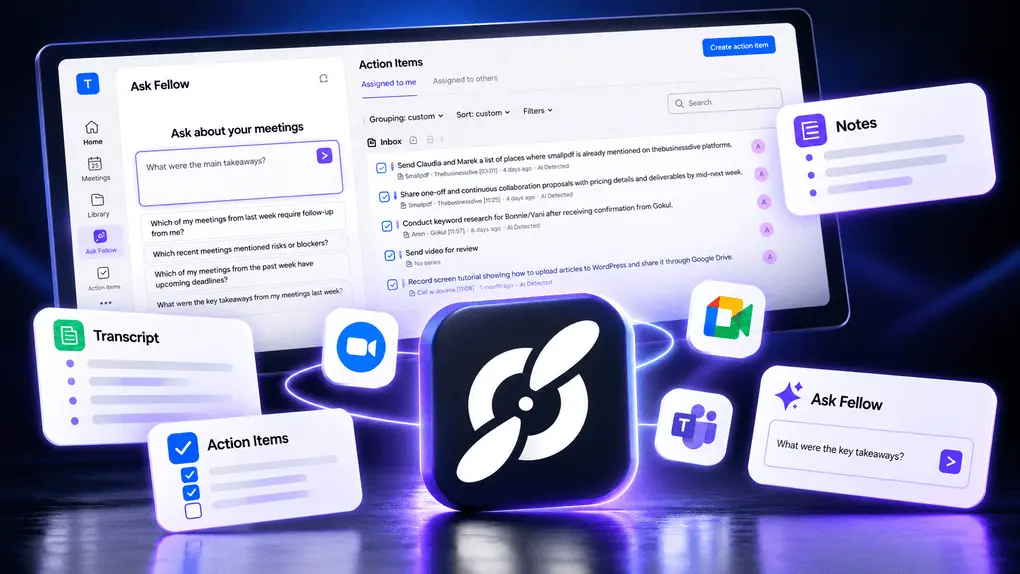
Fellow AI Review: My Thoughts After 2 Years Using This AI Meeting Note Taker
I’ve used Fellow as my default AI note-taker for more than two years, across countless online meetings. In this Fellow review, I’ll share what I love about it, where it falls short, and whether it’s still worth using in 2026.
Here’s my quick verdict if you don’t want to read the full review:
My verdict after 2+ years with Fellow
🎯 Best for: Teams and professionals who need accurate AI meeting notes, meeting minutes, and meeting summaries, especially in industries where security and governance controls matter
🚫 Not ideal for: Free AI note-taking
⭐ Biggest strength: Highly accurate AI meeting transcription, meeting notes, meeting minutes, and summaries with native integrations for Zoom, Google Meet, and Microsoft Teams, plus enterprise-grade security and governance controls for regulated industries
⚠️ Biggest weakness: The free version is more like a trial
⚖️ Verdict: One of the most advanced AI note-takers with high security, plenty of productivity tools, and enterprise-grade control
🏆 Score: 4.5 / 5
✅ Tested with our review & scoring methodology ✅ Real-world testing ✅ Unbiased evaluation
Fellow Review
Summary
Fellow is an AI meeting assistant designed for organization-wide use, but it works great with smaller teams and individuals. Whether you have online meetings on Zoom, Teams, or Google Meet, it works on all the main meeting platforms. Fellow helps increase your productivity and efficiency in numerous ways, not just in online meetings
|
|
Accurate transcriptions and summaries
|
|
|
Bot and Bot-less transcription & recording
|
|
|
It offers numerous productivity tools besides the essential features
|
|
|
AI summaries
|
|
|
A budget-friendly option for teams
|
|
|
High-security standards
|
|
|
Have more features in the free plan
|
|
|
You need to install the Fellow desktop app in order to use botless recording
|
What is the Fellow app?
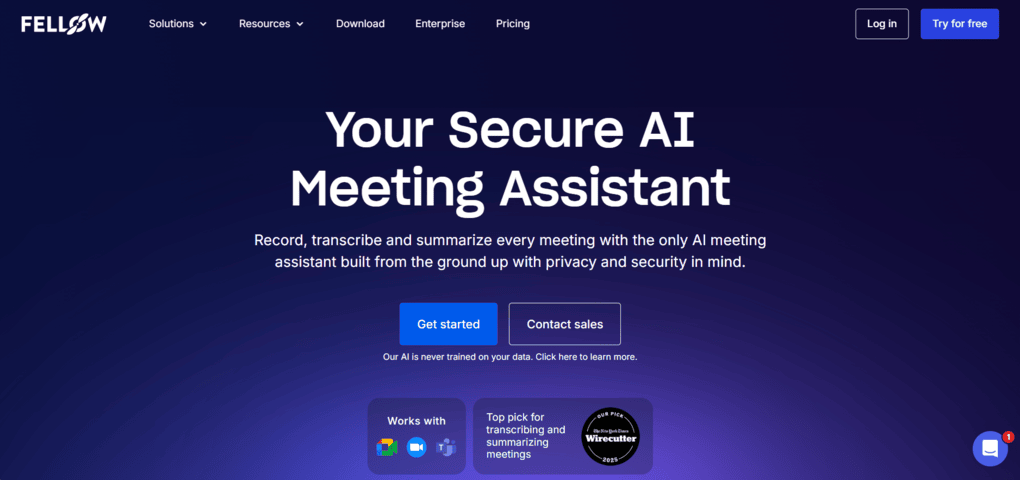
Fellow is an AI meeting assistant designed for organization-wide use, but it works great with smaller teams and individuals. I tried numerous AI meeting assistants, but this tool wasn’t on my radar, and I did not have an existing Fellow account. So, I tried Fellow, and it did not disappoint me.
With Fellow, you no longer need to deal with taking meeting notes or action items. Whether you have online meetings on Zoom, Teams, or Google Meet, it works on all the main meeting platforms. This app has one of the most accurate transcriptions I have seen and captures context and nuances.
My take after using Fellow for my AI meeting notes
After testing numerous AI note-takers, I found Fellow to be the most accurate and security-focused one. It is full of productivity tools that help me save time and get more out of my online calls.
And this is one of the main reasons why I have used it as my default AI note-taker for more than two years now.
Based on my experience, Fellow transcribes my online meetings with 95%+ accuracy. After my video calls, it prepares the AI meeting summaries and transcripts within minutes, so I can quickly review how the meeting went.
One of the most underrated features of Fellow is the meeting agendas. Using this feature, you can collect all the points you want to discuss in the next meeting and see them next to the meeting participants during your calls.
The botless recording feature also works reliably in the background and captures conversations effortlessly and securely, whether you’re online, in person, or somewhere in between.
I particularly like having the option to choose between bot and botless recording depending on the meeting and privacy needs.
Where Fellow excels & where it falls short
|
Where Fellow excels |
Where it falls short |
|---|---|
|
🟢 Highly accurate transcription: Around 95%+ accuracy in my meetings and the most accurate among the AI note-takers I tested. |
🔴 Limited free plan: The free version feels more like a trial than a plan for regular use. |
|
🟢 Bot + botless recording: I can choose the recording method depending on the meeting and privacy needs. |
🔴 Desktop app required for botless: You need to install Fellow’s desktop app to record without a bot. |
|
🟢 Excellent AI meeting notes: Detailed, well-balanced summaries with key takeaways, decisions, and action items. |
🔴 Can feel feature-heavy: It’s still easy to use, but the large feature set takes longer to explore than simpler AI note-takers. |
|
🟢 Strong security & governance: Advanced controls such as ZDR, custom retention, redaction, consent capture, and recording policies. |
|
|
🟢 More than just note-taking: Meeting agendas, pre-meeting briefs, Ask Fellow, templates, analytics, and 50+ integrations. |
Why Fellow scored 4.5 out of 5
|
|
Area |
Score |
Why it gained/lost points |
|---|---|---|---|
|
🟢 |
Features & functionality |
5/5 |
Massive feature set with meeting agendas, pre-meeting briefs, AI notes, and other productivity tools. |
|
🟢 |
User interface |
4.5/5 |
Easy to use with only a short learning curve despite its extensive feature set. |
|
🟢 |
Security |
5/5 |
Strong security and governance controls make it suitable for organization-wide use. |
|
🟢 |
Real-world experience |
5/5 |
The most balanced AI note-taker I’ve tried, combining accuracy, productivity, and team features. |
|
🔴 |
Pricing |
3/5 |
The free plan feels more like a trial and is limited for regular use. |
Who is Fellow AI best for?
Who should NOT use Fellow?
Use this link to sign up and get 10% off the paid plans if you upgrade.
What it’s like to use Fellow AI long-term
Let’s break down my experience after more than two years with Fellow.
Fellow’s bot and bot-less transcription
TL;DR: The most accurate transcription I’ve tested, with the flexibility to record with or without a bot
Fellow lets you capture virtual meetings without a bot, with the same enterprise governance as its bot-based recordings. Just select the “Record without bot” option from your meeting, and Fellow will record your meeting in the background without compromising privacy and security.
Nevertheless, if you want to use it with a bot, it is also pretty straightforward. Whenever you join online meetings on Microsoft Teams, Zoom, Slack, and Google Meet, Fellow will automatically transcribe and record such meetings in over 92 languages.
For organizations, Fellow also provides admin controls over how meetings are recorded. Workspace admins can set the default recording method, choosing between bot and botless recording, and establish recording rules and restrictions for their organization.
Fellow can also capture consent before a meeting is recorded, adding another layer of control for organizations that need clear recording practices.
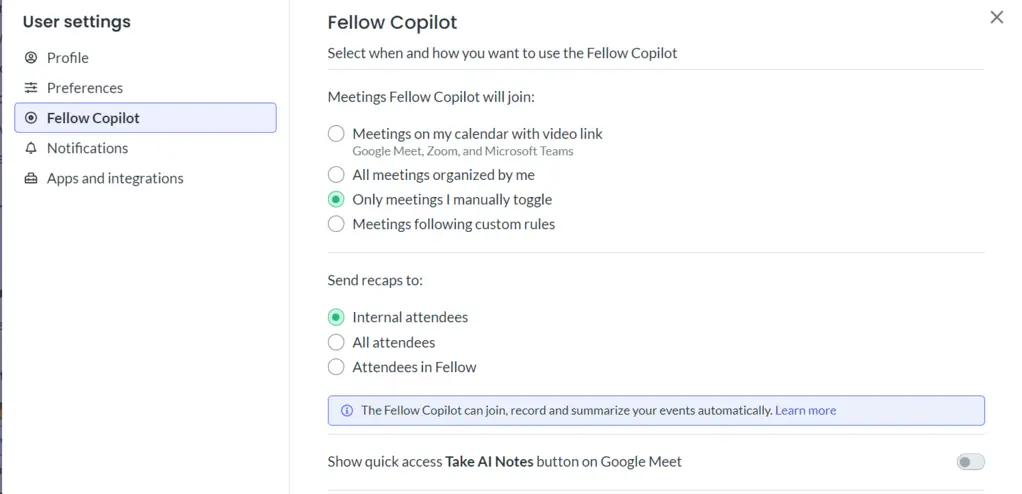
If there are meetings where you do not want Fellow to join automatically, you can easily change it in the user settings menu. Fellow always asks to be let into a meeting and appears as a participant so everyone knows the meeting is being recorded.
The transcription of your meetings takes only a couple of minutes. So, it is quite fast.
Based on my experience, the transcriptions are highly accurate. Fellow captured my words quite precisely. However, no matter which AI note-taker you use, always make sure to have decent audio quality.
To put it into context, after testing 20-30 AI note-takers, Fellow was the most accurate for me. Only MeetGeek, Bluedot, and Fathom offer similar accuracy. However, none of these tools, except MeetGeek, offers a comparable feature set.
AI summaries
TL;DR: Consistently detailed without becoming overwhelming. It’s still my favorite AI summaries after 2+ years
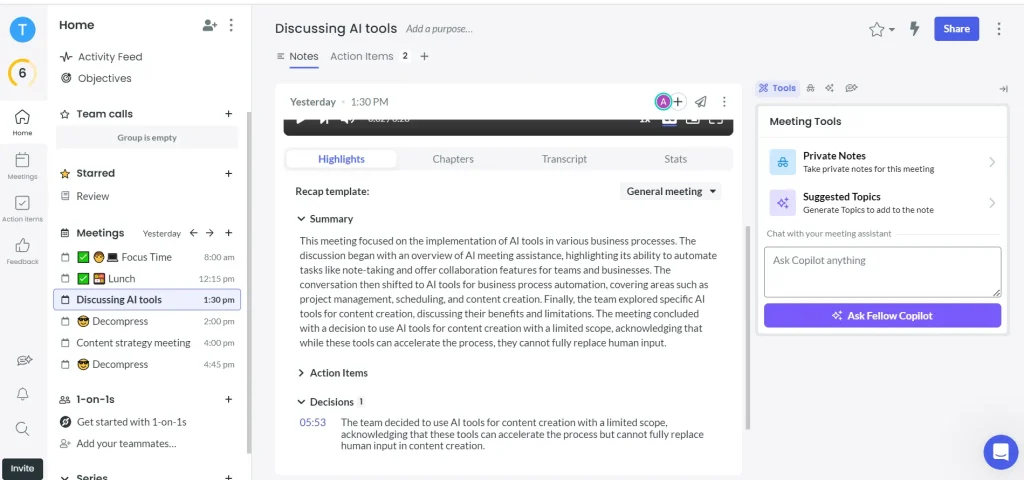
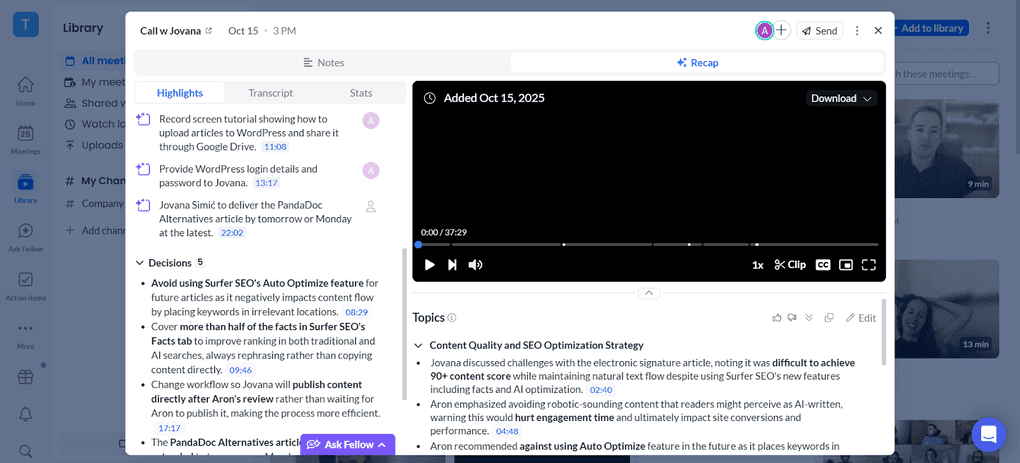
The AI summaries provide you with the key takeaways, action items, and decisions from the meeting. Thanks to this feature, Fellow makes online meetings easily digestible in a few minutes.
Essentially, the AI summaries just save a ton of time, as you no longer need to go through the entire transcription.
I also like that these summaries can outlive the raw recording. Admins can set Fellow to delete the source audio and transcript on your compliance schedule while keeping the AI summary as your record of what was decided. Fellow calls this decoupled retention.
Meeting agendas
TL;DR: Fellow’s agendas are one of the features that make it feel more like a meeting productivity tool than just an AI note-taker.
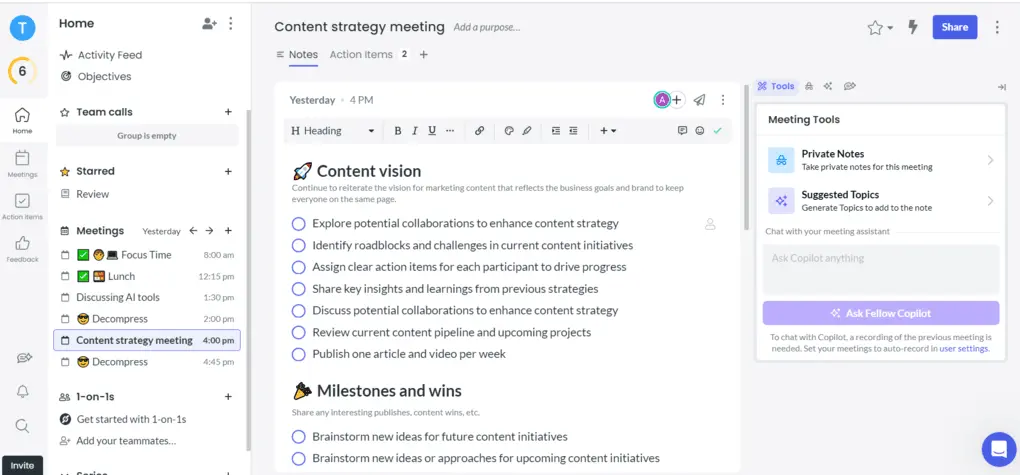
The meeting agenda is a helpful pre-meeting function for establishing clear talking points and action items that you want to deal with during the call. I found it pretty fascinating that Fellow implemented AI not only in the meeting and post-meeting phase but also in the pre-meeting stage. You can ask for topic suggestions from AI or chat about particular parts of your meeting agenda.
The pre-meeting AI briefs provide information on everyone in the meeting as well as a recap of the last meeting. This was extremely valuable for my back-to-back meetings when I didn’t have time to prepare properly.
Whoever from your team will attend the meeting can also add their thoughts and assign the talking points and action items to others. You can also create a private note that only you can see during the meeting.
Fellow also extends its agenda capabilities through Ask Fellow and MCP. This gives teams additional ways to work with meeting agendas and agenda-related information using AI-powered tools and workflows.
Ask Fellow
TL;DR: One of the features I use most because it turns my meeting history into a searchable knowledge base.
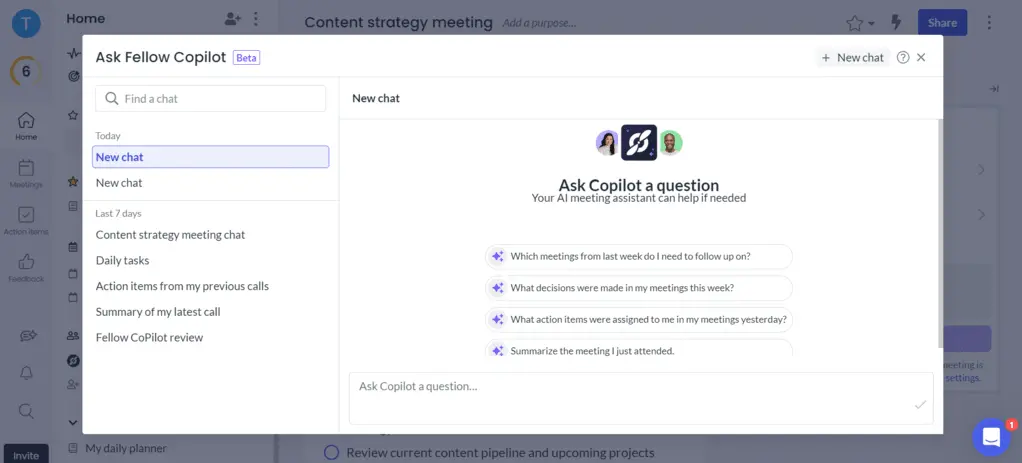
Ask Fellow is pretty efficient for getting meeting information and answers to meeting-related questions. You can ask Fellow any questions regarding your meetings, for example, “What did we decide on X topic?” or “What should I follow up on from yesterday?”
While it offers value for every team, I was impressed by how beneficial “Ask Fellow” was for sales teams.
Let me give you an example.
You had a call with one of your potential clients one week ago and another one two weeks ago. Besides these, you had ten more sales-related calls, and you just have no idea which one you need to follow up on.
Instead of going through meeting notes or emails, you just ask Fellow to collect the sales calls you need to follow up and it also creates follow-up emails for you based on the meeting content. Easy, right?
Ask Fellow can also help with meeting agendas. You can ask it to create an agenda for an upcoming meeting, add talking points to an existing agenda, or rewrite and reorder agenda items based on what you need to cover.
Fellow also extends this functionality through its MCP server, which allows compatible AI tools such as Claude to securely access meeting context from Fellow. This means you can use Claude to work with your Fellow meeting information and even create agenda items from outside the Fellow interface.
While almost all the AI note-takers offer similar features, I experienced that the Ask Fellow feature is superior to most of them. For example, many AI note-taking assistants can only pull data from one meeting, like Krisp or Granola, or from a certain number of meetings, like Bluedot.
Therefore, if you need information or data from a bird’s-eye view, Fellow is a great choice over most of the AI note-takers.
Analytics
TL;DR: Useful for understanding how teams use Fellow, but it’s more about AI adoption and meeting workflows than sales performance
With Fellow’s AI Analytics dashboard, workspace admins can see how their teams are using Fellow’s AI features across the organization. The dashboard provides insights into recording coverage, engagement with AI notes, Ask Fellow usage, active users, and AI-generated action items.
This makes it easier to understand whether teams are actually using Fellow’s AI features and where there may be gaps in adoption. Admins can also filter and export the data and control who can access the dashboard.
Nevertheless, don’t expect too much data if you’re looking for traditional sales analytics. The AI Analytics dashboard is more focused on AI usage and meeting workflows across the organization than on sales performance. If you need an AI note-taker with extensive sales analytics features, you might want to check out MeetGeek.
Use this link to sign up and get 10% off the paid plans if you upgrade.
Team collaboration features
TL;DR: The strongest team collaboration features I’ve found among AI note-takers, especially for organization-wide use
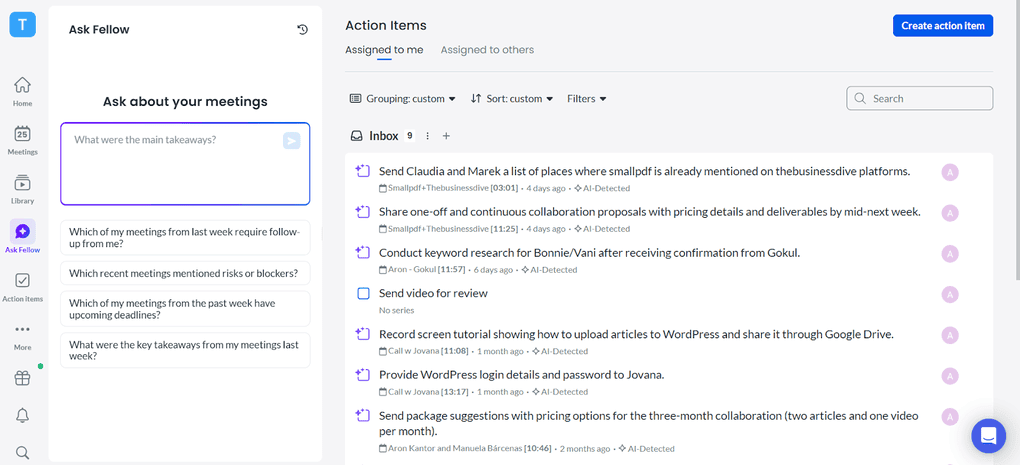
What makes Fellow special is that it was designed for the whole organization’s use cases. Whether it’s sales calls, interviews, one-on-ones, you can implement Fellow in every team. It offers an excellent way to deal with both external and internal calls and gives you incredibly helpful collaboration features.
You can utilize the collaborative agendas, assign action items, give feedback to meeting attendees, and easily share the meeting notes with others.
When reviewing other AI note-takers, none offered the extensive team collaboration features that Fellow provides. Only Otter AI had similar team collaboration capabilities during testing, though it offered different tools for teams (chat, for example).
Integrations
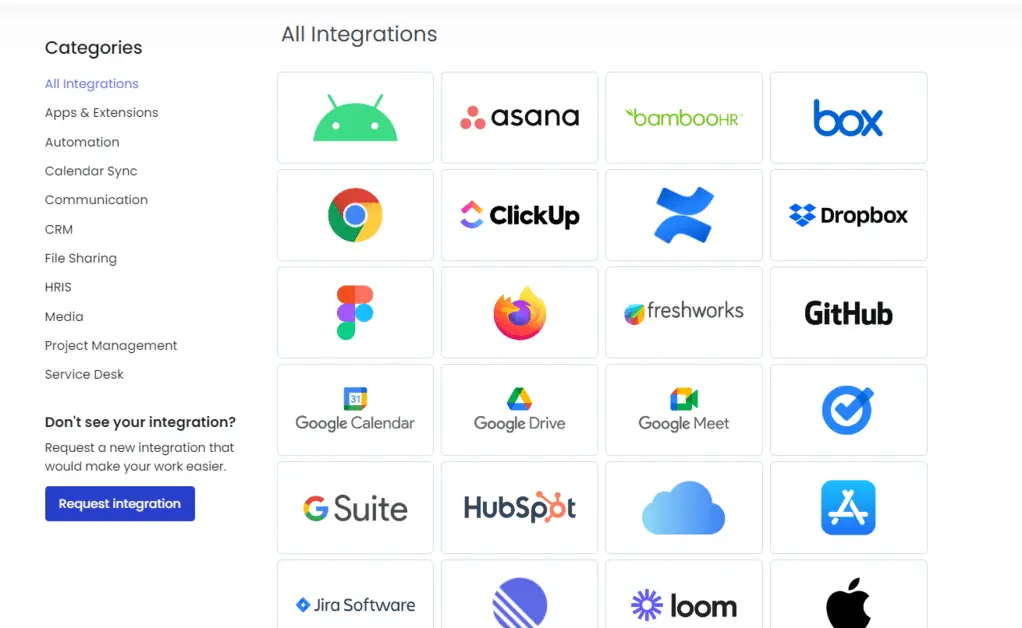
Fellow integrates Slack, Google Calendar, Google Docs, Microsoft Outlook, ClickUp, and over 50 other apps. It also supports Claude integration, giving users another way to work with their Fellow meeting information through AI.
For me, the most useful integration was the Google Calendar because I could use the Ask Fellow feature to provide answers about my tasks, appointments, etc. So, it felt like having a personal assistant.
Explore our Apps directory
A curated directory of software tools we’ve independently reviewed, with links to full reviews, comparisons, and category guides.
User interface
Fellow has a simple and clean user interface. It’s particularly great that you can access many features from the homepage with just a few clicks.
I used this tool’s desktop version, which you can easily download from Fellow’s website. Fellow also offers mobile apps for iOS and Android. The desktop app helps you make the meeting experience smooth from beginning to end.
Fellow pricing
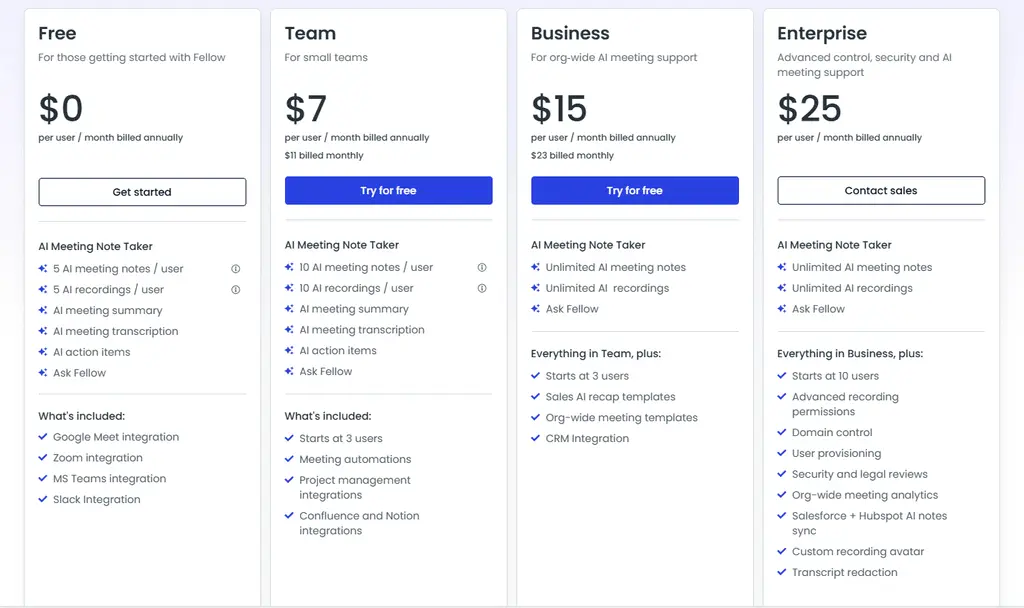
Fellow offers competitive pricing for teams, while the Solo plan is a bit pricier but comes with access to premium features.
Fellow pricing table
|
Plan |
Price |
Best for |
Key features |
|---|---|---|---|
|
Free |
$0 |
Testing Fellow |
Limited for regular use (5 AI meeting notes / user) |
|
Team |
$7/user/month |
Small teams |
Higher limits, meeting automation & additional integrations |
|
Business |
$15/user/month |
Growing organizations |
Unlimited recordings & transcription, organization-wide templates & more integrations |
|
Enterprise |
$25/user/month |
Larger organizations |
Advanced security, governance, recording controls & higher limits |
|
Solo |
$19/month |
Professionals |
All the business features applicable for indviduals |
Is Fellow AI safe?
One of the main reasons why Fellow is very effective for organizations is security. This tool was designed to work seamlessly and securely throughout the whole organization. It is SOC2 compliant, which means it stores and processes client data securely.
Fellow does not train any models on your data, and it is one of the few tools that offer enterprise-level restrictions and controls for AI governance at the organization level.
You can also choose Zero-Day Retention (ZDR) if you need this additional level of control over your data. Beyond ZDR, Fellow also allows organizations to set custom data retention policies based on their own requirements.
I also like that admins have more control over how meetings are recorded. They can set recording rules and restrictions, choose the default recording method between bot and botless recording, and use consent capture before meetings.
Another useful feature is redaction, which can be used for transcripts, AI summaries, and video. This gives organizations more control over sensitive information in their meeting content.
Fellow also provides a Compliance Portal for organizations that need to manage their security and compliance requirements. Overall, these controls make Fellow a great choice for regulated industries, as well as organizations where privacy, security, and data governance are especially important.
Why is this important?
These security features become especially important when Fellow is used across an entire organization rather than by a single user. More meetings mean more sensitive conversations, recordings, transcripts, and AI-generated notes that companies need to control.
That said, Fellow offers enterprise-grade security and governance controls, making it a strong fit for organizations where privacy, security, and data governance are critical.
That covers regulated industries such as private equity, hedge funds, investment banking, asset management, healthcare, healthtech, and legal. It also covers enterprise and tech companies that treat security as a baseline expectation.
Its broad collaboration features make it useful across teams and workflows regardless of industry.
Use this link to sign up and get 10% off the paid plans if you upgrade.
Related articles:
- Best 9 AI-Note Takers | My Top Picks After +2 Years Testing (2026)
- 6 Best Meeting Recording Apps 2026 | 2+ Years Testing
Fellow alternatives
If you are still unsure whether Fellow is the right AI note-taker for you, check out these alternatives:
|
App |
Best for |
Description |
|---|---|---|
|
Fireflies AI |
Best budget-friendly option |
A popular and budget-friendly AI meeting assistant for individuals and teams. |
|
Notta |
Best for multi-language transcription |
A unique AI note-taker that allows multi-language transcription, enabling people to speak two different languages during online meetings. |
|
Fathom |
Best free AI note-taker |
An accurate AI note-taker with an extensive free plan. |
|
MeetGeek |
Best for multi-language transcription |
A versatile AI note-taking app with the best AI meeting summaries. |
|
tl;dv |
Best simple AI note-taker |
A simple option for individuals with a feature-rich free plan. |
|
Radiant |
Best free AI note-taker for Mac |
It is a 100% free AI bot-less note-taker for Mac users for in-person and online meetings. |
|
Otter AI |
A popular AI note-taker |
One of the most popular AI note-takers for Google Meet, Zoom, and Microsoft Teams. |
|
Granola |
Best for users need a simple bot-less AI note-taker |
Granola is a lightweight AI note-taking app that transcribes and summarizes meetings without bots, with a generous free tier, but it’s basic and lacks advanced features. |
|
Krisp |
Best bot-less AI note-taker supporting high audio quality |
Krisp is a Voice AI platform for clearer communication and more productive meetings, combining real-time audio enhancements with AI note-taking. |
|
Bluedot |
An easy-to-use bot-less AI note-taker |
Bluedot is a straightforward and easy-to-use bot-free AI note-taker. |
|
Zoom AI Companion |
Best for Zoom users needing built-in AI note-taking |
A solid built-in AI assistant for Zoom that offers meeting summaries, basic transcription, and action items, but lacks advanced features. Full Zoom AI Companion review | Quick Zoom AI Companion overview |
|
Tactiq |
Best for individuals and workflow automation |
Tactiq is an AI meeting assistant that provides real-time transcription, customizable summaries, and workflow automation. |
|
Read AI |
Best for teams & individuals who want an all-in-one AI meeting assistant |
Read AI is an AI meeting assistant with solid transcription, summaries, and search, but limited features on lower plans and privacy concerns make it hard to rely on. |
|
Plaud |
Best for in-person conversations |
A unique AI note-taker with dedicated hardware for recording meetings, phone calls, and ideas wherever you are. |
Fellow vs alternatives

Otter AI VS Fellow
Fellow VS Fireflies AI

Fellow VS Fathom
Granola VS Fellow
Wrap-up: Fellow AI review
Ultimately, Fellow is one of the best choices for enterprise organizations and larger teams, thanks to its features and strong security, privacy, and governance controls.
But teams of every size get real value from it too; the accuracy of the transcriptions and quality of the meeting notes hold up whether you’re a solo user or a thousand-person org. Considering other AI meeting assistants’ pricing, Fellow has affordable pricing.
Based on my experience, Fellow is surely among the best AI note-takers when it comes to transcription accuracy, while its security and governance features make it especially suitable for regulated industries and organizations where privacy matters most.
How We Test AI Note-Takers
To keep our reviews and final scores fair and consistent, we evaluate every AI note-taking tool using a standardized testing framework built on real-world usage and hands-on experience.
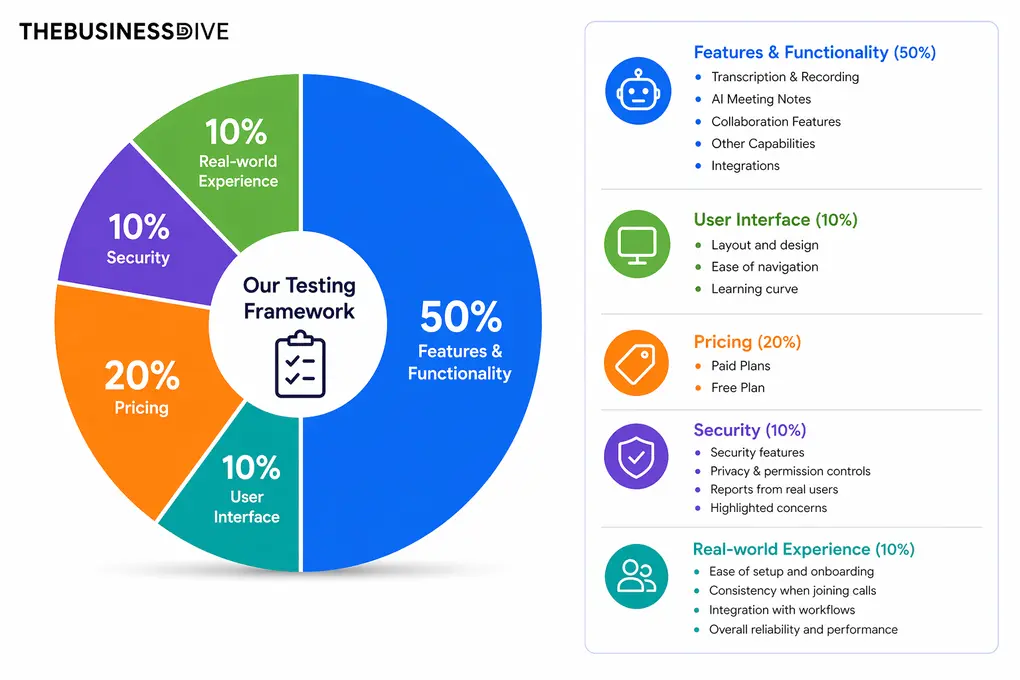
Our scoring breakdown after testing 20+ AI note-takers:
🤖 Features & functionality — 50%
🖥️ User interface — 10%
💰 Pricing — 20%
🔐 Security — 10%
👥 Real-world experience — 10%
Want a detailed breakdown of how we test each category?
Learn exactly how we test tools → Review methodology
Looking for similar tools?
Visit our AI note-takers library to explore other apps we’ve reviewed in this space and how they compare.
Why you can trust our reviews
At thebusinessdive.com, our team tests, reviews, and compares hundreds of productivity apps every year — from project management tools to note-taking apps. We dive deep into real-world use cases to help you find the right tools that actually improve your workflow, not just add noise.
Our mission? No fluff, no shortcuts—just honest, hands-on insights from productivity pros.
Discover how we stay transparent, read our review methodology, and let us know about any tools we missed.
Frequently asked questions
Does Fellow transcribe meetings?
Yes. Fellow transcribes meetings in real time, with speaker identification so you can see who said what. Transcripts are searchable after the meeting and sync automatically with your meeting notes, summaries, and action items. Fellow supports transcription for Zoom, Microsoft Teams, Google Meet, and other major conferencing platforms.
Does Fellow work with Zoom, Microsoft Teams, and Google Meet?
Yes. Fellow works across Zoom, Microsoft Teams, Google Meet, and other major video conferencing platforms. It joins meetings as a bot or, for users who prefer a botless setup, captures audio locally without sending a bot into the call.
Notes, transcripts, and summaries sync regardless of which platform the meeting is on.
What does Fellow include in its AI meeting summary?
Fellow’s AI generates a structured meeting summary after each call that includes a brief overview, key discussion points, decisions made, and a list of action items with owners and due dates.
Summaries are sent automatically to attendees and can be exported to tools like Notion, Slack, HubSpot, Salesforce, and others. You can edit any summary before it goes out.
How does Fellow compare to Fireflies?
Both Fellow and Fireflies record and transcribe meetings, but they differ in a few meaningful ways. Fellow places heavier emphasis on meeting governance, security controls, and compliance features — including SOC 2 Type II certification, zero-day retention, transcript redaction, and firm-level recording controls that matter to regulated organizations.
Fireflies is generally easier to set up and has a more generous free plan. Teams that prioritize productivity and collaboration features alongside meeting notes tend to prefer Fellow; teams that need a lightweight, low-cost transcription tool often find Fireflies sufficient.
How much does Fellow cost?
Fellow offers a Free plan, but to access all features, you have to choose the Team, Business, or Enterprise plan based on your organization’s size.
The Team plan costs $7 per user per month, the Business plan costs $15 per user per month, and the Enterprise plan is $25 per user per month. If you’re a solo user, Fellow offers the Solo plan for $19/month. The mentioned prices are for annual billing.
Is Fellow secure for regulated industries?
Fellow is a secure AI meeting assistant with strong privacy and governance controls. It is SOC 2 Type II certified and does not train any models on your data. Organizations can also use optional Zero-Day Retention, custom data retention policies, recording controls, consent capture, and redaction for transcripts, AI summaries, and video.
Disclosure: I only recommend products I would use myself, and all opinions expressed here are our own. This post may contain affiliate links that, at no additional cost to you, may earn a small commission. Read the full privacy policy here.

Hey there! I am Aron, the founder of Thebusinessdive. I have been testing productivity apps for almost three years now. I reach 25.000 -50.000 people monthly with the mission to help you find the perfect productivity apps. Subscribe to my YouTube channel, newsletter, and social media to hear more about the best productivity tools. Let’s dive in!