


8 Best Clockify Alternatives: 90% of People Choose Wrong (2026)
Clockify is an okay time tracking app, but I understand some of you are not satisfied with its mobile app, customer support, or pricing model. This is the reason why I put together my best eight Clockify alternatives based on my personal testing.
Just to put this into perspective, we have tested 25 time tracking apps so far and spent hundreds of hours with them to find the best ones.
And now, I will share the eight best Clockify alternatives available right now.
Let’s dive in!
Quick Answer: Which Clockify Alternative Should You Choose?
You need an alternative for… | My pick | Why I’d choose it |
|---|---|---|
Automatic time tracking and AI productivity insights | Rize | Automatically tracks and categorizes activities while providing detailed productivity insights. |
Employee monitoring and productivity analytics | Insightful | Offers customizable monitoring settings and easy-to-use productivity reports. |
Simple time tracking for small teams | Toggl Track | Easy to use, with offline tracking, project reporting, and invoicing features. |
GPS time tracking for construction crews | Workyard | Connects precise jobsite tracking with job costing and construction-specific payroll rules. |
Client reporting and invoicing | TrackingTime | Combines background activity recording, detailed reports, and built-in invoicing. |
Remote team productivity monitoring | Time Doctor | Provides detailed productivity insights, employee monitoring, and payroll tools. |
All-around time tracking and workforce management | Hubstaff | Combines GPS tracking, project management, scheduling, and detailed reporting. |
Expense tracking and project budgeting | Harvest | Makes it easy to track expenses, create invoices, and monitor project costs. |
How We Test Time Tracking Apps
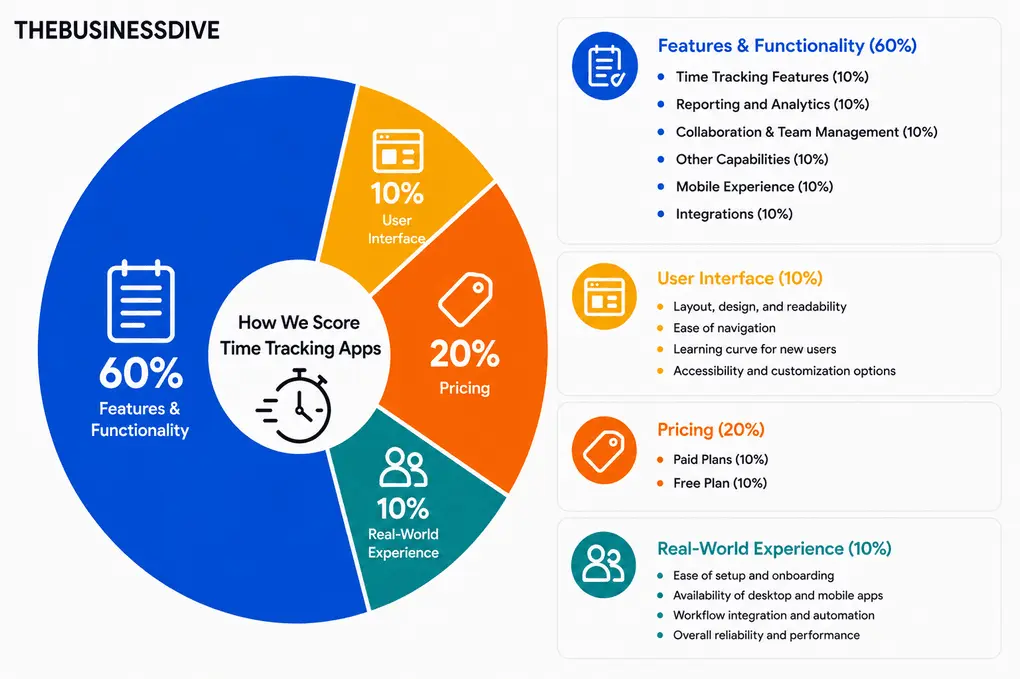
Our scoring breakdown after testing 25+ time-tracking apps:
🛠️Features & functionality — 60%
🖥️ User interface — 10%
💰 Pricing — 20%
👥 Real-world experience — 10%
While the overall review scores influenced the rankings in this article, we also considered specific use cases, workflows, and standout strengths to recommend the best Clockify alternatives for different needs and teams.
Want a detailed breakdown of how we test each category?
Learn exactly how we test tools → Review methodology
How These Clockify Alternatives Compare
Clockify Replacement | Better than Clockify for 🎯 | What stood out during testing ✨ | Biggest downside ⚠️ | Pricing starts 💰 |
|---|---|---|---|---|
Automatic time tracking and AI productivity insights | Automatic activity categorization and in-depth productivity data | Lacks web and mobile apps | Free plan; paid plans from $9.99/month | |
Employee monitoring and productivity analytics | Customizable monitoring and easy-to-use reports | No free plan or mobile app for on-site tracking | $6.40/seat/month, billed annually | |
Small teams, client billing, and ease of use | Simple interface, offline tracking, and invoicing | No GPS tracking | Free plan for up to 5 users; paid plans from $9/user/month | |
GPS tracking and construction job costing | Precise jobsite data connected to payroll and labor costs | $50/month company base fee on top of per-user pricing | $6/user/month, billed annually, plus $50/month | |
Client reporting and invoicing | AutoTrack, color-coded projects, and invoice generation | Advanced features require paid plans | Free plan; paid plans from $4.50/user/month, billed annually, with a 2-user minimum for Starter | |
Remote team monitoring and productivity reports | Detailed analytics, customizable dashboard, and payroll tools | Monitoring can feel invasive; no free plan | $6.70/user/month, billed annually | |
Workforce management and GPS tracking | Flexible timer, detailed reporting, and strong admin controls | Some monitoring features might feel invasive | Free plan; paid plans from $4.99/user/month, billed annually | |
Expense tracking and project budgeting | Invoicing, expense reports, and project cost estimation | No GPS tracking or fully automatic time tracking | Free plan; paid plans from $11/month, billed annually |
My Experience Testing These Clockify Alternatives

Rize
Honestly, I have been using Rize for 6 months, and it is absolutely the best time tracking software (and possibly the best productivity app) for my business. In short, Rize is an AI-powered time tracking solution that improves your focus and helps you establish better work habits.
MY TAKE AFTER TESTING
Automatic time tracking, AI-powered productivity insights, and building better work habits.
Users who need web and mobile apps, or teams that prefer manual time tracking and a free, cross-platform solution.
Rize automatically categorizes activities and provides detailed insights into how I spend my time across projects, clients, and tasks.
Rize is not the cheapest time-tracking tool, and some advanced project and client tracking features require the Professional plan.
My real-world experience with Rize
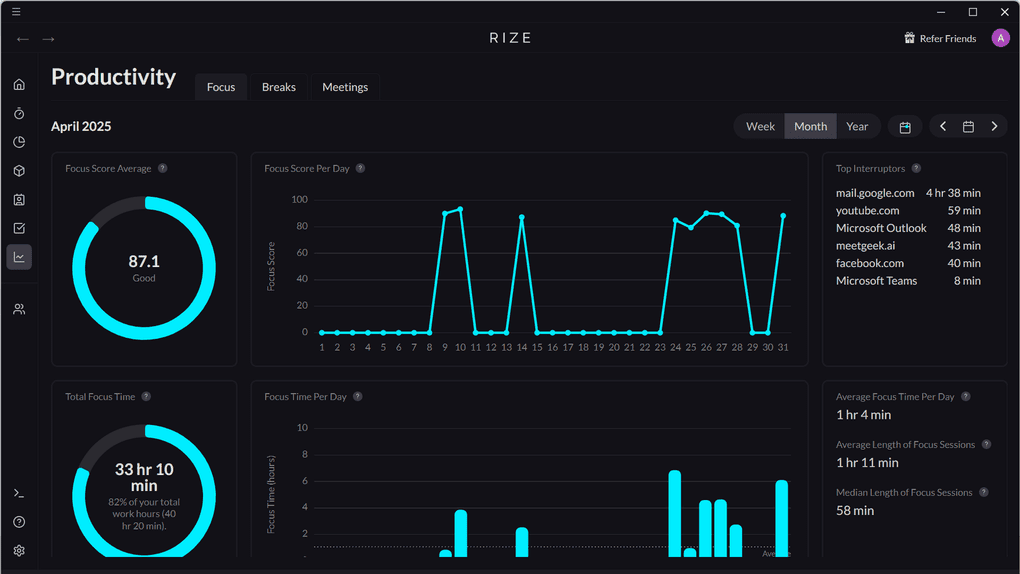
Rize was a game-changer for my day-to-day work & time management. After testing many apps, I think Rize is the best time-tracking app currently and one of the best productivity tools. And yeah, I still use & will use it every day.
Its intuitive user interface offers features that allow you to track, analyze, and improve your time spent on activities, projects, clients, and more.
While it helped a lot to improve my productivity, it also had a massive impact on my business’s workflows, as I started to see clearly how much time I spent on each activity and client.
Rize offers numerous features, but it remains a simple tool. It is fairly easy to get started with Rize, but it gives more than enough data and suggestions on how to improve personal productivity.
Overall, my experience with Rize was 10/10 during the review, and it is one of the few apps that I can recommend for almost all use cases when you are looking for a Clockify alternative.
🟢 Pick Rize if: You want automatic time tracking, detailed productivity insights, and a better understanding of how you spend your working hours. It is also an excellent choice for freelancers, business owners, and agencies that need to track time across projects and clients.
🔴 Stay with Clockify if: You prefer a free and flexible time tracker with cross-platform support, or you mainly need straightforward manual time tracking without paying for advanced productivity features.
Where Rize Excels & Falls Short
Strengths | Trade-offs |
|---|---|
Ease of use | Lacks web and mobile apps |
Automatic time tracking is great | |
In-depth data about your productivity | |
An excellent solution for client-facing teams or freelancers | |
You can use custom categories for activities |
Rize’s pricing
- Free plan: Available
- Standard plan: $9.99/month with annual billing or $16.99/month with monthly billing
- Professional plan: $23.99/month with annual billing or $39.99/month with monthly billing
Use this link and the code THEBUSINESSDIVE to get 25% off on all payments within the first 3 months.
Related articles:
- 7 Best Productivity Apps I Use In 2026 | 100+ Tools Tested
- Clockify Vs Rize | An Easy Decision (2026)
Insightful
Insightful is an easy-to-use time-tracking app with a short learning curve. After testing more than 25 time-tracking and employee-monitoring apps, I found Insightful to be one of the best Clockify alternatives for teams that need employee monitoring and productivity insights.
MY TAKE AFTER TESTING
Employee monitoring, productivity analytics, and customizable activity tracking.
Teams that need client tracking or mobile tracking for on-site employees.
The easy-to-use reporting features, numerous customization options, and clear productivity trends.
Insightful lacks a mobile app for tracking on-site work and does not offer a free plan.
My real-world experience with Insightful
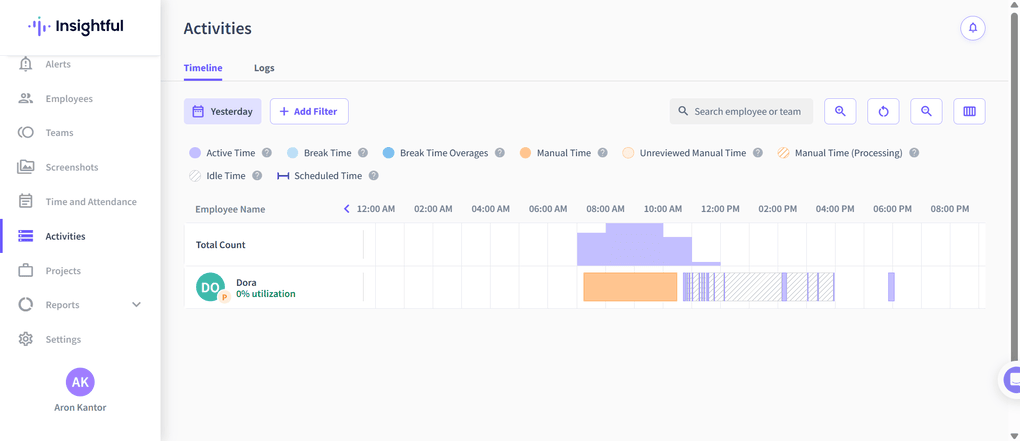
Insightful is an easy-to-use time tracking app with a short learning curve. It provides many customization options to adjust the time tracking experience to your company’s workflows and culture.
What I discovered during my Insightful review is that it performs particularly well in employee monitoring and productivity analysis.
That said, Insightful is an excellent choice for teams that need employee monitoring, time tracking, and productivity features in one app.
🟢 Pick Insightful if: You manage a remote or hybrid team and need detailed employee activity tracking, customizable monitoring settings, and easy-to-understand productivity reports.
🔴 Stay with Clockify if: You need a free time-tracking solution, mobile tracking for on-site employees, or client tracking without investing in a dedicated employee-monitoring platform.
Where Insightful Excels & Falls Short
Strengths | Trade-offs |
|---|---|
Appealing UI | No client tracking |
Numerous customization options | Lacks a mobile app to track on-site work |
Easy-to-use reporting features | No free plan |
Loved the productivity trends feature | |
Offers clear visibility into your employees’ time management | |
Affordable pricing |
Insightful’s pricing
- No free plan, only a 7-day free trial
- Productivity Management plan: $6.40 per seat/month (annual billing)
- Time Tracking plan: $8 per seat/month
- Process Improvement plan: $12 per seat/month (for teams with over 50 users)
- Enterprise plan: Custom pricing (for organizations with over 100 users)

Toggl Track
Toggl Track is a time-tracking solution for small businesses looking for a top Clockify alternative. I spent a lot of time testing this tool and even implemented it in my business to see how it affects my workflows, and I was quite satisfied with the results.
MY TAKE AFTER TESTING
Ease of use, client billing, and straightforward reporting.
Teams that need GPS tracking for fieldwork or on-site projects.
The user-friendly interface, offline time tracking, and excellent invoicing features.
Advanced reporting and profitability analysis require a paid plan.
My real-world experience with Toggl Track
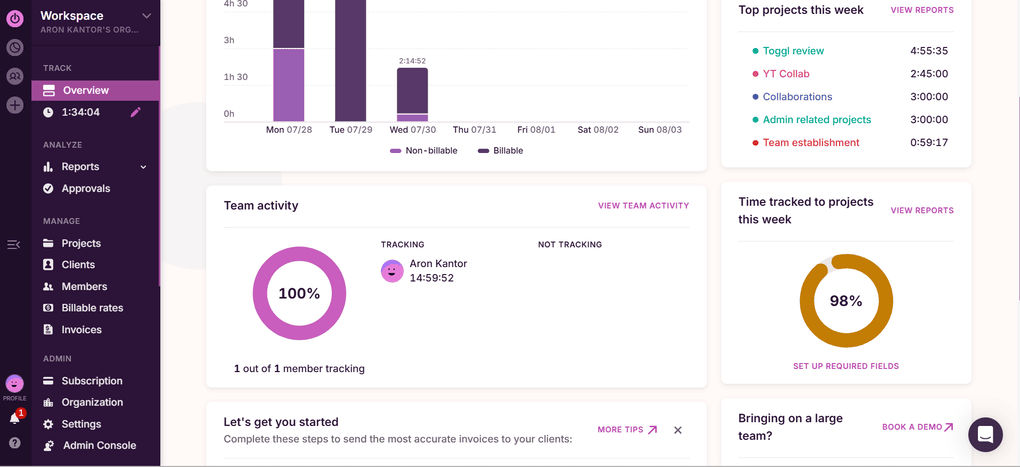
I spent a lot of time with this time-tracking software during testing. I not only tested it, but also implemented it in my business to see how it affects my workflows.
And honestly, I was quite satisfied. This time-tracking app is super simple to use, while providing all the features a small or medium-sized business might need.
It has a user-friendly interface, and the reporting and client billing tools are outstanding. Considering its features & pricing, Toggl Track is among the best Clockify alternatives for me.
Nevertheless, if you need to track time during field work or on-site projects, this is not the most ideal app, as it does not offer GPS tracking.
🟢 Pick Toggl Track if: You run a small or medium-sized business and need an easy-to-use time tracker with project reporting, client management, and invoicing features.
🔴 Stay with Clockify if: You need a free time-tracking solution with the specific features your team already uses, or you require GPS tracking for fieldwork.
Where Toggl Track Excels & Falls Short
Strengths | Trade-offs |
|---|---|
Ease of use | Lacks GPS tracking |
Offline time tracking | |
Versatile app | |
Detailed reporting and analytics | |
Great free plan | |
Excellent invoicing feature |
Toggl Track’s pricing
- Free plan: Available for up to 5 users
- Starter plan: $9/user/month with annual billing or $10/user/month with monthly billing
- Premium plan: $18/user/month with annual billing or $20/user/month with monthly billing
- Enterprise plan: Custom pricing
- Free trial: 30 days with access to Premium features
Related articles:

Workyard
Workyard is GPS time-tracking and workforce-management software built specifically for construction crews and contractors. After testing more than 25 time-tracking apps, I found Workyard to be the best Clockify alternative for construction teams that need accurate GPS time tracking and job costing in the field.
MY TAKE AFTER TESTING
Real-time GPS tracking, job costing, and construction-specific payroll automation.
Office-based teams, freelancers, and businesses that don’t need field workforce management.
Accurate GPS data tied directly to job costing, payroll, and crew locations.
Field crews may need in-depth onboarding to address privacy concerns about GPS tracking, and higher-tier plans cost more than generic time trackers.
My real-world experience with Workyard
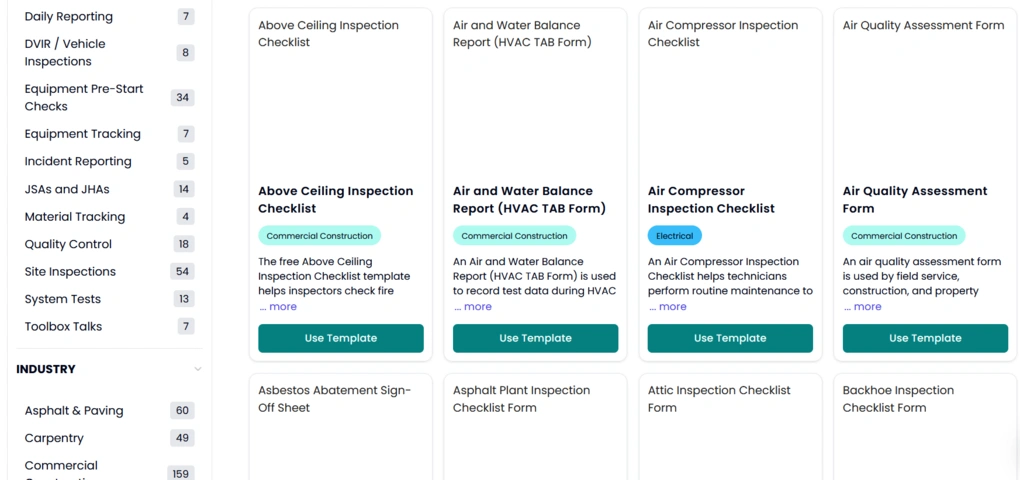
Workyard is clearly the most field-focused tool I tested. The mobile app is simple enough that crews pick it up quickly, and the office side gives genuinely detailed visibility – exact arrival times, driving routes, mileage, and live crew locations on a map.
What stood out most is how tightly the GPS data ties back to job costing and payroll, which removes most of the guesswork that generic trackers leave behind.
That said, Workyard is a specialist tool. If you don’t run field or construction crews, much of its power won’t apply – but for contractors, it’s excellent.
🟢 Pick Workyard if: You manage construction crews, subcontractors, or multi-site projects and need accurate GPS time tracking, job costing, and construction-specific payroll rules.
🔴 Stay with Clockify if: You primarily track time for office-based work, freelancers, or general business projects and don’t need GPS-based workforce management.
Where Workyard Excels & Falls Short
Strengths | Trade-offs |
|---|---|
Accurate real-time GPS with detailed site, mileage, and travel-time data | Field crews may need in-depth onboarding to address privacy concerns about GPS tracking |
Easy mobile app built and field-tested with construction crews | Higher-tier plans are slightly costlier than generic trackers |
English and Spanish support | |
Automatic overtime and state-based pay rules | |
Reliable payroll integrations (QuickBooks, ADP, Gusto, Sage) |
Workyard’s pricing
- No free plan available, only a 14-day free trial
- Starter plan: $6/user/month with annual billing or $8/user/month with monthly billing, plus a $50/month company base fee
- Pro plan: $13/user/month with annual billing or $16/user/month with monthly billing, plus a $50/month company base fee
- Autopilot plan: Custom pricing
TrackingTime
TrackingTime is a well-rounded time-tracking tool for agencies and teams that bill by the hour. I particularly liked AutoTrack, detailed reports, and built-in invoicing, which make it easier to manage billable hours, client projects, and retainers in one workspace.
MY TAKE AFTER TESTING
Background activity recording, client reporting, and built-in invoicing.
Users who only need a simple time tracker without project management, detailed reports, or invoicing.
AutoTrack, color-coded projects and tasks, and the ability to generate invoices directly from tracked hours.
Some of TrackingTime’s most useful features, including AutoTrack and invoicing, require a paid plan.
My real-world experience with TrackingTime
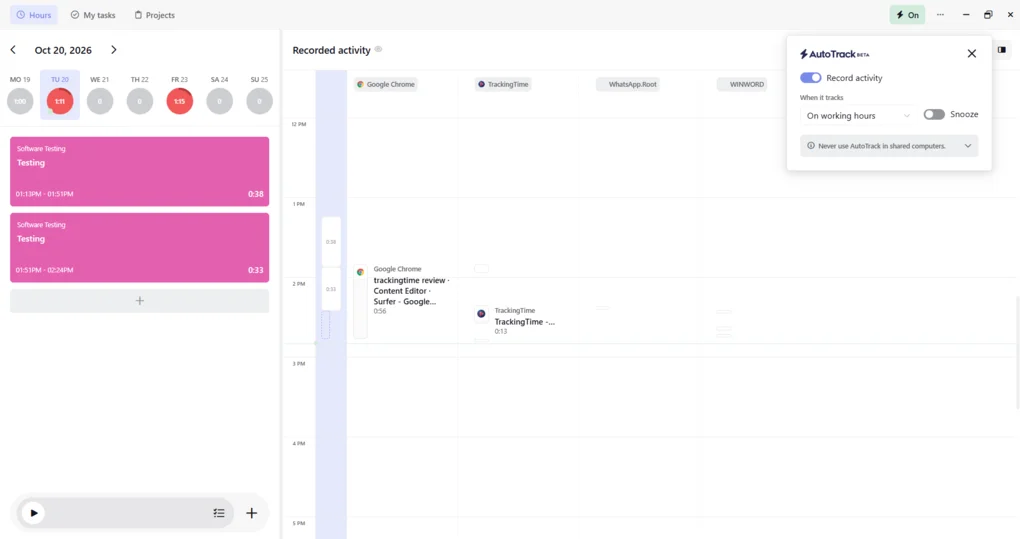
I mainly tested TrackingTime’s web app, using the Windows desktop app to try AutoTrack. I created projects for content writing, updates, software testing, and admin tasks to see how it handled my everyday workload.
AutoTrack was the standout feature. It recorded my computer activity in the background, letting me review the timeline and turn selected activities into time entries instead of starting a timer for every task.
I also liked the weekly calendar, drag-and-drop editing, and color-coded projects, which made it easier to review how I spent my time. The reporting tools offered plenty of detail, although they took some time to get used to.
Invoicing was straightforward once I configured my clients and billing rates. Overall, TrackingTime is a great fit for freelancers and teams that need time tracking, project reporting, and invoicing in one workspace.
🟢 Pick TrackingTime if: You manage multiple clients or projects and need automatic activity tracking, detailed reports, billable-hour tracking, and invoicing in one workspace.
🔴 Stay with Clockify if: You only need basic time tracking and timesheets, or you don’t want to pay for advanced reporting, automatic activity tracking, and invoicing features.
Where TrackingTime Excels & Falls Short
Strengths | Trade-offs |
|---|---|
AutoTrack records computer activity in the background | Limited AutoTrack availability, as it requires the Windows or macOS desktop app |
Flexible time tracking with a weekly calendar and drag-and-drop editing | Advanced features are locked behind paid plans |
Color-coded projects and tasks | The desktop app offers fewer features than the web version |
Detailed reporting tools for timesheets, projects, and clients | Some reports and filters take time to get used to |
Built-in invoicing based on configured billing rates | Some setup is required before generating invoices |
Client reports showing worked hours, rates, and costs |
TrackingTime’s pricing
- Free plan available, as well as a 14-day free trial
- Freelancer plan: $8/month with annual billing
- Starter plan: $4.50/user/month with annual billing or $6/user/month with monthly billing (2-user minimum)
- Pro plan: $6.50/user/month with annual billing or $8.50/user/month with monthly billing (2-user minimum)
- Business plan: $10/user/month with annual billing or $13.50/user/month with monthly billing
Explore our Apps directory
A curated directory of software tools we’ve independently reviewed, with links to full reviews, comparisons, and category guides.

Time Doctor
If you are managing a remote team, Time Doctor could be an ideal Clockify alternative. It helps to improve employee well-being while providing monitoring features as well.
MY TAKE AFTER TESTING
Employee monitoring, detailed productivity reports, and payroll management.
Teams that prefer non-invasive time tracking without screenshots or activity monitoring.
Extensive reporting features, a customizable dashboard, and detailed productivity insights.
Customer support complaints, minor technical issues, and limited admin control over monitoring settings.
My real-world experience with Time Doctor
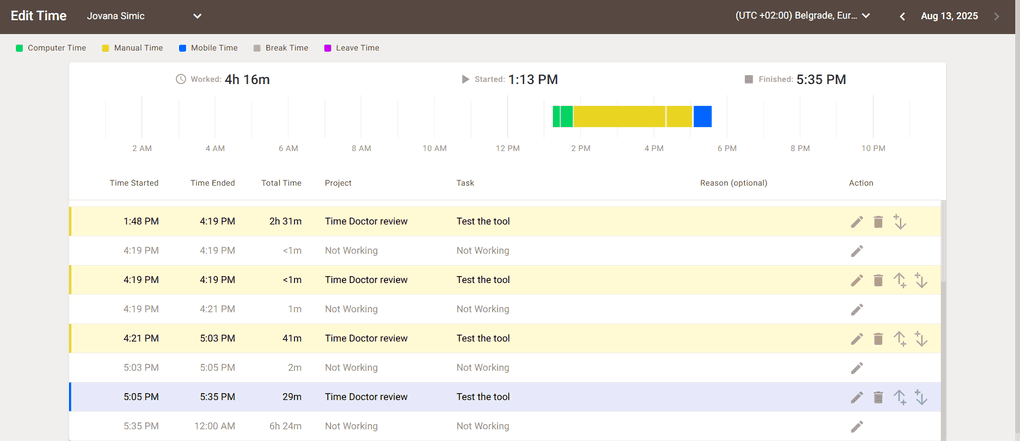
Overall, Time Doctor is a solid time-tracking tool. It delivers on its promise of detailed analytics, clear reporting, and straightforward payroll management.
While I found the interface clean and easy to navigate, some aspects, like customer support issues, occasional technical glitches, and limited admin controls over monitoring settings, can make it feel more invasive than necessary.
For teams that value transparency, data-driven insights, and features like billable hours tracking and the ability to set hourly budgets, Time Doctor can still be a practical choice, as long as you’re willing to fine-tune it to avoid crossing into surveillance territory.
🟢 Pick Time Doctor if: You manage a remote team and need detailed productivity reports, employee monitoring, and payroll features in one tool.
🔴 Stay with Clockify if: You prefer straightforward time tracking without extensive employee surveillance or need a free plan.
Where Time Doctor Excels & Falls Short
Strengths | Trade-offs |
|---|---|
Easy to use | Complaints about customer support |
Provides a lot of detailed insights | Minor technical issues |
Extensive reporting features | Admins have limited control over feature settings |
Dashboard is highly customizable | No free plan |
Extensive integrations |
Time Doctor’s pricing
- No free plan, only a 14-day free trial
- Basic plan: $6.70/user/month with annual billing or $8/user/month with monthly billing
- Standard plan: $11.70/user/month with annual billing or $17/user/month with monthly billing
- Premium plan: $16.70/user/month with annual billing or $20/user/month with monthly billing
- Enterprise plan: Custom pricing
Related articles:
- Time Doctor vs Clockify 2026 | An Unfiltered Comparison
- Time Doctor vs Hubstaff 2026 | A Honest Comparison

Hubstaff
Hubstaff is a robust time-tracking and workforce management platform with powerful features for improving employee productivity and project management. After testing it, I was impressed by its reporting tools, flexible timer, and the level of control admins have over how the software operates.
MY TAKE AFTER TESTING
GPS tracking, project management, workforce scheduling, and advanced reporting.
Teams that prefer non-invasive time tracking without screenshots or activity monitoring.
Detailed reporting tools, flexible time tracking, and strong admin controls over employee monitoring.
Some monitoring features might feel invasive, depending on how they’re configured.
My real-world experience with Hubstaff
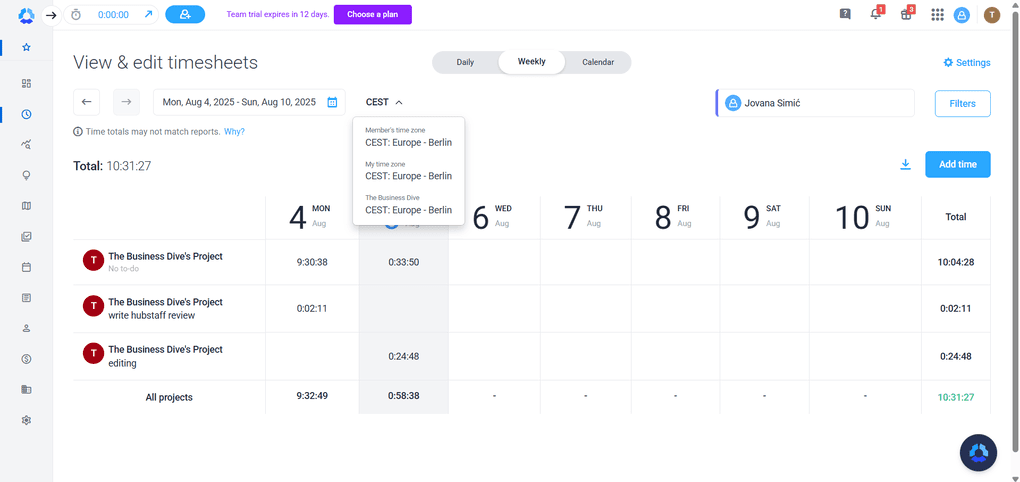
Honestly, Hubstaff really surprised me. After spending some time with it, I’d say it’s a great tool.
I liked how much control admins have over how the software operates, which ultimately determines how invasive or flexible the tracking feels. The Silent App stands out as maybe the least intrusive option, providing a smooth way to monitor time without constant user interaction.
All in all, my experience with Hubstaff was really good. It’s a powerful tool that can strike a balance between invasiveness and effectiveness.
🟢 Pick Hubstaff if: You manage a team and need time tracking, GPS location tracking, project management, and detailed workforce analytics in one platform.
🔴 Stay with Clockify if: You prefer simpler time tracking without extensive employee monitoring or need a more straightforward tool for recording work hours.
Where Hubstaff Excels & Falls Short
Strengths | Trade-offs |
|---|---|
Packed with useful features | Some features might feel invasive |
Flexible timer | |
Excellent location tracking | |
Strong admin controls | |
Advanced reporting tools |
Hubstaff’s pricing
- Free plan available
- Starter plan: $4.99/user/month with annual billing or $7/user/month with monthly billing
- Grow plan: $7.50/user/month with annual billing or $9/user/month with monthly billing
- Team plan: $10/user/month with annual billing or $12/user/month with monthly billing
- Enterprise plan: $25/user/month with annual billing
Related articles:
- Time Doctor vs Hubstaff 2026 | A Honest Comparison
- Hubstaff vs Clockify | My Findings After +2 Months
- 6 Best Hubstaff Alternatives After 500+ Hours Tracked

Harvest
Harvest is a time-tracking tool designed to help businesses manage expenses, track billable hours, and monitor time spent on projects. I had a positive experience testing it, particularly its invoicing, reporting, and project budgeting features.
MY TAKE AFTER TESTING
Expense tracking, client invoicing, and project budget monitoring.
Teams that need automatic time tracking or GPS tracking.
Smooth invoicing tools, detailed reports, and project cost estimation.
Automatic time tracking is limited to specific integrations, and phone support is only available on paid plans.
My real-world experience with Harvest
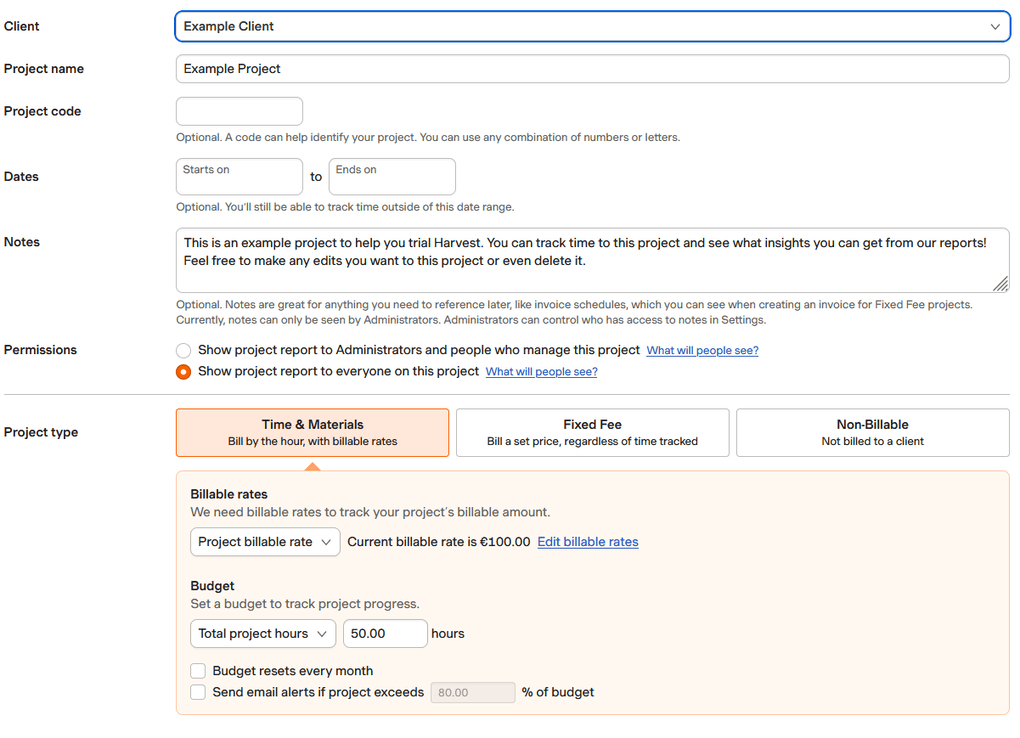
Overall, I had a positive experience with Harvest, and I tried all the features. It is an easy-to-use time tracking app that you can utilize on multiple platforms. While its features are not perfect, the time tracking itself is very straightforward with this app.
In addition, the invoicing feature makes this time tracking app an ideal solution for client-facing teams who need a simple solution for invoicing and project budgeting.
One of the key features I missed during my Harvest review is the automatic time tracking. Harvest only allows this for specific apps that you can connect to Harvest.
🟢 Pick Harvest if: You manage client projects and need straightforward time tracking combined with expense management, invoicing, and budget monitoring.
🔴 Stay with Clockify if: You prefer a simple time tracker or need more flexible automatic time tracking without relying on integrations.
Where Harvest Excels & Falls Short
Strengths | Trade-offs |
|---|---|
User-friendly interface design | Phone support is available only in paid plans |
Reasonable pricing | No GPS tracking |
Smooth tools for invoicing preparation | Automatic time tracking is not available |
Supports many integrations | |
Time tracking is simple |
Harvest’s pricing
- Free plan available, as well as a 30-day free trial
- Pro plan: $11/month with annual billing or $13.75/month with monthly billing
- Premium plan: $14/month with annual billing or $17.50/month with monthly billing
Related articles:
Summary: Best Clockify alternatives in 2026
After testing over 25 time tracking software options, this is my list of the top alternatives to Clockify. My ultimate winner is Rize, but there are some other great options depending on your preferences.
Related articles:
- 9 Best Time Tracking Apps In 2026 | 25+ Personally Tested Tools
- 18 Best Slack Integrations You Are MISSING In 2026
- 7 Best Productivity Apps I Use In 2026 | 100+ Tools Tested
- 15 Best AI Tools | 200+ Apps Tested By A Skeptical (2026)
Hope I was able to help you find the best Clockify alternative. As always, I will update this article over time so you guys have up-to-date information about the best Clockify alternatives.
Looking for similar tools?
Visit the link to explore other apps we’ve reviewed in this space and how they compare.
Why you can trust our reviews
At thebusinessdive.com, our team tests, reviews, and compares hundreds of productivity apps every year — from project management tools to note-taking apps. We dive deep into real-world use cases to help you find the right tools that actually improve your workflow, not just add noise.
Our mission? No fluff, no shortcuts—just honest, hands-on insights from productivity pros.
Discover how we stay transparent, read our review methodology, and let us know about any tools we missed.
Frequently asked questions
Is Clockify still free?
Clockify has an extensive free version, and it is one of the best free time tracking software. Nevertheless, if you want to use advanced features, you have to purchase Clockify paid plans.
What is the best time tracking tool?
For me, the best time tracking tool is Rize after testing numerous alternatives. In this article, I collected the best time tracking apps I tried so far based on features, pricing, pros & cons: 6 Best Time Tracking Apps In 2026 | 15+ Personally Tested Tools
Is Clockify invasive?
Based on my experience, Clockify is not invasive. I tried many other time tracking tools with more invasive features. However, I believe Clockify found the right balance when it comes to employee surveillance features.
Disclosure: I only recommend products I would use myself, and all opinions expressed here are my own. This post may contain affiliate links that, at no additional cost to you, may earn a small commission. Read the full privacy policy here.

Hey there! I am Aron, the founder of Thebusinessdive. I have been testing productivity apps for almost three years now. I reach 25.000 -50.000 people monthly with the mission to help you find the perfect productivity apps. Subscribe to my YouTube channel, newsletter, and social media to hear more about the best productivity tools. Let’s dive in!