


Granola vs Fellow 2026: I Used Both for Weeks — This One Won
I used Granola for a few weeks to see how it works, what its nuances are, and ultimately how it stacks up against the most popular AI note-takers.
On the other hand, I’ve been using Fellow for nearly 10 months — long enough to fully experience its strengths, limitations, and overall impact as an AI meeting assistant.
And now, in this Granola vs Fellow comparison, I will show every crucial difference I found between these AI meeting assistants, including features, pricing structures, and pros and cons.
This way, you can make the best decision and decide more easily between Granola and Fellow.
Let’s dive in!
Verdict
Here’s the quick verdict if you don’t want to read the full Granola vs Fellow review:
🎯 Best for:
Fellow: Teams & professionals that need an advanced and safe AI note-taker
Granola: Simple, bot-free AI note-taking
🚫 Not ideal for:
Fellow: Free AI note-taking
Granola: Teams or users who need more advanced features
⭐ Biggest strength:
Fellow: One of the most accurate transcriptions & meeting notes
Granola: Ability to incorporate your own notes into AI-generated summaries
⚠️ Biggest weakness:
Fellow: The free version is more like a trial
Granola: Limited feature set
⚖️ Verdict:
Granola is better for lightweight, bot-free personal note-taking with a minimalist experience, while Fellow is ideal for advanced team collaboration, security, and structured meeting workflows.
🏆 Winner:
Granola for personal simplicity, Fellow for teams and advanced meeting management
✅ Tested with our review & scoring methodology ✅ Real-world testing ✅ Unbiased evaluation
My ratings: Granola Vs Fellow
Granola
|
|
A lightweight AI note-taker with a simple user interface
|
|
|
Accurate live transcript
|
|
|
No meeting bots
|
|
|
The free tier includes numerous features
|
|
|
I loved how it incorporated my notes into the AI summary
|
|
|
There is no meeting recording
|
|
|
No video or audio upload
|
|
|
Feels too basic
|
Fellow
|
|
Accurate transcriptions and summaries
|
|
|
Bot and Bot-less transcription & recording
|
|
|
It offers numerous productivity tools besides the essential features
|
|
|
AI summaries
|
|
|
A budget-friendly option for teams
|
|
|
High-security standards
|
|
|
Have more features in the free plan
|
|
|
You need to install the Fellow desktop app in order to use botless recording
|
How We Test AI Note-Takers
To keep our reviews and final scores fair and consistent, we evaluate every AI note-taking tool using a standardized testing framework built on real-world usage and hands-on experience.
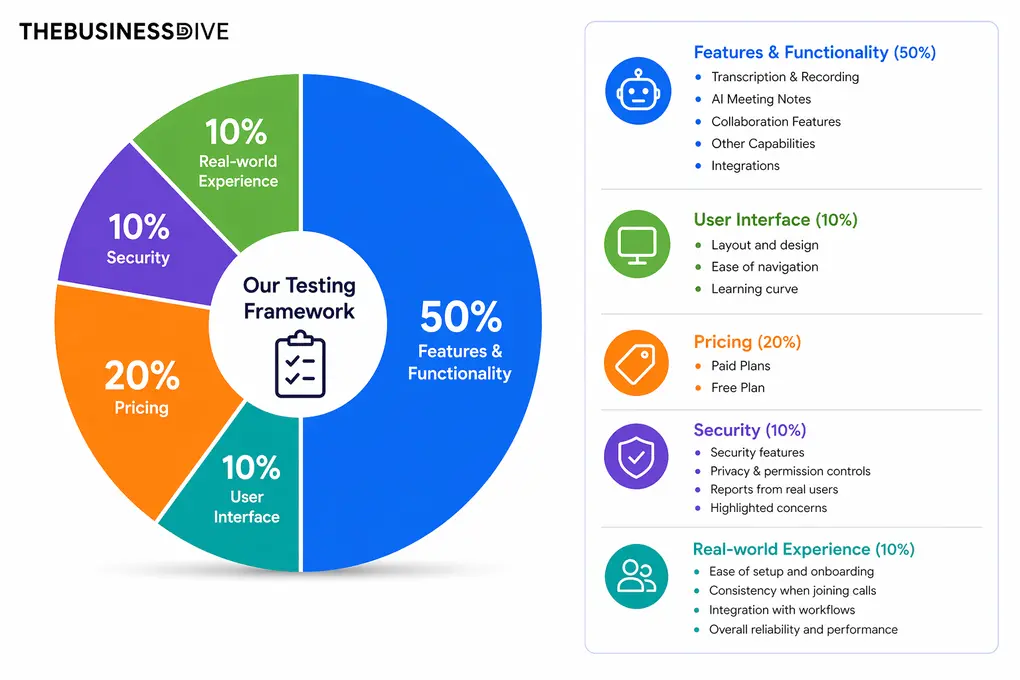
Our scoring breakdown after testing 20+ AI note-takers:
🤖 Features & functionality — 50%
🖥️ User interface — 10%
💰 Pricing — 20%
🔐 Security — 10%
👥 Real-world experience — 10%
Want a detailed breakdown of how we test each category?
Learn exactly how we test tools → Review methodology
Key differences between Granola and Fellow
Here is a short overview of the key differences I found in the Granola vs Fellow showdown:
|
|
|||
|---|---|---|---|
|
Best for |
Teams and professionals needing an advanced and secure AI note-taker |
Simple, bot-free AI note-taking for individuals |
|
|
Core focus |
AI meeting assistant with transcription, collaboration, meeting workflows, and enterprise security |
Lightweight AI meeting transcription and note-taking |
|
|
Key strengths |
|
|
|
|
Main limitations |
Weak free plan and bot-less recording requires desktop app |
No meeting recording or file uploads, and limited advanced features |
|
|
Ease of use |
Easy |
Easy |
|
|
Pricing |
|
|
|
|
Integrations |
Extensive integrations |
Extensive integrations |
|
|
Cross-platform |
Web / Desktop / Mobile |
Web / Desktop |
Comparison: Granola vs Fellow
First, I will show you the features of both AI note-taking apps one by one. After, I will guide you through their language and meeting platform support, integrations, pricing, and user interfaces. Finally, I collected the pros and cons that I discovered during the Fellow vs Granola comparison.
Features
Let’s begin with Granola’s features!
Granola’s features
Below, I guide you through the key features I tried during my Granola vs Fellow testing.
Bot-free transcription
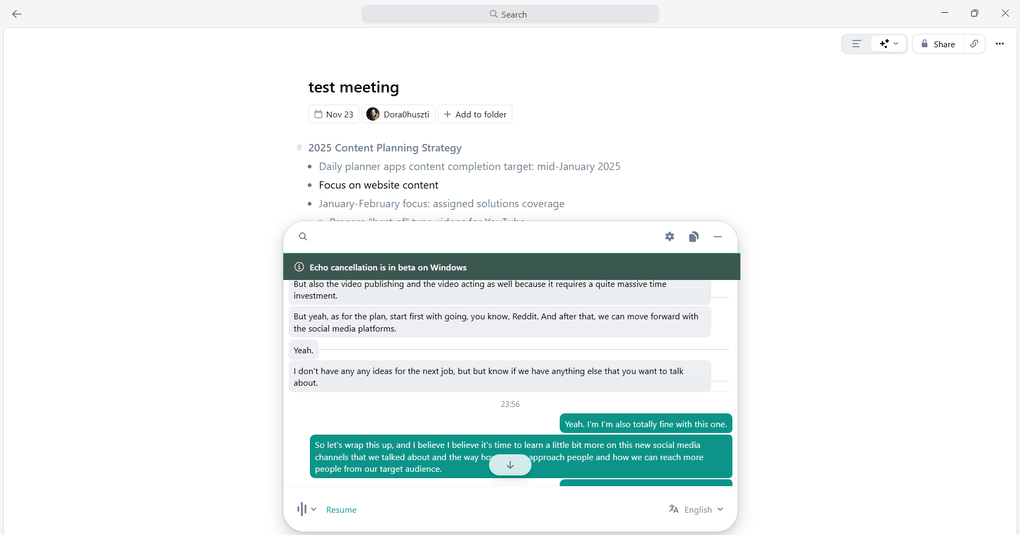
The reason why I enjoyed Granola is that this AI note-taking app does not use meeting bots to transcribe calls. Essentially, it means that it only listens to your device’s audio, and no bots join your meeting.
The meeting transcript is very simple, as you can see. Granola transcribes meetings in real time. That said, you only need to hit the button to see the live transcript.
Granola’s transcription accuracy is generally strong, but it struggles with speaker identification in group calls.
Moreover, during my Granola review, I discovered that if you are looking for call recordings, you are not gonna find them, as Granola can only transcribe and summarize your meetings.
AI notes
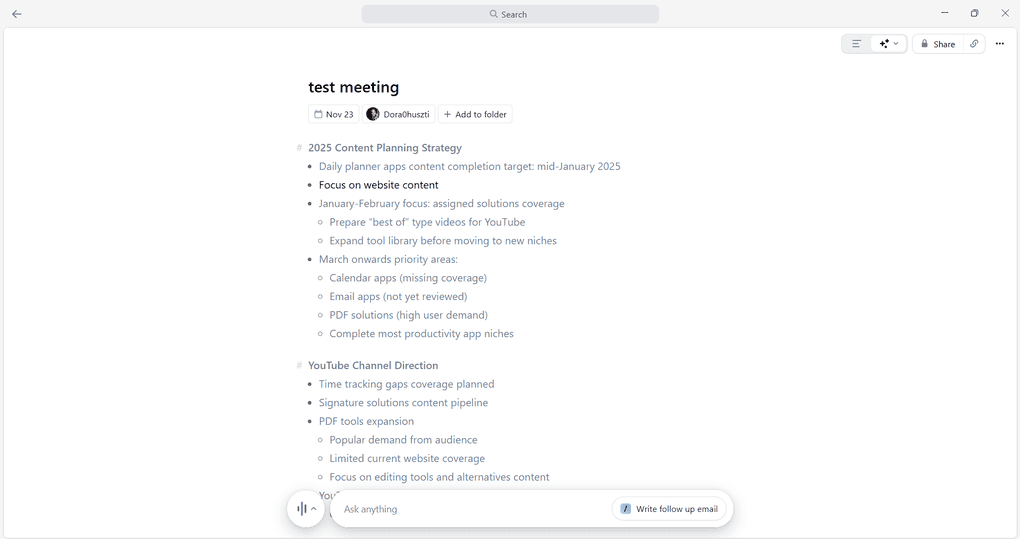
Granola’s AI-generated notes work a bit differently compared to other meeting tools. Besides analyzing the transcript, it converts your own notes from the meeting into an AI-generated summary.
If you take a closer look at the picture, you will see text in black. Now, that’s my own notes, while all the other bullet points are written by Granola.
To convert your own notes into AI-generated notes, you only need to click on the “Enhance notes” option, and Granola will take care of the rest.
Personally, I loved this solution, and I was impressed by how it transforms my notes into AI-powered meeting notes. Nevertheless, the output was a bit too basic for me compared to Fellow, where I get more advanced meeting notes.
Ask Granola
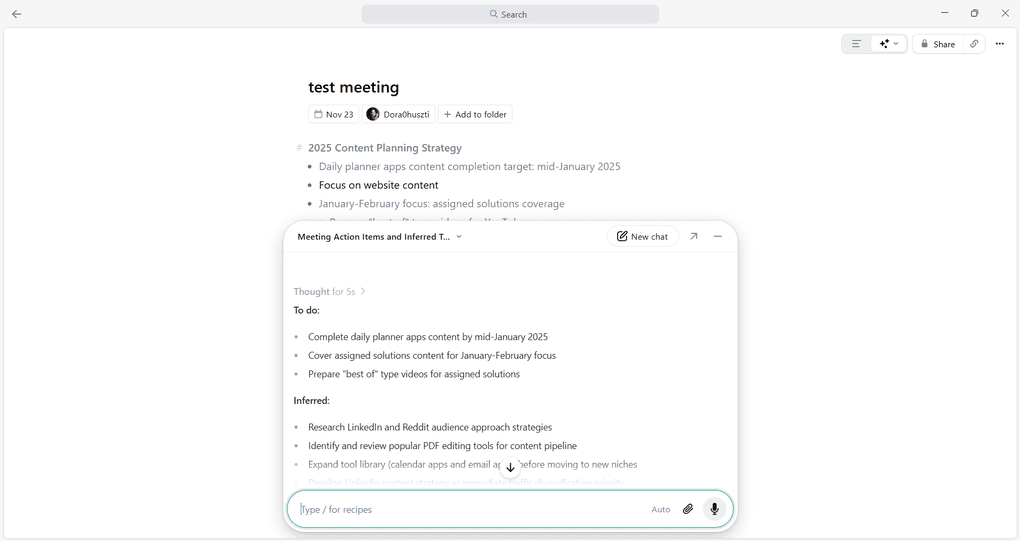
The Ask Granola feature works like an AI chatbot for your meetings. During my Granola review, I asked questions, asked to write follow-ups, or identify action items.
Ask Granola provided me with relevant outputs, and it was pretty fast. It was great to see that Granola included this feature in the Free plan.
Ultimately, its AI chat is a helpful feature for quickly accessing key points from your meetings or performing meeting-related tasks faster.
Templates
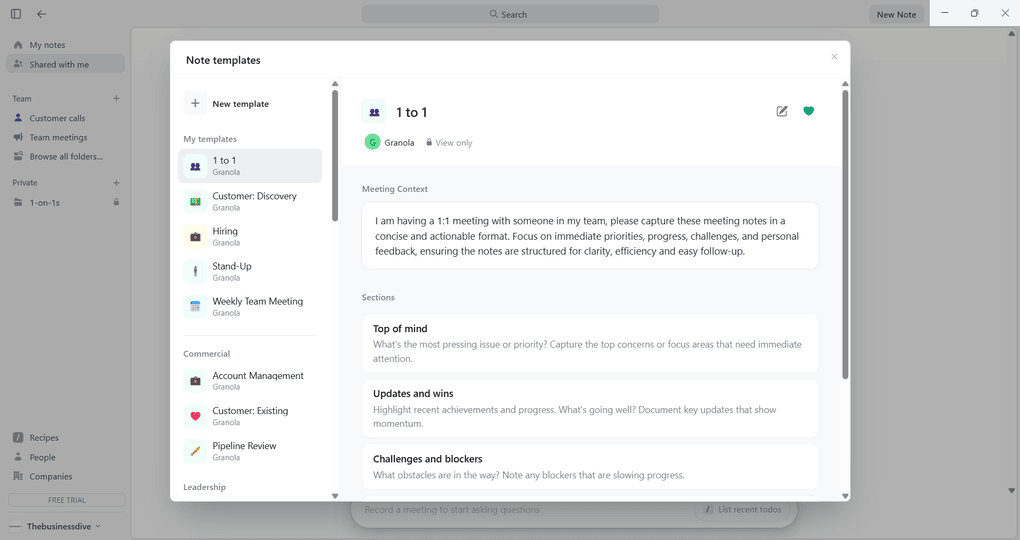
With Granola, you can choose from numerous meeting templates. Based on the template you choose, it will organize your meeting notes accordingly.
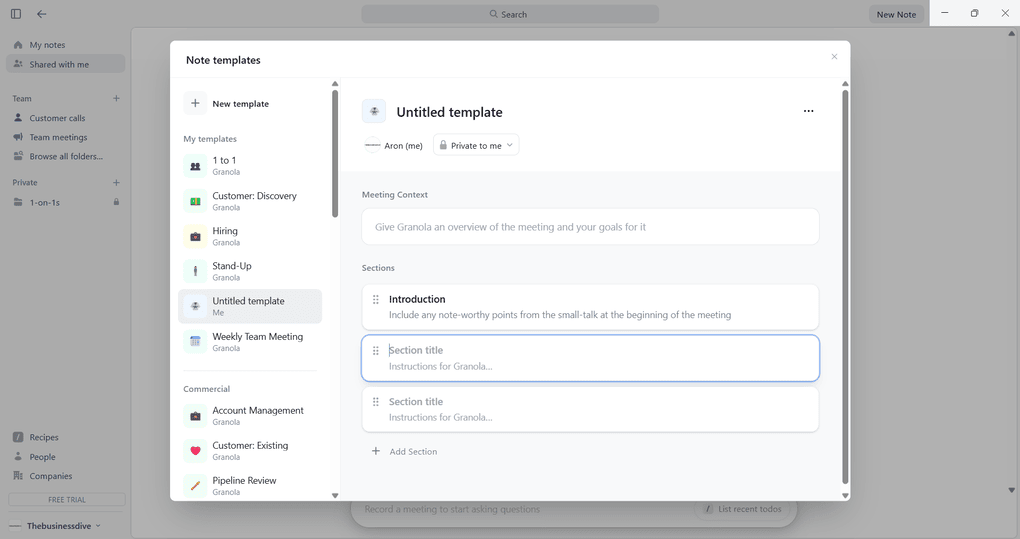
That said, it offers meeting templates for 1:1 meetings, customer calls, and more. An additional plus for me is that you can add and remove sections when customizing or creating a new meeting template.
This way, you can fully personalize the templates for your meetings. It is definitely a useful feature for many users!
Team features
Finally, Granola has a few team features for small businesses. It is useful that you can share the meeting notes with a few clicks through email, Slack, a link, or by copying the text.
Also, you can create shared folders with your teams to centralize your meeting summaries in one place and organize them into different folders, such as sales calls or team meetings.
However, my overall impression was that Granolas was designed for individuals rather than teams.
🔎 Read my full Granola Review 2026 | Where It Shines And Where It Fails
Short on time? Here’s a quick overview of Granola
Fellow’s features
Now, it’s time to delve into Fellow’s features!
Bot-free or Bot Transcription
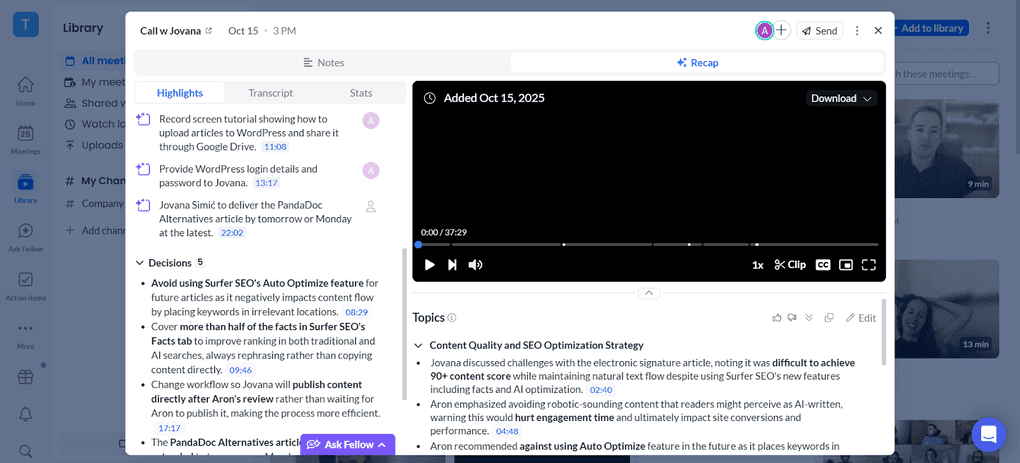
Whenever you join online meetings on Microsoft Teams, Zoom, Slack, and Google Meet, Fellow will automatically transcribe and record them, offering this service in over 92 languages. If there are meetings where you do not want Fellow to join automatically, you can easily change it in the user settings menu.
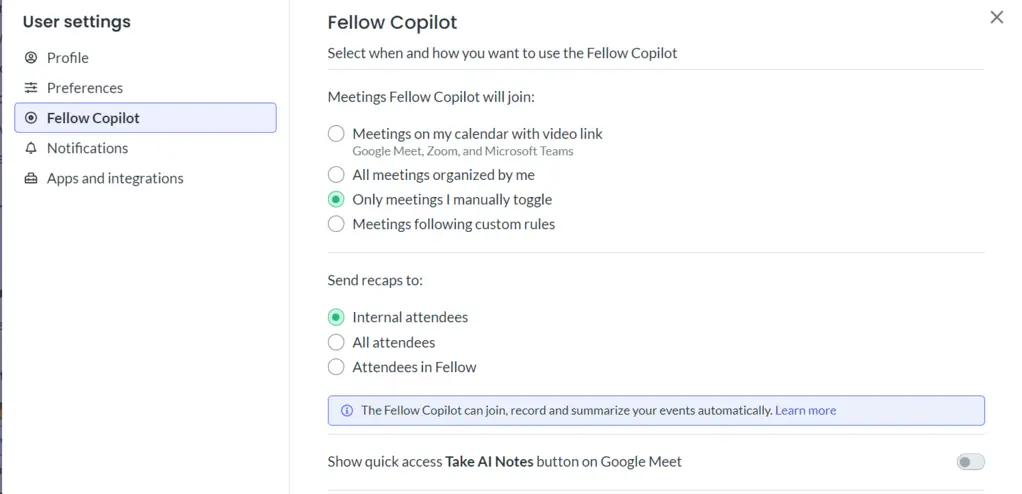
With Fellow, you can choose whether you want to transcribe your meetings with a bot or without a bot when attending a call. This is a key differentiator from Granola, as some users still prefer to have a bot in the call to show external attendees that the meeting is being recorded. Fellow gives users the flexibility to choose between bot and bot-free recording, depending on the type of meeting they are joining.
If you want to transcribe calls without a bot, Fellow offers the same enterprise governance as its bot-based recordings. Just select the “Record without bot” option from your meeting, and Fellow will record your meeting in the background without compromising privacy and security.
Alternatively, if you want a bot to join, Fellow always asks to be let into a meeting and appears as a participant, so everyone knows the meeting is being recorded.
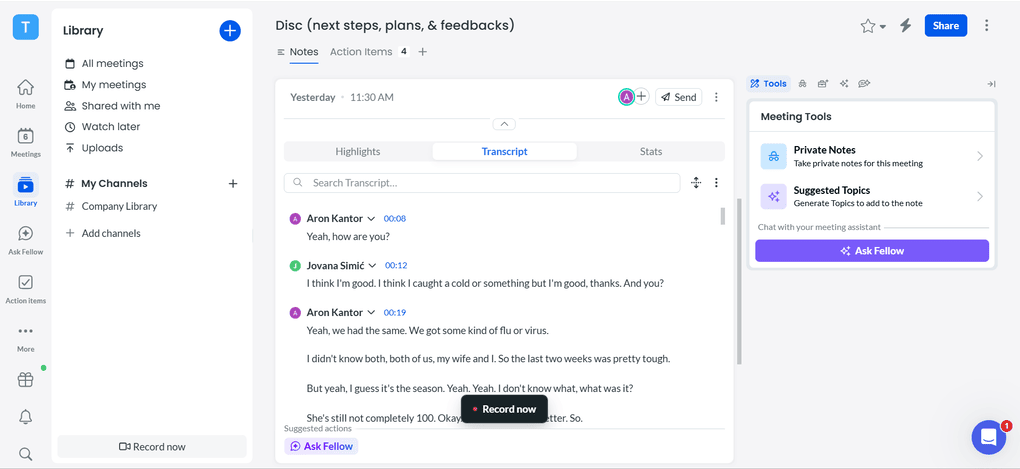
The transcription of your meetings takes only a couple of minutes, and you can access them. Based on my experience, the transcriptions are highly accurate. Also, Fellow uses timestamps and speaker IDs, so you can easily track who said what.
Use this link to sign up and get 10% off the paid plans if you upgrade.
Recording
In contrast to Granola, Fellow automatically records calls, which you can access through your transcription and meeting notes. I found the recordings library valuable, especially for teams or larger organizations. You can organize your previous meetings into custom channels and auto-publish your recordings to the right ones.
Furthermore, you can create new channels for yourself or even your whole company. Essentially, this library helps you structure your meeting recaps and offers an excellent way to organize your meeting history, and a way to share recaps with people who did not attend those meetings but want access to that information.
For example, the CEO can be a part of the Sales calls channel or the Project Check-In channel even if they didn’t attend those meetings, and then use “Ask Fellow” to ask for insights and updates from those conversations.
AI meeting notes
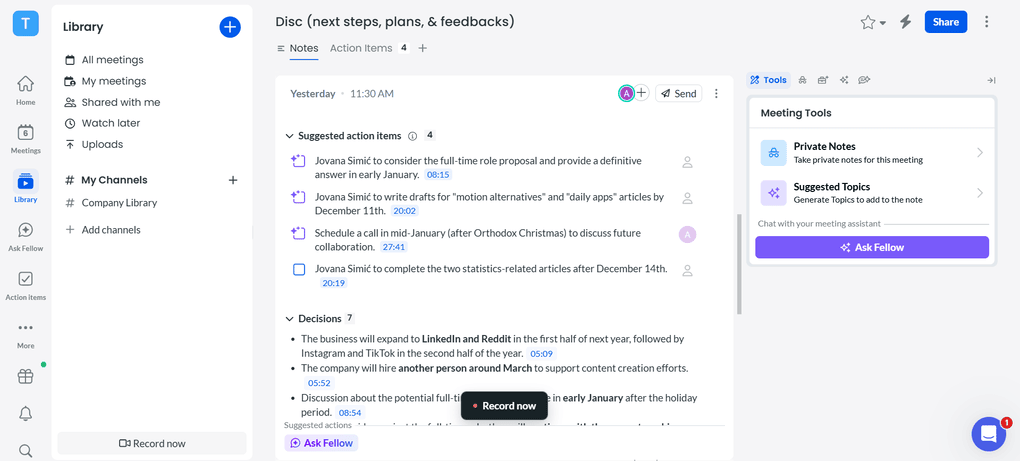
Fellow’s AI summaries provide you with the key insights, action items, and decisions from the meeting. Essentially, the AI summaries just save a ton of time, as you no longer need to go through the entire transcription.
Compared to Granola, Fellow’s AI meeting notes are more detailed and extract key insights from your meeting recordings.
I also love that you can assign the action items to your team members with Fellow, so it is clear after each meeting who is responsible for what. Unfortunately, Granola does not track your tasks or allow you to assign them to others, which makes accountability harder to monitor.
Ultimately, my overall experience with Fellow’s meeting notes was great. After my virtual meetings, it automatically generated meeting notes linked to your meeting transcriptions and recordings.
Meeting agendas
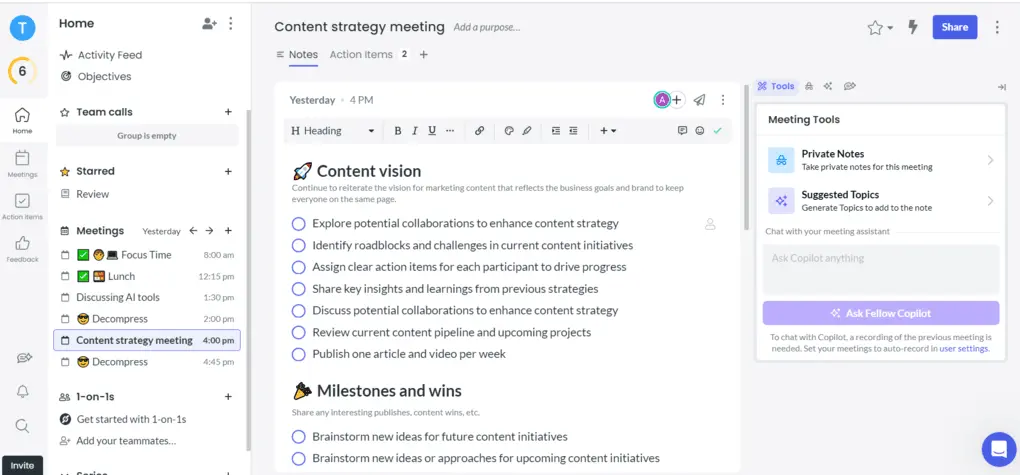
The meeting agenda is a helpful pre-meeting tool for establishing clear talking points and action items to address during the call. I found it pretty fascinating that Fellow implemented AI not only in the meeting and post-meeting phase but also in the pre-meeting stage. You can ask AI for topic suggestions or chat about specific parts of your meeting agenda.
The pre-meeting AI briefs provide information on everyone in the meeting as well as a recap of the last meeting. This was extremely valuable for my back-to-back meetings when I didn’t have time to prepare properly.
Whoever from your team will attend the meeting can also add their thoughts and assign the talking points and action items to others. You can also create a private note that you can see during the meeting.
Lastly, Fellow’s Agenda Builder helps you generate headings and talking points for your meeting using the title of the meeting and the calendar description.
Clips
Clips are a helpful way to capture and highlight key moments and share them with your team members. When you click on the recording, you will access the full recording, summary, and transcription of the virtual meeting.
Here, you will also see the option to clip a snippet of the call. After selecting the start and end time, you just need to save the clip, and voila, you can save it in the recording library or share it with teammates.
Ask Fellow Copilot
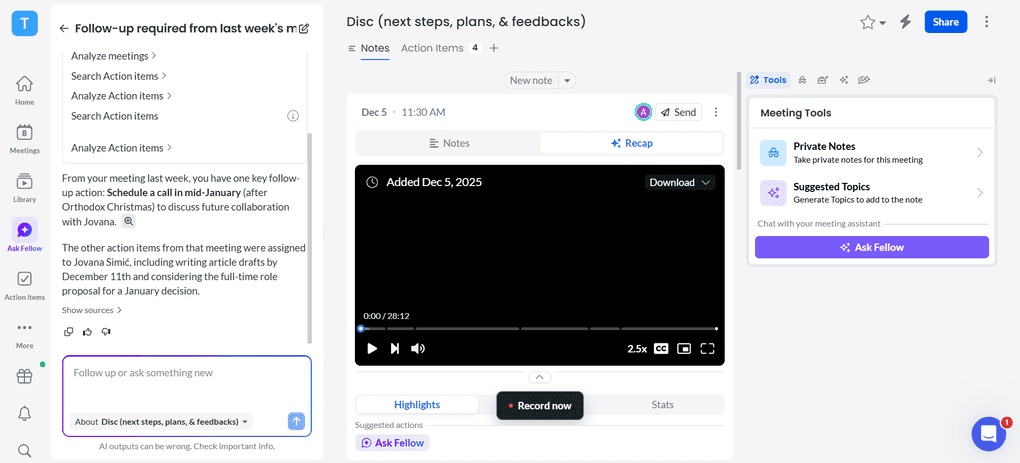
Ask Fellow utilizes your meetings and channels across your organization that you have access to (even if you didn’t attend) to provide up-to-date and comprehensive responses. So, it is more than just an AI chat, as it collects all the critical information from your organization to answer questions.
I found it pretty efficient for getting meeting information and answers to meeting-related questions. You can ask Fellow any questions regarding your meetings, for example, “What did we decide on X topic?” or “What should I follow up on from yesterday?”, and even get insights from meetings you did not or could not attend, if you are a part of the recording channel where that meeting is stored.
If we compare it to Ask Granola, which only has access to your meetings, Fellow offers a more comprehensive solution without leaving gaps in knowledge.
Team collaboration features
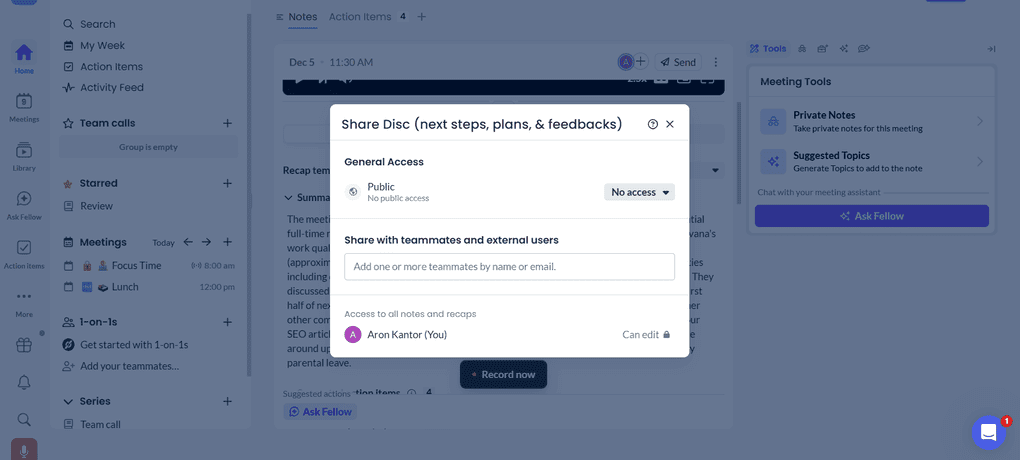
What makes Fellow special is that it was designed for the whole organization’s use cases. Whether it’s sales calls, interviews, or one-on-ones, you can implement Fellow in every team. It offers an excellent way to handle both external and internal calls and provides incredibly helpful collaboration features.
You can utilize the collaborative agendas, assign action items,, and easily share the meeting notes with others. Fellow is built with collaboration in mind, which means that even when you’re using their botless recording functionality, internal attendees in your organization will know that they are being recorded.
Similarly, Fellow will always prompt you to invite attendees to the meeting agenda and AI notes if you are recording an impromptu huddle or meeting, always keeping collaboration and alignment in mind.
🔎 Read my full Fellow Review: My Thoughs After +12 Months (2026)
Short on time? Here’s a quick overview of Fellow
Use this link to sign up and get 10% off the paid plans if you upgrade.
Language support
In round 2 of the Granola vs Fellow clash, let’s take a look at the language support of each AI note-taking app.
Granola’s language support
Regardless of whether you use the macOS or Windows apps, Granola supports English, French, German, Spanish, Italian, Portuguese, Dutch, Japanese, Russian, and Hindi.
If you use your iPhone, Granola supports Mandarin Chinese, Finnish, Korean, Polish, Turkish, Ukrainian, and Vietnamese.
Fellow’s language support
In contrast, Fellow has more extensive language support. Currently, it supports transcripts in 92 languages.
Meeting platforms and integrations
Now, it’s time to check their integrations!
Explore our Apps directory
A curated directory of software tools we’ve independently reviewed, with links to full reviews, comparisons, and category guides.
Granola’s supported meeting platforms and integrations
Granola supports most major virtual meeting platforms like Zoom, Google Meet, Microsoft Teams, Slack Huddles, and Webex. It captures your computer’s audio to provide transcription.
In the course of my Granola review, I discovered that it is okay in terms of integrations, as you can connect it with some of the most popular apps like Google Workspace, HubSpot, Slack, and Zapier.
Fellow’s supported meeting platforms and integrations
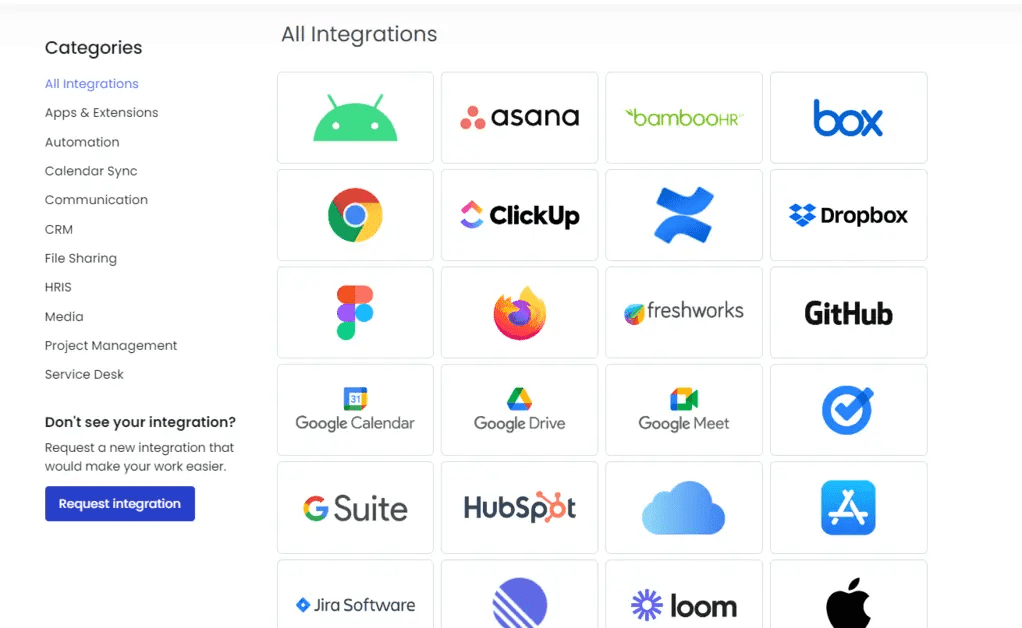
Fellow offers deep integrations with more tools than Granola. You can utilize Fellow for virtual meetings on Zoom, Microsoft Teams, Slack, and Google Meet.
Fellow also allows direct integration with over 50 third-party apps, including Glean, Asana, Monday, Salesforce, HubSpot, Jira, Linear, Google Calendar, Google Docs, Microsoft Outlook, ClickUp, and more. In addition, you can access 8,000 apps with its Zapier integration.
One key differentiator of Fellow is that it offers an MCP Server to connect your AI meeting notes to LLMs like Claude, ChatGPT, and AI apps like Cursor. Technical teams can also use Fellow’s API to build custom workflows.
Use this link to sign up and get 10% off the paid plans if you upgrade.
Security controls
Security is an important aspect when choosing between Fellow and Granola, since you will bring these tools to sensitive meetings as well.
That said, let’s take a closer look at what I found!
Granola’s security controls
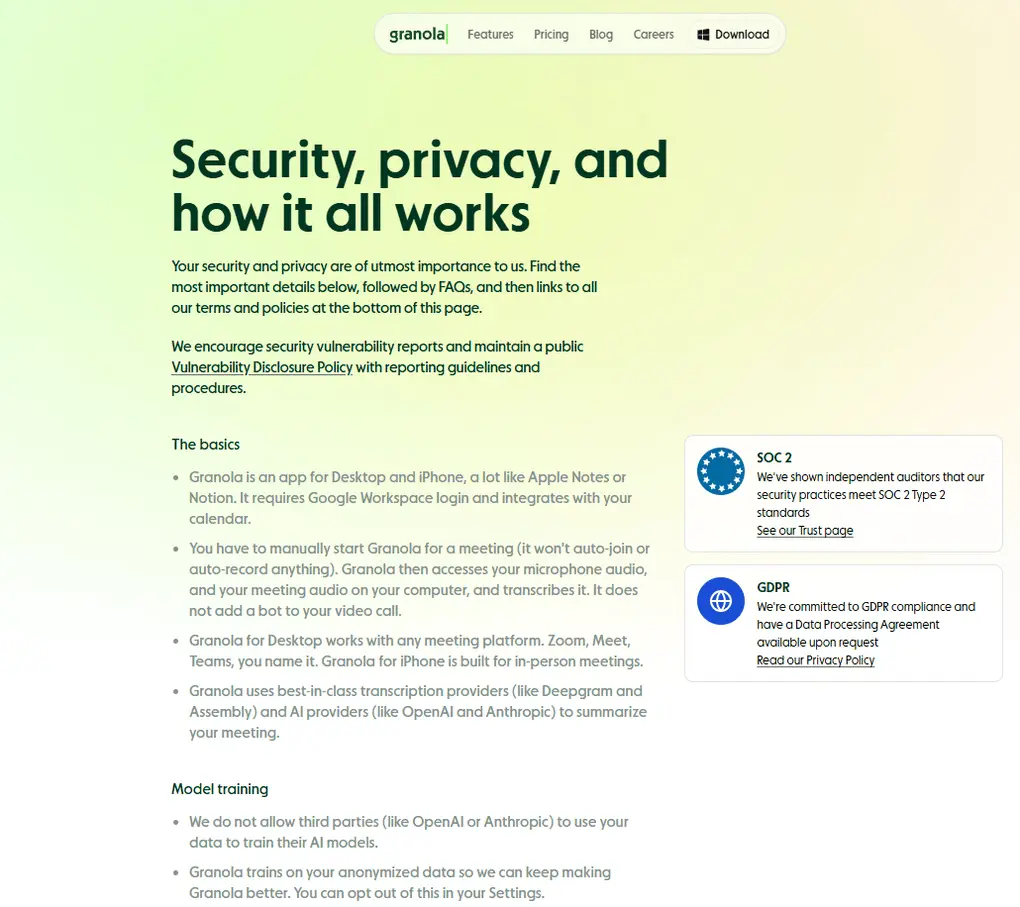
During my Granola review, I took a deep dive into its security and privacy policy. Also, I did some research online to see if there are any red flags about this AI note-taking app.
Granola is SOC 2 and GDPR compliant, and it does not allow third parties to use your data to train their AI models. So, all looks good on paper, but the reality is a bit different.
I found past reports that Granola allowed anyone to download other users’ transcripts without authentication. It was around May, but since then, I have not seen any red flags.
Fellow’s security controls
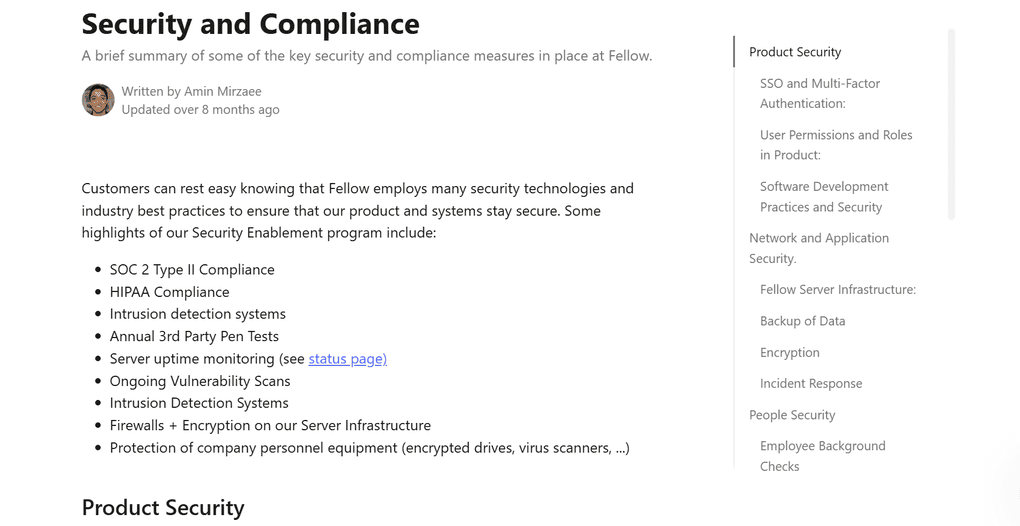
Fellow is an enterprise-ready solution designed for organization-wide use. For businesses, and especially larger organizations and regulated industries, choosing an AI meeting assistant isn’t just about features – it’s about trust.
Fellow is recognized for its data privacy and security features, making it suitable for sensitive discussions. Organizations appreciate the AI recording policies, redaction feature, and thoughtful UX details like being able to pause and resume the recording during the meeting.
It is SOC 2 Type II certified and GDPR compliant, meaning an independent auditor has verified its data security practices. Fellow also offers HIPAA compliance, signing BAAs for customers in healthcare.
Pricing
In round 4 of the Granola vs Fellow comparison, let’s take a look at the pricing structure of each AI note-taking app.
Granola’s pricing
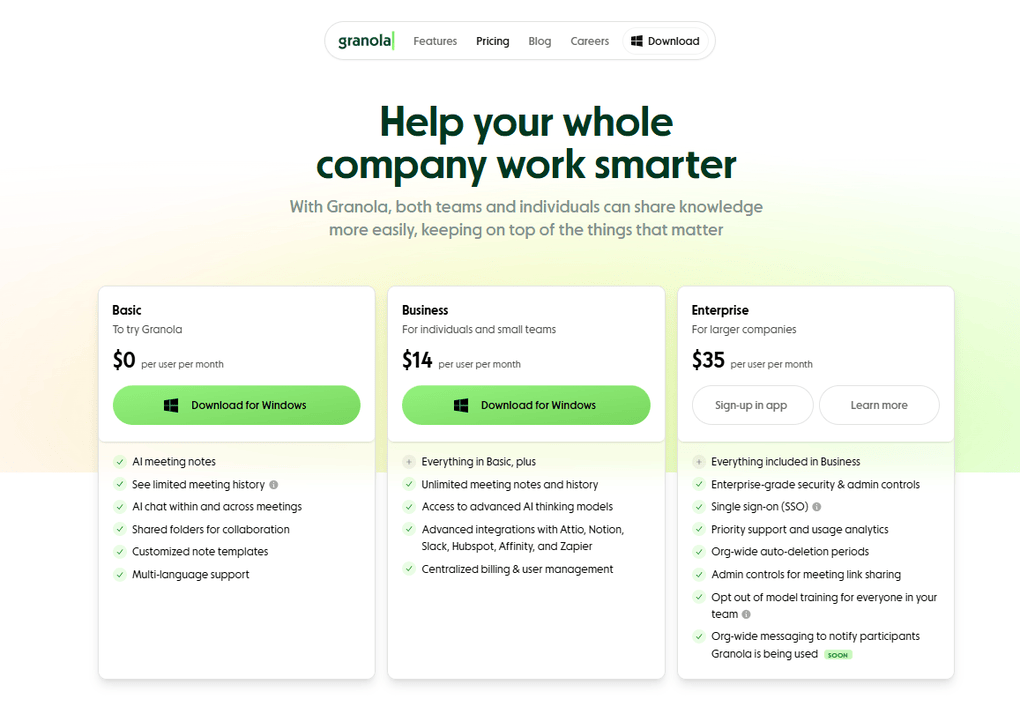
Granola offers a Basic plan (i.e., Free plan) and two paid plans. Let me break them down for you!
Granola provides a free Basic plan with features like AI meeting notes, Ask Granola, shared folders, customized note templates, and multi-language support. However, your meeting notes will stay viewable for a limited time.
The free tier is ideal for those who want to give Granola a try but are not sure if it is for them.
The Business plan is $14 per user per month, and includes everything in the Basic plan. Additionally, you will get unlimited meeting history and notes, consolidated billing, access to the advanced AI models, and you can connect Granola with Slack, Hubspot, Notion, Zapier, Attio, and Affinity.
Finally, Granola offers an Enterprise plan for larger companies for $35 per user per month. It covers enterprise-grade security, SSO, priority support, usage analytics, and more. So, this plan is for businesses with higher compliance and security requirements.
Overall, Granola’s pricing is okay. I would not call it overpriced, but it is not as cheap, given the features it offers for this price.
Fellow’s pricing
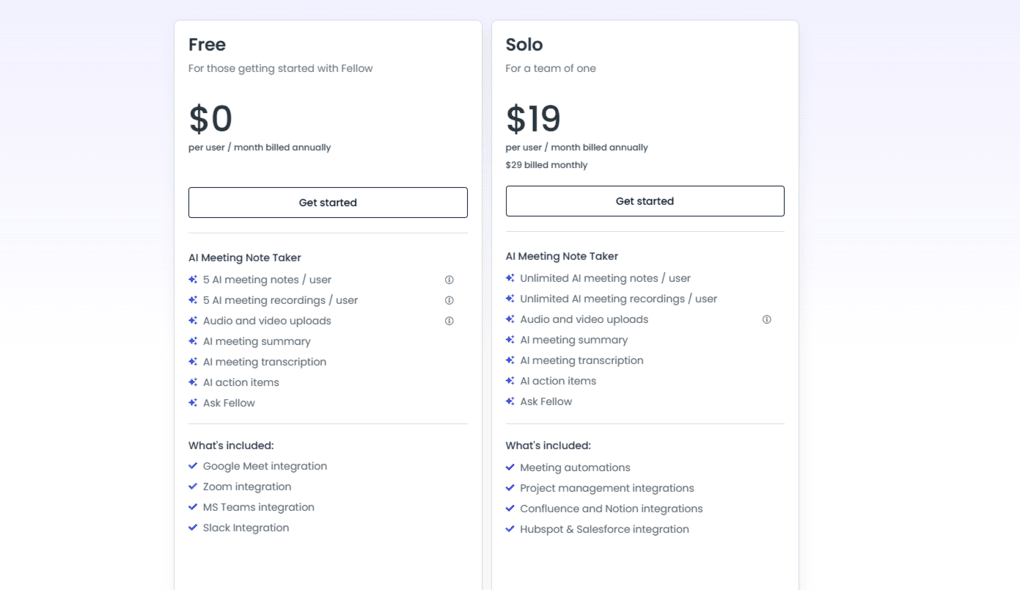
Fellow offers four plans. The Free plan includes access to AI recording, recaps, and transcriptions. Additionally, it provides access to features such as collaborative meeting notes, meeting agendas, meeting timers, and integrations with Zoom, Slack, Microsoft Teams, and Google Meet. The Free plan is perfect for those who want to try Fellow before purchasing it.
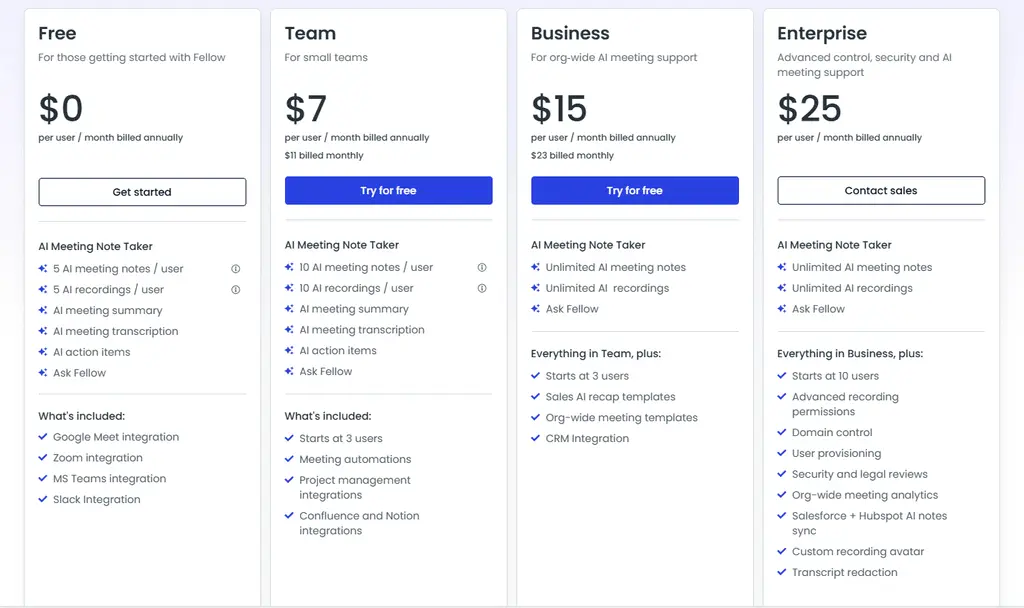
The Team plan was developed for small teams and starts with 3 users. It includes all the features in the Free plan with higher limits and offers meeting automation tools and additional integrations with Notion or project management tools.
The Business plan starts with 3 users and provides unlimited recordings, transcription minutes, organization-wide meeting templates, sales AI recap templates, and more integrations.
The Enterprise plan offers advanced control, security, and AI meeting support. With this plan, you can create customized rules for recording and have more recordings and transcription minutes.
Use this link to sign up and get 10% off the paid plans if you upgrade.
User interface
Granola’s user interface
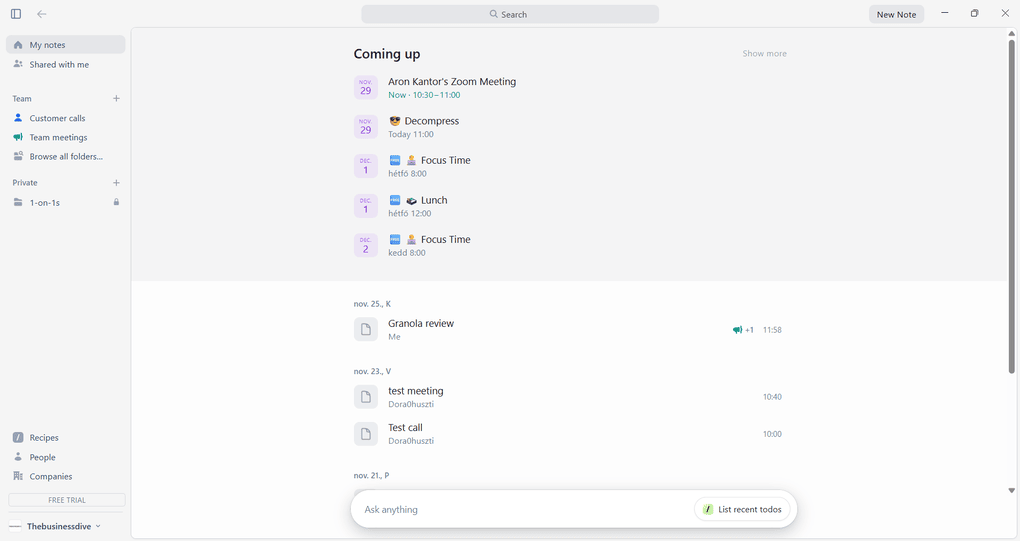
Granola’s interface is clean and minimalist, designed for easy access to ongoing and past transcription sessions. On the left side, you will access your notes, folders, account information, and more.
Probably, one of the most straightforward interfaces I saw in the past three years was when testing AI note-taking apps.
Fellow’s user interface
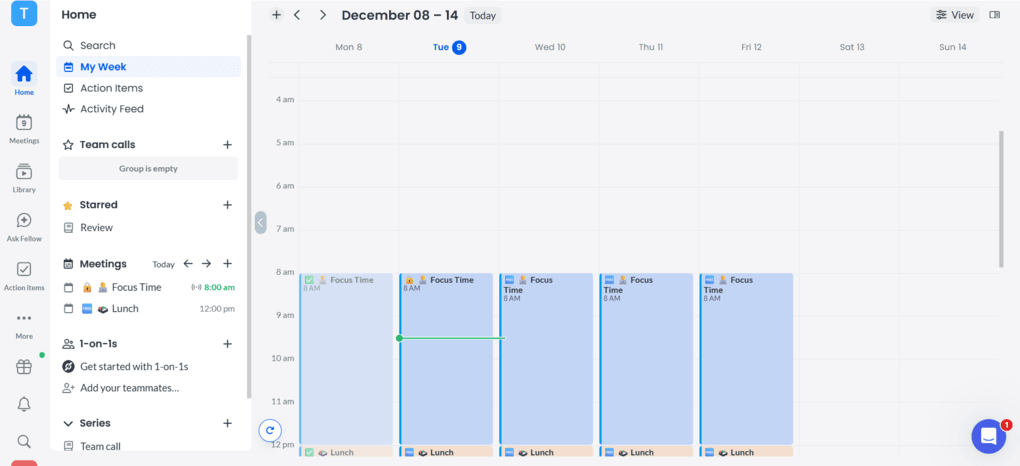
Fellow has a simple and clean user interface. It’s particularly great that you can access many features from the homepage with just a few clicks.
With the launch of Fellow 5.0, the interface has become even more user-friendly and noticeably more convenient to use.
I used this tool’s desktop version, which you can easily download from Fellow’s website. The desktop app helps you make the meeting experience smooth from beginning to end.
My experience with Granola
During my Granola review, I had some mixed feelings. Let me break this down.
From the positive side, Granola provided accurate transcriptions. It impressed me with the meeting notes and the way it converts my own notes into AI-generated summaries. The desktop app is intuitive and straightforward, and the meeting tool ultimately has a short learning curve.
On the other hand, Granola was simply too basic for me. What hurts the most for me is that Granola cannot record and store video, which is crucial for many users, including me.
Granola’s pricing is okay, but I could not call it budget-friendly. Don’t get me wrong, it provides a good value for this money, but still, if we consider that Fellow’s paid plans start at $7, I don’t feel it is completely justified.
To summarize, I enjoyed using Granola, and it is a reliable AI note-taker. However, it is ideal only for personal use and for those who need a very simple solution for transcribing online meetings.
You can read my full experience here: An Honest Granola Review 2026 | An Exciting AI Note-Taker
My experience with Fellow
After testing numerous AI note-takers, I found Fellow the most accurate and safest one. It is full of productivity and AI tools to supercharge productivity and save time with your online calls.
Based on my experience, Fellow transcribes my online meetings with 95%+ accuracy. After my video calls, the AI prepares meeting summaries and transcriptions within minutes, so I can quickly review how it went.
One of the most underrated features of Fellow is the meeting agendas. Using this feature, you can collect all the points you want to discuss in the next meeting, and you will see them next to the meeting participants during your calls.
For the meeting agendas, the AI-powered pre-meeting briefs are super valuable for summarizing previous discussions and action items, ensuring that you are fully aware of the context before the meeting.
While Fellow just recently implemented its bot-free AI note-taker feature, it works reliably in the background. It captures conversations effortlessly and securely, whether you’re online, in person, or somewhere in between.
In contrast to Granola, Fellow is an excellent choice for teams and larger organizations. It’s an enterprise-ready solution with robust roles, policy enforcement, and admin flexibility.
Use this link to sign up and get 10% off the paid plans if you upgrade.
Granola’s pros and cons
Now, I will show you Granola’s pros and cons I discovered.
Pros of Granola
Cons of Granola
Fellow’s pros and cons
Let’s continue with Fellow’s pros and cons!
Pros of Fellow
Cons of Fellow
Use this link to sign up and get 10% off the paid plans if you upgrade.
Alternatives to Granola and Fellow
If you are not sure if Granola and Fellow are the best choice for you, here are some:
|
App |
Best for |
Description |
|---|---|---|
|
Fireflies AI |
Best budget-friendly option |
A popular and budget-friendly AI meeting assistant for individuals and teams. |
|
Notta |
Best for multi-language transcription |
A unique AI note-taker that allows multi-language transcription, enabling people to speak two different languages during online meetings. |
|
Fathom |
Best free AI note-taker |
An accurate AI note-taker with an extensive free plan. |
|
MeetGeek |
Best for multi-language transcription |
A versatile AI note-taking app with the best AI meeting summaries. |
|
tl;dv |
Best simple AI note-taker |
A simple option for individuals with a feature-rich free plan. |
|
Radiant |
Best free AI note-taker for Mac |
It is a 100% free AI bot-less note-taker for Mac users for in-person and online meetings. |
|
Otter AI |
A popular AI note-taker |
One of the most popular AI note-takers for Google Meet, Zoom, and Microsoft Teams. |
|
Krisp |
Best bot-less AI note-taker supporting high audio quality |
Krisp is a Voice AI platform for clearer communication and more productive meetings, combining real-time audio enhancements with AI note-taking. |
|
Bluedot |
An easy-to-use bot-less AI note-taker |
Bluedot is a straightforward and easy-to-use bot-free AI note-taker. |
|
Zoom AI Companion |
Best for Zoom users needing built-in AI note-taking |
A solid built-in AI assistant for Zoom that offers meeting summaries, basic transcription, and action items, but lacks advanced features. Full Zoom AI Companion review | Quick Zoom AI Companion overview |
|
Plaud |
Best for in-person conversations |
A unique AI note-taker with dedicated hardware for recording meetings, phone calls, and ideas wherever you are. |
Looking for similar tools?
Visit our AI note-takers library to explore other apps we’ve reviewed in this space and how they compare.
My pick: Granola vs Fellow
After going through all these aspects of Granola and Fellow, it was easy for me to decide which one to choose. Personally, I found Fellow to be a more capable AI note-taker than Granola, particularly in terms of features and security.
Additionally, the pricing of Fellow’s paid plans is justified to me given the value they offer, while I have doubts about whether Granola’s Business plan is worth $14 per month.
Related article:
- Best Granola Alternatives 2026 | My Top 6 After Testing 25+ Tools
- Fireflies AI vs Otter AI: A Side-by-Side Comparison In 2026
- Best 5 Otter AI Alternatives | 20+ Personally Tested Apps (2026)
- Otter AI vs Fellow: My pick after +2 years testing (2026)
- 6 Best Meeting Recording Apps 2026 | 2+ Years Testing
I hope I was able to help you find out whether Fellow or Granola suits you the best. As always, I will keep updating this Granola vs Fellow article to ensure it reflects the reality.
Why you can trust our reviews
At thebusinessdive.com, our team tests, reviews, and compares hundreds of productivity apps every year — from project management tools to note-taking apps. We dive deep into real-world use cases to help you find the right tools that actually improve your workflow, not just add noise.
Our mission? No fluff, no shortcuts—just honest, hands-on insights from productivity pros.
Discover how we stay transparent, read our review methodology, and let us know about any tools we missed.
Frequently asked questions
Is Fellow or Granola better?
After spending enough time with both AI note-takers, I found Fellow the better solution. It offers more advanced features, robust security, and generous pricing plans for teams.
What is the difference between Tl;dv and Granola?
While Granola offers bot-free transcription and meeting summaries, tl;dv uses a bot for your calls. Nonetheless, tl;dv offers more features, including video recording, than Granola, and it is a more suitable choice for sales teams.
In fact, you can create meeting templates for sales and customer success teams as well to ensure all the actionable insights are captured.
Does Granola work with teams?
Granola has limited team collaboration features. While you can share the meeting summary and transcription with your team members and organize them into folders, it does not offer more features for teams.
Is Granola legal?
Yes, Granola is legal. Although it does not record audio or video, it transcribes the conversations in the background, which can be tricky, since some jurisdictions require informing or gaining consent from other meeting participants before transcribing.
Disclosure: I only recommend products I would use myself, and all opinions expressed here are our own. This post may contain affiliate links that, at no additional cost to you, may earn a small commission. Read the full privacy policy here.

Hey there! I am Aron, the founder of Thebusinessdive. I have been testing productivity apps for almost three years now. I reach 25.000 -50.000 people monthly with the mission to help you find the perfect productivity apps. Subscribe to my YouTube channel, newsletter, and social media to hear more about the best productivity tools. Let’s dive in!