


My Brutal Honest Krisp Review 2026 | Is It Worth It?
Recently, when I was looking for the best botless AI note-takers, I came across Krisp. It promises a lot: AI note-taking, noise cancellation, accent conversion, and more.
So, I wanted to give it a try and see what it actually delivers to help you save time and money by testing it for yourself.
In this Krisp review, I will guide you through its main features, share my personal experience, explore pricing, and outline its pros and cons to help you decide if it is the right AI note-taker for you.
Let’s dive in!
Verdict
Here’s the quick verdict if you don’t want to read the full review:
🎯 Best for: Users who need a solution for AI note-taking and noise cancellation
🚫 Not ideal for: Users who are looking for a free AI note-taker
⭐ Biggest strength: It works on most communication platforms
⚠️ Biggest weakness: Noise cancellation is desktop-only (Mac and Windows), not available on mobile
⚖️ Verdict: A bot-free AI note-taker with accurate transcription and real-time audio enhancements ideal for professionals
🏆 Score: 4.2 / 5
✅ Tested with our review & scoring methodology ✅ Real-world testing ✅ Unbiased evaluation
Krisp Review
Summary
Krisp’s notetaker is a voice AI platform that removes background noise from your real-time online calls, provides AI note-taking and accent conversion. My experience with Krisp was pleasant, and I can recommend it for those who need a versatile and simple AI note-taker with noise-cancelling features.
|
|
Bot-free recording that works across most communication apps
|
|
|
96% accurate transcriptions in 16 languages, with searchable AI notes and summaries
|
|
|
Action item extraction with speaker identification
|
|
|
Industry-leading
|
|
|
Accent AI
|
|
|
Simple setup and easy to use for non-tech users
|
|
|
Relatively affordable compared to other AI note-taking tools
|
|
|
No free version
|
|
|
Noise cancellation is not available on mobile
|
How We Test AI Note-Takers
To keep our reviews and final scores fair and consistent, we evaluate every AI note-taking tool using a standardized testing framework built on real-world usage and hands-on experience.
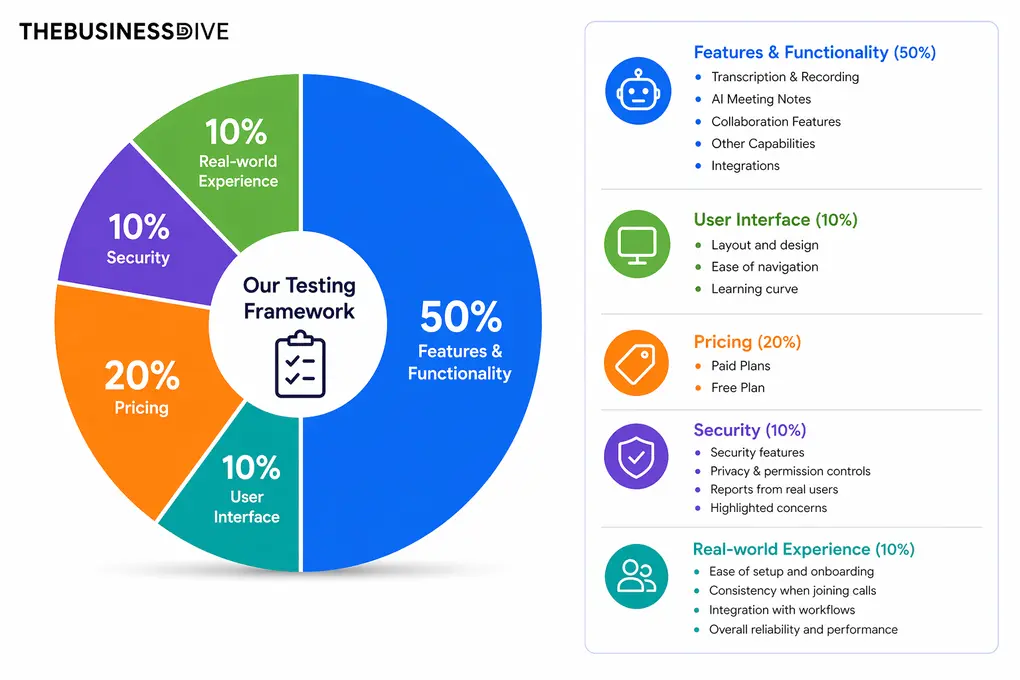
Our scoring breakdown after testing 20+ AI note-takers:
🤖 Features & functionality — 50%
🖥️ User interface — 10%
💰 Pricing — 20%
🔐 Security — 10%
👥 Real-world experience — 10%
Want a detailed breakdown of how we test each category?
Learn exactly how we test tools → Review methodology
Short on time? Here’s a quick overview of Krisp
What is Krisp AI?
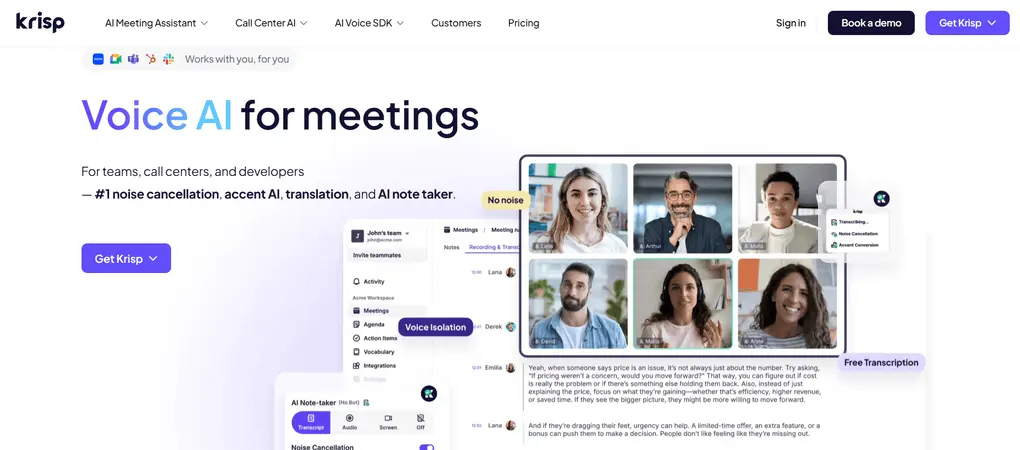
Krisp was founded in 2017, and in the beginning, it was primarily designed for remote workers, call centers, and teams looking to ensure high-quality communication. However, in 2026, it will provide more than just high-quality video and audio communication.
Krisp is a voice AI platform that removes background noise from your real-time online calls, provides AI note-taking, and accent conversion. Just a heads-up: to maximize Krisp’s capabilities and features, you need to download the desktop app.
In this Krisp review, I will mainly focus on its AI note-taking features and noise cancellation function, since these are the ones that most of you are interested in.
How Krisp performed in my daily workflow
When I joined calls through Google Meet in Chrome, the extension made it simple to capture the meeting without opening the desktop app. I feel the tool is lightweight overall, but still powerful.
For transcription accuracy and meeting notes, Krisp was solid during my testing. I was totally satisfied with the output and loved the AI chat. Also, it’s great that you can use it for in-person meetings.
As for the other features, Krisp offers some outstanding, unique tools, such as accent conversion and noise cancellation. With this extensive feature set, Krisp is an ideal choice for customer calls.
While I had a smoother experience with other bot-less AI note-takers like Granola or Bluedot, Krisp offers a more complete platform for calls.
Overall, my experience with Krisp was pleasant and earned its place on my list of best AI note-takers. I can recommend it to those who need a versatile, simple AI note-taker with noise-canceling features.
Why Krisp earned a 4.2 / 5
Krisp performed well in terms of features and functionality during testing and earned strong points. The same applies to my experience and its security, where I did not find any issues.
It did not score higher because it lacks a free plan and only offers a trial, so we could only add 1 star here. If that were to change, it could easily reach a higher overall score.
When to choose Krisp
When you should skip Krisp
Key Features
Let’s see the key features I tried during my Krisp review!
Recording
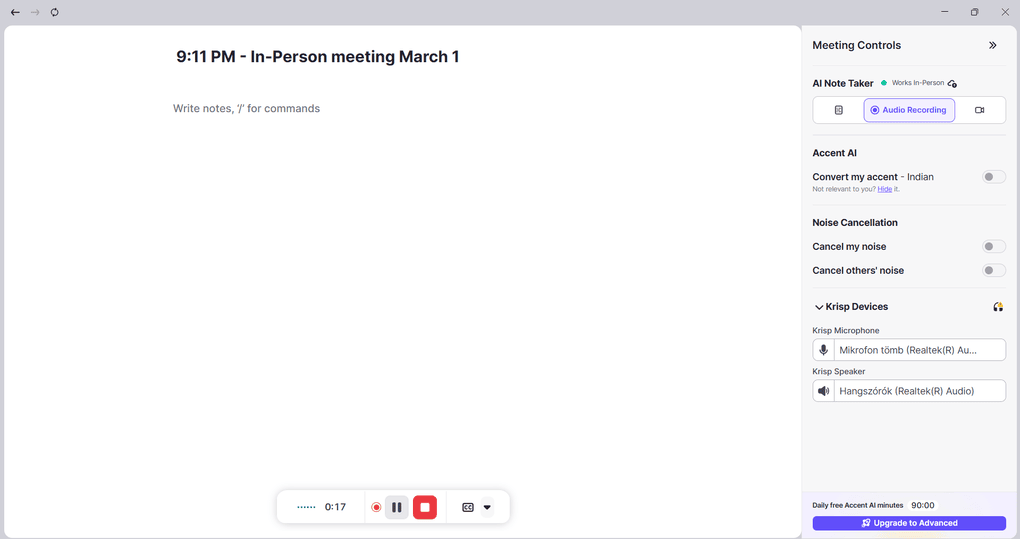
Krisp also offers video and audio recording for your online meetings on Zoom, Microsoft Teams, Google Meet, Webex, and more. You can choose the screen recording option to record and transcribe your meetings without a bot, while sending the bot is an additional option.
If you click on the recording option on the homepage, you can also record and transcribe in-person meetings. For online meetings, you can access the recording, meeting summaries, and transcription after the call.
Transcription
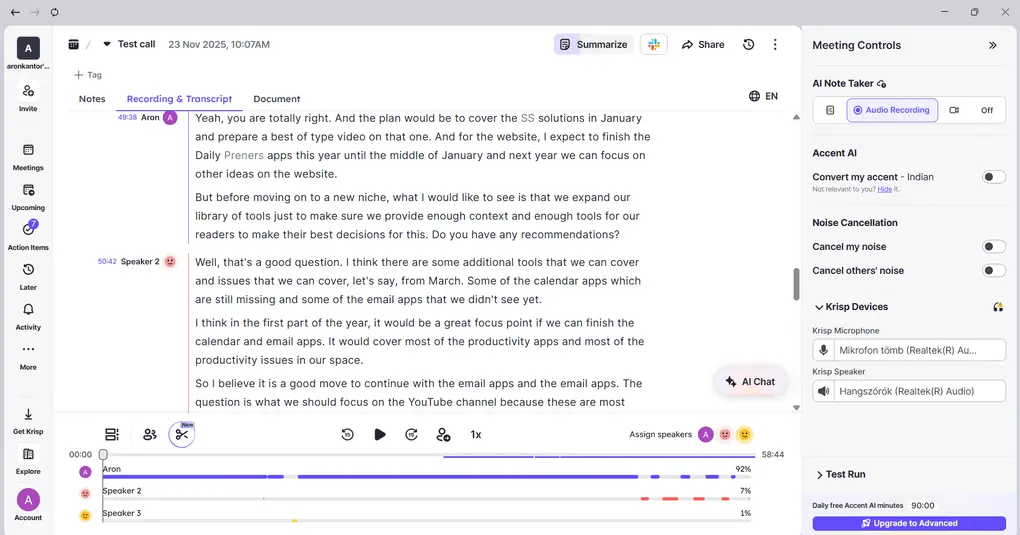
Krisp works on Zoom, Teams, and Google Meet meetings, but it also supports in-person meetings through the mobile app. Krisp’s transcription supports 16 languages currently.
When using Krisp in my own business calls, it delivered accurate transcriptions. I did not have to wait long, and transcripts and recordings were available within minutes, and I could edit them directly inside the app.
Krisp supports both bot-less and bot meeting recording, which is quite good since only a few AI meeting assistants offer the same. The transcription includes speaker IDs and timestamps. If you click on the text, the recording will jump to the relevant part.
This AI Note Taker also supports transcription editing. A small icon will come up next to the transcript. You only need to click it to make the requested changes. Also, I liked that I could upload audio or video files later and still get the same clean transcripts.
One huge plus for me is that it lets me add industry-specific terms. It helps Krisp better pick up words used in your industry.
Overall, I discovered that during my Krisp review, it delivers accurate transcriptions (96%) and offers some handy tools to edit and review the transcript.
AI notes
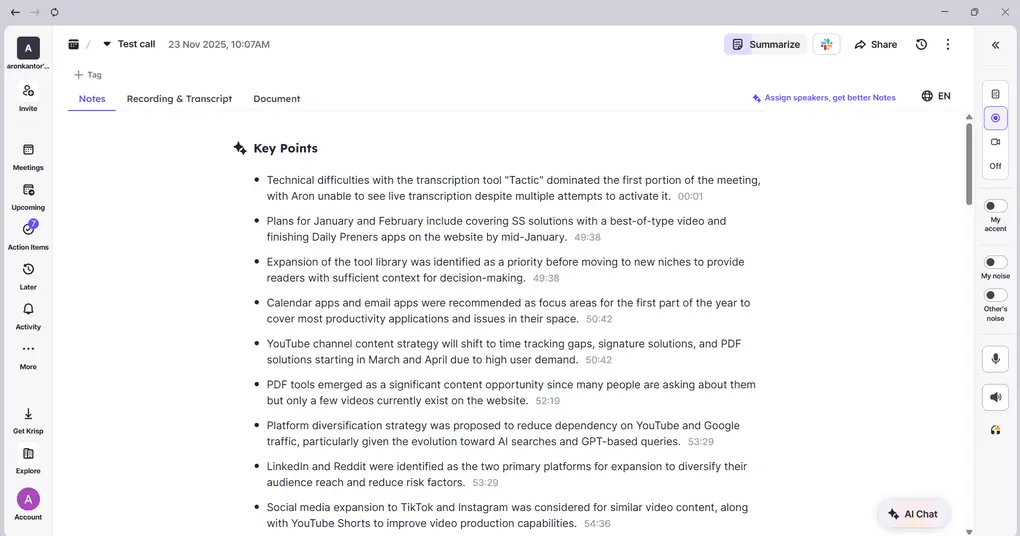
After your Microsoft Teams, Google Meet, or Zoom calls, Krisp automatically generates AI-powered notes that highlight the main discussion points and next steps. I particularly found it helpful that it assigns action items to the meeting participants.
Ultimately, I found the summary well-structured and easy to skim. It captured the key action items really well, and the fact that it supports both online and offline meetings makes Krisp a powerful solution.
Moreover, if you open your meeting notes, click on the three dots, and choose “Copy Meeting Minutes”, you can copy the minutes template to your clipboard to edit. That said, you can paste the meeting minutes with more formal info, such as date, participants etc. anywhere you want.
AI chat
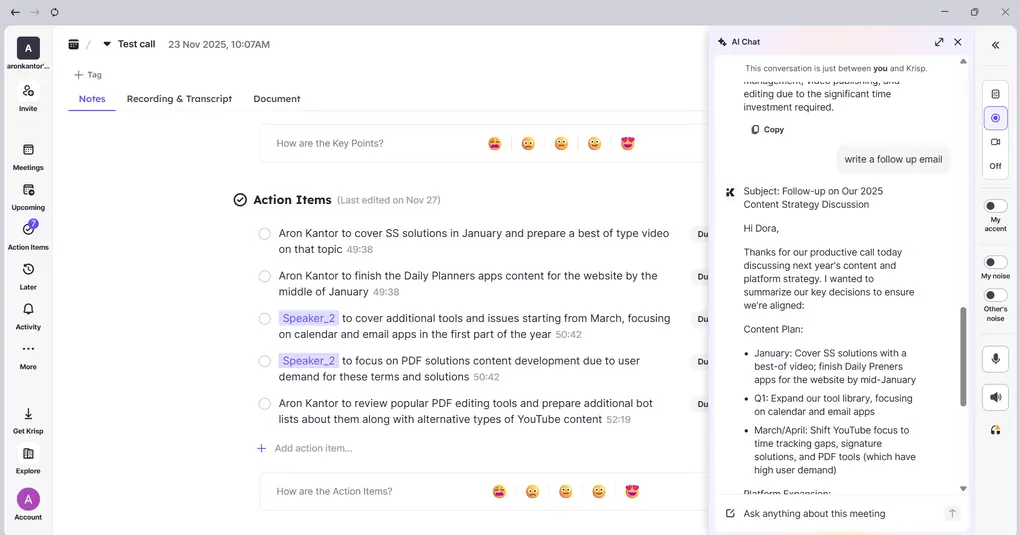
Krisp has an AI chat that allows you to ask questions directly about your meetings. It provides instant answers to meeting-related questions, highlights key insights like action items and decisions, and saves time by eliminating the need to manually review transcripts.
It is a useful feature that helps you find the information you need quickly and accelerates post-meeting workflows.
Background voice and noise cancellation
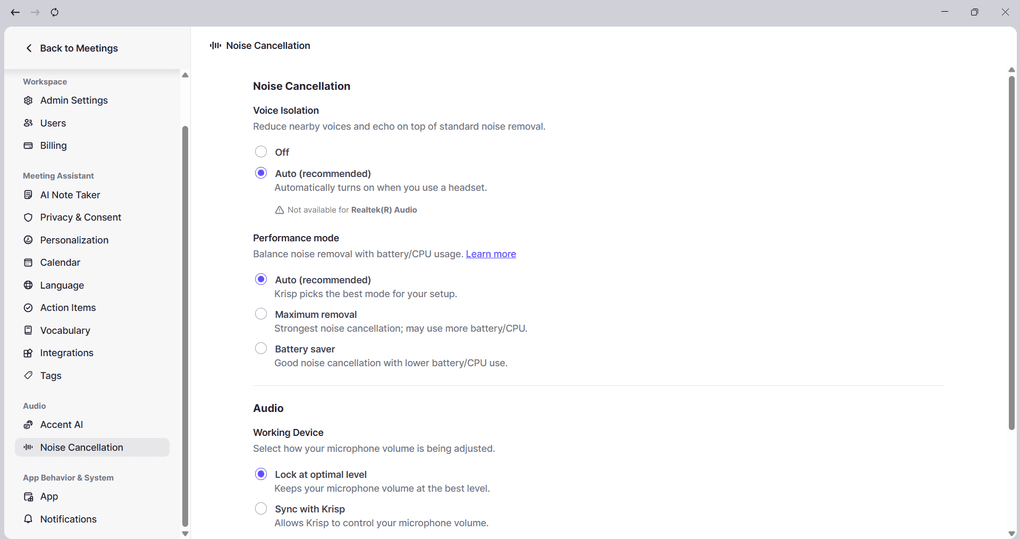
Krisp has some unique features that none of the other AI note-takers offer. The first one is its noise cancellation tool that filters out the background chatter and keyboard sounds, so the transcripts are much clearer.
Imagine working in coworking spaces, where people continuously have loud conversations. This is where Krisp comes to the rescue. What the Krisp app’s background noise cancellation technology does is identify the primary speaker’s voice and remove other nearby human voices and other noise.
Given noise cancellation, meeting participants will hear only your voice when making calls. Such a feature is beneficial not only for customer support or sales teams but also for those who are working with others in the same place.
Personally, the noise cancellation worked great in my case, and it was a nice addition to my meeting workflows.
Accent conversion
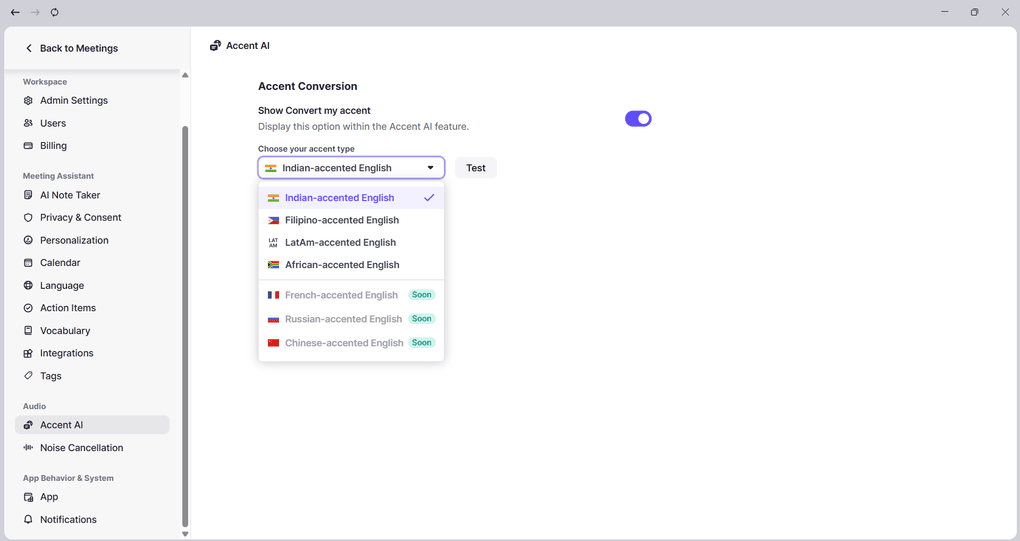
Krisp includes real-time accent conversion, which helps make global meetings clearer and easier to follow. It transforms strong accents into a more neutral-sounding voice without changing the meaning.
It works bidirectionally: for the speaker, it adjusts the accents, helping native speakers understand you more easily; for the listener, it converts others’ accents in meetings for you.
This is another major difference compared to other AI note-takers. Based on my best knowledge, no other popular AI note-taker offers accent conversion, noise cancellation, and AI notes at the same time.
Team collaboration features
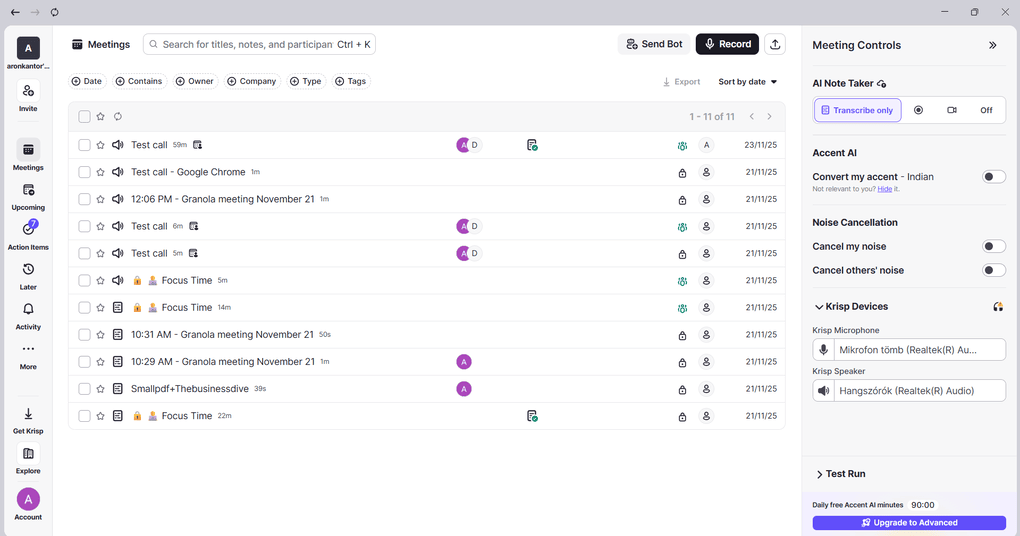
With Krisp, you can invite team members to your workspace and give them access to your recordings.
Krisp lets you share meeting recordings, transcripts, and AI notes with your team. You can also automatically share meeting transcripts and recordings with participants from a calendar invite, so you don’t have to send the links manually.
You can also organize your meetings into folders and use search to quickly find recordings based on tags, dates, and other details.
Overall, Krisp provides useful collaboration and organization features for teams.
Integrations
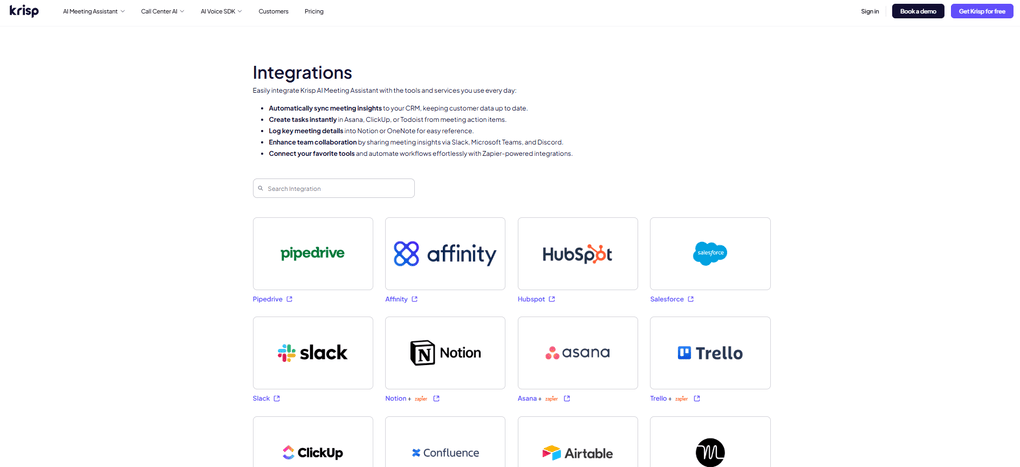
Krisp integrates directly with CRMs like HubSpot and Salesforce, and Zapier support allows it to connect with thousands of other apps. Furthermore, you can connect it with almost all the video conferencing apps, which makes it a versatile AI meeting assistant.
Explore our Apps directory
A curated directory of software tools we’ve independently reviewed, with links to full reviews, comparisons, and category guides.
Pricing plans
Now, let’s quickly break down Krisp’s pricing plans!
Free trial
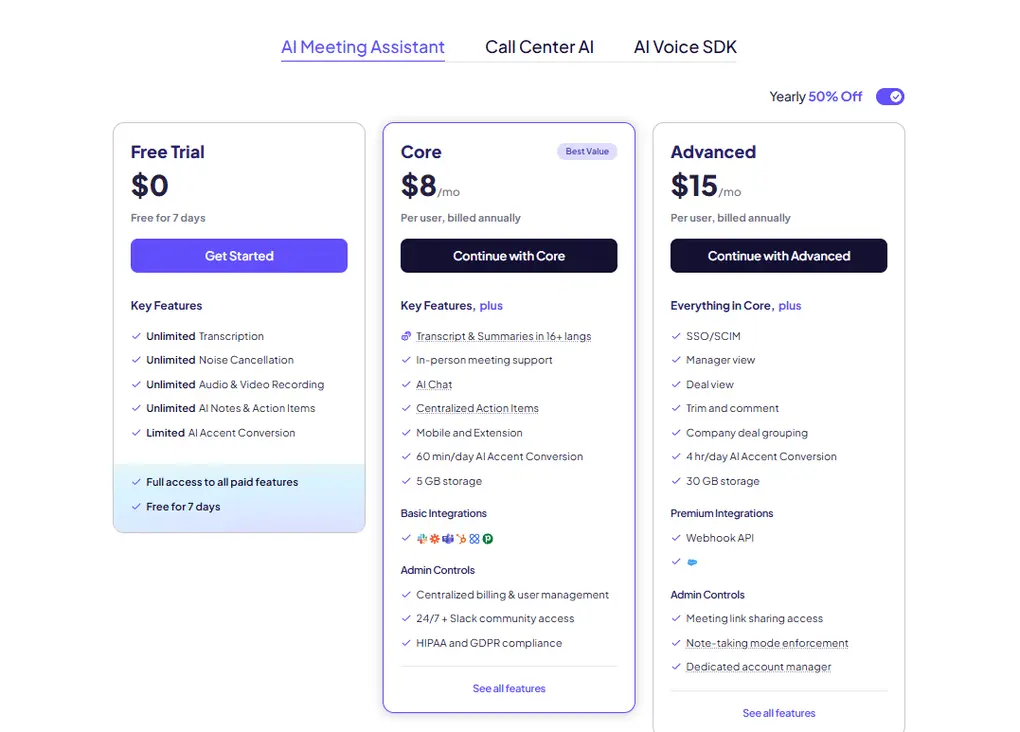
Krisp does not have a free plan and only offers a 7-day trial, where you get full access to all paid features. So, if you are looking for a free AI meeting assistant, I am afraid Krisp will not be the one you are looking for.
Core plan
The Core plan is $8 with yearly billing. It gives you unlimited audio and video recording, AI meeting notes and action items, AI chat, multilingual summaries, and in-person meeting support. For individual users or small teams, this feels like the sweet spot.
Advanced plan
For larger teams, the Advanced plan ($30 per user/month, or $15 with yearly billing) layers on features like four hours per day of accent conversion, 30GB storage, SSO/SCIM, manager view, and advanced admin controls. This plan is clearly designed for companies that need structure, compliance, and collaboration at scale.
Enterprise plan
Finally, Enterprise plans come with advanced security options, private on-device transcription, dedicated account managers, and usage analytics.
Security
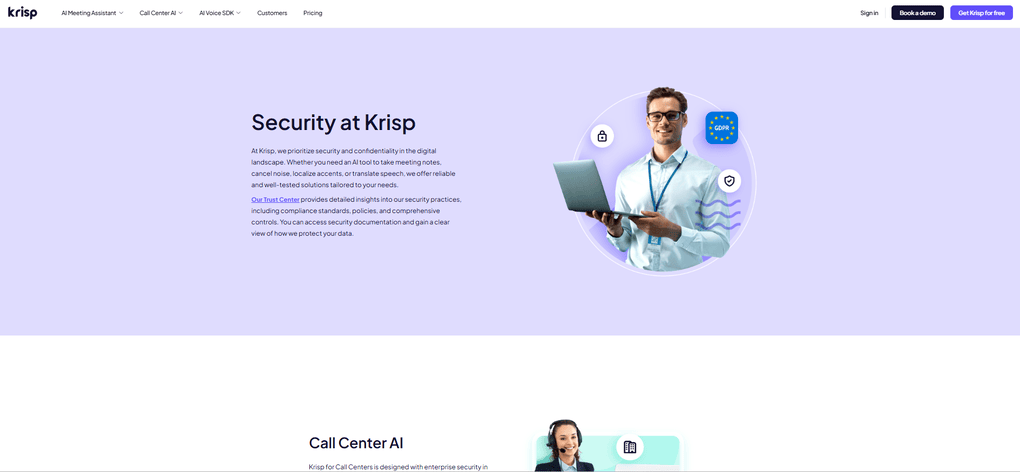
Security and privacy are crucial questions when it comes to AI note-takers since they will access data from sensitive meetings. So, I did my research during my Krisp review.
Krisp is SOC 2, GDPR, HIPAA, and PCI-DSS certified, and I did not find any complaints or negative reports concerning its privacy. Based on these, I see it as a reliable and safe AI note-taker for sensitive meetings as well.
Pros and cons of Krisp
Now, take a look at the pros and cons of Krisp, focusing on how noise cancelling can improve sound quality.
Krisp’s pros
Krisp’s cons
Krisp alternatives
If you are still unsure whether Krisp is the right AI note-taker for you, check out these alternatives:
|
App |
Best for |
Description |
|---|---|---|
|
Fellow |
Best overall |
A top AI note-taker for professionals and teams. This is the one I use for online meetings. |
|
Fireflies AI |
Best budget-friendly option |
A popular and budget-friendly AI meeting assistant for individuals and teams. |
|
Notta |
Best for multi-language transcription |
A unique AI note-taker that allows multi-language transcription, enabling people to speak two different languages during online meetings. |
|
Fathom |
Best free AI note-taker |
An accurate AI note-taker with an extensive free plan. |
|
MeetGeek |
Best for multi-language transcription |
A versatile AI note-taking app with the best AI meeting summaries. |
|
tl;dv |
Best simple AI note-taker |
A simple option for individuals with a feature-rich free plan. |
|
Radiant |
Best free AI note-taker for Mac |
It is a 100% free AI bot-less note-taker for Mac users for in-person and online meetings. |
|
Otter AI |
A popular AI note-taker |
One of the most popular AI note-takers for Google Meet, Zoom, and Microsoft Teams. |
|
Granola |
Best for users need a simple bot-less AI note-taker |
Granola is a lightweight AI note-taking app that transcribes and summarizes meetings without bots, with a generous free tier, but it’s basic and lacks advanced features. |
|
Bluedot |
An easy-to-use bot-less AI note-taker |
Bluedot is a straightforward and easy-to-use bot-free AI note-taker. |
|
Zoom AI Companion |
Best for Zoom users needing built-in AI note-taking |
A solid built-in AI assistant for Zoom that offers meeting summaries, basic transcription, and action items, but lacks advanced features. Full Zoom AI Companion review | Quick Zoom AI Companion overview |
|
Tactiq |
Best for individuals and workflow automation |
Tactiq is an AI meeting assistant that provides real-time transcription, customizable summaries, and workflow automation. |
|
Read AI |
Best for teams & individuals who want an all-in-one AI meeting assistant |
Read AI is an AI meeting assistant with solid transcription, summaries, and search, but limited features on lower plans and privacy concerns make it hard to rely on. |
|
Plaud |
Best for in-person conversations |
A unique AI note-taker with dedicated hardware for recording meetings, phone calls, and ideas wherever you are. |
Summary: Krisp review 2026
Krisp is a top AI meeting assistant with a unique feature set. I love that it has both bot and bot-free recording options, and you have the flexibility to switch depending on the meeting. Besides, it offers reasonable pricing plans considering the value it offers.
While it is not an ideal choice if you are looking for a free AI meeting assistant, it’s definitely worth its price if you need an accurate, bot-free AI note-taker.
Related articles:
- Best 9 AI Note-Takers | My Top Picks After +2 Years Testing (2026)
- Best 5 Otter AI Alternatives | 20+ Personally Tested Apps (2026)
- 5 Best Bot-Free AI Note-Takers In 2026 (NOT What You’d Think)
Looking for similar tools?
Visit our AI note-takers library to explore other apps we’ve reviewed in this space and how they compare.
Why you can trust our reviews
At thebusinessdive.com, our team tests, reviews, and compares hundreds of productivity apps every year — from project management tools to note-taking apps. We dive deep into real-world use cases to help you find the right tools that actually improve your workflow, not just add noise.
Our mission? No fluff, no shortcuts—just honest, hands-on insights from productivity pros.
Discover how we stay transparent, read our review methodology, and let us know about any tools we missed.
Frequently asked questions
Does Krisp AI work for meetings?
Yes, Krisp supports almost all the video conferencing apps, including Zoom, Microsoft Teams, Google Meet, and more.
How effective is Krisp AI?
Krisp offers around 96% transcription accuracy. Nevertheless, this depends on the audio settings and quality as well.
Is Otter AI better than Krisp?
After testing 25+ AI meeting assistants, Krisp feels like a superior tool for me, especially for customer support teams. The area where I feel Otter AI might be better is in team collaboration features.
Is Krisp AI note taker good?
Krisp is top AI note-taker when it comes to transcribing and summarizing online meetings. It is a simple, reliable, and accurate AI note-taker for your calls.
Can Krisp remove background noises from a video?
Yes, Krisp is effective in reducing background noise. It eliminates any disruptive background noises from calls or audio recordings.
Is Krisp good for noise cancellation?
Krisp removes unwanted background noises on both incoming and outgoing audio, so there will be no background noise from your and the other meeting participants’ sides.
Disclosure: I only recommend products I would use myself, and all opinions expressed here are our own. This post may contain affiliate links through which, at no additional cost to you, I may earn a small commission. Read the full privacy policy here.

Hey there! I am Aron, the founder of Thebusinessdive. I have been testing productivity apps for almost three years now. I reach 25.000 -50.000 people monthly with the mission to help you find the perfect productivity apps. Subscribe to my YouTube channel, newsletter, and social media to hear more about the best productivity tools. Let’s dive in!