


5 Best Bot-Free AI Note-Takers In 2026 (NOT What You’d Think)
Do you want AI transcription and meeting notes without a meeting bot joining your meetings?
I totally get it – it can affect the natural conversation flow of your meetings. Even for me, who works in the tech industry, sometimes I need to explain that the other participant is just my AI meeting assistant.
Don’t worry, I’ve collected the best botless AI note-takers after personally testing all the popular options.
In this article, I will guide you through the key features, pricing, and pros and cons I found when testing the best bot-free AI note-takers.
Let’s dive in!
Best Botless AI note-takers I tried
Here is my list of the best botless AI note-takers in 2026:
|
Bot-Free AI note-takers |
Overall experience |
My top picks |
|---|---|---|
 |
Best bot-free AI note-taker overall |
|
 |
Best bot-free AI note-taker runner-up |
|
 |
An accurate bot-free AI note-taker |
|
 |
Best simple bot-free AI note-taker |
|
 |
A bot-free AI note-taker with real-time transcription |
How do I rank the best bot-free AI note-takers?
When selecting the best bot-free AI not-takers, I considered the following factors:
Best Bot-Free AI Note-Takers in 2026
Let’s delve into the best 5 botless AI note-takers!
Bot-Free AI Note-Taker #1 | Fellow
Best bot-free AI note-taker overall
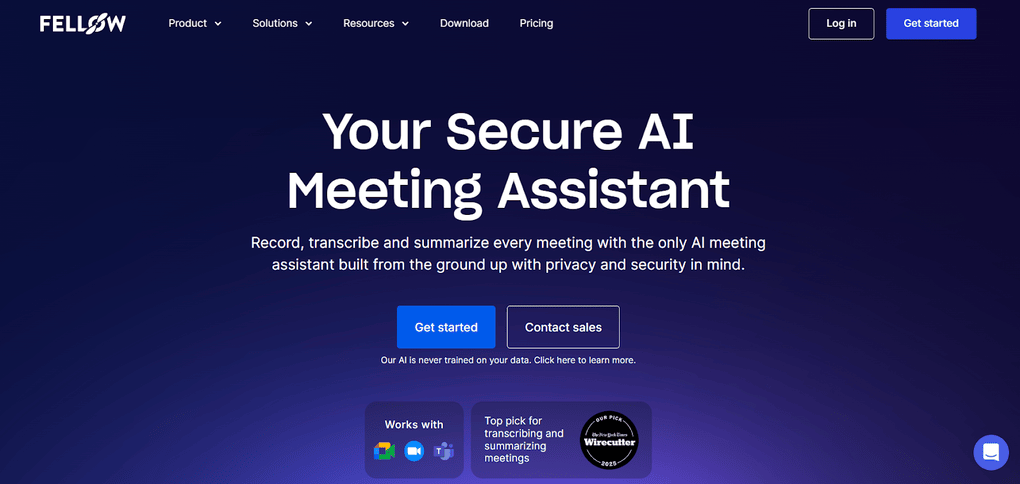
Fellow is the one bot-free AI note-taker I’ve used for 7 months that captures meetings without a bot while still enforcing the same security, retention, and access rules on every recording. It takes notes on Zoom, Teams, Google Meet, Webex calls, Slack huddles, and in-person meetings, and also helps you create follow-up emails, prepare a meeting agenda, and more.
You can choose which meetings you want to transcribe and when to bring the bot into a call or switch to botless capture – both options still follow the same security, retention, and access rules set by your organization.
That means you get the flexibility of invisible note-taking when you need it, but without the sketchy, no-oversight vibe most botless tools have. It just feels more trustworthy, especially if your team cares about keeping meeting data under control.
This also makes Fellow a strong choice for enterprise companies, regulated industries, and organizations where privacy, security, and data governance are especially important.
Key features
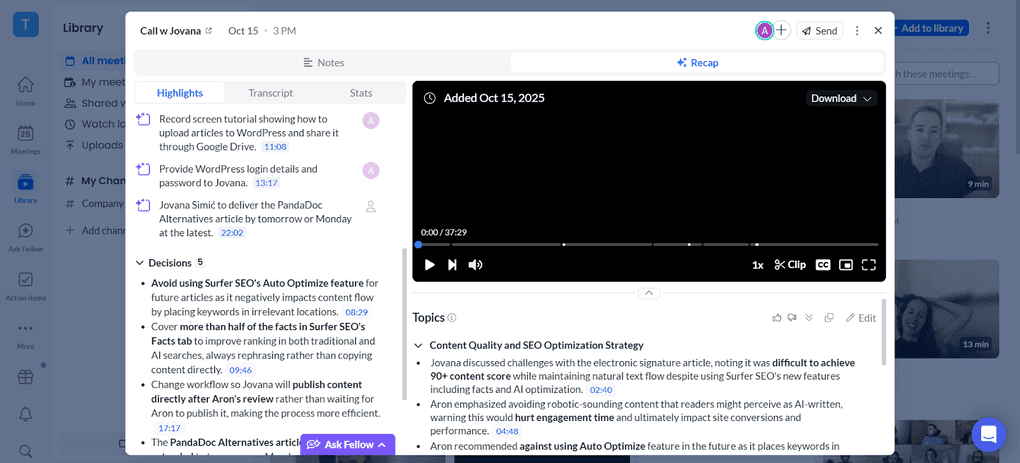
Bot and botless recording: Fellow captures Zoom, Teams, Google Meet, Webex, Slack, and in-person meetings, without a bot, with the same enterprise governance as its bot-based recordings. Just select the “Record without bot” option from your meeting, and Fellow will record your meeting in the background without compromising privacy and security. Workspace admins can also set the default recording method and create recording rules and restrictions, while consent capture helps make recording practices clear to participants. Fellow supports 92 languages, which makes it an excellent choice for global teams.
AI meeting notes: Fellow’s AI-generated summaries include the key decisions and action items of your meeting alongside the transcription. The way Fellow breaks down your meetings into topics and action items makes the whole meeting easily digestible within seconds. Fellow also supports redaction across transcripts, AI summaries, and video, which is useful when meetings contain sensitive information. You can also password-protect meeting recaps when sharing them.
Ask Fellow: It is a helpful feature for creating follow-up emails and gathering info from previous calls. It uses the data from your transcriptions, recordings, and AI meeting summaries from your past meetings to answer your questions. Not all AI meeting assistants can gather insights from across all your meetings, but Fellow can. You can also use agenda tools in Ask Fellow and MCP to create and work with meeting agendas.
Security and compliance: Botless recording in Fellow follows the same retention rules, access controls, and compliance policies as bot-based recordings. Fellow also offers optional Zero-Day Retention (ZDR), custom data retention policies, recording controls, and a Compliance Portal for organizations with more demanding security and compliance requirements. Admins can also use consent capture and redaction to give organizations more control over sensitive meeting content.
AI Usage Analytics: Fellow also provides an AI Usage Analytics dashboard, which helps organizations understand how their teams use Fellow’s AI features.
Mobile app: Fellow has a mobile version for iOS and Android devices, so you can use it for in-person meetings as well.
Integration options: Fellow connects natively to 50+ apps, including CRMs (HubSpot, Salesforce), project tools (Asana, Linear, Jira, Monday.com), knowledge tools (Glean), and Microsoft Outlook, so meeting outcomes sync straight into the systems your team already runs on. Through Zapier, Fellow reaches nearly 8,000 additional third-party apps. For AI-powered workflows, Fellow offers a native Claude integration, an MCP Server, and a Developer API, so you can query meeting data and extend Fellow inside your own tools.
Pricing
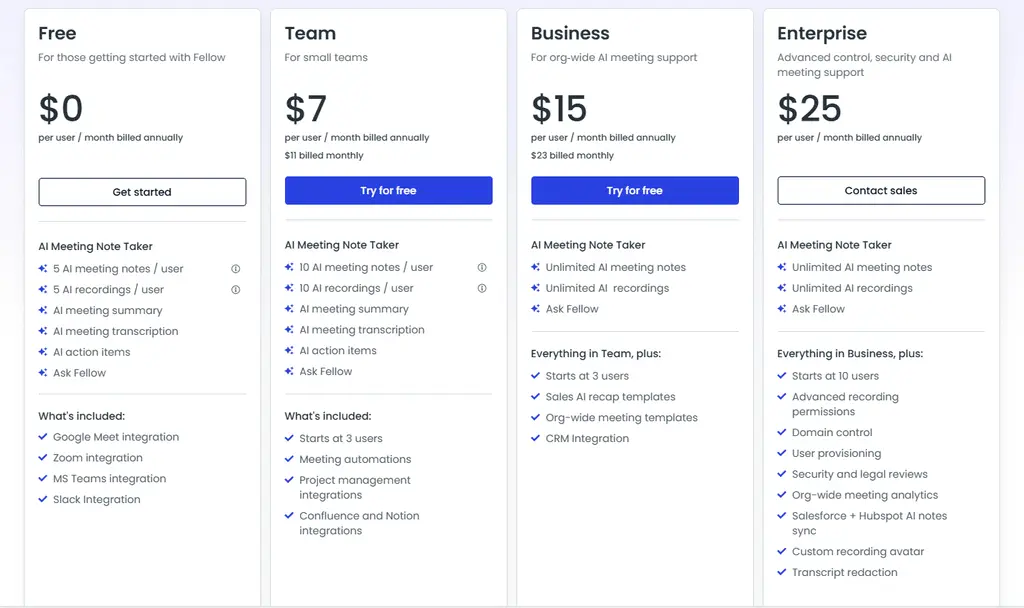
For individuals, Fellow offers a Free and a Solo plan. With the Free plan, you will get 10 AI notes and recordings, so you can explore whether Fellow is the best botless AI note-taker for you.
To get unlimited features, you have to purchase the Solo Plan for $19 per month. With this plan, you will access integrations and automations.
For teams, Fellow provides Free, Team, Business, and Enterprise plans. The free version has the same limitations as the Free plan for individuals.
The Team plan costs $7 per user per month, while the Business plan costs $15 per user per month. Finally, Fellow offers an Enterprise plan for $25 per user per month, with advanced control, security, and AI meeting support.
My experience with Fellow
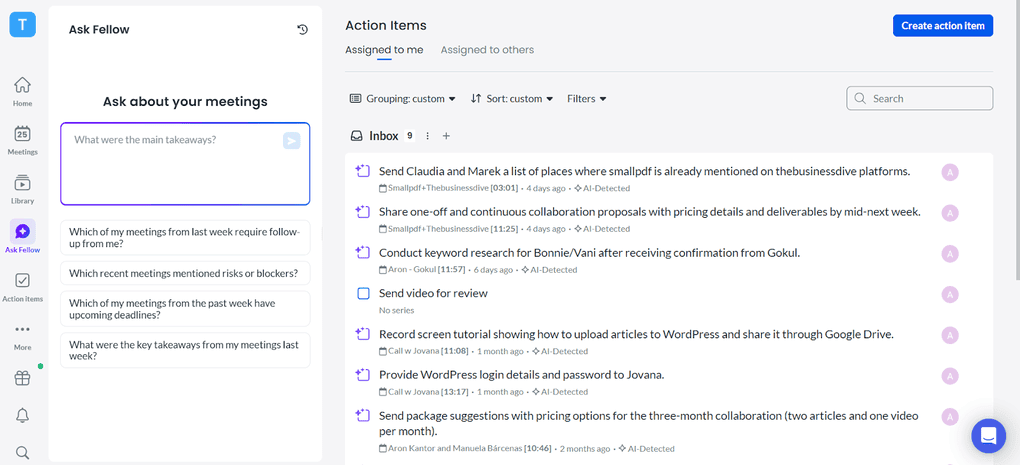
After testing numerous AI note-takers, I found Fellow to be the most accurate and safest one. It is full of productivity tools that help me save time and get more out of my online calls.
Based on my experience, Fellow transcribes my online meetings with 95%+ accuracy. After my video calls, it prepares the AI meeting summaries and transcripts within minutes, so I can quickly review how the meeting went.
One of the most underrated features of Fellow is the meeting agendas. Using this feature, you can collect all the points you want to discuss in the next meeting and see them next to the meeting participants during your calls.
For the meeting agendas, the AI-powered pre-meeting briefs are super valuable for summarizing previous discussions and action items, ensuring that you are fully aware of the context before the meeting.
The botless recording feature also works reliably in the background and captures conversations effortlessly and securely, whether you’re online, in person, or somewhere in between. I particularly like having the option to choose between bot and botless recording depending on the meeting and privacy needs.
🔎 Read my full Fellow Review: My Thoughs After +12 Months (2026)
Short on time? Here’s a quick overview of Fellow
Pros and cons of Fellow
Pros
Cons
Use this link to sign up and get 10% off the paid plans if you upgrade.
Bot-Free AI Note-Taker #2 | Krisp
Best bot-free AI note-taker runner-up
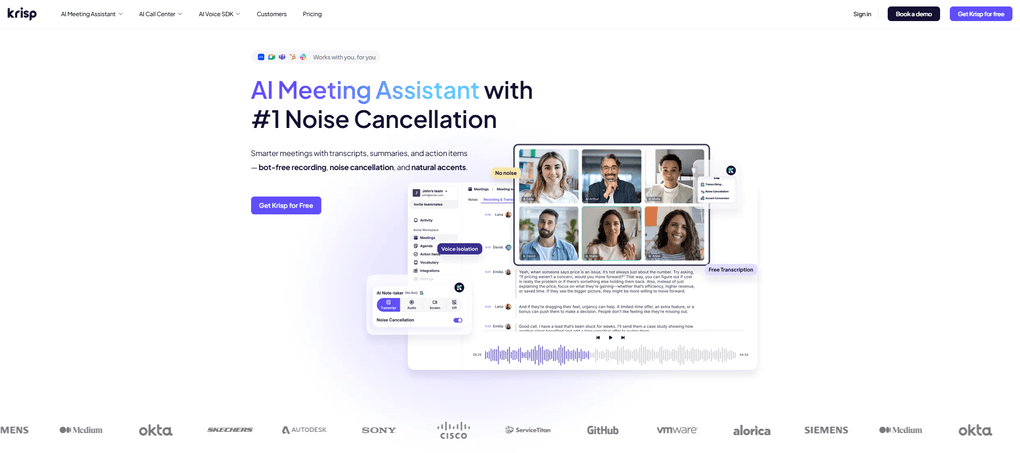
Krisp works on Zoom, Teams, and Google Meet meetings, but it also supports in-person meetings through the mobile app. It supports 16 languages currently, and offers some really unique features that no other AI meeting assistant provides.
Key features
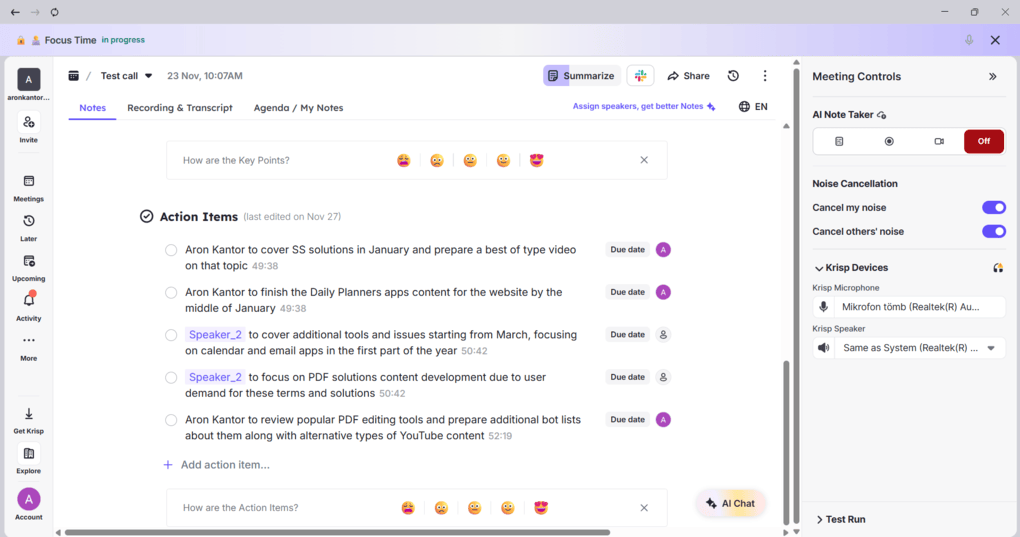
Bot and Bot-less transcription & recording: You can choose whether you want to record your calls with a bot or without a bot. For me, the botless experience felt much simpler. It runs quietly in the background, capturing transcripts and summaries in real time. During my testing, Krisp delivered an accurate transcription. I did not have to wait long, and transcripts and recordings were available within minutes, and I could edit them directly inside the app
AI meeting notes: After your call, Krisp can generate AI-powered notes that highlight the key points and next steps. I particularly found it helpful that it assigns action items to the meeting participants.
Noise cancellation: When enabling its noise cancellation feature, Krisp filters out the background noise and keyboard sounds, so the transcripts are much clearer.
AI chat: Krisp has an AI chat that allows you to ask questions directly about your meetings. It provides instant answers to meeting-related questions, highlights key insights like action items and decisions, and saves time by eliminating the need to manually review transcripts.
Accent conversion: This AI note-taking app offers real-time accent conversion, which helps make global meetings clearer and easier to follow. It transforms strong accents into a more neutral-sounding voice without changing the meaning.
Custom vocabulary: When testing Krisp, I also appreciated that it let me add industry-specific and technical terms. It helps Krisp to pick up words that are used in your industry more accurately.
Mobile app: Krisp offers mobile apps for iOS and Android devices, so you can utilize it for in-person meetings as well.
Integration options: Krisp integrates directly with CRMs like HubSpot and Salesforce, and Zapier support allows it to connect with thousands of other apps.
Security and compliance: It is SOC 2, GDPR, HIPAA, and PCI-DSS certified, with encrypted storage and strict access controls, so you can use it for more sensitive meetings as well.
Pricing
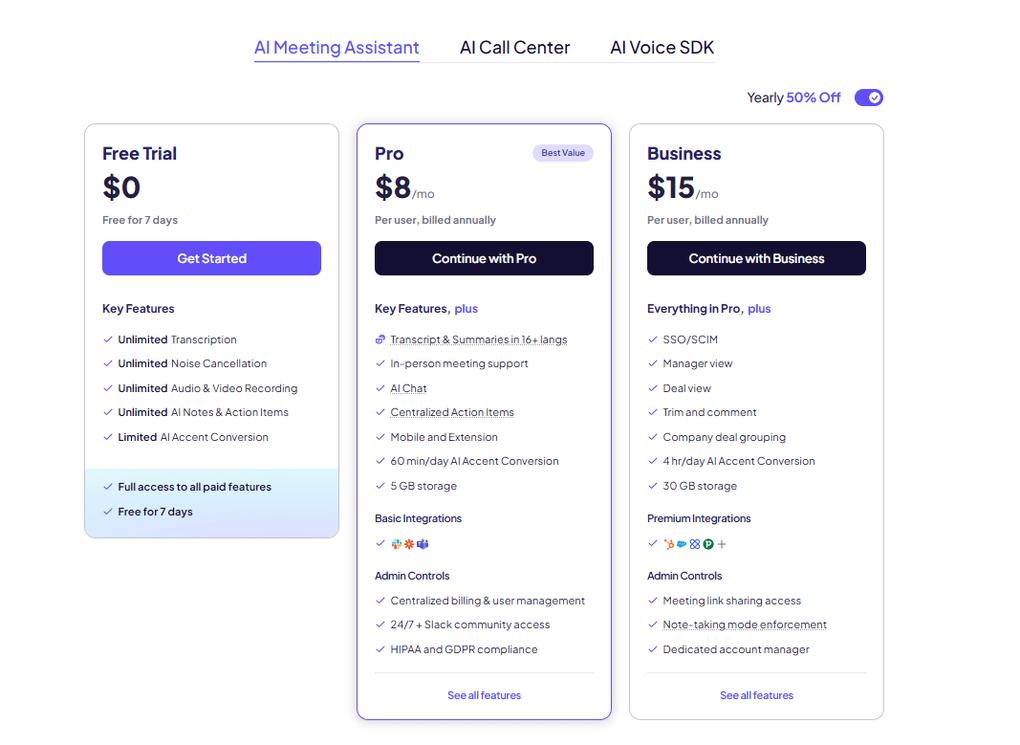
Krisp does not offer a free plan and only provides a 7-day trial with full access to all paid features.
The Pro plan is $8 with yearly billing. It provides unlimited audio and video recording, AI-generated meeting notes and action items, AI chat, multilingual summaries, and in-person meeting support. For individual users or small teams, this feels like the sweet spot.
For larger teams, the Business plan ($30 per user/month, or $15 with yearly billing) adds features such as 4 hours per day of accent conversion, 30GB of storage, SSO/SCIM, manager view, and advanced admin controls. This plan is clearly designed for companies that need structure, compliance, and collaboration at scale.
Finally, Enterprise plans come with advanced security options, private on-device transcription, dedicated account managers, and usage analytics.
My experience with Krisp
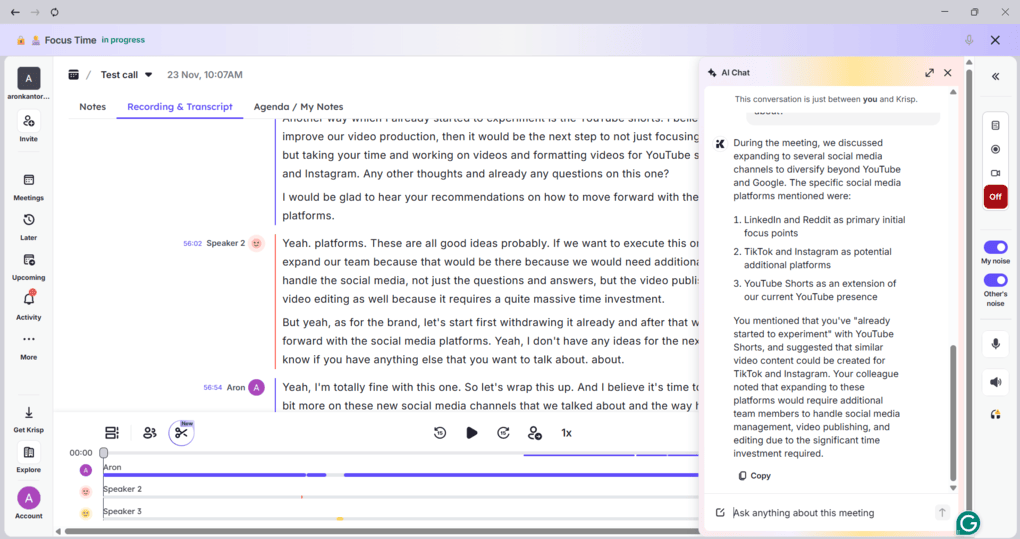
Krisp is a reliable AI note-taking app with accurate transcriptions and meeting notes. When using Krisp for my internal meetings, I was totally satisfied with the output and loved the AI chat. Also, it’s great that you can use it for in-person meetings as well.
As for the other features, Krisp has some outstanding and unique tools like accent conversion and noise cancellation. Comparing Krisp’s feature set to the other AI note-taking tools, it is quite solid.
The pricing itself is quite generous, as you can get the Pro plan for $8 monthly with annual billing. Nevertheless, since it does not provide a Free plan, it can be discouraging for some of you.
Krisp is the ideal AI note-taker app for professionals who demand high-quality audio in their virtual meetings. It is a good all-around solution for professionals and teams.
🔎 Read my full review: My Brutal Honest Krisp Review 2026 | Is It Worth It?
Short on time? Here’s a quick overview of Krisp
Pros and cons of Krisp
Pros
Cons
Bot-Free AI Note-Taker #3 | Bluedot
An accurate bot-free AI note-taker
Bluedot records every conversation without any bots, simplifying the note-taking process. While it is not as feature-heavy as Fellow or Krisp, it was built to capture notes quickly across different platforms.
You can use it on Zoom, Google Meet, Teams, and Slack. It supports transcription in over 100 languages and offers a smooth bot-free AI note-taker experience.
Key features
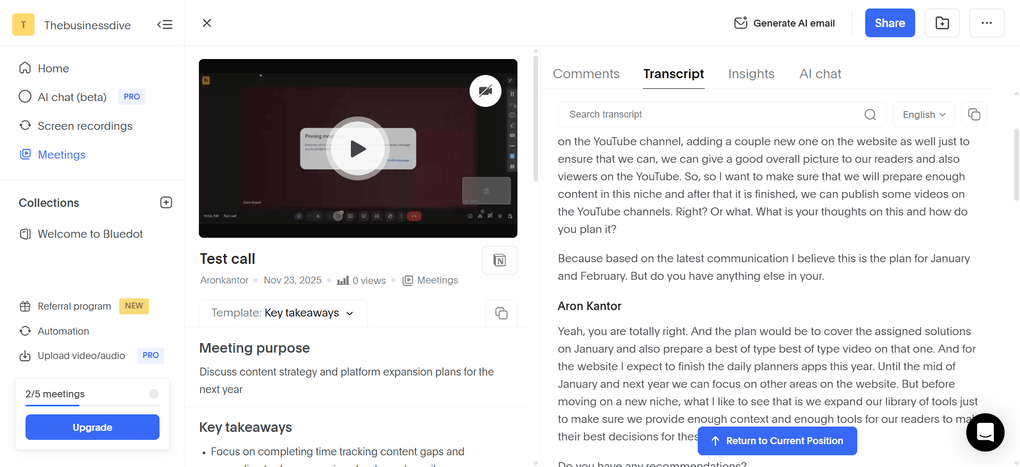
Bot-less transcription & recording: It was super straightforward to set up Bluedot, and it captured my calls without any issues. The transcriptions are quite fast and mostly accurate. The speaker identification was solid throughout the meeting. What I also liked about this botless AI note-taker is that you can still edit the transcription and the video. I noticed that as well, that Bluedot automatically cuts your uhms and filler words, making the transcripts look way more neat.
AI meeting notes: The meeting notes are well structured. It extracts key insights from your calls and organizes them into an overview, topics, next steps, and action items. But the structure of your meeting notes depends on the template you choose. Also, you can upload video or audio files for transcription and summarization.
Collaboration tools: Bluedot has some team collaboration features. That said, you can organise your recordings into shared libraries where teammates can comment, edit, and work on meeting notes in one centralized space.
AI chat: If you have any questions, you can ask the AI chat for insights. It helps to find information quickly or summarize important details or discussion points with a few clicks.
Meeting templates: This bot-free AI note-taker allows you to choose from its pre-built templates or create your own. It offers templates for sales calls, interviews, technical discussions, and more. Based on the template you choose, Bluedot will structure your meeting notes and include different key points.
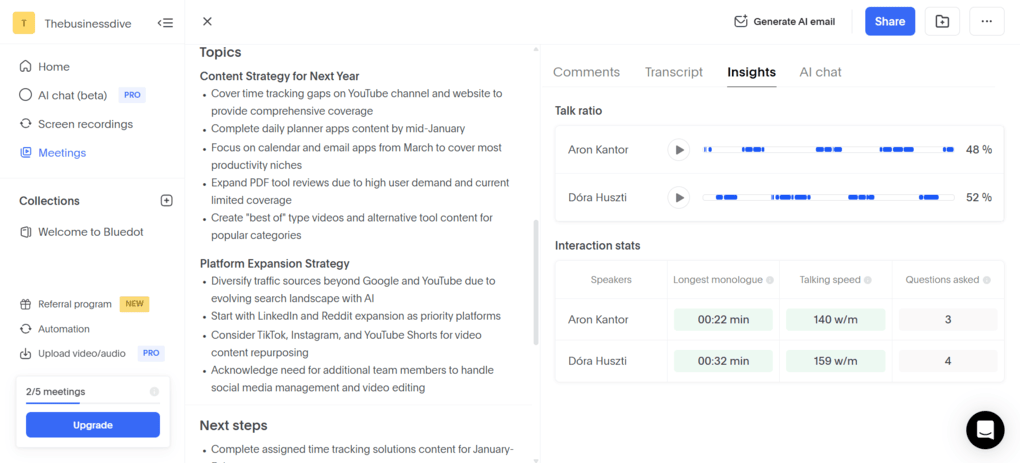
Conversation intelligence: Bluedot shares some data about talk ratio, talking speed, longest monologue, and the number of questions asked.
Mobile app: Bluedot recently launched its mobile app for iOS and Android devices, so you can utilize it for in-person meetings as well.
Integration options: You can connect Bluedot with various third-party apps, including direct integrations with tools like Slack, HubSpot, and Notion, and broader connections through Zapier.
Security and compliance: When taking a look at the safety policies, I found that Bluedot is GDPR and CCPA compliant, but the SOC2 certification is still pending.
Pricing
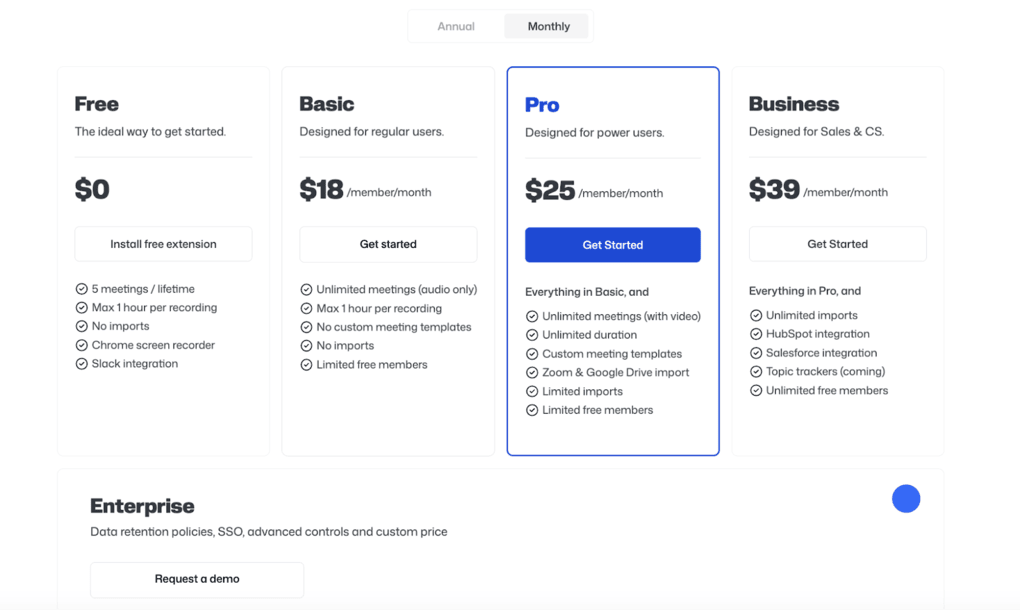
Using its Free plan, Bluedot lets you record and transcribe up to five meetings with a maximum of 1 hour per recording. You also have access to the Slack integration and the Chrome screen recorder.
Just a heads-up: the above picture shows the monthly prices with monthly billing, while I will break down the prices here in terms of annual billing.
If you buy the Basic plan for $14 per month with annual billing, it unlocks unlimited audio recordings and storage. If you need longer recordings and custom meeting templates, the Pro plan could be ideal for $20 per month per user.
If you need the HubSpot and Salesforce integration, you have to go with the Business plan. It is $32 monthly with annual billing and includes these integrations, plus bulk import options.
Larger organizations can opt for Enterprise pricing, which includes features like SSO, custom retention policies, and advanced admin controls.
My experience with Bluedot
When it comes to the transcription and meeting notes, I was satisfied with this botless AI note-taker. In general, it was accurate, and the meeting summaries were well structured.
Regarding the other features, it’s great that it also records your calls and has some team collaboration features. And a huge plus for me is that the Bluedot is an easy-to-use tool, and the setup is simple, and it reliably captures all the meetings.
Although it has a free plan, it is very limited. While the Basic plan has a reasonable price, the real stuff comes with the Pro plan, which is $20 per month. It’s not overpriced, but I would not call it a cheap botless AI note-taker.
Overall, if you need a straightforward AI bot-free note-taking app, Bluedot can be an ideal option with its solid AI features for transcribing and summarizing your calls.
🔎 Read my full review: My Honest Bluedot Review After Testing 25+ AI Note-Takers
Short on time? Here’s a quick overview of Bluedot
Pros and cons of Bluedot
Pros
Cons
Explore our Apps directory
A curated directory of software tools we’ve independently reviewed, with links to full reviews, comparisons, and category guides.
Bot-Free AI Note-Taker #4 | Granola
Best simple bot-free AI note-taker
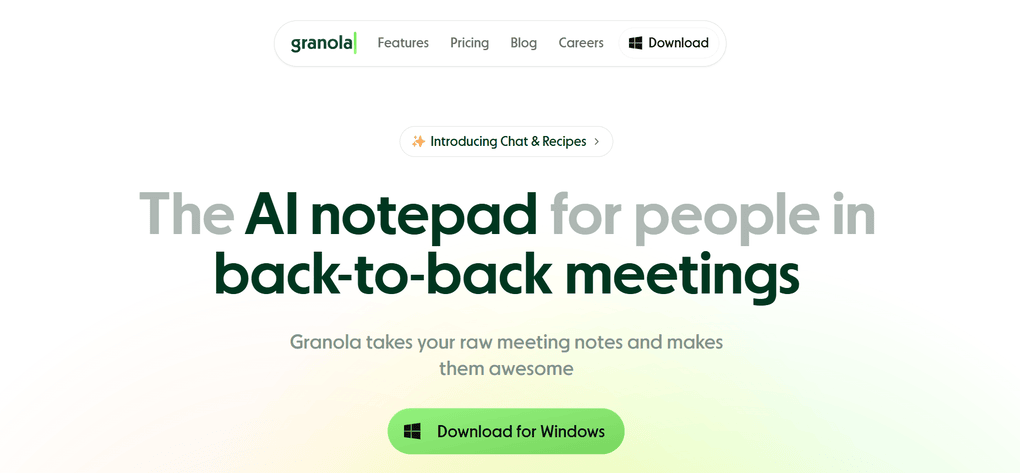
Granola is a lightweight and simple bot-less AI note-taker. This is one of its main strengths, but a weakness as well, since it really only has the basic features, which are transcribing and summarizing your calls.
If you want to record your call, it’s not an ideal option, as it doesn’t have that capability. It works on Google Meet, Teams, Zoom, Slack, and Webex, and supports 10 languages.
Key features
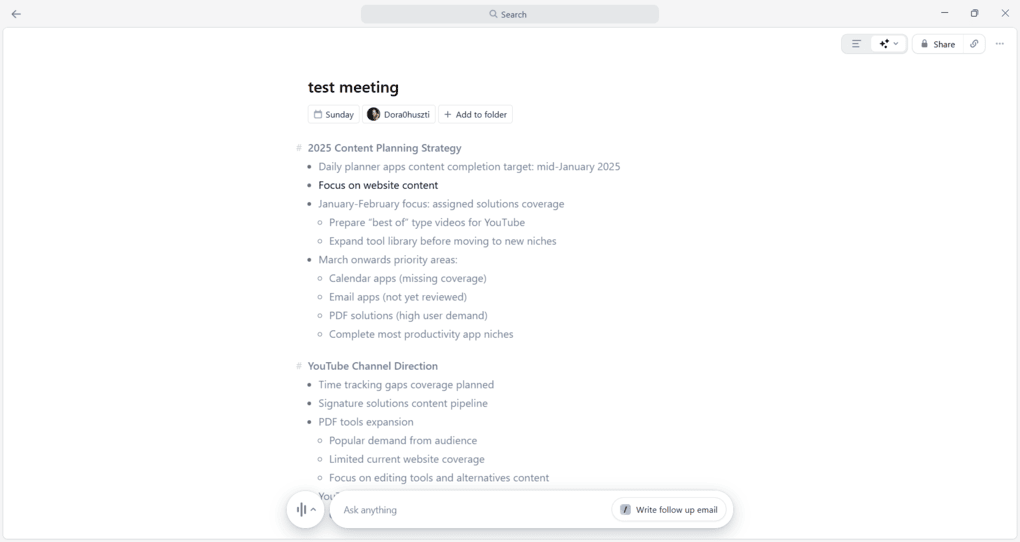
Bot-less transcription: Granola offers real-time transcription for your calls. The transcriptions were mostly accurate, and you can start it anytime you want using its desktop app.
AI meeting notes: It is unique in terms of combining manual note-taking with smart AI summaries. You only need to wait for your meeting to end, and then click Enhance notes at the bottom of the note. In a matter of seconds, Granola will provide detailed notes based on the transcript and your manual notes and organize everything in an easily scannable way.
Team collaboration features: Granola offers only a few team collaboration tools, but they are essential. You can share the meeting notes with a few clicks through email, Slack, a link, or by copying the text. Also, you can create shared folders with your teams.
AI chat: Using Granola’s AI assistant, you can ask questions about your meetings and find important points.
Integration options: Granola is solid in terms of integrations, as you can connect it with some of the most popular apps like Notion, HubSpot, Slack, and Zapier.
Security and compliance: Granola is SOC 2 and GDPR compliant, and it does not allow third parties to use your data to train their AI models. However, I found some issues around May 2025 when Granola allowed anyone to download other users’ transcripts without authentication.
Pricing
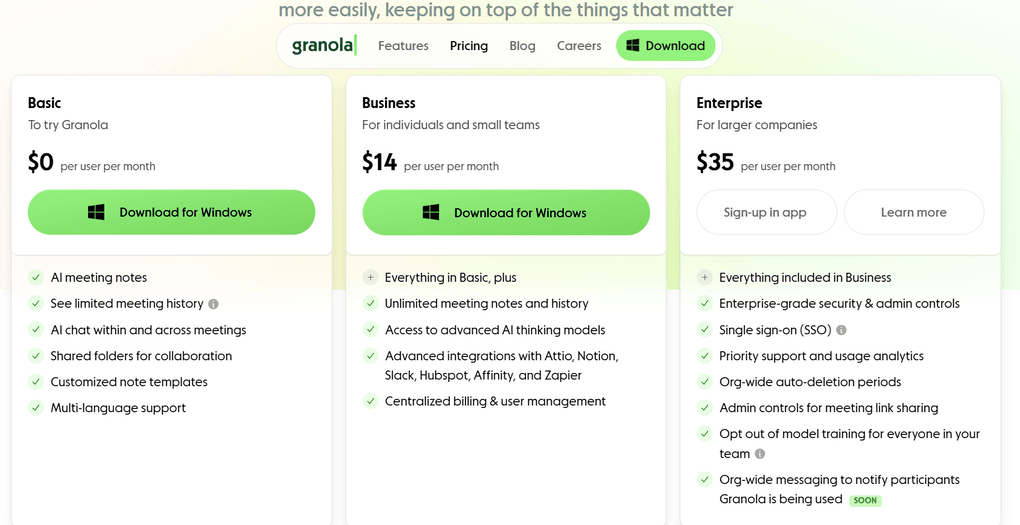
When it comes to pricing, Granola has a Free plan that includes AI meeting notes, AI chat, shared folders, customized templates, and multi-language support.
The Business plan is $14 per user per month and offers unlimited meeting notes and history, integrations, and centralized billing. For larger companies, Granola has an Enterprise plan for $35 per user per month.
Ultimately, I feel Granola is a bit overpriced considering the features it offers, but I can see it as the right option for those who need a single bot-free AI note-taker.
My experience with Granola
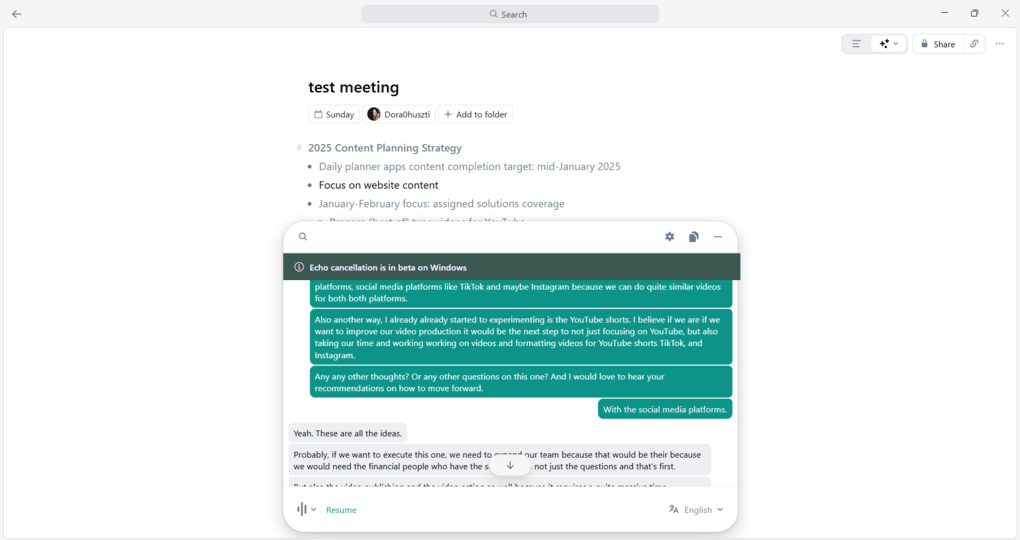
When using Granola, I loved how it incorporated my notes into the AI summary. Overall, I did not have any major issues with the accuracy and meeting notes.
When considering its feature set, it has fewer tools than the other tools on my list. However, I appreciate its simplicity and its ease of use.
For pricing, it’s great to see a free plan. Honestly, for me, it’s a bit overpriced compared to Krisp or Fellow. But again, it is a simple, easy-to-use app, so the price can be justified.
While Granola is SOC 2 and GDPR compliant, I found a red flag from the past, but probably they fixed these issues, as there have been no negative reports since then.
Ultimately, Granola is a lightweight botless AI note-taker that I enjoyed using. I would appreciate it if it provided recording features, but even without it, Granola earned its spot among the best bot-free AI note-taking tools.
🔎 Read my full review: An Honest Granola Review 2026 | An Exciting AI Note-Taker
Short on time? Here’s a quick overview of Granola
Pros and cons of Granola
Pros
Cons
Bot-Free AI Note-Taker #5 | Tactiq
A bot-free AI note-taker with real-time transcription
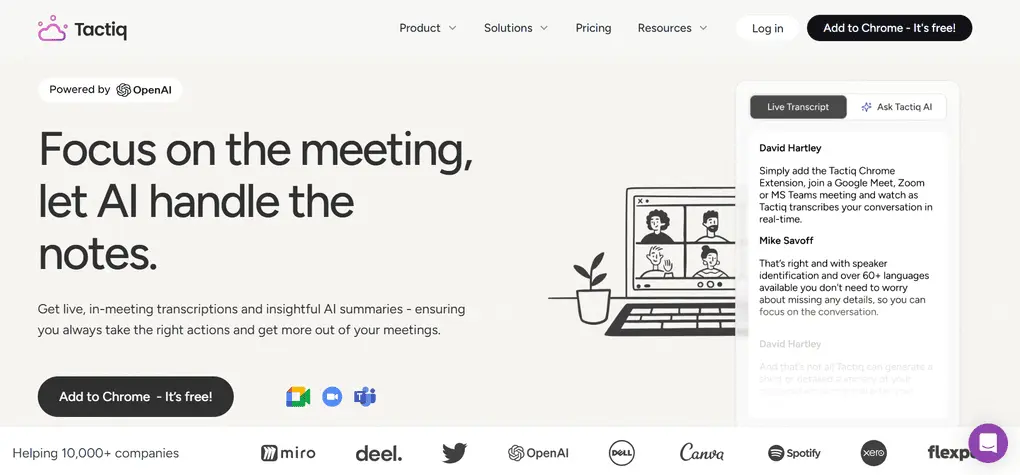
With Tactiq, you can transcribe and summarize meetings on Zoom, Teams, and Google Meet & supports over 60 languages. Similar to Granola, Tactiq does not offer recording capabilities.
Key features
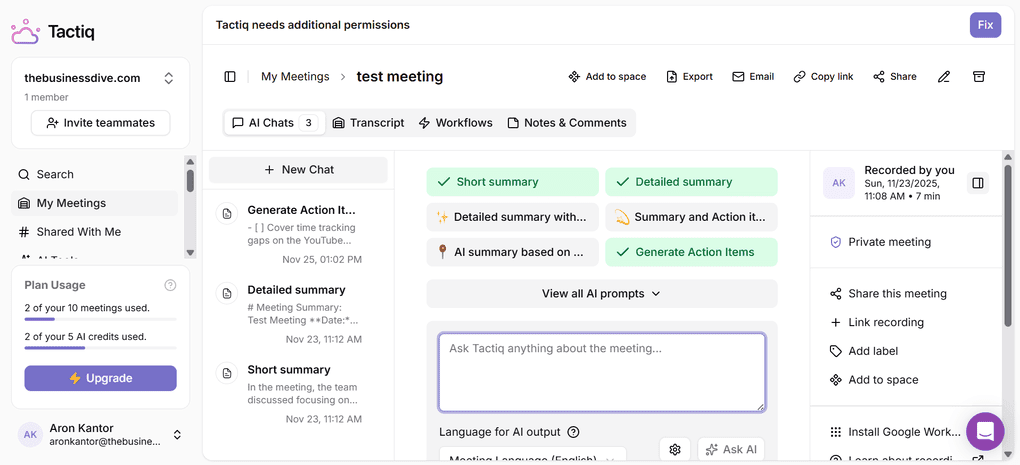
Bot-less transcription: It shows captions in real time during your call, then saves them as transcripts. These transcripts become searchable meeting recordings, summaries, and notes you can revisit anytime. You can also transcribe audio or video files.
AI meeting notes: To get your AI summaries, you have to spend credits on prompts to get your AI meeting notes. You can ask for shorter and longer summaries as well, but you can also ask for the action items and more. Although I am not a big fan of this solution, it is great that you can use your own prompts, so you can build your own meeting templates for project updates, one-on-one calls, and more.
Action items: What I noticed during my testing is that it is solid in identifying and highlighting action items. This platform is very good at highlighting action items. Once an action item is identified, it automatically adds it to a task list, tagged with the speaker’s name.
AI chat: You can ask questions about your video call during and after the meeting to get instant answers based on the transcript.
AI workflows: With Tactiq, you can create an AI workflow for project updates, and after your transcript is processed, it generates a ready-to-send update automatically.
Conversation intelligence: Bluedot shares some data about talk ratio, talking speed, longest monologue, and the number of questions asked.
Integration options: Tactiq is quite solid in terms of integrations, and you can connect it with numerous productivity apps, which makes your AI workflows more efficient.
Security and compliance: Tactiq has security certifications, including SOC2, PCI, and HIPAA, so it is considered a safe app. After my research, I did not find any red flags.
Pricing
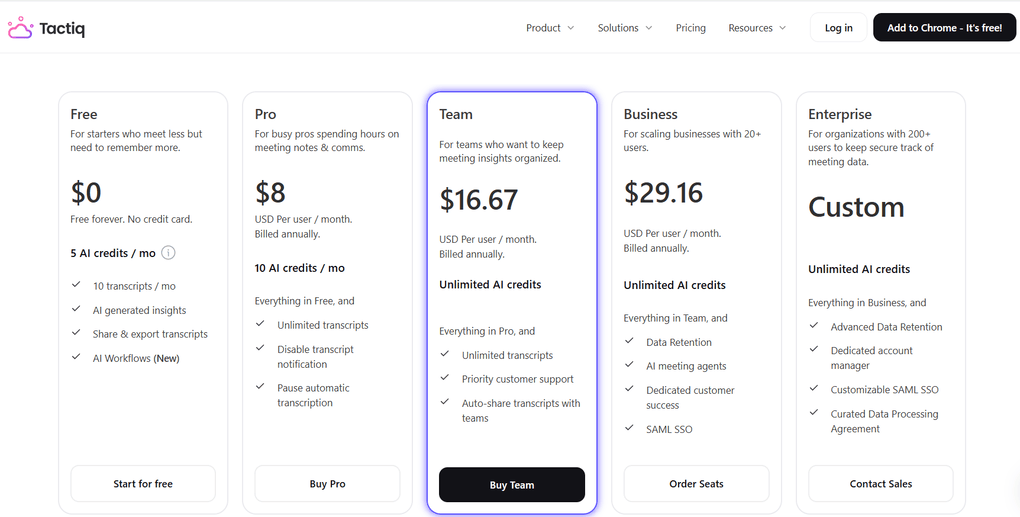
The Free plan gets you just 10 meetings per month and only 5 AI credits that you can use for summaries, notes, questions, and more. You can access the AI workflows as well with the free plan.
The Pro plan provides unlimited transcripts but still has a limit of 10 AI credits per month. It is $8 per month per user, and you have access to some additional features like pausing the automatic transcription or turning off transcription notification.
The Team plan is where you unlock unlimited AI credits and get priority customer support for $16.67.
If you have more than 20 users, Tactiq offers its business plan for $29.16, and you gain access to some more advanced features. Also, it has an Enterprise plan for larger organizations with custom pricing.
My experience with Tactiq
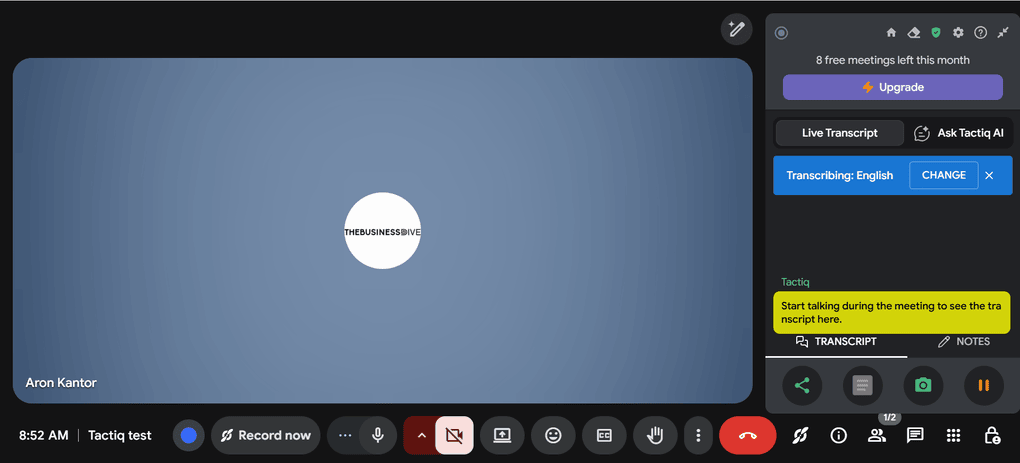
When testing Tactiq, I found some small issues with the transcription, and it only allows generating the meeting notes for AI credits.
In addition, it was not easy to transcribe meetings, and I had to try numerous times to get the real-time transcription. It was a bit frustrating, but it may have happened only to me, since I have numerous Gmail accounts.
As for the other features, it made a good impression on me with its AI workflows, file uploads, and wide range of integrations. However, since it can not record my calls, I am not completely satisfied.
Looking at its pricing structure, the essence of Tactiq is the Team Plan, which offers unlimited AI credits. It’s great to see that the AI workflows are included in the free version.
To summarize, Tatciq has some outstanding features like real-time transcription or AI workflows. However, I had some difficulties transcribing meetings, and I am not fully comfortable with the idea of AI credits.
🔎 Read my full review: Tactiq Review 2026: 5 Pros & 6 Cons — Is It Actually Worth It?
Short on time? Here’s a quick overview of Tactiq
Pros and cons of Tactiq
Pros
Cons
Wrap-up: Best bot-free AI note-takers for 2026
After testing 20+ AI note-taker tools, it was not easy to select only a few for this list. I tried all of these options for real-life virtual meetings, and found these the best bot-free AI note-takers right now.
While all of the listed best botless AI note-takers have similar capabilities, they are completely different in terms of features and use cases. So, make sure you try it for yourself before committing to one of the paid plans.
Related articles:
- Best Granola Alternatives 2026 | My Top 6 After Testing 25+ Tools
- Best 9 AI Note-Takers | My Top Picks After +2 Years Testing (2025)
- Granola vs Fellow 2026: I Used Both for Weeks — This One Won
- Best 5 Otter AI Alternatives | 20+ Personally Tested Apps (2025)
- 6 Best Meeting Recording Apps 2026 | 2+ Years Testing
- 15 Best AI Tools | 200+ Tested By A Skeptical (2025)
I hope I was able to find the best bot-free AI meeting note-taker for you. As always, I will keep updating this list to ensure it reflects reality.
Looking for similar tools?
Visit our AI note-takers library to explore other apps we’ve reviewed in this space and how they compare.
Why you can trust our reviews
At thebusinessdive.com, our team tests, reviews, and compares hundreds of productivity apps every year — from project management tools to note-taking apps. We dive deep into real-world use cases to help you find the right tools that actually improve your workflow, not just add noise.
Our mission? No fluff, no shortcuts—just honest, hands-on insights from productivity pros.
Discover how we stay transparent, read our review methodology, and let us know about any tools we missed.
Frequently asked questions
Are there any free AI note takers?
There are only a few AI note-taking tools that are completely free, for example, Radiant. Most of the AI note-taking tools have free plans with specific limits. Here are some of the most popular AI note-taker tools besides the ones I showed you:
- Otter AI: It is solid for lectures and in-person audio, but its free plan feels more like a demo in 2025.
- Jamie: It is considered one of the best AI note-taker apps on the market that doesn’t use bots to transcribe calls.
- Tl;dv: The free plan of tl;dv is considered the most generous among free AI note takers.
- Superpowered: It is a useful AI notetaker for teams that conduct meetings in multiple languages.
- Sonnet: It is an AI note taker that helps with the tedious task of updating your CRM after every call.
- Fathom: Fathom is completely free for individuals, but lacks the finesse of other tools.
- Fireflies AI: Fireflies’ free plan is useful, but lacks video recording, and some advanced features are behind a paywall.
Is there a free AI transcribing tool?
If you need a 100% free AI meeting assistant, check out Radiant or Fathom. While Radiant only works for Mac users, Fathom has an extensive free plan for individuals.
Best AI Meeting Note App Without Bot Joining?
After testing numerous AI note-taker tools, I found these to be the best AI bot-less note-taking apps:
- Fellow
- Krisp
- Bluedot
- Granola
- Tactiq
Disclosure: I only recommend products I would use myself, and all opinions expressed here are our own. This post may contain affiliate links through which, at no additional cost to you, I may earn a small commission. Read the full privacy policy here.

Hey there! I am Aron, the founder of Thebusinessdive. I have been testing productivity apps for almost three years now. I reach 25.000 -50.000 people monthly with the mission to help you find the perfect productivity apps. Subscribe to my YouTube channel, newsletter, and social media to hear more about the best productivity tools. Let’s dive in!