


7 Best Google Meet AI Note-Takers | 25+ Apps Tested (2026)
TL;DR: After testing 25 AI note-takers across 50+ calls in the past years, my top Google Meet AI note-taker for professionals is Fellow; Bluedot is my second pick for those who need a simple & bot-less AI note-taker; and Gemini is a solid choice for those who already subscribe to one of Google’s Workspace plans.
AI note-takers for Google Meet I’d Actually Use (Quick Picks)
Why you need an AI note-taker | Start with | Pricing starts at |
|---|---|---|
You need accurate meeting notes with strong security | Fellow | Free plan + paid plans from $7/user/month (for teams) |
You want simple AI note-taking | Bluedot | Free plan + paid plans from $14/user/month |
Clearer conversations and AI notes in one tool | Krisp | Free trial; paid plans from $8/month, subject to current pricing |
You already have a Google Workspace subscription and don’t want to pay extra | Google Take Notes for Me (Gemini) | You already have a Workspace subscription (Business Standard or higher). |
You want to combine your own notes with AI-generated notes | Granola | Free plan + paid plans from $14/user/month |
You want more meeting analytics | MeetGeek | Free plan + paid plans from $9.99/user/month |
You want a budget-friendly solution | Fireflies AI | Free plan + paid plans from $10/user/month |
Compare the Best Google Meet AI note-takers
AI note-takers | Ideal for 🎯 | Bot or botless recording🎙️ | Meeting notes quality📝 | Transcription accuracy ✅ | What stood out in my testing🔍 | Biggest drawback⚠️ |
|---|---|---|---|---|---|---|
Teams and professionals who prioritize accurate meeting notes and security | Both | Excellent | 95% – 100% | Accurate transcripts, actionable summaries, and strong team collaboration | Limited free plan | |
Users who want simple, bot-free AI note-taking | Botless | Excellent | 85–90% | Quick setup and simple bot-free recording | Free plan is essentially a trial | |
Client-facing teams that need accurate notes and clear communication | Botless | Excellent | 95% – 100% | Combines AI note-taking with Noise Cancellation and Accent Conversion | Noise cancellation isn’t available on mobile | |
Google Workspace users who don’t want another AI note-taker | Botless | Poor | 80-85% | No additional setup required, as it’s built directly into Google Meet | Poor meeting notes quality and fewer advanced features than competitors | |
Users who want to combine their own notes with AI-generated notes | Botless | Excellent | 85–90% | Seamlessly combines my own notes with AI-generated meeting notes | No video recording | |
Teams needing advanced meeting analytics for sales, customer, and recruitment calls | Both | Excellent | 95–100% | Detailed conversation analytics and insights beyond basic meeting summaries | Limited transcription minutes on Free and Pro plans | |
Budget-conscious users who need AI meeting notes | Both | Good | 85–90% | Flexible recording options, broad platform support, and integrations | Limited free plan |
Detailed Breakdown of the Top AI Note-Takers For Google Meet Meetings

Fellow
After using Fellow as my main AI note-taker for over two years and testing it in 50+ Google Meet calls, it’s still my top pick for professionals and teams. In my tests, it delivered 95–100% transcription accuracy, detailed AI summaries, and reliable meeting recording. What sets it apart is how it handles the entire meeting workflow, from preparing agendas to tracking action items afterward.
Quick verdict
Teams and professionals who need accurate AI notes, strong security, and meeting collaboration
Occasional users looking for a generous free plan
95–100% transcription accuracy, detailed AI summaries, and strong privacy controls
Limited free plan with only 5 lifetime AI meeting notes
What I Learned Using Fellow for Google Meet Calls
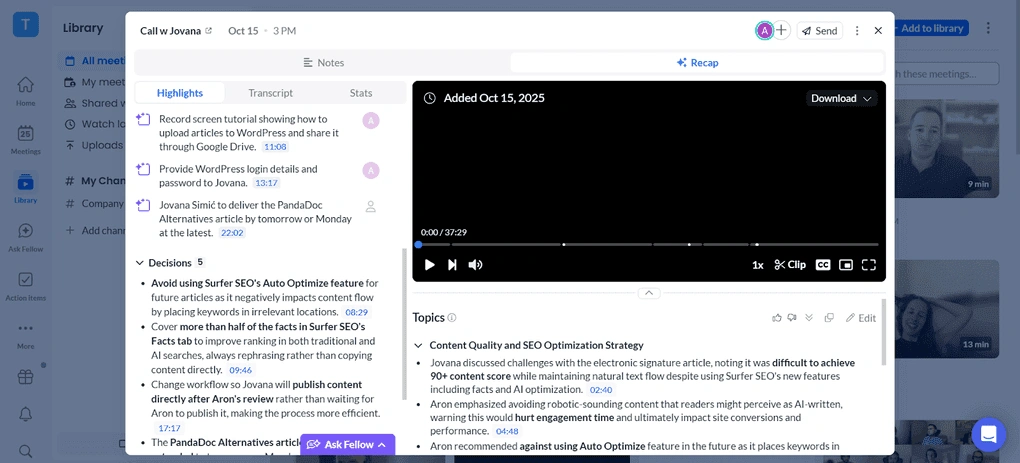
Fellow has been my default note-taker for more than two years, and if you are a professional or run a team, I think it’s the most competent AI note-taker for Google Meet calls.
Most of my meetings take place on Google Meet, and over 50+ meetings, Fellow always joined right on time. Most importantly, it only joined the meetings I asked it to join and didn’t get into awkward situations.
For more sensitive meetings, I appreciate having the botless recording option. Unlike Granola, Fellow applies the same security and governance controls to both recording methods. It also automatically notifies participants when botless recording is active, which is particularly useful for transparency.
But what impressed me most was the 95–100% transcription accuracy in my tests. Combined with detailed AI summaries, action items, and meeting agendas, Fellow is easily one of the most complete AI note-takers I’ve tried. That’s why it ranked first on my list of best AI note-takers and Otter AI alternatives.
🟢 Pick Fellow if: You regularly use Google Meet and want highly accurate transcripts, detailed meeting notes, and strong privacy controls.
🔴 Skip Fellow if: You only attend occasional meetings or need a generous free plan.
Fellow’s best parts
Fellow’s biggest pain points
Fellow pricing: Which plan makes sense?
Plan | Price | Best For | Key Features |
|---|---|---|---|
Free | $0 | Testing Fellow | Five AI meeting notes per user (lifetime) |
Solo | $19/month | Professionals | Premium meeting notes and business features for individuals |
Team | $7/user/month | Small teams | Higher usage limits, meeting automation, and additional integrations |
Business | $15/user/month | Growing organizations | Unlimited recordings and transcription, organization-wide templates, and more integrations |
Enterprise | $25/user/month | Larger organizations | Advanced security, governance, recording controls, and higher limits |
🔎 Read my full review: Fellow Review: My Thoughts After +12 Months (2026)
Use this link to sign up and get 10% off the paid plans if you upgrade

Bluedot
Bluedot is one of the easiest AI note-takers I’ve tested for Google Meet. In my tests, it delivered 85–90% transcription accuracy, well-structured AI summaries, and reliable bot-free video recording through its Chrome extension. I particularly liked how quickly I could start recording meetings without inviting a bot. Its biggest drawback is the limited free plan, which only includes five lifetime meetings.
Quick verdict
Users who want simple, bot-free meeting recording with accurate AI notes
Users looking for a free AI note-taker
Easy bot-free video recording with well-structured AI summaries
Free plan limited to 5 lifetime meetings
What I Learned Using Bluedot for Google Meet Calls
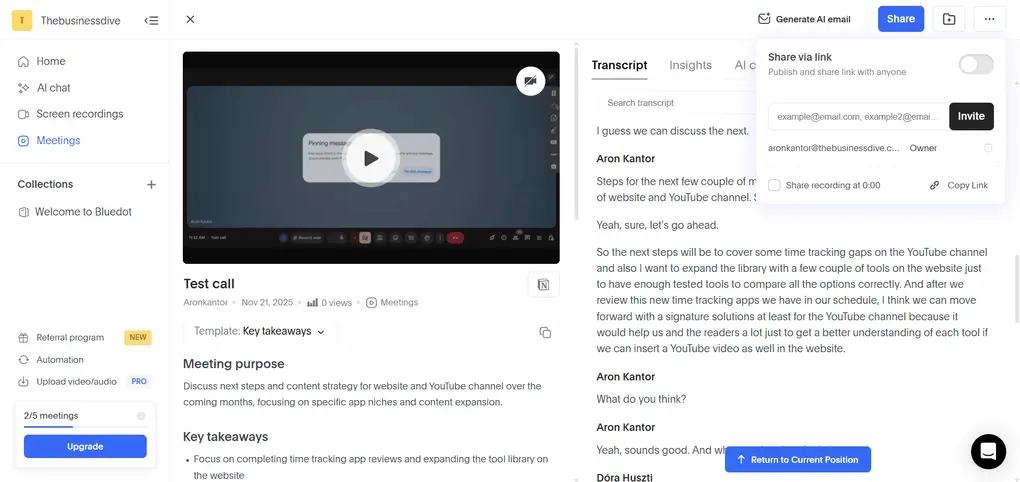
Bluedot was one of the simplest AI note-takers I have tried, yet it has many advanced features.
The transcription was accurate, and the AI-generated summaries were well structured and captured all the key points discussed. You can apply different meeting templates and create your own, giving you plenty of flexibility in how you structure your meeting notes.
However, Bluedot’s real advantage is that you can record calls without a bot, which most bot-less AI note-takers can’t do. You just start capturing the call with its browser extension, and Bluedot records, transcribes, and takes notes for you.
The one pain point for Bluedot is that the free plan is only enough to try the AI note-taker and decide whether you want to upgrade.
🟢 Pick Bluedot if: You want an easy-to-use, bot-free AI note-taker for Google Meet with accurate transcripts, well-structured meeting notes, and video recording.
🔴 Skip Bluedot if: You need a free AI note-taker for your Google Meet calls.
Bluedot’s best parts
Bluedot’s biggest pain points
Bluedot pricing: Which plan makes sense?
Plan | Price | Best For | Key Features |
|---|---|---|---|
Free | $0 | Try Bluedot | 5 lifetime meetings, up to 1 hour per recording, Slack and Notion integrations |
Basic | $14/user/month | Individuals and freelancers | Unlimited recordings and storage |
Pro | $20/user/month | Professionals who regularly attend meetings | Longer recordings and custom meeting templates |
Business | $32/user/month | Sales teams and growing businesses | HubSpot and Salesforce integrations, unlimited imports |
Enterprise | Custom pricing | Larger organizations | SSO, custom data retention policies, and advanced admin controls |
🔎 Read my full review: My Honest Bluedot Review After Testing 25+ AI Note-Takers

Krisp
Krisp is one of the few AI note-takers for Google Meet that improves the meeting experience, not just the notes afterward. During my testing, it transcribed calls in real time with high accuracy and turned them into structured notes, summaries, and action items. I tested Krisp AI Note Taker in noisy environments, where it canceled background noise and competing voices, making calls easier to follow. During meetings with international team members, Krisp converted accents in real time, making it easier for everyone on the call to hear and understand each other.
Quick verdict
Sales teams, consultants, and other client-facing teams that need accurate notes and clear communication during calls.
Users who want a note-taker that works entirely inside Google Meet without installing a separate desktop app.
Combines bot-free meeting notes with real-time AI Noise Cancellation and AI Accent Conversion
Requires installing the desktop app and configuring the Krisp microphone and speaker in meeting settings.
What I Learned Using Krisp for Google Meet Calls
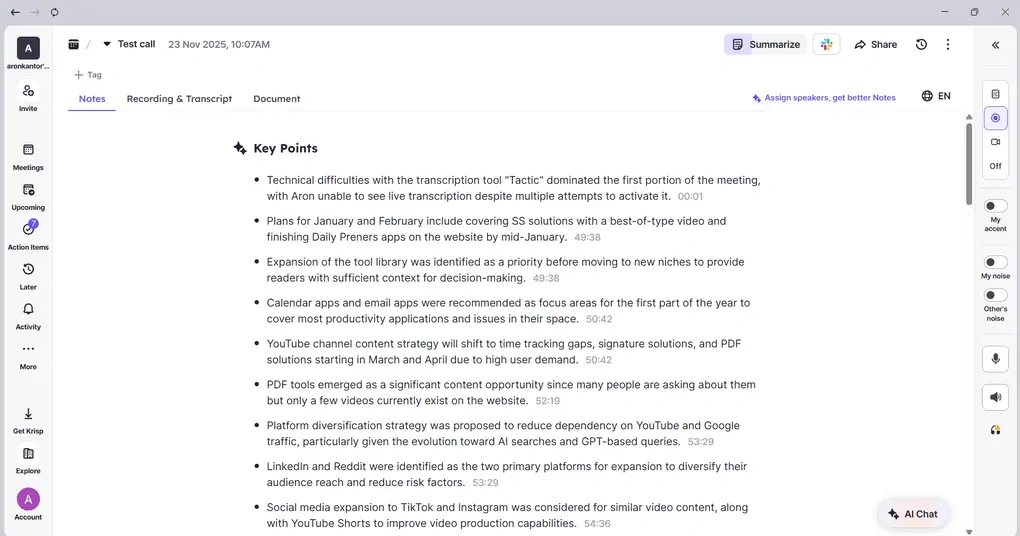
Krisp makes the most sense if you want meeting notes and clearer audio in the same app. Alongside transcribing Google Meet calls, it reduces background noise, competing voices, and echo. Its AI Accent Conversion feature also helps make accented speech easier to understand.
For note-taking, Krisp covers the essentials: live transcription, speaker identification with timestamps, summaries, discussion points, decisions, and action items. Transcripts are searchable, so you can find a detail from an earlier meeting without going through the entire recording.
AI Chat lets you ask questions about meeting content and get answers without manually searching through the transcript.
One of its main advantages is bot-free note-taking. You can capture supported meetings without adding another participant to the call.
Krisp also lets you choose what to save: a transcript without a saved recording, or a recording alongside the transcript. You can upload existing audio and video files to generate transcripts and notes, then connect meeting information with tools such as Salesforce, HubSpot, Affinity, Asana, Jira, and Zapier.
The main drawback is the initial setup. Unlike tools that operate entirely within Google Meet, Krisp requires its desktop app. You also need to select the Krisp microphone and speaker in your meeting settings.
Noise cancellation isn’t available on mobile, so you won’t get the same audio-processing experience on your phone.
Based on my testing, I’d consider Krisp especially useful for sales and other client-facing teams.
🟢 Pick Krisp if: You want searchable Google Meet transcripts and actionable notes, along with tools that improve audio clarity during calls.
🔴 Skip Krisp if: You only need basic meeting summaries and don’t want to install a desktop app.
Krisp’s best parts
Krisp’s biggest pain points
Krisp pricing: Which plan makes sense?
Plan | Price | Best For | Key Features |
|---|---|---|---|
Free trial | $0 | Trying Krisp before committing | Access to premium features during the trial, subject to current plan limits |
Core | $8/user/month | Individuals and small teams | Unlimited AI Note Taker, unlimited Noise Cancellation, integrations and webhooks, mobile app |
Advanced | $15/user/month | Teams that need additional features and controls | Unlimited Accent Conversion, advanced integrations, advanced admin controls |
Enterprise | Custom pricing | Organizations deploying Krisp at scale | SSO/SCIM, advanced security and reporting, private transcription and recordings processed on-device |
🔎 Read my full review: My Brutal Honest Krisp Review 2026 | Is It Worth It?

Take Notes for Me (Gemini)
Google’s Take Notes for Me is a convenient AI note-taker built directly into Google Meet. In my tests, I liked its simple setup and automatic Google Docs integration. However, its AI summaries were less detailed than those from dedicated tools like Fellow or Granola.
Quick verdict
Higher-Tier Google Workspace users who want built-in AI meeting notes
Users who need detailed AI summaries or advanced features
Seamless Google Meet integration with no additional setup
Basic AI summaries and limited advanced features
What I Learned Using Take Notes for Me for Google Meet Calls

One of its biggest strengths is simplicity. You can activate it with a single click before joining a meeting or while the call is in progress. If you’re already paying for Google Workspace (Business Standard and above), it’s a convenient way to generate AI meeting notes without installing or setting up another app.
After the meeting, Gemini saves the notes as a Google Doc in your Drive and can share them with invited participants within your organization, depending on your sharing settings. Since everything is stored in Google Docs, you can easily edit the notes or share them with colleagues.
The meeting notes include a discussion summary and key takeaways. If meeting transcription is also enabled, you can revisit the transcript separately.
However, the biggest disappointment for me was the quality of the AI meeting notes. Compared to dedicated AI note-takers, Gemini’s summaries felt basic and missed some of the detail I expected.
It also falls behind in functionality. You won’t find advanced features like a dedicated meeting library, AI chat across meetings, collaborative agendas, or extensive meeting analytics.
Overall, Take Notes for Me is convenient, but convenience is its biggest selling point—not the quality or depth of its meeting notes.
🟢 Pick Google Gemini if: You already use Google Workspace and want a simple, built-in AI note-taker for Google Meet without installing or paying for another app.
🔴 Skip Google Gemini if: You need detailed, high-quality meeting summaries, advanced AI features, or an AI note-taker that works across multiple meeting platforms.
Take Notes for Me’s Best Parts
Take Notes for Me’s Biggest Pain Points
Take Notes for Me pricing: Which plan makes sense?
Plan | Price | Best For | Key Features |
|---|---|---|---|
Business Starter | $7/user/month | Individuals and small businesses | Business email, 30 GB storage, Google Meet for up to 100 participants; limited Gemini features |
Business Standard | $14/user/month | Professionals and small teams | Take Notes for Me, Gemini in Google Meet, 2 TB storage, meeting recording |
Business Plus | $22/user/month | Growing businesses | Everything in Standard, 5 TB storage, attendance tracking, advanced security |
Enterprise | Custom pricing | Large organizations | Advanced security, administrative controls, and enterprise-level meeting features |

Granola
Granola is one of my favorite botless AI note-takers for Google Meet. What impressed me most was how it combined my messy, handwritten-style notes with meeting transcripts to create detailed, well-structured summaries. It’s simple to use, but the lack of meeting recording and advanced features limits its versatility
Quick verdict
Combining your own notes with AI-generated summaries
Users who need meeting recordings or advanced collaboration features
Turns messy personal notes and transcripts into structured AI summaries
No meeting recording or audio/video file uploads
What I Learned Using Granola for Google Meet Calls
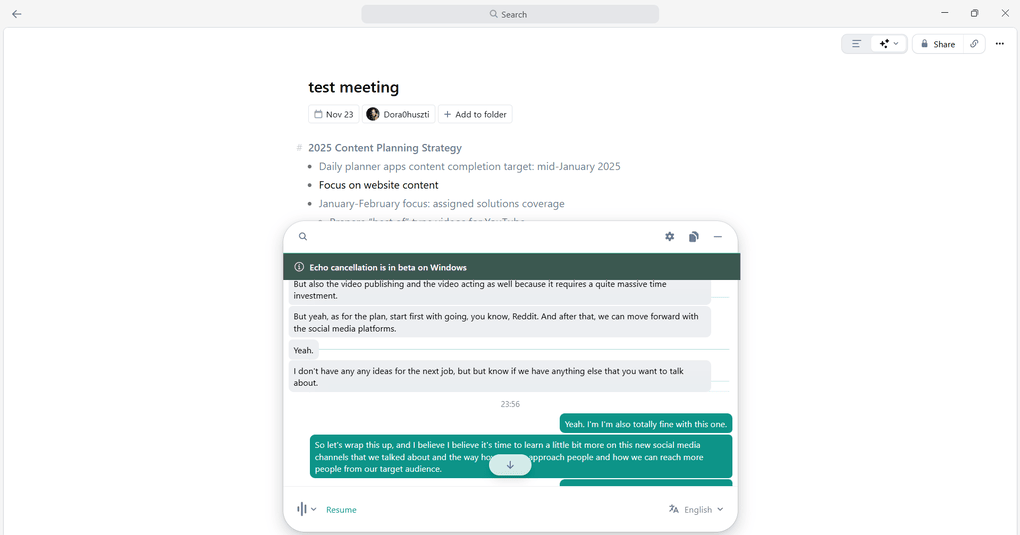
Granola transcribes meetings in real time without a bot, then uses the transcript to generate meeting notes. But this is where Granola is different from the rest of the options on this list.
Granola uses not only your transcript but also your notes from Google Meet calls and combines them into the AI notes. I often write messy shorthand notes during meetings, and Granola surprisingly turned them into structured summaries that actually sounded usable afterward.
For me, that was Granola’s most impressive feature.
To use this AI note-taker, you first need to download the desktop app. Beyond that, it is intuitive and straightforward, with a short learning curve.
However, Granola falls short on additional features. The lack of meeting recording was probably my biggest disappointment. Unlike most alternatives, you also can’t upload audio or video files for transcription.
Ultimately, Granola offers excellent AI meeting notes, but its feature set is more limited than alternatives like Fellow or Bluedot.
🟢 Pick Granola if: You want a simple, bot-free AI note-taker for Google Meet that combines your own notes with meeting transcripts to create detailed, well-structured summaries.
🔴 Skip Granola if: You need video or audio recording, file uploads for transcription, or more advanced meeting management and collaboration features.
Granola’s Best Parts
Granola’s Biggest Pain Points
Granola pricing: Which plan makes sense?
Plan | Price | Best For | Key Features |
|---|---|---|---|
Basic | $0 | Testing Granola | AI meeting notes, 30-day meeting history, AI chat, custom templates, and shared folders |
Business | $14/user/month | Individuals, founders, and professionals | Unlimited meeting history, advanced AI models, integrations with Notion, HubSpot, and Zapier, API access |
Enterprise | $35/user/month | Businesses | Everything in Business, plus SSO, advanced security, organization-wide controls, and priority support |
🔎 Read my full review: Granola Review 2026: Why It Won’t Work for Everyone
MeetGeek
After testing MeetGeek in 20+ meetings, I was impressed by its 95–100% transcription accuracy and detailed AI summaries. However, what really sets it apart is its advanced meeting analytics, which track speaking time, engagement, and sentiment to help improve meeting performance. Its biggest drawback is the transcription limits on lower-tier plans.
Quick verdict
If you want accurate transcripts and advanced meeting analytics
Casual users who only need basic meeting summaries
Detailed analytics tracking speaking time, sentiment, and engagement
Limited transcription hours on Free and Pro plans
What I Learned Using MeetGeek for Google Meet Calls

If you love checking your stats and seeing how your meeting performance improves over time, you will love MeetGeek.
It tracks speaking time, participation levels, sentiment, and engagement, helping teams understand how their meetings actually unfold. Beyond tracking, it offers actionable insights on how to improve and what you should focus on.
In my tests, transcription accuracy reached 95–100%, while the AI-generated meeting notes were well-structured, easy to digest, and customizable.
Another standout feature is its AI agent, one of the most advanced I’ve tested. It can execute workflows within MeetGeek and across integrated platforms, going beyond simply answering questions about your meetings.
The main downside is the transcription limits on lower-tier plans. While its Pro plan is affordable at $9.99/month, you’ll need the $17/month Business plan for unlimited transcription.
🟢 Pick MeetGeek if: You want highly accurate transcriptions plus advanced meeting analytics, especially for sales, customer, and recruitment calls.
🔴 Skip MeetGeek if: You want a lightweight AI note-taker with generous transcription limits — its lower-tier plans are fairly restrictive on transcription volume and storage.
MeetGeek’s Best Parts
MeetGeek’s Biggest Pain Points
MeetGeek pricing: Which plan makes sense?
Plan | Price | Best For | Key Features |
|---|---|---|---|
Basic | $0 | Occasional meetings | 3 hours of transcription/month, AI summaries, meeting analytics, bot and botless recording |
Pro | $9.99/user/month | Sales teams, and customer support teams | 20 hours of transcription/month, AI agents, custom meeting templates, integrations |
Business | $17/user/month | Teams and professionals with many meetings | Unlimited transcription, HD video recording, team analytics, unlimited AI agents and workflows |
Enterprise | Custom pricing | Large organizations | Unlimited transcription, SSO, custom data retention, advanced security and administrative controls |
🔎 Read my full review: MeetGeek Review: Is It The Best AI Note-Taker For You? (2026)
Fireflies AI
Fireflies AI is one of the most versatile AI note-takers I’ve tested for Google Meet. While its transcription accuracy wasn’t perfect (85–90%), I liked its flexible bot and botless recording, support for 100+ languages, and extensive integrations. Its affordable pricing makes it a solid all-rounder, although the AI summaries could be better structured.
Quick verdict
Budget-conscious users who need a versatile AI note-taker
Users prioritizing near-perfect transcription and structured summaries
Flexible recording, 100+ languages, and extensive integrations
AI meeting notes could be better structured
What I Learned Using Fireflies AI for Google Meet Calls
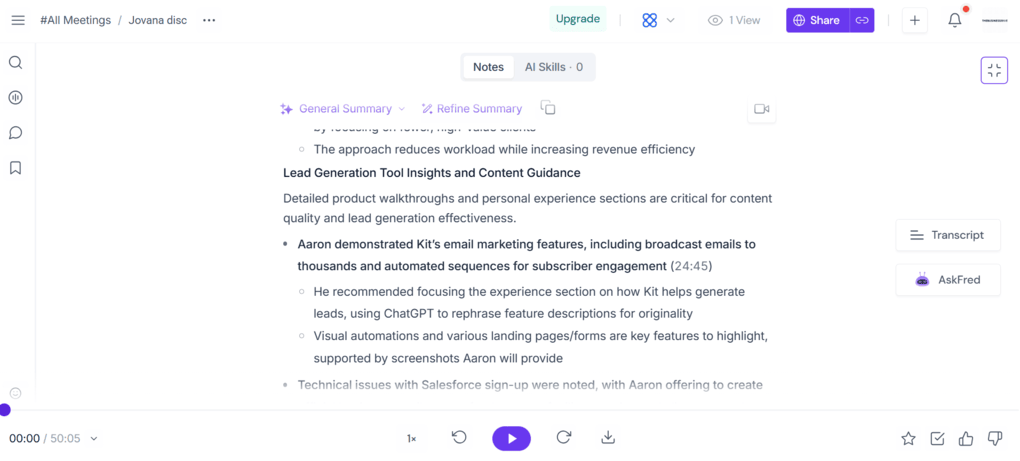
Fireflies AI is a balanced AI note-taker for Google Meet and offers great value for the price.
When I tried Fireflies AI a few years ago, the bot couldn’t join meetings when I wanted it to, but lately, they’ve fixed these issues.
The setup is relatively simple and offers solid, but not perfect, transcription accuracy. For example, in one meeting, it transcribed “versus articles” as “Virtus articles.”
The meeting summaries were good, but I wasn’t always happy with how Fireflies structured them.
However, where Fireflies really impressed me was its versatility.
It works with almost all major video conferencing platforms, offers both bot-based and botless recording, and supports over 100 languages. Also, it’s seamlessly integrated with numerous third-party apps, including Google Calendar.
Overall, Fireflies is a strong all-rounder, especially if you want a feature-rich AI note-taker without paying a premium.
🟢 Pick Fireflies AI if: You want an affordable, versatile AI note-taker for Google Meet with flexible recording options, extensive integrations, and support for 100+ languages.
🔴 Skip Fireflies AI if: Your top priorities are near-perfect transcription accuracy and consistently well-structured meeting notes.
Fireflies AI’s Best Parts
Fireflies AI’s Biggest Pain Points
Fireflies AI pricing: Which plan makes sense?
Plan | Price | Best For | Key Features |
|---|---|---|---|
Free | $0 | Individuals with a few meetings | Unlimited transcription, limited AI summaries, 400 minutes of storage, 20 AI credits |
Pro | $10/user/month | Price-sensitive teams & professionals | Unlimited transcription and AI summaries, video recording, 8,000 minutes of storage, unlimited integrations |
Business | $19/user/month | Teams & professionals that need all the advanced features | Unlimited storage, conversation intelligence, team analytics, multilingual mode, 30 AI credits |
Enterprise | $39/user/month | Large organizations | Advanced security, SSO, HIPAA compliance, custom data retention, dedicated account manager |
🔎 Read my full review: Fireflies AI Review: Why is EVERYONE using it for meeting notes?
Final thoughts and recommendations
After testing 25+ AI note-takers, I noticed that Google Meet generally offers the smoothest experience with third-party AI note-taking apps.
In several cases, an AI note-taker worked perfectly on Google Meet, but when I switched to Zoom or Microsoft Teams, the experience wasn’t nearly as smooth.
For example, joining and recording meetings can work differently depending on the platform. Some AI note-takers require additional permissions or setup steps, while others rely on meeting bots that don’t always join as expected.
That’s why I wouldn’t assume an AI note-taker that performs well on Google Meet will deliver the same experience on other platforms.
If you regularly switch between Google Meet, Zoom, and Microsoft Teams, I’ve also tested AI note-takers specifically for these platforms:
- 7 Best Zoom Note-Taker Apps: My Findings After 2 Years (2026)
- 6 AI Note-Takers I’d Use for Microsoft Teams Meetings After Real Meetings
Another thing to consider: native AI note-takers are usually limited to their own ecosystems. For example, Google Meet’s Take Notes for Me won’t automatically capture your Zoom or Microsoft Teams meetings.
My recommendation: If you use multiple meeting platforms, choose a third-party AI note-taker that I’ve found works reliably across them, such as Fellow or Fireflies AI.
Alternatively, consider a botless AI note-taker like Granola, which captures meeting audio directly from your device instead of relying on a bot joining the call. This reduces your dependence on the meeting platform and can make switching between Google Meet, Zoom, and Microsoft Teams much easier.
How We Test AI Note-Takers
To keep our reviews and final scores fair and consistent, we evaluate every AI note-taking tool using a standardized testing framework built on real-world usage and hands-on experience.
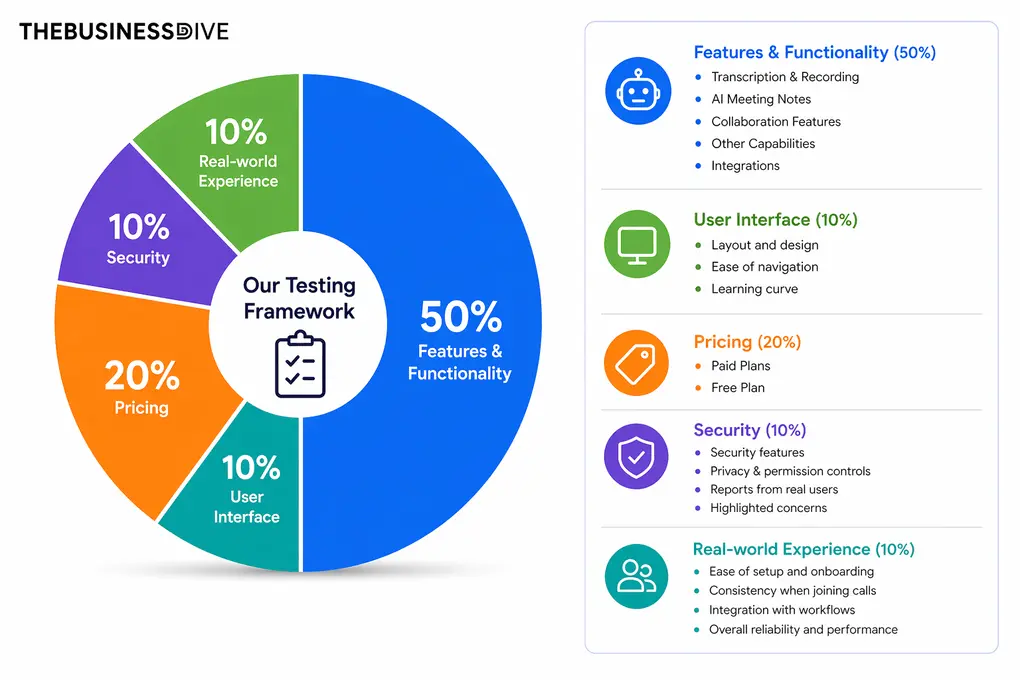
Our scoring breakdown after testing 20+ AI note-takers:
🤖 Features & functionality — 50%
🖥️ User interface — 10%
💰 Pricing — 20%
🔐 Security — 10%
👥 Real-world experience — 10%
Want a detailed breakdown of how we test each category?
Learn exactly how we test tools → Review methodology
Why you can trust our reviews
At thebusinessdive.com, our team tests, reviews, and compares hundreds of productivity apps every year — from project management tools to note-taking apps. We dive deep into real-world use cases to help you find the right tools that actually improve your workflow, not just add noise.
Our mission? No fluff, no shortcuts—just honest, hands-on insights from productivity pros.
Have a question or suggestion? I’d love to hear from you. Feel free to reach out anytime at aronkantor@thebusinessdive.com.
Frequently asked questions
What is the best free AI note taker for Google Meet?
Based on my testing, Fathom is one of the best free AI note-takers for Google Meet, thanks to its generous free plan. Although it didn’t make my top seven overall, it’s worth considering if you primarily want free meeting summaries.
Does Google have an AI note-taking app?
Yes. Google Meet offers meeting transcription, which creates a written record of conversations, and Gemini’s Take Notes for Me, which generates AI meeting summaries. These are separate features available with eligible Google Workspace subscriptions.
How to enable Google Meet note-taker?
To use Gemini’s Take Notes for Me tool, select your Google Meet call, and at the top right of your screen, click Take notes with Gemini. Here, you can select whether you want to transcribe or record your meeting, or both. Click it, and Gemini will start taking notes.
To check whether it’s taking notes, move your cursor here to see the meeting notes.
Can Google Meet transcribe notes?
Yes, Google Meet can transcribe notes through its built-in AI note-taker (Google Gemini’s Take Notes for Me), which creates a text document from the audio, but only after someone manually starts transcription during the meeting.
Disclosure: I only recommend products I would use myself, and all opinions expressed here are my own. This post may contain affiliate links that, at no additional cost to you, I may earn a small commission. Read the full privacy policy here.

Hey there! I am Aron, the founder of Thebusinessdive. I have been testing productivity apps for almost three years now. I reach 25.000 -50.000 people monthly with the mission to help you find the perfect productivity apps. Subscribe to my YouTube channel, newsletter, and social media to hear more about the best productivity tools. Let’s dive in!