


6 AI Note-Takers I’d Use for Microsoft Teams Meetings After Real Meetings
Microsoft Teams can record meetings and generate recaps, but many teams still need a better way to capture notes, track action items, and organize follow-ups.
To help you find the right MS Teams AI note taker, we tested and selected the tools that go beyond transcription, generating summaries, identifying key decisions, and keeping meeting information searchable and easy to share.
Here are the AI note-takers we choose from 20+ tested options:
🏆 Fellow → Best overall MS Teams AI note taker for meeting workflows, collaboration, and follow-ups.
🤖 Bluedot → Best bot-free option for teams that want AI meeting notes without inviting a meeting bot.
💰 Fireflies AI → Best budget-friendly MS Teams AI note taker with strong collaboration and analytics features.
🏢 Microsoft Copilot → Best built-in choice for organizations already using Microsoft 365 and Teams.
🎙️ Krisp → Best for combining AI meeting notes with industry-leading noise cancellation.
✨ Granola → Best for users who want a simple, distraction-free AI note-taking experience.
How These MS Teams AI Note Takers Compare
|
AI note taker |
Best fit for Teams users 🎯 |
What it adds beyond Teams recap ✨ |
Biggest limitation ⚠️ |
Pricing 💰 |
|---|---|---|---|---|
|
Enterprise teams on Microsoft 365 that need bot-free recording, compliance controls, and structured follow-ups |
Meeting agendas, action item ownership, templates, searchable meeting records, and enterprise-grade security controls |
Limited free version |
Free plan available; paid plans start at $7/user/month |
|
|
Want bot-free meeting recording with AI-generated transcripts, summaries, and follow-up tools |
Bot-free recording, AI chat, custom note templates, and AI-generated follow-up emails |
The free plan only includes five lifetime recordings |
Free plan available; paid plans start at $14/user/month |
|
|
Want a budget-friendly AI note taker with reliable transcription, collaboration features, and broad platform support |
Meeting analytics, conversation intelligence, AI assistant, and broad integrations |
The free plan is more limited than some competing AI note takers |
Free plan available; paid plans start at $10/user/month |
|
|
Already use Microsoft 365 and want AI meeting assistance built directly into Teams |
Native Teams integration, AI meeting recaps, action items, and conversational AI inside Teams |
Full functionality requires a Microsoft 365 Copilot license on top of an eligible Microsoft 365 subscription |
Paid plans start at $18/user/month (plus Microsoft 365 subscription) |
|
|
Need AI meeting notes and background noise cancellation in a single tool |
Real-time noise cancellation, accent conversion, and audio enhancement |
Noise cancellation is not available on mobile devices |
7-day free trial; paid plans start at $8/user/month |
|
|
Want a simple, distraction-free AI note taker without meeting bots |
Combines personal notes with AI-generated summaries in a clean, bot-free interface |
Doesn’t offer meeting recording capabilities |
Free plan available; paid plans start at $14/user/month |
How We Test AI Note-Takers
To keep our reviews and final scores fair and consistent, we evaluate every AI note-taking tool using a standardized testing framework built on real-world usage and hands-on experience.
We reviewed and personally tested every AI note-taker featured in this list, and you will find links to the full review articles for each tool. Based on our hands-on testing, we assigned an overall score using our standardized scoring system.
While these overall review scores influenced the rankings in this article, we also considered specific use cases, workflows, and standout strengths to recommend the best AI note-takers for different needs and teams.
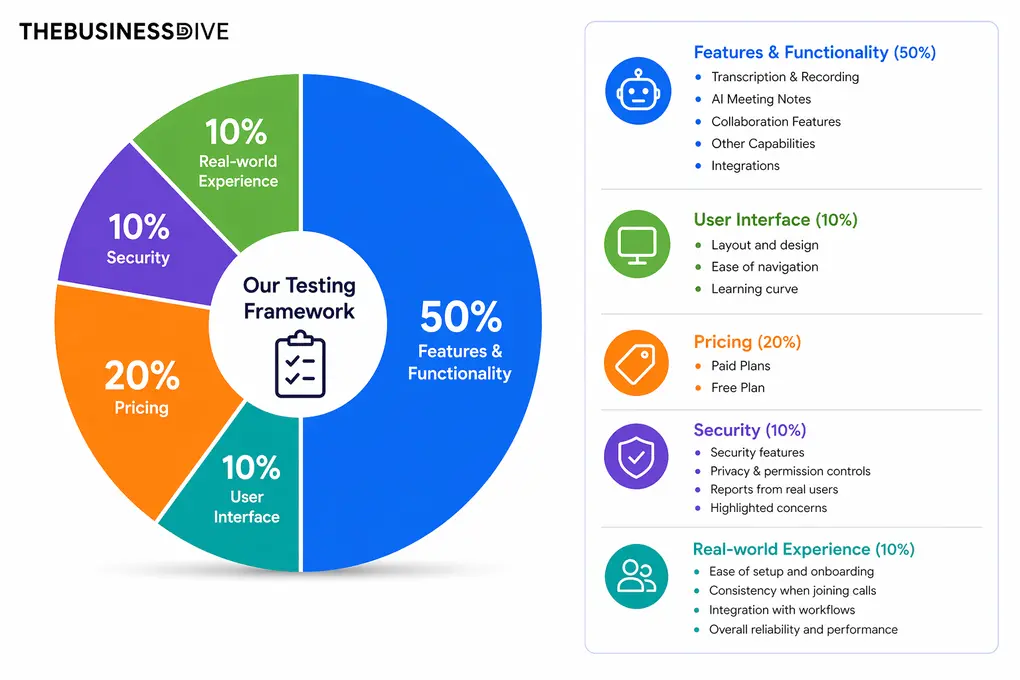
Our scoring breakdown after testing 20+ AI note-takers:
🤖 Features & functionality — 50%
🖥️ User interface — 10%
💰 Pricing — 20%
🔐 Security — 10%
👥 Real-world experience — 10%
Want a detailed breakdown of how we test each category?
Learn exactly how we test tools → Review methodology
Breaking Down the Best MS Teams AI Note-Takers in 2026
Fellow
Fellow is a secure AI meeting assistant and note-taker that captures conversations, turns them into transcripts and summaries, and helps teams manage everything from meeting agendas to follow-ups in one place.
Quick verdict
Enterprise teams on Microsoft 365 that need bot-free recording, compliance controls, and structured follow-ups.
You’re looking for a basic low-cost note-taking tool.
Botless recording means no bot joins the call — Fellow captures audio locally, which matters for compliance-sensitive teams. Backed by SOC 2 Type II, SSO, SCIM, and RBAC, with strong action-item tracking and integrations with Salesforce, HubSpot, and Jira.
Limited free version
Who Fellow is best for
Who Fellow is not ideal for
Fellow highlights
Fellow drawbacks
Use this link to sign up and get 10% off the paid plans if you upgrade
Testing Fellow for Microsoft Teams meetings
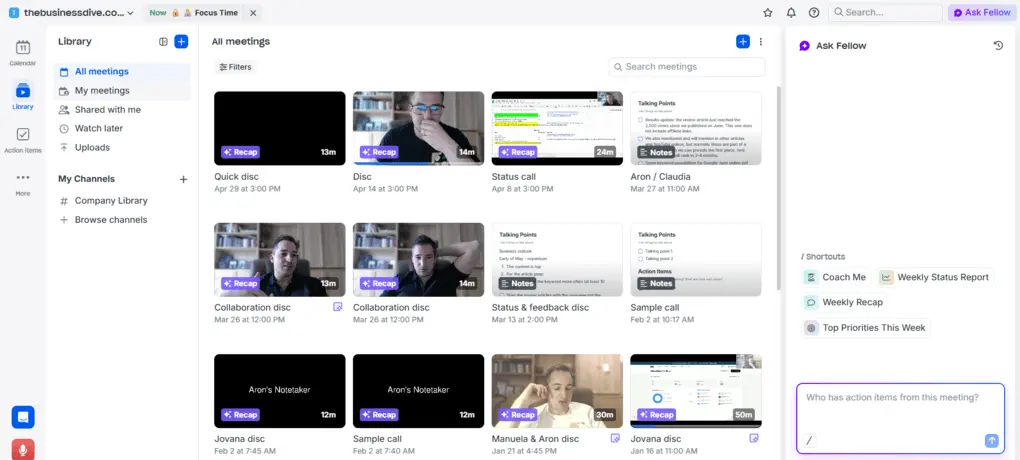
I tested Fellow with Microsoft Teams meetings to see whether it could do more than generate transcripts and summaries. While note-taking is one of its core features, I found that Fellow focuses on the entire meeting process, from planning discussions to tracking what happens afterward.
Getting started was straightforward. Fellow joined Teams meetings automatically, recorded the conversation, generated a transcript, and created an AI summary once the meeting ended. The transcripts were highly accurate, even during longer discussions with multiple participants.
One feature I used frequently was meeting agendas. Fellow allows you to prepare discussion points before a meeting and keep notes directly alongside the agenda during the call. Having everything in a single workspace really helped me keep meetings organized.
After each meeting, Fellow automatically generated action items and highlighted key decisions. Instead of reviewing the entire transcript, I could quickly see the next steps and assign tasks to team members. This was one of the most valuable parts of the experience.
I also liked how Fellow organized meeting information. Transcripts, recordings, summaries, action items, and past discussions were stored in a searchable library, so it was easy to find information from previous meetings.
I also spent some time exploring features outside of note-taking. Fellow includes shared agendas, meeting templates, and action item tracking, which helped keep meeting preparation, discussions, and follow-ups in the same workspace instead of spreading them across multiple tools.
Another thing I noticed while researching the platform was its strong focus on security and privacy — Fellow is built for regulated industries, not bolted on as an afterthought. Fellow is SOC 2, HIPAA, and GDPR compliant, doesn’t train its AI on customer data, and offers controls you rarely see in this category: Zero-Day Retention, which deletes recordings and transcripts after AI processing while preserving the summary and action items, and transcript redaction for stripping out sensitive details. For teams in finance, legal, or healthcare — or anyone who regularly discusses confidential client information in meetings — that level of control is a real differentiator.
Overall, Fellow delivered accurate meeting notes while also helping manage agendas, decisions, and follow-ups. For Microsoft Teams users who want meeting management features alongside AI transcription, it offers a more complete solution than many note-taking tools I’ve tested.
Cost breakdown
- Free plan: AI recording, recaps, transcriptions, collaborative notes, agendas, meeting timers, and integrations with Zoom, Slack, Microsoft Teams, and Google Meet. Great for testing the platform.
- Team plan ($7/user/month with annual billing): Includes higher limits, meeting automation, and integrations with Notion and project management tools.
- Business plan ($15/user/month with annual billing): Unlimited recordings and transcription minutes, organization-wide templates, sales AI recaps, and expanded integrations.
- Enterprise plan ($25/user/month with annual billing): Advanced security, custom recording controls, governance features, and increased recording and transcription capacity.
🔎 Read my full review: Fellow Review: My Thoughts After +12 Months (2026)
Use this link to sign up and get 10% off the paid plans if you upgrade

Bluedot
Bluedot is a bot-free AI note taker that records meetings, generates transcripts and summaries, and helps teams share insights and follow-ups without inviting a meeting bot.
Quick verdict
Want bot-free meeting recording with AI-generated transcripts, summaries, and follow-up tools.
You need a generous free plan or prefer local processing over cloud-based note generation.
Bot-free recording, accurate transcripts, and well-structured meeting notes with minimal setup.
The free plan only includes five lifetime recordings.
Who Bluedot is best for
Who Bluedot is not ideal for
Bluedot highlights
Bluedot drawbacks
Testing Bluedot for Microsoft Teams meetings
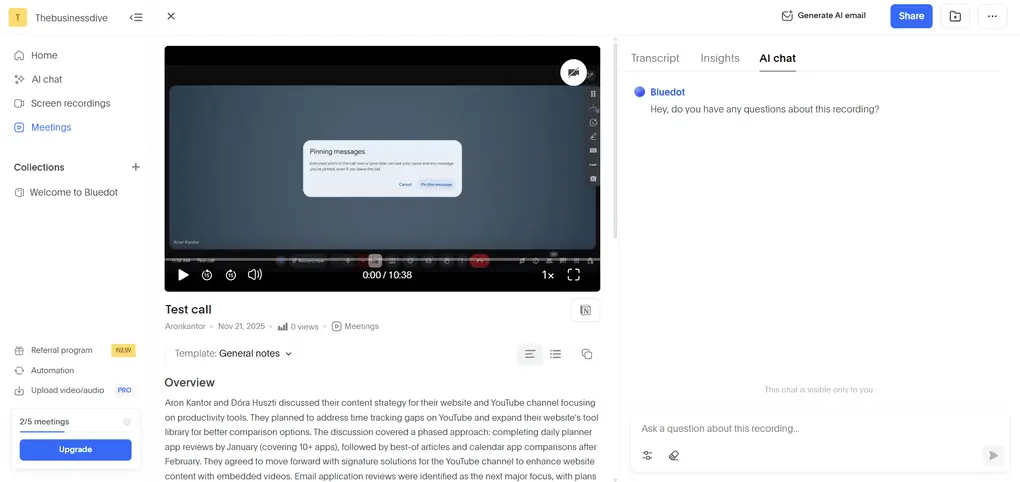
When testing Bluedot with Microsoft Teams, I was most interested in its bot-free approach. Many AI note takers rely on meeting bots to join calls, while Bluedot takes a different route and records meetings without adding another participant to the conversation.
First of all, the transcription quality was strong throughout my testing. Bluedot generated accurate transcripts and organized the meeting notes into clear sections, including summaries, action items, and timestamps. It automatically removed filler words, which made the transcripts easier to review afterward.
One feature I found useful was the ability to switch between meeting templates. Depending on the type of meeting, Bluedot could reorganize notes using different structures, and custom templates made it possible to focus on specific topics or questions.
I also spent some time using the AI chat feature. It allowed me to ask questions about individual meetings and quickly find key information. The responses were fast and included timestamps, allowing me to easily verify information and revisit specific parts of a conversation.
Another feature I appreciated was the follow-up workflow. Bluedot can generate AI-powered follow-up emails based on meeting discussions. Combined with its meeting insights and collaboration features, it offered more functionality than simple transcription alone.
Overall, Bluedot delivered a smooth experience during testing. The bot-free recording, accurate transcripts, flexible meeting templates, and AI-powered follow-up tools make it one of the best options for Microsoft Teams users who prefer not to use meeting bots.
Cost breakdown
- Free plan: Record and transcribe up to five meetings, with support for AI notes plus Slack and Notion integrations. Good for testing the platform, but not for long-term use.
- Basic plan ($14/user/month with annual billing): Includes unlimited recordings and storage, making it suitable for individuals and small teams that regularly rely on AI meeting notes.
- Pro plan ($20/user/month with annual billing): Adds longer recordings and custom meeting templates for more advanced workflows.
- Business plan ($32/user/month with annual billing): Unlocks HubSpot and Salesforce integrations, along with unlimited imports for teams that want to connect meeting data with their CRM.
- Enterprise plan (custom pricing): Includes SSO, advanced admin controls, custom retention policies, and other enterprise-grade security features.
🔎 Read my full review: My Honest Bluedot Review After Testing 25+ AI Note-Takers
Fireflies AI
Fireflies AI is an AI meeting assistant that records conversations, generates transcripts and summaries, and helps teams collaborate through meeting insights, analytics, and integrations.
Quick verdict
Want a budget-friendly AI note taker with reliable transcription, collaboration features, and broad platform support.
You need the highest transcription accuracy or a feature-rich free plan.
The balance between transcription quality, collaboration features, integrations, and pricing.
The free plan is more limited than some competing AI note takers.
Who Fireflies AI is best for
Who Fireflies AI is not ideal for
Fireflies AI highlights
Fireflies AI drawbacks
Testing Fireflies AI for Microsoft Teams meetings
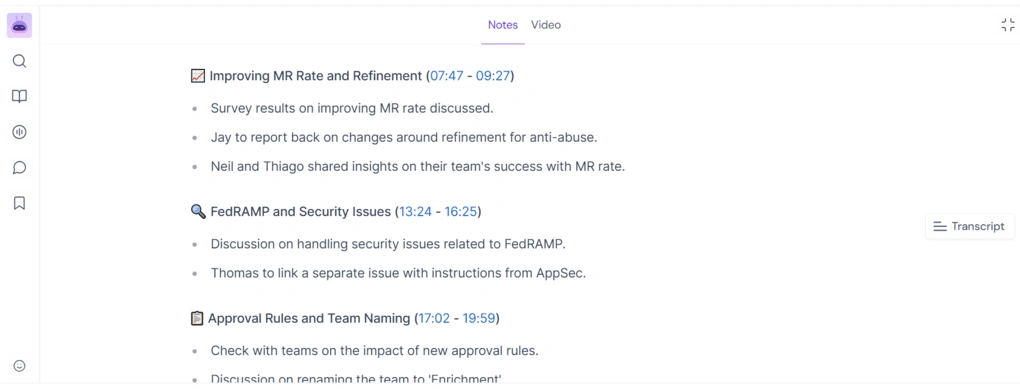
My experience with Fireflies AI in Microsoft Teams meetings was consistently solid. While it wasn’t the most advanced tool I tested, it offered a strong combination of transcription quality, collaboration features, and affordability.
Fireflies automatically joined my MS Teams meetings, recorded the conversations, and generated transcripts and meeting summaries afterward. While the transcription accuracy wasn’t quite on the same level as some of the best-performing tools I tested, it was consistently reliable.
The meeting summaries were another highlight. Fireflies organized discussions into key points, action items, and timestamps. I also liked that meeting notes could be edited and shared with other team members in just a few clicks.
I also spent some time using Fireflies’ collaboration and analytics features. Team members can comment on transcripts, leave reactions, and collaborate on meeting notes, while conversation intelligence provides insights such as speaker talk time and meeting sentiment.
Another feature I found useful was Fireflies’ AI assistant, Fred. It allowed me to ask questions about meetings and quickly find specific information. I also liked the Soundbites feature, which makes it possible to create and share short clips from longer conversations.
Overall, Fireflies AI delivered a dependable MS Teams experience with reliable transcription, strong collaboration tools, useful meeting analytics, and affordable pricing. While it may not lead the market in any single category, it offers one of the best overall value propositions among the AI note takers I tested.
Cost breakdown
- Free plan: Includes unlimited storage and transcription for shared bot meetings, but advanced features and file transcription limits make it better suited for occasional use.
- Pro plan ($10/user/month with annual billing): Includes unlimited transcription minutes, meeting recaps, AI assistant access, and advanced search capabilities.
- Business plan ($19/user/month with annual billing): Adds conversation intelligence, meeting analytics, team insights, and advanced collaboration features.
- Enterprise plan ($39/user/month with annual billing): Includes dedicated onboarding, enhanced support, and enterprise-grade administration capabilities.
🔎 Read my full review: Fireflies AI Review: Why is EVERYONE using it for meeting notes?

Microsoft Copilot
Microsoft Copilot is Microsoft’s built-in AI assistant that helps Teams users generate meeting summaries, identify action items, answer questions about discussions, and catch up on missed meetings.
Quick verdict
Already use Microsoft 365 and want AI meeting assistance built directly into Teams.
You want a budget-friendly AI note taker or don’t work primarily inside the Microsoft ecosystem.
Native Teams integration and the ability to ask questions about meetings during and after calls.
Full functionality requires a Microsoft 365 Copilot license on top of an eligible Microsoft 365 subscription.
Who Microsoft Copilot is best for
Who Microsoft Copilot is not ideal for
Microsoft Copilot highlights
Microsoft Copilot drawbacks
Testing Microsoft Copilot for Teams meetings
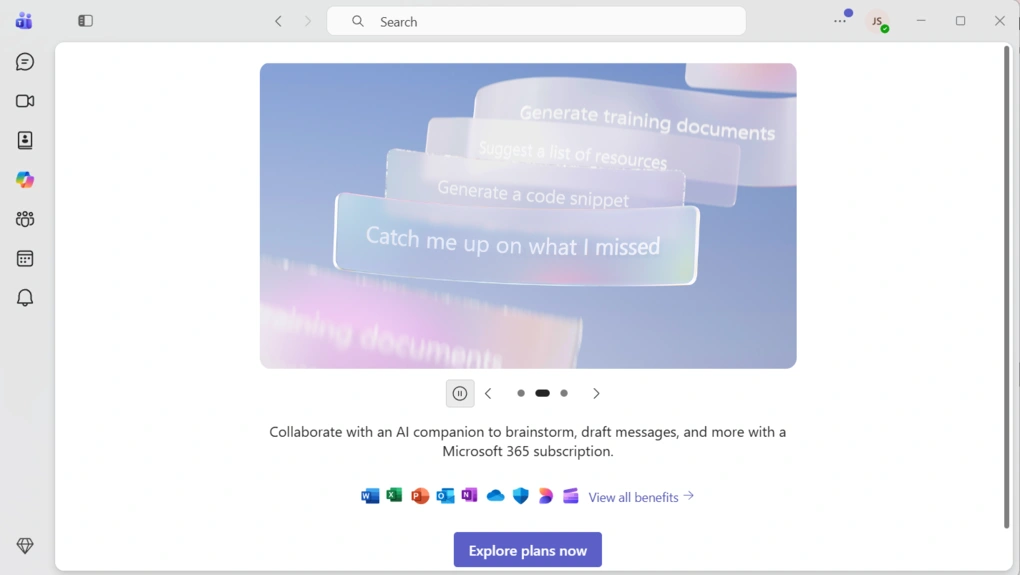
Since Microsoft Copilot is built directly into Microsoft Teams, I could access AI features from the same place where I was already joining meetings, checking chats, and reviewing recaps. This created a more seamless experience than using a third-party tool.
One of the most useful features was the ability to ask Copilot questions about a meeting. During and after meetings, I could ask for a summary of what had been discussed, key decisions that had been made, or action items that were assigned.
After meetings ended, Copilot generated structured recaps that highlighted discussion points, decisions, and follow-up tasks. I also liked how it highlighted action items and follow-up tasks mentioned during conversations and surfaced them alongside the meeting recap.
One of Microsoft Copilot’s biggest advantages is its deep integration with Microsoft 365. Teams that already rely on Microsoft tools will likely get the most value from it.
While it doesn’t offer some of the dedicated meeting management features found in specialized AI note takers, its native Teams integration, meeting recaps, action item tracking, and conversational AI capabilities make it a compelling choice for Microsoft 365 users.
Cost breakdown
- Free plan: Included with eligible Microsoft 365 subscriptions, and offers secure AI chat.
- Microsoft 365 Copilot Business ($18/user/month with annual billing):Includes Copilot in Teams, Outlook, Word, Excel, PowerPoint, and other Microsoft 365 apps.
- Microsoft 365 Copilot ($30/user/month): Enterprise-focused plan for larger organizations that want Copilot across Microsoft 365.
- Enterprise deployments: Additional security, compliance, governance, and administration capabilities are available depending on your Microsoft 365 licensing setup and organization size.

Krisp
Krisp is a bot-free AI note taker that combines meeting transcription and summaries with industry-leading noise cancellation, accent conversion, and real-time audio enhancement.
Quick verdict
Need AI meeting notes and background noise cancellation in a single tool.
You’re looking for a free AI note taker or advanced meeting analytics.
The combination of accurate AI notes, bot-free recording, and real-time noise cancellation.
Noise cancellation is not available on mobile devices.
Who Krisp is best for
Who Krisp is not ideal for
Krisp highlights
Krisp drawbacks
Testing Krisp for Microsoft Teams meetings
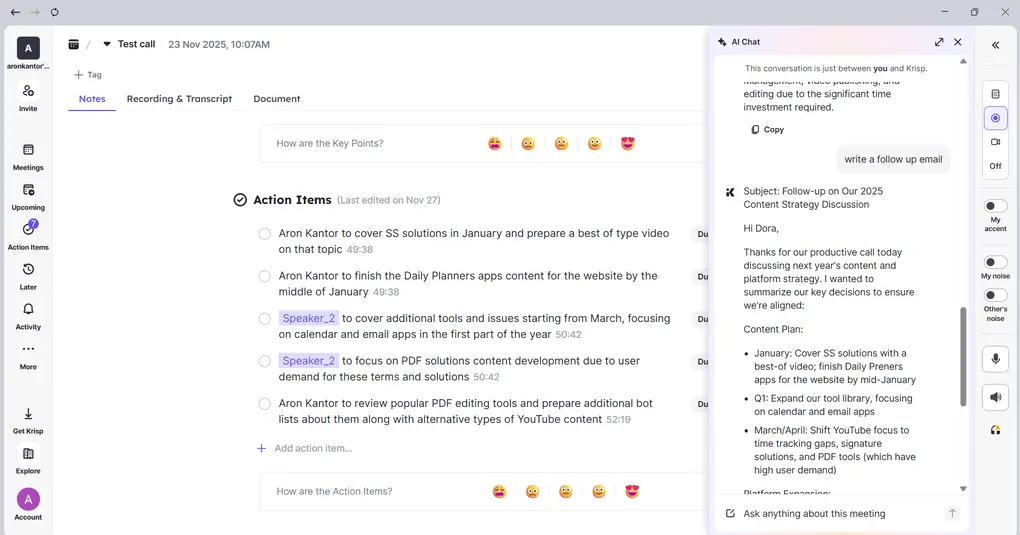
One of the main reasons I wanted to try Krisp was its noise cancellation features. I was curious to see how well they worked in real Microsoft Teams meetings and whether they could improve both call quality and transcription accuracy.
The first thing I noticed was how easy it was to get started. Krisp worked quietly in the background and captured meeting content without disrupting the call. The transcription quality was strong throughout my testing, and transcripts were available within minutes after meetings ended. I also liked that transcripts included speaker identification and timestamps.
The AI-generated meeting notes were well structured and covered key discussion points, decisions, and action items. I found the summaries easy to skim, and Krisp did a good job highlighting the most important takeaways from meetings. It also assigned action items to participants, which made follow-ups easier to manage.
I also spent some time using the AI chat feature. Whether I wanted to review decisions, action items, or specific discussion points, the AI chat provided fast answers and helped speed up post-meeting work.
Finally, I tested Krisp’s main differentiator: noise cancellation. During testing, it effectively reduced background sounds and nearby conversations, creating cleaner audio and more accurate transcripts. I also found the accent conversion feature interesting, particularly for teams that regularly collaborate with international clients or colleagues.
Overall, Krisp delivered accurate meeting notes while offering audio features that most competitors don’t provide.
Cost breakdown
- No free plan available, only 7-day free trial
- Core plan ($8/user/month with annual billing): Includes unlimited audio and video recording, AI meeting notes, action items, AI chat, multilingual summaries, and support for in-person meetings.
- Advanced plan ($15/user/month with annual billing): Adds accent conversion, increased storage, SSO/SCIM, manager view, and advanced admin controls.
- Enterprise plan (custom pricing): Includes advanced security features, private on-device transcription, dedicated account management, and usage analytics.
🔎 Read my full review: My Brutal Honest Krisp Review 2026 | Is It Worth It?
Explore our Apps directory
A curated directory of software tools we’ve independently reviewed, with links to full reviews, comparisons, and category guides.
Granola
Granola is a lightweight, bot-free AI note taker that transcribes meetings, generates AI notes, and turns your own meeting notes into structured summaries.
Quick verdict
Want a simple, distraction-free AI note taker without meeting bots.
You need meeting recordings, advanced collaboration features, or deeper meeting analytics.
The clean interface and the ability to combine personal notes with AI-generated summaries.
Doesn’t offer meeting recording capabilities.
Who Granola is best for
Who Granola is not ideal for
Granola highlights
Granola drawbacks
Testing Granola for Microsoft Teams meetings
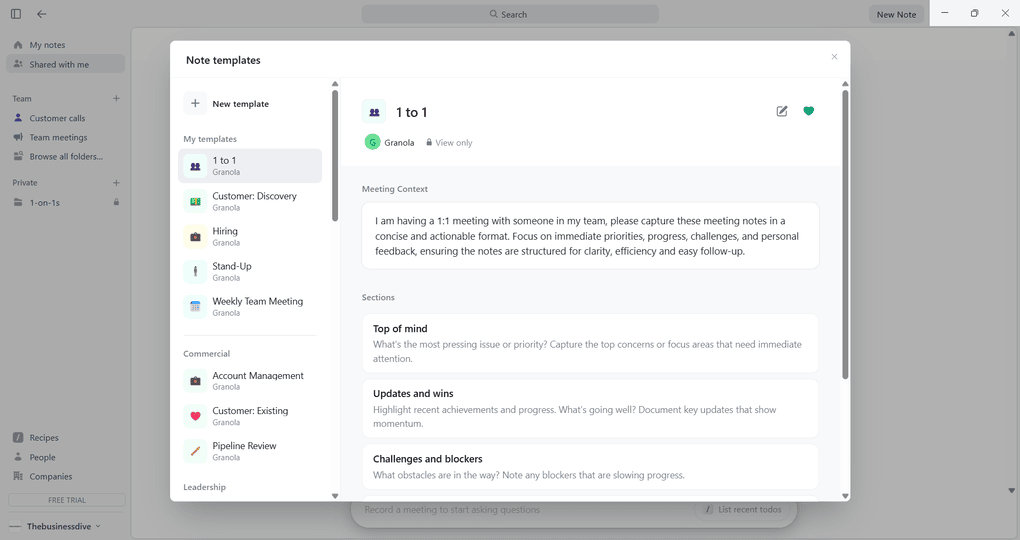
The first thing I noticed right away while testing Granola was how little there was to learn. Instead of trying to be an all-in-one meeting assistant, it focuses on a simpler experience centered around transcription and AI notes.
After installing the desktop app, Granola transcribes meetings without requiring a bot to join the call. The transcripts were accurate, and real-time transcription was useful for following discussions as they happened.
The feature that impressed me most was Granola’s note-taking workflow. It combines your own notes with the meeting transcript to create structured AI summaries. I often take quick notes during meetings, and Granola did a surprisingly good job turning them into structured summaries afterward.
I also tested Ask Granola, the platform’s AI assistant. It helped me find information from meetings, identify action items, and draft follow-ups. The responses were fast and generally relevant to the questions I asked.
Another feature I liked was the template system. Granola includes templates for different meeting types and allows you to customize them by adding or removing sections.
The biggest limitation I encountered was the lack of recording functionality. Unlike many competing AI note takers, Granola doesn’t provide meeting recordings or support audio and video uploads. Depending on your workflow, that may be a dealbreaker.
Overall, Granola delivered a simple and distraction-free Microsoft Teams experience.
Cost breakdown
- Free plan: Includes AI meeting notes, Ask Granola, shared folders, custom note templates, and multi-language support. Meeting history is limited, but the free plan is generous enough to thoroughly test the platform.
- Business plan ($14/user/month): Includes unlimited meeting history and notes, advanced AI models, integrations, and consolidated billing.
- Enterprise plan ($35/user/month): Adds SSO, enterprise-grade security, priority support, usage analytics, and advanced administrative controls.
🔎 Read my full review: Granola Review 2026: Why It Won’t Work for Everyone
Bottom line
MS Teams has improved its own meeting capabilities over the years, but for many teams, built-in recaps still aren’t enough. Dedicated AI note takers can provide more detailed summaries, stronger search capabilities, better collaboration features, and clearer follow-ups after meetings.
The good news is that there’s now an MS Teams AI note taker for almost every workflow, team, and budget.
I hope this list helped you narrow down your options and find a tool that fits the way you work. Wishing you more productive Microsoft Teams meetings!
Looking for similar tools?
Visit our library of PDF editors to explore other apps we’ve reviewed in this space and how they compare.
Why you can trust our reviews
At thebusinessdive.com, our team tests, reviews, and compares hundreds of productivity apps every year — from project management tools to note-taking apps. We dive deep into real-world use cases to help you find the right tools that actually improve your workflow, not just add noise.
Our mission? No fluff, no shortcuts—just honest, hands-on insights from productivity pros.
Discover how we stay transparent, read our review methodology, and let us know about any tools we missed.
Frequently asked questions
What is the best AI note taker for Microsoft Teams?
The best AI note taker for Microsoft Teams depends on your workflow. Some tools focus on automatic meeting notes and AI-generated summaries, while others offer advanced follow-ups, meeting insights, noise cancellation, or collaboration features.
If you regularly participate in Microsoft Teams meetings, a dedicated AI note-taking app can save time by capturing conversations and organizing key information automatically.
Can an AI note taker replace manual note taking in Teams meetings?
In many cases, yes. Modern AI note takers can generate meeting transcripts, summarize key points, identify action items, and create structured notes automatically.
While some users still prefer to add manual notes during important discussions, AI-generated notes can significantly reduce the amount of manual note taking required after meetings.
Do Microsoft Teams AI note takers work with Google Meet and other platforms?
Many AI note-taking apps support more than just Microsoft Teams. Depending on the tool, you may also be able to use it with Google Meet, Zoom, Webex, and other virtual meetings platforms. This can be useful for teams that collaborate with external clients or use multiple meeting tools.
Can AI note takers help with follow-up meetings and future meetings?
Yes. Most AI note takers generate meeting summaries, action items, and follow-ups that can be shared with team members after a meeting ends. Some tools also maintain meeting history, making it easier to review past meetings, prepare for upcoming meetings, and keep track of decisions across multiple discussions.
What features should I look for in a Microsoft Teams AI note taker?
The most important features depend on your needs, but common options include real-time transcription, AI-generated summaries, meeting highlights, meeting transcripts, cross-meeting search, meeting audio capture, and integrations with your Teams calendar.
Customer success teams, revenue teams, and other organizations that spend a lot of time in meetings may also benefit from analytics, conversation insights, and automatic meeting recaps.
Disclosure: I only recommend products I would use myself, and all opinions expressed here are our own. This post may contain affiliate links that, at no additional cost to you, may earn a small commission. Read the full privacy policy here.

Hey! I’m Jovana, a content writer who loves writing, researching, and testing new productivity apps. With a background in philosophy, I bring a thoughtful but no-bullshit approach to everything I do. Let’s connect on Linkedin!