


Best 9 AI Task Manager Tools to Get More Work Done
AI task managers are becoming more than digital to-do lists. They can automatically schedule work, reprioritize tasks, build workflows, and even manage parts of your team’s workload.
After testing 15+ such apps, I selected the best AI task manager tools, comparing their features, AI capabilities, ease of use, and overall value.
🧩 Monday → Best AI task manager for customizable workflows
⚙️ Wrike → Best AI task manager for complex workflows
🌐 ClickUp → Best AI Task manager app for remote and hybrid teams
✅ Todoist → Best AI task manager for simple task management
🤖 Taskade → Best AI task manager for AI-powered workflows and automation
📅 Motion → Best AI Task Manager App For Scheduling Tasks and Meetings
🤝 Hive → Best AI task manager for easy team collaboration
⚖️ Reclaim AI → Best AI task manager for work-life balance
📊 Timehero → Best AI task manager for team scheduling and workload management
Quick Comparison of the Best AI Task Manager Tools
Need to find the right option fast? The table below highlights the factors we usually care about most when choosing an AI task management app.
|
Tool |
Standout feature ✨ |
Main limitation 👎🏻 |
Pricing 💰 |
|---|---|---|---|
|
15+ project views and highly customizable workflows |
Relatively expensive |
Free + From $9/user/mo |
|
|
Resource management and workload planning |
Steep learning curve and complex interface |
Free + From $10/user/mo |
|
|
All-in-one collaboration with Docs, Whiteboards, Chat, and AI |
Can feel overwhelming for new users |
Free + From $7/user/mo |
|
|
Natural language task capture |
Limited project management and time blocking |
Free + From $5/user/mo |
|
|
AI agents and AI-generated workflows |
Limited advanced project management |
Free + From $10/user/mo |
|
|
AI auto-scheduling and automatic rescheduling |
Expensive and limited project management depth |
From $19/user/mo |
|
|
Built-in communication and collaboration |
Some advanced features require higher-tier plans |
Free + From $5/user/mo |
|
|
AI scheduling combined with habits and focus-time protection |
No native mobile or desktop apps |
Free + From $10/user/mo |
|
|
Workload forecasting and risk detection |
No permanent free plan and weaker cross-platform experience |
From $4.60/user/mo |
How we selected the best AI task manager tools
To keep our reviews & final score for each project management app fair and consistent, we evaluate every tool using the same testing framework based on real-world usage, feature depth, and overall value.
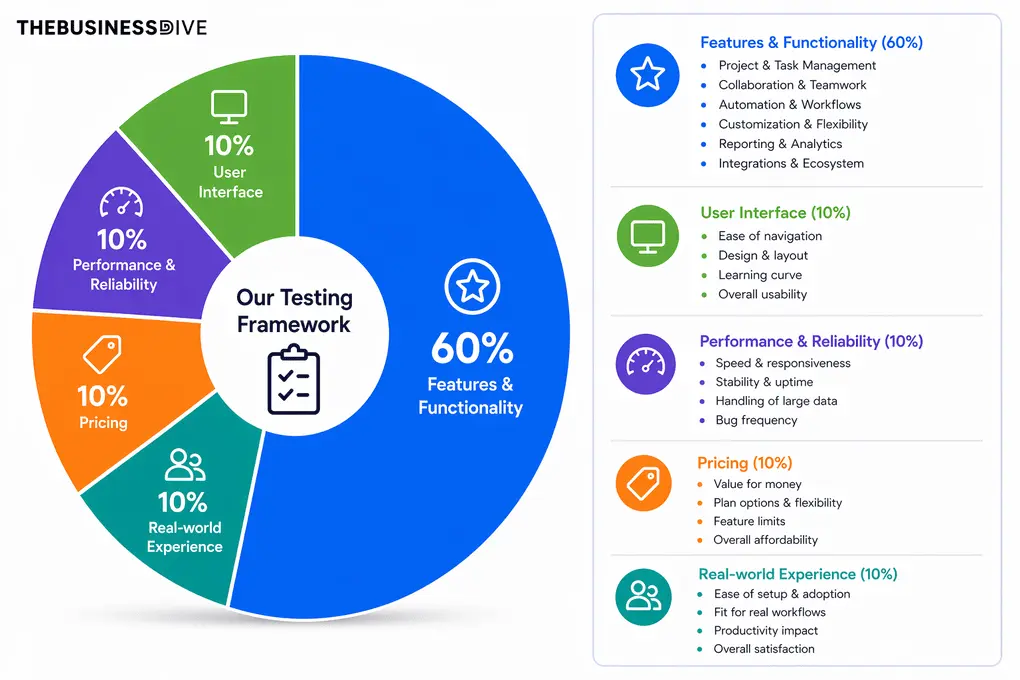
Our scoring breakdown after testing 20+ project management apps:
⚙️ Features & functionality — 60%
🖥️ User interface — 10%
⚡ Performance & Reliability —10%
💰 Pricing — 10%
👥 Real-world experience — 10%
Since AI task managers vary from lightweight to-do list apps to full project management platforms, we also consider how well each tool handles different workflows, including task organization, project planning, automation, scheduling, and team collaboration.
Want a detailed breakdown of how we test each category?
Learn exactly how we test tools → Review methodology
A Closer Look at Each AI Task Manager
Now, let’s take a closer look at each tool, including what it does best, where it falls short, and what I found during hands-on testing.

Monday.com
Monday.com is an intuitive project and task management platform built around visual workflows, customizable project views, and team collaboration. While it’s not the cheapest option, it’s a great choice for teams that want flexibility without a steep learning curve.
Quick verdict
Teams that want a simple, visual, easy-to-use project management tool
Power users needing deep customization or budget-friendly pricing
Best-in-class UI and dashboards
Expensive compared to many competitors
Why I recommend Monday.com for customizable workflows
What stood out most during testing was how quickly I could build and restructure workflows. Monday.com has a shorter learning curve than tools like ClickUp or Jira while still offering plenty of customization.
I particularly liked its wide range of project views, including Kanban, workload, Gantt, calendar, and timeline. I also rebuilt my content pipeline for the next few months in about 20–30 minutes, showing how quickly you can adapt the platform to your workflow.
The customizable dashboards were another highlight, giving me a clear overview of project progress, workloads, and other key information.
Monday.com also offers a growing set of AI features, including AI Blocks, AI Sidekick, AI Workflows, and AI Agents. These can help automate tasks, summarize information, generate content, and build AI-powered workflows.
The main drawbacks are its relatively high pricing, the lack of a dedicated recurring-task feature, and occasional bugs in the mobile app.
Standout features
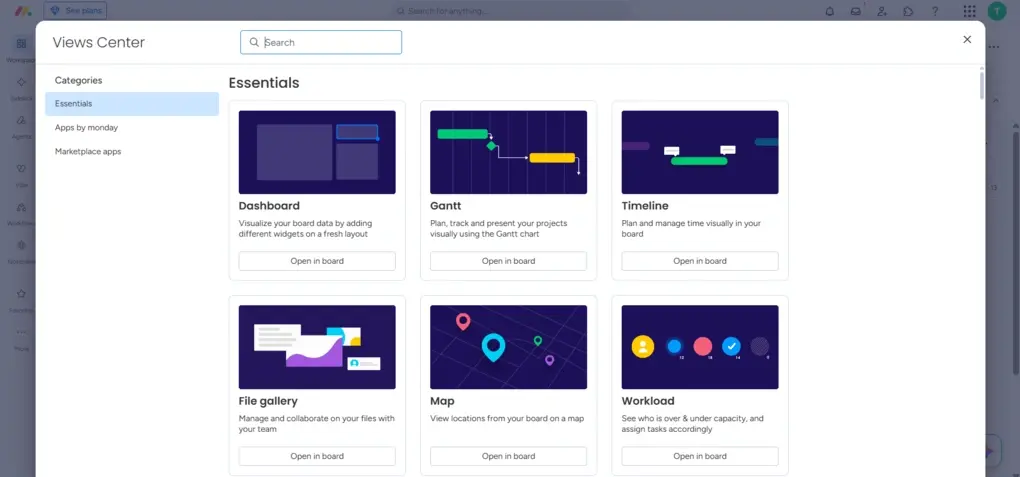
Custom project views: Monday.com offers 15+ project views, including Kanban, Gantt, Calendar, Timeline, Workload, Map, and more.
Custom dashboards: You can combine widgets and apps to track project progress, workloads, budgets, and other key information in one place. This was one of the features I found most useful during testing.
AI-powered workflows: Monday.com integrates AI across workflows through AI Blocks, AI Workflows, AI Agents, and AI Sidekick. You can use them to summarize information, generate content, create workdocs, automate actions, and even update boards or create new ones.
My Key Takeaways After Using Monday.com
|
What impressed me |
Why it made a difference |
|---|---|
|
Intuitive interface |
I could navigate the platform and start building projects without spending hours learning how everything works. |
|
Large number of project views |
Switching between Kanban, workload, Gantt, calendar, timeline, and other views made it easier to look at projects from different perspectives. |
|
Customizable workflows |
I could restructure workflows quickly and rebuilt my content pipeline for the next few months in about 20–30 minutes. |
|
Custom dashboards |
Dashboards gave me a much clearer overview of project progress, workloads, budgets, and other key information. |
|
What I’d improve |
Who it could affect |
|---|---|
|
Recurring tasks require automation |
Users who frequently work with recurring tasks may find the setup unnecessarily cumbersome. |
|
Mobile app bugs |
Teams that rely heavily on the mobile app may occasionally run into syncing or performance issues. |
|
Higher pricing |
Small businesses and individuals may find the paid plans expensive compared with competitors offering more features for less. |
Pricing plans
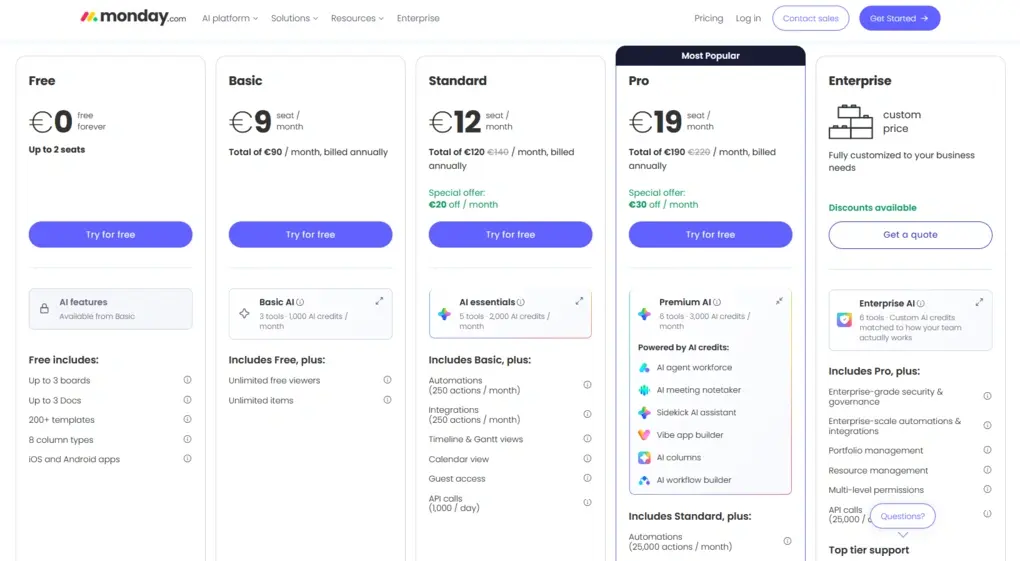
- Free plan available, as well as a 14-day free trial
- Basic plan: $9/month per user when billed annually.
- Standard plan: $12/month per user when billed annually.
- Pro plan: $19/month per user when billed annually.
- Enterprise plan: Custom pricing.
Related articles:
- Asana Vs Monday: I Personally Tested Both (2025)
- Teamwork vs Monday 2025 | I Personally Tested Both
- Notion vs Monday: An Unfiltered Comparison (2025)
🔎 Read my full review: Monday.com Review 2025: Is the $228 Price Tag Justified?

Wrike
Wrike is a powerful AI-powered project and task management platform built for teams managing complex workflows. It combines project management, resource planning, automation, reporting, and collaboration in one workspace.
Quick verdict
Teams managing complex projects and cross-functional workflows
You want a simple task management app with an easy learning curve
Extensive customization and resource management tools
Its large number of features can make it harder for beginners to learn
Why I recommend Wrike for complex workflows
Wrike stands out when you need more than basic task lists. Its combination of task management, resource planning, workload tracking, automation, and reporting gives teams more control over complex projects and workflows.
The resource management tools are particularly useful for teams working across multiple projects. You can track workload, time, and budgets to get a better understanding of how your team’s capacity is being used.
I also like how much flexibility Wrike gives you when organizing work. You can customize dashboards, use different project views, and connect related work across tasks, subtasks, folders, milestones, phases, and projects with cross-tagging.
Collaboration is another strong point. Comments, mentions, approvals, and shared dashboards make it easier for different teams and stakeholders to stay aligned throughout a project.
The main drawback is that all this functionality comes with a learning curve. Some advanced features are also limited to the more expensive plans, which may make Wrike difficult to justify for smaller teams.
Standout features
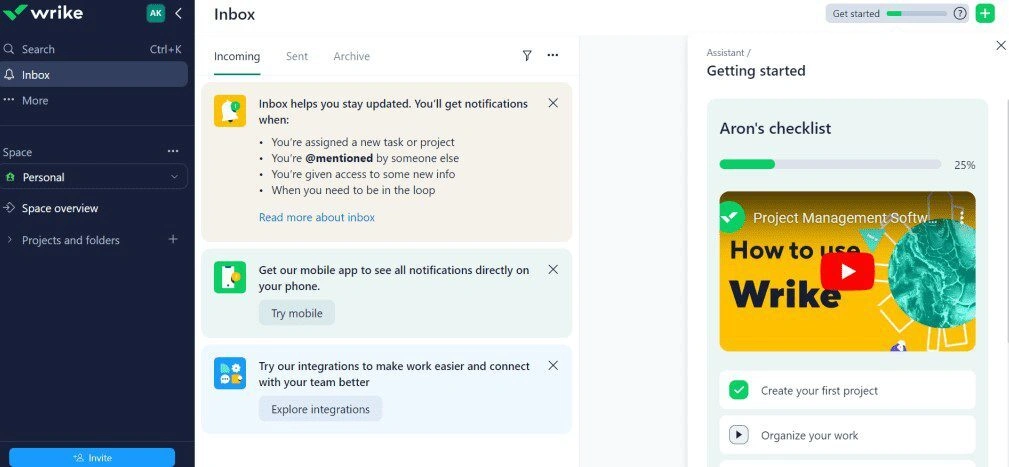
Resource management: Wrike goes beyond basic workload tracking with tools for managing time, budgets, and resource allocation.
Custom dashboards: You can customize dashboards to track plans, project progress, workloads, and analytics in one place.
Cross-tagging: You can connect tasks and other work items across different workflows without duplicating them.
Automation and recurring workflows: Wrike lets you create rules based on triggers and actions to automate recurring processes. You can also use request forms to collect information and automatically route work into the right workflow.
My Key Takeaways After Using Wrike
|
What impressed me |
Why it made a difference |
|---|---|
|
Resource management |
Helps teams track workload, time, budgets, and resource allocation across projects. |
|
Custom dashboards |
Provides a clear overview of plans, progress, and analytics in one place. |
|
Cross-functional collaboration |
Comments, mentions, approvals, and cross-tagging make it easier for different teams to work together. |
|
400+ integrations |
Makes it easier to connect Wrike with the other tools your team already uses. |
|
What I’d improve |
Who it could affect |
|---|---|
|
Learning curve |
Beginners may need more time to become comfortable with the platform. |
|
Advanced features are expensive |
Smaller teams may struggle to justify the higher-priced plans. |
|
Interface complexity |
Users looking for a simple task manager may find Wrike unnecessarily complicated. |
Pricing plans
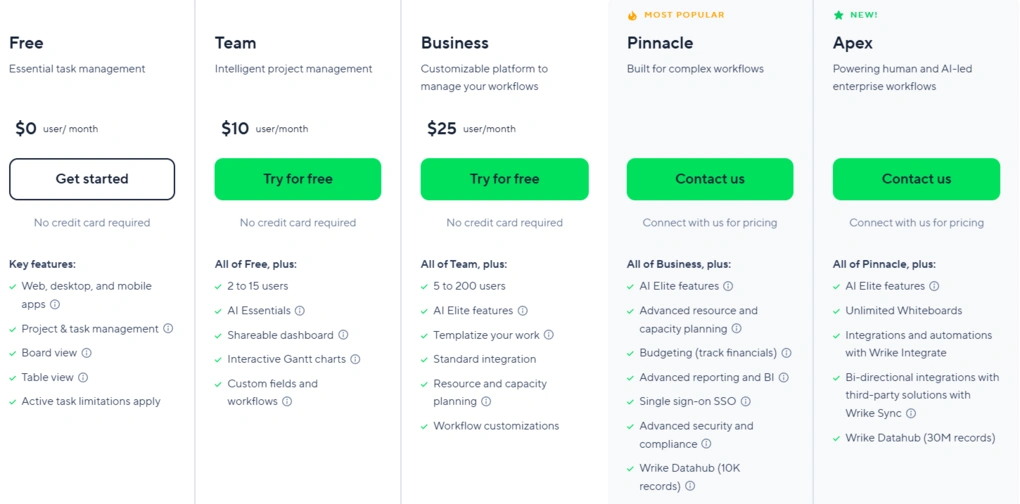
- Free plan available, as well as a 14-day free trial
- Team plan: $10/user/month
- Business plan: $25/user/month
- Pinnacle plan: Custom pricing
- Apex plan: Custom pricing

ClickUp
ClickUp is an AI-powered project and task management platform that combines tasks, documents, collaboration, time tracking, and AI in one workspace. Its extensive customization and collaboration features make it particularly useful for teams working remotely or across hybrid setups.
Quick verdict
Remote and hybrid teams that need an all-in-one workspace
You prefer a simple, lightweight task management tool
Extensive collaboration features and workspace flexibility
Steep learning curve and occasional performance issues
Why I recommend ClickUp for remote and hybrid teams
After using ClickUp daily for three months, I found it to be one of the most feature-rich project management tools I tested. It combines task management, documents, communication, time tracking, and AI, so remote teams can keep much of their work in one place.
The collaboration features are what make ClickUp particularly suitable for remote and hybrid teams. You can work together through Docs, Whiteboards, Chat, comments, and real-time editing, while also creating tasks directly from conversations.
I also liked the flexibility of its project management tools. You can customize dashboards, switch between different views, and use workload, box, and team views to understand how work is distributed across your team.
ClickUp’s AI features add another useful layer for distributed teams. ClickUp Brain can help with workspace questions, content creation, and meeting transcription, while the AI note-taker can summarize meetings and turn action items into trackable tasks.
The main downside is the learning curve. ClickUp can feel overwhelming if you only need basic task management, and I also experienced occasional slowdowns with heavier features. The mobile app has some bugs as well.
Standout features
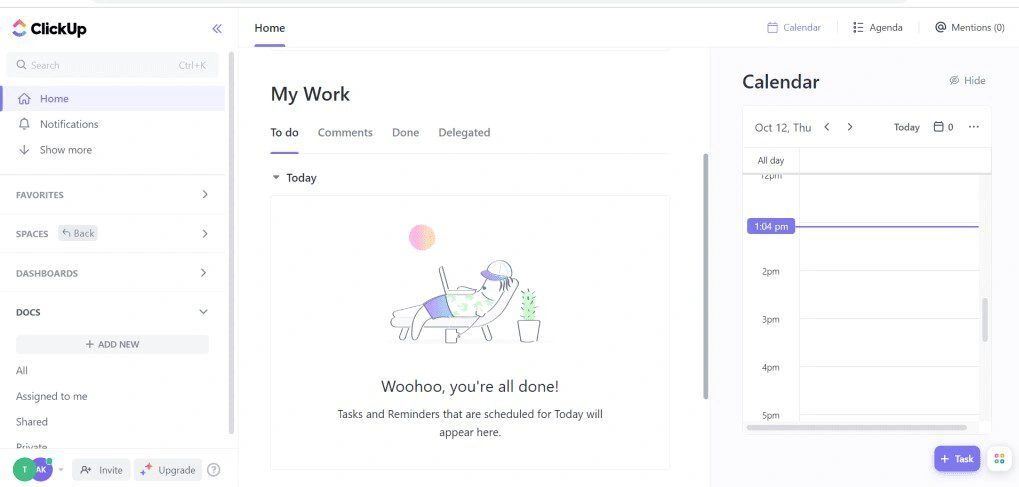
Whiteboards: ClickUp’s interactive Whiteboards let remote teams brainstorm, add tasks, documents, images, and notes, and collaborate in real time.
ClickUp Chat: Teams can discuss work, share documents, and create tasks directly from messages, keeping communication connected to project work.
AI meeting note-taker: ClickUp transcribes and summarizes Zoom, Microsoft Teams, and Google Meet calls and can turn action items into trackable tasks.
Collaborative Docs: Teams can create wikis, knowledge bases, and other documents together with real-time editing and customizable content.
My Key Takeaways After Using ClickUp
|
What impressed me |
Why it made a difference |
|---|---|
|
Collaboration tools |
Docs, Whiteboards, Chat, and comments keep team communication and project work connected. |
|
All-in-one workspace |
Teams can manage tasks, projects, documents, communication, time tracking, and AI in one platform. |
|
AI note-taking |
Meeting summaries and automatically created action items can reduce manual follow-up after calls. |
|
Workspace flexibility |
Custom dashboards, project views, and workflows make it easier to adapt ClickUp to different team setups. |
|
What I’d improve |
Who it could affect |
|---|---|
|
Learning curve |
New users may need time to understand the large number of available features. |
|
Performance |
Teams using heavier features may occasionally experience slowdowns or glitches. |
|
Mobile experience |
Users who work primarily from their phones may find the mobile app less polished than the desktop version. |
Pricing plans
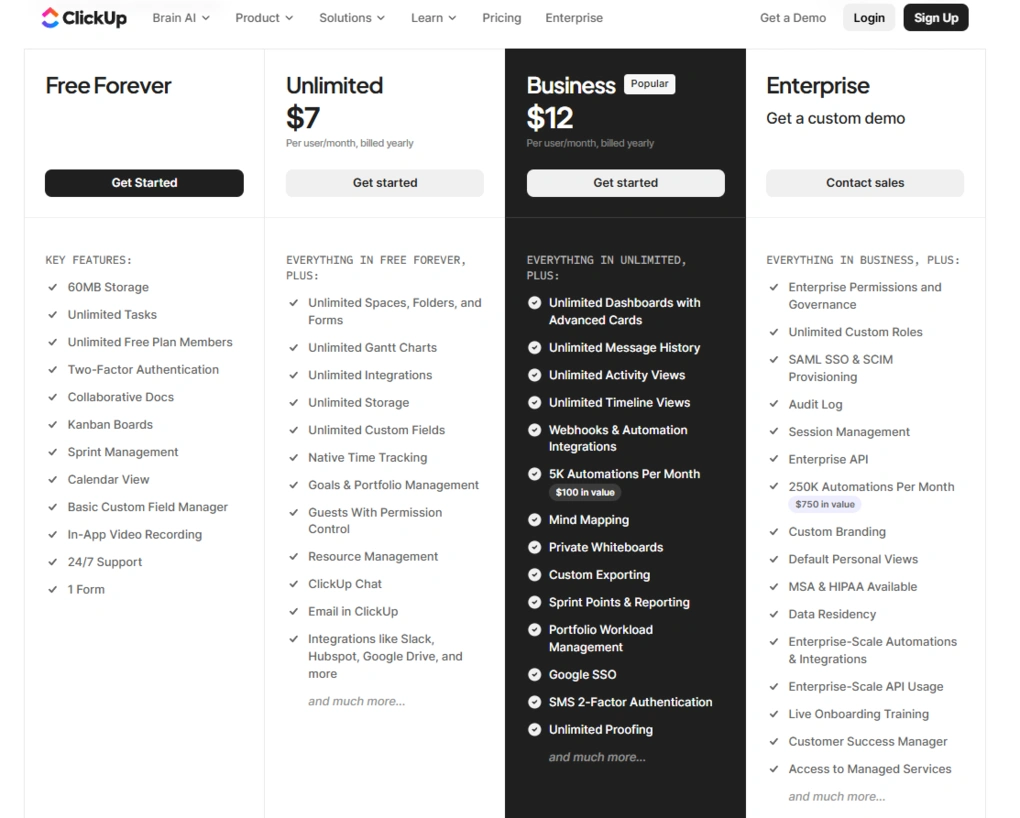
- Free plan available
- Unlimited plan: $7/user per month when billed annually
- Business plan: $12/user per month when billed annually
- Enterprise plan: Custom pricing
Related articles:
- SmartSuite vs ClickUp 2025 | A Honest Comparison
- Motion vs ClickUp | An Unfiltered Comparison (2025)
- ClickUp vs Monday: My Findings After +6 Months (2025)
- Taskade vs ClickUp | An Unfiltered Comparison (2025)
- Coda vs ClickUp | A Honest Comparison (2025)
- Notion Vs ClickUp: What I Discovered in 90 Days! (2025)
- Asana Vs ClickUp: This will save you $300 (2025)
🔎 Read my full review: My Honest ClickUp Review After Using It For +3 Months (2026)

Todoist
Todoist is a fast and intuitive task management app designed to keep personal and professional tasks organized. It combines quick task capture, recurring tasks, natural language input, customization, and cross-platform sync in a simple interface.
Bottom line
Individuals and small teams who want a simple, fast, and reliable task manager
You need advanced project management or fully automated time blocking
Fast task capture and intuitive organization
Limited project management and calendar capabilities
Why I recommend Todoist for simple task management
After using Todoist for more than three years and creating over 1,400 tasks, I found that its biggest strength is how quickly it lets you capture and organize work. Adding a task takes seconds, while labels, priorities, subtasks, reminders, and recurring tasks give you enough structure without making the system complicated.
Natural language input is probably my favorite feature. I could type tasks naturally, including dates, times, and recurring schedules, and Todoist would turn them into properly structured tasks automatically. This made task capture much faster and helped me stay in the flow.
I also liked how well Todoist works across different devices. Fast syncing between web, desktop, and mobile means I can access the same tasks wherever I am, while integrations with calendars and other productivity tools make it easier to fit Todoist into an existing workflow.
Todoist is also becoming more AI-focused. Pro users can access its AI assistant for workload management and scheduling suggestions, while the app already uses smart features such as natural language input and AI-generated custom filters.
Standout features
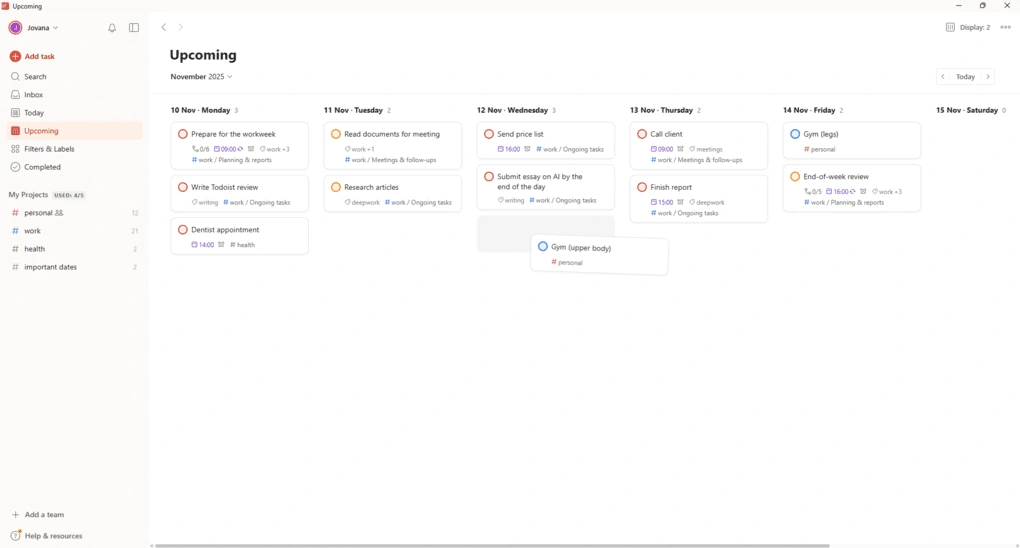
Natural language input: Type tasks the way you normally speak, and Todoist automatically recognizes dates, times, priorities, and recurring schedules.
Recurring tasks: Tasks can repeat automatically on custom schedules, making Todoist particularly useful for routines and recurring responsibilities.
Custom filters: You can create highly specific task views based on priorities, due dates, labels, and other criteria, including by describing the filter in plain English.
Cross-platform sync: Todoist works across web, desktop, and mobile with fast syncing, while integrations with calendars and other productivity tools keep tasks connected to the rest of your workflow.
My Key Takeaways After Using Todoist
|
What impressed me |
Why it made a difference |
|---|---|
|
Fast task capture |
Adding and organizing tasks takes seconds without interrupting my workflow. |
|
Natural language input |
I could describe tasks naturally and let Todoist handle dates, times, and recurring schedules. |
|
Cross-platform experience |
Tasks stayed synced across desktop, web, and mobile, making Todoist easy to use anywhere. |
|
Customization |
Labels, filters, priorities, colors, and sections let me adapt Todoist without making it complicated. |
|
What I’d improve |
Who it could affect |
|---|---|
|
Limited time blocking |
Users who want automatic calendar scheduling may prefer tools like Motion or Reclaim AI. |
|
Basic project management |
Teams working with complex projects, dependencies, or advanced workflows may need a more powerful tool. |
|
Some advanced features are paid |
Users on the Free plan won’t get access to features such as the Calendar layout and AI assistant. |
Pricing plans
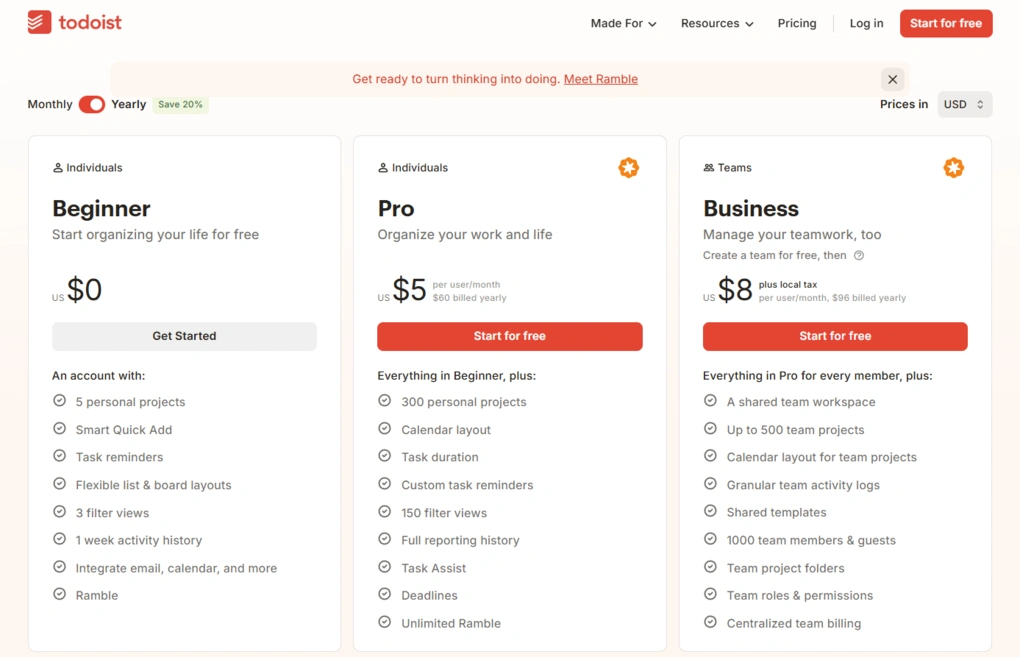
- Free plan available, as well as a 7-day free trial
- Pro plan: $5/user per month when billed annually
- Business plan: $8/user per month when billed annually
🔎Read my full review: My Honest Todoist Review After 3 Years & 1,400 Tasks

Taskade
Taskade is an AI-first productivity and task management platform that combines projects, tasks, collaboration, automation, and AI agents in one workspace.
Review Summary
Teams and individuals who want AI agents, automation, and lightweight project management in one place
You need advanced project management or a deep knowledge management system
Powerful AI agents and workflow automation
Limited project management and note-taking depth
Why I recommend Taskade for AI-powered workflows
After using Taskade for several weeks, I found it different from most task management tools I tested. It combines tasks, projects, notes, collaboration, automation, and AI in a single workspace without feeling overly complicated.
The biggest reason I’d recommend it is its AI agents. These aren’t just chatbots – you can train them with instructions, workspace data, files, and web sources, then use them for different parts of your workflow. I found it impressive for automating tasks such as project planning, content creation, and research.
Taskade’s automation is another standout. You can create detailed trigger-and-action workflows and connect them with tools such as Slack, Google Sheets, and WordPress. During testing, I particularly liked how much control I had over what happens after a trigger.
The newer Genesis AI App Builder takes this even further. Instead of manually building a workflow, you can describe what you want and Taskade generates the structure, including tasks, workflows, automations, and AI agents. The generated setups still need some adjustments, but they can save considerable time.
The main limitation is that Taskade remains a lightweight project management tool. It lacks some of the advanced project management and knowledge management features you’ll find in more specialized platforms.
Standout features
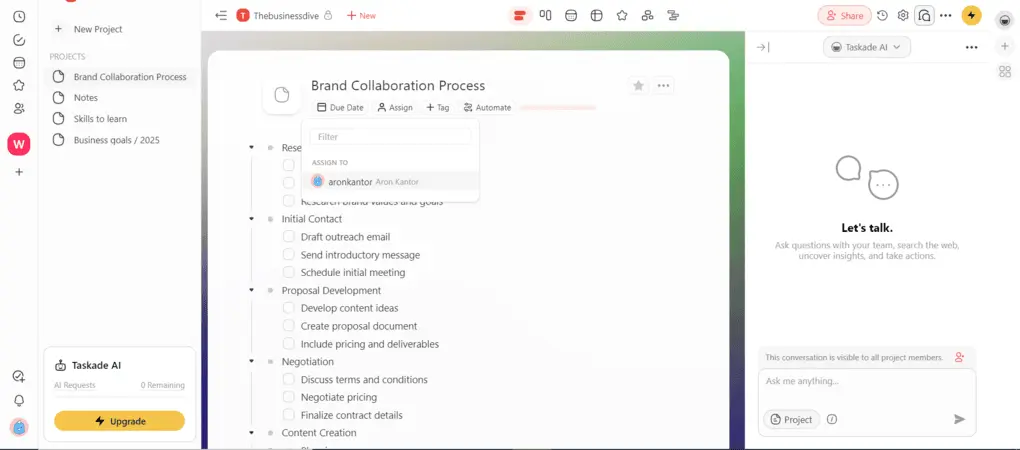
AI agents: Build custom AI agents trained on your instructions, files, and workspace data to handle tasks across different workflows.
AI App Builder (Genesis): Describe a system you need, and Taskade can generate its tasks, workflows, automations, and AI agents for you.
Automation: Create detailed trigger-and-action workflows and connect them with external tools such as Slack, Google Sheets, and WordPress.
AI document chat: Upload files and ask Taskade’s AI questions about them or have it summarize their contents directly inside your project.
My Key Takeaways After Using Taskade
|
What impressed me |
Why it made a difference |
|---|---|
|
AI agents |
They can be customized for specific workflows instead of being limited to simple chatbot interactions. |
|
Automation |
Detailed triggers and actions make it possible to automate repetitive processes across Taskade and other apps. |
|
AI-generated workflows |
Genesis can create entire project structures from a simple description, reducing setup time. |
|
Ease of use |
Despite its AI capabilities, I found the interface intuitive and learned most of the features within a few hours. |
|
What I’d improve |
Who it could affect |
|---|---|
|
Project management depth |
Teams managing complex projects may need more advanced reporting and resource management. |
|
Note-taking |
Users looking for a full knowledge management system may find Taskade too limited compared with Notion or Obsidian. |
|
AI-generated setups need refinement |
Genesis can save time, but the workflows it creates aren’t always perfect and may require adjustments. |
Pricing plans
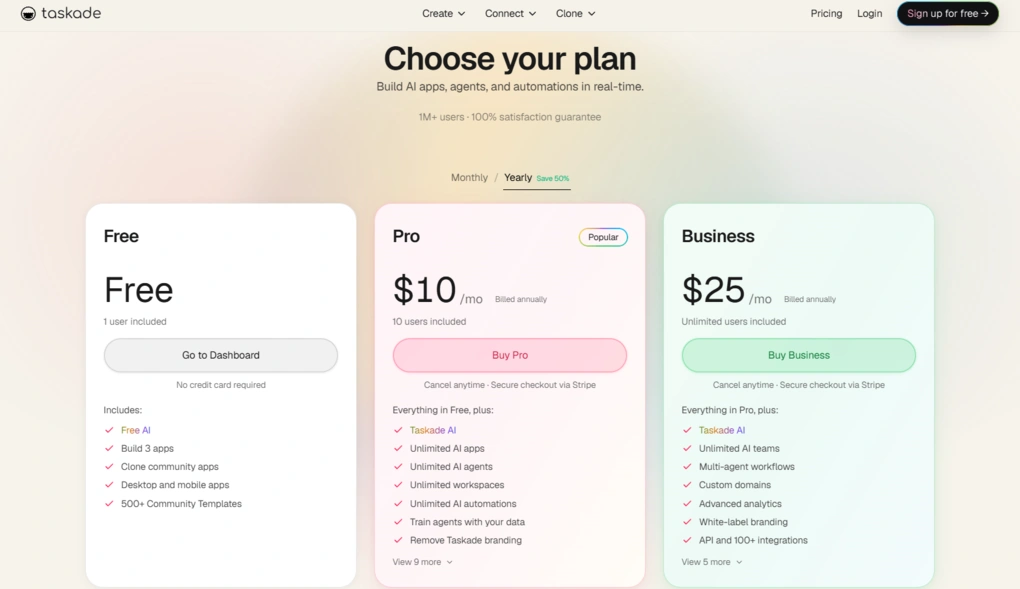
- Free plan available, and a 7-day free trial
- Pro plan: $10/user per month when billed annually
- Business plan: $25/user per month when billed annually
- Max plan: $100/user per month when billed annually
- Enterprise plan: $250/user per month when billed annually
🔎 Read my full review: Taskade Review: I Nearly Spit Out My Coffee (2026)

Motion
Motion is an AI-powered productivity platform that combines task management, project management, calendar management, and meeting scheduling. Its biggest strength is automatically planning and rescheduling your work around your availability, priorities, and existing commitments.
Bottom line
Busy professionals and teams who want AI to plan and optimize their day
You need advanced project management and reporting features
Powerful AI scheduling and automatic task rescheduling
High pricing and limited project management depth
Why I recommend Motion for scheduling tasks and meetings
What makes Motion different from most task managers is that it doesn’t just store your to-do list. It actively plans when you should complete your work. After adding tasks, Motion schedules them around your availability, priorities, working hours, meetings, and personal commitments.
I found the auto-scheduling feature to be the most impressive part of Motion. If a task takes longer than expected or something unexpected comes up, Motion can automatically rearrange your schedule based on your priorities and available time.
Its calendar is another major advantage. Motion brings Google Calendar, Apple Calendar, and Outlook Calendar into one view, making it easier to see personal and work commitments alongside your tasks.
The meeting scheduler complements this well. You can create personalized booking pages with availability rules, buffer times, and meeting limits, reducing the back-and-forth involved in finding a suitable time.
Motion also goes beyond scheduling with AI note-taking, an AI docs assistant, and AI Employees. These features can turn meeting notes, documents, and ideas into actionable tasks and help automate repetitive work.
The main drawback is that Motion isn’t designed to replace a full-scale project management platform. Its project management features are useful for smaller teams, but it lacks the advanced reporting and project management depth found in more specialized tools.
Standout features
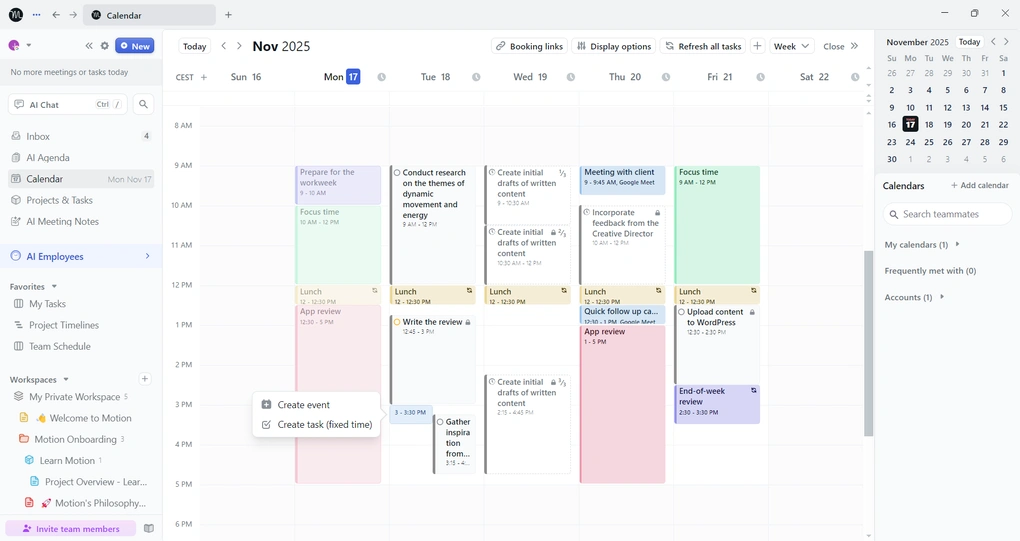
AI auto-scheduling: Motion automatically finds time for tasks based on your priorities, availability, and existing commitments, then reschedules unfinished work when plans change.
Unified calendar: Google, Apple, and Outlook calendars can be managed from one centralized view alongside your tasks and projects.
Meeting scheduler: Personalized booking links let you control availability, buffer times, meeting limits, and preferred meeting slots.
AI Employees: Customizable AI assistants can analyze your notes and documents, generate action items, draft emails, and create project plans based on your workflows.
My Key Takeaways After Using Motion
|
What impressed me |
Why it made a difference |
|---|---|
|
AI auto-scheduling |
Motion takes the manual work out of deciding when tasks should be completed. |
|
Automatic rescheduling |
When plans change, unfinished tasks can be moved automatically instead of requiring manual replanning. |
|
Calendar integration |
Combining work and personal calendars made it easier to plan realistic days. |
|
All-in-one approach |
Tasks, projects, calendars, meetings, and AI features are managed in one platform. |
|
What I’d improve |
Who it could affect |
|---|---|
|
Pricing |
Individuals and small teams on a budget may find Motion expensive. |
|
Project management depth |
Teams managing complex projects may need a more specialized PM tool. |
|
Learning curve |
New users may need some time to configure schedules, booking pages, and other features. |
|
Mobile experience |
Users who rely heavily on mobile may find the experience less complete than desktop. |
Pricing plans
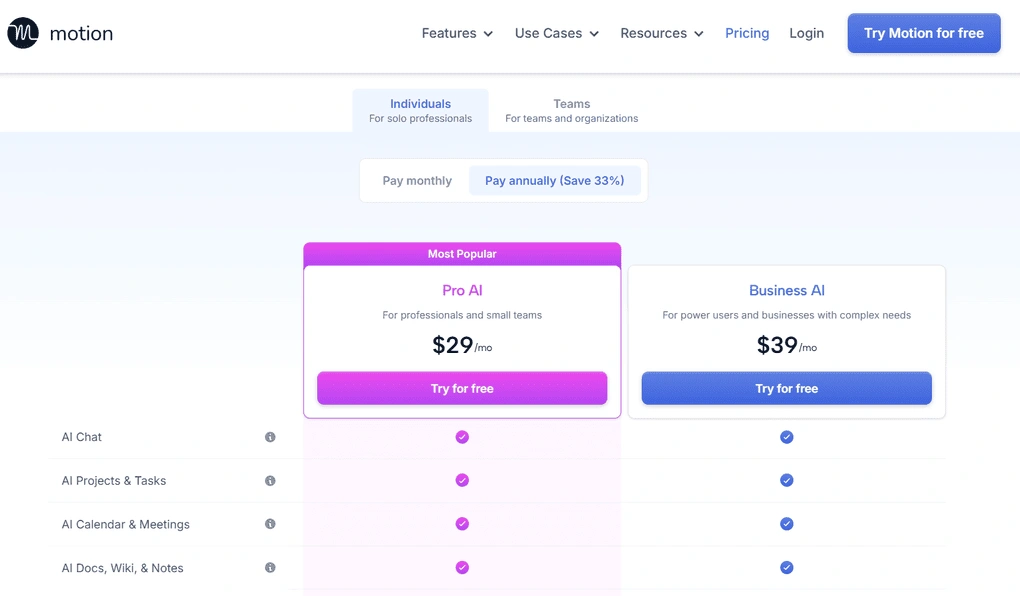
- No free plan available, only a 7-day free trial
- Pro AI plan: $29/month per user when billed annually
- Business AI plan: $39/month per user when billed annually
- Pro AI for teams: $19/seat/month when billed annually
- Business AI for teams: $29/seat/month when billed annually
- Enterprise: Custom pricing
Related articles:
🔎Read my full review: Motion App Review: My $348 Experience and Why I Don’t Regret It

Hive
Hive is a user-friendly AI project and task management platform built around collaboration, communication, and workflow automation. It combines tasks, projects, chat, email, notes, dashboards, and AI tools in one workspace.
Quick verdict
Small and mid-sized teams that want simple project management and built-in communication
You need deep customization or advanced enterprise-level workflows
Easy-to-use collaboration and communication features
Some advanced features are locked behind higher-tier plans
Why I recommend Hive for easy team collaboration
What stood out to me most about Hive was how easily it combines project management with team communication. You can assign tasks, comment on work, share files, edit documents together, and use direct or group messaging without switching between different apps.
I also found Hive easy to learn. Despite offering a solid range of project management and AI features, the interface has a short learning curve, so teams can start organizing projects without spending too much time configuring the platform.
The customizable dashboards and workspace add-ons give teams some flexibility without making the platform feel overly complicated. You can tailor dashboards, add goals, choose different project views, and add tools such as time tracking or forms when you need them.
Hive’s AI features are another advantage. Buzz can answer questions, create projects, automate workflows, and even build widgets and dashboards, while AI in Notes can help with content creation.
The main limitation is that some of the more advanced features are locked behind the Teams plan or paid add-ons, so smaller teams may need to upgrade to get the full experience.
Standout features
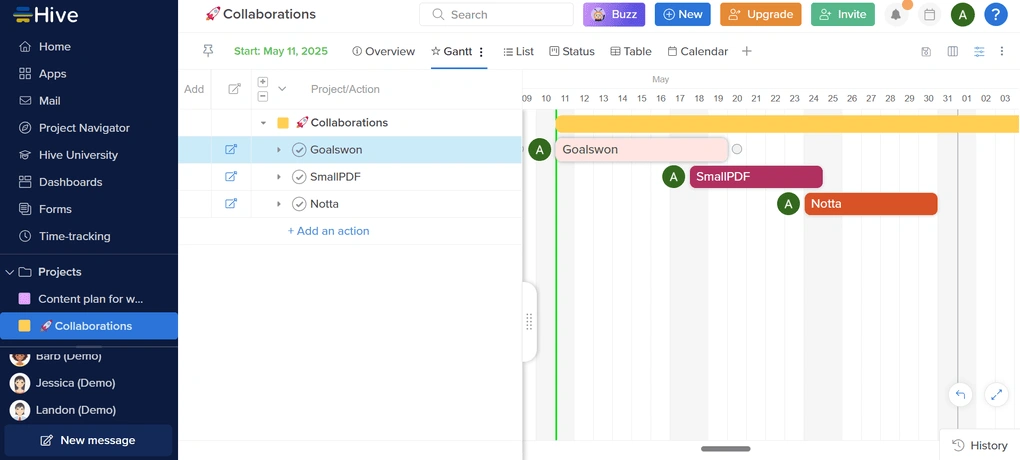
Built-in communication: Hive combines project work with instant messaging, collaborative documents, comments, and project updates, keeping team communication in one workspace.
AI assistant: Hive’s Buzz AI assistant can answer questions, create projects, automate workflows, and generate widgets or dashboards.
Custom dashboards: You can combine widgets, filters, charts, goals, notes, and external embeds to create dashboards tailored to your team’s needs.
Time tracking: Hive automatically records time spent on tasks and lets you filter and export time-tracking results, making it useful for monitoring project effort.
My Key Takeaways After Using Hive
|
What impressed me |
Why it made a difference |
|---|---|
|
Ease of use |
Hive has a short learning curve while still offering a solid range of project management features. |
|
Collaboration |
Messaging, comments, collaborative documents, and project updates keep distributed teams connected. |
|
AI tools |
Buzz can assist with projects, workflows, widgets, and dashboards rather than just answering questions. |
|
Workspace flexibility |
Views, dashboards, templates, and add-ons make it easy to adapt Hive to different workflows. |
|
What I’d improve |
Who it could affect |
|---|---|
|
Advanced features are plan-dependent |
Teams needing time tracking, resourcing, or unlimited advanced tools may need the Teams plan. |
|
Project views |
Power users looking for a very large selection of project views may find Hive less flexible than Monday.com. |
|
AI in email |
Users who rely on email workflows may miss having Hive’s AI capabilities integrated into the email feature. |
Pricing plans
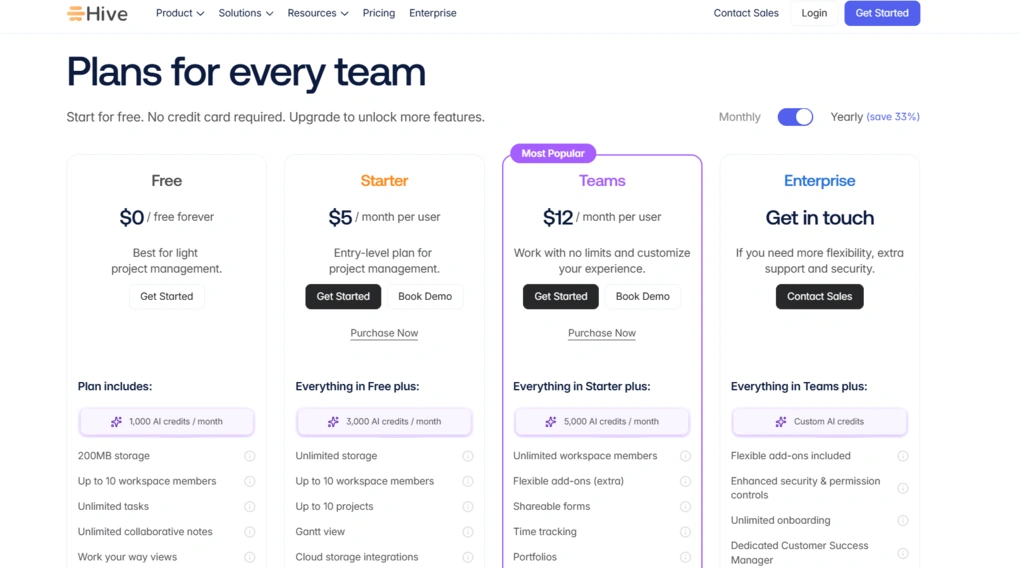
- Free plan available, and a 14-day free trial
- Starter plan: $5/user/month when billed annually
- Teams plan: $12/user/month when billed annually
- Enterprise plan: Custom pricing
🔎 Read my full review: Hive Review: The Best Project Management App? (2025)
Explore our Apps directory
A curated directory of software tools we’ve independently reviewed, with links to full reviews, comparisons, and category guides.

Reclaim AI
Reclaim is an AI scheduling and task management app that automatically finds time for tasks, meetings, habits, and focus work. It is designed to protect your priorities while keeping your schedule flexible as plans change.
Bottom line
Busy professionals who want to protect focus time, habits, and personal time
You need a mobile or desktop app or broad integrations
AI scheduling combined with habits and focus-time protection
Web-only experience and limited integrations
Why I recommend Reclaim for work-life balance
What makes Reclaim different from a traditional task manager is how much emphasis it puts on protecting your time. Instead of simply listing tasks, it automatically finds space for them in your calendar based on their priority, duration, and your availability.
I particularly like the Habits feature. You can schedule recurring activities such as exercise, lunch, or focus time, and Reclaim automatically moves them when your calendar changes. This makes it easier to maintain routines without having to constantly rearrange your schedule manually.
Reclaim also works well if you already use another project management tool. You can connect apps such as Todoist, Asana, Jira, ClickUp, and Google Tasks, allowing Reclaim to pull your tasks into the calendar and automatically find time to complete them.
Its Smart Meetings and scheduling links are useful for reducing scheduling back-and-forth. Reclaim can find suitable times across participants’ schedules while taking existing priorities and calendar commitments into account.
Standout features
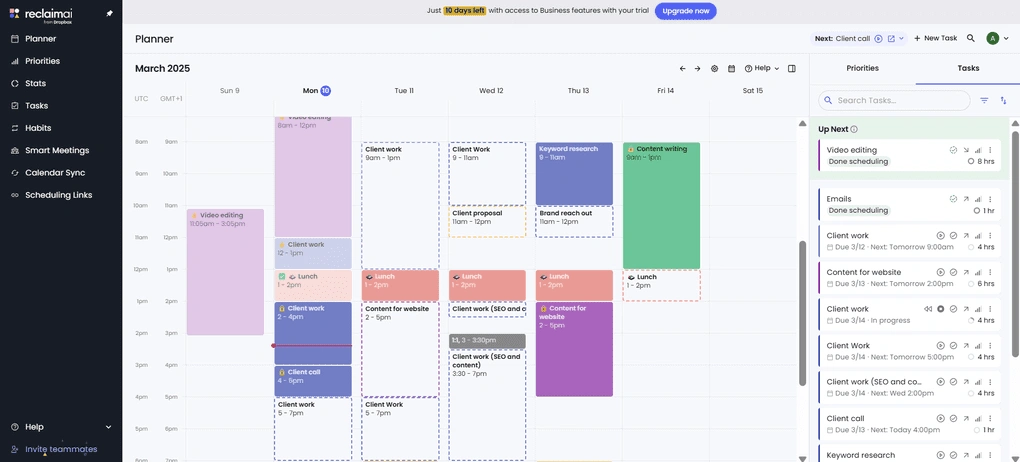
AI task scheduling: Reclaim automatically finds time for tasks based on their priority, duration, and your availability, then reschedules them when plans change.
Habits: You can protect recurring activities such as exercise, breaks, or focus time, with Reclaim automatically moving them when your calendar changes.
Smart Meetings: Reclaim finds suitable times for recurring meetings across everyone’s schedules, reducing the need for manual coordination.
Time tracking and analytics: Reclaim tracks focus time, meetings, buffer time, and work-life balance trends, giving you a clearer picture of how your time is actually being spent.
My Key Takeaways After Using Reclaim
|
What impressed me |
Why it made a difference |
|---|---|
|
Work-life balance |
Reclaim protects focus time, personal activities, and recurring habits alongside work commitments. |
|
Automatic rescheduling |
Tasks and habits can move automatically when your schedule changes, reducing manual planning. |
|
Easy task management |
You can add tasks quickly and let Reclaim decide when they should happen. |
|
Simple meeting scheduling |
Scheduling links and Smart Meetings remove much of the back-and-forth involved in finding a time. |
|
What I’d improve |
Who it could affect |
|---|---|
|
No mobile or desktop app |
Users who want to manage their schedules primarily from dedicated apps may find the web-only experience limiting. |
|
Limited integrations |
Teams relying on a broad range of third-party tools may find Reclaim less flexible than competitors. |
|
Habits can linger |
Stopped habits may continue appearing in your Google or Outlook calendar. |
Pricing plans
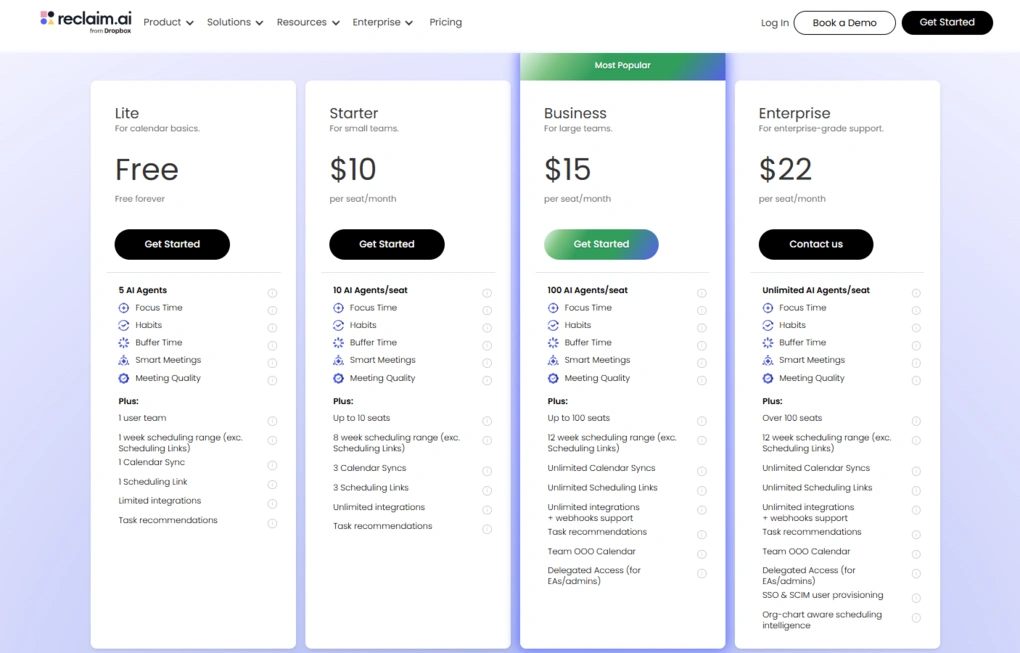
- Free plan available, as well as a 14-day free trial
- Starter: $10/user/month when billed annually
- Business: $15/user/month when billed annually
- Enterprise: $22/user/month when billed annually
🔎Read my full review: Honest Reclaim AI Review | An Unreal Advantage? (2026)

TimeHero
TimeHero is an AI-powered task and scheduling platform that automatically plans work around your availability, deadlines, meetings, and priorities. It also adds workload management, forecasting, and risk detection, making it particularly useful for teams managing multiple projects.
Bottom line
Teams that need automated scheduling and visibility into workloads and project risks
You want a simple personal planner or a highly visual project management tool
Automatic scheduling combined with workload management and forecasting
No permanent free plan and a weaker cross-platform experience
Why I recommend TimeHero for team scheduling and workload management
TimeHero goes beyond automatically scheduling individual tasks. It continuously adjusts your team’s work based on availability, priorities, deadlines, and changes to meetings or workloads. This makes it useful for teams where schedules are constantly shifting.
Its workload management features are another major strength. You can quickly see overloaded team members, projects that are falling behind, and tasks that are at risk of missing their deadlines. Forecasting tools also help teams create more realistic project estimates and priorities.
I also liked the workflow automation. Reusable templates, recurring projects, task dependencies, and shared folders make it easier to organize ongoing team workflows without rebuilding them from scratch.
TimeHero also connects with a wide range of productivity and project management tools, including Google Calendar, Outlook, Asana, ClickUp, Slack, Todoist, and Jira. This makes it easier to bring tasks from your existing tools into an automatically planned schedule.
The main drawbacks are the lack of a permanent free plan, limited features on the Basic plan, and some difficulty finding older tasks and projects. The platform can also feel more focused on structured team workflows than simple personal planning.
Standout features
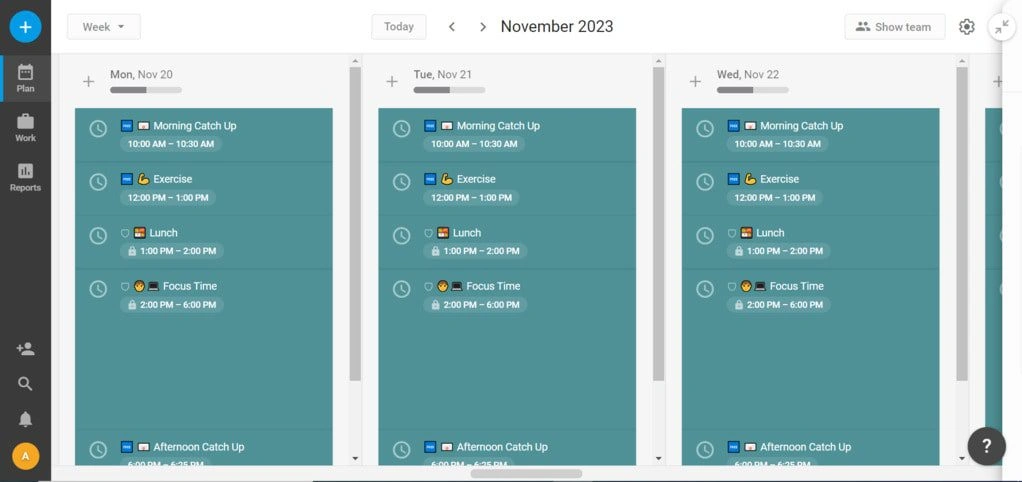
Automated scheduling: TimeHero automatically schedules tasks around your availability, deadlines, meetings, and priorities, then adjusts the plan when circumstances change.
Workload management: Workload and forecasting tools help identify overloaded team members, projects falling behind, and deadlines that may be at risk.
Workflow templates: Reusable templates and recurring workflows make it faster to set up projects and repeatable team processes.
Risk detection: TimeHero flags tasks that are scheduled too close to their deadlines, helping teams identify potential problems before they become missed deadlines.
My Key Takeaways After Using TimeHero
|
What impressed me |
Why it made a difference |
|---|---|
|
Automatic scheduling |
Tasks are continuously planned and adjusted around availability, priorities, and deadlines. |
|
Workload visibility |
Managers can quickly see overloaded team members and projects that may be falling behind. |
|
Forecasting |
Project forecasts help teams create more realistic expectations around deadlines and workload. |
|
Workflow templates |
Reusable templates and recurring projects speed up the setup of repeatable workflows. |
|
Integrations |
TimeHero connects with major productivity and project management tools, making it easier to bring existing tasks into its scheduling system. |
|
What I’d improve |
Who it could affect |
|---|---|
|
No permanent free plan |
Individuals and small teams looking for a free long-term solution will need to look elsewhere. |
|
Basic plan limitations |
Teams that need advanced workflow and reporting features may need to upgrade. |
|
Task discovery |
Users with many projects may sometimes find it difficult to locate older tasks and projects. |
|
Cross-platform experience |
Users who rely heavily on native mobile or desktop apps may find TimeHero less flexible than competitors. |
Pricing plans
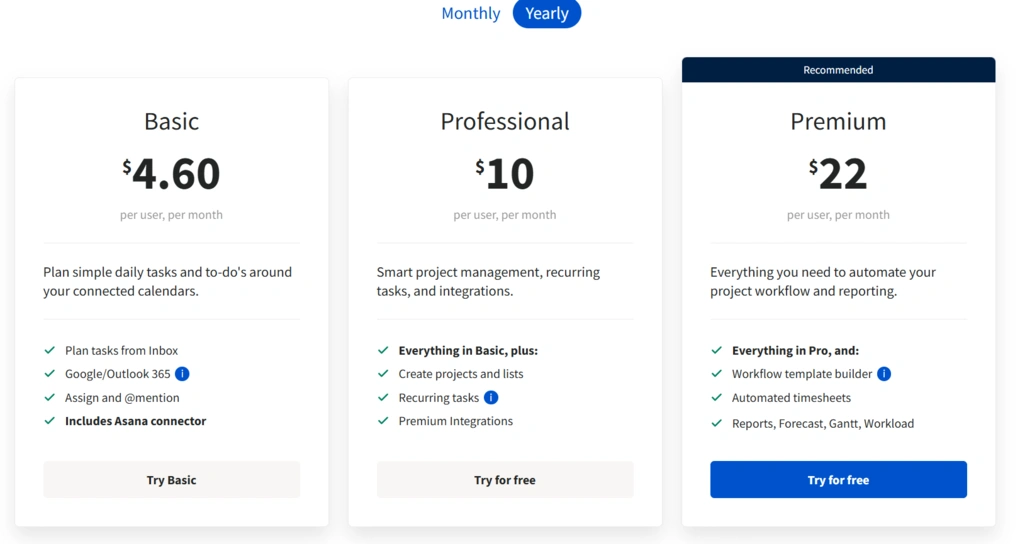
- No free plan available, only a 7-day free trial
- Basic plan: $4.60/user/month
- Professional plan: $10/user/month
- Premium plan: $22/user/month
Summary
AI task managers can do much more than organize to-do lists. They can prioritize work, automate repetitive tasks, build schedules, and help teams coordinate their workload more efficiently.
The key is choosing a tool that fits the way you actually work. Some apps focus on AI scheduling, while others are built around project management, automation, or simple task organization. Integrations, customization, security, and pricing are also important when deciding which tool is worth using.
After testing 15+ AI task management apps, I found that there isn’t one tool that works best for everyone. The right choice depends on your workflow, team size, and the type of work you want AI to handle.
Why you can trust our reviews
At thebusinessdive.com, our team tests, reviews, and compares hundreds of productivity apps every year — from project management tools to note-taking apps. We dive deep into real-world use cases to help you find the right tools that actually improve your workflow, not just add noise.
Our mission? No fluff, no shortcuts—just honest, hands-on insights from productivity pros.
Have a question or suggestion? I’d love to hear from you. Feel free to reach out anytime at aronkantor@thebusinessdive.com.
Frequently Asked Questions
What is an AI task manager?
An AI task manager is a task management tool that uses AI to help with task creation, prioritization, scheduling, and automation. More advanced AI-powered task management apps can also support project planning, team collaboration, and other project management processes.
Can AI project management tools replace traditional project management software?
Not always. Some AI project management tools are designed for complex projects and include advanced features such as resource management, project scheduling, and workload tracking. Others focus mainly on everyday tasks and automation. The best AI project management tool depends on how much project management your workflow requires.
How can using AI improve project management?
Using AI can help teams automate routine tasks, prioritize work, and improve project planning. AI can also analyze large amounts of data to support resource allocation and provide data-driven insights for better decision-making. This can help project teams spend less time on repetitive tasks and more time on higher-value work.
How much do AI task management tools cost?
AI project management tools can cost as little as $0 per month when a free plan is available, while paid options typically range from around $5 to $50 per month depending on the platform and plan. Pricing is often listed per user per month, with more advanced features available on higher-tier plans.
What should I look for in an AI task management tool?
Look for the AI capabilities that match your workflow, such as natural language task creation, automated scheduling, workflow automation, and resource management. You should also consider the user interface, integrations with third-party apps, team collaboration features, pricing, and whether the tool can handle your project management needs as your team and projects grow.
Disclosure: I only recommend products I would use myself, and all opinions expressed here are our own. This post may contain affiliate links through which, at no additional cost to you, I may earn a small commission. Read the full privacy policy here.

Hey there! I am Aron, the founder of Thebusinessdive. I have been testing productivity apps for almost three years now. I reach 25.000 -50.000 people monthly with the mission to help you find the perfect productivity apps. Subscribe to my YouTube channel, newsletter, and social media to hear more about the best productivity tools. Let’s dive in!
Interesting that you separated customizable from complex workflows—those often get lumped together. Did the customizable option still handle automation well, or did it focus more on UI flexibility?