


Best 9 AI Note-Takers | My Top Picks After +3 Years Testing (2026)
Looking for the best AI note-taker but not sure which one is worth checking out?
In the past three years, I have used 25+ AI note-takers across 100+ meetings. Some made my life easier; others… well, not so much.
So, I put together my top picks for different use cases, based on what actually worked during my testing and where each tool fell short.
Quick picks: Where I’d Start Based on Your Use Case
You need an AI note-taker for… | My pick | Pricing starts at |
|---|---|---|
Accurate meeting notes with strong security and team collaboration features | Fellow | Free plan + paid plans from $7/user/month |
Detailed meeting analytics and actionable insights | MeetGeek | Free plan + paid plans from $9.99/user/month |
Clear audio and AI meeting notes | Krisp | Free trial+ paid plans from $8/user/month |
Bot-free meeting transcription and task management on Mac | Supernormal | Free plan + paid plans from $20/month (50 monthly credits). |
Affordable AI meeting notes and transcription | Fireflies AI | Free plan + paid plans from $10/user/month |
Simple bot-based recording and meeting summaries | tl;dv | Free plan + paid plans from $18/user/month |
Free AI meeting notes and transcription | Fathom | Free plan + paid plans from $15/user/month |
Simple, bot-free meeting recording | Bluedot | Free plan + paid plans from $14/user/month |
Meeting participation and speaking-time analytics | Equal Time | Free trial + paid plans from $15/user/month |
How We Test AI Note-Takers
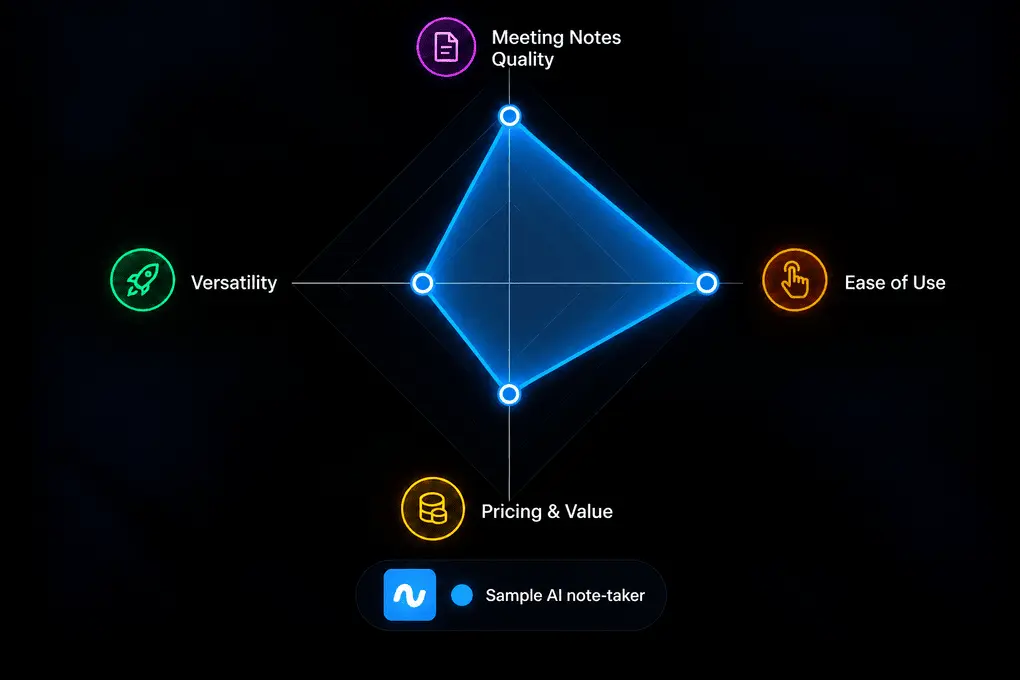
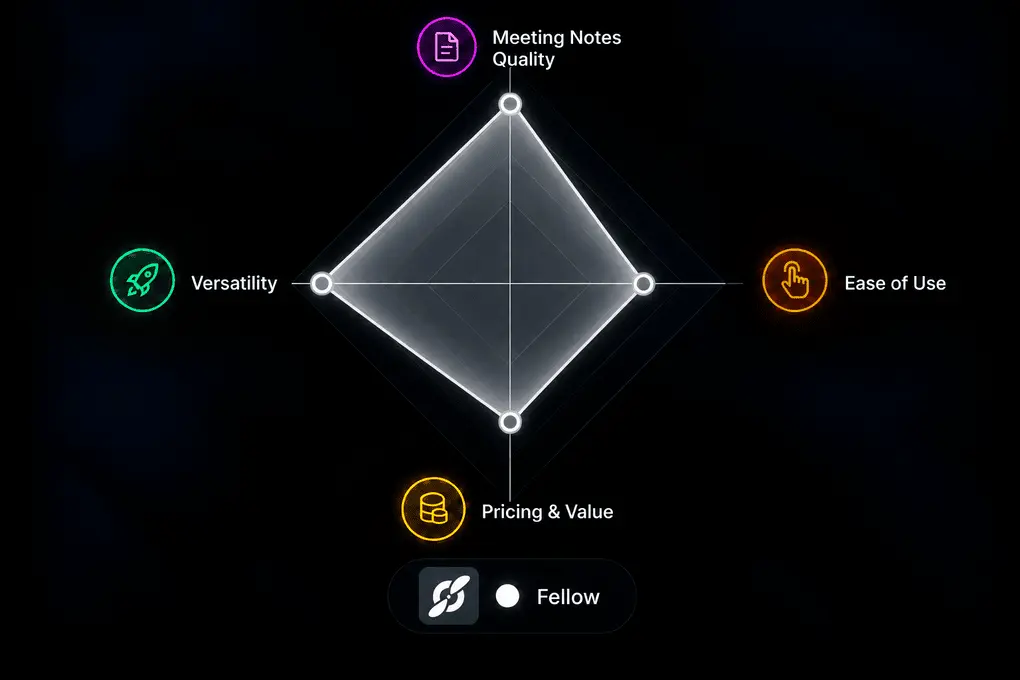
To make it easier to compare each AI note-taker, we’ve included a visual comparison graph for every tool, based on our hands-on testing. Each scorecard evaluates four key areas:
Meeting Notes Quality: How accurate, detailed, and useful the AI-generated notes are, including supporting features like meeting templates and action items.
Ease of Use: How intuitive the tool is, how easy it is to get started, and how steep the learning curve is.
Versatility: How flexible the tool is across different meeting setups, including bot-based and botless recording, supported platforms, and mobile app availability.
Pricing & Value: How much value you get from the free and paid plans compared to other AI note-takers.
The graph reflects our actual experience using each tool, not just the features listed on its website. The overall rating also takes into account the findings from our in-depth reviews, including each tool’s strengths, weaknesses, and performance during real meetings.
Learn exactly how we test tools → Review methodology
Top AI Note-Takers Compared
Here is my list of the best AI note-takers in 2026:
AI note-takers | Ideal for 🎯 | Bot or botless recording🎙️ | Meeting notes quality📝 | Transcription accuracy ✅ | What stood out in my testing🔍 | Biggest drawback⚠️ |
|---|---|---|---|---|---|---|
Teams & professionals | Both | Excellent | 95% – 100% | Accurate transcripts, actionable summaries, and strong team collaboration | Limited free version | |
Advanced meeting analytics for sales, customer, and recruitment calls | Both | Excellent | 95% – 100% | Detailed conversation analytics and insights beyond basic meeting summaries | Free & Pro plans have limited transcription minutes | |
Professionals require noise cancellation, combined with AI note-taking | Both | Excellent | 95% – 100% | Effective noise cancellation combined with bot-free meeting recording | Advanced features are locked behind paid plans | |
Teams using Mac only | Botless | Average | 90% – 95% | Turning meeting discussions into tasks and follow-up actions | Mac only | |
Budget-friendly AI note-taking | Both | Good | 85% – 90% | Flexible recording option, platform support, and integrations | Limited free plan | |
Individuals and freelancers | Both | Good | 95%-100% | Generous free plan, useful AI reports, and intuitive interface | Mobile app experience could be more polished | |
Free AI note-taking | Both | Good | 85%-90% | Useful meeting summaries without paying for a subscription | Lacks some advanced features | |
Easy-to-use AI note-taker with bot-free recording | Botless | Excellent | 85%-90% | Quick setup and straightforward bot-free recording | The free version is more like a trial only | |
Teams focused on meeting inclusion and speaking analytics | Only Bot | Average | 90%-95% | Detailed speaking-time and participation insights | No mobile and desktop support |
Breaking Down the Best AI Note-Takers in 2026
Fellow
After using Fellow as my main AI note-taker for over two years, it’s still my favorite all-around option. In my meetings, it delivered 95%+ transcription accuracy, consistently detailed AI summaries, and some of the strongest team collaboration features I’ve tested. What sets it apart is how it handles the entire meeting workflow, from preparing agendas to tracking action items afterward
Quick verdict
Teams and professionals who need accurate AI notes, strong security, and meeting collaboration
If you are looking for a free & occasional AI note-taking
High security, accurate transcription, and team collaboration
Limited free version (5 AI notes/lifetime)
⚡ Biggest productivity gain: Streamlines the entire meeting workflow from preparing agendas before the call to generating AI summaries, follow-up emails, and action items afterward.
Testing Fellow in real meetings
I’ve been using Fellow as my main AI note-taker for over two years, but I’d be lying if I said it only takes notes for me. What I particularly like is that it helps me before, during, and after meetings.
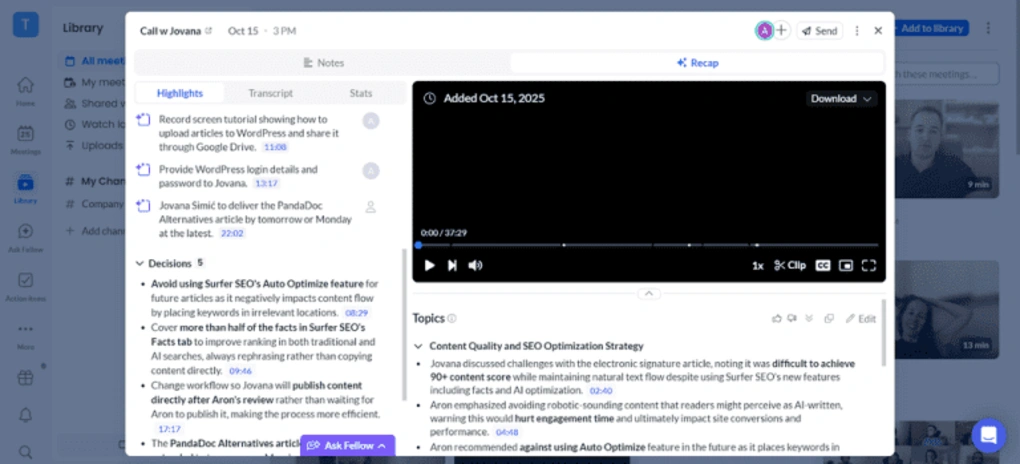
Before meetings, I use its meeting agendas to prepare talking points, while the AI briefs summarize previous conversations and remind me what needs following up.
During meetings, I can easily control when Fellow records and transcribes. For sensitive calls, I normally use its botless recording, which automatically notifies participants that the meeting is being recorded.
After meetings, Fellow generates detailed AI summaries, highlights key points and action items I can assign to my team, and helps me prepare follow-up emails. I also regularly use Ask Fellow to find information across previous meetings without digging through transcripts.
Overall, Fellow is much more than an AI note-taker. It handles my entire meeting workflow while remaining easy to use, with strong security and collaboration features.
🟢 Pick Fellow if: You need highly accurate meeting notes, strong security, flexible recording options, and advanced team collaboration features.
🔴 Skip Fellow if: You want a generous free plan, an affordable AI note-taker for personal use, or a simple tool without too many extra features.
Highlights & Drawbacks
Strengths | Trade-offs |
|---|---|
Highly accurate transcription and detailed AI meeting summaries | It would be great if the free plan included more features |
Supports both bot and botless recording | You need to install the Fellow desktop app in order to use botless recording |
It provides numerous advanced tools besides the essential features | |
Data privacy is a top priority and offers enterprise-grade security | |
A meeting agenda is a useful feature to prepare with talking points and notes before your meetings |
Plans & pricing
- Free plan: Available
- Solo plan: $19/month per user
- Team plan: $7/month per user
- Business plan: $15/month per user
- Enterprise plan: $25/month per user
🔎 Read my full review: Fellow Review: My Thoughts After +12 Months (2026)
Use this link to sign up and get 10% off the paid plans if you upgrade
MeetGeek
I used MeetGeek for 20+ real meetings and achieved 95%+ transcription accuracy. It supports Zoom, Microsoft Teams, Google Meet, Webex, and Slack. However, its biggest strength is advanced meeting analytics, tracking speaking time, engagement, sentiment, and participation. It’s one of the most powerful AI note-takers I’ve tested for analyzing meeting performance.
Quick verdict
Teams that need advanced meeting analytics and accurate transcripts
Solo users who only need basic meeting summaries
Meeting analytics tracking talk time, sentiment, participation, and engagement
Limited transcription minutes in the Pro plan
⚡ Biggest productivity gain: Helps sales and customer-facing teams uncover patterns, decisions, and follow-ups faster.
Testing MeetGeek in real meetings
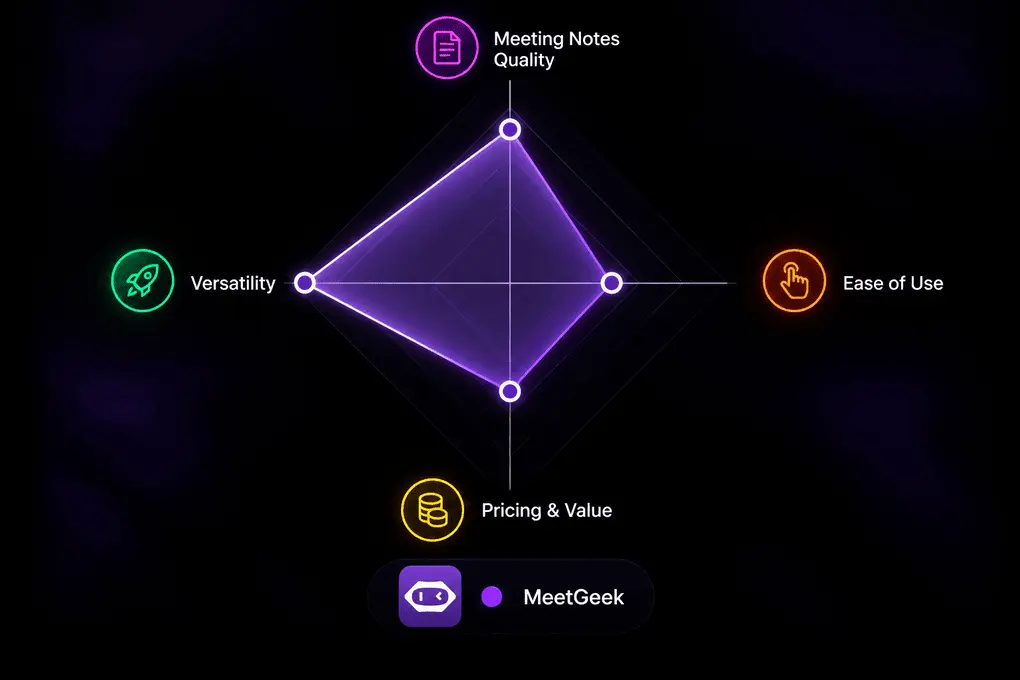
Before Fellow, I used MeetGeek as my default AI note-taking app for 20+ meetings. It offers highly accurate transcripts and has all the advanced features an individual or business might need.

However, what really sets MeetGeek apart is its advanced meeting analytics. It tracks speaking time, participation levels, sentiment, and engagement, helping teams understand how their meetings actually unfold.
Of the 20+ AI note-takers I’ve tested, MeetGeek offers some of the most advanced meeting analytics, making it particularly valuable for sales teams and managers.
The main downside is its premium pricing and transcription limits on lower-tier plans. Still, it’s an excellent choice if you want more than just meeting notes.
🟢 Pick MeetGeek if: You want highly accurate transcriptions plus advanced meeting analytics, especially for sales, customer, and recruitment calls.
🔴 Skip MeetGeek if: You want a cheap or lightweight AI note-taker with generous transcription limits — its lower-tier plans are fairly restrictive on transcription volume and storage.
Highlights & Drawbacks
Strengths | Trade-offs |
|---|---|
MeetGeek has one of the most advanced conversation intelligence features | Compared to other AI note-takers on this list, it has a limited free plan |
Outstanding meeting summaries & transcription accuracy | The Pro plan does not include unlimited transcription |
Broad platform compatibility and integrations | |
Advanced AI chat |
Plans & pricing
- Free plan: Available
- Pro plan: $9.99/month per user
- Business plan: $17/month per user
- Enterprise plan: Custom pricing
🔎 Read my full review: MeetGeek Review: Is It The Best AI Note-Taker For You? (2026)

Krisp
I tested Krisp in real business calls and achieved 96% transcription accuracy. It supports Zoom, Microsoft Teams, Google Meet, Webex, and other platforms with bot-free recording. What impressed me most was its noise cancellation and accent conversion, which make it particularly useful for customer-facing teams. Unlike most AI note-takers, Krisp improves your audio quality while capturing meeting notes.
Quick verdict
Professionals require noise cancellation, combined with AI note-taking
Users who are looking for a free AI note-taker
It works on most communication platforms
No permanent free plan
⚡ Biggest productivity gain: Removes background noise while automatically capturing AI notes and meeting summaries
Testing Krisp in real meetings
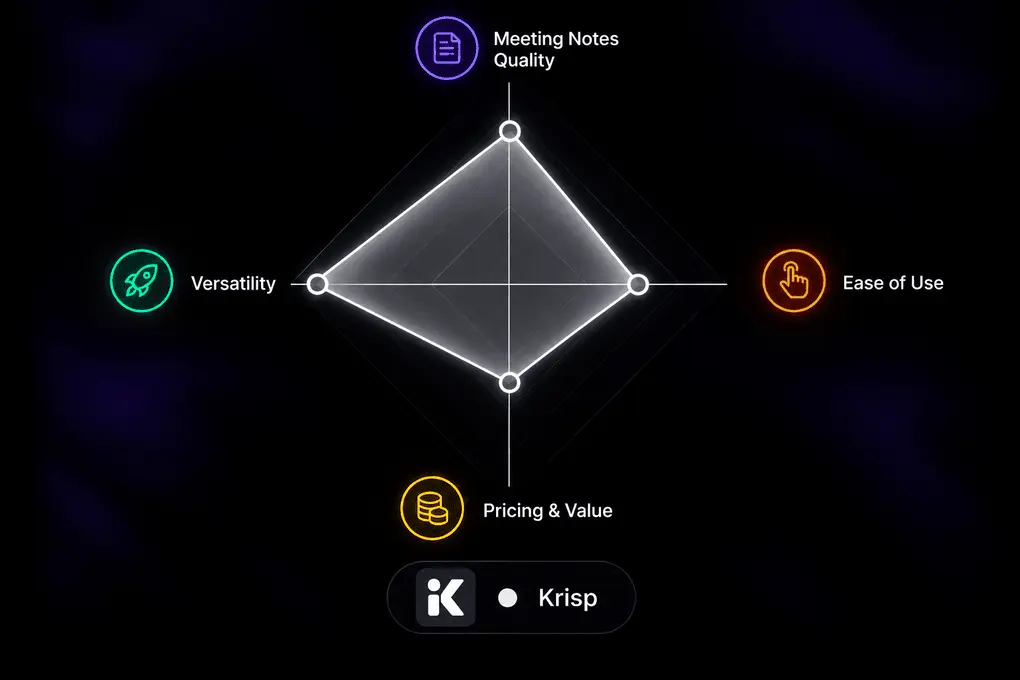
When I joined calls through Google Meet in Chrome, the extension made it simple to capture the meeting without opening the desktop app. I feel the tool is lightweight overall, but still powerful.
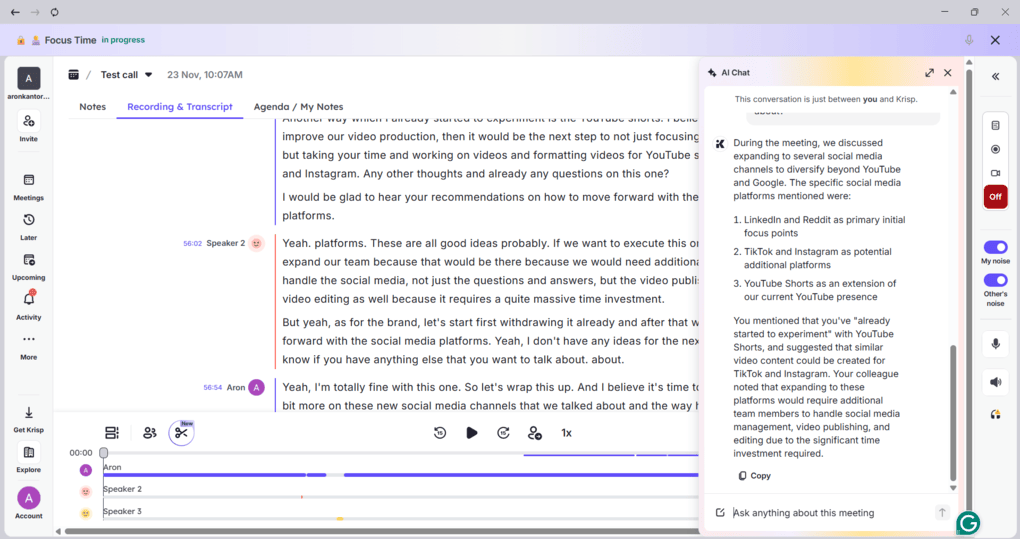
For transcription accuracy and meeting notes, Krisp was solid during my testing. I was totally satisfied with the output and loved the AI chat. Also, it’s great that you can use it for in-person meetings.
As for the other features, Krisp offers some outstanding, unique tools, such as accent conversion and noise cancellation. With this extensive feature set, Krisp is an ideal choice for customer calls.
While I had a smoother experience with other bot-less AI note-takers like Granola or Bluedot, Krisp offers a more complete platform for calls.
🟢 Use Krisp if: You need bot-free AI meeting notes, noise cancellation, and clear audio for online or in-person meetings, especially in noisy environments.
🔴 Skip Krisp if: You need a free AI note-taker, advanced meeting analytics, or more extensive team collaboration features.
Highlights & Drawbacks
Strengths | Trade-offs |
|---|---|
Bot-free recording that works across most communication apps | No free version |
Simple setup and easy to use for non-tech users | Noise cancellation is not available on mobile |
You can switch on noise cancellation with one click | You can’t create folders in your workspace to organize calls |
Action item extraction with speaker identification | |
The Core plan is affordable while including the crucial features |
Plans & pricing
- No free plan available, only a 7-day free trial
- Core plan: $8/month with yearly billing
- Advanced plan: $15/month per user with yearly billing
- Enterprise plan: Custom pricing
🔎 Read my full review: My Brutal Honest Krisp Review 2026 | Is It Worth It?

Supernormal
Supernormal (formerly Radiant) is a simple AI-powered personal assistant for Mac users that helps you capture your meetings and execute your next steps.
Quick verdict
Combining AI note-taking with task and workflow management
Users who need more advanced note-taking features like recording
Task management + AI follow-up actions
Mac only
⚡ Biggest productivity gain: Turns meeting conversations into ready-to-execute tasks, emails, and follow-ups in seconds
Testing Supernormal in real meetings
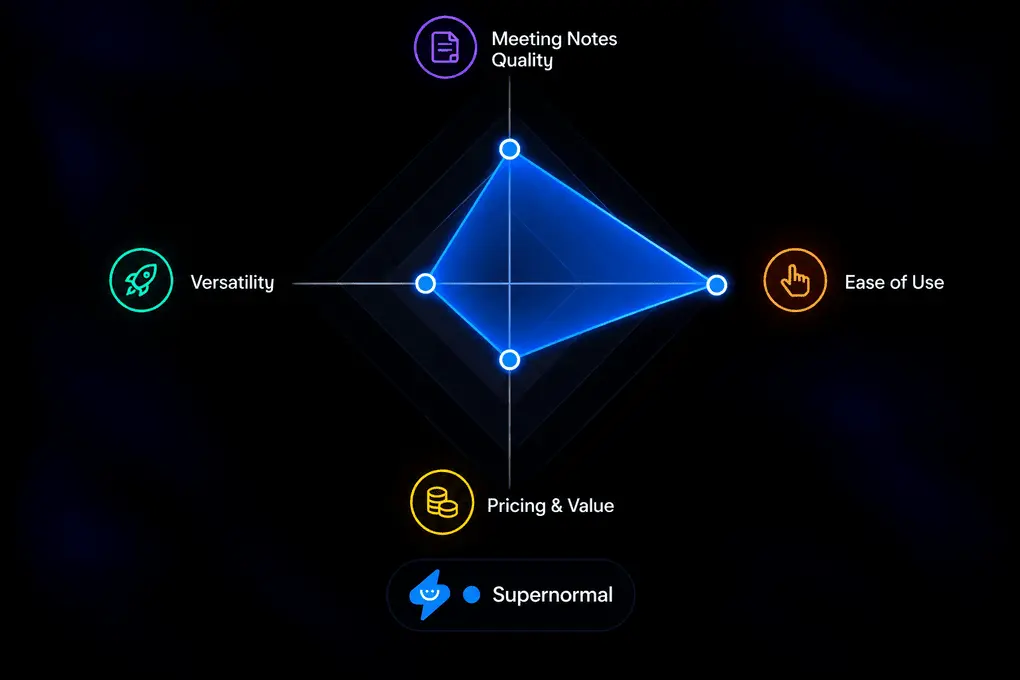
Compared to other AI note-taker tools, Supernormal showed me something new, and I discovered that it’s more than just an AI meeting assistant, but a task management app as well.

Supernormal offers the perfect combination of note-taking and task management by integrating AI that suggests your next steps and prepares your drafts.
It takes you one step closer to actually getting things done, since you get a solid draft for all the tasks you have to do after your call.
So, if you want to try out something fresh with more focus on taking action (and you have a Mac), I definitely recommend checking out Supernormal.
🟢 Use Supernormal if: You’re a Mac user looking for an AI note-taker that turns meetings into actionable tasks, drafts follow-ups, and automates your post-meeting workflows.
🔴 Skip Supernormal if: You use Windows, need built-in meeting recording or multilingual support, or simply want an AI note-taker for transcripts and summaries.
Highlights & Drawbacks
Strengths | Trade-offs |
|---|---|
Supernormal is a user-friendly and simple app | Limited integrations with third-party apps, particularly with Zapier |
The way it generates the action items and follow-ups, or schedules meetings, is impressive | It does not support Windows |
Since your audio is stored locally on your Mac computer, your data remains in safe hands | It does not offer call recording |
It also works as a task management app for Mac users | Broader language support would be appreciated |
Plans & pricing
- Free plan: $0/month with 5 daily credits and 15 monthly credits
- Team plan: $20/month with yearly billing, including 50 monthly credits
- Business plan: $40/month with yearly billing
🔎 Read my full review: Radiant Review: Something Special? (2026)
Fireflies AI
Fireflies AI is a well-rounded AI meeting assistant that records, transcribes, and summarizes meetings across major conferencing platforms. In my side-by-side testing, it delivered more accurate transcripts than Otter AI, although Fellow performed better overall. Its searchable recordings, topic tracker, and AI assistant make it particularly useful for managing past meetings.
Quick verdict
Budget-friendly meeting transcription & note-taking
Users prioritizing top-tier transcription accuracy and structured summaries
Strong meeting search, and topic tracking
Advanced features require higher-tier plans or additional fees
⚡ Biggest productivity gain: Speeds up post-meeting workflows with instant summaries, smart search, and shareable notes
Testing Fireflies AI in real meetings
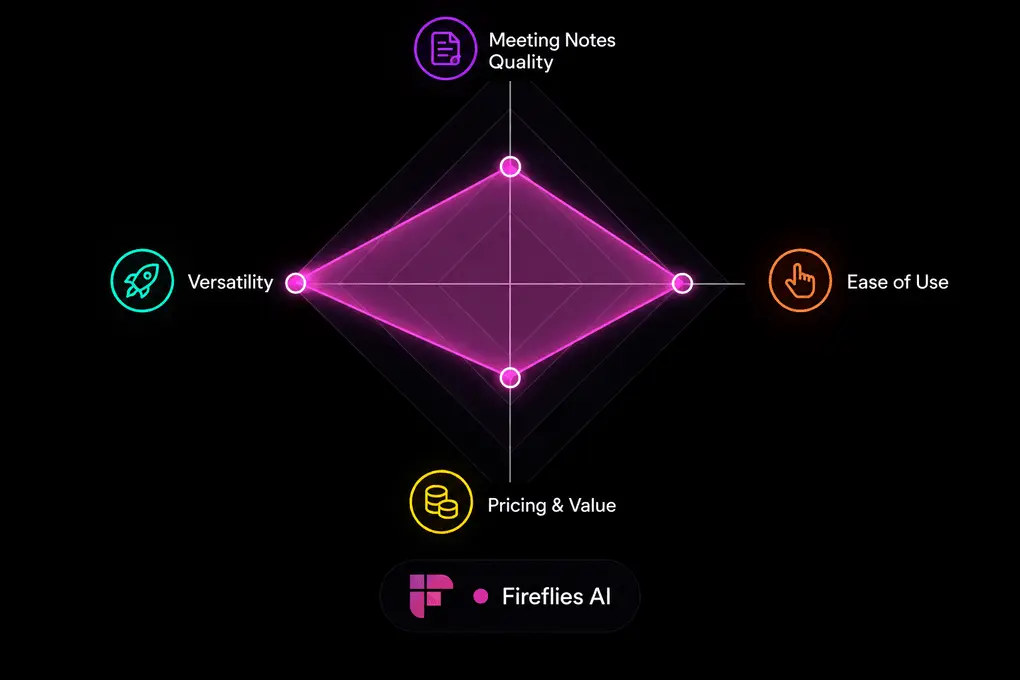
My overall experience with Fireflies AI was solid, especially considering how easy it is to get started. Setup took only a few minutes, and it worked reliably across different meeting platforms.
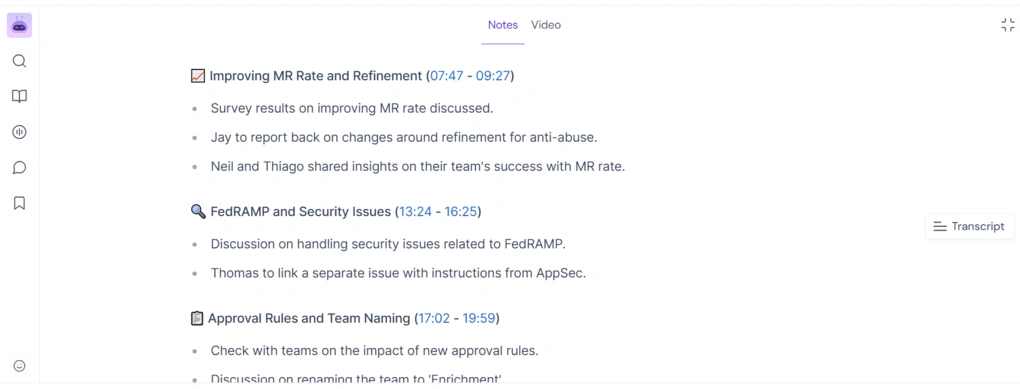
During my latest tests, its meeting bot joined on time, which was an improvement over my earlier experience when it occasionally joined late.
For example, Fireflies AI transcribed “versus articles” as “Virtus articles,” while Otter made more noticeable mistakes, such as interpreting “Fireflies AI” as “Fireplace AI” and “best lead generation tools” as “best regeneration tools.”
However, Fellow still delivered the most accurate transcripts, while Otter structured its AI-generated meeting notes slightly better. After testing both Fireflies AI and Fellow, they earned a spot among the best Otter AI alternatives.
I particularly liked the timestamped transcripts and video recordings, which made it easy to revisit specific discussions. Its topic tracker and AI assistant, Fred, were also useful for finding information across previous meetings.
Overall, Fireflies AI is not the most advanced tool in any single category, but it offers a strong combination of usability, features, and pricing.
🟢 Pick Fireflies AI if: You want an affordable, easy-to-use AI note-taker with reliable transcription, meeting analytics, and useful features for managing meetings across multiple platforms.
🔴 Skip Fireflies AI if: You need a generous free plan, top-tier transcription accuracy, or more advanced and structured AI meeting notes.
Highlights & Drawbacks
Strengths | Trade-offs |
|---|---|
Supports 100+ languages and most major meeting platforms | Limited free plan |
Relatively accurate transcriptions | Less structured AI meeting notes |
Solid collaboration features | |
Affordable paid plans | |
Supports many integrations |
Plans & pricing
- Free plan: Available
- Pro plan: $10/month per user
- Business plan: $19/month per user
- Enterprise plan: $39/month per user
🔎 Read my full review: Fireflies AI Review: Why is EVERYONE using it for meeting notes?
tl;dv
tl;dv is a straightforward AI note-taker that comes with an extensive free plan and accurate transcriptions, ideal for individuals and freelancers. It works with 30+ languages, and you can transcribe meetings on Microsoft Teams, Zoom, and Google Meet.
Quick verdict
Individuals & freelancers who need easy-to-use AI note-taking
Users who need a reliable mobile app for in-person meetings
Easy-to-use interface with a generous free plan
Expensive Business plan
⚡ Biggest productivity gain: Accelerate post-meeting workflows and information collection with AI reports
Testing tl;dv in real meetings
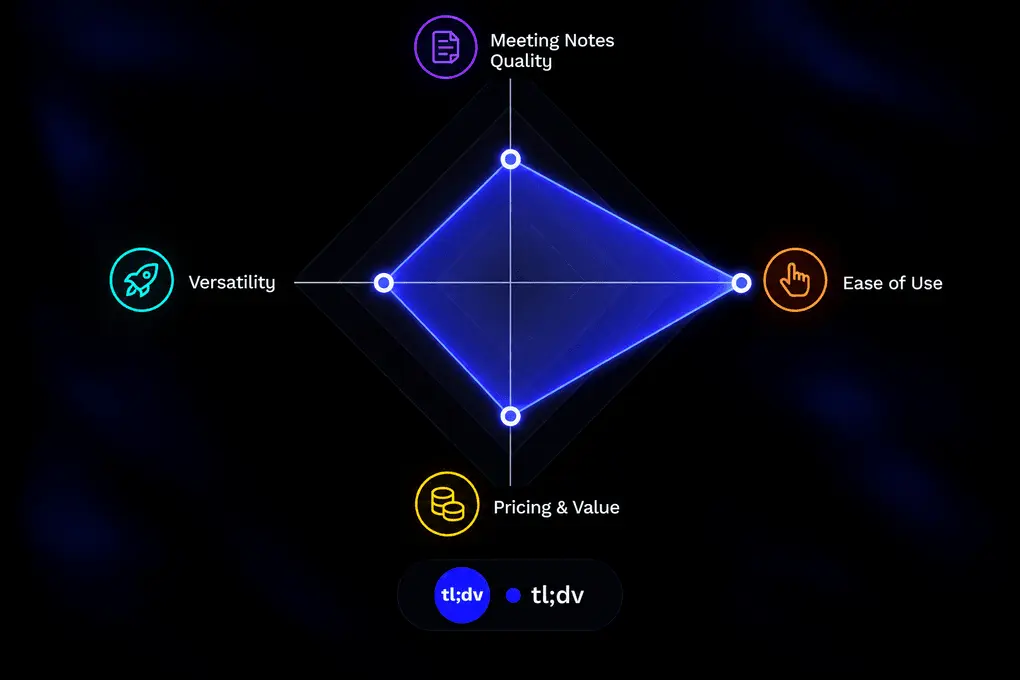
Tl;dv is one of the simplest AI note-takers I have tried so far. Joining calls is easy; the setup took around 10 minutes, and the learning curve is minimal.
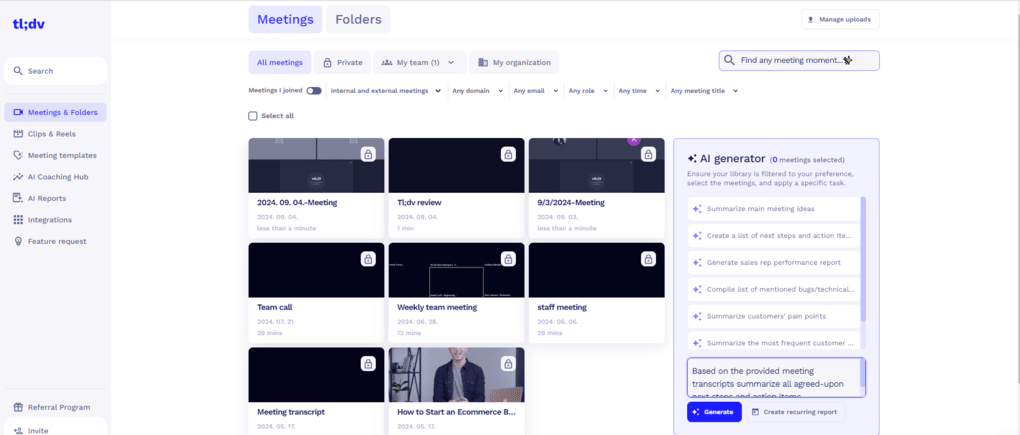
My favorite feature was the AI reports when testing tl;dv. The AI reports offer an easy way to collect the essential information from your previous meetings. You can generate a list of next steps or action items from your conversations.
Furthermore, it offers an AI chat, so you can ask it to prepare follow up emails, analyze customer pain points, and more
Tl;dv a straightforward and reliable AI note-taker to manage your meetings on Microsoft Teams, Zoom, and Google Meet.
🟢 Pick tl;dv if: You want a simple, reliable AI note-taker with a generous free plan, accurate transcription, and useful AI notes without a steep learning curve.
🔴 Skip tl;dv if: You need advanced enterprise features, or a full mobile experience.
Highlights & Drawbacks
Strengths | Trade-offs |
|---|---|
It offers an extensive free tier ideal for solo users with occasional calls | The mobile experience could be more polished. |
Requires a short learning curve to get started | Business plan is pricey compared to other AI note-takers on this list |
Outstanding AI reports feature | |
Accurate transcriptions for Microsoft Teams, Zoom, and Google Meet meetings or uploaded video files Supports many integrations |
Plans & pricing
- Free plan: Available
- Pro plan: $18/month per user
- Business plan: $29/month per user
- Enterprise plan: Custom pricing
🔎 Read my full review: My Honest Tl;dv Review After Using It For +18 Months (2026)
If you fall in love with tl;dv and switch to paid plans in the future, you will get a 30% discount for the first six months if you use this link for sign-up.
Fathom
After using Fathom for several months, I found it to be one of the best free AI note-takers. It delivered 85–90% transcription accuracy in my testing, with well-structured AI summaries and unlimited recordings on its free plan. It supports Zoom, Google Meet, and Microsoft Teams, although it lacks some advanced features found in Fellow and MeetGeek.
Quick verdict
Individuals who need reliable meeting notes and recordings for free
Teams needing advanced meeting analytics or extensive collaboration features
Unlimited free recordings
No mobile app
⚡ Biggest productivity gain: Finding information from past meetings is way faster with Ask Fathom
Testing Fathom in real meetings
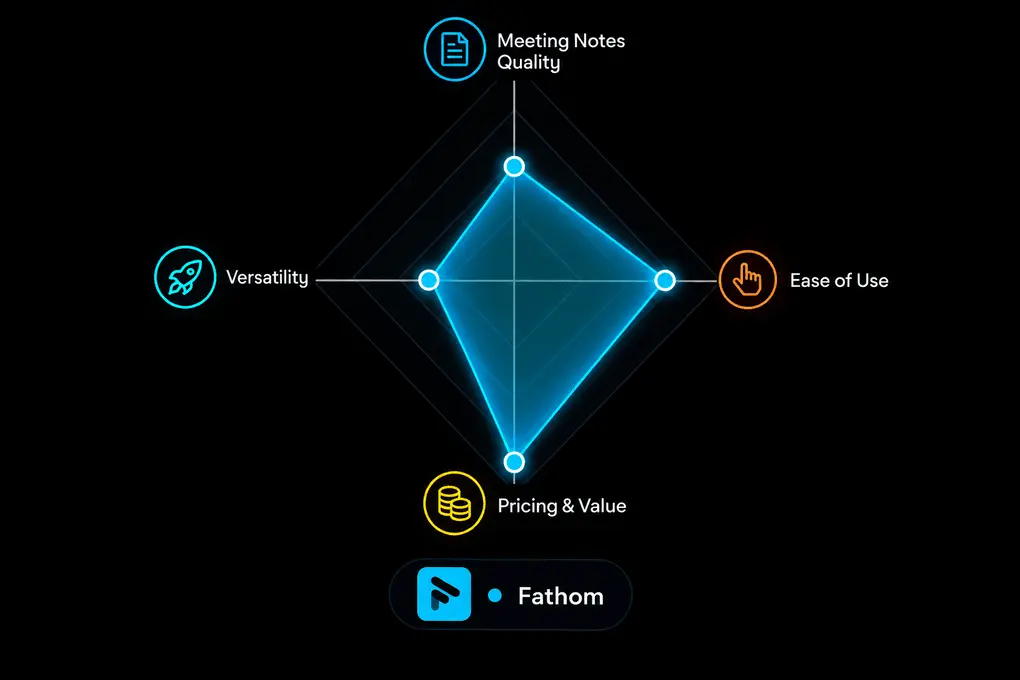
Fathom was a pleasant surprise for me after using it for several months and comparing it with other AI note-takers.
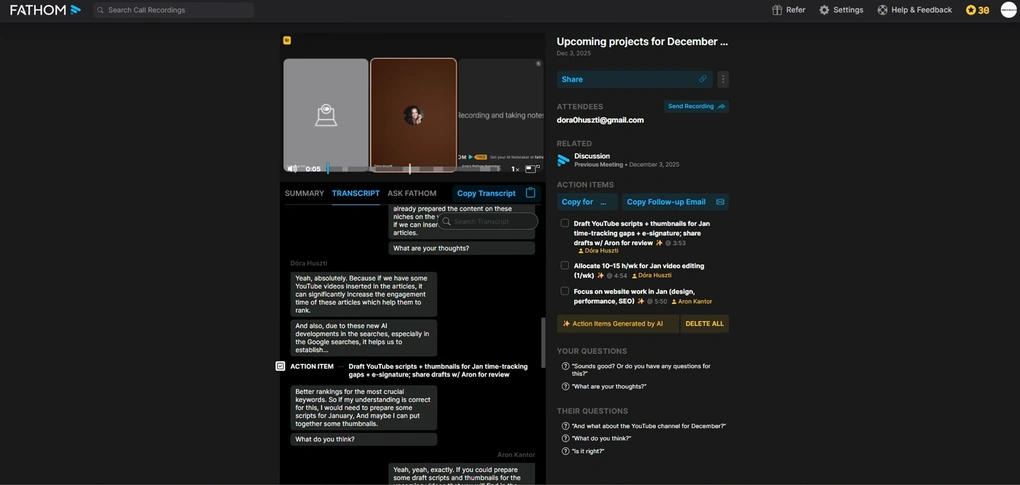
After testing almost all the major AI note-taking apps, I found Fathom’s free plan among the best. It includes unlimited recordings, transcriptions, and automated meeting notes, making it an excellent choice if you don’t want to spend anything.
In my testing, Fathom delivered around 85–90% transcription accuracy, and I particularly liked its well-structured AI notes. You can switch between meeting templates for sales calls, interviews, or general meetings, and clicking on any part of the transcript takes you directly to that moment in the recording.
Another standout feature was Ask Fathom, which worked well for extracting decisions, identifying action items, and drafting follow-up emails. For example, you can use it to identify buying signals from sales calls or commitments made during one-on-one meetings.
However, Fathom requires a desktop app for its full functionality, uses a visible meeting bot, and reserves some advanced features for paid users.
Overall, Fathom focuses on the essentials and does them extremely well. While it lacks some of the advanced features of Fellow or MeetGeek, its generous free plan and reliable core features make it one of my favorite AI note-takers for individuals and freelancers.
🟢 Pick Fathom if: You want a simple, accurate AI note-taker without paying, especially if unlimited recordings and transcriptions matter to you
🔴 Skip Fathom if: You need more detailed AI notes, advanced team features, or a mobile app for in-person meetings.
Highlights & Drawbacks
Strengths | Trade-offs |
|---|---|
It has the most generous free plan, ideal for individuals | Meeting templates are only accessible with high-tier plans |
It generally offers accurate transcriptions on multiple languages | Can only transcribe online meetings, unlike many other AI meeting assistants on this list, which can transcribe video and audio files as well |
Fathom provides a simple, user-friendly interface | No mobile app, which makes it unsuitable for in-person meetings |
You can easily control when to pause, stop, or highlight specific moments during your meeting Many users reported top-notch customer service |
Plans & pricing
- Free plan: Available
- Premium plan: $16/month per user
- Team plan: $15/month per user
- Business plan: $20/month per user
🔎 Read my full review: My Honest Fathom Review After Using It For +3 Months (2026)
If you want to try out Fathom, use this link to get FREE 3 months of premium features without an extra cost. This way, you can have 3X more time to test Fathom’s advanced features and decide whether to upgrade or stay with the free plan.

Bluedot
Bluedot is a bot-free AI note-taker for Google Meet, Zoom, Microsoft Teams, and Slack calls. I found it an easy-to-use AI note-taker with bot-free recording, transcription, and summaries, but the free plan is quite limited.
Quick verdict
Users who need an easy-to-set-up AI note-taker that works without a bot
Users looking for a fully free AI note-taking solution
Easy-to-use bot-free recording
Free plan is essentially a trial
⚡ Biggest productivity gain: Eliminates manual CRM updates by syncing meeting insights directly into tools like HubSpot and Notion
Testing Bluedot in real meetings
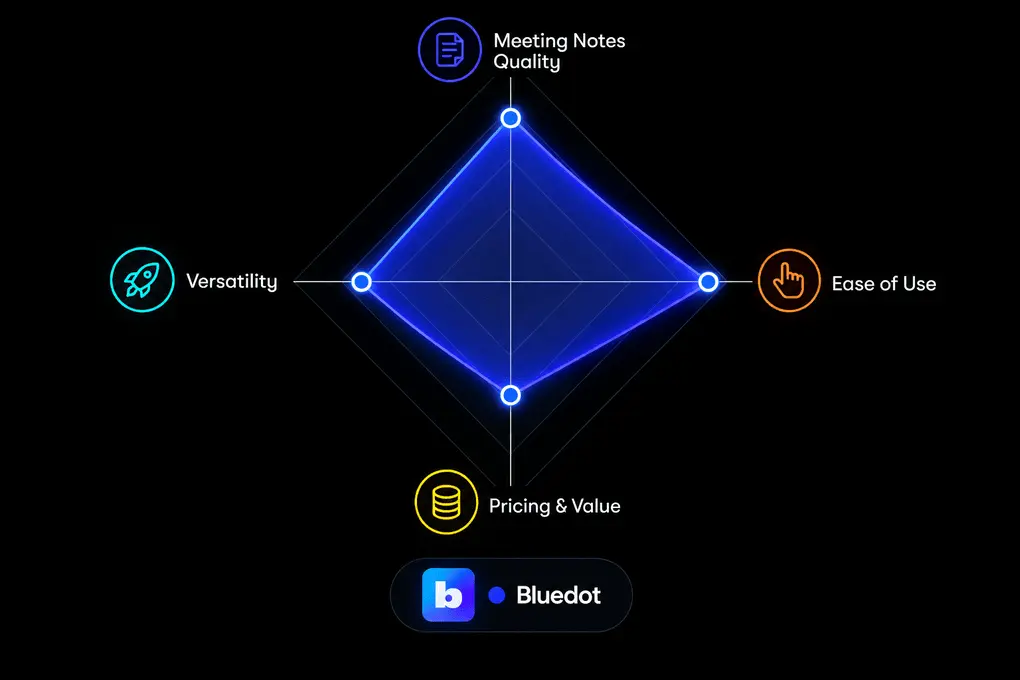
After testing 25+ AI note-takers, I found Bluedot to be one of the easiest to use. While I noticed that a few users mentioned that Bluedot’s setup can be clunky and requires more manual configuration than competitors, I don’t agree with them. For me, it was really smooth to set up Bluedot and get started.
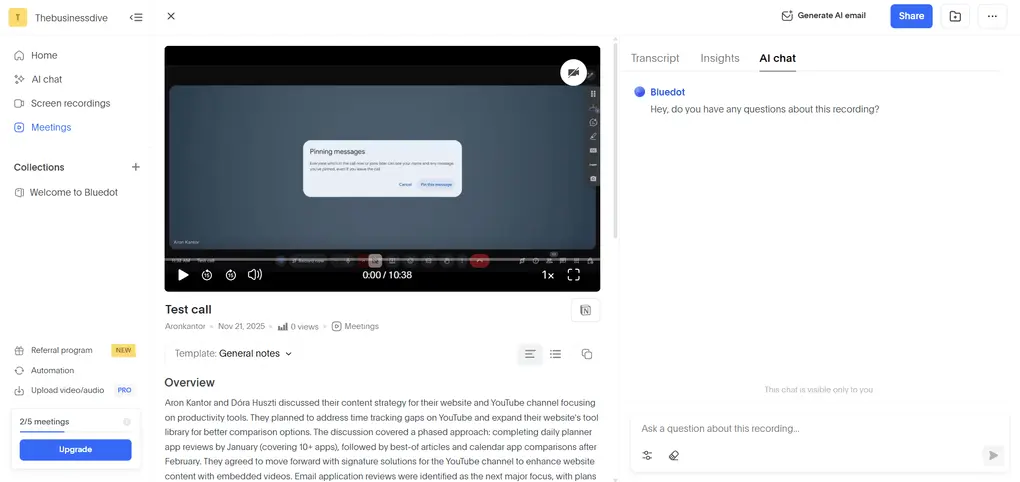
Bluedot reminded me how simple AI note-taking should be. It’s not trying to be an all-in-one meeting intelligence platform, despite all the advanced functionalities it has in store.
The AI summaries were impressively accurate and I loved how you get to interact with the meeting via AI chat to draw conclusions or simply get reminded of important points.
The impression I have of Bluedot is that it is a perfect match for professionals who want fast, accurate meeting notes without the hassle of bots or complex setups.
When comparing it to other bot-less AI note-takers I tried, like Granola and Krisp, I think Bluedot really finds the right balance between being a lightweight tool and offering all the necessary features. In contrast, Granola felt too basic at times, while Krips is feature-heavy but requires a learning curve.
🟢 Pick Bluedot if: You want a simple bot-free note-taker with call recording, accurate transcripts, and almost no learning curve.
🔴 Skip Bluedot if: You need a free AI note-taker.
Highlights & Drawbacks
Strengths | Trade-offs |
|---|---|
Unlike many other bot-free AI note-takers, Bluedot offers video recording | The free plan is essentially a free trial |
It is super easy to set up | |
The AI follow-up email generation is valuable after your calls | |
This AI note-taker offers screen recording features as well, which is quite unique Well-structured meeting notes with timestamps |
Plans & pricing
- Free plan: Available
- Basic plan: $14/month per user
- Pro plan: $20/month per user
- Business plan: $32/month per user
🔎 Read my full review: My Honest Bluedot Review After Testing 25+ AI Note-Takers

Equal Time
Equal Time is an AI-powered meeting assistant for Zoom, Google Meet, and Microsoft Teams calls. During my testing, it stood out as a straightforward AI note-taker with an excellent inclusion analysis feature, but it lacks a free plan and a desktop and mobile version.
Quick verdict
Teams focused on meeting inclusion and speaking analytics
If you need an AI note-taker that has a desktop and mobile version as well
Advanced inclusion analysis
No free plan
⚡ Biggest productivity gain: Helps teams identify speaking imbalances, interruptions, and monologues automatically
Testing Equal Time in real meetings
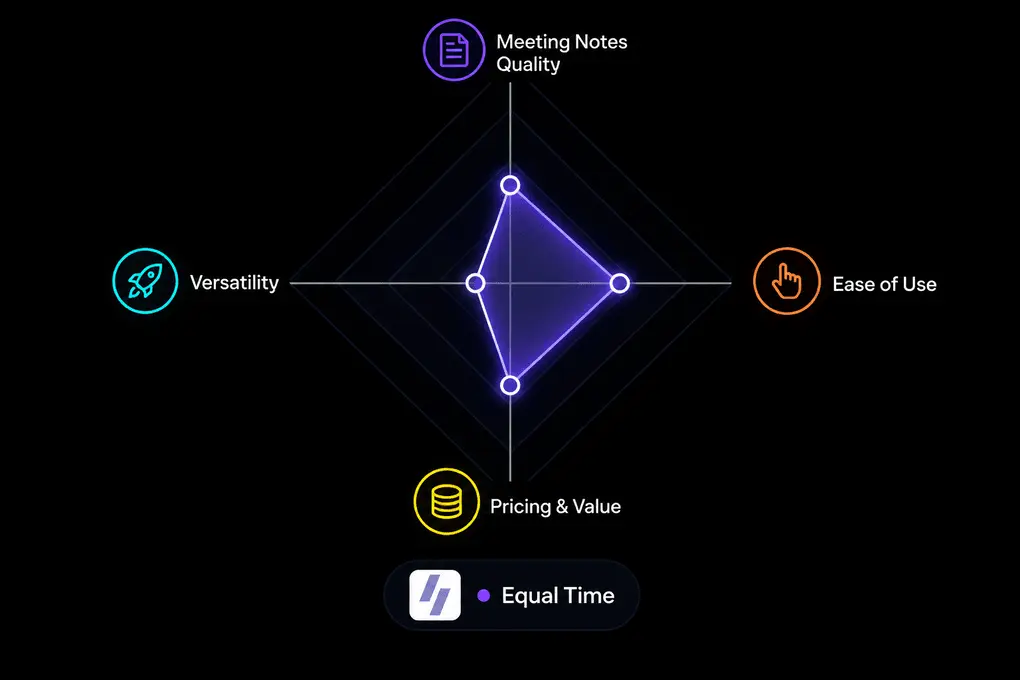
When testing this AI note-taker, I really loved its simplicity. I found everything easily and encountered no technical issues.

After using Equal Time for a few calls, I concluded that it offers accurate transcription. But what impressed me most was its inclusion analysis features.
It shows you the participation rate, monologues, mansplaining, and the number of interruptions. Also, Equal Time breaks down your online call and provides a more detailed overview of the conversation patterns.
On the other hand, the user interface is a bit old-fashioned and lacks a free plan. Also, it’s the least versatile AI note-taking app on this list, since it only has a web version.
However, it was great to see that there are no fluffs, it does its job reliably, and it is one of the most straightforward AI note-takers I have used in recent years.
🟢 Pick Equal Time if: You want an easy-to-use AI note-taker with accurate transcription and unique inclusion analytics that track speaking balance, interruptions, and meeting participation.
🔴 Skip Equal Time if: You need a free AI note-taker, advanced meeting summaries and collaboration features, or a mobile app.
Highlights & Drawbacks
Strengths | Trade-offs |
|---|---|
It has easy-to-use features with no fluff | While it has a seven-day trial, it does not offer a free plan |
It offers accurate meeting transcription | Equal Time does not have a mobile app or a desktop version |
Equal Time provides numerous useful insights into your meeting effectiveness and speaking patterns | I would appreciate more advanced features, such as a meeting agenda or collaboration tools |
The UI is not visually appealing |
Plans & pricing
- Premium plan: $15/month with yearly billing
- Team plan: $80/month with yearly billing
- Company License: Custom pricing
🔎 Read my full review: Equal Time Review: More Than A Simple AI Note-Taker (2026)
Explore our Apps directory
A curated directory of software tools we’ve independently reviewed, with links to full reviews, comparisons, and category guides.
Wrap-up: Best AI note-taker for 2026
After testing 25+ AI note-takers across more than 100 meetings, one thing became clear: there’s no single AI note-taker that’s perfect for everyone.
For me, Fellow remains the best overall choice for professionals and teams. I’ve used it for over two years, and it consistently delivers some of the most accurate transcripts and useful AI meeting summaries I’ve tested. Its security, meeting agendas, and collaboration features make it particularly valuable for professionals and teams.
However, depending on what you need, I’d recommend a few alternatives:
- Bluedot is an excellent choice if you prefer simple, bot-free recording without a complicated setup.
- MeetGeek is my favorite for detailed meeting analytics and conversation intelligence.
- Krisp is worth checking out if noise cancellation and clear audio matter as much as meeting notes.
- Fathom is my top pick if you want the core features for free
Looking for similar tools?
Visit our AI note-takers library to explore other apps we’ve reviewed in this space and how they compare.
Why you can trust our reviews
At thebusinessdive.com, our team tests, reviews, and compares hundreds of productivity apps every year — from project management tools to note-taking apps. We dive deep into real-world use cases to help you find the right tools that actually improve your workflow, not just add noise.
Our mission? No fluff, no shortcuts—just honest, hands-on insights from productivity pros.
Discover how we stay transparent, read our review methodology, and let us know about any tools we missed.
Frequently asked questions
Which is the best AI meeting assistant for online meetings?
After testing numerous AI note-takers, I found Fellow the best. It is a safe AI note-taking app that follows industry standards for data protection and also offers great features to improve productivity.
How much does a Fathom AI note-taker cost?
| Plan | Price (Annual) | Best For | Key Limitations |
|---|---|---|---|
| Free | Free | Individuals who need unlimited meeting recording, transcription, and basic AI features | Limited team collaboration and advanced features |
| Premium | $16/user/month | Individuals & professionals who want more advanced AI features | Lacks team-focused collaboration and advanced business features |
| Team | $15/user/month | Small teams that need collaboration features | 2-user minimum; lacks advanced CRM, coaching, and enterprise controls |
| Business | $25/user/month | Sales and customer-facing teams needing coaching metrics and CRM workflows | 2-user minimum; lacks enterprise-level security and administration |
| Enterprise | $35/user/month | Larger organizations needing advanced security and administration | 2-user minimum; highest-cost plan |
You can read the full Fathom review here: My Honest Fathom Review After Using It For +3 Months (2026)
Is there a free AI Note-taker for Zoom?
No completely free AI note-taker exists for Zoom. If you already pay for Zoom Workspace, you can use its built-in AI note-taker without an extra cost. Other alternatives could be Fathom and tl;dv if you need AI notes occasionally.
You can find my list of the best AI note-takers for Zoom:https://thebusinessdive.com/zoom-note-taker
Disclosure: I only recommend products I would use myself, and all opinions expressed here are my own. This post may contain affiliate links that, at no additional cost to you, may earn a small commission. Read the full privacy policy here.

Hey there! I am Aron, the founder of Thebusinessdive. I have been testing productivity apps for almost three years now. I reach 25.000 -50.000 people monthly with the mission to help you find the perfect productivity apps. Subscribe to my YouTube channel, newsletter, and social media to hear more about the best productivity tools. Let’s dive in!
Too bad to mention US tools in this ranking. There are also European alternatives, like Noota and others.