


7 Read AI Alternatives Worth Trying in 2026
If you’re looking for a Read AI alternative, there are plenty of AI meeting assistants to choose from, but they don’t all offer the same experience.
I tested more than 20 AI note-takers in real-world use. Here are the ones I found to be better alternatives to Read AI, depending on what you’re looking for:
🤝 Fellow → Best Read AI alternative for structured AI meeting notes, security, and data governance
🆓 Fathom → Best Read AI alternative for free AI meeting notes
🌐 Fireflies AI → Best Read AI alternative for broad platform support and conversation intelligence
👥 Otter AI → Best Read AI alternative for team collaboration
🎙️ Granola → Best Read AI alternative for bot-free meeting notes
🔎 tl;dv → Best Read AI alternative for multi-meeting insights
📝 MeetGeek → Best Read AI alternative for detailed AI summaries
✅ Tested with our review & scoring methodology ✅ Real-world testing ✅ Unbiased evaluation
Best Read AI Alternatives Compared
If you don’t want to read the entire guide, this comparison table will help you narrow down your options in under a minute.
|
Tool |
Why choose it? ✨ |
Main limitation ⚠️ |
Pricing starts 💰 |
|---|---|---|---|
|
Strong AI meeting notes, security, and data governance |
Limited free plan |
Free; paid plans from $7/user/mo |
|
|
Unlimited recordings, transcriptions, and storage for free |
Fewer advanced features |
Free; paid plans from $15/user/mo |
|
|
100+ languages and extensive integrations |
Limited free storage and AI credits |
Free; paid plans from $10/user/mo |
|
|
Excellent collaboration and task management |
Lower transcription accuracy |
Free; paid plans from $8.33/user/mo |
|
|
No meeting bot and personalized AI notes |
No traditional meeting recording |
Free; paid plans from $14/user/mo |
|
|
Cross-meeting analysis and AI reports |
Advanced features require higher-tier plans |
Free; paid plans from $18/user/mo |
|
|
Highly accurate transcription and detailed summaries |
Can feel feature-heavy |
Free; paid plans from $9.99/user/mo |
How We Chose the Best Read AI Alternatives
To keep our recommendations fair and consistent, we used our standardized AI note-taker testing framework to evaluate each tool through hands-on testing and real-world use.
We reviewed and personally tested 20+ AI note-takers, assessing their features, usability, pricing, security, and overall performance. You’ll find links to the full review articles for each tool featured in this list.
However, we didn’t simply rank the tools by their overall review scores. To choose the best Read AI alternatives, we looked at how each tool compares with Read AI and identified the specific strengths, workflows, and use cases where it offers a better fit.
This is why the tools in this list have different “best for” recommendations rather than a single overall ranking.
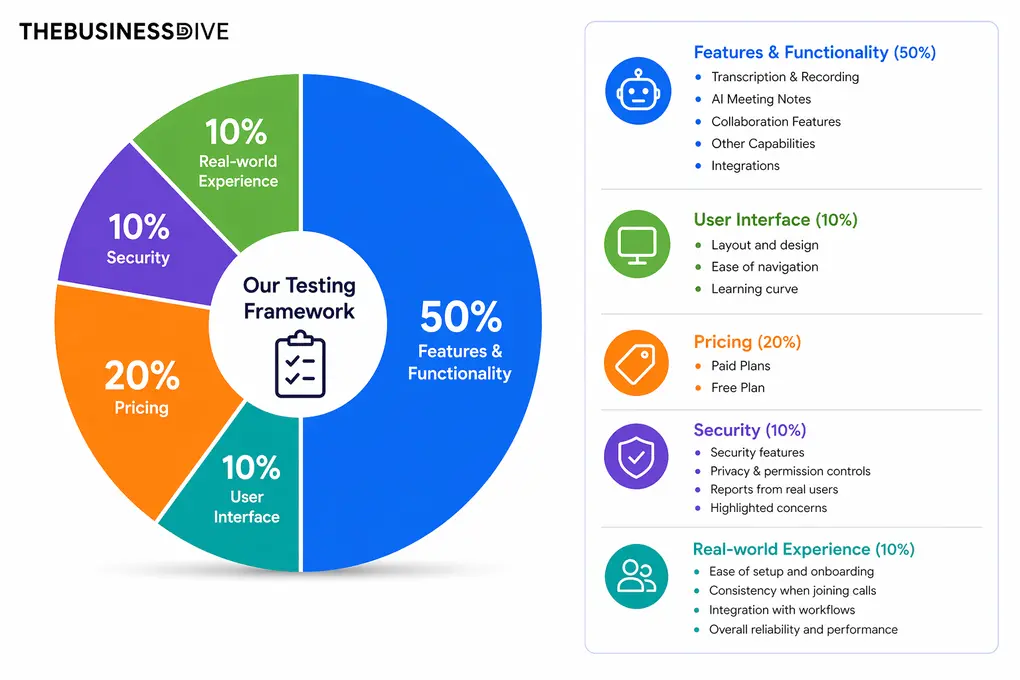
Our testing framework evaluates every AI note-taker across five categories:
🤖 Features & functionality — 50%
🖥️ User interface — 10%
💰 Pricing — 20%
🔐 Security — 10%
👥 Real-world experience — 10%
Want a detailed breakdown of how we test each category?
Learn exactly how we test AI note-takers → Review methodology
Detailed Reviews of the Best Read AI Alternatives
Wondering how each Read AI alternative performed during our testing?
Check out our detailed reviews for each option we selected.
Fellow
Fellow is an AI meeting assistant for teams, security-conscious organizations, and individual professionals. It handles recording, transcription, AI summaries, action items, and collaborative notes. Its transcription accuracy is among the best I experienced, while agendas and Ask Fellow make it more than a note-taking tool. Its strong security and governance controls also make it a good fit for regulated industries.
Quick verdict
Teams and organizations that want AI meeting notes plus agendas, collaboration, and strong security and governance controls.
You want a generous free plan or the cheapest possible AI note-taker.
Fellow combines highly accurate meeting notes with pre- and post-meeting tools Read AI doesn’t offer: shared agendas, collaborative notes, and configurable compliance controls.
Its extensive feature set comes with a short learning curve, while the free plan is fairly limited.
How Fellow features performed during my testing
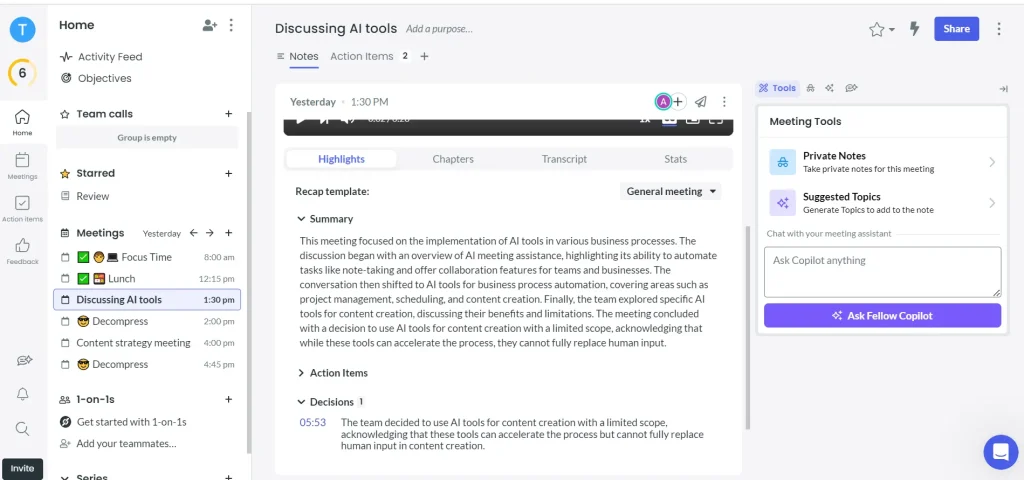
Bot and botless recording and transcription: Fellow gives you the flexibility to record meetings with or without a bot. I found the botless recording reliable in the background, while the bot option works across major meeting platforms and supports transcription in more than 92 languages. The transcription itself is one of Fellow’s strongest points in my experience, with 95%+ accuracy. I also like that organizations can set recording rules, control the default recording method, and use consent capture when needed.
AI meeting summaries: Fellow’s AI summaries turn a full meeting into a more manageable recap by pulling out key takeaways, action items, and decisions. In my experience, the summaries are consistently one of the most helpful parts of the post-meeting workflow.
Meeting agendas and pre-meeting briefs: Fellow’s agenda tools help teams establish talking points and action items before a call, while AI can suggest topics and provide a pre-meeting brief with information about participants and a recap of previous meetings. Fellow also extends its agenda functionality through Ask Fellow and MCP.
Ask Fellow: Ask Fellow lets you search and ask questions about information from your meetings. It can create, add to, rewrite, and reorder meeting agendas, while the MCP server lets compatible AI tools such as Claude work with Fellow meeting information.
Security and governance: Fellow’s security controls are a major reason I would consider it for organizations rather than just individual users. It is SOC 2 compliant, does not train models on your data, and gives admins control over recording rules, consent capture, password-protected sharing links for meeting notes, plus bot and botless recording options. Organizations can also use optional Zero-Day Retention, custom data retention policies, and redaction for transcripts, AI summaries, and video, while the Compliance Portal provides another layer of support for security and compliance management.
Fellow pricing
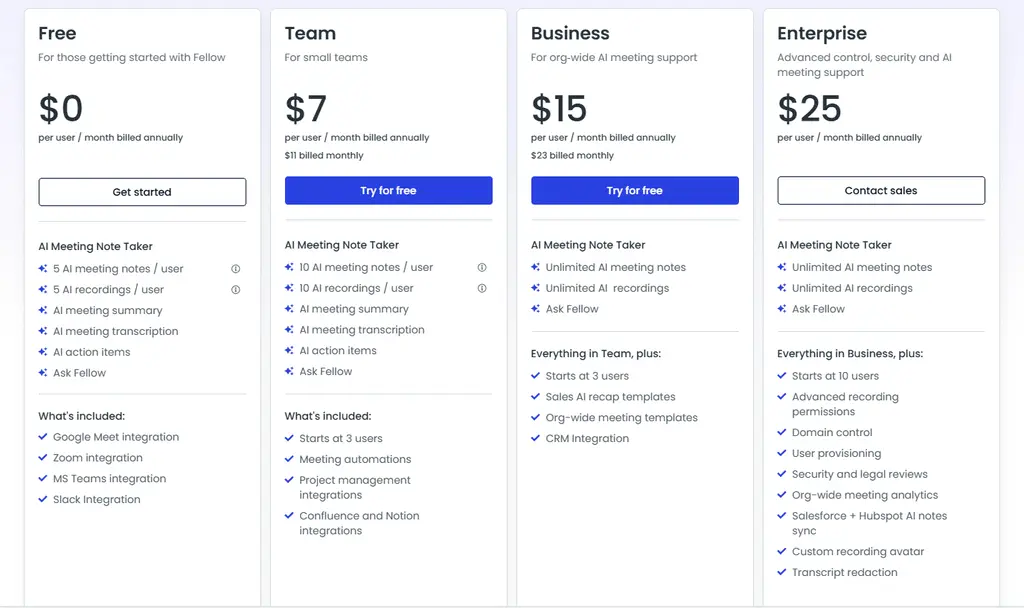
- Free plan: Available
- Solo plan: $19/month per user
- Team plan: $7/month per user
- Business plan: $15/month per user
- Enterprise plan: $25/month per user
Fellow strengths
Short wrap-up: Fellow is the strongest Read AI alternative for teams that need accurate AI meeting notes alongside structured agendas, action item tracking, and compliance-ready governance controls, particularly for organizations in regulated industries where data retention, redaction, and admin oversight matter as much as the notes themselves.
Fellow limitations
Short wrap-up: If your priority is a cheap, simple AI note-taker with a generous free plan, Fellow may offer more functionality and complexity than you need.
🔎 Read my full review: Fellow Review: My Thoughts After +12 Months (2026)
Use this link to sign up and get 10% off the paid plans if you upgrade

Fathom
Fathom is an AI meeting assistant that records, transcribes, and summarizes online meetings. It works with Zoom, Microsoft Teams, and Google Meet and supports 38 languages. I find it impressive for its combination of accurate transcription, simple AI notes, and an unusually generous free plan.
Quick verdict
Individuals and small teams that want accurate meeting notes without paying for the core features.
You need advanced meeting management, collaboration, or mobile recording.
Fathom offers unlimited recordings, transcriptions, and storage on its free plan.
It focuses on the essentials, so it lacks some of the more advanced features available in Read AI and other competitors.
How Fathom features performed during my testing
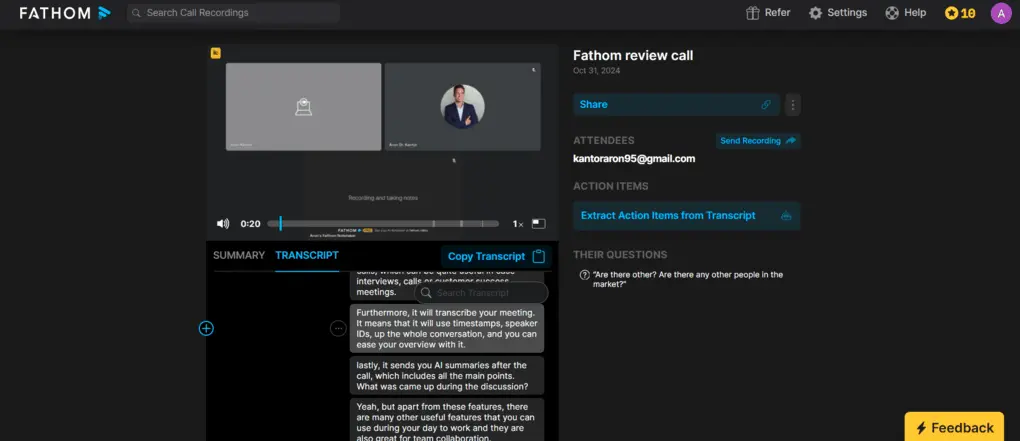
Transcription: Fathom delivers solid 85–90% transcription accuracy in my experience, although it’s not quite as accurate as Fellow or MeetGeek. I like that the transcript is easy to edit and that clicking a section of text takes you directly to that point in the recording.
AI meeting summaries: Fathom’s AI notes focus on the key points from a meeting rather than producing lengthy summaries. This structure is easy to scan, especially when reviewing several meetings in a row. However, if you prefer more detailed meeting notes, Fellow and some other alternatives offer greater depth.
Ask Fathom: Ask Fathom works like an AI assistant for your meeting recordings. I could ask questions about a call or use it to create a follow-up email without manually searching through the transcript. It is a useful productivity feature, although Fathom’s overall feature set remains more lightweight than Read AI.
Meeting recordings and clips: Fathom provides high-quality video recordings that you can share with your team, which is useful for customer success and recruiting workflows. You can also create short clips from specific moments in a meeting and share them through tools such as Slack.
Integrations and collaboration: Fathom integrates with tools including Slack, Asana, HubSpot, Salesforce, Close, and Zapier, giving it connections to more than 9000 other apps. Its team features also let users organize meetings into folders, add comments, and mention teammates.
Fathom pricing
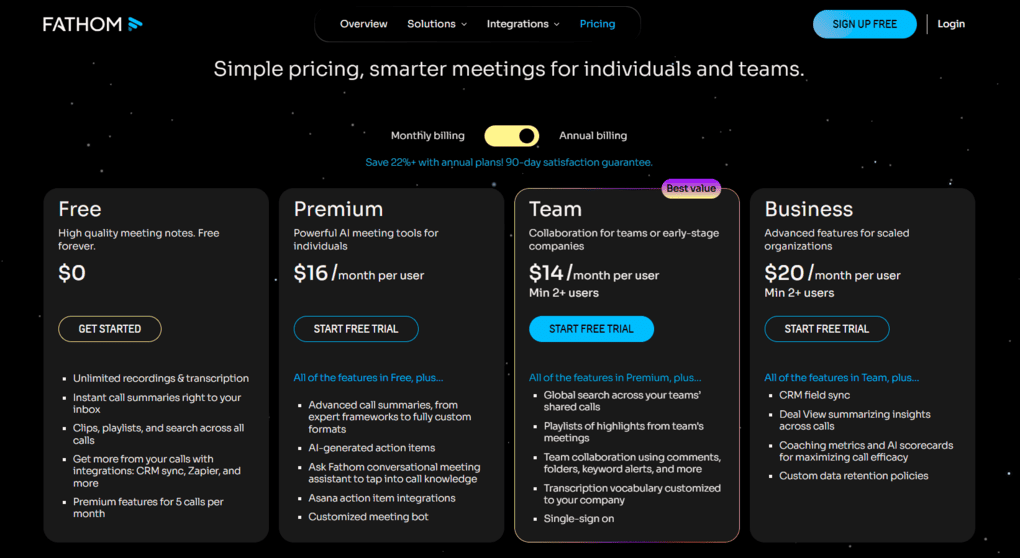
- Free plan: Available
- Premium plan: $16/user/month billed annually
- Team plan: $15/user/month billed annually (2 user min)
- Business plan: $25/user/month billed annually (2 user min)
- Enterprise plan: Custom pricing
Fathom strengths
Short wrap-up: Fathom is one of the best choices if you want a simple Read AI alternative that covers the core meeting-notetaking workflow without requiring a subscription.
Fathom limitations
Short wrap-up: If you need advanced meeting management, extensive collaboration features, or support for in-person meetings, Read AI or another more feature-rich alternative may be a better fit.
🔎 Read my full review: My Honest Fathom Review After Using It For +3 Months (2026)
If you want to try out Fathom, use this link to get FREE 3 months of premium features without an extra cost. This way, you can have 3X more time to test Fathom’s advanced features and decide whether to upgrade or stay with the free plan.
Fireflies AI
Fireflies is a versatile AI meeting assistant that records, transcribes, and summarizes meetings across most major video conferencing platforms. It supports more than 100 languages and offers a broad range of integrations, collaboration tools, and conversation intelligence features. In my experience, it consistently delivers reliable transcripts and well-structured summaries.
Quick verdict
Teams that need a versatile meeting assistant with broad platform and language support, integrations, and conversation intelligence.
You need generous meeting storage or the most advanced AI features without upgrading.
Fireflies combines meeting notes with extensive integrations, conversation intelligence, and support for 100+ languages.
The free plan has limited storage and AI credits, and its transcription accuracy is good rather than best-in-class.
How Fireflies features performed during my testing
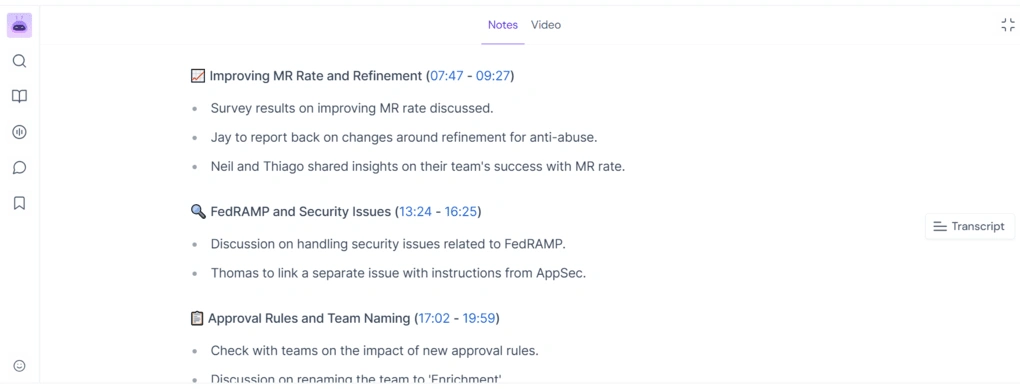
Transcription: Fireflies delivered between 85% and 95% transcription accuracy in my experience. It isn’t as accurate as Fellow, but I find it more reliable than Otter AI. I also like that transcripts are divided by speaker and that Fireflies can transcribe uploaded audio and video files in addition to meetings.
AI meeting summaries: Fireflies automatically creates meeting recaps with an overview, key points, timestamps, and action items. I find the summaries well structured and easy to scan, while smart search makes it simple to find specific questions, metrics, dates, or other details from a meeting.
Live Assist: Live Assist brings Fireflies into the meeting itself rather than limiting it to post-meeting notes. It can summarize what’s been discussed so far, identify action items, and help you catch up when joining a meeting late. I didn’t use it in every meeting, but when I needed to quickly understand a long conversation, it saved me from having to review the recording afterward.
Conversation intelligence: Fireflies offers analytics that can help teams understand how meetings are going, including speaker talk time and sentiment. It’s useful for sales calls, where conversation patterns and meeting metrics can provide useful coaching insights.
Collaboration and integrations: Fireflies is very strong for teams because it keeps meeting notes, recordings, and transcripts in one place while allowing teammates to edit, comment, and react to specific parts of a transcript. Its integrations include Google Calendar, Google Meet, Notion, ClickUp, monday.com, Slack, Google Docs, and Asana.
Fireflies pricing
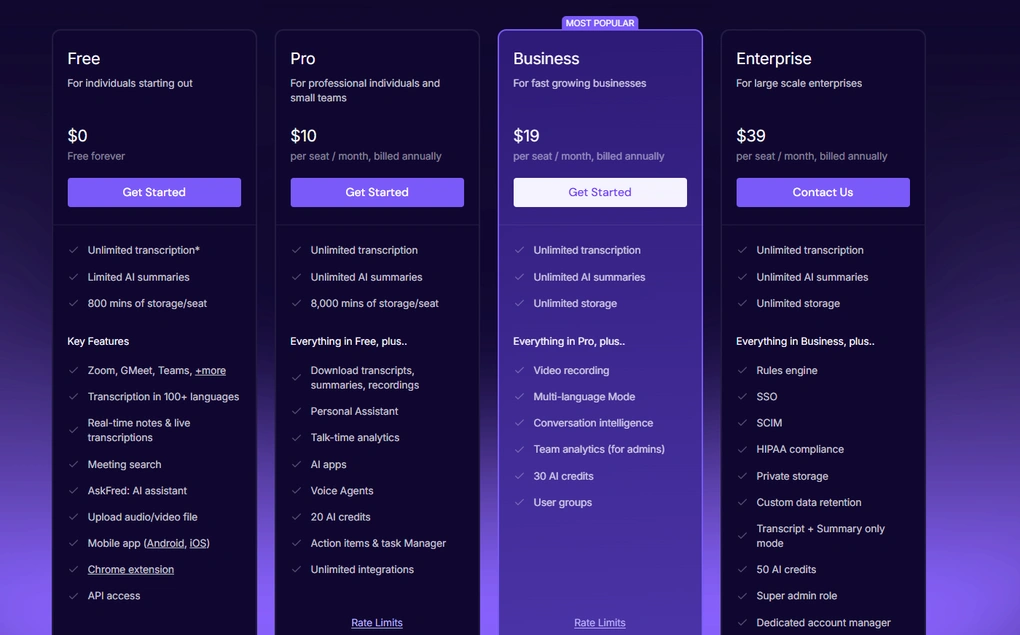
- Free plan: Available
- Pro plan: $10/month per user
- Business plan: $19/month per user
- Enterprise plan: $39/month per user
Fireflies strengths
Short wrap-up: Fireflies is a strong Read AI alternative for teams that want a versatile meeting assistant with excellent integrations, language support, and conversation intelligence without paying enterprise-level prices.
Fireflies limitations
Short wrap-up: If your priority is maximum transcription accuracy, a more advanced meeting-management workflow, or a generous free plan, Fellow, Fathom, or another specialized alternative may be a better fit.
🔎 Read my full review: Fireflies AI Review: Why is EVERYONE using it for meeting notes?
Otter AI
Otter AI is an AI meeting assistant focused on real-time transcription, meeting notes, and collaboration. It works with Zoom, Google Meet, and Microsoft Teams, and also lets you upload audio and video files for transcription. In my experience, it’s easy to use and strong for team collaboration, although its transcription accuracy and language support are less impressive than some competitors.
Quick verdict
Teams that want shared meeting notes, transcripts, and collaboration tools in one place.
You need highly accurate transcription, video recording, or broad language support.
Strong team collaboration features, including channels, shared spaces, comments, permissions, and task management.
Transcription accuracy and feature depth lag behind some of the stronger alternatives I tested.
How Otter AI features performed during my testing
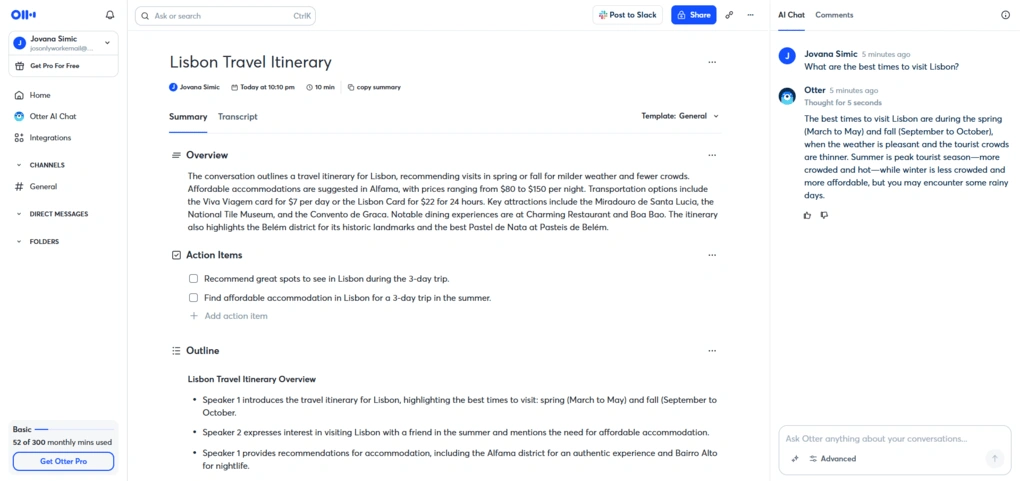
Real-time transcription: Otter transcribes meetings in real time and automatically organizes the transcript with timestamps and speaker labels. In clear audio, I got around 85% accuracy, with only occasional mistakes that were easy to correct manually. However, it was less accurate than Fireflies, Fathom, Fellow, and tl;dv in my testing, and speaker identification sometimes needed manual corrections.
AI meeting summaries: After a meeting, Otter automatically highlights key points and creates action items. These summaries are useful for quickly reviewing what was discussed, but they are fairly basic compared with Fellow and MeetGeek. It is a good fit if you prefer minimalist meeting notes rather than highly detailed AI recaps.
Channels and shared spaces: Channels are one of Otter’s strongest team features. You can create public or private spaces where meeting transcripts, summaries, recordings, and highlights stay organized and searchable.
Collaboration and task management: I’m pleasantly surprised by Otter’s collaboration tools. Team members can share transcripts, add time-stamped comments, control viewer or collaborator permissions, and highlight important sections. You can also turn action items into tasks, assign them to teammates, and track their progress.
Otter AI Chat: Otter AI Chat lets you interact with your meeting transcripts instead of manually searching through them. I could ask questions, extract action items, or quickly recall information from older conversations, and the responses were fast and accurate in my testing. It adds a useful layer of interaction to Otter’s otherwise straightforward transcription workflow.
Otter AI pricing
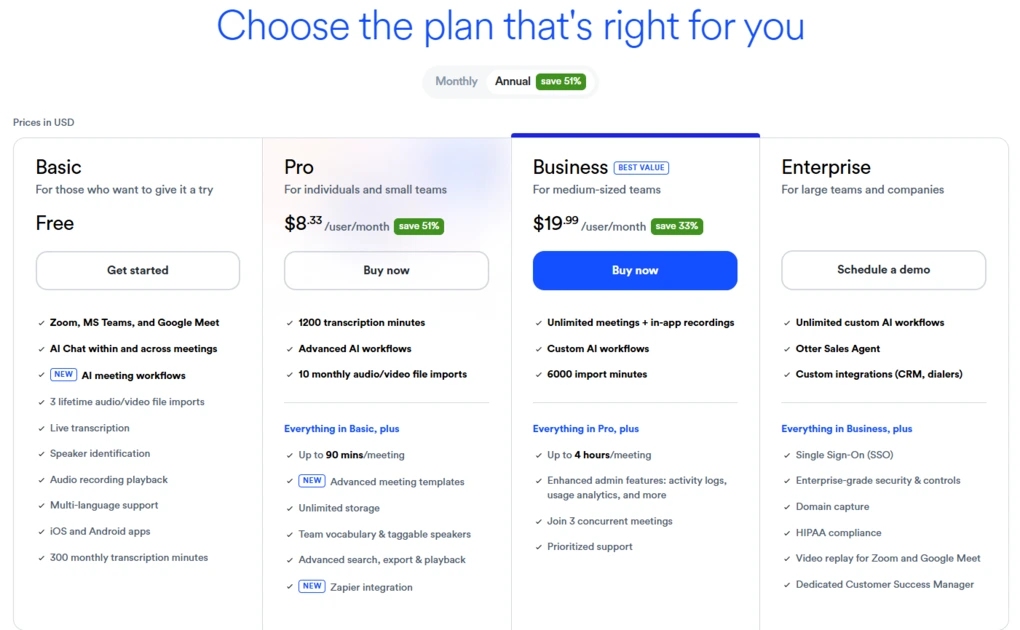
- Free plan: Available
- Pro plan: $8.33/month per user
- Business plan: $19.99/month per user
- Enterprise plan: Custom pricing
Otter AI strengths
Short wrap-up: Otter is a good Read AI alternative for teams that care more about sharing and collaborating on meeting content than getting the most advanced AI notes.
Otter AI limitations
Short wrap-up: If accurate transcription, video recording, or advanced meeting intelligence is your priority, Read AI or another more feature-rich alternative is likely a better choice.
🔎 Read my full review: Otter AI Review | My Brutal Honest Take (2026)
Granola
Granola is a lightweight AI meeting assistant that focuses on bot-free transcription and AI-generated notes. It works with Google Meet, Zoom, and Microsoft Teams through its desktop app. It’s very easy to use, with accurate transcription and an excellent approach to combining your own notes with AI-generated summaries.
Quick verdict
Individuals who want lightweight, bot-free transcription and AI meeting notes.
You need meeting recordings, advanced collaboration, or deeper meeting analytics.
Granola combines bot-free transcription with your own meeting notes to create more personalized AI summaries.
Its minimalist approach also means fewer features and less workflow depth than Read AI.
How Granola features performed during my testing
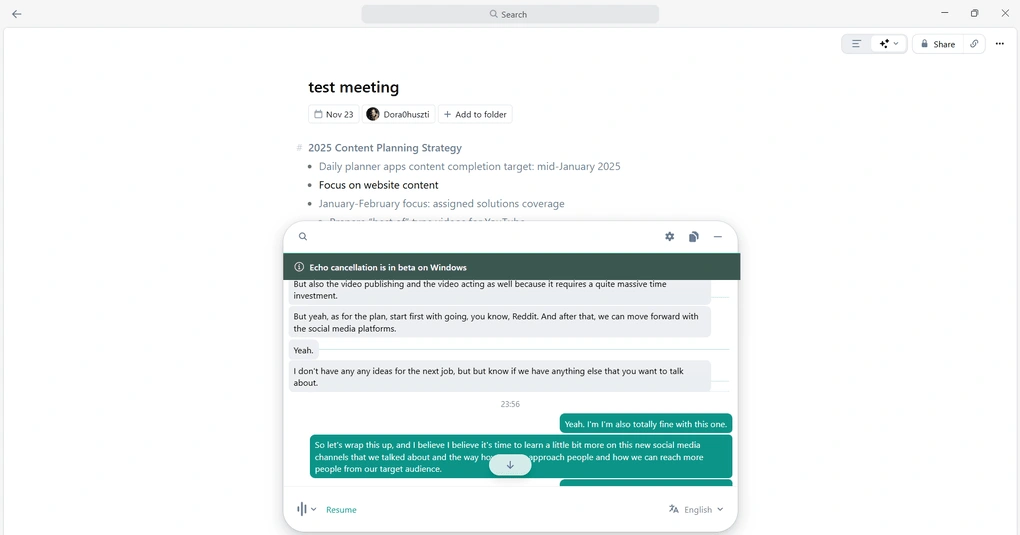
Bot-free transcription: Granola listens to your device’s audio instead of adding a bot to the meeting, so other participants don’t see an AI assistant join the call. This approach is less intrusive and I noticed that conversations are more natural without another participant in the meeting. The live transcript is accurate, although speaker identification is basic and transcripts label participants as Speaker A, Speaker B, and so on.
AI meeting notes: This is the feature that impressed me most. Granola doesn’t just summarize the transcript, it also incorporates the notes you take during the meeting into the final AI-generated summary. Even when my notes were messy shorthand, the Enhance notes function turned them into structured, usable meeting notes.
Ask Granola: Ask Granola works like an AI chatbot for your meetings, letting you ask questions, create follow-ups, or identify action items. Its fast and useful for getting specific information. It’s also included in the Free plan, which makes the feature easy to try.
Meeting templates: Granola offers templates for different meeting types, including 1:1s and customer calls. You can customize the structure by adding or removing sections, so the resulting notes follow the format you actually need. It’s a useful addition to an otherwise minimalist tool, particularly for recurring meeting types.
Integrations and sharing: Granola integrates with tools such as Google Workspace, HubSpot, Slack, and Zapier, and you can share meeting notes through email, Slack, links, or copied text. Shared folders also let small teams centralize meeting notes. However, its collaboration capabilities remain fairly basic compared with tools such as Fellow or Fireflies.
Granola pricing
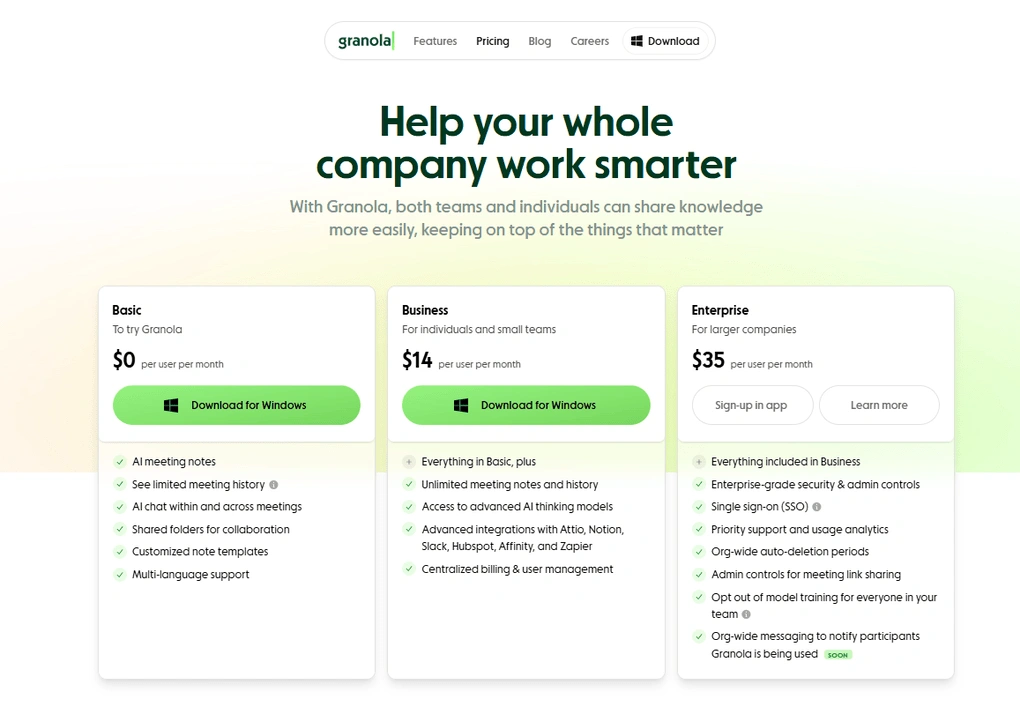
- Free plan: Available
- Business plan: $14/month per user
- Enterprise plan: $35/month per user
Granola strengths
Short wrap-up: Granola is a strong Read AI alternative if you want a simple, unobtrusive meeting assistant that turns both the conversation and your own notes into useful summaries.
Granola limitations
Short wrap-up: If you need recordings, advanced collaboration, or deeper meeting intelligence, Read AI or a more feature-rich alternative will be a better fit.
🔎 Read my full review: Granola Review 2026: Why It Won’t Work for Everyone
Explore our Apps directory
A curated directory of software tools we’ve independently reviewed, with links to full reviews, comparisons, and category guides.
tl;dv
tl;dv is an AI meeting assistant for recording, transcription, and AI-generated meeting notes. It works with Microsoft Teams, Zoom, and Google Meet, supports more than 30 languages, and can also transcribe uploaded audio and video files. After using it as a default AI note-taker for more than 18 months, I find it easy to use, accurate, and useful for turning information from multiple meetings into valuable insights.
Quick verdict
Teams and individuals who want to analyze information across multiple meetings and automate post-meeting workflows.
You need bot-free recording, advanced enterprise controls, or a highly polished mobile experience.
tl;dv can turn information from multiple meetings into AI insights, reports, and automated workflows.
Some of its most advanced AI capabilities are reserved for higher-tier plans.
How tl;dv features performed during my testing
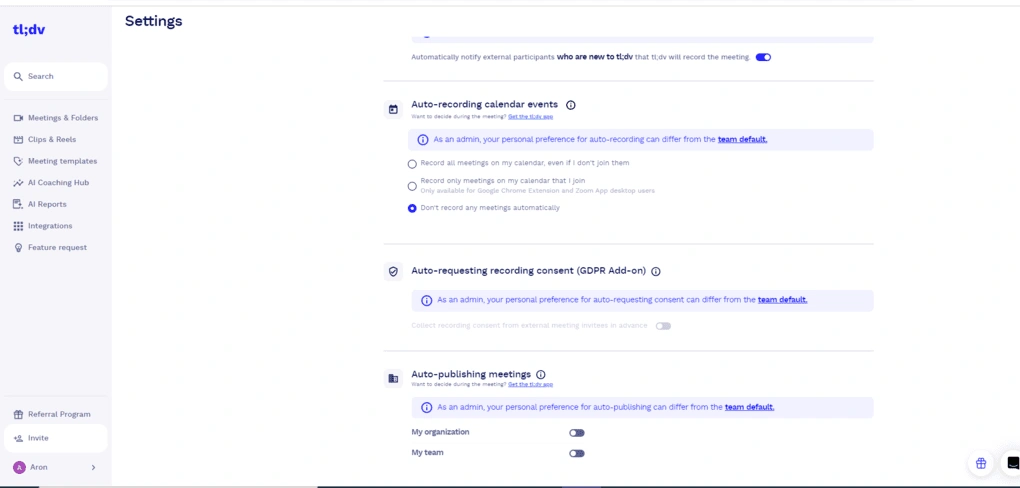
Transcription and recording: tl;dv automatically records and transcribes meetings on Microsoft Teams, Zoom, and Google Meet, while also supporting uploaded files. Its transcriptions are highly accurate, although they don’t quite reach Fellow’s level. The process is also fairly fast, with recordings, transcripts, and notes generally available within 10–15 minutes after a meeting.
AI meeting notes: This is one of my favorite features. tl;dv turns meetings into concise notes covering key points, next steps, and other customizable sections based on the meeting template. This makes individual meetings easy to review, while the built-in AI chatbot can answer questions about the meeting or summarize specific moments.
Multi-meeting AI insights: tl;dv can analyze multiple meetings at once instead of limiting AI questions to a single conversation. It’s useful for spotting recurring topics, comparing what changed between meetings, and collecting action items across several calls. You can also use global search and smart trackers to monitor specific keywords or phrases across your meetings.
AI reports: AI reports go beyond asking questions about individual meetings by creating structured, recurring overviews from your meeting history. You can choose what information to include, which meetings to analyze, and when to receive the report. It’s useful for keeping track of recurring action items, deadlines, and other information across multiple conversations.
Meeting templates and AI agents: Meeting templates let you structure notes around specific use cases such as sales, HR, customer success, management, or product meetings. You can also create custom templates and map sections to CRM fields. AI agents take this further by automating post-meeting workflows, turning decisions, customer requests, and next steps into structured outputs.
tl;dv pricing
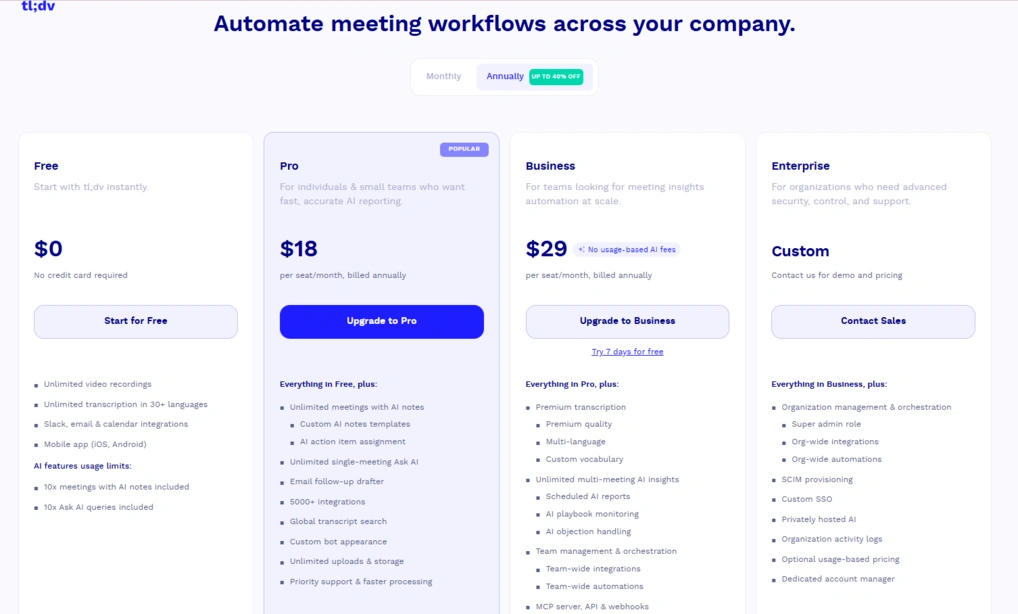
- Free plan: Available
- Pro plan: $18/month per user
- Business plan: $29/month per user
- Enterprise plan: Custom pricing
tl;dv strengths
Short wrap-up: tl;dv is an excellent Read AI alternative if you need to connect insights from multiple meetings, generate recurring reports, and automate post-meeting workflows.
tl;dv limitations
Short wrap-up: If you need bot-free meetings, advanced enterprise controls, or higher transcription accuracy, Fellow or another specialized alternative may be a better fit.
🔎 Read my full review: My Honest Tl;dv Review After Using It For +18 Months (2026)
If you fall in love with tl;dv and switch to paid plans in the future, you will get a 30% discount for the first six months if you use this link for sign-up.
MeetGeek
MeetGeek is an AI meeting assistant that records, transcribes, and summarizes meetings and uploaded audio or video files. It works with Microsoft Teams, Zoom, and Google Meet and supports more than 100 languages. After testing it extensively, I find it impressive for its transcription accuracy and the level of detail in its AI-generated meeting notes.
Quick verdict
Professionals and teams that want highly accurate transcription and detailed AI meeting summaries.
You want a lightweight note-taker or a generous amount of transcription minutes on lower-tier plans.
MeetGeek combines highly accurate transcription with exceptionally detailed AI meeting summaries.
Its extensive feature set can feel overwhelming, and some usage limits are relatively restrictive.
How MeetGeek features performed during my testing
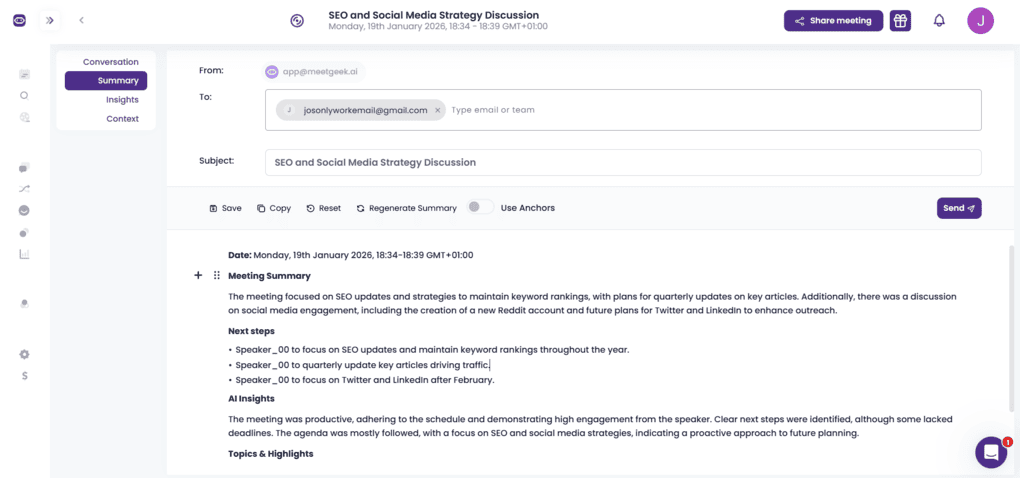
Transcription and recording: MeetGeek delivered more than 95% transcription accuracy in my testing, making it one of the most accurate AI note-takers I have tried. It identifies speakers and adds timestamps, while also allowing you to transcribe uploaded audio and video files. MeetGeek supports both bot-based and botless recording, giving you more flexibility depending on the meeting.
AI meeting summaries: This is one of MeetGeek’s strongest features. Instead of producing a basic recap, it breaks meetings down into tasks, next steps, concerns, facts, and decisions. I find the summaries detailed enough to understand the main points of a meeting, and you can edit and share them with your team.
Meeting insights and analytics: MeetGeek goes beyond summarizing what was said by analyzing how the meeting unfolded. It provides insights such as talk time, participation, sentiment, silence rate, punctuality, and engagement. In my experience, these analytics were among the most advanced I encountered, making this feature very valuable for sales and customer-facing teams.
AI Chat and meeting history: AI Chat lets you ask questions about your stored meetings. It’s useful for quickly retrieving details from previous conversations, especially as your meeting history grows. This makes MeetGeek more useful over time.
Integrations and workflows: MeetGeek supports 20,000+ apps through Zapier, n8n, and Make. I like the HubSpot integration because it can automatically move meeting information and key highlights into the CRM, reducing manual work after customer calls.
MeetGeek pricing
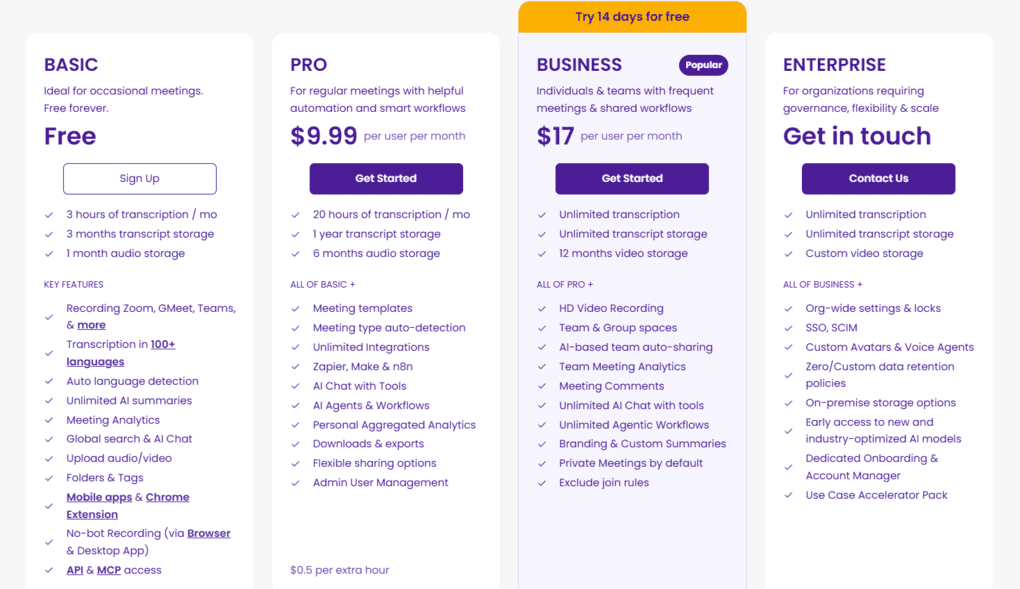
- Free plan: Available
- Pro plan: $9.99/user/month billed annually
- Business plan: $17/user/month billed annually
- Enterprise plan: Custom pricing
MeetGeek strengths
Short wrap-up: MeetGeek is a strong Read AI alternative if detailed AI summaries and highly accurate transcription matter more to you than having the simplest possible meeting assistant.
MeetGeek limitations
Short wrap-up: If you want a lightweight meeting note-taker with fewer features or a more generous free plan, Fathom or Granola may be a better fit.
🔎 Read my full review: MeetGeek Review: Is It The Best AI Note-Taker For You? (2026)
In conclusion
Read AI is a capable AI meeting assistant, but it isn’t necessarily the best fit for every team or workflow. I hope this guide helped you find a Read AI alternative that fits your needs and your budget.
Now, all that’s left is to choose the one that feels like the right fit and put it to the test. If you try one of these alternatives, I’d love to hear how it worked for you!
Related articles:
- Best Granola Alternatives 2026 | My Top 6 After Testing 25+ Tools
- Best 9 AI-Note Takers | My Top Picks After +2 Years Testing (2026)
- Best Fireflies AI Alternatives 2026 | Top 5 Picks + Discounts
- Fireflies AI vs Otter AI: A Side-by-Side Comparison In 2026
- Best 5 Otter AI Alternatives | 20+ Personally Tested Apps (2026)
- 7 Best Zoom Note-Taker Apps: My Findings After 2 Years (2026)
- 5 Best Bot-Free AI Note-Takers In 2026 (NOT What You’d Think)
Looking for similar tools?
Visit our library of PDF editors to explore other apps we’ve reviewed in this space and how they compare.
Why you can trust our reviews
At thebusinessdive.com, our team tests, reviews, and compares hundreds of productivity apps every year — from project management tools to note-taking apps. We dive deep into real-world use cases to help you find the right tools that actually improve your workflow, not just add noise.
Our mission? No fluff, no shortcuts—just honest, hands-on insights from productivity pros.
Discover how we stay transparent, read our review methodology, and let us know about any tools we missed.
Frequently Asked Questions
What should I look for when evaluating AI meeting assistants?
When evaluating AI meeting assistants, look at meeting transcription accuracy, the quality of automated meeting summaries, available AI models, integrations, and pricing. It’s also worth checking whether the tool supports custom meeting templates, unlimited meetings or recordings, and the virtual meetings and video conferencing platforms your team already uses.
Which AI meeting assistant is best for sales and revenue teams?
The best choice depends on your workflow, but Fireflies is designed specifically for revenue and RevOps teams, while Chorus by ZoomInfo is best suited to enterprise sales teams. Tools with features such as sentiment analysis, talk-to-listen ratios, key moments, and multi-meeting intelligence can be particularly useful for sales and revenue teams.
Can AI meeting assistants capture and summarize scheduled calls automatically?
Yes. Many AI-powered meeting assistants can connect to your Google or Outlook calendars and automatically capture scheduled calls. They can then generate meeting transcription, automated meeting summaries, key insights, and action items without requiring you to take notes manually. Some tools use an AI bot to join the meeting, while others, such as Bluedot, can capture meetings without deploying a bot.
Are there AI meeting assistants with unlimited meeting recordings?
Yes. Some tools offer unlimited meeting recordings, although the exact limits vary by plan. For example, Fathom offers unlimited recordings on its free version, while other tools may limit recording time, storage, or access to AI features depending on whether you use the free or basic plan.
What are the main drawbacks of Read AI?
Read AI has several limitations worth considering when choosing an alternative. It requires extensive calendar permissions, and its sentiment analysis can sometimes misinterpret context. Users have also criticized its customer support and GDPR compliance, while its Trustpilot score is currently 1.5/5. If data control is a priority, alternatives such as Fellow or Bluedot offer tighter control over user data.
Disclosure: I only recommend products I would use myself, and all opinions expressed here are my own. This post may contain affiliate links through which, at no additional cost to you, I may earn a small commission. Read the full privacy policy here.

Hey there! I am Aron, the founder of Thebusinessdive. I have been testing productivity apps for almost three years now. I reach 25.000 -50.000 people monthly with the mission to help you find the perfect productivity apps. Subscribe to my YouTube channel, newsletter, and social media to hear more about the best productivity tools. Let’s dive in!