


9 Best Motion Alternatives | I Tried 20+ Apps (2026)
Motion is one of the most talked-about productivity tools right now, and for a good reason. It promises to plan your day automatically, reschedule tasks when things change, and reduce the mental load of daily planning.
But after testing Motion and dozens of similar tools, one thing became clear: Motion is powerful, but it is not for everyone.
It is expensive, requires a learning curve, and sometimes the AI scheduling just does not nail it.
So instead of settling for a tool that almost works, I spent months testing Motion alternatives. In total, I tested over 20 tools that can realistically replace Motion in 2026.
Out of all the tools I tested, I narrowed the list down to the best 9 Motion alternatives.
Keep reading to discover which tools made the list, how they work, how much they cost, and their main strengths and limitations.
Let’s dive in!
Which are the best Motion alternatives in 2026?
To narrow the list down, I focused on tools that can replace Motion’s core purpose. That includes planning, scheduling, and organizing tasks, without forcing you to adopt Motion’s exact way of working.
Here are the main criteria I used:
Without further ado, let’s see which apps made the list.
My list of the best Motion alternatives in 2026
Here are the best Motion alternatives in 2026:
|
Motion alternatives |
Overall experience |
My top picks |
|---|---|---|
 |
Best Motion alternative for individuals |
|
 |
Best Motion alternative for work-life balance |
|
 |
Best Motion alternative for AI-powered scheduling |
|
 |
Best free Motion alternative |
|
 |
Best Motion alternative for task management |
|
 |
Best Motion alternative for project management |
|
 |
Best Motion alternative for a to-do list workflow |
|
 |
Best Motion alternative for team collaboration |
|
 |
Best Motion alternative for simple scheduling |
Best Motion Alternative #1 | Morgen
Best Motion alternative for individuals
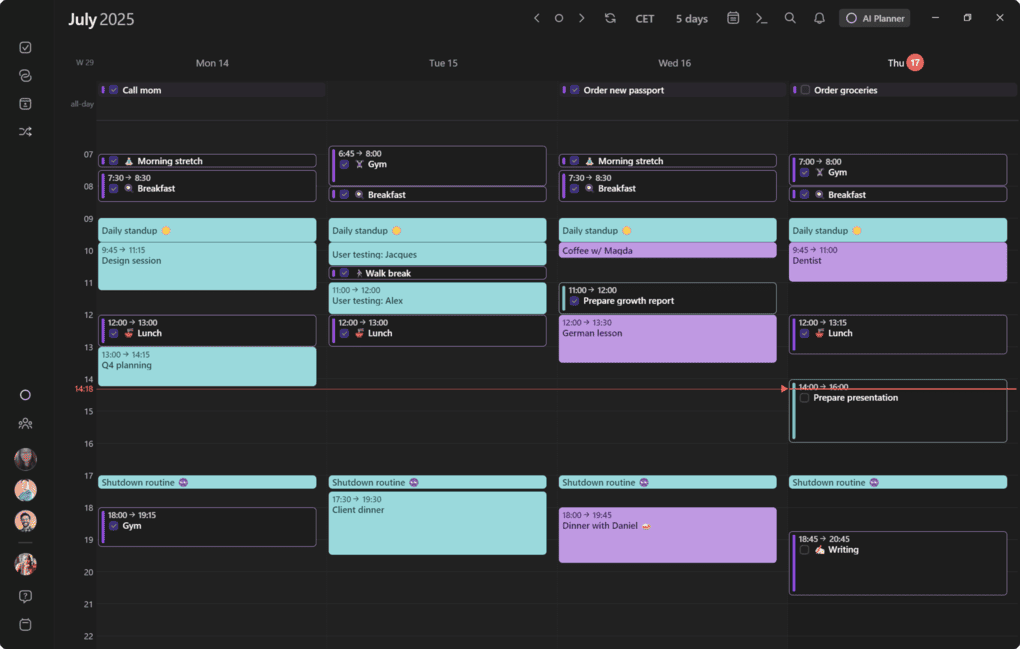
Morgen is a cross-platform daily planner that combines calendars, tasks, and scheduling in one app. As a Motion alternative, it works especially well for individuals who want a clear daily planning system without heavy automation or team-focused complexity.
In my testing, Morgen came closest to replacing Motion for solo users who plan their day around a calendar but still want full control over how tasks are scheduled.
Key features
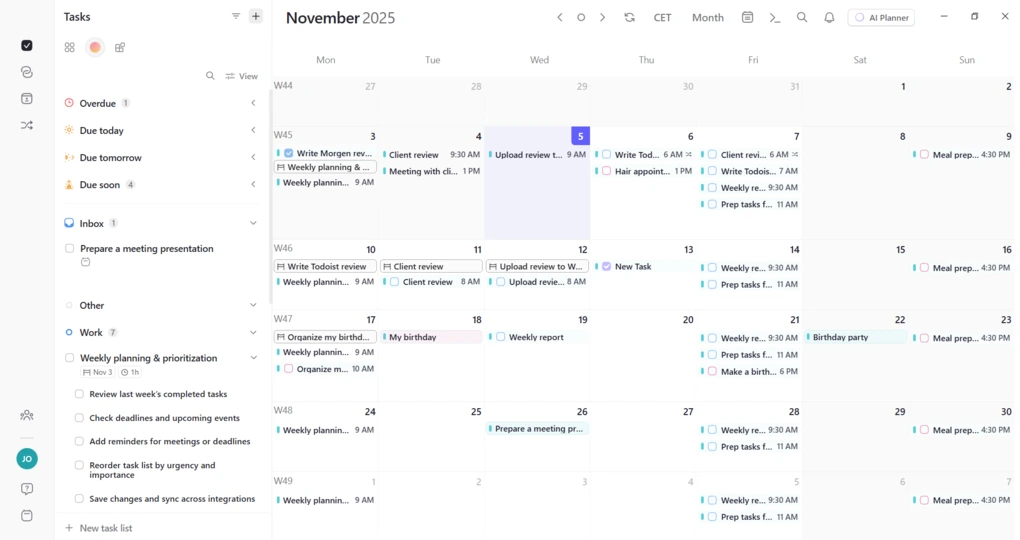
Unified calendar and tasks: Morgen brings multiple calendars and task lists into one beautiful user interface, so you can plan personal and work commitments together. This is especially helpful if you manage more than one calendar and want a realistic picture of your available time.
Flexible calendar views and time blocking: You can switch between day, week, two-week, month, and agenda views or save a custom layout. Drag-and-drop scheduling, recurring events, reminders, and color coding make time blocking simple and visual, without forcing automatic changes to your schedule.
Straightforward task management: Tasks can be created from the sidebar or directly from the calendar and organized into lists. You can add due dates, tags, colors, and subtasks, then drag tasks into the calendar when they need dedicated time. This keeps daily planning intentional and under your control.
AI Planner and Frames: Morgen includes an optional AI Planner that suggests where tasks should fit around existing events. Frames such as deep work or admin time help structure your day, making the automation feel supportive rather than intrusive. This works well for individuals who want guidance instead of full autopilot scheduling.
Meeting scheduler and booking links: Morgen includes built-in scheduling links that let others book time with you based on your real availability. You can add Zoom, Google Meet, Teams, or Webex links and avoid back-and-forth emails without relying on a separate scheduling tool.
Integrations: Morgen integrates with tools like Todoist, Notion, ClickUp, Linear, Apple Reminders, Google Tasks, Obsidian, and Microsoft To Do, alongside Google Calendar, Outlook, and iCloud. These integrations make it easy to keep tasks and events flowing into one daily planning space.
Mobile apps: The iOS and Android apps are fast and easy to use for daily adjustments. Sync is reliable, and adding or editing tasks and events feels smooth, which makes Morgen practical even when plans change during the day.
Pricing
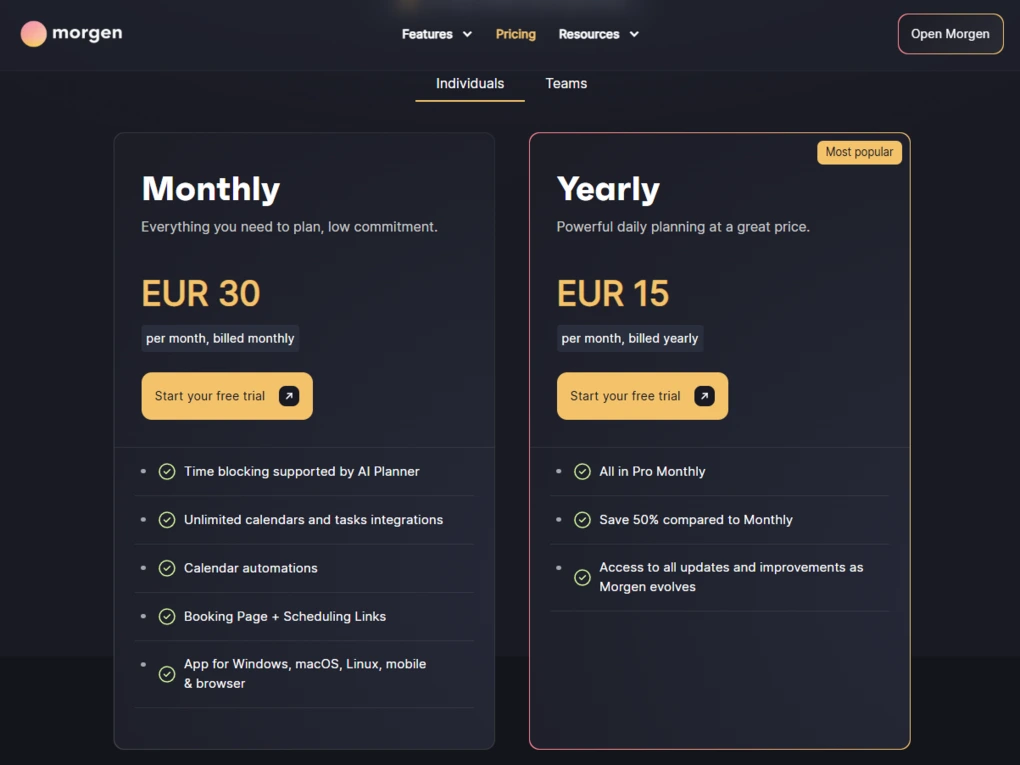
Morgen keeps pricing straightforward, with separate plans for individuals and teams.
You can start with a 14-day free trial that unlocks nearly all Pro features, giving you enough time to properly test the app before committing. There’s no permanent free plan, so after the trial, you’ll need a subscription to continue using Morgen.
For individuals, Morgen Pro costs €30 per month or €15 per month when billed yearly. Teams pay €25 per seat monthly or €10 per seat on annual billing, with a minimum of two seats and extra collaboration options like shared booking pages.
There is also a 30-day money-back guarantee, plus discounts for people switching from certain tools and for students, academics, and nonprofits. In some regions, localized pricing can bring the total down further.
My experience with Morgen
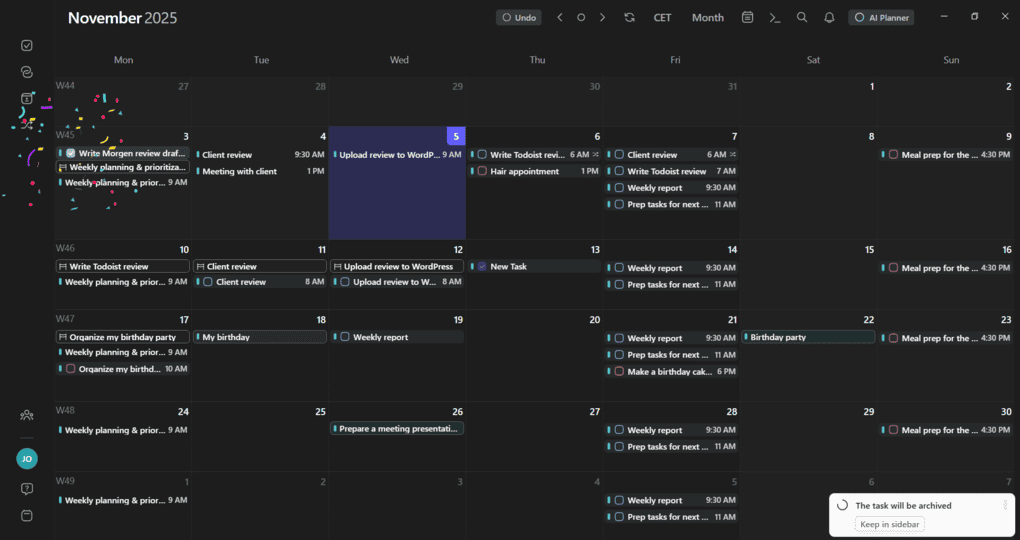
I used Morgen as my main daily planner for several weeks, focusing on individual work rather than team collaboration. Once everything was connected, calendars, tasks, and meetings lived in one place, which immediately reduced context switching.
Compared to Motion, the experience felt calmer and more predictable. I liked that I could plan manually and still use light AI support through Frames when I wanted structure, without having my schedule constantly reshuffled.
🔎 Read my full review: My Honest Morgen Review After 5 Weeks (2026)
Short on time? Here’s a quick overview of Morgen
Pros and cons of Morgen
Pros of Morgen
Cons of Morgen
Why Morgen is the best Motion alternative for individuals
Morgen keeps the strongest parts of Motion: a unified calendar, task scheduling, and structured daily planning, while removing much of the complexity.
For individuals who want control over their day, optional AI support, and a clean planning experience without team overhead, Morgen is the most balanced Motion alternative on this list.
Best Motion Alternative #2 | Sunsama
Best Motion alternative for work-life balance
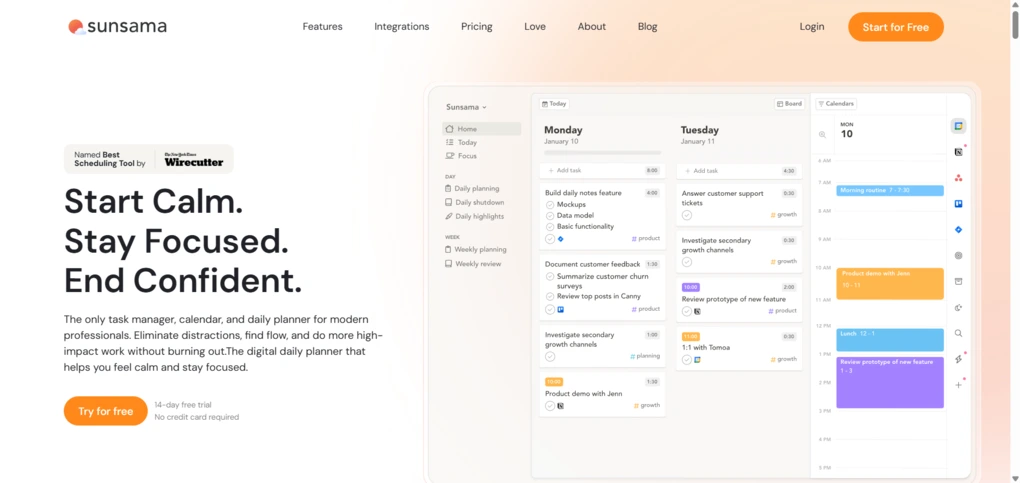
Sunsama is a daily planning app designed to help you build realistic schedules and maintain a healthy balance between work and personal life. As a Motion alternative, it focuses less on automatic scheduling and more on intentional, guided planning that helps prevent overcommitment.
In my testing, Sunsama felt like the best choice if Motion’s automation feels stressful or too rigid and you want a planner that actively encourages sustainable daily habits.
Key features
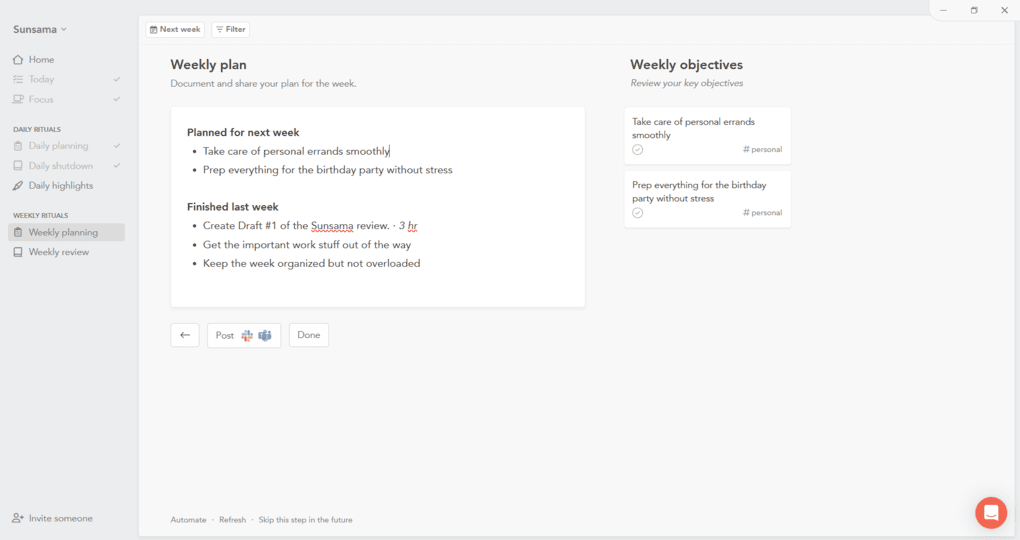
Guided daily planning workflow: Sunsama is built around a daily planning ritual. Each morning, you review tasks, choose what actually matters, and place those tasks on your calendar. This forces you to acknowledge time limits and makes it harder to overload your day, which is ideal if burnout is a concern.
Weekly objectives and review: You can set weekly goals and link them to daily tasks. At the end of the week, Sunsama shows what you completed, how your time was distributed, and where you overcommitted. This reflection loop helps you plan future weeks more realistically.
Task management with channels and contexts: Tasks can include planned time, subtasks, recurring schedules, and tags. Channels organize tasks by type of work, while contexts group channels into areas like Work or Personal. This separation helps keep boundaries clear and supports a better work-life balance.
Time blocking with built-in time tracking: Once tasks are scheduled, Sunsama shows a live timeline of your day. Built-in time tracking lets you compare planned time with actual time spent, which helps you understand where work expands and where personal time gets squeezed.
Focus Mode and daily shutdown ritual: Focus Mode helps reduce distractions during work blocks, while the daily shutdown ritual encourages you to review what was completed and consciously end the workday. This feature alone makes Sunsama stand out as a Motion alternative focused on mental clarity.
Integrations: Sunsama integrates with Google Calendar, Outlook, iCloud, Todoist, Asana, Trello, and Notion. Imported tasks appear in a sidebar and can be dragged directly into your daily plan, keeping everything in one place without manual copying.
Pricing

Sunsama does not offer a free plan, but you can try it with a 14-day free trial with no credit card required. The trial unlocks the full planner, including daily and weekly workflows, time tracking, and integrations.
After the trial, Sunsama has a single paid plan that costs $20 per month, or $16 per month when billed annually. All features are included in this tier, and team members are billed per user at the same price. It is more expensive than many daily planners, but it makes sense if you plan to use Sunsama as your primary planning environment.
My experience with Sunsama
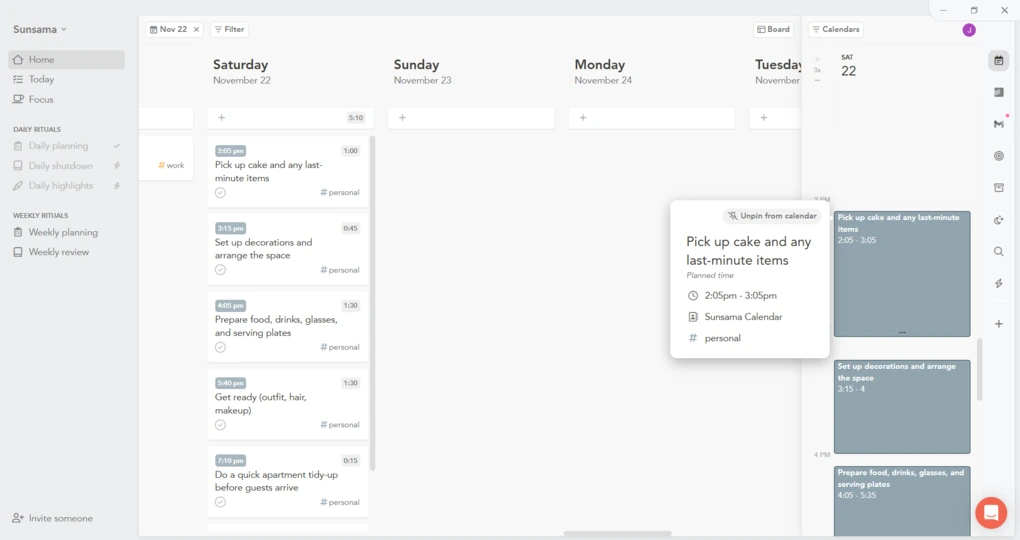
I used Sunsama for several weeks while managing both work and personal tasks. The guided planning flow made me slow down and think before committing to tasks, which immediately reduced unrealistic daily plans.
Compared to Motion, Sunsama felt less powerful but far more humane. Instead of reshuffling tasks automatically, it encouraged me to make conscious decisions about my time, which helped keep evenings and weekends clearer.
🔎 Read my full review: An Unfiltered Sunsama Review (2026): Is It Worth $20/Month?
Short on time? Here’s a quick overview of Sunsama
Pros and cons of Sunsama
Pros of Sunsama
Cons of Sunsama
Why Sunsama is the best Motion alternative for work-life balance
Sunsama does not try to optimize every minute of your day. Instead, it helps you plan intentionally, respect your limits, and shut work off when the day is done. If Motion feels too aggressive or overwhelming, Sunsama is the strongest alternative for building a sustainable planning routine that protects your time and energy.
Related posts:
- Akiflow vs Sunsama (2026): An Honest Comparison
- Sunsama vs Motion 2026: I found the best one for you
Best Motion Alternative #3 | Reclaim AI
Best Motion alternative for AI-powered scheduling
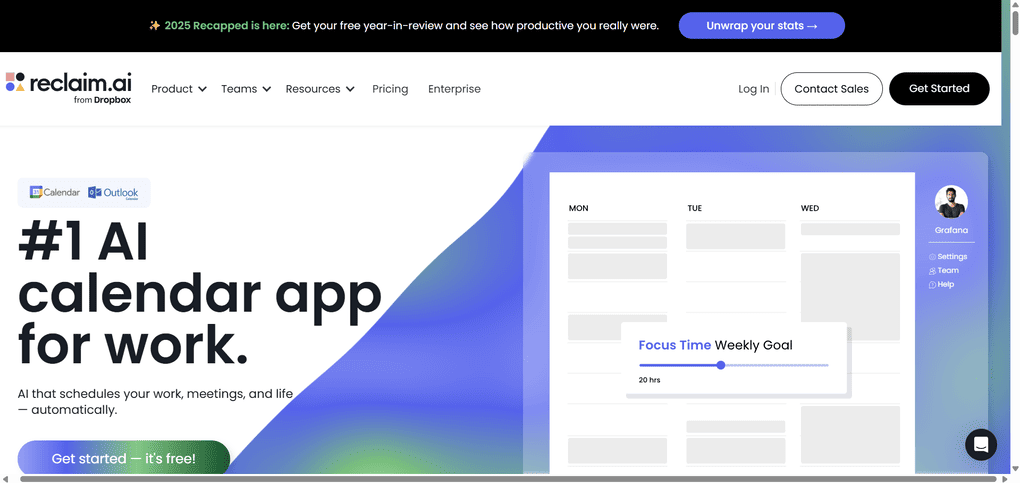
Reclaim AI is an intelligent scheduling tool that automatically finds time for tasks, habits, and meetings by continuously reshuffling your calendar. As a Motion alternative, it comes closest to replicating Motion’s auto-scheduling logic, but with more transparent rules and less complexity.
In my testing, Reclaim AI felt like the best option if you want strong AI scheduling without committing to Motion’s full all-in-one workspace.
Key features
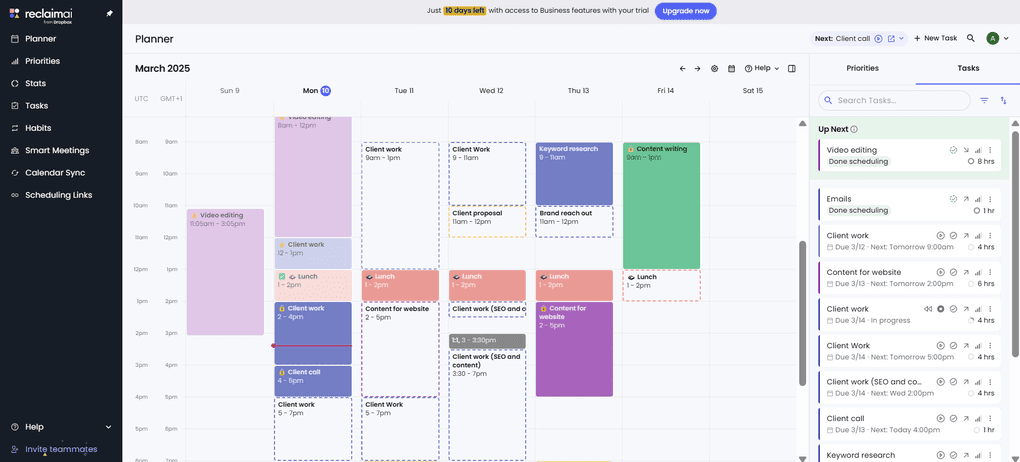
Automatic task scheduling: Reclaim schedules tasks directly into your calendar based on priority, deadlines, and available time. When meetings move or new events appear, tasks are rescheduled automatically, keeping your plan realistic without constant manual adjustments.
Habit and routine protection: You can create habits such as workouts, lunch breaks, or focus time, and assign priority levels to them. Reclaim actively protects these blocks and reschedules them when conflicts appear, which makes it especially strong for maintaining routines alongside work.
Smart meetings and scheduling links: Reclaim includes scheduling links that reflect your real availability across connected calendars. It also helps teams find optimal times for recurring meetings by analyzing everyone’s schedules and preferred working hours.
Task integrations instead of native task management: Rather than acting as a full task manager, Reclaim pulls tasks from tools like Todoist, Asana, ClickUp, Jira, HubSpot, and Google Tasks. This allows you to keep your existing task system while letting Reclaim handle scheduling.
Calendar visibility and analytics: Reclaim provides insights into how your time is distributed between meetings, focus work, habits, and personal time. These analytics help you spot overload patterns and adjust priorities before burnout sets in.
Integrations: Reclaim integrates deeply with Google Calendar and supports task and project tools such as Todoist, Asana, ClickUp, Jira, HubSpot, and Google Tasks. This makes it easy to plug Reclaim into an existing productivity stack.
Pricing
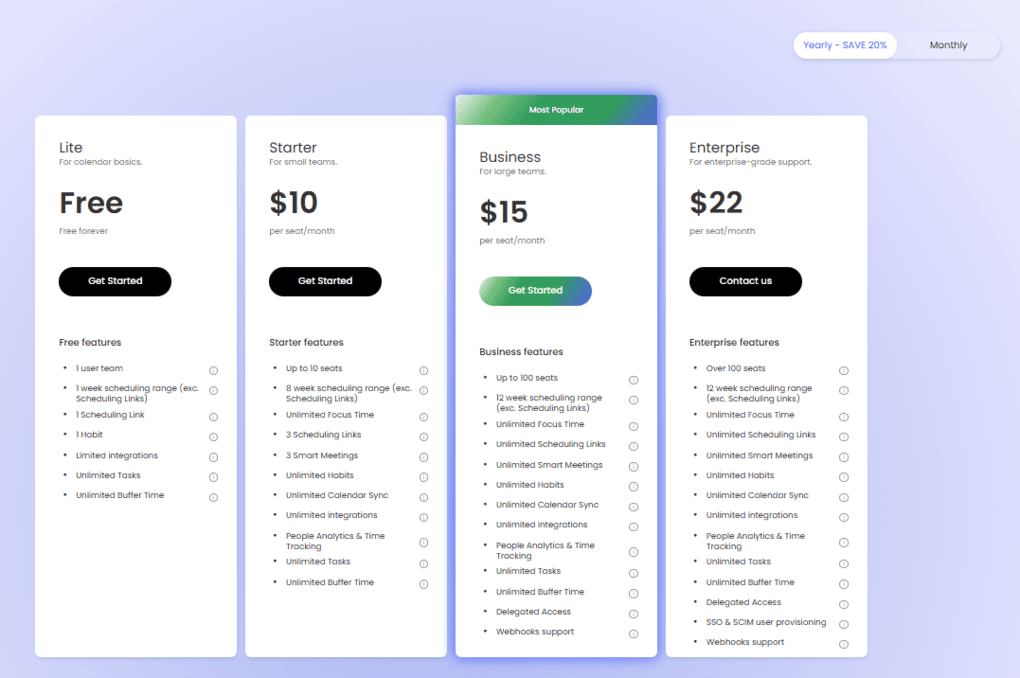
Reclaim offers a free tier that includes 1 scheduling link, 1 smart meeting, 3 habits, a single calendar sync, limited integrations, and a 3-week scheduling range. It is suitable for personal use but too limited for heavier workloads.
The Starter plan costs $10 per user/month with annual billing. It includes up to 10 users, 3 scheduling links, 3 smart meetings, unlimited habits, full integrations, calendar sync, analytics, and an 8-week scheduling range.
The Business plan is $15 per user/month and supports up to 100 seats. It adds unlimited scheduling links, calendar sync, integrations, and a 12-week scheduling range, making it suitable for teams.
Large businesses that need additional support can opt for an enterprise plan at $22 per user/month with annual billing.
There is a 14-day free trial, so you can test all features before upgrading.
Discounts are available for students, nonprofits, startups, and users switching from Clockwise, Motion, or Calendly. Ultimately, Reclaim AI’s pricing is very reasonable compared to many other competitors on the market.
My experience with Reclaim AI
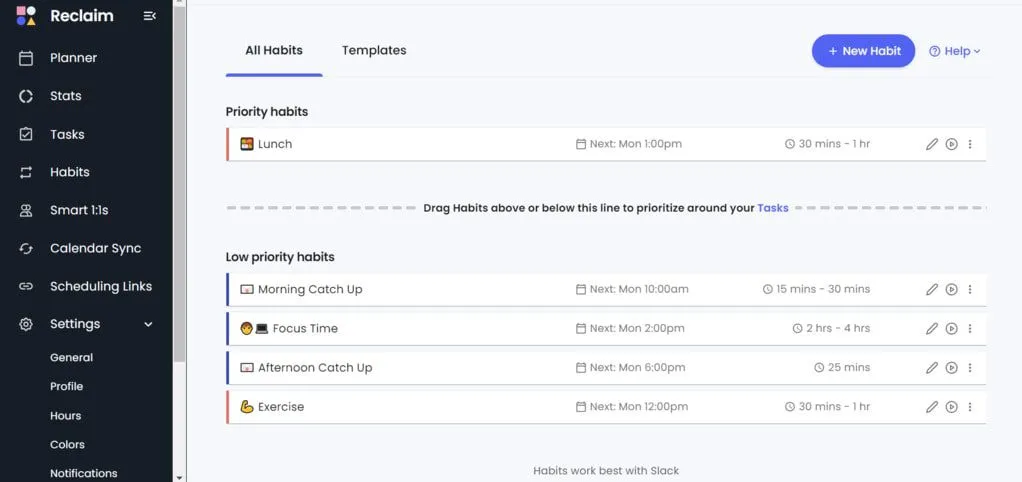
Setting up Reclaim was quick. After connecting my calendar and task tools, it started scheduling work almost immediately. I liked that the rules were visible and adjustable, which made the AI feel predictable rather than intrusive.
Compared to Motion, Reclaim felt more focused and less overwhelming. It does one thing very well, automatic scheduling, without trying to replace your entire productivity system.
Short on time? Here’s a quick overview of Reclaim AI
Pros and cons of Reclaim AI
Pros of Reclaim AI
Cons of Reclaim AI
Why Reclaim AI is the best Motion alternative for AI-powered scheduling
Reclaim AI focuses entirely on scheduling intelligence. It automatically protects habits, finds time for tasks, and adapts as your calendar changes. If you want Motion-like automation without switching your entire workflow into a new system, Reclaim AI is the strongest alternative for AI-powered scheduling.
Related posts:
Best Motion Alternative #4 | Notion Calendar
Best free Motion alternative
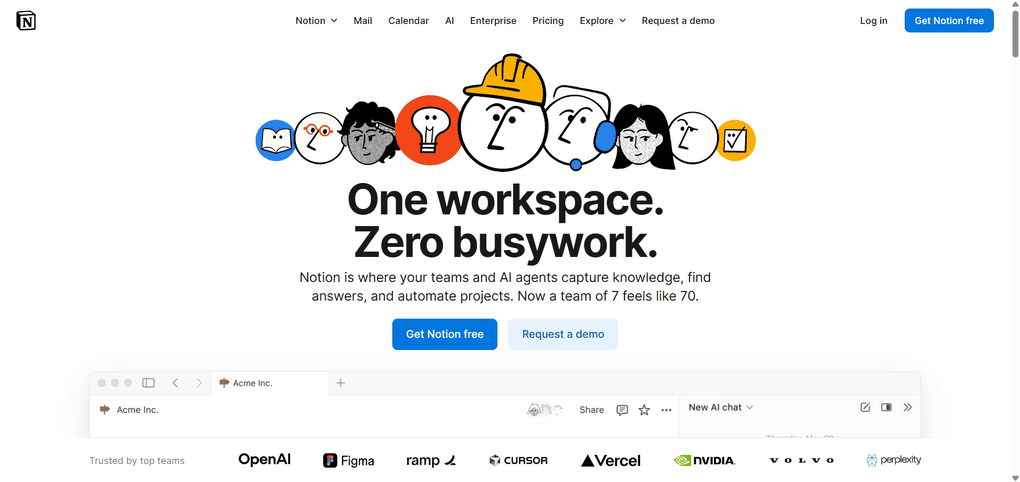
Notion Calendar is a flexible scheduling tool that connects your calendar with tasks and pages inside the Notion workspace. As a Motion alternative, it works best for users who want a free option and prefer manual planning over automatic scheduling.
In my testing, Notion Calendar stood out as the strongest free replacement for Motion if you already use Notion or want full control over how your planning system works.
Key features
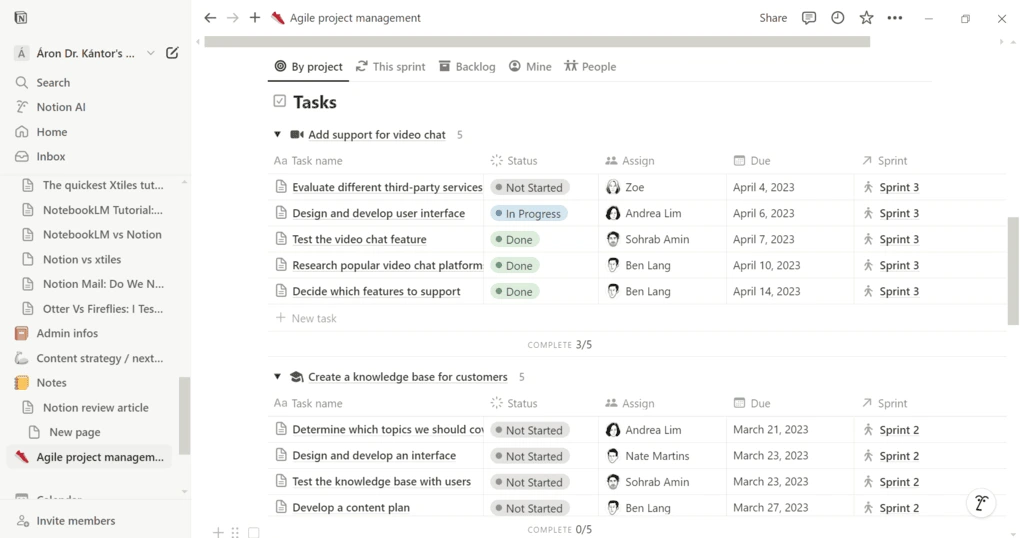
Calendar and task visibility in one place: Notion Calendar lets you see calendar events alongside tasks from your Notion databases. This makes it easy to plan your day in context, especially if your tasks already live inside Notion. While it does not auto-schedule tasks, it gives you a clear overview of what your day actually looks like.
Custom task properties and databases: Tasks can include due dates, priorities, statuses, tags, and relations to larger projects. This makes Notion Calendar especially useful if you want a planner that also doubles as a lightweight project management system without extra tools.
AI support for planning and organization: Notion AI can help summarize notes, extract action items, and turn unstructured content into tasks. While it does not handle scheduling automatically, it can still feel like a lightweight AI-powered calendar assistant inside a Notion-based planning setup.
Templates for daily and weekly planning: Notion offers thousands of free templates for daily planners, weekly schedules, and productivity dashboards. You can start with a simple calendar setup and gradually build a more advanced system as your needs grow.
Deep integration with Notion workspace: Because Notion Calendar is built directly into Notion, tasks, notes, projects, and schedules are tightly connected. You can open tasks from the calendar, jump into related pages, and update project information without leaving your planning view.
Manual time blocking and flexible views: You can use Notion Calendar for manual time blocking by dragging tasks into time slots or planning directly from your task databases. Views can be customized to show daily, weekly, or project-focused schedules, depending on how you structure your workspace.
Integrations: Notion Calendar connects with Google Calendar and works with tools like Google Drive, Slack, Asana, ClickUp, and Jira through native integrations and Zapier. This helps keep events and tasks in sync across tools without manual copying.
Pricing
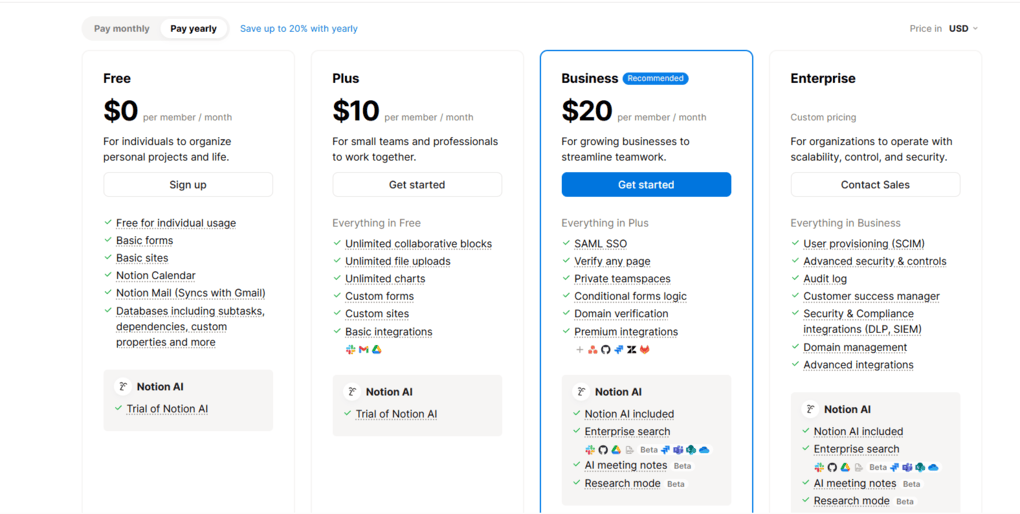
Notion has a generous Free plan with basic forms and sites, Notion Calendar and Mail. It also supports databases with subtasks, dependencies, custom properties, and you can invite up to 10 guests. For many individuals, this plan is already enough.
The Plus plan is $10 per seat per month and unlocks unlimited collaborative blocks, unlimited file uploads, charts, custom forms and sites, and basic integrations. It is a great fit for freelancers and small teams.
The Business plan costs $20 per seat per month and adds granular database permissions, private teamspaces, domain verification, conditional forms logic, premium integrations, and up to 250 guests.
Larger organizations can choose the Enterprise plan with custom pricing. It adds a dedicated success manager, advanced integrations, and advanced security and control features, among other things.
Keep in mind that, while Notion AI is included in the price of Notion’s Business and Enterprise plans, there is only a trial usage on Free and Plus plans.
My experience with Notion
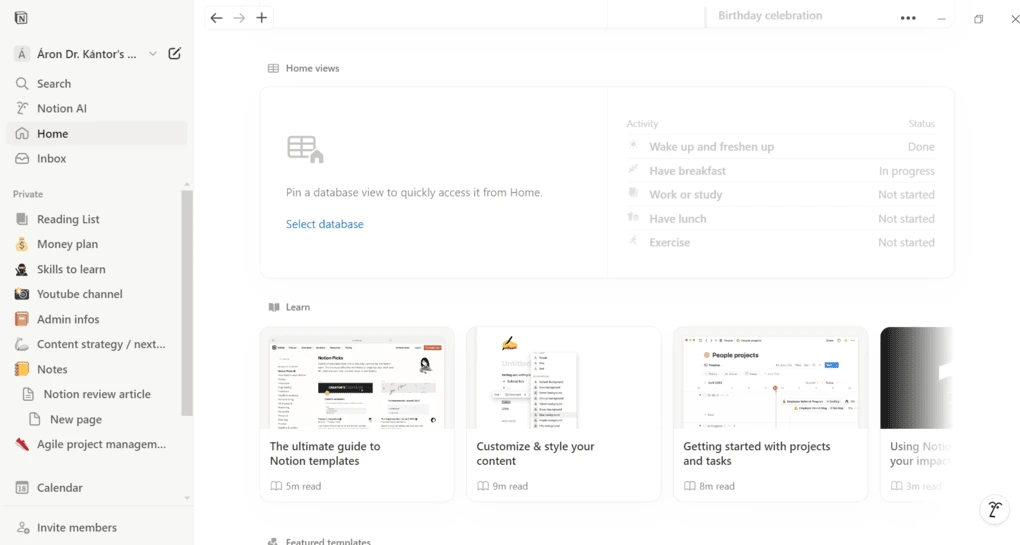
I used Notion Calendar as part of a broader Notion workspace and found it reliable for manual daily planning. Once tasks and projects were properly structured, planning my day felt clear and intentional.
Compared to Motion, it requires more setup and more decision-making. However, that trade-off comes with full control and zero cost, which makes it very appealing if you enjoy building your own system.
🔎 Read my full review: My Honest Notion Review After Using It For +2 Years (2026)
Short on time? Here’s a quick overview of Notion
Pros and cons of Notion
Pros of Notion
Cons of Notion
Why Notion Calendar is the best free Motion alternative
Notion Calendar does not try to automate your day. Instead, it gives you the tools to design your own planning system from scratch. If you want a free alternative to Motion and are comfortable planning manually inside a flexible workspace, Notion Calendar is the strongest option available.
Related posts:
Best Motion Alternative #5 | Akiflow
Best Motion alternative for task management
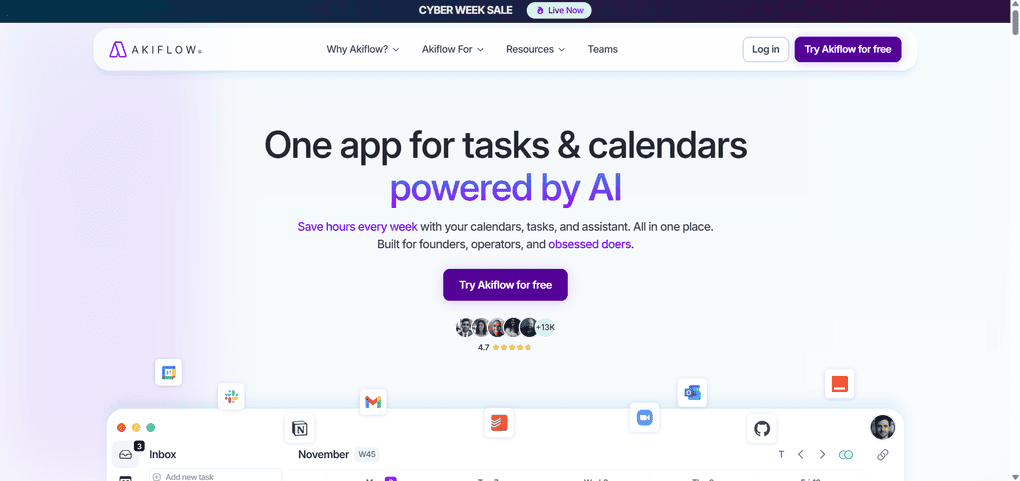
Akiflow is a calendar-centered daily planner designed to help you capture, organize, and schedule tasks with minimal friction. As a Motion alternative, it works best for users who want stronger task management than Motion offers, without moving into full project management territory.
In my testing, Akiflow stood out for how efficiently it turns incoming tasks into a clear daily plan.
Key features
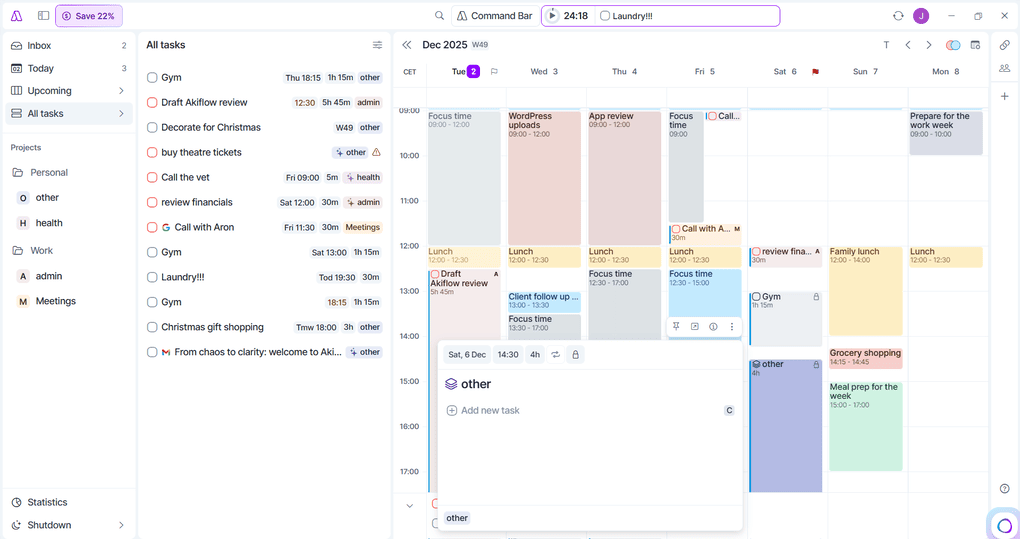
Universal inbox and fast task capture: Akiflow’s inbox collects tasks and inputs from multiple sources, including email, calendar invites, Slack messages, saved links, and browser tabs. Everything lands in one place, making it easy to process tasks quickly and avoid mental clutter.
Task scheduling and time blocking: Dragging a task into the calendar instantly turns it into a time block. The block reflects the task’s duration and becomes part of your schedule, which helps keep daily planning realistic and flexible when priorities change.
Calendar-centered planning: Akiflow connects to Google Calendar and Outlook and displays events and tasks together. Tasks with deadlines appear clearly, and scheduled tasks live directly in the calendar grid, which makes it easy to see what your day can actually accommodate.
Natural language input: You can add tasks using plain language, such as “Send invoice tomorrow at 10” or “Prepare report every Friday.” Akiflow converts these into scheduled or recurring tasks, keeping task creation fast and friction-free.
Simple task organization: Tasks are organized into core views like Inbox, Today, Upcoming, and All Tasks. Instead of complex priority systems, Akiflow uses pinning and lightweight labels, which keep task management focused on execution rather than configuration.
Light AI workflows and focus tools: Akiflow includes optional AI workflows that send daily summaries or reminders. A built-in focus timer helps you stay on task during scheduled work blocks without adding unnecessary complexity.
Integrations: Akiflow integrates with Google Calendar, Outlook, Gmail, Slack, Todoist, Notion, Asana, ClickUp, Trello, Linear, Jira, Zoom, and more. Through Zapier and IFTTT, it can also connect to tools like Spotify, YouTube, and WhatsApp.
Pricing
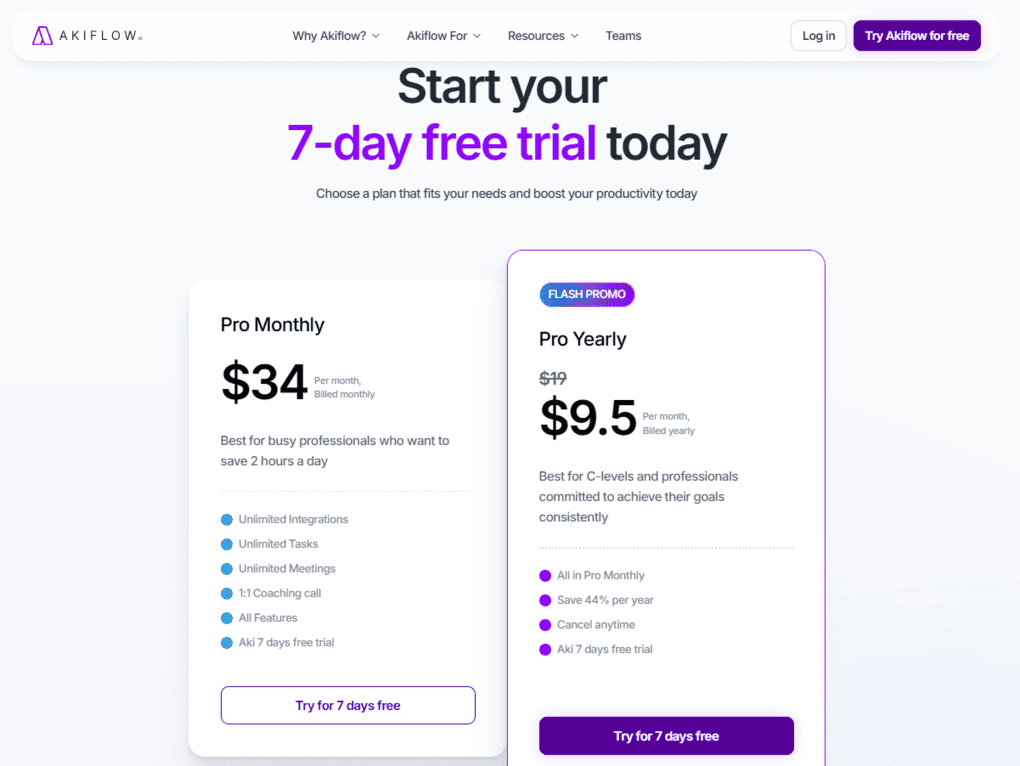
Akiflow does not offer a free plan, but you can start with a 7-day free trial to see how it fits your workflow. During the trial, you get access to all features so you can properly test them.
After the trial, you can choose between two Pro plans. Pro Monthly costs $34 per month, billed monthly, and is aimed at busy professionals who want a straightforward daily planner.
Pro Yearly is currently available as a flash promo at $9.5 per month, billed yearly. Both plans include unlimited integrations, unlimited tasks, unlimited meetings, all features, a 1:1 coaching call, and access to Aki.
My experience with Akiflow
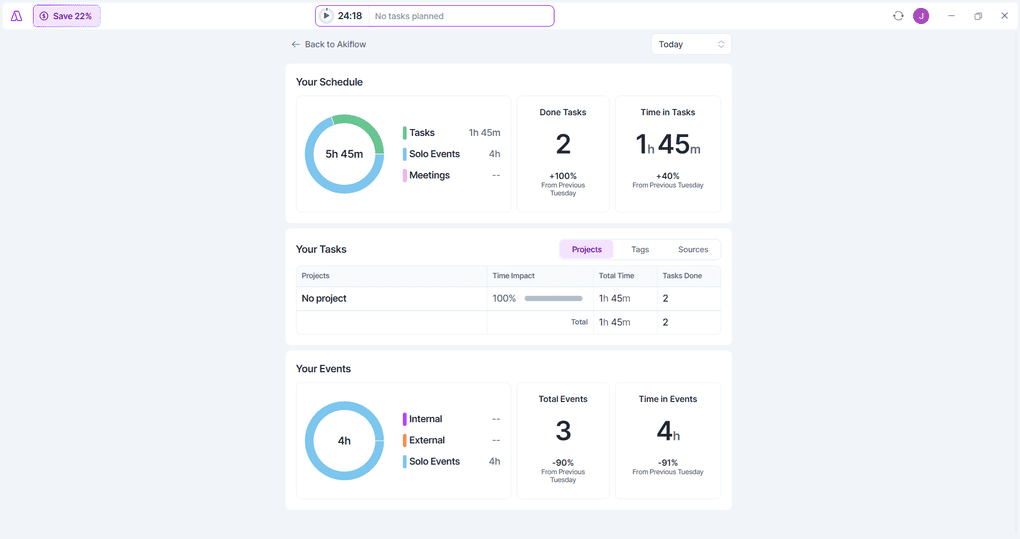
I tested Akiflow as my primary task capture and planning tool and found it extremely efficient. The inbox quickly became the place where everything landed, from work tasks to content I wanted to revisit later.
Compared to Motion, Akiflow felt more predictable and task-focused. Instead of constantly reshuffling my schedule, it gave me the tools to decide what to work on and when, which made daily planning feel faster and more intentional.
🔎 Read my full review: An Honest Akiflow Review 2026: Is It Worth $34 For You?
Short on time? Here’s a quick overview of Akiflow
Pros and cons of Akiflow
Pros of Akiflow
Cons of Akiflow
Why Akiflow is the best Motion alternative for task management
Akiflow focuses on one thing and does it extremely well. It captures tasks from everywhere and makes it easy to turn them into a realistic daily schedule. If Motion feels too automated and you want stronger control over task execution, Akiflow is the most effective task-focused alternative on this list.
Related posts:
Explore our Apps directory
A curated directory of software tools we’ve independently reviewed, with links to full reviews, comparisons, and category guides.
Best Daily Planner App #6 | Monday.com
Best Motion alternative for project management
Monday.com is a work management platform designed to handle projects, tasks, timelines, and team collaboration in one visual workspace. As a Motion alternative, it works best for users and teams who need stronger project management capabilities and clearer oversight than Motion provides.
In my testing, Monday stood out as the most structured option on this list for managing complex workflows that go beyond daily scheduling.
Key features
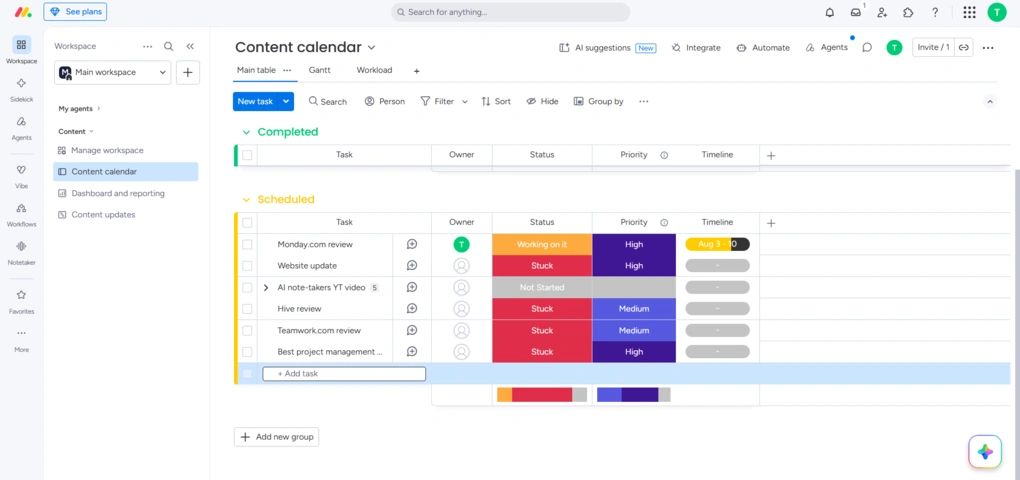
Visual project boards and multiple views: Monday.com is built around customizable boards where tasks are displayed as rows with properties like status, owner, due date, and priority. You can switch between board, timeline, calendar, workload, and Gantt views, which makes it easy to see progress from both a daily and long-term perspective.
Timeline and workload planning: The timeline and workload views help teams understand capacity and deadlines at a glance. Managers can spot bottlenecks early and redistribute work before deadlines slip, which improves project progress visibility over longer timelines.
Task and dependency management: Tasks can include dependencies, subitems, and automation rules. This allows you to model real project workflows, where one task cannot start until another is finished. Compared to Motion, this makes Monday far stronger for planning multi-step projects.
Automations that reduce manual work: Monday.com offers no-code automations for recurring actions, status changes, notifications, and task assignments. While it does not auto-schedule tasks like Motion, these automations significantly reduce repetitive admin work.
AI features: Monday’s AI features are integrated directly into boards, workflows, docs, and automations. AI Blocks, AI Sidekick, AI Workflows, AI Agents, Monday Vibe, and AI Notetaker cover tasks ranging from content generation and workflow automation to app building and meeting summaries.
Collaboration and communication tools: Each task includes comments, file uploads, mentions, and activity logs. This keeps conversations tied directly to work items and reduces the need for external communication tools.
Integrations: Monday.com integrates with Google Calendar, Outlook, Slack, Microsoft Teams, Google Drive, Dropbox, Zoom, and many other tools. It also supports Zapier, which expands integration options even further.
Pricing
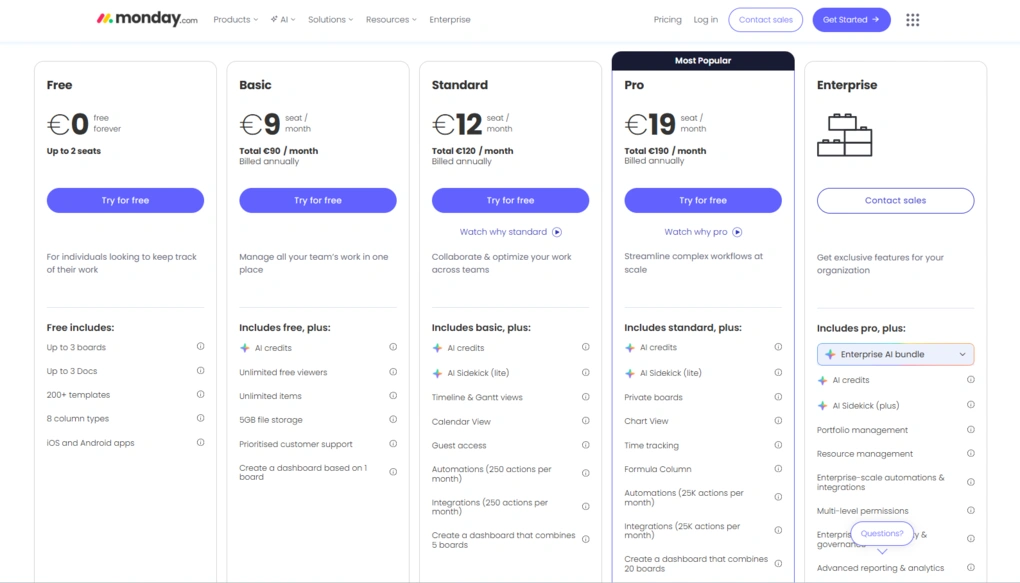
Monday.com offers a Free plan that includes up to 3 boards, 8 column types, 200+ templates, up to 3 docs, and access to iOS and Android apps. It is suitable for testing, but too limited for real project work.
The Basic plan costs $9 per user/month when billed annually or $12 per user/month on monthly billing. It includes unlimited items, 5 GB of file storage, 6,000 trial AI credits, priority support, and dashboards based on one board. There is no single-user subscription on paid plans.
The Standard plan is priced at $12 per user/month with annual billing or $14 per user/month. It unlocks timeline, Gantt, and calendar views, automations, integrations, dashboards combining up to five boards, and 20 GB of file storage.
The Pro plan costs $19 per user/month when billed annually or $24 per user/month on monthly billing. It adds private boards, chart view, time tracking, formula columns, more automations and integrations, and larger dashboards. This plan works well for small to mid-sized businesses.
For larger organizations, Monday.com offers an Enterprise plan with custom pricing. It includes advanced security, enterprise-grade automations and integrations, 12,000 trial AI credits, detailed analytics, and 24/7 customer support.
My experience with Monday.com
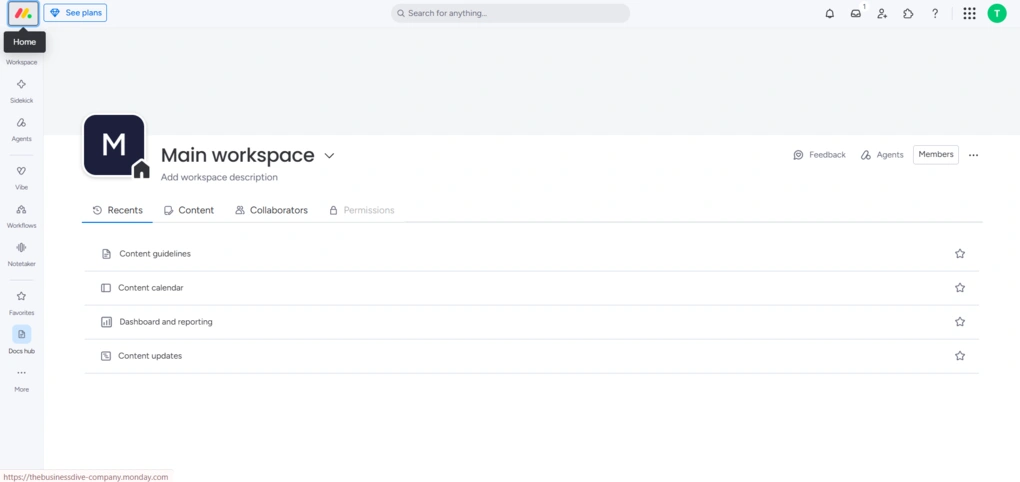
I used Monday.com primarily for project planning rather than daily scheduling. Setting up boards and workflows took some initial effort, but once everything was in place, it became a very clear and reliable system.
Compared to Motion, Monday.com feels much more deliberate and less reactive. It does not automatically rearrange your day, but it excels at showing how work fits together over time, which makes it a better fit for structured projects and team environments.
🔎 Read my full Monday.com Review 2026: Is the $228 Price Tag Justified?
Short on time? Here’s a quick overview of Monday.com
Pros and cons of Monday.com
Pros of Monday.com
Cons of Monday.com
Why Monday.com is the best Motion alternative for project management
Motion focuses on scheduling individual work, while Monday.com focuses on organizing projects and teams. If your main challenge is tracking progress, dependencies, and workloads across multiple people or long-term initiatives, Monday.com is a far stronger alternative than Motion.
Best Daily Planner App #7 | Todoist
Best Motion alternative for a to-do list workflow
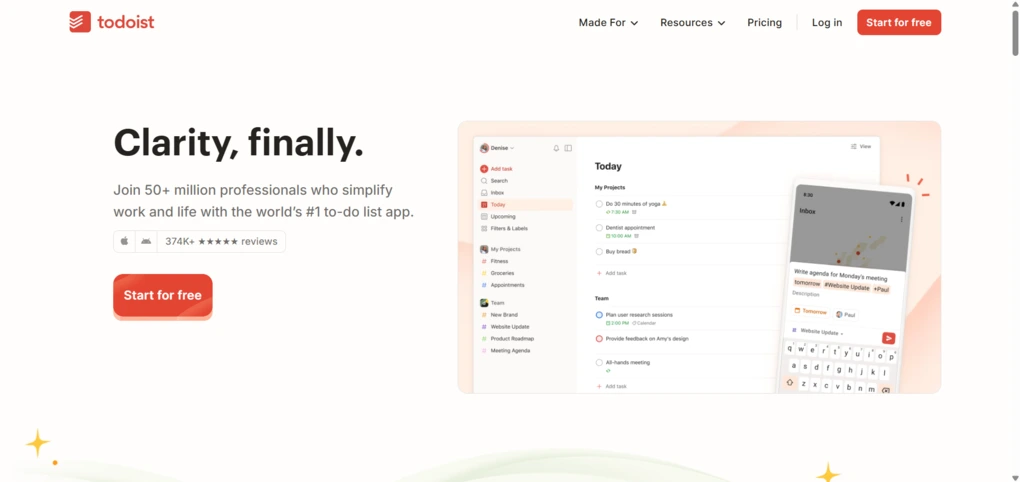
Todoist is a fast, reliable to-do list app built for capturing tasks, organizing projects, and staying consistent with daily work. As a Motion alternative, it works best for users who do not need automatic scheduling but want a clean and dependable task system they can trust every day.
In my testing, Todoist felt like the simplest way to replace Motion’s task layer without adding complexity.
Key features
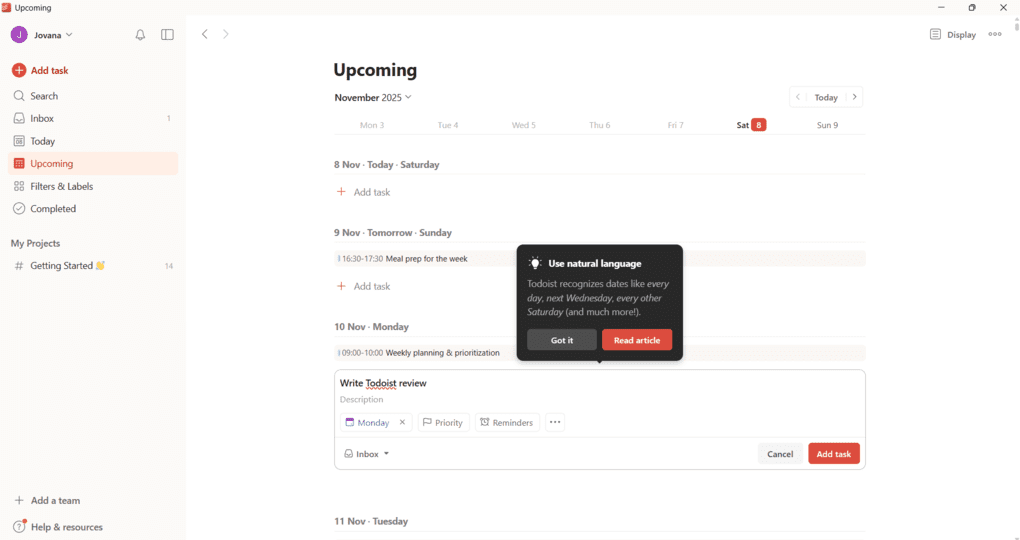
Fast task capture and organization: Creating tasks in Todoist is almost instant. Tasks land in the Inbox and can be organized into projects with due dates, priorities, labels, and subtasks. This makes it easy to collect everything first and organize later.
Natural language input: Todoist understands plain language such as “Submit report every second Thursday” or “Call client tomorrow at 3 PM.” This keeps task entry quick and reduces friction, especially when capturing tasks on the go.
Flexible task views: You can view tasks as simple lists, kanban-style boards, or inside a calendar layout. Filters allow you to surface tasks by priority, due date, or label, which helps keep daily focus clear without micromanaging schedules.
Light project management and collaboration: Todoist supports shared projects, task assignment, comments, and file uploads. While it is not a full project management tool, it works well for small teams and collaborative task tracking.
Calendar integration for daily planning: Todoist integrates with Google Calendar and Outlook, allowing tasks with due dates or durations to appear in your calendar. This supports manual time blocking without forcing automatic scheduling.
User interface: Todoist’s clean and responsive design feels intuitive on every platform. Light and dark themes, smooth animations, and thoughtful layout make everyday planning feel calm and organized.
Integrations: Besides Google Calendar and Outlook, Todoist integrates with Zapier, IFTTT, email clients, and file storage tools. These integrations help Todoist fit into almost any productivity setup.
Cross-platform apps and sync: Todoist works across web, Windows, macOS, iOS, and Android. Sync is fast and reliable, which makes it easy to move between devices without losing context.
Pricing
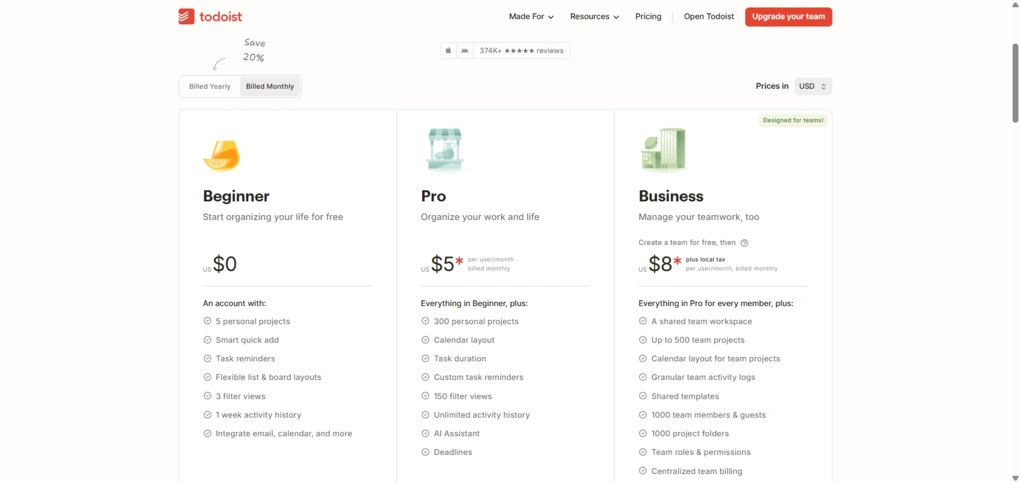
Todoist offers a free plan and two paid tiers. The free version includes up to five active projects, Smart Quick Add, reminders, list and board layouts, basic filters, and cross-platform sync. It is a great starting point for building a personal task system.
The Pro plan is $5 per month or $4 with annual billing. It unlocks custom filters, Calendar layout, AI Assistant, task duration, automatic backups, and up to 300 personal projects. It is a strong fit for freelancers and professionals who want more structure.
The Business plan costs $8 per user/month or $6 with annual billing. It adds a shared workspace, up to 500 team projects, activity logs, team templates, permissions, centralized billing, and CSV imports. It works well for small teams that want clarity without a full project management platform.
Todoist offers a 14-day free trial on paid plans and a 30-day refund window, so you can explore premium features without risk.
My experience with Todoist
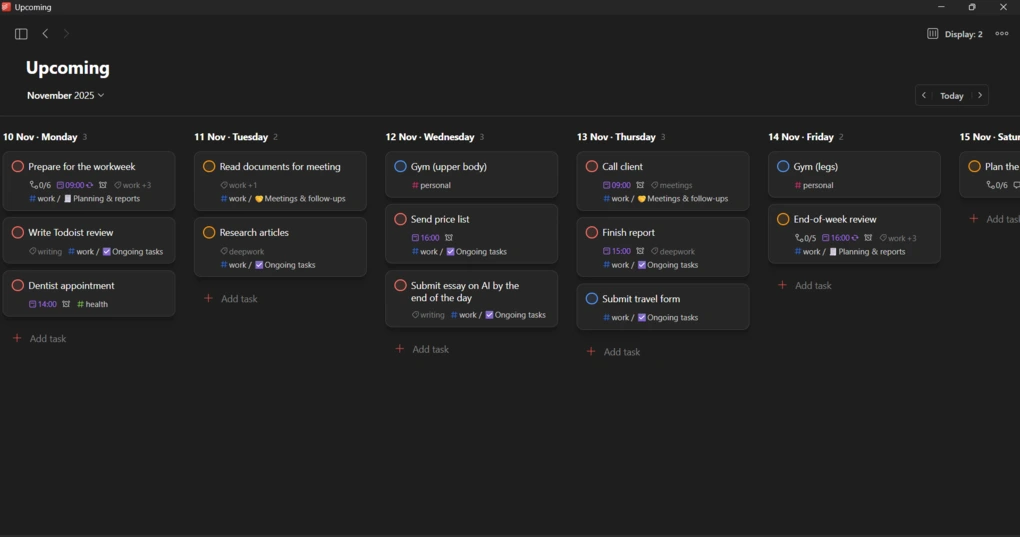
I used Todoist for daily task management across desktop and mobile and found it consistently fast and stable. Capturing tasks took seconds, and filters made it easy to focus on what mattered each day.
Compared to Motion, Todoist feels much lighter and more predictable. It does not plan your day for you, but it gives you a solid task foundation you can combine with any calendar.
🔎 Read my full review: My Honest Todoist Review After 3 Years & 1,400 Tasks
Short on time? Here’s a quick overview of Todoist
Pros and cons of Todoist
Pros of Todoist
Cons of Todoist
Why Todoist is the best Motion alternative for a to-do list workflow
Todoist strips planning down to its essentials. It helps you capture tasks quickly, stay organized, and build consistent habits without automation getting in the way. If Motion feels too complex and you mainly need a dependable to-do list that works everywhere, Todoist is the strongest alternative on this list.
Best Daily Planner App #8 | ClickUp
Best Motion alternative for team collaboration
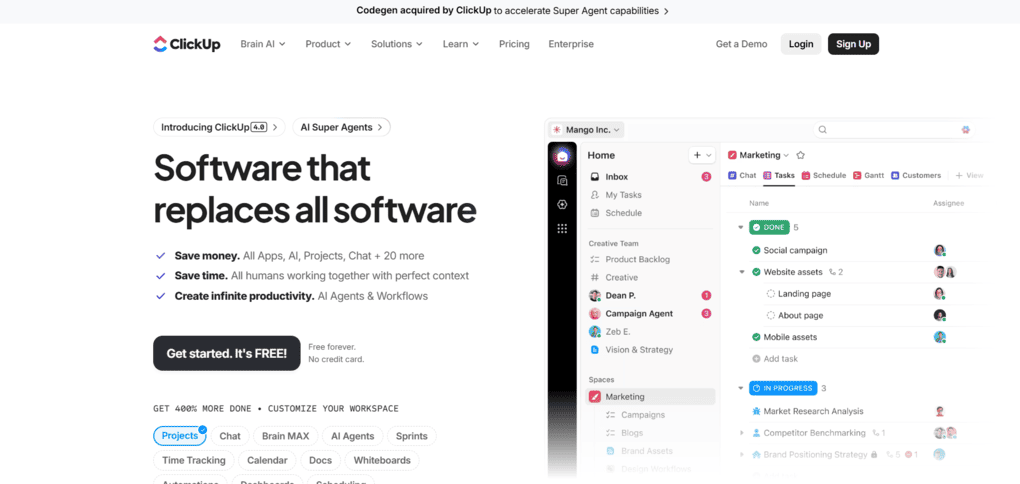
ClickUp is an all-in-one productivity platform designed to manage tasks, projects, documents, goals, and team collaboration in one workspace. As a Motion alternative, it works best for teams that need structure, visibility, and flexibility beyond daily scheduling.
In my testing, ClickUp stood out as the most customizable team-oriented alternative to Motion, with robust team collaboration features built for scaling.
Key features
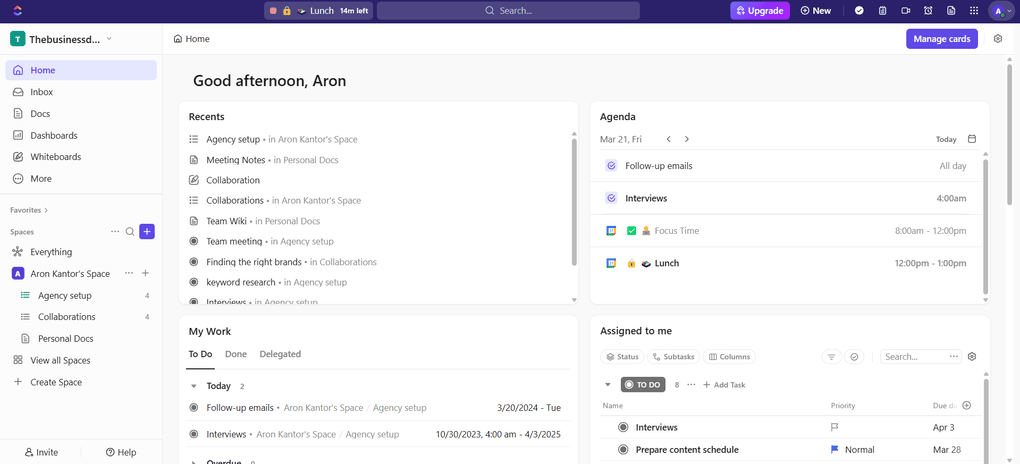
Advanced task and project management: ClickUp supports tasks, subtasks, checklists, priorities, dependencies, and custom statuses. This makes it easy to model complex workflows and manage projects across multiple teams and departments.
Multiple views for planning and execution: You can switch between list, board, calendar, timeline, Gantt, and workload views. This flexibility helps teams plan both day-to-day work and long-term projects without switching tools.
Docs, goals, and dashboards: ClickUp includes built-in Docs for documentation, Goals for tracking progress, and dashboards for real-time reporting. These dashboards support advanced reporting and keep performance updates tied to actual work.
Automations and templates: ClickUp offers no-code automations for task updates, assignments, and recurring workflows. Combined with a large template library, this helps teams reduce repetitive work and onboard faster.
AI tools for productivity: ClickUp AI assists with writing, summarizing, generating task lists, and organizing content. While it does not auto-schedule tasks like Motion, these AI features reduce planning overhead for teams working at scale.
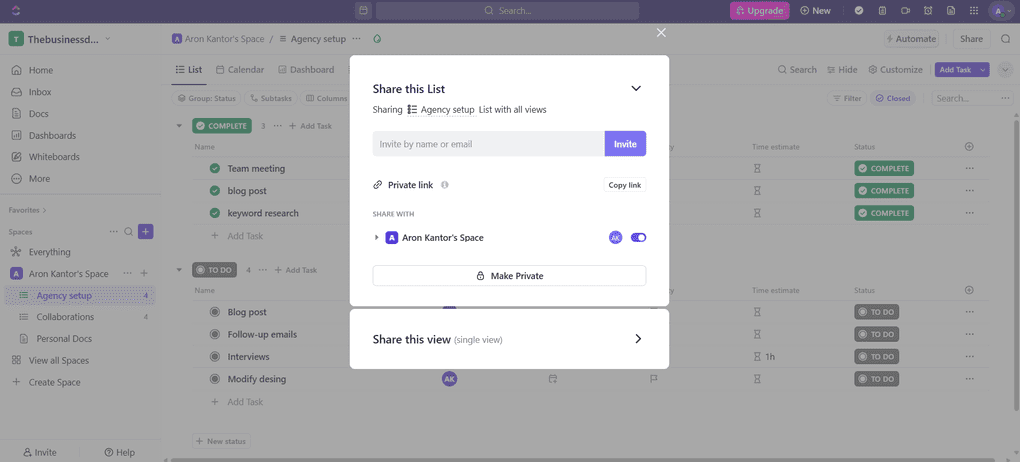
Collaboration and communication: Teams can comment directly on tasks, assign work, mention teammates, and track activity in real time. Permissions and spaces support stronger workflow management across different teams. Also, it has a whiteboard that allows teams to visually collaborate and brainstorm with each other.
Integrations: ClickUp integrates with Google Calendar, Outlook, Slack, Microsoft Teams, Zoom, GitHub, GitLab, and hundreds of other tools via native integrations and Zapier.
Pricing
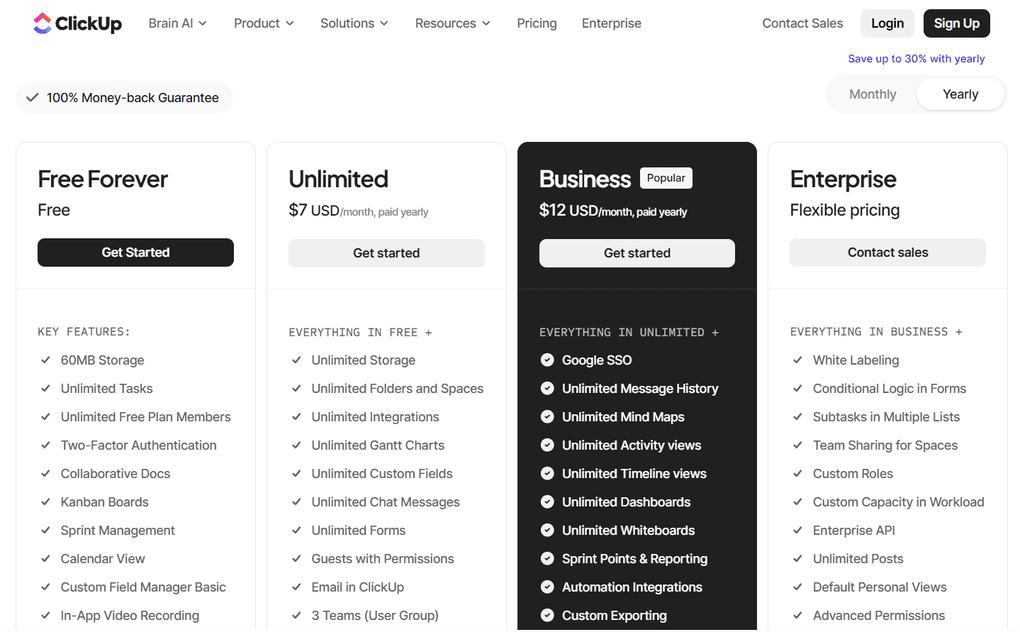
ClickUp offers a Free Forever plan that includes 60 MB storage, unlimited tasks, unlimited free plan members, two-factor authentication, and multiple project views. This free forever tier is surprisingly capable, especially if you do not need ClickUp AI.
The Unlimited plan builds on the free tier with unlimited storage, integrations, folders and spaces, chat messages, and others. It costs $7 per user/month when billed annually or $10 per user/month with monthly billing. This plan is a strong fit for small teams that need more flexibility and collaboration features.
The Business plan costs $12 per user/month with annual billing or $19 per user on monthly billing. It adds advanced automations, workload and resource management, sprint reporting, dashboards, timesheets, and more detailed customization options across the workspace, making it suitable for mid-sized teams.
For larger organizations, ClickUp offers an Enterprise plan with custom pricing. It includes enterprise-grade security, advanced permissions, and tailored support for complex team structures.
It’s also worth noting that ClickUp’s AI features are offered as a separate add-on. ClickUp Brain, AI Notetaker, Super Agents, and other AI-powered workflows are not automatically included in the base plans.
My experience with ClickUp
I tested ClickUp in a team-focused setup rather than as a personal planner. The amount of customization was impressive, but it also required time to configure properly.
Compared to Motion, ClickUp feels less automatic but far more flexible. Once workflows and views are set up, teams gain a clear overview of responsibilities, progress, and deadlines.
🔎 Read my full review: My Honest ClickUp Review After Using It For +3 Months (2026)
Short on time? Here’s a quick overview of ClickUp
Pros and cons of ClickUp
Pros of ClickUp
Cons of ClickUp
Why ClickUp is the best Motion alternative for team collaboration
While ClickUp focuses on organizing teamwork at scale, Motion focuses on automating individual schedules. If your priority is collaboration, visibility, and managing complex projects across multiple people, ClickUp is the kind of proper project manager Motion is not trying to be.
Best Daily Planner App #9 | Routine
Best Motion alternative for simple daily scheduling
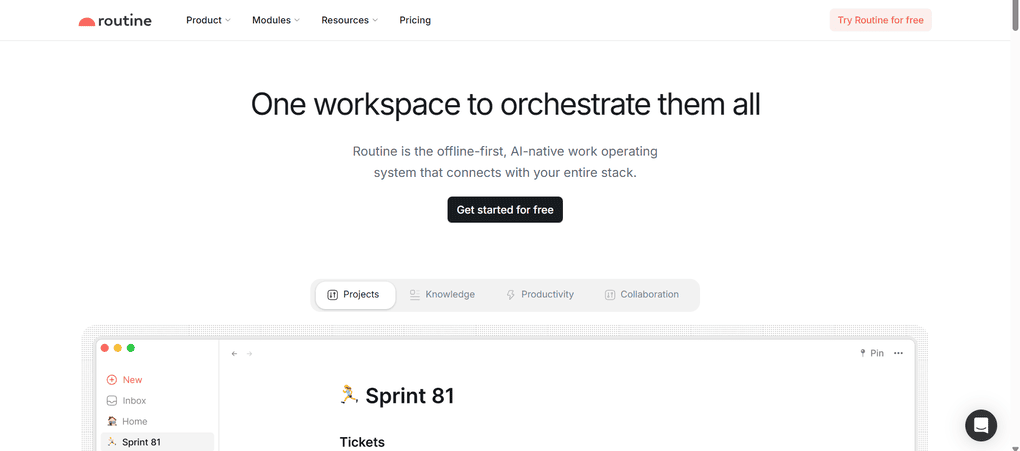
Routine is a minimalist daily planner that combines tasks, calendar events, notes, and light journaling in one calm workspace. As a Motion alternative, it works best for users who want simple, intentional daily planning without heavy automation or complex setup.
In my testing, Routine felt like the cleanest option for seeing the day clearly and staying focused on what is next.

See Routine overview
Calendar and task management app with notes and daily planning
Key features
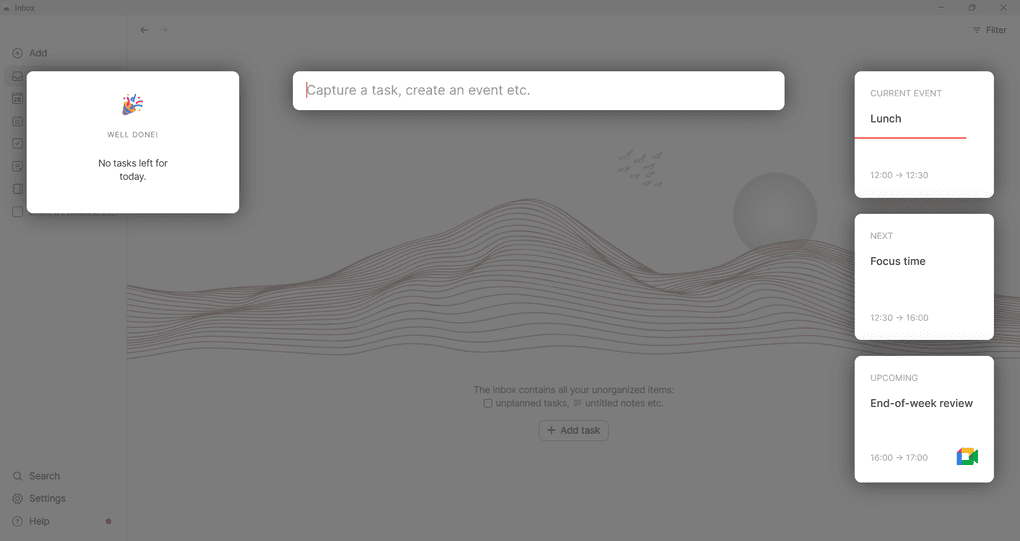
Inbox and quick capture: Routine includes an Inbox where you can quickly capture tasks, ideas, or notes throughout the day. New items appear in context with your current schedule, which helps keep planning grounded instead of turning into endless lists.
Agenda view for daily clarity: Routine’s Agenda view shows tasks on one side and calendar events on the other, giving you a clear picture of your day at a glance. This makes it easy to understand what you are doing now, what comes next, and how much time you realistically have left.
Calendar and manual time blocking: You can manually drag tasks into the calendar to create scheduled blocks and move events around easily. Routine focuses on manual planning rather than automatic scheduling, which gives you full control over how your day is structured.
Lightweight task management: Tasks support subtasks, attachments, and basic properties, but there are no advanced priority systems or automation rules. This keeps the experience simple and works well for personal planning rather than complex projects.
Notes and daily journal: Routine includes a notes area with templates for meeting notes, lists, and reflections. The daily journal shows completed tasks and events, acting more as a daily recap than a traditional diary.
Integrations: Routine integrates with Google Calendar and supports Zapier and Notion connections. The integration ecosystem is smaller than Motion or ClickUp, but reliable for basic daily scheduling.
Pricing
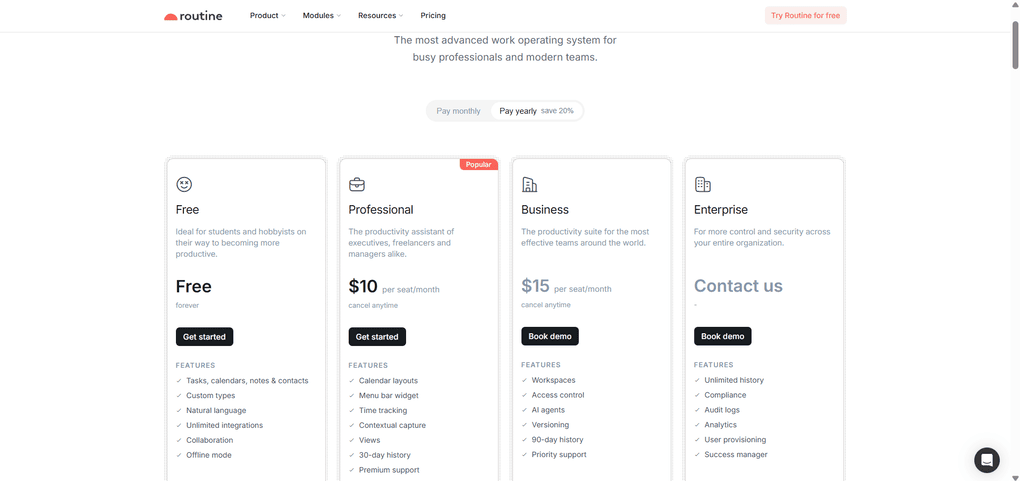
Routine offers a free plan, generous for personal use and enough to explore the full workflow.
The Professional plan costs $12 per seat monthly or $10 per seat with yearly billing. It adds calendar layouts, time tracking, contextual capture, additional view options, and a 30-day activity history.
The Business plan starts at $18 per seat monthly or $15 with annual billing. It adds workspaces, access control, AI agents, versioning, and a 90-day history for teams that need more structure.
Enterprise plan includes custom pricing, unlimited history, audit logs, compliance tools, and advanced analytics.
My experience with Routine
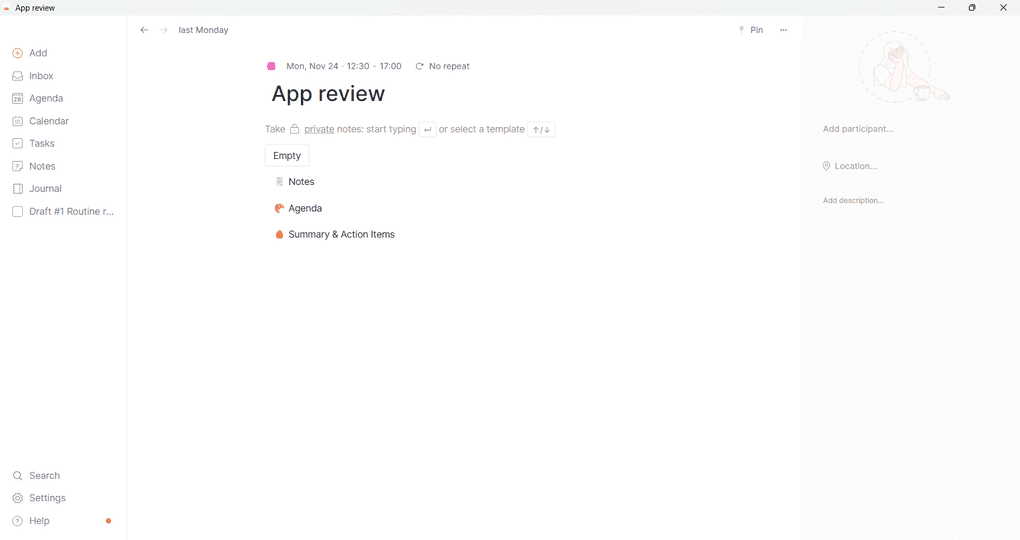
I used Routine mainly for planning individual workdays and found it very pleasant to use. The Agenda view made days feel structured without pressure, and drag-and-drop planning was smooth.
Compared to Motion, Routine is far less powerful, but also far less demanding. It works best if you want clarity and calm rather than optimization and automation.
Pros and cons of Routine
Pros of Routine
Cons of Routine
Why Routine is the best Motion alternative for simple daily scheduling
Routine shows you your day clearly, helps you stay focused on what matters now, and avoids unnecessary complexity. If Motion feels overwhelming and you want a simple, distraction-free planner for everyday scheduling, Routine is the strongest alternative on this list.
Related posts:
Summary: Best Motion alternatives in 2026
Motion is a powerful tool, but it is not a universal solution. The right alternative depends on how much automation you want, how you manage tasks, and whether you plan solo or with a team.
Some tools on this list focus on AI-powered scheduling, others on task control, project visibility, or simple daily structure. From fully automated planners to calm, manual systems, these 9 Motion alternatives cover a wide range of real-world workflows and advanced features without forcing one rigid system.
If Motion feels too rigid, too complex, or too expensive, one of these tools will fit better.
Looking for similar tools?
Visit the link to explore other apps we’ve reviewed in this space and how they compare.
Why you can trust our reviews
At thebusinessdive.com, our team tests, reviews, and compares hundreds of productivity apps every year — from project management tools to note-taking apps. We dive deep into real-world use cases to help you find the right tools that actually improve your workflow, not just add noise.
Our mission? No fluff, no shortcuts—just honest, hands-on insights from productivity pros.
Discover how we stay transparent, read our review methodology, and let us know about any tools we missed.
Frequently asked questions
What is the best Motion alternative in 2026?
The best Motion alternative depends on your workflow. Some motion alternatives focus on AI-powered scheduling, automatic scheduling, and the ability to auto-schedule tasks, while others prioritize manual planning, time blocking, and stronger task management. The right choice depends on whether you want automation or more control.
Are there any free Motion alternatives worth using?
Yes, several motion app alternatives offer a solid free plan or even a free forever plan. Notion Calendar is the strongest free option for manual planning, basic project management, and Google Calendar integration, while other tools use free tiers as an entry point before paid plans.
Which Motion alternative works best with Google Calendar?
Most top motion alternatives include reliable Google Calendar integration and calendar sync. Tools like Morgen, Reclaim AI, Akiflow, and Todoist handle calendar events well and allow you to schedule tasks, manage time slots, and avoid conflicts using full calendar functionality.
Can Motion alternatives handle project management and team workflows?
Yes, but only some tools offer robust project management features. Platforms like ClickUp and Monday.com include advanced project management features, team collaboration tools, project timelines, and progress tracking, making them better suited for complex projects and team productivity.
Do Motion alternatives support automatic scheduling and focus time?
Some motion app alternatives support automatic task scheduling, AI scheduling, and focus time protection. Tools like Reclaim AI use AI-powered scheduling to schedule tasks automatically and reduce back-to-back meetings, while others rely on manual time blocking for users who want more control.
Disclosure: I only recommend products I would use myself, and all opinions expressed here are my own. This post may contain affiliate links that, at no additional cost to you, may earn a small commission. Read the full privacy policy here.

Hey! I’m Jovana, a content writer who loves writing, researching, and testing new productivity apps. With a background in philosophy, I bring a thoughtful but no-bullshit approach to everything I do. Let’s connect on Linkedin!
Keep reading to discover which tools made the list, how they work, how much they cost, and their main strengths and limitations.
I also found check it out really helpful.
As someone who’s been frustrated with AI scheduling that doesn’t quite nail it, I really appreciated your honest take on Motion’s learning curve and pricing. Could you share which of the 20+ alternatives you tested handled recurring meetings best? That’s the one feature that always breaks my current setup.
The point about Motion’s pricing and the AI scheduling missing the mark really resonates — I’ve had similar experiences where auto-rescheduling created more chaos than clarity. It’s refreshing to see a breakdown that goes beyond surface-level comparisons and actually tests the tools over months rather than days.
I appreciate the honest take on Motion’s pricing and AI scheduling quirks — too many reviews gloss over how much the recurring cost adds up for individuals. The learning curve point really resonated, especially since I’ve seen similar tools promise seamless automation but end up requiring more manual tweaking than the actual planning saves.
I appreciate the emphasis on real-world testing over surface-level reviews — the point about Motion’s AI scheduling “not nailing it” despite the hype is something I’ve experienced too. Would love to see how these alternatives handle recurring meetings and timezone conflicts in follow-up posts.
Thanks for putting this across absolute cool writing in time of AI.