


An Honest Akiflow Review 2026: Is It Worth $34 For YOU?
In this Akiflow review, I look at a productivity app that tries to solve a familiar problem: your tasks live in one place, your meetings in another, and your ideas are scattered across multiple apps.
Instead of spreading your work across multiple tools, Akiflow aims to bring everything into one simple daily view that feels closer to a focused daily planner app than a basic task list.
On Trustpilot, many users praise how well it delivers on that. On Reddit, people are more cautious, often pointing to the high price or not fully clicking with its time-blocking mindset that many productivity apps are built around.
So, what is the TRUTH? Is it worth $34 monthly for you?
Stay here, because in this Akiflow review, I will share where it actually lands between the excitement and the skepticism, and whether it can really help with managing tasks across different tools.
Let’s dive in!
Verdict
Here’s the quick verdict if you don’t want to read the full review:
🎯 Best for: Professionals who rely on time blocking and want to manage tasks and calendar in one focused daily planner
🚫 Not ideal for: Users looking for a free, lightweight to-do list or full project management tool
⭐ Biggest strength: Seamless task capture and calendar-based planning in one unified workflow
⚠️ Biggest weakness: Relatively high price and lacks a free plan
⚖️ Verdict: A highly focused productivity app that excels at daily planning and reducing context switching, but its premium pricing won’t suit everyone.
🏆 Score: 4 / 5
✅ Tested with our review & scoring methodology ✅ Real-world testing ✅ Unbiased evaluation
Akiflow Review
Summary
Akiflow is a calendar-centered productivity app that brings all your tasks, events, and inbox items into one place for structured daily planning and time blocking. It feels polished, fast, and thoughtfully designed, especially if you like planning directly on a calendar, but its higher pricing and lack of a free plan mean it will appeal most to people who already take their productivity system seriously.
|
|
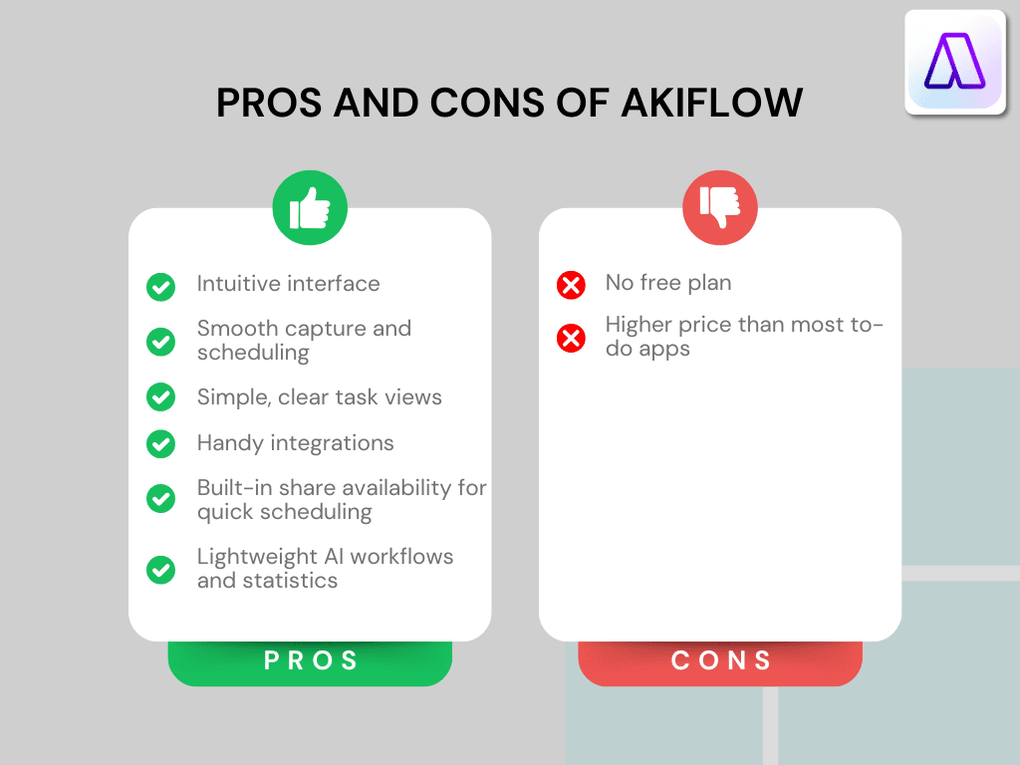
Intuitive design and user-friendly interface
|
|
|
Smooth capture and scheduling
|
|
|
Simple, clear task views
|
|
|
Handy integrations
|
|
|
Built-in share availability for quick scheduling
|
|
|
Lightweight AI workflows and statistics
|
|
|
No free plan
|
|
|
Higher price than most to-do apps
|
How We Test Daily Planners
To keep our reviews & final score for each daily planner app fair and consistent, we evaluate every tool using the same testing framework based on real-world usage, feature depth, and overall value.
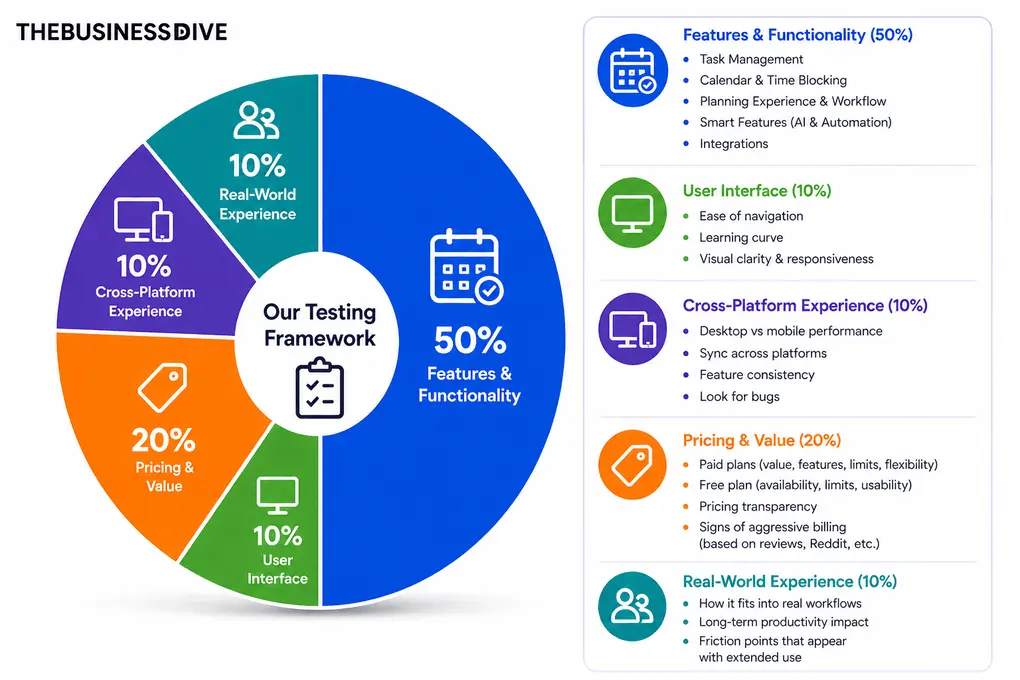
Our scoring breakdown after testing 10+ daily planner apps:
⚙️Features & functionality — 50%
🖥️ User interface — 10%
⚡Cross-platform performance—10%
💰 Pricing — 20%
👥 Real-world experience — 10%
Want a detailed breakdown of how we test each category?
Learn exactly how we test tools → Review methodology
Short on time? Here’s a quick overview of Akiflow
What is Akiflow?
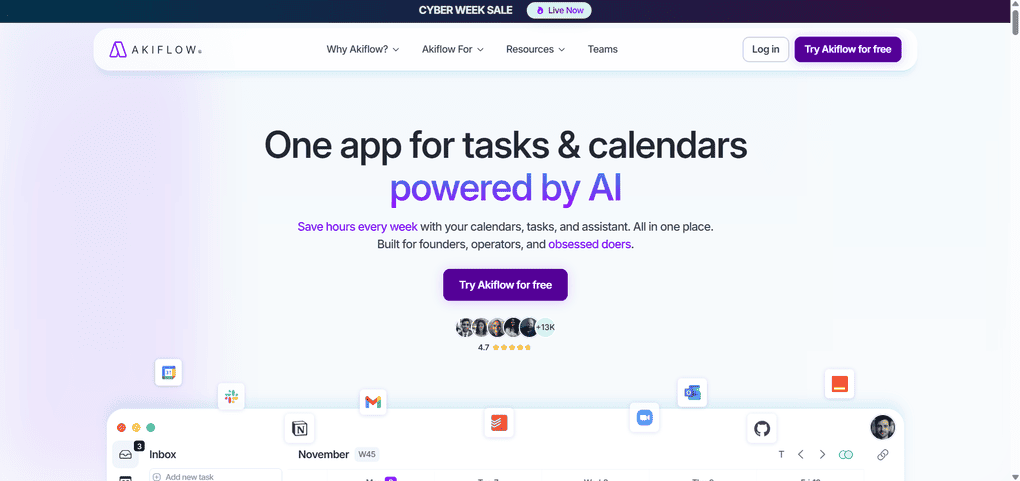
Akiflow is a productivity app built around one idea: keeping all your tasks, events, and plans in a single place. It combines a universal inbox, a fast calendar, natural language task creation, and simple time blocking so you can plan your day without switching between task management apps or calendar tools.
Instead of acting as a traditional to-do list, Akiflow works more like a daily command center. You capture tasks from anywhere, drag them into your schedule, and use lightweight features like AI workflows, statistics, and share availability to keep your day structured without feeling overwhelmed.
It sits somewhere between classic task management and calendar management, without trying to be a full project management tool. Akiflow’s ultimate goal is to reduce context switching and make daily planning feel less chaotic.
My experience with Akiflow
I tested Akiflow on the Windows desktop app, and it felt smooth from the start. What stood out the most was how easy it was to keep my day realistic.
Dragging tasks into the calendar, adjusting time blocks, and checking the Today view helped me see very quickly when I was trying to fit too much into one day and when all my tasks simply did not fit in the available time slots.
Overall, Akiflow felt reliable and thoughtfully designed, especially for planning my day in a realistic way. It did not radically change how I work, but it made the parts I already do like scheduling, reviewing, and committing to tasks noticeably smoother.
Why Akiflow got a 4/5 score
From feature-wise- Akiflow delivered, and only got a “worst score” (4) for its task management features because it lacks some more advanced tools. Apart from that, it delivered excellent features.
However, I cannot say the same about the pricing. It does not offer a free plan; only a trial. Plus, it’s a relatively pricey daily planner compared to other alternatives like Todoist.
Who Would be a Good Fit for Akiflow?
Who Would be a Bad Fit for Akiflow?
Key features
Here, I will share the key features and how they performed during my Akiflow review.
Capture and task creation
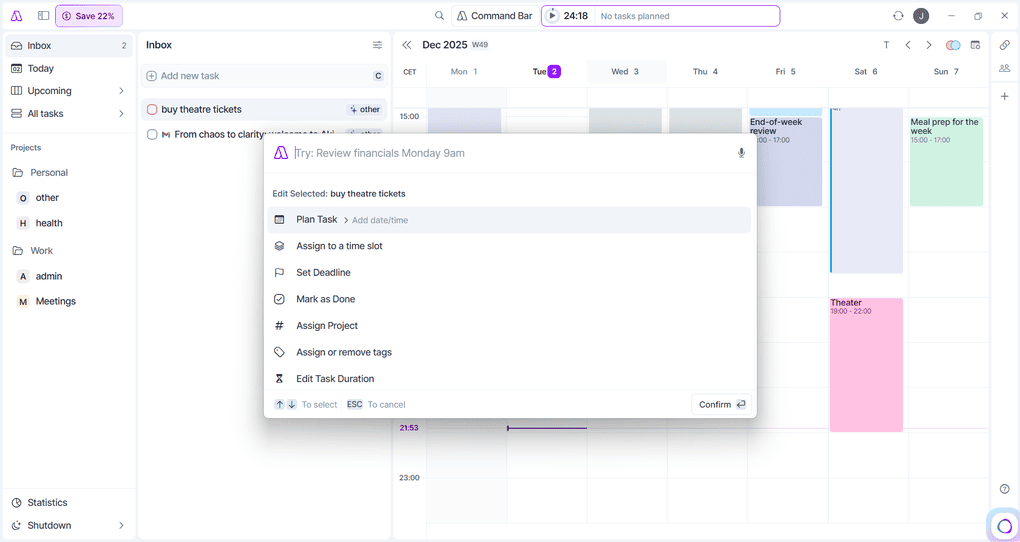
Akiflow’s inbox is built to catch everything you need to act on, no matter where it comes from. Emails, calendar invites, saved links, Slack messages, and browser tabs all land in one place, which makes it easier to start your day without jumping between various apps.
The inbox is practical because every item can be processed in seconds. You can turn it into a task, schedule it, snooze it, or send it to a project. Task creation is quick whether you use the Command Bar at the top, click directly on the calendar, or convert something from the inbox.
It all feels smooth and consistent and works well as a quick capture tool for consolidating tasks from other tools. Yet, if you require more advanced features, complex subtasks, or custom fields, Akiflow might underperform expectations.
That said, Akiflow is not a project management app, so I can rate it 4 out of 5 based on our daily planner scoring system.
Planning and time blocking
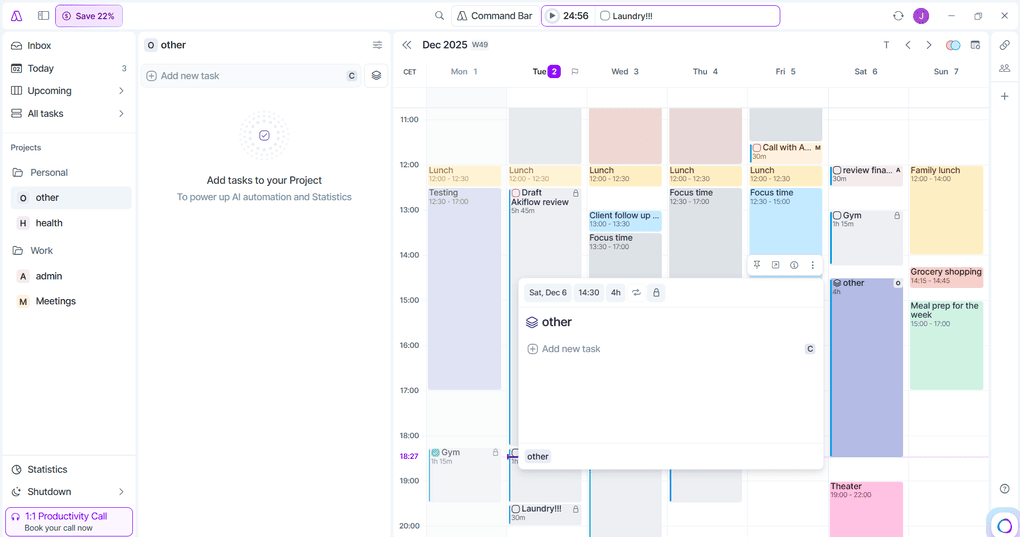
If you prefer visual planning, dragging a task into the calendar instantly turns it into a time block. The block takes your project color, shows the duration, and becomes part of your schedule, which is great if you want more control over how you plan calendar tasks.
You can also plan from list views like Today, Upcoming, or Inbox. Assign a time slot, set a deadline, or leave the task flexible. Tasks behave like events when placed in the calendar, but they stay easy to move and adjust, which keeps the day from feeling rigid.
The Today view brings everything into one screen. It brings tasks, calendar events, and time blocks in a way that makes it easier to see what realistically fits in your day and how your daily tasks line up with your daily routine.
Considering these features and my experience with Akiflow when planning my days, it earned 4.5/5 based on our scoring system.
Calendar management
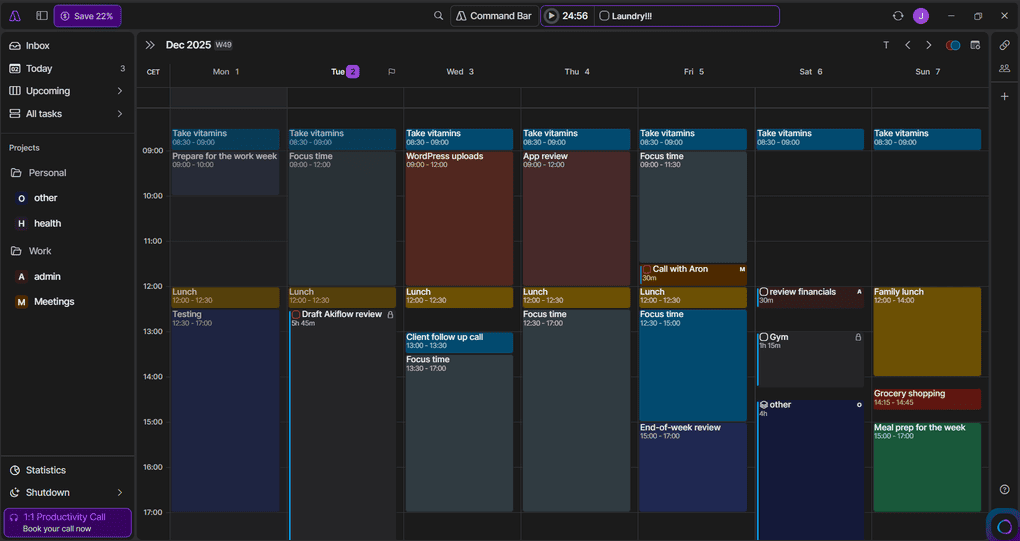
Akiflow’s calendar supports multiple accounts, including Google Calendar & Outlook, and keeps your meetings, personal plans, and deadlines in one place.
Events and tasks appear side by side, but only tasks stay flexible until you schedule them. Tasks with deadlines show up as small flags at the top of the calendar, which makes due dates visible without filling your day with fake events.
The calendar sits next to every major view rather than living in its own tab, which makes it feel more integrated into the workflow.
It is also customizable. You can show the whole month, a few days, or the full week, and resize the panel however you like. Color coding helps the layout stay readable at a glance and gives you a clear calendar experience.
Navigation is simple. You can jump through days and weeks quickly or return to Today with a single click. Dragging tasks into the calendar turns them into time blocks instantly, and everything syncs across your accounts without delay.
For basic meeting scheduling and everyday calendar management, Akiflow covers the essential features most people actually use, so I can give it 4.5/5.
Natural language input
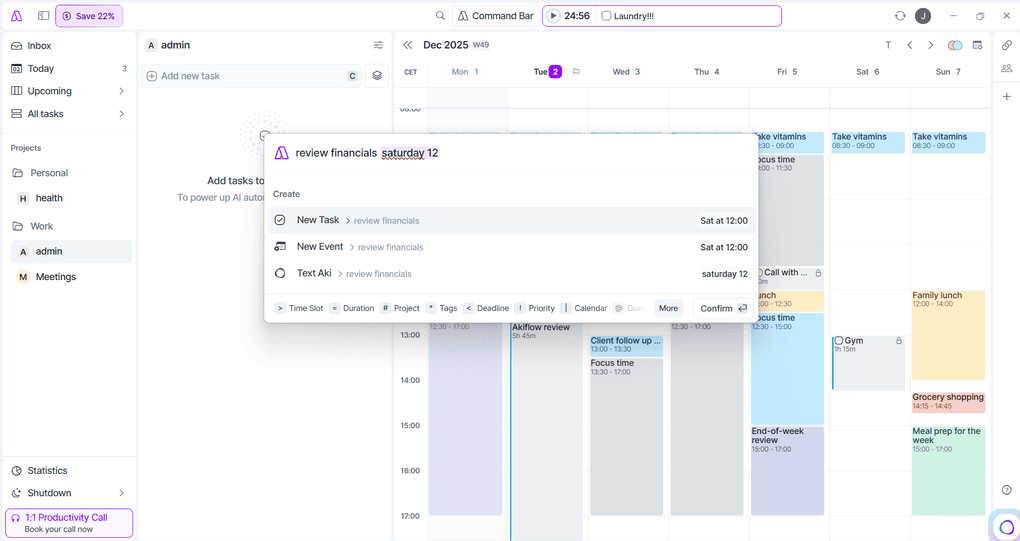
Akiflow lets you create tasks the way you would say them out loud. You can type “Call the vet tomorrow at 9” or “Pay rent on the first of every month,” and the app turns that into a scheduled task. It feels more like capturing a thought than filling out a form.
The same logic works inside the Command Bar, which is always visible. You can type or use voice input, speak a sentence, and Akiflow will parse it on the spot.
It understands simple phrases like “tomorrow,” “next week,” or “every weekday,” which is enough for everyday task entry and makes new tasks quick to add.
Task Management
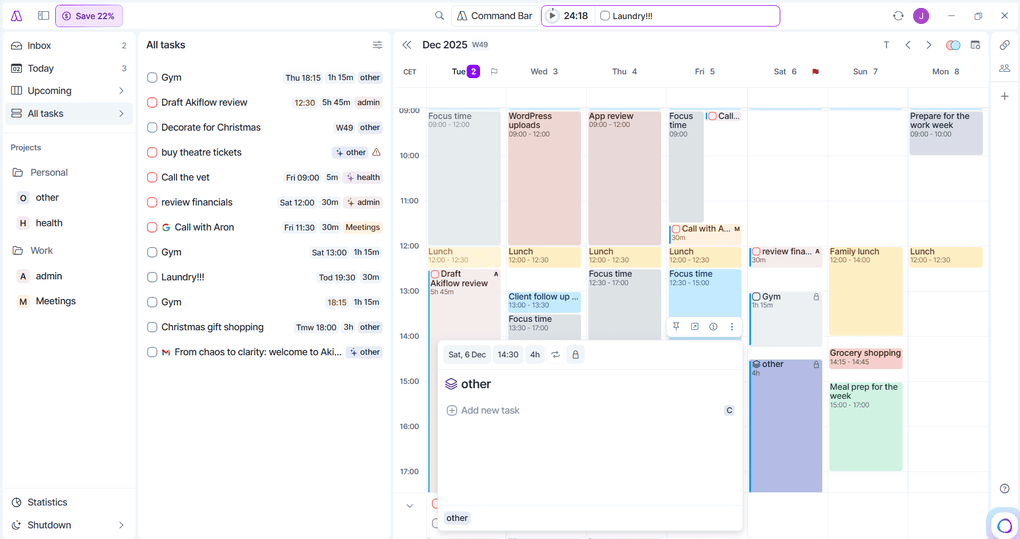
Akiflow keeps task management straightforward. Tasks sit in four main views: Inbox, Today, Upcoming, and All Tasks. This makes it easy to see what needs attention now, what is coming up next, and what still needs to be processed in your task list.
Each task can be scheduled, snoozed, assigned a project or label, or turned into a time block. You can also convert a task into an event or keep it flexible until you decide where it fits. No matter where the task comes from, the actions are predictable and fast, which helps when you are managing tasks across many tools.
Projects and labels help you group related work without becoming full project management boards. Akiflow is not designed to manage projects at the same depth as a dedicated project management tool, and it does not try to replace larger projects that live in ClickUp or Notion.
Priorities stay simple. Instead of multiple priority levels, Akiflow uses pinning to highlight the few things you truly want to focus on.
AI Workflows
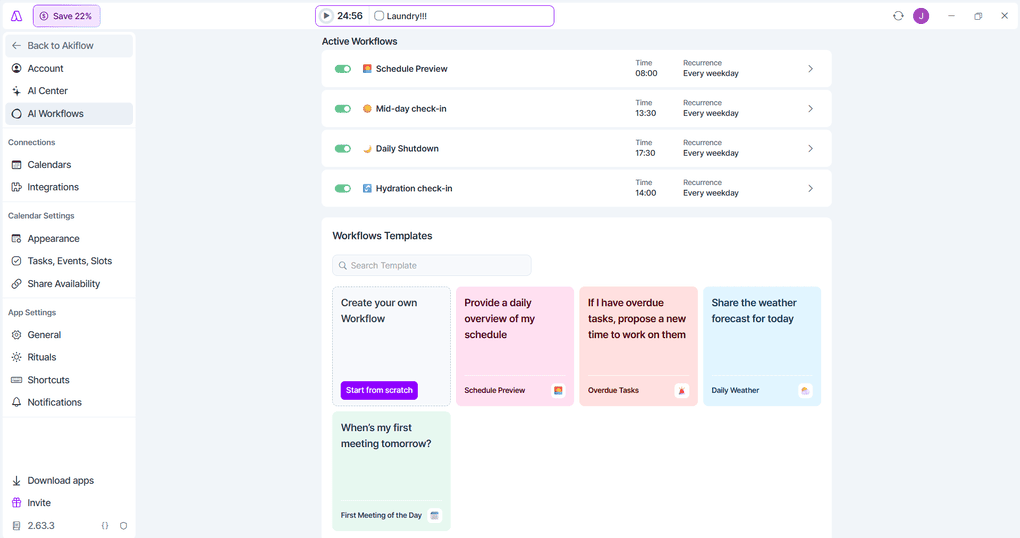
Akiflow includes several AI workflow templates that automate small parts of your day, like schedule previews, weather updates, or reminders about overdue tasks. You choose the time and recurrence, and Aki sends the message when it is most useful.
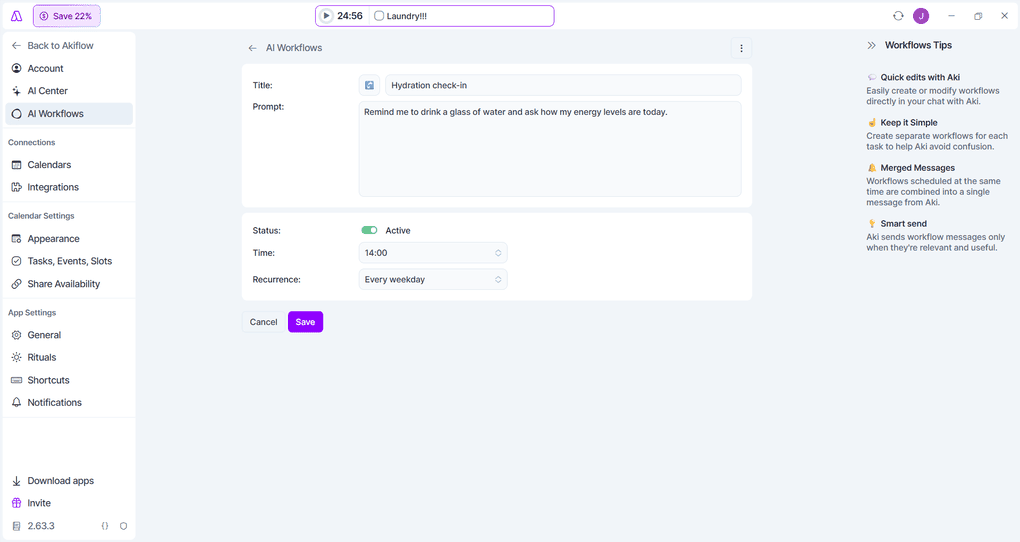
If you want something more personal, you can create a workflow from scratch. Write your own prompt, set when it should run, and Aki turns it into a recurring message. It works well for simple routines and habit check-ins.
The workflows stay lightweight and do not try to plan your day for you, but they add basic AI capabilities on top of your existing time management system.
Focus and Timer
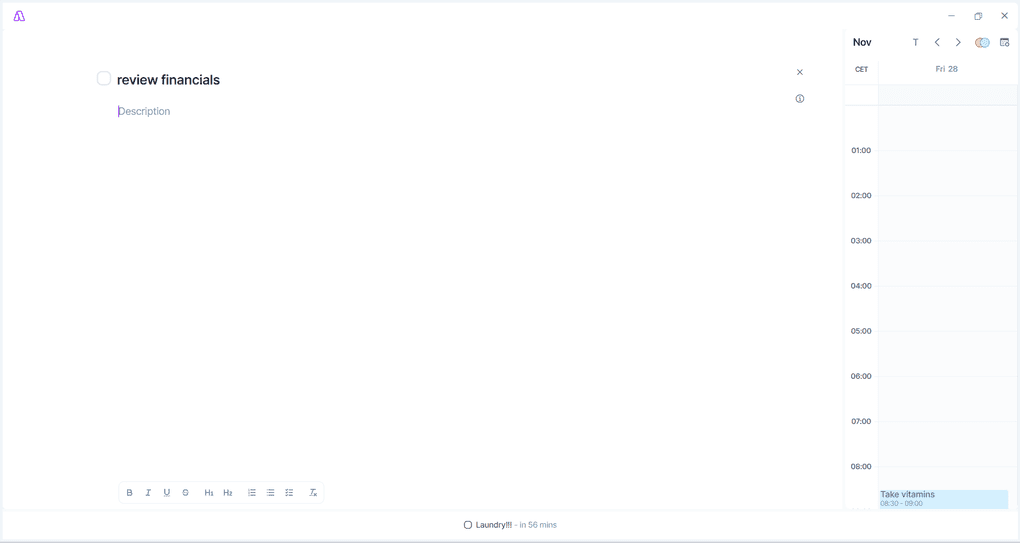
Akiflow includes a simple focus timer that helps you stay committed to one task at a time. You can start a session directly from a task or from a time block in the calendar. The timer shows your progress, stays out of the way, and mutes distractions while you work.
It is not a full Pomodoro system, but it pairs naturally with time blocking. Drag a task onto the calendar, lock it, start the timer, and you have a small routine that keeps you grounded in the work you want to finish and helps you stay focused during focused work sessions.
Share availability
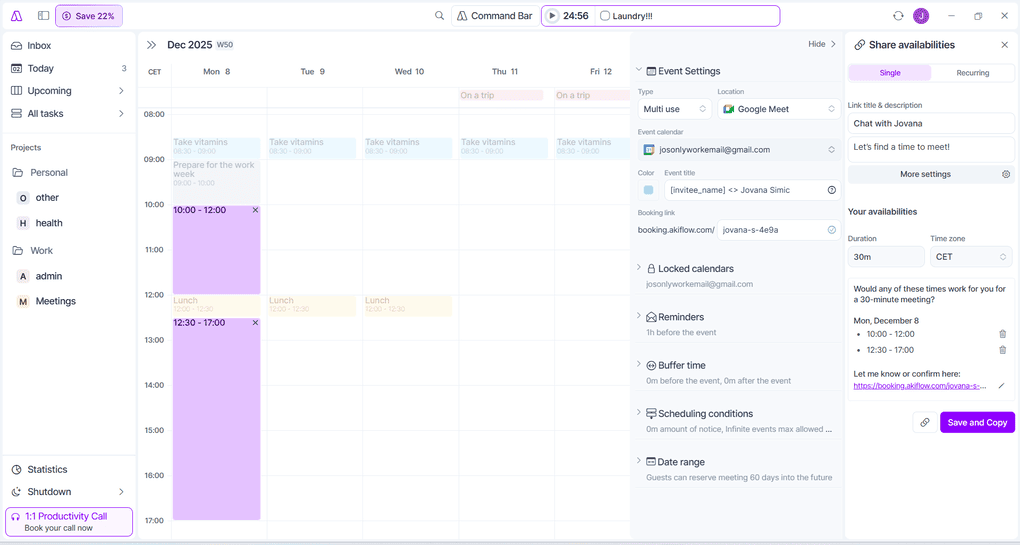
Akiflow also covers basic scheduling through its Share availability feature. You choose a few time slots, set the meeting duration, and Akiflow generates a simple booking link. The other person picks one of the times you offered, and the event is added to your calendar automatically.
The setup panel is easy to use. You can customize the event title, choose the meeting location, such as Google Meet, set reminders, add buffer time, and decide how far into the future people can book. Locked calendars help keep private events protected while still showing your real availability.
Other Features
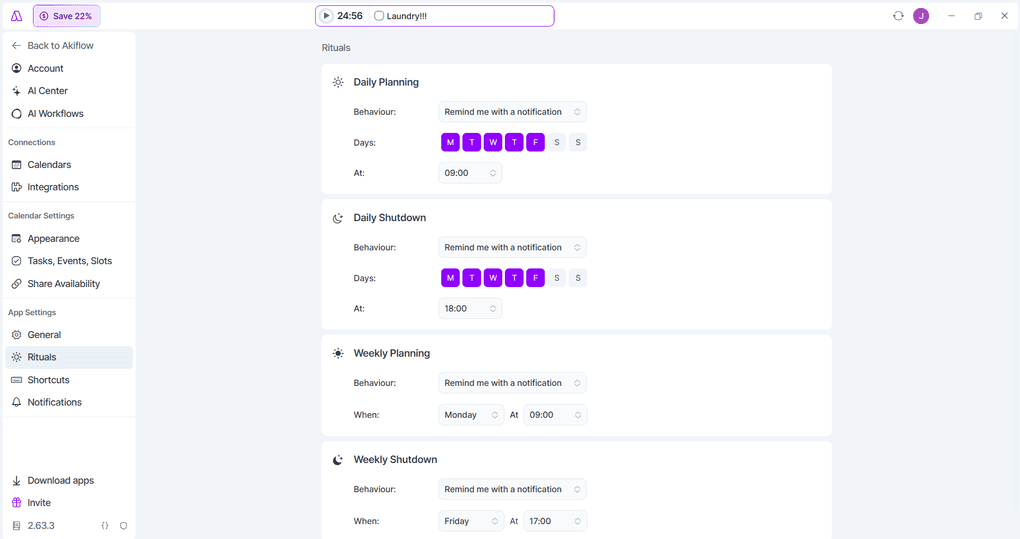
Akiflow includes a long list of keyboard shortcuts that make the app quick to navigate. You can move between views, create tasks, open the Command Bar, or start a focus session without lifting your hands from the keyboard, which is especially nice for power users.
The universal search is fast and flexible. You can jump to tasks, projects, labels, or calendar views with a few letters. Search also doubles as a command launcher, which helps when you do not remember the exact shortcut.
Notifications and reminders stay simple. Tasks can be snoozed, overdue items surface naturally, and deadlines appear as small calendar flags. You can enable desktop notifications or keep everything inside the app if you prefer a quieter workflow, without adding cognitive overload on top of your existing productivity system.
Akiflow’s user interface
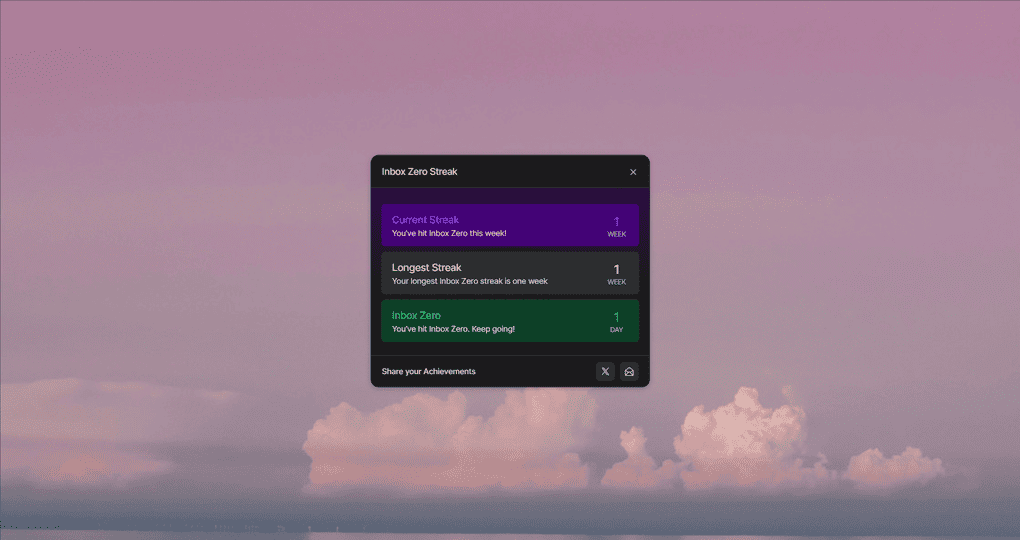
The first thing that stood out to me with Akiflow was how polished it feels. This is easily one of the better-designed apps in this category, in my opinion. It looks like a serious tool, but not a heavy one.
The onboarding and everyday guidance are very well done. I always felt like the app was quietly showing me what to do next. Everything is highly customizable in a practical way, and most things worked exactly how I expected the first time I clicked on them.
Akiflow’s integrations
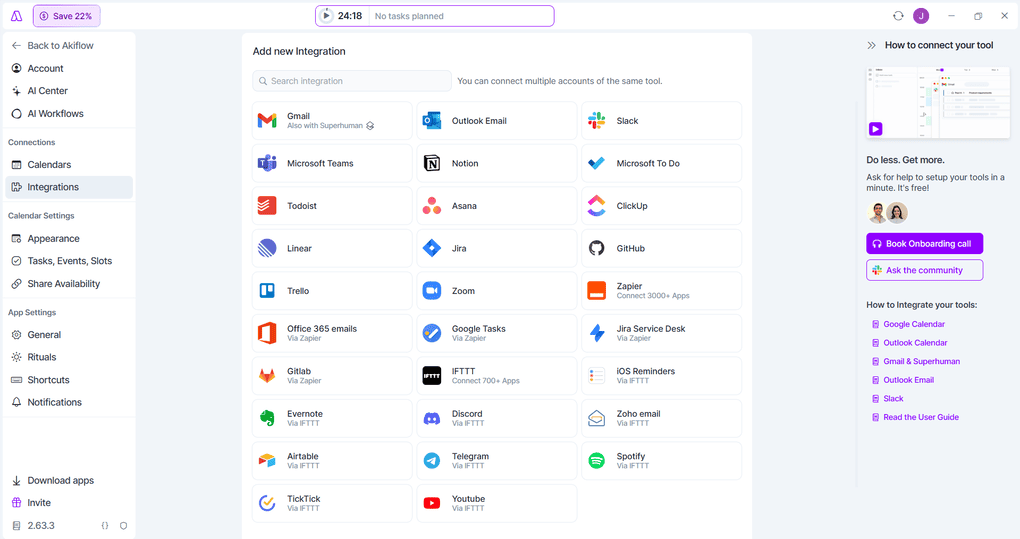
Akiflow offers seamless integration with most tools you probably already use. You can connect Google Calendar, Outlook Calendar, Gmail and Outlook email, Slack, Microsoft Teams, Todoist, Notion, Asana, ClickUp, Trello, Linear, Jira, Zoom, and more.
Multiple accounts are supported, so it is easy to keep both personal and work setups in the same place and integrate tasks from different systems.
With Gmail, you can simply star an email and have it show up in Akiflow as a task, which is much nicer than forwarding or copying things around. You can even send a quick WhatsApp message to Aki, the built-in assistant, and turn that into a task.
For everything else, Akiflow leans on Zapier and IFTTT. That is where the more unusual options show up, such as Spotify and YouTube. These are not native integrations, but simple automations you set up once.
They exist for one purpose: capturing tasks from anything you are doing online. If you hear something useful in a podcast or want to save a video for later, you can turn it into a task with one click. Everything flows into your central inbox, so you never lose track of content you want to revisit.
Explore our Apps directory
A curated directory of software tools we’ve independently reviewed, with links to full reviews, comparisons, and category guides.
Akiflow’s pricing
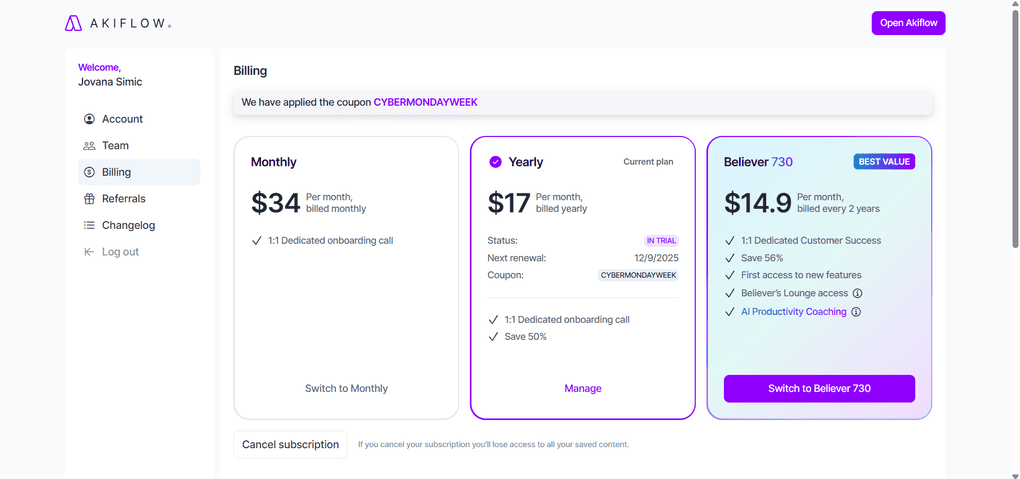
In the course of my Akiflow review, I found that it has one feature set with three billing options.
The monthly subscription costs $34 per month, the yearly subscription drops the price to $17 per month billed yearly, and the Believer 730 plan goes down to $14.90 per month billed every two years.
All three include unlimited tasks, integrations, meetings, full access to Aki, and a 1:1 onboarding call, while the Believer plan adds perks like priority customer success, early access to new features, and AI productivity coaching.
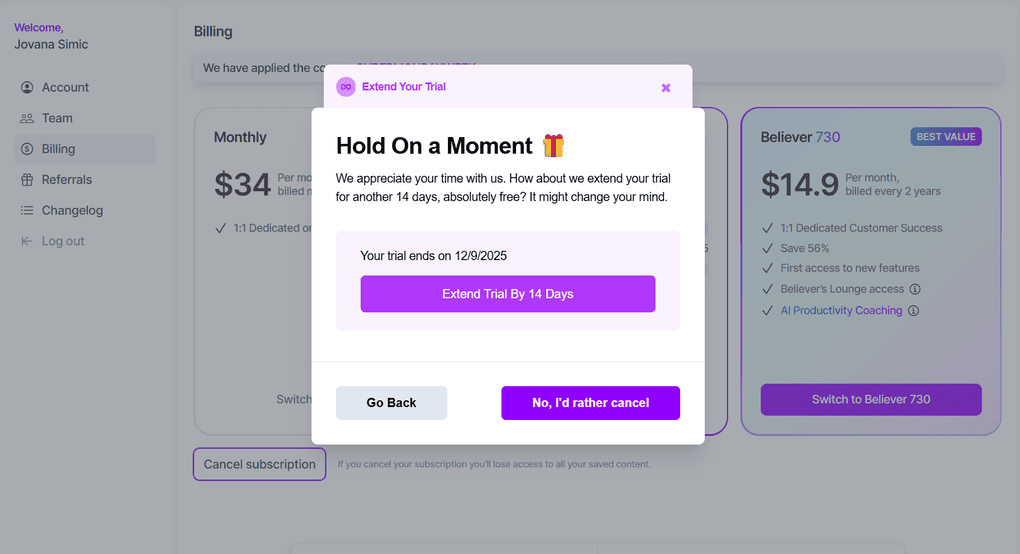
Akiflow offers a 7-day free trial for new users, and the subscription can be canceled at any time. When I clicked to cancel during my trial, Akiflow offered to extend it by another 14 days for free, and I have seen other users report the same experience, so this seems to be a common safety net rather than a one-off gesture.
Students, researchers, and teams can also request special pricing, which is helpful if you are testing Akiflow in a professional or academic setting. Still, the price is higher than most to-do lists and simple task management apps, and there is no free plan.
Akiflow positions itself closer to time-blocking and workflow tools like Motion or Sunsama. It is aimed at people who want to run their whole day from one place, not just manage a basic task list.
Pros and cons I found during my Akiflow review
With all that being said, let’s take a look at the pros and cons I found throughout my Akiflow review.
Pros of Akiflow
Cons of Akiflow
Akiflow alternatives
If you are still unsure whether Akiflow is the right fit for you, check out these other tools with similar features:
|
App |
Best for |
Description |
|---|---|---|
|
Morgen |
Best for calendar-based planning |
A daily planner that prioritizes your most important to-dos, events, and projects in one app. |
|
Todoist |
Best for task management |
A popular alternative to Sunsama that offers a free plan and is great for task management and collaboration. |
|
Notion Calendar |
Best for flexible planning |
A flexible calendar built into Notion’s workspace, great for users who already manage projects, notes, and tasks there and want task integration within one platform. |
|
Motion |
Best AI daily planner |
An AI-powered planner that automatically fills your professional and personal schedule using real-time scheduling links and auto-adjusted events. |
|
Reclaim AI |
Best for smart calendar automation |
Reclaim is half the price of Sunsama and offers similar task management and time blocking capabilities, but is only available for Google Calendar. |
|
ClickUp |
Best for complex workflows |
It is another alternative that provides extensive features for project management, but has a steeper learning curve. |
|
Routine |
Best minimalist planner |
Routine is a minimalist productivity app that combines calendars, tasks, notes, and simple journaling in one place. |
|
Sunsama |
Best for mindful planning |
A mindful productivity tool designed to help you create balanced days and focus on priorities, with built-in task scheduling and reflective daily planning. |
Compare Akiflow vs alternatives



Akiflow VS Sunsama

Akiflow VS Motion
Wrap up: Akiflow review
After testing it, Akiflow felt like a tool that knows exactly what it wants to be. It focuses on making your day easier to plan by putting everything you need in one place and helping you see what realistically fits. So, I can see why Akiflow is often recommended for busy professionals and freelancers who use multiple tools.
Whether it is worth the price depends on how much you rely on time blocking and how often you plan your day around a calendar. If that is already part of your workflow, Akiflow makes those habits smoother and more structured.
Related articles:
- 9 Best Motion Alternatives | I Tried 20+ Apps (2026)
- 11 Best Daily Planner Apps | 20+ Personally Tested Tools (2026)
- Akiflow vs Sunsama (2026): An Honest Comparison
- Akiflow vs Motion (2026): My Honest Opinion
During my Akiflow review, I discovered that Akiflow is not recommended for users who are budget-conscious due to its higher pricing compared to other task management tools. If you prefer simple to-do lists or want deep project features, it will probably feel like more than you need.
For me, it landed somewhere in the middle of the Trustpilot enthusiasm and Reddit skepticism. This well-designed, well-thought-out tool helps with daily planning, but it also asks for a level of commitment that will not be for everyone.
As always, I will update this Akiflow review over time so you guys have the latest information on this productivity app.
Looking for similar tools?
Visit the link to explore other apps we’ve reviewed in this space and how they compare.
Why you can trust our reviews
At thebusinessdive.com, our team tests, reviews, and compares hundreds of productivity tools every year — from project management tools to note-taking apps. We dive deep into real-world use cases to help you find the right tools that actually improve your workflow, not just add noise.
Our mission? No fluff, no shortcuts—just honest, hands-on insights from productivity pros.
Discover how we stay transparent, read our review methodology, and let us know about any tools we missed.
Frequently asked questions
Is Akiflow free?
No. Akiflow does not offer a free plan, only a 7-day free trial. After that, you need a subscription, and the Akiflow pricing is closer to premium time blocking apps than simple to-do lists. There is no free tier or believer plan, but it runs on multiple platforms and includes all calendar functionalities.
Is Akiflow worth it?
It depends on your workflow. If you rely on time blocking and want task consolidation instead of switching between multiple tools and other apps, Akiflow excels at keeping all your tasks in one place. If you only need a lightweight task list or want to manage projects in depth, other competitors may fit better.
What does Akiflow do?
Akiflow combines time management, task management, and calendar features into one daily planner app. You can drag tasks into time slots, sync them with Google or Outlook Calendar using simple two-way sync, and use easy-to-use features like the Command Bar, daily shutdown feature, and basic progress visualization.
Disclosure: I only recommend products I would use myself, and all opinions expressed here are our own. This post may contain affiliate links that, at no additional cost to you, may earn a small commission. Read the full privacy policy here.

Hey! I’m Jovana, a content writer who loves writing, researching, and testing new productivity apps. With a background in philosophy, I bring a thoughtful but no-bullshit approach to everything I do. Let’s connect on Linkedin!