


Zoho Projects Review: My Honest Experience (2026)
Most project management tools focus on tasks, while Zoho Projects focuses on how projects fit into the rest of your business. Instead of treating projects as isolated workspaces, Zoho Projects is built to connect project work with sales, finance, and customer support.
So, the overall idea sounds exciting.
But how does it actually deliver in real life?
In this Zoho Projects review, I will share my honest experience on how it fits into our business workflows, what features it offers, its pricing model, and its pros and cons.
Let’s dive in!
Verdict
Here’s the quick verdict if you don’t want to read the full review:
🎯 Best for: Teams that need structured project management with strong reporting and business integrations
🚫 Not ideal for: Users who prefer highly visual or flexible workflows
⭐ Biggest strength: Deep ecosystem integration and advanced reporting
⚠️ Biggest weakness: Less flexibility and a more traditional interface
⚖️ Verdict: Zoho Projects is a powerful and structured project management tool that excels in planning, reporting, and business integration, making it ideal for process-driven teams, but less appealing for users who want flexibility or modern UI.
🏆 Score: 4.3 / 5
✅ Tested with our review & scoring methodology ✅ Real-world testing ✅ Unbiased evaluation
Zoho Projects
Summary
Zoho Projects is a structured project management tool designed to help teams plan, track, and deliver projects with clear processes and long-term visibility. It offers strong planning tools, built-in time tracking, reporting, and automation, especially when used within the Zoho ecosystem, but its more traditional interface and limited visual flexibility mean it will appeal most to teams that value structure and predictability over heavy customization.
|
|
Strong project planning and task structure
|
|
|
Powerful automation and custom workflows
|
|
|
Built-in time tracking and timesheets
|
|
|
Detailed reports and workload management
|
|
|
Clear roles and permission controls
|
|
|
Strong ecosystem integrations
|
|
|
Competitive pricing with a usable free plan
|
|
|
No native desktop app
|
|
|
More customization options would be great
|
How We Test Project Management Tools
To keep our reviews & final score for each project management app fair and consistent, we evaluate every tool using the same testing framework based on real-world usage, feature depth, and overall value.
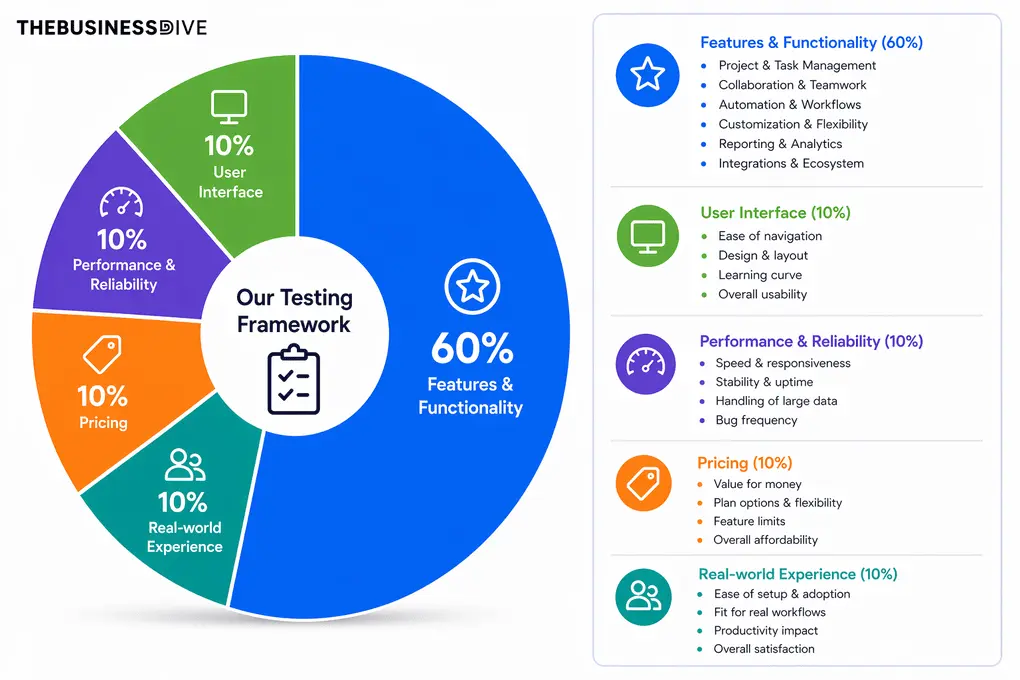
Our scoring breakdown after testing 20+ project management apps:
⚙️ Features & functionality — 60%
🖥️ User interface — 10%
⚡ Performance & Reliability —10%
💰 Pricing — 10%
👥 Real-world experience — 10%
Want a detailed breakdown of how we test each category?
Learn exactly how we test tools → Review methodology
Short on time? Here’s a quick overview of Zoho Projects
What is Zoho Projects?
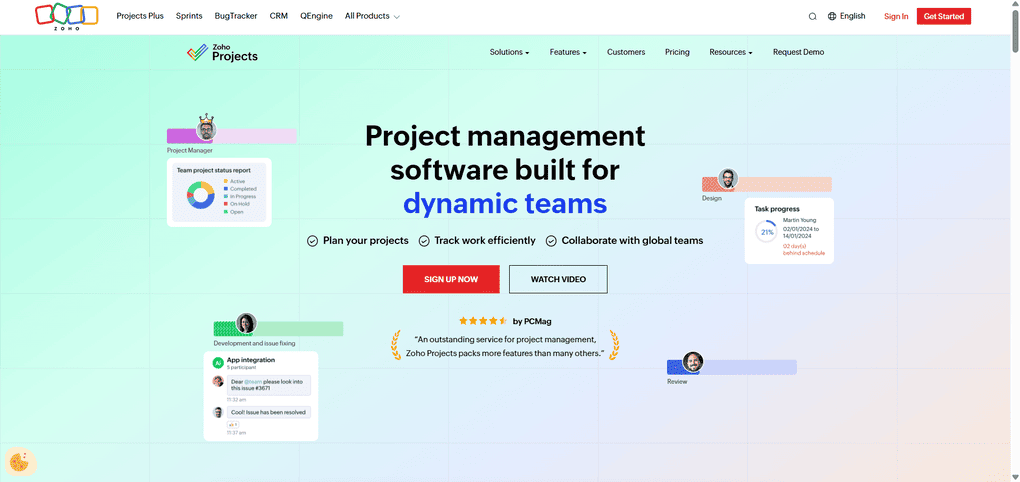
To understand Zoho Projects, it helps to first look at the company behind it.
Zoho is a global software company that builds cloud-based business tools across sales, finance, customer support, marketing, analytics, and operations. Rather than offering isolated products, Zoho focuses on building a connected ecosystem where tools are designed to work together.
The company is best known for Zoho CRM, which acts as the foundation of the Zoho ecosystem. CRM plays a central role, with other tools naturally extending into areas like project delivery, billing, and customer support.
Zoho Projects is Zoho’s project management tool within this ecosystem. It is designed to help teams plan work, organize projects and milestones, track time, and create task dependencies, while staying closely connected to other business functions.
My experience with Zoho Projects
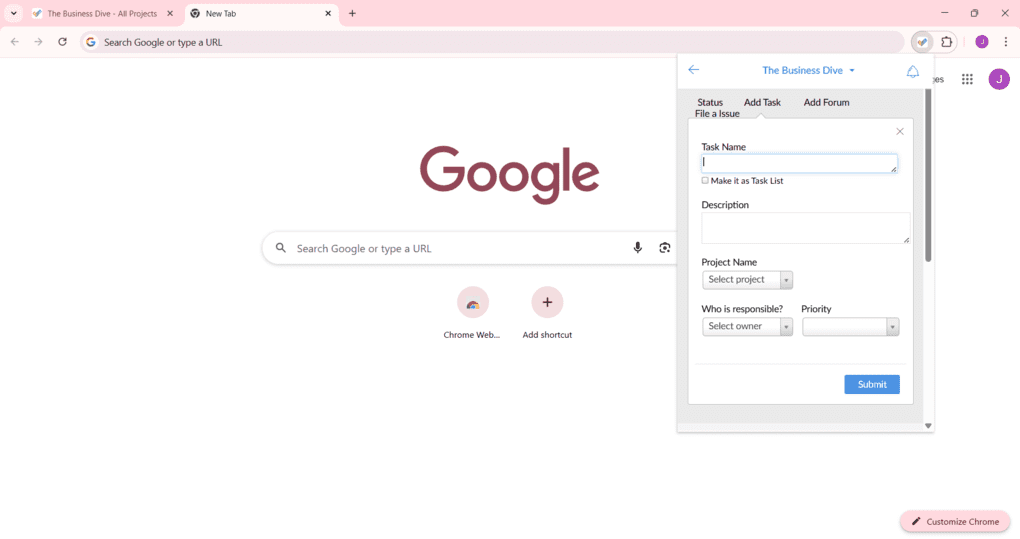
While Zoho Projects has a learning curve, especially when setting up advanced features, it is worth it in the end, as it significantly improves the overall user experience and efficiency.
One thing that helped a lot in my workflow was the Chrome extension, which kept Zoho Projects easily accessible at all times. I also found the Gmail add-on genuinely useful. Being able to turn emails into tasks with a single click made it much easier to capture work without breaking focus.
Moreover, I discovered that when reviewing Zoho projects, it is designed to be scalable and customizable to meet the unique needs of different organizations.
My biggest frustration is that Zoho Projects still does not have a native desktop app, and that it doesn’t offer extensive customization options.
Overall, Zoho Projects feels reliable and capable, especially for complex or recurring projects. While the interface is traditional and there is limited visual flexibility, it is a top project management software for structured workflows.
Why Zoho Projects got a 4.3 / 5 score
Zoho Projects outperformed numerous project management apps we have tested in terms of integrations (Zoho ecosystem), reporting depth (workload reports, time log reports, etc. ), and project and task management features.
Where Zoho Projects lost points is in the level of customization options offered (3/5). Compared to other project management software such as ClickUp or Monday, Zoho Projects offers fewer personalization options.
Who Zoho Projects is a good fit for
Who Zoho Projects is not ideal for
Key features
Now, let’s take a closer look at Zoho Projects’ key features!
Dashboard
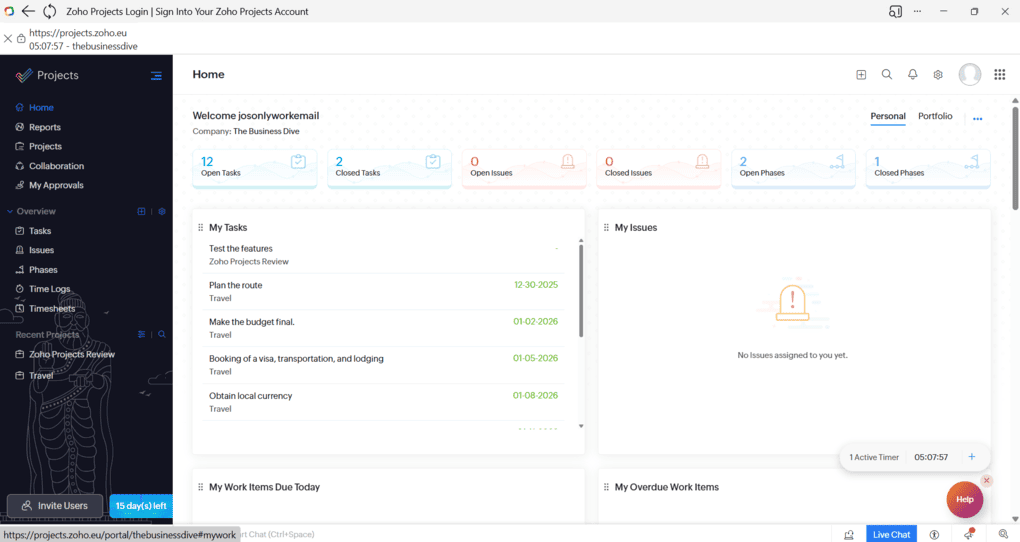
In Zoho Projects, the dashboard lives inside the Home tab and is split into two views: Personal and Portfolio.
The Personal view focuses on individual work. It shows your tasks, phases, issues, time logs, items due today, and overdue work across all projects.
The Portfolio view provides a higher-level overview of projects. Here, you can see reports such as Project Status, Project Ownership, Project Groups, customer-related reports, and a yearly timeline summary. This view is more about understanding overall project health than managing individual tasks.
Overall, the Home dashboard feels practical and easy to work with. It does a good job of supporting both daily execution and project-level oversight.
Reports and project insights
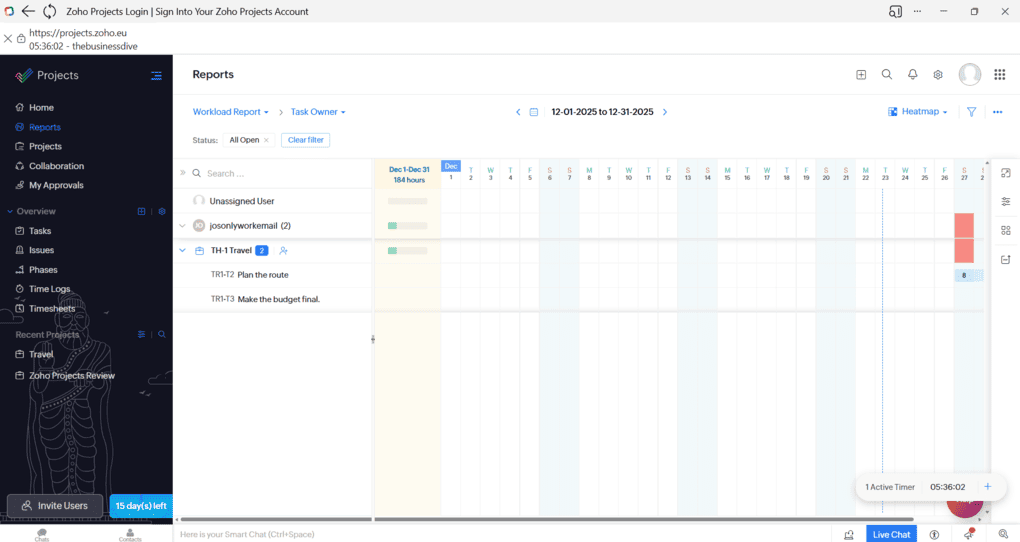
The reports section gives you a much clearer picture of what is happening across projects, teams, and time.
You can switch between different types of reports, such as Workload Reports, Planned vs Actual, Time Log Reports, and Custom Reports, depending on what you want to analyze.
I found this structure intuitive because it mirrors how project managers usually think about work: who is overloaded, how plans compare to reality, and where time is actually going.
The workload reports are especially useful. Using Zoho Projects’ features lets you view capacity by task owner and time period, and you can switch to a heatmap view to quickly spot overloads or gaps.
Ultimately, this makes it easier to adjust assignments.
Project planning and task structure
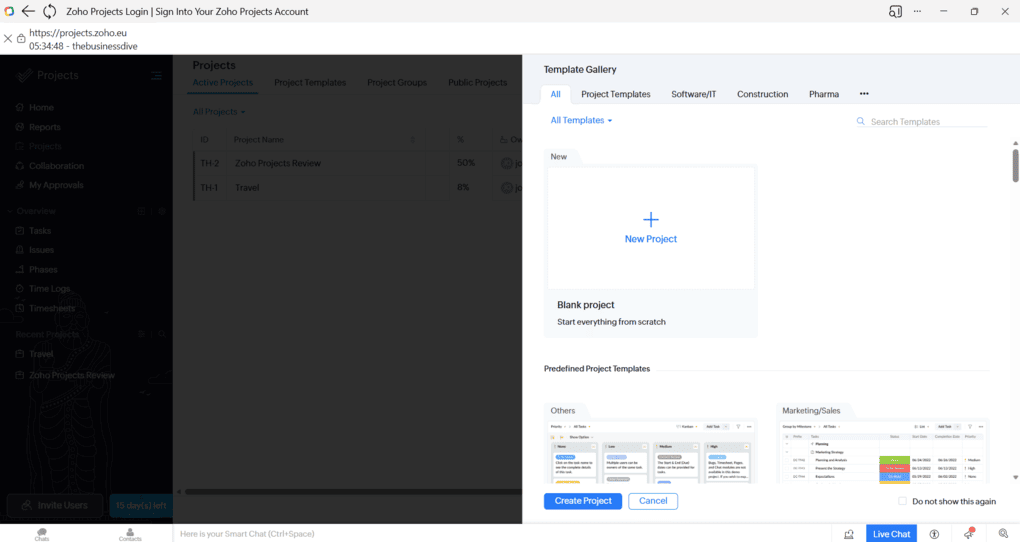
At its core, Zoho Projects uses a clear project hierarchy built around projects, milestones, task lists, tasks, and dependencies.
Creating a new project is simple. When you add one, you can either start from scratch or choose from a wide range of ready-made project templates, depending on how much structure you want upfront.
What I really liked here is the way Zoho Projects supports this structure with a large library of premade templates.
Instead of limiting project templates to software or marketing workflows, Zoho offers templates across many different areas, including construction, manufacturing, HR, events, SEO, product launches, and even more practical use cases like wedding planning, travel planning, and vehicle inspections.
I found this surprisingly useful. These templates feel less abstract than what many PM tools offer and more grounded in real-world processes.
Each template comes with predefined tasks and phases, which makes it easy to get started quickly, while still allowing full customization. Of course, you can also create your own templates from scratch.
Compared to other project management apps like ClickUp, Asana, or Monday, Zoho Projects puts more emphasis on industry-specific and process-driven templates rather than flexible visual setups. That makes templates feel more practical, especially for teams that value structure over experimentation.
Once a project is set up this way, it also becomes much easier to automate workflows and manage timelines later on.
Automation and custom workflows
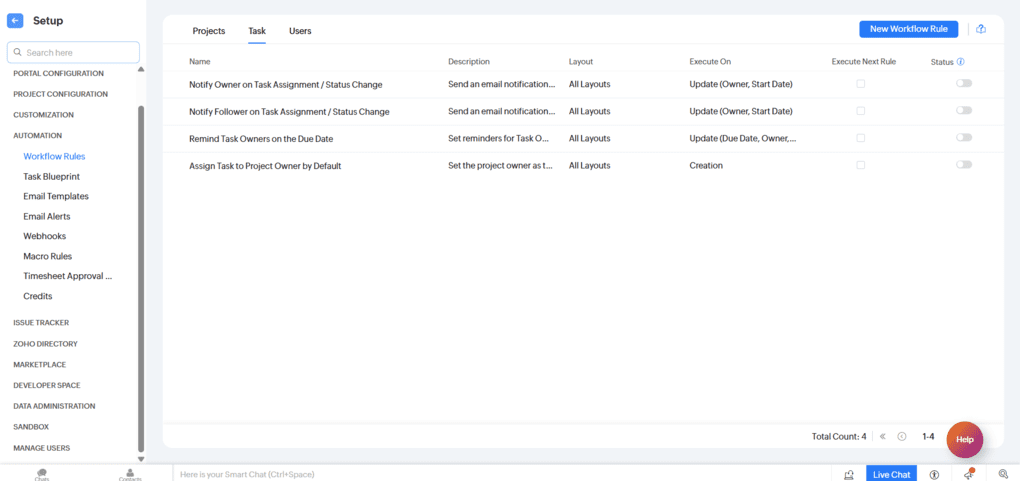
Zoho Projects provides practical customization where it counts, enough to make the tool fit your workflow. You can add custom fields, adjust task statuses, create your own views, reuse templates, and set up simple no-code automations.
On the automation side, Zoho Projects offers a dedicated set of tools for building workflows around that structure. You can create workflow rules triggered by user actions or by date and time, automate status updates, assignments, notifications, and approvals, and manage everything from a single place.
There are also additional automation options like task blueprints, email alerts, and approval flows.
If you are used to some Zoho Projects competitors, such as ClickUp or Monday, where you can redesign almost everything and build very specific setups, Zoho Projects will feel more structured and a bit less flexible.
That said, this can actually be a good thing. Zoho Projects keeps a clear and consistent structure, so you spend less time configuring and more time actually managing work.
It is easy to get started, easy to explain to new team members, and easier to keep organized over time. The trade-off is that it is not the best choice if you want highly customized layouts or very specific workflows.
Built-in time tracking and timesheets
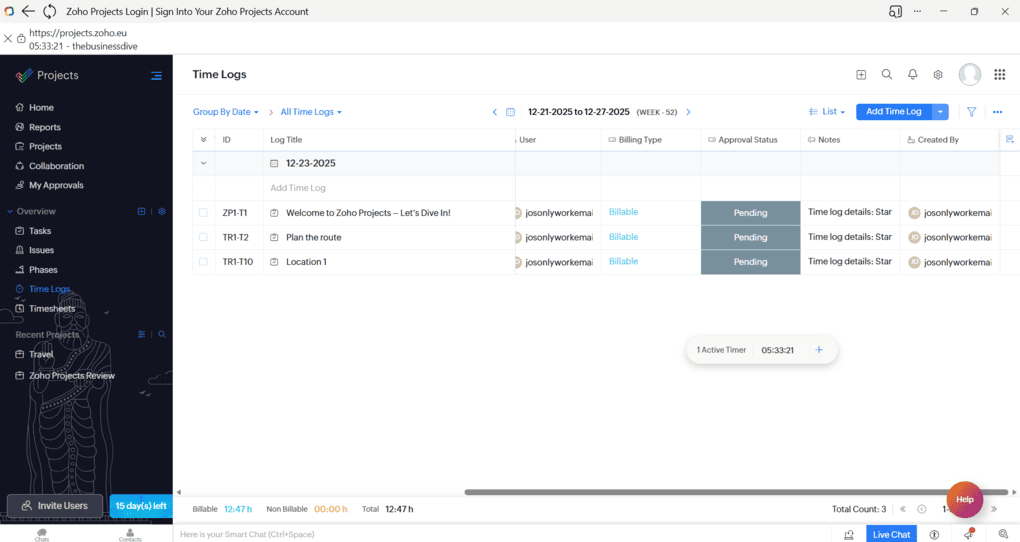
Time tracking is not an afterthought in Zoho Projects. The platform supports timers, manual time entries, weekly timesheets, and timesheet approvals, which is a big deal if you bill clients or need clean internal reporting.
One small thing worth mentioning is that the timer is not immediately front and center. It is there and works reliably, but you may need a moment to notice it when you first start using the tool. Once you do, it works without any issues.
Zoho Projects also makes a clear distinction between billable and non-billable time, and timesheets can go through an approval flow before being finalized. This is something many teams end up solving with third-party tools in other project management platforms.
I discovered that during my Zoho Projects review, teams using other project management apps often rely on external time tracking integrations to achieve the same level of control and reporting as I had with Zoho Projects.
Gantt charts and project timelines
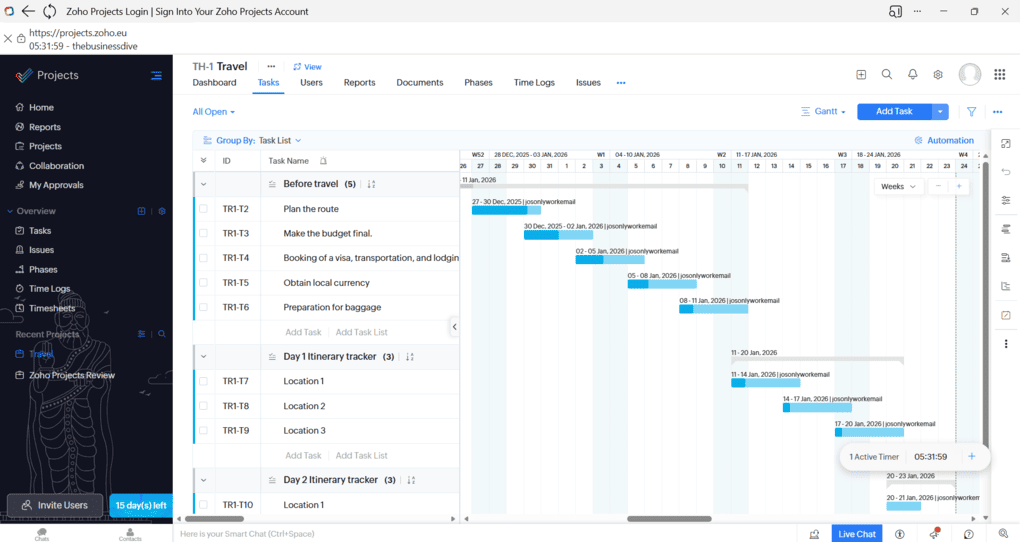
Zoho Projects has a solid Gantt experience that goes beyond a basic timeline view. You can work with task dependencies directly inside the Gantt chart and define how tasks relate to each other, which makes planning more realistic from the start.
What I found useful is that the Gantt view actually feels central to project planning. You can see how tasks shift when timelines change, track progress against the original plan, and quickly spot delays or bottlenecks.
Tools like Asana also support dependencies on their Timeline view, but Zoho Projects feels more oriented toward classic project planning, where tracking planned versus actual progress is part of everyday project management rather than an advanced feature.
Resource and workload management
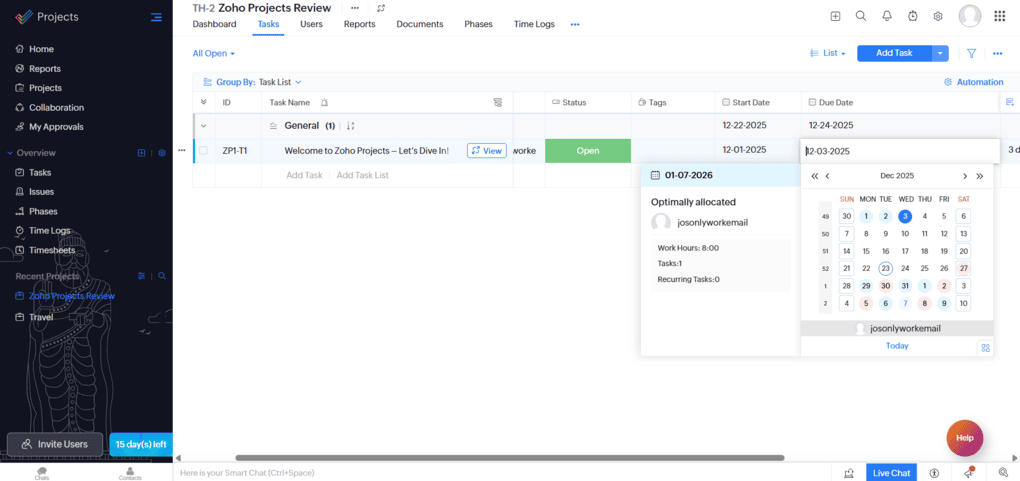
After reading some user reports, I found that in the course of my Zoho Projects review, this is one of the most underrated features. The platform includes dedicated workload and resource utilization views that help you see who is overloaded and who still has capacity, using clear visual indicators like bars and heatmap-style reports.
What I liked here is that workload planning feels like a built-in part of the tool, not something you have to assemble yourself through dashboards or extra reports. You can quickly understand how work is distributed across the team and adjust assignments accordingly.
This feature matters most for project managers, agencies, and service teams where capacity planning is a daily concern and where knowing who can take on more work is just as important as knowing what tasks are due next.
Collaboration and team communication
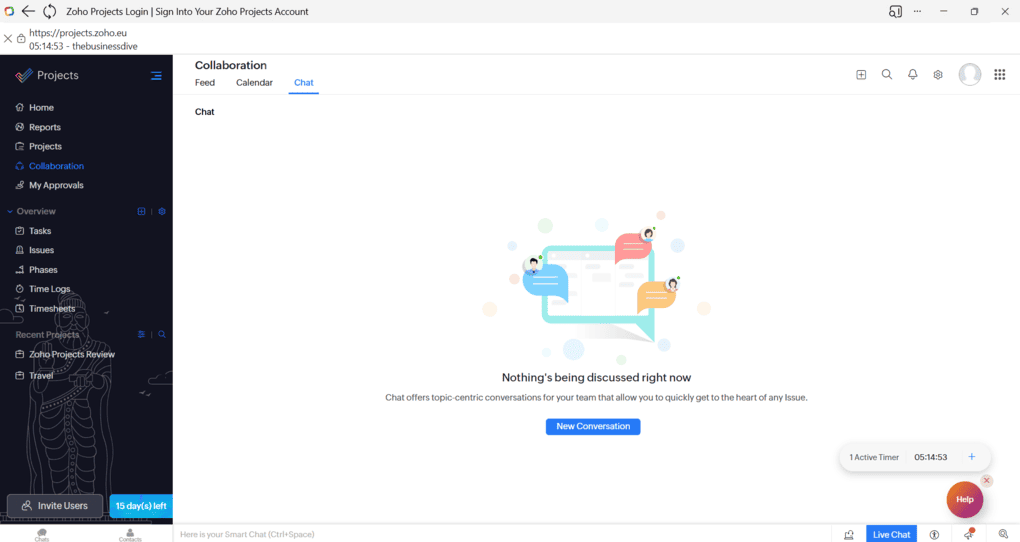
Zoho Projects includes built-in collaboration features such as task comments, mentions, file attachments, activity feeds, and a dedicated Chat section for team conversations. This covers most everyday communication needs without relying on external tools.
What stood out to me during my Zoho Projects review is that collaboration is still primarily anchored to work items. While built-in chat exists as a separate space, most discussions naturally happen around tasks, phases, or issues, which makes conversations easier to follow later and keeps context intact.
Compared to chat-first platforms like ClickUp or Notion, collaboration in Zoho Projects feels more structured and work-focused. It works best for teams that prefer communication to support project execution, rather than replace task-based workflows with constant real-time chat.
Roles and user permissions
Zoho Projects supports role-based access control with clearly defined roles such as Administrator, Manager, Employee, and Contractor. These roles are tied to profiles that determine what each user can see, edit, or manage across projects.
This feature becomes especially important if you work with external collaborators, freelancers, or clients. You can give people access only to the parts of a project they actually need, without exposing internal discussions, budgets, or sensitive information.
Many lighter project management tools offer basic permission settings, but Zoho Projects takes a more business-oriented approach. It is designed for teams that need clear boundaries and accountability, not just internal collaboration.
For agencies and service teams, this level of control can make day-to-day project management much easier to maintain.
Zoho Projects user interface
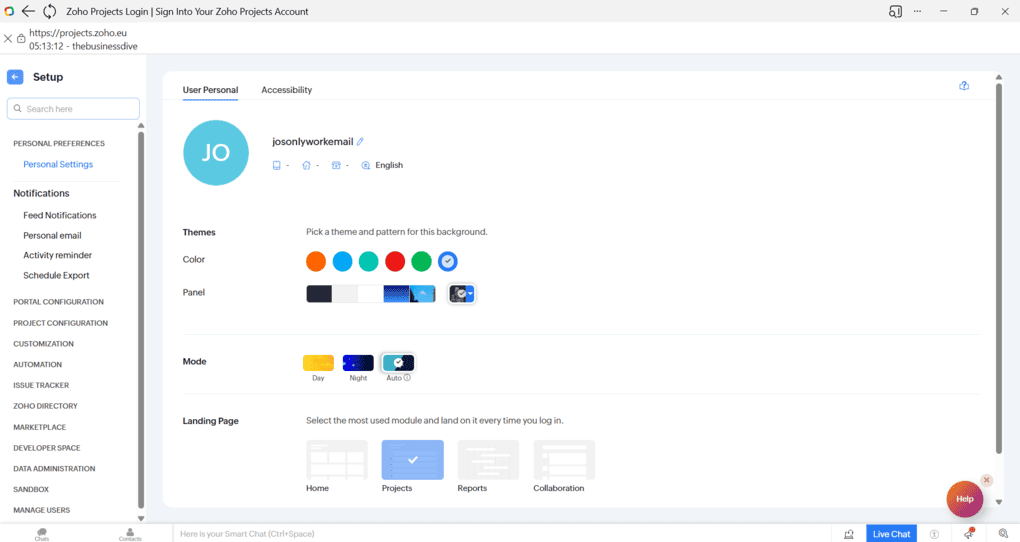
The user interface in Zoho Projects feels clean and structured, with a clear focus on functionality. Navigation is consistent, and once you understand where things live, it is easy to move around.
That said, the UI is not the most modern or visually flexible on the market. Compared to tools like ClickUp or Monday, it feels more traditional and a bit conservative. I see this as a trade-off that works in Zoho’s favor if you value clarity and predictability over heavy customization or pretty design.
Zoho Projects integrations
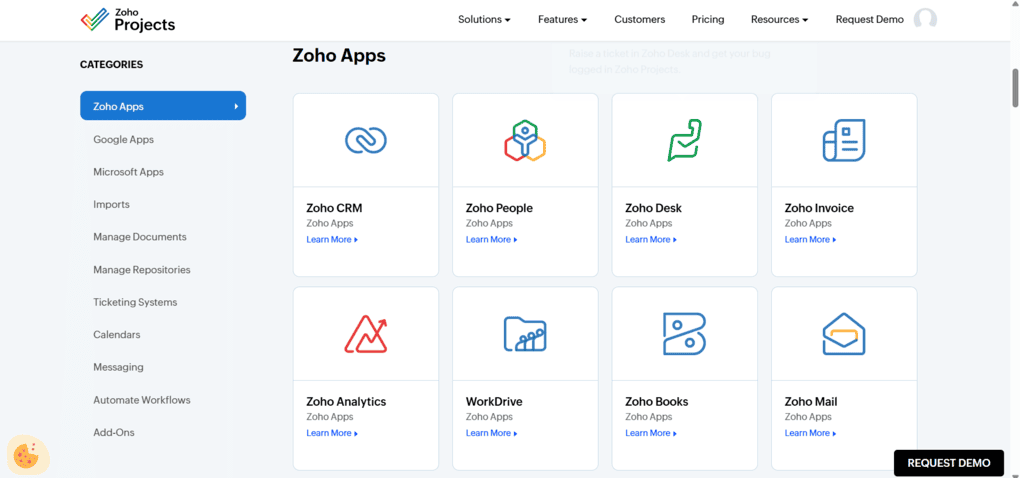
Integrations are one of the strongest parts of Zoho Projects, especially if you are already using other Zoho tools. The platform is designed to work as part of a larger ecosystem, which makes it easier to connect project work with sales, support, finance, and internal operations.
What stood out to me is that these integrations feel built in rather than bolted on. You are not just syncing data, but actually extending workflows across tools.
For example, the integration with Zoho Books and Zoho Invoice allows users to manage project budgets and invoicing directly within Zoho Projects. Also, the integrations with Zoho’s CRM allow for automatic task creation based on customer interactions, improving project tracking.
Furthermore, Zoho Projects can connect with third-party tools like Google Drive, Microsoft Office, and Slack to streamline project management.
There are also integrations with Google and Microsoft apps for calendars, email, and documents, but the real value shows if you plan to work inside the Zoho ecosystem rather than mixing many unrelated tools.
Explore our Apps directory
A curated directory of software tools we’ve independently reviewed, with links to full reviews, comparisons, and category guides.
Zoho Projects pricing plans
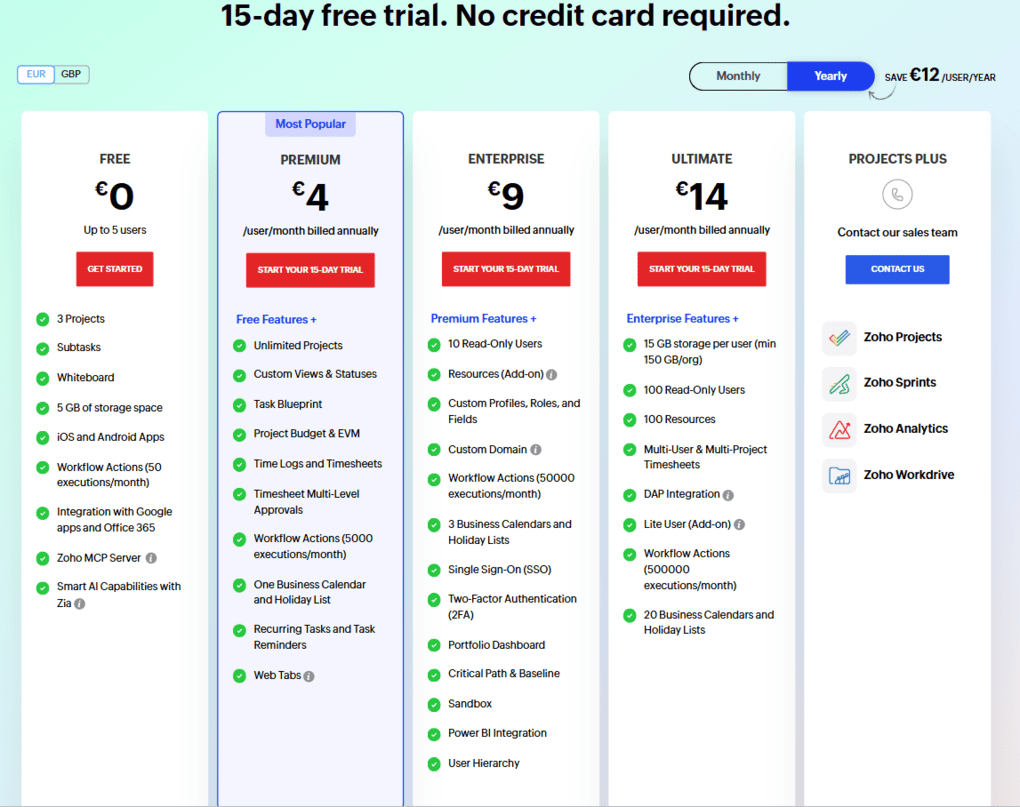
Zoho Projects offers one of the more flexible pricing structures in the project management space, with a usable free plan and several paid tiers that scale gradually as teams grow. In addition to the free plan, Zoho Projects also offers a 15-day free trial on paid plans.
The Free plan supports up to five users and three projects. While it supports only basic issue tracking and reporting features, and only includes 5GB of cloud storage, it is a decent option for small teams or for testing the tool long-term.
Paid plans start with Premium, at €4 per user per month when billed annually, and unlock unlimited projects, custom views and statuses, time tracking, task blueprints, and workflow automation. For many teams, this tier already covers most core project management needs.
The Enterprise and Ultimate plans are aimed at larger or more process-driven teams. These tiers add advanced permissions, higher automation limits, resource management features, portfolio-level dashboards, and enterprise-grade security options like SSO and sandbox environments.
There is also a Projects Plus option for organizations that want Zoho Projects bundled with other Zoho apps. It is a combination of four applications – Zoho Projects, Zoho Sprints, Zoho Workdrive, and Zoho Analytics.
Overall, I found Zoho Projects’ pricing fair, and the Premium and Enterprise plans seem especially an affordable solution compared to other software.
My experience with Zoho Projects
After spending time with Zoho Projects, my overall impression is that this is a genuinely serious project management tool. It is clearly built for teams that care about structure, process, and long-term project visibility.
While Zoho Projects has a learning curve, especially when setting up advanced features, it is worth it in the end, as it significantly improves the overall user experience and efficiency.
My biggest frustration is that Zoho Projects still does not have a native desktop app.
That said, there are a few solid workarounds that make daily use much more comfortable. On Microsoft Edge, you can open Zoho Projects, click the three dots in the top right corner, go to More tools, then Apps, and choose Install this site as an app.
It still runs in the background as a web app, but it gives you a proper desktop-app feel. You can do something similar in Chrome by clicking the three dots, going to Cast, save, and share, and choosing Install page as app.
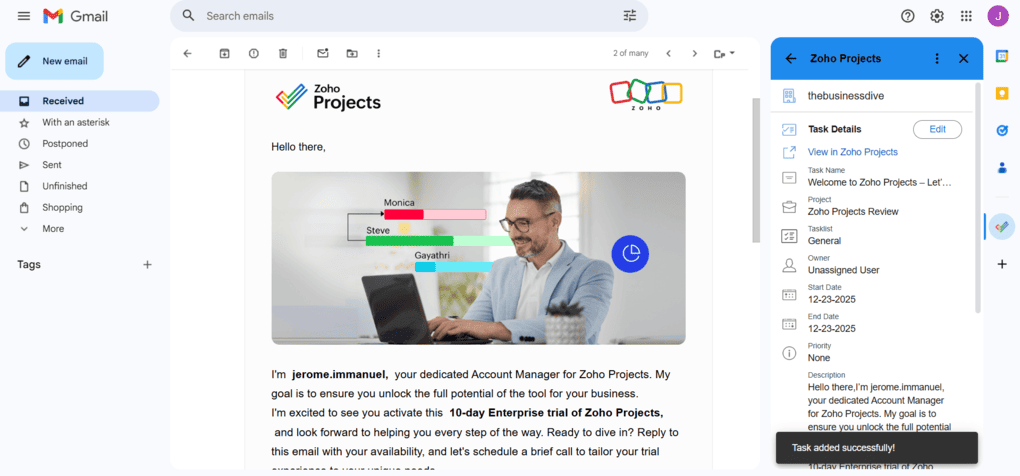
Another thing that helped a lot in my workflow was the Chrome extension, which kept Zoho Projects easily accessible at all times. I also found the Gmail add-on genuinely useful. Being able to turn emails into tasks with a single click made it much easier to capture work without breaking focus.
Moreover, I discovered that when reviewing Zoho projects, it is designed to be scalable and customizable to meet the unique needs of different organizations. So, if your business grows, Zoho Projects can grow with you.
Overall, Zoho Projects feels reliable and capable, especially for complex or recurring projects. While I would still love to see a native desktop app in the future, the available workarounds make it easy to live with the web version in the meantime.
Pros and cons I found during my Zoho Projects review
Here, I show you the pros and cons I discovered throughout my Zoho Projects review.
Pros of Zoho Projects
Cons of Zoho Projects
Zoho Projects alternatives
Here are some alternatives to Zoho Projects if you think it is not right for you.
|
App |
Best for |
Description |
|---|---|---|
|
Hive |
Best for small teams |
A project management app for small teams with advanced collaboration and AI features. |
|
SmartSuite |
Best for no-code workflow building |
A collaborative work management solution for teams to track and manage workflow. |
|
Monday.com |
Best for visual workflows |
An intuitive project management app with advanced features for teams. |
|
Teamwork.com |
Best for client work |
An excellent project management software for client-facing teams. |
|
Motion |
Best for AI scheduling |
It is an AI calendar app, but it also works as a project management software. |
|
Coda |
Best for custom workflows |
An all-in-one app that is similar to Notion, however, with more massive project management tools. |
|
Asana |
Best for ease of use |
A popular and easy-to-use project management tool. |
|
ClickUp |
Best all-in-one |
An easy-to-use AI-powered project management software. |
|
Notion |
Best for notes & projects |
It provides a centralized workspace where you can organize your thoughts, notes, tasks, projects, and documents in one place. |
|
ProofHub |
Best for approvals & feedback |
A project and team management app with outstanding collaboration, proofing, and customization options. |
|
Taskade |
Best lightweight AI tool |
An AI-powered workflow and lightweight project management app. |
|
Jira |
Best for agile teams |
An advanced project management and issue tracking tool, built mainly for agile software and IT teams. |
|
Vaiz |
Best lightweight all-in-one |
A lightweight project management platform that combines tasks, docs, collaboration, automation, and AI in one workspace. |
Wrap up: Zoho Projects review
Zoho Projects is a strong choice if you are looking for a serious, structured project management tool. It shines in areas like planning, automation, reporting, and resource management, and it feels especially well-suited for teams that run repeatable, process-driven projects.
The tight integration with the broader Zoho ecosystem is a major advantage if you already use Zoho tools or plan to build a connected business stack. As for the pricing aspect, Zoho Projects is affordable for small businesses, making it accessible even for cash-strapped organizations.
Related posts:
- 8 Best Project Management Software in 2025 | My Honest List
- ClickUp vs Monday: My Findings After +6 Months (2025)
- 6 Best Jira Alternatives | 25+ Personally Tested Apps (2025)
- 6 Best Trello Alternatives After Testing +20 Tools (2025)
- 6 Best Asana Alternatives in 2025 | 20+ Personally Tested Apps
As always, I will update this Zoho Projects review over time so you guys have the latest information on this project management software.
Looking for similar tools?
Visit the link to explore other apps we’ve reviewed in this space and how they compare.
Why you can trust our reviews
At thebusinessdive.com, our team tests, reviews, and compares hundreds of productivity apps every year — from project management tools to note-taking apps. We dive deep into real-world use cases to help you find the right tools that actually improve your workflow, not just add noise.
Our mission? No fluff, no shortcuts—just honest, hands-on insights from productivity pros.
Discover how we stay transparent, read our review methodology, and let us know about any tools we missed.
Frequently asked questions
What are Zoho Projects?
Zoho Projects is a cloud-based project management app designed for managing projects, tasks, timelines, and teams in one place.
Zoho Projects lets project managers create a new project, assign multiple team members, manage task dependencies, track time, and monitor progress using tools like Gantt charts and reports.
It works especially well when handling multiple projects as part of the broader Zoho ecosystem.
Is Zoho Projects free?
Yes, Zoho Projects offers a free plan that supports up to five users and three projects, making it a solid free version for small teams or first-time users.
The free plan includes core features like task management, basic time tracking, and limited storage space. Paid plans unlock advanced features such as workflow rules, detailed reports, single sign-on, premium support, and higher limits, with options available on an annual or monthly basis.
Is Zoho a CRM or ERP?
Zoho is best described as a full business software ecosystem rather than just a CRM or ERP. While Zoho CRM is one of its most popular products, Zoho also offers ERP-style tools through apps like Zoho Books, Zoho Analytics, and other Zoho apps that cover finance, operations, and analytics.
That said, Zoho Projects fits into this ecosystem by connecting project work with broader business workflows.
Is Zoho Projects any good?
Zoho Projects is a strong choice for teams that need structured project management with built-in time tracking, Gantt chart views, and solid reporting.
It is especially useful for project managers and service teams that track time, manage project tasks, and rely on task status, dependencies, and timely delivery. While it may feel limited compared to highly visual tools, it offers reliable core features at competitive pricing.

Hey! I’m Jovana, a content writer who loves writing, researching, and testing new productivity apps. With a background in philosophy, I bring a thoughtful but no-bullshit approach to everything I do. Let’s connect on Linkedin!