


8 Best Adobe Sign Alternatives | #1 is a Game Changer (2025)
I fell down a Reddit rabbit hole the other day while writing an e-signature article, and noticed something: a lot of people are looking for Adobe Sign alternatives.
Common complaints include buggy updates, confusing billing, and unnecessary complexity. So I tested the leading alternatives to see which ones actually offer a smoother experience, and where they genuinely improve on Adobe Sign.
Here’s what I’d recommend depending on what you’re looking for:
🎯 Xodo Sign → Best Adobe Sign alternative overall
💰 Nitro Sign → Best Adobe Sign alternative for predictable pricing
💵 BoldSign → Best budget-friendly Adobe Sign alternative
✨ SignWell → Best simple Adobe Sign alternative
📄 PandaDoc → Best Adobe Sign alternative for all-in-one document management
🏢 DocuSign → Best Adobe Sign alternative for large organizations
👍 Dropbox Sign → Best Adobe Sign alternative for user experience
🔗 Zoho Sign → Best Adobe Sign alternative for Zoho-first teams
Quick Comparison Before Switching From Adobe Sign
|
Tool |
Where it beats Adobe Sign 🎯 |
My favorite feature ✨ |
Where Adobe Sign is stronger ⚠️ |
Pricing starts 💰 |
|---|---|---|---|---|
|
Built-in PDF editing and complete signing workflow |
Built-in PDF editor |
Enterprise support & governance |
Free + paid from $10/user/mo |
|
|
More predictable pricing based on completed envelopes |
Completed-envelope pricing |
Advanced enterprise workflows |
Trial + paid from $10/user/month |
|
|
Much more affordable for basic eSigning |
Clean, simple workflow |
Advanced features without add-ons |
Free + paid from $5/user/mo |
|
|
Simpler workflow and responsive human support |
24/7 human support |
More advanced functionality |
Free + paid from $10/mo |
|
|
Combines document creation, approvals, and signing |
All-in-one document management |
Simpler if you only need eSignatures |
Free / From $19/seat/mo |
|
|
Detailed reporting and enterprise workflow tools |
Ready-made workflow templates |
Lower pricing and simpler plans |
No free plan / From €9/user/mo |
|
|
Faster, more intuitive signing experience |
Seamless cloud integrations |
Built-in document editing |
Free / From $15/user/mo |
|
|
Strong integration with the Zoho ecosystem |
Zoho integrations |
More intuitive interface |
Free / From €10/user/mo |
How we choose the best Adobe Sign alternatives
When selecting the best Adobe Sign alternatives, I used our standardized e-signature testing framework, developed through 3+ years of testing productivity apps.
The recommendations are based on hands-on testing of the entire signing workflow, including document preparation, e-signatures, templates, signing workflows, PDF capabilities, security, integrations, pricing, and overall user experience.
I didn’t rank these alternatives based on review scores alone. A tool with a slightly lower rating can still be a better choice if it solves a specific problem better than Adobe Sign.
Instead, I organized them around where they outperform Adobe Sign and who they’re best suited for—whether that’s PDF workflows, proposal-to-signature processes, unlimited users, Google Workspace integration, customer support, flexible pricing, or enterprise compliance.
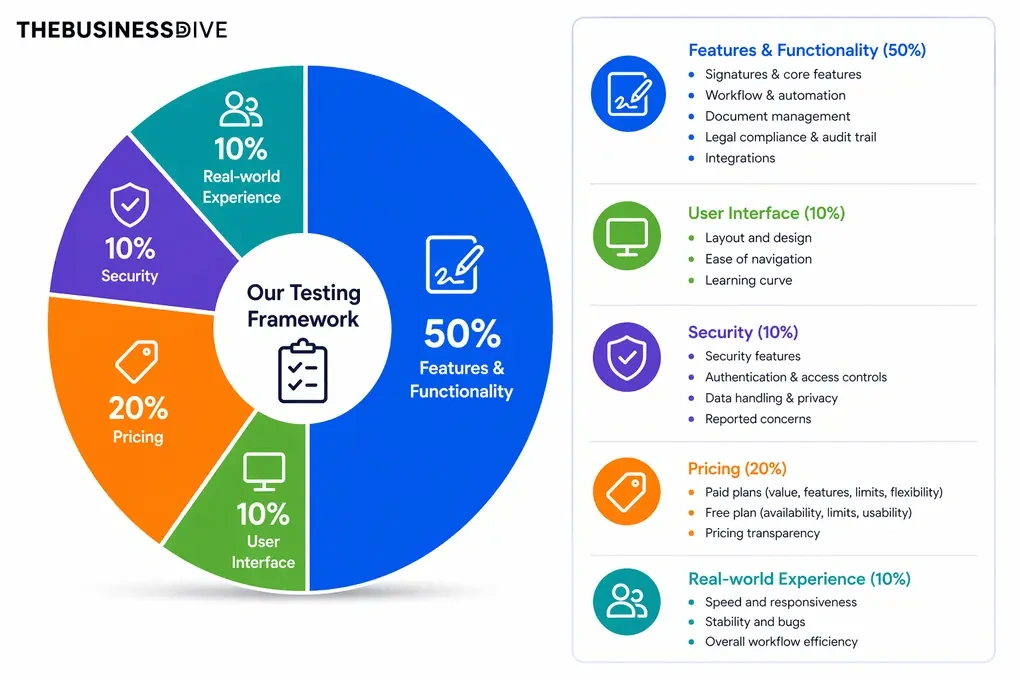
Our scoring breakdown after testing 10+ e-signature apps:
✍️ Features & functionality — 50%
🖥️ User interface — 10%
🔐 Security — 10%
💰 Pricing — 20%
👥 Real-world experience — 10%
Want a detailed breakdown of how we test each category?
Learn exactly how we test tools → Review methodology
A Closer Look at Each Adobe Sign Alternative

Xodo Sign
Xodo Sign is my personal favorite, and I recommend it warmly. It topped my list when I wrote both the PandaDoc alternatives and DocuSign alternatives articles, and it still holds the #1 spot here. In testing, it checked almost every box from my criteria while staying light, tidy, and complete.
Quick verdict
Individuals and teams looking for a complete e-signature workflow with built-in PDF editing.
You need highly specialized enterprise support and governance features.
You can edit and manage PDFs directly inside the signing workflow instead of relying on a separate Acrobat app.
Support can be slower at busy times.
How Xodo Sign’s Features Performed During My Testing
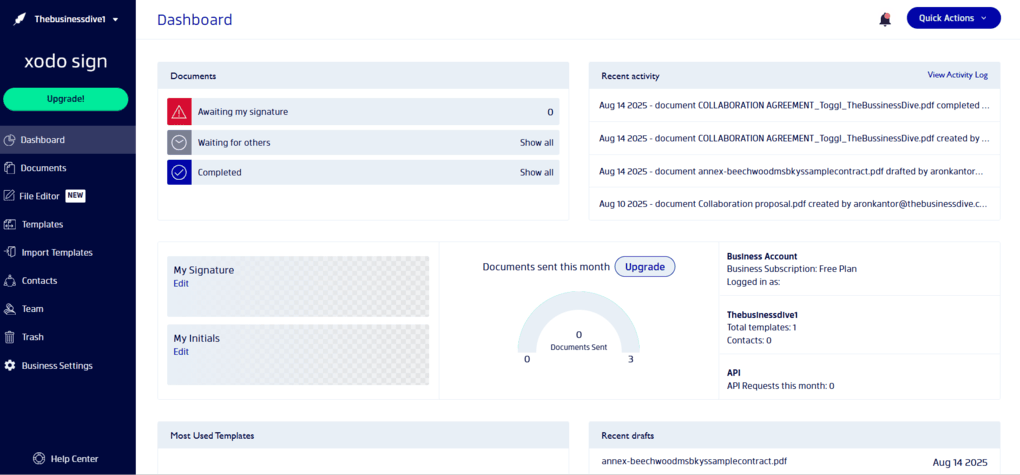
Signing process: Xodo Sign makes it easy to upload documents from your computer or services like Google Drive, Dropbox, Box, and OneDrive. I could drag and drop the required fields, send documents for signing, and use secure signing links when needed. Both remote and in-person signing worked smoothly across the devices I tested.
PDF editing: One of Xodo Sign’s biggest advantages is its built-in PDF editor. I could edit text, highlight and comment, rearrange pages, and redact sensitive information without leaving the app. There’s also an AI summarizer for quickly reviewing longer documents.
Templates and automation: Templates let you prefill standard fields, assign signer roles, and set the signing order, which makes recurring paperwork much faster. I could also set automatic reminders and document expiration dates, reducing the need for manual follow-ups.
Signatures, contacts, and branding: Xodo Sign lets you type, draw, or upload signatures and save multiple signatures and initials. You can also manage contacts and teams directly, while branding options include logos, colors, and custom email templates.
Integrations: Xodo Sign connects directly with Google Drive, Dropbox, OneDrive, and Evernote, while Zapier provides access to thousands of additional integrations. During testing, syncing was quick and reliable.
Xodo Sign pricing
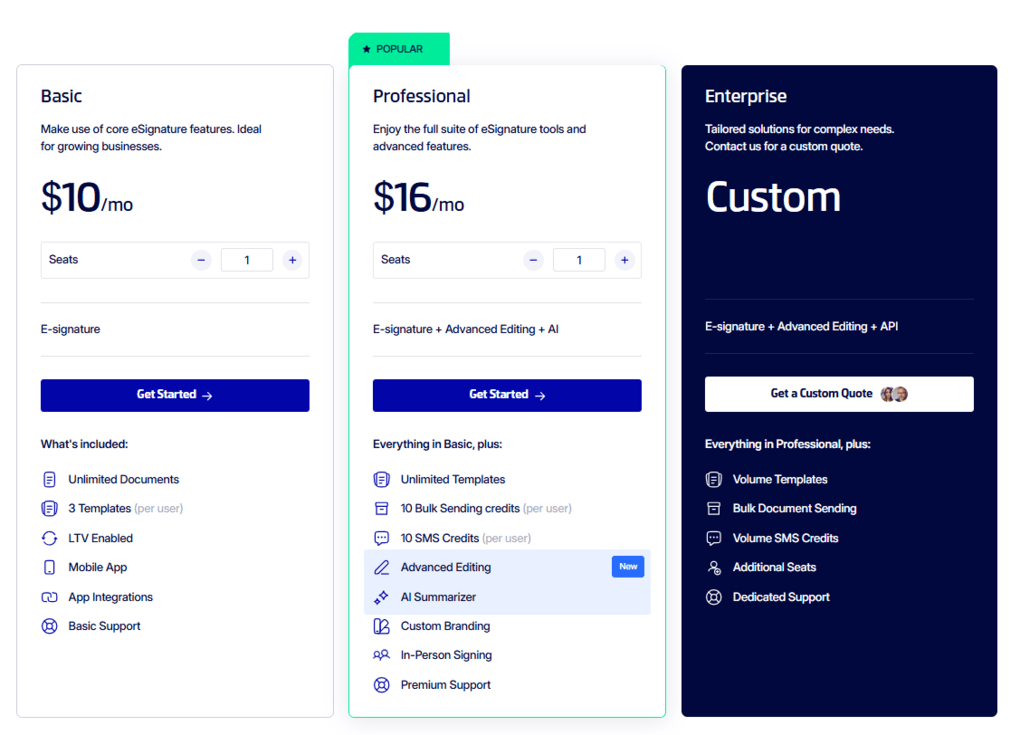
- Free plan available, as well as a 7-day free trial
- Basic plan: $10/seat/month with annual billing or $20 monthly
- Professional plan: $16/seat/month with annual billing or $32 monthly
- Enterprise plan: Custom pricing
Xodo Sign’s Strengths
Short wrap-up: Xodo Sign is an excellent choice for individuals and teams that want to prepare, edit, send, and track signed documents without switching between multiple apps.
Xodo Sign’s Limitations
Short wrap-up: If highly responsive support is a priority, you may want to consider an alternative with stronger support availability.
🔎 Read my full review: Xodo Sign Review 2026: The Best E-Sign Solution?
Related posts:
- Xodo Sign Review 2025: The Best E-Sign Solution?
- Xodo PDF Editor Review | A Top Choice (2025)
- Xodo Sign Vs Docusign 2025: Side-by-Side Comparison

Nitro Sign
Nitro Sign focuses on the core eSigning workflow: preparing, sending, tracking, and managing legally binding documents. It’s a particularly good fit for teams that already create documents elsewhere and want a simpler alternative to Adobe Acrobat Sign without paying for a broader document suite.
Quick verdict
Teams that want straightforward eSigning with predictable costs and strong security.
You need advanced workflow features such as conditional routing, web forms, or eWitness.
Only completed envelopes count toward your usage allowance, making costs easier to predict.
Some advanced workflow and enterprise features require higher-tier plans.
How Nitro Sign’s Features Performed During My Testing
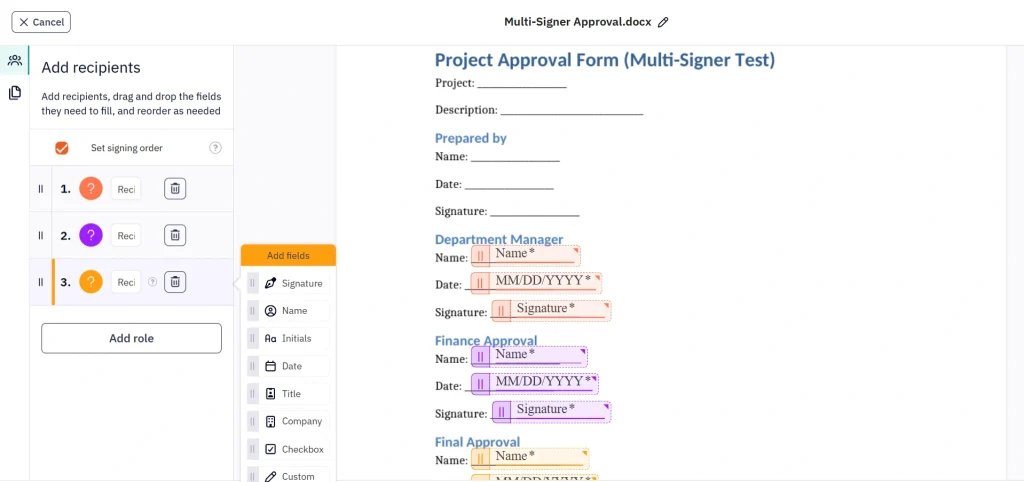
Document editor: Preparing a signature request was quick. I could upload a document, add recipients, set signing fields, and assign each field to the right person. The color-coded recipient fields were particularly useful when multiple people needed to sign.
Signing workflows: Nitro Sign supports both sequential and parallel signing orders, as well as reminders and recipient authentication through SMS or email one-time passcodes. This gives teams flexibility without making the signing process unnecessarily complicated.
Multi-document requests and Bulk Send: I could send several related documents together in a single envelope, which made multi-form agreements easier to manage. Bulk Send is also useful when the same document needs to be sent to multiple recipients.
Templates and saved signatures: Frequently used documents can be saved as reusable templates with predefined fields and recipients. I also liked being able to save and switch between multiple signatures directly in the editor, which made repeat signing tasks quicker.
Audit trails and integrations: Completed documents include detailed audit trails covering signatures, notifications, and document activity. Nitro Sign also offers an API for businesses that want to integrate eSigning into their own workflows. Higher plans add integrations and automation options for tools such as Salesforce and Microsoft Power Automate.
Nitro Sign pricing
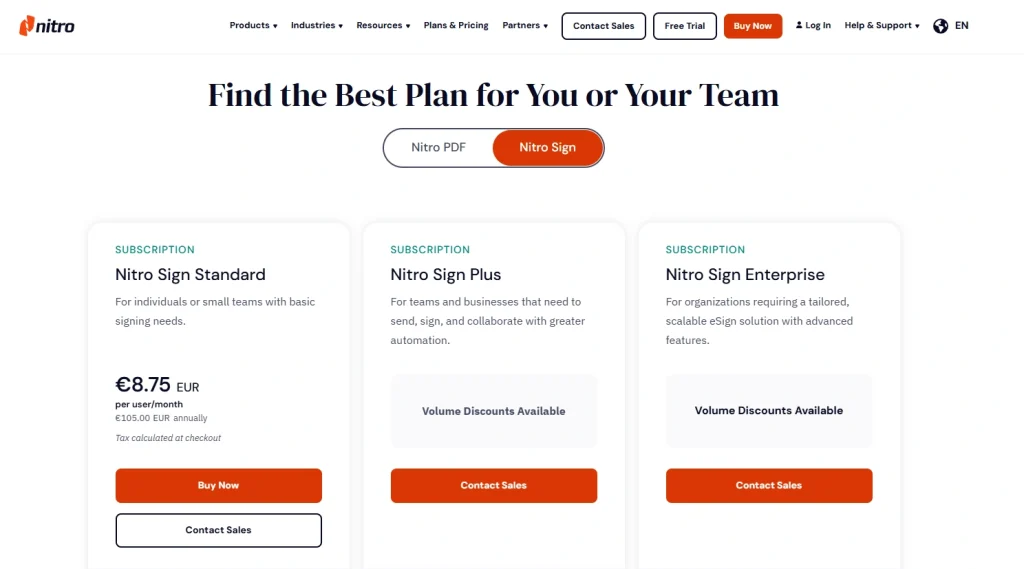
- No free plan, but you can try Nitro through a 14-day free trial
- Nitro Sign Standard: $10/user/month with annual billing
- Nitro Sign Plus: Custom pricing
- Nitro Sign Enterprise: Custom pricing
Nitro Sign’s Strengths
Short wrap-up: Nitro Sign is a strong Adobe Sign alternative for teams that want the essential eSigning features without Adobe’s more complex pricing and licensing structure.
Nitro Sign’s Limitations
Short wrap-up: If you need advanced routing, web forms, eWitness, or highly complex enterprise workflows, Adobe Acrobat Sign may still be the better fit.

BoldSign
BoldSign is still a relatively new name, but in testing it already felt like a solid pick if you want clean workflows and sensible pricing. You can prepare, send, track, and manage documents without distractions, and the user interface remains approachable even if this is your first e-signature tool.
Quick verdict
Small teams and individuals looking for an affordable, easy-to-use e-signature tool.
You need advanced features without paying for add-ons.
A simple, polished signing workflow at a much lower price.
Some features, including bulk links, are available only as paid add-ons.
How BoldSign’s Features Performed During My Testing
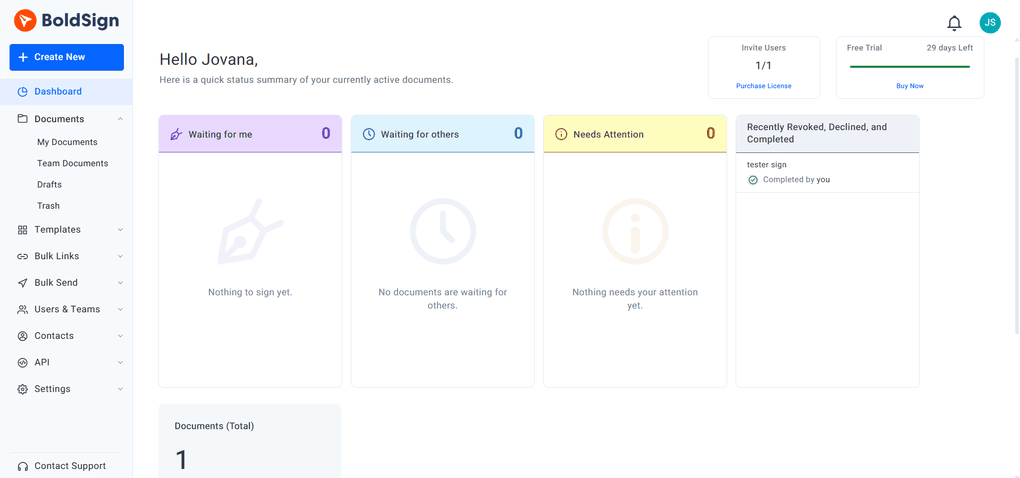
Dashboard and signatures: The dashboard makes it easy to see what needs attention, what’s waiting for others, and what’s already completed. Setting up a signature was quick, with options to type, draw, or upload one and choose a color. The main limitation is that you can save only one signature and one set of initials at a time.
Signing process: The editor is clean and easy to understand. I could upload a document, drag in the fields I needed, preview everything, and send it without much effort. The workflow felt natural even for a first-time user.
Templates: Templates are particularly useful if you regularly send similar documents. I could create, clone, share, and edit templates in just a few clicks, which made preparing documents much less repetitive.
Contacts, teams, and branding: BoldSign lets you save contacts and manage team members in one place. You can also add your logo, customize colors, and preview emails and signing pages before sending them, which helps keep documents consistent with your brand.
Bulk sending, API, and integrations: BoldSign supports bulk links and bulk sending for high-volume workflows, although these are paid add-ons and I couldn’t fully test them during the trial. The platform also offers an API and integrations with Google Drive, OneDrive, Dropbox, and Xero, with WhatsApp delivery available as an add-on.
BoldSign pricing
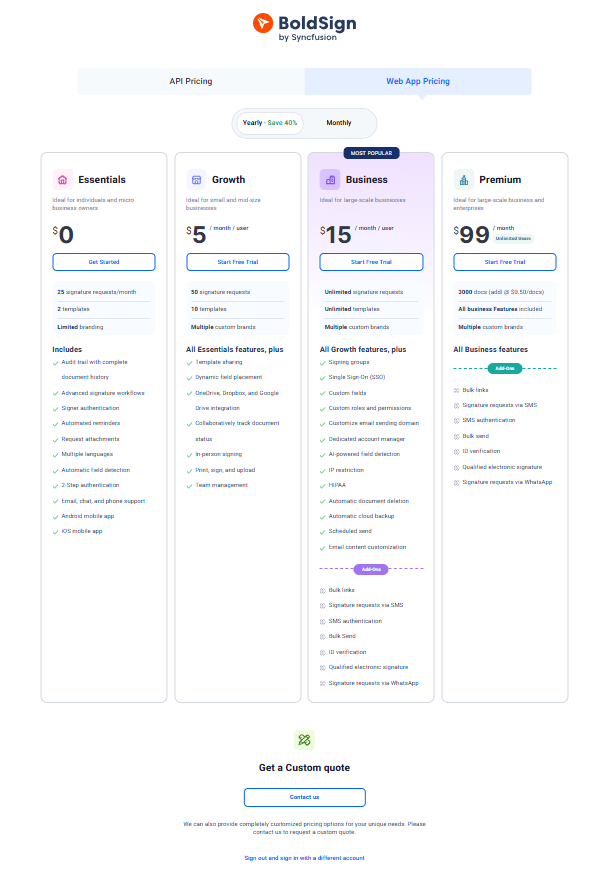
- Free plan available, as well as a 30-day free trial
- Growth plan: $5/user/month
- Business plan: $15/user/month
- Premium plan: $99/user/month
BoldSign’s Strengths
Short wrap-up: BoldSign is a strong choice for small teams and individuals who want a straightforward e-signature workflow without paying enterprise-level prices.
BoldSign’s Limitations
Short wrap-up: If you need multiple saved signatures or want advanced features included without additional costs, another Adobe Sign alternative may be a better fit.
🔎 Read my full review: BoldSign Review 2026: But will this work for ME?
Related articles:
- BoldSign Vs PandaDoc 2025: An Unfiltered Comparison
- BoldSign Vs SignWell 2025: A Tough Decision
- BoldSign Vs PandaDoc 2025: An Unfiltered Comparison

SignWell
SignWell keeps e-signing simple, with an easy editor and practical tools like templates and Bulk Send. Its 24/7 human support is another strong point, especially for small teams.
Quick verdict
Small teams and individuals who want a simple, straightforward e-signature tool.
You want to extensively test paid features before committing or need a generous free plan.
A simple signing workflow combined with responsive human support.
The free plan is limited, and there’s no standard free trial for paid plans.
How SignWell’s Features Performed During My Testing
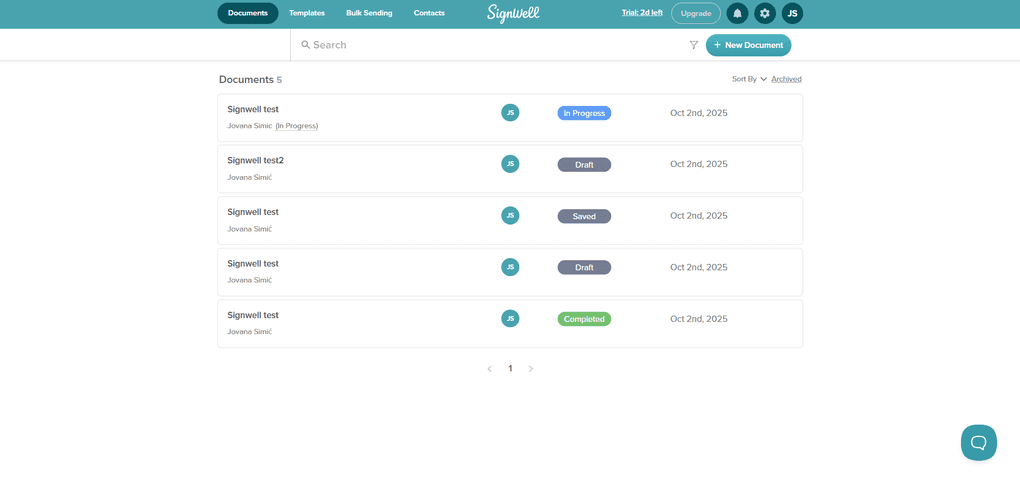
Electronic signatures and document management: SignWell keeps the signing process straightforward. You can upload one or more files, assign signers, add the required fields, and send the document. The editor is clean and easy to learn, although I would have liked a quick preview before sending.
Templates and Bulk Send: Templates are easy to create from the Templates tab or directly from a document. You can add placeholders, reminders, and post-signing redirects. For larger batches, Bulk Send lets you import recipients via CSV, set the signing order, add a message, and review the list before sending.
Contacts and team management: Adding contacts only requires an email address, and you can bulk-import existing contacts through CSV. For teams, SignWell supports user roles such as Admin, Manager, and Member, as well as teams and separate workspaces to keep documents organized.
Branding and integrations: You can add your logo and a custom email signature to give documents a more professional appearance. SignWell also offers integrations, including QuickBooks Online through its native app.
Customer support: Support was one of the strongest parts of my experience. SignWell offers 24/7 live chat with real people, and when I reached out with questions, I received a prompt and helpful response.
SignWell pricing
- Free plan available
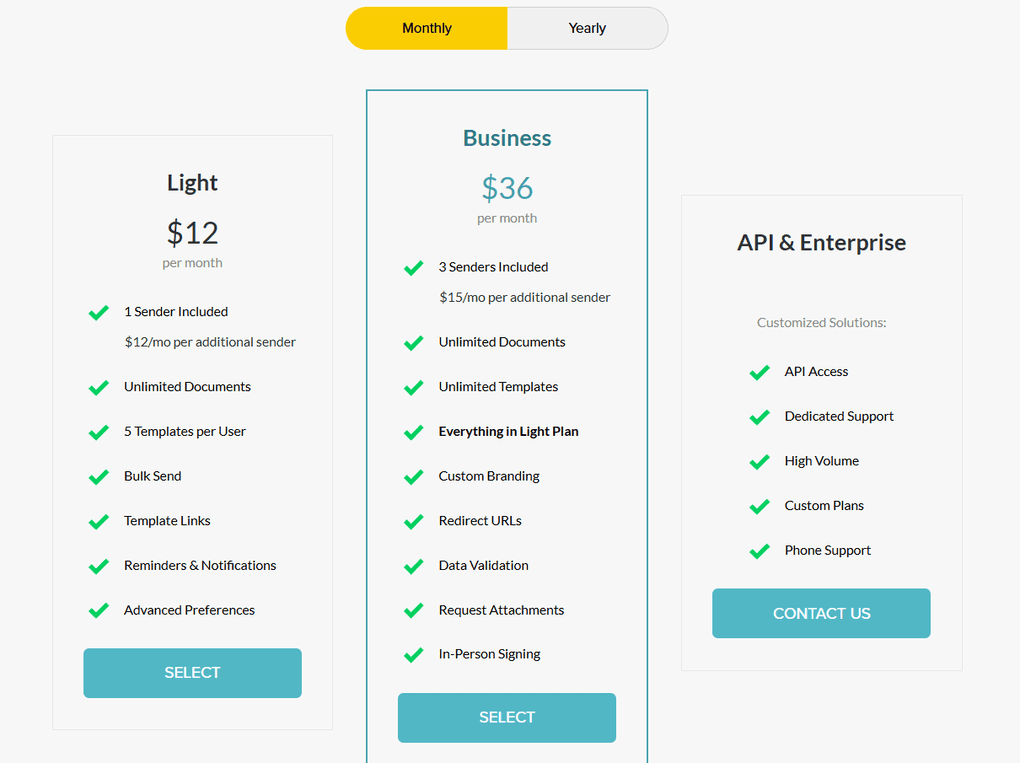
- Light plan: $10 per month (annual billing)
- Business plan: $30 per month (annual billing)
- Enterprise plan: Custom pricing
SignWell’s Strengths
Short wrap-up: SignWell is a strong choice for small teams that want simple document signing, useful automation, and responsive customer support without unnecessary complexity.
SignWell’s Limitations
Short wrap-up: If you need to extensively test premium features before paying or want more functionality on a free plan, another Adobe Sign alternative may be a better fit.
🔎 Read my full review: SignWell Review 2026: Docusign FINALLY has a Competitor
Related articles:
Explore our Apps directory
A curated directory of software tools we’ve independently reviewed, with links to full reviews, comparisons, and category guides.
PandaDoc
PandaDoc goes beyond signing, covering document creation, approvals, and e-signatures in one workspace. It’s more than some small teams need, but a strong fit if your workflow involves drafting, reviews, and revisions before signing.
Quick verdict
Teams managing documents through multiple stages, from creation and approval to signing.
You only need a simple e-signature tool or want a generous free plan.
Combines document creation, editing, approvals, and signing in one workspace.
Pricing increases quickly once you need advanced features and integrations.
How PandaDoc’s Features Performed During My Testing
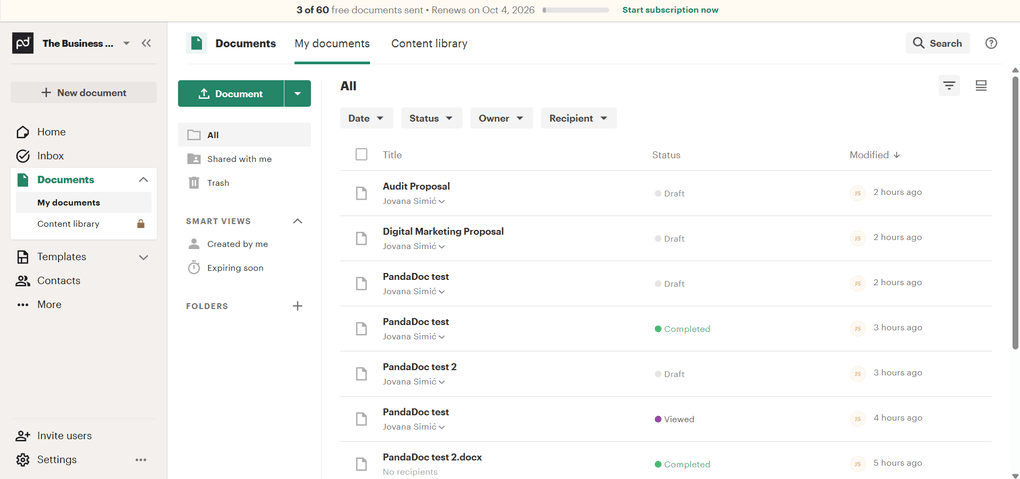
Dashboard and document management: The dashboard feels clean and modern, with filters for status and date and folders for keeping documents organized. You can also customize the dashboard, although deeper analytics are limited to paid plans.
Document creation and editing: PandaDoc lets you create business documents from scratch and edit Word files easily. PDF editing is more limited, though—you can add fields but can’t change the existing PDF content.
Electronic signatures and Stamps: The signing process is straightforward, while the Stamps feature is a useful extra for teams that work with company seals or formal approval marks.
Templates and contacts: PandaDoc offers a large selection of templates for areas like sales, HR, and legal documents. Customizing them is quick, although some content blocks require higher-tier plans. Contacts can be added manually or imported from Google and CRMs such as HubSpot and Salesforce.
Integrations and analytics: PandaDoc integrates with tools including Google Workspace, HubSpot, Salesforce, Slack, PayPal, and Stripe. Its document analytics are particularly useful for tracking recipient engagement, although many integrations require Business or Enterprise plans.
PandaDoc pricing
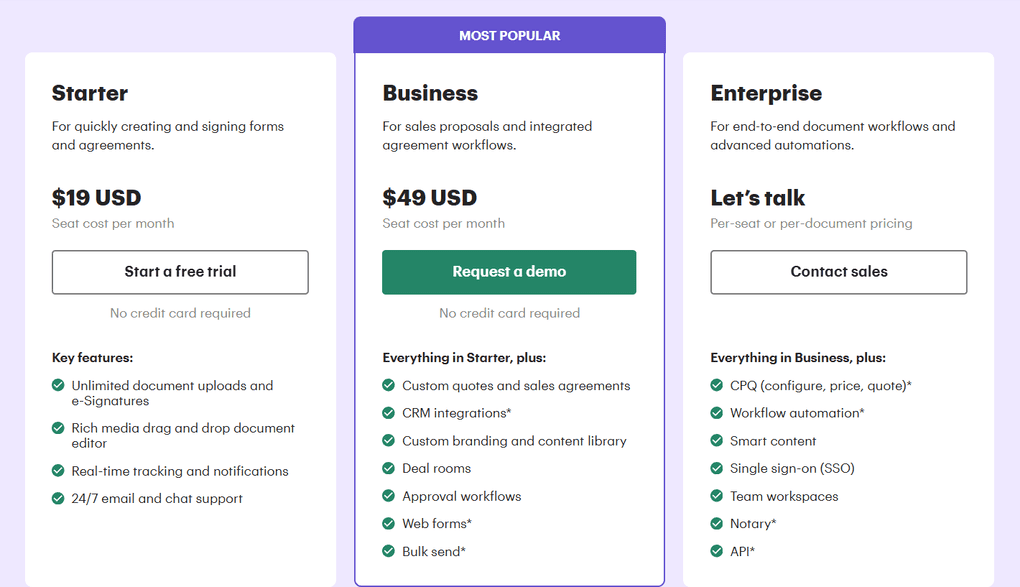
- Free plan available, as well as a free trial
- Starter plan: $19/seat/month with annual billing
- Business plan: $49/seat/month with annual billing
- Enterprise plan: Custom pricing
PandaDoc’s Strengths
Short wrap-up: PandaDoc is a strong choice for teams that need more than basic e-signatures and want to manage documents, approvals, and recipient activity in one place.
PandaDoc’s Limitations
Short wrap-up: If you only need basic document signing or want to keep costs low, a simpler Adobe Sign alternative will likely be a better fit.
🔎 Read my full review: PandaDoc Review: What Nobody Tells You (2026)
Related articles:
- PandaDoc Review: What Nobody Tells You (2025)
- Docusign Vs PandaDoc 2025: The Truth (4-Week Test)
- BoldSign Vs PandaDoc 2025: An Unfiltered Comparison
- 7 Best PandaDoc Alternatives You MUST See (2025)

Docusign
DocuSign is one of the best-known names in e-signatures, and its biggest strengths are stability, detailed reporting, and strong compliance. It makes the most sense for larger teams that need reliable workflows and visibility across multiple departments.
Quick verdict
Mid-sized and enterprise teams that need strong compliance, reporting, and administrative controls.
You’re a solo user or small team looking for a low-cost signing tool.
Detailed reporting and workflow tools combined with extensive integrations and enterprise controls.
Higher pricing and envelope limits on the lower-tier plans.
How DocuSign’s Features Performed During My Testing
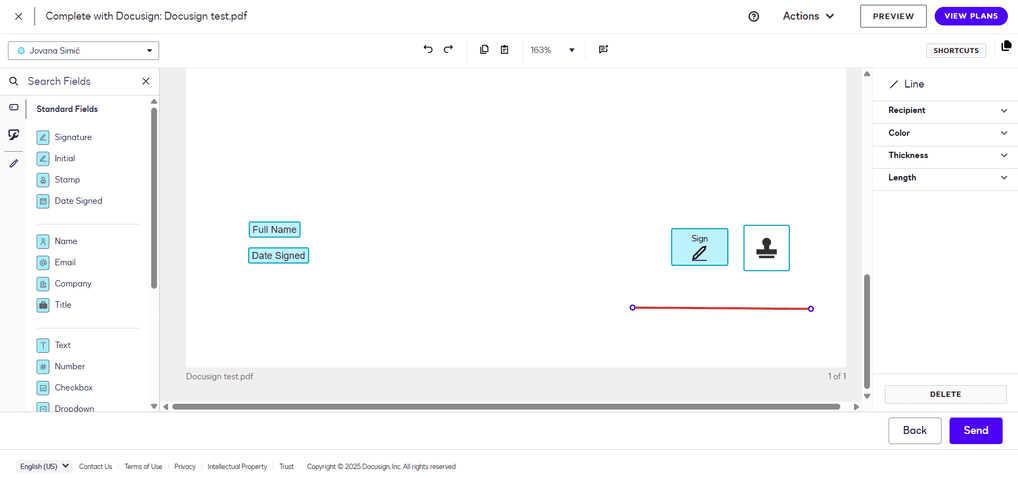
Home screen and dashboard: The Home screen keeps the essentials within easy reach, including creating signatures and initials, starting envelopes, and viewing documents that need action. My Dashboard and Admin Dashboard provide deeper analytics, including envelope history, completion rates, and trends.
Agreements and envelopes: The Agreements tab organizes documents into Drafts, In Progress, Completed, and Deleted. Folders, filters, and search make larger libraries easier to manage, while every envelope includes a full audit trail.
Templates and workflows: Templates let you standardize recipients, roles, and fields for recurring documents. I also found the ready-made workflow templates useful for areas such as HR, finance, and sales, as they can save time compared with building workflows from scratch.
Contacts, teams, and branding: Admins can add users, assign roles and permissions, and organize teams as the company grows. Higher plans also include branding tools for adding logos and colors, while features like stamps, reminders, and notifications help with everyday workflows.
Integrations and security: DocuSign offers more than 400 integrations, including Google Workspace, Microsoft 365, Salesforce, HubSpot, Zoho, Slack, Box, Dropbox, and OneDrive. There’s also an API for custom workflows. Signatures are legally binding and support ESIGN, UETA, and GDPR compliance.
Docusign pricing
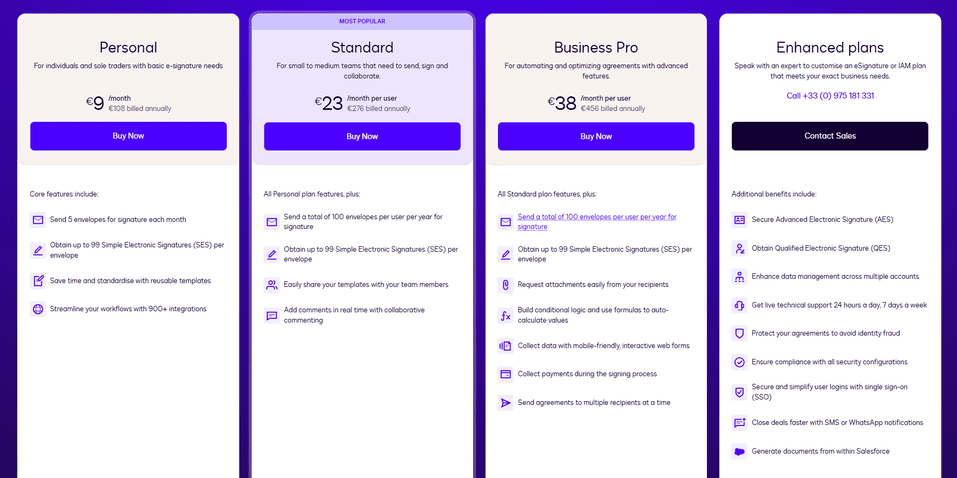
- No free plan available, only a free trial
- Personal plan: €9/user/month
- Standard plan: €23/user/month
- Business Pro Plan: €38/user/month
- Enhanced plan: Custom pricing
- Enterprise plan: Custom pricing
Docusign’s Strengths
Short wrap-up: Docusign is a strong choice for organizations that need reliable e-signatures alongside detailed reporting, workflow tools, and administrative oversight.
Docusign’s Limitations
Short wrap-up: If you don’t need advanced reporting, governance, or enterprise integrations, simpler tools like SignWell or BoldSign can offer better value.
🔎 Read my full review: Docusign Review 2026: Justified Red Flags?
Related articles:
- Docusign Vs PandaDoc 2025: The Truth (4-Weeks Test)
- Xodo Sign Vs Docusign 2025: Side-by-Side Comparison
- 7 Best Docusign Alternatives (2025) | NOT What You’d Think
- Signable Vs Docusign 2025: Side-by-Side Comparison

Dropbox Sign
Dropbox Sign (formerly HelloSign) stands out for feeling fast, polished, and easy to use. It’s an easy choice if you already keep files in Dropbox, since everything connects seamlessly. But even without Dropbox, Dropbox Sign works smoothly on its own.
Quick verdict
Users who want a fast, intuitive e-signature tool with strong cloud integrations.
You need built-in document editing or want advanced features on lower-tier plans.
A smooth signing experience with seamless Dropbox and Google Drive integration.
Some useful features are limited to higher-tier plans.
How Dropbox Sign’s Features Performed During My Testing
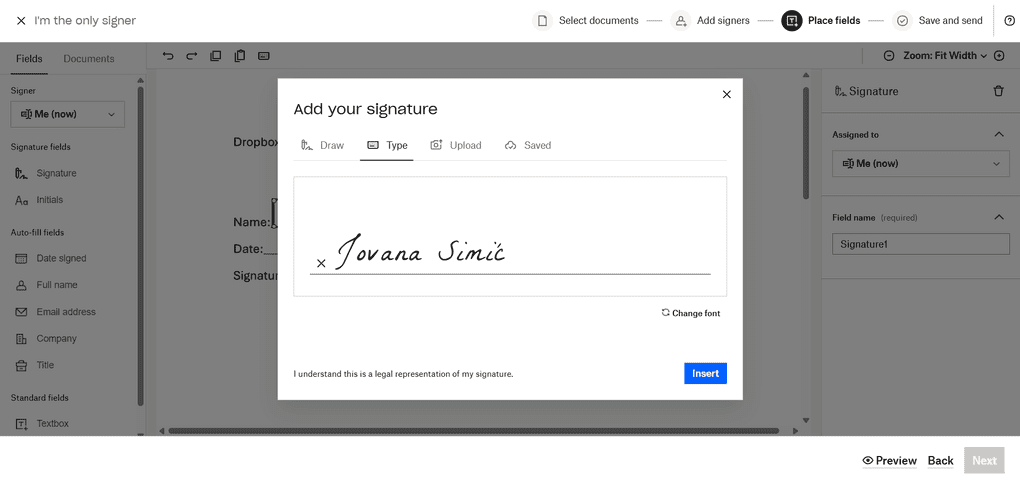
Dashboard and electronic signatures: The dashboard is simple and thoughtfully laid out, showing what’s waiting for you or others and making it easy to start a new request. Setting up a signature takes less than a minute, and Dropbox Sign remembers initials and commonly used fields for future documents.
Signing process: Signing is quick and straightforward. You can upload files or pull them directly from Dropbox, Google Drive, OneDrive, or Box. The experience stayed consistent across desktop and mobile during testing.
Templates and reminders: Templates let you prefill fields, assign roles, and reuse the same setup for recurring agreements. You can also set automatic reminders and see when someone opens or signs a document, which makes follow-up easier.
Fax and document workflow: Dropbox Sign includes built-in fax functionality for sending and receiving faxes, with syncing to services such as Google Drive, Box, and Evernote. It’s not something every team will need, but it’s a useful addition for businesses that still rely on fax.
Integrations: Dropbox Sign integrates with Google Drive, Slack, Salesforce, HubSpot, and Dropbox, while Zapier provides access to thousands of additional connections. During testing, I particularly liked that signed files could appear automatically in Dropbox without needing to export them manually.
Dropbox Sign pricing
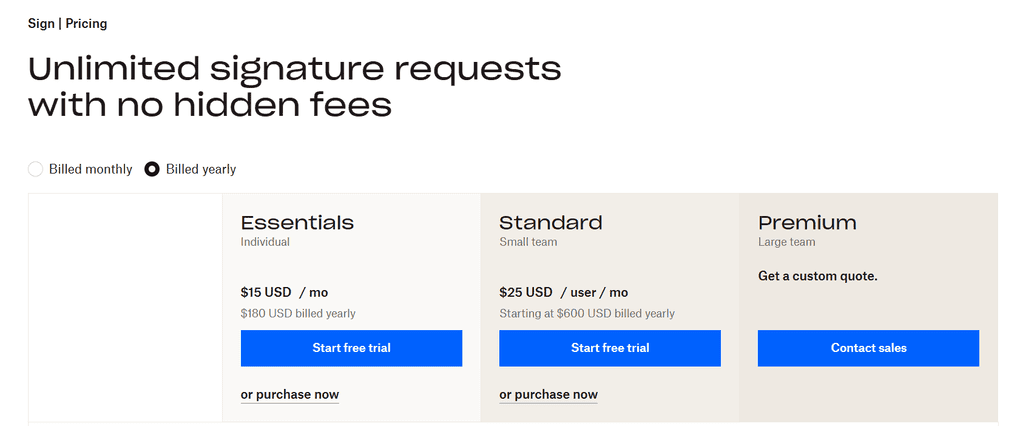
- Free plan available
- Essentials plan: $15/user/month
- Standard plan: $25/user/month
- Premium plan: Custom pricing
Dropbox Sign’s Strengths
Short wrap-up: Dropbox Sign is a strong choice for users who value a polished signing experience and want their documents to move easily between cloud storage and their e-signature workflow.
Dropbox Sign’s Limitations
Short wrap-up: If you need to edit document content directly or want more advanced features without upgrading, another Adobe Sign alternative may be a better fit.
Related articles:

Zoho Sign
Zoho Sign works particularly well for teams already using Zoho CRM, Books, WorkDrive, or Desk, keeping documents, approvals, and storage connected in one ecosystem. It’s capable and flexible, although the interface takes a little longer to learn than simpler alternatives.
Quick verdict
Teams already using Zoho’s business applications.
You want the most intuitive interface or a quick, frictionless setup.
Seamless integration with the wider Zoho ecosystem.
The interface and template workflow take some getting used to.
How Zoho Sign’s Features Performed During My Testing
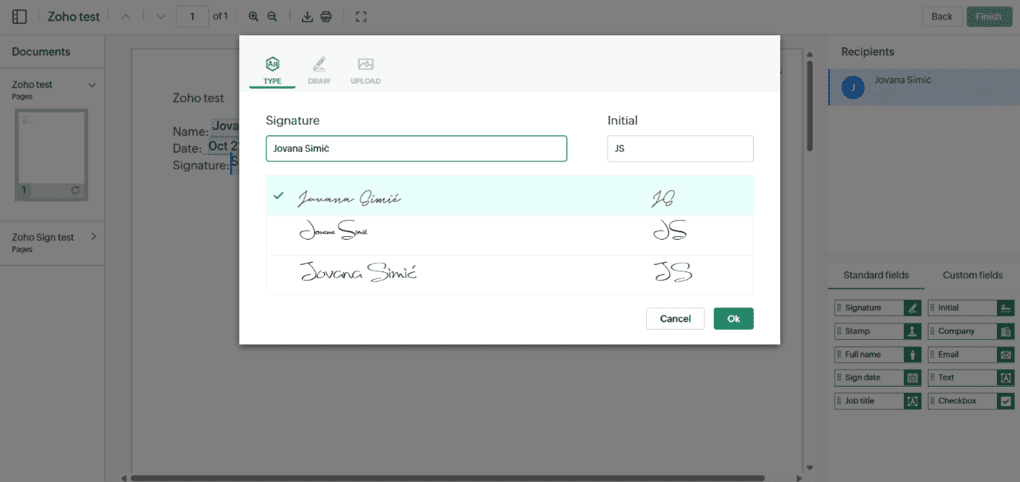
Dashboard and document management: The sidebar organizes the workflow by task, while Reports provide a full activity trail showing when documents were drafted, signed, or completed. The layout is clean, although finding specific actions can take some time at first.
Document creation and signing: You can create documents from scratch, import files, or start with templates. The signing flow lets you assign recipients, set the signing order, add fields, and track progress from Reports. Recipients can sign on both desktop and mobile. The editor works reliably, although it feels less polished than tools like Dropbox Sign or PandaDoc.
Templates and SignForms: Templates can be customized and reused, while SignForms lets you turn them into public signing links with options such as expiration dates, limits, and one-time passwords. This makes it useful for recurring agreements and repetitive workflows.
Branding and integrations: You can add your logo, custom domain, and SMTP for branded emails. Zoho Sign also integrates directly with Zoho CRM, Books, Desk, and WorkDrive, making it particularly convenient if your team already relies on the Zoho ecosystem.
Reports, automation, and administration: Organization-wide reports and admin controls provide greater visibility over document activity. Higher plans also add features such as bulk sending, advanced authentication, QES, timestamping, APIs, and webhooks, giving larger teams more control over their workflows.
Zoho Sign pricing
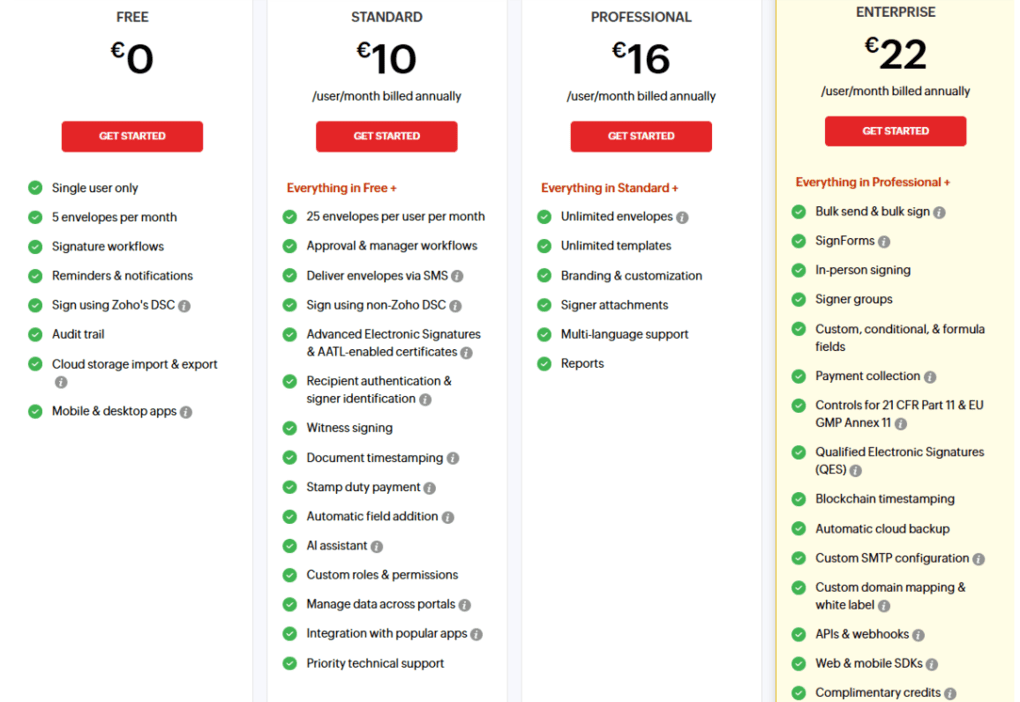
- Free plan available
- Standard plan: €10/user/month
- Professional plan: €16/user/month
- Enterprise plan: €22/user/month
Zoho Sign’s Strengths
Short wrap-up: Zoho Sign is a strong choice for businesses already invested in Zoho that want their document and approval workflows connected under one roof.
Zoho Sign’s Limitations
Short wrap-up: If ease of use is your top priority and you don’t rely on Zoho’s ecosystem, simpler tools like SignWell or Dropbox Sign may be a better fit.
Summary: Best Adobe Sign alternatives in 2026
Adobe Sign set the standard for digital signatures, but it’s not the only path anymore. After testing all these tools, it’s clear that you don’t have to stay locked into a complex or expensive ecosystem to get smooth, reliable signing.
Whether you’re after Xodo Sign’s built-in editor, BoldSign’s affordability, SignWell’s real human help, or PandaDoc’s full document management, all these tools prove that signing documents doesn’t have to be complicated or expensive to feel professional.
So if you’re ready to streamline your workflow without giving up security or control, now’s a great time to switch. The options are strong, flexible, and built for real-world use. I’ll keep this list updated as new features roll out, so you can always find the best fit for your stack when your needs evolve.
Looking for similar tools?
Visit the link to explore other apps we’ve reviewed in this space and how they compare.
Why you can trust our reviews
At thebusinessdive.com, our team tests, reviews, and compares hundreds of productivity apps every year — from project management tools to note-taking apps. We dive deep into real-world use cases to help you find the right tools that actually improve your workflow, not just add noise.
Our mission? No fluff, no shortcuts—just honest, hands-on insights from productivity pros.
Discover how we stay transparent, read our review methodology, and let us know about any tools we missed.
Frequently asked questions
What is the best alternative to Adobe Sign in 2026?
Some of the best Adobe Sign alternatives include Xodo Sign, BoldSign, SignWell, PandaDoc, DocuSign, and Dropbox Sign.
For most teams, Xodo Sign stands out as the best overall alternative to Adobe Acrobat Sign. It combines legally binding digital signatures with a built-in PDF editor, templates, document tracking, and a clear document workflow that helps reduce manual tasks.
Which Adobe Sign alternative offers the best value?
If you are looking for the strongest balance of price and performance, BoldSign is the best value pick. It provides essential and advanced features such as templates, reminders, team roles, and branding, all backed by transparent pricing plans.
On higher tiers, you also get unlimited document uploads, which is ideal for multiple users managing contracts daily.
Are there free Adobe Sign alternatives?
Yes. Xodo Sign, BoldSign, and SignWell each offer a free version that lets you sign PDFs and send a limited number of documents every month.
Xodo Sign’s free version includes three documents per month and one reusable template. BoldSign has a free forever plan with up to twenty-five signature requests per month, and SignWell also offers a free version that is perfect for testing workflows before upgrading to a paid tier with advanced features.
Do Adobe Sign alternatives support legally binding digital signatures?
Yes. Every platform in this list supports legally binding e-signatures that comply with ESIGN, UETA, and eIDAS standards.
For stricter compliance and governance, Adobe Acrobat Sign and DocuSign include advanced features for enterprise-level users, while Xodo Sign, BoldSign, SignWell, and PandaDoc cover all standard business needs with full audit trails and detailed document tracking.
Which Adobe Sign alternative offers the best data security?
If you handle sensitive files, DocuSign and Adobe Acrobat Sign remain leaders in data security thanks to advanced encryption, GDPR compliance, and detailed audit reports.
However, tools such as Xodo Sign and PandaDoc are quickly catching up, offering 256-bit encryption, secure cloud storage, and clear visibility across your entire document workflow, which is especially useful for teams with multiple users.
Is Adobe Document Cloud still worth it in 2026?
For organizations heavily invested in Adobe products, Adobe Sign offers the most seamless integration. But keep in mind that it has expensive plans.
However, if your main focus is simply to sign PDFs and manage contracts efficiently, Xodo Sign or SignWell will feel lighter, faster, and more budget-friendly. They provide excellent workflow automation and basic features that cover most everyday signing needs.
Which alternative is best for contract management and workflow automation?
PandaDoc is the best choice if you need a complete contract management platform for creating, approving, and signing in one workspace. It offers a large template library, approval flows, integrations, and automation tools that help eliminate manual tasks. For larger organizations that need governance and detailed reporting, DocuSign provides advanced features and broad integration with existing tools.
Disclosure: I only recommend products I would use myself, and all opinions expressed here are my own. This post may contain affiliate links that, at no additional cost to you, may earn a small commission. Read the full privacy policy here.

Hey! I’m Jovana, a content writer who loves writing, researching, and testing new productivity apps. With a background in philosophy, I bring a thoughtful but no-bullshit approach to everything I do. Let’s connect on Linkedin!
The Reddit rabbit hole angle is spot on—that’s exactly where most of us start when Adobe Sign’s pricing gets ridiculous. Curious if your #1 “game changer” actually fixes the workflow automation gaps, or if it’s just a slicker UI with the same limitations.
Glad you dug through Reddit for this — the “depends on what you’re looking for” angle is spot on, since Adobe Sign’s biggest pain point for small teams is usually the pricing. Curious if the #1 game changer actually holds up on mobile, or if it’s mostly a desktop win.