


Best 7 Otter AI Alternatives | 20+ Personally Tested Apps (2026)
Looking for the best Otter AI alternatives in 2026, but don’t know what recommendation you should trust or what options you have.
I totally understand you guys. There are way too many options out there, and it is really tough and overwhelming trying to find a safe, reliable, and accurate alternative to Otter AI. Honestly, I had the same feeling as well.
So, I decided to find the best Otter AI alternatives, and most importantly, the safest.
In this article, I’ll share the top 7 Otter AI alternatives I personally tested (and spoiler: I still use the #1 pick every day).
Let’s dive in!
The Best Alternatives to Otter AI at a Glance
🤝 Best Otter AI alternative overall: Fellow
🔇 Best Otter AI alternative for noise cancellation: Krisp
🆓 Best free alternative to Otter AI: Fathom
📝 Best for detailed AI meeting summaries: MeetGeek
👤 Best for individuals and freelancers: tl;dv
💸 Best budget-friendly Otter AI alternative: Fireflies AI
⚡ Best lightweight alternative to Otter AI: Bluedot
How We Test AI Note-Takers
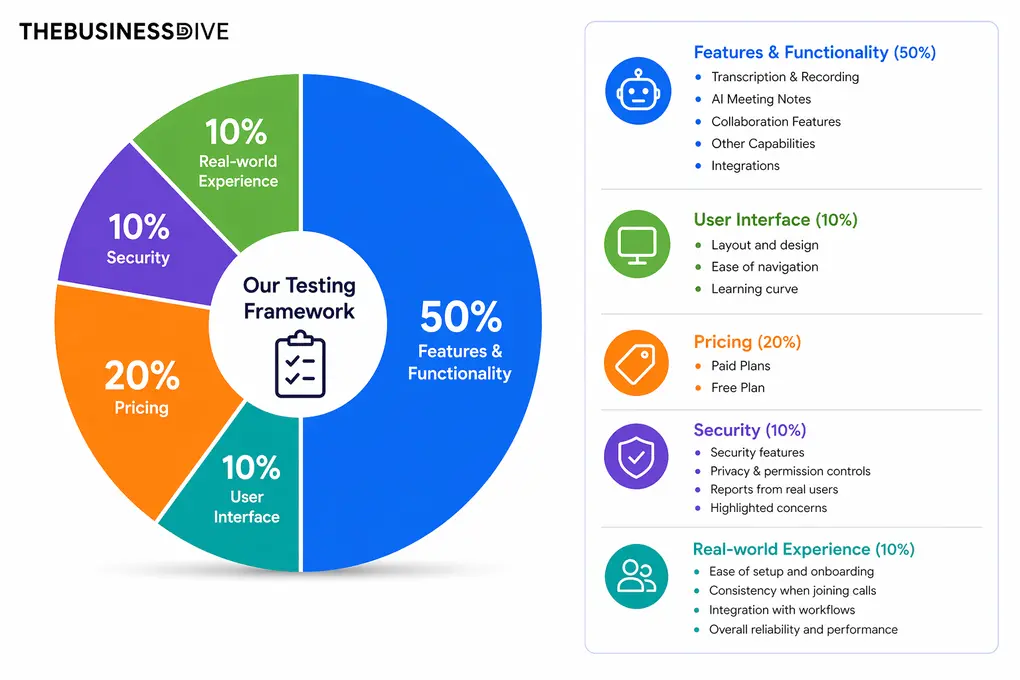
Our scoring breakdown after testing 20+ AI note-takers:
🤖 Features & functionality — 50%
🖥️ User interface — 10%
💰 Pricing — 20%
🔐 Security — 10%
👥 Real-world experience — 10%
We reviewed and personally tested every Otter AI alternative featured in this list, and you will find links to the full review articles for each tool. Based on our hands-on testing, we assigned an overall score using our standardized scoring system.
While these overall review scores influenced the rankings in this article, we also considered specific use cases, workflows, and standout strengths to recommend the best AI note-takers for different needs and teams.
Want a detailed breakdown of how we test each category?
Learn exactly how we test tools → Review methodology
A Side-by-Side Look at the Otter AI Alternatives
|
Best Otter AI alternatives |
Better than Otter AI for 🎯 |
What stood out during testing ✨ |
Biggest downside ⚠️ |
Pricing starts 💰 |
|---|---|---|---|---|
|
Teams & professionals that need stronger collaboration and productivity features |
More accurate transcription and meeting agenda feature |
Limited free version |
Free plan + paid from $7/user/month billed annually |
|
|
Remote, hybrid, and global teams that need accurate notes and audio enhancement |
96% transcription accuracy, noise cancellation, and accent conversion |
No free version |
7-day free trial + paid from $8/user/month billed annually |
|
|
Individuals who want a free AI note-taker with the essential features |
Excellent free plan and effortless setup |
Lacks deeper workflow features |
Free plan + paid from $15/user/month billed annually |
|
|
Detailed meeting summaries and analytics |
Structured AI notes and conversation insights |
Usage limits on lower-tier plans |
Free plan + paid from $9.99/month billed annually |
|
|
Freelancers and individuals who want simplicity |
Easy-to-use interface and practical AI reports |
Mobile experience still feels limited |
Free plan + paid from $18/user/month billed annually |
|
|
Teams & individuals who need a budget-friendly alternative |
Broad platform support and well-rounded feature set |
Free plan feels restrictive |
Free plan + paid from $10/user/month billed annually |
|
|
People who want lightweight bot-free recording |
Simple setup and recording without meeting bots |
The free plan is more like a trial |
Free plan + paid from $14/user/month billed annually |
Fellow
Fellow is designed for organization-wide use, but it works great with smaller teams and professionals as well. It works on Windows, Mac, iOS, Android, and online, and supports Google Meet, Zoom, MS Teams, and Slack in over 92 languages. Personally, I have been using it for over 6 months, and it has been a game-changer for meeting notes.
Quick verdict
Professionals and teams needing strong collaboration features
If you are looking for a free Otter AI alternative
More accurate transcription and meeting agenda feature
The free plan is quite limited for regular use
Testing Fellow in real meetings
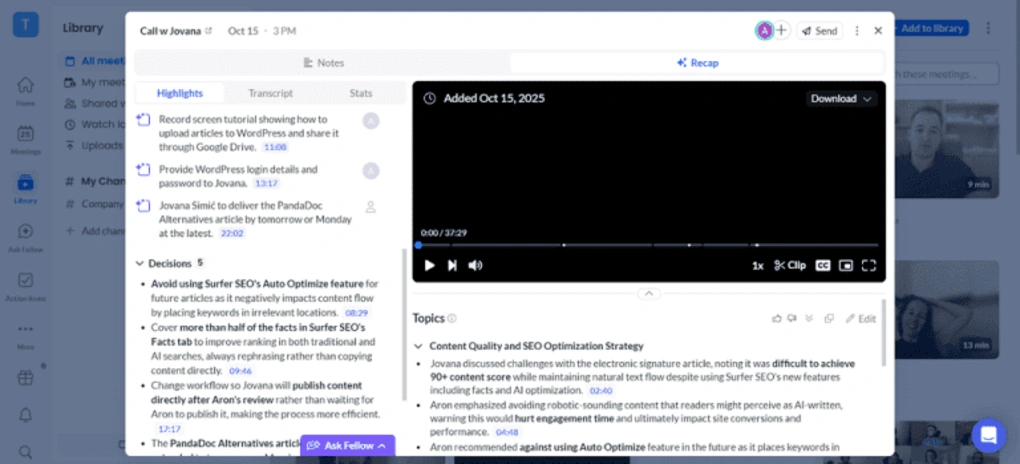
After testing numerous AI note-takers, Fellow earned the title of the best overall Otter AI alternative.
Based on my experience, Fellow transcribes my online meetings with 95%+ accuracy, whereas I achieved around 85% with Otter.
I also love that I can decide whether to bring my meeting bot to my calls or record without it. I value the privacy here, as internal participants always know when recording is happening, even when you use botless recording.
Its intelligent AI assistance, enterprise-grade security, and compliance make Fellow a capable Otter AI alternative for businesses and professionals who want to use AI in meetings without compromising privacy or productivity.
When Fellow makes more sense than Otter AI
When another alternative may work better
Use this link to sign up and get 10% off the paid plans if you upgrade.
The Fellow Features I Used Most
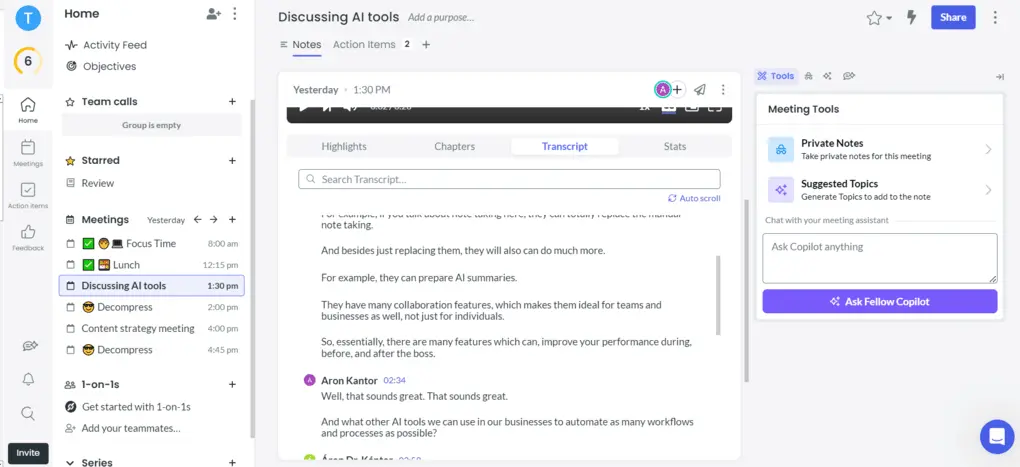
Transcription & recording: Fellow automatically transcribes and records your online calls on Zoom, MS Teams, Slack, and Google in over 92 languages. It provides enterprise-grade governance, bot or botless recording options with identical security protections, and redaction tools for sensitive information.
Transcription accuracy: Based on my experience, Fellow provides quite accurate transcriptions, with an accuracy rate above 95%.
Meeting notes: The meeting notes provide you with the key points, action items, and decisions from the meeting. Using this feature, Fellows makes even the +1-hour meeting digestible in a few minutes.
Collaboration tools: Fellow has great collaboration features like collaborative agendas, but you can assign action items, give feedback to meeting participants, and easily share the meeting notes with others.
Ask Fellow: When using Fellow in my day-to-day business, one of the most useful features for me is Ask Fellow. You can get the wanted meeting information in seconds, and it can help you in numerous ways, including preparing follow-ups, finding outstanding tasks from previous calls, and more.
Mobile app: Fellow has a mobile version for iOS and Android devices, so you can use it for in-person meetings.
Integration options: Fellow provides a wide range of integrations, including Google Calendar, Slack, Jira, Monday, ClickUp, Linear, Glean, and Asana. Additionally, you can connect it to Zapier, which allows you to integrate with +7,000 third-party apps.
Fellow’s pricing
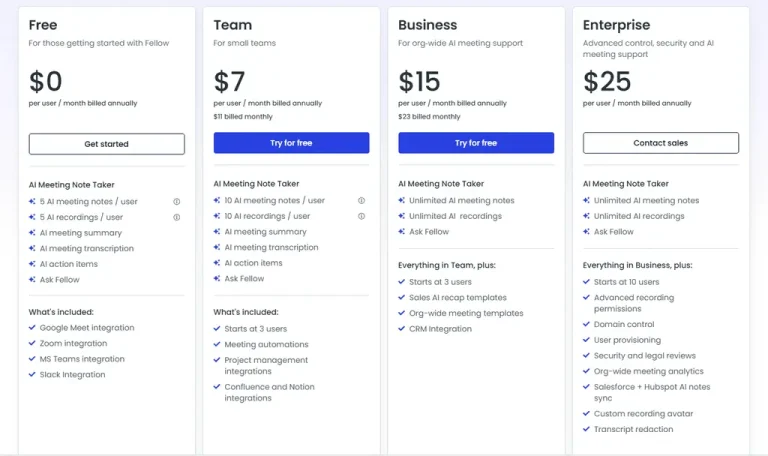
- Free plan: Available
- Solo plan: $19/month per user
- Team plan: $7/month per user
- Business plan: $15/month per user
- Enterprise plan: $25/month per user
What I Liked About Fellow
|
Pro |
Why It Matters |
|---|---|
|
Accurate transcripts |
It offers one of the most accurate transcriptions. |
|
Bot-less recording support |
You can choose between bot and bot-less transcription & recording |
|
Massive feature set |
Fellow provides numerous advanced tools besides the essential features |
|
Data privacy |
Data privacy is a top priority and offers an enterprise-grade security |
|
Advanced AI summaries |
The AI summaries are super helpful and include all the relevant points |
|
Helpful integrations |
Integrations with tools like Slack, Zoom, Google Meet, and CRMs help connect meeting workflows with the rest of your productivity stack. |
What Could Be Better
|
Con |
Why It Hurts |
|---|---|
|
Limited free plan |
The free version could include more features and higher usage limits for regular users. |
Why is Fellow the best Otter AI alternative overall?
Fellow is the best overall Otter AI alternative because it offers far more than the essentials. During my testing, it consistently delivered more accurate meeting summaries, better collaboration tools, and stronger privacy controls than Otter AI.
What really made the difference for me was how well Fellow fits into my meeting workflows. Features like collaborative agendas, action items, Ask Fellow, and bot-free recording make it a practical solution for both teams and professionals.
🔎 Read my full Fellow Review: My Thoughts After +12 Months (2026)
Use this link to sign up and get 10% off the paid plans if you upgrade.
Krisp
Krisp’s note taker is a voice AI platform that combines AI note-taking with real-time noise cancellation and accent conversion. It supports bot-free and bot-based recording and can also capture in-person meetings.
Quick verdict
AI note-taking and noise cancellation.
Users looking for a free AI note-taker.
Bot-free recording with accurate transcription and real-time audio enhancements
No free plan.
Testing Krisp in real meetings
During my testing, Krisp delivered accurate transcriptions and well-structured meeting notes, and I loved its AI chat. When I joined Google Meet calls through Chrome, the extension made it easy to capture meetings without opening the desktop app.
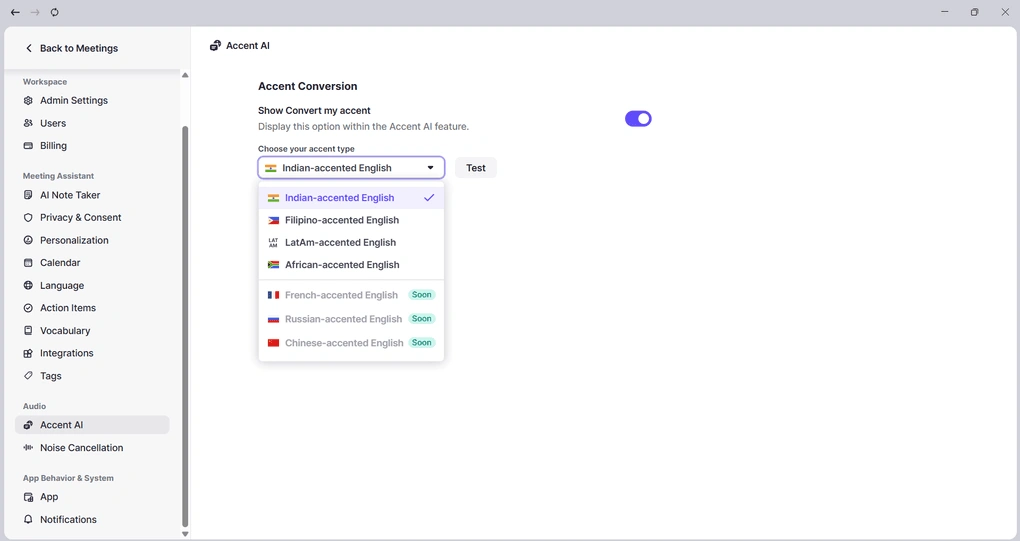
Krisp also stood out because it combines several features that you don’t usually get together in one AI note-taker. Besides AI notes and transcription, it offers noise cancellation and real-time accent conversion.
I found the noise cancellation useful, and the tool worked well for customer calls and environments where background conversations or keyboard sounds could become distracting.
Another advantage is its flexibility. Krisp supports both bot-free and bot-based recording, while in-person meetings can also be recorded and transcribed.
When Krisp makes more sense than Otter AI
When another alternative may work better
The Krisp Features I Used Most
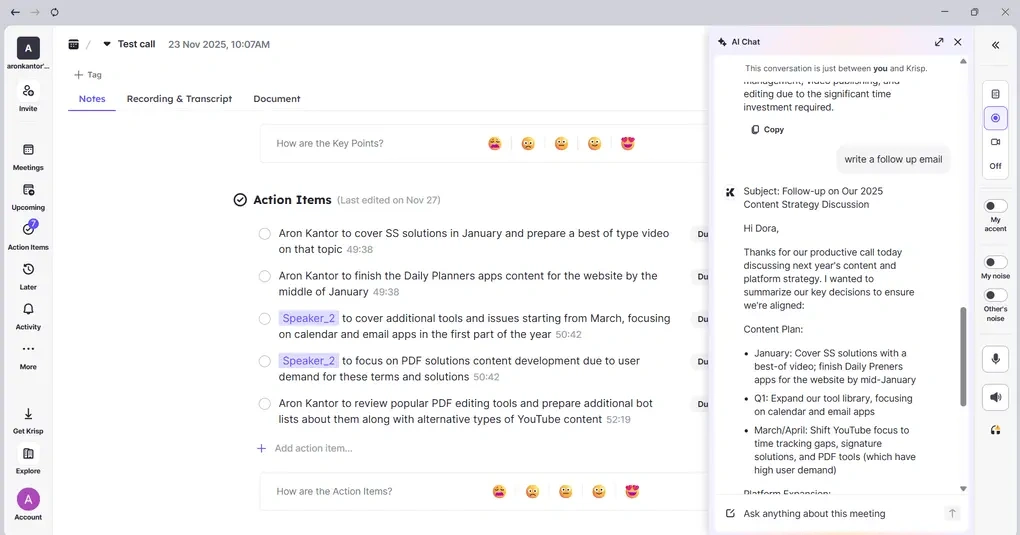
Recording: Krisp supports audio and video recording for online meetings on Zoom, Microsoft Teams, Google Meet, Webex, and other platforms. You can choose the screen recording option to record and transcribe your meetings without a bot, while sending the bot is an additional option.
Transcription: Krisp supports 16 languages and both bot-free and bot-based meeting recording. I experienced 96% accuracy during testing. Transcripts include speaker IDs and timestamps, and can be edited, searched, and reviewed alongside recordings.
AI notes: Krisp automatically generates AI notes with key discussion points, next steps, and assigned action items. The summaries are well-structured and easy to skim, and you can copy the meeting minutes template for further editing.
AI chat: Krisp’s AI chat lets you ask questions about your meetings and quickly find information such as action items and decisions without manually searching through the transcript.
Noise cancellation: Krisp’s noise cancellation filters out background chatter, keyboard sounds, and nearby voices while preserving the primary speaker’s voice. During testing, I found it worked great and was a useful addition to my workflow.
Accent conversion: Krisp includes real-time accent conversion, which helps make global meetings clearer and easier to follow. It transforms strong accents into a more neutral-sounding voice without changing the meaning.
Team collaboration: You can share meeting recordings, transcripts, and AI notes with your team. You can also automatically share meeting transcripts and recordings with participants from a calendar invite, so you don’t have to send the links manually.
Krisp’s pricing
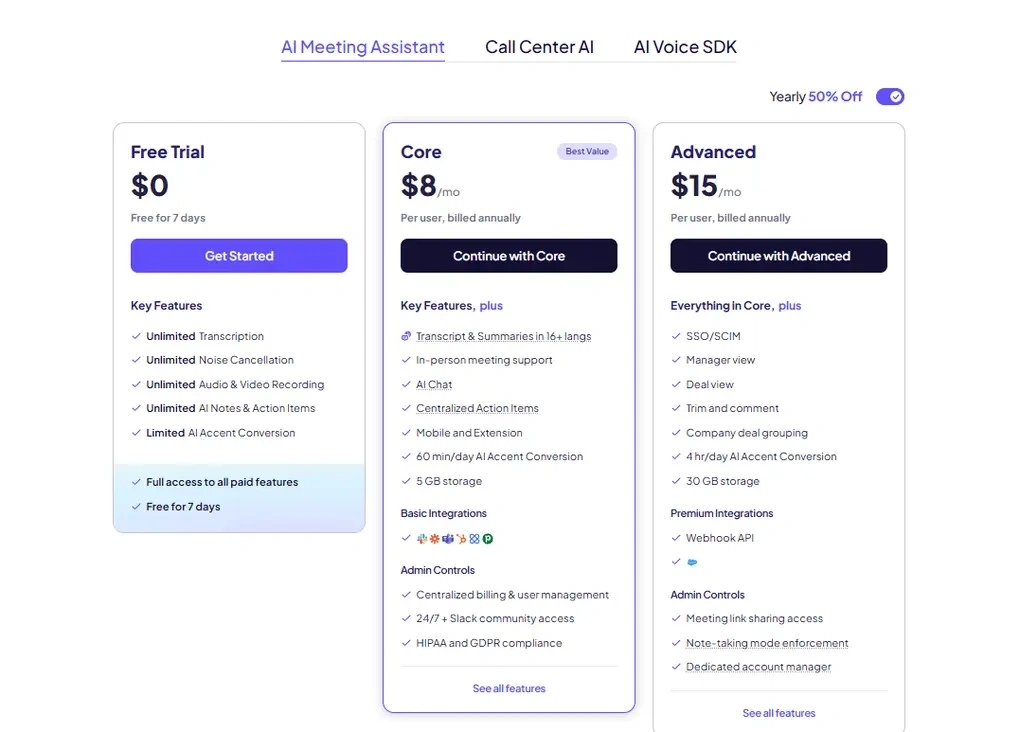
- No free plan available, only a 7-day free trial
- Core plan: $8/month with yearly billing
- Advanced plan: $15/month per user with yearly billing
- Enterprise plan: Custom pricing
What I Liked About Krisp
|
Pro |
Why It Matters |
|---|---|
|
Bot-free recording |
Krisp can record and transcribe meetings without a bot across most communication platforms. |
|
Accurate transcriptions |
Krisp delivered 96% transcription accuracy during testing and supports 17 languages. |
|
Noise cancellation |
Krisp effectively removes background chatter, keyboard sounds, and nearby voices. |
|
Accent conversion |
Real-time accent conversion can make global meetings easier to follow. |
|
Simple setup |
Krisp is lightweight and easy to use, even for non-tech users. |
What Could Be Better
|
Con |
Why It Hurts |
|---|---|
|
No free plan |
Krisp only offers a 7-day trial, making it unsuitable for users seeking a completely free AI note-taker. |
|
No mobile noise cancellation |
Krisp’s noise cancellation feature is not available on mobile. |
Why is Krisp the best Otter AI alternative for noise cancellation?
Krisp is one of the few AI note-takers that combines strong meeting notes with real-time noise cancellation. During testing, it effectively removed background chatter, keyboard sounds, and nearby voices. That’s why I recommend it as an Otter AI alternative, especially for customer calls and noisy environments where clear audio really matters.
🔎 Read my full review: My Brutal Honest Krisp Review 2026 | Is It Worth It?
Fathom
Fathom suits users who need the essential features for free and a simple AI note-taker. It supports 38 languages and captures calls on Microsoft Teams, Zoom, and Google Meet.
Quick verdict
Simple AI note-taking with free core features
If you are looking for more advanced meeting workflows and collaboration tools
Accurate transcriptions and well-structured meeting notes for free
The feature set feels more lightweight for teams
Testing Fathom in real meetings
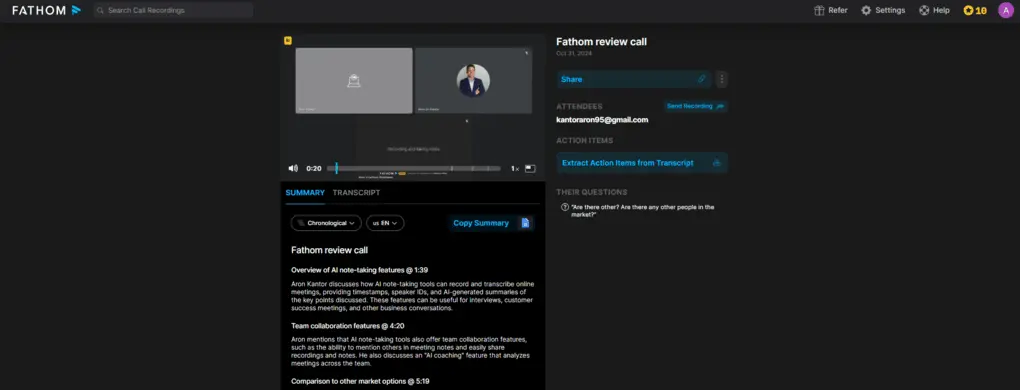
When testing Fathom, I had an absolutely pleasant experience. I tried many exciting features that make this AI note-taker outstanding. While its free plan does not include too many advanced features, you can use the core tools without limits.
So, if you are looking for a simple meeting transcription software to automate your video meetings on the popular video conferencing tools, Fathom can be a practical choice.
When Fathom makes more sense than Otter AI
When another alternative may work better
If you want to try out Fathom, use this link to get FREE 3 months of premium features without extra cost. This way, you can have 3X more time to test Fathom’s advanced features and decide whether to upgrade or stay with the free plan.
The Fathom Features I Used Most
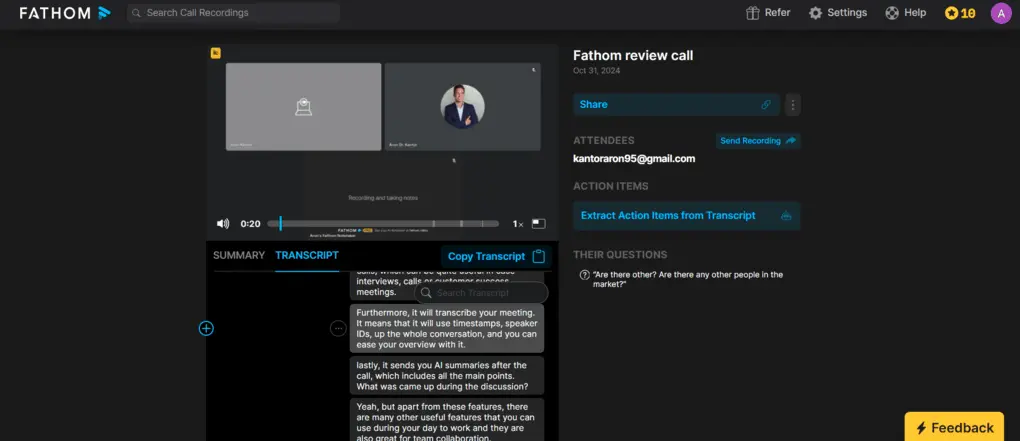
Transcription & recording: After you let Fathom’s bot into the call, it will automatically transcribe and record the virtual meetings on Zoom, Microsoft Teams, and Google Meet. Fathom provides high-quality video recording that you can easily share with others.
Transcription accuracy: Based on my experience, the transcription accuracy ranges from 85% to 90%. While this also depends on the audio quality and your accent, I reached this accuracy with the built-in microphone of my PC.
Meeting notes: Fathom also summarizes your meetings and offers multi language support. These summaries cover the key points discussed during the call. I discovered that the meeting summary is shorter and follows a different structure compared to other Otter AI alternatives. Personally, I would love it if the meeting summary were a bit more detailed, like MeetGeek’s, but this short version is also quite valuable & straightforward.
Collaboration tools: With Fathom, you can structure your meeting notes and recordings into different folders that your team can access. Also, you can mention, add comments, and share the meeting notes with a few clicks. If we look at the advanced team collaboration features, you can access the coaching feature and the deal view in the higher plans, which is especially helpful for sales teams.
Ask Fathom: During my personal testing of Fathom, this feature was my favorite. I think there are numerous totally useless AI tools nowadays, but this one is different. Ask Fathom works similarly to ChatGPT, allowing you to chat with the meeting notes. For example, you can ask questions regarding your previous customer interaction or ask them to write a follow-up email. It is just super helpful after your calls to keep the ball rolling and automate repetitive tasks.
Integration options: Fortunately, Fathom has a Zapier integration, so you can integrate it with over 7000 apps. However, you can access the Zapier integration only if you purchased the Team or Business plan.
Fathom’s pricing
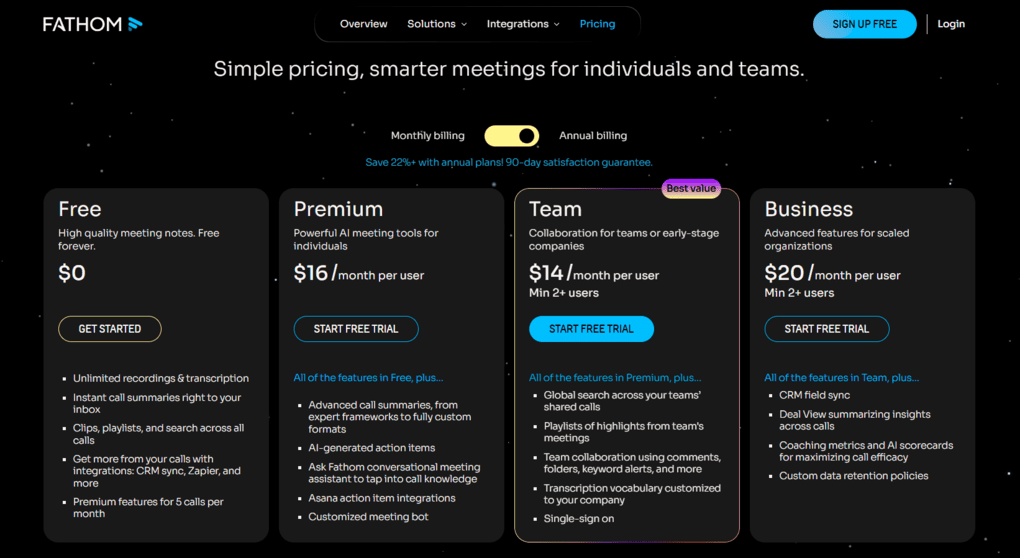
- Free plan: Available
- Premium plan: $16/month per user
- Team plan: $14/month per user
- Business plan: $20/month per user
What I Liked About Fathom
|
Pro |
Why It Matters |
|---|---|
|
Free plan |
This AI note-taker offers the most generous free plan |
|
Transcription accuracy |
Fathom has accurate transcriptions (85-90%), and you can edit them as well |
|
Customer support |
Many users reported top-notch customer service |
|
Simple |
Fathom provides a simple, user-friendly interface |
What Could Be Better
|
Con |
Why It Hurts |
|---|---|
|
Meeting templates |
Meeting templates are only accessible with high-tier plans |
|
File upload |
Can only transcribe online meetings, unlike many other AI meeting assistants on this list, which can transcribe files as well |
|
No mobile app |
Fathom lacks a mobile app, so you can’t capture in-person meetings |
Why is Fathom the best free Otter AI alternative?
What makes Fathom a solid Otter AI alternative is its free core features and simplicity. You can access the essential features completely free, with no limit caps.
🔎 Read my full review: My Honest Fathom Review After Using It For +3 Months (2026)
If you want to try out Fathom, use this link to get FREE 3 months of premium features without extra cost. This way, you can have 3X more time to test Fathom’s advanced features and decide whether to upgrade or stay with the free plan.
Explore our Apps directory
A curated directory of software tools we’ve independently reviewed, with links to full reviews, comparisons, and category guides.
MeetGeek
MeetGeek is a robust AI note-taker with detailed meeting notes and analytics. You can use it on Zoom, Teams, Google Meet, Webex, Slack, and more, and transcribe meetings in 50 languages. You can download it to a Mac and use it on mobile devices for in-person meetings as well.
Quick verdict
Extensive meeting notes & meeting insights
If you need a lightweight AI note-taker
Detailed AI meeting notes
Limited transcription minutes in the Pro plan
Testing MeetGeek in real meetings
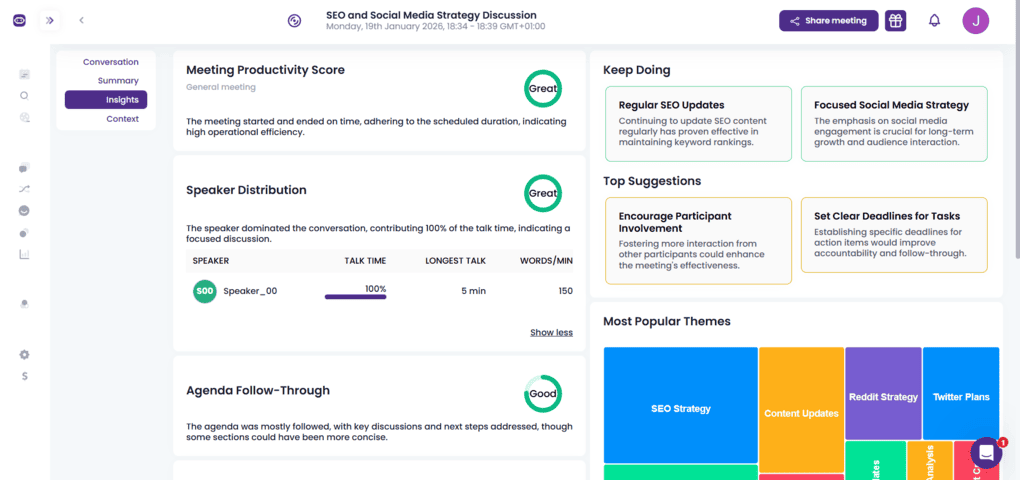
When using MeetGeek, you will get highly accurate transcripts and have all the advanced features you need.
My favorite feature was the AI meeting notes. I loved how MeetGeek breaks down my previous meetings into key points, and you can share these with one click in an email. This way, you can easily recall important details from your past meetings.
After investing many hours of testing in MeetGeek, I highly recommend MeetGeek to teams and individuals looking for a solid AI note-taking app to save time with online meetings.
When MeetGeek makes more sense than Otter AI
When another alternative may work better
The MeetGeek Features I Used Most
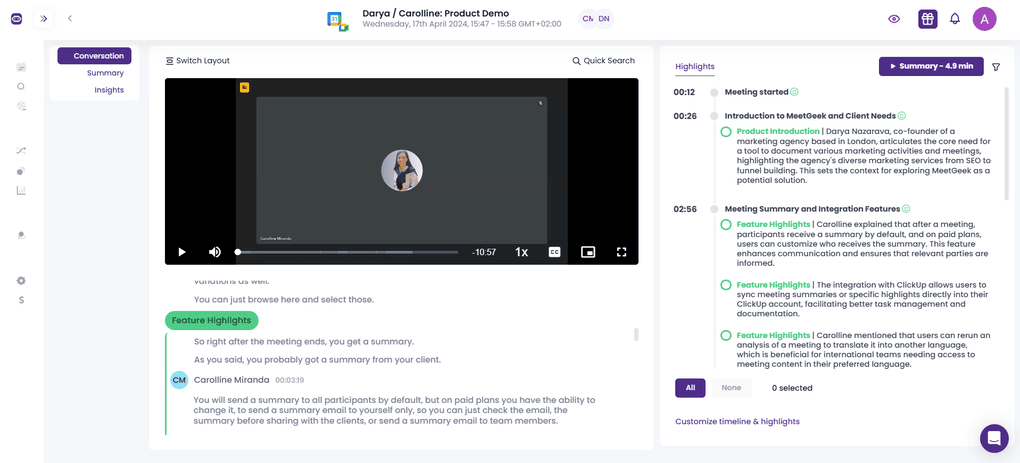
Transcription & recording: MeetGeek automatically records and transcribes meetings with high accuracy on Google Meet, Zoom, and Microsoft Teams. If you check the settings, you can also add your preferences for which meeting you want MeetGeek to join.
Transcription accuracy: During my virtual meetings, when I tested MeetGeek, I mostly used my PC’s built-in microphone and experienced over 95% transcription accuracy.
Meeting notes: Based on my 2+ years of experience with AI meeting assistants, I think MeetGeek offers one of the best AI meeting summaries. It is fantastic how it breaks down each part of the meetings into tasks, next steps, concerns, facts, and decisions. I also loved the way you can edit these meeting notes and add or remove specific points from your virtual meetings.
Collaboration tools: MeetGeek has some excellent collaboration tools. With this Otter AI alternative, you can create and share meeting snippets, add comments on meeting notes, and easily send the meeting notes to your team members. Similar to Otter, it has a searchable library where you can store and easily find your recordings and meeting transcriptions.
Conversation intelligence: MeetGeek analyzes not only what was said during meetings but also how the conversation unfolded. It provides sentiment analysis and key behavioral metrics such as silence rate, participation levels, talk time distribution, punctuality, and overall engagement.
Templates: MeetGeek automatically identifies the type of meeting, for instance, a customer call or a weekly team meeting, and prepares customized meeting notes for such a call.
Mobile app: MeetGeek offers a mobile app for iOS and Android devices. With the mobile app, you can record and get meeting notes from in-office meetings or events.
Integration options: MeetGeek supports +8000 integrations, so you can use this AI note-taking app with your favorite tools.
MeetGeek’s pricing
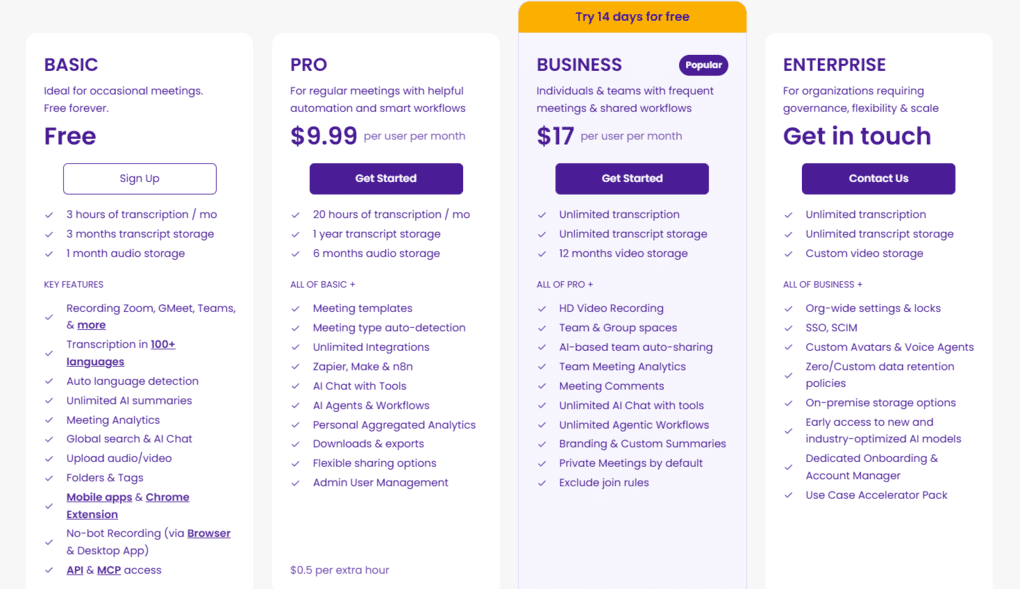
- Free plan: Available
- Pro plan: $9.99/month per user
- Business plan: $17/month per user
- Enterprise plan: Custom pricing
What I Liked About MeetGeek
|
Pro |
Why It Matters |
|---|---|
|
AI meeting summaries |
It offers extensive and digestible AI meeting summaries that you can instantly share with others |
|
Conversation intelligence |
MeetGeek has one of the most advanced conversation intelligence features. |
|
Transcription accuracy |
It delivers highly accurate transcriptions (95%+). |
|
Integrations |
MeetGeek provides a wide range of integrations with third-party apps |
What Could Be Better
|
Con |
Why It Hurts |
|---|---|
|
Free plan |
Compared to other Otter AI alternatives like Fathom or tl;dv, MeetGeek has a limited free plan. |
|
Limited Pro plan |
The Pro plan does not include unlimited transcription |
Why is MeetGeek the best Otter AI alternative for detailed meeting notes?
MeetGeek offers one of the most advanced and well-rounded AI meeting notes. It’s more structured and extensive than most AI meeting assistants, including Otter AI.
Also, thanks to its advanced meeting insights, it is a great tool for customer interactions and sales calls.
🔎 Read my full review: MeetGeek Review: Is It The Best AI Note-Taker For You? (2026)
tl;dv
tl;dv is a straightforward AI note-taker that comes with an extensive free plan and accurate transcriptions, ideal for individuals and freelancers. It works with 30+ languages, and you can transcribe meetings on Microsoft Teams, Zoom, and Google Meet.
Quick verdict
Individuals & freelancers who need a straightforward alternative
Bot-free recording
Easy-to-use interface with a generous free plan
Mobile app experience is limited
Testing tl;dv in real meetings
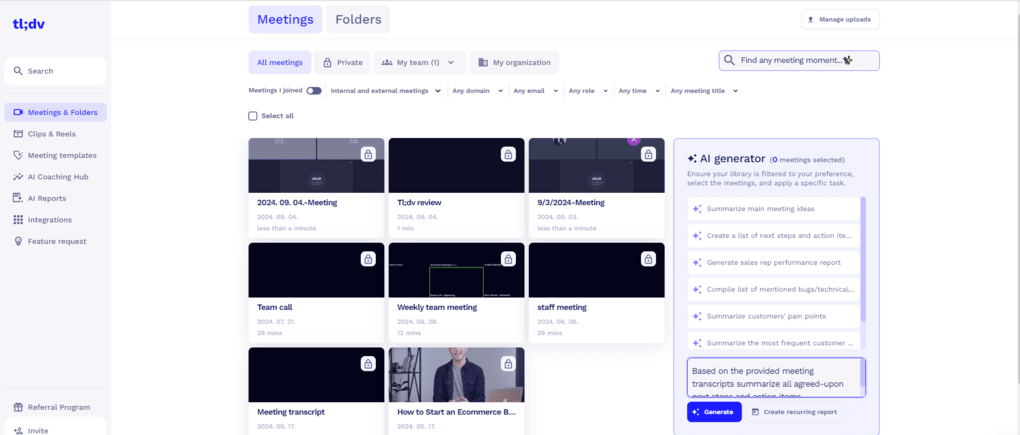
I had a very positive experience with tl;dv and used it for more than a year in my virtual meetings.
It’s easy to get started, and the whole setup took 10-15 minutes from signing up to joining a Google Meet call.
While it offers valuable features for automating your meeting workflows, like AI reports, it remains a user-friendly transcription tool.
It’s a free plan ideal for casual users to automate calls on Microsoft Teams, Zoom, and Google Meet.
When tl;dv makes more sense than Otter AI
When another alternative may work better
If you fall in love with tl;dv and switch to paid plans in the future, you will get a 30% discount for the first six months if you use this link for sign-up.
The tl;dv Features I Used Most
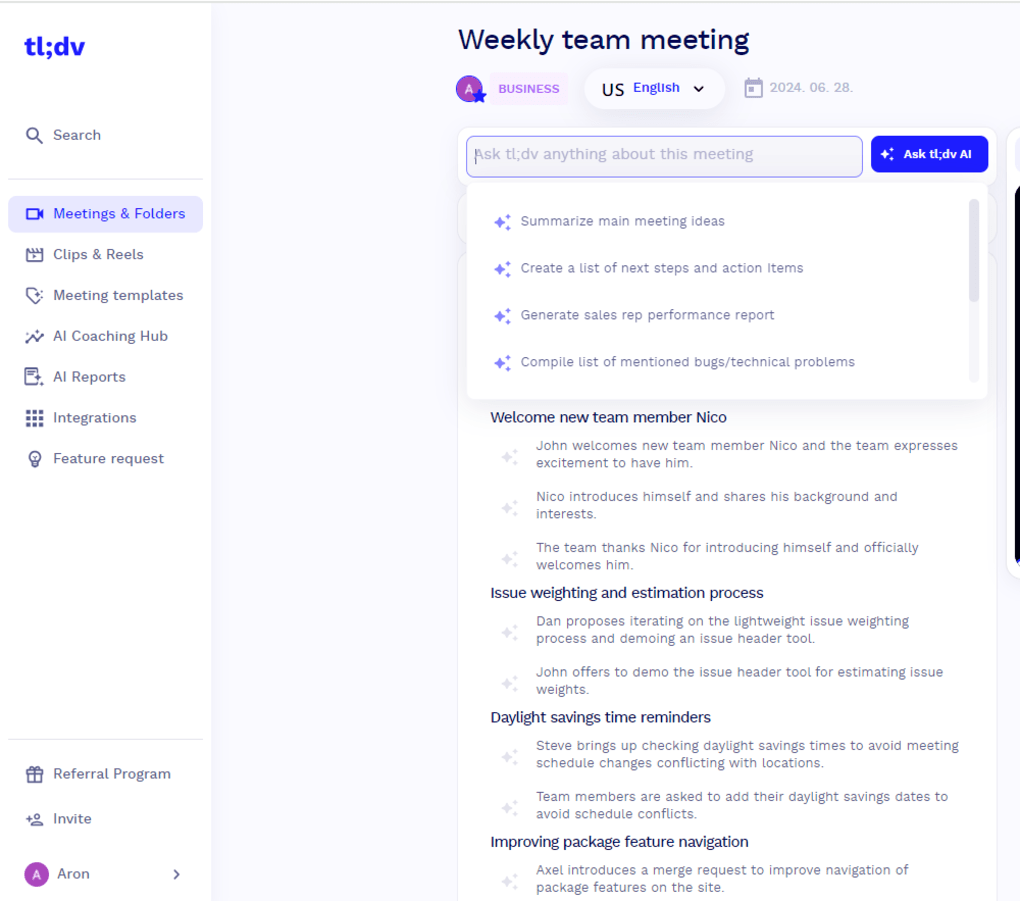
Transcription & recording: Tl;dv is a reliable transcription tool that records and transcribes your online meetings on Microsoft Teams, Zoom, and Google Meet. It gives IDs for different speakers, so you can easily see who said what. Furthermore, this AI meeting assistant can transcribe video and audio files as well.
Transcription accuracy: Based on my personal experience, it provides highly accurate transcriptions that you can easily access. I experienced around 90% transcription accuracy when using Tl;dv’s transcription services.
Meeting notes: I used tl;dv for quite a long time as my primary AI note-taker, and it was mostly because its meeting notes cover the key points of your discussions. Additionally, you can filter the next steps, general information, and customizable points depending on which meeting templates you use. Besides the automated transcription, I found tl;dv’s meeting notes very useful during day-to-day work.
Team collaboration tools: With a few clicks, you can easily share meeting insights, transcriptions, AI meeting notes, and recordings with your team members. Moreover, you can collect and organize your recordings and meeting notes with your team members in one single place.
AI reports: My favorite feature, besides the detailed meeting minutes, is the AI reports. The AI reports offer an easy way to collect the essential information from your previous meetings. You can generate a list of next steps or action items from your conversations.
Mobile app: Tl;dv has a mobile app for Android and iOS. However, it is only Lite, so the full experience is still desktop-first.
Integration options: Tl;dv offers seamless integrations with more than 8000 apps.
Tl;dv’s pricing
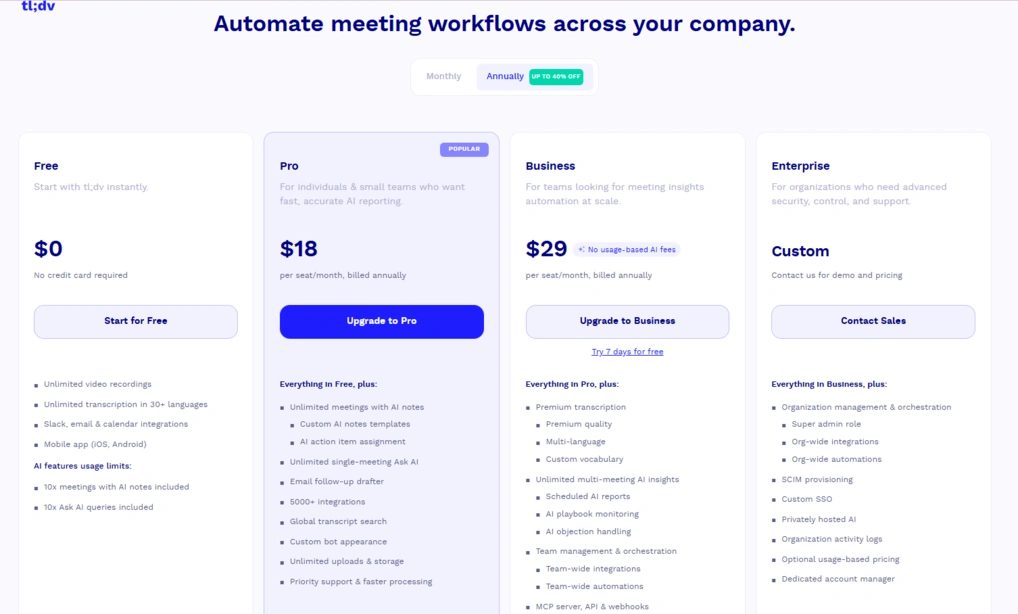
- Free plan: Available
- Pro plan: $18/month per user
- Business plan: $29/month per user
- Enterprise plan: Custom pricing
What I Liked About tl;dv
|
Pro |
Why It Matters |
|---|---|
|
Generous free plan |
tl;dv offers one of the best free plans among AI note-takers, including unlimited core features for casual users. |
|
Easy to get started |
The interface is intuitive and requires only a short learning curve. |
|
Accurate transcriptions |
It delivers reliable transcriptions for Zoom, Microsoft Teams, Google Meet, and uploaded video files. |
|
AI reports |
The AI reports help summarize meetings, action items, and recurring insights across calls. |
|
Meeting templates |
Custom meeting templates make AI notes more structured and tailored to different meeting types. |
What Could Be Better
|
Con |
Why It Hurts |
|---|---|
|
Expensive Business plan |
The Business plan is pricier than many other AI note-takers with similar advanced features. |
|
Limited mobile experience |
The mobile app feels more restricted compared to the desktop version and lacks the full workflow experience. |
Why is tl;dv the best Otter AI alternative for individuals?
Although tl;dv is a user-friendly app, it has a well-rounded feature set suitable for individuals and freelancers.
While the paid plans are a bit pricey, the free plan includes many valuable tools that those with only a few meetings a month need.
Overall, I think tl;dv is a simple and quite good free alternative to Otter AI.
🔎 Read my full review: My Honest Tl;dv Review After Using It For +18 Months (2026)
If you fall in love with tl;dv and switch to paid plans in the future, you will get a 30% discount for the first six months if you use this link for sign-up.
Fireflies AI
Fireflies AI is one of the most popular AI note-takers with a budget-friendly paid plan for businesses and individuals. It supports Google Meet, Zoom, Teams, and Webex, and offers web, desktop, and mobile apps.
Quick verdict
Budget-friendly meeting transcription & note-taking
If you are looking for an extensive free plan
Platform and language support
Limited free plan
Testing Fireflies AI in real meetings
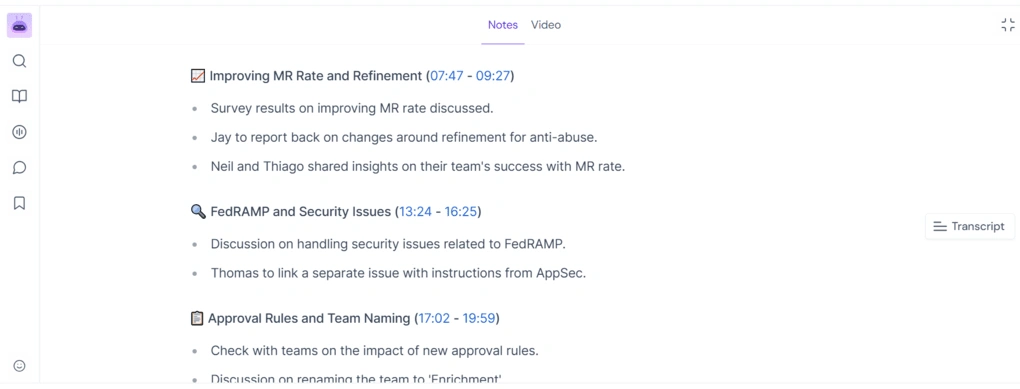
Fireflies AI and Otter AI are both among the most popular AI meeting assistants.
When comparing these two options, I found that Fireflies AI produced more accurate transcriptions, more structured meeting notes, and a more intuitive UI.
The only area where Otter AI performed better is in team collaboration, thanks to its chat feature.
Nonetheless, when comparing Otter AI and Fireflies AI side by side, Fireflies AI offers better value in its paid plans than Otter AI.
When Fireflies AI makes more sense than Otter AI
When another alternative may work better
The Fireflies AI Features I Used Most
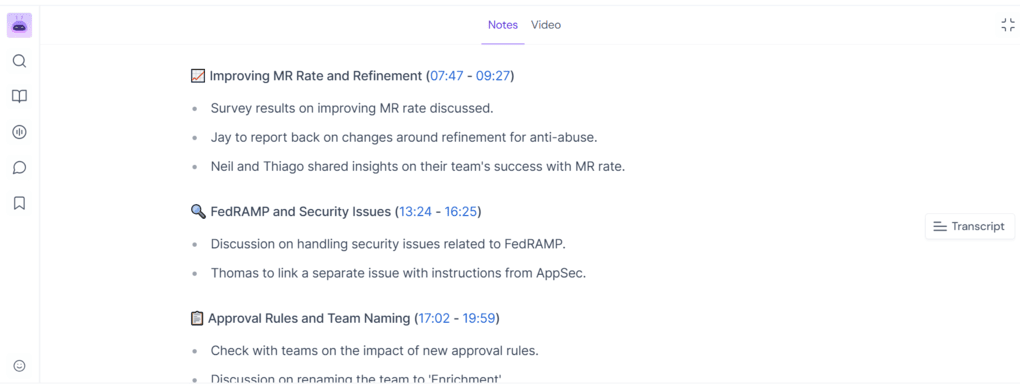
Transcription & recording: Fireflies AI can transcribe virtual meetings and audio and video files as well. When you transcribe meetings or files, you will see the meeting transcripts on the right side. Once the virtual meeting starts, Fireflies AI automatically joins and records and transcribes them if you selected the auto-join in the settings.
Transcription accuracy: In my experience, it is a reliable AI transcription tool with around 95% accuracy.
Meeting notes: Once the call is over, Fireflies AI will summarize the meetings and share the meeting notes that include an overview, key points with timestamps, and action items. These recaps have all the important details you need to quickly review what happened during the meeting.
Live assist: In addition to post-meeting summaries, Fireflies AI can also help you during meetings. This feature quickly summarizes what’s been discussed so far, points out action items as they come up, and helps you catch up if you join a meeting late. It’s a lifesaver in longer meetings, where it’s easy to lose focus or miss a few important moments.
Collaboration tools: Similar to other AI note-takers, you can organize your team’s meeting notes, recordings, and transcriptions in one app. Also, Fireflies AI allows you to share meeting notes and recordings with your team easily.
Meeting analysis: One of my favorite features was Fireflies AI’s meeting and sentiment analysis. It is very simple but includes the key metrics you need to track to improve in online calls, and shows you some data about the overall sentiment of the call.
Mobile app: Fireflies AI offers a mobile version for iOS and Android devices as well.
Integration options: You can connect Fireflies AI with thousands of the most popular apps through Zapier, including numerous project management tool integrations.
Fireflies AI’s pricing
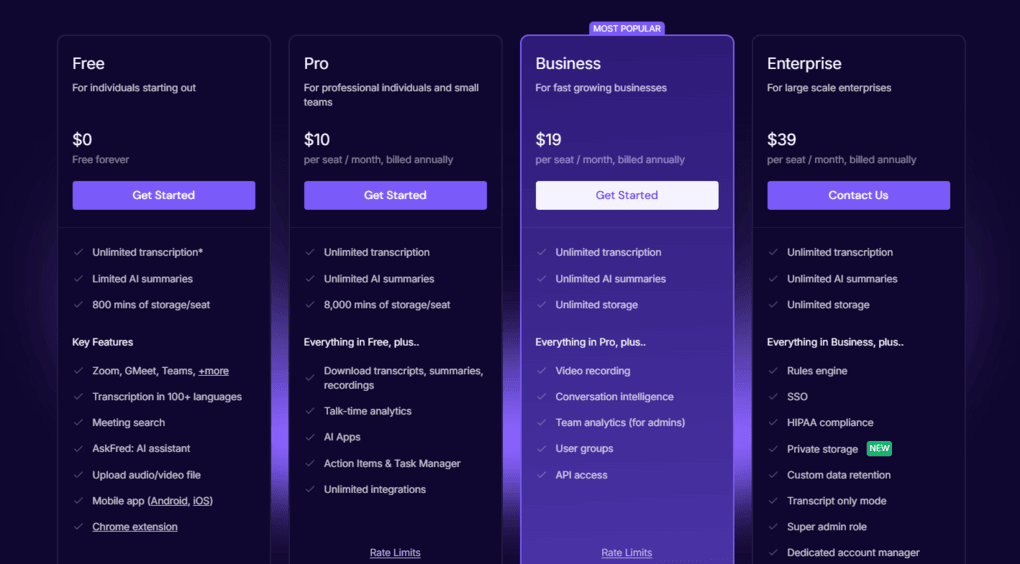
- Free plan: Available
- Pro plan: $10/month per user
- Business plan: $19/month per user
- Enterprise plan: $39/month per user
What I Liked About Fireflies AI
|
Pro |
Why It Matters |
|---|---|
|
Broad language and platform support |
Fireflies AI supports 100+ languages and works across most major meeting platforms. |
|
Wide range of integrations |
It connects easily with CRMs, project management tools, and thousands of third-party apps. |
|
Accurate transcriptions |
It provides reliable transcription accuracy (85-90%) for everyday meetings and uploaded files. |
|
Well-structured meeting summaries |
The AI summaries make it easy to review meetings and identify key points quickly. |
|
Affordable paid plans |
Compared to many competitors, Fireflies AI offers budget-friendly pricing for teams and individuals. |
What Could Be Better
|
Con |
Why It Hurts |
|---|---|
|
Limited free plan |
Most of the advanced AI and collaboration features are locked behind paid plans. |
|
Bot reliability issues |
During testing, the bot occasionally joined meetings late, which can interrupt recordings. |
Why is Fireflies AI the best budget-friendly Otter AI alternative?
Fireflies AI is a capable meeting transcription tool with solid recaps. Thanks to its affordable paid plans, it is one of the best alternatives to Otter AI.
🔎 Read my full review: Fireflies AI Review: Why is EVERYONE using it for meeting notes?
Bluedot
Bluedot is a bot-free AI note-taker for Google Meet, Zoom, Microsoft Teams, and Slack calls. I found it an easy-to-use AI note-taker with bot-free recording, transcription, and summaries, but the free plan is quite limited.
Quick verdict
Users who need an easy-to-set-up AI note-taker that works without a bot
Users looking for a fully free AI note-taking solution
Intuitive bot-free recording
Requires cloud processing to generate meeting notes
Testing Bluedot in real meetings
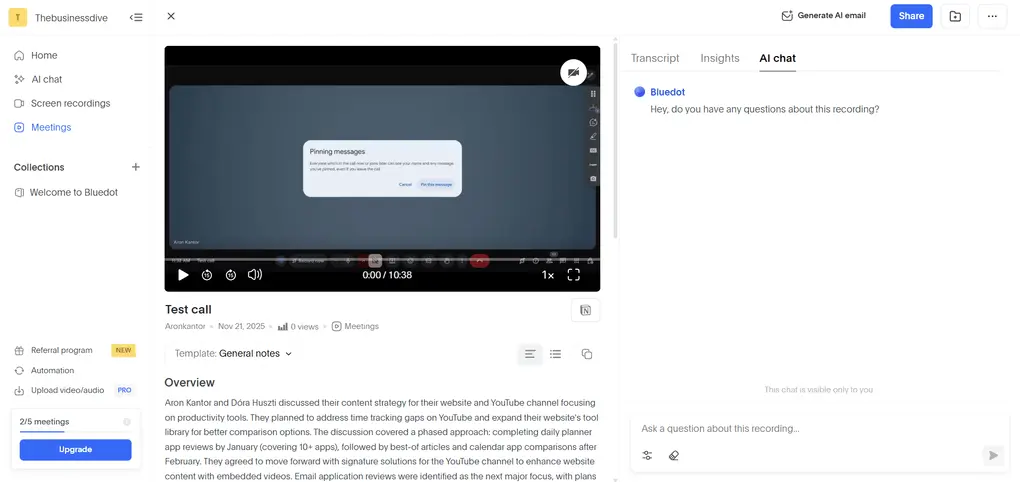
Setting up Bluedot took 5-10 minutes, and after installing the Chrome extension, I jumped right into a meeting.
It joined instantly without any issues and notified the meeting participants that the call was being recorded. After the online meeting, I received the meeting notes within 15 minutes, which were well-structured and really scannable.
In addition to the essential features, Bluedot offers advanced features such as screen recording, meeting insights, and AI chat.
My experience with Bluedot was smooth and pleasant, and it’s an ideal choice for users who need a botless and simple AI note-taker.
When Bluedot makes more sense than Otter AI
When another alternative may work better
The Bluedot Features I Used Most
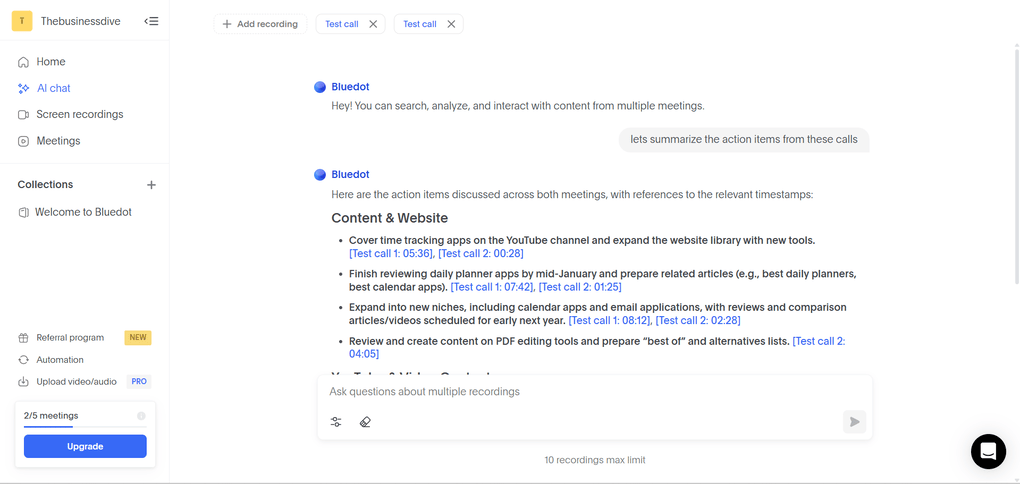
Transcription & recording: Bluedot transcribes meetings or the uploaded audio/video files. With over 100 languages supported, the transcriptions are fast and accurate, even with diverse accents and background noise
Meeting notes: Once your recording is done or the video/audio file is uploaded, you will have your meeting notes and transcript side by side. Bluedot already provides some great note templates, and you can also customize them. All in all, the notes come out very organized and structured, with perfectly identified action items for each meeting participant. Based on the notes, you can also send an automatically generated email follow-up.
Collaboration tools: You can organize your recordings into shared libraries where teammates can comment, edit, and work on meeting notes in one centralized space, eliminating the need to dig through scattered docs and email threads. You can also share your recordings externally or sync the notes with Notion and Slack.
My favorite features: Its clean and minimalistic interface made a good impression on me and helped me to use Bluedot with no learning curve at all.
Integration options: Bluedot offers a native integration with your Google Calendar and Google Drive, Hubspot, Salesforce, Slack, Notion, Zoom, but you can connect it to so many other apps via Zapier or Webhook.
Bluedot’s pricing
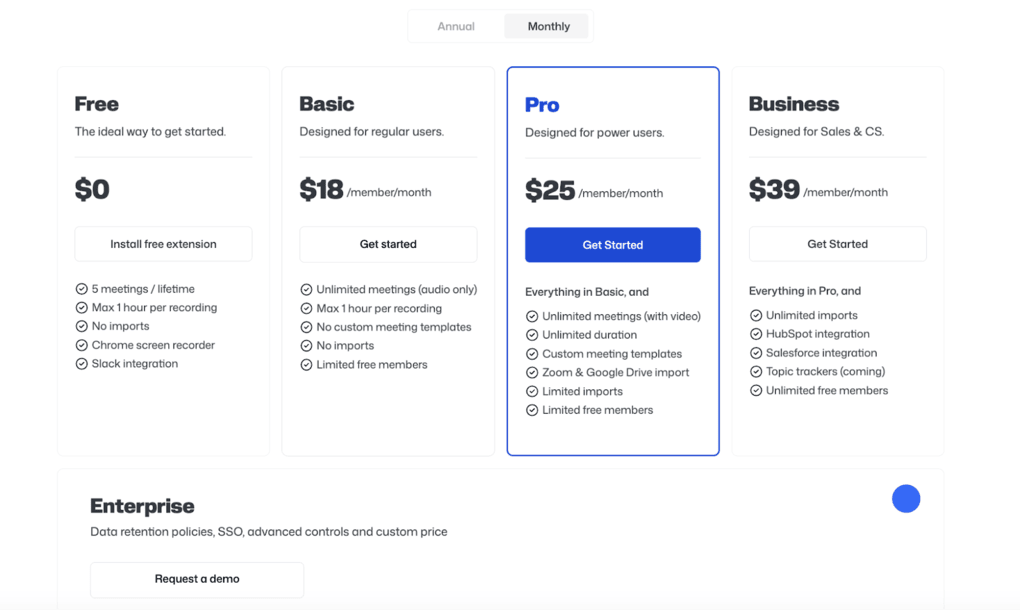
- Free plan: Available
- Basic plan: $18/month per user
- Pro plan: $25/month per user
- Business plan: $39/month per user
What I Liked About Bluedot
|
Pro |
Why It Matters |
|---|---|
|
Video recording support |
Unlike many bot-free AI note-takers, Bluedot also supports video recording during meetings. |
|
Easy setup process |
It takes only a few minutes to get started and begin recording meetings. |
|
AI follow-up emails |
The AI-generated follow-up emails help save time after calls and keep conversations moving. |
|
User-friendly interface |
The interface is clean, intuitive, and easy to navigate even for beginners. |
|
Screen recording features |
Bluedot includes screen recording capabilities that other AI note-takers do not offer |
What Could Be Better
|
Con |
Why It Hurts |
|---|---|
|
Limited free plan |
The free version feels restrictive if you have frequent meetings or need advanced features. |
|
Cloud processing dependency |
Bluedot relies on cloud processing to generate AI meeting notes, which may concern privacy-focused users. |
Why is Bluedot the best lightweight alternative to Otter AI?
Bluedot is a practical choice for individuals and small teams that need reliable meeting notes and a frictionless onboarding. It also focuses on privacy and transparent AI note-taking, which makes it a solid choice for teams that value visibility.
🔎 Read my full review: My Honest Bluedot Review After Testing 25+ AI Note-Takers
Wrap-up: Which Otter AI Alternative Should You Choose?
After testing 20+ AI note-taking apps, these are my best picks for these use cases. I found Fellow the best overall alternative, and this is the one I still use in my workflows.
However, if you need a lighter alternative with short onboarding, you might want to check out Fathom, tl;dv, or Bluedot.
Related articles:
- Best 9 AI Note-Takers | My Top Picks After +2 Years Testing (2026)
- 5 Best Bot-Free AI Note-Takers In 2026 (NOT What You’d Think)
- 6 Best Meeting Recording Apps 2026 | 2+ Years Testing
Nevertheless, I am open to debate & happy to hear your thoughts on this. I hope I was able to find the best Otter AI alternative for you. As always, I will keep updating this list to ensure it reflects reality.
Looking for similar tools?
Visit our AI note-takers library to explore other apps we’ve reviewed in this space and how they compare.
Why you can trust our reviews
At thebusinessdive.com, our team tests, reviews, and compares hundreds of productivity apps every year — from project management tools to note-taking apps. We dive deep into real-world use cases to help you find the right tools that actually improve your workflow, not just add noise.
Our mission? No fluff, no shortcuts—just honest, hands-on insights from productivity pros.
Discover how we stay transparent, read our review methodology, and let us know about any tools we missed.
Frequently asked questions
Is Fireflies or Otter.ai better?
My pick is Fireflies AI in this battle. It has more accurate transcriptions, the user interface seems better for me, and Fireflies AI has a recording feature as well.
You can find my full comparison here: Fireflies AI vs Otter AI: A Side-by-Side Comparison In 2026
Can I get Otter AI for free?
Otter AI has a free version, but it has some severe limits. That said, it only allows 300 monthly transcription minutes, 30 minutes per conversation, and you can transcribe 3 audio or video files lifetime per user.
Is Otter AI better than ChatGPT?
Otter AI and ChatGPT are two very different AI tools. Otter AI excels at real-time transcription and meeting management, while ChatGPT is a versatile conversational AI and knowledge source.
Can Otter AI provide human transcription services?
No, Otter AI does not offer human transcription services. With Otter AI, you will get automated transcription and meeting notes about your online meetings.
Disclosure: I only recommend products I would use myself, and all opinions expressed here are our own. This post may contain affiliate links that, at no additional cost to you, may earn a small commission. Read the full privacy policy here.

Hey there! I am Aron, the founder of Thebusinessdive. I have been testing productivity apps for almost three years now. I reach 25.000 -50.000 people monthly with the mission to help you find the perfect productivity apps. Subscribe to my YouTube channel, newsletter, and social media to hear more about the best productivity tools. Let’s dive in!