


How we test daily planners at TheBusinessDive
To stay transparent, we want to explain how we test daily planner apps at TheBusinessDive.
Our testing framework (at a glance)
- Average testing time per tool: 7–21 days
- Number of tools tested: 10+ daily planner apps
- Test scenarios: simple daily planning, time blocking, and mixed task and calendar workflows
- Platforms tested: Web, mobile, desktop (when available)
- Review process: the same framework is applied across all daily planner reviews
This structured approach ensures that every tool is evaluated consistently and under comparable conditions.
Our testing approach
Our scoring system for daily planners
We created our scoring system for daily planners based on 3+ years of experience in testing calendar, task management, and planner apps. We have tested 10+ daily planners to identify the most important factors that help people make decisions.
That said, we evaluated the daily planners across 10 key factors, focusing on real-world use cases.
How we score daily planner apps (quick breakdown)
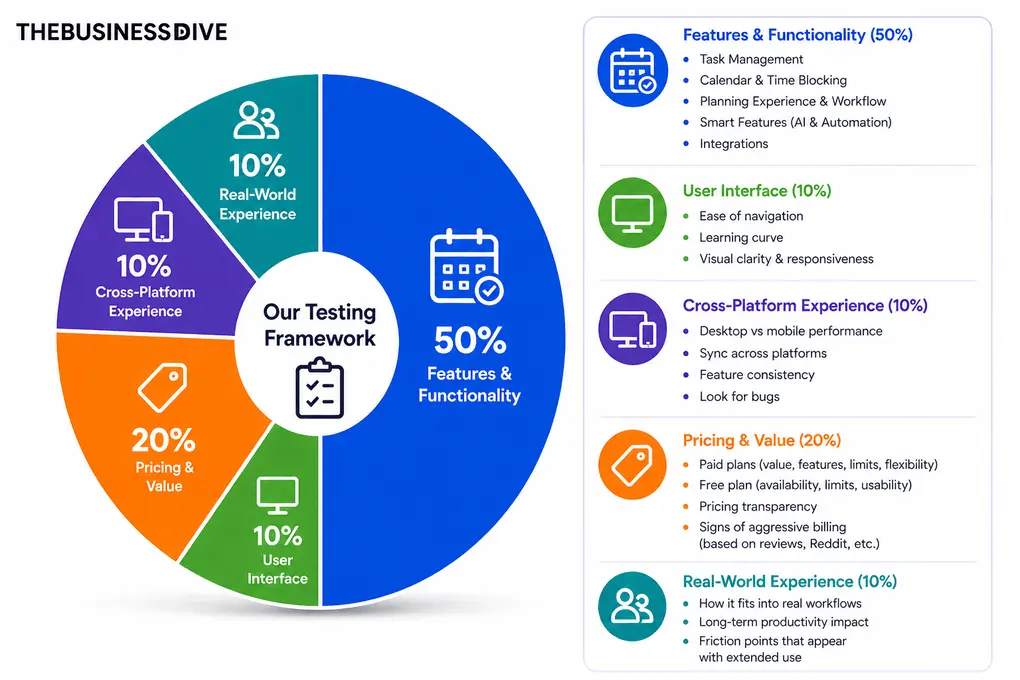
- Features & functionality → 50%
- User interface → 10%
- Cross-platform experience→ 10%
- Pricing → 20%
- Real-world experience → 10%
Features & functionality (50%)
The feature set of each daily planner gives half of the final score. When testing the features, we focus on the following:
Task Management
We evaluate how easy it is to capture, organize, and manage tasks in real-world use.
During testing, we look at:
- Task creation speed (keyboard shortcuts, quick add, natural input)
- Organization (projects, labels, priorities, subtasks)
- Recurring tasks and reminders
- Flexibility vs structure
- View options to track tasks
- Assigning tasks to others
We prioritize tools that make task management feel fast, intuitive, and not overloaded.
Calendar & time blocking
We test how effectively each tool helps you plan your day visually and realistically.
This includes:
- Drag-and-drop time blocking
- Customization options
- Flexibility of scheduling vs rigid planning
Apps that make it easy to see what actually fits into your day score highest here.
Planning experience and workflow
We evaluate how well the tool supports daily planning as a process, not just task tracking.
During testing, we focus on:
- Daily planning flow
- Clarity of “Today view”
- Ability to prioritize and commit to work
- Whether the app reduces overwhelm
Tools that guide your day with high flexibility and efficiency perform best.
Smart features
We evaluate how much the tool can reduce manual work and repetitive actions.
During testing, we check:
- AI features (task suggestions, summaries, scheduling help)
- Workflow automation (rules, triggers, routines)
- Real usefulness vs gimmicks
Tools score higher if automation actually saves time in daily workflows, not just looks good on paper.
Integrations
We assess how well the tool connects with your existing workflow.
We test:
- Native integrations (Google Calendar, Outlook, Slack,, etc.)
- Sync quality and reliability
- Depth of integrations
We prioritize tools that help you centralize tasks from multiple apps.
User interface (10%)
We evaluate how intuitive and polished the app feels during everyday use.
This includes:
- Ease of navigation
- Learning curve
- Visual clarity and responsiveness
Apps that feel fast, clean, and predictable from day one score highest.
Pricing & value (20%)
We assess whether the tool provides good value for what it offers.
Free plan
Here, we check:
- Free plan availability and limitations
- Is a free trial available
Paid plans
During testing, we consider:
- Pricing compared to competitors
- Feature access across plans
- Subscription model (whether it has monthly and yearly plans, or just yearly)
- If there are signs of aggressive billing based on checking reviews, user reports from Reddit, and more.
Higher scores go to tools that deliver real value without forcing upgrades too early, and offer a good balance between price and value.
Cross-platform experience
We test how well the app works across devices.
This includes:
- Desktop vs mobile performance
- Sync across platforms
- Feature consistency
- Look for bugs
Apps that deliver a smooth, reliable experience everywhere score higher.
Real-world experience (10%)
This is based on actual daily use over time.
We evaluate:
- How the tool fits into real workflows
- Whether it improves productivity long-term
- Pros and cons that only appear with extended use
- The overall experience during testing
This category reflects what it’s actually like to rely on the tool every day, not just test features.
Our testing approach
Our testing approach
Daily planner apps are used to structure your day, manage tasks, and balance time. Because of that, we do not evaluate them based only on features or visual design.
We test daily planner apps by planning real days over multiple weeks and across different routines. This includes creating daily plans, scheduling tasks into time blocks, handling changes during the day, and reviewing how the plan actually played out.
This testing framework is used across all of our daily planner content, including individual reviews, comparisons, and best-of guides. All recommendations are based on this same evaluation process, not on one-off impressions.
Testing duration & depth
Each daily planner app is tested for at least 1–3 weeks, not just a quick trial.
We use every tool across multiple days and planning styles to understand how it performs over time. This includes testing different routines, adjusting plans during the day, and evaluating how the tool handles real-life changes.
Why daily planners are hard to compare
Daily planning is highly personal, and different tools support different approaches.
From our testing, here are the main reasons they are difficult to compare:
- Tasks versus calendar balance. Some tools focus on lists, others on time blocking
- Handling changes. Plans often shift during the day and tools handle this differently
- Level of structure. Some planners guide your day closely, others are more flexible
- Visual clarity. A crowded day can become difficult to manage depending on the layout
- Workflow preferences. Different users plan in different ways
Because of this, a feature list alone does not reflect how a planner performs in real use.
Real scenarios we test
We do not just explore features. We simulate real daily planning:
- Planning full workdays with tasks and scheduled events
- Using time blocking and flexible task lists
- Adjusting plans when meetings or priorities change
- Switching between different planning styles
- Reviewing completed and unfinished tasks at the end of the day
This helps us understand how each tool performs in realistic conditions.
How we test daily planners
We do not rely on short testing sessions. We use each tool to plan real days over time.
We create daily plans, schedule tasks, move them as needed, and evaluate how well the app supports a full day of work. We test different approaches such as time blocking, list-based planning, and combined views.
During testing, we look for clear answers to questions like:
- Can you plan your day without relying on multiple tools?
- Is it easy to move tasks into time slots and adjust them?
- Does the planner help maintain focus throughout the day?
- How well does it handle unexpected changes?
Testing across multiple days helps us evaluate consistency and real usability.
Proof of testing
All screenshots and videos included in our reviews are:
- created during our own testing
- based on real daily planning scenarios
- never taken from marketing materials
This ensures that all visuals reflect actual product usage.
Check out some of our reviews to see how it works in practice:
What we don’t do
Just as important as what we test is what we intentionally avoid:
- We do not rely only on demos or marketing pages
- We do not rank tools based on affiliate commissions
- We do not test tools for only a few hours
- We do not assume one planner works for everyone
Daily planning is highly personal, and oversimplifying it would not be helpful.
How we make recommendations
Instead of calling one tool “the best,” we focus on specific use cases, such as:
- Best for simple scheduling and to-do lists
- Best for time blocking and calendar-focused planning
- Best for combined task and calendar workflows
- Best for reflection and daily review
- Best budget option
This makes it easier to choose a planner based on how you actually organize your day.
How often are reviews updated
Daily planner apps evolve regularly. Features change, integrations improve, and interfaces are updated.
We revisit reviews when:
- pricing or plans change
- major usability features are released
- core planning workflows are redesigned
Keeping reviews up to date is part of our process.
Transparency & monetization
Some of our articles include affiliate links. If you sign up through one of them, we may earn a commission at no extra cost to you.
This never influences how tools are tested, ranked, or recommended.