


6 Best Bot-Free AI Note-Takers (Just Updated)
You want AI meeting notes without bots. But don’t want to sign up for 10+ apps to find the best bot-free AI note-taker for your use case.
I totally get it. So, I did the testing for you.
After testing 25+ AI note-takers across 50 meetings, these stood out most for bot-less note-taking:
- 👥 Advanced features for professionals and teams: Fellow
- 🔇 Noise cancellation and AI meeting notes: Krisp
- 🆓 Free bot-less AI note-taking: Scribbl
- 🎥 Video recording without a bot: Bluedot
- 📝 Combining manual notes with AI summaries: Granola
- ⚙️ AI workflows and post-meeting automation: Tactiq
Comparison Table: Top 6 AI Note-Takers That Work WITHOUT Bots
AI note-takers | Works best for | Meeting notes | Bot-free video recording available? | What stood out in my testing | Notifies participants about recording? | Pricing starts |
|---|---|---|---|---|---|---|
Teams & professionals that need advanced features | Highly accurate, well-structured summaries with key decisions and action items | No | Advanced security and collaboration features | Yes | $7/user/month | |
When having meetings in a loud environment | Well-structured, easy-to-skim summaries with accurate action items and clear next steps. | No | Valuable noise cancellation when having meetings in noisy environment | No | $8/user/month | |
Bot-free recording and cross-meeting AI insights | Searchable, speaker-labeled transcripts with concise AI summaries and action items | Yes | Automatic meeting grouping and AI chat across calls | No | $13/user/month | |
Video recording without a bot | Customizable meeting notes | Yes | Quick setup and straightforward bot-free recording | Yes | $14/user/month | |
Combining manual notes with AI notes | Turns handwritten notes into useful meeting notes | No | Surprisingly effective at turning my messy notes into structured AI summaries | No | $14/user/month | |
Workflow automation | Excellent action item extraction, but limited by AI credits | No | Powerful AI workflows that automate follow-ups and turn meeting notes into actionable tasks | No | $8/user/month |
How We Test Bot-Free AI Note-Takers
To keep our reviews fair and consistent, we test every AI note-taking tool through hands-on use, focusing on recording and transcribing meetings without a bot joining the call.
We test tools across supported video conferencing platforms, checking whether participants receive notifications, how quickly notes become available, and how useful the transcripts, AI summaries, and action items are. We also evaluate ease of use, privacy, integrations, and pricing.
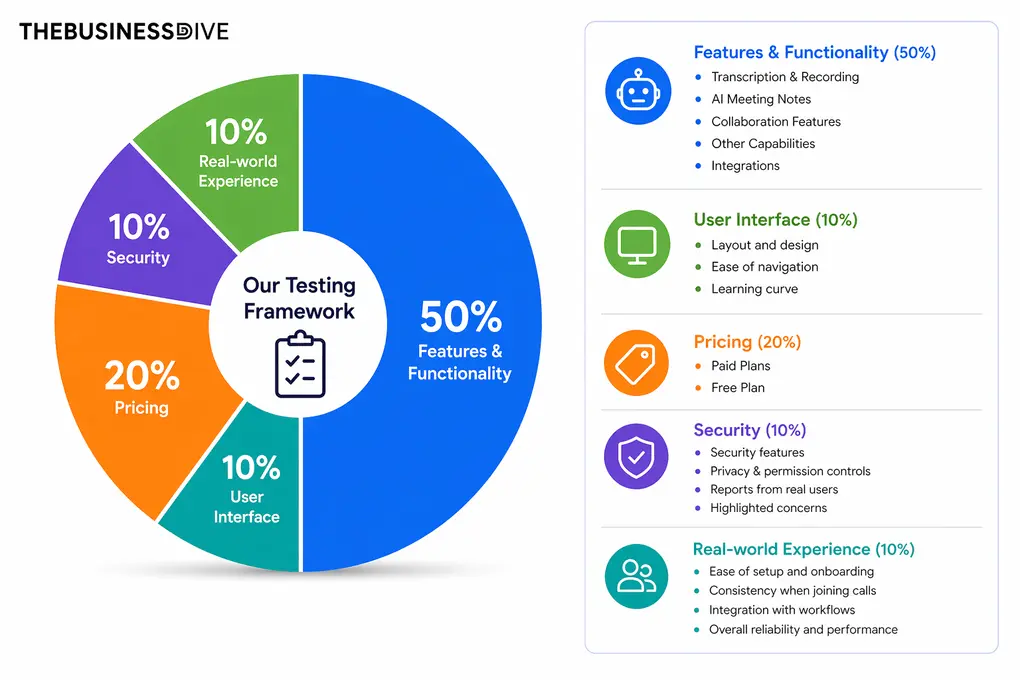
Our scoring breakdown after testing 20+ AI note-takers:
🤖 Features & functionality — 50%
🖥️ User interface — 10%
💰 Pricing — 20%
🔐 Security — 10%
👥 Real-world experience — 10%
Want a detailed breakdown of how we test each category?
Learn exactly how we test tools → Review methodology
Detailed breakdown: what each tool offers (and where it falls short)
Fellow
Fellow is the one bot-free AI note-taker I’ve used for 7 months that captures meetings without a bot while still enforcing the same security, retention, and access rules on every recording. It takes notes on Zoom, Teams, Google Meet, Webex calls, Slack huddles, and in-person meetings, and also helps you create follow-up emails, prepare a meeting agenda, and more.
Quick verdict
Teams needing secure, feature-rich bot-free meeting notes
Users who need bot-free video recording
Accurate notes with advanced security and collaboration features
Free plan + paid plans from $7/user/month
How Fellow performs in real meetings
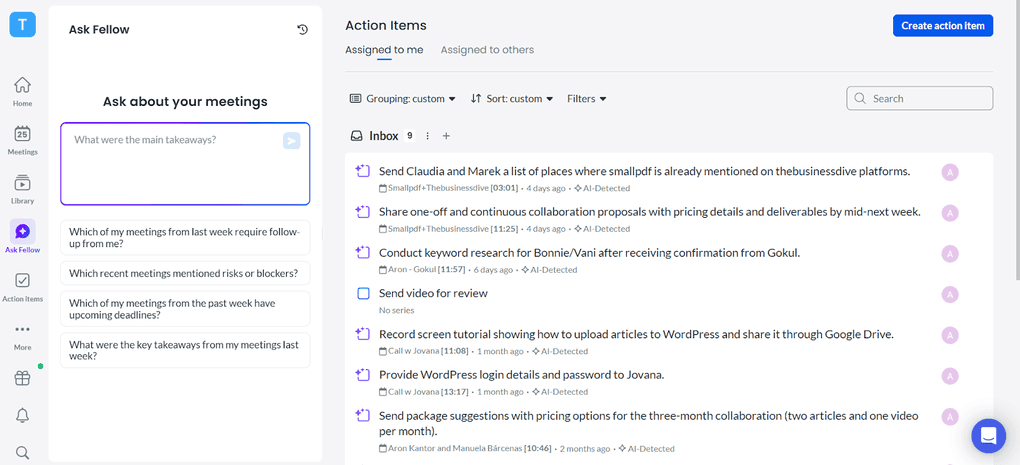
After testing 25+ options, Fellow was the most complete solution for professionals and teams that need high security, well-structured meeting notes, and advanced features.
What I particularly like about Fellow is that you can choose between bot-based and botless recording, depending on your preferences. With botless recording, Fellow captures your meetings directly through its desktop app, without adding an extra participant to your Zoom, Google Meet, or Microsoft Teams calls.
During my testing, botless recording worked reliably in the background, and I didn’t have to manually start a recording bot or have a bot join the meeting
Another important advantage is that Fellow applies the same security, consent, and data retention controls to both recording methods. So, choosing botless recording doesn’t mean compromising on privacy or losing access to the features available with bot-based recording.
Nevertheless, it can only capture the video if you let the bot into the meeting.
As for accuracy, Fellow consistently delivered 95%+ transcription accuracy during my testing. After each meeting, I received well-structured AI summaries and transcripts within minutes, including key discussion points, decisions, and action items.
Beyond recording and transcription, one of Fellow’s most underrated features is its meeting agendas. You can prepare discussion points before a call and access them alongside the meeting participants during the conversation.
Fellow’s biggest advantage is that its botless recording doesn’t feel like a separate, stripped-down feature. You get the flexibility of recording without a bot while keeping the accurate transcripts, detailed AI summaries, and advanced collaboration features that make Fellow one of the most complete AI note-takers
The Good & The Missing Pieces
✅ Pros | ❌ Cons |
|---|---|
Bot-free recording with the same security and consent controls | Desktop app required for bot-free recording |
Enterprise-grade security and compliance features | More limited free plan than some competitors |
95%+ transcription accuracy in my testing | Can only record video with a bot |
50+ native integrations and thousands more through Zapier | |
Ask Fellow searches across all past meetings | |
Affordable team plans starting at $7/user/month |
Plans & pricing
- Free plan: Available
- Solo plan: $19/month per user
- Team plan: $7/month per user
- Business plan: $15/month per user
- Enterprise plan: $25/month per user
Use this link to sign up and get 10% off the paid plans if you upgrade.

Krisp
Krisp works on Zoom, Teams, and Google Meet meetings, but it also supports in-person meetings through the mobile app. It supports 16 languages currently, and offers some really unique features that no other AI meeting assistant provides.
Quick Verdict
Meetings in noisy environments
Users who need a free plan
Noise cancellation and accurate AI meeting notes
Free trial + paid plans from $8/user/month
How Krisp performs in real meetings
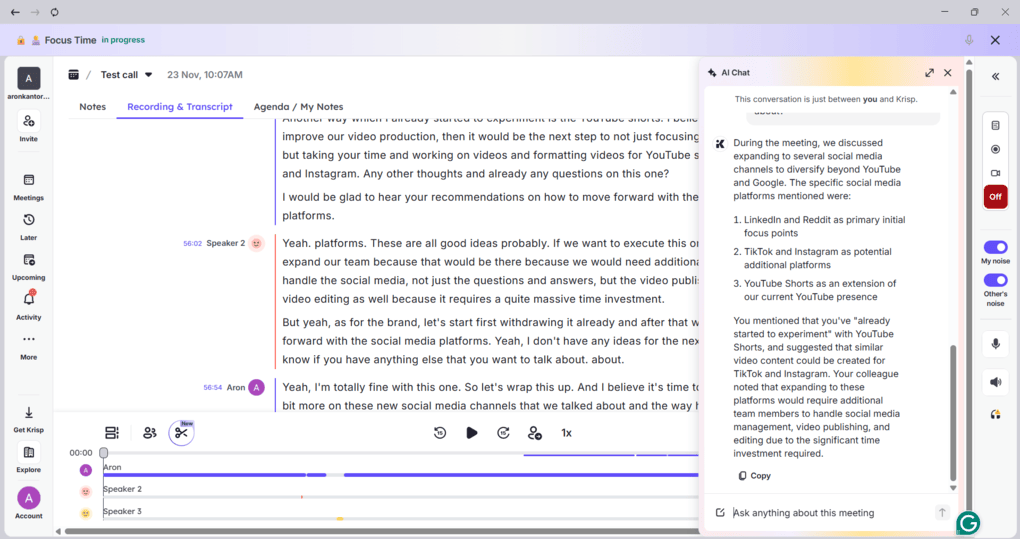
When joining a call, you can activate Krisp with just one click, and it will start taking notes in the background without adding a bot to the meeting. However, it’s your responsibility to inform other participants that Krisp is transcribing the conversation, as it doesn’t automatically notify them.
The meeting notes are well-structured and easy to skim, and Krisp automatically extracts action items and assigns them to the relevant participants. During my testing, transcription accuracy was between 95% and 100%, although this largely depends on the audio quality.
Beyond AI meeting notes, Krisp offers some unique features, including accent conversion and noise cancellation.
Personally, I’ve used its noise cancellation feature numerous times, and believe me, it has been a lifesaver on some occasions. With an eight-month-old baby at home, background noise isn’t exactly uncommon during my meetings!
That said, Krisp performed really well during my testing, and I think it’s an excellent choice if you frequently attend meetings in noisy environments.
The Good & The Missing Pieces
✅ Pros | ❌ Cons |
|---|---|
Accurate AI meeting transcription | No free plan |
Well-structured meeting recaps with speaker-assigned action items | Advanced integrations are only available on the Business plan |
Excellent noise cancellation and unique accent conversion features | You can’t create folders in your workspace to organize calls |
Strong security and data protection | |
Supports bot-free recording of in-person meetings |
Plans & pricing
- Free plan: Only trial
- Core plan: $8/month per user
- Advanced plan: $15/month per user
- Enterprise plan: Custom pricing

Scribbl
Scribbl is an AI meeting note-taker that records meetings on Google Meet, Zoom, and Microsoft Teams without adding a bot to the call. It generates video recordings, searchable transcripts, AI summaries, and action items, while letting you organize meetings and analyze conversations across multiple calls using ChatGPT or Claude.
Quick Verdict
Organizing and analyzing multiple meetings with AI
In-person meeting recording
AI chat across meetings with ChatGPT and Claude integrations
Free plan + paid plans from $13/user/month
Using Scribbl in real-world meetings
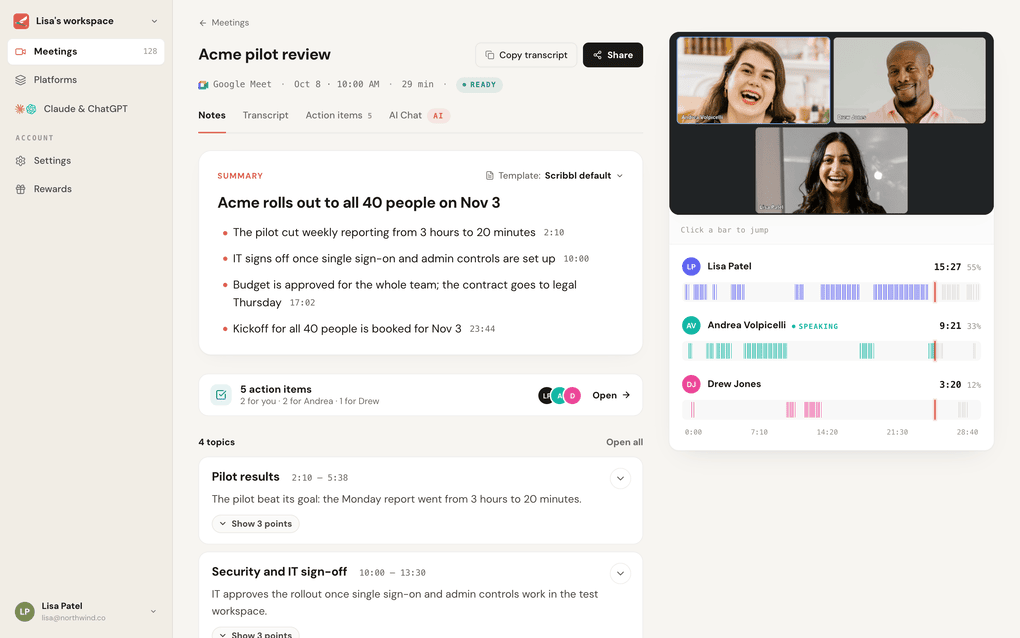
I used Scribbl on my own demo and client calls across Google Meet, Zoom, and Teams. Nobody on the other side saw a bot or got an email saying a notetaker had joined, which mattered most on calls with prospects.
Notes came back in about a minute after the call ended, with the video, a searchable transcript with speaker names, AI notes, and action items. The part I used most was grouping. I described a “Demo calls” collection in one sentence, and every demo landed there on its own.
Then, with Scribbl connected to ChatGPT, I asked about all of those demos at once, and the answer came back with the actual quotes, who said them, and in which call. It works for client work too: “What did this client ask me to do across our last five calls?”
My one frustration: connecting ChatGPT the first time took a few minutes of clicking through settings.
The Good & The Missing Pieces
✅ Pros | ❌ Cons |
|---|---|
Integrates with ChatGPT and Claude through MCP | No in-person meeting recording |
AI chat across multiple meetings, with answers linked to speakers and specific conversations | |
Automatically groups related meetings for easier analysis | |
Video recordings, speaker-labeled transcripts, AI summaries, and action items | |
Integrates with HubSpot and Pipedrive to automatically log meeting notes | |
Extensive free plan |
Plans & pricing
- Free plan: Includes 10 meetings monthly without limits on meeting length
- Pro plan: $13/month per user
- Team plan: $20/per user

Bluedot
Bluedot records every conversation without any bots, simplifying the note-taking process. While it is not as feature-heavy as Fellow or Krisp, it was built to capture notes quickly across different platforms. You can use it on Zoom, Google Meet, Teams, and Slack. It supports transcription in over 100 languages and offers a smooth bot-free AI note-taker experience.
Quick verdict
Bot-free video recording and customizable meeting notes
Users looking for a generous free plan
Bot-free video and screen recording with customizable AI summaries
Free plan + paid plans from $14/user/month
Using Bluedot in real-world meetings
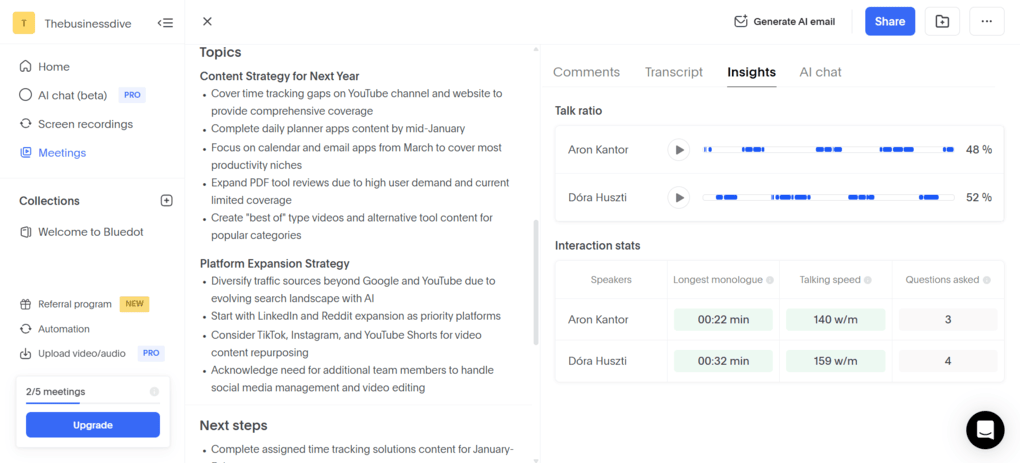
Setting up Bluedot took only a few minutes, and its browser extension made recording meetings smooth. What stood out immediately was that Bluedot can record video meetings without adding a bot to the call.
Unlike many bot-free AI note-takers, Bluedot supports video recording without adding a bot to your calls. Scribbl also offers this functionality, but Bluedot stood out to me for its simple setup and customizable meeting notes.
When it comes to transcription and AI meeting notes, Bluedot delivered solid results. I liked the customizable meeting templates, which made the meeting summaries more flexible and helped me identify key insights, decisions, and action items within seconds.
During my testing, transcription accuracy ranged between 85% and 90%. While that’s a decent result, it’s not as strong as some other AI note-takers I’ve tested, specifically Fellow and Krisp.
One important thing to keep in mind is that Bluedot doesn’t automatically notify meeting participants about recording by default. However, you can enable optional chat notifications or configure consent settings to inform participants.
Overall, I think Bluedot is one of the best choices if you want to record video meetings without a bot while still getting the meeting video.
The Good & The Missing Pieces
✅ Pros | ❌ Cons |
|---|---|
Unlike many other bot-free AI note-takers, Bluedot offers video recording | The free plan is essentially a free trial |
It is super easy to set up | |
The AI follow-up email generation is valuable after your calls | |
It has screen recording features as well, which is quite unique Well-structured meeting notes with timestamps |
Plans & pricing
- Free plan: Available
- Basic plan: $14/month per user
- Pro plan: $20/month per user
- Business plan: $32/month per user
Explore our Apps directory
A curated directory of software tools we’ve independently reviewed, with links to full reviews, comparisons, and category guides.

Granola
Granola is a lightweight and simple bot-less AI note-taker. This is one of its main strengths, but a weakness as well, since it really only has the basic features, which are transcribing and summarizing your calls. If you want to record your call, it’s not an ideal option, as it doesn’t have that capability. It works on Google Meet, Teams, Zoom, Slack, and Webex, and supports 10 languages.
Quick verdict
Combining manual notes with AI summaries
Users who need video recordings or audio uploads
Turning rough notes and live transcripts into structured AI summaries
Free plan + paid plans from $14/user/month
Using Granola in real-world meetings
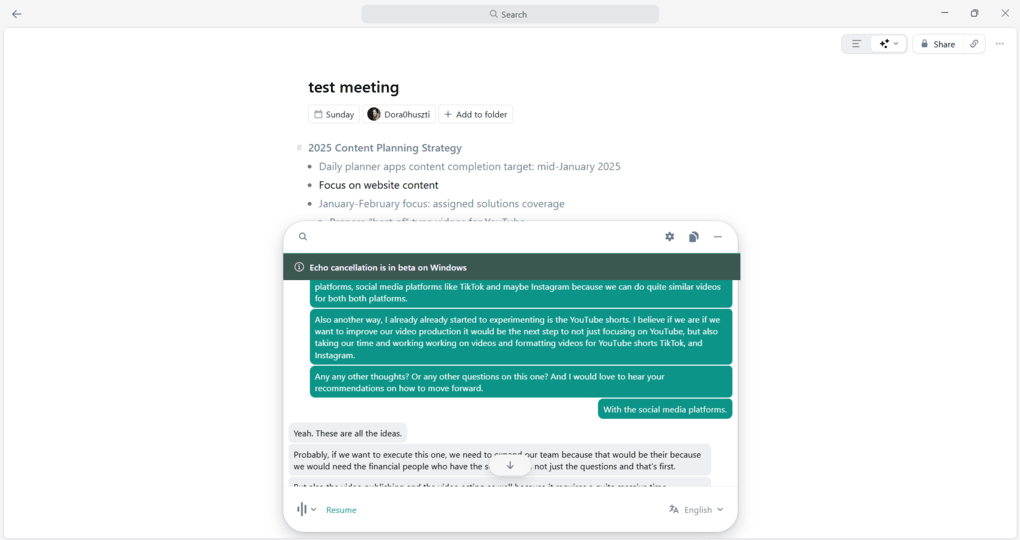
Granola takes a slightly different approach from the other AI note-takers on my list. It works best when you combine manual note-taking with AI-generated meeting summaries, rather than relying entirely on AI to capture everything.
After using Granola across 5+ meetings, I was impressed by how well it transformed my messy notes into structured summaries. Sometimes, even I struggle to understand my notes afterward, but Granola managed to combine them with the transcript and create useful meeting summaries.
Another thing I liked was its quick setup and discreet bot-free recording. Granola works quietly in the background without adding a bot to your calls.
However, Granola doesn’t automatically notify meeting participants about transcription, so you’ll need to inform them yourself. It also doesn’t support video recording.
Overall, Granola is a great lightweight AI note-taker if you prefer taking your own notes and want AI to organize them afterward.
The Good & The Missing Pieces
✅ Pros | ❌ Cons |
|---|---|
Lightweight and easy to use, with a simple interface | No video or replayable meeting recordings |
Accurate live transcription during meetings | No audio or video uploads for transcription |
Solid free plan to test advanced features | Limited advanced features compared to other AI note-takers |
Combines manual notes with AI summaries, turning messy notes into structured meeting summaries |
Plans & pricing
- Free plan: Available
- Business plan: $14/user/month
- Enterprise plan: $35/user/month

Tactiq
With Tactiq, you can transcribe and summarize meetings on Zoom, Teams, and Google Meet & supports over 60 languages. Similar to Granola, Tactiq does not offer recording capabilities.
Quick verdict
AI workflows and post-meeting automation
Users who need meeting recordings or unlimited AI notes
Custom AI workflows and extensive integrations
Free plan + paid plans from $8/user/month
Using Tactiq in real-world meetings
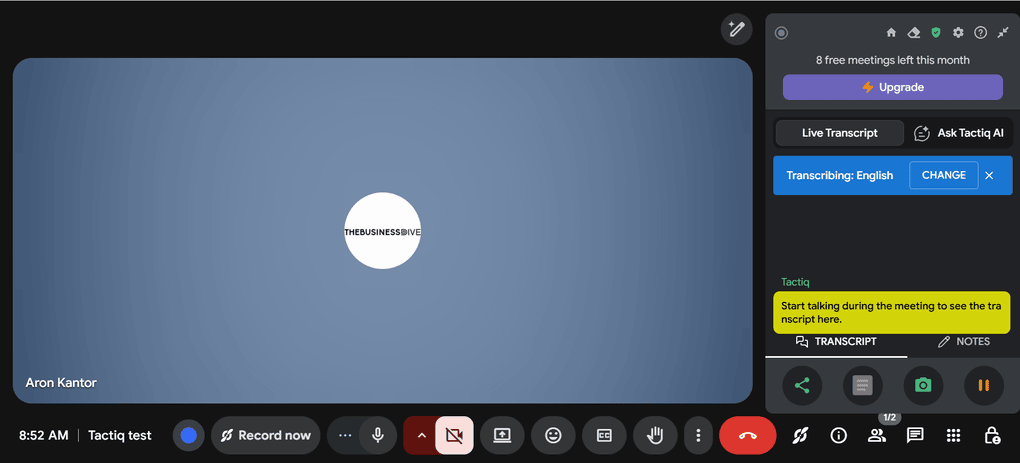
During my testing, I noticed minor transcription issues with Tactiq, with accuracy ranging from 85% to 90%. A more critical issue for me was that generating AI meeting notes requires AI credits, which can be limiting if you attend numerous meetings.
I also struggled to get the real-time transcription working and had to try several times across different meetings. It was frustrating, although having multiple Gmail accounts might have contributed to the issue.
On the positive side, Tactiq impressed me with its AI workflows, file uploads, and extensive integrations. However, I was disappointed that it couldn’t record my calls, especially when I wanted to revisit important discussions.
Overall, Tactiq has some powerful features, particularly its AI workflows and real-time transcription. Nonetheless, lower transcription accuracy, no video recording, and the AI credit system make it less appealing than some other bot-free AI note-takers I tested.
The Good & The Missing Pieces
✅ Pros | ❌ Cons |
|---|---|
Useful real-time transcription that lets you follow conversations as they happen | Unreliable transcription setup — I struggled to get it working across multiple meetings |
Powerful AI workflows that automate post-meeting tasks and processes | No mobile app, making it less suitable for in-person meetings |
Effective action item extraction from AI-generated meeting summaries | Limited AI credits, even on the Pro plan |
Plans & pricing
- Free plan: Available
- Pro plan: $8/user/month with annual billing
- Team plan: $16.67/user/month with annual billing
- Business plan: $29.16/user/month with annual billing
- Enterprise plan: Custom pricing
Wrap-up: Best bot-free AI note-takers for 2026
There is no best overall botless AI note-taker. It depends on your use case and budget. If you need advanced features, I’d pick Fellow. Krisp is a great choice if you need more than just AI notes and want to improve your meeting audio, while Scribbl is a solid free option if you don’t have a budget for AI meeting note-taking tools.
Related articles:
- Best 9 AI Note-Takers | My Top Picks After +2 Years Testing (2026)
- Best 7 Otter AI Alternatives | 20+ Personally Tested Apps (2026)
- 15 Best AI Tools | 200+ Tested By A Skeptical (2026)
I hope I was able to find the best bot-free AI meeting note-taker for you. As always, I will keep updating this list to ensure it reflects reality.
Looking for similar tools?
Visit our AI note-takers library to explore other apps we’ve reviewed in this space and how they compare.
Why you can trust our reviews
At thebusinessdive.com, our team tests, reviews, and compares hundreds of productivity apps every year — from project management tools to note-taking apps. We dive deep into real-world use cases to help you find the right tools that actually improve your workflow, not just add noise.
Our mission? No fluff, no shortcuts—just honest, hands-on insights from productivity pros.
Discover how we stay transparent, read our review methodology, and let us know about any tools we missed.
Frequently asked questions
Are there any free AI note-takers?
Yes, several AI note-takers offer free plans, although most come with limitations. Based on my testing, Scribbl, Fathom and tl;dv have some of the most generous free plans, including meeting transcription, AI summaries, and recordings.
Are these bot-free AI note-takers also included in our list of the best AI meeting assistants?
Yes, several tools appear on both lists, including Fellow, Krisp, and Bluedot. While our best AI note-takers article covers both bot-based and bot-free solutions, this article focuses specifically on tools that can capture meetings without adding a bot to your calls.
Can bot-free AI note-takers record video calls?
Yes, but only a few support video recording. Bluedot is one of the best examples, allowing you to record video calls without a meeting bot. Most other bot-free AI note-takers focus primarily on transcription and AI-generated meeting summaries rather than video recording.
Disclosure: I only recommend products I would use myself, and all opinions expressed here are our own. This post may contain affiliate links through which, at no additional cost to you, I may earn a small commission. Read the full privacy policy here.

Hey there! I am Aron, the founder of Thebusinessdive. I have been testing productivity apps for almost three years now. I reach 25.000 -50.000 people monthly with the mission to help you find the perfect productivity apps. Subscribe to my YouTube channel, newsletter, and social media to hear more about the best productivity tools. Let’s dive in!