


An Unfiltered Sunsama Review (2026): Is It Worth $20/Month?
I knew Sunsama was going to be different the moment I saw the price.
Twenty dollars a month for a daily planning tool is not something you sign up for lightly.
But this made me curious. If a daily planner app costs more than tools like ClickUp, Notion, etc., it has to justify it with more than a pretty interface.
Before I wrote this Sunsama review, I tested how well it handles time blocking, recurring tasks, pulling tasks from other tools, and how much it helped me stay focused and balanced during real workdays.
And I did this for one goal: To save you time and money, and help you decide whether Sunsama is worth $20 monthly.
Stay around, because I will reveal its key features, pricing, my experience, and the pros and cons I found during my Sunsama review.
Let’s dive in!
Verdict
Here’s the quick verdict if you don’t want to read the full review:
🎯 Best for: Professionals who rely on time blocking and want a structured daily planning workflow with time tracking
🚫 Not ideal for: Users looking for a free or budget-friendly daily planner
⭐ Biggest strength: Guided daily and weekly planning with seamless task-to-calendar integration
⚠️ Biggest weakness: Premium pricing and reliance on external calendars
⚖️ Verdict: Sunsama is a thoughtfully designed daily planner that excels at intentional, time-blocked workflows and reducing overwhelm, but its high price and reliance on external calendars make it best suited for committed productivity users rather than casual ones.
🏆 Score: 3.9 / 5
✅ Tested with our review & scoring methodology ✅ Real-world testing ✅ Unbiased evaluation
Sunsama Review
Summary
Sunsama is a cross-platform daily planner that brings your tasks, calendar events, and time tracking into one focused workspace. It works on web, desktop, and mobile, guiding you through intentional daily and weekly planning with helpful routines. In my review, it felt calm, structured, and genuinely useful, although the higher price and lack of a free plan will not suit everyone.
|
|
Thoughtful, intuitive interface
|
|
|
Excellent daily and weekly planning flows
|
|
|
Built-in time tracking
|
|
|
Strong integrations
|
|
|
Focus Mode and Pomodoro timer
|
|
|
No free plan
|
|
|
On the pricier side
|
|
|
Not a full standalone calendar replacement
|
How We Test Daily Planners
To keep our reviews & final score for each daily planner app fair and consistent, we evaluate every tool using the same testing framework based on real-world usage, feature depth, and overall value.
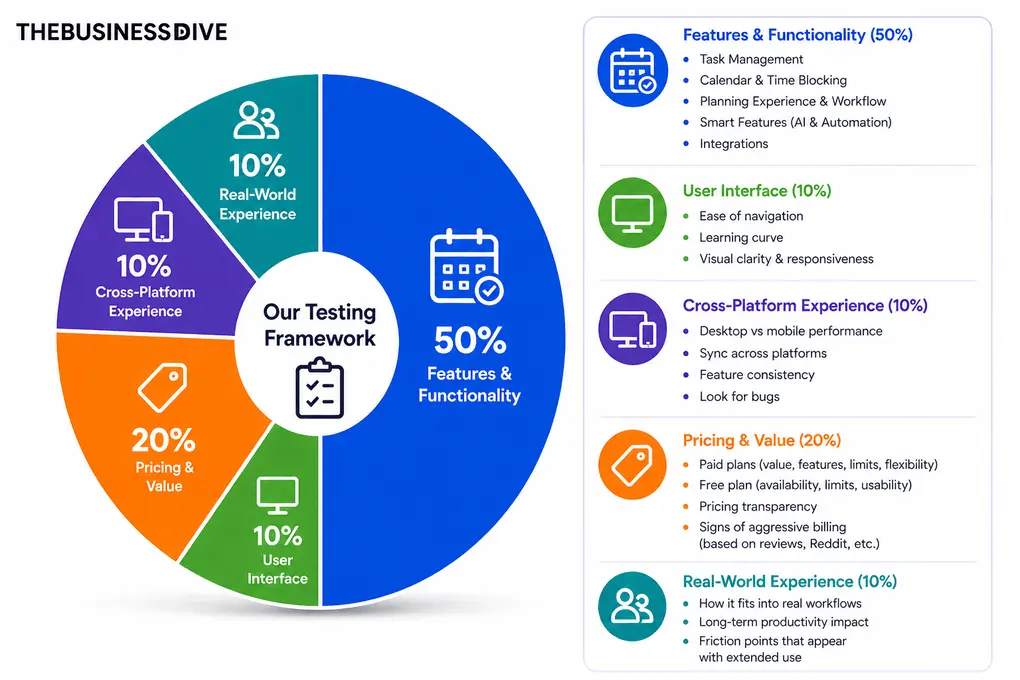
Our scoring breakdown after testing 10+ daily planner apps:
⚙️Features & functionality — 50%
🖥️ User interface — 10%
⚡Cross-platform performance—10%
💰 Pricing — 20%
👥 Real-world experience — 10%
Want a detailed breakdown of how we test each category?
Learn exactly how we test tools → Review methodology
Short on time? Here’s a quick overview of Sunsama
What is Sunsama?
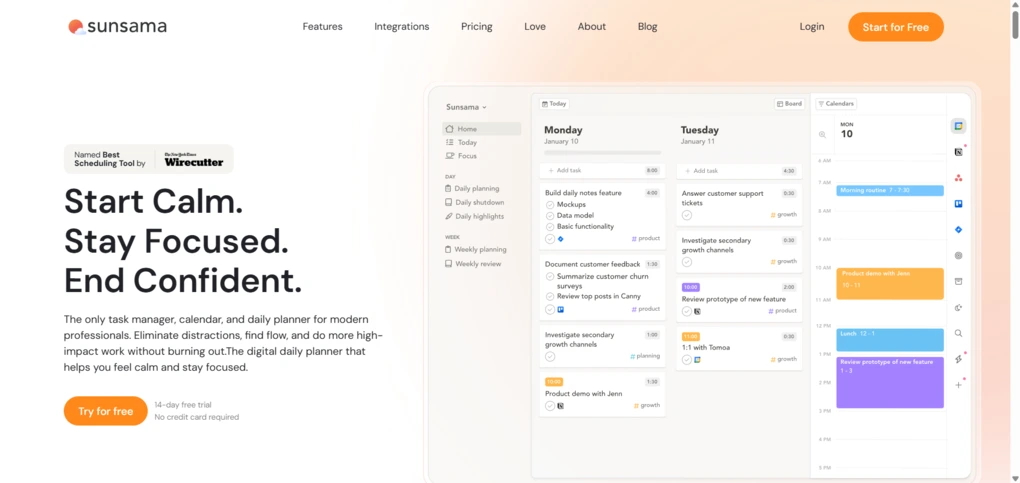
Sunsama is a daily planner app that brings your tasks, calendar events, and time tracking into one organized space. Unlike classic task management apps, Sunsama encourages intentional planning through guided daily and weekly workflows.
You can connect it to your Google and Outlook Calendars, and it supports integration with the most popular productivity tools like Todoist, Trello, Notion, and Asana, so you can pull all your tasks into one place.
Sunsama also supports time blocking, recurring tasks, and focus mode, making it easier to prioritize tasks and manage multiple projects.
My experience with Sunsama after a few weeks
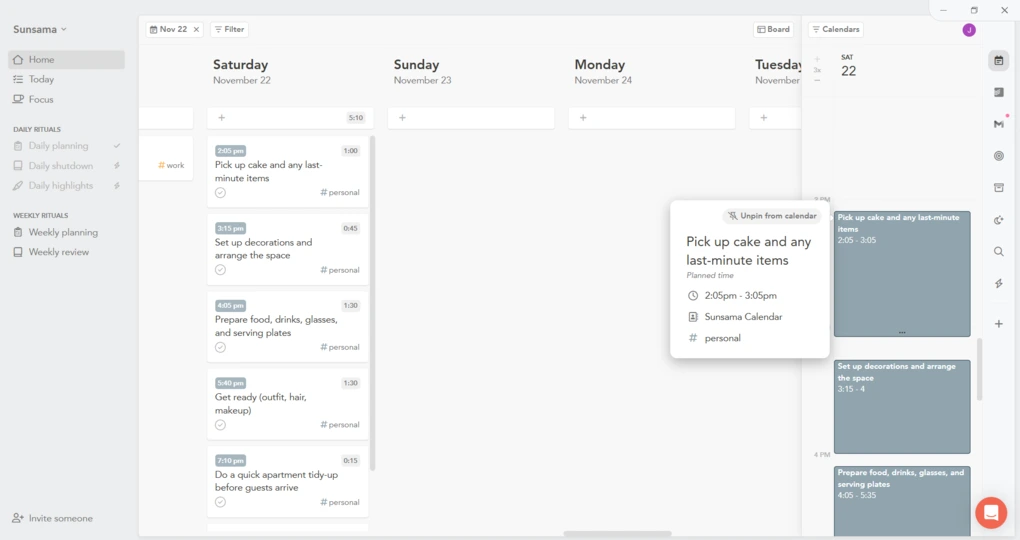
After a few weeks of planning my days in Sunsama, I understood why many people see it as a mindful productivity tool. What I appreciated most was how it encouraged intention without feeling restrictive. Weekly objectives, focus mode, and daily shutdowns helped me stay organized without burning out.
The price is on the higher side, but the overall experience felt polished and genuinely helpful for daily planning.
Why Sunsama didn’t score higher (and where it loses points)
Where Sunsama underperformed compared to other daily planners is its smart features. While it offers time tracking and focus mode, it lacks sufficient depth in these features, as we noticed with Reclaim AI, for example.
Also, its calendar and time-blocking capabilities are limited, and it cannot function as a standalone calendar. Therefore, we gave 3 points out of 5 for this criterion.
In addition, we added 2.5 stars out of 5 for pricing due to the lack of a free plan and the high cost of the paid plans, which also impacted the final score.
Who Sunsama is a good fit for
Who Sunsama is not ideal for
Key features
Without further ado, let’s see the features I tried in the course of my Sunsama review!
Task management
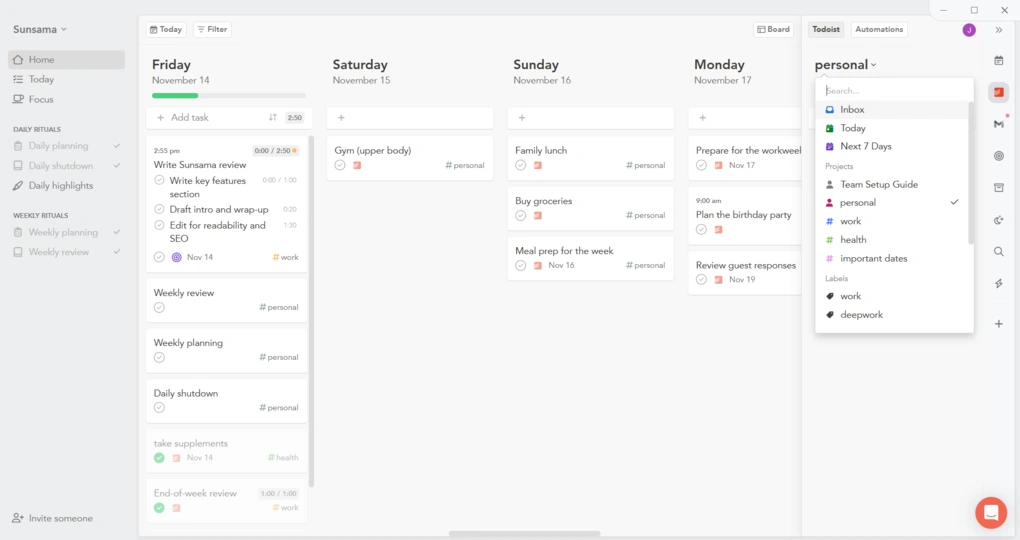
Users can import tasks from other platforms like Asana or Trello into Sunsama. Personally, I started testing Sunsama by connecting my Todoist account, and the transition was smoother than I expected.
My task list appeared instantly in the sidebar, and I could pull tasks into the calendar with simple drag and drop. This made it easy to schedule tasks and reschedule them without breaking my workflow.
Not everything was perfect, though. One task did not pull its subtasks on the first try, so I had to import it again. The second attempt worked, but it showed me that integrations depend on how consistent your task structure is in other tools.
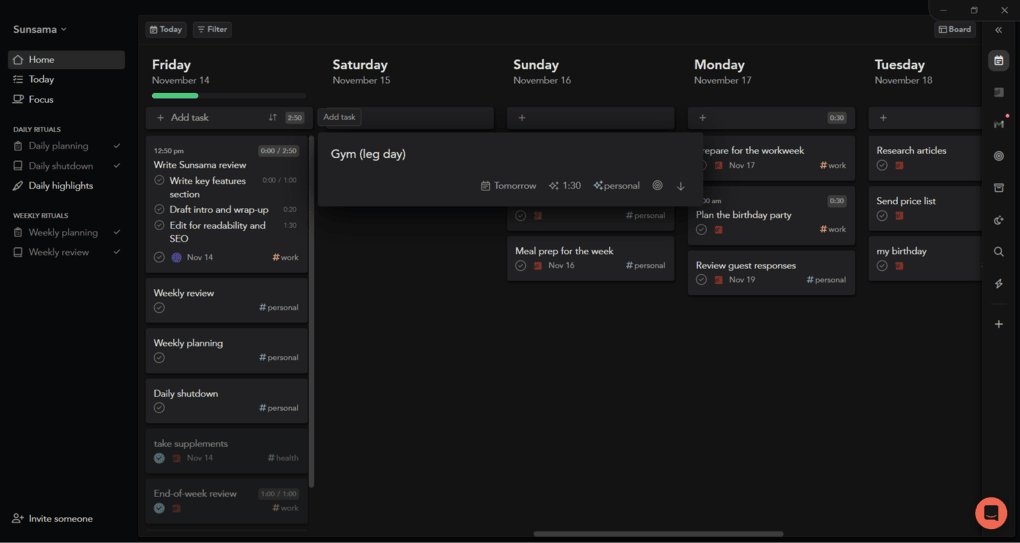
The Home tab is essentially a board view, and it is one of the cleanest layouts I have seen in a task management app. Adding tasks is quick. Users can manually add tasks or pull them in from weekly objectives, backlog, or third-party calendars.
To add a task, click Add Task or press A, type the name, and Sunsama will suggest a channel and planned time. These suggestions were usually accurate during my review.
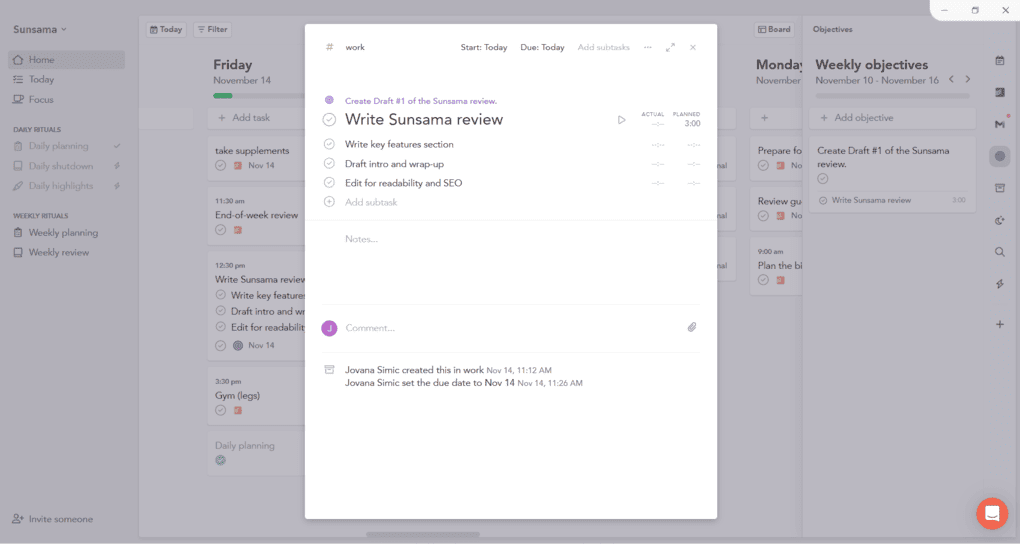
Every task can have an objective, planned time, subtasks, tags, and a channel. Channels and contexts are especially helpful because they let you categorize all your tasks, projects, and personal tasks in a way that mirrors real life. Contexts group several channels so you can focus on one area at a time.
Sunsama supports recurring tasks, but I loved most how it balances both tasks and events. The board view shows everything, while other views display only items with planned time. It is worth keeping this in mind so you do not lose track of important tasks.
Overall, compared to classic task managers like Todoist, Sunsama is less focused on organizing large volumes of tasks and more on turning them into a realistic daily plan. That said, for individuals, Sunsama works great for managing tasks and projects, so I can give 5 out of 5 based on its feature set.
Daily planning workflow
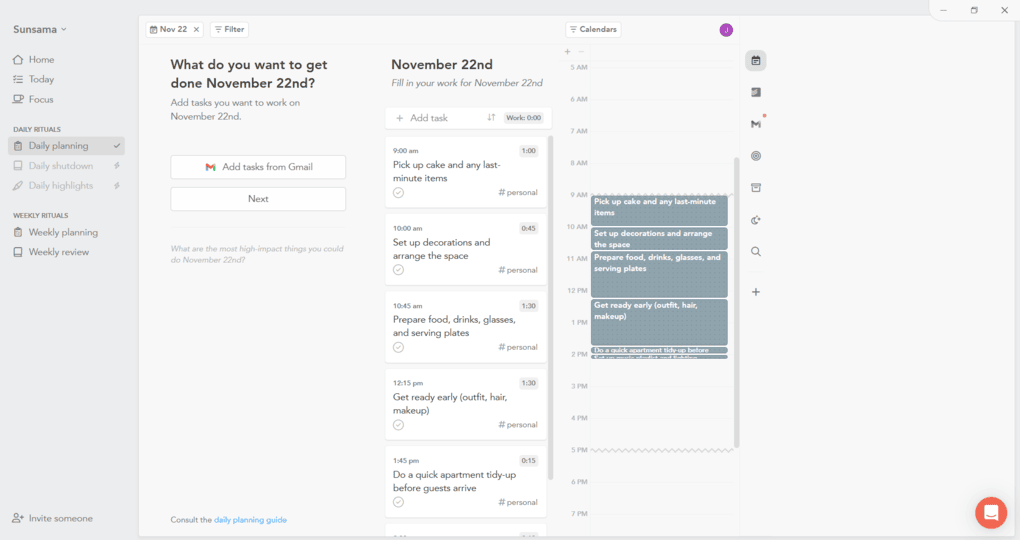
Daily planning is one of Sunsama’s strongest features. Unlike AI scheduling tools such as Motion or Reclaim AI, which automatically assign tasks to your calendar, Sunsama keeps you in control of your schedule. This makes the planning process more deliberate, but also requires a bit more manual input.
Hover over a day and select Plan to open a guided workflow that walks you through your daily tasks. It helps you prioritize tasks, schedule them realistically, and share your daily plan on Slack or Microsoft Teams.
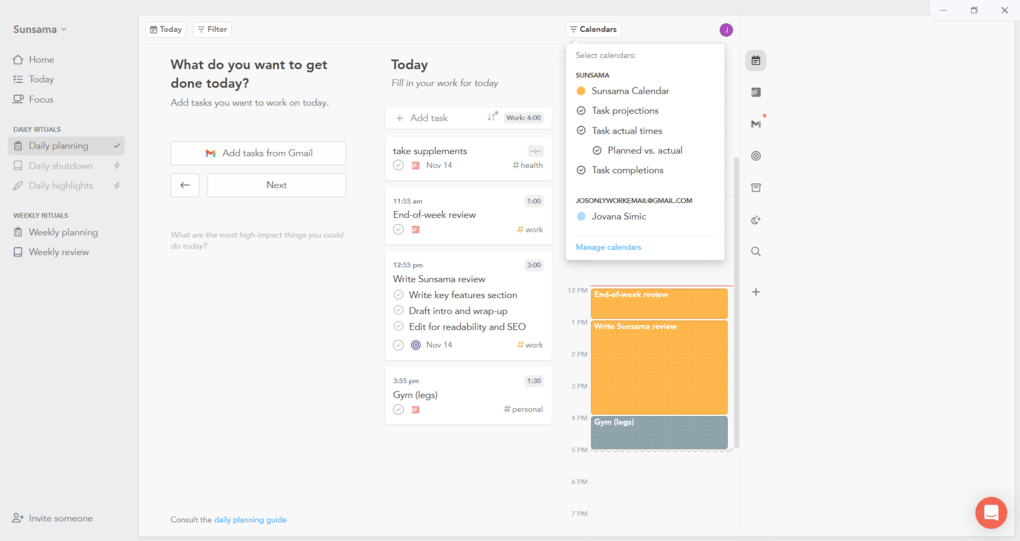
Once tasks are placed on the calendar, the timestamped day overview appears in the sidebar. You can drag items around to adjust their planned time or shift your schedule if something takes longer. This keeps daily planning flexible and intentional.
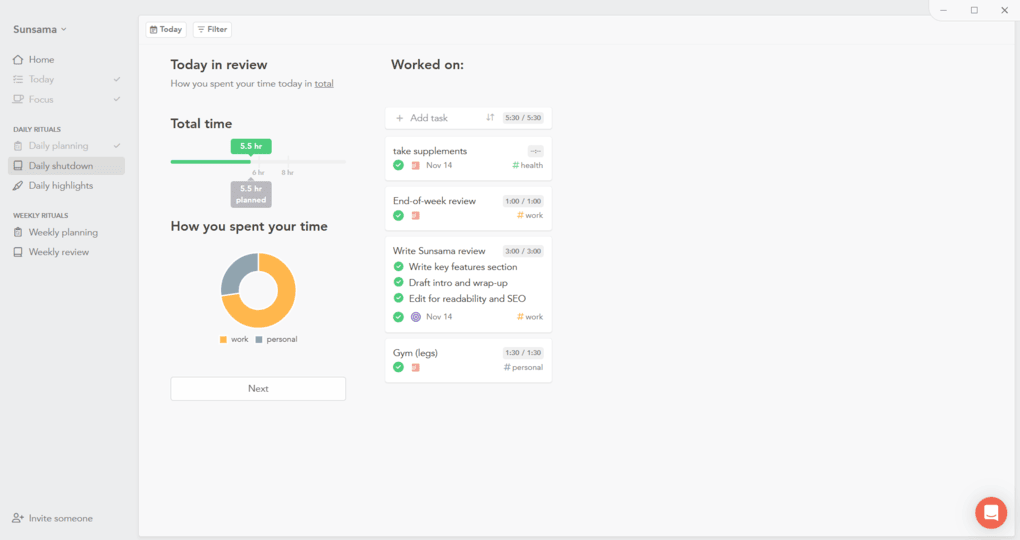
At the end of the day, Sunsama encourages a daily shutdown routine. You can review completed tasks, check what still needs attention, and write a short reflection. Previous days show a Reflect option when you hover, allowing you to revisit your day and see a clear summary.
These daily rituals are part of what makes this app unique. During my Sunsama review, I found that it encourages consistent daily planning routines, helping you maintain structure and avoid decision fatigue.
However, Sunsama does not offer an in-built calendar for time blocking, so you need to connect it with a third-party calendar. So, it’s not a full standalone calendar replacement, and I can only give it 3 out of 5 for this criterion.
Weekly planning & review
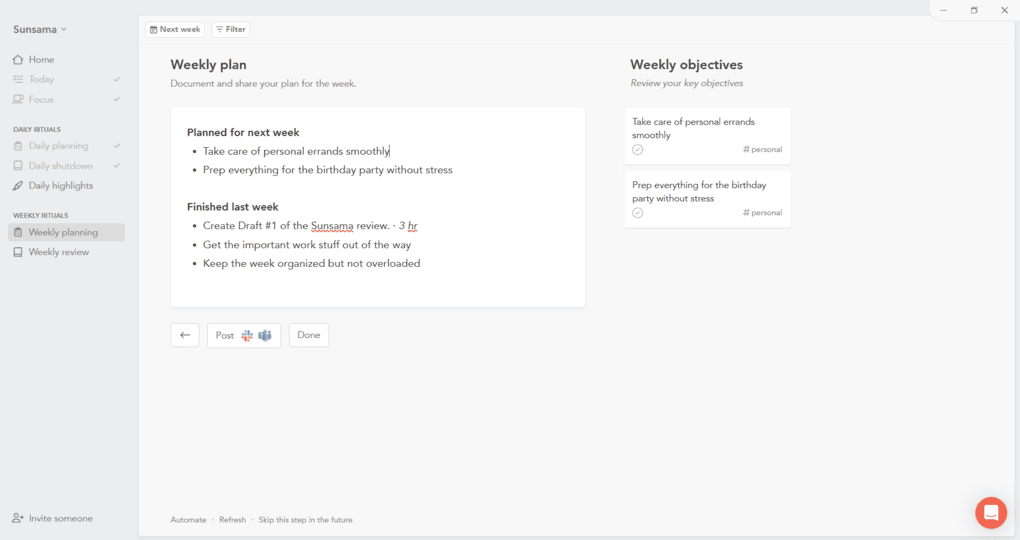
Weekly objectives were one of my favorite features during testing. You can set goals for the week and instantly assign them to tasks. The sidebar shows everything in one place, making it easier to stay focused on what matters.
Sunsama promotes weekly planning through simple rituals. Users often mention that this planning process helps manage workload and prevent burnout, and I found that to be true. It gives you a clear sense of where your time should go before the week starts.
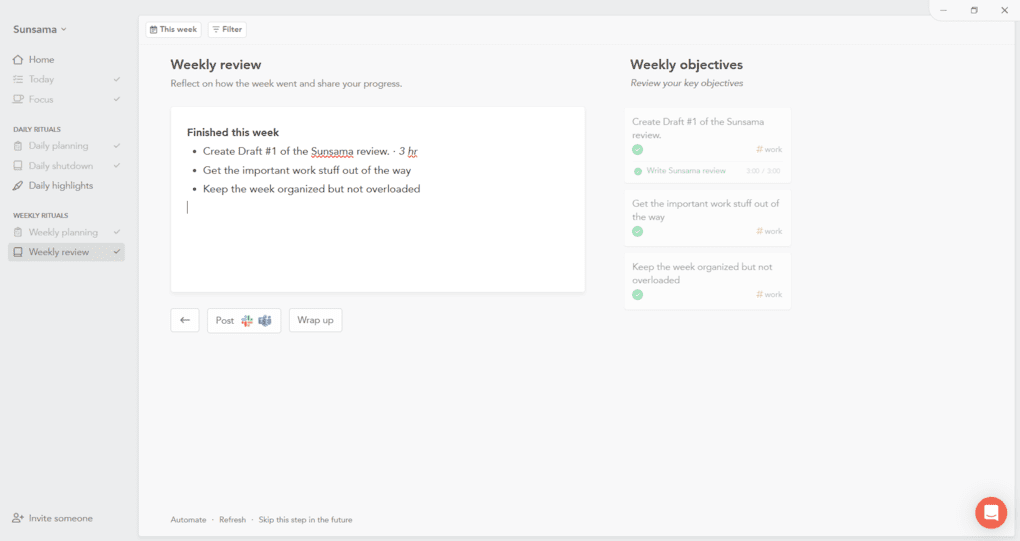
The weekly review feature helps you see how your week went. It shows completed tasks, time spent on different channels, and highlights your productivity patterns. Many users describe this as essential for long-term improvement, and I agree.
Time tracking & focus mode
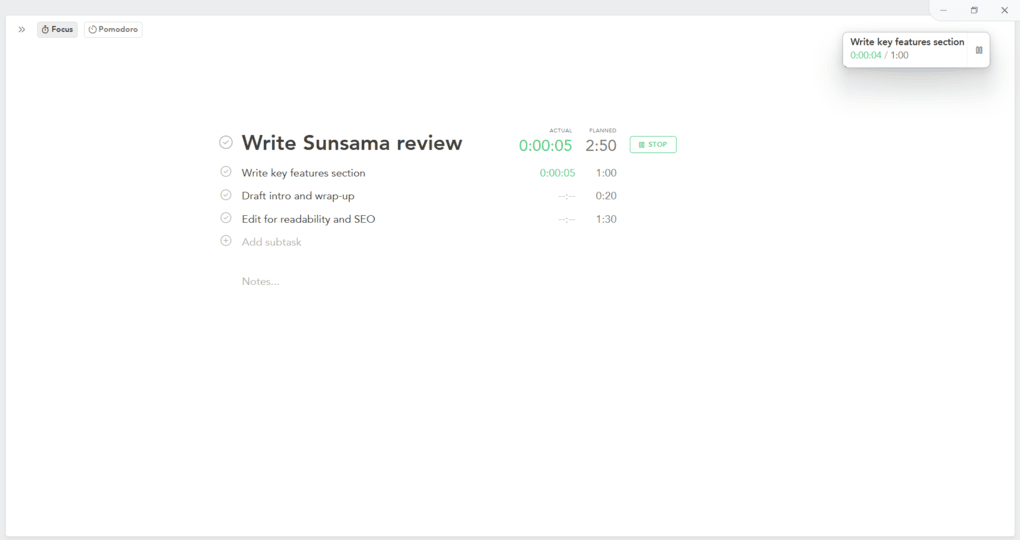
Sunsama surprised me with its built-in time tracking. Each task can have a planned time, and once you start working, you can activate the timer to track actual time. This feature helped me understand how much time I spent on tasks and how accurate my planning was.
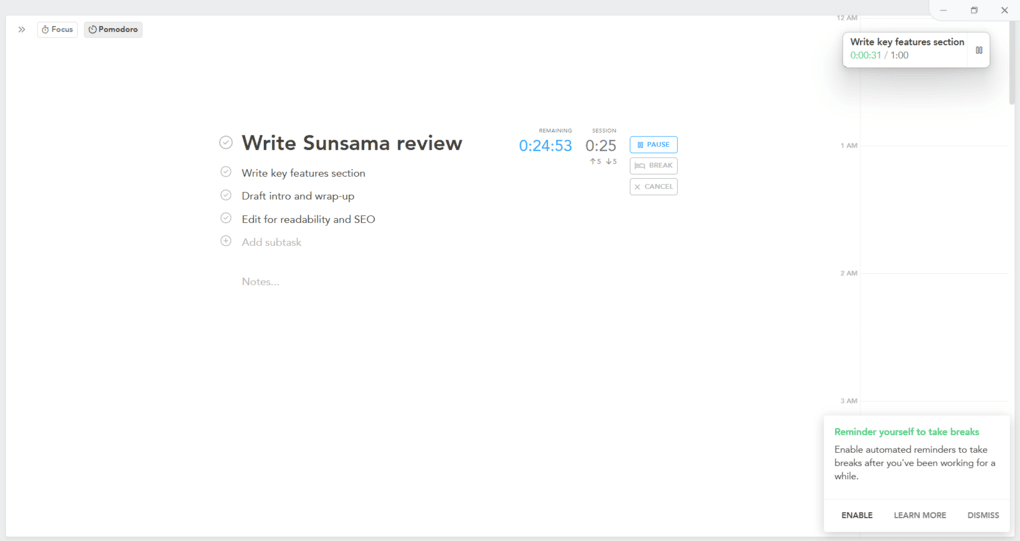
You can track time spent on subtasks as well, which is great for multiple projects or detailed work. At the top of each channel, Sunsama shows how much planned time you still have left for the day. This makes it easier to avoid overcommitting and stay realistic.
Focus Mode and the Pomodoro style timer help you stay in deep work. These tools reduce distractions and support mindful work sessions. Sunsama also provides analytics and time distribution graphs so you can see exactly how your days were spent.
While there are no traditional smart or AI features, both the Focus Mode and Pomodoro timer can significantly increase the efficiency of Sunsama, so I can give 3 out of 5 for these features when considering the smart features based on our ranking system.
Customization & settings
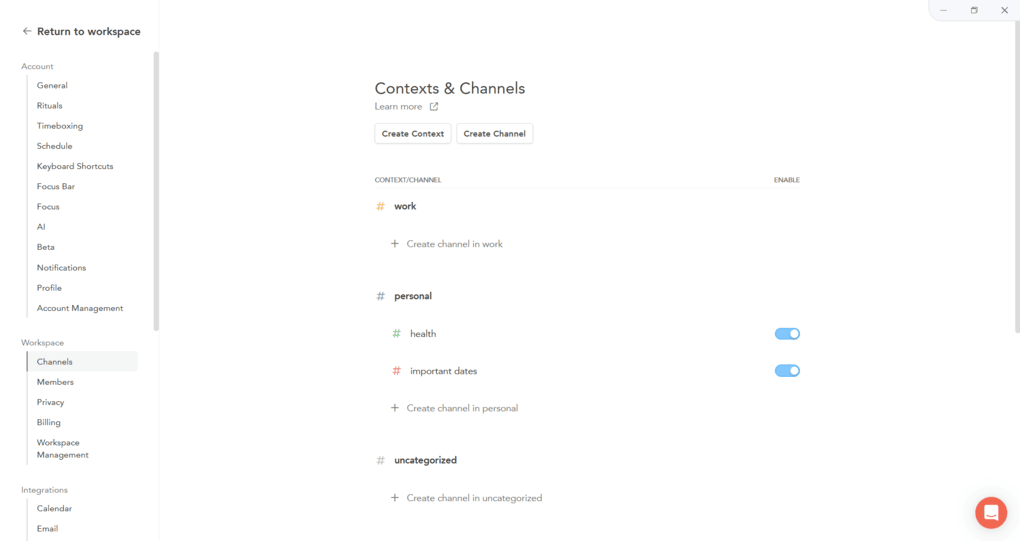
Sunsama gives you a lot of control over your planning process. You can customize channels, contexts, task views, colors, filters, and workflows. Everything is designed to help you stay organized without feeling overwhelmed.
Channels categorize your work so you can understand where your time is going. Contexts group multiple channels so you can focus on specific areas like work or personal life. This structure makes Sunsama feel intentional and easy to navigate.
The Settings menu is extensive. You can adjust rituals, planned time behavior, notifications, integrations, and daily or weekly flows. With so many options, Sunsama can fit different working styles and planning habits.
Sunsama user interface
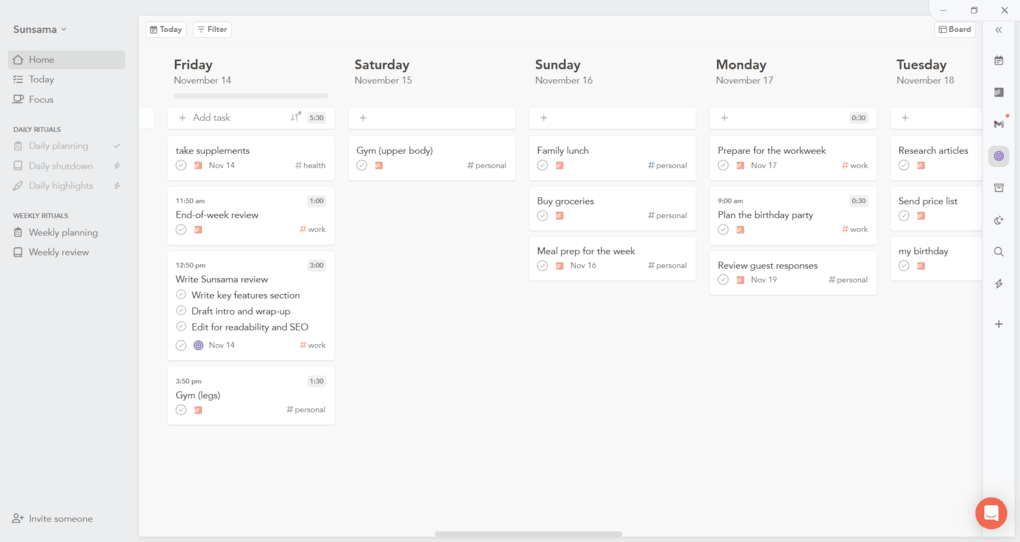
Sunsama’s user interface feels thoughtfully designed, with lots of small details that show how much attention was given to real user needs. The left sidebar, main calendar, and right sidebar work together nicely, so tasks, channels, and settings always feel close at hand.
There is both a light and a dark theme, and I enjoyed using each one. Everything can be personalized and color-coded, which keeps even a busy week visually simple and easy to scan.
What I especially liked is that the desktop app feels complete. I never had to jump to the web app to change important settings or find hidden options.
I also had a positive experience with the mobile app and did not run into bugs or performance issues.
Overall, I had the feeling that Sunsama’s design focuses on a minimalistic interface to enhance usability while planning.
Sunsama integrations
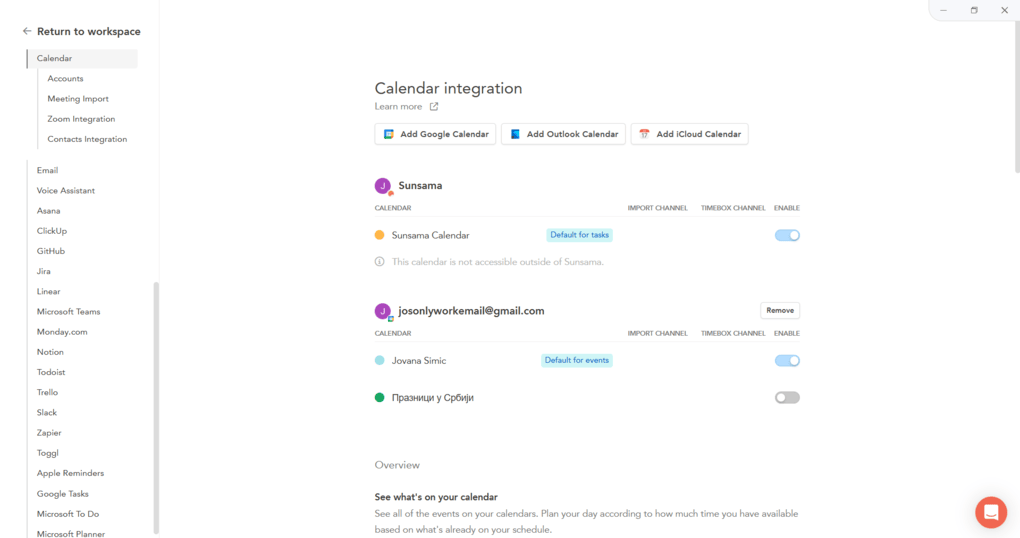
Sunsama integrates with major calendar apps, including iCloud, Google, and Outlook Calendar. Personally, I connected my Google Calendar to Sunsama, and it was quite quick.
You can set defaults for tasks or events and control what gets imported. It makes daily planning and time blocking much easier than jumping between separate calendar apps.
Beyond calendars, Sunsama works with many productivity tools and task management apps. Tasks from these tools appear in the sidebar, so you can pull tasks into the calendar with drag and drop. This keeps all your tasks and projects together in one planner app.
Explore our Apps directory
A curated directory of software tools we’ve independently reviewed, with links to full reviews, comparisons, and category guides.
Sunsama pricing

Sunsama does not offer a free plan, but you can try it with a 14-day free trial, no credit card required. The trial unlocks the full planner app, so you can test daily planning, weekly review, time blocking, and focus mode before paying.
After the free trial, Sunsama has a single paid plan: $20 monthly subscription, or $16 per month when billed annually. All features are included in this one tier, from calendar integration and time tracking to recurring tasks, weekly objectives, and analytics.
If you want to bring others in, teammates are billed separately at $20 per user per month. Sunsama pricing is definitely on the premium side compared to other productivity tools, but many users feel the intentional planning workflow and better work-life balance justify it.
Pros and cons I found during my Sunsama review
Here are the main pros and cons I found during my Sunsama review:
Pros of Sunsama
Cons of Sunsama
Sunsama alternatives
If you are still unsure whether Sunsama is the right fit for you, check out these alternatives:
|
App |
Best for |
Description |
|---|---|---|
|
Morgen |
Best for calendar-based planning |
A daily planner that prioritizes your most important to-dos, events, and projects in one app. |
|
Akiflow |
Best for time blocking |
A calendar-centered productivity app that brings all your tasks, events, and inbox items into one place for structured daily planning and time blocking. |
|
Todoist |
Best for task management |
A popular alternative to Sunsama that offers a free plan and is great for task management and collaboration. |
|
Notion Calendar |
Best for flexible planning |
A flexible calendar built into Notion’s workspace, great for users who already manage projects, notes, and tasks there and want task integration within one platform. |
|
Motion |
Best AI daily planner |
An AI-powered planner that automatically fills your professional and personal schedule using real-time scheduling links and auto-adjusted events. |
|
Reclaim AI |
Best for smart calendar automation |
Reclaim is half the price of Sunsama and offers similar task management and time blocking capabilities, but is only available for Google Calendar. |
|
ClickUp |
Best for complex workflows |
It is another alternative that provides extensive features for project management, but has a steeper learning curve. |
|
Routine |
Best minimalist planner |
Routine is a minimalist productivity app that combines calendars, tasks, notes, and simple journaling in one place. |
Compare Sunsama vs alternatives



Akiflow VS Sunsama

Sunsama VS Motion
Wrap up: Sunsama review
After using Sunsama in my actual routine, I understand why so many users say it helps maintain work-life balance and prevents burnout. At the same time, the lack of a free plan and the higher subscription price make it harder to recommend to everyone.
Related articles:
- 11 Best Daily Planner Apps | 20+ Personally Tested Tools (2026)
- 9 Best Motion Alternatives | I Tried 20+ Apps (2026)
- Akiflow vs Sunsama (2026): An Honest Comparison
- Sunsama vs Motion 2026: I found the best one for you
Still, if you want a task management app that supports intentional planning and helps you stay focused without jumping between multiple calendars or tools, Sunsama is worth the investment and one of the best productivity apps for this.
I will keep this Sunsama review updated over time so you always have the latest and most honest look at how it performs in real-world use.
Looking for similar tools?
Visit the link to explore other apps we’ve reviewed in this space and how they compare.
Why you can trust our reviews
At thebusinessdive.com, our team tests, reviews, and compares hundreds of productivity apps every year — from project management tools to note-taking apps. We dive deep into real-world use cases to help you find the right tools that actually improve your workflow, not just add noise.
Our mission? No fluff, no shortcuts—just honest, hands-on insights from productivity pros.
Discover how we stay transparent, read our review methodology, and let us know about any tools we missed.
Frequently asked questions
Is Sunsama free to use?
Sunsama does not have a free plan, but you can try it with a 14-day free trial and no credit card. After that, it costs 20 dollars per month, or 16 dollars per month when billed annually, with all features included in a single plan.
What makes Sunsama different from other productivity apps?
Sunsama is more than a simple task management app. It guides you through daily planning, weekly objectives, weekly review, time blocking, and focus mode. The app encourages realistic workloads and helps prevent burnout instead of pushing you to do more.
Who is Sunsama best suited for?
Sunsama is ideal for individuals and small teams who want a structured daily planner rather than a complex project management tool. It works especially well for busy professionals who want all their tasks and calendar events in one place and care about work-life balance.
Can you connect Sunsama to your Google Calendar?
No matter if you use Google or Outlook Calendars, you can connect Snunsama seamlessly with them. Also, it supports a wide range of integration with task management tools.

Hey! I’m Jovana, a content writer who loves writing, researching, and testing new productivity apps. With a background in philosophy, I bring a thoughtful but no-bullshit approach to everything I do. Let’s connect on Linkedin!