


10 Best Time Tracking Apps In 2026 | 25+ Personally Tested Tools
There are over 50 time tracking apps. The problem?
Almost every tool claims to be the best.
To find the best time tracking apps in 2026, I tested more than 25 tools and spent over 100 hours comparing features, pricing, and use cases.
It was a long process, but I finally completed my list of the best time tracking tools, based on actual testing and not marketing claims.
In this article, I guide you through the best time tracking apps that stood out the most, who they’re best for, where they fall short, and which ones I’d personally recommend based on different use cases.
By sharing this list of the best time tracking software, I hope to help you save time, avoid mistakes, and find the right solution faster.
Let’s dive in!
Best Time Tracking Apps in 2026 at a Glance
🏆 Best overall time tracking app: Rize
👥 Best for teams: Toggl Track
🚚 Best for field teams & GPS tracking: Buddy Punch
🆓 Best free time tracking app: Jibble
📈 Best for real-time employee tracking: Insightful
🧾 Best for freelancers & client billing: TMetric
⌛ Best for shift-based, and hourly teams: Homebase
🏢 Best for workforce management: Hubstaff
🌍 Best for remote team monitoring: Time Doctor
💸 Best budget-friendly time tracker: Clockify
How We Test Time Tracking Apps
We evaluate the time-tracking apps we have tested using a standardized testing framework we built based on 3+ years of experience with time-tracking apps.
Using this system, we can keep our scores objective and consistent, helping you compare time-tracking apps and make better, faster decisions.
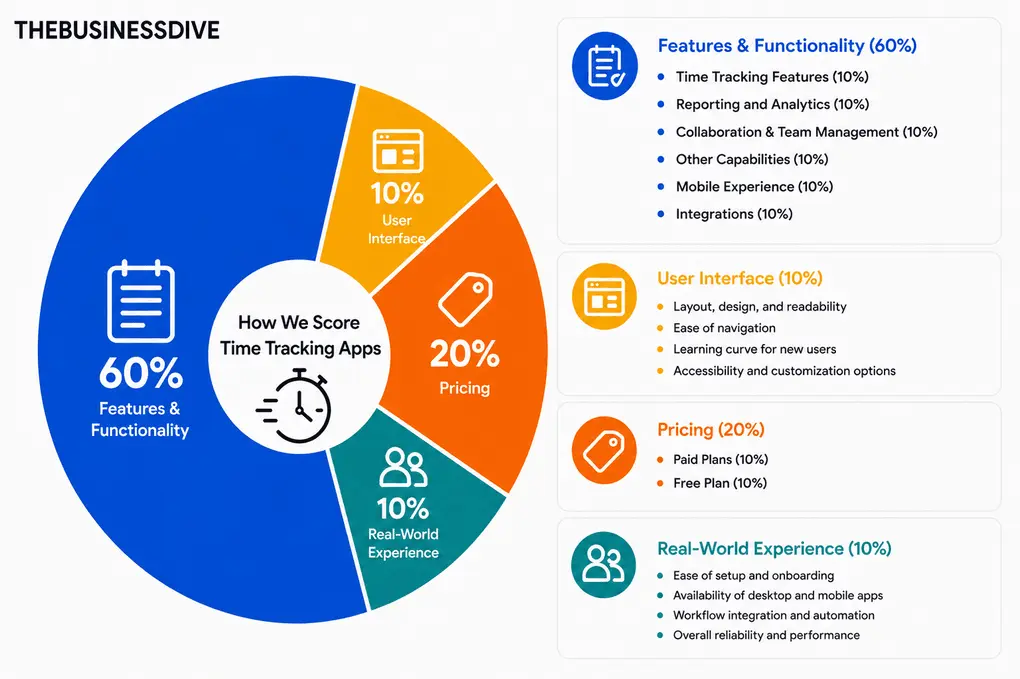
Our scoring breakdown for time tracking apps:
🛠️Features & functionality — 60%
🖥️ User interface — 10%
💰 Pricing — 20%
👥 Real-world experience — 10%
Most of the apps featured in this list also have dedicated review articles with full scores and detailed breakdowns (except for Buddy Punch, which we tested thoroughly as well).
However, the rankings in this article are not based solely on review scores. We also considered the ideal use case for each tool, since the best time tracking app for freelancers may not be the best choice for remote teams or field workers.
Want a detailed breakdown of how we test each category?
Learn exactly how we test tools → Review methodology
Time Tracking Apps Compared: Features, Pricing & Best Use Cases
Every time tracking app has trade-offs. This comparison table highlights the strengths and limitations of each tool.
|
Time tracking apps |
Top use case 🎯 |
Standout feature⚡ |
Main drawback⚠️ |
Tracking style ⏱️ |
Pricing starts 💰 |
|---|---|---|---|---|---|
|
Best overall time tracking app |
AI productivity insights & automatic categorization |
No mobile app |
Fully automatic |
Paid from $9.99/month billed |
|
|
Best for teams |
Clean UI + team reporting |
No GPS tracking |
Manual + automatic |
Free plan + paid from $9/user/month billed annually |
|
|
Best for on-field teams |
GPS tracking + employee scheduling |
Less useful for personal productivity |
Manual + GPS |
Paid from $4.49/user/month billed annually |
|
|
Best free time tracking app |
Free time tracking & attendance management |
Less advanced analytics |
Manual + automatic +GPS |
Completely free |
|
|
Best for real-time employee tracking |
Deep productivity analytics |
Client management |
Manual |
Paid from $10/user/month billed annually |
|
|
Best for freelancers & client billing |
Project budgeting and profitability tracking |
Advanced workforce features require the Business plan |
Manual + Automatic |
Free plan + paid from $5.83/user/month billed annually |
|
|
Best for shift-based, and hourly teams |
Scheduling, time tracking & payroll in one workflow |
Payroll requires a separate add-on |
Manual + GPS |
Free plan + paid from $24/location/month billed annually |
|
|
Best for workforce management |
Detailed time tracking with advanced reporting |
More monitoring-focused than personal productivity |
Manual +GPS |
Paid from $4.99/user/month billed annually |
|
|
Best for remote team monitoring |
Comprehensive reporting and analytics |
Some monitoring features may feel intrusive |
Manual + automatic |
Paid from $6.70/user/month billed annually |
|
|
Best budget-friendly time tracker |
Unlimited tracking with the free plan |
Basic productivity insights |
Manual + automatic +GPS |
Free plan + paid from $3.99/user/month billed annually |
In-Depth Reviews of the Best Time Tracking Apps
After months of testing, these are the time tracking apps I’d actually recommend in 2026.

Rize
Rize is an AI-powered time tracker that improves your focus and helps you establish better work habits. I have been using it for more than a year now, and it’s still the best time tracking app for my workflow. Unlike most time trackers, Rize doesn’t just log hours. It analyzes your productivity patterns, focus time, and work habits while staying one of the least invasive tools in this category.
Quick Verdict
Professionals and small teams that want automatic time tracking with AI-powered productivity insights
Users needing mobile access, offline tracking, or simple manual timers
Automatic activity categorization and productivity analysis
While Rize offers some of the most advanced AI productivity features I tested, it lacks a free plan and mobile support.
🔒Privacy & tracking: Rize keeps tracking lightweight and non-invasive. Unlike employee monitoring tools, it doesn’t take screenshots or record your screen, and you stay in control with pause options, exclusions, and sensitive-data redaction.
How Rize handled real-world time tracking
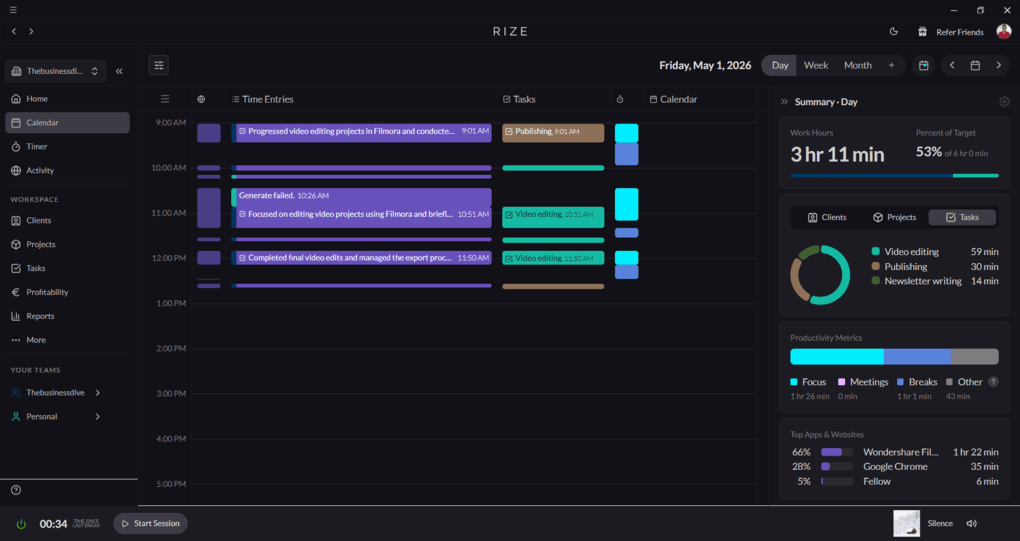
Rize was a game-changer for my day-to-day work & time management. After testing many apps, Rize completely changed how I think about time tracking and productivity.
Unlike most tools that simply log hours, Rize helped me understand how I actually work throughout the day, where my focus drops, how long tasks really take, and which habits hurt my productivity the most.
Its intuitive user interface offers features that allow you to track, analyze, and improve your time spent on activities, projects, clients, and more.
It also had a significant impact on my business workflows. It helped me see how much time I spent on different clients, projects, and activities, making my planning and prioritization easier.
While the overall score I gave to Rize does not reflect this since it has no free plan and mobile app support, my experience with Rize was 10/10 during the review, and it still has a fixed place in my productivity stack after a year.
Who should consider Rize?
Who should look elsewhere?
Use this link and the code of THEBUSINESSDIVE to get 25% off on all payments within the first 3 months.
Core features & functionality
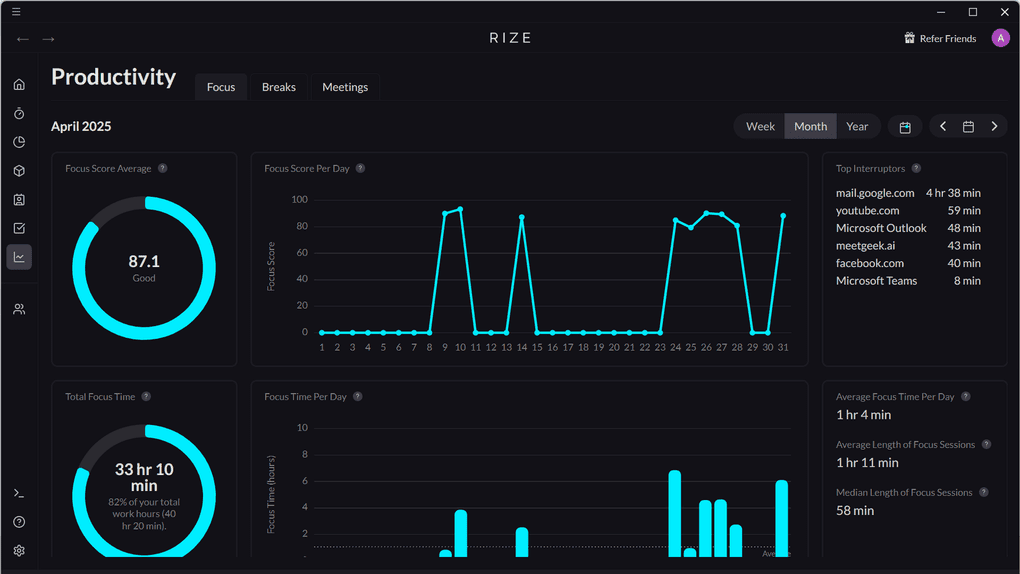
Automatic time tracking: Rize automatically captures the time spent on your computer, so you do not need to use timers. Whenever you start your PC, Rize will automatically track your workflows and categorize them into different categories. Don’t be afraid; you can turn off automatic tracking anytime if you click on the power button in the bottom left corner, and you can rely only on manual time tracking.
Customizable categories: This time tracking app categorizes your time spent into different activities and sessions. If you move your cursor to the specific activity, you will get a more detailed breakdown of your activity. I especially valued that you can create new categories for activities. Besides the activities, Rize also uses sessions. Sessions are periods dedicated to focus time, meetings, and breaks. With these features, you not only get the raw time tracking data, but Rize also analyzes and structures it into different sessions and categories.
Task and project management tools: With Rize, you can add projects, tasks, and clients as well, so you can seamlessly record every moment spent on a specific project or client work. You can choose an icon, color, budget hours, and keywords so Rize can identify the activities that relate to this project.
Reporting capabilities: Rize sends you a daily report of your time breakdown and productivity metrics via email. Furthermore, you will receive weekly and monthly reports as well about your efficiency and how you spend your time.
AI notifications: I really appreciated Rize’s AI notifications on when to take a break based on my work activity. Additionally, Rize alerts you when you’ve reached a certain number of hours worked in a day, which can be valuable in preventing burnout.
Personal productivity tools: Rize shows metrics about productivity trends and insights, and allows you to add goals. I mostly used the insights, as they can provide you with some practical advice to increase personal productivity and create proper work habits.
What does Rize cost?
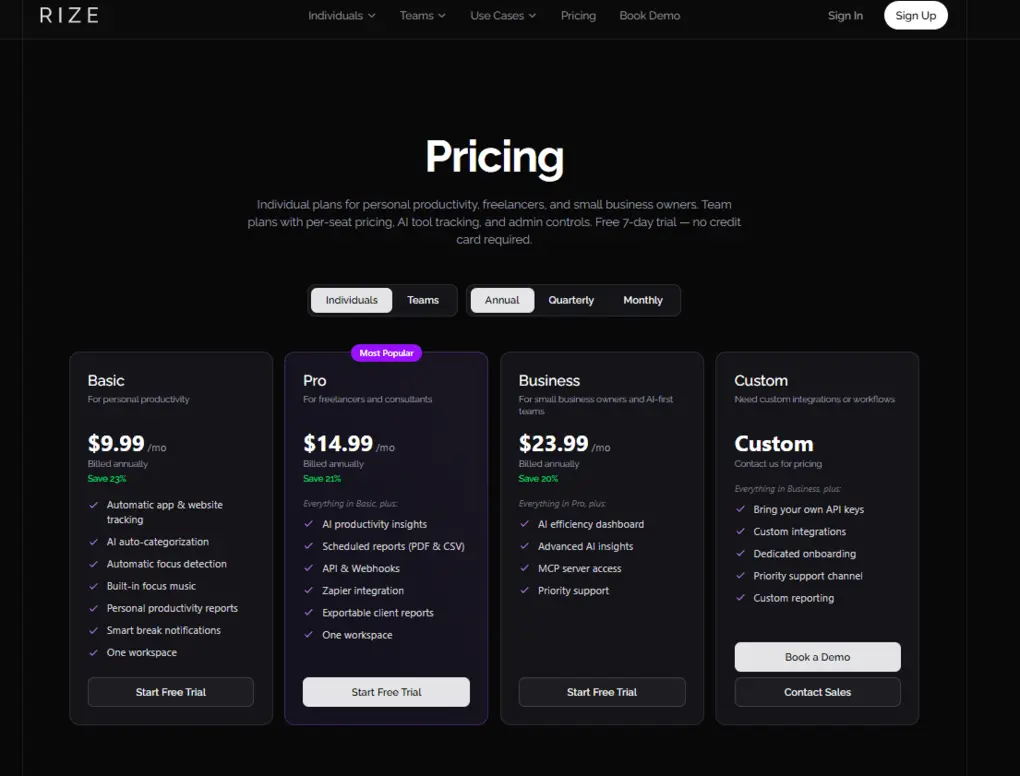
Rize offers a 1-week free trial so you can try out its features and get an idea of what you’ll pay.
Rize’s Standard Plan is $9.99 monthly if choosing the annual billing. It includes automatic time tracking, AI auto-categorization, productivity reports, and smart break notification.
The Pro Plan is $14.99 per month when annual billing is selected. It gives you access to AI productivity insights, Zapier integration, client reports, API, & Webhooks.
It has a Business plan for $23.99/month with an AI efficiency dashboard, advanced AI insights, MCP server access, and priority support.
Furthermore, if you need custom integrations and workflows, you can contact them for custom pricing.
Lastly, Rize offers team plans from $16/seat/month.
Strengths & Limitations
After using Rize daily for more than a year, these are the biggest strengths and trade-offs that stood out to me.
Strengths of Rize
Limitations of Rize
Why is Rize the best time tracking software overall?
If you value your time and you not only want to improve your own, but also your business’s effectiveness, Rize is the right tool.
It’s easy to use, helps you to avoid burnout, while providing you with all the data you need to effectively manage your projects and clients.
🔎 Read my full review: My Honest Rize Review After Using It For +12 Months (2026)
Use this link and the code of THEBUSINESSDIVE to get 25% off on all payments within the first 3 months.
Toggl Track
Toggl Track is a time tracking solution ideal for small businesses. It is a user-friendly tool that doesn’t try to do everything, and that’s a good thing. It focuses on time tracking and reporting, and it does so exceptionally well.
Quick Verdict
Teams and freelancers that require a user-friendly and versatile time tracking software
Field teams that require GPS tracking
Advanced reporting capabilities with an intuitive user interface
It only works for office teams, as it does not support location tracking
🔒Privacy & tracking: Toggl Track supports an anti-surveillance philosophy and does not support screen recording, mouse/keystroke tracking, or webcam monitoring features.
How Toggl Track handled real-world time tracking
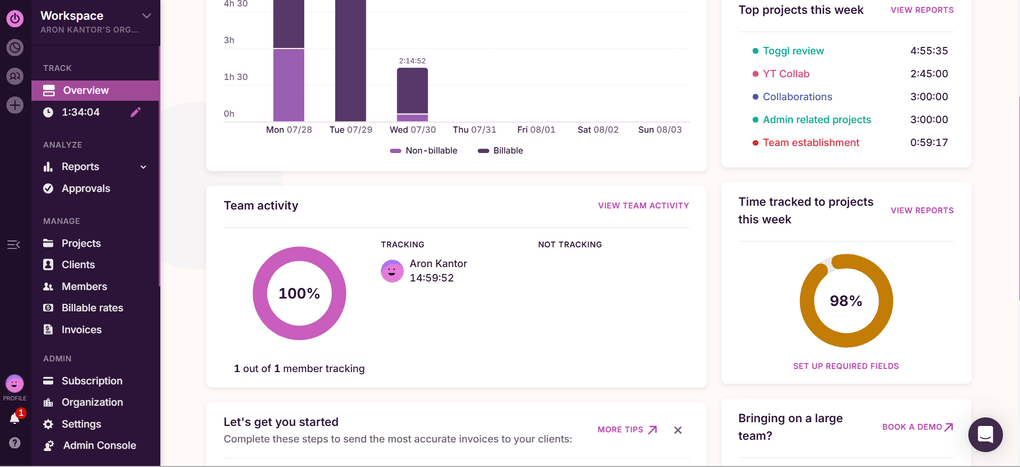
I spent a lot of time with this time-tracking software during testing. I not only tested it, but also implemented it in my business to see how it affects my workflows.
And honestly, I was quite satisfied. This time tracking app is super simple to use, while providing all the features a small or medium-sized business might need.
It has a user-friendly interface, and the reporting and client billing tools are outstanding. Given its features & pricing, Toggl Track is one of the most practical choices for teams to capture time.
Nevertheless, if you need to track time during field work or on-site projects, this is not the most ideal app, as it does not offer location tracking.
Who should consider Toggl Track?
Who should look elsewhere?
Core features & functionality
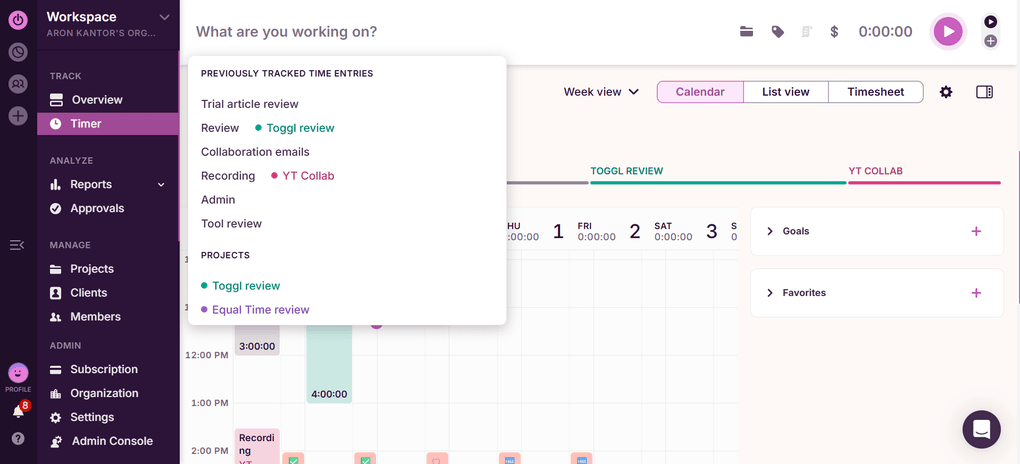
Automated time tracking: When using the desktop app, you can easily switch between apps, websites, and documents without manually logging time entries utilizing this feature. When opening a window, you get a notification to start a project time entry, and Toggl Track will automatically capture and record the time spent with that specific project. However, you can choose to turn off this feature, and you can record your time manually.
Timer: This tool is quite straightforward; you only need to add a description, add a tag or a project, select whether it is billable or not, and you can start recording the time. Once you finish the task, you only need to hit the stop button, and that’s it.
Client & project management features: Using Toggl Track, you can create projects and clients, which helps you to track project profitability, the time spent on tasks, clients, and teams. I also appreciated that you can filter on a specific project, team member, client, or whether it is billable or not. If you select one of the projects, you can gain insight into the hours worked on the specific project. You can also access the team members who worked on it and what tasks they performed relating to this project.
Timesheet: Toggl Track works as a simple timesheet app as well. It automatically collects your tracked time and structures it based on projects. This way, you do not need to deal with manual time entries, and it also makes employee monitoring easier.
Invoicing: This time tracking app has an invoicing feature as well. It allows you to record every billable hour worked across your entire team and create an invoice with a few clicks for your clients.
Reporting and analytics: When testing and exploring Toggl Track’s features, I discovered that it provides a detailed report about how you & your team spent their time with clients and projects. You can quickly access a project distribution and billable hours. Nevertheless, besides the projects, you can filter on clients, team members, tags, tasks, and more.
Mobile devices: Toggl Track has mobile apps for iOS and Android devices. I loved the functionality of its iOS phone app.
What does Toggl Track cost?
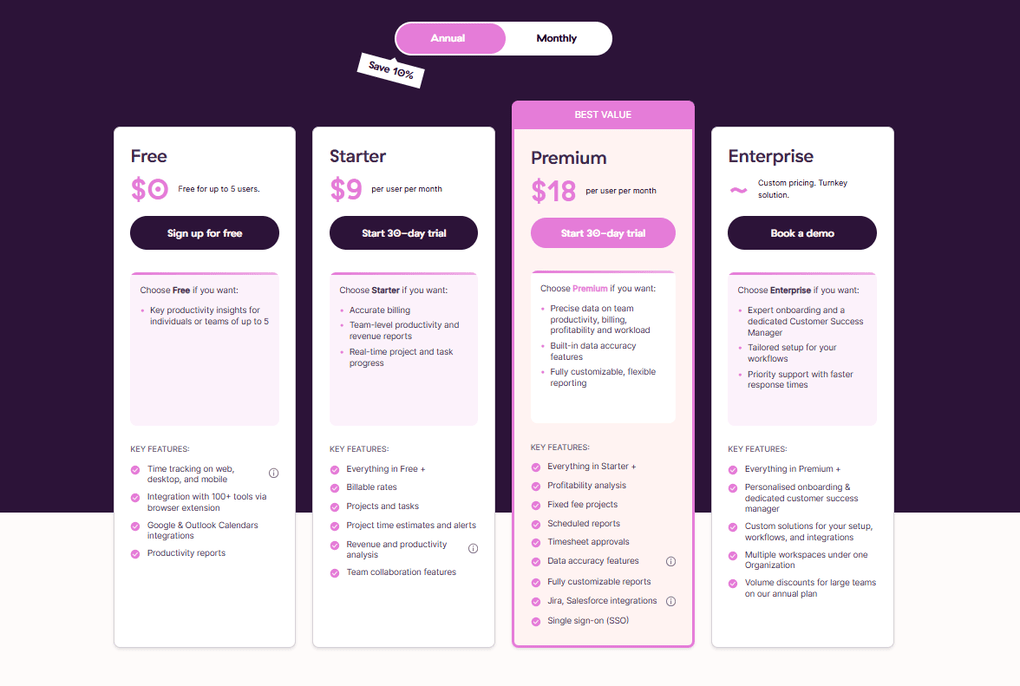
Toggl Track offers its Free Plan for up to five users. With this plan, you will access automated time tracking, personal productivity tools like a Pomodoro timer or reminders, and integrations with Google Calendar, Outlook, and 100+ tools via a browser extension.
If you want to utilize more features during your day-to-day work, you can give Toggl Track’s Starter Plan a try. It is $9 monthly per user for annual billing. If opting for the monthly billing, the Starter Plan is $10 per user per month.
Quick note: When you sign up for Toggl Track, you will get a 30-day trial, so you can access all Premium features for free.
With the Toggl Track Premium Plan, you will get the full experience of this time-tracking app. It is $18 per user per month if you choose yearly billing.
Finally, Toggl Track offers an Enterprise Plan for larger businesses.
Strengths & Limitations
Here are the areas where Toggl Track stood out the most compared to other time tracking apps and where it still needs improvement.
Strengths of Toggl Track
Limitations of Toggl Track
Why is Toggl Track the best time tracking app for teams?
Toggl Track is an well-balanced time tracker app for businesses. It focuses on time tracking and reporting, and does so exceptionally well.
If you are running a small team and need a low-key yet efficient time-tracking app, Toggl Track is a great choice.
🔎 Read my full Toggl Review 2026: My 4-Week Personal Experience
Related articles:
- Toggl Vs Clockify: I Tried Both for Weeks — This One Won (2026)
- Harvest Vs Toggl: I Personally Tested Both (2026)
Buddy Punch
After testing numerous apps, I found Buddy Punch as the best employee time tracking software. It offers many features for businesses to measure and improve employee performance & time management.
Quick Verdict
Field teams that need robust GPS tracking, geofencing, and facial recognition features
Office teams and businesses that require offline time tracking
It offers advanced GPS tracking and employee scheduling functions
It doesn’t have personal productivity features
🔒Privacy & tracking: Buddy Punch focuses more on accountability and attendance tracking than employee surveillance (no mouse movement monitoring, screenshots, etc.) But keep in mind that it’s not HIPAA-compliant, which rules it out for many medical and healthcare businesses.
How Buddy Punch handled real-world time tracking
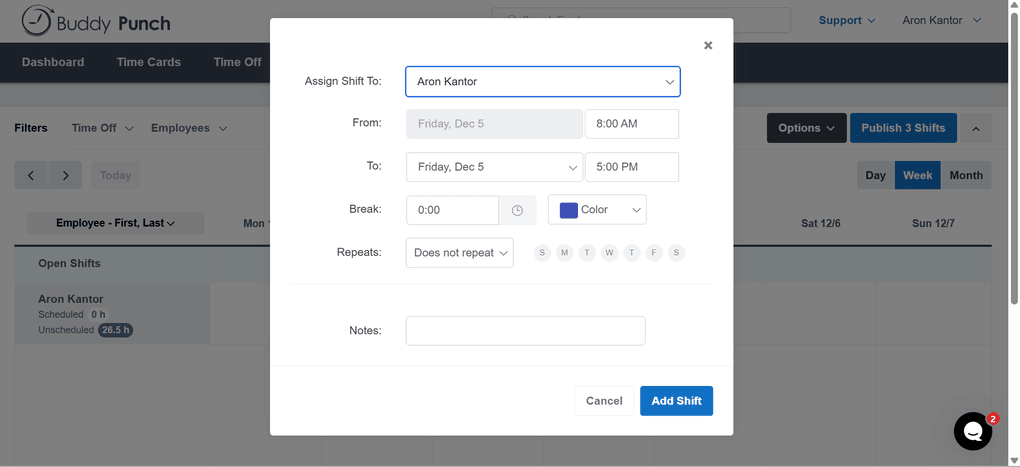
Buddy Punch is a solid app for accurately tracking employee hours. I found the drag-and-drop employee scheduling particularly helpful for creating shifts.
With its real-time GPS tracking and geofencing, Buddy Punch is one of the best employee time tracking apps for on-site teams. What impressed me during my testing was how effectively it combines time tracking, attendance monitoring, and payroll into a single platform.
Nonetheless, it has a learning curve. It took me several hours to understand the functions, navigation, and how to get started.
Also, I missed the offline mode, which can be crucial for some on-site teams. But apart from these points, it outperformed other on-site-focused time tracking apps like ClockShark or Workyard.
Who should consider Buddy Punch?
Who should look elsewhere?
Core features & functionality
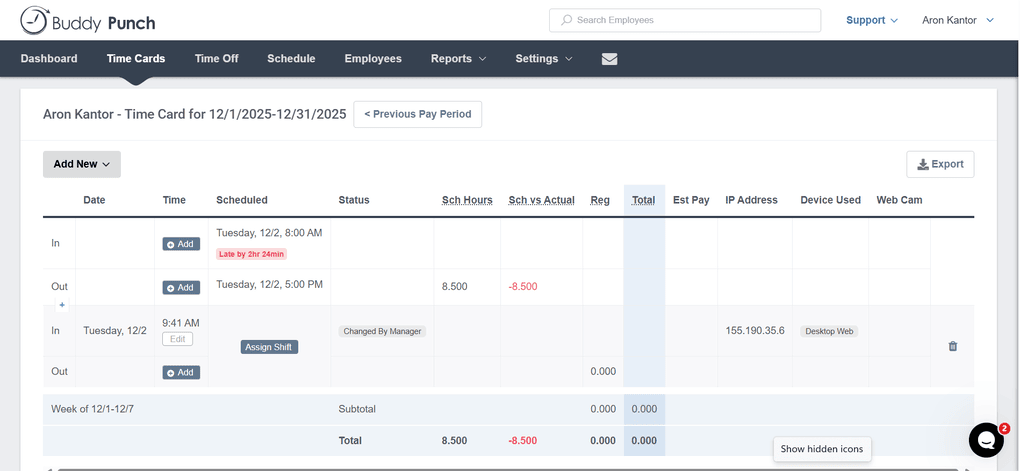
Time tracker tool: Buddy Punch lets you track work hours easily with the mobile (iOS and Android) and web app. For the clock-ins & clock-outs, your employees can use a PIN, QR code, facial recognition, or username and password.
Attendance tracking: It has powerful attendance management tools. That said, you or your employees can create their schedules with this employee time-tracking app. And when employees clock in/out, it matches that data to their schedules and shows which team members arrived on time, were late, were absent, or left work early.
Time off tracking: It provides all the features you need to manage your employees’ time off. That said, you can create PTO policies with accrual rules, add different types of time-offs like personal or sick leave, and more.
Payroll features: Buddy Punch also functions as payroll software, allowing you to review your employees’ work hours and time off and submit your team’s pay.
Reporting tools: This employee time tracking app has robust reporting tools. Using them, you can get valuable insights about daily work hours, PTOs, payroll, and more.
GPS time tracking: Buddy Punch provides robust GPS tracking to ensure your employees are in the right place at the right time. When employees log in, it captures their location and adds it to their timesheets.
Mobile device: You can use Buddy Punch on Android and iOS devices, so your employees can clock in and out from anywhere.
What does Buddy Punch cost?
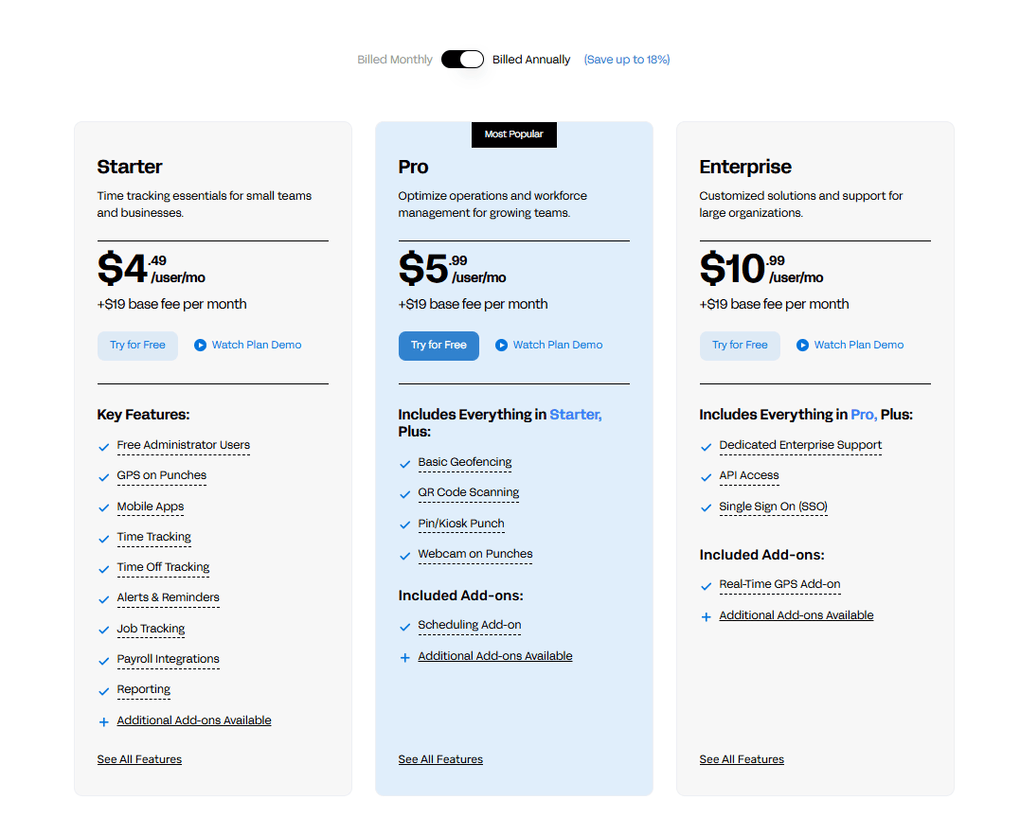
Buddy Punch’s Starter plan includes all the essential time tracking features for small businesses. It covers the time tracker, GPS tracking, time-offs, alerts, and more. You can get the Starter plan for $4.49 per user per month, plus a $19 monthly base fee.
If you want more advanced features like geofencing, QR code scanning, and pin/kiosk punch, you should consider the Pro plan. It is $5.99 per user per month with annual billing and has the same monthly base fee ($19).
Finally, Buddy Punch offers its Enterprise plan for larger organizations with dedicated support, SSO, and API access. It is $10.99 per user per month, billed annually.
Regardless of which plan you choose, Buddy Punch provides a 14-day free trial.
Strengths & Limitations
To help you decide whether Buddy Punch fits your workflow, here are the pros and cons I noticed during testing.
Strengths of Buddy Punch
Limitations of Buddy Punch
Why is Buddy Punch the best time tracking app for field teams?
Buddy Punch is a suitable employee time-tracking app for on-site teams, as it integrates time tracking, employee monitoring, and payroll into a single solution.
While it has a learning curve, it’s a practical choice for on-site teams requiring GPS tracking.
Explore our Apps directory
A curated directory of software tools we’ve independently reviewed, with links to full reviews, comparisons, and category guides.

Jibble
Jibble is a time tracking software and employee productivity app designed for teams. It works on web, desktop, and mobile devices (both iOS and Android). With its extensive feature set and completely free pricing, Jibble earned the title of the best free time tracking app in my testing.
Quick Verdict
Users looking for a free and simple time tracking solution
If you need a time tracking app that helps with client management and billing workflows
Extensive feature set for free
Limited advanced productivity analytics
🔒Privacy & tracking: Compared to Hubstaff or Time Doctor, Jibble is a more privacy-friendly time tracking solution. However, it includes screenshot capture, app and website monitoring, and mouse/keyboard activity tracking.
How Jibble handled real-world time tracking
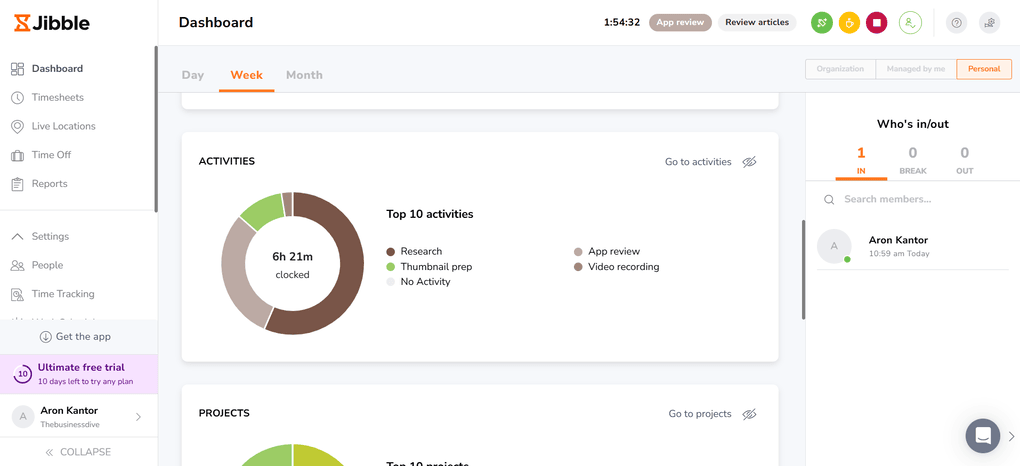
After testing 25+ time tracking apps, here is a short summary of my experience with Jibble: It is the best time tracking app that you can get for free.
Let’s elaborate on it a bit more!
What surprised me most was learning that Jibble is completely free. Instead of limiting advanced capabilities to paid tiers, it gives every user access to the full feature set without charging a subscription.
Within the first 15 minutes, I already felt comfortable navigating Jibble, which rarely happens when testing time tracking apps.
It has advanced features for managing attendance, such as facial recognition, that ensure accurate time tracking across the organization without buddy punching. The fact that you can use it on web, desktop, and mobile apps as well makes Jibble a versatile and accessible time tracking solution.
Since Jibble doesn’t charge for premium plans, pricing becomes one of its biggest competitive advantages.
On the other hand, I would love to see Jibble offer more team collaboration tools or client management features. I understand that these were not the focus points of this time tracking app, but they would help a lot for businesses like mine, where we have remote teams.
Who should consider Jibble?
Who should look elsewhere?
Core features & functionality
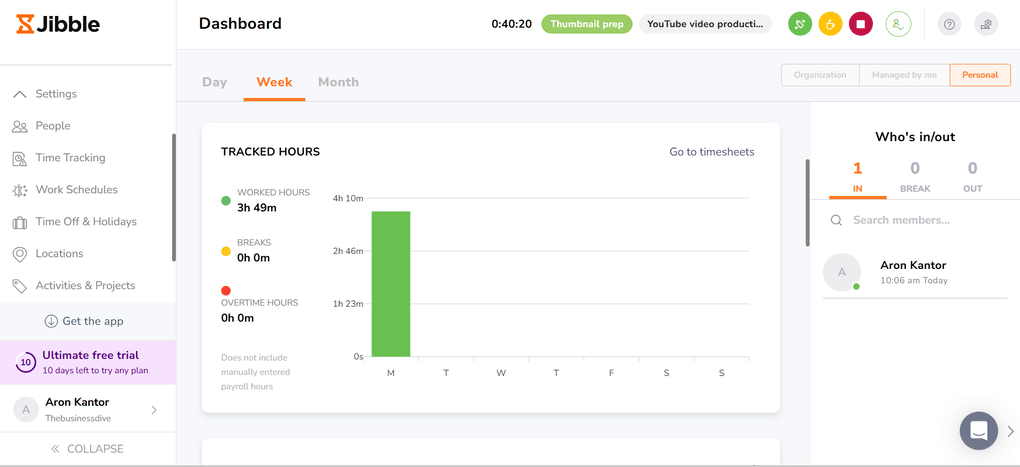
Time tracking software: Jibble offers web, desktop, and mobile apps to capture your time. You can start the time tracker from all the pages of Jibble, and you only need to select the project and activity. Also, Jibble allows you to switch activities, start a break, or stop the timer with a single click.
Client & project time tracking: It allows users to clock in, select a specific project and/or client, and then automatically generate detailed timesheets.
Timesheet app: It automatically adds the time entries to your timesheet when using its time tracker. Nevertheless, you can enter hours manually easily if needed.
Time off management: You can create and approve time off with Jibble. But most importantly, you can create your holiday policy. With this feature, you can select the team members, whether there is compensation or not, accruals, the number of holidays, and more.
Reporting tools: Jibble has robust reporting capabilities. You can ask for attendance reports and recorded time for activities, projects, and clients. This makes Jibble a capable tool for project time tracking.
Live location tracking: Jibble’s GPS tracking feature makes it an ideal time tracking app for on-site teams. Team members can capture their time spent with each job site easily, and it supports automated facial recognition.
Mobile device: With Jibble’s mobile apps, you can capture your time from anywhere.
What does Jibble cost?
Jibble is completely free. Instead of offering multiple paid tiers, every user gets access to the platform’s complete feature set at no cost.
Strengths & Limitations
After comparing Jibble with other time tracking apps, these were the most important pros and cons I discovered.
Strengths of Jibble
Limitations of Jibble
Why is Jibble the best free time tracking app?
Jibble includes automated timesheets, unlimited integrations, overtime rules, and all of its other features at no cost, while many competing time tracking apps still lock similar capabilities behind paid plans.
So, if you are looking for a free time tracking app, Jibble is an excellent choice.
🔎 Read my full Jibble Review 2026: The Most Underrated Time Tracking App?
Insightful
Insightful is a time tracking and employee monitoring software for teams. It captures daily work in real time and offers numerous productivity tools to help your team maximize time.
Quick Verdict
Employee monitoring and time tracking for office-based teams
Individuals or teams that need client management or invoicing features
Provides clear visibility into employee productivity without overly intrusive monitoring
No free plan
🔒Privacy & tracking: It supports screenshots, app/website monitoring, and activity tracking. Still, you can customize or turn off many of these features to create a less invasive setup that fits your company culture.
How Insightful handled real-world time tracking
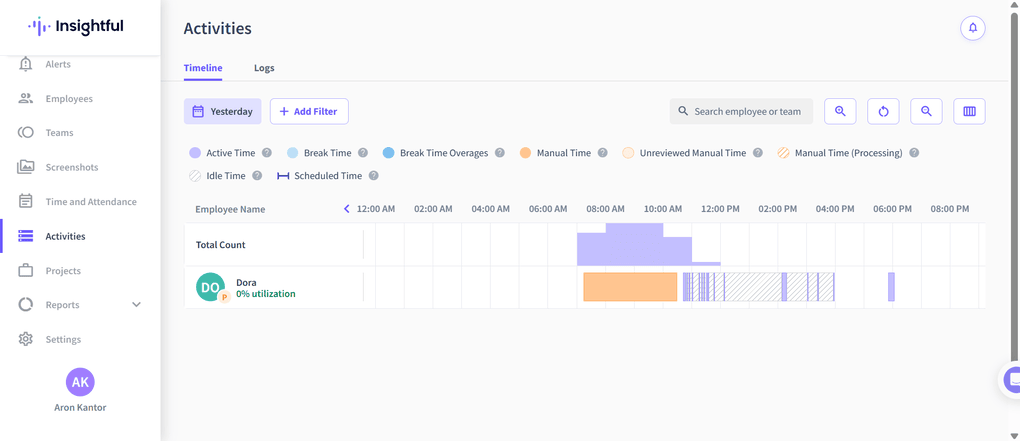
Insightful is a unique combination of an employee time tracking app and productivity software. In day-to-day use, I was glad to see that you can customize the time tracker & make this app more employee-friendly.
Compared to other time tracking apps, it is an easy-to-use app while offering a massive feature set. Where I found some room for improvement is client tracking, mobile support, and Zapier integrations.
Ultimately, Insightful is currently one of the best employee time tracking apps with super helpful team management features. It is an especially useful app for remote and hybrid teams.
Who should consider Insightful?
Who should look elsewhere?
Core features & functionality
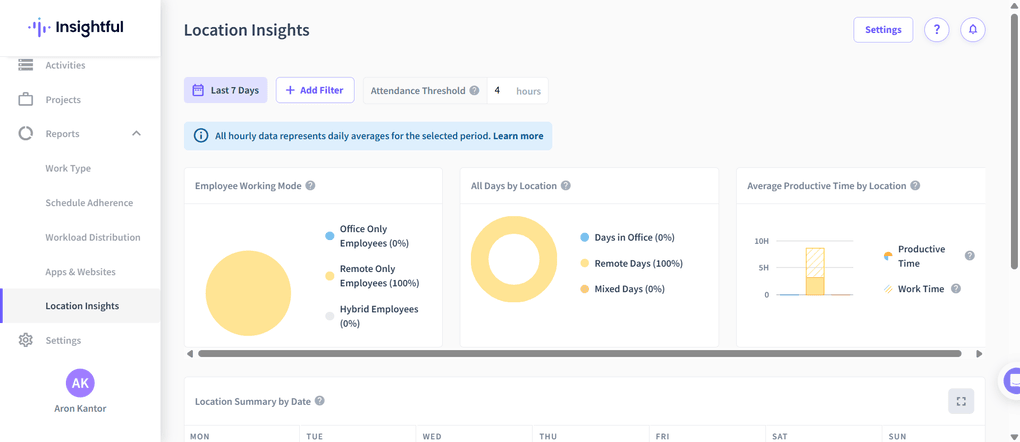
Time tracker: You can easily track time after you have downloaded the desktop version. Once you have the desktop app, you only need to select or add a project, and you can start tracking your time.
Employee monitoring: Insightful provides many employee monitoring tools to track and improve team performance. There are numerous customization options for each employee, which allow you to personalize the time tracking in a way that aligns with your company culture. You can control screenshots, break and idle time, and permissions for each employee individually.
Productivity trends and insights: Using the productivity trends, you will get a clear overview of your employees’ work hours, idle time, time logs, and more. In addition, the real-time insights about active and inactive employees, along with the apps and websites they are currently using. While I felt it was a bit too invasive, Insightful allows you to change the settings and make it more employee-friendly.
Projects & tasks: With Insightful, you can create projects and tasks for your employees. Although your employees can add new tasks, I did not find the same option for projects. When creating projects and tasks, you only need to add the name, due date, status, priority, assignees, and description, and your employee can clock in & start the work.
Activity tracking and reports: Activity tracking provides a timeline view of work hours, breaks, and idle time detection, along with detailed time logs of app and website usage. The reporting feature is very easy to use, and it visualizes metrics beautifully. You can also export data with a single click.
Integrations: There are many useful integrations you can access, like Asana, Wrike, Deel, and GitHub. However, it does not support Zapier.
What does Insightful cost?
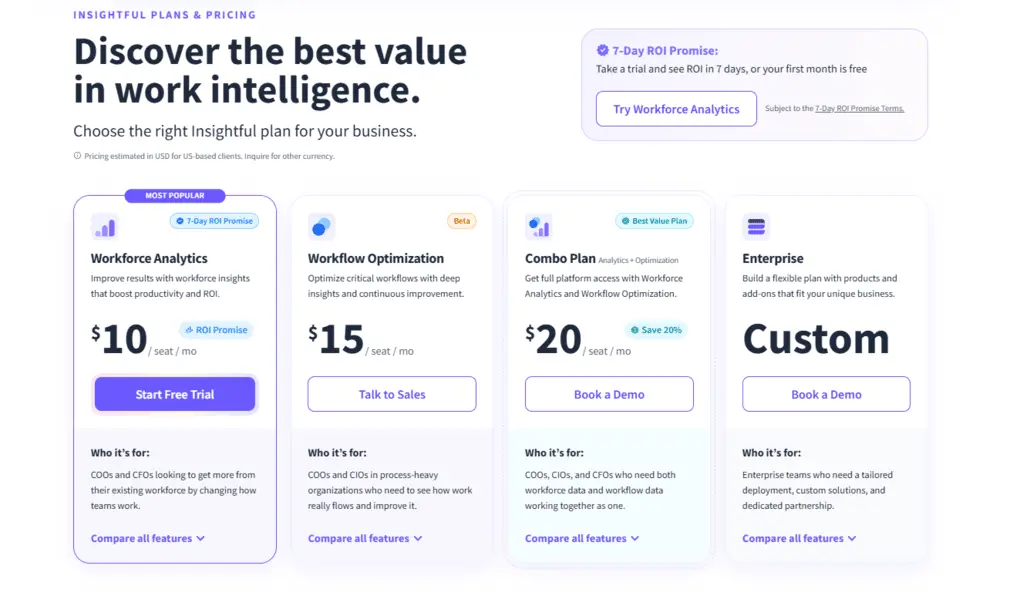
Insightful offers a 7-day free trial without requiring a credit card.
The Workforce Analytics Plan is $10 per seat per month and includes app and attendance tracking, reports, user management, and more.
The Workflow Optimization plan costs $15 per seat per month and gives you access to process optimization features, but does not include several time tracking features included in the Workforce Analytics Plan.
If you need the combination, Insightful offers its Combo Plan for $20 per seat per month, which covers all the features from the two previous plans.
There is also an Enterprise plan with custom pricing.
Lastly, you can request add-ons such as screenshots, screen recording, data warehouse integrations, and extra security for further monthly payments.
Strengths & Limitations
These were the biggest things it did well and where it struggled after testing how it performs in my day-to-day business,
Strengths of Insightful
Limitations of Insightful
Why is Insightful the best time tracking app for real-time employee tracking?
If you need not only a time tracker but also a productivity app, Insightful is a great choice. It offers an appealing, easy-to-navigate interface and provides clear visibility into employee productivity.
Nonetheless, the lack of a free version & mobile support makes it a less appealing option for some teams.
🔎 Read my full Insightful Review | My Honest Opinion (2026)
TMetric
TMetric is a time tracking app designed for freelancers, consultants, and agencies that bill clients by the hour. It combines time tracking with project budgeting, invoicing, and profitability reporting in a simple and affordable platform.
Quick Verdict
Freelancers, consultants, and small teams that need accurate billable-hour tracking, project budgeting, and invoicing
Teams looking for AI-powered productivity insights rather than project budgeting and profitability tools
The combination of time tracking, project budgeting, and profitability reporting
Some advanced workforce management features require the Business plan
🔒Privacy & tracking: Unlike employee monitoring tools such as Hubstaff or Time Doctor, TMetric is primarily designed around billable hours, project budgets, invoicing, and profitability reporting. Activity tracking and screenshots are available, but they’re not the platform’s main focus.
How TMetric handled real-world time tracking
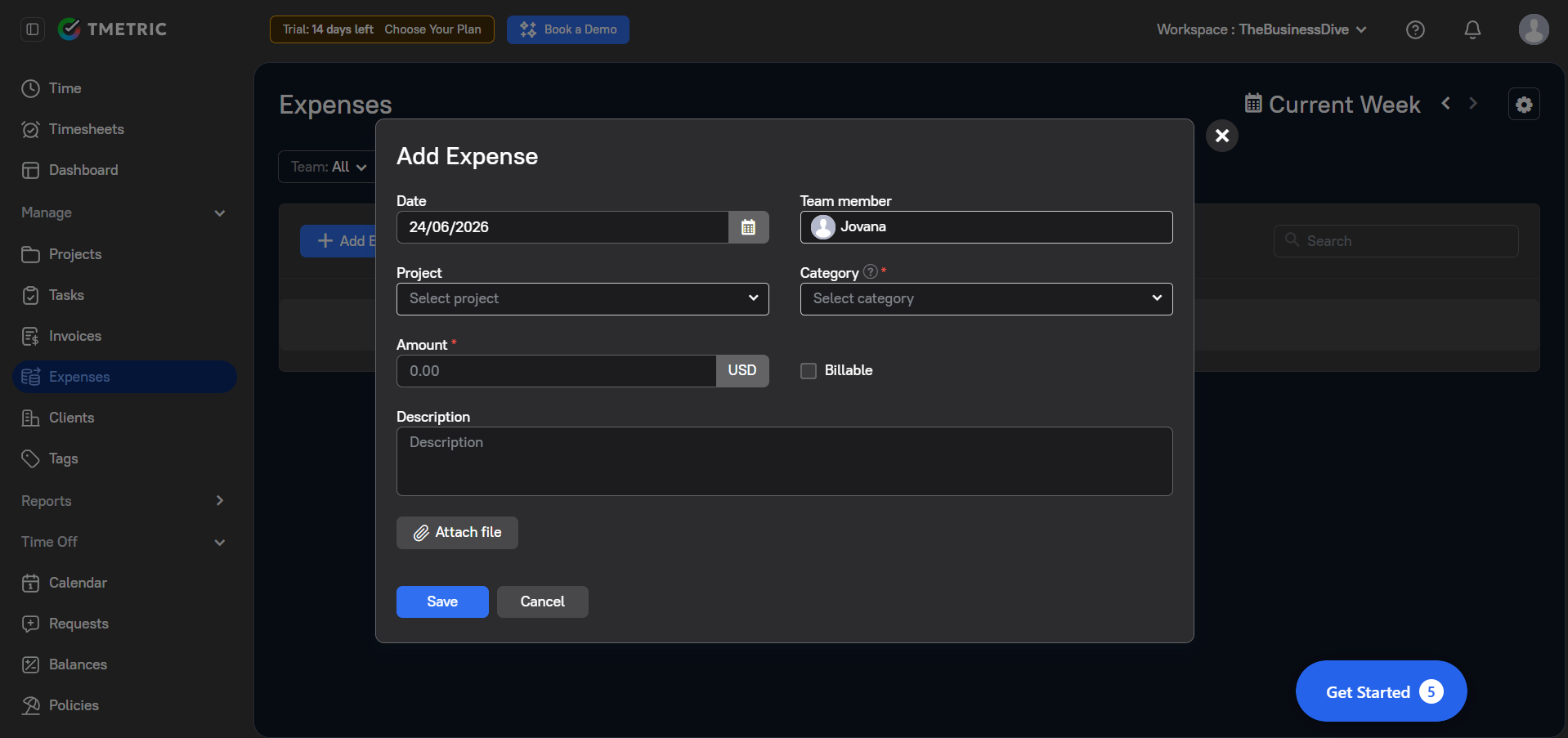
To get a better feel for the platform, I tested TMetric’s core time tracking, reporting, invoicing, and project management features.
Most of my time was spent in the My Time view, where I could start a timer, add manual entries, log breaks, and review my day in a timeline format. I liked that time entries, breaks, and calendar events all appear in the same workspace.
The reporting section was more extensive than I expected. In addition to standard time reports, TMetric includes project summaries, task summaries, profitability reports, activity summaries, app usage reports, and team-level reporting. I gave extra credit to the profitability report since it’s not something many basic time trackers offer.
I also appreciated that invoices, expenses, and time-off management are built directly into the platform. During testing, I could create invoices, record billable expenses, review leave balances, and manage time-off policies without relying on separate tools or integrations.
Who should consider TMetric?
Who should look elsewhere?
Core features & functionality
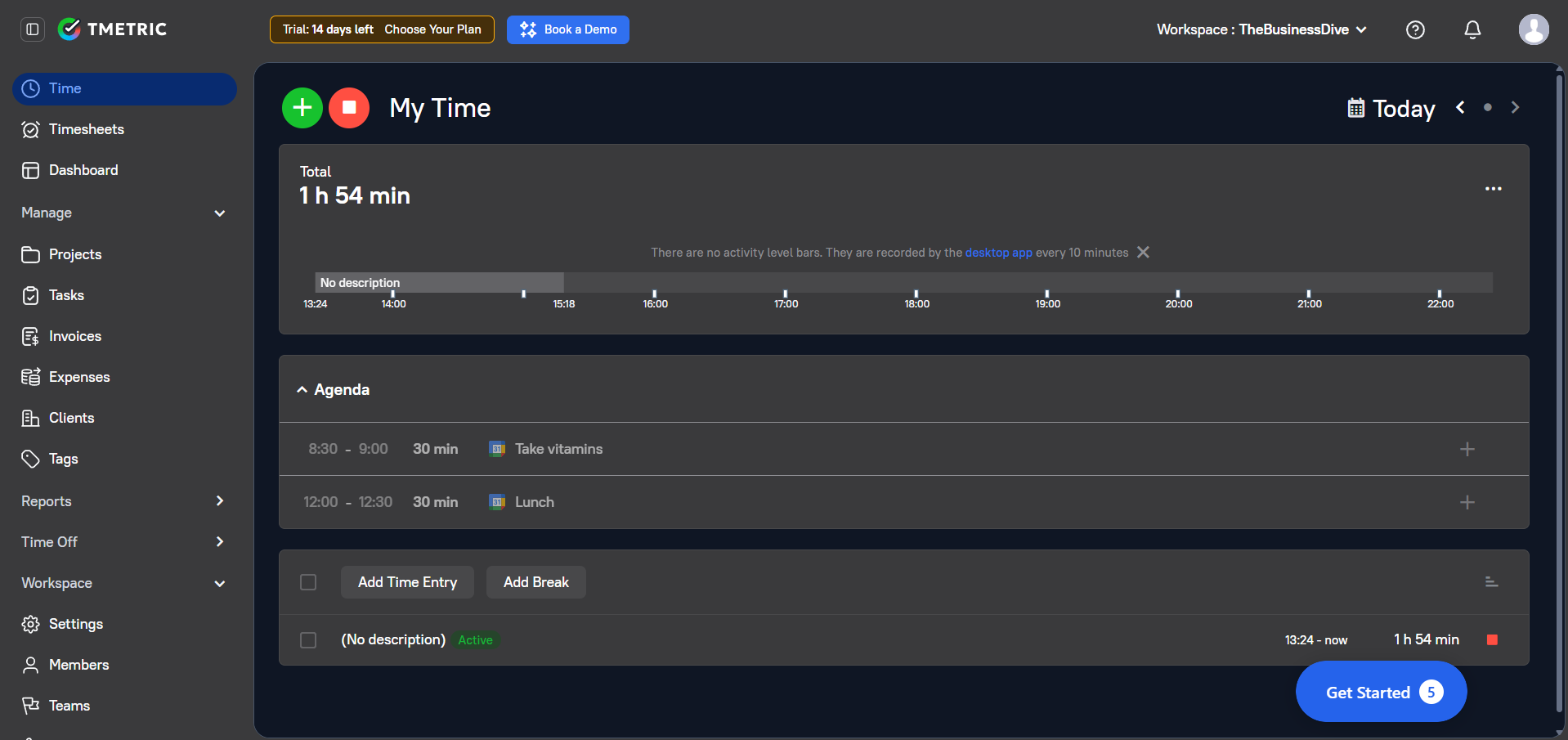
Time tracking: You can track time using a timer, manual entries, desktop apps, browser extensions, and mobile apps. TMetric also supports offline tracking, so your hours are automatically synced once you reconnect. It can detect idle time as well, allowing you to review or remove inactive periods from your time records. I especially like that you can start timers directly inside tools like Jira, Asana, Trello, GitHub, and Notion. You can also create tasks, assign work, and track progress alongside time entries.
Project budgeting: Budget management is one of TMetric’s standout features. You can set both time and money budgets for projects, compare planned versus actual hours, and receive alerts when projects approach their budget limits.
Billing & invoicing: Billable rates can be assigned to team members, clients, projects, and tasks, while billable and non-billable hours are tracked separately. You can also track expenses, generate invoices directly from tracked time, and export invoices and billing data. QuickBooks integration is available for syncing invoices and billing data.
Reports: The reporting tools in TMetric provide detailed breakdowns of time spent by project, client, task, employee, and even application usage. I like that profitability reports are available alongside standard time-tracking reports.
Timesheets & payroll: Tracked hours are automatically converted into timesheets that can be reviewed, approved, and used for payroll calculations. Attendance tracking is also included, so work hours, absences, and timesheet records are available in one place.
Team management: Team dashboards, work schedules, attendance tracking, time-off management, and workload visibility are all built into the platform. Managers can review team capacity, monitor attendance, track project progress, and analyze activity levels across projects and team members. Employees can also submit time-off requests and track remaining leave balances.
Mobile app: Mobile apps are available for both iOS and Android devices. You can start and stop timers, add manual time entries, track billable hours, and review tracked time from your phone. Time entries automatically sync across mobile, desktop, and web apps.
What does TMetric cost?
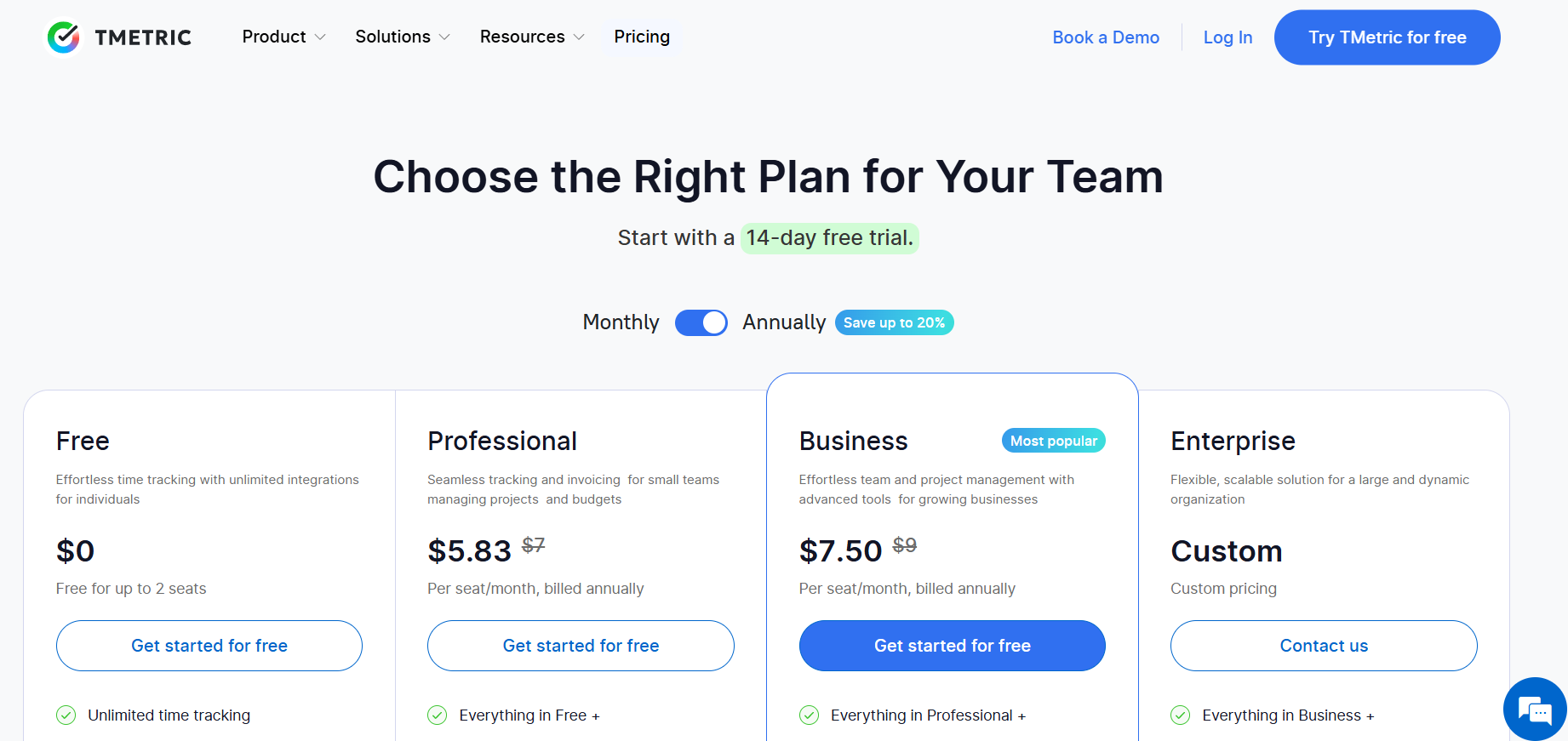
TMetric offers a free plan for up to 2 seats. It includes unlimited time tracking, unlimited projects and clients, exportable reports, web, desktop, and mobile apps, as well as timer integrations with 50+ tools.
If you want to test the premium features, TMetric also offers a 14-day free trial of its paid plans.
Upgrading to the Professional plan costs $5.83 per user/month when billed annually. It adds billable rates and expense tracking, project budgets and alerts, client invoicing, calendar sync, task management, and project/client import tools.
The Business plan includes everything in Professional, plus time-off management, team timesheets, app and website monitoring, screenshots, activity tracking, QuickBooks integration, real-time notifications, and advanced integrations. It costs $7.50 per user/month with annual billing.
For larger organizations, TMetric also offers an Enterprise plan with custom pricing. It includes everything in Business, along with custom integrations, priority support, secure deployment options, and volume discounts.
Strengths & Limitations
To summarize my findings, these are the areas where TMetric performed well and where it still has some limitations.
Strengths of TMetric
Limitations of TMetric
Why is TMetric the best time tracking app for freelancers & client billing?
TMetric combines several tools that freelancers and agencies often need separately. In addition to tracking billable hours, it includes project budgets, expense tracking, invoicing, and profitability reports.
For freelancers, consultants, and agencies, this means client work, billing, and reporting can all be managed from a single workspace.

Homebase
Homebase is a scheduling, time tracking, and payroll app built for small businesses and hourly teams. It’s a straightforward tool that handles clocking in and out, scheduling, and payroll without the extra complexity bigger platforms add.
Quick Verdict
Small businesses and hourly teams that need scheduling, time tracking, and payroll in one place
Large enterprises needing complex workforce analytics
Team members clock in and out from any device, with automatic flags for overtime and missed breaks
Homebase is built for small, local businesses, so it doesn’t offer the deep enterprise-level reporting some larger companies look for
🔒Privacy & tracking: Homebase focuses on accurate time tracking rather than employee surveillance. It supports GPS, geofencing, PINs, and photo capture for clock-ins and clock-outs, while helping businesses stay compliant with labor regulations.
How Homebase handled real-world time tracking
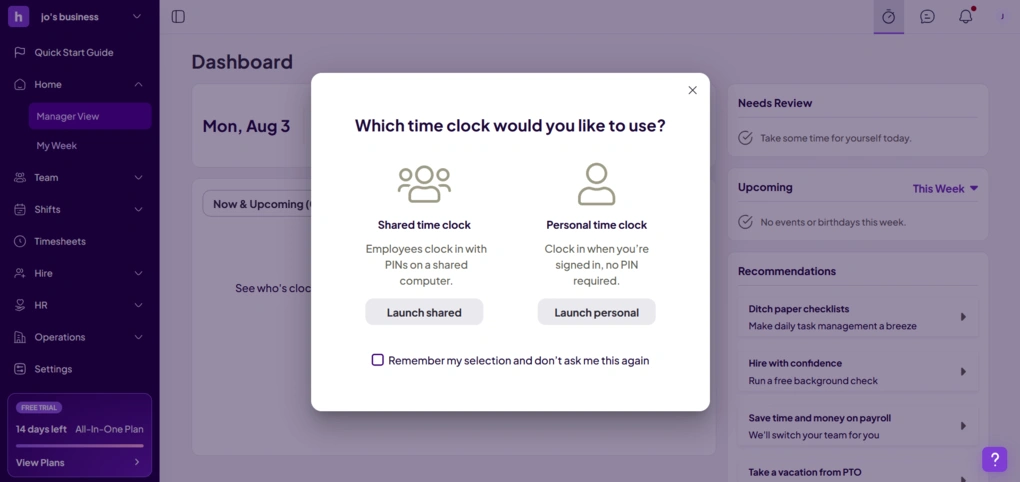
I wanted to see how Homebase handled a typical workday for an hourly team, from creating schedules to reviewing hours worked and preparing payroll.
What stood out most was how naturally everything connected. Once schedules were in place, time entries automatically fed into timesheets, which made it easy to review attendance, overtime, and missed breaks without piecing information together from multiple pages.
Overall, I can conclude from my testing that Homebase is easy to adopt and works especially well for small businesses with shift workers.
Who should consider Homebase?
Who should look elsewhere?
Core features & functionality
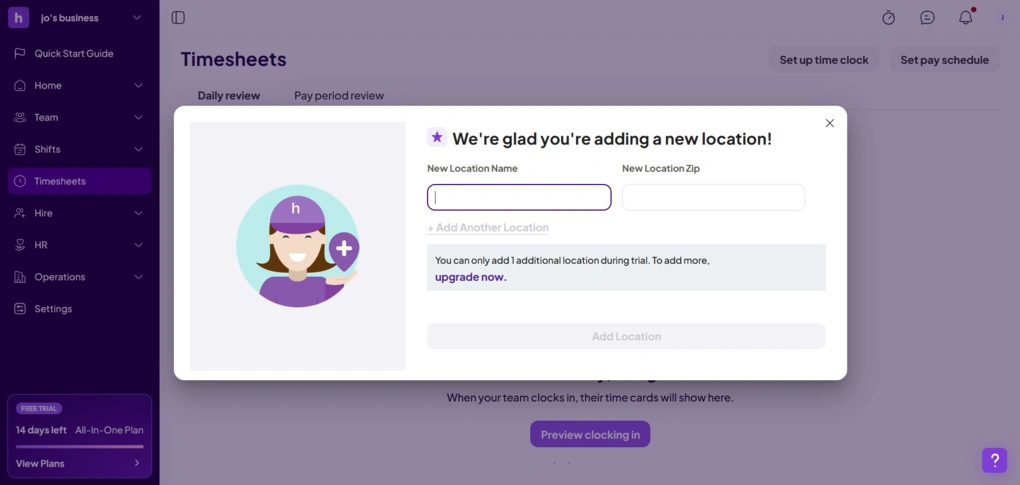
Time tracking: Homebase makes time tracking easy for both employees and managers. Staff can clock in and out from their phone, tablet, computer, or POS system, while managers can add GPS, geofencing, PINs, or photo verification for extra accountability. The platform also automatically flags overtime and missed breaks.
Employee scheduling: Being one of Homebase’s strongest features, it lets you create recurring schedules, reuse templates, and assign shifts based on employee availability. Once a schedule is published, employees receive it instantly through the mobile app.
Payroll: Rather than treating payroll as a separate process, Homebase pulls approved hours directly from employee timesheets. This removes the need to manually enter worked hours and reduces the chance of payroll mistakes, and includes built-in compliance support.
Team communication: Homebase also includes built-in messaging. Managers can send announcements, shift reminders, or updates to the entire team, while employees are automatically notified whenever schedules change or open shifts become available.
Hiring & onboarding: Beyond scheduling and time tracking, Homebase includes tools for hiring and onboarding new employees. You can post jobs, screen candidates, schedule interviews, complete onboarding paperwork, and store employee documents without leaving the platform
What does Homebase cost?
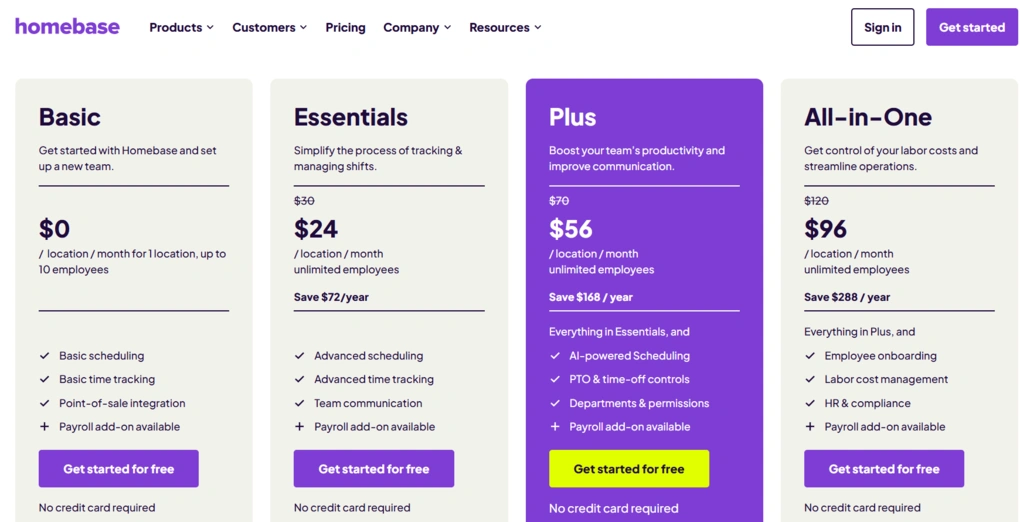
Homebase offers a free Basic plan for one location with up to 10 employees. It includes basic scheduling, time tracking, point-of-sale integrations, and the option to add payroll, making it a great starting point for small businesses.
If you want to explore the premium features first, Homebase also offers a 14-day free trial of its All-in-One plan.
Upgrading to the Essentials plan costs $24 per location/month when billed annually. It includes everything in the Basic plan, plus advanced scheduling, advanced time tracking, and team communication tools.
The Plus plan costs $56 per location/month with annual billing. It includes everything in Essentials, along with AI-powered scheduling, PTO and time-off controls, and departments and permissions for managing larger teams.
For businesses that need HR and workforce management tools, Homebase offers the All-in-One plan for $96 per location/month with annual billing. It includes everything in Plus, as well as employee onboarding, labor cost management, and HR and compliance features.
One thing to keep in mind is that payroll isn’t included in any subscription plan. Instead, it’s available as an add-on for $39/month plus $6 per active employee, regardless of which Homebase plan you choose.
Businesses can also purchase optional add-ons such as Task Manager, Tip Manager, Hiring Assistant, and Background Checks if they need additional functionality.
Strengths & Limitations
After testing Homebase and researching user feedback, these are the biggest strengths and limitations I came across.
Strengths of Homebase
Limitations of Homebase
Why is Homebase the best time tracking app for shift-based, and hourly teams?
Homebase was built specifically for businesses with hourly employees. It brings scheduling, time tracking, and payroll into one workflow, automatically flags overtime and missed breaks, and lets employees clock in from virtually any device. With GPS, geofencing, PINs, and photo verification, it also helps managers reduce time theft without adding extra administrative work.

Hubstaff
Hubstaff is a robust time-tracking and workforce management platform with powerful features for improving employees’ productivity and time management. It’s highly customizable by admins, you can clock in on mobile and desktop, and it does not require an internet connection.
Quick Verdict
If you need a capable workforce management app for teams
Users looking for a free time tracking solution
It gives you detailed time tracking with advanced reporting
More monitoring-focused than personal productivity & some of these features can feel invasive
🔒Privacy & tracking: Hubstaff can feel invasive sometimes as it includes screenshots, app and website tracking, activity monitoring, and even optional silent tracking. But, fortunately or unfortunately, depending on the company culture, the admin can customize these and even turn them off completely.
How Hubstaff handled real-world time tracking
Honestly, Hubstaff really surprised me. After spending some time with it, I’d say it’s a well-rounded time tracking app for teams.
I liked how much control admins have over how the software operates, which ultimately determines how invasive or flexible the tracking feels. The Silent App stands out as maybe the least intrusive option, providing a smooth way to monitor time without constant user interaction.
All in all, my experience with Hubstaff was really good. It’s a powerful tool that can strike a balance between invasiveness and effectiveness.
That said, because admins have extensive control over monitoring settings, Hubstaff can also become a very intrusive “Big Brother” type software if a company decides to use it that way.
Who should consider Hubstaff?
Who should look elsewhere?
Core features & functionality
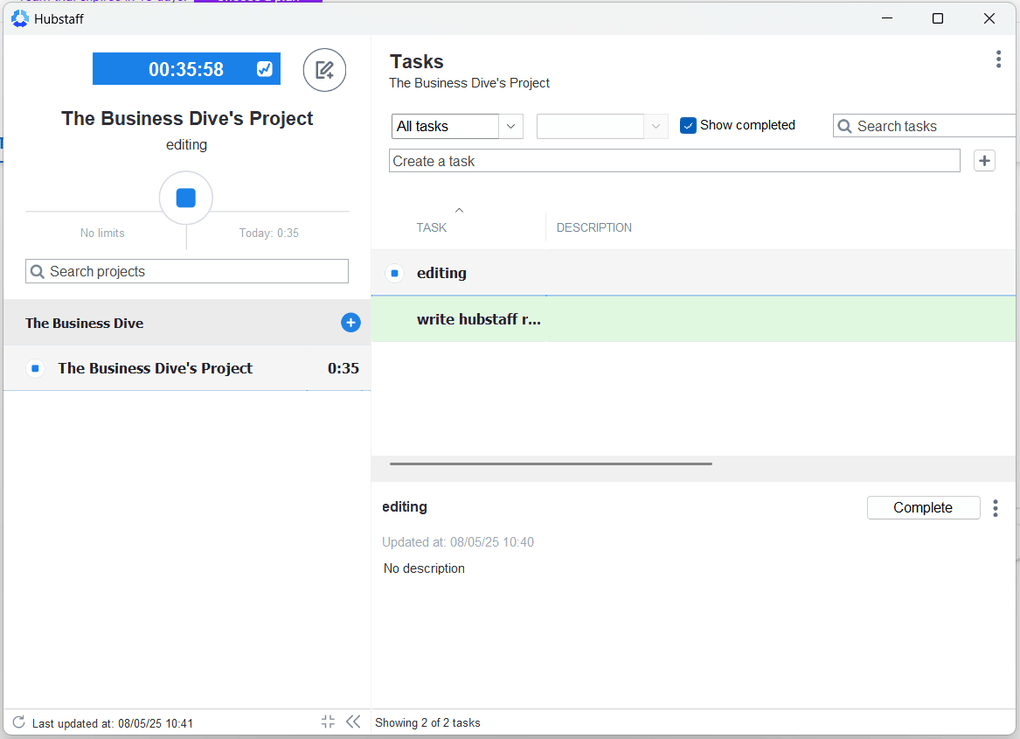
Time tracking: Hubstaff allows you to track time smoothly using its web, desktop, or mobile app. While the web timer is super stripped down (basically just start/stop), the desktop timer is more of a command center. You can add or edit time, create projects and tasks, switch between them, add notes, or even mark tasks as done. It offers an automatic tracking option that can start and stop the timer for team members based on preset rules, but it’s far from Rize’s automatic time tracking capabilities.
Project management tools: With this time tracking app, you can create projects, break them down into task lists, and organize them in a way that fits your workflow. You can see your tasks in a classic Kanban board, List view, or Timeline view. In addition, you can assign employees, manage tasks, set due dates, and even add workflow actions, which means you can automate certain task updates when something changes in the project.
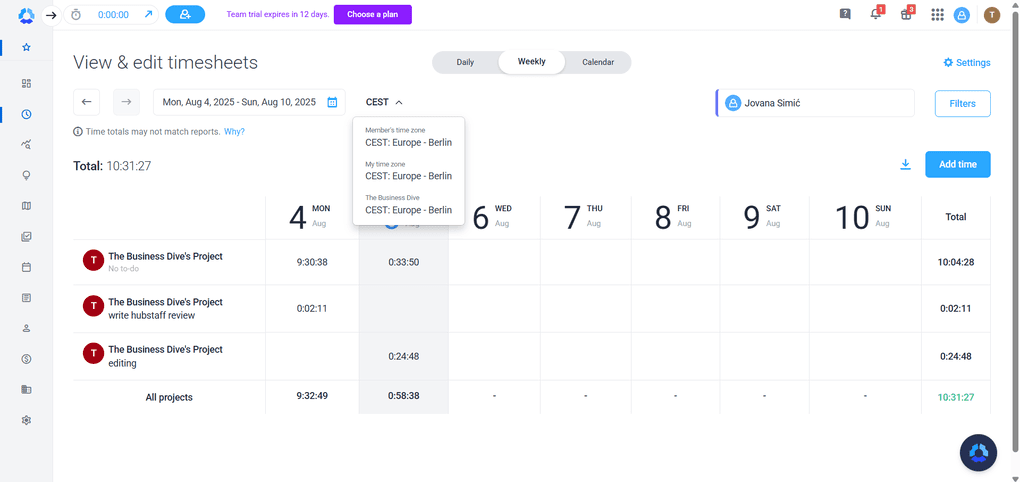
Timesheet app: This feature is useful for employee monitoring. You can view and edit your timesheet in multiple formats: daily, weekly, or calendar view, and all of them feel detailed yet intuitive. Adding time manually is quick and allows you to specify the reason or mark it as a work break. One small thing that I appreciate is that you can choose from different time zones, which can be crucial for remote team management.
Actionable insights: Hubstaff turns time tracking data into visual summaries: charts, percentages, and color-coded graphs that show things like work time classification, average activity, who your top performers are, and who might be slacking off a bit. Furthermore, you can filter everything by team, member, or custom date ranges, which helps to spot the patterns and get the accurate data you need.
Reporting features: One thing that really stood out to me when testing Hubstaff is how detailed and diverse the Reports section is. There’s a wide range of report types covering everything from time tracking to payments, budgets, invoices, and even job site visits.
GPS tracking: The Locations feature uses GPS tracking and geofenced job sites to automatically start and stop the timer based on an employee’s location. You can also set rules around them, like restricting time tracking to certain places or triggering alerts when someone enters or leaves a job site. On the Map, you get a live view (and history) of where everyone’s been.
Calendar: Hubstaff’s Calendar feature is great for workforce management. It lets you schedule, forecast, and handle absences so you can easily optimize your team’s performance.
Silent app: While the standard app requires users to start and stop a timer, the Silent App runs quietly in the background, tracking time, activity levels, app usage, and website visits without any user interaction.
Mobile app: I tried the Android version, which currently has a 5-star rating on the Play Store, and I absolutely agree with that rating. The app is fast, responsive, and very easy to navigate. It doesn’t lag or freeze, and it loads everything surprisingly quickly.
What does Hubstaff cost?
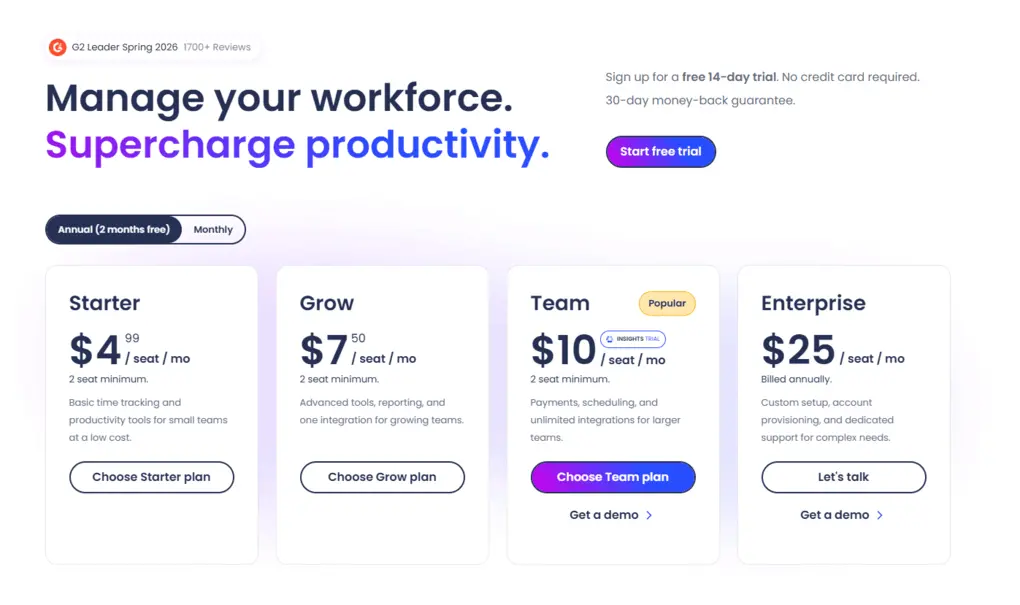
Hubstaff’s Free plan is available for one user only and includes limited time tracking, reports, screenshots, and client invoicing.
The Starter Plan includes the essential time tracking tools, such as a timesheet or a timer. It is $4.99 per seat per month if you grab the annual plan.
TheGrow Plan is $7.50 per user monthly with annual billing. This plan covers some more advanced tools, reporting, and one integration.
Hubstaff designed the Team Plan for larger teams that need more than just a simple time tracking app. You can access features for payments, scheduling, and unlimited integrations. It is $10 per user monthly in case of yearly billing.
Finally, Hubstaff offers an Enterprise Plan for larger businesses. Nevertheless, you can only choose the annual billing here, which will cost you $25 per user per month.
Strengths & Limitations
To summarize my experience, these are the biggest wins and compromises of using Hubstaff.
Strengths of Hubstaff
Limitations of Hubstaff
Why is Hubstaff the best time tracking app for workforce management?
Hubstaff is a versatile time tracking app for both on-site and off-site teams. You can clock in with mobile and desktop as well, and its in-depth reporting features make it one of the most reliable workforce management apps.
🔎 Read my full Hubstaff Review 2026 | Keep It or Kick It?
Related articles:
- Time Doctor vs Hubstaff 2026 | A Honest Comparison
- Hubstaff vs Clockify | My Findings After +2 Months
- 6 Best Hubstaff Alternatives After 500+ Hours Tracked

Time Doctor
Time Doctor is a time tracking app designed for remote teams. It helps global teams to monitor how they spend their work hours and offers numerous team management features. It’s available on the web, desktop, and mobile.
Quick Verdict
Remote teams that prioritize detailed reporting and analytics
Field workers or creative teams with flexible workflows
It provides comprehensive reporting and analytics capabilities
Some monitoring features may feel intrusive
🔒Privacy & tracking: Time Doctor can feel overly monitoring-focused at times. Some features are quite invasive by default, and do admin controls over these settings offer less flexibility than in Hubstaff.
How Time Doctor handled real-world time tracking
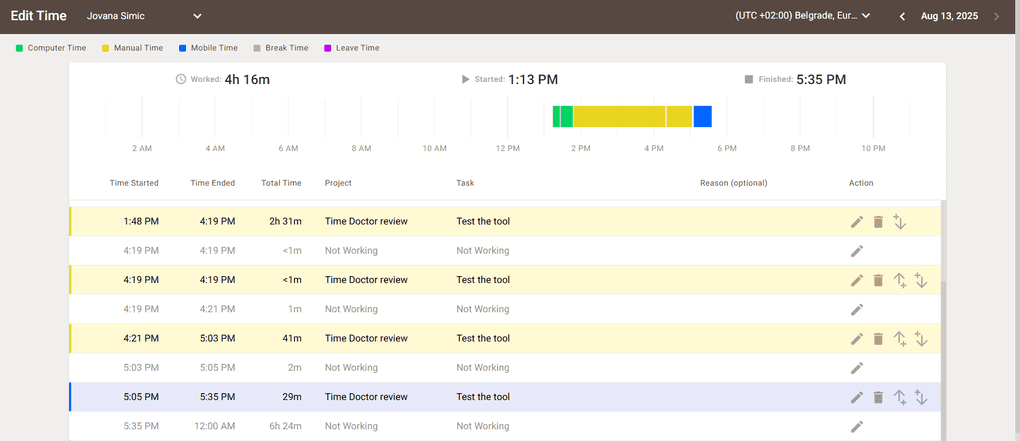
Overall, Time Doctor is a solid time-tracking tool. It delivers on its promise of detailed analytics, clear reporting, and straightforward payroll management.
While I found the interface clean and easy to navigate, some aspects, like customer support issues, occasional technical glitches, and limited admin controls over monitoring settings, can make it feel more invasive than necessary.
For teams that value transparency, data-driven insights, and features like billable hours tracking and the ability to set hourly budgets, Time Doctor can still be a practical choice, as long as you’re willing to fine-tune it to avoid crossing into surveillance territory.
Who should consider Time Doctor?
Who should look elsewhere?
Core features & functionality
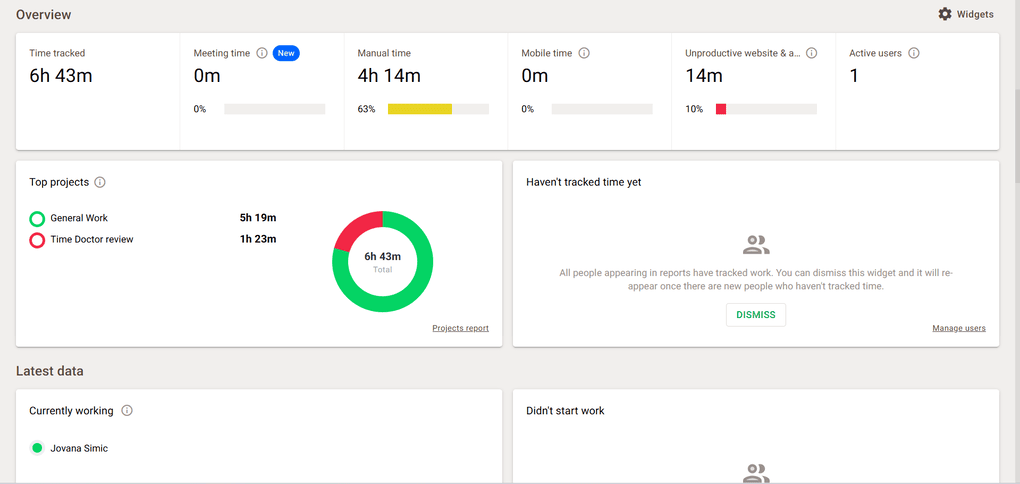
Time tracking: Time tracking isn’t built into the web app, so you’ll need to use the desktop app instead. The desktop app tracks time well, but that’s pretty much all it does. Besides the manual time tracking, you can use its automatic time tracking feature to capture the time spent.
Benchmarks AI: Time Doctor’s Benchmarks AI feature is designed to help you understand how your overall productivity ratings compare to others. It uses AI to match you with similar profiles or lets you benchmark against all profiles across the platform.
Payroll software: You can set hourly budgets for each team member to keep payroll expenses under control. Time Doctor also makes it easy to track billable hours, ensuring accurate client invoicing and payroll calculations.
Employee monitoring features: It takes screenshots at set intervals and shows them in the Screencasts section of the web app, while monitoring keyboard and mouse activity. However, you can customize or even disable this option completely.
Detailed reports: This feature gives you a clear, detailed view of productivity and work hours. You can fully customize each report, which makes usage tracking and employee monitoring much more straightforward.
Mobile app: When it comes to the mobile app, I had a bit of download trouble with the Android version. However, the iOS app, on the other hand, installed immediately without any problems.
What does Time Doctor cost?
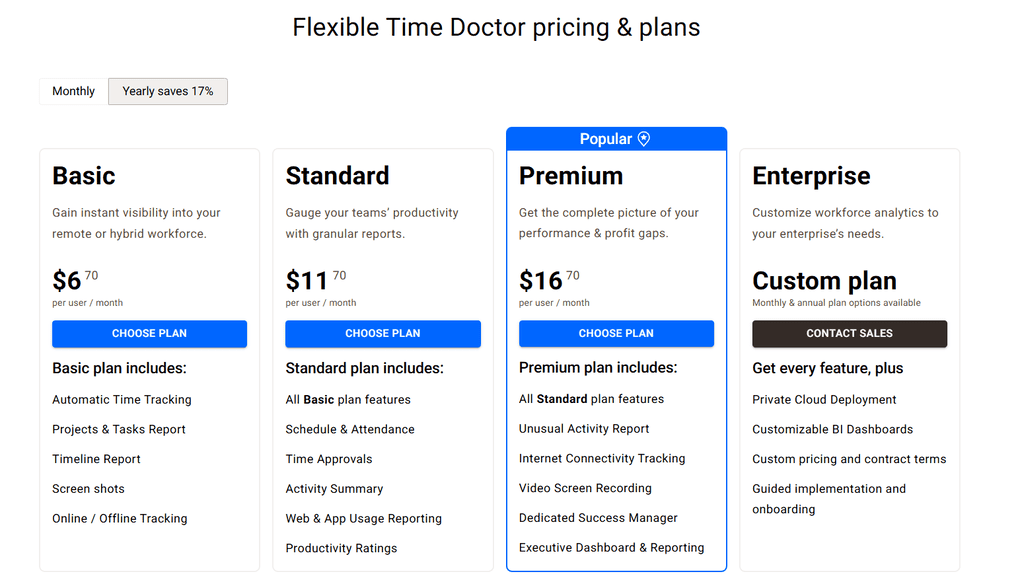
Time Doctor offers a 14-day free trial, so you can test it and see if it’s worth the money, but there is no free version.
The Basic plan costs $8 per user with monthly billing. This plan comes with automatic time tracking, project and task reports, and a timeline report. You’ll also get screenshots and online/offline activity tracking.
The Standard plan is $11.70 per user a month with annual billing, and $14 with the monthly billing option. This plan includes more advanced features and provides all the management insights not available in the Basic plan.
The Premium plan is $20 per user a month with monthly billing, or $16.70 with annual billing.
The Enterprise plan is built for larger organizations that need advanced features and dedicated support. It offers VIP support, enterprise-grade security, and customizable tools.
Strengths & Limitations
Before adding Time Doctor to your tool stack, here are the pros and cons I think you should know.
Strengths of Time Doctor
Limitations of Time Doctor
Why is Time Doctor the best time tracking app for remote teams?
Time Doctor works well for global teams that value detailed reports, monitoring, and payroll features. If you are running a remote team, Time Doctor is probably among the most efficient time tracking apps currently.
🔎 Read my full Time Doctor Review 2026 | Too Invasive or Worth Every Penny?
Related articles:
- Time Doctor vs Clockify 2026 | An Unfiltered Comparison
- Time Doctor vs Hubstaff 2026 | A Honest Comparison

Clockify
Clockify is a popular time tracking app for Windows, Mac, web, and mobile devices. With its budget-friendly pricing and generous free plan, it’s a flexible choice for individuals and teams.
Quick Verdict
Teams and individuals who are looking for a simple yet robust time tracking app at an affordable price
Design-conscious users
It offers unlimited time tracking with the free plan
It has basic productivity insights, particularly if we compare it to Rize
🔒Privacy & tracking: By default, Clockify is not an invasive time tracking app and works as a user-driven tool. But with paid plans, you can enable advanced tracking features, such as activity monitoring and screenshots.
How Clockify handled real-world time tracking
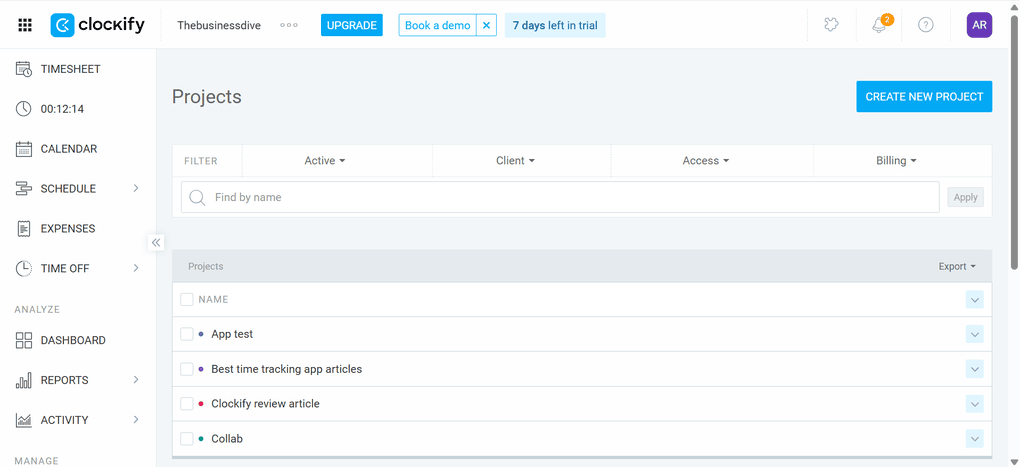
Clockify is a simple time-tracking software for individuals and teams. Although it is a feature-rich app, as you can use it for expense management and invoices, I still missed the in-depth options for the dashboard or time tracker, for example.
The user interface is quite straightforward, but compared to Toggl Track or Rize, it’s far from polished. Nonetheless, there is a short learning curve regardless of the number of features this time-tracking software can offer.
Its Free plan is absolutely one of the best, and you can access numerous advanced features. When it comes to the paid plans, Clockify adopted reasonable pricing. So, I would definitely not call it an expensive time-tracking software.
If you want to have a simple time-tracking solution for your business with numerous other features that can replace other tools, for example, invoicing or expense management apps, Clockify could be a great option.
In addition, it could be an excellent alternative for agencies or client-facing teams, as it offers many advanced features to keep track of time, projects, and billable hours.
Who should consider Clockify?
Who should look elsewhere?
Core features & functionality
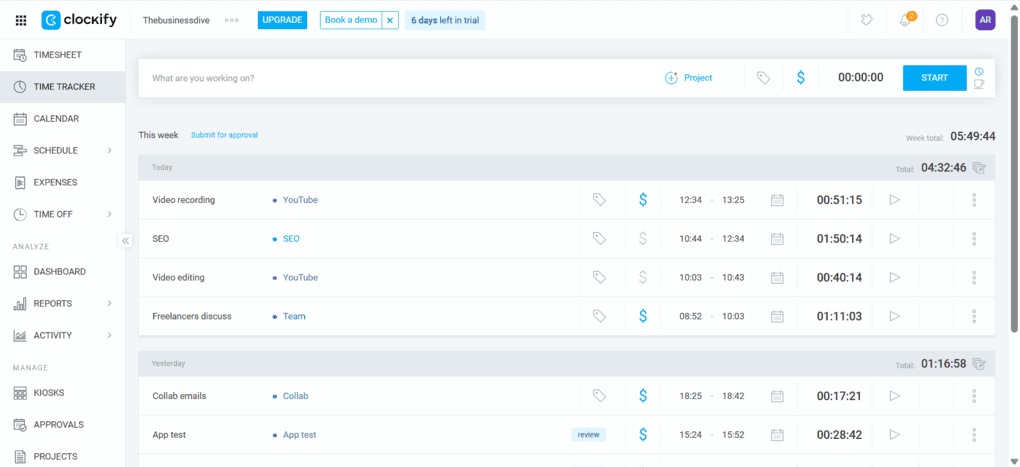
Time tracking: You can use a timer to capture your time spent on specific projects and tasks. When starting a new task or project and wanting to keep track of your time spent, you can add some additional information. Moreover, you can utilize Clockify’s automatic time tracking feature if you have downloaded the desktop app. With this feature, Clockify will track websites and programs you view for more than 10 seconds.
Timesheet app: This feature allows users to log time spent on projects and tasks, categorize entries, add details, generate reports, and submit them for approval. You can filter on different periods and team members, but you can also modify, remove, or add new entries.
Project management features: With Clockify, you can create multiple projects. When creating a new project, you can enter a project name, select a color or client, and choose whether it is visible to all the team members. However, keep in mind that Clockify does not have advanced project management features. For example, there are no project visualization options for your projects.
Calendar: Clockify has an in-built calendar feature to track time, compare planned vs tracked time, and add or edit entries. It makes sense to integrate with your Google Calendar or Outlook to see all your events in one place.
Expense management: Before creating an expense, you need to make sure you have all the expense categories you need. Clockify offers some default categories like meals or entertainment, but you can create some personalized ones. Once you’re done, you can create an expense with just a few clicks. Clockify allows you to add a date, project, team member, category, amount, note, and attach files.
Reporting features: Essentially, the reports break down data by team, project, billable hours, and date. It visualizes with charts and allows for comparison of estimated vs tracked time. What I especially loved when using this feature is how easy it is to access the earnings, costs, profit, billable hours, and non-billable hours. It offers a great way to see how your team is working from a profitability perspective.
Invoices: Clockify also has an invoicing feature where you can select which client you want to issue it to. It is an easy-to-use feature overall, and you have all the options to create an invoice fast. Once you have added the necessary information, you can download it or send the invoice directly. All in all, it is a simple feature for those who do not use an invoicing app.
GPS tracking: This Clockify feature is valuable for teams with numerous members who are on the road or on-site. They can clock in via their mobile app, and you can see their location on the map.
Mobile app: Clockify offers mobile apps for iOS and Android devices. Using the mobile version, you can access some of the key features of Clockify, like the time tracker, timesheet, and dashboards. Personally, I felt the user interface was a bit annoying compared to other time tracking apps. Furthermore, sometimes, I encountered bugs or long loading times.
What does Clockify cost?
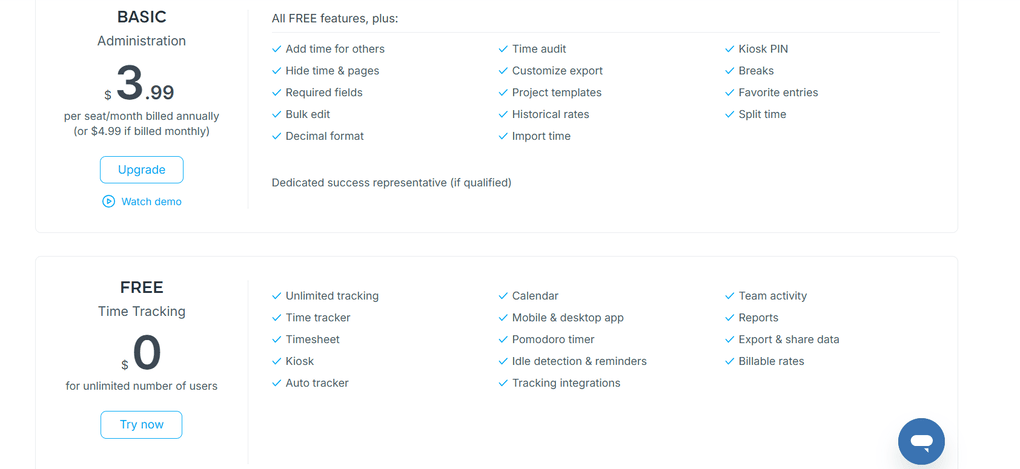
You can use Clockify for free with unlimited users. The Free plan covers key features such as a time tracker, timesheet, kiosk, calendar, Pomodoro timer, mobile and desktop apps, reports, and auto tracker.
The Basic plan is $3.99 per user per month with annual billing.
In terms of features, the Basic plan offers additional options like project templates, breaks, and kiosk pins.
The Standard plan includes additional features such as time-off requests, invoicing, approvals, and task rates. You can get this plan for $5.49 per month per user with annual billing.
If you need robust time-tracking features, I recommend choosing the Pro plan. With this plan, you can access all the features I showed you in this Clockify review. The Pro plan is $7.99 per month with annual billing.
For larger businesses, Clockify offers an Enterprise plan. When choosing the annual billing, it is $11.99 per user per month.
Lastly, Clockify provides a Bundle plan that covers all the features of Clockify, Pumble, and Plaky. You can have this for $12.99 per user, per month, with annual billing.
Strengths & Limitations
After testing Clockify, these were the biggest things it did well and where it struggled.
Strengths of Clockify
Limitations of Clockify
Why is Clockify the best budget-friendly time tracking solution?
Clockify is an affordable time-tracking app for professionals and teams. It offers more budget-friendly pricing plans than most time tracking apps, and has a quite solid free plan.
I had a positive experience when using Clockify in my business, and I think it offers an efficient solution overall to track time, projects, and expenses.
🔎 Read my full review: My Brutally Unfiltered Clockify Review After 4 Weeks (2026)
Summary: The best time tracking software in 2026
After my long research and testing, I found these to be the best time tracking apps in 2026. Keep in mind that there are many options on the market, and these are only my personal picks after testing 25 time tracking apps.
I hope I was able to find the best time tracking apps in 2026. As always, I will keep updating this list to ensure it reflects reality.
Related articles:
- 18 Best Slack Integrations You Are MISSING In 2026
- 7 Best Productivity Apps I Use In 2026 | 100+ Tools Tested
- 15 Best AI Tools | 200+ Apps Tested By A Skeptical (2026)
Looking for similar tools?
Visit the link to explore other apps we’ve reviewed in this space and how they compare.
Why you can trust our reviews
At thebusinessdive.com, our team tests, reviews, and compares hundreds of productivity apps every year — from project management tools to note-taking apps. We dive deep into real-world use cases to help you find the right tools that actually improve your workflow, not just add noise.
Our mission? No fluff, no shortcuts—just honest, hands-on insights from productivity pros.
Discover how we stay transparent, read our review methodology, and let us know about any tools we missed.
Frequently asked questions
What is the best app for tracking hours?
For me, Rize is the best time tracking app. It’s ideal for business owners, freelancers, and managers who value their time and need a real-time tracking solution.
For teams, Toggl Track can be an excellent alternative. It has decent project and task management features with smooth time tracking to improve team productivity.
What is the best free app for tracking?
Probably, Clockify offers one of the most extensive free plans. Its free version covers some of the key features like a time tracker, timesheet, kiosk, calendar, pomodoro timer, mobile and desktop app, reports, and auto tracker.
Is Clockify still free?
Clockify has a free version, which provides you with access to numerous useful features. However, if you need more advanced tools, you probably need to upgrade to one of its paid plans.
What is the best time tracking app for field teams?
Besides ClockShark, Workyard, and Jibble can be excellent choices for tracking your team members with GPS and ensuring accurate payroll.
Disclosure: I only recommend products I would use myself, and all opinions expressed here are my own. This post may contain affiliate links through which, at no additional cost to you, I may earn a small commission. Read the full privacy policy here.

Hey there! I am Aron, the founder of Thebusinessdive. I have been testing productivity apps for almost three years now. I reach 25.000 -50.000 people monthly with the mission to help you find the perfect productivity apps. Subscribe to my YouTube channel, newsletter, and social media to hear more about the best productivity tools. Let’s dive in!
“Great roundup, Aron! Time tracking is crucial for productivity, and your extensive testing of these apps is really valuable. Looking forward to trying out your top picks and seeing how they can streamline my workday in 2025. Thanks for saving us the hassle of sorting through the myriad of options out there!”
That line about ‘actual testing and not marketing claims’ is exactly why I trust this list. Too many roundups feel like paid placements, but the 100+ hours of real effort comes through in how you describe each tool’s
Great resource! I especially like how useful and simple this is for checking the current time at a glance. For anyone looking for a convenient **digital clock**, this is worth checking out: https://timerclock.io/digital-clock/