


How we test time tracking apps at TheBusinessDive
To stay transparent, we want to explain how we test time tracking apps at TheBusinessDive.
Our testing framework (at a glance)
- Average testing time per tool: 7–21 days
- Number of tools tested: 10+ time tracking apps
- Test scenarios: freelancers, team tracking, and billable work workflows
- Platforms tested: Web, mobile, desktop (when available)
- Review process: the same framework is applied across all time tracking reviews
This structured approach ensures that every tool is evaluated consistently and under comparable conditions.
Our scoring system for time tracking apps
Our scoring system for time tracking apps is built on 3+ years of hands-on testing across 10+ apps and real-world use cases.
The goal is simple: help you quickly decide whether a time tracking app is right for you — based on structured, repeatable testing criteria, not marketing claims.
Each time tracking app is evaluated across 10 key factors, with a strong emphasis on real functionality and everyday usability.
How We Score Time Tracking Apps (Quick Breakdown)
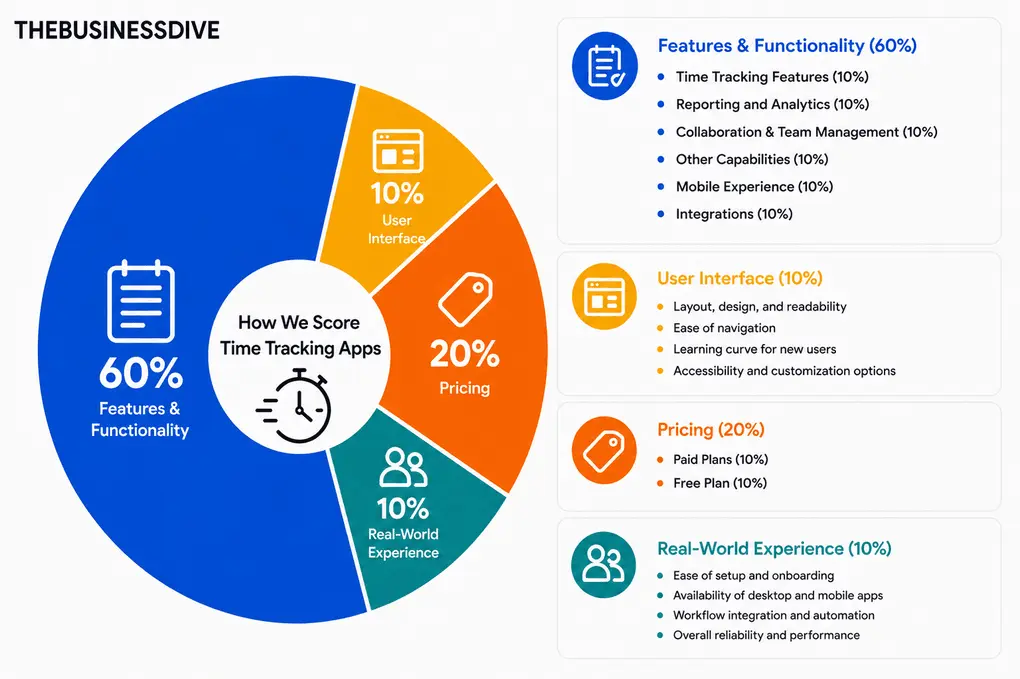
- Features & Functionality → 60%
- User Interface → 10%
- Pricing → 20%
- Real-World Experience → 10%
Features & Functionality (60%)
We test each time tracking app across the following areas:
Time Tracking Features (10%)
We evaluate:
- How easy it is to start, pause, and stop time tracking
- Availability and accuracy of automatic time tracking
- Ability to set rules and categories for tracked time
- Options for tracking billable vs non-billable hours
We use each tool over several workdays to see how well it integrates into real workflows.
Reporting and Analytics (10%)
We assess:
- Extensiveness and depth of reporting features
- Ability to identify patterns and productivity insights
- Ease of sharing, exporting, and customizing reports
- How reports help optimize time management
Collaboration & Team Management (10%)
We evaluate:
- Task assignment and team tracking options
- Shared dashboards, reports, and insights
- Collaboration features like commenting or tagging
- Team-based notifications and workflow management
Other Capabilities (10%)
We test:
- Unique features beyond basic time tracking (e.g., invoicing, automated alerts, productivity suggestions)
- Built-in AI or analytics enhancements
Mobile Experience (10%)
We evaluate:
- Accessibility on iOS and Android
- Feature parity between mobile and desktop
- Mobile performance and usability
Integrations (10%)
We assess:
- Available third-party integrations
- Ease of setup and workflow connection
- How well integrations work in real-world scenarios
User Interface (10%)
We test:
- Layout, design, and readability
- Ease of navigation
- Learning curve for new users
- Accessibility and customization options
Pricing (20%)
We also consider pricing when determining our final score for each time-tracking app.
Paid Plans (10%)
We evaluate Paid Plans:
- Value for money relative to competitors
- Plan features vs pricing
- Transparency and payment flexibility
Free Plan (10%)
- Availability and functional limitations
- Usability of free plan for daily workflows
Real-World Experience (10%)
Finally, we evaluate day-to-day usability:
- Ease of setup and onboarding
- Availability of desktop and mobile apps
- Workflow integration and automation
- Overall reliability and performance
Our testing approach
Time tracking apps are used daily to log work hours, manage productivity, and support billing or payroll processes. Because of that, we do not evaluate them based only on features.
We test time tracking apps by tracking real work time over multiple days. This includes using timers, adding manual entries, pausing and resuming sessions, and adjusting logged time to reflect real work patterns.
We also test how time tracking fits into broader workflows such as calendars, project management, invoicing, and reporting.
This testing framework is used across all of our time tracking content, including individual reviews, comparisons, and “best of” guides. All recommendations are based on this same evaluation process, not on one-off impressions.
Testing duration & depth
Each time tracking app is tested for at least 1–3 weeks, not just a quick trial.
We use every tool across multiple workdays and scenarios to understand how it performs over time. This includes tracking different types of tasks, revisiting entries, and evaluating how the system handles interruptions and corrections.
Why time tracking apps are hard to compare
Time tracking apps often seem simple until they are used consistently in daily work.
From our testing, here are the main reasons they are difficult to compare:
- Manual versus automatic tracking. Some tools rely on timers, others track activity automatically
- Solo versus team use. Personal tracking differs from managing teams, approvals, and permissions
- Reporting needs. Basic summaries and detailed billing or payroll reports serve different purposes
- Integration depth. Connected workflows behave differently from standalone tracking
Because of this, the real evaluation starts once the tool is used every day.
Real scenarios we test
We do not just explore features. We simulate real work environments:
- Tracking time across multiple tasks during a workday
- Switching between timer-based and manual tracking
- Editing and correcting time entries after interruptions
- Reviewing reports for billing, payroll, or internal analysis
- Managing time tracking across multiple users in team setups
This helps us understand how each tool performs in realistic conditions.
How we test time tracking apps
We do not rely on short sessions or demo data. We use each tool during real workdays.
We run timers, log time manually, pause and resume tracking, and adjust entries as needed. We compare tracked time with actual work hours and evaluate whether reports are accurate and usable.
For team tools, we also test timesheet approvals, permissions, and admin controls. We check how easy it is to identify missing time, fix errors, and maintain consistency across users.
During testing, we look for clear answers to questions like:
- Does the tool accurately reflect real work time?
- How easy is it to correct mistakes or missed entries?
- Are reports useful for billing or internal tracking?
- Does the tool simplify tracking or create additional overhead?
Testing across multiple days and workflows helps us evaluate consistency and reliability
Proof of testing
All screenshots and videos included in our reviews are:
- created during our own testing
- based on real work tracking scenarios
- never taken from marketing materials
This ensures that all visuals reflect actual product usage.
Check out some of our reviews to see how it works in practice:
What we don’t do
Just as important as what we test is what we intentionally avoid:
- We do not rely only on demos or marketing pages
- We do not rank tools based on affiliate commissions
- We do not test tools for only a few hours
- We do not assume one tool works for every use case
Time tracking depends heavily on workflow and habits, so oversimplifying it would not be helpful.
How we make recommendations
Instead of naming a single “best” tool, we focus on specific use cases, such as:
- Best for freelancers
- Best for team time tracking
- Best for billable hours and client work
- Best for simple personal tracking
- Best budget option
This makes it easier to choose a tool based on how time tracking is actually used.
How often are reviews updated
Time tracking tools evolve regularly. Features change, pricing shifts, and integrations are updated.
We revisit reviews when:
- pricing or plan limits change
- major features are released
- key integrations are updated
Keeping reviews current is part of our process.
Transparency & monetization
Some of our articles include affiliate links. If you sign up through one of them, we may earn a commission at no extra cost to you.
This never influences how tools are tested, ranked, or recommended.