


Salesforce Alternatives: 6 Better CRM Options for 2026
Salesforce CRM is incredibly capable, but many businesses don’t need an enterprise CRM platform to manage their sales process effectively.
If your priority is a more user friendly interface, better sales pipeline management, or affordable CRM software with solid workflow automation, these Salesforce alternatives are the ones I’d recommend:
👩🏻💻 Nutshell → Best Salesforce alternative for small businesses
🌱 HubSpot → Best Salesforce alternative for growing businesses
💼 Pipedrive → Best Salesforce alternative for sales pipeline management
🌐 Copper CRM → Best Salesforce alternative for Google Workspace users
⚙️ Zoho CRM → Best Salesforce alternative for affordable customization
✨ Monday CRM → Best Salesforce alternative for collaborative sales workflows
Best Salesforce Alternatives Compared
If you don’t want to read the entire guide, this comparison table will help you narrow down your options in under a minute.
|
CRM |
Best if you want… |
Why switch from Salesforce? |
Learning curve 📈 |
Pricing 💰 |
|---|---|---|---|---|
|
A simpler sales CRM |
Easier to learn and manage |
Easy |
From $13/user/month |
|
|
Sales and marketing in one platform |
Easier setup and a generous free plan |
Easy |
Free + from $10/seat/month |
|
|
Better visibility into every deal |
Simpler sales pipeline management |
Easy |
From $14/user/month |
|
|
A CRM that works inside Gmail |
Native Google Workspace integration |
Easy |
From $23/user/month |
|
|
Enterprise-style customization for less |
Similar flexibility at a lower cost |
Moderate |
Free + from €14/user/month |
|
|
Sales and teamwork in one workspace |
Better collaboration across teams |
Moderate |
From €12/seat/month |
How We Chose the Best Salesforce Alternatives
We evaluate every CRM using the same hands-on testing framework we developed after testing 10+ CRM platforms across real sales workflows. This allows us to compare each platform consistently while understanding where it performs best.
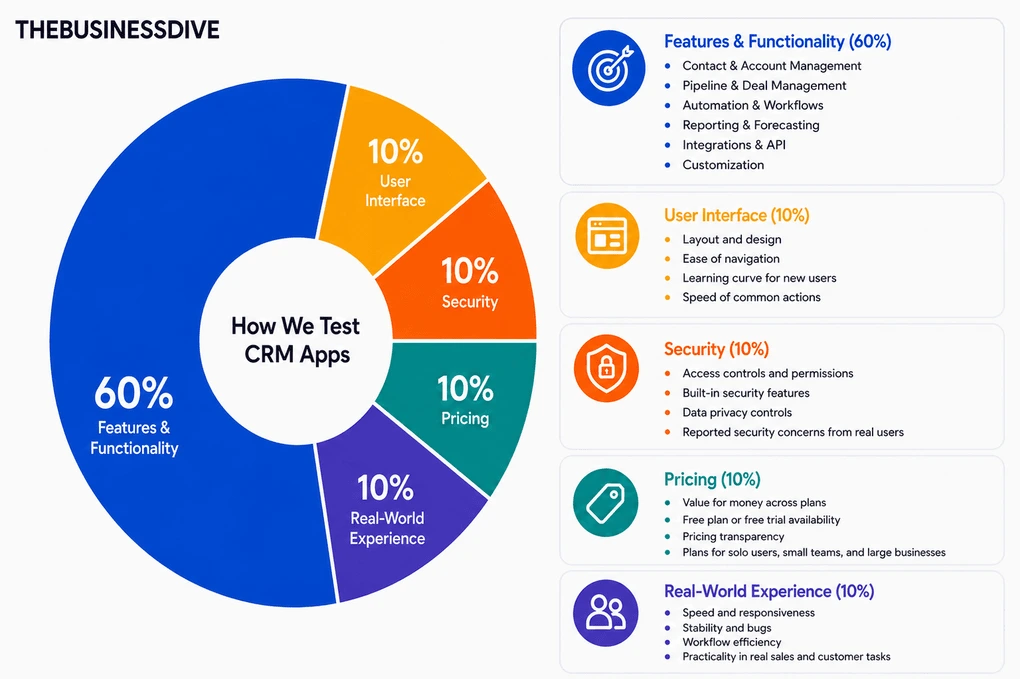
Our scoring breakdown for CRM tools:
🛠️ Features & functionality — 60%
🖥️ User interface — 10%
🔒 Security — 10%
💰 Pricing — 10%
👥 Real-world experience — 10%
Most of the Salesforce alternatives featured in this guide also have dedicated review articles with full scores and detailed testing breakdowns.
However, this ranking isn’t based on review scores alone. We also compared each CRM directly with Salesforce based on pricing, usability, customization, automation, and real-world business fit.
As a result, every recommendation is designed for a different type of business and reason for switching.
Want a detailed breakdown of how we test each category?
Learn exactly how we test tools → Review methodology
Detailed Reviews of the Best Salesforce Alternatives
Wondering how each Salesforce alternative performed during our testing?
Check out our detailed reviews for each option we selected.

Nutshell
Nutshell is an all-in-one CRM that combines contact management, pipeline tracking, communication, reporting, and sales automation tools in one platform. Nutshell is built for small businesses that want a structured sales CRM without the overhead of an enterprise platform.
Quick verdict
Small businesses that want an easy-to-use CRM with sales, communication, and pipeline management in one place.
You manage highly complex enterprise sales processes that require extensive customization.
A much simpler CRM that doesn’t require extensive setup or administration.
It isn’t designed for the same level of enterprise customization as Salesforce.
Why choose Nutshell over Salesforce
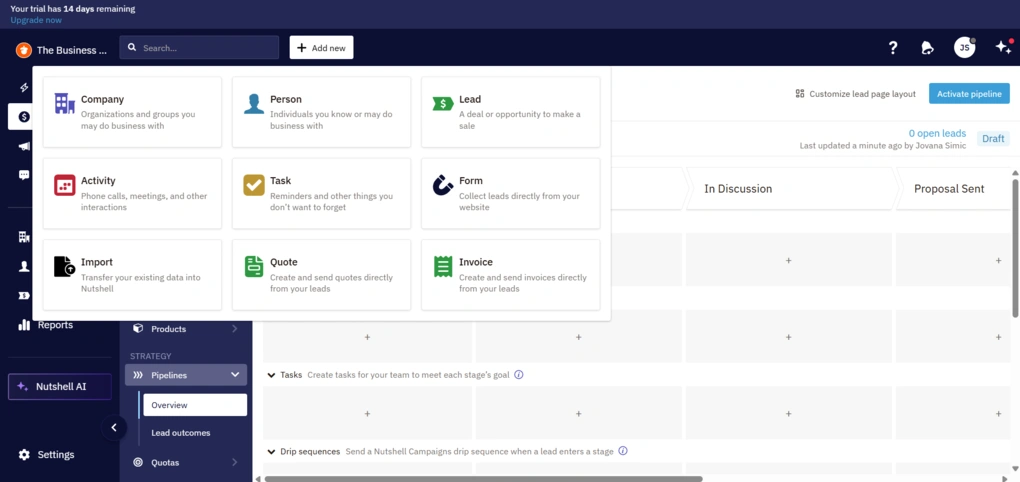
While testing Nutshell, I was able to import contacts, create leads, and build my first pipeline with very little setup. The core workflow was easy to follow, so I could start managing deals almost immediately.
As I spent more time with the platform, I discovered more advanced customization and automation features. They do take a bit of time to learn, but the everyday sales workflow always remained simple and easy to navigate.
What I liked most is that customer information stays organized in one place. Contacts, emails, notes, meetings, and tasks are all linked to the same deal, making it easy to see the full history of every opportunity.
I also appreciated being able to customize pipelines and automate routine tasks as my sales process became more structured. For a small business, it strikes a good balance between flexibility and ease of use.
Salesforce is built for organizations with highly complex sales operations, dedicated CRM administrators, and extensive customization needs. Nutshell takes a different approach by focusing on the features most small businesses use every day, making it a much easier CRM to adopt and manage.
The Good and Not-So-Good After Testing Nutshell
|
Pro |
Why it’s important |
|---|---|
|
Easy to learn |
I could start managing contacts, pipelines, and deals quickly without spending much time on setup. |
|
Everything stays connected |
Contacts, deals, emails, meetings, notes, and tasks all remain linked together, making customer history easy to review. |
|
Flexible pipeline management |
I could customize stages, automate repetitive tasks, and create different pipelines as my workflow evolved. |
|
Built-in communication |
Emails and customer conversations stay attached to each deal, making follow-ups much easier. |
|
Built for small businesses |
It focuses on the CRM features most small businesses use every day without the overhead of an enterprise platform. |
|
Con |
The tradeoff |
|---|---|
|
Advanced features take time to master |
The core CRM is easy to use, but some automation and customization tools require more time to explore. |
|
Not built for enterprise-scale customization |
Organizations with highly specialized workflows may eventually need a more configurable platform like Salesforce. |
|
Fewer enterprise capabilities |
Large organizations that rely on advanced permissions, custom objects, or complex enterprise workflows may find Salesforce a better fit. |
Plans & costs
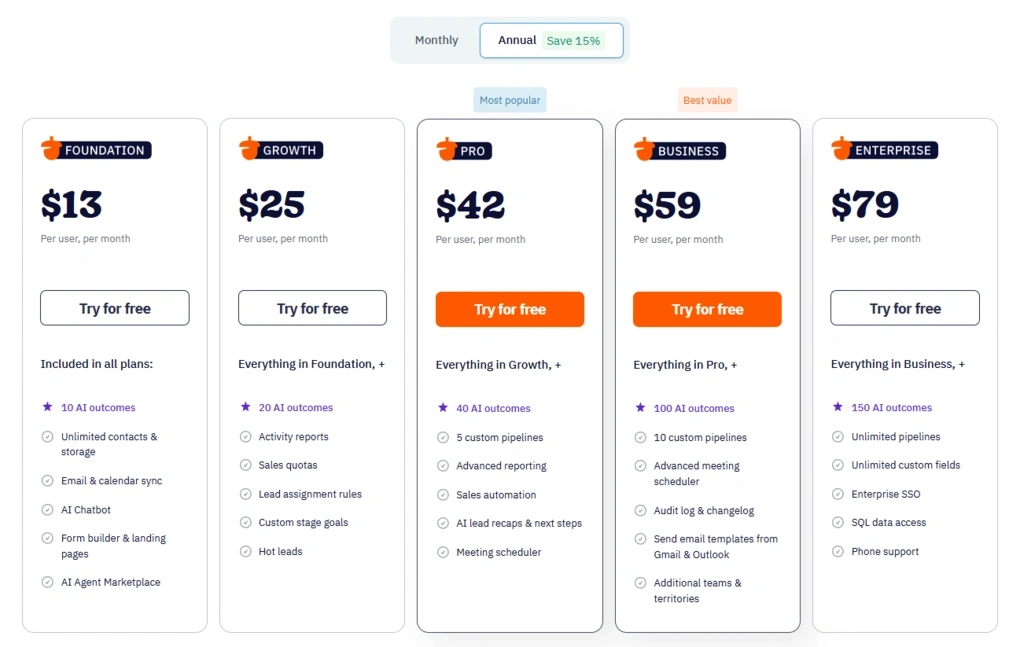
- No free plan, only a 14-day free trial
- Foundation plan: $13/user/month
- Growth plan: $25/user/month
- Pro plan: $42/user/month
- Business plan: $59/user/month
- Enterprise plan: $79/user/month
- Optional paid add-ons are available for additional functionality
🔎 Read my full review: Nutshell Review 2026 | Everything You Need to Know

HubSpot
HubSpot is an all-in-one CRM that combines sales, marketing, customer service, and automation in a single platform. Compared to Salesforce, it offers a more approachable experience while still giving growing businesses plenty of room to scale.
Quick verdict
Growing businesses that want CRM, sales, marketing, and customer service tools in one platform.
You’re looking for a lightweight CRM or want to keep software costs low as your team grows.
A much easier learning curve with a powerful all-in-one ecosystem.
Costs increase quickly as you unlock more advanced features and additional Hubs.
Why choose HubSpot over Salesforce
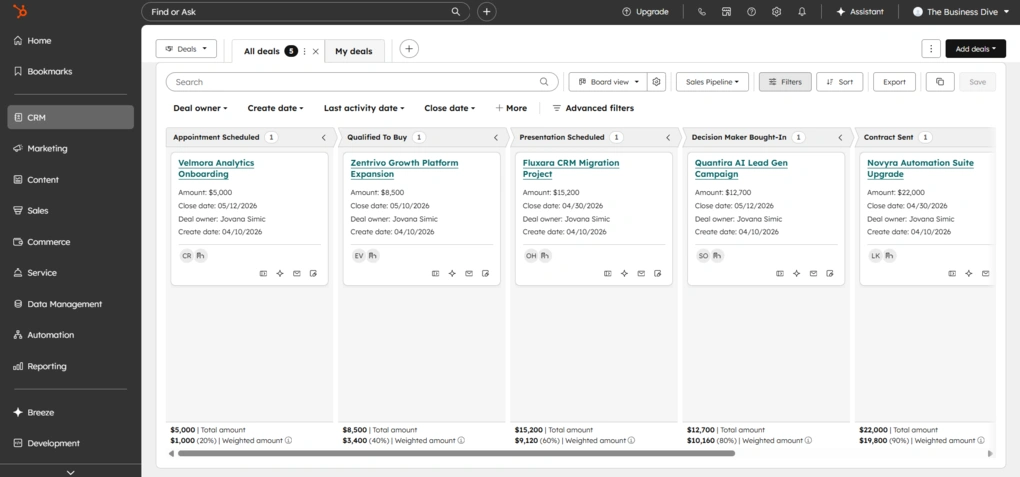
One thing I noticed almost immediately while testing HubSpot is how easy it is to get started. Importing contacts, creating deals, customizing pipelines, and navigating the platform all felt intuitive, even though HubSpot includes a wide range of features.
What makes it different from Salesforce is that it combines CRM, sales, marketing, customer service, and automation in one connected ecosystem that’s designed to be accessible from day one.
As my testing progressed, I found plenty of advanced features to grow into, but the platform never felt as overwhelming as a traditional enterprise CRM.
Another advantage is the free CRM. Before paying for an upgrade, I could already manage contacts, track deals, capture leads, and run basic email marketing campaigns. That makes HubSpot much easier to adopt for businesses that are still growing.
Salesforce still offers deeper customization for large enterprises with highly specialized sales processes. But if your business is growing and you want an all-in-one platform that’s easier to implement and manage, HubSpot strikes a better balance between functionality and usability.
The Good and Not-So-Good After Testing HubSpot
|
Pro |
Why it’s important |
|---|---|
|
Easy to get started |
I was able to import contacts, customize pipelines, and begin managing deals without a complicated setup. |
|
Complete business platform |
CRM, sales, marketing, customer service, and automation all work together using the same customer data. |
|
Generous free plan |
The free CRM includes enough features to manage contacts, deals, lead capture, and basic email marketing before upgrading. |
|
Powerful automation and integrations |
As my needs grew, I could connect HubSpot with hundreds of business tools and automate increasingly complex workflows. |
|
Scales with your business |
The platform supports everything from small teams to growing organizations without requiring a move to another CRM. |
|
Con |
The tradeoff |
|---|---|
|
Pricing increases quickly |
Unlocking advanced automation, reporting, and marketing capabilities can become expensive. |
|
More complex over time |
As you start using multiple Hubs and advanced workflows, there’s more to learn and manage. |
|
Less customizable than Salesforce |
Businesses with highly specialized enterprise workflows may find Salesforce offers greater flexibility |
Plans & costs
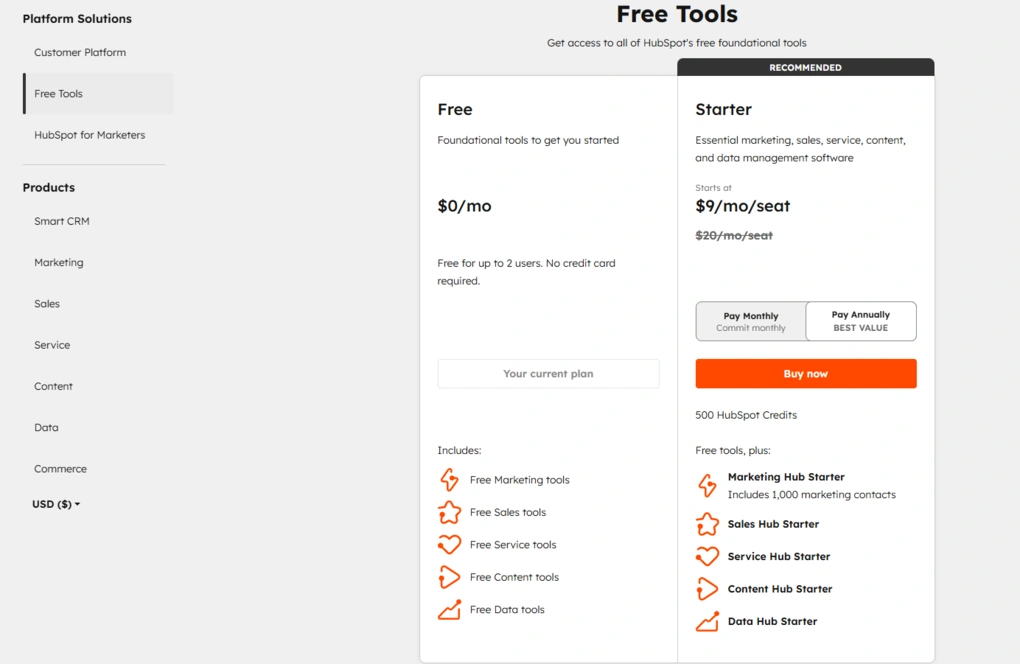
- Free plan available
- Starter plan: $10/seat/month
- Professional plan: $1450/6 seats/month
- Enterprise plan: $4700/8 seats/month
HubSpot also offers separate Marketing, Service, Content, and Operations Hubs, each with its own pricing. Costs can increase significantly as you add advanced features, extra seats, or additional Hubs.
🔎 Read my full review: HubSpot Review 2026 | I Tested It — Here’s the Truth

Pipedrive
Pipedrive is a sales-focused CRM built around visual pipeline management, deal tracking, and follow-ups. Compared to Salesforce, it strips away much of the complexity and focuses on helping sales teams move deals through the pipeline as efficiently as possible.
Quick verdict
Sales teams that want a simple CRM focused on managing deals, follow-ups, and pipeline visibility.
You need enterprise-level customization or an all-in-one platform with marketing and customer service tools.
A much simpler sales workflow centered around visual pipeline management.
Many features beyond core sales management require paid add-ons.
Why choose Pipedrive over Salesforce
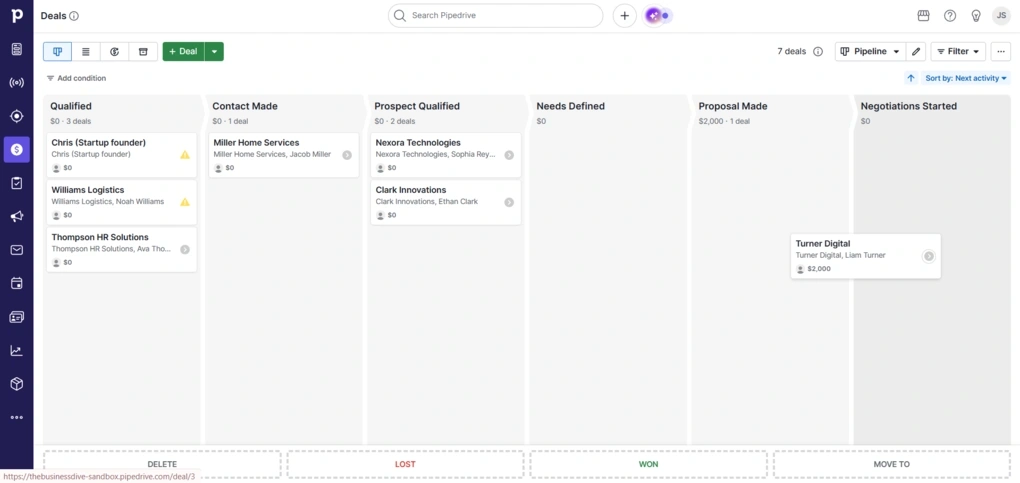
While testing Pipedrive, I noticed that almost every part of the platform revolves around the sales pipeline. Whether I was adding deals, scheduling activities, or reviewing follow-ups, everything stayed connected to the pipeline, so keeping track of my work felt straightforward.
One feature I especially liked was the separate Leads Inbox. New leads don’t immediately appear in the pipeline, which keeps active opportunities separate from contacts that still need qualification. As the number of deals grew, that made the pipeline much easier to manage.
I also appreciated how closely activities are tied to every deal. Calls, meetings, emails, notes, and follow-ups all stay connected to the same opportunity, making it easy to understand what has happened and what still needs attention.
Salesforce offers far more customization and enterprise functionality, but not every sales team needs that level of complexity. If your priority is simply keeping deals organized, staying on top of follow-ups, and maintaining a clear sales pipeline, Pipedrive delivers a much more focused experience with far less administration.
The Good and Not-So-Good After Testing Pipedrive
|
Pro |
Why it’s important |
|---|---|
|
Visual sales pipelines |
I could see where every deal stood at a glance and move opportunities through each stage with drag-and-drop. |
|
Activity-focused workflow |
Calls, meetings, emails, and follow-ups stay attached to every deal, making daily sales work much easier to organize. |
|
Separate Leads Inbox |
Keeping unqualified leads outside the pipeline helped me stay focused on active opportunities. |
|
Easy to learn |
I was able to start managing contacts and deals almost immediately without a lengthy setup or training process. |
|
Useful reporting |
Dashboards made it easy to monitor pipeline performance, sales activities, and revenue trends. |
|
Con |
The tradeoff |
|---|---|
|
No free plan |
Businesses looking for a free CRM may prefer HubSpot or another alternative. |
|
Paid add-ons |
Lead generation, email marketing, document management, and other advanced capabilities require additional subscriptions. |
|
Limited enterprise customization |
Organizations with highly specialized workflows or complex permissions may find Salesforce a better long-term fit. |
Plans & costs
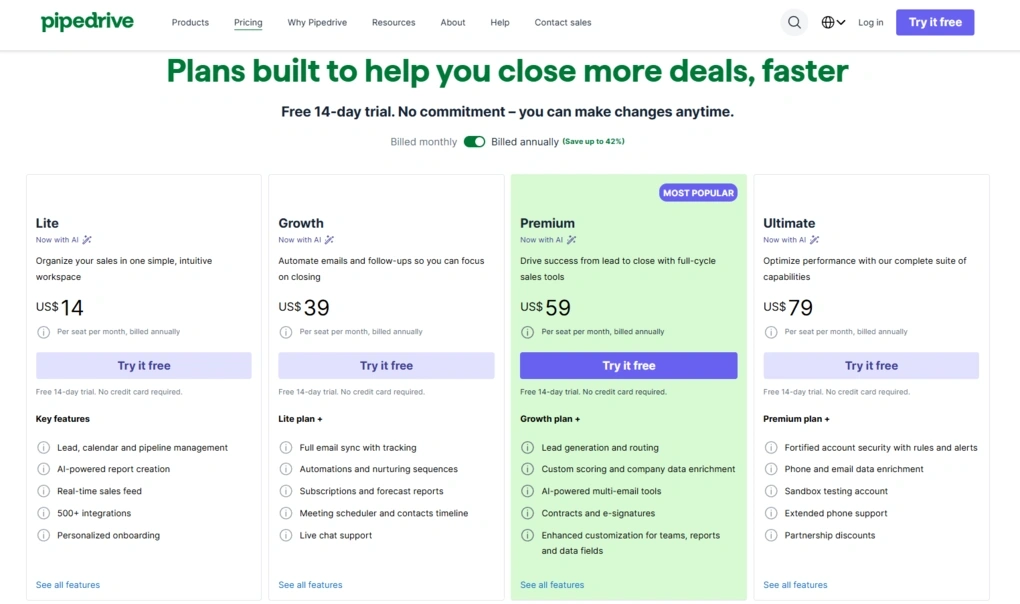
- No free plan, only a 14-day free trial
- Lite plan: $14/user/month
- Growth plan: $39/user/month
- Premium plan: $59/user/month
- Ultimate plan: $79/user/month
- Optional add-ons available
🔎 Read my full review: Pipedrive Review 2026: Tested Firsthand — Here’s the Truth

Copper CRM
Copper CRM is built specifically for Google Workspace, helping businesses manage contacts, deals, and customer communication without leaving Google’s ecosystem. Compared to Salesforce, it offers a much simpler experience that’s easier for Google Workspace teams to adopt.
Quick verdict
Businesses already using Google Workspace that want a CRM built around Gmail, Google Calendar, Google Drive, and Google Contacts.
You need enterprise-level customization or advanced reporting without upgrading to the Business plan.
A CRM that fits naturally into Google Workspace instead of requiring a separate enterprise platform.
Advanced reporting and customization are more limited than Salesforce and several key features require the Business plan.
Why choose Copper over Salesforce
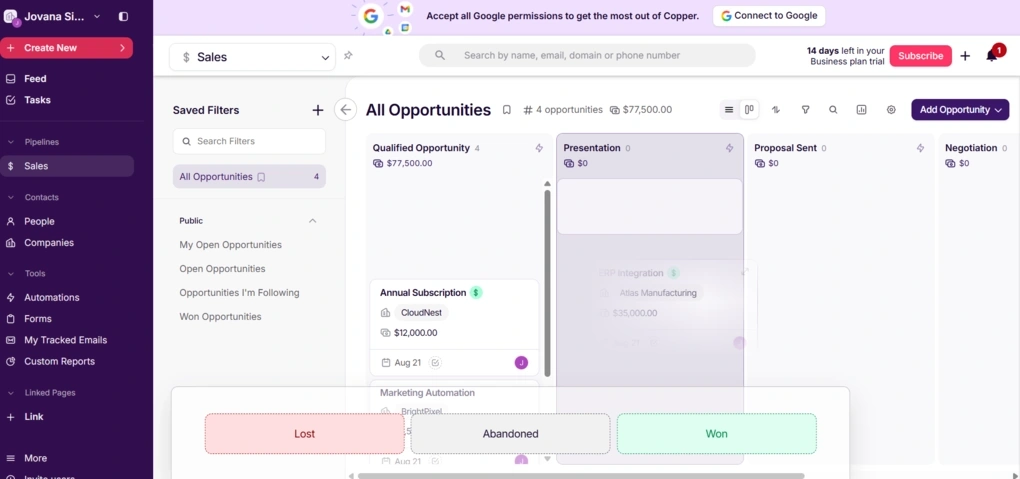
Getting started with Copper didn’t take long. I imported my contacts, built a pipeline, and started exploring the platform without much setup. Unlike Salesforce, which often requires significant configuration before teams can work efficiently, Copper felt ready to use almost immediately.
As I spent more time testing it, I appreciated how consistent the experience remained across the CRM. Whether I was managing contacts, opportunities, or automations, the layout stayed familiar, so I always knew where to find emails, notes, tasks, and activities.
The biggest advantage, though, is how deeply Copper works with Google Workspace. Gmail, Google Calendar, Google Drive, and Google Contacts aren’t treated as external integrations—they’re part of the way the CRM works. That makes the entire experience feel much more natural if your business already runs on Google’s ecosystem.
Salesforce offers significantly deeper customization, reporting, and enterprise capabilities. But if your team already lives inside Google Workspace and wants a CRM that’s easy to adopt without a lengthy implementation, Copper is a much better fit.
The Good and Not-So-Good After Testing Copper
|
Pro |
Why it’s important |
|---|---|
|
Built for Google Workspace |
Gmail, Calendar, Drive, and Contacts work naturally with the CRM, so I didn’t have to constantly switch between different apps. |
|
Easy to adopt |
Importing contacts, creating pipelines, and getting started required very little setup or training. |
|
Consistent interface |
Every section follows the same layout, making it easy to move between contacts, deals, and activities. |
|
Flexible pipeline templates |
I could start with ready-made templates or build custom pipelines for different business workflows. |
|
Well-organized customer records |
Emails, files, activities, notes, and opportunities stay connected, making customer history easy to review. |
|
Con |
The tradeoff |
|---|---|
|
No free plan |
Businesses comparing free CRM options will need to look elsewhere. |
|
Advanced reporting requires the Business plan |
Custom Reports and several analytics features aren’t available on lower-priced plans. |
|
Less enterprise flexibility |
Organizations with highly customized sales processes may eventually need Salesforce’s deeper customization capabilities. |
Plans & costs
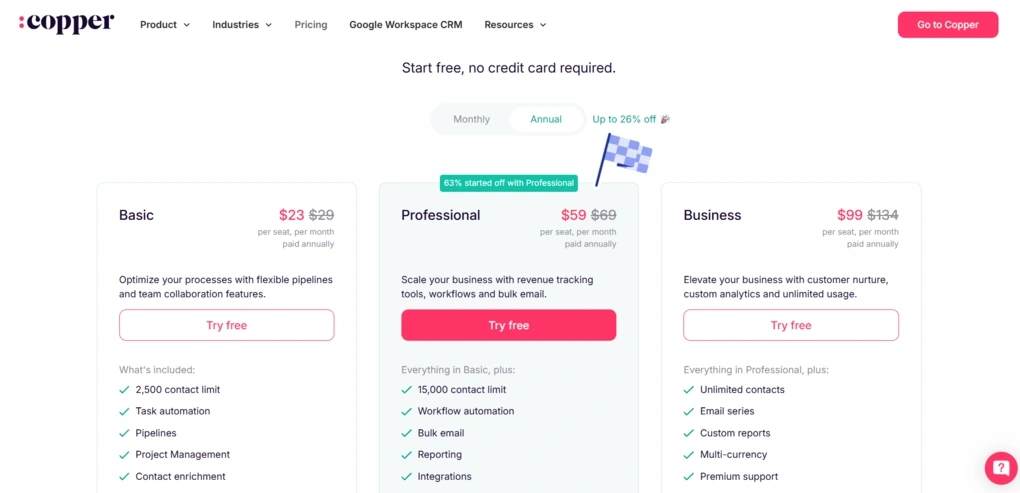
- No free plan, only a 14-day free trial
- Basic plan: $23/user/month
- Professional plan: $59/user/month
- Business plan: $99/user/month
🔎 Read my full review: The 4 Biggest Takeaways From My Copper CRM Review

Zoho CRM
Zoho CRM is a highly customizable CRM that combines contact management, sales automation, AI-powered insights, and reporting in one platform. Compared to Salesforce, Zoho CRM is a more affordable solution that still delivers many of the same core CRM capabilities.
Quick verdict
Businesses that want advanced customization, automation, and AI features without paying Salesforce prices.
You want a CRM that’s easy to learn with minimal setup and configuration.
Many advanced CRM capabilities at a much lower cost.
The platform takes time to fully customize and master.
Why choose Zoho CRM over Salesforce
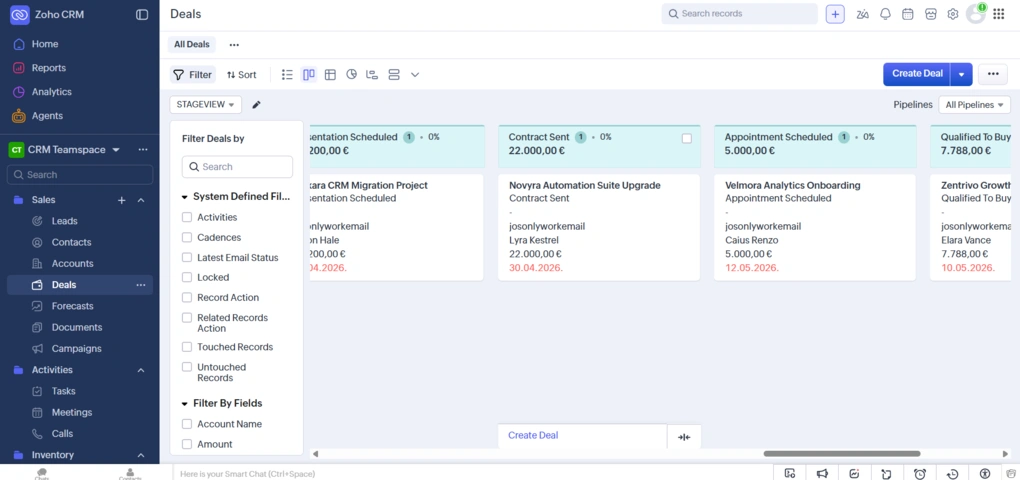
What stood out most while testing Zoho CRM key features was how much functionality it offers for the price. I had access to advanced automation, AI-powered features, reporting, and customization without paying enterprise-level subscription fees.
I also liked how much control I had over the CRM itself. I could customize modules, pipelines, layouts, fields, and workflows to match different sales processes instead of adjusting my workflow to fit the software.
Salesforce still goes further when it comes to enterprise customization and supporting highly complex organizations. But during my testing, Zoho CRM delivered far more flexibility than most growing businesses are ever likely to need, while remaining much easier to justify from a pricing perspective.
If you need a powerful CRM with advanced automation and customization but don’t want the cost or complexity that often comes with Salesforce, Zoho CRM is one of the strongest alternatives I’ve tested.
The Good and Not-So-Good After Testing Zoho CRM
|
Pro |
Why it’s important |
|---|---|
|
Excellent value for money |
I got AI, automation, customization, and reporting without paying enterprise-level prices. |
|
Highly customizable |
Modules, fields, layouts, pipelines, and dashboards can all be adapted to different sales processes. |
|
Powerful automation |
Workflows handled repetitive tasks like lead assignments, follow-ups, and notifications automatically. |
|
AI-powered assistance |
Zia helped with lead scoring, predictions, summaries, and recommended next steps. |
|
Broad Zoho ecosystem |
Connecting CRM with Zoho’s marketing, support, and business apps creates a complete business platform. |
|
Con |
The tradeoff |
|---|---|
|
Steeper learning curve |
Getting the most out of the platform’s customization and automation takes time. |
|
Feature-rich interface |
Teams looking for a lightweight CRM may find the number of options overwhelming. |
|
Less enterprise depth than Salesforce |
Large organizations with highly specialized workflows may still benefit from Salesforce’s broader enterprise capabilities. |
Plans & costs
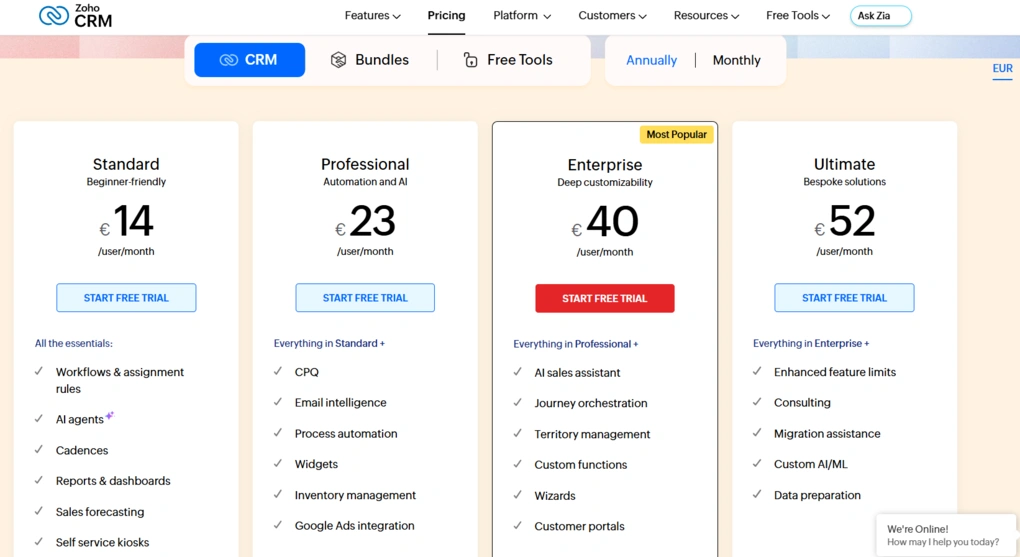
- Free plan and 15-day free trial available
- Standard: €14/user/month (billed annually)
- Professional: €23/user/month (billed annually)
- Enterprise: €40/user/month (billed annually)
- Ultimate: €52/user/month (billed annually)

Monday CRM
Monday CRM is a flexible, board-based CRM that helps teams manage leads, sales pipelines, customer relationships, and internal collaboration from one platform. Compared to Salesforce, Monday CRM offers a more visual and adaptable way to organize work without the complexity of a traditional enterprise CRM.
Quick verdict
Teams that want to manage sales, projects, and collaboration from one highly customizable workspace.
You need deep enterprise CRM customization or prefer a traditional CRM with predefined sales modules.
Much more flexible collaboration across sales and other teams with far less complexity.
Some CRM-specific features require additional setup, and advanced capabilities are reserved for higher-tier plans.
Why choose Monday CRM over Salesforce
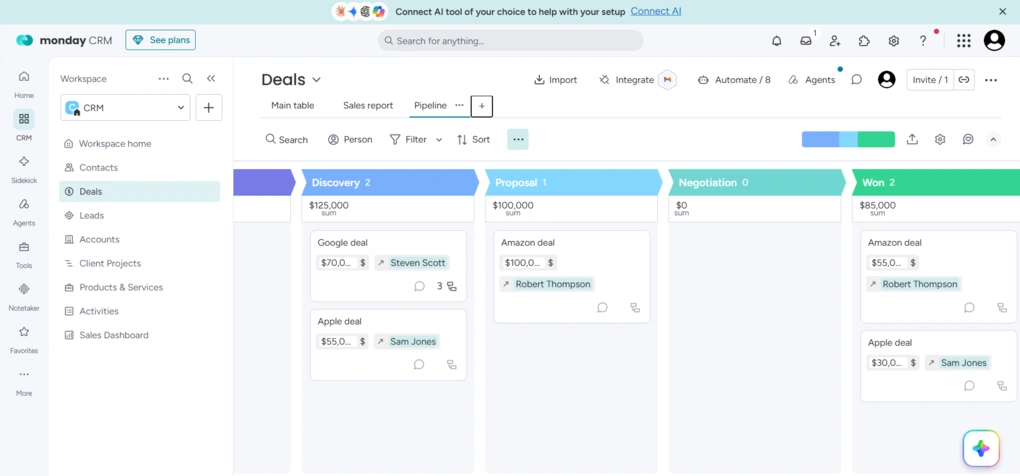
The first thing I noticed while testing Monday CRM is that it doesn’t feel like a traditional CRM. Rather than working within a fixed structure, I could customize boards, pipelines, fields, automations, and dashboards to fit the way my team actually works.
I also liked how easy it was to switch between different views of the same data. Whether I needed a Table, Kanban, Calendar, or Timeline view, I could change the layout in a few clicks while keeping all customer information in one place.
What really stood out, though, is how naturally Monday CRM supports collaboration beyond the sales team. Sales, onboarding, project delivery, and customer success can all work from the same workspace, making handoffs much easier than in a traditional CRM.
Salesforce offers far deeper customization and enterprise capabilities, but many businesses don’t need that level of complexity. If your priority is giving multiple teams a flexible workspace that adapts to your processes, Monday CRM is one of the strongest alternatives I’ve tested.
The Good and Not-So-Good After Testing Monday CRM
|
Pro |
Why it’s important |
|---|---|
|
Highly customizable workflows |
I could tailor boards, pipelines, automations, and custom fields to match different business processes without writing code. |
|
Visual interface |
The board-based layout made it easy to track deals, manage tasks, and switch between multiple views depending on the work I was doing. |
|
Useful automations |
Automating task assignments, follow-ups, notifications, and status updates reduced repetitive manual work. |
|
Flexible dashboards |
Custom dashboards gave me a clear overview of pipeline performance, team activity, and sales metrics in one place. |
|
Strong cross-team collaboration |
Sales, onboarding, project delivery, and customer success can all work from the same workspace, making collaboration much smoother. |
|
Con |
The tradeoff |
|---|---|
|
Learning curve for customization |
Building boards, workflows, and automations takes some planning before everything works the way you want. |
|
Advanced features require higher-tier plans |
AI capabilities and several advanced automations are only available on more expensive plans. |
|
Less enterprise depth than Salesforce |
Organizations with highly specialized CRM requirements may still benefit from Salesforce’s broader customization and administration capabilities. |
Plans & costs
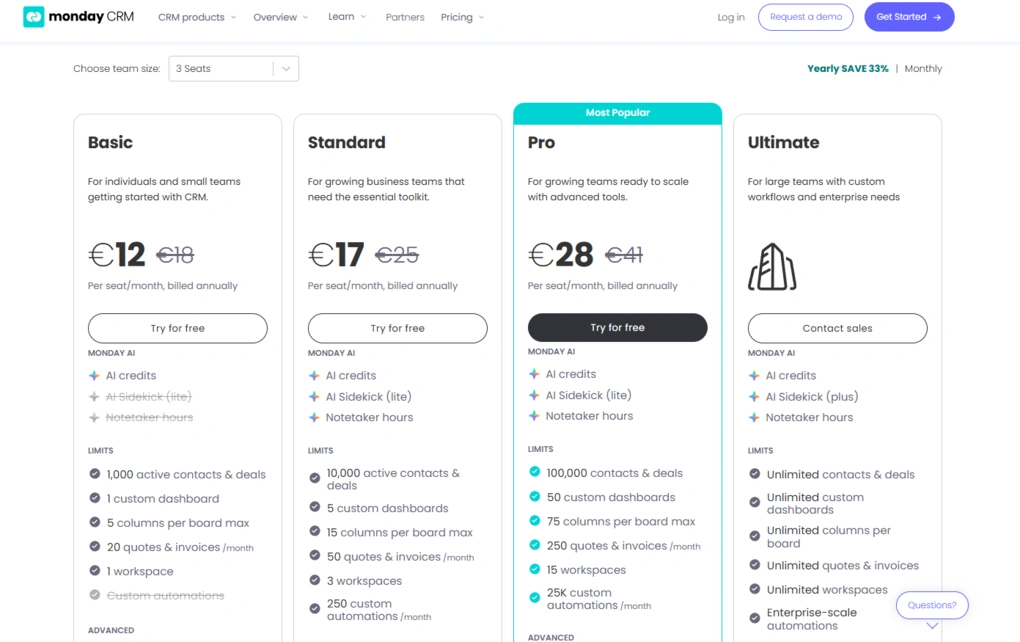
- No free plan, only a 14-day free trial
- Basic: €12/seat/month (billed annually)
- Standard: €17/seat/month (billed annually)
- Pro: €28/seat/month (billed annually)
- Enterprise: Custom pricing
Final thoughts
A good CRM platform should make daily work easier. The best CRM software helps you automate sales processes, improve and track sales performance, and support long-term business growth.
That’s why the best Salesforce alternatives are the ones that fit your sales teams, sales process, and customer relationship management needs, rather than simply offering the longest list of features.
Before choosing an alternative to Salesforce, compare the key features that matter most, including workflow automation, contact management, lead management, custom reporting, and integration capabilities.
The right CRM should support the way your team works today and continue to grow with your business.
Related posts:
- The Best CRM Software Isn’t Always the Biggest Brand: Top 7 CRMs I’d Recommend
- 6 Best HubSpot Alternatives Worth Switching To
Explore our Apps directory
A curated directory of software tools we’ve independently reviewed, with links to full reviews, comparisons, and category guides.
Why you can trust our reviews
At thebusinessdive.com, our team tests, reviews, and compares hundreds of productivity apps every year — from project management tools to note-taking apps. We dive deep into real-world use cases to help you find the right tools that actually improve your workflow, not just add noise.
Our mission? No fluff, no shortcuts—just honest, hands-on insights from productivity pros.
Discover how we stay transparent, read our review methodology, and let us know about any tools we missed.
Frequently Asked Questions
What is the best Salesforce alternative?
The best Salesforce alternatives depend on your business needs. Nutshell is ideal for small businesses, Zoho CRM offers affordable customization, HubSpot is a great all-in-one CRM platform for growing companies, Pipedrive excels at sales pipeline management, Copper CRM is built for Google Workspace, and Monday CRM combines customer relationship management with project management and collaboration
Which Salesforce alternative is best for small businesses?
If you’re looking for an alternative to Salesforce for small teams, Nutshell is my top recommendation because it’s easy to learn and focuses on the CRM features most businesses actually use. Zoho CRM is another excellent option if you need more advanced workflow automation, AI-powered features, and room to scale without Salesforce’s pricing.
Is Zoho CRM a good replacement for Salesforce?
Yes. Zoho CRM is one of the strongest Salesforce competitors if you want advanced CRM software at a lower cost. Zoho CRM offers workflow automation, AI-powered assistance, custom objects, and strong contact management, while avoiding Salesforce’s enterprise pricing. It also includes a free plan for up to three users.
Why do businesses switch from Salesforce?
Many businesses replace Salesforce CRM because of its high pricing, steep learning curve, and the time required to configure and maintain the platform. Companies looking for a more user friendly CRM often choose CRM tools like Nutshell, Pipedrive, or Monday CRM, while businesses that still want advanced customization frequently move to Zoho CRM.
What should I compare before switching from Salesforce?
Before choosing one of the best Salesforce alternatives, focus on the key features your business actually needs. Compare CRM software based on customer relationship management, integration capabilities, sales force automation platforms, customer data, AI-powered automation, custom reporting, mobile apps, and pricing. The best choice is the CRM platform that fits your sales process and long-term business goals.
Disclosure: I only recommend products I would use myself, and all opinions expressed here are my own. This post may contain affiliate links through which, at no additional cost to you, I may earn a small commission. Read the full privacy policy here.

Hey there! I am Aron, the founder of Thebusinessdive. I have been testing productivity apps for almost three years now. I reach 25.000 -50.000 people monthly with the mission to help you find the perfect productivity apps. Subscribe to my YouTube channel, newsletter, and social media to hear more about the best productivity tools. Let’s dive in!