


Fellow vs Jamie 2026: Head-to-Head
Fellow and Jamie have a lot in common.
So why compare them?
Because even though they solve the same problem, they take very different approaches:
- Fellow is an AI meeting note taker built with security and compliance at its core.
- Jamie focuses on bot-free AI meeting notes.
- Fellow offers collaborative agendas, AI connectors, and integrations with the tools your team already uses.
- Jamie provides a simpler, more lightweight meeting experience.
- Fellow gives you the choice between bot and bot-free recording.
- Jamie hosts data exclusively in the EU
- Jamie deletes the audio immediately after transcription.
- Fellow offers the option to retain video and audio, or delete them entirely, with zero-day retention.
- My personal recommendation is Fellow, as it fits better with my daily use and my data retention preferences.
If one of those approaches already sounds like a better fit, your decision might be easy.
If not, keep reading this Fellow vs Jamie review, where I’ll compare their features, pricing, user interface, strengths, weaknesses, and my hands-on experience with both tools.
Let’s dive in!
Verdict
Here’s the quick verdict if you don’t want to read the full Jamie vs Fellow review:
🎯 Best for:
Fellow: Teams & professionals that need an advanced and safe AI note-taker
Jamie: Individuals and teams that just want AI meeting notes without meeting bots.
🚫 Not ideal for:
Fellow: Free AI note-taking
Jamie: Teams that need collaborative meeting agendas and enterprise-grade security and compliance features.
⭐ Biggest strength:
Fellow: One of the most accurate meeting transcriptions & meeting notes. Plus granular control for IT and Compliance over what gets recorded, retained, and deleted.
Jamie: Bot-free recording with excellent AI meeting summaries.
⚠️ Biggest weakness:
Fellow: The free version is more like a trial
Jamie: Requires the desktop app and lacks collaborative meeting management features.
⚖️ Verdict:
Fellow is the better choice for teams that need advanced meeting transcription and security controls, while Jamie is ideal for users who simply want accurate AI meeting notes without meeting bots.
🏆 Winner:
Fellow is the better choice for industries needing recording flexibility and compliance control – with options for bot or bot-free recording, zero-day retention, and granular redaction. Jamie excels for users seeking simple, bot-free AI notes with EU data residency.
✅ Tested with our review & scoring methodology ✅ Real-world testing ✅ Unbiased evaluation
My ratings: Fellow vs Jamie
Fellow
|
|
Accurate transcriptions and summaries
|
|
|
Bot and Bot-less transcription & recording
|
|
|
It offers numerous productivity tools besides the essential features
|
|
|
AI summaries
|
|
|
A budget-friendly option for teams
|
|
|
High-security standards
|
|
|
Have more features in the free plan
|
|
|
You need to install the Fellow desktop app in order to use botless recording
|
Jamie
|
|
Bot-free recording
|
|
|
Highly accurate real-time transcription
|
|
|
Excellent AI meeting summaries with customizable templates
|
|
|
Automatically extracts and organizes action items
|
|
|
Ask Jamie feature
|
|
|
Clean interface
|
|
|
Requires the desktop app to record meetings
|
|
|
Lacks collaborative meeting agendas and meeting management features
|
|
|
No browser-based recording option
|
|
|
Not designed for organizations that need advanced security, compliance, and governance controls
|
Key differences between Fellow and Jamie
Here is a short overview of the key differences I found in the Fellow vs Jamie showdown:
|
|
|||
|---|---|---|---|
|
Best for |
Individuals and teams that want accurate AI meeting notes without meeting bots |
Enterprise organizations and regulated teams (investment banking, private equity, legal) needing an AI meeting note taker with granular compliance control |
|
|
Core focus |
AI meeting transcription, summaries, and searchable meeting history |
AI meeting assistant built with recording flexibility, team collaboration, granular data retention, and security controls |
|
|
Key strengths |
|
|
|
|
Main limitations |
Lacks collaborative meeting agendas and advanced meeting management and compliance features |
Free plan has limited usage |
|
|
Ease of use |
Easy |
Easy |
|
|
Pricing |
|
|
|
|
Integrations |
Zoom, Microsoft Teams, Google Meet, Webex, Google & Outlook Calendar, Slack, HubSpot, Trello, Monday.com, Gmail, API & webhooks |
Zoom, Microsoft Teams, Google Meet, Slack, CRMs, project management tools, calendars, Claude, Glean, Global Relay |
|
|
Cross-platform |
Desktop (Windows & macOS) |
Web / Desktop (Windows & macOS) / Mobile (Android & iOS) |
The Scoring System We Used
To keep our reviews and final scores fair and consistent, we evaluate every AI note-taking tool using a standardized testing framework built on real-world usage and hands-on experience.
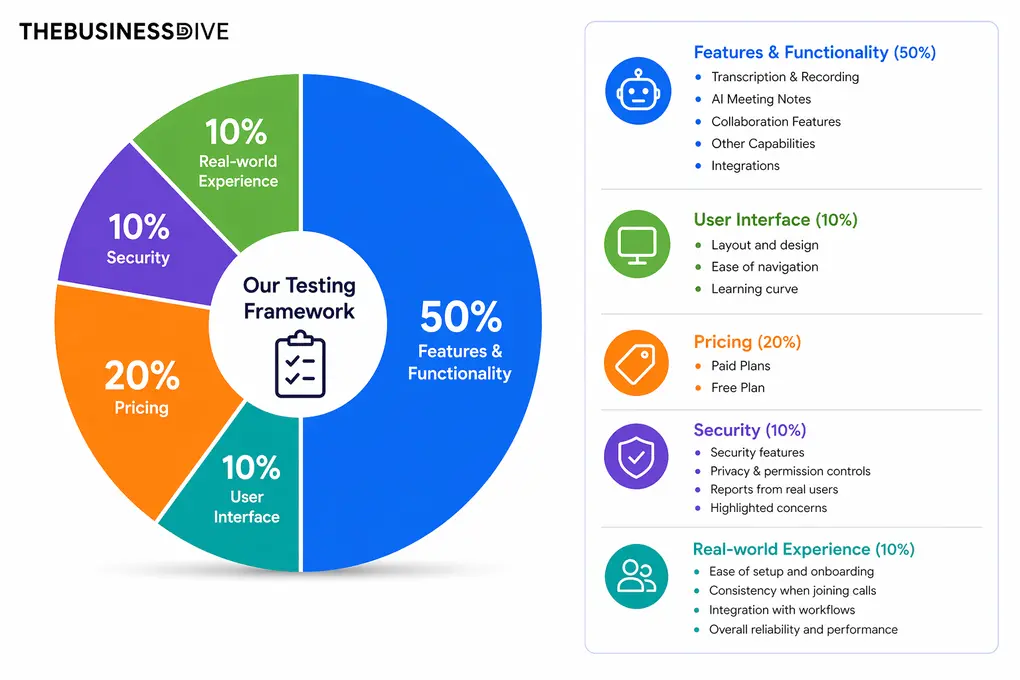
We evaluate every AI note-taking tool using this weighted framework, based on hands-on testing in real meetings and everyday workflows.
Our scoring breakdown after testing 20+ AI note-takers:
🤖 Features & functionality — 50%
🖥️ User interface — 10%
💰 Pricing — 20%
🔐 Security — 10%
👥 Real-world experience — 10%
Want a detailed breakdown of how we test each category?
Learn exactly how we test tools → Review methodology
Comparison: Fellow vs Jamie
In the sections below, I’ll compare Fellow and Jamie based on my hands-on testing, covering their features, pricing, user interface, strengths, weaknesses, and the types of users each tool is best suited for.
Testing Fellow in everyday use
After using Fellow for more than a year and testing over 20 AI note-taking apps, it has become my benchmark for what a complete AI meeting assistant should look like.
It consistently delivers accurate transcriptions, detailed AI meeting summaries, and reliable action items. What really sets it apart, however, is everything that happens before and after the meeting.
In my testing, Fellow transcribed meetings with over 95% accuracy and generated AI meeting summaries within minutes. This made it easy to revisit key discussions without listening to the entire recording.
One new Fellow feature I especially liked was password-protected meeting recaps. It’s a smart security layer for anyone handling sensitive information. You get the productivity gains of automated notes and action items, but the recap itself stays locked down with a password that keeps unauthorized eyes out, and admins can enforce it workspace-wide for public recaps.
I also appreciated the flexibility of Fellow’s recording options. Whether I used bot-based or bot-free recording, it captured conversations reliably across online and in-person meetings.
Overall, Fellow delivered one of the most complete AI meeting experiences I tested.
🔎 Read my full Fellow Review: My Thoughts After +12 Months (2026)
Short on time? Here’s a quick overview of Fellow
Who should use Fellow
Who should NOT use Fellow
Testing Jamie in everyday use
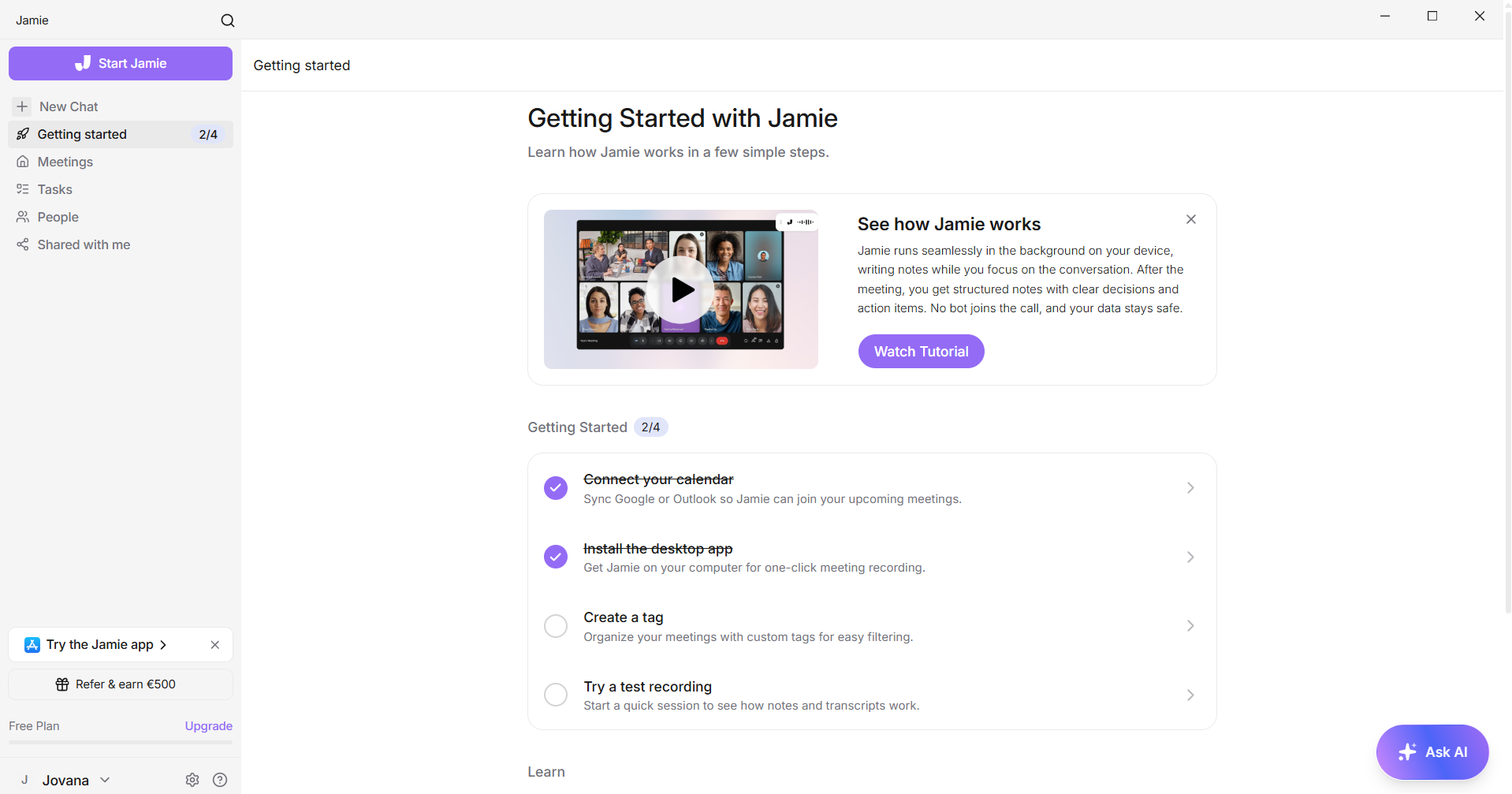
What I liked most about Jamie was how little it interrupted the meeting itself. Once I clicked Start Jamie, I barely had to interact with the app again. The floating transcript stayed out of the way, but it was always there if I wanted to check that everything was being transcribed correctly.
After the meeting, everything I needed was already organized. Instead of reviewing the recording myself, I could read the summary, check the action items, and ask follow-up questions through AI Chat.
When to choose Jamie
When you should skip Jamie
Key features
Below, I’ll walk you through the features that stood out the most during my Fellow vs Jamie testing.
Fellow’s features
Bot-free or bot transcription
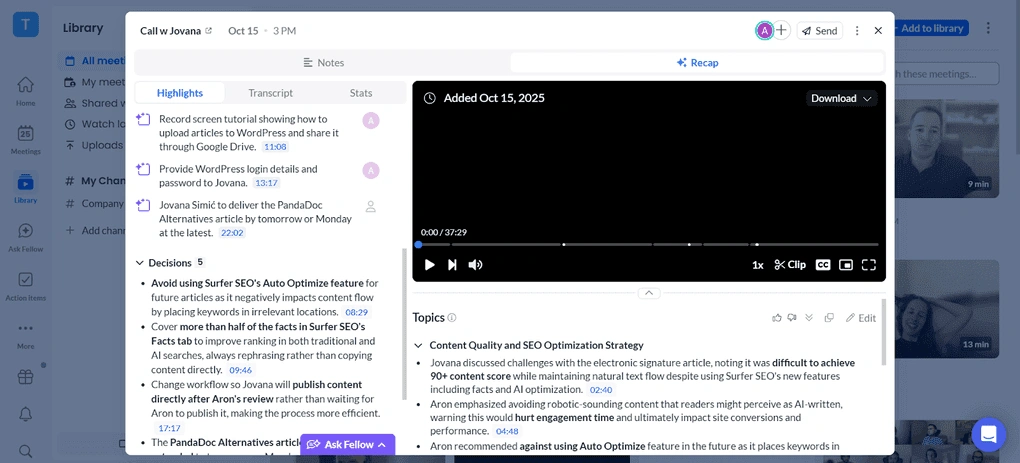
One of Fellow’s biggest advantages is that you can choose whether to record meetings with a bot or without one. It supports Zoom, Microsoft Teams, Google Meet, and Slack Huddles, automatically recording and transcribing meetings in more than 92 languages.
If you prefer bot-free recording, simply select Record without bot, and Fellow captures the meeting in the background while maintaining the same enterprise-grade privacy and security controls as bot-based recordings.
If you choose to use a bot instead, it always requests permission to join the meeting and appears as a participant, so everyone knows the meeting is being recorded.
Based on my testing, Fellow’s transcriptions were highly accurate, around 95% or higher. They were available within a few minutes and included timestamps and speaker identification.
Security and recording controls
Fellow prioritizes enterprise-grade security with SOC 2, HIPAA, and GDPR compliance built in.
What stood out most was the zero-day retention option: Fellow gives you the option for raw recordings and transcripts to be deleted immediately after AI processing, so sensitive content never persists in the system.
For teams that need to share summaries, password-protected recaps let you lock down meeting notes while keeping the productivity benefits of automated action items and summaries.
The compliance portal gives admins granular control over recording rules and restrictions, so you can enforce policies across your workspace, whether that’s preventing recordings on certain call types or restricting who can access public recaps.
I also appreciated that Fellow makes clear that customer meeting data isn’t used to train AI models and remains fully under your ownership.
For organizations handling MNPI, privileged conversations, or patient data, these features move Fellow from “interesting tool” to “actually compliant solution.”
Recordings library and channels
Fellow automatically records calls, which you can access through your transcription and meeting notes. I found the recordings library valuable, especially for teams or larger organizations. You can organize your previous meetings into custom channels and auto-publish your recordings to the right ones.
Furthermore, you can create new channels for yourself or even your whole company. This library helps you structure your meeting recaps and offers an excellent way to organize your meeting history, and a way to share recaps with people who did not attend those meetings but want access to that information.
For example, the CEO can be a part of the Sales calls channel or the Project Check-In channel even if they didn’t attend those meetings, and then use “Ask Fellow” to ask for insights and updates from those conversations.
AI meeting notes
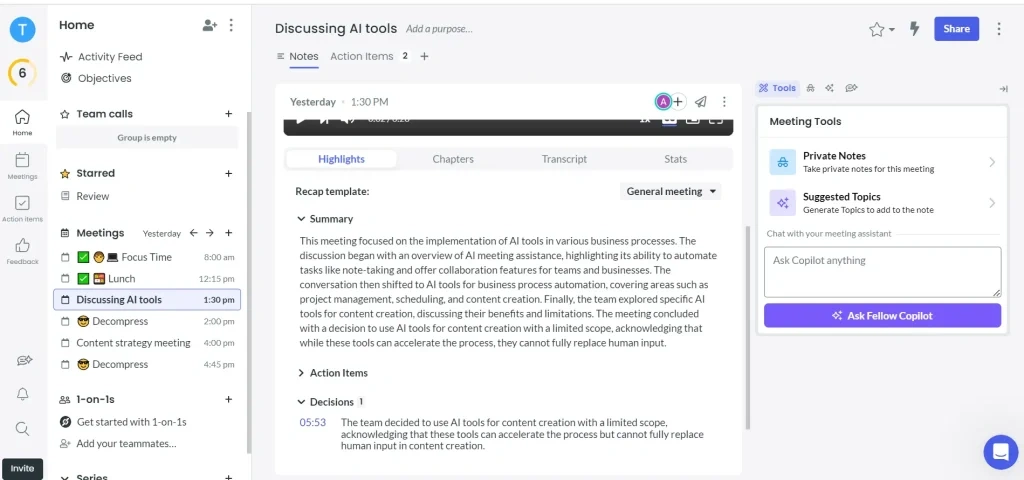
Fellow automatically generates AI meeting summaries that highlight key discussion points, decisions, and action items. Instead of reading an entire transcript, I could quickly review the summary and immediately understand what happened during the meeting.
I also liked that action items could be assigned directly to team members, making responsibilities clear before everyone left the meeting. Every summary remained connected to its transcript and recording, so finding additional context was always easy.
Meeting agendas
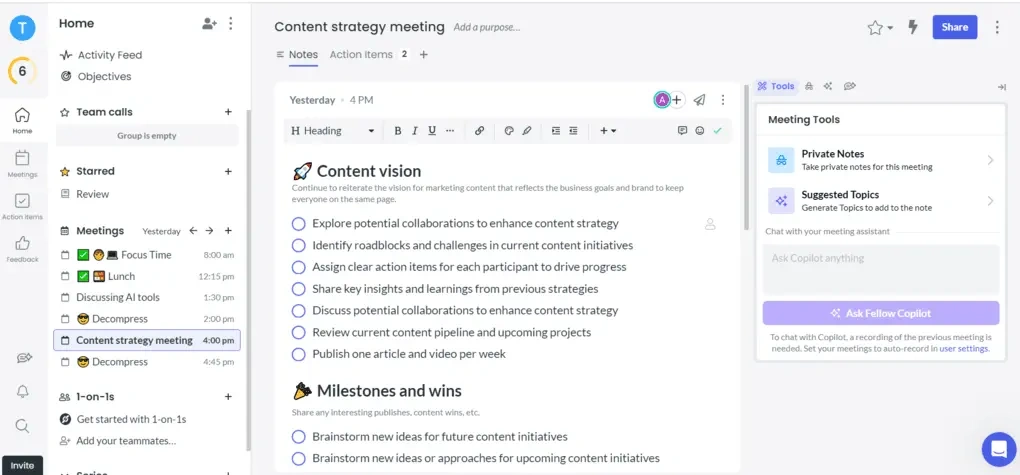
Meeting agendas are one of Fellow’s most distinctive features because they improve meetings before they even begin.
You can build collaborative agendas, ask AI to suggest discussion topics, and use AI-powered pre-meeting briefs that summarize previous meetings, outstanding action items, and participant information. I found these briefs especially valuable when I had back-to-back meetings and very little time to prepare.
Everyone attending the meeting can contribute agenda items, assign talking points or action items, and even create private notes that are only visible to them during the meeting. Fellow’s Agenda Builder can also generate an agenda automatically using the meeting title and calendar description.
Clips
Clips make it easy to capture and share the most important moments from a meeting without sending the entire recording.
After opening a recording, you can select the beginning and end of a clip, save it to your recordings library, or share it directly with teammates.
I also liked that Ask Fellow can generate clips for you. For example, you can ask it to create a clip of a specific customer comment, and it will find and generate that segment automatically.
Ask Fellow
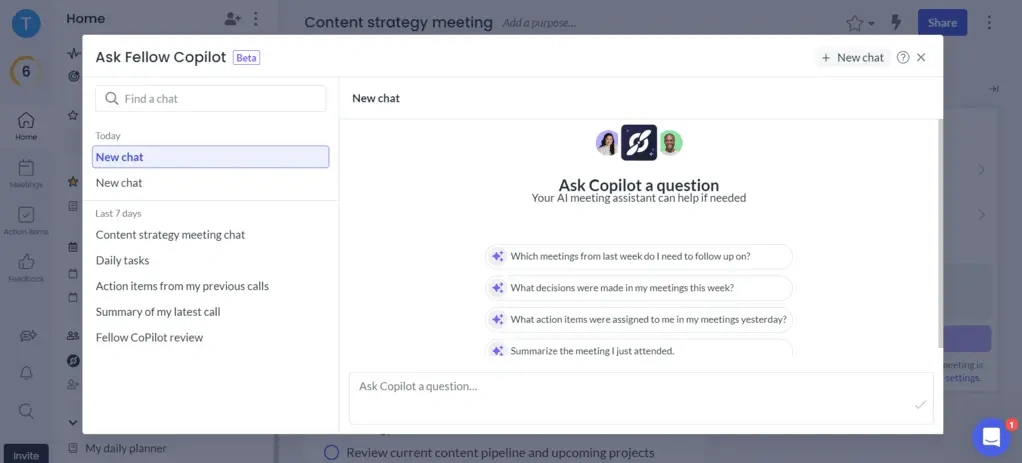
Ask Fellow is much more than a chatbot. It searches the meetings and channels you have access to, even if you didn’t attend them, to answer questions using your organization’s meeting history.
During testing, I used it to ask questions like “What did we decide about this project?” or “What should I follow up on from yesterday’s meeting?” and it quickly surfaced the relevant discussions, decisions, and action items.
Beyond answering questions, Ask Fellow can prepare you for upcoming meetings, summarize priorities, generate follow-up emails, create and edit documents, export content to Google Docs, Notion, or Confluence, generate meeting clips, manage your calendar, and remember your preferences over time.
Team collaboration
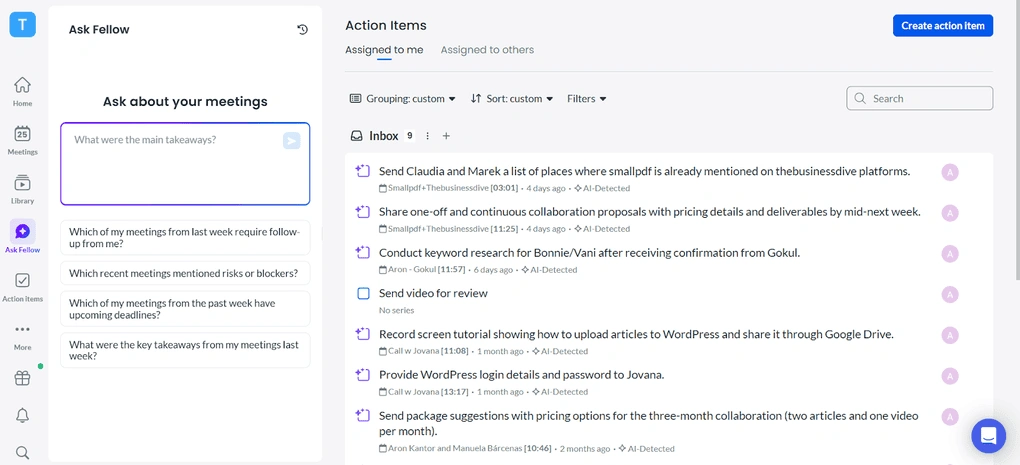
What makes Fellow special is that it was designed for the whole organization’s use cases. Whether it’s sales calls, interviews, or one-on-ones, you can implement Fellow in every team. It offers an excellent way to handle both external and internal calls and provides incredibly helpful collaboration features.
It supports collaborative agenda creation, you can assign action items, and easily share the meeting notes with others. Even when you’re using botless recording functionality, internal attendees in your organization will know that they are being recorded.
Similarly, Fellow will always prompt you to invite attendees to the meeting agenda and AI notes if you are recording an impromptu huddle or meeting, always keeping collaboration and alignment in mind.
Integrations
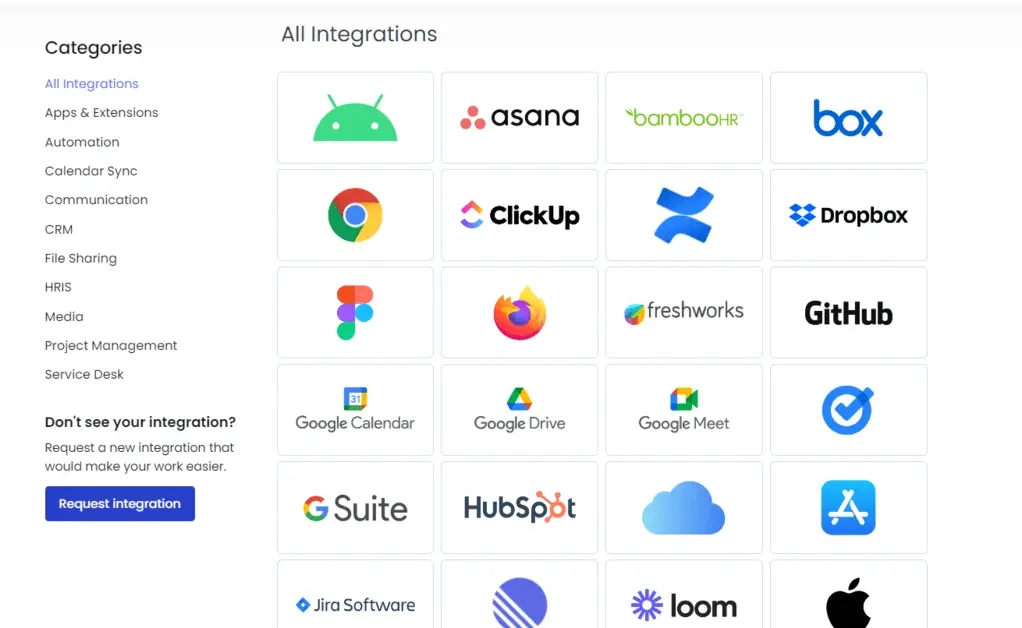
Fellow integrates with the tools most teams already use, including Zoom, Microsoft Teams, Google Meet, Slack, project management platforms, CRMs, and calendars.
For regulated industries, Fellow integrates with Global Relay for compliant archiving, and with Claude for advanced workflows.
Rather than replacing your existing workflow, it connects meeting notes, recordings, and action items with the rest of your productivity stack, making follow-up work much more streamlined.
Use this link to sign up and get 10% off the paid plans if you upgrade.
Jamie’s features
Bot-free AI meeting notes
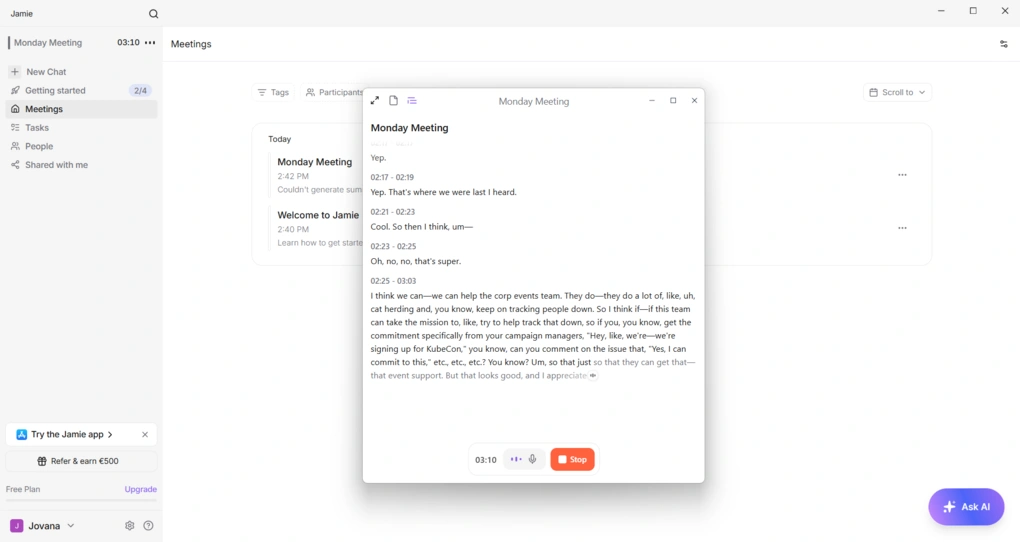
Jamie doesn’t rely on a meeting bot joining your calls. After installing the desktop app, I simply clicked ‘Start Jamie’, and it started transcribing the meeting directly from my computer.
The transcript was generated in real time as the meeting progressed, so I could follow the conversation without waiting for the recording to finish.
During my test, the transcription was highly accurate (on par with Fellow), even when multiple people were speaking, and timestamps made it easy to jump back to specific parts of the discussion.
While the meeting was running, Jamie displayed a floating transcript window that I could minimize when I needed more screen space or expand to follow the conversation. The window also included quick controls for muting the microphone and stopping the recording, so I never had to switch back to the main app.
Another feature I found useful was Scratchpad, where I could keep personal notes inside Jamie while it handled the transcription. After I stopped the recording, Jamie immediately started processing the meeting, displayed the transcription progress, and generated the meeting notes automatically.
AI summaries with customizable templates
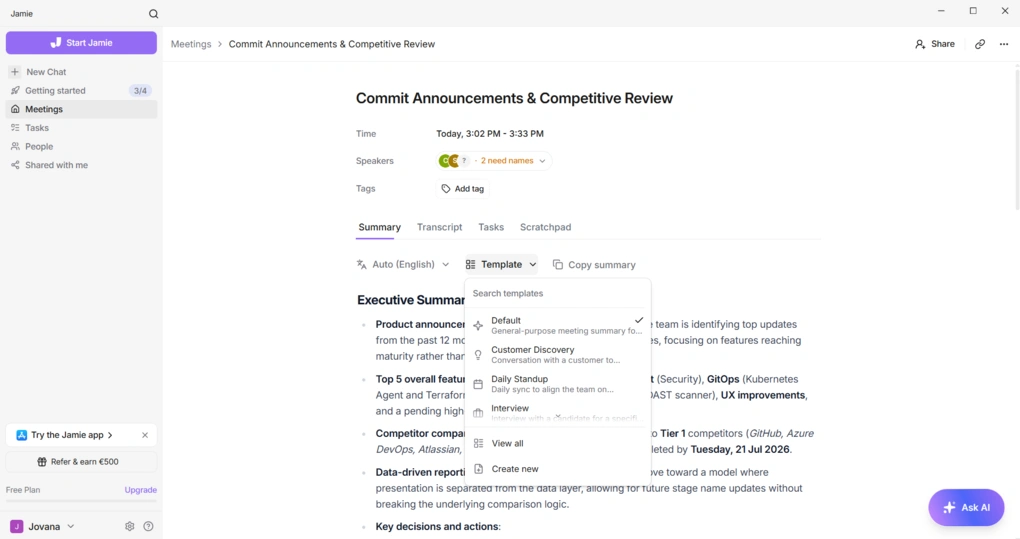
Jamie generated an executive summary almost immediately after the recording finished. Instead of giving me a transcript to organize myself, it highlighted the main discussion points, decisions, and follow-up tasks automatically.
I also liked that the summaries weren’t limited to a single format. Jamie comes with templates for Default, Customer Discovery, Daily Standup, and Interview meetings, and it also lets you create your own.
Action item tracking
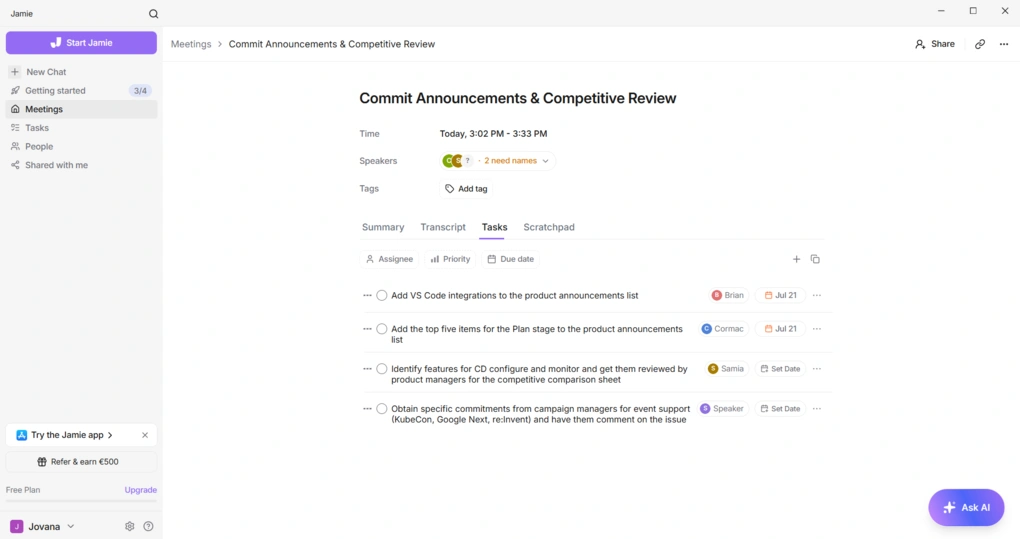
Jamie automatically pulled action items from the meeting and placed them in a dedicated Tasks section. Each task included the assignee, due date, and priority, so I could immediately see what needed to be done after the meeting.
The tasks were fully editable, which I appreciated. I could change the assignee, update the due date, adjust the priority, or remove tasks that weren’t relevant. It saved me from manually copying follow-ups into another tool before sharing them with the team.
Ask Jamie AI
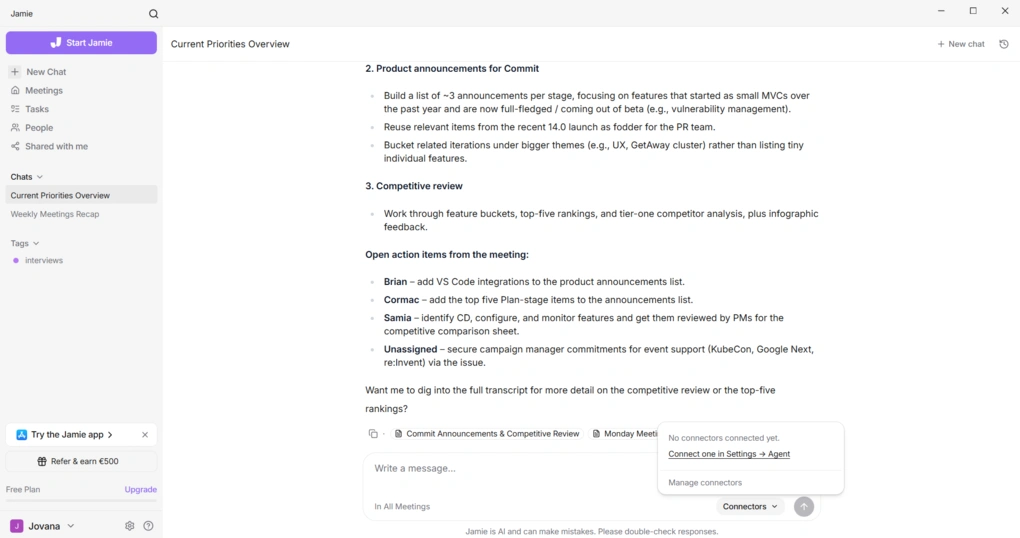
Instead of searching through previous transcripts, I could ask Jamie questions in natural language.
I found this much faster than manually searching through transcripts. Even after several meetings, I could ask a question and quickly get the information I was looking for without remembering where it had originally been discussed.
Speaker identification
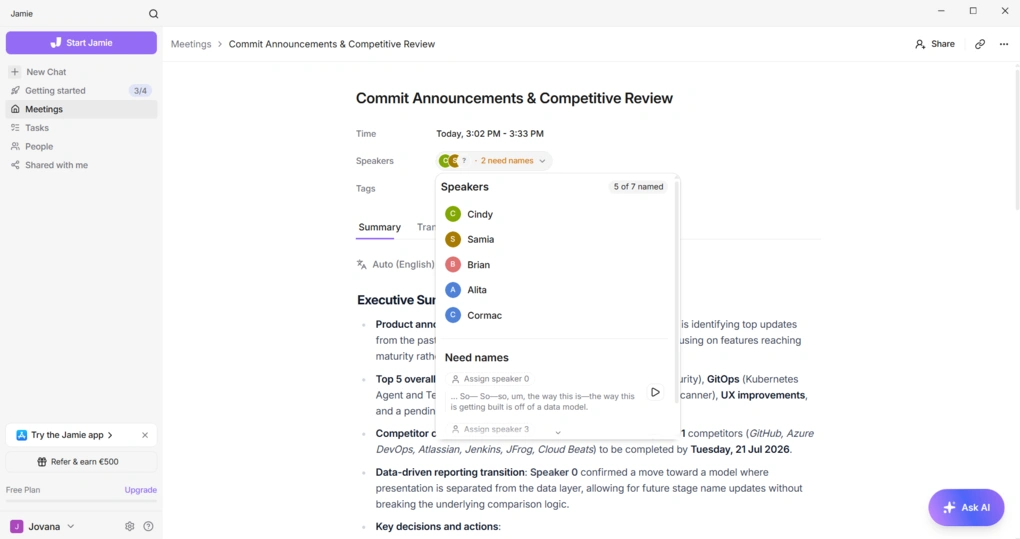
Jamie automatically separated the transcript by speaker, making the conversation easier to follow. During my test, it correctly identified most participants and clearly showed which speakers had already been matched.
For the two speakers it couldn’t identify, Jamie grouped their comments separately and displayed short audio clips next to each segment. I could listen to those clips, recognize the speaker, and assign the correct name in just a few clicks.
I thought this was a thoughtful touch that made correcting speaker labels much faster than manually searching through the transcript.
Searchable meeting workspace
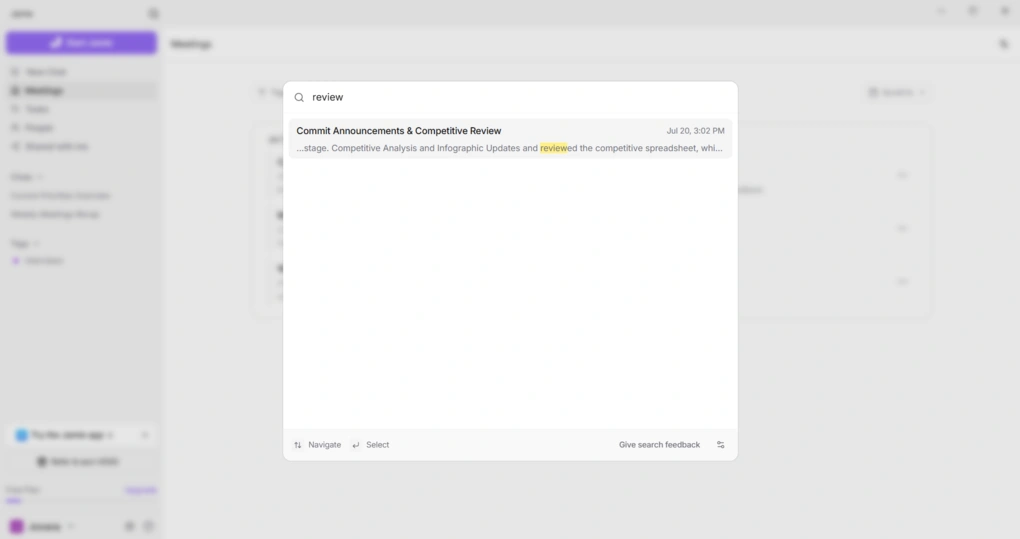
Jamie stores every meeting in a searchable workspace. I could browse previous meetings, open participant profiles in the People tab, organize conversations with Tags, and review meetings that had been shared with me.
Integrations
Jamie works with the most popular meeting platforms, including Zoom, Microsoft Teams, Google Meet, and Webex. If you connect your Google Calendar or Outlook Calendar, it can automatically detect upcoming meetings and prepare them for recording.
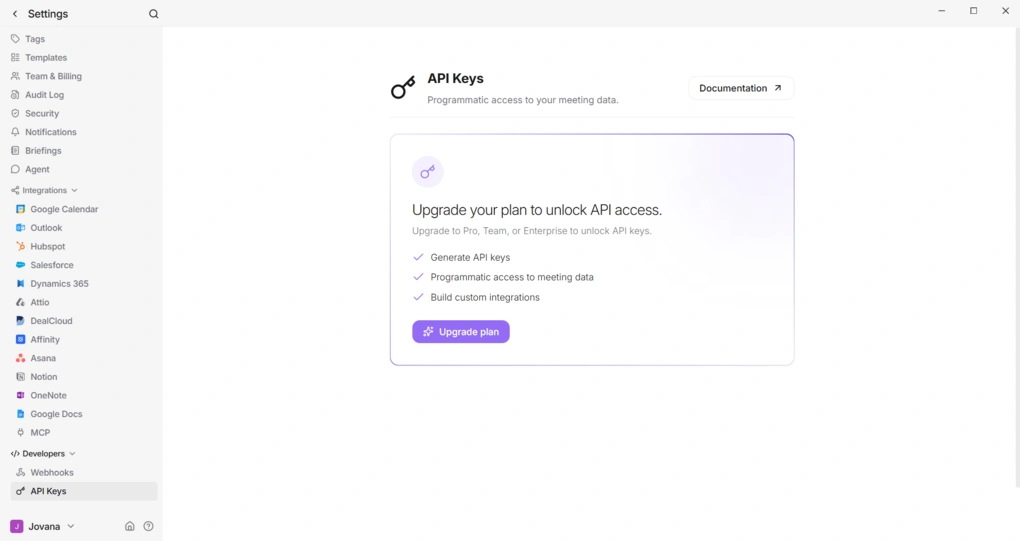
Beyond meetings, Jamie integrates with Slack, HubSpot, Trello, Monday.com, Gmail, and Outlook. Teams with more advanced automation needs can also connect Jamie through its API and webhooks, including workflows built with Zapier or Make.
Plans & value
Fellow’s cost breakdown
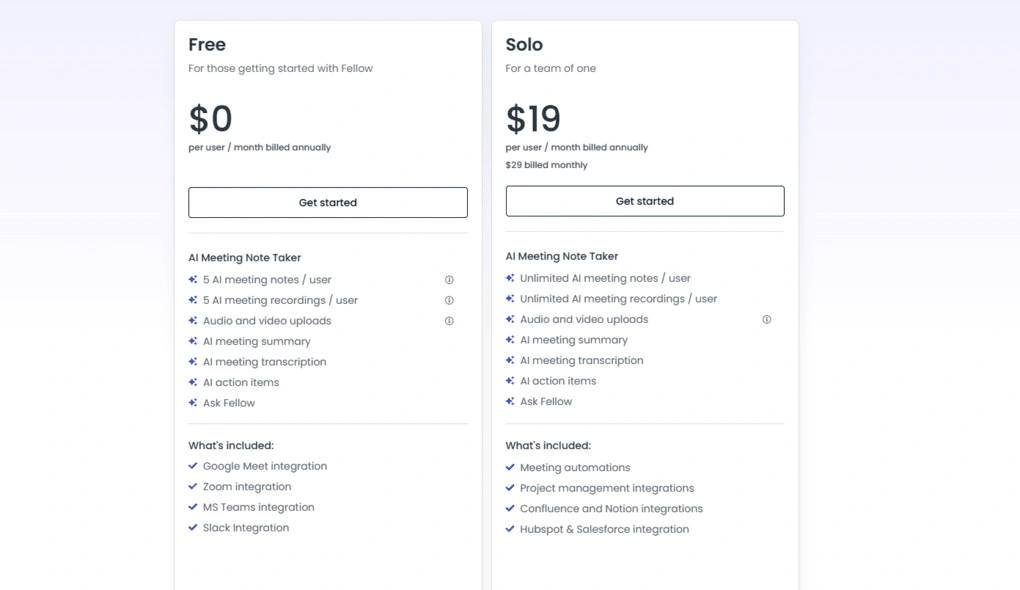
Fellow offers four plans. The Free plan includes access to AI recording, recaps, and transcriptions. Additionally, it provides access to features such as collaborative meeting notes, meeting agendas, meeting timers, and integrations with Zoom, Slack, Microsoft Teams, and Google Meet. The Free plan is perfect for those who want to try Fellow before purchasing it.
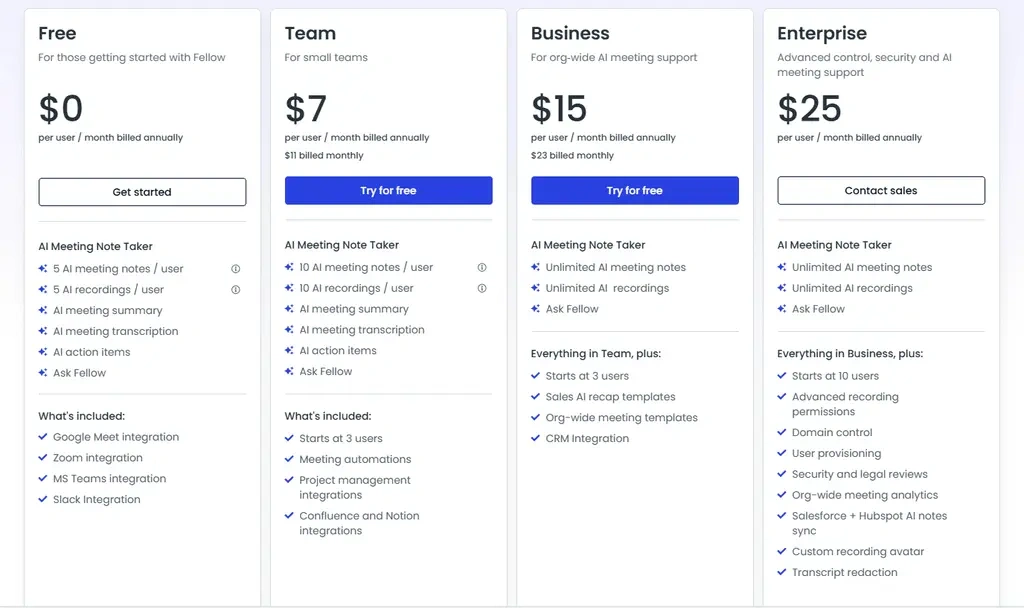
The Team plan was developed for small teams and starts with 3 users. It includes all the features in the Free plan with higher limits and offers meeting automation tools and additional integrations with Notion or project management tools.
The Business plan starts with 3 users and provides unlimited recordings, transcription minutes, organization-wide meeting templates, sales AI recap templates, and more integrations.
The Enterprise plan offers advanced control, security, and AI meeting support. With this plan, you can create customized rules for recording and have more recordings and transcription minutes.
Explore our Apps directory
A curated directory of software tools we’ve independently reviewed, with links to full reviews, comparisons, and category guides.
Jamie’s cost breakdown
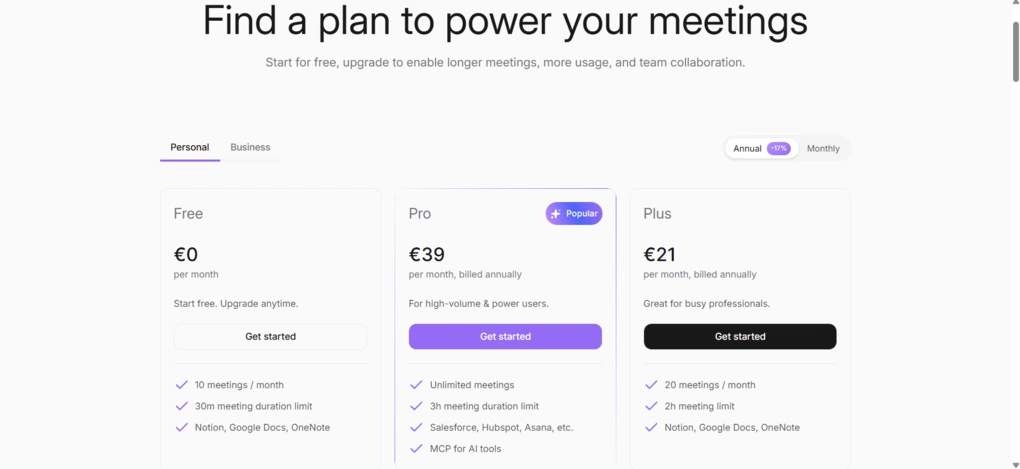
Jamie offers a free plan alongside four paid tiers.
The free plan includes 10 AI meeting notes and transcripts per month, with meetings of up to 30 minutes. Despite the usage limits, it still includes core features like AI summaries, action item detection, speaker recognition, Ask Jamie, calendar integrations, and unlimited storage.
Plus starts is €21/month when billed annually and increases the limits to 20 meetings per month with meetings of up to 2 hours. Pro costs €39/month with annual billing and removes the meeting cap while increasing the maximum meeting length to 3 hours. It also adds CRM integrations, unlimited templates, Asana integration, MCP support, and priority support.
The Team plan is €33 per month per seat with annual billing (min 2 seats), and adds shared workspaces, centralized billing, and admin features, while Enterprise offers custom pricing with SSO, advanced security controls, and dedicated onboarding for larger organizations.
User interface
Fellow’s user interface
Fellow has a simple and clean user interface. It’s particularly great that you can access many features from the homepage with just a few clicks.
I used this tool’s desktop version, which you can easily download from Fellow’s website. The desktop app helps you make the meeting experience smooth from beginning to end.
Use this link to sign up and get 10% off the paid plans if you upgrade.
Jamie’s user interface
Jamie has one of the cleanest interfaces I’ve seen in an AI meeting assistant. The layout is simple, and I had no trouble finding my way around.
I also liked that the recording controls stayed in a small floating window instead of taking over my screen. It let me follow the live transcript, minimize it when I needed more space, and stop the recording without interrupting the meeting.
Pros and cons of Fellow
Pros of Fellow
Cons of Fellow
Pros and cons of Jamie
Jamie pros
Jamie cons
Alternatives to Fellow and Jamie
If you are not sure if Jamie and Fellow are the best choice for you, here are some:
|
App |
Best for |
Description |
|---|---|---|
|
Notta |
Best for multi-language transcription |
A unique AI note-taker that allows multi-language transcription, enabling people to speak two different languages during online meetings. |
|
Fathom |
Best free AI note-taker |
An accurate AI note-taker with an extensive free plan. |
|
MeetGeek |
Best for multi-language transcription |
A versatile AI note-taking app with the best AI meeting summaries. |
|
tl;dv |
Best simple AI note-taker |
A simple option for individuals with a feature-rich free plan. |
|
Radiant |
Best free AI note-taker for Mac |
It is a 100% free AI bot-less note-taker for Mac users for in-person and online meetings. |
|
Otter AI |
A popular AI note-taker |
One of the most popular AI note-takers for Google Meet, Zoom, and Microsoft Teams. |
|
Granola |
Best for users need a simple bot-less AI note-taker |
Granola is a lightweight AI note-taking app that transcribes and summarizes meetings without bots, with a generous free tier, but it’s basic and lacks advanced features. |
|
Krisp |
Best bot-less AI note-taker supporting high audio quality |
Krisp is a Voice AI platform for clearer communication and more productive meetings, combining real-time audio enhancements with AI note-taking. |
|
Bluedot |
An easy-to-use bot-less AI note-taker |
Bluedot is a straightforward and easy-to-use bot-free AI note-taker. |
|
Zoom AI Companion |
Best for Zoom users needing built-in AI note-taking |
A solid built-in AI assistant for Zoom that offers meeting summaries, basic transcription, and action items, but lacks advanced features. Full Zoom AI Companion review | Quick Zoom AI Companion overview |
My pick: Fellow vs Jamie
After testing both tools, my pick in this Fellow vs Jamie comparison is Fellow.
It simply offers much more than AI meeting notes. The option to choose between bot and bot-free recording is another advantage that makes it suitable for a wider range of workflows.
Jamie, on the other hand, is an excellent AI note-taker. If your priority is accurate transcription, bot-free recording, and a clean, distraction-free experience, it’s one of the best options I’ve tested. It just doesn’t offer the same meeting management and collaboration features that make Fellow stand out.
Looking for similar tools?
Visit our AI note-takers library to explore other apps we’ve reviewed in this space and how they compare.
Why you can trust our reviews
At thebusinessdive.com, our team tests, reviews, and compares hundreds of productivity apps every year — from project management tools to note-taking apps. We dive deep into real-world use cases to help you find the right tools that actually improve your workflow, not just add noise.
Our mission? No fluff, no shortcuts—just honest, hands-on insights from productivity pros.
Discover how we stay transparent, read our review methodology, and let us know about any tools we missed.
Frequently Asked Questions
Which is better: Fellow or Jamie?
Fellow is the better choice if you’re looking for a secure AI meeting note taker with collaborative agendas, meeting preparation, action item tracking, and extensive integrations. Jamie, on the other hand, is better suited for users who primarily want accurate AI meeting notes, bot-free recording, and AI-powered conversation summaries with minimal setup.
What is the biggest difference between Fellow and Jamie?
The biggest difference is their focus. Fellow combines AI meeting notes with meeting management and security features like collaborative agendas, pre-meeting briefs, password-protected recaps, a compliance portal for IT and chief compliance officers, and team collaboration. Jamie focuses on recording meetings without a bot, generating accurate transcripts, AI summaries, and helping users search past conversations through Ask Jamie AI.
Does Jamie integrate with Outlook and other business tools?
Yes. Jamie integrates with Google Calendar and Microsoft Outlook to automatically detect upcoming meetings. It also supports integrations with business tools such as Slack, HubSpot, Trello, and Monday.com, while API and webhook support allow additional automation through platforms like Zapier and Make.
Which tool offers better integrations?
Fellow offers broader integrations overall. In addition to Zoom, Microsoft Teams, Google Meet, Slack, and calendar apps, it connects with CRM systems, project management platforms, archiving tools, and productivity tools to help teams manage meeting notes, action items, and follow-up work. Jamie supports the most common meeting and business integrations but is more focused on AI note-taking than workflow management.
Is Jamie or Fellow better for business teams?
For most business teams, especially teams in private equity, hedge funds, investment banking, legal, and other regulated industries, Fellow is the stronger choice because it combines AI meeting notes with security and compliance, collaboration, meeting preparation, shared agendas, and organization-wide workflows. Jamie works well for individuals and smaller teams that want accurate AI meeting notes and searchable conversation history without adding a meeting bot to every call.
Disclosure: I only recommend products I would use myself, and all opinions expressed here are our own. This post may contain affiliate links that, at no additional cost to you, may earn a small commission. Read the full privacy policy here.

Hey there! I am Aron, the founder of Thebusinessdive. I have been testing productivity apps for almost three years now. I reach 25.000 -50.000 people monthly with the mission to help you find the perfect productivity apps. Subscribe to my YouTube channel, newsletter, and social media to hear more about the best productivity tools. Let’s dive in!