


How we test CRM apps at TheBusinessDive
To stay transparent, we want to explain how we test CRM tools at TheBusinessDive.
Our testing framework (at a glance)
- Average testing time per tool: 7–21 days
- Number of tools tested: 10+ CRM platforms
- Test scenarios: small business + multi-stage sales pipelines
- Platforms tested: Web, mobile (when available)
- Review process: the same framework is applied across all CRM reviews
This structured approach ensures that every CRM is evaluated consistently and under comparable conditions.
Our scoring system for CRM apps
Our scoring system for CRM apps is built on hands-on testing across real sales and customer management workflows.
Each tool is evaluated across 10 key factors, with a strong emphasis on real functionality and everyday usability.
How we score CRM apps (quick breakdown)
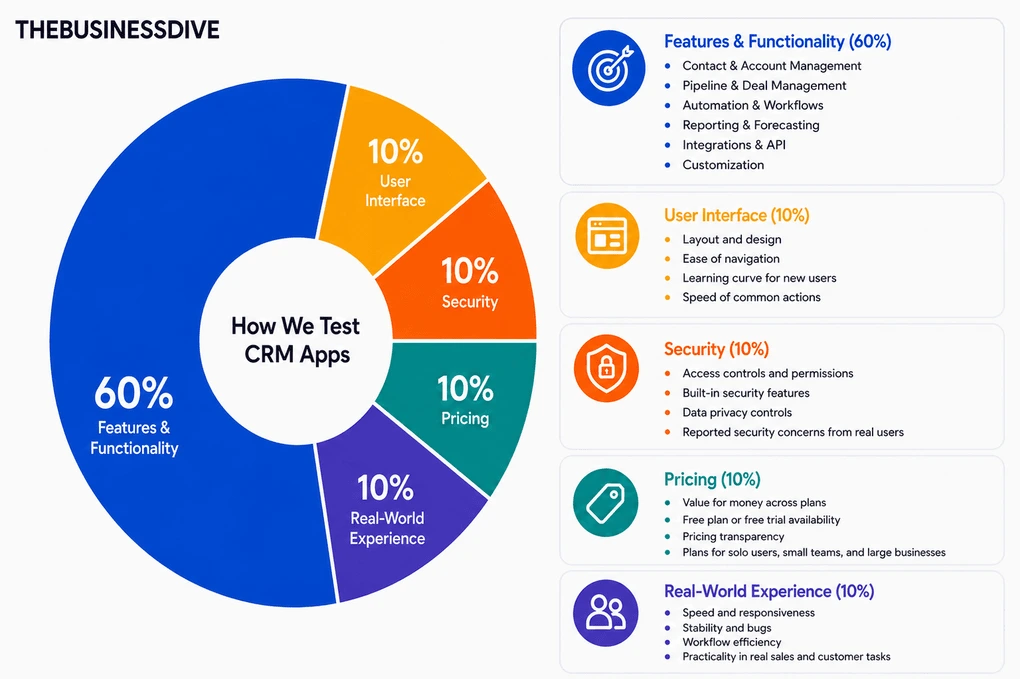
- Features & functionality → 60%
- User interface → 10%
- Security→ 10%
- Pricing → 10%
- Real-world experience → 10%
Features & functionality (60%)
This is the most important part of our evaluation. We test each CRM across the areas that matter most in day-to-day sales and client management.
Contact & account management
A CRM is only as useful as the quality and organization of its customer data, so we spend time working with large contact lists and reviewing things like:
- Creating and organizing contacts and companies
- Tagging, filtering, and segmenting records
- Deduplication and data handling
- Relationship tracking and record visibility
Pipeline & deal management
Pipeline and deal management is one of the core parts of any CRM, which is why a big part of our testing focuses on how flexible and intuitive the sales workflows feel in practice, including:
- Creating and customizing pipelines
- Moving deals through stages
- Tracking deal progress and bottlenecks
- Visibility into open opportunities and next steps
Automation & workflows
Automation should reduce repetitive work, not create more setup headaches, so we spend time building workflows and testing areas such as:
- Task automation and reminders
- Lead routing and assignment rules
- Workflow triggers and follow-up sequences
- Ease of setting up repeatable processes
Reporting & forecasting
Good reporting should make it easy to understand what’s happening in the sales pipeline, which is why we evaluate areas like:
- Built-in dashboards and report quality
- Sales forecasting accuracy and clarity
- Custom reporting options
- How easy it is to turn data into useful insights
Integrations & API
Most CRMs don’t operate in isolation, so integrations play a big role in the overall experience, especially when reviewing:
- Native integrations with email, calendars, marketing tools, and communication apps
- Reliability of sync across connected tools
- Availability and flexibility of API access
Customization
Different teams manage customers differently, so flexibility matters when adapting the CRM to different workflows and team structures, including:
- Custom fields, objects, and properties
- Flexible layouts and views
- Role-based setup for different team sizes
User interface (10%)
We evaluate how intuitive and user-friendly the interface is by looking at:
- Layout and design
- Ease of navigation
- Learning curve for new users
- Speed of common actions
Security (10%)
Since CRMs handle sensitive customer and business data, security plays an important role in the overall evaluation, especially around:
- Access controls and permissions
- Built-in security features
- Data privacy controls
- Reported security concerns from real users
Pricing (10%)
Pricing is easier to justify when the features, limits, and overall experience match what users are actually paying for, so we pay attention to things like:
- Value for money across plans
- Free plan or free trial availability
- Pricing transparency
- Whether the plans make sense for solo users, small teams, and larger businesses
Real-world experience (10%)
Beyond feature lists and marketing claims, we also spend time using each CRM in realistic day-to-day workflows, paying attention to:
- Speed and responsiveness
- Stability and bugs
- Workflow efficiency
- How practical it is during real sales and customer management tasks
Our testing approach
CRM tools are at the core of how businesses manage relationships, track deals, and organize their sales process. Because of that, we don’t evaluate them based on surface-level features alone.
We test CRM tools by setting up real sales pipelines, adding contacts, tracking deals, and using them as if we were managing an actual sales process. This includes testing how leads move through stages, how teams collaborate, and how the CRM supports day-to-day workflows.
This testing framework is used across all of our CRM-related content, including individual reviews, comparisons, and “best of” guides. All recommendations are based on this same evaluation process, not on one-off impressions.
Testing duration & depth
Each CRM is tested for at least 1–3 weeks, not just a quick trial.
We use every tool across multiple sessions and scenarios to understand how it performs over time, not just during initial setup. This includes simulating real workflows, revisiting the tool after a few days, and testing how it behaves as more data is added.
Why CRM apps are hard to compare
CRM tools can look similar at first glance, but in practice, they vary significantly
depending on how they are used.
From our testing, here are the main reasons they are difficult to compare:
- Different use cases: Some CRMs focus on sales, others on marketing or support
- Pipeline complexity: Simple pipelines versus multi-stage sales processes
- Customization versus simplicity: Flexible tools often require more setup
- Automation depth: Basic versus advanced workflow automation
- Pricing structure: Key features are often locked behind higher plans
Because of this, a feature list alone does not reflect how a CRM performs in real use.
Real scenarios we test
We do not just explore features. We simulate real business use cases:
- Managing a small sales pipeline (5–20 deals)
- Tracking leads across multiple stages
- Assigning tasks to team members
- Testing automation workflows (follow-ups, task creation, lead assignment)
- Evaluating performance as data grows
This helps us understand how each CRM performs in realistic conditions, not ideal
scenarios.
How we test CRM apps
We do not just click around for an hour and move on. We actively use each CRM over time. We build pipelines, add contacts and deals, assign tasks, and simulate real sales
processes. We move deals through stages, update statuses, and test how the system handles everyday changes.
During testing, we look for clear answers to questions like:
- How quickly can someone get started and close their first deal?
- Does the CRM stay organized as data grows?
- Do automations actually save time or require constant tweaking?
- Is the tool still usable after several days of consistent use?
Testing across multiple sessions helps us identify both strengths and friction points that
only appear with regular use.
Proof of testing
All screenshots and videos included in our reviews are:
- created during our own testing
- based on real workflows and data
- never taken from marketing materials
This ensures that what you see reflects actual product usage, not curated examples.
Check out some of our reviews to see how it works in practice:
What we don’t do
Just as important as what we test is what we intentionally avoid:
- We do not rely only on demos or marketing pages
- We do not rank tools based on affiliate commissions
- We do not test tools for only a few hours
- We do not assume one tool fits all use cases
CRM tools are highly contextual, and oversimplifying them would not be helpful.
How we make recommendations
Instead of calling one CRM “the best,” we focus on specific use cases, such as:
Best for small businesses
Best for sales teams
Best for automation-heavy workflows
Best for growing companies
Best budget option
How often are reviews updated
CRM tools evolve constantly. Features change, pricing shifts, and interfaces are updated.
We revisit reviews when:
- pricing changes
- major features or automations are introduced
- core workflows or user interface significantly change
Keeping reviews up to date is part of our process.
Transparency & monetization
Some of our articles include affiliate links. If you sign up through one of them, we may
earn a commission at no extra cost to you.
This never influences how tools are tested, ranked, or recommended.