


Pangram Review 2026 (99.98% Accuracy Tested)
AI-written content is everywhere right now, and opinions about it are more divided than ever. Some see it as a productivity boost, others as a serious threat to originality and academic integrity.
These two sentences were generated by AI. Would you have guessed it? AI is getting better at writing, which also makes AI detectors worse at reliably detecting AI-generated content.
That’s what led me to Pangram Labs. It’s a small company founded in 2024, but based on Reddit discussions, it’s already built a reputation as one of the more accurate AI detectors available.
So I spent some time testing the tool myself, and in this Pangram review, I’ll walk you through what I found.
Let’s dive in!
Verdict
Here’s the quick verdict if you don’t want to read the full review:
🎯 Best for: Reliable AI content detection with contextual analysis
🚫 Not ideal for: Casual users relying on a generous free plan
⭐ Biggest strength: Transparent AI detection with sentence-level analysis and low false positive rates
⚠️ Biggest weakness: Free plan is very limited
⚖️ Verdict: A highly accurate AI detector focused on transparency and contextual analysis, useful for educators, teams, and anyone who needs more reliable AI detection results.
🏆 Score: 4.3 / 5
✅ Tested with our review & scoring methodology ✅ Real-world testing ✅ Unbiased evaluation
Pangram
Summary
Pangram is a context-focused AI content detector that helps distinguish between human-written and AI-generated text. Instead of relying on a single score, it provides sentence-level insights, confidence indicators, and follow-up tools that make results easier to interpret. During my Pangram review, I found it especially reliable for longer texts and academic or editorial use cases. Overall, Pangram stands out as a transparent and trustworthy AI detector.
|
|
Reliable AI content detection
|
|
|
Low false positive rate compared to other tools
|
|
|
Sentence-level analysis with confidence indicators
|
|
|
Strong support for academic use cases
|
|
|
Helpful follow-up tools for edge cases
|
|
|
Clean, fast interface with no learning curve
|
|
|
The free plan is very limited
|
What is Pangram?
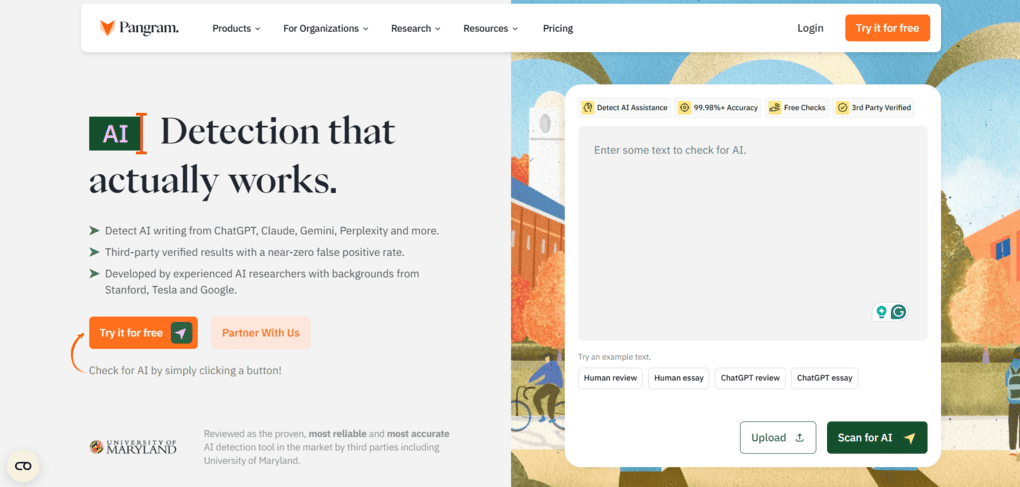
Pangram is an AI content detector designed to help distinguish between human-written text and AI-generated content. Its focus isn’t just on labeling text as AI or human, but on offering reliable AI content verification with enough context to reduce the false positive rate.
Pangram’s AI detector is commonly used to detect AI-generated text, including AI-written text found in articles, essays, and even research papers or AI-generated papers.
Its detection model uses a proprietary ‘synthetic mirror’ training method to improve reliability across text genres. It was trained on millions of text samples from both human writers and AI systems like GPT-4, Claude, Gemini, and others.
How it was working in Pangram
Working in Pangram felt very easy from the start, and that’s something I genuinely appreciated.
What stood out to me most is that Pangram doesn’t present its results as the absolute truth. Instead, it stays transparent about how conclusions are reached and gives you the tools to understand them. That’s really the core of its strength.
By showing sentence-level highlights, confidence indicators, and follow-up checks, Pangram leaves room for human judgment rather than forcing a rigid verdict. Because of that approach, true false positives are rare, and when they do appear, it’s easy to verify them yourself. For that reason, I think Pangram’s strong reputation among AI detectors is well deserved.
Why Pangram earned a 4.3 / 5?
Pangram earned high scores for AI detection accuracy, transparency, and overall usability. Features like sentence-level highlights, confidence indicators, and contextual explanations make the results much easier to understand and review compared to many other AI detectors.
It also scored well for its clean interface and useful collaboration features for teams and academic use. The main areas where it lost points are the limited free plan and the fact that some users may prefer a simpler tool focused on faster, one-click results.
Who Pangram works best for
Who Pangram may not work well for
But that’s enough from the intro, it’s time to see what Pangram actually brings to the table.
What Pangram brings to the table
Without further ado, let’s see what sets Pangram apart from other AI detectors!
AI detection
Being an AI detection tool, Pangram’s main feature is its AI detector. Pangram claims it can detect AI writing from ChatGPT, Claude, Gemini, Perplexity, and other tools, so I decided to put that claim to the test. I prompted these AI tools to generate human-sounding text, and Pangram detected each sample as 100% AI-written, passing the initial test.
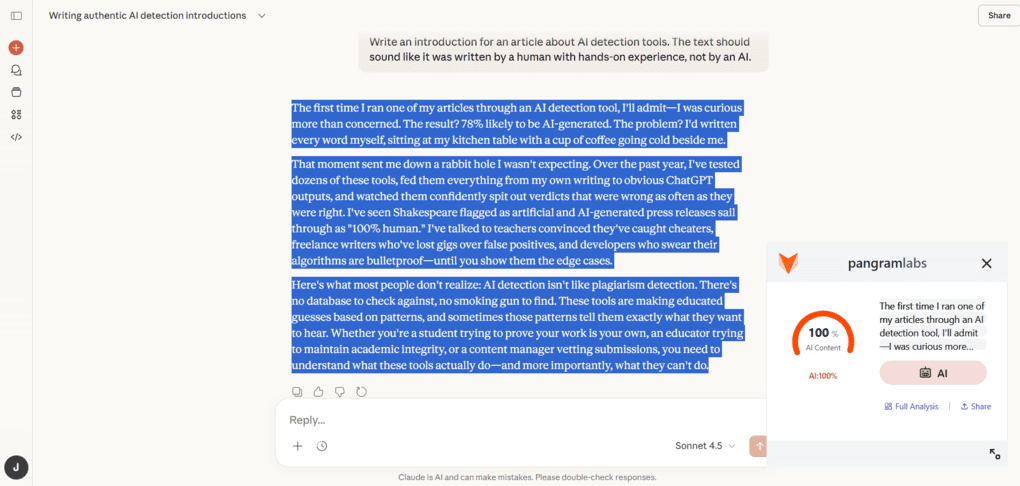
I used Pangram’s Chrome extension to check these AI-generated texts directly on the webpage. Given that Pangram’s interface is web-based and doesn’t offer a desktop app, the Chrome extension is a very handy addition. You can simply select the text you want to test, right-click, and choose “Check for AI content.” Pangram then displays the results on the same page within a few seconds, no matter the length of the text.
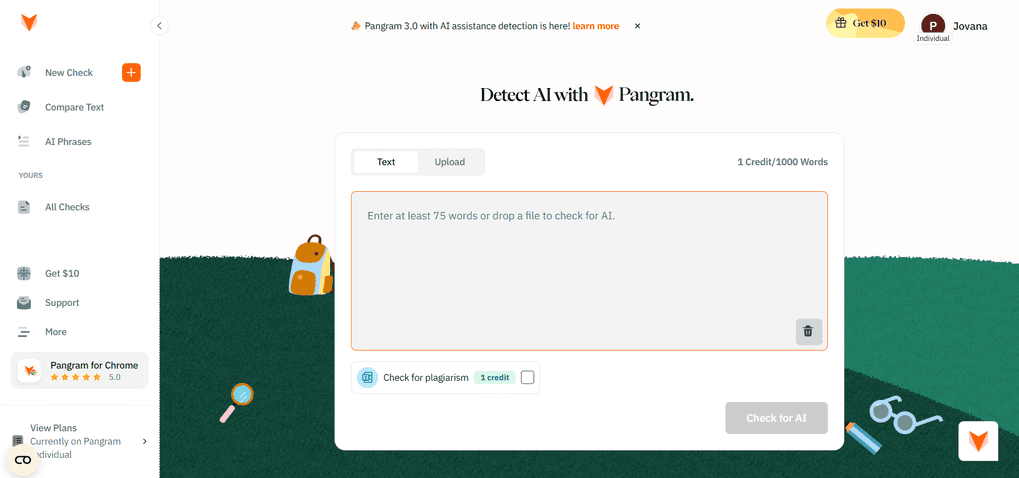
One thing to keep in mind is that Pangram requires a minimum of 75 words for accurate detection. Short texts don’t provide enough context for reliable results. To determine whether a piece of content is human- or AI-written, detection tools need enough text to identify patterns, structure, repetition, and consistency — not just isolated, AI-sounding phrases.
Like all AI detection tools, Pangram can occasionally produce false positives. This isn’t a bug, but a limitation of the technology itself. For example, as I mentioned, longer texts give more context and thus more reliable results.
At the same time, short and neutral texts, SEO-friendly segments, technical or informational articles, and content without personal examples or hands-on experience are more likely to be flagged as AI-written, even when they’re not.
This is where Pangram feels fair rather than perfect. In order to reduce false positives, it doesn’t rely on a single score but adds context using several supporting features. When giving the result, Pangram highlights sentences to show which parts of the text influenced the result. If you hover over the highlighted sentences, you will see the level of confidence with which the result is rendered.
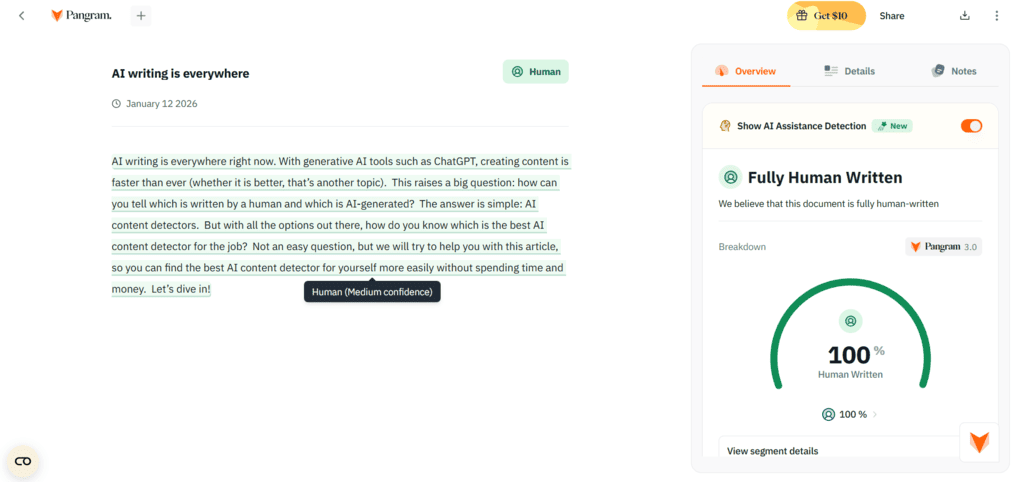
There is also a new addition in the form of an AI assistance detector that adds an extra layer that helps distinguish between AI-generated and AI-assisted writing.
Besides that, I discovered that during my Pangram review, it also uses AI phrases and compares text features to check the results further when they’re not clear.
I liked that Pangram’s AI detection feature is very thorough. Alongside the result, it shows a clear breakdown, including an overall summary with the percentages of human, mixed, and AI content detected in the text, a detailed graph of the AI Usage Across the Document, and the option to add notes and tags.
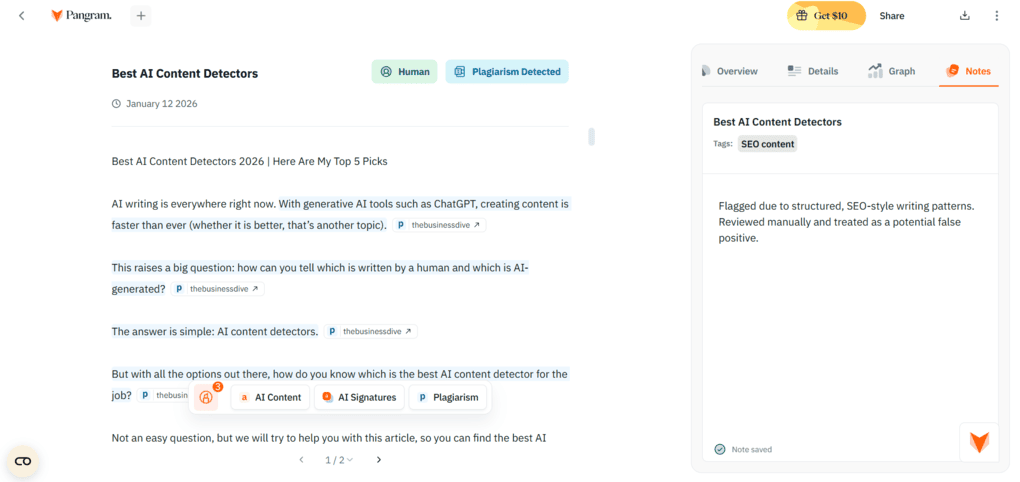
This is especially helpful if you manage a large volume of text or work in a team. For example, you can tag texts as false positives, AI-assisted, or reviewed, and leave notes explaining why a certain result was accepted, questioned, or required further review.
I also liked that each analysis can be exported as a report, which can be genuinely useful.
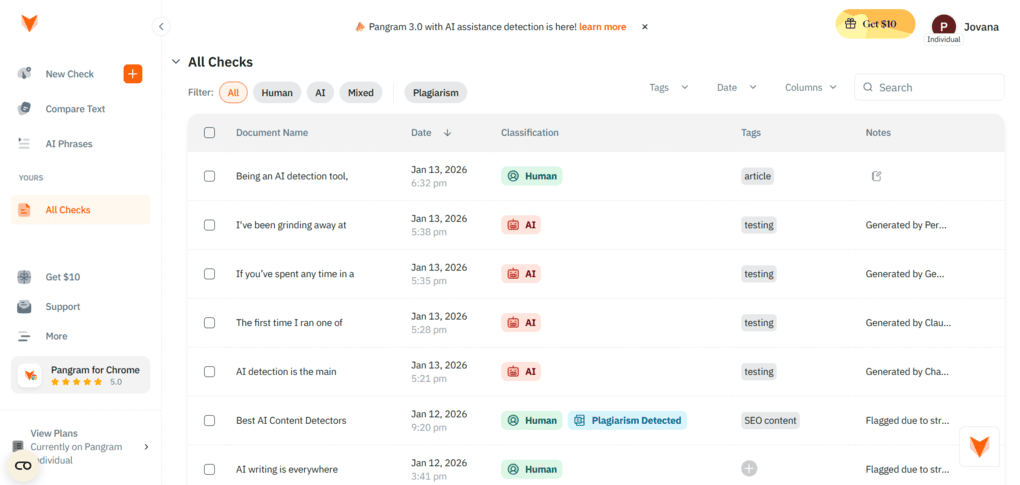
All your checks, along with their classification, tags, and notes, are stored in the All Checks tab in the left sidebar. You can filter results by type, sort them by date, and use tags to group related checks. This makes it much easier to navigate and keep track of results.
Plagiarism detector
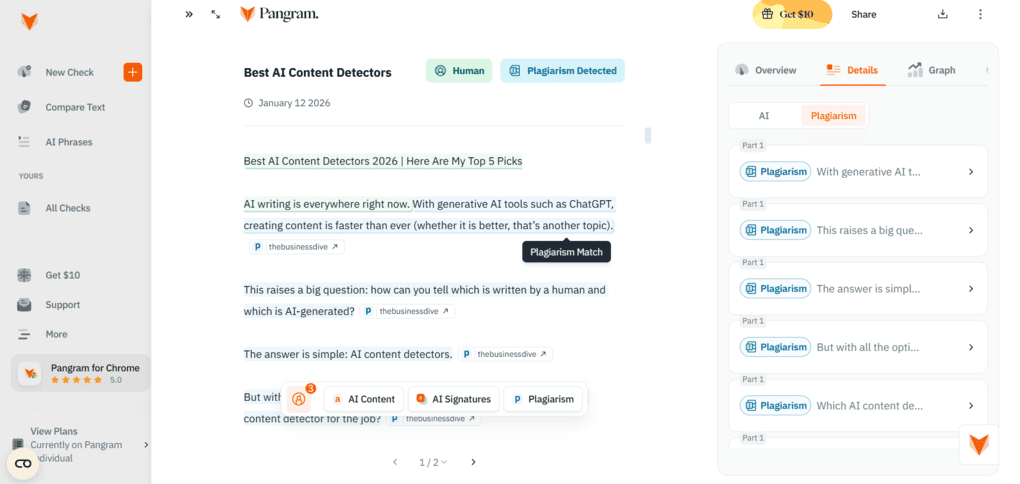
This feature is part of Pangram’s AI detector. When you paste text or upload a document for analysis, you can simply toggle on the plagiarism check and get plagiarism results included in the same report.
In my experience, the plagiarism detector was very accurate. When I pasted an existing article from The Business Dive website, Pangram correctly flagged almost every sentence as a plagiarism match. Each highlighted sentence was linked directly to the original source, making it easy to verify where the match came from.
In the overview section, Pangram shows plagiarism results alongside the AI detection score, including the total number of plagiarized sentences. There’s also a visual graph that helps put the findings into context, which makes the results much easier to interpret at a glance.
Compare text
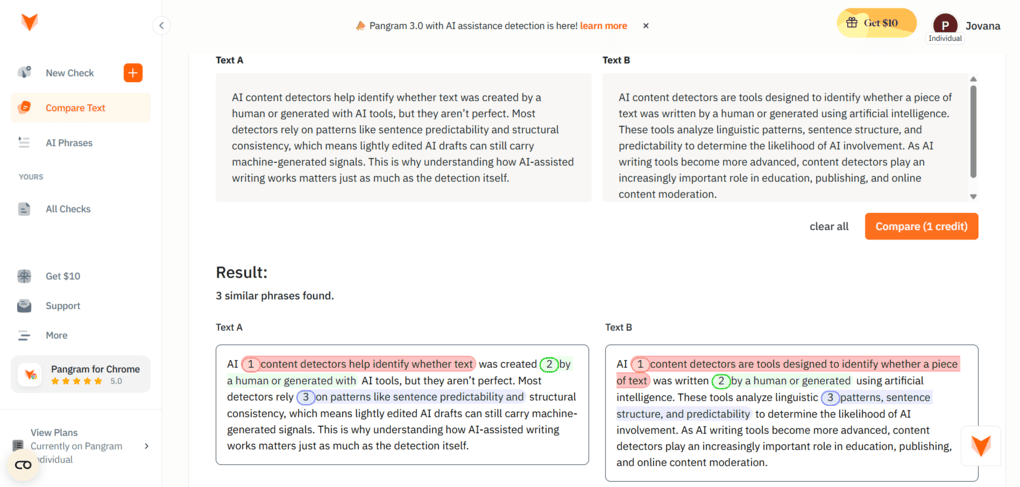
As I mentioned earlier, AI detection tools aren’t perfect and can flag human-written content. Pangram acknowledges this by offering follow-up tools, such as Compare Text. This feature helps clarify whether a text was actually AI-assisted and how AI may have been involved.
It works by analyzing two texts side by side and highlighting structural similarities, overlapping phrasing, and shared patterns. This is especially useful in cases where traditional plagiarism tools often fail.
For example, a draft may have started as an AI-generated text and was later edited or paraphrased by a human. Text like that would probably pass a plagiarism check. However, Compare Text can still reveal underlying similarities in structure and flow and help identify AI-assisted rewrites.
AI phrases
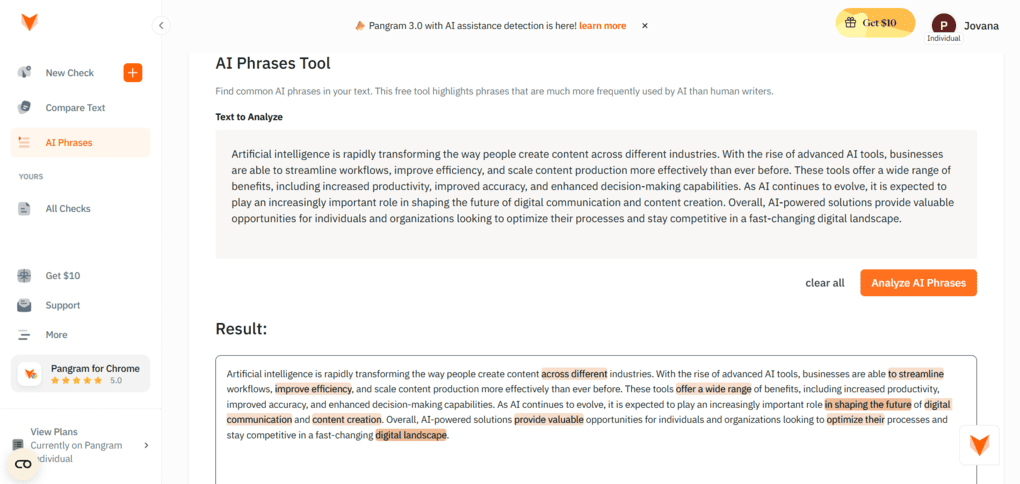
While the compare text feature identifies similarities in structure and flow, the AI phrases feature identifies phrases in a text that are likely to appear in AI writing.
However, some highlighted phrases were more subtle than I expected. In some cases, they were fairly ordinary words or short expressions that function more as part of a sentence’s structure than as obviously awkward, AI-sounding phrases. In isolation, this would be hard to interpret.
Nevertheless, this feature works best as an editing tool for humanizing AI-assisted content. It wouldn’t make sense to use it in highly technical texts with generic and repetitive terminology or purely informational content where neutral phrasing is expected and doesn’t necessarily indicate AI involvement.
This means the highlighted phrases should always be reviewed in context, rather than treated as definitive indicators on their own.
Other features
During my testing, I worked with English-language content, and the results were very reliable. However, Pangram can currently detect AI-generated and human-written text in over 20 languages!
Finally, Pangram offers an Organizations feature designed for team use. It allows multiple people to work in the same space, share checks, and view each other’s notes and tags. This can be useful for schools or teams that review a large amount of content together, though it doesn’t affect detection results themselves.
Pangram’s integrations
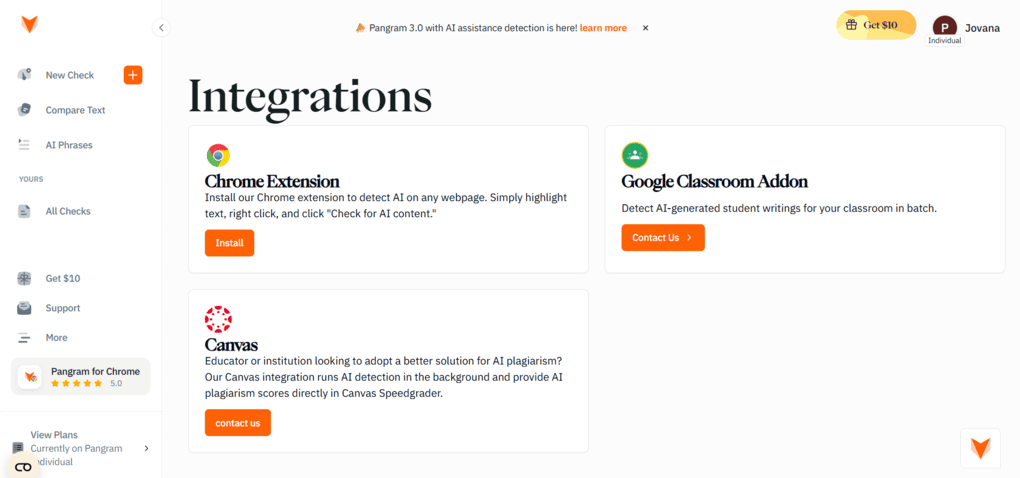
Pangram offers a small but practical set of integrations focused mainly on education and everyday browser use. The most accessible one is the Chrome extension, which is a real time-saver.
For educational use, Pangram also provides a Google Classroom add-on and a Canvas integration. These are designed for schools and institutions that need to review student submissions in bulk, with AI detection and plagiarism checks running in the background.
Pangram’s user interface
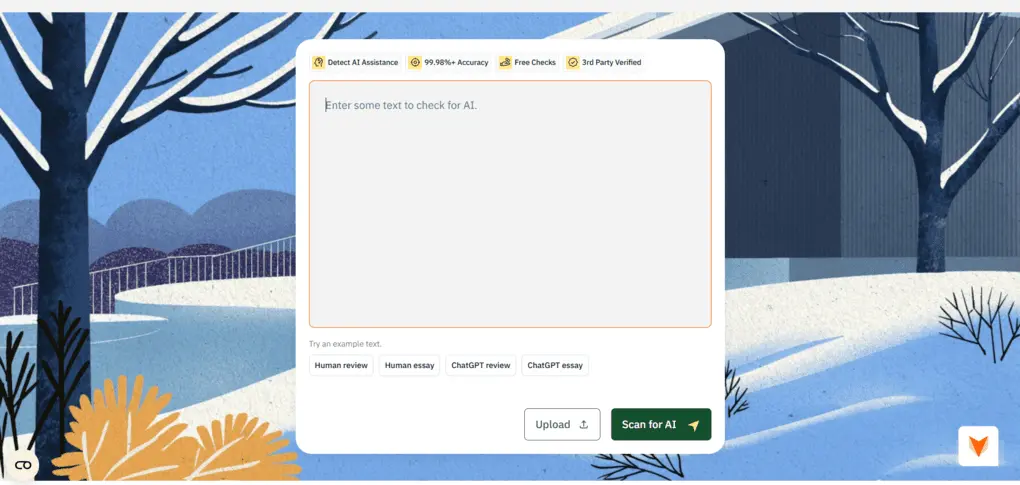
Pangram has a very clean and intuitive user interface, which makes the whole tool feel fast and easy to use.
Since the interface is fully web-based, the Chrome extension is a great addition and genuinely speeds things up. It allows you to check content directly on a webpage with just a few clicks. This comes especially handy when you review a lot of content in your browser.
All features are neatly organized in the left sidebar, and each option is clearly labeled, so there’s practically no learning curve. I also liked the overall design. It feels playful and modern, which makes working with the tool more pleasant than you’d expect from an AI detector.
How much is it?
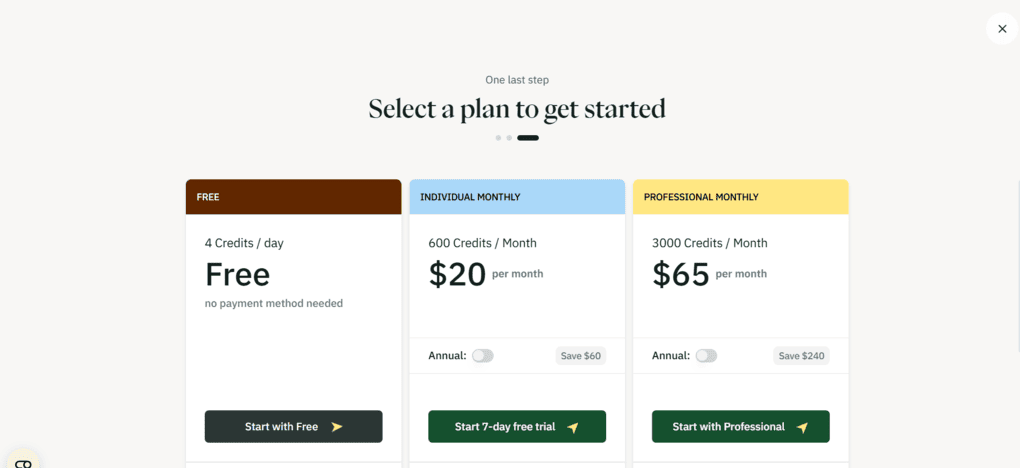
Pangram uses a fairly flexible credit-based pricing model, with separate plans for individuals, developers, and institutions. There is also a 7-day free trial.
Free plan
Pangram offers a free plan with 4 credits per day. This plan supports AI detection in 20+ languages, file uploads, and Chrome and Google Docs integrations. It’s suitable for very light use, as one credit covers up to 1,000 words.
Individual plans
For regular use, Pangram offers two individual subscriptions. Individual Monthly plan costs $20 monthly, and will get you 600 credits, while the Professional Monthly plan offers 3,000 credits for $65 per month.
Both paid plans include all free features, plus AI assistance detection and plagiarism detection.
Developer pricing
Pangram also offers API access through a separate developer plan. Credits start at $5 for 100 API credits. This option is aimed at developers who want to integrate AI detection into their own tools or workflows.
Enterprise & institutional pricing
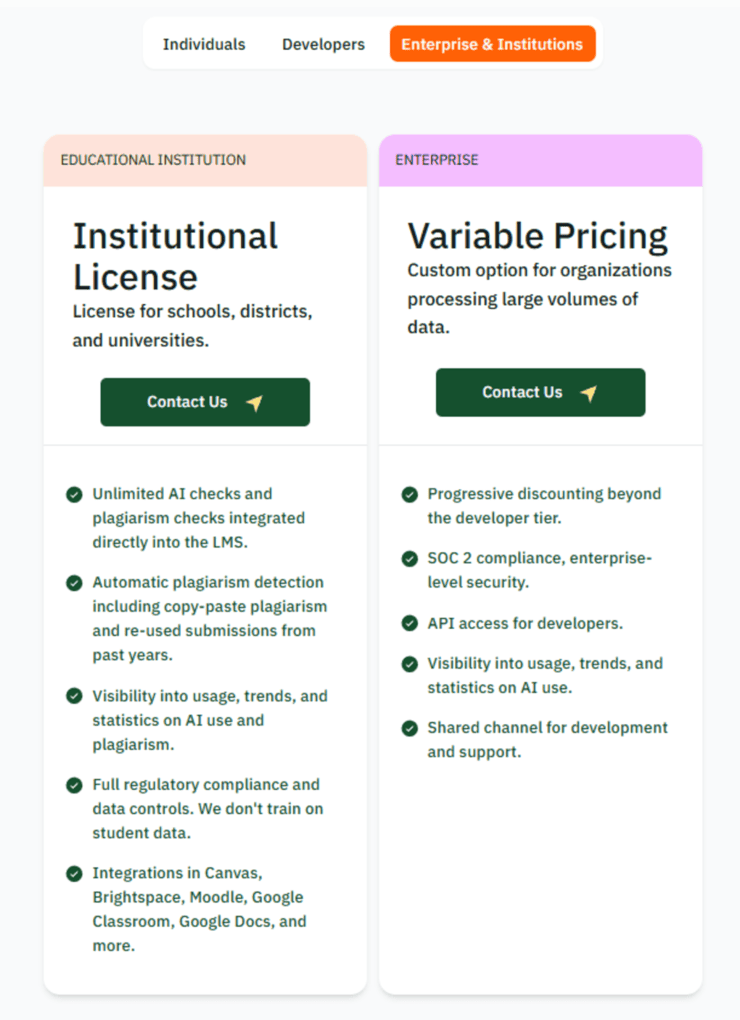
Pangram provides custom pricing for educational institutions and enterprises. These plans include LMS integrations, bulk checks, usage analytics, regulatory compliance, and enterprise-level security.
The good and the bad
Here’s a quick breakdown of where Pangram performs well and where it could improve.
The good
The bad
Pangram review conclusion
While it doesn’t claim to be the best AI detector in every scenario, Pangram’s AI detector offers a more transparent and accurate AI detection experience than many tools in this space.
Based on my hands-on testing, I can confidently say it stands out as one of the best AI detectors available right now.
Related posts:
- Best AI Content Detectors 2026 | Here Are My Top 6 Picks
- 15 Best AI Tools | 200+ Apps Tested By A Skeptical (2026)
- Quetext Review 2026: My Honest Take After Testing It
As always, I will update this Pangram review over time so you guys have the latest information on this AI content detector.
Why you can trust our reviews
At thebusinessdive.com, our team tests, reviews, and compares hundreds of productivity apps every year — from project management tools to note-taking apps. We dive deep into real-world use cases to help you find the right tools that actually improve your workflow, not just add noise.
Our mission? No fluff, no shortcuts—just honest, hands-on insights from productivity pros.
Discover how we stay transparent, read our review methodology, and let us know about any tools we missed.
Frequently asked questions
How accurate is Pangram’s AI detector?
Pangram performs best on longer text samples and clearly AI-generated content. Its detection model is designed to provide reliable AI content verification while keeping the false positive rate relatively low compared to other AI detectors. Mixed content, where AI was used and then edited by a human, can still be flagged in certain edge cases.
Can Pangram detect AI-generated papers and student submissions?
Yes. Pangram is commonly used to detect AI-generated papers, including research papers and student submissions. It is built with educational institutions in mind and supports academic integrity checks, particularly in academic and scientific writing.
Does Pangram detect AI-assisted writing or only fully AI-written text?
Pangram can detect both fully AI-written text and AI-assisted content. Its AI assistance detection helps clarify how AI was used in a text, which is useful when reviewing rewrites or edited AI-generated text that might otherwise pass plagiarism checks.
How does Pangram compare to other AI detectors?
Compared to other AI detectors, Pangram focuses more on context than on a single score. It provides sentence-level analysis, confidence indicators, and follow-up tools that help explain results. This makes AI usage easier to interpret and reduces confusion around false positives, especially when AI involvement is not immediately obvious.
Disclosure: I only recommend products I would use myself, and all opinions expressed here are my own. This post may contain affiliate links that, at no additional cost to you, may earn a small commission. Read the full privacy policy here.

Hey! I’m Jovana, a content writer who loves writing, researching, and testing new productivity apps. With a background in philosophy, I bring a thoughtful but no-bullshit approach to everything I do. Let’s connect on Linkedin!