


HubSpot Review 2026 | I Tested It — Here’s the Truth
In this HubSpot review, I will share my experience during testing the tool, including key features, pricing, and pros and cons.
Here are the key takeaways:
- HubSpot is easy to start with and has a strong free plan
- It gets more complex and expensive as you go deeper
- From my experience, it works best for growing teams that want everything in one place
- However, it may not be the best fit if you are looking for something simple or budget-friendly
If you want to learn more about what we found from our 2-week-long testing of HubSpot, just scroll down where we break down how we came to these conclusions and other essential information you should know before buying.
Let’s dive in!
Verdict
Here’s the quick verdict if you don’t want to read the full review:
🎯 Best for: Growing teams that want CRM, sales, and marketing tools in one platform
🚫 Not ideal for: Small teams looking for a lightweight or budget-friendly CRM
⭐ Biggest strength: Strong all-in-one ecosystem with powerful automation and integrations
⚠️ Biggest weakness: Gets expensive quickly as you scale
⚖️ Verdict: A powerful all-in-one CRM platform that’s easy to start with and scales well over time, though the growing complexity and pricing may not suit every business.
🏆 Score: 4.5 / 5
✅ Tested with our review & scoring methodology ✅ Real-world testing ✅ Unbiased evaluation
HubSpot
Summary
HubSpot is an all-in-one CRM that combines sales, marketing, and automation in one platform. It’s easy to get started and offers a strong free plan with solid core features. Overall, it works best for growing teams, but may not be the best fit if you need something simple or low-cost.
|
|
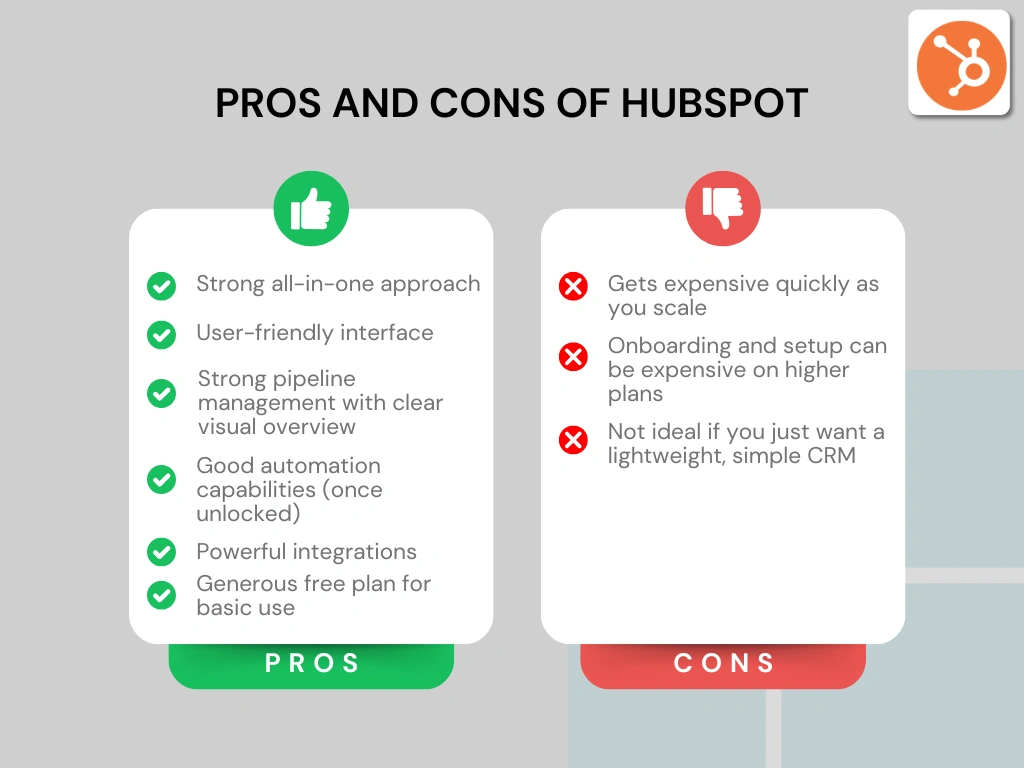
Strong all-in-one approach (CRM + marketing + sales tools)
|
|
|
User-friendly interface
|
|
|
Strong pipeline management with clear visual overview
|
|
|
Good automation capabilities (once unlocked)
|
|
|
Powerful integrations
|
|
|
Generous free plan for basic use
|
|
|
Gets expensive quickly as you scale
|
|
|
Onboarding and setup can be expensive on higher plans
|
|
|
Not ideal if you just want a lightweight, simple CRM
|
How We Test CRM Apps
To keep our reviews and final scores fair and consistent, we evaluate every CRM app using a standardized testing framework based on real-world sales workflows and hands-on testing.
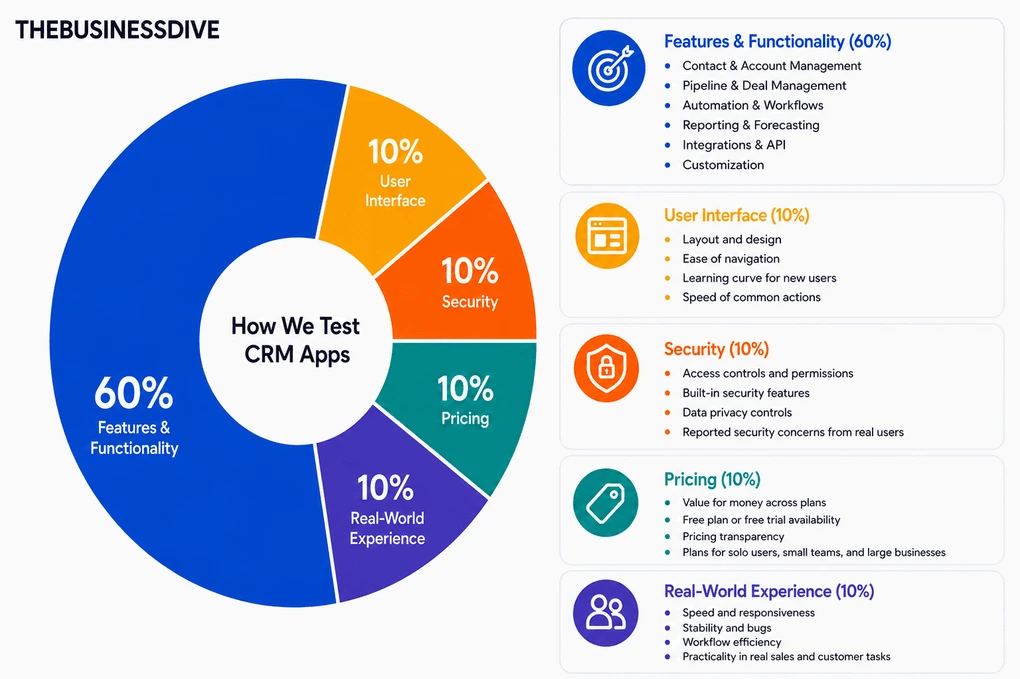
Our scoring breakdown after testing 10+ CRM apps:
🤖 Features & functionality — 60%
🖥️ User interface — 10%
💰 Pricing — 10%
🔐 Security — 10%
👥 Real-world experience — 10%
Want a detailed breakdown of how we test each category?
Learn exactly how we test tools → Review methodology
Short on time? Here’s a quick overview of HubSpot
What is HubSpot CRM?
HubSpot CRM is a US-based software company founded in 2006. It started as a marketing tool built around the idea of inbound marketing, and over time evolved into a full customer platform that combines CRM, sales, marketing, and support tools in one place.
Today, HubSpot is one of the most recognizable names in the CRM space, used by hundreds of thousands of businesses worldwide. It is especially known for being more accessible than traditional enterprise tools, while still offering a wide range of features as companies grow.
My personal experience with HubSpot CRM

When it comes to my personal experience during testing HubSpot, it was very smooth at the beginning.
However, the more I explored, the more complex it started to feel. Not in a bad way, but it definitely takes some time to get comfortable with all the options, especially when you get into automation or reporting.
One thing I realized pretty quickly is that the tool only works as well as you use it. If you keep everything updated, it’s really useful.
Overall, I didn’t have the feeling that it’s hard to use, just that there’s a lot of it.
Why did it get a 4.5 / 5?
HubSpot earned high scores for its all-in-one approach, strong CRM functionality, and overall flexibility. It combines contact management, sales pipelines, marketing tools, automation, and reporting in one platform, while still being relatively easy to start with compared to many enterprise CRMs.
It also scored well for customization, integrations, and the quality of its free plan, useful for smaller teams.
The main areas where HubSpot lost points are pricing and complexity. As you unlock more advanced features, costs increase quickly, and the platform becomes noticeably heavier to manage.
Who gets the most value from HubSpot
Who won’t get the most out of HubSpot
Features I tested
Now, let’s take a closer look at the key features I tried during my HubSpot review.
Contact Management
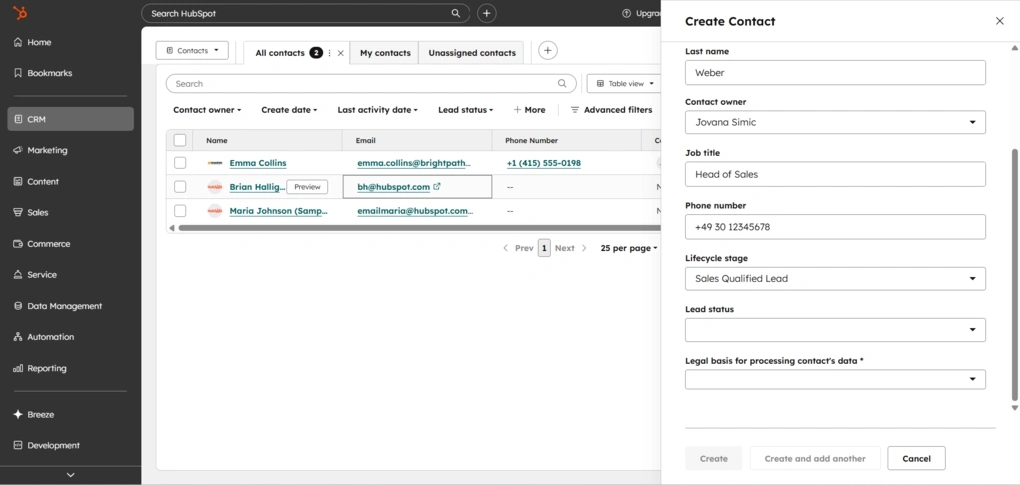
At the start of the workflow, I added contacts by going to CRM in the left sidebar and then clicking on Contacts. The process itself is pretty standard. You can either import contacts or create them from scratch.
Importing is flexible. You can upload a file from your computer, such as a CSV or Excel file, sync contacts from external apps, or use HubSpot’s data transfer option to move data from another system. There is also a guided import setup with sample files and instructions to make the process easier if you are starting from scratch.
If you create a contact manually, you get a standard form with fields like name, email, company, and so on. What I liked here is that the form is customizable. By clicking on edit form, you can rearrange fields, add new ones, remove anything you do not need, and mark certain fields as required.
Adding companies follows the same logic.

Once contacts are added, you can switch between a table view and a board view. In both views, you can quickly edit contact details directly without opening each profile.
Filtering options are strong. You can segment contacts by lifecycle stage, owner, company, or pretty much any property. There are also solid customization options if you want to adjust how data is displayed.
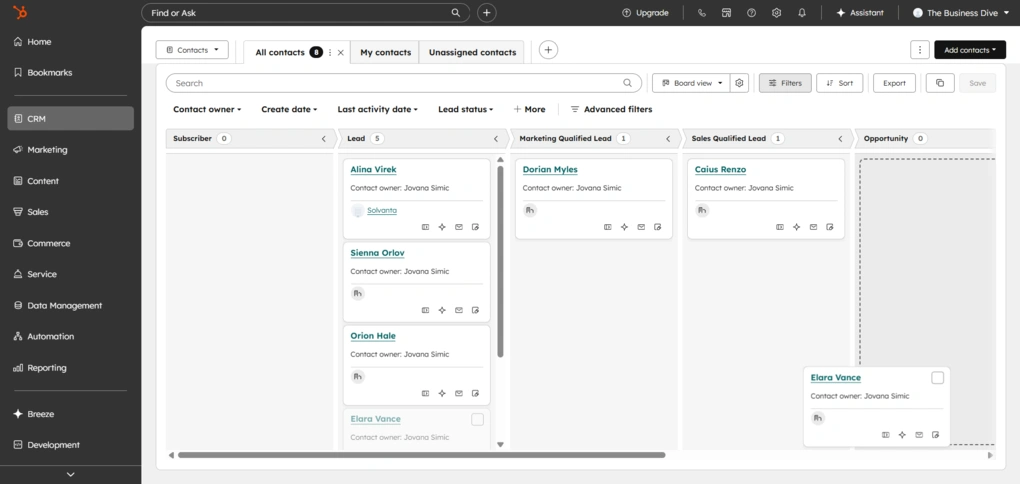
Personally, I preferred the board view. It gives a clearer, more visual overview of contacts based on their lifecycle stage. It also supports drag and drop, so you can move contacts between stages in a very intuitive way.
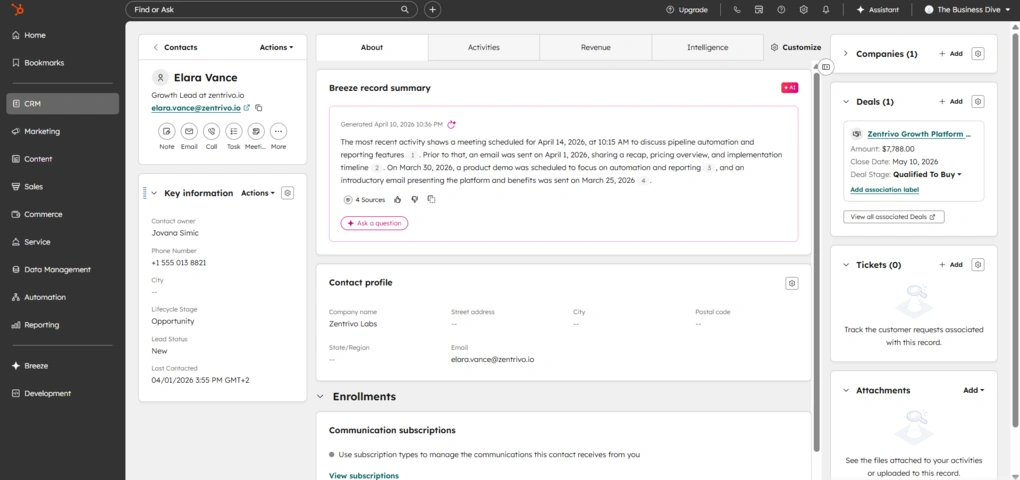
No matter which view you use, clicking on a contact opens a detailed profile. You can see the full activity timeline, add notes, log emails and calls, create tasks, and basically build a complete picture of each contact in one place.
Compared to tools like Nutshell or Pipedrive, HubSpot is more flexible when it comes to contact data and customization. You get more control over fields, filtering, and how information is displayed.
At the same time, Nutshell and Pipedrive are simpler and more focused. HubSpot gives you more options, but it also comes with more complexity, especially as you start customizing things.
Lead Capture
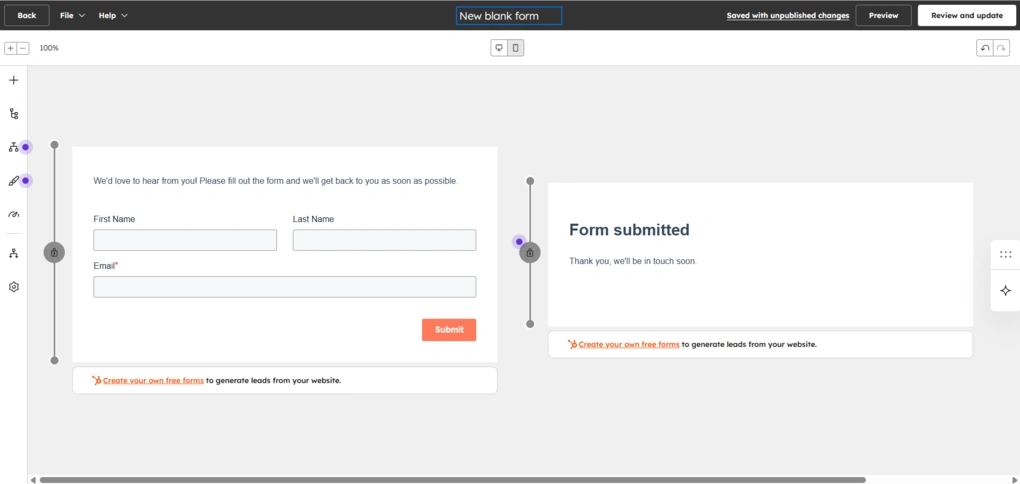
In addition to manually adding contacts, HubSpot also offers built-in tools for capturing leads.
You can create forms and embed them on your website, or use landing pages to collect contact information directly into the CRM. Once someone submits a form, they are automatically added as a contact.
Forms can be customized with different fields, and you can decide which data you want to collect. HubSpot also supports pop-up forms, embedded forms, and live chat, including chatbots that can capture leads automatically.
Forms can also be connected to workflows, so new contacts can be automatically assigned, segmented, or moved into follow-ups.
Sales Pipeline Management
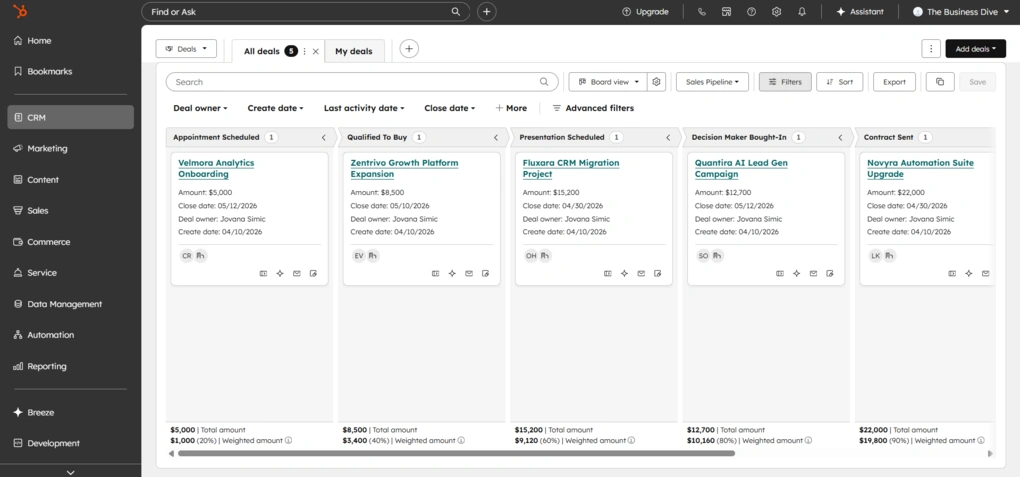
Once contacts are in place, the next step is managing deals.
Deals are also located in the left sidebar under CRM. Just like contacts, they can be imported by uploading a file, syncing from apps, or transferring data from another system.
You can also create them manually, and the process is very similar to adding contacts or companies. The form is customizable, so you can adjust fields, add new properties, and structure it based on your workflow.
There are two views here as well, the table and the board. The board view shows deals across different stages in a kanban-style pipeline, and supports drag and drop.
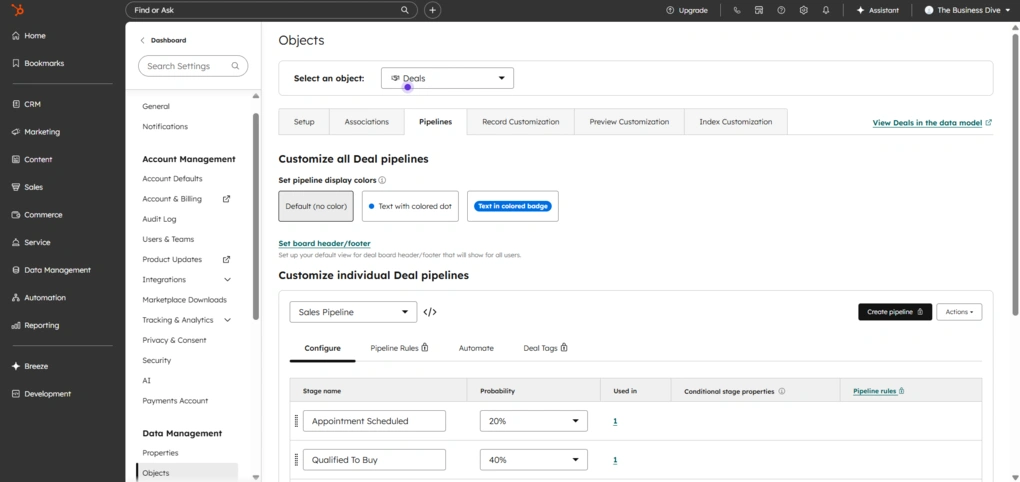
Pipelines themselves are customizable designed for sales teams. You can create multiple pipelines, rename stages, and adjust them to match your actual sales process.
By default, HubSpot comes with predefined stages like appointment scheduled, qualified to buy, contract sent, and closed won or lost, but you can change all of this.
Furthermore, each deal can be linked to a contact and a company. Once you open a deal, you get a detailed view with a full activity timeline, where you can log emails, calls, meetings, notes, and tasks in one place.
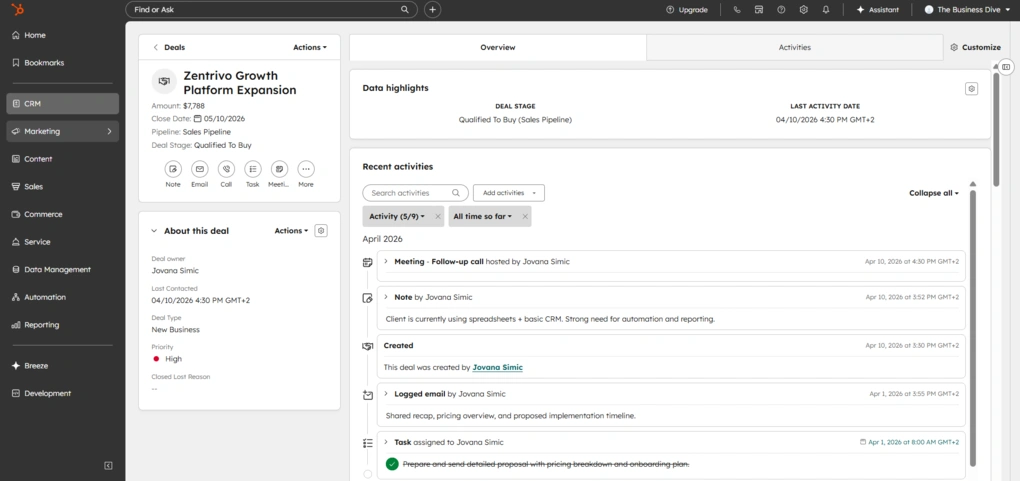
You can also assign deal owners, set deal value, expected close date, and priority, which helps with tracking and basic forecasting. The pipeline itself gives you a quick overview of how many deals you have in each stage and their total value.
One thing that stands out is how flexible the deal structure is. You can add multiple contacts to a deal, attach products and line items, and break down the total value into specific services or subscriptions.
Overall, this setup makes HubSpot a strong fit for sales teams. It gives a clear overview of the pipeline, while still being flexible enough to adapt to different sales processes. At the same time, it stays relatively easy to use, which is not always the case with more advanced CRM tools.
Products & Line Items
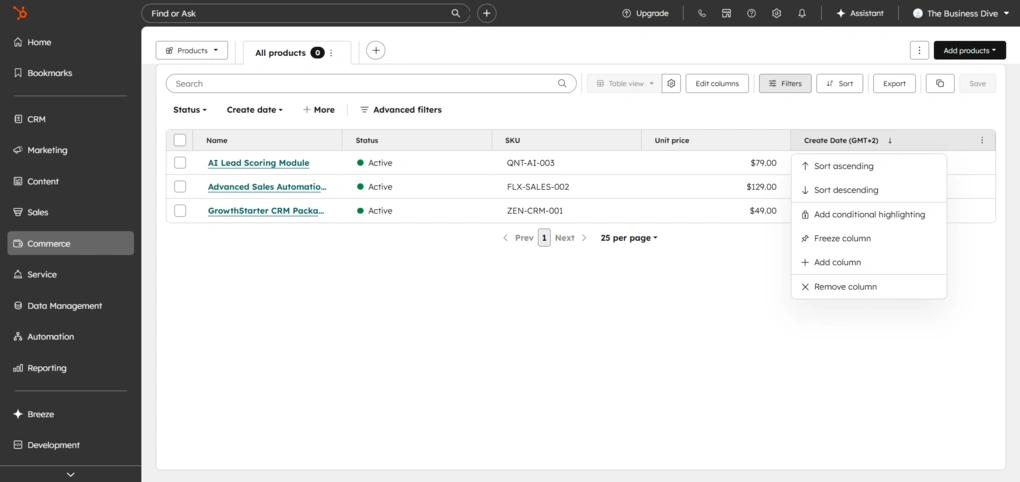
One thing that becomes important once you start working with deals is how deal value is actually calculated.
Products are basically a library of what you sell. You can create and store all your services or offerings there, with predefined names, prices, and descriptions.
When you add a product to a deal, it becomes a line item. This is where things get more flexible. A line item is a specific instance of a product inside a deal, which means you can change details like price, quantity, discount, or billing terms without affecting the original product.
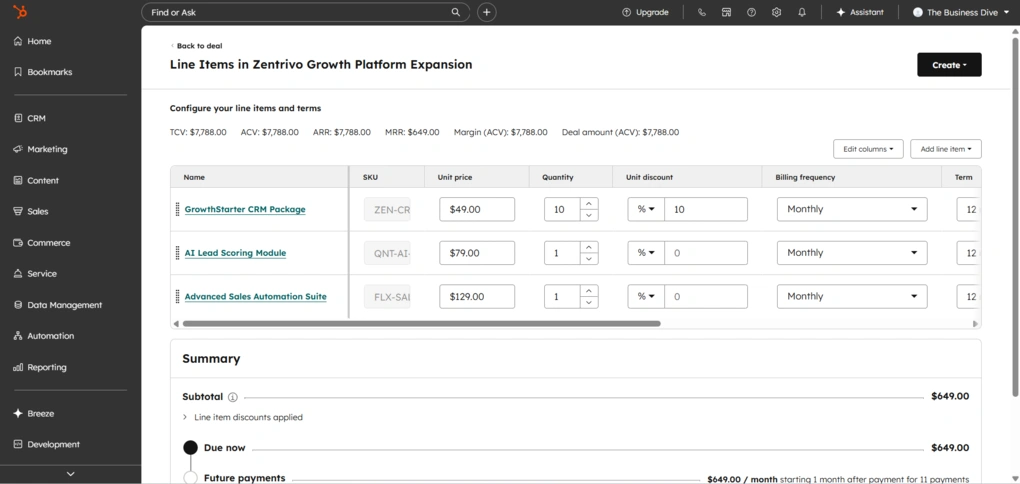
Inside a deal, you can add multiple line items and build out the full structure of the offer. You are not limited to just setting a total value. You can mix different products, adjust quantities, apply discounts, and combine one-time and recurring pricing.
There is also a dedicated line item editor, where you can manage everything in one place. You can edit pricing, set billing frequency, define contract terms, and apply taxes or discounts.
HubSpot can automatically calculate values like total contract value, monthly recurring revenue, or annual revenue based on the line items you add.
Once the deal structure is set through line items, HubSpot also covers the final step.
Commerce Features
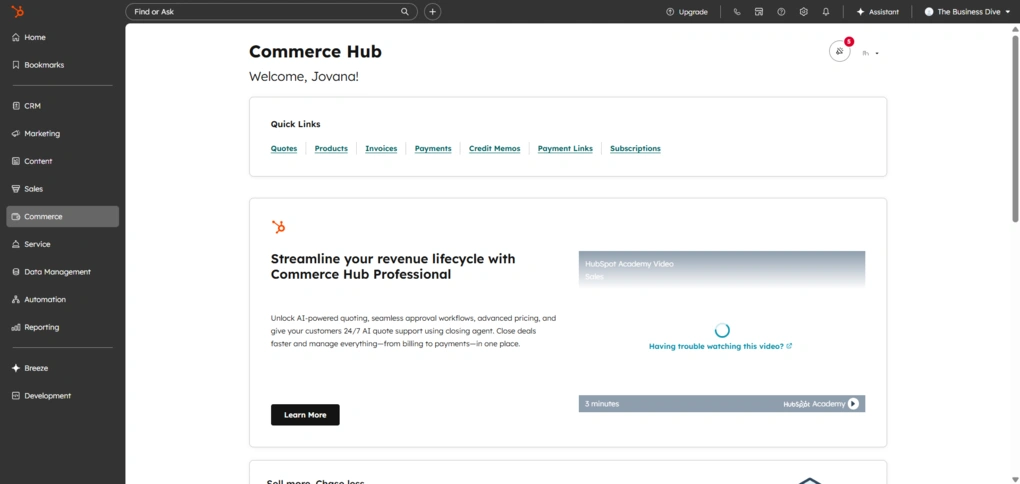
HubSpot includes basic commerce features that cover the final part of the sales process.
You can create quotes directly from deals, send invoices, and collect payments without leaving the platform. There are also payment links that can be shared with customers, as well as support for subscriptions and recurring billing.
Everything is connected to the CRM, so when a payment is made, it updates the deal and contact automatically. This keeps revenue data in the same place as your sales activity.
Activity Tracking
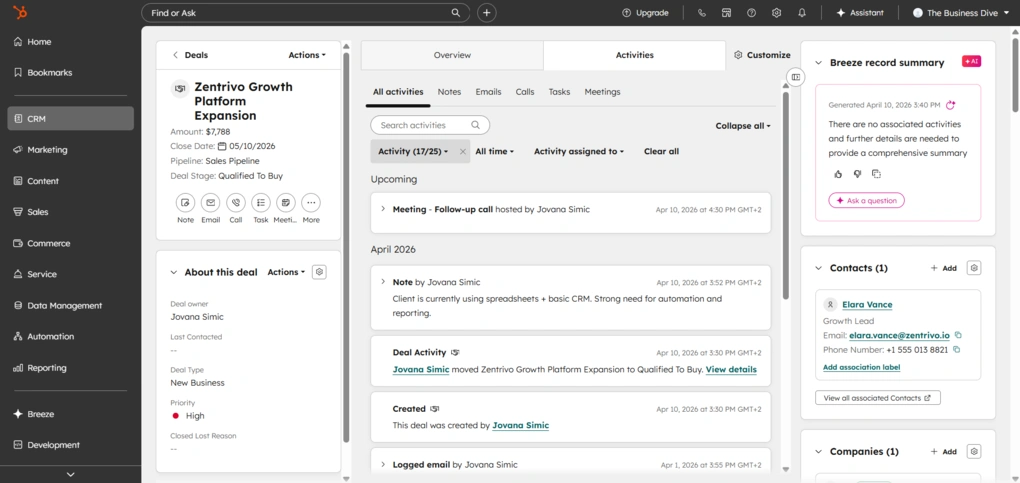
Activities are built directly into both contacts and deals, so you don’t need to switch. They are automatically linked across contacts, companies, and deals. Email activity can also be tracked automatically, including opens and engagement.
You can log emails, calls, meetings, and notes, or schedule future actions like follow-ups and tasks.
When it comes to tasks, you can set due dates, priorities, reminders, and assign them to specific users. Meetings can also be scheduled directly from the deal or contact view, and they appear in the same timeline.
The timeline itself is one of the stronger parts of this feature. It gives a chronological view of everything that has happened and what is coming next.
Automation & Workflows
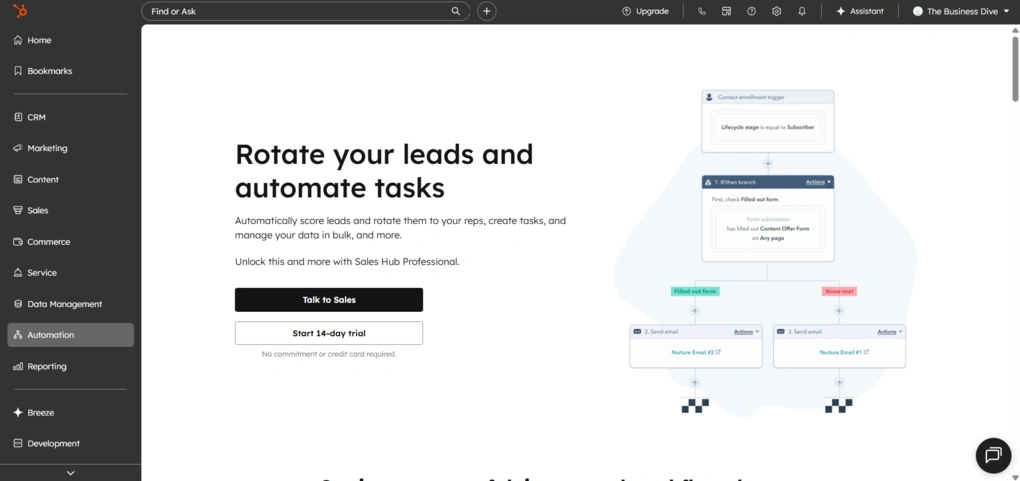
Workflows in HubSpot allow you to automate repetitive actions based on triggers. For example, you can automatically create a task when a deal moves to a new stage, send a follow-up email, or update contact properties.
The logic is based on simple if/then conditions. You define a trigger, like a deal entering a stage, and then set actions that follow, such as assigning tasks, sending emails, or updating data.
Automation can also be used for marketing tasks and lead nurturing, so instead of manually following up, you can guide contacts through the process automatically.
One important limitation is that more advanced automation features are not available in the free plan and require higher-tier subscriptions.
Compared to tools like Pipedrive or Nutshell, HubSpot offers more advanced automation options, especially when it comes to building multi-step workflows and combining sales and marketing actions. On the other hand, it also comes with more setup and a steeper learning curve once you go beyond basic automation.
Reporting & Analytics
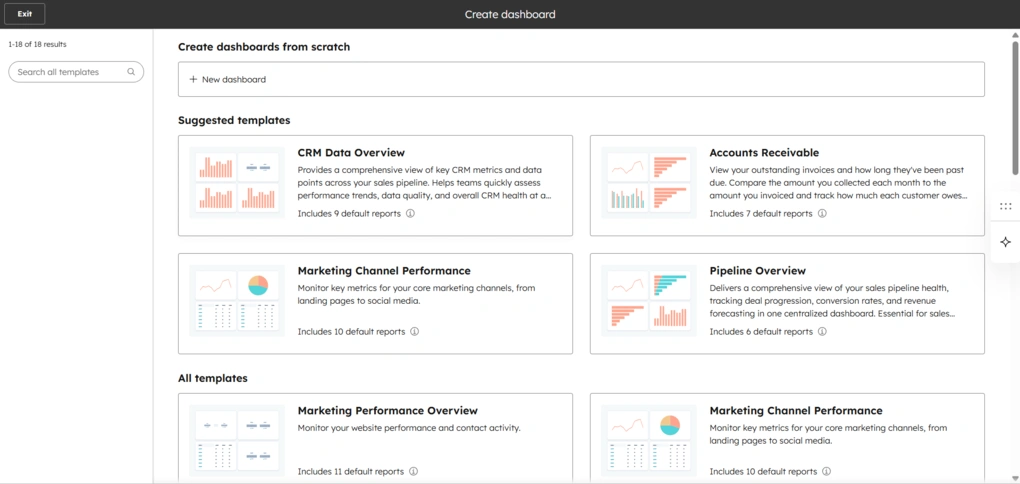
HubSpot provides reporting dashboards and reports that give you an overview of your pipeline, deal progress, and overall performance. You can track things like deal value, conversion rates, and how deals move through different stages.
Reports can be filtered and customized based on different properties, such as deal stage, owner, or time period.
The dashboards are easy to read and give a quick snapshot of what is happening. You can quickly see how many deals are open, how much revenue is in the pipeline, and where things are slowing down.
One limitation is that more advanced reporting tools are not fully available in the free plan, so deeper analysis requires a paid upgrade.
AI capabilities
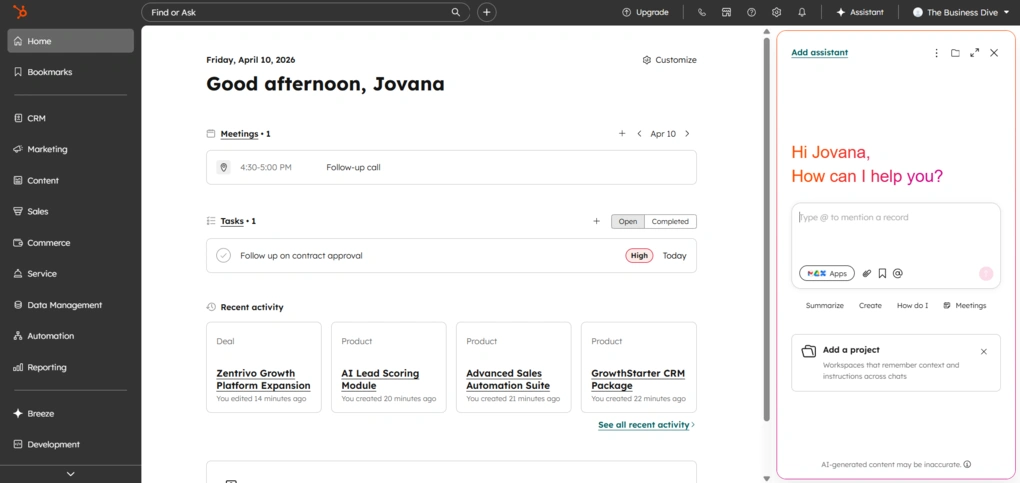
HubSpot also includes AI features across the platform, grouped under its Breeze AI.
It includes tools like Breeze Assistant, which helps with everyday tasks like writing emails or summarizing data, as well as AI agents that can handle more complex workflows automatically.
I used it occasionally for small things like rewriting emails or checking suggestions, but it did not change how I use the tool overall.
HubSpot CRM integrations
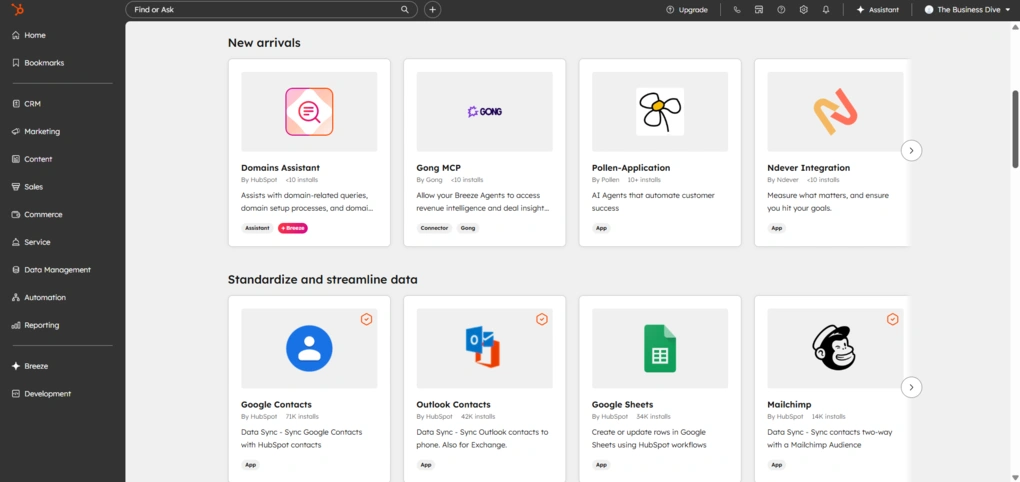
HubSpot offers a large integration ecosystem through its App Marketplace.
You can connect tools like Gmail or Outlook for email tracking, Slack for communication, Google Calendar for meetings, and platforms like Zapier for connecting more than 8000 additional apps.
HubSpot also supports custom integrations through its API, but more advanced syncing and customization often require higher-tier plans.
HubSpot CRM user interface
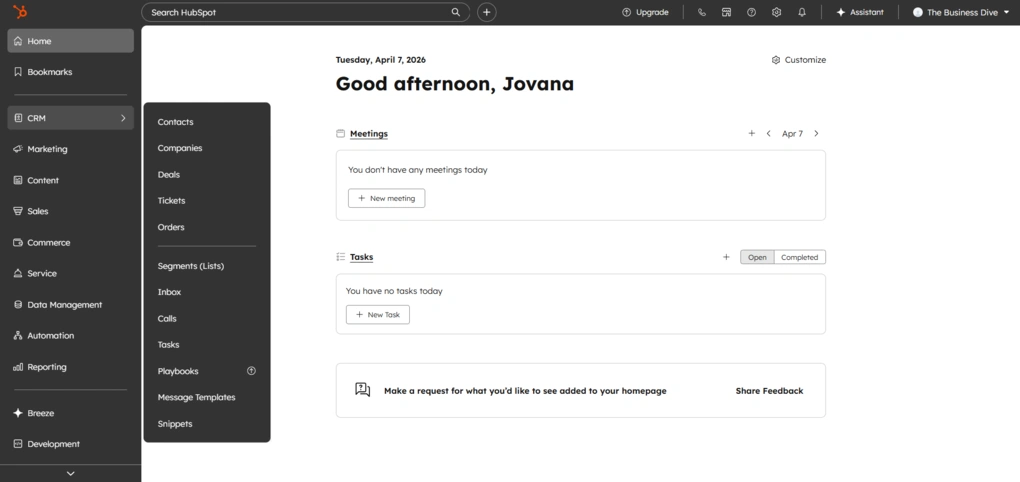
Since HubSpot includes a lot of different features, the interface can feel a bit heavy at first. There is a lot going on, but it is structured in a way that makes sense. Additionally, when you first start using it, the platform guides you through most actions, so even though it looks complex, it is not hard to get into.
Everything is organized through the left sidebar, so once you learn where things are, navigation becomes pretty straightforward.
You can rearrange widgets on the dashboard, which gives some flexibility. There is also a search bar that makes it easy to jump to things quickly, and a bookmarks bar that you can customize based on what you use most.
Filtering and customization options are strong across the tool, especially when working with contacts and deals.
HubSpot pricing structure
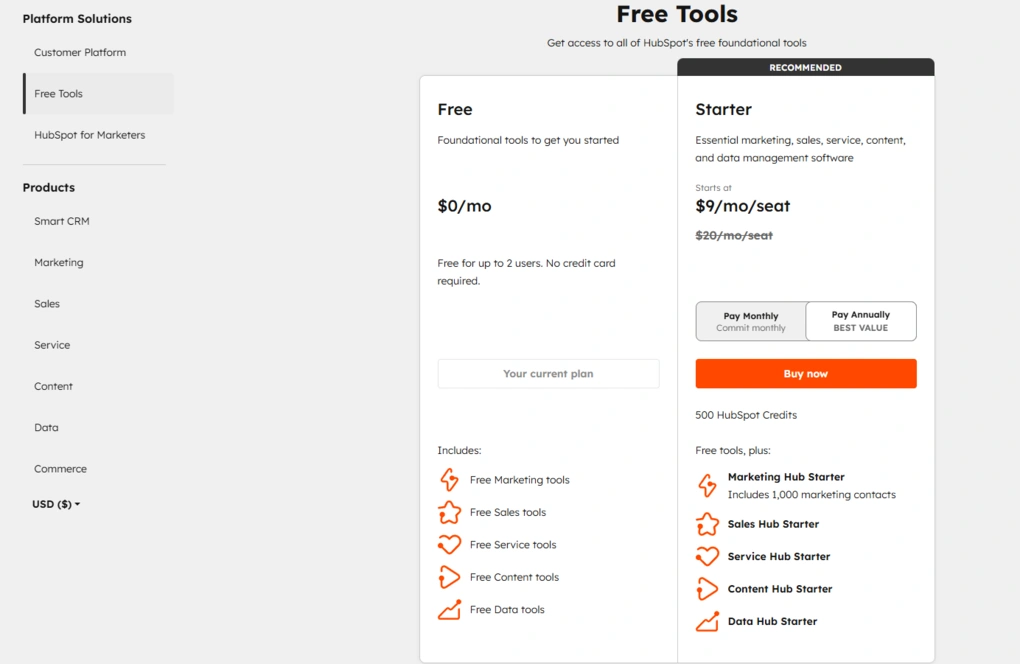
HubSpot uses a modular pricing structure, which means you pay separately for each hub, including HubSpot Sales Hub, Marketing Hub, Service Hub, CRM, and others. Pricing is mostly seat-based, but in the HubSpot Marketing Hub, it also depends on the number of marketing contacts, which can significantly increase total cost.
There is a free CRM plan that includes core features like contact management, deal tracking, email marketing tools, lead tracking, and basic reporting dashboards. This free version is genuinely usable for small businesses and simple setups, but most advanced features like marketing automation, reporting tools, and automated workflows are locked behind paid plans.
Paid plans start with Starter, which typically costs around $9–$20 per user per month and includes basic sales and marketing tools, simple automation capabilities, and limited email marketing automation. This tier works for small teams, but has clear limitations when it comes to reporting, customization, and scaling.
The biggest jump happens with Professional plans. For example, Sales Hub Professional costs around $90–$100 per user per month, while Marketing Hub Professional starts at around $800–$900 per month and includes automation, lead scoring, reporting dashboards, and more advanced marketing campaigns.
This is where HubSpot becomes a full marketing automation platform, but also where pricing increases significantly.
Enterprise plans go even higher. Sales Hub Enterprise starts at $150 per user per month, while Marketing Hub Enterprise can reach $3,600+ per month, depending on contacts and features. These tiers add advanced features like predictive analytics, custom objects, and deeper customization for larger teams.
Another important detail is onboarding fees. For higher pricing tiers, there is often a mandatory one-time onboarding cost, typically around $1,500 for Professional and $3,500–$7,000 for Enterprise, depending on the hub. This is something many users overlook when comparing CRM tools.
In practice, HubSpot starts as an affordable free CRM, but becomes one of the more expensive CRM tools as you scale.
While it offers strong automation capabilities, marketing tools, and an all-in-one platform for managing customer relationships, the pricing structure and higher pricing tiers can be a limiting factor for smaller teams or businesses comparing it to alternatives like Zoho CRM or other tools.
What HubSpot does well and where it falls short
Here’s a quick breakdown of where HubSpot performs well and where it falls short.
What it does well
Where it falls short
HubSpot alternatives
If you’re still unsure whether this is the right CRM tool for you, we’ve got you! Here are some solid HubSpot alternatives worth considering:
|
App |
Best for |
Description |
|---|---|---|
|
Pipedrive |
Best for sales-focused teams |
Pipedrive is a sales-focused CRM built for managing deals and moving leads through a clear visual pipeline. |
|
Nutshell |
Best for simple all-in-one CRM |
Nutshell is a well-rounded CRM that brings contact management, pipeline tracking, and communication tools into one place. |
|
Copper CRM |
Best for Google Workspace users |
Copper CRM is an easy-to-use CRM that works best for teams already using Google Workspace. |
|
Zoho CRM |
Best budget-friendly CRM |
A flexible CRM platform with a wide range of features, including automation, analytics, and customization options. Often used by businesses looking for a more affordable all-in-one solution. |
|
Salesforce |
Best for enterprise teams |
A highly customizable CRM designed for large organizations, offering advanced automation, reporting, and integration capabilities across complex business processes. |
|
Monday CRM |
Best for visual workflows |
A visual CRM built on a flexible workspace, allowing teams to manage pipelines, tasks, and processes in a highly customizable way. |
Compare HubSpot vs alternatives



Pipedrive VS HubSpot
Wrapping up: HubSpot CRM review
At the end of this HubSpot review, I can conclude by saying that HubSpot clearly delivers on what it promises. It brings a lot of tools into one place and makes it easy to get started, especially with its free plan, which already covers the basics.
At the same time, the more you rely on it, the more you start to feel its complexity and pricing. It works best if you actually use it consistently and are ready to grow into it over time.
As always, I will update this HubSpot review over time so you guys have up-to-date information about this CRM software.
Why you can trust our reviews
At thebusinessdive.com, our team tests, reviews, and compares hundreds of productivity apps every year — from project management tools to note-taking apps. We dive deep into real-world use cases to help you find the right tools that actually improve your workflow, not just add noise.
Our mission? No fluff, no shortcuts—just honest, hands-on insights from productivity pros.
Discover how we stay transparent, read our review methodology, and let us know about any tools we missed.
Explore our Apps directory
A curated directory of software tools we’ve independently reviewed, with links to full reviews, comparisons, and category guides.
Frequently asked questions
Is HubSpot a good CRM for small businesses?
Yes, HubSpot is often considered one of the best CRM tools for small businesses because of its free CRM and user-friendly interface. It includes contact management tools, sales pipeline tracking, email marketing tools, and lead tracking in the free plan.
However, as your marketing efforts grow and you need more advanced features like marketing automation or reporting dashboards, the pricing increases quickly.
What does HubSpot include across its hubs?
HubSpot offers a full marketing automation platform with multiple hubs, including HubSpot CRM, Marketing Hub, Sales Hub, and Service Hub.
The HubSpot Marketing Hub includes email marketing automation, landing pages, marketing campaigns, and lead scoring, while the Sales Hub focuses on sales pipeline management, sales calls, and automation capabilities.
The Service Hub adds tools like live chat, knowledge base, and customer support features, making it a complete system for managing customer relationships.
Is HubSpot easy to use for beginners?
HubSpot is generally easy to start with, especially compared to other CRM tools like Zoho CRM or Salesforce. The user interface is intuitive, and the onboarding process is guided, which helps new users get started quickly.
However, many users report a learning curve as they move into more advanced features like automated workflows, reporting tools, and content management, especially when trying to build automated workflows or manage multiple marketing channels.
Disclosure: I only recommend products I would use myself, and all opinions expressed here are our own. This post may contain affiliate links that, at no additional cost to you, may earn a small commission. Read the full privacy policy here.

Hey! I’m Jovana, a content writer who loves writing, researching, and testing new productivity apps. With a background in philosophy, I bring a thoughtful but no-bullshit approach to everything I do. Let’s connect on Linkedin!