


PDF Editors Statistics 2026: 34 Statistics You Need to Know
PDFs are still a core part of everyday digital workflows, from sharing documents to editing, signing, and managing files. As PDF software evolves, AI, automation, and security are becoming increasingly important.
After digging into the latest PDF editors statistics, a few numbers stood out. Here’s what the data tells us about PDF editing in 2026:
- $10.01 billion is the estimated global PDF editor market size by 2032.
- 11.15% is the projected CAGR of the global PDF editor market through 2032.
- 3+ trillion PDF documents are in circulation worldwide.
- 400+ billion PDFs are opened every year.
- 18+ billion PDFs are edited annually.
- 98% of financial professionals regularly work with PDFs.
- 64.5% of enterprises have AI in production for document workflows.
- 82.8% of organizations plan to invest in document automation within the next 12 months.
- 22% of malicious email attachments are PDF files.
- 95% of public-facing PDFs fail accessibility standards.
The statistics below cover everything from market growth and PDF usage to editing, AI adoption, security, business workflows, and the latest industry trends.
PDF Editor Market Statistics
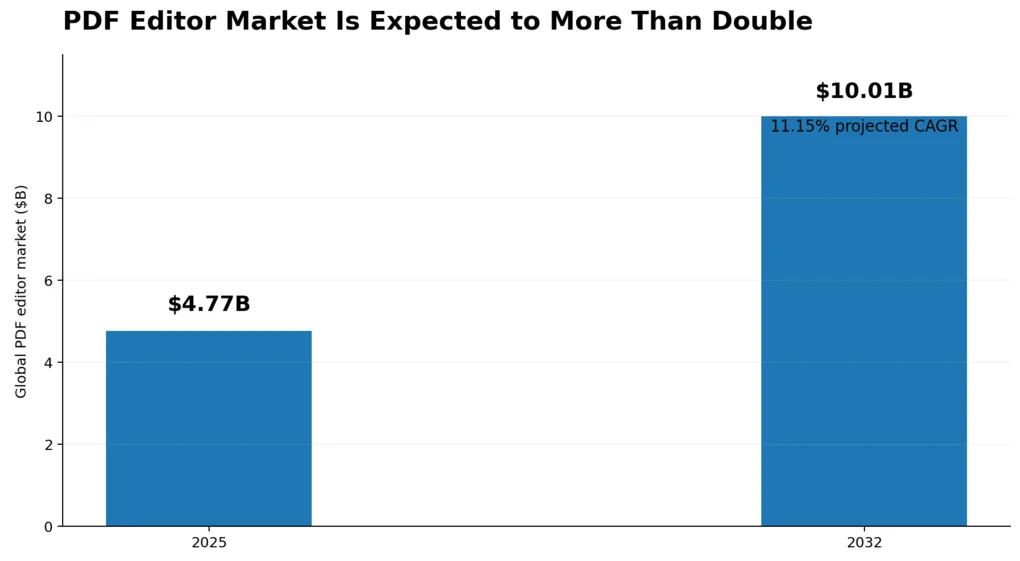
The PDF Editor Market Is Expected to Reach $10.01 Billion by 2032
The global PDF editor software market was valued at $4.77 billion in 2025. 360iResearch forecast projected it’s growth to $10.01 billion by 2032, at a compound annual growth rate (CAGR) of 11.15%.
Why this statistic matters
The market is expected to more than double over the next several years, reflecting the growing demand for digital document workflows. This growth highlights the increasing role of PDF editors in modern business operations.
Cloud-Based PDF Editors Are Growing Faster Than On-Premises Solutions
Data from DataIntelo’s PDF Editor Market Research Report 2034 shows that cloud-based PDF editing software accounted for 42.7% of global market revenue in 2025 and is projected to grow at a 12.8% CAGR through 2034, compared to 7.4% for on-premises solutions.
Why this statistic matters
Cloud-based PDF editors are becoming the preferred deployment model thanks to their accessibility, automatic updates, and collaboration features. This shift reflects the growing demand for SaaS document management solutions.
Large Enterprises Generate Over 60% of PDF Editor Market Revenue
According to the same DataIntelo’s report, large enterprises accounted for 61.2% of the global PDF editor market revenue in 2025, making them the dominant customer segment.
Why this statistic matters
Large organizations invest heavily in PDF editors to manage high document volumes, automate workflows, and meet strict security and compliance requirements. This makes enterprise customers the primary revenue driver for the industry.
Software Accounts for More Than Two-Thirds of the PDF Editor Market
DataIntelo reports that software solutions accounted for 68.4% of the global PDF editor market revenue in 2025, generating approximately $3.28 billion.
Why this statistic matters
Software remains the core revenue driver of the PDF editor market, while services such as implementation and training play a supporting role. This highlights that businesses continue to invest primarily in feature-rich PDF editing platforms rather than accompanying services.
North America Accounts for Over One-Third of the Global PDF Editor Market
Data from DataIntelo shows that North America accounted for 36.5% of the global PDF editor market revenue in 2025, generating approximately $1.75 billion.
Why this statistic matters
North America’s market leadership reflects the region’s high enterprise software adoption and strong demand for secure document management. It also serves as an early indicator of the features and technologies likely to shape the global PDF editor market
Mobile PDF Editing Is the Fastest-Growing Platform Segment
According to this research, the mobile platform is the fastest-growing segment of the PDF editor market, projected to grow at a 14.3% CAGR between 2026 and 2034. Mobile PDF editing accounted for 18.7% of global platform revenue in 2025.
Why this statistic matters
As more professionals work on smartphones and tablets, demand for mobile PDF editing continues to rise. This trend is driving vendors to invest in mobile-first features like cloud syncing, annotation, and e-signatures.
PDF Usage Statistics
There Are More Than 3 Trillion PDF Documents Worldwide
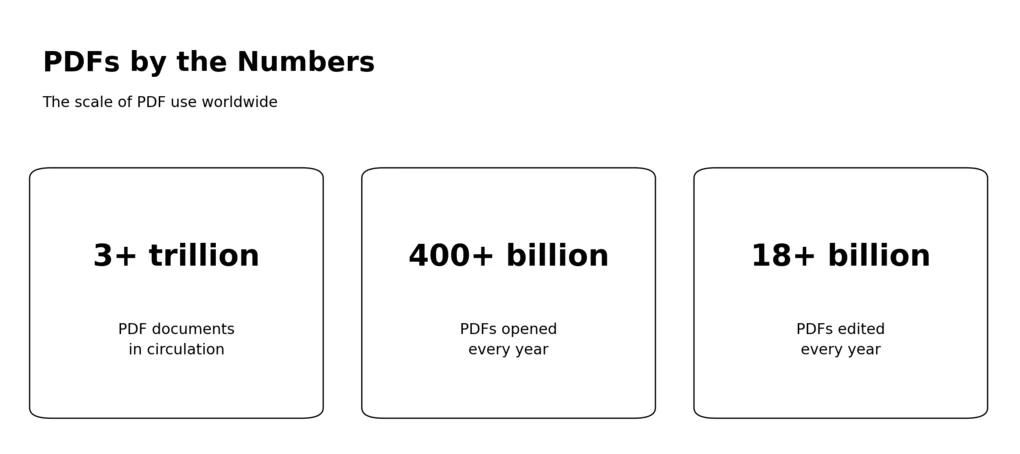
Adobe estimates that there are more than 3 trillion PDF documents in circulation worldwide, making PDF one of the most widely used digital file formats.
Why this statistic matters
With more than 3 trillion PDFs in circulation, the format remains the global standard for sharing and preserving digital documents. Its widespread adoption continues to drive demand for PDF editing, collaboration, and security tools.
More Than 400 Billion PDFs Are Opened Each Year
Adobe’s 2025 Fast Facts and its 2025 report on agentic AI state that more than 400 billion PDF documents are opened in Adobe Acrobat every year by Acrobat’s hundreds of millions of users.
Why this statistic matters
Opening more than 400 billion PDFs annually demonstrates that PDF remains one of the world’s most frequently used document formats. It also highlights the continued demand for tools that help users view, edit, organize, and collaborate on PDF files.
More Than 18 Billion PDFs Are Edited Every Year
According to Adobe’s 2026 company information and 2025 Fast Facts, Adobe Acrobat users edit more than 18 billion PDF documents every year, highlighting the growing demand for PDF editing beyond simple document viewing.
Why this statistic matters
Billions of edited PDFs each year show that PDFs have evolved into working documents, not just files for viewing. This growing demand is driving adoption of advanced editing, collaboration, and AI-powered PDF tools.
Adobe Scan Has Been Downloaded More Than 150 Million Times
Adobe reports that Adobe Scan has been downloaded more than 150 million times, with users creating over 2.5 billion documents with the app.
Why this statistic matters
The popularity of Adobe Scan shows that users increasingly convert paper documents into PDFs on mobile devices. This reflects the growing demand for digital, searchable, and shareable documents in both personal and professional workflows.
PDF Represents Around 90% of Indexed Digital Document Formats
In its analysis of web-indexed document formats, the PDF Association found that PDF accounted for approximately 90% of document file types, compared with 3% for DOCX, 2% for XLSX, 1% for PPTX, and 4% for EPUB.
Why this statistic matters
The findings show that PDF continues to dominate online document publishing, making it the preferred format for sharing content while preserving layout and formatting.
80% of Files Uploaded for E-Signatures Are PDFs or Images
After analyzing 100,000 uploaded files, Apryse, the company behind Xodo Sign, found that around 80% of uploaded documents were PDF or image files.
Why this statistic matters
The high share of PDF uploads highlights the format’s role as the default choice for digital signing and document sharing in business workflows
PDF Is the Third Most Common File Format on the Web
An analysis of Common Crawl data by the PDF Association found that PDF is the third most common file format on the web, behind only HTML and XHTML, and is more prevalent than JPEG, PNG, and GIF files.
Why this statistic matters
PDF remains one of the most widely distributed digital document formats online, demonstrating its continued relevance for publishing, sharing, and archiving documents.
PDF Editing Statistics
98% of Financial Professionals Regularly Work With PDFs
Adobe’s Document Cloud Survey of U.S. financial professionals found that 98% regularly edit, sign, convert, combine, or collaborate on PDF documents, while more than one-third perform these tasks 11 or more times per month.
Why this statistic matters
The findings show that PDF editing extends far beyond modifying text. Modern workflows rely on a combination of editing, collaboration, conversion, and e-signatures, making PDF editors essential productivity tools.
61% of Financial Professionals Regularly Edit PDF Documents
According to Adobe’s 2025 Document Cloud Survey, as reported by Adobe Business, 61% of financial professionals regularly edit PDF documents, averaging 20 PDF edits per month for tasks such as updating financial statements, correcting contracts, and completing tax forms.
Why this statistic matters
The findings show that PDF editing is a routine part of work in document-intensive industries. Rather than serving as static files, PDFs are frequently updated throughout business workflows.
AI PDF Editor Statistics
64.5% of Enterprises Have AI in Production for Document Workflows
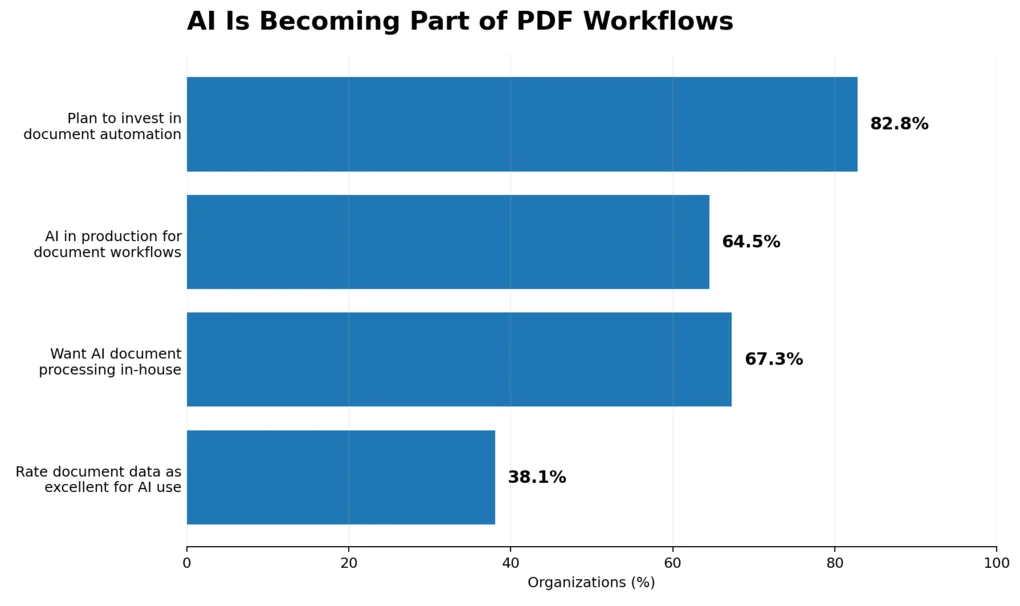
Apryse’s Global AI & Document Infrastructure Survey, published by the PDF Association in 2025, found that nearly two-thirds of enterprises have moved AI beyond pilot programs and now use it in production to support document-related workflows.
Why this statistic matters
As AI moves from pilot projects to production environments, organizations increasingly expect PDF editors to automate document processing, data extraction, and workflow management.
82.8% of Organizations Plan to Invest in Document Automation
According to Apryse’s survey published by the PDF Association, 82.8% of organizations plan to invest in document automation within the next 12 months.
Why this statistic matters
Organizations are moving beyond AI experimentation and investing in tools that automate document-heavy workflows. This trend is expected to accelerate the adoption of AI-powered PDF editors and document intelligence platforms.
67.3% of Organizations Want to Keep AI Document Processing In-House
Apryse’s AI Readiness 2025: Benchmarking Infrastructure, Strategy, and Scale found that 67.3% of organizations consider it extremely important to keep document processing in-house rather than sending sensitive documents to external AI services.
Why this statistic matters
As organizations adopt AI for document workflows, protecting sensitive information remains a top priority. This is driving demand for AI-powered PDF editors that offer on-premises deployment, private cloud options, and stronger data governance.
Only 38.1% of Organizations Say Their Document Data Is AI-Ready
In Apryse’s survey of 465 organizations, only 38.1% rated their document data as “excellent” for AI use, while 58.5% described it as merely “good.”
Why this statistic matters
High-quality document data is essential for accurate AI outputs. Organizations with poorly structured PDFs and documents are more likely to experience unreliable AI results, making document preparation a key part of AI adoption.
54% of Organizations Cite Data Security as the Biggest Barrier to Scaling AI
The same survey showed that 54% of organizations identify data security concerns as the biggest barrier to scaling AI initiatives, while 49% cite poor document data quality as a major obstacle.
Why this statistic matters
As AI becomes more integrated into document workflows, organizations are prioritizing solutions that protect sensitive data while maintaining high-quality document processing. This is increasing demand for secure, enterprise-grade AI PDF editors.
PDF Security Statistics
22% of Malicious Email Attachments Are PDF Files
Check Point Research’s The Weaponization of PDFs (2025) and Cyber Security Report 2025 found that 22% of all malicious email attachments are PDF files, making PDFs one of the most commonly used file types in phishing campaigns. The research also found that 68% of cyberattacks begin with email.
Why this statistic matters
Because PDFs are widely trusted and commonly exchanged in business environments, attackers increasingly use them to deliver phishing links and malicious content. This makes PDF security features essential for both organizations and individual users.
The Average Cost of a Data Breach Reached $4.4 Million in 2025
IBM and the Ponemon Institute reported in the Cost of a Data Breach Report 2025 that the global average cost of a data breach reached $4.4 million in 2025. While this represents the first decline in five years—a 9% decrease from 2024—it still highlights the significant financial impact of security incidents involving sensitive business data.
Why this statistic matters
Data breaches can expose confidential documents, contracts, and customer information stored in PDFs. Strong PDF security features—such as encryption, access controls, password protection, and digital signatures—help organizations reduce document-related security risks.
70–80% of U.S. Organizations Have Adopted E-Signature Tools
According to Fortune Business Insights‘ Digital Signature Market Report (2025), approximately 70–80% of U.S. organizations have adopted electronic signature tools as part of their digital document workflows, particularly in industries such as banking, healthcare, and legal services.
Why this statistic matters
The widespread adoption of e-signatures reflects the growing need for secure, authenticated document workflows. As organizations move away from paper-based approvals, PDF editors with built-in e-signature capabilities have become a business essential.
87% of Organizations Plan to Increase Investment in Encryption Technologies
Thales‘ 2024 Data Threat Report found that 87% of organizations plan to increase their investment in encryption technologies, while 71% have already adopted a formal cryptographic program to protect sensitive data.
Why this statistic matters
As cyber threats continue to evolve, organizations are investing more in encryption to safeguard sensitive business documents and meet growing security and compliance requirements.
51% of Organizations Rank Data Privacy and Cybersecurity as a Top Compliance Priority
According to PwC’s Global Compliance Survey 2025, 51% of organizations rank cybersecurity, data privacy, and data protection among their top compliance priorities, reflecting the growing importance of securing sensitive business information and digital documents.
Why this statistic matters
As privacy regulations become more complex, organizations increasingly prioritize secure document handling. PDF editors with encryption, access controls, audit trails, and digital signatures help businesses meet both security and compliance requirements.
PDF Editor Business Statistics
Workers Spend Nearly Two Hours a Day Searching for Documents
IDC’s The High Cost of Not Finding Information found that office workers spend an average of 1.8 hours every day searching for the documents and information they need to do their jobs. This adds up to nearly 9 hours per week spent looking for files instead of completing productive work.
Why this statistic matters
Poor document organization can significantly reduce productivity. PDF editors with search, OCR, and document management features help employees find and work with files more efficiently.
Paper-Free Processes Can Improve Staff Productivity by Nearly 30%
Research from AIIM’s Winning the Paper Wars found that organizations estimate eliminating paper-based processes can improve staff productivity by an average of 29.7%. Among organizations with more experience using paper-free workflows, the estimated productivity gain rises to 35.4%.
Why this statistic matters
Replacing paper-based workflows with digital documents and PDF tools helps employees complete tasks faster and spend less time on manual paperwork, resulting in measurable productivity gains.
Two-Thirds of Organizations See a Return on Paper-Free Initiatives Within 18 Months
According to the same research, two-thirds of organizations that implement paper-free processes report achieving a return on investment (ROI) within 18 months, while 50% recover their investment within the first 12 months.
Why this statistic matters
Paper-free workflows can deliver measurable business value in a relatively short time. PDF editors play an important role by helping organizations digitize, edit, sign, and manage documents more efficiently.
HR, Accounts Payable, and Customer Correspondence Deliver the Highest ROI from Paper-Free Workflows
The research also identifies human resources (HR), accounts payable (AP), and customer correspondence as among the most successful business processes for paper-free transformation. The research also found that 70% of organizations report accounts payable and accounts receivable (AP/AR) initiatives deliver good or excellent ROI, while contract and procurement workflows are also among the strongest candidates for digitization.
Why this statistic matters
Document-intensive workflows often generate the greatest return from digital transformation. PDF editors help streamline these processes by making it easier to edit, share, sign, and manage business documents electronically.
PDF Editor Trends
The Intelligent Document Processing Market Is Expected to Grow at Over 30% Annually
Grand View Research projects that the global Intelligent Document Processing (IDP) market will grow at a compound annual growth rate (CAGR) of approximately 30–33% through the early 2030s, making it one of the fastest-growing segments of enterprise software.
Why this statistic matters
Businesses are rapidly adopting AI-powered document processing to automate data extraction, document classification, and workflow automation. As a result, modern PDF editors are evolving into intelligent document management platforms rather than simple editing tools.
Cloud-Based Intelligent Document Processing Platforms Account for More Than 60% of the Market
According to Grand View Research’s Intelligent Document Processing Market Report (2026–2033), cloud-based Intelligent Document Processing (IDP) platforms accounted for 63.3% of the global IDP market revenue in 2025, making cloud deployment the dominant model for AI-powered document automation solutions.
Why this statistic matters
Although this statistic refers to the Intelligent Document Processing market rather than PDF editors specifically, it highlights the broader industry shift toward cloud-based document platforms. Many modern PDF editors now integrate AI-powered document processing, automation, and collaboration features through cloud deployment.
78% of Enterprises Are Now Operational with AI for Document Processing
The Market Momentum Index: Intelligent Document Processing (IDP) Survey 2025 from AIIM & Deep Analysis found that 78% of enterprises are now operational with AI-powered Intelligent Document Processing (IDP), marking a significant shift from pilot projects to production deployments.
Why this statistic matters
AI is no longer an experimental feature in document software. Organizations are replacing legacy document processing systems with AI-powered solutions that automate extraction, classification, and workflow management.
66% of New Intelligent Document Processing Projects Replace Existing Systems
According to AIIM & Deep Analysis’s research, 66% of new Intelligent Document Processing (IDP) projects are replacing existing document processing systems rather than being implemented as entirely new solutions.
Why this statistic matters
Organizations are modernizing existing document workflows instead of simply adding new tools. This trend is accelerating the transition from traditional PDF editors to AI-powered document platforms that automate document understanding and workflow management.
95% of Public-Facing PDFs Are Inaccessible
An analysis by Allyant, published in its PDF Accessibility Index 2025–2026 Benchmark Report, found that 94.75% of 644,854 public-facing PDF documents across more than 770 websites fail to meet accessibility standards, leaving only about 5% fully accessible.
Why this statistic matters
Accessibility is becoming a key focus for document software. Modern PDF editors are increasingly adding AI-assisted tagging, reading order detection, alt text generation, and accessibility checkers to help organizations create compliant PDF documents.
Wrap up: PDF Editors Statistics
The latest PDF editor statistics show that PDFs are far from being a static document format. Billions of PDFs are created, opened, edited, and shared every year, while businesses continue to invest in digital document workflows.
At the same time, AI is changing what PDF editors can do. Features such as automated document processing, data extraction, and workflow automation are becoming increasingly important, while security and accessibility remain major concerns.
As the PDF editor market continues to grow, the tools that stand out are no longer just the ones that can edit text. Modern PDF software is becoming a broader part of document management, combining editing, collaboration, e-signatures, security, and AI-powered features in a single platform.
If you’re looking for a PDF editor yourself, you can also explore our library of PDF tools.
Frequently Asked Questions
What can PDF editing tools do?
PDF editing tools let you edit text, remove images, add comments, highlight text, rearrange PDF pages, and manage existing content in a single document. More advanced PDF software can also create fillable forms, add annotation features, merge files, convert PDFs to other file formats, and add security or compliance features.
What should you look for in a PDF editor?
When choosing the right PDF editor, look for the features you actually need, such as basic editing, OCR, PDF creation, conversion, e-signatures, fillable forms, annotation tools, and version control. An intuitive interface and support for your preferred platforms, such as Windows and macOS, can also make a significant difference.
Are online PDF editors secure?
Online PDF editors can be convenient because they work through web browsers and don’t require software installation, but security features should be carefully evaluated. Look for encryption, access controls, compliance features, and clear data-handling policies, particularly when working with sensitive documents. This is increasingly important as more than 40% of shared PDFs are now encrypted and security is a major purchasing criterion. Pasted markdown
Are cloud-based PDF editors replacing on-premises PDF software?
Cloud-based PDF editors are growing quickly and are increasingly used for document editing, collaboration, and automation. The source material also shows broader growth in cloud-based document processing, while organizations handling sensitive information may still prefer keeping document processing in-house. Pasted markdown
What are the best PDF editors for businesses?
The best PDF editors for businesses depend on the workflow, industry, and required features. Options such as Foxit PDF Editor, Nitro Software, Soda PDF, and PDF-XChange offer different combinations of editing, conversion, e-signatures, forms, security, and document management features. For regulated industries, government agencies, and law firms, compliance and security features may be particularly important.

Hey! I’m Jovana, a content writer who loves writing, researching, and testing new productivity apps. With a background in philosophy, I bring a thoughtful but no-bullshit approach to everything I do. Let’s connect on Linkedin!