


6 Best HubSpot Alternatives For 2026 | No Marketing Hype, Just Real Testing
HubSpot CRM offers an impressive combination of sales, marketing, and customer management tools, but that doesn’t mean it’s the best fit for every business. Depending on your budget, sales processes, and business needs, another CRM software may be a better choice.
After testing 10+ CRM tools, I found these to be the best HubSpot alternatives:
🌱 Nutshell → Best HubSpot alternative for growing sales teams
💼 Pipedrive → Best HubSpot alternative for sales pipeline management
🌐 Copper CRM → Best HubSpot alternative for Google Workspace users
🏢 Salesforce Sales Cloud → Best HubSpot alternative for enterprises
⚙️ Zoho CRM → Best HubSpot alternative for affordable customization
✨ Monday CRM → Best HubSpot alternative for collaborative sales workflows
Best HubSpot Alternatives Compared
Need to decide quickly? Spend 30 seconds with the comparison table below.
|
CRM |
Best if you want… |
Why switch from HubSpot? |
Learning curve 📈 |
Pricing 💰 |
|---|---|---|---|---|
|
An easier-to-manage sales CRM |
Easier to use and more affordable |
Easy |
From $13/user/month |
|
|
Better visibility into every deal |
More sales-focused deal tracking |
Easy |
From $14/user/month |
|
|
A CRM that works inside Gmail |
Native Google integration |
Easy |
From $23/user/month |
|
|
Maximum control over complex sales operations |
Enterprise-level customization and scalability |
Advanced |
From $25/user/month |
|
|
Enterprise-style features on a smaller budget |
More customization and automation for the price |
Moderate |
Free + from €14/user/month |
|
|
Sales and teamwork in one workspace |
Flexible cross-team workflows |
Moderate |
From €12/seat/month |
How We Chose the Best HubSpot Alternatives
We evaluate every CRM using the same hands-on testing framework we developed after testing 10+ CRM platforms across real sales workflows. This allows us to compare each platform consistently while understanding where it performs best.
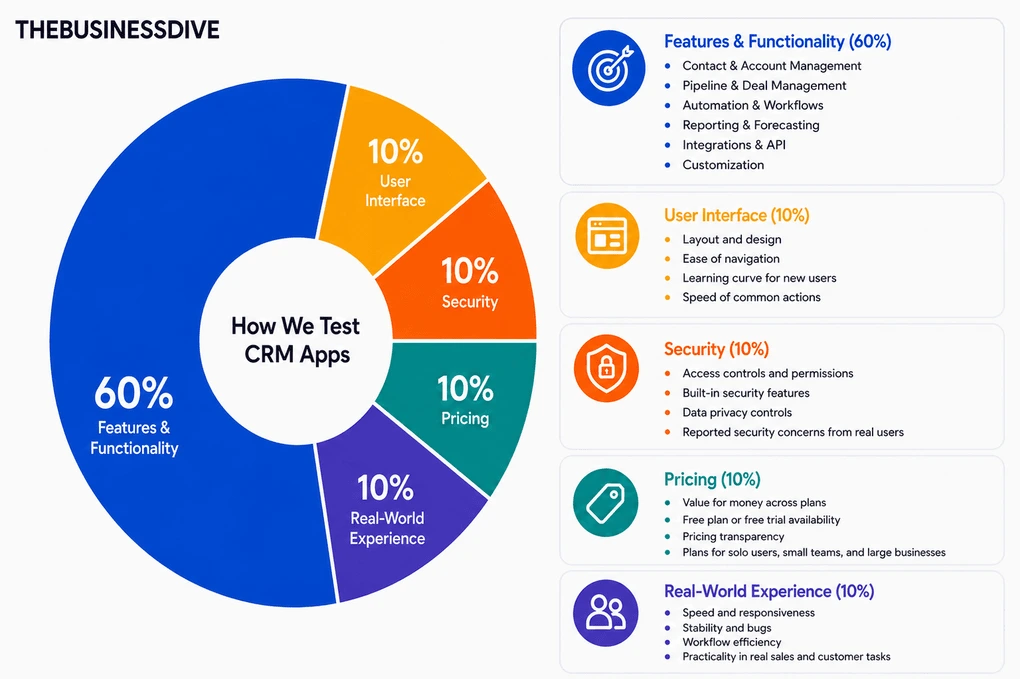
Our scoring breakdown for CRM tools:
🛠️ Features & functionality — 60%
🖥️ User interface — 10%
🔒 Security — 10%
💰 Pricing — 10%
👥 Real-world experience — 10%
Most of the HubSpot alternatives featured in this guide also have dedicated review articles with full scores and detailed testing breakdowns.
However, this ranking isn’t based on review scores alone. We also compared each CRM directly with HubSpot based on pricing, usability, customization, automation, and real-world business fit.
As a result, every recommendation is designed for a different type of business and reason for switching.
Want a detailed breakdown of how we test each category?
Learn exactly how we test tools → Review methodology
Detailed Reviews of the Best HubSpot Alternatives
Wondering how each HubSpot alternative performed during our testing?
Check out our detailed reviews for each option we selected.

Nutshell
Nutshell is an all-in-one CRM built for small businesses that want to manage contacts, pipelines, communication, and reporting from a single platform. It offers a simpler, more sales-focused experience than HubSpot.
Quick verdict
Small businesses and growing sales teams that want a simpler, more affordable CRM without sacrificing the core sales features they rely on.
You’re looking for a very simple or lightweight CRM
A focused sales CRM that’s simpler to use and more affordable.
It doesn’t offer the same breadth of marketing and business tools as HubSpot.
Why choose Nutshell over HubSpot
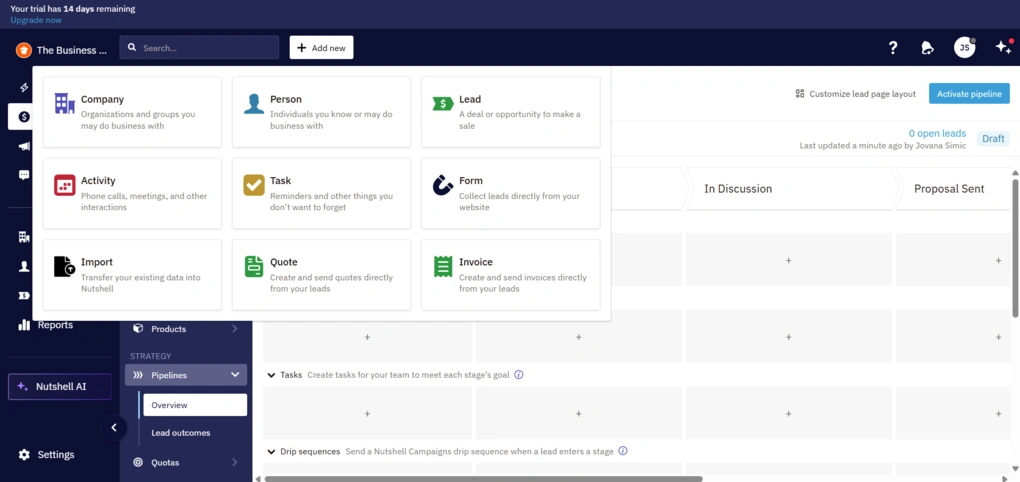
HubSpot offers an enormous range of tools, but many businesses end up paying for features they rarely use. While testing Nutshell, I found it much easier to focus on day-to-day sales work without navigating through multiple Hubs and advanced marketing features.
It still gives you everything most sales teams need—contact management, customizable pipelines, automation, reporting, email communication, and AI assistance—but presents those features in a way that’s easier to navigate without the broader marketing ecosystem.
That’s why Nutshell is my top HubSpot alternative. If your priority is managing sales rather than running an entire marketing ecosystem, it delivers much of the same core CRM functionality with far less complexity.
The Good and Not-So-Good After Testing Nutshell
|
Pro |
Why it’s important |
|---|---|
|
Easy to get started |
I was able to import contacts, build a pipeline, and start managing deals without much setup. |
|
Strong pipeline management |
Multiple pipelines, custom stages, and automation make it easy to organize different sales processes as your team grows. |
|
Built-in communication tools |
Emails, meetings, notes, and customer conversations stay attached to every deal, making follow-ups much easier. |
|
Useful AI features |
AI summarizes calls, suggests next steps, and helps create emails, reducing repetitive admin work. |
|
More affordable than HubSpot |
Core CRM functionality is available without paying for a large marketing and customer service ecosystem. |
|
Con |
The tradeoff |
|---|---|
|
No advanced marketing suite |
If you rely heavily on email marketing automation, landing pages, or CMS tools, HubSpot offers a broader ecosystem. |
|
Advanced features require some exploration |
Most day-to-day tasks are easy to pick up, but some automation and customization options take more time to fully understand. |
Plans & costs
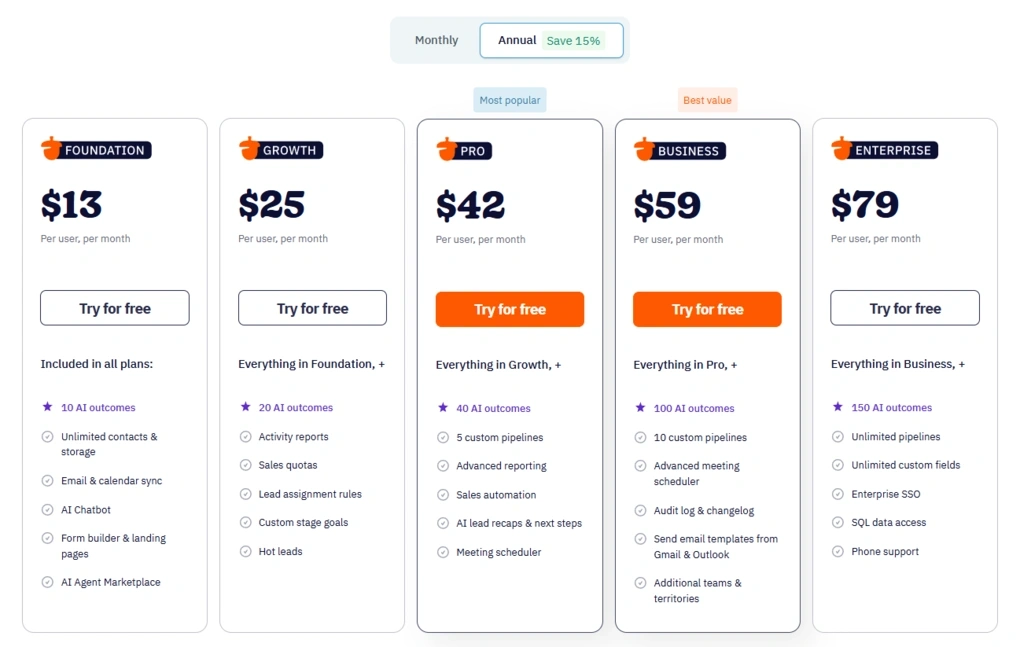
- No free plan, only a 14-day free trial
- Foundation plan: $13/user/month
- Growth plan: $25/user/month
- Pro plan: $42/user/month
- Business plan: $59/user/month
- Enterprise plan: $79/user/month
- Optional paid add-ons are available for additional functionality
🔎 Read my full review: Nutshell Review 2026 | Everything You Need to Know

Pipedrive
Pipedrive is a sales-focused CRM built around visual pipeline management, deal tracking, and follow-ups. Instead of combining CRM with a broader suite of marketing and customer service tools like HubSpot, it focuses on helping sales teams organize opportunities and move deals through the pipeline.
Quick verdict
Sales teams that want a CRM centered around pipeline management, deal tracking, and follow-ups.
You need built-in marketing, customer service, or content management tools.
A cleaner, more focused sales experience that keeps pipelines and activities front and center.
Many features beyond core sales management require paid add-ons.
Why choose Pipedrive over HubSpot
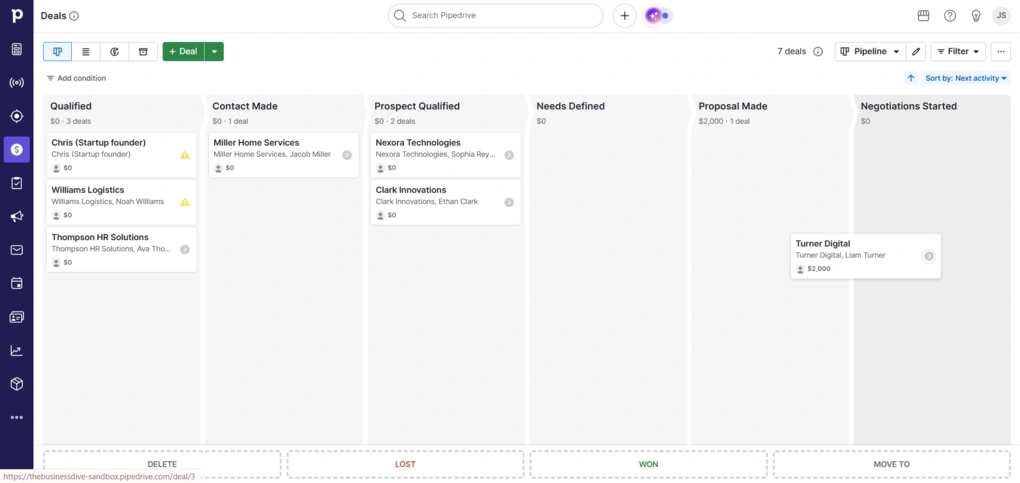
While testing Pipedrive, I noticed that almost every part of the platform revolves around the sales pipeline. Whether I was adding deals, scheduling activities, or reviewing follow-ups, everything stayed connected to the pipeline, so keeping track of my work was simple.
One feature I especially liked was the separate Leads Inbox. New leads don’t immediately appear in your pipeline, which keeps active deals separate from contacts that haven’t been qualified yet. As I added more opportunities, that small detail made the pipeline easier to manage.
I also appreciated how much emphasis Pipedrive puts on activities. Calls, meetings, emails, notes, and follow-ups are always tied to the relevant deal, so it’s easy to see what has already happened and what still needs to be done.
HubSpot offers a much broader platform with marketing, customer service, and content management tools. But if your team’s priority is managing deals, staying on top of follow-ups, and moving opportunities through the pipeline, Pipedrive delivers a more focused experience with less complexity.
The Good and Not-So-Good After Testing Pipedrive
|
Pro |
Why it’s important |
|---|---|
|
Visual sales pipelines |
I could see where every deal stood at a glance and move opportunities through each stage with drag-and-drop. |
|
Activity-focused workflow |
Calls, meetings, emails, and follow-ups stay attached to every deal, making it easier to stay organized. |
|
Separate Leads Inbox |
Keeping unqualified leads out of the pipeline made it much easier to focus on active opportunities. |
|
Easy to learn |
I was able to start managing contacts and deals almost immediately without spending much time learning the platform. |
|
Useful reporting |
Dashboards made it easy to monitor pipeline performance, sales activities, and revenue trends. |
|
Con |
The tradeoff |
|---|---|
|
No free plan |
Businesses looking for a free CRM may find HubSpot a better fit. |
|
Paid add-ons |
Lead generation, email marketing, and some advanced functionality require additional subscriptions. |
Plans & costs
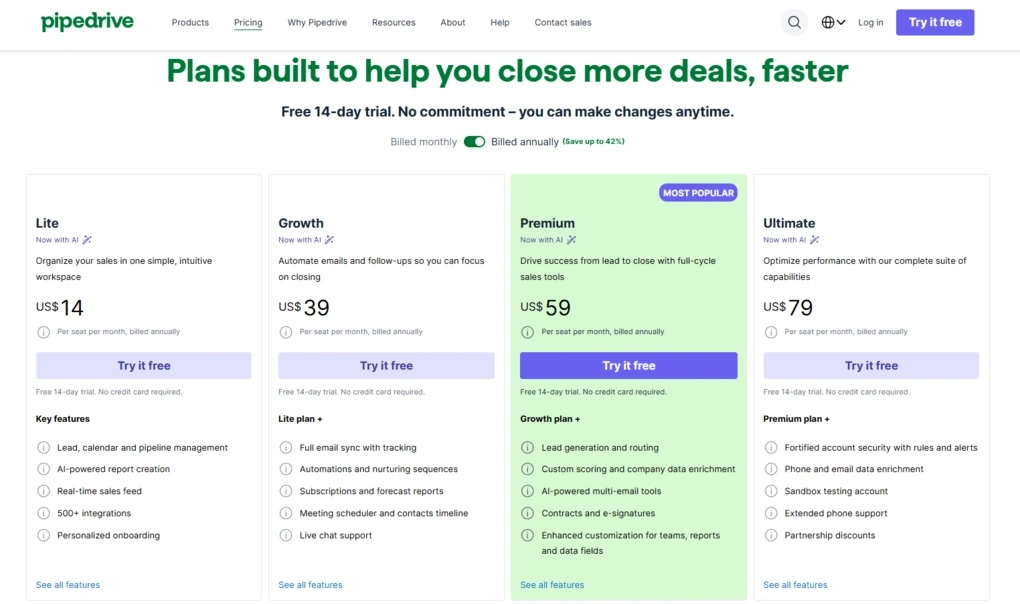
- No free plan, only a 14-day free trial
- Lite plan: $14/user/month
- Growth plan: $39/user/month
- Premium plan: $59/user/month
- Ultimate plan: $79/user/month
- Optional add-ons available
🔎 Read my full review: Pipedrive Review 2026: Tested Firsthand — Here’s the Truth

Copper CRM
Copper is a CRM built specifically for Google Workspace, helping businesses manage contacts, deals, and customer communication without leaving Google’s ecosystem. Compared to HubSpot, it offers a more natural experience for teams that already spend most of their day in Gmail and other Google apps.
Quick verdict
Businesses already using Google Workspace that want a CRM built around Gmail, Google Calendar, Google Drive, and Google Contacts.
You need advanced reporting or enterprise-level customization on a lower-priced plan.
Native Google Workspace integration that feels like part of the tools your team already uses.
Many advanced reporting features are only available on the Business plan.
Why choose Copper over HubSpot
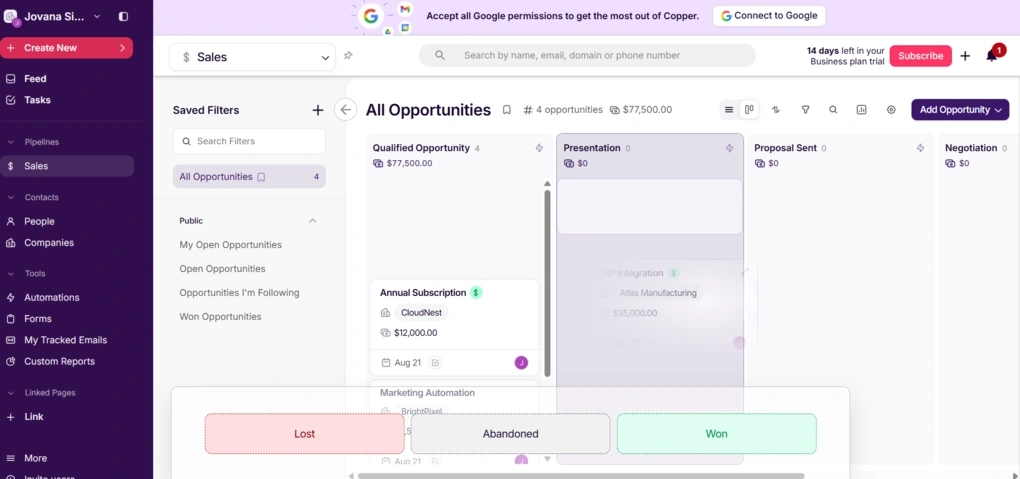
Getting started with Copper didn’t take long. I imported my test contacts, created a pipeline, and started exploring the platform without needing much setup.
As I spent more time testing it, I appreciated how consistent the experience remained across the CRM. Whether I was managing contacts, working with opportunities, or creating automations, the layout stayed familiar, so I always knew where to find activities, notes, emails, and tasks.
The biggest difference, is how closely Copper works with Google Workspace. Gmail, Google Calendar, Google Drive, and Google Contacts aren’t treated like optional integrations. They’re part of the way the CRM works, which makes the experience more natural for businesses already using Google’s ecosystem.
HubSpot also connects with Google Workspace, but it offers a much broader platform built around sales, marketing, and customer service. If your team already relies on Google’s apps and wants a CRM that fits into that workflow rather than expanding it, Copper is the stronger choice.
The Good and Not-So-Good After Testing Copper
|
Pro |
Why it’s important |
|---|---|
|
Built for Google Workspace |
Gmail, Calendar, Drive, and Contacts work naturally with the CRM, so I didn’t have to constantly move between different apps. |
|
Consistent interface |
Every section follows the same layout, making it easy to navigate between contacts, deals, and activities. |
|
Flexible pipeline templates |
I could quickly start with ready-made templates or create custom pipelines for different workflows. |
|
Well-organized customer records |
Emails, files, activities, notes, and opportunities stay connected to every contact, making customer history easy to review. |
|
Easy to get started |
Importing contacts, building a pipeline, and exploring the platform required very little setup. |
|
Con |
The tradeoff |
|---|---|
|
No free plan |
Businesses looking for a free CRM may find HubSpot a better starting point. |
|
Advanced reporting costs more |
Custom Reports and several advanced capabilities require the Business plan. |
Plans & costs
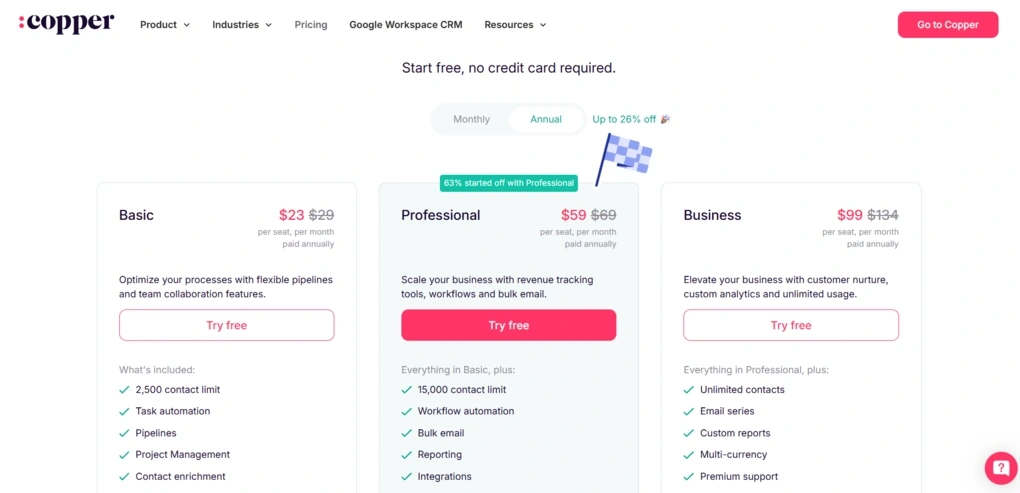
- No free plan, only a 14-day free trial
- Basic plan: $23/user/month
- Professional plan: $59/user/month
- Business plan: $99/user/month
🔎 Read my full review: The 4 Biggest Takeaways From My Copper CRM Review

Salesforce Sales Cloud
Salesforce Sales Cloud is an enterprise CRM designed for organizations with complex sales processes, large sales teams, and high lead volumes. It offers far more customization than HubSpot, making it a better fit for businesses that have outgrown a simpler CRM.
Quick verdict
Large businesses and enterprises managing complex sales processes across multiple teams.
You want a CRM that’s quick to learn and easy to set up.
A much higher level of customization for complex sales operations.
A steeper learning curve and significantly more time required for setup.
Why choose Salesforce over HubSpot
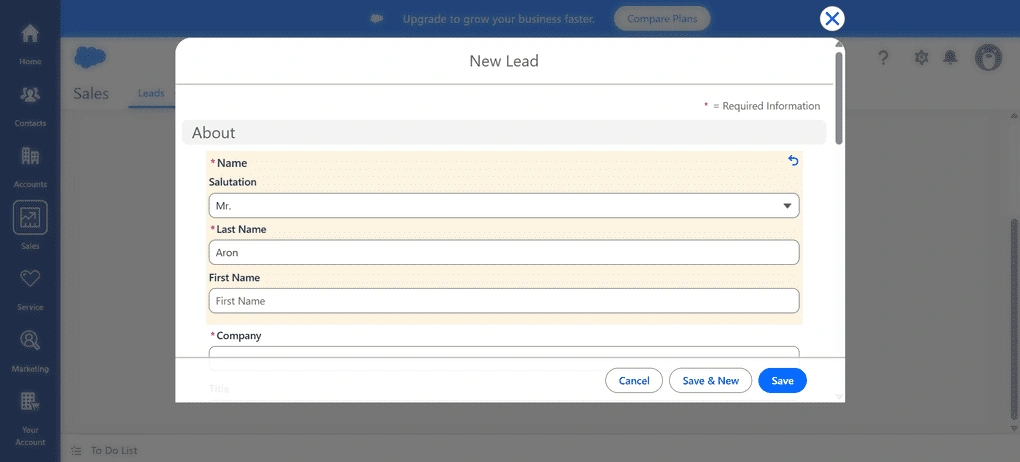
The first thing I noticed while exploring Salesforce was just how much the platform can handle. Nearly every part of the sales process can be customized, from lead and contact management to pipelines, automation, and reporting.
That flexibility comes with a tradeoff, though. Salesforce isn’t the kind of CRM you can learn in an afternoon. There are plenty of settings, workflows, and customization options, so getting everything configured takes time. During testing, it was clear that the platform is designed for businesses with more complex sales operations rather than teams looking for a quick setup.
HubSpot offers a more approachable experience, but Salesforce gives larger organizations much more control over how their CRM works. If your business manages high lead volumes, multiple sales teams, or longer sales cycles, that additional flexibility becomes much more valuable.
The Good and Not-So-Good After Testing Salesforce
|
Pro |
Why it’s important |
|---|---|
|
Highly customizable platform |
I could tailor objects, fields, pipelines, automations, and reports to support even very complex sales processes. |
|
Powerful automation |
Workflow automation, lead scoring, and approvals helped reduce repetitive work across larger sales teams. |
|
Detailed reporting |
Dashboards and reports provided deep insights into pipeline performance, sales forecasting, and team activity. |
|
Built to scale |
Salesforce handled complex sales operations and multiple teams far better than most CRM platforms I tested. |
|
Extensive integrations |
The AppExchange ecosystem makes it easy to connect Salesforce with hundreds of business applications. |
|
Con |
The tradeoff |
|---|---|
|
Steep learning curve |
New users and smaller businesses should expect to spend time learning the platform. |
|
Time-consuming setup |
Getting the CRM configured for your business often requires significant planning and customization. |
|
Higher overall cost |
As your team grows and you add advanced functionality, subscription costs can increase quickly. |
Plans & costs
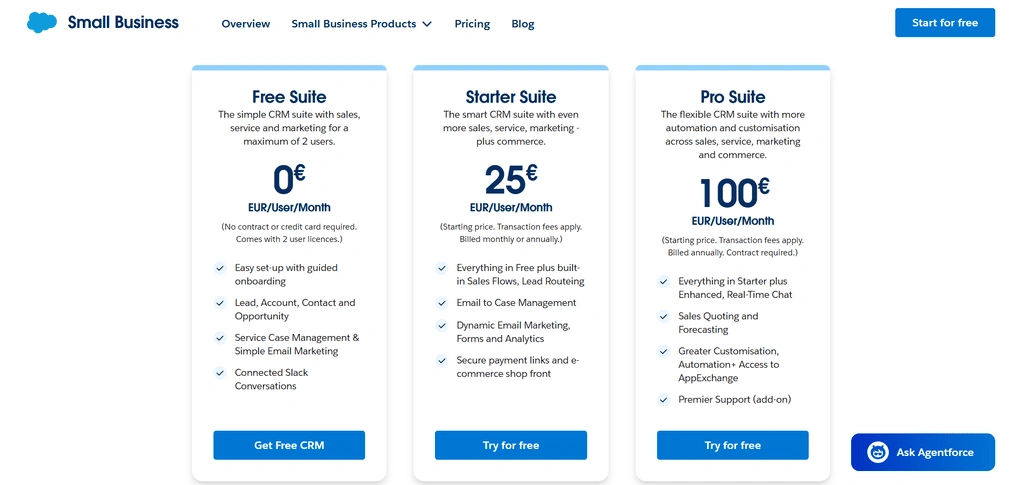
- Free plan available
- Starter Suite: $25/user/month
- Pro Suite: $100/user/month

Zoho CRM
Zoho CRM is a highly customizable CRM that combines contact management, sales automation, AI-powered insights, and reporting in one platform. Compared to HubSpot, it offers more flexibility for businesses that want to tailor their CRM without paying enterprise-level prices.
Quick verdict
Businesses that want a highly customizable CRM with advanced automation at a lower cost than HubSpot.
You want a CRM that’s easy to learn with minimal setup and configuration.
More customization and automation at a significantly lower price.
The interface and advanced setup require more time to learn.
Why choose Zoho CRM over HubSpot
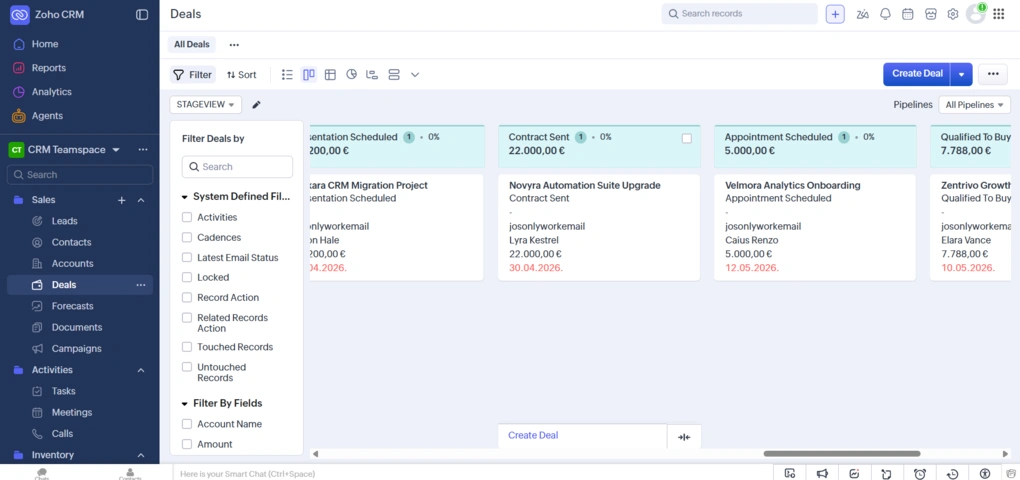
What stood out most while testing Zoho CRM was how much functionality it offers for the price. I had access to advanced automation, AI-powered features, reporting, and customization at a price point that compares favorably with HubSpot’s higher-tier plans.
I also liked how much control I had over the CRM itself. I could customize modules, pipelines, layouts, fields, and workflows to match different sales processes rather than adapting my workflow to the software.
That level of flexibility makes a real difference once your business starts growing or your sales process becomes more structured.
HubSpot is easier to pick up, but many of its more advanced capabilities come with higher-tier plans. Zoho CRM gives you much more room to customize how your CRM works before you reach that price point, which is why I think it offers better long-term value for businesses with more specific sales workflows.
I’d still choose HubSpot if marketing is at the center of your business. But if your CRM is primarily there to support your sales team, Zoho CRM gives you far more control over how everything is organized and automated, while keeping costs much more manageable.
The Good and Not-So-Good After Testing Zoho CRM
|
Pro |
Why it’s important |
|---|---|
|
Excellent value for money |
I got AI, automation, customization, and reporting without paying enterprise-level prices. |
|
Highly customizable |
Modules, fields, layouts, pipelines, and dashboards can all be adapted to different sales processes. |
|
Powerful automation |
Workflows handled repetitive tasks like lead assignments, follow-ups, and notifications automatically. |
|
AI-powered assistance |
Zia helped with lead scoring, predictions, summaries, and recommended next steps. |
|
Broad Zoho ecosystem |
Connecting CRM with Zoho’s marketing, support, and business apps creates a much more complete business platform. |
|
Con |
The tradeoff |
|---|---|
|
Steeper learning curve |
Getting the most out of the platform’s customization and automation takes time. |
|
Feature-rich interface |
Teams looking for a lightweight CRM may find the number of options overwhelming. |
|
Advanced setup requires planning |
Building more complex workflows and automations requires some initial configuration. |
Plans & costs
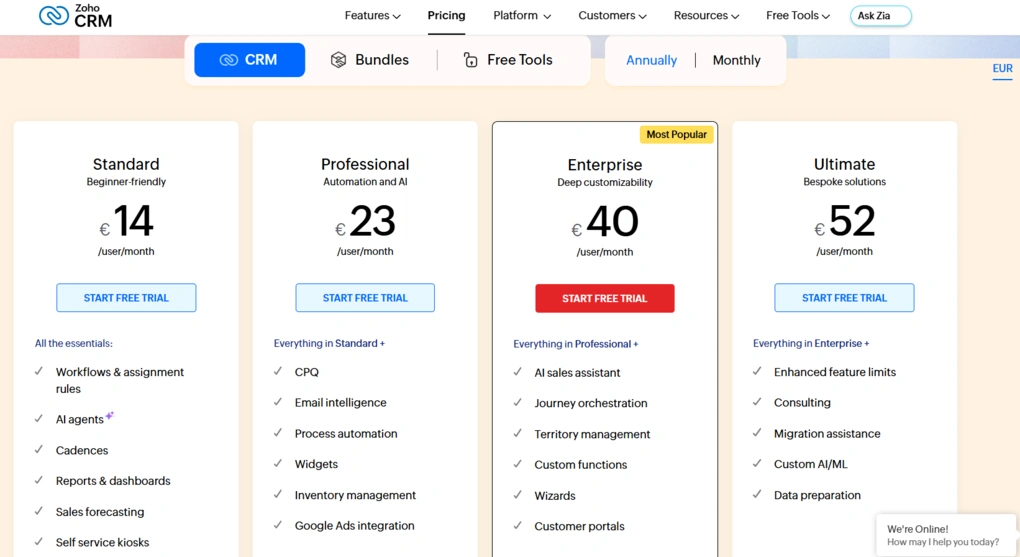
- Free plan and 15-day free trial available
- Standard: €14/user/month (billed annually)
- Professional: €23/user/month (billed annually)
- Enterprise: €40/user/month (billed annually)
- Ultimate: €52/user/month (billed annually)

Monday CRM
Monday CRM is a flexible, board-based CRM that helps teams manage leads, pipelines, customer relationships, and internal collaboration from one platform. Compared to HubSpot, it offers more freedom to customize workflows and organize work across different teams.
Quick verdict
Teams that want to manage sales, projects, and collaboration from one highly customizable workspace.
You prefer a traditional CRM with more built-in sales features and less configuration.
Greater flexibility to build sales workflows that match the way your team already works.
Some CRM features require additional setup, and advanced capabilities are reserved for higher-tier plans.
Why choose Monday CRM over HubSpot
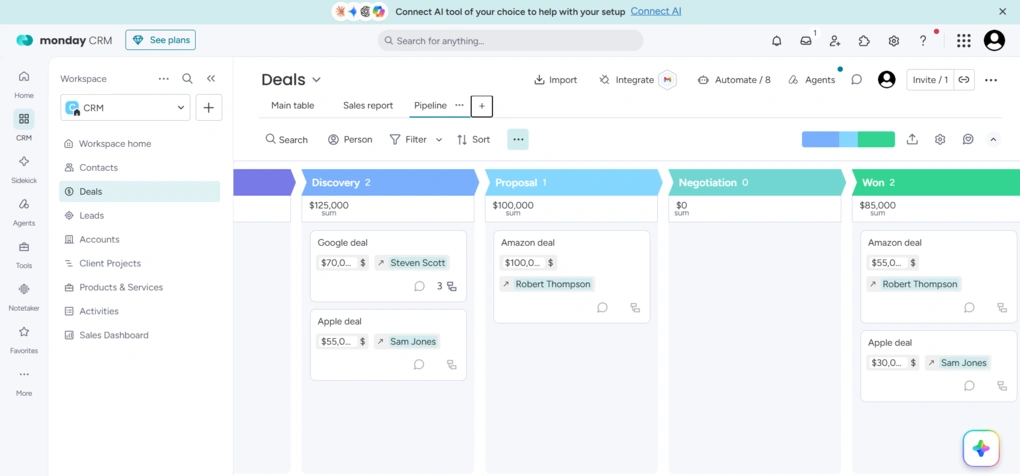
My first observatioon during testing was that Monday CRM doesn’t feel limited to a traditional CRM. Rather than following a predefined structure, I could customize boards, pipelines, fields, automations, and dashboards to match the way my team works.
I also liked how easy it was to switch between different views of the same data. Whether I needed a Table, Kanban, Calendar, or Timeline view, I could change the layout in just a few clicks while keeping all my customer information in one place.
HubSpot offers a more complete platform for businesses that rely heavily on marketing, customer service, and content management. But if your team collaborates across sales, onboarding, project delivery, or customer success, Monday CRM gives you much more freedom to build workflows that fit your processes.
The Good and Not-So-Good After Testing Monday CRM
|
Pro |
Why it’s important |
|---|---|
|
Highly customizable workflows |
I could tailor boards, pipelines, automations, and custom fields to match different sales processes without writing code. |
|
Visual interface |
The board-based layout made it easy to track deals, manage tasks, and switch between multiple views depending on the work I was doing. |
|
Useful automations |
Automating task assignments, follow-ups, notifications, and status updates reduced repetitive manual work. |
|
Flexible dashboards |
Custom dashboards gave me a clear overview of pipeline performance, team activity, and sales metrics in one place. |
|
Strong cross-team collaboration |
Sales, onboarding, and project-related work can all stay connected in the same workspace, making handoffs much easier. |
|
Con |
The tradeoff |
|---|---|
|
Learning curve for customization |
Building boards, workflows, and automations takes some planning before everything works the way you want. |
|
Advanced features require higher-tier plans |
AI capabilities and some advanced automations are only available on more expensive plans. |
|
Less traditional CRM experience |
Teams expecting a classic CRM interface may need some time to adjust to Monday’s board-based approach. |
Plans & costs
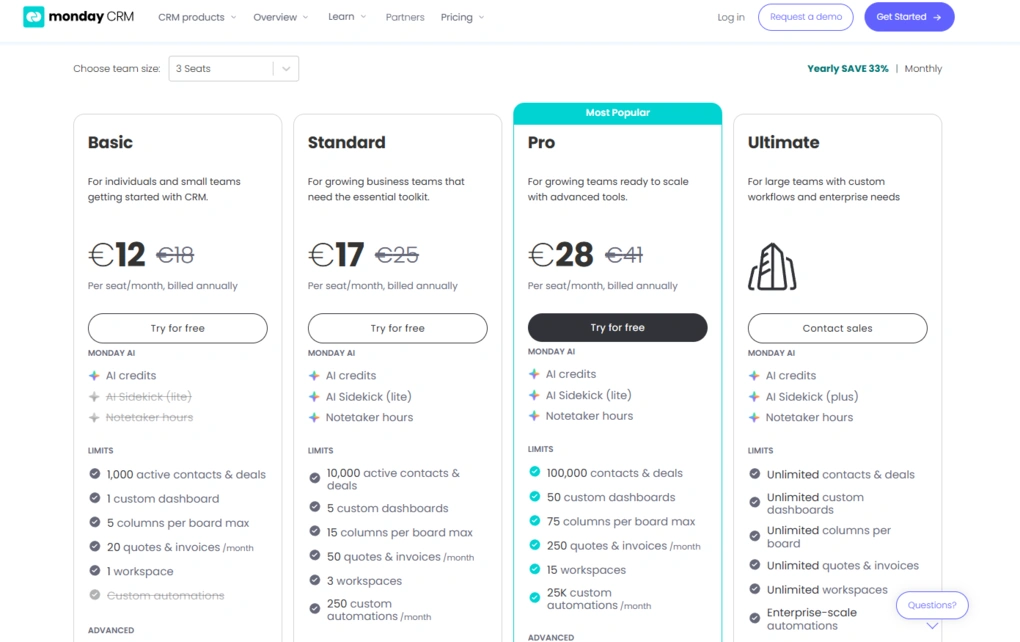
- No free plan, only a 14-day free trial
- Basic: €12/seat/month (billed annually)
- Standard: €17/seat/month (billed annually)
- Pro: €28/seat/month (billed annually)
- Enterprise: Custom pricing
Final thoughts
Choosing the best HubSpot alternative comes down to understanding what your business needs from a CRM. HubSpot CRM combines sales, marketing, customer support, and a powerful marketing platform, but many businesses don’t need all the features or the higher cost that comes with its larger paid plans.
So before choosing the right HubSpot CRM alternative, think about your business needs today and where your team is headed next. Compare CRM features like lead management, workflow automation, email marketing, sales automation, customer support capabilities, and pricing.
The best CRM software isn’t the one with the most features, but the one your team will actually use to manage customer relationships, streamline sales processes, and support long-term growth.
Related posts:
- The Best CRM Software Isn’t Always the Biggest Brand: Top 7 CRMs I’d Recommend
- Salesforce Alternatives: 6 Better CRM Options for 2026
Explore our Apps directory
A curated directory of software tools we’ve independently reviewed, with links to full reviews, comparisons, and category guides.
Why you can trust our reviews
At thebusinessdive.com, our team tests, reviews, and compares hundreds of productivity apps every year — from project management tools to note-taking apps. We dive deep into real-world use cases to help you find the right tools that actually improve your workflow, not just add noise.
Our mission? No fluff, no shortcuts—just honest, hands-on insights from productivity pros.
Discover how we stay transparent, read our review methodology, and let us know about any tools we missed.
Frequently Asked Questions
What is the best HubSpot alternative?
It depends. Nutshell is my top choice for growing sales teams, Pipedrive excels at sales pipelines, Zoho CRM offers affordable customization, Copper CRM is ideal for Google Workspace, Monday CRM supports collaborative sales workflows, and Salesforce Sales Cloud is best for enterprises.
Why do businesses look for HubSpot CRM alternatives?
Many businesses move away from HubSpot CRM because paid plans become expensive as they need more advanced CRM features. Others prefer CRM tools focused on sales management, lead management, workflow automation, or project management rather than HubSpot’s broader marketing platform.
Is Zoho CRM a good alternative to HubSpot?
Yes. Zoho CRM is one of the best HubSpot alternatives if you want advanced automation and customization at a lower cost. Zoho CRM pricing includes a free plan for up to three users, with paid plans starting at €14 per user/month (billed annually), making it an affordable CRM for growing businesses.
Which HubSpot alternative is best for small businesses?
For small businesses, Nutshell is a great choice if you want an easy-to-use sales-focused CRM with contact management and pipeline management. Zoho CRM is better if you need more advanced automation, customizable dashboards, and flexible sales processes.
How do I choose the right HubSpot CRM alternative?
The right HubSpot CRM alternative depends on your business needs. Compare CRM features like lead management, sales automation, workflow automation, email marketing, sales forecasting, customer support capabilities, and pricing to find the CRM platform that best supports your sales processes.
Disclosure: I only recommend products I would use myself, and all opinions expressed here are my own. This post may contain affiliate links through which, at no additional cost to you, I may earn a small commission. Read the full privacy policy here.

Hey there! I am Aron, the founder of Thebusinessdive. I have been testing productivity apps for almost three years now. I reach 25.000 -50.000 people monthly with the mission to help you find the perfect productivity apps. Subscribe to my YouTube channel, newsletter, and social media to hear more about the best productivity tools. Let’s dive in!