


CoSupport AI Review 2026: Beyond the Chatbot
A good AI support platform needs more than a chatbot.
In this CoSupport AI review, I put its knowledge retrieval, custom workflows, Playground, AI accuracy, and pricing to the test to see how it performs in practice.
My Take After Using CoSupport AI
Before going into the details, here are my main takeaways after testing CoSupport AI:
🎯 Best for: Growing B2B SaaS, consumer apps, and e-commerce support teams that want to automate customer support without losing control over AI responses.
🚫 Not ideal for: Small teams without a structured knowledge base or businesses looking for a plug-and-play chatbot.
⭐ Biggest strength: The combination of flexible knowledge sources, custom workflows, and an excellent testing environment.
⚠️ Biggest weakness: AI responses occasionally miss relevant information or cite sources less accurately than expected.
⚖️ Verdict: CoSupport AI is a well-designed AI support platform with powerful customization and testing tools.
Who will benefit most from CoSupport AI?
Who should skip CoSupport AI?
Where CoSupport AI Excels
CoSupport AI’s pain points
What is CoSupport AI?
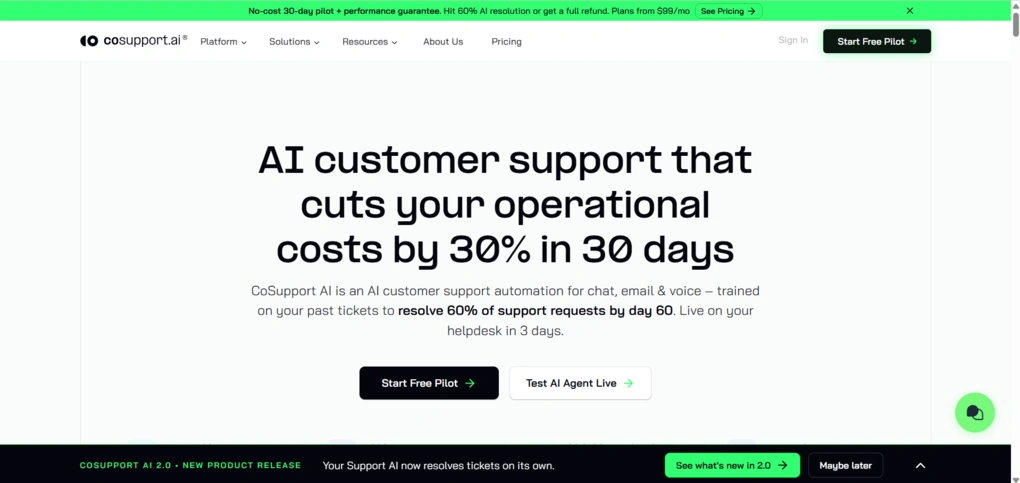
CoSupport AI is an AI customer support platform that automates customer conversations using your own knowledge base instead of generic AI responses.
The platform includes two products: CoSupport AI Agent, which handles customer inquiries end to end, and CoSupport AI Assistant, which drafts reply suggestions for human agents inside the helpdesk. Both run on patented AI architecture (US Patent 11823031B1) and are used by 300+ brands.
Features
Instead of listing every feature available in the platform, I wanted to focus on the parts I actually used while setting up and testing my AI agent. Here’s what that process looked like.
Creating and training the AI agent
The first thing I had to do was create an AI agent and connect it to a knowledge source. Connecting the site only took a few minutes, and once the initial sync finished, the agent was ready to answer questions based on that data source.
Before I started testing, I spent some time exploring the configuration options. The Persona tab is where I could define how the agent should communicate, including its tone, response length, and whether it should generate replies for chat or email conversations.
I could also add custom behavioral instructions that shaped the AI’s overall behavior across every conversation instead of repeating them inside individual workflows.
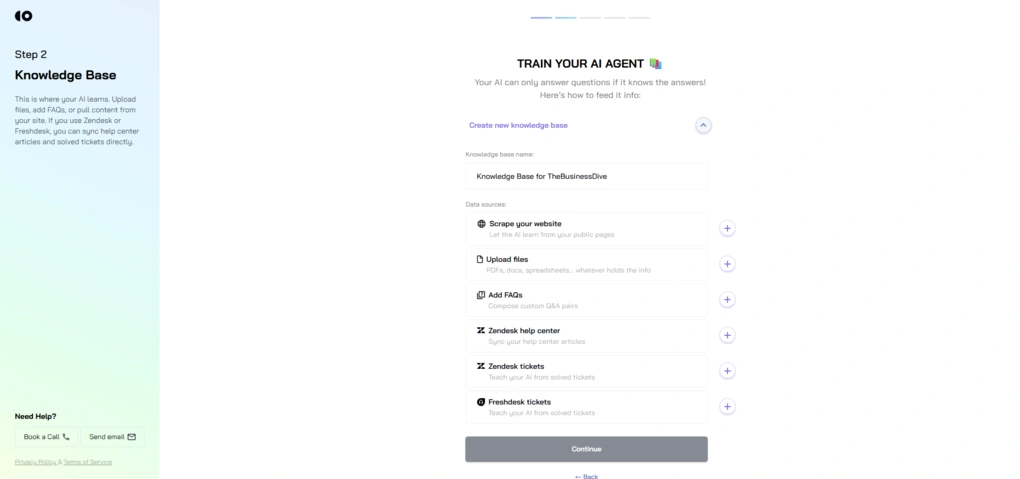
Although I only connected a website for this review, CoSupport AI supports a much wider range of knowledge sources, including help center articles, historical support tickets, Notion, Confluence, Google Drive, SharePoint, and OneDrive.
Multiple knowledge sources can also be attached to the same AI agent, allowing documentation, FAQs, websites, and other resources to work together instead of being managed separately.
That flexibility makes it possible to combine documentation from multiple places into a single AI knowledge base rather than maintaining duplicate content across different systems.
As soon as the knowledge base was connected, I could jump straight into the Playground and start asking questions.
Playground for testing AI responses
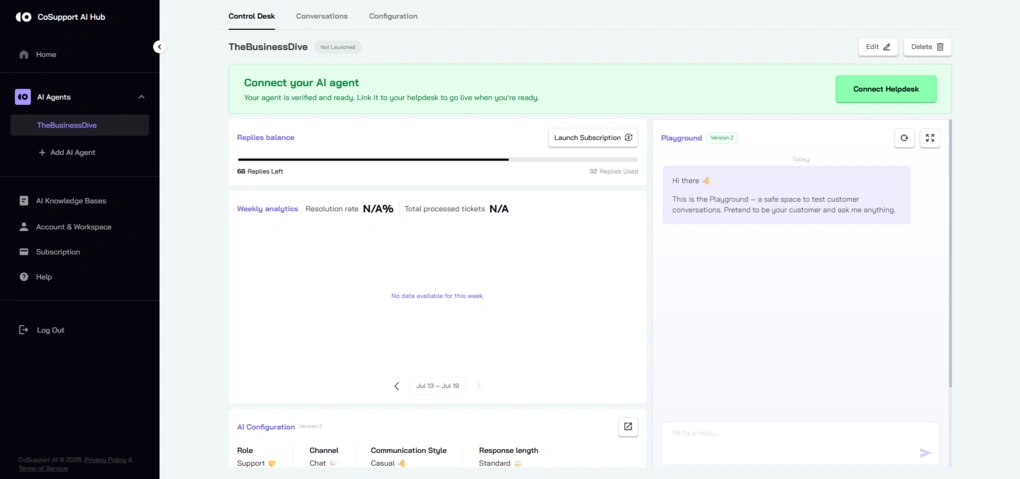
Most of my time with CoSupport AI was spent in the Playground, which is where I tested the agent before making any changes live. Every time I updated a workflow or changed the agent’s behavior, I could immediately start a new conversation and see how those changes affected the responses.
I deliberately tried a wide range of prompts to see how well the agent handled different scenarios. I also tested how it handled missing information, whether it admitted when it didn’t know something, and how it behaved during escalation scenarios.
One thing I appreciated is how fast the feedback loop was. I could tweak a setting, save it, start a fresh chat, and immediately see whether the change had the intended effect. Starting a new conversation after each update also made it easy to isolate the impact of individual configuration changes.
Since all of this happens in a separate testing environment, I could experiment freely without worrying about affecting a production chatbot.
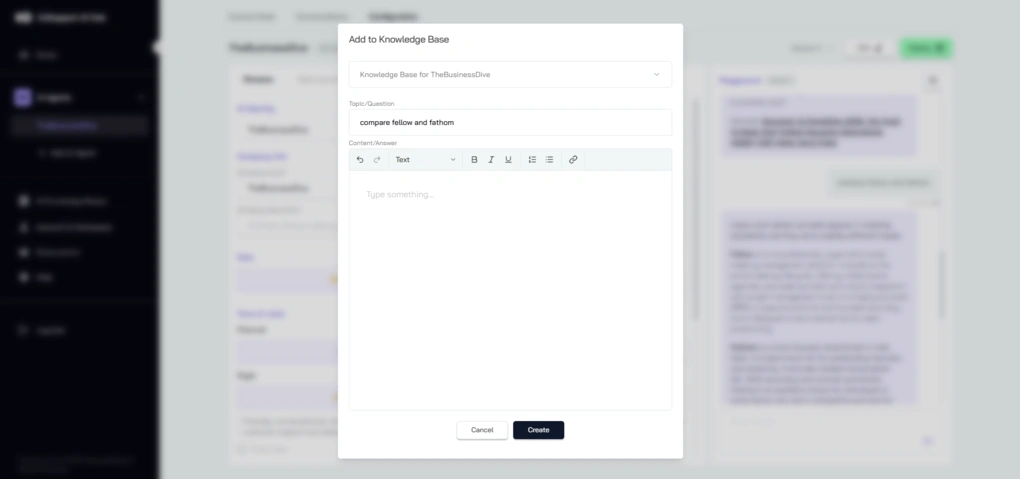
Another feature I found genuinely useful was Add FAQ. Whenever the AI generated an answer that I wanted to reuse, I could create a new FAQ directly from the conversation without leaving the Playground.
The customer’s question was automatically prefilled, while I could review or write the answer before saving it to the appropriate knowledge base. It’s a very practical way to grow the knowledge base from real conversations.
Custom workflows
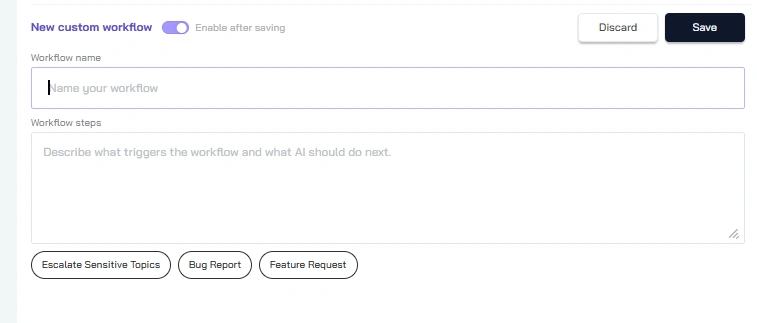
After testing the default behavior, I moved on to custom workflows to see how much control I actually had over the AI’s responses. The editor is entirely text-based, so I simply described the behavior I wanted in natural language.
After enabling my workflow, the AI consistently followed the behavior I’d defined instead of relying on its default responses. That demonstrated how much control custom workflows give you over the conversation flow.
I also appreciated that CoSupport AI comes with several prebuilt workflows for common support scenarios, including escalation, bug reports, feature requests, and FAQs. They worked well as reference examples and made it easier to understand how custom workflows should be structured.
Another detail I found useful was the built-in versioning system. Rather than replacing the live configuration right away, my changes were saved as a draft that I could test in the Playground before deploying. It made experimenting with prompts and workflows feel much less risky.
Human handoff and escalation
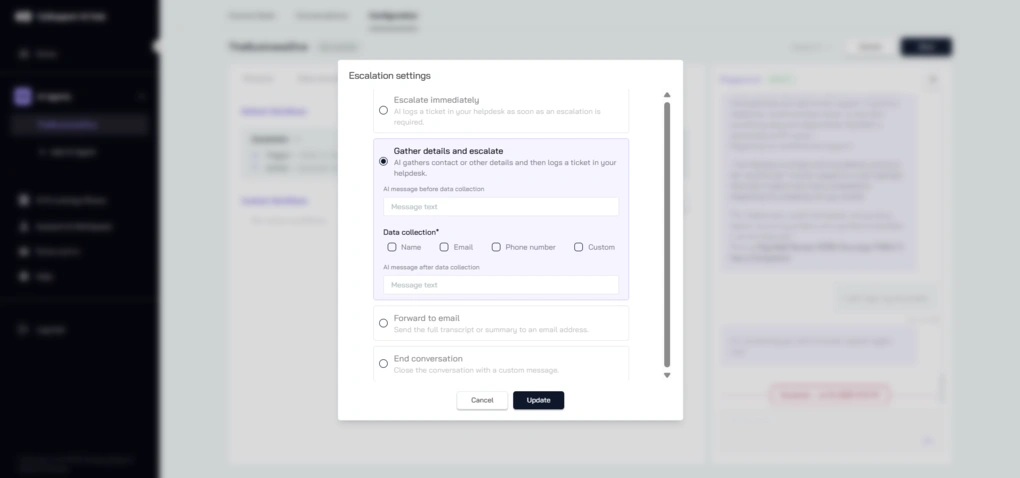
Another area I wanted to explore was how CoSupport AI handles conversations that need human intervention.
The platform comes with prebuilt escalation workflows, but these aren’t fixed rules. You can customize when an escalation happens, what information the AI should collect first, and how the handoff should be handled.
I liked that the workflow gave me control over the conversation instead of simply transferring every difficult request. After a few adjustments, the AI consistently collected additional context before escalating, which could save support agents from asking the same questions all over again.
One thing I did notice, though, is that the AI doesn’t automatically offer a human handoff just because it can’t answer a question.
When I asked about a product that wasn’t in the knowledge base, it admitted it didn’t have the information but only escalated after I explicitly requested a human agent. I think proactively offering escalation in those situations would create a smoother support experience.
Decision Logs
One feature I wasn’t able to test firsthand is Decision Logs, which CoSupport AI introduced with version 2.0. According to the company, every AI-generated response can include a detailed log showing the reasoning process, actions taken, and knowledge sources used to generate the final answer.
While this functionality wasn’t available in my Playground environment, I like the idea of having that level of transparency, especially for QA teams that need to audit AI-generated responses or understand why the agent reached a particular conclusion.
Cost vs value
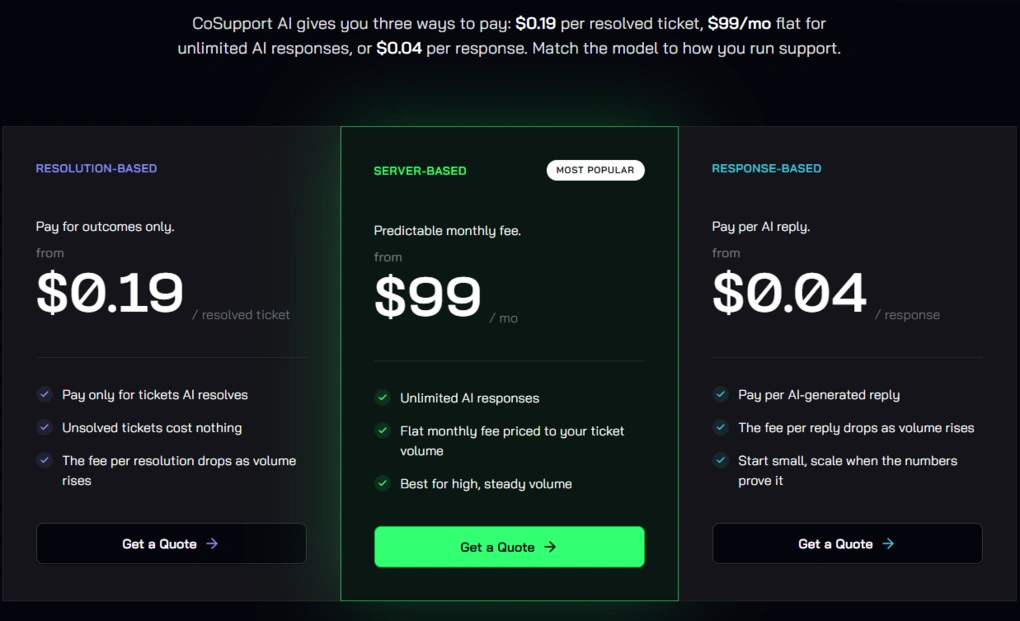
CoSupport AI offers a free pilot, no setup fees, and a money-back guarantee if it doesn’t achieve a 60% resolution rate within the first 60 days.
You can pay per resolved ticket (starting at $0.19), per AI response (starting at $0.04), or opt for a flat monthly plan starting at $99/month with unlimited AI responses.
From my perspective, the pricing is most attractive for companies that already handle a meaningful number of support requests. Smaller teams can start with the response-based model, while businesses with predictable ticket volumes will probably get more value from the flat-rate option.
The resolution-based model is also an interesting alternative because it means you’re only paying when the AI successfully resolves a ticket, which shows confidence in the platform’s ability to deliver real results rather than simply charging for access to AI.
Final thoughts about CoSupport AI
If there’s one takeaway from this CoSupport AI review, it’s that CoSupport AI is much more than a basic AI chatbot.
With flexible knowledge management, customizable workflows, and an excellent testing environment, it gives support teams the tools to build AI they can actually trust. While there’s still room to improve retrieval accuracy, it’s a platform I’d confidently recommend.
Explore our Apps directory
A curated directory of software tools we’ve independently reviewed, with links to full reviews, comparisons, and category guides.
Why you can trust our reviews
At thebusinessdive.com, our team tests, reviews, and compares hundreds of productivity apps every year — from project management tools to note-taking apps. We dive deep into real-world use cases to help you find the right tools that actually improve your workflow, not just add noise.
Our mission? No fluff, no shortcuts—just honest, hands-on insights from productivity pros.
Discover how we stay transparent, read our review methodology, and let us know about any tools we missed.
Frequently asked questions
Does CoSupport AI work with existing customer support platforms?
Yes. CoSupport AI integrates with popular customer support platforms like Zendesk, Freshdesk, and Zoho Desk, allowing support teams to keep their existing workflows while adding AI-powered automation.
Depending on the integration, setup can be as simple as connecting an API key and your existing documentation.
How accurate are CoSupport AI’s AI responses?
CoSupport AI is designed to generate AI responses using your knowledge base, company data, and past tickets instead of relying on generic AI models.
The company reports an AI resolution rate of 70–90% for customer queries and says its zero-hallucination architecture helps minimize inaccurate answers.
During my testing, responses were generally reliable, although I occasionally encountered missed information and imperfect source attribution.
Can CoSupport AI reduce customer support costs?
Yes. By automating repetitive support tickets and providing instant reply suggestions for human agents, CoSupport AI helps reduce support load, improve response time, and increase agent productivity.
The company claims businesses can save up to $30,000 annually for every 1,000 monthly support tickets, while also reducing total resolution time and maintaining 24/7 customer support.

Hey there! I am Aron, the founder of Thebusinessdive. I have been testing productivity apps for almost three years now. I reach 25.000 -50.000 people monthly with the mission to help you find the perfect productivity apps. Subscribe to my YouTube channel, newsletter, and social media to hear more about the best productivity tools. Let’s dive in!