


EaseUS PDF Editor Review 2026 | My Unfiltered Opinion
In this EaseUS PDF Editor review, I will share how it works in real-life scenarios, pricing, and whether it is safe to use.
After testing 30+ PDF editors, EaseUS made a surprisingly positive impression on me. BUT, it’s definitely not the right PDF editor for everyone.
Let’s dive in!
Verdict: One of the best-value PDF editors I’ve tested
Here’s the quick verdict if you don’t want to read the full review:
🎯 Best for: Individuals who need a budget-friendly PDF editor with an extensive feature set
🚫 Not ideal for: Those who need a PDF editor for mobile devices as well
⭐ Biggest strength: PDF reading features
⚠️ Biggest weakness: AI features
⚖️ Verdict: An affordable PDF editor for individuals who need a fast and reliable PDF editor
🏆 Score: 4.4 / 5
✅ Tested with our review & scoring methodology ✅ Real-world testing ✅ Unbiased evaluation
EaseUS PDF Editor
Summary
It is an all-in-one PDF software to read, edit, annotate, and convert your documents. EaseUS PDF Editor is available on Windows and Mac as well. To summarize, I had an excellent experience with EaseUS PDF, and it is ultimately an affordable alternative to Adobe Acrobat.
|
|
Affordable
|
|
|
Easy to use
|
|
|
Fast
|
|
|
Solid OCR feature
|
|
|
Advanced PDF protection
|
|
|
Lacks mobile version
|
|
|
Missed the in-built AI features
|
EaseUS PDF Editor at a glance
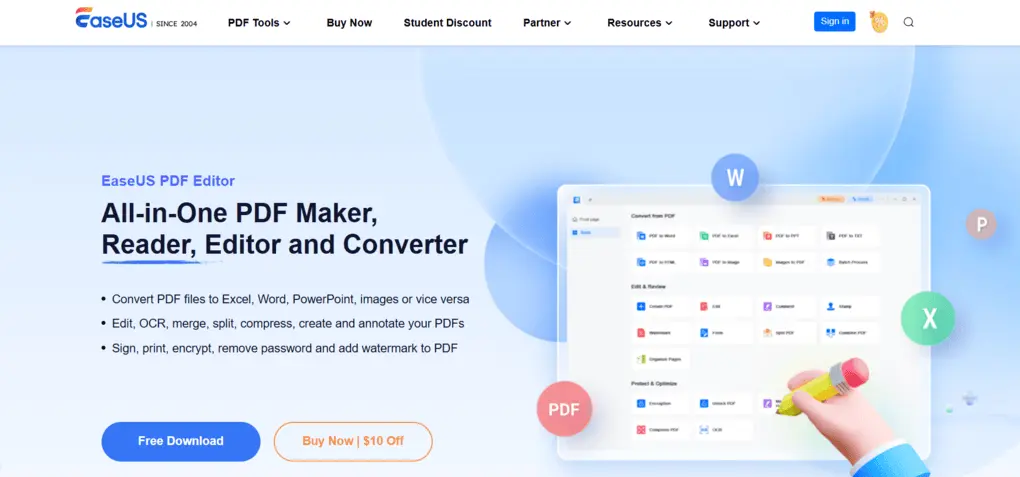
EaseUS is an international software company specializing in data recovery, data backup, and disk management tools since 2004. One of their products is EaseUS PDF Editor, which I will shortly introduce you to in this review.
It is an all-in-one PDF software to read, edit, annotate, and convert your documents. EaseUS PDF Editor is available on Windows and Mac as well.
My experience with EaseUS PDF Editor
EaseUS PDF has an intuitive interface and some useful tools for editing and reading PDF files. This tool is very simple.
You can find all the tools you need, whether it is OCR or annotation tools, in seconds. When testing EaseUS PDF Editor, I did not notice any performance issues even when I worked with larger PDF documents.
The features that mostly stand out for me were the editing, OCR, and encryption tools. I only missed the built-in AI tools when using EaseUS PDF Editor’s desktop version. Also, it does not have a mobile version, which would probably be useful for some of you.
To summarize, I had an excellent experience with EaseUS PDF, and it is ultimately an affordable alternative to Adobe Acrobat for small and mid-sized businesses and individuals.
What works well & what needs improvement?
| Works well | Needs improvement |
|---|---|
| 💰 Affordable pricing — One of the more budget-friendly PDF editors I’ve tested, especially compared with Adobe Acrobat. | 📱 No mobile apps — There’s no iOS or Android version. |
| 🖥️ Easy to use — Simple interface with quick access to the tools you need. | 🤖 Limited AI features — I missed having built-in AI tools in the desktop editor. |
| ⚡ Reliable performance — I experienced no performance issues, even with larger PDF files. | |
| 🔍 Excellent OCR — One of the more accurate OCR tools I’ve tested across 30+ PDF editors. | |
| 🔐 Advanced PDF protection — Supports open and permission passwords, encryption options, and customizable watermarks. |
Who gets the most value from EaseUS PDF Editor
When EaseUS PDF Editor might not work for you
Why EaseUS PDF Editor gets a 4.4 / 5
EaseUS PDF Editor offered a solid feature set whenever I tested it in the past two years. It has outstanding PDF editing features, an OCR function, and gets solid scores for conversion and form creating/filing as well.
EaseUS PDF Editor only lost one star for its PDF reading features and annotation tools. While these also worked smoothly during my EaseUS PDF Editor review, they were not as outstanding as the previously mentioned features.
With a total score of 4.4 (one of the highest in the PDF editor niche), EaseUS made my list of best PDF editors.
If you think you may need the advanced features, use the above link to sign up and enter the code THEBUSINESSDIVE20 to receive 20% OFF if you fall in love with EaseUS PDF later.
Is EaseUS PDF Editor safe?
When using EaseUS PDF Editor, including for business-related documents, I didn’t encounter any obvious security or privacy red flags. However, I didn’t want to rely solely on my own experience, so I dug deeper into forums, Reddit discussions, and EaseUS’s privacy documentation.
Surprisingly, I found very little discussion about the security or privacy of EaseUS PDF Editor specifically. On the positive side, I couldn’t find any notable user reports raising security concerns.
However, I also couldn’t find a dedicated privacy or security policy for EaseUS PDF Editor itself. The privacy policy I found appears to cover EaseUS and its website more broadly rather than clearly explaining how the PDF Editor handles documents and user data.
So, I reached out directly to the EaseUS team and asked how PDF Editor handles user data and uploaded files.
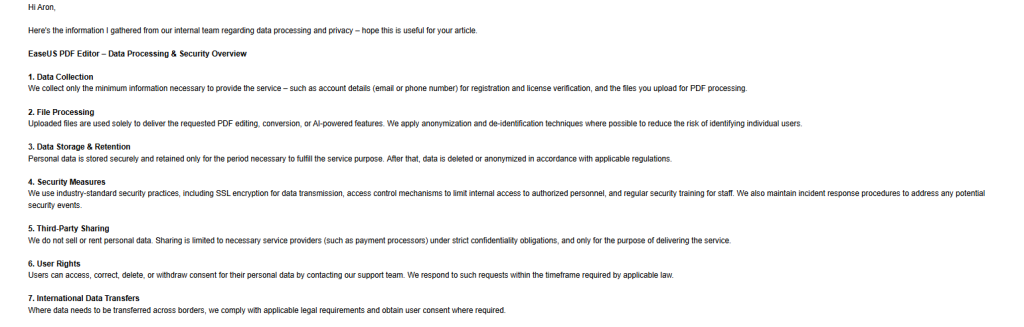
According to EaseUS, uploaded files are only used to provide the requested PDF services, while personal data is retained only as long as necessary and then deleted or anonymized.
The company also says it uses SSL encryption and access controls, does not sell or rent personal data, and allows users to request the deletion of their data.
You can see EaseUS’s full response below:
Based on my own experience, the lack of security complaints I could find, and EaseUS’s direct response, I didn’t uncover anything that would make me consider EaseUS PDF Editor inherently unsafe.
That said, I would still like to see this information published in a clear, product-specific privacy document rather than having to contact the company to get these details. For businesses handling highly sensitive or confidential documents, that additional transparency would be valuable.
How EaseUS PDF Editor’s features performed in my testing
After testing 30+ PDF editors, I’ve found that feature lists rarely tell you how well a PDF editor actually performs.
So instead of simply listing what EaseUS can do, here’s what stood out when I tested its core features in real-world scenarios—and where I found limitations.
PDF reading
More capable than I expected from a budget PDF editor
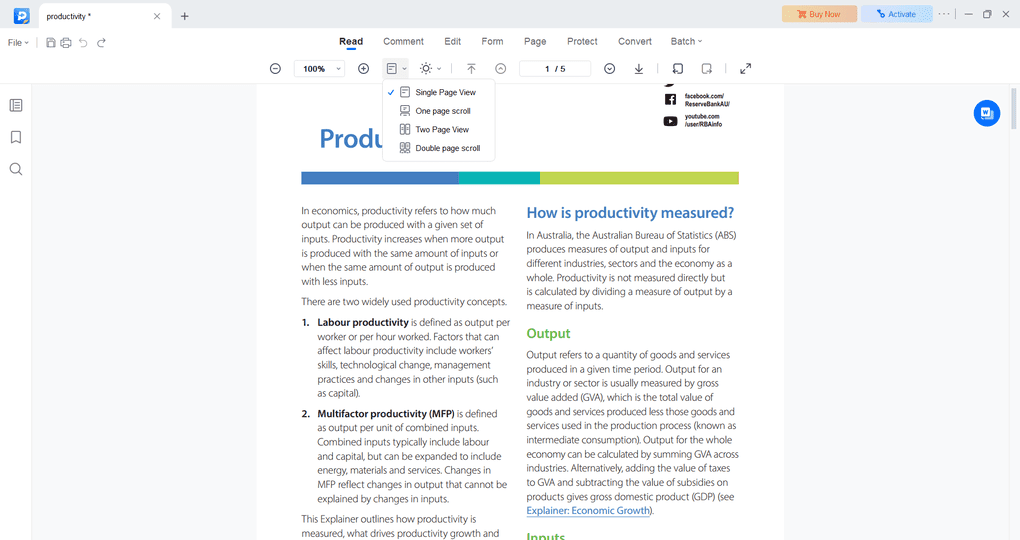
EaseUS PDF Editor offers outstanding PDF viewing features, which justify its place on my list of best PDF readers.
You can choose from different layout options, such as single-page view or two-page view, and have a dedicated mode for reading e-books.
Additionally, it enables you to smoothly rotate and zoom your pages, allowing you to read your documents with ease.
What’s good:
PDF editing
Surprisingly close to Acrobat for everyday edits
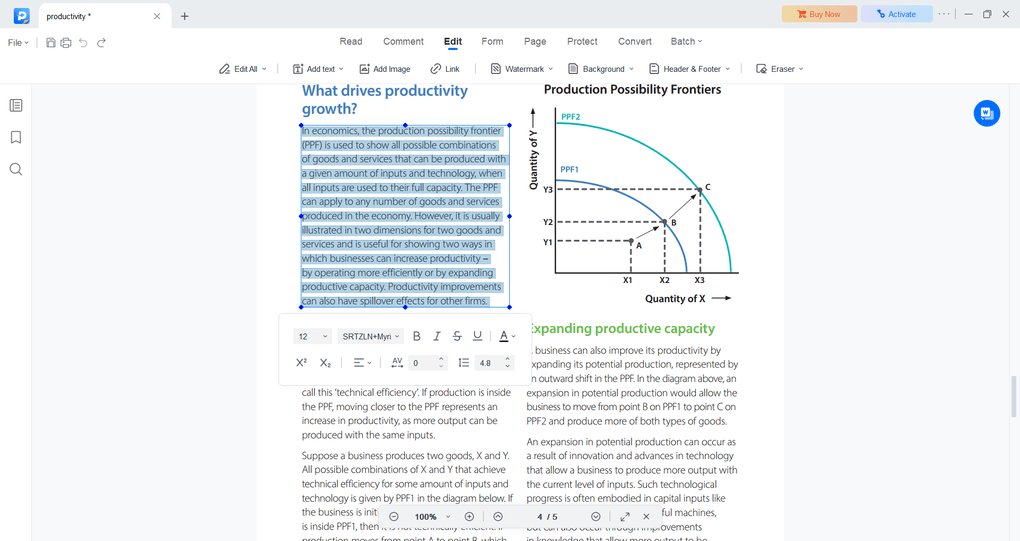
This is one of the areas where EaseUS surprised me. Editing existing text, moving text boxes, inserting images, and changing formatting all felt straightforward. I could also change or remove PDF backgrounds, which isn’t something every budget editor handles this conveniently.
Compared to some other popular PDF editors like Adobe Acrobat or Foxit, I found that EaseUS PDF Editor delivers the same or even advanced capabilities for significantly less money.
What stood out:
Where it falls short:
Annotations
Good enough for reviewing documents, but I missed audio comments
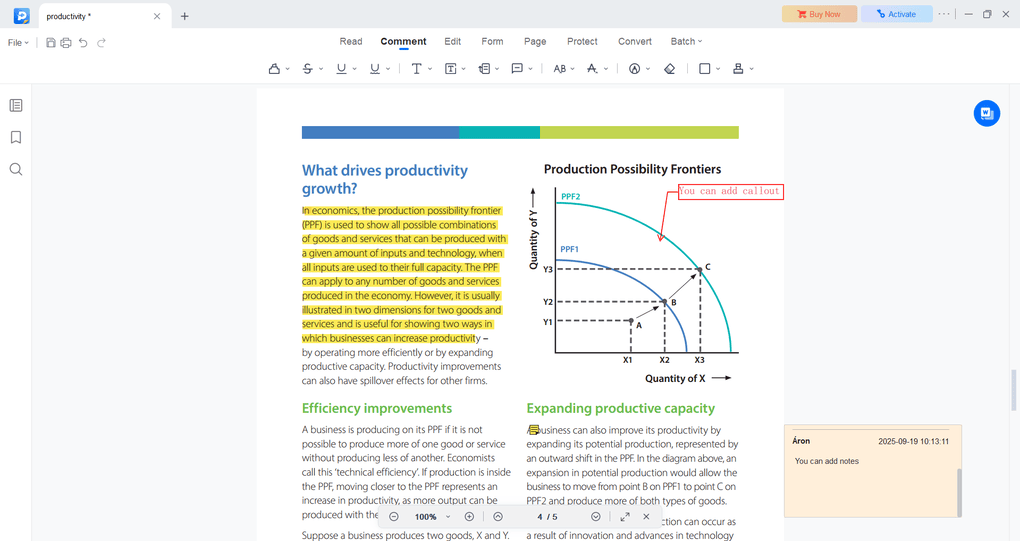
EaseUS covers most of the annotation tools I regularly use from highlights, drawings, shapes, stamps, comments, to callouts. Everything worked smoothly when using EaseUS PDF Editor for my files.
What worked well in my testing:
Where it falls short:
PDF organization
One of the strongest toolsets I’ve tested
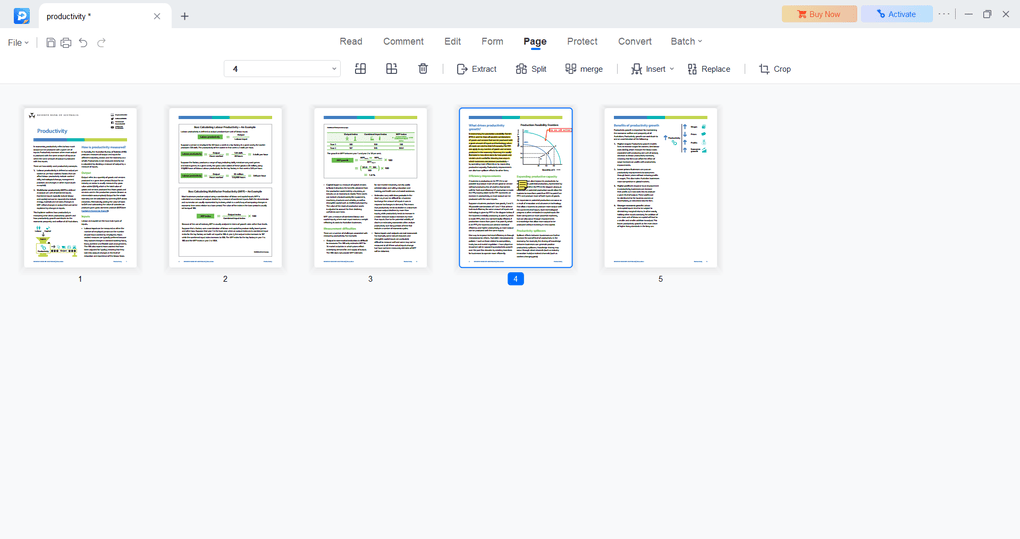
PDF organization was one of EaseUS’s biggest surprises for me. After testing 30+ PDF editors, I’d put its page-management tools among the strongest I’ve used, particularly considering the price.
What’s good:
Forms & signatures
More advanced than basic document signing
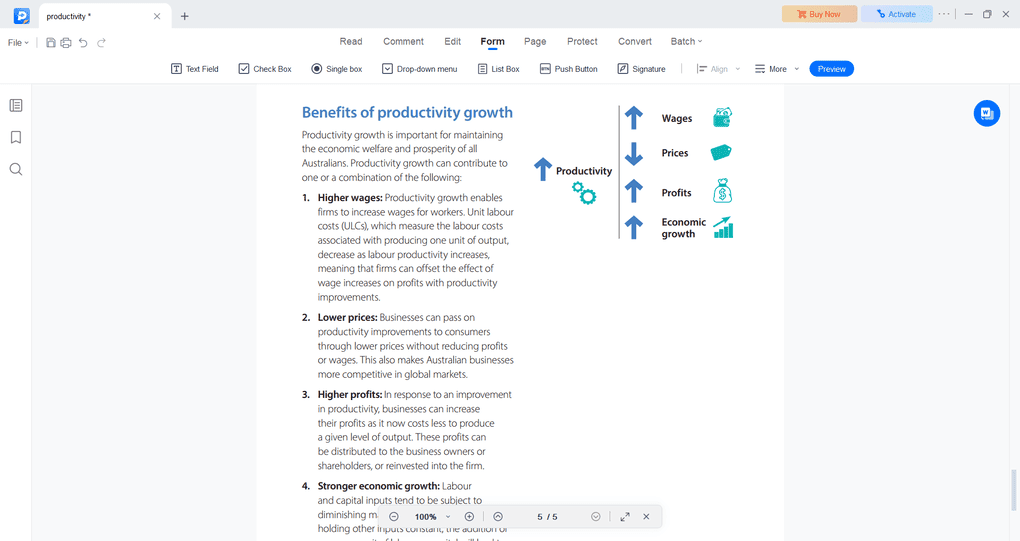
Using EaseUS PDF editor, you can create fillable forms or questionnaires with EaseUS PDF. You can add items like text fields, check boxes, drop-down menus, and more. Also, it lets you export and import data to fill more PDF forms with one click.
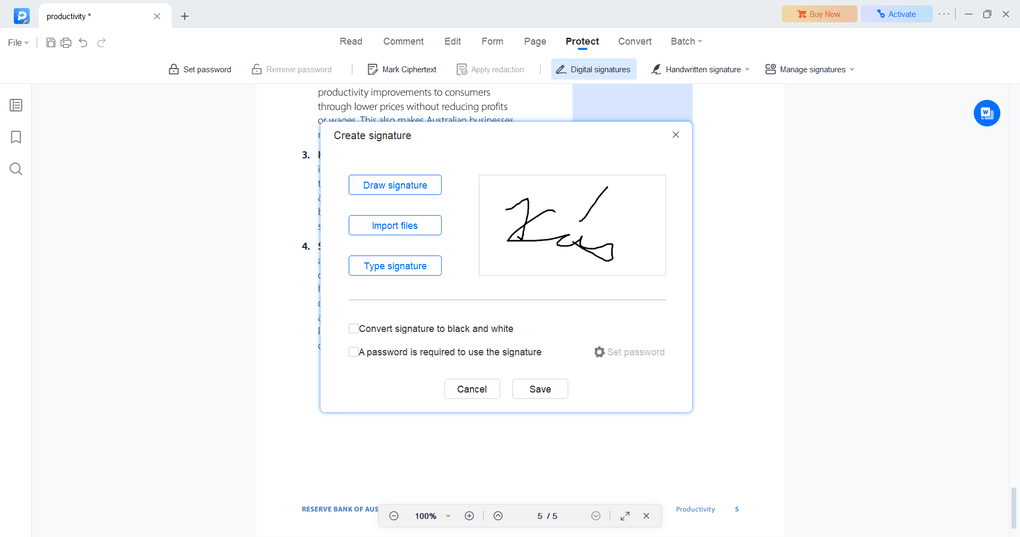
Furthermore, EaseUS PDF Editor allows you to create your signature by drawing, typing, or importing it. It’s pretty fast and straightforward to generate your first e-signature.
You can also sign your documents with your digital ID, which shows the location, date, time, and more. I loved that you can create more signatures & manage them under one tab.
Using its signature management features, you can add different types of signatures, and even for other people, which makes it an ideal e-signature solution.
Where EaseUS impressed me:
Any drawbacks?
If you think you may need the advanced features, use the above link to sign up and enter the code THEBUSINESSDIVE20 to receive 20% OFF if you fall in love with EaseUS PDF later.
PDF protection
Better security controls than many budget PDF editors
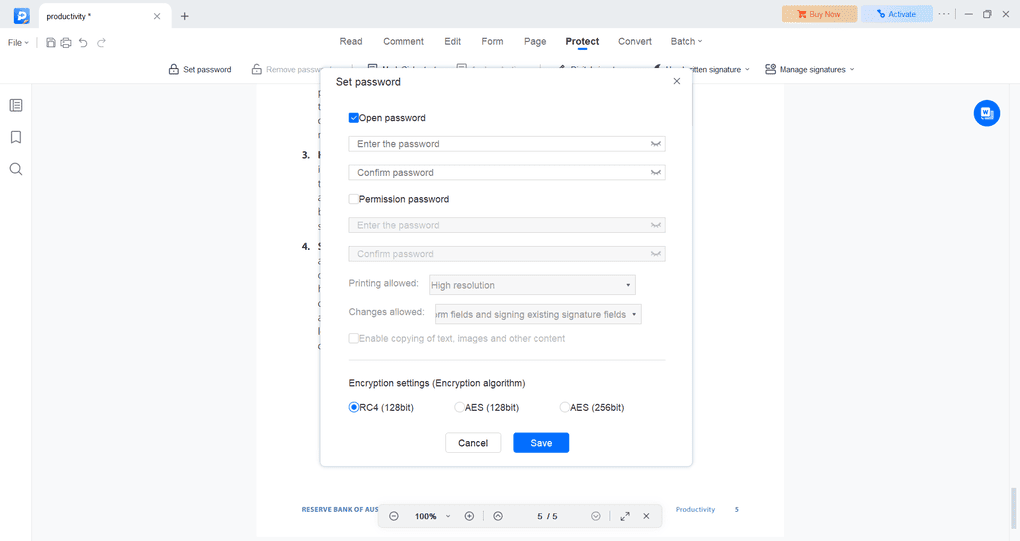
I was glad to see that you can add an open and permission password as well. With these features, you can customize who can view, copy, edit, or print your document. In addition, you can decrypt your documents easily.
Furthermore, you can decide if you want to protect your PDF files with RC4 or AES technology. As a rule of thumb, AES is a more secure choice as it offers superior protection.
With EaseUS PDF Editor, you can also add watermarks to your documents. You can choose from text and image formats, and offer many options to customize them.
Where it excelled:
Where EaseUS struggled:
OCR
One of the most accurate results I’ve seen across 30+ editors
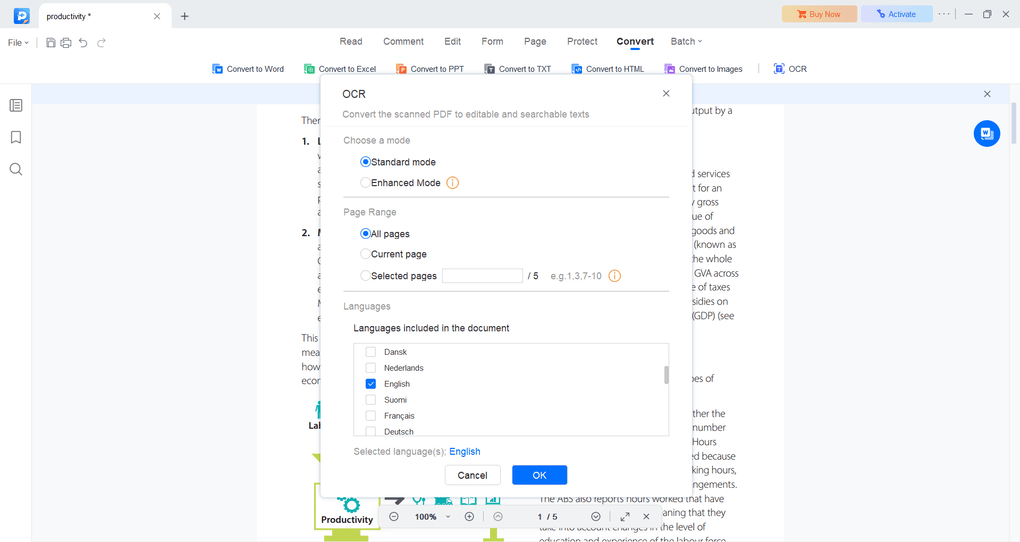
EaseUS PDF Editor offers an accurate OCR feature compared to other PDF software. It supports 29 languages, including English, French, and German.
During my EaseUS PDF Editor review, I used it for English text and it provided quite good output. I selected the enhanced mode, which is more accurate than the standard mode but takes longer.
You still need to make some minor adjustments to your scanned PDF when using the OCR feature, especially regarding formatting.
Yet, based on my experience, EaseUS PDF Editor has a more accurate OCR feature than 90% of PDF editors. After testing 30+ PDF editors’ OCR feature, only PDNob and ABBYY FineReader PDF provided a similar accuracy level.
Here is the full list of the top OCR Software for a more detailed breakdown.
What’s good:
What’s missing:
PDF conversion
My files were ready in around 20–30 seconds
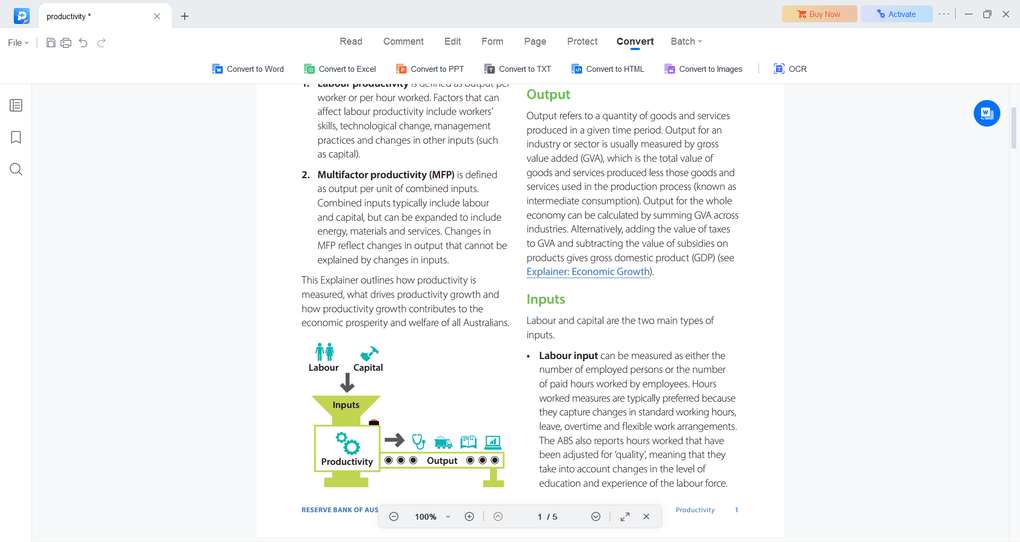
You can convert your PDF documents into 10+ file formats, including Word, Excel, PNG, and more. When converting PDFs, it took 20-30 seconds to get the format I selected.
Where EaseUS PDF excelled:
If you think you may need the advanced features, use the above link to sign up and enter the code THEBUSINESSDIVE20 to receive 20% OFF if you fall in love with EaseUS PDF later.
Compressing PDF files
Easy-to access and fast
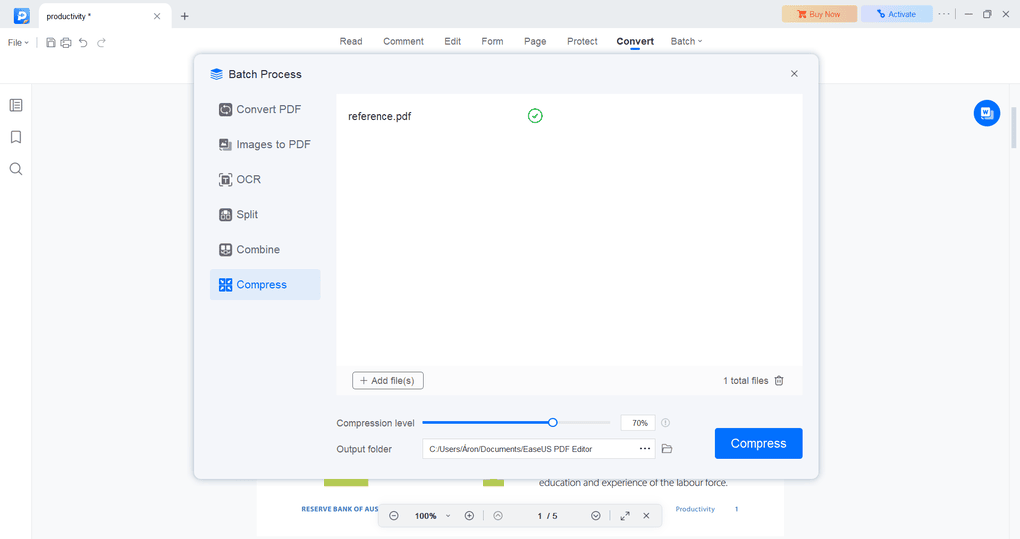
The compression feature of EaseUS PDF Editor is a helpful functionality, and it works pretty well. You only need to add the file you want to compress and select the level of compression.
The way that you can adjust the compression level is super useful, as it gives you the flexibility to find the perfect balance between size and quality.
What worked well in my testing:
Explore our Apps directory
A curated directory of software tools we’ve independently reviewed, with links to full reviews, comparisons, and category guides.
EaseUS PDF Editor user interface
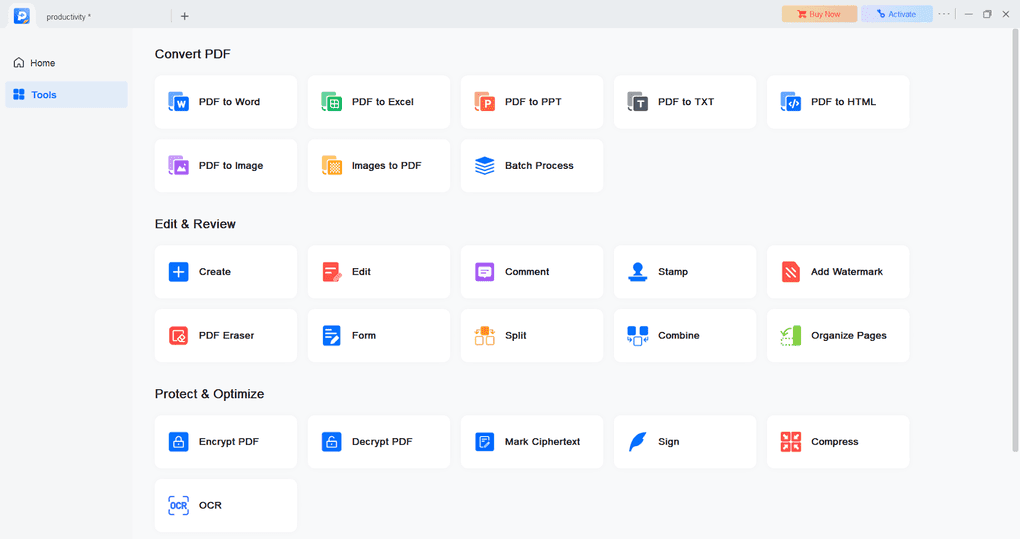
EaseUS PDF Editor has a simple user interface. On the home tab, you find the latest documents you worked with. If you click on the “Tools”, you can select the feature you want to use for your documents.
When working in a PDF document, it is easy to navigate among the features, and I felt the whole user experience was intuitive.
EaseUS PDF Editor Pro & Lifetime Upgrades
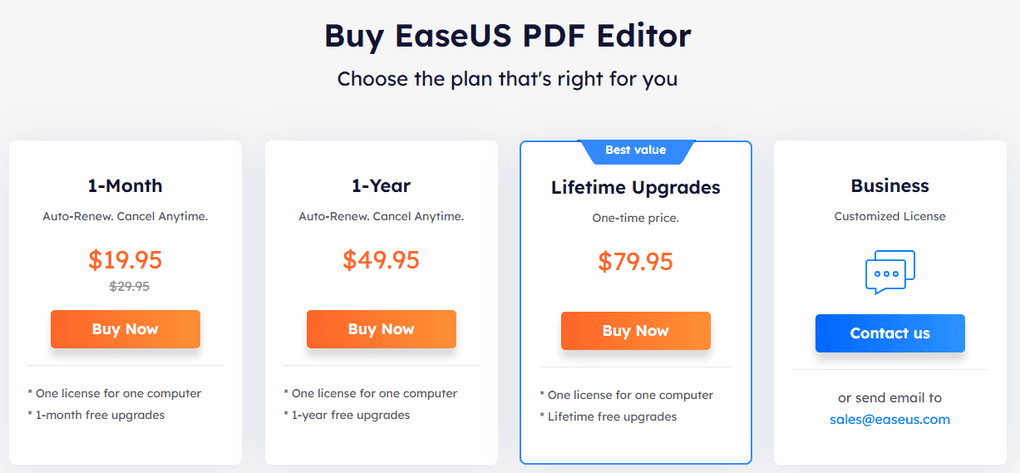
EaseUS’s monthly plan is $19.95, while the yearly plan is $49.95. They include one license for one computer and 1-year free upgrades. If you go for the lifetime upgrades, it will cost you $79.95.
With all these plans, you will have access to all EaseUS features, including the OCR tools.
Overall, EaseUS is currently one of the cheapest PDF editors on the market.
If you think you may need the advanced features, use the above link to sign up and enter the code THEBUSINESSDIVE20 to receive 20% OFF if you fall in love with EaseUS PDF later.
Wrap-up: EaseUS PDF Editor review
To wrap it up, I think EaseUS PDF Editor is currently one of the best PDF software options, and it has not accidentally made it to my lists of best PDF editors and best PDF readers. And again, it is not only an excellent but budget-friendly option as well if you need a top PDF editor.
Hope I was able to help you find the best PDF editor for you. As always, I will update this EaseUS PDF Editor review over time so you guys have up-to-date information about this PDF software.
EaseUS PDF Editor alternatives
If you feel like EaseUS PDF Editor is not the perfect one for you, here are the best alternatives:
|
App |
Best for |
Description |
|---|---|---|
|
Foxit |
Best affordable alternative to Adobe Acrobat |
A PDF editor with an intuitive user interface at an affordable price for Mac and Windows users. |
|
Tenorshare PDNob |
Best for AI-powered PDF editing |
It is an easy-to-use AI-powered PDF editor that offers many features to edit, read, organize, and annotate your documents. Full Tenorshare PDNob review | Quick Tenorshare PDNob overview |
|
PDF Expert |
Best for Mac users |
A PDF editor for Mac, iPhone, and iPad users that offers all the tools you need to manage your PDF files, from annotation tools to signing PDFs. |
|
Xodo PDF Studio |
Best offline PDF editor |
A straightforward offline desktop PDF editor for Windows, Linux, and iOS devices, with great PDF reading and editing tools. Full Xodo PDF Studio review | Quick Xodo PDF Studio overview |
|
ONLYOFFICE PDF Editor |
Best for collaboration and team editing |
A versatile tool that combines PDF editing with document collaboration features. It lets you edit text, add visual elements, and create fillable forms. |
|
UPDF |
Best value PDF editor with AI features |
One of my favorite PDF editors with advanced AI features and budget-friendly pricing. |
|
Nitro |
Best for business PDF workflows |
A feature-rich PDF editor with a strong focus on PDF editing. |
|
Smallpdf |
Best online PDF tool |
An online PDF software with numerous tools to convert, compress, and edit PDF files for free. |
|
Adobe Acrobat |
Most popular PDF editor |
The most popular PDF editor with solid features, but an extremely high price. |
|
pdfFiller |
Best for e-signatures and document workflows |
It offers a signing and editing solution that lets users sign and edit documents, send them for signature, and manage the full electronic document workflow in one place. |
|
LightPDF |
Best for AI PDF productivity |
An AI-powered PDF editor that lets you edit, convert, OCR, sign, annotate, chat with PDFs, and more. |
|
PDFgear |
Best free PDF editor |
A completely free, offline PDF editor with solid editing, OCR, conversion, and AI tools. |
|
PDF-XChange |
Best advanced PDF editor for Windows |
A powerful Windows-based PDF editor with advanced editing, annotation, security, and conversion tools. |
|
Sejda PDF Editor |
Best for simple, everyday PDF tasks |
An intuitive and simple PDF software best suited for personal use for those who need a PDF editor for basic PDF tasks. |
|
Soda PDF |
Best for security and file conversion |
A user-friendly PDF editor with solid core features, strong security tools, and broad file conversion options, but its advanced features come at a relatively high price. |
|
PDF Candy |
Best PDF toolkit with multiple tools |
A very practical PDF toolkit with a large number of useful tools, solid performance, and affordable pricing. |
|
Tungsten Power PDF |
Best enterprise-grade PDF solution |
A powerful PDF editor and document management tool designed for businesses, offering advanced editing, security, OCR, and collaboration features. Full Tungsten Power PDF review | Quick Tungsten Power PDF overview |
|
ABBYY FineReader |
Best for OCR and document digitization |
A powerful OCR-focused PDF tool with strong layout detection, flexible conversion, and an efficient workflow. Full ABBYY FineReader review | Quick ABBYY FineReader overview |
|
PDFelement |
Best balance of features and ease of use |
An easy-to-use PDF editor with valuable features for a reasonable price. |
|
WPS Office |
Best easy-to-use office suite and PDF editor |
WPS Office is an easy-to-use office suite with solid PDF editing and AI-powered productivity tools, though its free plan is quite limited. |
Looking for similar tools?
Visit our library of PDF editors to explore other apps we’ve reviewed in this space and how they compare.
How We Test PDF Editors
To keep our reviews and final scores fair and consistent, we evaluate every PDF editor using a standardized testing framework built on over 3 years of hands-on experience testing these tools in real-world scenarios.
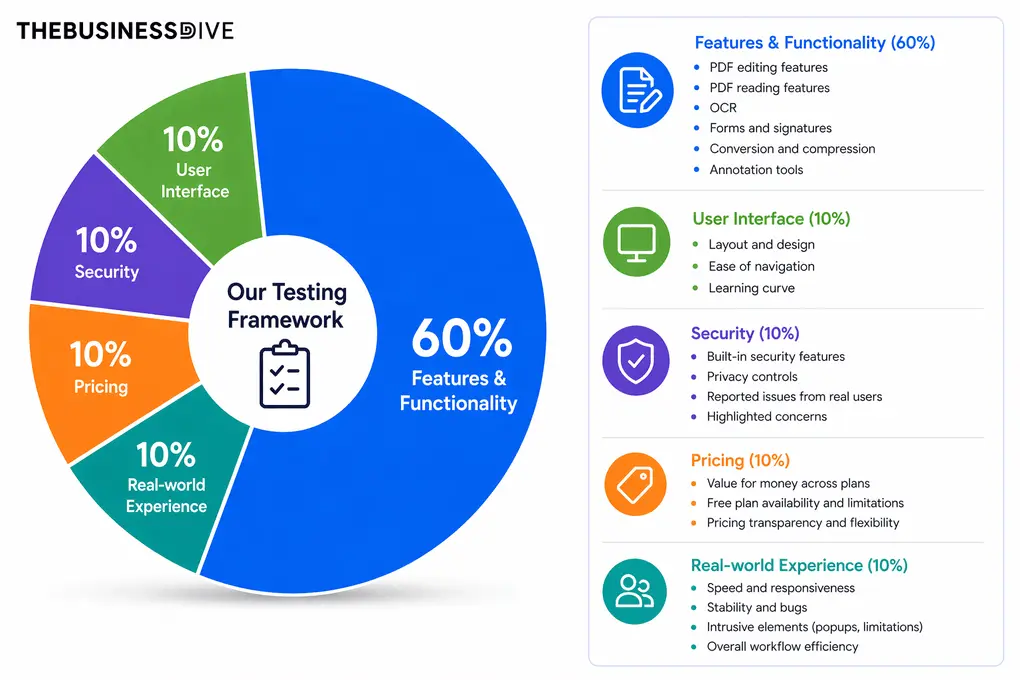
Our scoring breakdown after testing 30+ PDF editors:
🛠️ Features & functionality — 60%
🖥️ User interface — 10%
🔐 Security — 10%
💰 Pricing — 10%
👥 Real-world experience — 10%
Want a detailed breakdown of how we test each category?
Learn exactly how we test tools → Review methodology
Why you can trust our reviews
At thebusinessdive.com, our team tests, reviews, and compares hundreds of productivity apps every year — from project management tools to note-taking apps. We dive deep into real-world use cases to help you find the right tools that actually improve your workflow, not just add noise.
Our mission? No fluff, no shortcuts—just honest, hands-on insights from productivity pros.
Discover how we stay transparent, read our review methodology, and let us know about any tools we missed.
Frequently asked questions
Is EaseUS PDF Editor any good?
EaseUS PDF Editor is among the best PDF software considering its features and pricing. I had an absolutely positive experience with this PDF editing software, and I can recommend it.
Which PDF editor is best?
There are numerous powerful PDF editors, and the question of which one is the best ultimately depends on your preferences and budget.
However, I collected the best PDF editors I tried so far in this article:The 9 Best PDF Editors In 2026 | 30+ Personally Tested PDF Tools
Is there a fully free PDF editor?
While EaseUS PDF editor has a solid free plan, you need to purchase its paid plans if you need the more advanced features. If you want to use a completely free PDF editor, take a look at PDFgear.
Although it does not have as many advanced features as EaseUS PDF Editor, you can access numerous tools with PDFgear, which is normally included in the paid plans.
Can I edit a PDF without Adobe?
In addition to Adobe Acrobat, many other PDF tools offer a wide array of tools for PDF editing. In fact, some PDF editors, including EaseUS PDF Editor, provide similar or even better features than Adobe Acrobat for much less money.
Disclosure: I only recommend products I would use myself, and all opinions expressed here are our own. This post may contain affiliate links that, at no additional cost to you, may earn a small commission. Read the full privacy policy here.

Hey there! I am Aron, the founder of Thebusinessdive. I have been testing productivity apps for almost three years now. I reach 25.000 -50.000 people monthly with the mission to help you find the perfect productivity apps. Subscribe to my YouTube channel, newsletter, and social media to hear more about the best productivity tools. Let’s dive in!