


Subnoto review 2026 | The Most Secure E-Sign App?
Subnoto launched just last year, yet it’s already claiming to be the world’s most secure e-signature solution. That’s a bold promise, especially in a market where established tools have been around for decades.
So I decided to test it myself and see whether Subnoto truly delivers on its privacy-first vision, or if it’s just clever marketing wrapped in technical buzzwords.
Read on, because in this Subnoto review, I will tell you all about its key features, pricing, pros and cons, and my personal experience.
Let’s dive in!
Verdict
Here’s the quick verdict if you don’t want to read the full review:
🎯 Best for: Privacy-focused teams and organizations handling highly sensitive documents
🚫 Not ideal for: Businesses that need advanced workflows, bulk operations, or mature feature sets
⭐ Biggest strength: Industry-leading privacy and encrypted processing
⚠️ Biggest weakness: Limited feature depth and still early in product maturity
⚖️ Verdict: A highly innovative, security-first e-signature tool with cutting-edge technology, but not yet a complete replacement for more mature platforms
🏆 Score: 4.2 / 5
✅ Tested with our review & scoring methodology ✅ Real-world testing ✅ Unbiased evaluation
Subnoto
Summary
Subnoto is a privacy-first e-signature tool focused on secure and simple document signing. Its zero-knowledge architecture makes it stand out, while the clean interface keeps workflows straightforward. However, limited advanced features may be noticeable for more complex use cases. Overall, it’s a strong choice for users who value privacy and simplicity.
|
|
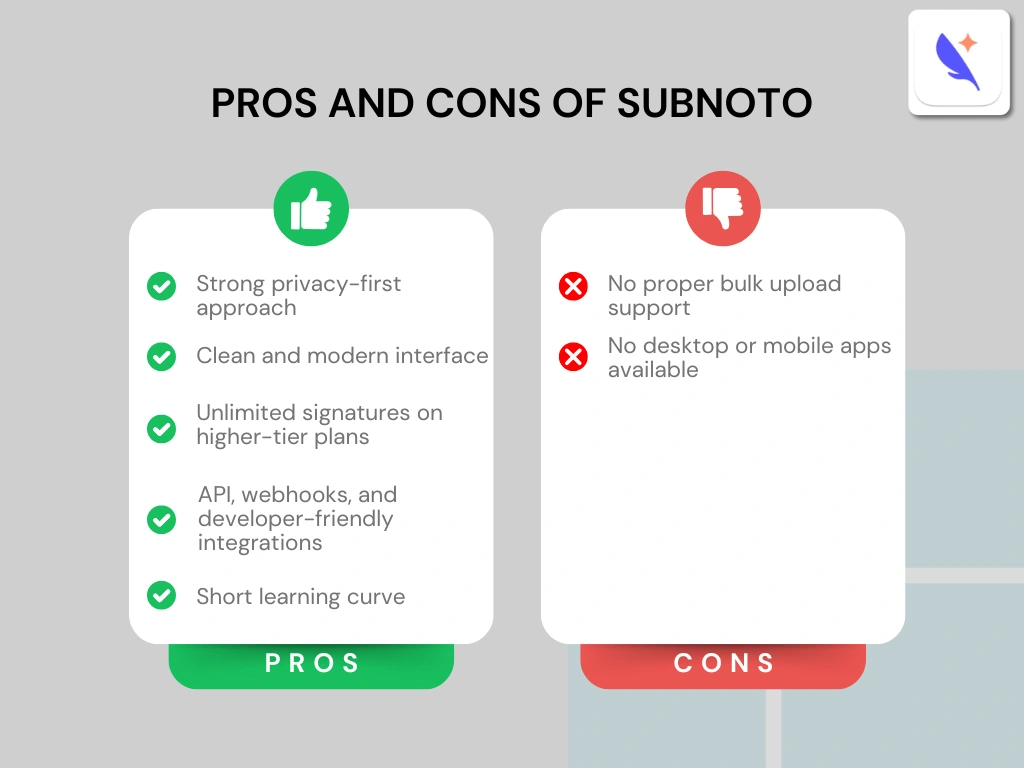
Strong privacy-first approach
|
|
|
Clean and modern interface
|
|
|
Unlimited signatures on higher-tier plans
|
|
|
API, webhooks, and developer-friendly integrations
|
|
|
Short learning curve
|
|
|
No proper bulk upload support
|
|
|
No desktop or mobile apps available
|
How We Test eSign Software
To keep our reviews and final scores fair and consistent, we evaluate every eSign tool using the same testing framework based on real-world usage, feature depth, and overall value.
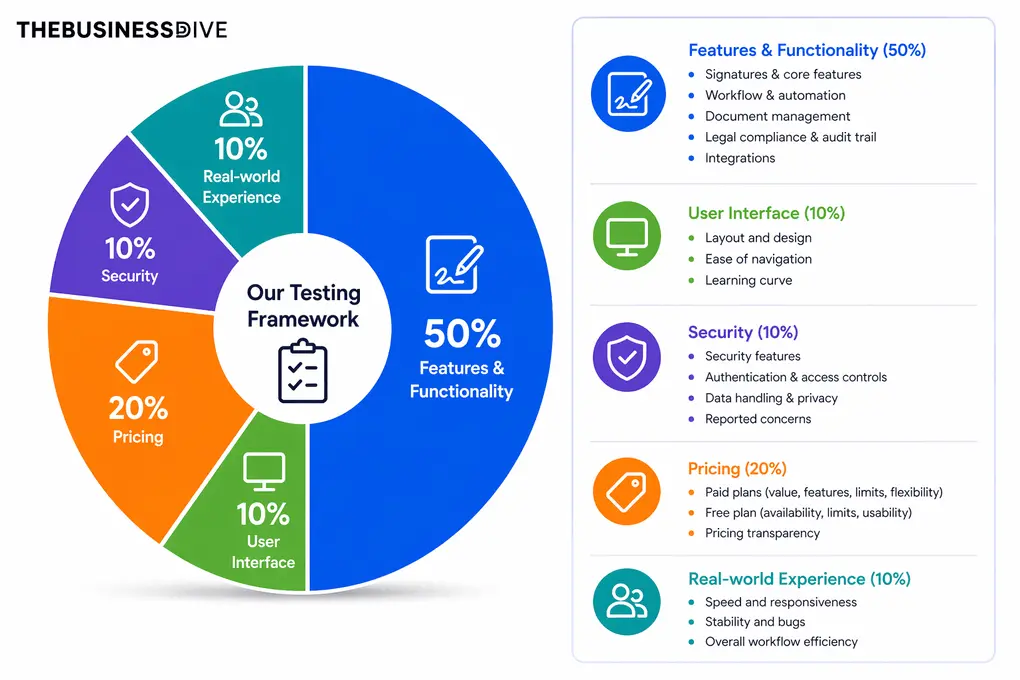
Our scoring breakdown after testing 10+ e-signature apps:
✍️ Features & functionality — 50%
🖥️ User interface — 10%
🔐 Security — 10%
💰 Pricing — 20%
👥 Real-world experience — 10%
Want a detailed breakdown of how we test each category?
Learn exactly how we test tools → Review methodology
Short on time? Here’s a quick overview of Subnoto
What is Subnoto?
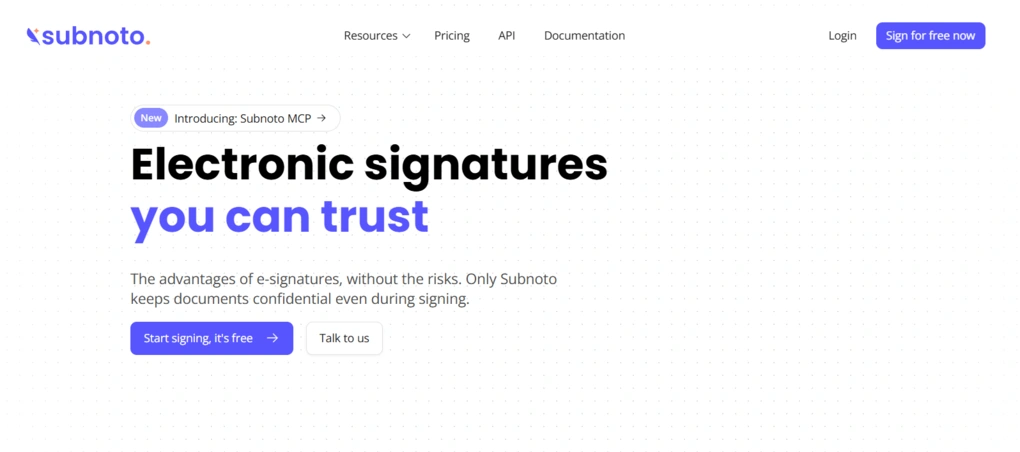
Subnoto is a privacy-first e-signature platform designed to let individuals and businesses sign documents without exposing sensitive data.
Unlike traditional e-signature tools, Subnoto is built on a zero-knowledge architecture, meaning that even the platform itself cannot access or read your documents.
By using confidential computing and secure enclaves, it keeps files encrypted not only in storage and transit, but also during the signing process, which is something most competitors don’t offer.
Launched only last year, Subnoto positions itself as a next-generation alternative to tools like DocuSign or PandaDoc. Its core mission is to eliminate the need to trust the platform with your data.
This is what makes it appealing for companies handling sensitive information, such as legal teams, HR departments, and security-conscious startups.
Testing Subnoto in everyday use
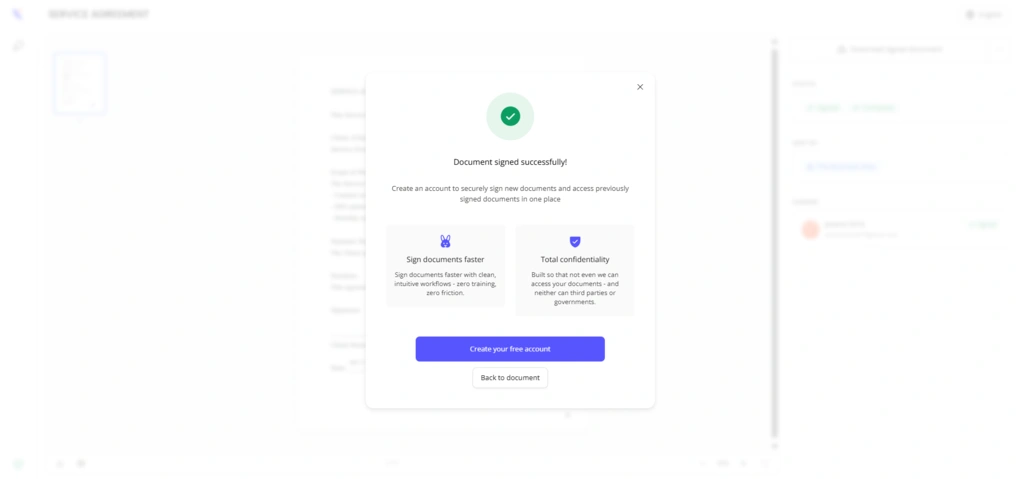
In short, I had a great experience with Subnoto.
What immediately stands out is its focus on privacy and security. It genuinely feels like a different approach compared to most e-signature tools. And this is something I missed from the e-signature market before Subnoto.
However, I noticed some small limitations, like no bulk upload and only one saved signature.
In the end, Subnoto is a promising, simple, security-first tool with a solid foundation, and can be an excellent choice for businesses that need a safe e-signature app.
The reasoning behind Subnoto’s score
While Subnoto offers solid signing (4/5) and legal compliance workflows (4.5/5), it received only 3.5 out of 5 for integrations and automation.
When evaluating other criteria such as user interface, pricing, and security, Subnoto outperformed most of the other e-signature apps we have tested.
Ideal users for Subnoto
Who Subnoto is not ideal for
Key features
Let’s start with its most distinctive feature.
Security & privacy
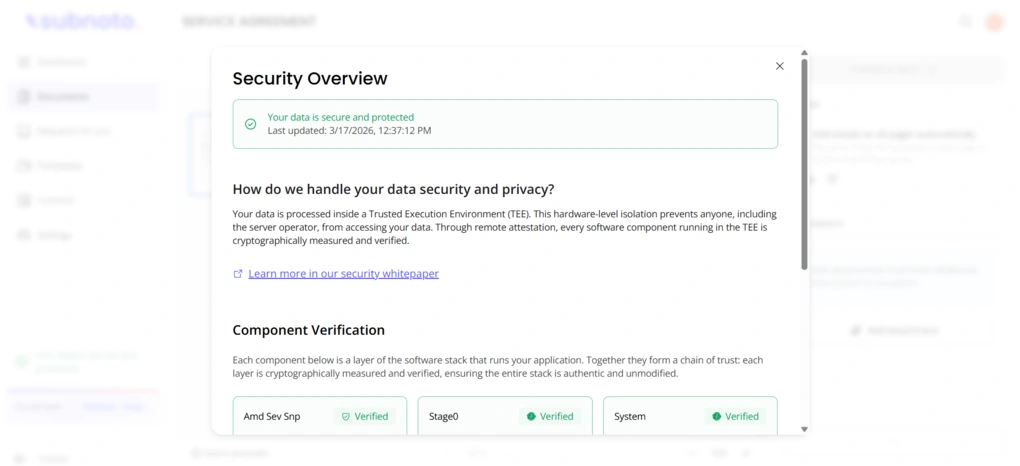
Subnoto genuinely uses confidential computing and trusted execution environments (TEEs) to keep documents encrypted even while they’re being processed. It also claims a zero-knowledge architecture, meaning not even the platform itself can read your files.
These are real technical differences compared to many competitors, and they’re clearly explained on its website and blog.
In practice, this approach closes the typical “data in use” gap that most platforms leave exposed, since documents remain encrypted during processing. That’s a meaningful advantage, especially for sensitive data. Subnoto is also GDPR-friendly, with data hosted in France and a design aligned with European privacy standards.
That said, calling it “the world’s most secure e-signature tool” is a big claim. While the architecture is impressive, Subnoto is still new. It doesn’t yet have the same track record, certifications, or third-party audits as bigger players. So while it’s clearly one of the most privacy-focused tools out there right now, the “most secure in the world” part has yet to be fully proven.
Beyond its strong focus on privacy, Subnoto also offers standard e-signature features.
Dashboard
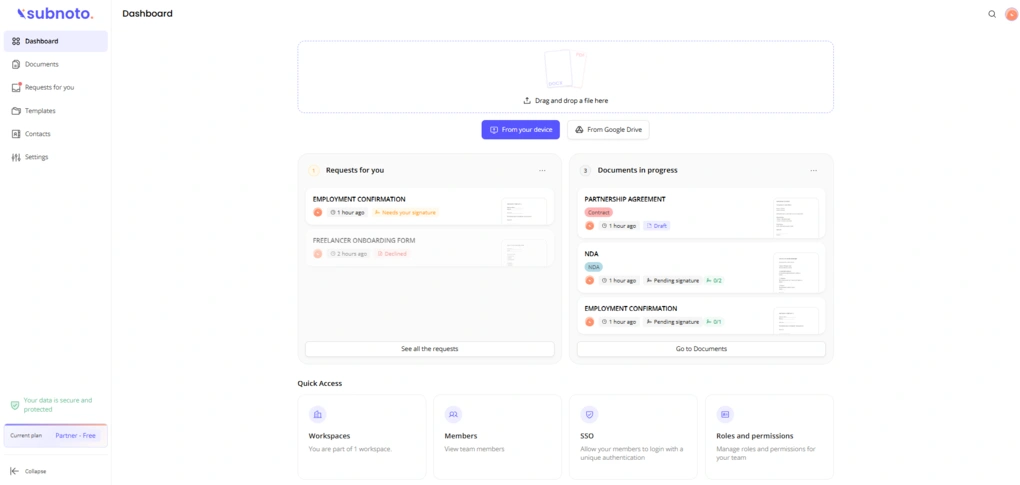
Subnoto’s dashboard is clean and easy to navigate. Right away, you get a clear overview of your documents, including those waiting for your signature and those currently in progress. It also gives you quick access to key sections like Workspaces, Members, SSO, and Roles and Permissions.
At the top of the page, there’s a simple upload area where you can drag and drop DOCX or PDF files, or upload them from your device or Google Drive. The upload process itself is fast.
However, one thing I missed is the proper bulk upload support. While you can select multiple files at once, only one file actually gets uploaded. This will slow things down if you’re working with multiple documents. That said, the Subnoto team mentioned that this feature is planned, so it may be improved in future updates.
Add signature
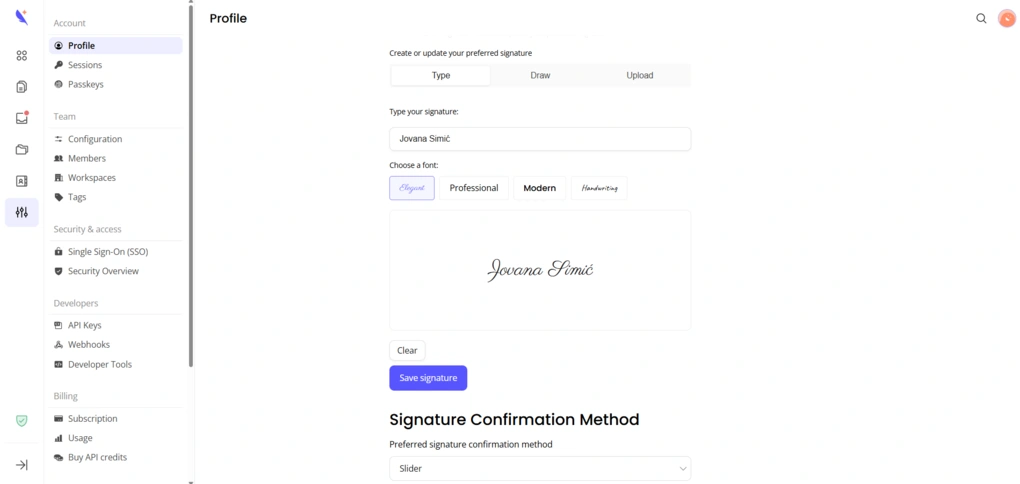
The option to create your signature is located under Settings → Profile, which isn’t the most obvious placement at first. Once you find it, the setup is straightforward and includes the three standard options: type, draw, or upload your signature.
If you choose to type your signature, you can select between four fonts – Elegant, Professional, Modern, and Handwriting. I appreciated that all fonts support diacritical marks, and I’m sure international users whose names include non-English characters, like mine, will appreciate this too.
The only limitation is that you can only save one signature, with no option to create initials or add a stamp. Nevertheless, the whole process felt straightforward and required a short learning curve.
Preparing documents
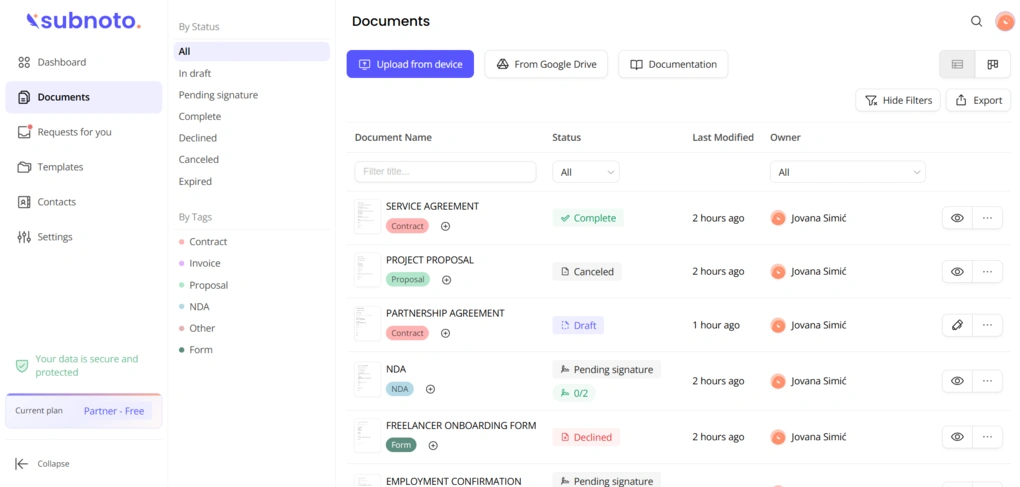
All your documents are organized under the Documents tab in the left sidebar. They’re neatly categorized by status and by tags. There are also filtering options that make it easy to find specific documents, especially if you’re working with a larger volume. You can switch between list and card view, which adds a bit of flexibility, but overall, the layout is clean and easy to navigate.
Just like on the dashboard, you can upload a document from the top of the page. After uploading, the first step is to add one or more signers. Once that’s done, you’re taken to the document editor.
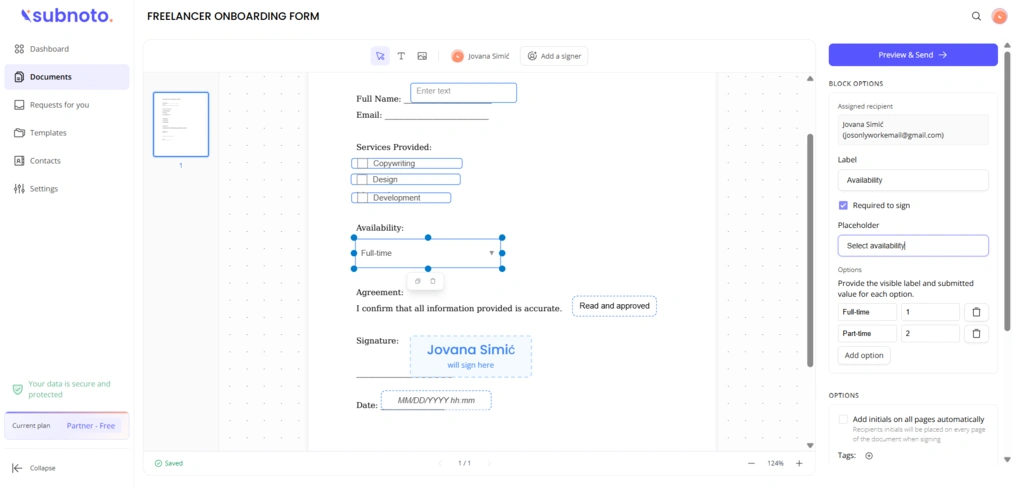
The available fields (like signature, date, name, text, dropdown, and radio buttons) appear after you click on a signer’s name. From there, you can drag and drop them onto the document. Subnoto covers all the core fields you’d expect from most e-signature tools, which is more than enough for a simple app that handles the majority of common use cases.
That said, for more advanced scenarios, some users may notice the lack of features like reusable or more configurable fields, as well as more specialized options such as file upload (collect files), billing-related inputs, or formula/calculation fields.
When you place a field, a settings panel appears on the right, allowing you to adjust it. This sidebar also includes additional options like automatically adding initials to every page, assigning tags, and attaching extra files for recipients.
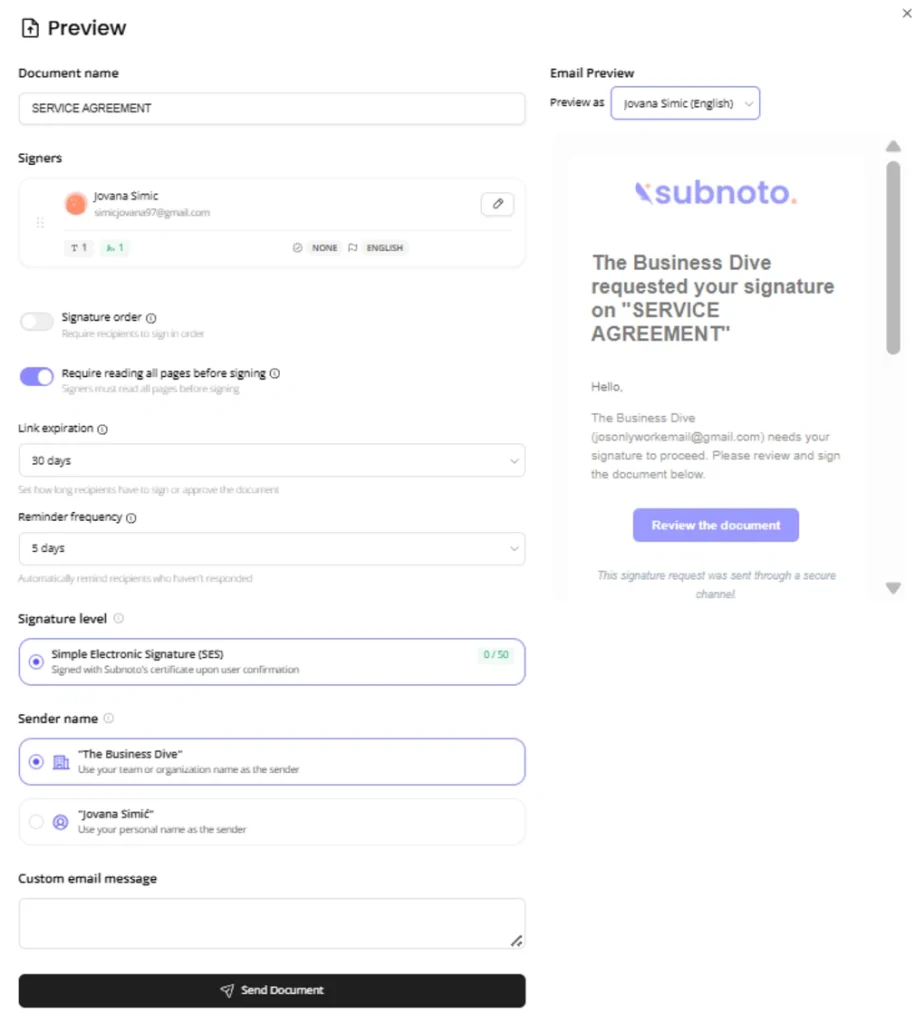
Once your document is ready, you can preview it before sending. In this step, you can edit the document title, manage signers, set the signing order, configure reminders and expiration dates, and write a custom email message. You can also preview how the email will look for each signer. After that, the document is ready to be sent.
Templates
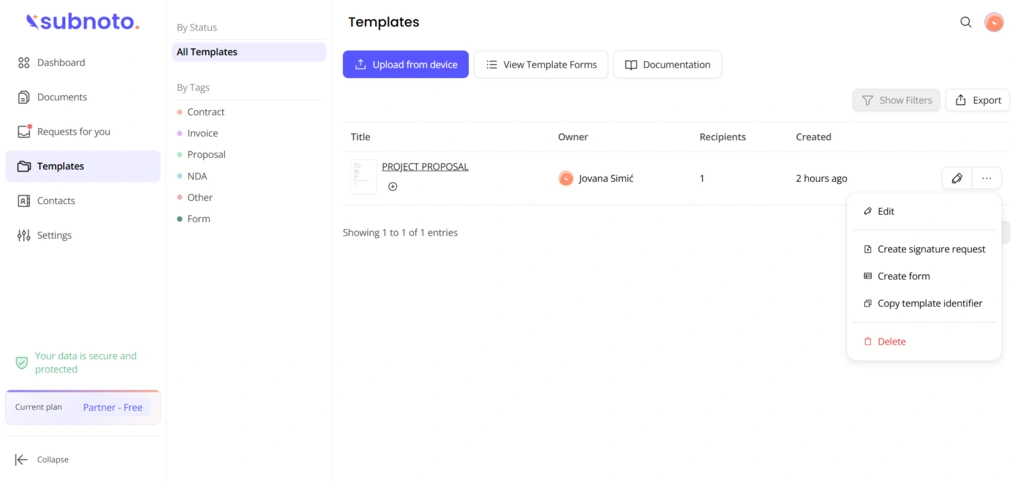
If you often send the same document for signing, Subnoto lets you save it as a template. However, there are no pre-built templates, so you have to create everything from scratch. This includes uploading the document, adding recipients, and placing all the necessary fields (blocks) manually.
When creating a template, you also assign labels to recipients (for example, “customer” or “manager”) and connect fields to those roles. Once everything is set up, the template stores the full structure of your document, including recipient roles and field positions.
One useful aspect is that templates can be used programmatically via the API. Instead of recreating the same document over and over, you can generate new envelopes by mapping those predefined labels to actual recipients and sending them in just a few steps.
That said, templates must be fully configured in advance, and their structure can’t be modified later through the API, meaning you’re simply reusing what you’ve already built.
Contacts
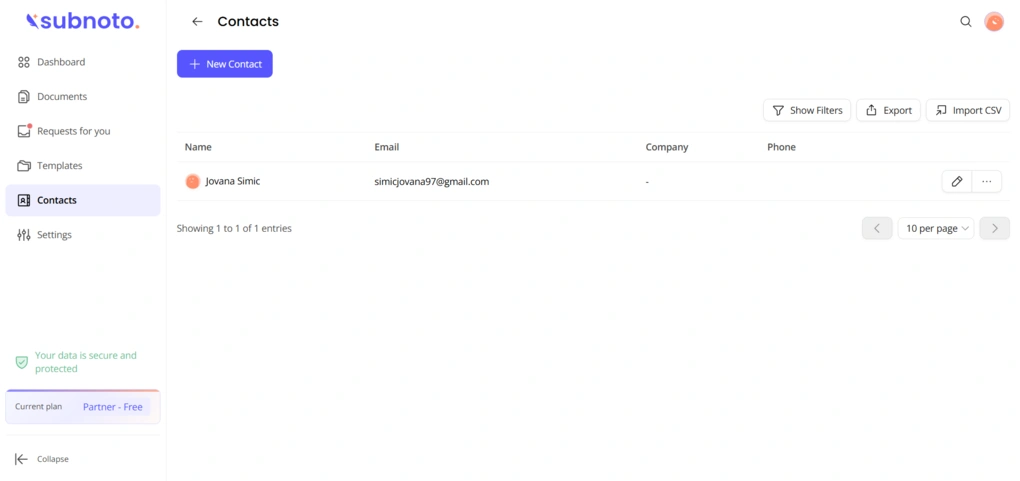
To add a new contact, you only need an email address, first name, and last name. You can add other details later.
You can also import contacts via CSV if you already have an existing list. On the other hand, Subnoto allows you to export your current contacts as well.
Team management
Subnoto organizes users into Workspaces, where you can invite team members and manage access. You can assign roles and permissions, thus controlling who can view, edit, or send documents.
There’s also support for SSO and workspace-level API access for larger teams and integrations. Overall, the setup is simple and covers the basics, but it doesn’t go much deeper than standard team management features.
Reports & Audit Logs
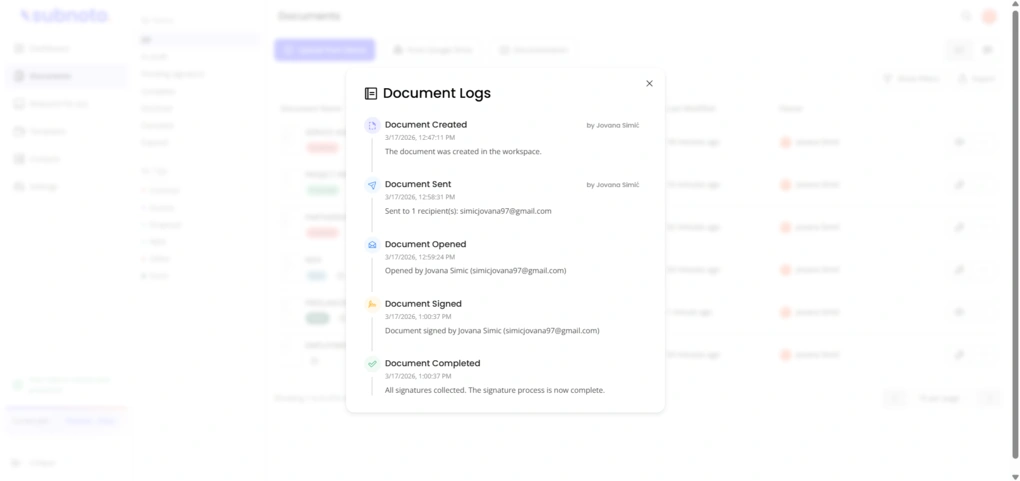
Subnoto doesn’t offer a traditional “Reports” feature with dashboards or scheduled exports. Instead, it focuses on audit logs and activity tracking. For every document, you can see who signed it, when, and what actions were taken. Once a document is completed, you can also download it with a tamper-proof audit trail that is useful for legal and compliance purposes.
In addition, Subnoto provides envelope logs and team logs, which give you an overview of document activity and team-level actions. These pages also allow you to export data when needed, so they can be very useful for basic reporting and tracking.
For more advanced reporting, Subnoto relies on its API and webhooks. This means you can track events and build custom reports externally, but there’s no built-in reporting system inside the app.
Overall, it covers the essentials for tracking and compliance, but is limited if you’re looking for detailed analytics or ready-made reports.
User interface
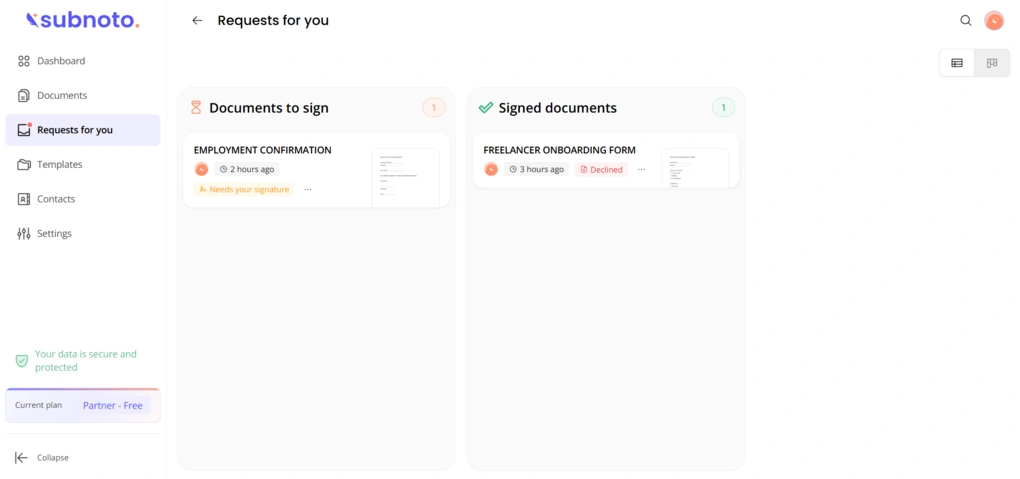
Subnoto’s user interface is clean, minimal, and visually well-designed.
However, I noticed a few minor discoverability and expectation gaps. It wasn’t immediately intuitive that fields only appear after clicking on a signer’s name. The bulk upload behavior was also a bit misleading, since selecting multiple files still results in only one being uploaded.
That said, these are really the only things I can point out, and they’re quite minor overall.
Explore our Apps directory
A curated directory of software tools we’ve independently reviewed, with links to full reviews, comparisons, and category guides.
Integrations
Subnoto offers a full API and SDKs, allowing you to automate document workflows, create envelopes, and embed signing into your own apps. It also supports webhooks, so you can track events like when a document is signed or completed in real time
At the same time, integrations are more developer-focused than plug-and-play. While there are some ready connections and cloud upload options (like Google Drive), most of the real power comes from using the API, which may not be ideal for non-technical users.
Subnoto pricing plans
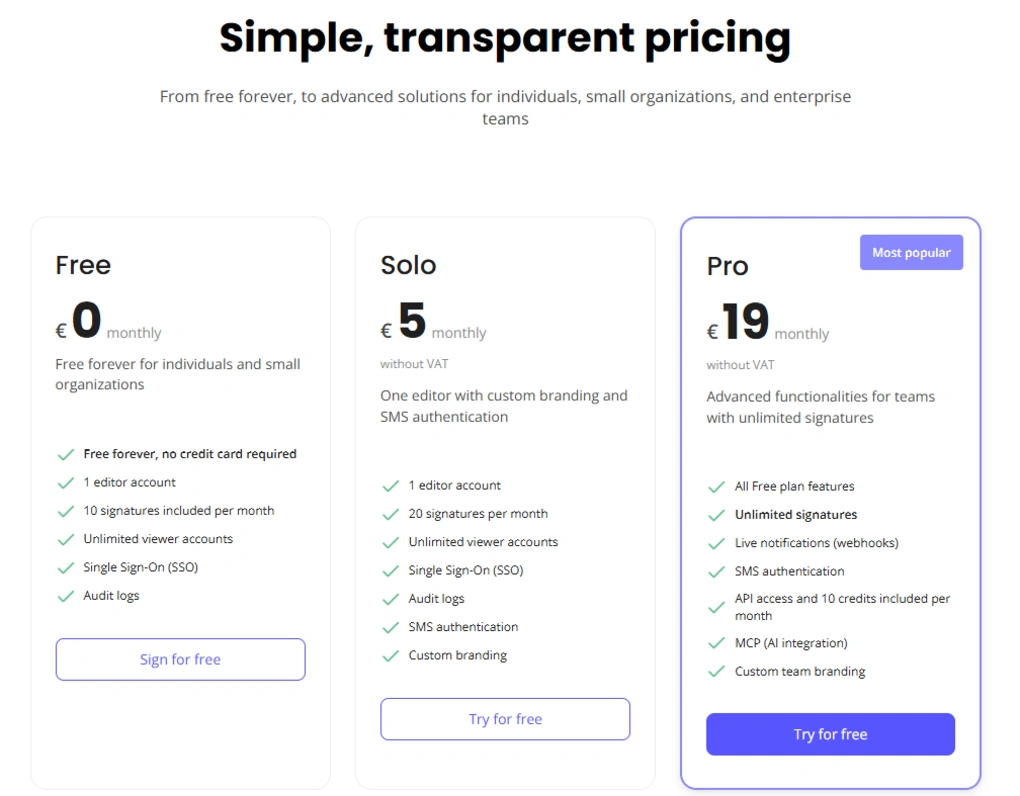
Subnoto offers a free plan and three paid tiers.
The Free plan is quite generous. It includes 10 signatures per month, one editor account, unlimited viewer accounts, SSO, and audit logs. This makes it a solid option for individuals or small teams just getting started.
The Solo plan, at €5/month, increases the limit to 20 signatures per month and adds features like SMS authentication and custom branding, while still keeping things lightweight with one editor account.
The Pro plan, at €19/month, is where things become more scalable. It includes unlimited signatures, webhook notifications, API access (with 10 credits per month), MCP (AI integration), and custom team branding. This plan is clearly aimed at teams and more advanced use cases.
Finally, the Ultimate plan, at €119/month, is built for enterprise use. It offers unlimited users, unlimited signatures, and extended audit log retention, along with all Pro features.
Pros and cons I found during my Subnoto review
Let’s see the pros and cons I identified in the course of my Subnoto review!
Pros of Subnoto
Cons of Subnoto
Subnoto alternatives
If you are not sure whether Subnoto is the perfect e-signature solution for you, here are some alternatives:
|
App |
Best for |
Description |
|---|---|---|
|
Docusign |
Best for enterprise e-signatures |
A pricey e-signature platform, but has solid integrations & some outstanding features for document signing. |
|
BoldSign |
Best for beginners |
A beginner-friendly app to help individuals and businesses streamline the way they prepare, send, and sign documents online. |
|
Signwell |
Best for quick document signing |
An electronic signature software to sign documents and save time. |
|
PandaDoc |
Best for document workflows |
An app to create, approve, track, and sign documents. |
|
Smallpdf |
Best for occasional signing |
A lightweight PDF editor that allows you to sign PDF documents easily. |
|
Foxit |
Best for advanced PDF + e-sign |
An advanced PDF editor with e-signature features. |
|
Signable |
Best for pay-as-you-go pricing |
An e-signature platform focusing on affordability and ease of use, it stands out from competitors by offering flexible pricing options, including a unique pay-as-you-go model. |
|
DocHub |
Best for Google Workspace users |
An e-signature platform and a PDF editor in your browser that integrates with Google and Gmail. |
|
Xodo Sign |
Best budget DocuSign alternative |
A popular e-signature platform, formerly known as Eversign. |
Looking for similar tools?
Visit our e-signature apps library to explore other apps we’ve reviewed in this space and how they compare.
Wrap up: Subnoto review
Subnoto may be a very new player, but it’s already trying to challenge the status quo. And to be fair, it does bring something genuinely different to the table. Its privacy-first approach and use of confidential computing make it one of the most forward-thinking tools in this space.
That said, while the technology is impressive, the overall product has room for improvement.
Related articles:
- 9 Best Docusign Alternatives (2026) | NOT What You’d Think
- The 8 Best eSign Software For 2026 | 15+ Apps Tested
- 7 Best PandaDoc Alternatives You MUST See (2026)
- 7 Best Adobe Sign Alternatives | #1 is a Game Changer (2026)
As always, I will update this Subnoto review over time so you guys have up-to-date information about this e-signature platform.
Why you can trust our reviews
At thebusinessdive.com, our team tests, reviews, and compares hundreds of productivity apps every year — from project management tools to note-taking apps. We dive deep into real-world use cases to help you find the right tools that actually improve your workflow, not just add noise.
Our mission? No fluff, no shortcuts—just honest, hands-on insights from productivity pros.
Discover how we stay transparent, read our review methodology, and let us know about any tools we missed.
Frequently asked questions
Is Subnoto really the most secure e-signature tool?
Subnoto uses advanced technologies like zero-knowledge architecture and confidential computing, which make it highly privacy-focused. However, its “most secure” claim is not yet fully backed by a long-term track record or independent certifications.
Does Subnoto offer a free plan?
Yes, Subnoto offers a free plan with limited features, including up to 10 signatures per month. However, it doesn’t provide a traditional free trial for its paid plans.
Does Subnoto have a mobile or desktop app?
No, Subnoto is currently a web-only platform. You can use it in your browser on both desktop and mobile, but there are no dedicated native apps available.

Hey there! I am Aron, the founder of Thebusinessdive. I have been testing productivity apps for almost three years now. I reach 25.000 -50.000 people monthly with the mission to help you find the perfect productivity apps. Subscribe to my YouTube channel, newsletter, and social media to hear more about the best productivity tools. Let’s dive in!