


The Best CRM Software Isn’t Always the Biggest Brand: Top 7 CRMs I’d Recommend
The right CRM can make a huge difference in how you manage leads, track deals, and organize customer relationships. I tested the best CRM software hands-on to see how they perform in real-world use, comparing their features, ease of use, pricing, and overall value.
Here are my best CRM software picks:
🌱 Nutshell → Best CRM software for growing sales teams
💰 HubSpot → Best free CRM software
💼 Pipedrive → Best CRM software for sales pipeline management
🌐 Copper CRM → Best CRM software for Google Workspace
🏢 Salesforce Sales Cloud → Best enterprise CRM software
✨ Zoho CRM → Best value CRM software
⚙️ Monday CRM → Best CRM software for customizable workflows
Compare the Best CRM Software in 2026
|
CRM |
Ideal for ✨ |
Pricing 💰 |
|---|---|---|
|
Small to midsize sales teams |
From $13/user/month |
|
|
Startups & small businesses |
Free + from $10/seat/month |
|
|
Sales-focused teams |
From $14/user/month |
|
|
Google Workspace businesses |
From $23/user/month |
|
|
Large enterprises |
Free + from $25/user/month |
|
|
Growing businesses |
Free + from €14/user/month |
|
|
Collaborative sales teams |
From €12/seat/month |
How do I rank the best CRM software?
We evaluate every CRM using the same hands-on testing framework we developed after testing 10+ CRM platforms across real sales workflows. This helps us keep our reviews objective, consistent, and easy to compare.
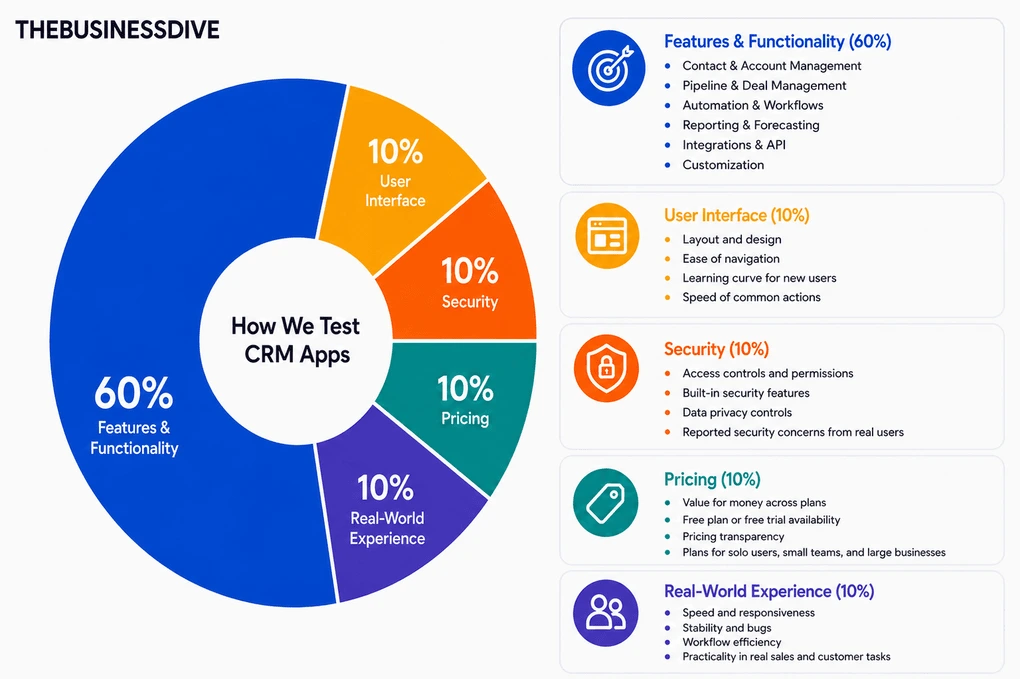
Our scoring breakdown for CRM tools:
🛠️ Features & functionality — 60%
🖥️ User interface — 10%
🔒 Security — 10%
💰 Pricing — 10%
👥 Real-world experience — 10%
Most of the CRMs featured in this list also have dedicated review articles with full scores and detailed testing breakdowns.
However, these rankings aren’t based solely on review scores. We also considered the ideal use case for each CRM, since the best CRM for growing sales teams isn’t necessarily the best choice for enterprises, Google Workspace users, or businesses looking for the best value.
Want a detailed breakdown of how we test each category?
Learn exactly how we test tools → Review methodology
Detailed Reviews of the Best CRM Software
Wondering how each CRM app performed during our testing?
Check out our detailed reviews for each option we selected.
Nutshell
Nutshell is an all-in-one CRM that brings contact management, pipeline tracking, communication, and reporting into a single platform. It’s built primarily for small businesses that want to organize their sales process as they grow.
Quick verdict
Small businesses and growing sales teams that want CRM, communication, and pipeline management in one place.
You’re looking for a very simple or lightweight CRM
Strong all-in-one workflow with connected sales, communication, and reporting features
The more advanced features have a learning curve.
Why I recommend Nutshell for growing sales teams
Getting started with Nutshell was easy. I was able to import contacts, create leads, and build my first pipeline without much setup.
As I explored more of the customization and automation features, there was naturally more to learn, but the core workflow remained easy to follow.
What I liked most is that sales activities don’t end up scattered across different tools. Contacts, emails, notes, meetings, tasks, and reports all stay connected, so it’s easy to see the full picture of every deal.
I also enjoyed how much control I had over the pipelines. I could customize stages, automate repetitive tasks, and organize different sales processes without having to rebuild everything from scratch.
For a small sales operation, some of those features would probably go unused. But once a team starts growing, sales become harder to coordinate, follow-ups get missed, and information quickly spreads across different places.
That’s why I recommend Nutshell for growing sales teams. As your team grows, it becomes much easier to keep track of deals, hand work over to teammates, and avoid losing important customer information.
Standout features
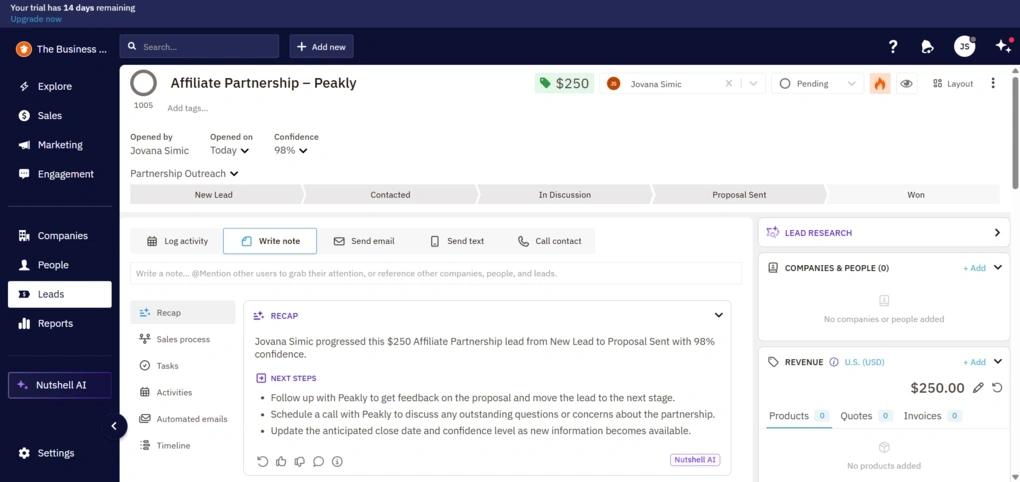
Flexible pipeline management: Beyond simple drag-and-drop boards, Nutshell lets you automate stage actions, assign owners, trigger emails, create tasks, and build multiple pipelines for different sales processes.
Built-in communication: You can manage emails, shared inboxes, campaigns, SMS, and messaging channels from within the CRM, keeping conversations tied directly to your contacts and deals.
Contact and company management: Adding contacts is quick, and every profile automatically becomes a central place for activities, notes, follow-ups, tasks, and company relationships.
AI-powered sales assistance: AI automatically summarizes calls, meetings, and lead history, suggests next steps, generates emails, and even helps create outreach campaigns, reducing manual admin work throughout the sales process.
My Key Takeaways After Using Nutshell
|
What impressed me |
Why it made a difference |
|---|---|
|
Everything is connected |
Every contact, deal, email, activity, and report is linked together, so finding the full history of a customer takes just a few clicks. |
|
Flexible pipelines |
I could tailor each pipeline to match different sales processes, automate repetitive work, and organize deals exactly the way I wanted. |
|
Built-in communication |
Emails, conversations, and customer interactions all stay inside the CRM, so every deal has its complete communication history attached. |
|
Clear reporting |
Reports are visual, easy to scan, and quickly highlight pipeline progress, sales activity, and team performance. |
|
What I’d improve |
Who it could affect |
|---|---|
|
Advanced features take time to master |
The core CRM is easy to use, but some advanced automation and customization features require a bit more time to learn. |
|
Paid add-ons |
Businesses that rely on extra features may end up spending more than the base subscription price. |
|
More features than some teams need |
Companies with a very simple sales process may not get much value from every feature included in the platform. |
Plans & costs
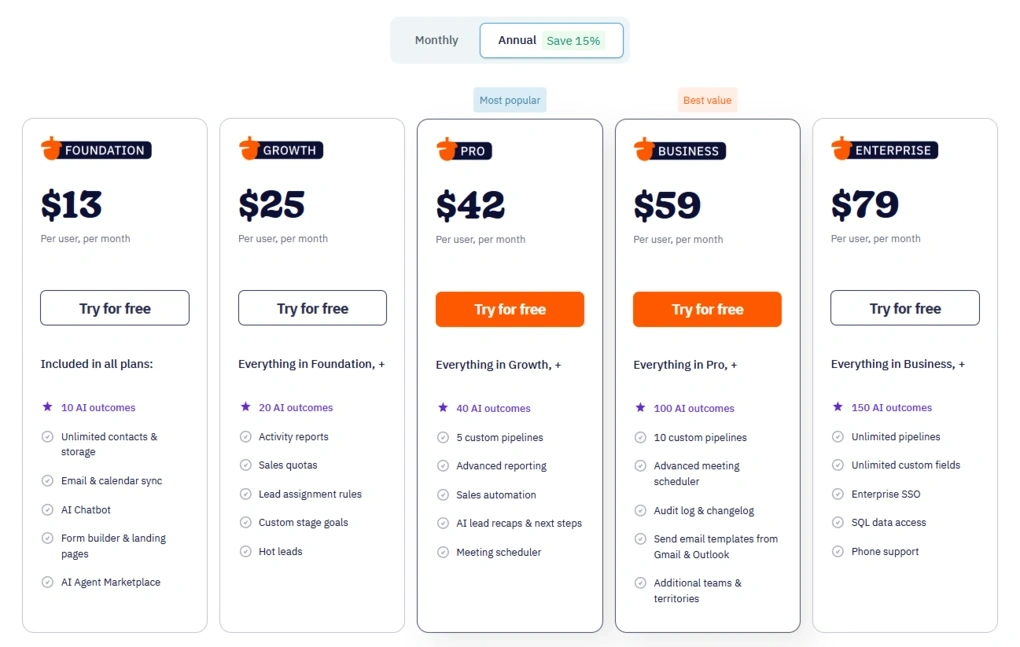
- No free plan, only a 14-day free trial
- Foundation plan: $13/user/month
- Growth plan: $25/user/month
- Pro plan: $42/user/month
- Business plan: $59/user/month
- Enterprise plan: $79/user/month
- Optional paid add-ons are available for additional functionality
🔎 Read my full review: Nutshell Review 2026 | Everything You Need to Know

HubSpot
HubSpot is an all-in-one CRM that combines sales, marketing, and customer management in one platform. What sets it apart is its free plan, which includes far more functionality than most free CRMs I tested.
Quick verdict
Small businesses and startups that want a capable free CRM before committing to a paid platform.
You only need a simple CRM or you’re looking for an affordable solution long-term.
One of the strongest free CRM plans available, with plenty of core features and a clear upgrade path.
Costs increase quickly as you unlock more advanced sales and marketing capabilities.
Why I recommend HubSpot as the best free CRM
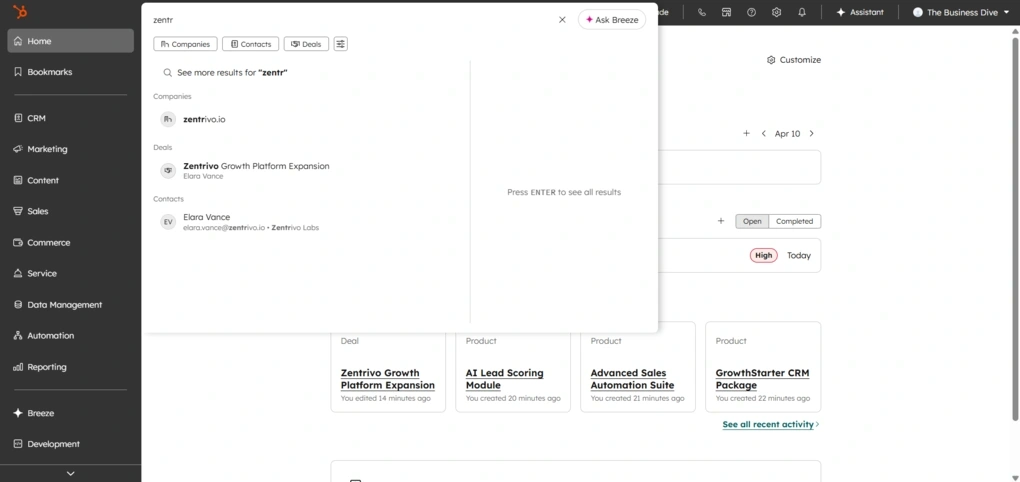
My experience with HubSpot was very smooth at the beginning. I had no trouble importing contacts, creating deals, customizing pipelines, or finding my way around the platform.
The more I explored, the more I realized it goes well beyond a basic CRM. It combines CRM, sales, marketing, automation, and reporting in one place, so there’s plenty to grow into as your business expands.
One thing I noticed pretty quickly is that the tool only works as well as you use it. If you keep your contacts, deals, and activities updated, HubSpot gives you a complete picture of your sales process and customer relationships.
What really stood out to me is that the free plan already includes solid core features. You can organize contacts, track deals, capture leads, and even run basic email marketing before paying for an upgrade.
That’s why HubSpot earned the top spot in this category. Most free CRMs give you just the basics, but HubSpot already includes enough features to run your sales process before paying for an upgrade.
Standout features
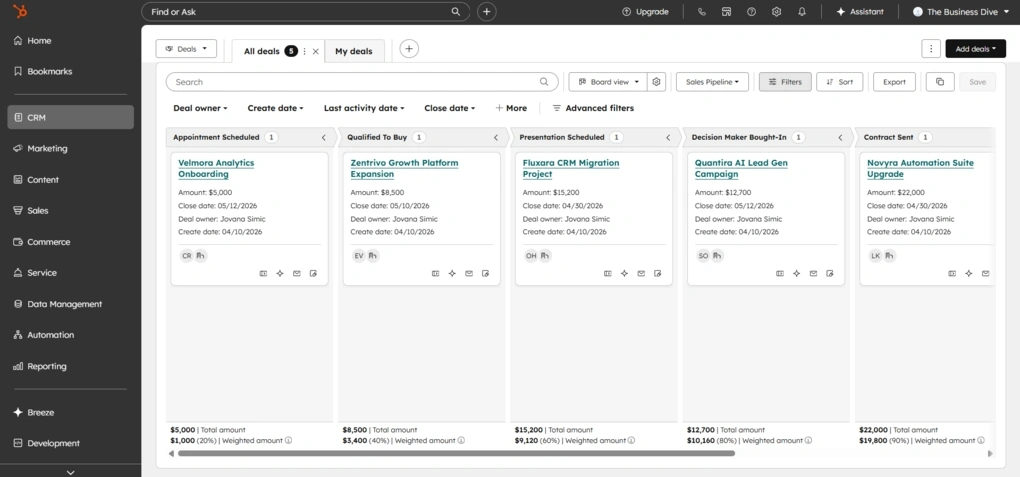
Generous free plan: HubSpot’s free plan includes contact management, deal tracking, forms, email marketing, lead tracking, and reporting, making it one of the most capable free CRMs I tested.
Flexible deal management: You can customize pipelines, create multiple sales processes, assign owners, attach products, and manage every deal from a detailed timeline.
Advanced automation: HubSpot supports multi-step workflows that can automate sales and marketing tasks, although many of the more advanced options require a paid plan.
Large integration ecosystem: The App Marketplace includes hundreds of integrations, while Zapier and HubSpot’s API extend compatibility even further.
My Key Takeaways After Using HubSpot
|
What impressed me |
Why it made a difference |
|---|---|
|
Excellent free plan |
I could manage contacts, deals, forms, and email marketing before needing to upgrade. |
|
All-in-one platform |
CRM, sales, and marketing tools share the same customer data, giving a complete picture of every interaction. |
|
Flexible pipelines |
Multiple pipelines, custom properties, and detailed deal records adapt well to different sales processes. |
|
Powerful integrations |
Connecting HubSpot with email, calendars, Slack, and other business tools takes very little effort. |
|
What I’d improve |
Who it could affect |
|---|---|
|
Pricing grows quickly |
Teams planning to rely on advanced automation or marketing features should expect significantly higher costs. |
|
More complex over time |
Users exploring advanced workflows, reporting, and customization will need extra time to master the platform. |
|
Advanced features require paid plans |
Businesses expecting enterprise-level automation from the free plan may find its limits sooner than expected. |
Plans & costs
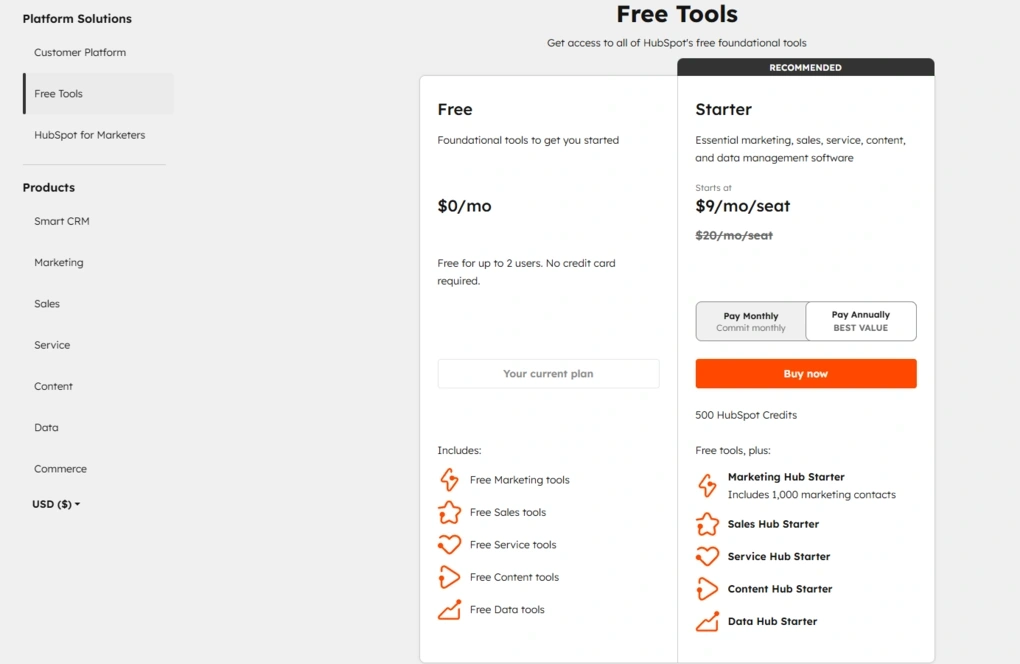
- Free plan available
- Starter plan: $10/seat/month
- Professional plan: $1450/6 seats/month
- Enterprise plan: $4700/8 seats/month
HubSpot also offers separate Marketing, Service, Content, and Operations Hubs, each with its own pricing. Costs can increase significantly as you add advanced features, extra seats, or additional Hubs.
🔎 Read my full review: HubSpot Review 2026 | I Tested It — Here’s the Truth

Pipedrive
Pipedrive is a sales-focused CRM built around pipeline management, deal tracking, and follow-ups. Unlike broader CRM platforms, it stays focused on helping sales teams organize opportunities and move deals through every stage of the sales process.
Quick verdict
Sales teams that already have leads coming in and need a clear, visual way to manage deals and follow-ups.
You’re looking for an all-in-one CRM with advanced marketing or customer support tools.
One of the cleanest and most intuitive pipeline management experiences I’ve tested.
Pricing can increase quickly once you start adding extra features and add-ons.
Why I recommend Pipedrive for sales pipeline management
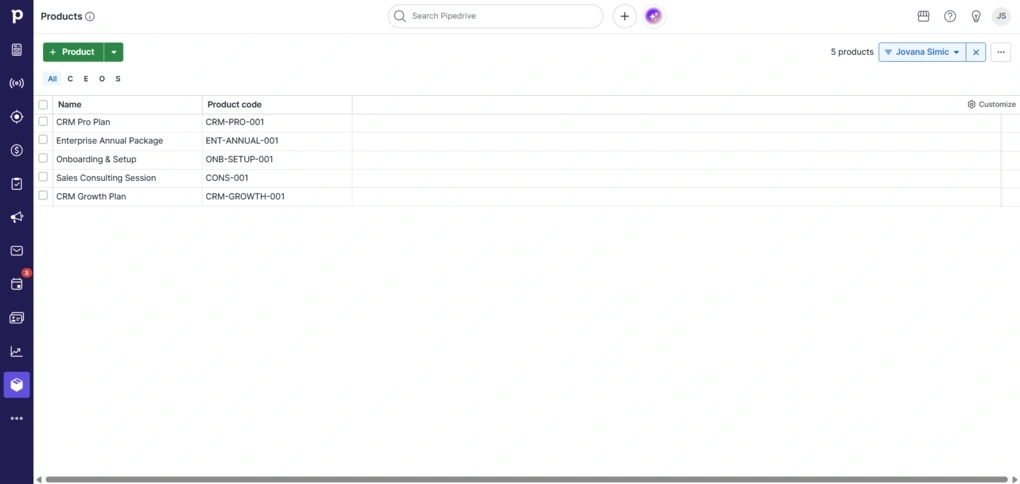
While testing Pipedrive, I spent most of my time managing deals and follow-ups, since that’s clearly what the platform was built for. The visual pipeline immediately stood out, and I always knew where each deal was and what needed attention next.
Another thing I appreciated was how much emphasis Pipedrive puts on activities. Calls, meetings, emails, and follow-ups stay closely tied to every deal, making it much harder to lose track of important next steps.
I also liked that the pipeline stays focused on active opportunities. Leads live in a separate inbox until they’re qualified, which keeps the sales pipeline clean and much easier to manage.
If your sales process revolves around moving deals through the pipeline, Pipedrive is one of the easiest CRMs I’ve tested to stay organized and keep every follow-up on track.
Standout features
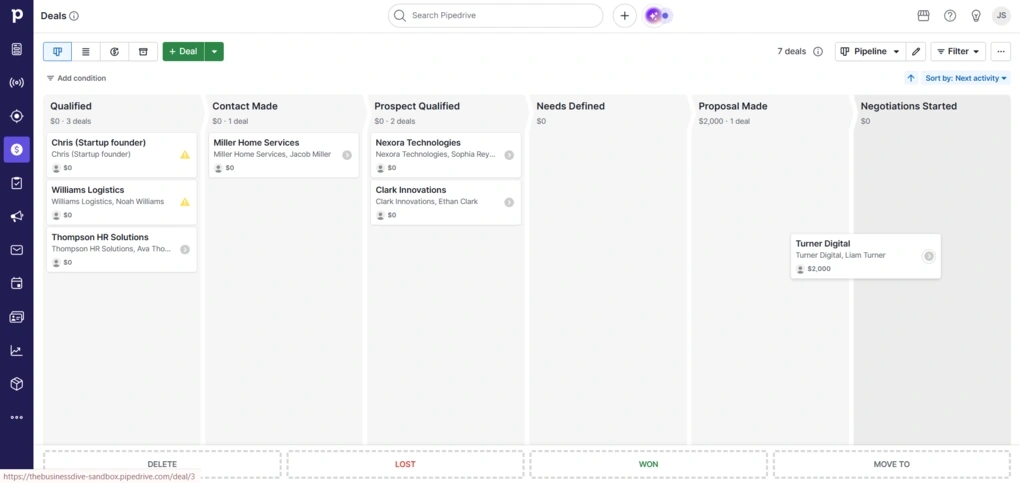
Visual deal pipelines: Pipedrive offers one of the cleanest pipeline views I tested, with customizable stages, drag-and-drop deal management, and multiple pipelines for different sales processes.
Pulse workspace: Pulse brings follow-ups, overdue activities, and untouched opportunities into one feed, making it easy to spot which deals need attention first.
Activity-focused workflow: Every deal is connected to calls, meetings, emails, notes, and tasks, helping sales reps stay organized throughout the sales cycle.
Visual reporting: Reports are easy to build and customize, with charts, dashboards, AI-generated reports, and filters for pipeline health, revenue, win rates, and sales activity.
My Key Takeaways After Using Pipedrive
|
What impressed me |
Why it made a difference |
|---|---|
|
Visual pipelines |
I could instantly see where every deal stood and move opportunities through each stage with very little effort. |
|
Activity management |
Calls, meetings, emails, and follow-ups stay closely connected to every deal, making daily sales work much easier to organize. |
|
Pulse dashboard |
Having overdue tasks, follow-ups, and inactive deals in one place helped me prioritize work much faster. |
|
Easy setup |
I was able to start adding contacts and managing deals almost immediately, with very little learning required. |
|
What I’d improve |
Who it could affect |
|---|---|
|
No free plan |
Small businesses comparing free CRM options may prefer HubSpot or another alternative. |
|
Add-ons increase the cost |
Teams that need lead generation, email marketing, or document management should expect additional monthly costs. |
|
Limited marketing features |
Businesses looking for CRM, marketing, and customer support in one platform will probably need another solution. |
Plans & costs
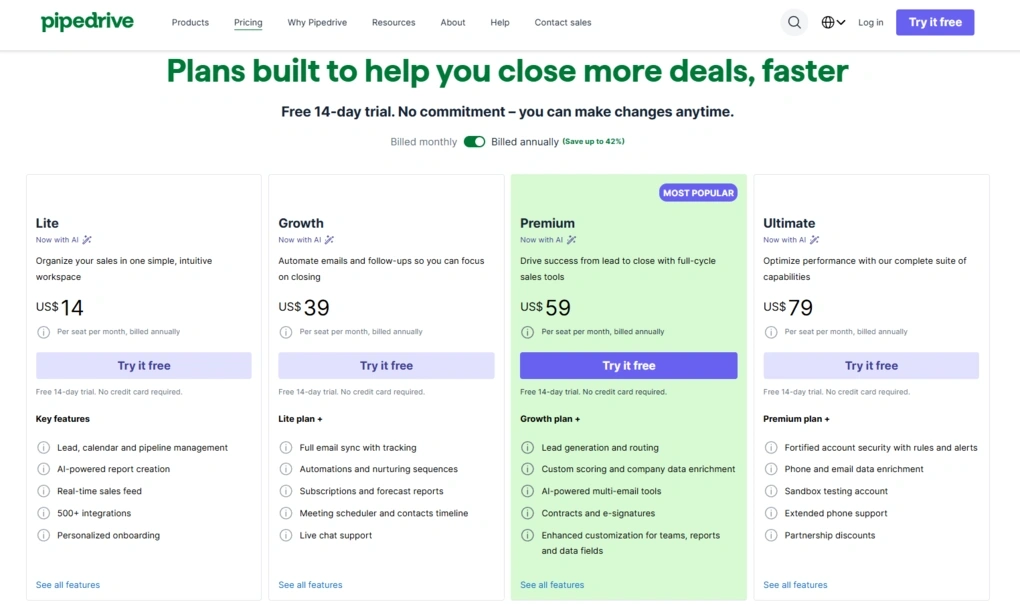
- No free plan, only a 14-day free trial
- Lite plan: $14/user/month
- Growth plan: $39/user/month
- Premium plan: $59/user/month
- Ultimate plan: $79/user/month
- Optional add-ons available
🔎 Read my full review: Pipedrive Review 2026: Tested Firsthand — Here’s the Truth

Copper CRM
Copper is a CRM built specifically for Google Workspace, bringing contacts, deals, and customer communication into the Google tools many teams already use every day. It’s a particularly strong choice for businesses that want to introduce a CRM without disrupting existing workflows.
Quick verdict
Small to midsize businesses already using Google Workspace that want an intuitive CRM with strong pipeline management and automation.
Your team is looking for a free CRM or advanced reporting on a lower-priced plan.
Seamless Google Workspace integration paired with a clean, easy-to-use interface.
Many advanced features, including Custom Reports, are only available on the expensive Business plan.
Why I recommend Copper for Google Workspace
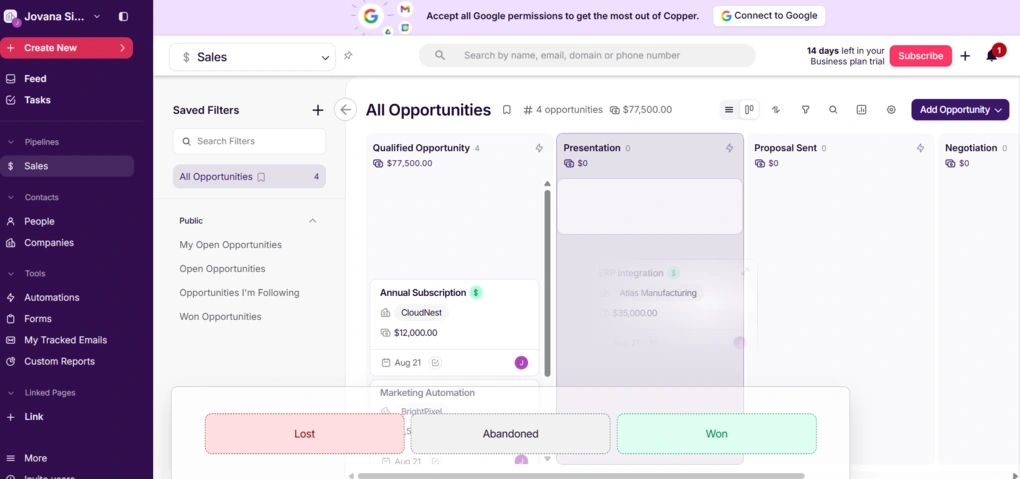
Getting started with Copper didn’t take long. I imported my test contacts, created a pipeline, and started exploring the platform without needing much setup.
As I spent more time testing it, I appreciated how consistent the experience remained across the platform. Whether I was managing contacts, working with opportunities, or creating automations, the layout stayed familiar, so I always knew where to find activities, notes, emails, and tasks.
The biggest difference, though, is how closely Copper works with Google Workspace. Gmail, Google Calendar, Google Drive, and Google Contacts aren’t treated like optional integrations. They’re part of the way the CRM works, which makes the experience much more natural for teams already using Google’s ecosystem.
That’s what earned Copper the top spot for Google Workspace users. If your team already spends most of the day in Google’s apps, Copper fits into that workflow better than almost any other CRM I tested.
Standout features
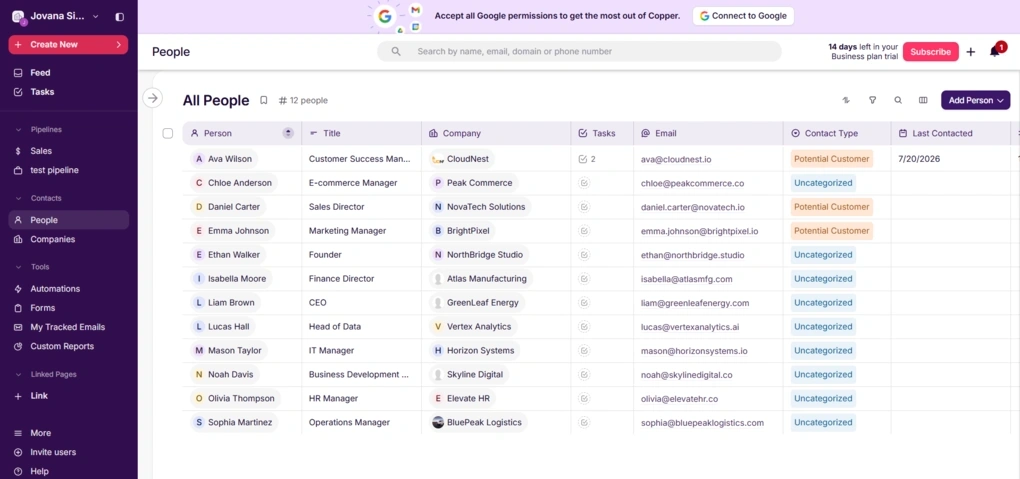
Native Google Workspace integration: Copper works directly with Gmail, Google Calendar, Google Drive, and Google Contacts, allowing you to manage customer relationships while staying inside the Google ecosystem.
Flexible pipeline templates: Beyond traditional sales pipelines, Copper includes ready-made templates for onboarding, customer support, recruitment, fundraising, partnerships, and project management, or you can build your own from scratch.
Built-in automation: Copper separates automation into email, task, and workflow automation, making it easy to automate follow-ups, reminders, recurring tasks, and multi-step workflows.
Well-organized contact records: Every contact keeps emails, calls, notes, files, activities, tasks, and related opportunities together, making it easy to see the full history of each customer.
My Key Takeaways After Using Copper CRM
|
What impressed me |
Why it made a difference |
|---|---|
|
Google Workspace integration |
Gmail, Calendar, Drive, and Contacts work naturally with the CRM, so I didn’t have to constantly move between different apps. |
|
Consistent interface |
Every section follows the same layout, making it easy to learn the platform and navigate between contacts, deals, and tasks. |
|
Flexible pipeline templates |
I could start with ready-made templates or create custom pipelines for different workflows in just a few minutes. |
|
Well-organized customer records |
Contacts, emails, activities, files, and opportunities stay connected, making it easy to review every customer interaction. |
|
What I’d improve |
Who it could affect |
|---|---|
|
No free plan |
Businesses comparing free CRM options will need to look elsewhere. |
|
Custom Reports require the Business plan |
Teams that rely on advanced reporting may have to pay for the most expensive subscription. |
|
Higher costs as teams grow |
Larger organizations adding more users may see costs increase fairly quickly. |
Plans & costs
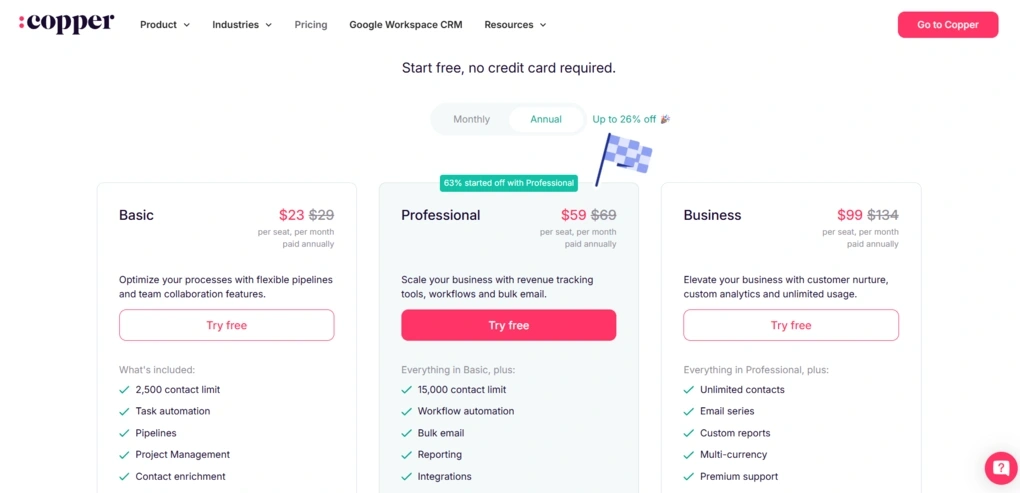
- No free plan, only a 14-day free trial
- Basic plan: $23/user/month
- Professional plan: $59/user/month
- Business plan: $99/user/month
🔎 Read my full review: The 4 Biggest Takeaways From My Copper CRM Review

Salesforce Sales Cloud
Salesforce Sales Cloud is an enterprise CRM built for organizations with large sales teams, high lead volumes, and complex sales cycles. Rather than focusing on simplicity, it gives businesses the flexibility to customize almost every part of their sales process, making it a strong fit for companies with more demanding CRM requirements.
Quick verdict
Large businesses and enterprises managing complex sales processes across multiple teams.
You’re looking for a simple CRM that’s quick to learn and easy to set up.
Exceptional flexibility for managing complex sales operations at scale.
A steep learning curve and high costs as your team and requirements grow.
Why I recommend Salesforce for enterprises
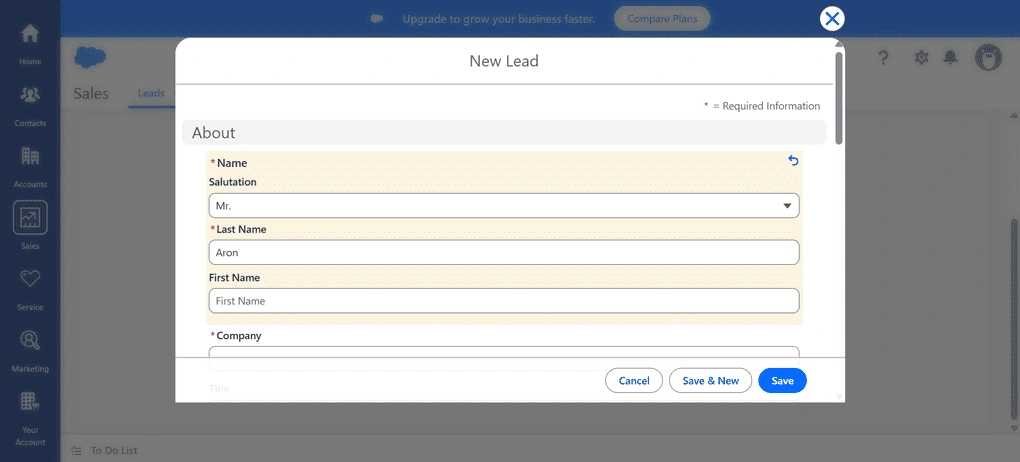
The first thing I noticed while exploring Salesforce was just how much the platform can handle. Every part of the sales process can be customized, from lead and contact management to pipelines, automation, and reporting.
That flexibility comes with a tradeoff, though. Salesforce isn’t the kind of CRM you can learn in an afternoon. There are plenty of settings, workflows, and customization options, so getting everything configured takes time.
What stood out most is that Salesforce is designed for businesses with more complex sales operations. When multiple teams are involved, sales cycles are longer, and thousands of leads move through the pipeline, the platform provides the level of control that simpler CRMs can’t match.
Because it requires a bigger investment of both time and money, but offers the flexibility and scalability that large organizations need, Salesforce is my top pick for enterprises.
Standout features
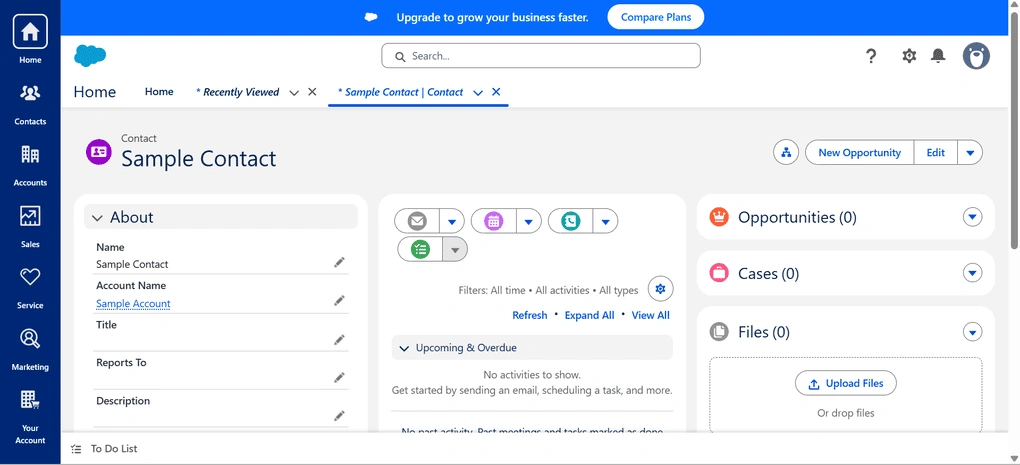
Advanced lead and contact management: Manage large volumes of leads with custom fields, ownership rules, and detailed records that support long and complex sales cycles.
Highly customizable pipelines: Build sales pipelines that match different teams, workflows, and approval processes instead of relying on a one-size-fits-all setup.
Lead scoring and automation: Automatically prioritize leads, trigger workflows, and reduce repetitive work as lead volume grows.
Advanced reporting and analytics: Create detailed dashboards and reports to track pipeline performance, forecast revenue, and monitor sales activity across teams.
My Key Takeaways After Using Salesforce
|
What impressed me |
Why it made a difference |
|---|---|
|
Highly customizable platform |
Nearly every part of the CRM can be tailored to match complex sales processes. |
|
Advanced automation |
Automated workflows and lead scoring reduce manual work across larger sales teams. |
|
Detailed reporting |
Dashboards provide deep visibility into pipeline performance and sales forecasting. |
|
Enterprise scalability |
The platform is built to handle large lead volumes and multiple teams without becoming difficult to manage. |
|
What I’d improve |
Who it could affect |
|---|---|
|
Steep learning curve |
New users and smaller businesses may need significant time to become comfortable with the platform. |
|
Time-consuming setup |
Organizations looking for a quick implementation may find the initial configuration overwhelming. |
|
High overall cost |
Growing teams and businesses requiring advanced functionality should expect costs to increase quickly. |
Plans & costs
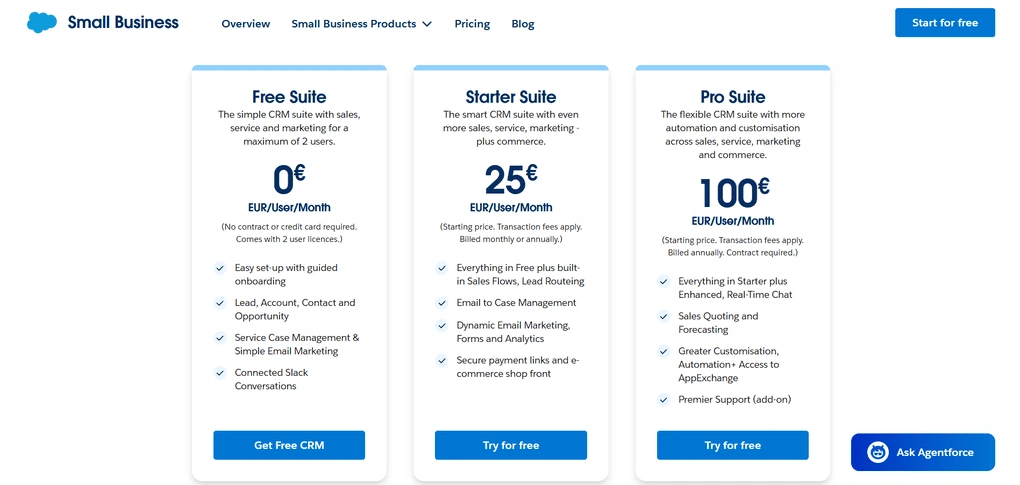
- Free plan available
- Starter Suite: €25/user/month
- Pro Suite: €100/user/month

Zoho CRM
Zoho CRM is a highly customizable CRM that combines contact management, sales automation, AI-powered insights, and reporting in one platform. It’s designed for businesses that want advanced CRM capabilities without the high cost of enterprise solutions.
Quick verdict
Businesses that want advanced CRM features without paying enterprise-level prices.
You want a lightweight CRM with minimal setup and customization.
Excellent balance of features, customization, automation, and affordability.
Advanced customization comes with a steeper learning curve.
Why I recommend Zoho CRM for businesses looking for the best value
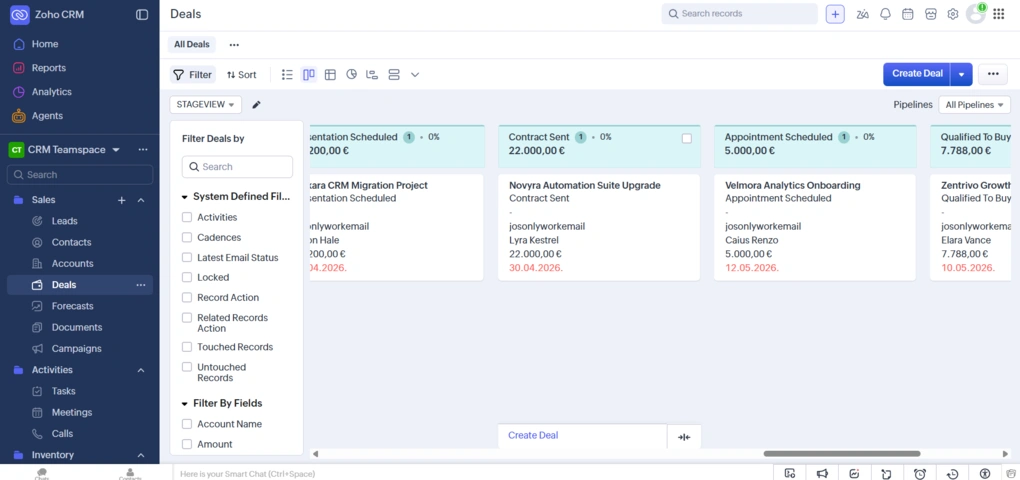
The first thing that stood out to me while testing Zoho CRM was how much functionality it offers for the price. It combines advanced automation, AI-powered features, reporting, and customization in a competitively priced platform.
What impressed me even more is how flexible the platform is. I could customize modules, pipelines, fields, layouts, and workflows to match different sales processes without feeling limited by the default setup.
That flexibility does come with a learning curve. Zoho CRM isn’t difficult to use for everyday tasks, but taking full advantage of its automation and customization features requires some time and experimentation.
That’s why I recommend Zoho CRM for businesses looking for the best value. It delivers many enterprise-level capabilities at a much more affordable price, making it an excellent choice for growing companies that want a powerful CRM without the high cost of larger platforms.
Standout features
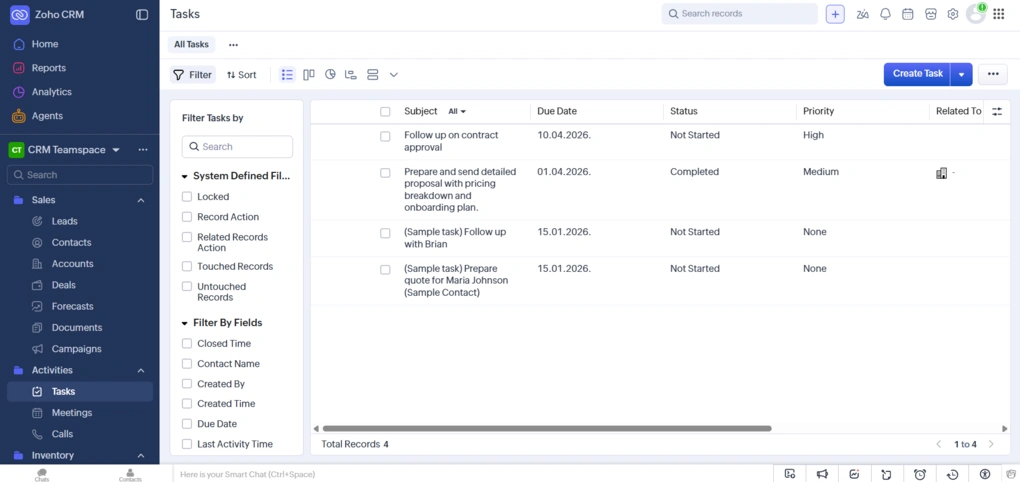
AI-powered sales assistant: Zoho CRM’s AI Zia helps score leads, predict deal outcomes, summarize emails, recommend next steps, and answer questions about your CRM data.
Workflow automation and Blueprint: Automate lead assignments, follow-ups, approvals, notifications, and repetitive tasks while enforcing consistent sales processes with Blueprint.
Highly customizable CRM: Customize modules, fields, layouts, pipelines, dashboards, and business processes to match the way your team works.
Omnichannel customer engagement: Manage conversations across email, phone, WhatsApp, live chat, social media, and SMS, with every interaction linked to the customer’s record.
My Key Takeaways After Using Zoho CRM
|
What impressed me |
Why it made a difference |
|---|---|
|
Excellent value |
I got AI, automation, customization, and reporting without paying enterprise-level prices. |
|
Highly customizable |
I could tailor modules, fields, pipelines, and dashboards to fit different sales processes. |
|
Powerful automation |
Workflows handled repetitive tasks like lead assignments, follow-ups, and notifications automatically. |
|
Broad Zoho ecosystem |
Integrations with Zoho’s business apps made it easy to manage sales, marketing, and support from one ecosystem. |
|
What I’d improve |
Who it could affect |
|---|---|
|
Steeper learning curve |
New users may need time to learn the platform’s many customization options. |
|
Busy interface |
Teams looking for a very simple CRM may find the number of features overwhelming. |
|
Advanced setup takes time |
Businesses planning complex automations should expect some initial configuration effort. |
Plans & costs
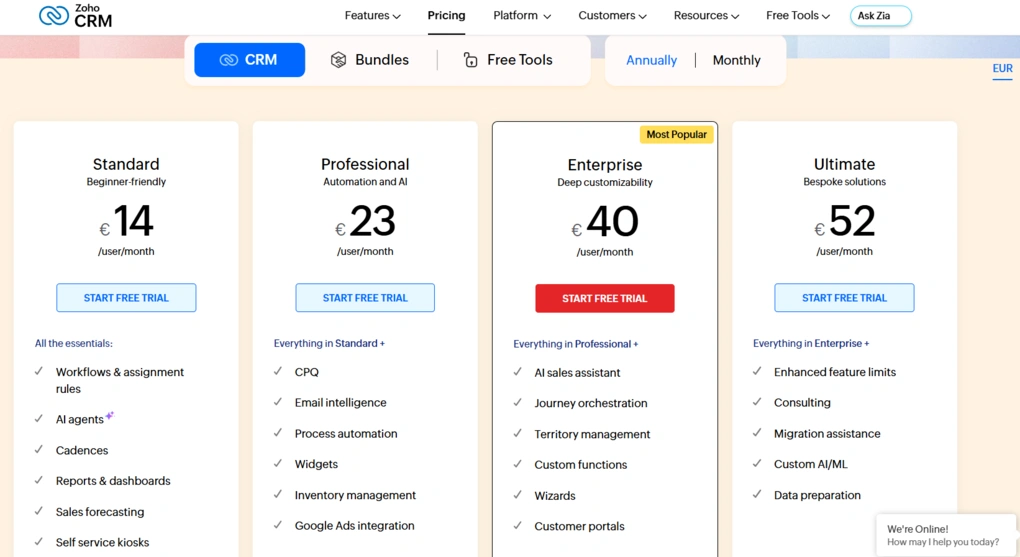
- Free plan and a 15-day free trial available
- Standard plan: €14/user/month annualy
- Professional plan: €23/user/month annualy
- Enterprise plan: €40/user/month annualy
- Ultimate plan: €52/user/month annualy

Monday CRM
Monday CRM is a visual CRM that helps teams manage leads, sales pipelines, and customer relationships through highly customizable boards and workflows. It combines sales automation, collaboration, and reporting in a flexible platform that’s easy to adapt as your business grows.
Quick verdict
Teams that want a visual CRM they can easily customize to match their sales process.
You prefer a traditional CRM with more built-in sales features and less customization.
Flexible boards, automations, and workflows make it easy to adapt the CRM to different sales processes.
Some CRM-specific features require additional setup, and advanced functionality is limited on lower-tier plans.
Why I recommend Monday CRM for customizable workflows
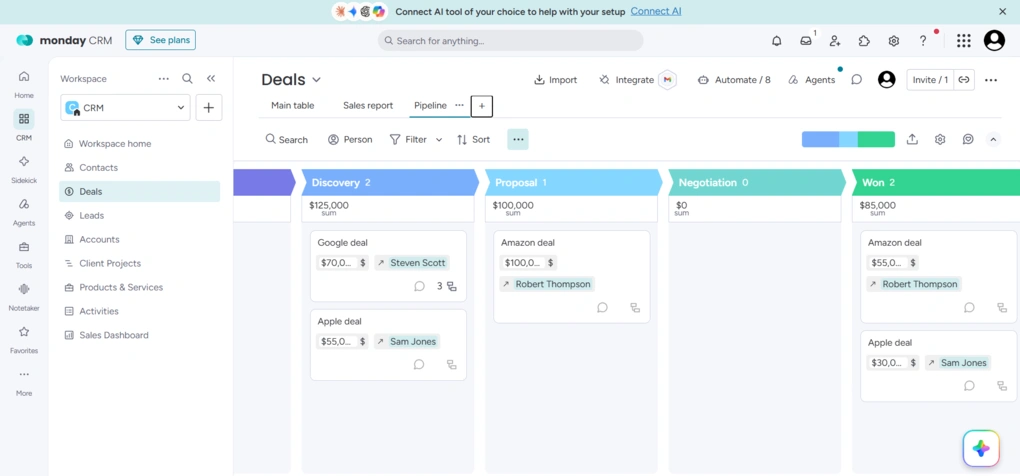
What stood out to me while testing Monday CRM is that it doesn’t feel like a traditional CRM. Instead of working around a fixed structure, I could shape almost every part of the platform to fit my sales process, from pipelines and board views to custom fields and automations.
I also liked how easy it was to switch between different ways of viewing the same data. Whether I wanted a Table, Kanban, Calendar, or Timeline view, I could change the layout in a few clicks without losing any information. It made managing deals more intuitive than in many CRMs I tested.
Another feature I like is the no-code automation builder. Setting up automatic task assignments, status updates, and reminders took only a few minutes, making it easy to remove repetitive work without any technical knowledge.
That’s why I recommend Monday CRM for customizable workflows. If your team has outgrown rigid CRM systems or wants a platform that can adapt as your sales process evolves, Monday CRM offers a level of flexibility that’s hard to match.
Standout features
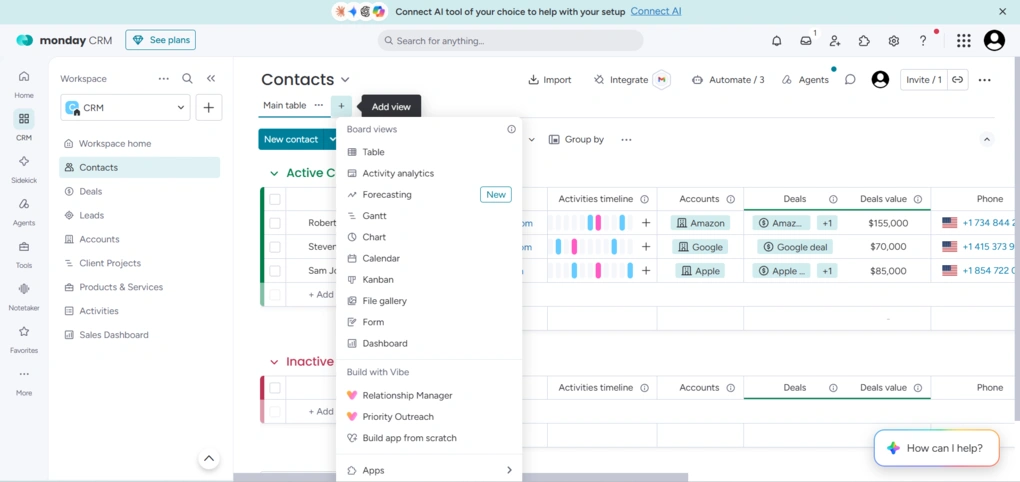
Customizable sales workflows: Build custom pipelines, boards, and workflows that match your sales process, with no-code automations to reduce repetitive work.
AI-powered sales tools: AI helps qualify leads, generate emails, summarize meetings, extract CRM data, and surface insights to help sales teams work more efficiently.
Centralized customer communication: Keep emails, meetings, notes, activities, and customer updates connected to each contact, giving your team a complete view of every customer relationship.
Real-time dashboards and reporting: Track pipeline health, sales performance, forecasts, and team activity with customizable dashboards that update automatically.
My Key Takeaways After Using Monday CRM
|
What impressed me |
Why it made a difference |
|---|---|
|
Highly customizable workflows |
I could tailor boards, pipelines, and automations to match different sales processes without writing code. |
|
Visual interface |
The board-based layout made it easy to track deals, manage tasks, and see progress at a glance. |
|
Useful automations |
Automating follow-ups, task assignments, and status updates helped reduce repetitive manual work. |
|
Flexible dashboards |
Custom dashboards gave me a clear overview of pipeline performance, team activity, and sales metrics in one place. |
|
What I’d improve |
Who it could affect |
|---|---|
|
Learning curve for customization |
Teams new to Monday may need time to set up boards, workflows, and automations effectively. |
|
Advanced features require higher-tier plans |
Businesses looking for AI tools and more advanced capabilities may need to upgrade. |
|
Less traditional CRM experience |
Teams expecting a classic CRM with built-in sales modules may need time to adapt to Monday’s board-based approach. |
Plans & costs
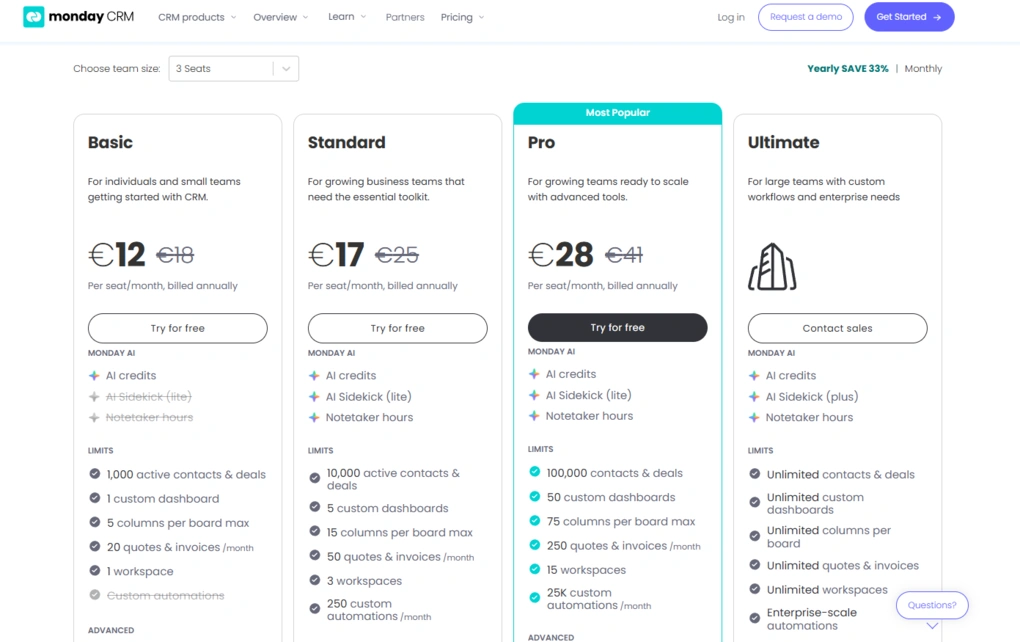
- No free plan, only a 14-day free trial available
- Basic plan: €12/seat/month annualy
- Standard plan: €17/seat/month annualy
- Pro plan: €28/seat/month annualy
- Ultimate plan: Custom pricing
In conclusion
The best CRM software doesn’t necessarily have the longest feature list; it has the features your business will actually use.
After testing these CRM platforms, I found that every tool handled the core parts of customer relationship management well, but each one approached sales processes differently.
Some focused on pipeline management and sales automation, while others stood out for their free plans, Google Workspace integration, or enterprise-level customization.
If you’re still evaluating CRM software, start by thinking about how your team manages customer relationships today.
Whether you need a simple CRM for contact management, a platform with marketing automation and customer support features, or a more advanced CRM solution for larger sales teams, choosing the right fit will have a much bigger impact than choosing the platform with the longest list of advanced features.
Related posts:
- Salesforce Alternatives: 6 Better CRM Options for 2026
- 6 Best HubSpot Alternatives Worth Switching To
Explore our Apps directory
A curated directory of software tools we’ve independently reviewed, with links to full reviews, comparisons, and category guides.
Why you can trust our reviews
At thebusinessdive.com, our team tests, reviews, and compares hundreds of productivity apps every year — from project management tools to note-taking apps. We dive deep into real-world use cases to help you find the right tools that actually improve your workflow, not just add noise.
Our mission? No fluff, no shortcuts—just honest, hands-on insights from productivity pros.
Discover how we stay transparent, read our review methodology, and let us know about any tools we missed.
Frequently Asked Questions
What is the best CRM software?
The best CRM software depends on your business size, sales processes, and the features you need most. In my testing, Nutshell was the best overall choice for growing sales teams, HubSpot stood out for its generous free plan, Pipedrive excelled at pipeline management, Copper was the strongest option for Google Workspace users, and Salesforce Sales Cloud was the best fit for enterprise customers with complex sales operations.
What features should I look for in CRM software?
When evaluating CRM software, focus on the features your team will use every day. Contact management, lead management, pipeline management, workflow automation, reporting capabilities, mobile apps, and sales automation are essential for most businesses. Depending on your needs, you may also want marketing automation, document management, task management, email marketing campaigns, customer support features, or AI tools that help automate workflows and improve productivity.
Are free CRM tools good enough for small businesses?
Many free CRM tools are a great starting point for small businesses, especially if you only need basic CRM features like contact management, deal management, and lead tracking. HubSpot offers one of the strongest free plans, supporting up to 1 million contacts, while Zoho CRM offers a free plan for up to three users, and Agile CRM supports up to 10 users and 1,000 contacts on its free version. As your business grows, though, you may eventually need paid plans with more advanced features, automation capabilities, and reporting.
Which CRM software is best for enterprise customers?
Enterprise customers typically need a CRM system that can support large sales teams, complex business processes, and advanced customization. Salesforce Sales Cloud is one of the strongest CRM platforms for enterprise organizations thanks to its sales forecasting, workflow automation, reporting capabilities, and ability to generate detailed reports across multiple teams. Salesforce also offers 24/7 support via phone, email, and live chat, making it a strong choice for businesses that need ongoing assistance.
Which CRM platforms include marketing and customer service tools?
Not all CRM platforms focus only on sales management. HubSpot combines CRM software with marketing tools, marketing automation, customer service, landing pages, and content management in one platform. Salesforce expands beyond sales with products like Marketing Cloud and Service Cloud, while Microsoft Dynamics and Zoho CRM also offer broader business software platforms that combine customer relationship management with customer service, marketing features, and other business applications. If you only need a sales-focused CRM, however, a simpler solution may provide better value.
Disclosure: I only recommend products I would use myself, and all opinions expressed here are my own. This post may contain affiliate links through which, at no additional cost to you, I may earn a small commission. Read the full privacy policy here.

Hey there! I am Aron, the founder of Thebusinessdive. I have been testing productivity apps for almost three years now. I reach 25.000 -50.000 people monthly with the mission to help you find the perfect productivity apps. Subscribe to my YouTube channel, newsletter, and social media to hear more about the best productivity tools. Let’s dive in!