


Unroll.Me Review 2026: Is Unroll.Me Safe? Here’s the Truth
In this Unroll.me reivew, I will break down all the red flags I found about this email app. No marketing hype, just real testing and researching.
Let’s dive in!
Verdict
Here’s the quick verdict if you don’t want to read the full Unroll.me review:
🎯 Best for: Users who want a simple, completely free tool to unsubscribe from newsletters and reduce inbox clutter
🚫 Not ideal for: Privacy-conscious users or anyone uncomfortable with their inbox data being analyzed
⭐ Biggest strength: Fast and effortless bulk unsubscribe with a very simple, beginner-friendly interface
⚠️ Biggest weakness: Data-based business model with ongoing inbox access and limited control over data usage
⚖️ Verdict: A simple and effective unsubscribe tool that delivers on its core promise, but the privacy trade-offs make it hard to recommend for users who value data control.
🏆 Score: 2.8/5
✅ Tested with our review & scoring methodology ✅ Real-world testing ✅ Unbiased evaluation
Unroll.Me review
Summary
Unroll.Me is a simple unsubscribe app. It’s completely free, but relies on inbox-derived data insights to operate. While transparency has improved over time, the underlying model hasn’t changed. If you’re comfortable exchanging inbox access for a free cleanup tool, it can be a practical option. If privacy is your priority, you may want to look elsewhere.
|
|
Completely free to use
|
|
|
One-click unsubscribe and bulk actions
|
|
|
Rollup digest option
|
|
|
Multi-account support
|
|
|
Numerous customization options
|
|
|
Data-based business model
|
|
|
No opt-out from data processing while using the service
|
|
|
Basic interface with no customization options
|
|
|
Not available to EU users
|
What is Unroll.Me, and why is it free?
Unroll.Me is an unsubscribe and newsletter management tool designed to help users clean up and organize subscription emails.
Launched in 2011, it was one of the earliest widely recognized apps focused specifically on newsletter management and bulk unsubscribing, long before inbox cleanup became a crowded SaaS category.
Unroll.Me is completely free to use. There are no subscription plans, no premium upgrades, and no paid add-ons.
That said, it’s not “free” in the traditional sense. Instead of charging users, Unroll.Me operates on a data-based model. The app analyzes certain commercial and transactional emails to generate aggregated market insights.
It’s also worth noting that Unroll.Me isn’t the only free unsubscribe tool built this way. Other apps in this space, such as Cleanfox, rely on analyzing inbox data to sustain a free service too.
So the key question isn’t simply whether a tool is free or paid, but how transparent it is about what it does with inbox access.
What Unroll.Me can see vs. what you see
| Question | What I found |
|---|---|
| Does Unroll.Me show my whole inbox in its dashboard? | No. The interface primarily surfaces emails identified as subscriptions/commercial messages. |
| Does it need ongoing inbox access? | Yes. That’s necessary for its subscription-management functionality. |
| Can transactional emails be analyzed? | Certain transactional emails may be analyzed for aggregated market insights. |
| Can I use Unroll.Me without inbox scanning? | No. |
| Can I opt out of some data programs? | Yes, but that doesn’t eliminate the inbox access required to use the core service. |
| Can I delete my account/data? | Unroll.Me provides controls for account/data deletion. |
Is Unroll.Me safe? Privacy concerns you should know about
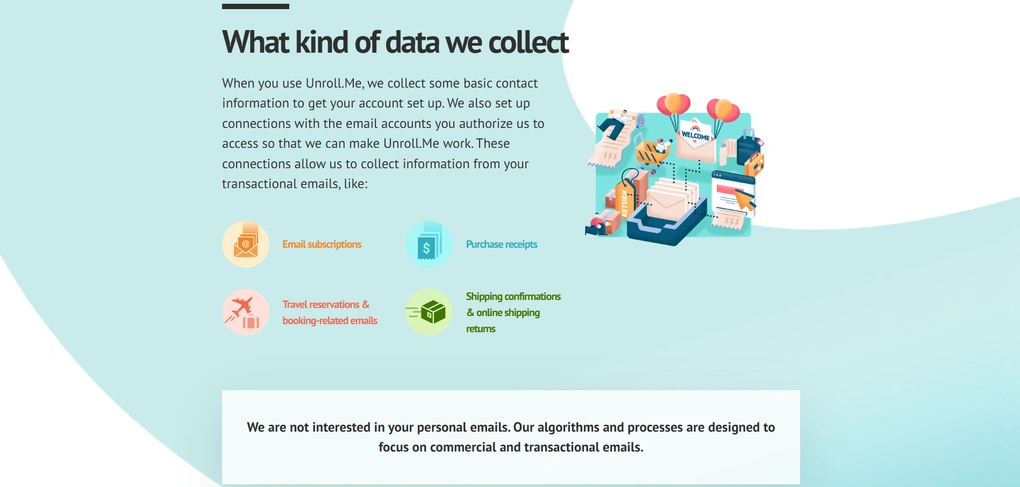
Before we get into the features, we need to address the biggest concern about Unroll.Me: data privacy.
What data Unroll.Me actually accesses
The free pricing model is exactly why privacy concerns come up so often with Unroll.Me. For the app to identify subscriptions and create the Rollup, it needs ongoing access to your inbox. It scans commercial and subscription emails to detect senders and organize them into categories.
As part of that process, it may also analyze certain transactional emails, such as receipts or purchase confirmations, to generate aggregated market insights. And the question comes: Is the data shared with a third party?
Unroll.Me states that it does not sell your name or email address to advertisers, and that these insights are anonymized and combined to identify broader consumer trends, not individual users.
This is the part that still fuels backlash online. The wording can be exaggerated, but the core concern is valid: even if your identity isn’t being sold, inbox activity can still be turned into market research signals.
What Unroll.me users say about safety?
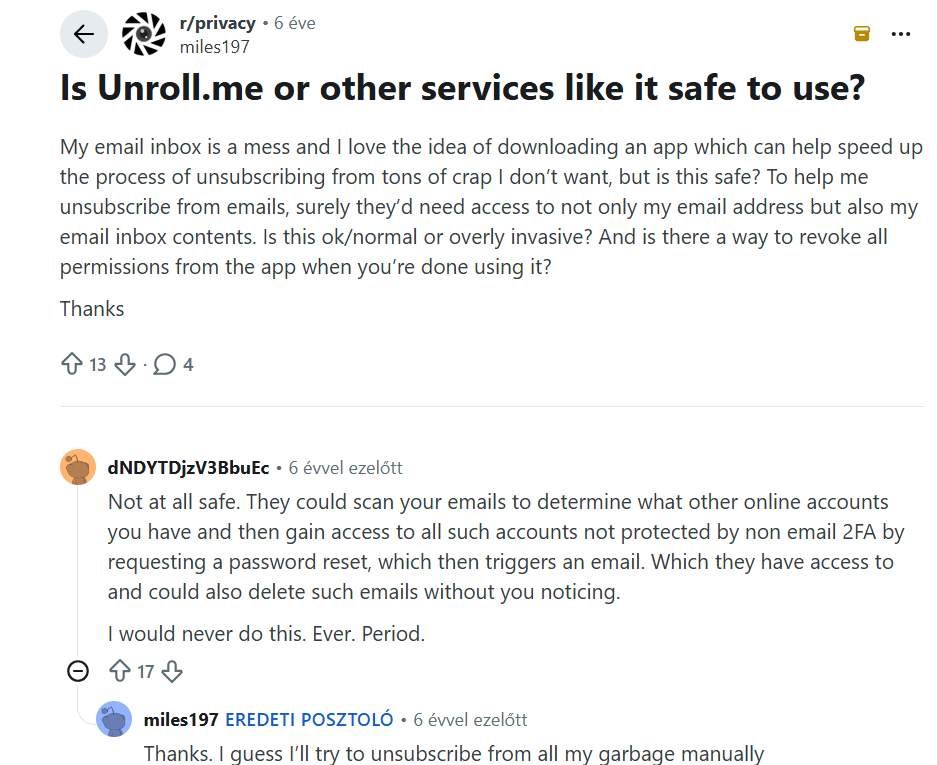
Reddit users also raised concerns about the level of access Unroll.me needs. One commenter highlighted that broad email permissions create potential security risks, as email accounts are often used for password resets and accessing other online accounts.
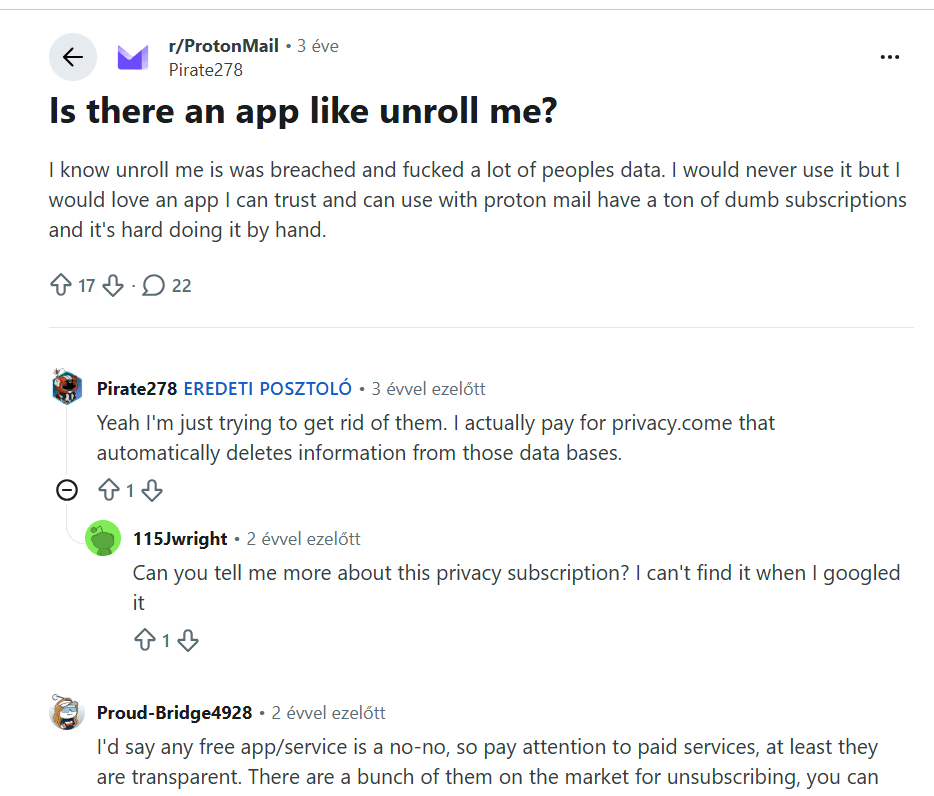
Another Reddit discussion shows that Unroll.Me’s past privacy controversy still affects user trust years later. The original poster, Pirate278 was specifically looking for an alternative because they were uncomfortable using Unroll.Me.
For me, this highlights why transparency around its business model and how it uses inbox data matters so much. So, I dug deeper to see whether Unroll.Me has actually addressed these concerns and what has changed since the controversy.
What actually changed after Unroll.Me’s privacy controversy?
After past regulatory scrutiny, the company updated its disclosures and now provides clearer explanations of how inbox data may be used, along with privacy portals where users can manage or delete their data.
In other words, what mainly changed after the backlash is transparency, not the underlying data-based model.
Most importantly, there’s no way to use Unroll.Me without granting ongoing inbox access. You may be able to opt out of specific data programs (such as the Measurement Panel), but you cannot opt out of inbox scanning and still keep using the service.
So, if you stopped using Unroll.Me because you were uncomfortable with inbox scanning itself, the fundamental reason for your concern hasn’t disappeared. What has improved is how clearly that relationship is disclosed.
Testing Unroll.Me in everyday use
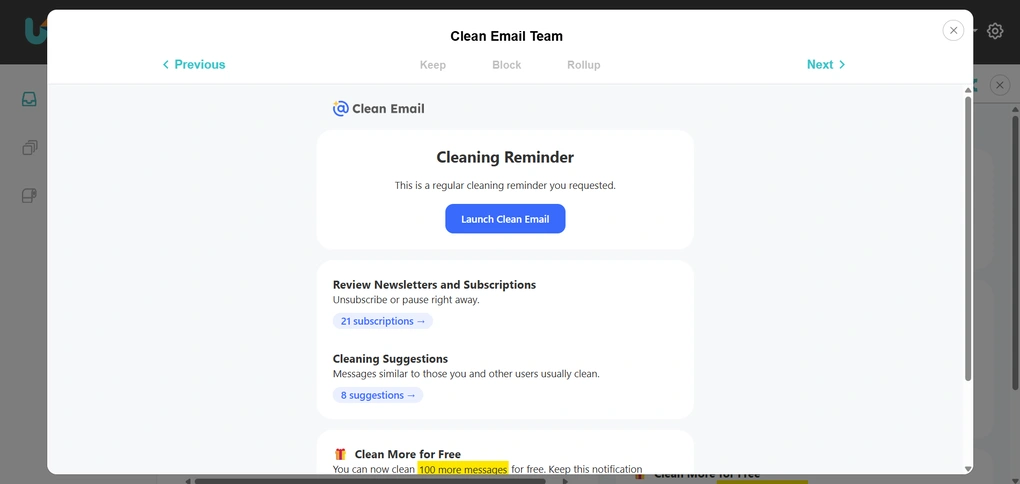
Since my inbox is already fairly clean, I didn’t expect Unroll.Me to make a huge difference. Still, it managed to surface a few forgotten subscriptions, and the unsubscribe process was quick.
It was also great to see that it offers a mobile app for iOS and Android, making it a versatile email app.
For me, the bigger consideration wasn’t functionality but the data model behind it. Unroll.Me does what it promises when it comes to subscription cleanup, but using it means being comfortable with how inbox data is analyzed.
While other free unsubscribe apps may follow similar models, Unroll.Me’s negative history, and the way it can draw signals from transactional emails (like receipts) made me think twice, and its privacy & data policies did not convince me that it is a safe app to use.
That said, if privacy is your main concern, it’s worth keeping this in mind. Nevertheless, Unroll.Me still made our list of the best unsubscribe apps thanks to its completely free plan and simple bulk-unsubscribe tools. It can be a practical option if cost and simplicity matter more to you than privacy and data control.
Where Unroll.Me works well (and what are the biggest pain points)
After testing Unroll.Me, these were the biggest strengths and trade-offs that stood out to me.
What Unroll.Me gets right
Biggest pain points
Who should use Unroll.Me
Who should NOT use Unroll.Me
What led to Unroll.Me’s 2.8 / 5 rating
The biggest factors behind Unroll.Me’s low rating was its data security (1.5/5), lack of team collaboration features (0.5/5), although to be fair, it was not designed for teams, and there are no smart features (0.5/5).
It also underperformed in productivity features (2/5) compared to other unsubsciber apps like SaneBox or Clean Email.
Where Unroll.Me shined is the pricing (5/5), since it is a completely free app, and the core features for inbox management (4.5/5).
Overall, Unroll.Me received the lowest score of all the email apps I’ve tested so far, which is why it didn’t make our list of the best email apps. Its core unsubscribe features work well, but its limited functionality and privacy trade-offs held it back.
The features that actually mattered during testing
Since Unroll.Me is intentionally simple, most of the experience revolves around a few core tools.
Subscription Scan
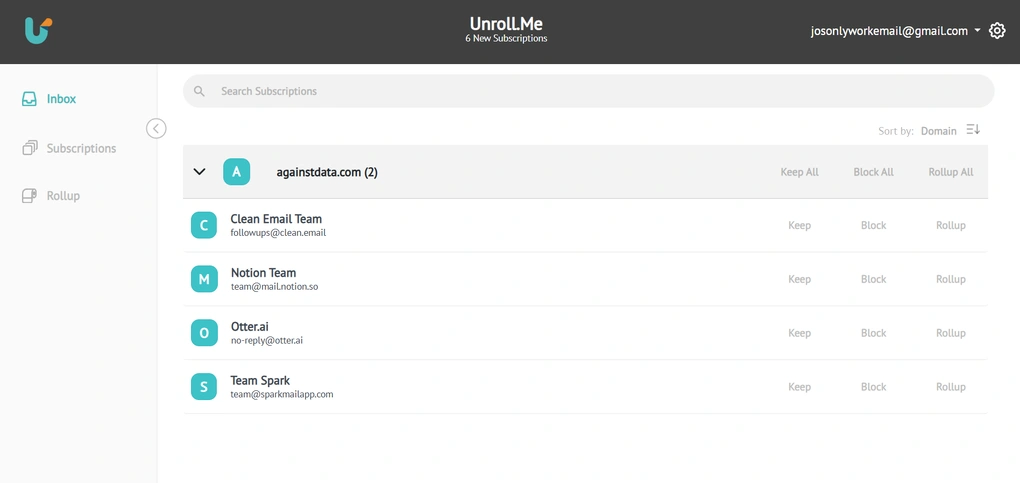
Once I connected my inbox, Unroll.Me quickly scanned for subscription and promotional emails and displayed them in one centralized list. It doesn’t show your entire inbox, but only displays emails it identifies as newsletters, subscriptions, or commercial messages.
Emails are grouped by sender or domain rather than shown individually, so bulk management is much easier. This means you can review all messages from a specific brand in one place instead of going through them one by one.
My inbox is already fairly clean since I regularly use inbox-cleanup tools, so I didn’t expect to find much. Still, within three minutes, the scan identified a few subscriptions I had overlooked.
The subscription tab makes it easy to see how many active subscriptions you actually have and which senders appear most frequently. You can also search for specific senders and preview email messages directly inside the app.
Unroll.me allows you to choose to keep, block, or rollup the messages. This way, you can reduce the number of subscription emails and focus on important messages.
One-Click Unsubscribe
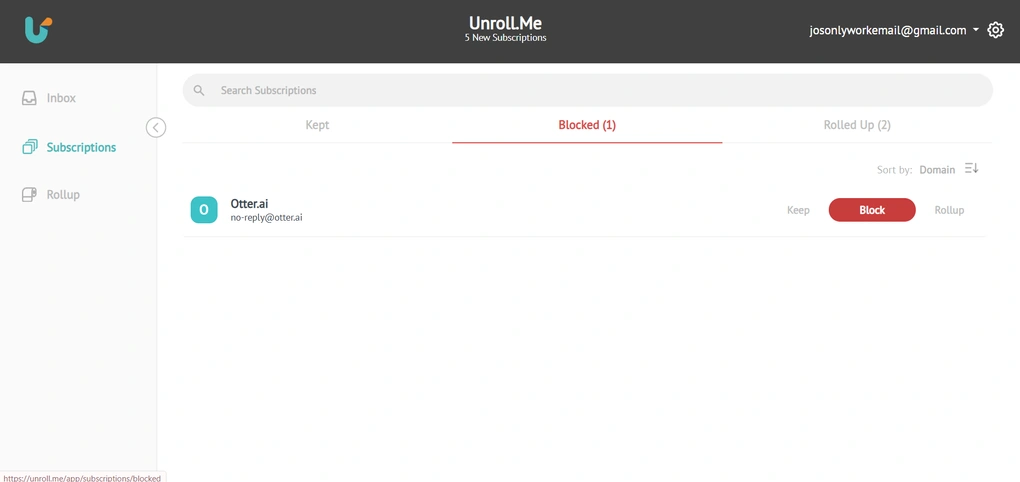
The core function of Unroll.Me is simplifying the unsubscribe process. Instead of opening emails one by one and searching for an unsubscribe link, you can manage mailing lists directly from the dashboard.
When you select “Block,” Unroll.Me attempts to unsubscribe you from that mailing list and prevent future messages from that sender from reaching your inbox. In other words, “Block” acts as both an unsubscribe action and a filtering mechanism.
It’s important to note that there is no separate “Unsubscribe” button inside the interface. “Block” is the action that triggers the unsubscribe attempt.
Since my inbox is already maintained, I didn’t have that many newsletters to remove, but the process is fast and intuitive based on my experience throughout my Unroll.Me review. Selecting multiple senders at once also makes bulk cleanup more efficient.
I also appreciated that decisions are not permanent. You can adjust your choices later if you change your mind.
Rollup Digest
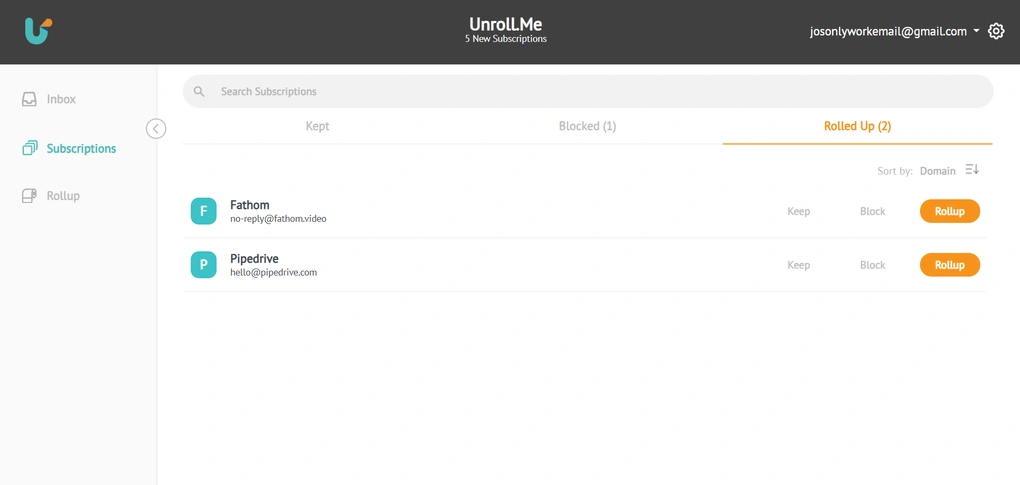
The Rollup is one of the features that originally set Unroll.Me apart. Instead of fully unsubscribing, you can move selected newsletters into a daily digest.
Personally, I tend to either unsubscribe completely or keep emails in my inbox, so the Rollup is not something I rely on heavily. However, I can see how it could work well for people who want fewer emails but still want to stay updated.
You can customize which subscriptions are included and choose when the digest is delivered, instead of getting them throughout the day. Therefore, you can focus on the important emails during work, and only ask for the digest after work in case you have enough nerve and time to review it.
Multi-Account Support
Unroll.Me allows you to connect multiple email accounts and manage subscriptions across them from one dashboard.
The app supports major email providers, including Gmail, Outlook, Yahoo, AOL, and iCloud. This means most personal and work inboxes can be connected without additional setup.
Since the platform is designed to handle multiple accounts within one profile, you can add as many email addresses as you’d like. If you separate work and personal email accounts, this makes subscription management much more centralized.
While I tested the app on a single account, the ability to manage multiple inboxes in one place makes it more practical for users dealing with higher email volume.
Supported email providers and platforms
Unroll.Me is available as a web app and also offers dedicated mobile apps for iOS and Android. There is no desktop app, so I primarily tested the web version.
In terms of email providers, Unroll.Me connects directly to major services such as Gmail, Outlook, Yahoo, and iCloud. Since the tool is built specifically around subscription management, its “integrations” are limited to supported email accounts rather than third-party productivity apps.
Explore our Apps directory
A curated directory of software tools we’ve independently reviewed, with links to full reviews, comparisons, and category guides.
Design and usability
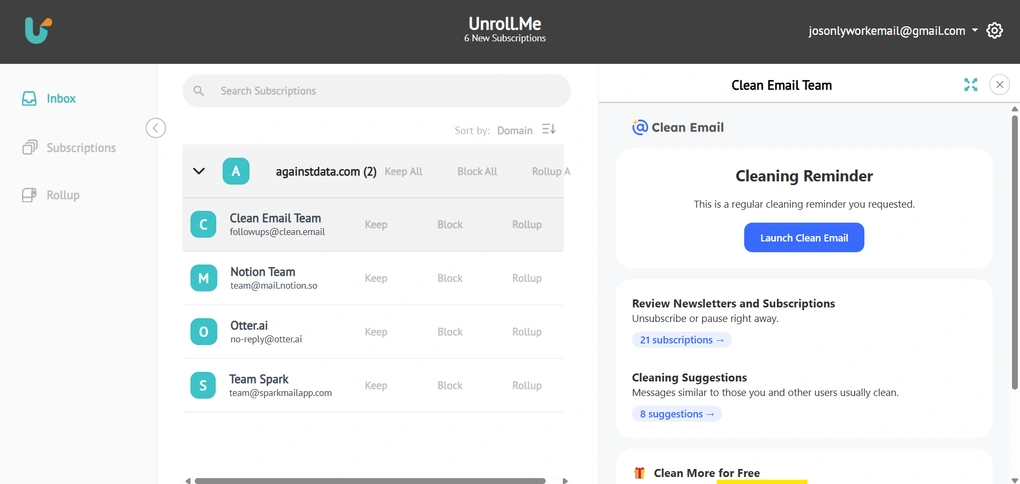
The interface is very simple and minimalist, almost plain. There aren’t many options, so that simplicity makes it very easy to use.
The Settings section is also minimal, offering basic controls such as Rollup delivery time, email notifications, and data management options.
Unroll.Me alternatives
If Unroll.Me’s privacy trade-offs make you uncomfortable, these alternatives are worth looking into.
|
App |
Best for |
Description |
|---|---|---|
|
Clean Email |
Best for inbox cleanup |
A reliable and transparent inbox management tool that gives you full control over email cleanup, but most advanced features require a paid plan. |
|
Proton Mail |
Best for privacy |
Proton Mail combines a familiar email experience with strong privacy and security features, making it a well-rounded choice for users who value both usability and control over their data. |
|
MailBroom |
AI-Powered Inbox Cleanup |
An AI-powered email cleanup tool that helps you quickly declutter your inbox with bulk actions, smart recommendations, and granular search controls. |
|
Cleanfox |
Best free unsubscribe tool |
A free tool designed to help users remove unwanted marketing emails and unsubscribe from newsletters. Like Unroll.me, it relies on data monetization rather than a paid subscription model. |
|
Spark |
Best AI email client |
A popular email client with built-in AI features, smart inbox organization, and collaboration tools. Unlike Clean Email, Spark focuses more on AI assistance and email productivity than long-term inbox cleanup. |
|
Missive |
Best for team collaboration |
A collaborative email client designed for teams, with shared inboxes and task assignment. It’s more of a productivity workspace than a cleanup tool, but useful if you need collaboration plus email management. |
|
Sanebox |
Best for automatic email filtering |
An email organizer that filters unimportant messages into separate folders automatically. It works with any email provider and focuses on a clean inbox, though its feature set and pricing differ from Clean Email. |
|
Virtualworkforce.ai |
Best for automating email workflows with AI agents |
Virtualworkforce.ai is an AI agent platform that automates email workflows by handling replies, classification, knowledge retrieval, and data extraction from emails and documents. Full Virtualworkforce.ai review | Quick Virtualworkforce.ai overview |
Final verdict: Is Unroll.Me safe?
With all that in mind, Unroll.Me today is simple, functional, and does what it promises when it comes to subscription cleanup.
If you’re comfortable with its business model and privacy trade-offs, it can be a practical free option. If not, there are alternatives that take a different approach like Sanebox or Clean Email.
I hope this review gave you a clear picture of how Unroll.Me works today and helped you make a more informed decision about whether it’s the right fit for you.
How We Test Email Apps
To keep our reviews & final score for each email app fair and consistent, we evaluate every tool using the same testing framework based on real-world usage, feature depth, and overall value.
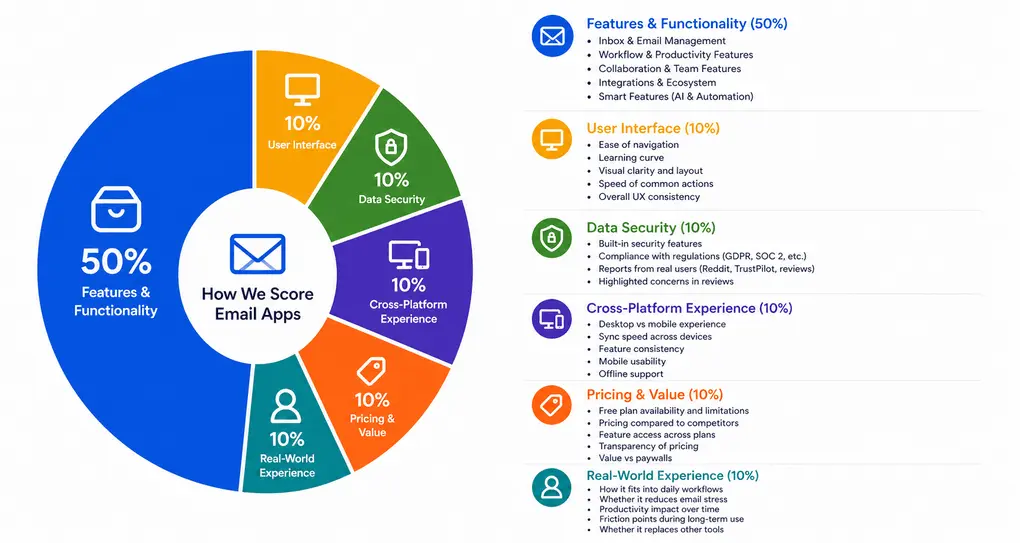
Our scoring breakdown after testing 10+ email apps:
⚙️ Features & functionality → 50%
🖥️ User interface → 10%
🛡️ Data security → 10%
📱 Cross-platform experience → 10%
💰 Pricing & value → 10%
👥 Real-world experience → 10%
Want a detailed breakdown of how we test each category?
Learn exactly how we test tools → Review methodology
Why you can trust our reviews
At thebusinessdive.com, our team tests, reviews, and compares hundreds of productivity apps every year — from project management tools to note-taking apps. We dive deep into real-world use cases to help you find the right tools that actually improve your workflow, not just add noise.
Our mission? No fluff, no shortcuts—just honest, hands-on insights from productivity pros.
Discover how we stay transparent, read our review methodology, and let us know about any tools we missed.
Frequently Asked Questions
Is Unroll.Me safe to use?
Unroll.Me faced criticism in 2017 for how user data was handled, which led to an FTC settlement in 2019. Today, the company states that it does not sell personal data such as your email address, but it does analyze certain commercial and transactional email messages to generate anonymized market research insights.
Because the app requires full access to your inbox to manage subscription emails, block unwanted emails, and process unsubscribe requests, users should feel comfortable with how their data is collected and shared before connecting their email accounts.
Does Unroll.Me actually stop unwanted emails?
Unroll.Me helps users unsubscribe from mailing lists using a visible unsubscribe button and bulk unsubscribe options, but it cannot guarantee that all unwanted emails or spam emails will stop.
Some senders use complex unsubscribe link structures or email segmentation, which can lead to future messages even after unsubscribing.
In some cases, email providers like Gmail, Outlook, Yahoo, or AOL may create rules that move messages to a folder rather than fully blocking them, so you may still need to set rules, mark messages as spam, or block senders directly to regain control of your inbox.
Is Unroll.Me really free?
Yes, Unroll.Me is a free service with no paid plans, but it operates on a data-based business model. Instead of charging money, the company analyzes certain email messages from connected email accounts to generate aggregated insights for research purposes.
This approach is not unique to Unroll.Me, like other free unsubscribe services, such as Clean Email alternatives and Cleanfox, also rely on data in different ways. The key factor for most users is transparency and understanding how the service uses inbox access.

Hey there! I am Aron, the founder of Thebusinessdive. I have been testing productivity apps for almost three years now. I reach 25.000 -50.000 people monthly with the mission to help you find the perfect productivity apps. Subscribe to my YouTube channel, newsletter, and social media to hear more about the best productivity tools. Let’s dive in!
Thanks for the insightful review! It’s crucial to highlight the safety aspects of using services like Unroll.Me, especially with data privacy concerns on the rise. I appreciate the transparency about potential drawbacks that many users may overlook. It definitely gives me food for thought before deciding to use the service!