A Budget-Friendly PDF Editor That Supports Cross-Platform Usage
- Independently reviewed
- Hands-on evaluation
Quick Verdict
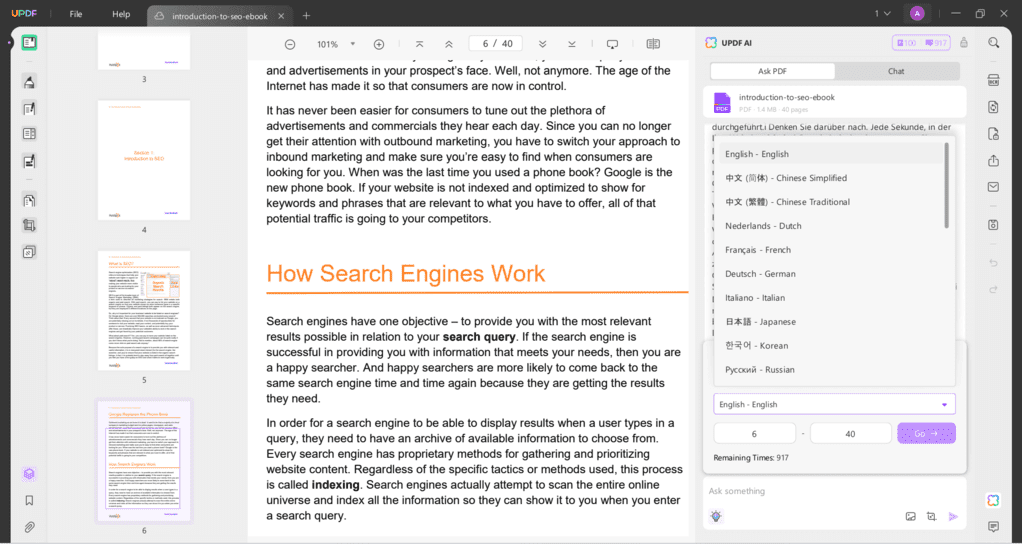
An affordable PDF editor that allows you to view, edit, sign, protect, translate, and organize your PDF files across Windows, Mac, iPad, iPhone, and Android devices with one license.
- Best for: Individuals who need one PDF editor for multiple devices at a reasonable price
- Not ideal for: Users requiring heavy, free-form, or complex graphical annotations
- Pricing: Free & Paid Plans ($49.99/user/year)
UPDF's strengths
- A budget-friendly option
- You can use one license on multiple devices
- It provides solid AI features
- UPDF has a simple user interface
UPDF's limitations
- It has limited drawing tools
- Encountered some bugs during testing
REVIEW
UPDF vs similar PDF editors
Related guides and comparisons
Popular UPDF alternatives
PDF Editors
Foxit
Foxit is a feature-rich PDF editor built for advanced document control. It offers text editing, page management, and annotation tools.
PDF Editors
Nitro
Nitro is a robust PDF editing solution designed for businesses that need reliable document editing, conversion, and collaboration tools.
Top pick
PDF Editors
Tenorshare PDNob
PDNob is an easy-to-use, AI-powered PDF editor for reading, editing, organizing, and annotating PDF documents.
Related videos
Our Evaluation Process
Our UPDF evaluation is based on hands on testing and comparison with other PDF editors. This page may contain affiliate links that, at no additional cost to you, may earn a small commission.