


My Honest Bluedot Review After Testing 25+ AI Note-Takers
Bluedot is a bot-free AI note-taking app for Google Meet, Zoom, Slack, and Microsoft Teams meetings. But how accurate is it? How do the meeting notes look? And what about its safety?
Stay here, because in this honest Bluedot review, I will answer all these questions based on real hands-on testing.
Let’s dive in!
Verdict
Here’s the quick verdict if you don’t want to read the full review:
🎯 Best for: Users who want an easy-to-set-up AI note-taker that works without a bot
🚫 Not ideal for: Users looking for a fully free AI note-taking solution
⭐ Biggest strength: Very easy to set up and start using
⚠️ Biggest weakness: Requires cloud processing to generate meeting notes
⚖️ Verdict: An easy-to-use AI note-taker with bot-free recording, transcription, and summaries, but the free plan is quite limited
🏆 Score: 4.4 / 5
✅ Tested with our review & scoring methodology ✅ Real-world testing ✅ Unbiased evaluation
Bluedot Review
Summary
Bluedot is a bot-free AI note-taker for Google Meet, Zoom, Microsoft Teams, and Slack calls. It works on any platform and auto-updates your CRM, Notion, and more. Overall, Bluedot is a straightforward and easy-to-use bot-free AI note-taker. It’s safe, you can set it up within minutes, and it offers excellent meeting notes for your calls.
|
|
Video recording
|
|
|
It is super easy to set up
|
|
|
AI follow-up email generation
|
|
|
User-friendly interface
|
|
|
Screen recording
|
|
|
Well-structured meeting notes
|
|
|
Limited free plan
|
|
|
Bluedot needs the cloud to create meeting notes
|
How We Test AI Note-Takers
To keep our reviews and final scores fair and consistent, we evaluate every AI note-taking tool using a standardized testing framework built on real-world usage and hands-on experience.
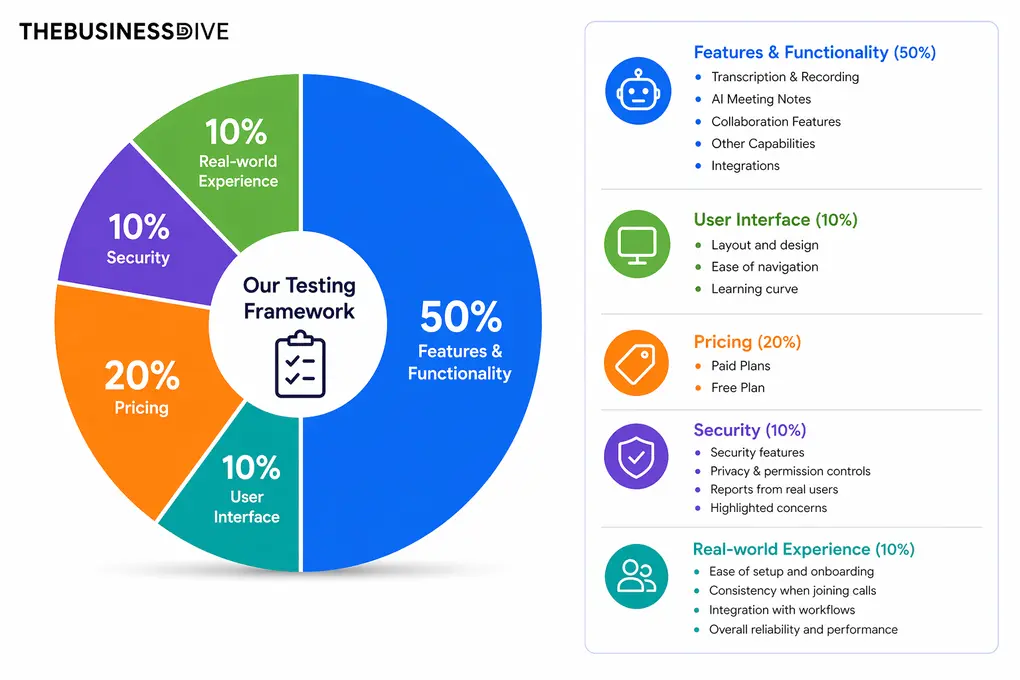
Our scoring breakdown after testing 20+ AI note-takers:
🤖 Features & functionality — 50%
🖥️ User interface — 10%
💰 Pricing — 20%
🔐 Security — 10%
👥 Real-world experience — 10%
Want a detailed breakdown of how we test each category?
Learn exactly how we test tools → Review methodology
Short on time? Here’s a quick overview of Bluedot
What is Bluedot?
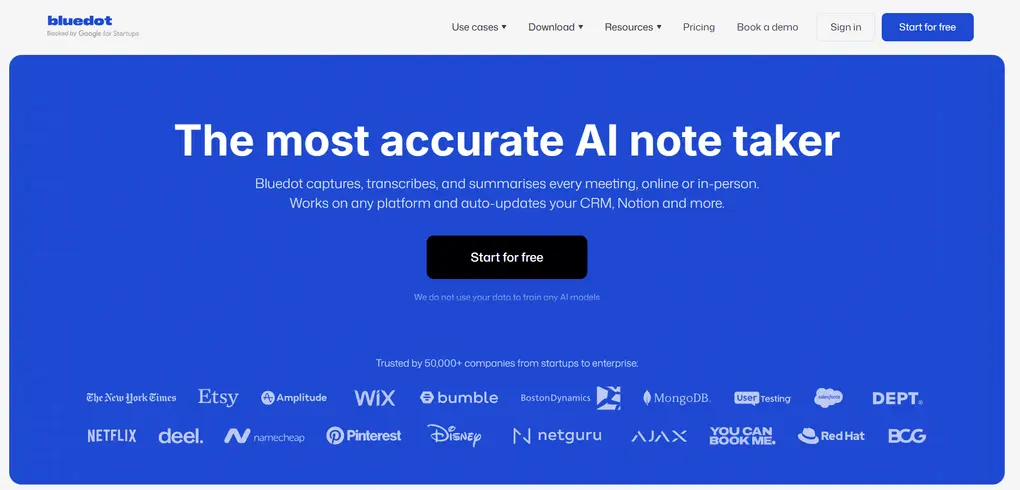
Bluedot is a bot-free AI note-taker for Google Meet, Zoom, Microsoft Teams, and Slack calls. It works on any platform and auto-updates your CRM, Notion, and more.
Bluedot offers a Chrome extension to quickly capture calls on all popular video conferencing platforms, while its desktop version supports Zoom, Microsoft Teams, and Google Meet. Bluedot also supports in-person meetings via its mobile app.
My hands-on experience with Bluedot
After testing 25+ AI note-takers, I found Bluedot to be one of the easiest to use. While I noticed that a few users mentioned that Bluedot’s setup can be clunky and requires more manual configuration than competitors, I don’t agree with them. For me, it was really smooth to set up Bluedot and get started.
The transcription was accurate, and the meeting notes were well structured. It’s also great that you can create meeting templates, and Bluedot offers sufficient customization options here.
One of the main advantages of Bluedotis is that you can record calls without a bot, which most bot-less AI note-takers can’t do.
When comparing it to other bot-less AI note-takers I tried, like Granola and Krisp, I think Bluedot really finds the right balance between being a lightweight tool and offering all the necessary features. In contrast, Granola felt too basic at times, while Krips is feature-heavy but requires a learning curve.
When it comes to the cons, the first thing I would mention is its free plan. The 5-lifetime limit only allows users to test Bluedot and decide afterward whether it is worth it. That said, if you are looking for a free AI note-taker, Bluedot will not be ideal for you.
Overall, Bluedot is a straightforward and easy-to-use bot-free AI note-taker that is also one of the best AI note-takers. It’s safe, you can set it up within minutes, and it offers excellent meeting notes for your calls.
Breaking down Bluedot’s final score
Bluedot delivers excellent performance across most key functionalities, with top scores in transcription & recording (4.5/5), meeting notes (5/5), collaboration features (4.5/5), integrations (5/5), and privacy (5/5). It strikes a strong balance between ease of use and a solid feature set.
I also had a great experience during my Bluedot review (5/5) and found its intuitive user interface (4/5) to be one of the easiest AI note-takers to set up and use in real workflows.
Where Bluedot loses some points is pricing (4/5) and especially its free plan (2.5/5), which is quite limited and feels more like a trial.
Ideal users for Bluedot
Where Bluedot falls short
Key features
Now let’s take a closer look at the key features I tried during my Bluedot review!
Bot-free transcription
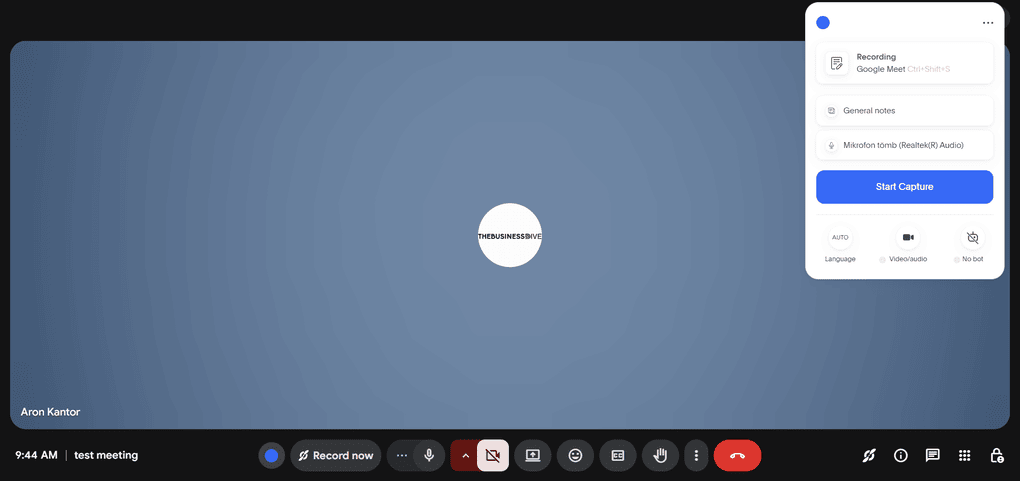
It was among the few AI note-takers that worked instantly after setup, without any fiddling with the settings. You only need to click on the Google Extension, and you can capture your calls in seconds. So, setting up Bluedot for my Google Meet calls was really straightforward.
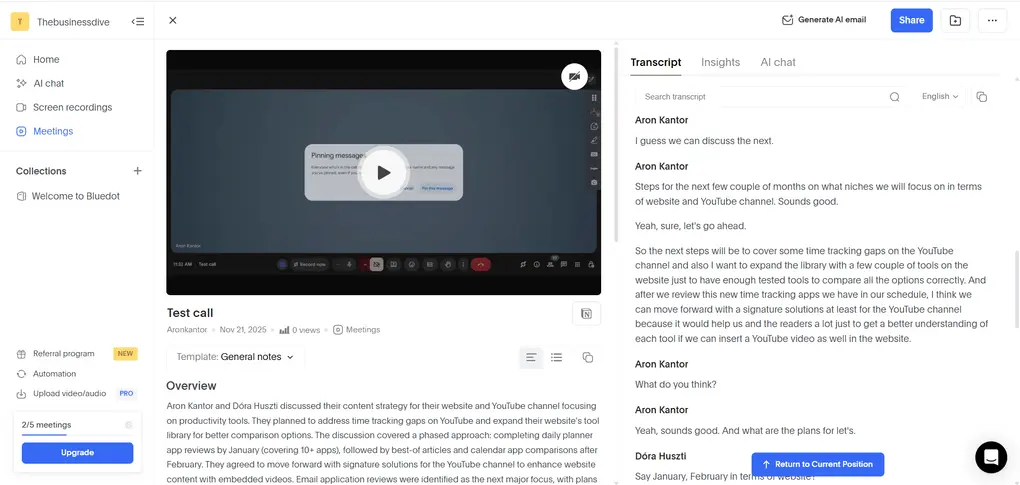
You can access the automated transcription on the right side. The transcriptions are quite fast and mostly accurate.
What I also liked about this tool is that you can leave comments in the transcription and quickly clip specific moments, making it great for collaboration. With Bluedot’s speaker identification, you can also clearly differentiate who said what.
Since Bluedot supports transcription in over 100 languages, it is an ideal solution for multi-language teams.
Also, I noticed that Bluedot automatically cuts your uhms and filler words, making the transcripts look way more neat.
One small thing – it also offers a search feature, so you can quickly find the information you are looking for in the transcription.
Overall, I think Bluedot offers fine transcriptions, especially with high-quality audio. Compared to other bot-free options, including Granola, Tactiq, and Krisp, Bluedot provided me with more accurate meeting transcription.
Meeting recording
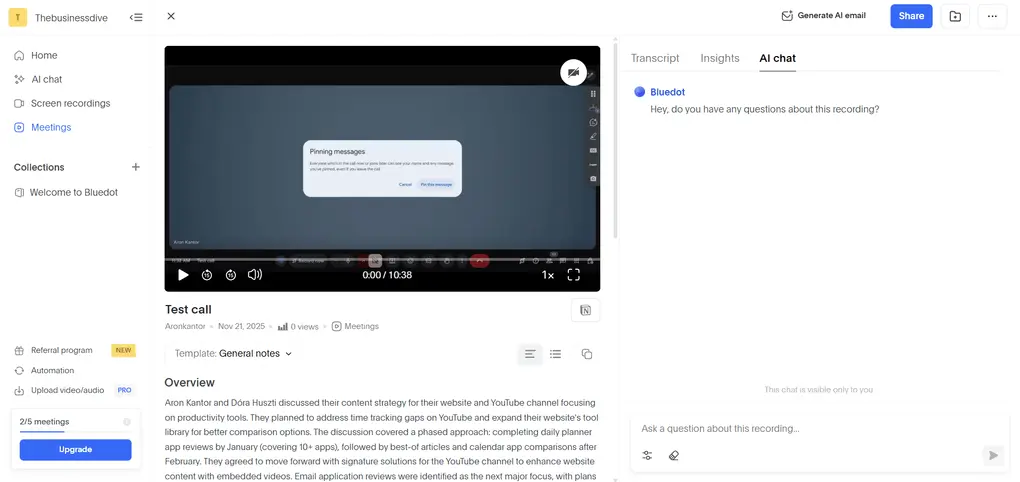
Most bot-free AI note-takers can’t record meetings. However, it’s not the case with Bluedot. Once you join a call, Bluedot offers video and audio recording. You can also import your own video and audio recordings for transcription and summarization.
After your meeting, you will find the recording alongside the transcription and meeting notes. You can also change the playback speed from 1x to 2x.
Meeting notes
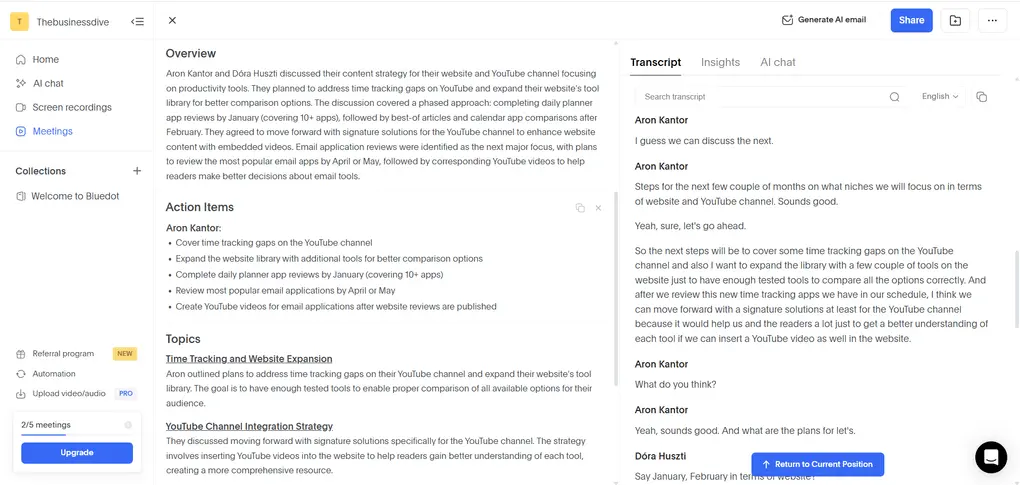
The meeting notes are well structured. It covers an overview, action items, and timestamps.
If you change the meeting template, Bluedot will reorganize the meeting notes based on the selected template, but I will cover this a bit later.
Bluedot allows users to edit the meeting notes. You only need to double-click the text to change, add, or remove specific parts of the meeting notes.
Meeting templates
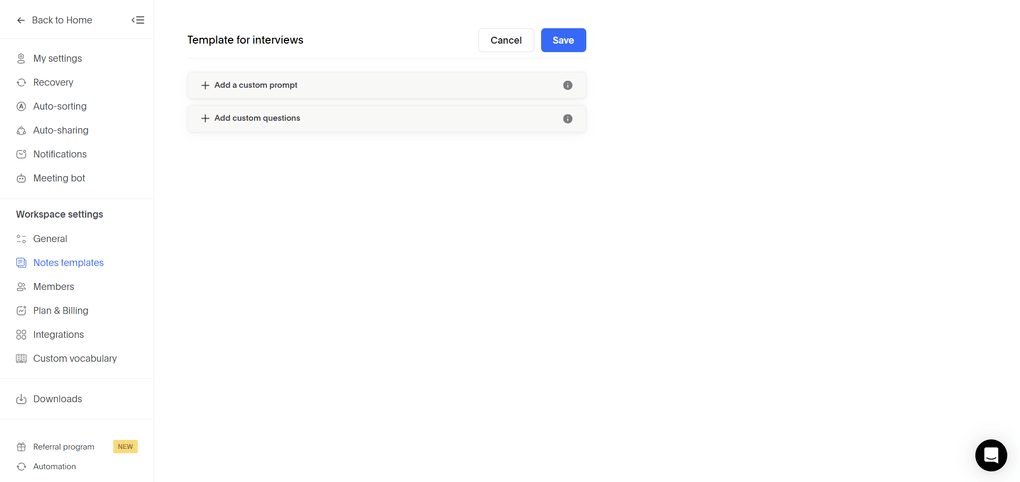
As mentioned, Bluedot offers some pre-built meeting templates, but you can also create custom note templates for your meetings.
When creating your own meeting template, you can add custom prompts and questions to focus on the most crucial points for that specific use case.
Once you are ready with your custom templates, just go to your meeting notes and switch the template. Bluedot will restructure the meeting notes accordingly in a few seconds to reflect on the prompts and questions you added to that specific template.
AI chat
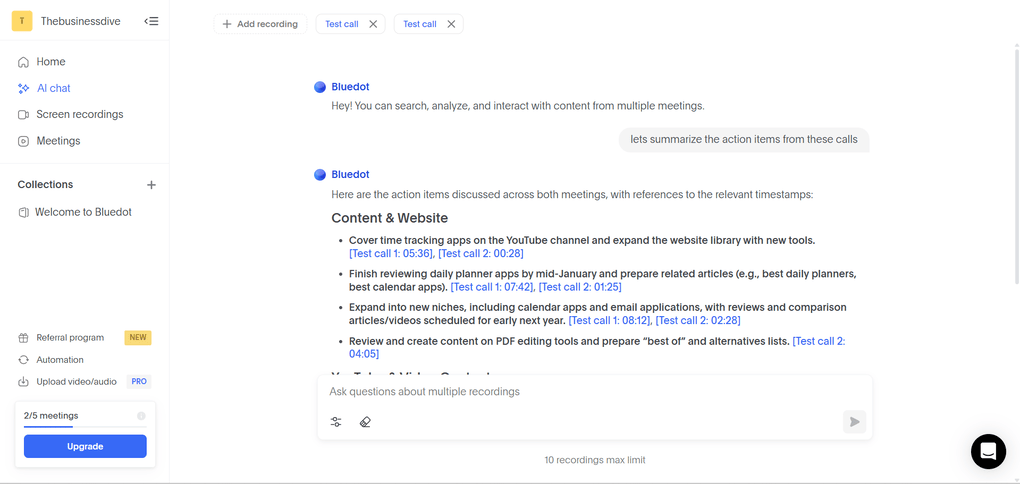
You can use the AI chat to ask questions about a specific call or cover topics across multiple meetings. It helps to find information quickly or summarize important details or discussion points with a few clicks.
During my Bluedot review, I experienced that the AI chat is quite fast and provides correct information with timestamps.
If you want to ask questions across multiple meetings, you can select up to 10 recordings at the same time. The AI chat will then analyze all of them together and pull the relevant information to answer your questions.
This gives you a more complete and accurate response, especially when the topic or decision was discussed across several meetings rather than just one.
Meeting Insights
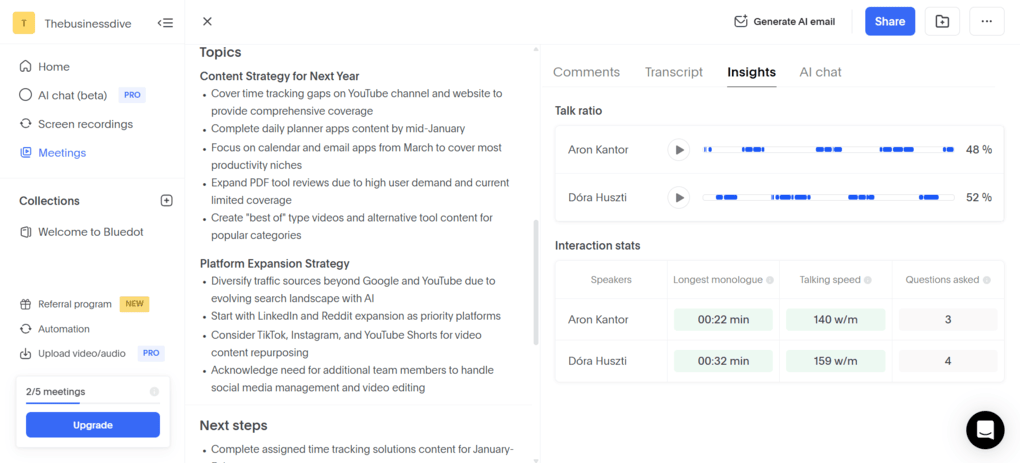
During my Bluedot review, I was glad to see that it offers AI insights for your calls. It covers talk ratio, longest monologues, talking speed, and the number of questions asked.
This feature is valuable for customer calls, especially if you combine it with the AI chat. With the Meeting Insights, you can get an understanding of how you communicate with your client and self-assess your questions.
To improve your sales calls, you can ask the AI Chat to identify customers’ pain points and help you increase the chance of closing deals.
Screen recording
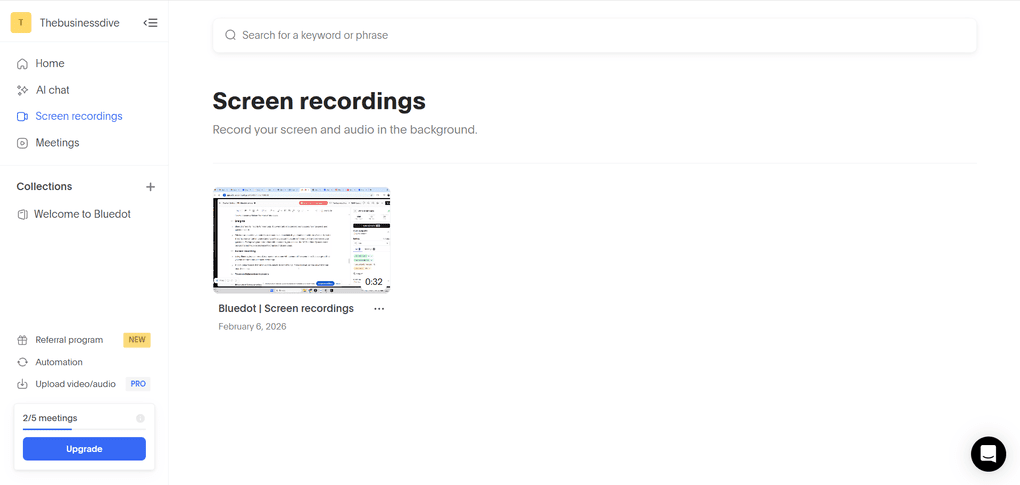
Using Bluedot, you can record your screen and record yourself with your webcam at the same time. Your face shows up in a little camera bubble in the corner, like on Loom — a great feature for asynchronous collaboration. It’s also great that you can annotate and edit recordings.
It is a unique feature that other AI note-takers do not offer. So, if you need an AI note-taker that can record your screen as well, Bluedot is an ideal choice.
Team collaboration features
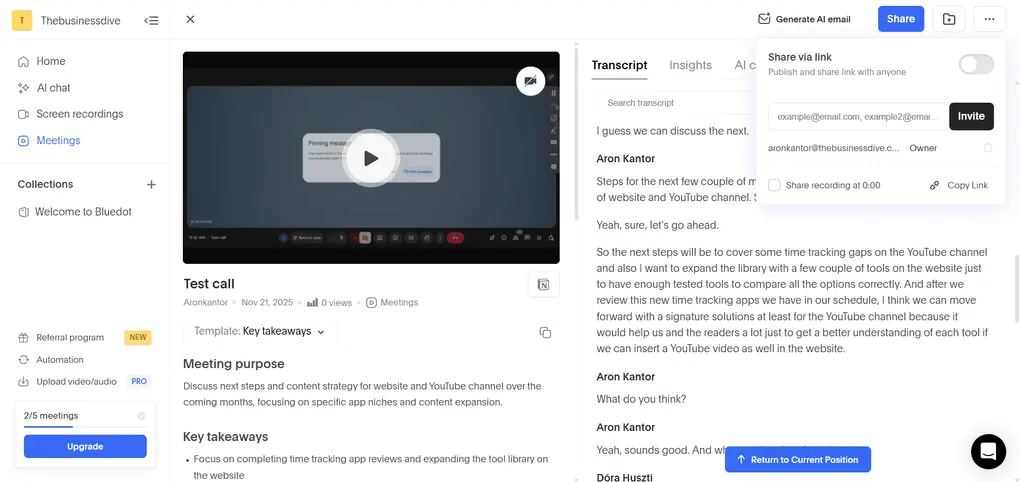
Bluedot has various collaboration features. You can organize your recordings into shared libraries where teammates can comment, edit, and work on meeting notes in one centralized space.
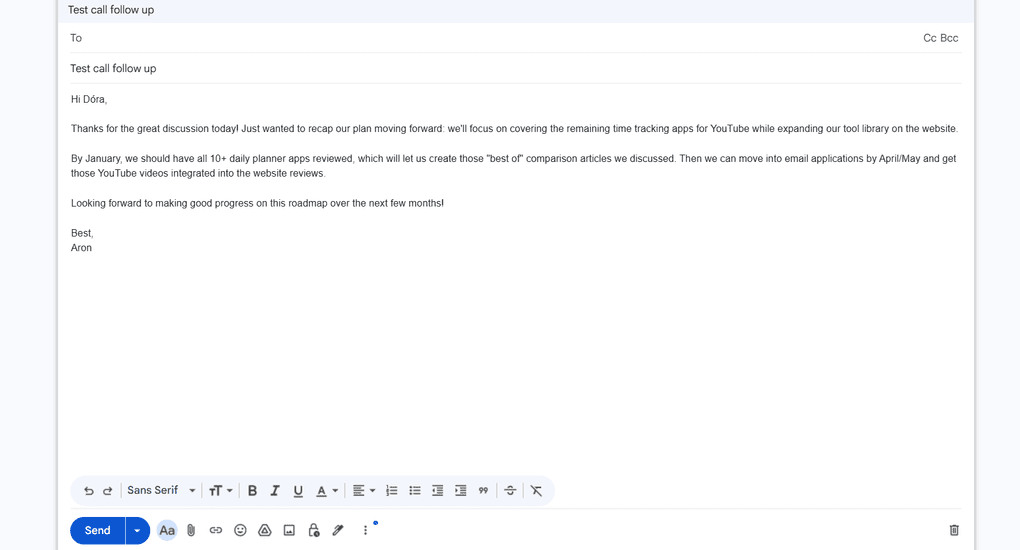
Furthermore, you can share your recordings with a few clicks via link or email. If you click on “Generate AI email”, Bluedot will craft a quite solid follow-up email based on the meeting notes and transcription.
Personally, I loved this feature when using Bluedot for my meetings. It helps to accelerate the follow-up actions after your calls and enhance productivity.
Bluedot integrations
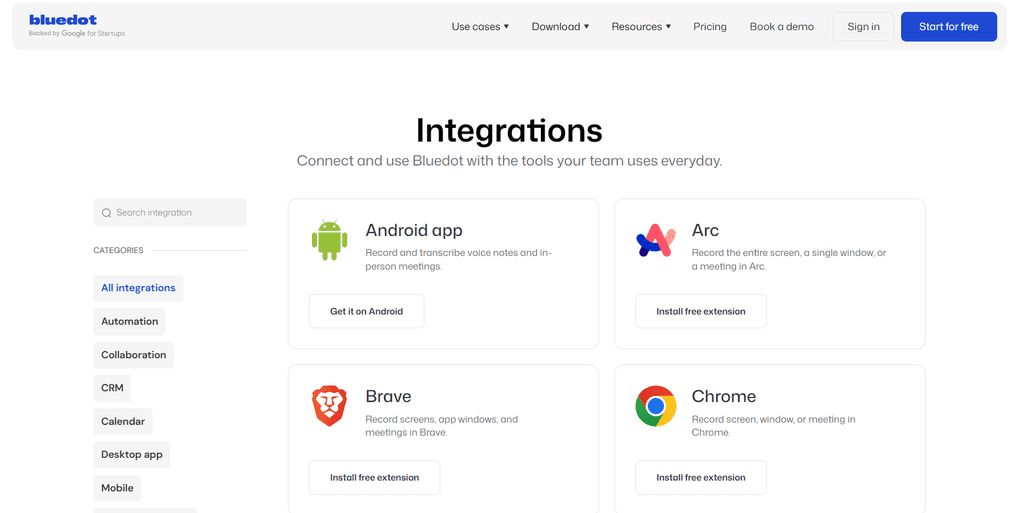
Bluedot integrates seamlessly with various third-party apps, including direct integrations with tools like Slack, HubSpot, and Notion, and broader connections through Zapier. This way, you can push meeting insights into your CRM and productivity tools without manual data entry.
Bluedot user interface
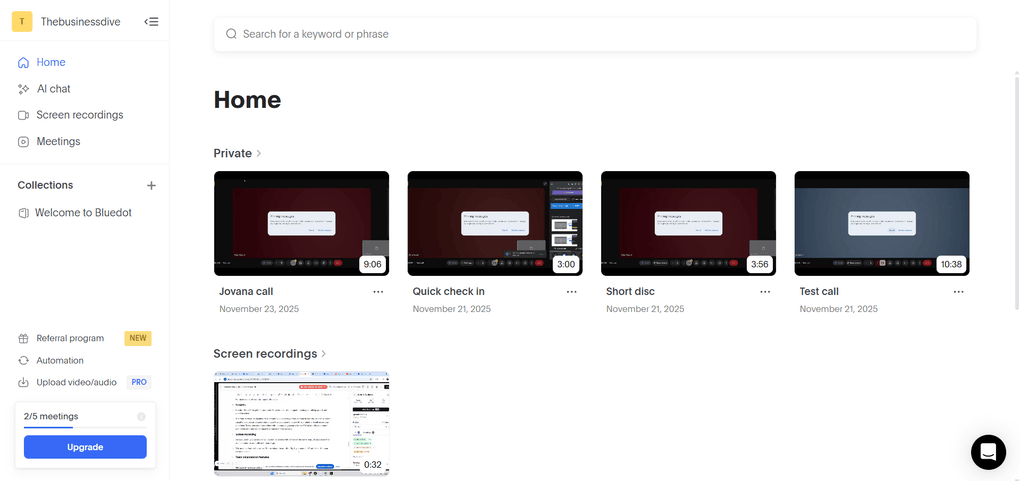
The first thing that comes to my mind when taking a look at Bluedot’s user interface is simplicity. It offers a user-friendly interface with no fluff or unnecessary noise.
Explore our Apps directory
A curated directory of software tools we’ve independently reviewed, with links to full reviews, comparisons, and category guides.
Bluedot pricing
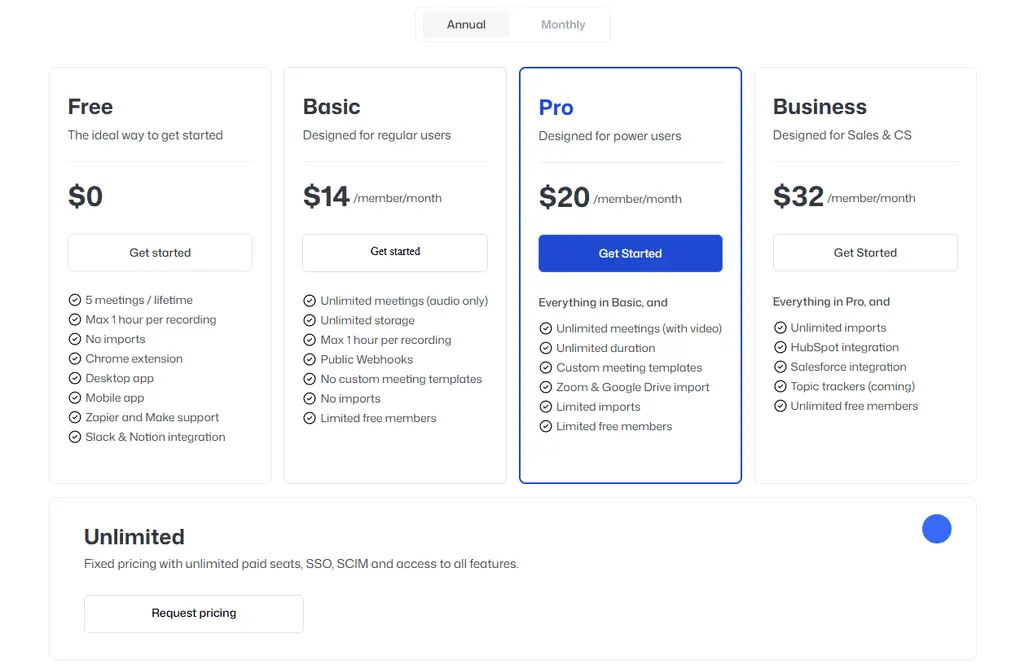
Using its Free plan, Bluedot lets you record and transcribe up to five meetings with a maximum of 1 hour per recording. You also have access to the Slack and Notion integrations.
If you buy the Basic plan for $14 per month with annual billing, it unlocks unlimited recordings and storage. If you need longer recordings and custom meeting templates, the Pro plan could be ideal for $20 per month per user.
If you need the HubSpot and Salesforce integration, you have to go with the Business plan. It is $32 monthly with annual billing and includes these integrations, plus unlimited import options.
Larger organizations can opt for Enterprise pricing, which includes features like SSO, custom retention policies, and advanced admin controls.
Bluedot’s security
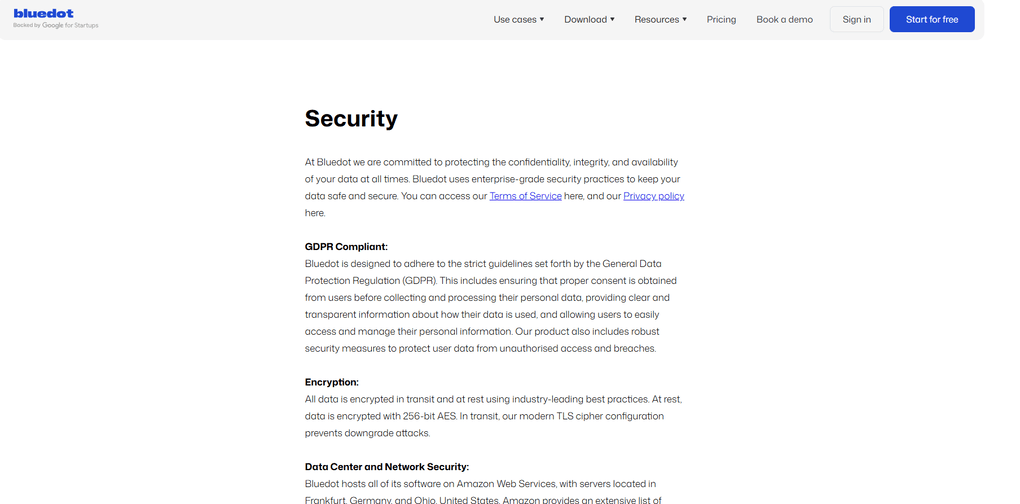
In the course of my Bluedot review, I also checked how it approaches data privacy. When taking a look at the safety policies, I found that Bluedot is GDPR and CCPA compliant, but the SOC2 certification is still pending.
The connections are encrypted using SSL, and any attempt to connect over HTTP is redirected to HTTPS. I was glad to see that all the customer data, including the recordings, transcriptions, and meeting notes, is encrypted at rest and in transit. Bluedot relies on AWS infrastructure to securely maintain cryptographic encryption keys.
Finally, I did not find any negative user reports about data security, so I can say that Bluedot is a safe AI note-taking app.
Pros and cons I found during my Bluedot review
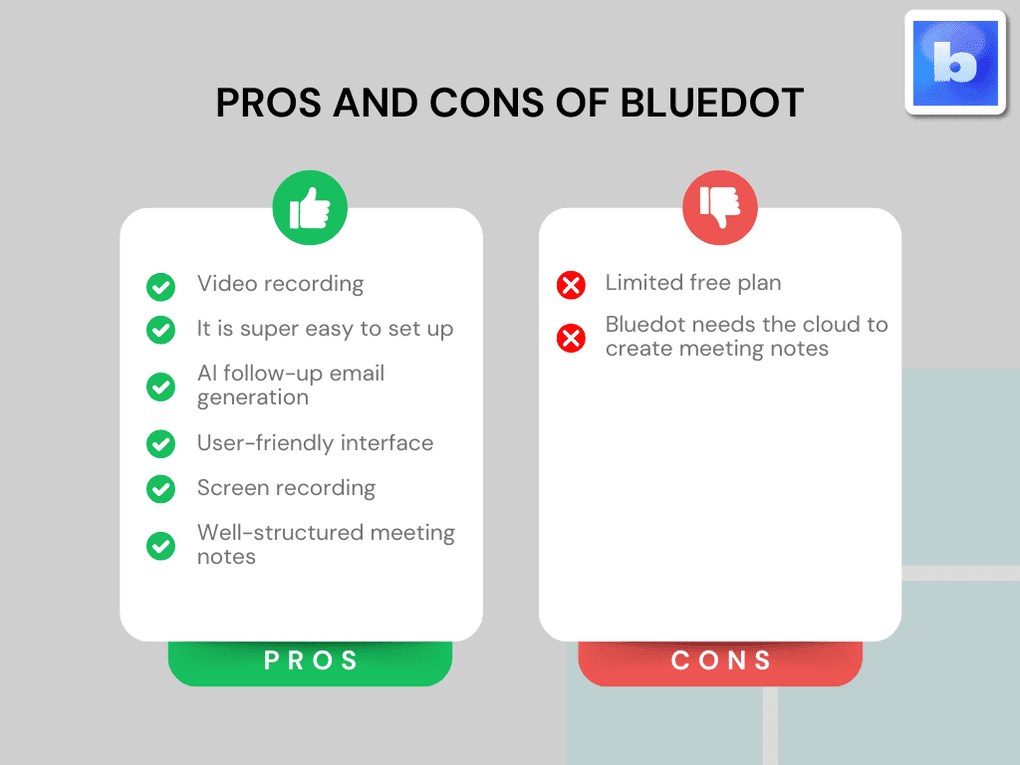
Now, let’s break down Bluedot’s strengths and limitations.
Pros of Bluedot
Cons of Bluedot
Bluedot alternatives
If you are still unsure whether Bluedot is the right AI note-taker for you, check out these alternatives:
|
App |
Best for |
Description |
|---|---|---|
|
Fellow |
Best overall |
A top AI note-taker for professionals and teams. This is the one I use for online meetings. |
|
Notta |
Best for multi-language transcription |
A unique AI note-taker that allows multi-language transcription, enabling people to speak two different languages during online meetings. |
|
MeetGeek |
Best for multi-language transcription |
A versatile AI note-taking app with the best AI meeting summaries. |
|
tl;dv |
Best simple AI note-taker |
A simple option for individuals with a feature-rich free plan. |
|
Fathom |
Best free AI note-taker |
An accurate AI note-taker with an extensive free plan. |
|
Radiant |
Best free AI note-taker for Mac |
It is a 100% free AI bot-less note-taker for Mac users for in-person and online meetings. |
|
Otter AI |
A popular AI note-taker |
One of the most popular AI note-takers for Google Meet, Zoom, and Microsoft Teams. |
|
Granola |
Best for users need a simple bot-less AI note-taker |
Granola is a lightweight AI note-taking app that transcribes and summarizes meetings without bots, with a generous free tier, but it’s basic and lacks advanced features. |
|
Krisp |
Best bot-less AI note-taker supporting high audio quality |
Krisp is a Voice AI platform for clearer communication and more productive meetings, combining real-time audio enhancements with AI note-taking. |
|
Fireflies AI |
Best budget-friendly option |
A popular and budget-friendly AI meeting assistant for individuals and teams. |
|
Zoom AI Companion |
Best for Zoom users needing built-in AI note-taking |
A solid built-in AI assistant for Zoom that offers meeting summaries, basic transcription, and action items, but lacks advanced features. Full Zoom AI Companion review | Quick Zoom AI Companion overview |
|
Tactiq |
Best for individuals and workflow automation |
Tactiq is an AI meeting assistant that provides real-time transcription, customizable summaries, and workflow automation. |
|
Read AI |
Best for teams & individuals who want an all-in-one AI meeting assistant |
Read AI is an AI meeting assistant with solid transcription, summaries, and search, but limited features on lower plans and privacy concerns make it hard to rely on. |
|
Plaud |
Best for in-person conversations |
A unique AI note-taker with dedicated hardware for recording meetings, phone calls, and ideas wherever you are. |
Wrap up: Bluedot review
Bluedot is a simple & reliable AI note-taker, excellent for professionals and small businesses. You can easily connect it with various CRMs and productivity tools, and forward your meeting documentation to the apps you use.
To summarize, my overall experience during testing was positive, and I can imagine using Bluedot in my own business in the future.
Related articles:
- Best 5 Otter AI Alternatives | 20+ Personally Tested Apps (2026)
- 5 Best Bot-Free AI Note-Takers In 2026 (NOT What You’d Think)
- Best 9 AI Note-Takers | My Top Picks After +2 Years Testing (2026)
Hope I was able to help you find the best AI note-taker for you. As always, I will update this Bluedot review over time so you guys have up-to-date information about this AI note-taking app.
Looking for similar tools?
Visit our AI note-takers library to explore other apps we’ve reviewed in this space and how they compare.
Why you can trust our reviews
At thebusinessdive.com, our team tests, reviews, and compares hundreds of productivity apps every year — from project management tools to note-taking apps. We dive deep into real-world use cases to help you find the right tools that actually improve your workflow, not just add noise.
Our mission? No fluff, no shortcuts—just honest, hands-on insights from productivity pros.
Discover how we stay transparent, read our review methodology, and let us know about any tools we missed.
Frequently Asked Questions
Is Bluedot AI good?
Yes, Bluedot is easy to use and offers accurate transcriptions. While many users think it is only ideal for Google Meet users, it supports Zoom, Slack, and Microsoft Teams as well.
Is Bluedot safe?
Bluedot is highly regarded as a privacy-focused AI meeting assistant favored by professionals. It uses enterprise-grade security practices to keep your data safe and secure.
All data is encrypted in transit and at rest using industry-leading best practices. At rest, data is encrypted with 256-bit AES.
Finally, it is GDPR compliant and found to be fully compliant with the California Consumer Privacy Act (CCPA) as well.
Is Bluedot AI Note Taker free?
Bluedot offers a free plan. However, the free plan of Bluedot is essentially a trial and not suitable for long-term use if users plan to record meetings regularly.
Does Bluedot work with Zoom?
Yes, Bluedot works on Zoom, Microsoft Teams, Slack, and Google Meet. Bluedot supports transcription in over 100 languages and creates meeting summaries post-call.
Disclosure: I only recommend products I would use myself, and all opinions expressed here are our own. This post may contain affiliate links that, at no additional cost to you, may earn a small commission. Read the full privacy policy here.

Hey there! I am Aron, the founder of Thebusinessdive. I have been testing productivity apps for almost three years now. I reach 25.000 -50.000 people monthly with the mission to help you find the perfect productivity apps. Subscribe to my YouTube channel, newsletter, and social media to hear more about the best productivity tools. Let’s dive in!