


How we test note-taking apps at TheBusinessDive
To stay transparent, we want to explain how we test note-taking apps at TheBusinessDive.
Our testing framework (at a glance)
- Average testing time per tool: 7–21 days
- Number of tools tested: 10+ note-taking apps
- Test scenarios: daily notes, idea capture, and long-term knowledge organization
- Platforms tested: Web, mobile, desktop (when available)
- Review process: the same framework is applied across all note-taking reviews
This structured approach ensures that every tool is evaluated consistently and under comparable conditions.
Our scoring system for note-taking apps
Our scoring system for note-taking apps is built on 3+ years of hands-on testing across 10+ note-taking solutions.
The goal is simple: help you quickly decide whether a note-taking app is worth your time — based on structured, repeatable testing criteria, not marketing claims.
We evaluate each note-taking app across 10 key factors, with a strong emphasis on real functionality and everyday usability.
How we score note-taking apps (quick breakdown)
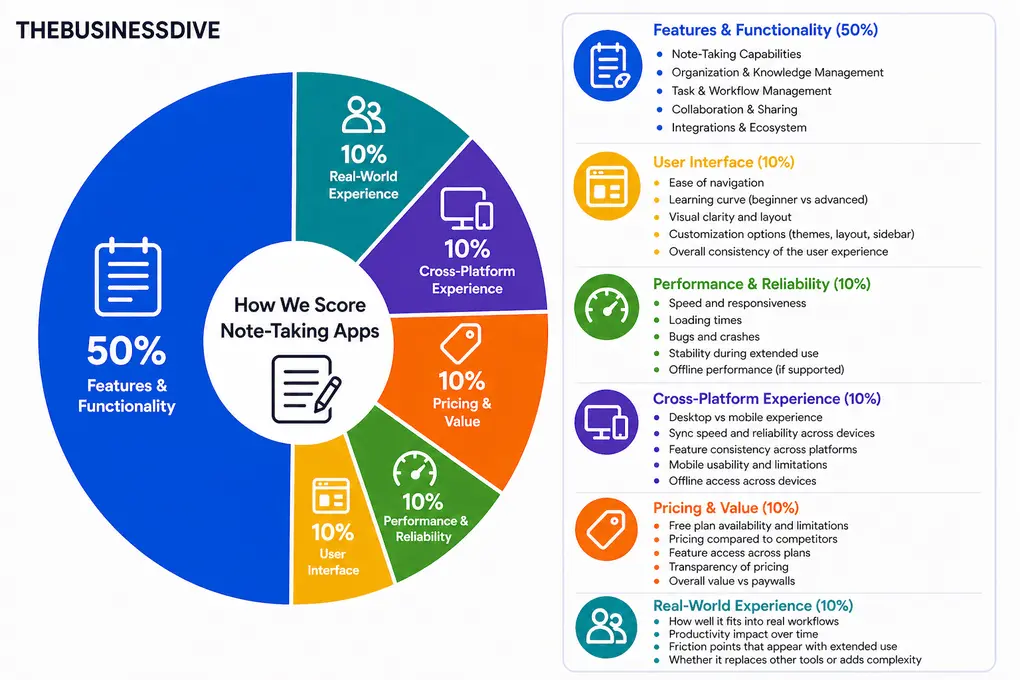
- Features & functionality → 50%
- User interface → 10%
- Performance and reliability→ 10%
- Cross-platform performance→ 10%
- Pricing→ 10%
- Real-world experience → 10%
Features & functionality (50%)
This is the most important part of our evaluation. We test each note-taking app across the following areas:
Note-taking capabilities
We test:
- Writing experience (speed, responsiveness, formatting options)
- Content blocks (text, lists, tables, code, embeds, media)
- Rich media support (images, videos, files, bookmarks)
- Editor flexibility (block-based, markdown, object-based systems)
- Ease of structuring content inside a page
We test different content types, from notes to embedded videos, to identify limitations.
Organization & knowledge management
Here, we focus on:
- Page hierarchy (folders, nested pages, workspaces)
- Tagging and labeling systems
- Linking between notes (backlinks, relations, references)
- Databases or structured content systems
- Advanced organization (graph view, objects, collections)
We add higher scores for a note-taking app that makes it easy to build a scalable knowledge system, not just store notes.
Task & workflow management
We evaluate how effectively the app supports task tracking and simple workflows.
At this part of our review, we check:
- Task and project creation (speed, simplicity, recurring tasks)
- Reminders, due dates, notifications, and task assignment
- Task organization (priorities, subtasks, statuses)
- Ability to combine notes + tasks in one workflow
- Usefulness for personal productivity vs team workflows
Collaboration & sharing
We assess how well the tool works for teams and shared workflows.
During testing, we look at:
- Real-time collaboration
- Sharing options (pages, workspaces, public links)
- Permission levels and access control
- Team workflows and communication features
- Stability when multiple users are editing
Integrations
We evaluate how well the app connects with other tools in your workflow.
Regarding integrations, we analyze:
- Native integrations (Google Calendar, Slack, Drive, etc.)
- Third-party integrations (Zapier, API access)
- Ease of connecting tools
- Sync quality and reliability
- Ability to centralize workflows from multiple apps
User interface (10%)
We assess how intuitive and user-friendly the app feels.
When testing note-taking apps’ user interfaces, we focus on:
- Ease of navigation
- Learning curve (beginner vs advanced users)
- Visual clarity and layout
- Customization options (themes, layout, sidebar)
- Overall user experience consistency
Performance & reliability (10%)
We evaluate how stable and responsive the app is in daily use.
When testing performance we check:
- Speed and responsiveness
- Loading times
- Bugs and crashes
- Stability during longer sessions
- Offline performance (if supported)
Cross-platform experience (10%)
We assess how well the app performs across different devices.
During app review, we check:
- Desktop vs mobile experience
- Sync speed across devices
- Feature consistency across platforms
- Mobile usability and limitations
- Offline access across devices
Pricing & value (10%)
We evaluate whether the tool offers good value for its features.
During testing, we consider:
- Free plan availability and limitations
- Pricing compared to competitors
- Feature access across plans
- Transparency of pricing
- Real value vs paywalls (I am looking at you, Evernote)
Real-world experience (10%)
This reflects how the tool performs in everyday use over time.
During testing, we evaluate:
- How it fits into real workflows
- Productivity impact over time
- How complex it is (this one is for Anytype)
- Friction points that appear with extended use
- Whether it replaces other tools or adds complexity
Our testing approach
Note-taking apps are not just productivity tools. For many users, they become a long-term system for thinking, organizing information, and storing knowledge.
Because of that, we do not evaluate them based only on features or short-term impressions.
We test note-taking apps by building real note systems and using them over time. This includes writing daily notes, capturing ideas, organizing information, revisiting older content, and relying on the app to store information we need to access later.
This testing framework is used across all of our note-taking content, including individual reviews, comparisons, and best-of guides. All recommendations are based on this same evaluation process, not on one-off impressions.
Testing duration & depth
Each note-taking app is tested for at least 1–3 weeks, not just a quick trial.
We use every tool across multiple sessions and workflows to understand how it performs over time. This includes building a growing note system, revisiting older notes, and testing how the app behaves as content scales.
Why note-taking apps are hard to compare
Note-taking is highly personal, and different users rely on different systems.
From our testing, here are the main reasons they are difficult to compare:
- Different note-taking styles. Some users prefer simple text, others rely on links, tags, or structured systems
- Long-term usability. A tool must remain usable as notes grow over time
- Search and retrieval. Finding information later is often harder than writing it
- Cross-device use. Notes are created and accessed across multiple devices
Because of this, a feature list alone does not reflect how a note-taking app performs in real use
Real scenarios we test
We do not just explore features. We simulate real note-taking workflows:
- Writing daily notes and capturing ideas
- Organizing notes into folders, tags, or linked systems
- Revisiting and editing older notes
- Searching for information created days or weeks earlier
- Using the app across multiple devices
This helps us understand how each tool performs in realistic conditions.
How we test daily planners
We do not rely on short testing sessions. We use each tool as an active note-taking system.
We write notes, build small knowledge structures, revisit older content, and search for information over time. We test how the app behaves as notes accumulate and workflows become more complex.
During testing, we look for clear answers to questions like:
- Does the app remain fast and usable as notes grow?
- How reliable is search when you need to find something?
- Do notes stay in sync across devices without issues?
- Does the structure hold up as your system expands?
Testing across multiple sessions helps us evaluate long-term usability.
Proof of testing
All screenshots and videos included in our reviews are:
- created during our own testing
- based on real note-taking workflows
- never taken from marketing materials
This ensures that all visuals reflect actual product usage.
Check out some of our reviews to see how it works in practice:
What we don’t do
Just as important as what we test is what we intentionally avoid:
- We do not rely only on demos or marketing pages
- We do not rank tools based on affiliate commissions
- We do not test tools for only a few hours
- We do not assume one note-taking app works for everyone
Note-taking is highly personal, and oversimplifying it would not be helpful.
How we make recommendations
Instead of naming a single “best” tool, we focus on specific use cases, such as:
- Best for quick capture and simple notes
- Best for long-term knowledge management
- Best for cross-device access
- Best budget option
This makes it easier to choose a tool based on how you think and organize information.
How often are reviews updated
Note-taking apps evolve over time. Features change, sync systems improve, and pricing models shift.
We revisit reviews when:
- pricing or plan limits change
- major features are released
- core note-taking workflows change
Keeping reviews current is part of our process.
Transparency & monetization
Some of our articles include affiliate links. If you sign up through one of them, we may earn a commission at no extra cost to you.
This never influences how tools are tested, ranked, or recommended.