


How we test email apps at TheBusinessDive
To stay transparent, we want to explain how we test email apps at TheBusinessDive.
Our testing framework (at a glance)
- Average testing time per tool: 7–21 days
- Number of tools tested: 10+ email apps
- Test scenarios: personal inbox, team communication, high-volume email workflows
- Platforms tested: Web, mobile, desktop (when available)
- Review process: the same framework is applied across all email app reviews
This structured approach ensures that every email app is evaluated consistently and under comparable conditions.
Our scoring system for email apps
We established our scoring system for email apps based on 3 years of testing the involved 10+ email apps.
We evaluate each email app across 10 key factors, with a strong emphasis on real functionality and everyday usability.
How we score email apps (quick breakdown)
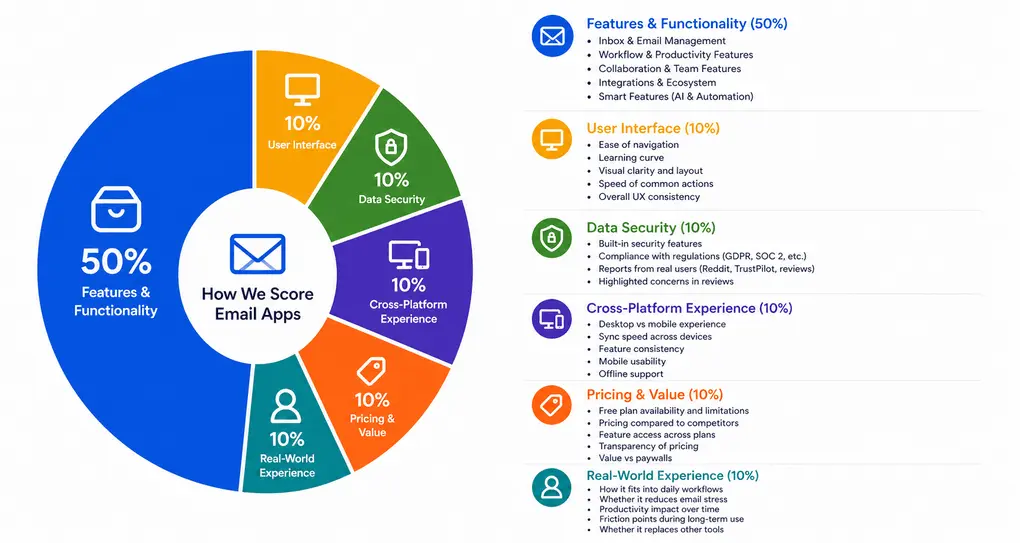
- Features & functionality → 50%
- User interface → 10%
- Data security→ 10%
- Cross-platform performance→ 10%
- Pricing→ 10%
- Real-world experience → 10%
Features & functionality (50%)
Here is what we check to see how email apps perform in real action.
Inbox & Email Management
We evaluate how effectively the app helps you handle incoming emails.
During testing, we look at:
- Inbox organization (folders, labels, categories)
- Filtering and sorting options
- Search functionality and speed
- Handling high email volume
- How easy it is to reach inbox zero
For email apps focused on unsubscribe and inbox cleaning, we adapt this category to prioritize:
- Bulk unsubscribe functionality
- Detection of subscriptions and newsletters
- Automation of inbox cleanup
- Control over what gets removed vs kept
Workflow & Productivity Features
We test how much the app helps you take action on emails.
During testing, we check:
- Snooze, reminders, follow-ups
- Scheduling emails
- Templates
- Task conversion from emails
Collaboration & Team Features
While some email apps were built for individuals, we still need to evaluate how teams can implement such features.
So, we check the following:
- Shared inbox functionality
- Internal comments and discussions
- Assigning emails to teammates
- Permission and access control
- Visibility across team workflows
Integrations
When reviewing the email apps, we consider integrations:
- Calendar integrations (Google/Outlook)
- Productivity tools (Slack, Notion, CRM tools)
- Third-party automation (Zapier, API)
- Sync reliability
- Ability to centralize workflows
Smart Features (AI & Automation)
During testing, we check:
- AI writing or summarization
- Smart inbox sorting
- Suggested replies or actions
- Automation workflows and rules
- Real usefulness vs gimmicks
User Interface (10%)
We evaluate how intuitive and polished the app feels, so we check:
- Ease of navigation
- Learning curve
- Visual clarity and layout
- Speed of common actions
- Overall UX consistency
Data security (10%)
Data security is a top priority when reviewing email apps to ensure we flag security and privacy concerns for our readers, as it highly influences the decision.
That said, we check:
- Built-in security features
- Compliance with regulations (this is one of the main reasons why we don’t recommend Unroll.me despite its outstanding free plan)
- Reports from real users (Reddit, TrustPilot, reviews)
- Highlighted concerns in reviews
Cross-Platform Experience (10%)
We assess how well the app works across devices. During testing, we check:
- Desktop vs mobile experience
- Sync speed across devices
- Feature consistency
- Mobile usability
- Offline support
Pricing & value (10%)
For pricing, we check both the value of the free and paid plans:
- Free plan availability and limitations
- Pricing compared to competitors
- Feature access across plans
- Transparency of pricing
- Value vs paywalls
Real-world experience (10%)
This reflects how the tool performs over time.
During testing, we evaluate:
- How it fits into daily workflows
- Whether it reduces email stress
- Productivity impact over time
- Friction points during long-term use
- Whether it replaces other tools
Our testing approach
Email apps are used daily and often handle sensitive communication. Because of that, we do not evaluate them based only on features or promises.
We test email apps by connecting real inboxes and using them in everyday communication. This includes sending and replying to emails, organizing incoming messages, testing automation rules, and managing ongoing conversations.
This testing framework is used across all of our email apps-related content, including individual reviews, comparisons, and “best of” guides. All recommendations are based on this same evaluation process, not on one-off impressions.
Testing duration & depth
Each email app is tested for at least 1–3 weeks, not just a quick trial.
We use every tool across multiple sessions and real inbox scenarios to understand how it performs over time. This includes handling ongoing email threads, revisiting past conversations, and testing how the app behaves with increasing email volume.
Why email apps are hard to compare
Email apps can seem similar at first, but small differences can significantly impact daily use.
From our testing, here are the main reasons they are difficult to compare:
- Security and trust. Email apps require access to sensitive communication
- Hidden limitations. Storage, AI features, and rules are often restricted by plan
- Feature expectations versus reality. Promised features do not always perform as expected
- Different use cases. Personal inboxes, team communication, and shared inboxes behave differently
Because of this, choosing an email app requires more than comparing features or pricing.
Real scenarios we test
We do not just explore features. We simulate real email workflows:
- Managing a busy inbox with ongoing conversations
- Handling high volumes of incoming and outgoing emails
- Organizing emails using labels, folders, or smart filters
- Setting up automation rules and follow-ups
- Switching between multiple accounts and contexts
This helps us evaluate how each tool performs in real-world usage.
How we test email apps
We do not just test email apps in isolation. We use them as our primary inbox over time.
We connect real email accounts, send and receive messages, organize conversations, and rely on the app for daily communication. We evaluate how emails are processed, prioritized, and acted on.
During testing, we look for clear answers to questions like:
- Is it easy to manage a busy inbox without missing important messages?
- Do features like sorting, prioritization, and reminders actually save time?
- Can users quickly read and respond to emails without extra steps?
- Does the app reduce follow-up work, or add more complexity?
We test across different use cases, including personal email, team communication, and high-volume inboxes, to evaluate consistency over time.
Proof of testing
All screenshots and videos included in our reviews are:
- created during our own testing
- based on real inbox workflows
- never taken from marketing materials
This ensures that all visuals reflect real product usage.
Check out some of our reviews to see how it works in practice:
What we don’t do
Just as important as what we test is what we intentionally avoid:
- We do not rely only on demos or promotional examples
- We do not rank tools based on affiliate commissions
- We do not test tools for only a few hours
- We do not rely only on user reports without verifying them
Email apps require careful evaluation, especially due to the sensitivity of the data they handle.
How we make recommendations
Instead of calling one tool “the best,” we focus on specific use cases, such as:
- Best for teams
- Best for email productivity
- Best for inbox organization
- Best budget option
This makes it easier to choose a tool based on how it will actually be used.
How often are reviews updated
Email apps evolve quickly. Features improve, integrations expand, and pricing structures change.
We revisit reviews when:
- major features are released
- pricing or plan limits change
- core workflows or performance significantly change
We typically update our content multiple times per year to keep it accurate.
Transparency & monetization
Some of our articles include affiliate links. If you sign up through one of them, we may earn a commission at no extra cost to you.
This never influences how tools are tested, ranked, or recommended.