


How we test project management apps at TheBusinessDive
To stay transparent, we want to explain how we test project management apps at TheBusinessDive.
Our testing framework (at a glance)
- Average testing time per tool: 7–21 days
- Number of tools tested: 20+ project management and productivity apps
- Test scenarios: solo use, small teams, and multi-stage project workflows
- Platforms tested: Web, mobile, desktop (when available)
- Review process: the same framework is applied across all project management reviews
This structured approach ensures that every tool is evaluated consistently and under comparable conditions.
Our scoring system for project management apps
Our scoring system for project management apps is built on 3+ years of hands-on testing across 20+ alternatives and real-world use cases.
Each project management app is evaluated across 10 key factors, with a strong emphasis on real functionality and everyday usability.
How we score project management apps (quick breakdown)
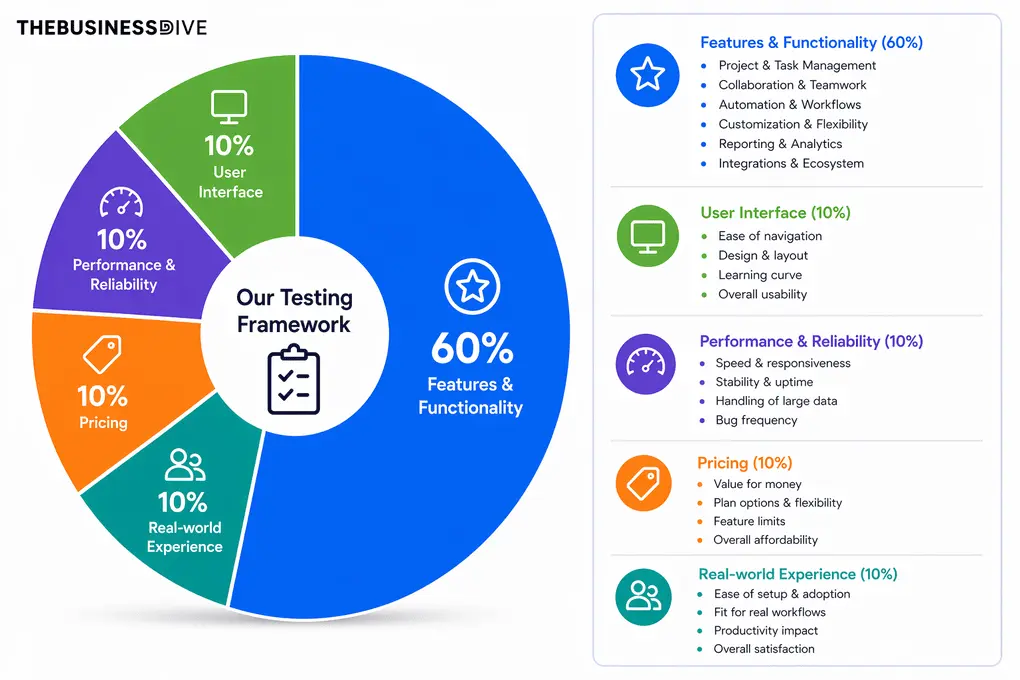
- Features & functionality → 60%
- User interface → 10%
- Performance & Reliability→ 10%
- Pricing → 10%
- Real-world experience → 10%
Features & functionality (60%)
This category accounts for 60% of the total score and reflects a project management app’s capabilities.
Project & task management
This is how we test the project and task management features:
- Creating a workflow for numerous projects from scratch
- Adding tasks, subtasks, and dependencies
- Switching between views (Kanban, Gantt, Timeline, Table)
- Testing filtering, sorting, and grouping
- Using the project management app for at least a few weeks as a team and tracking several internal projects
What we look for:
- How easy it is to structure projects
- Flexibility of views and workflows
- Depth of task management (fields, dependencies, tracking)
Collaboration & teamwork
When testing project management apps, we take a closer look at these functionalities:
- Inviting team members and assigning tasks
- Comments, mentions, and notifications
- Real-time editing with multiple users
- Sharing records and reports via links
- Use specific team collaboration features at the same time, like the whiteboard with ClickUp
What we look for:
- Whether you can set up multi-step workflows and approval chains
- How notifications work
- How does the overall collaboration experience feel
Automation & workflows
This is how we check the automations and workflow functionalities
- Creating automation rules using “when → then” logic
- Testing triggers like record updates and form submissions
- Connecting email workflows (Gmail/Outlook)
- Adding multiple conditions to workflows
What we look for:
- Ease of setting up automation
- Flexibility of triggers and actions
- Real usefulness in reducing manual work
Customization & flexibility
We also test the customization options and overall flexibility:
- Building custom task fields (time tracking, formulas, etc.)
- Customizing views and layouts
- Testing how deeply workflows can be personalized
What we look for:
- Level of customization
- Ability to adapt to different use cases
- Balance between flexibility and complexity
Reporting & analytics
This is how we test the reporting capabilities:
- Using the dashboard view for resource management
- Tracking task progress and team workload
- Reviewing how the project management app visualizes the data
What we look for:
- Clarity of insights
- Usefulness for decision-making
- Visibility into team performance
Integrations
Here, you can find how we evaluate our score for integrations:
- Connecting Google Drive, Slack, and email
- Reviewing native integrations
- Testing Zapier connectivity
What we look for:
- Variety of integrations
- Ease of setup
- Real impact on workflow automation
User interface (10%)
This is how we come up with the score for the UI:
- Navigating the platform from scratch
- Building workflows without tutorials
- Using both desktop and mobile apps
What we look for:
- Learning curve
- Navigation clarity
Performance & reliability (10%)
This is how we get the score for performance when testing project management apps:
- Using the project management app with multiple projects and larger datasets
- Testing loading speed when opening workspaces and solutions
- Testing the mobile app for responsiveness and stability
- Simulated real-time collaboration with multiple users editing simultaneously
What we look for:
- Overall speed and responsiveness
- Loading times when switching views or opening projects
- Stability during real-time collaboration
- Ability to handle larger datasets without lag
- Bugs, crashes, or data-saving issues (especially on mobile)
Pricing & value (10%)
This is how we test and provide a value score for each project management app:
- Compare plans and feature limits to other project management apps we tried
- Evaluate free plan usability
- Benchmarking pricing vs competitors
What we look for:
- Value for money
- Feature availability in lower tiers
- Scalability for teams
Real-world experience (10%)
While our experience can be subjective, we try to make the score as objective as possible based on criteria:
- Using the project management app to manage real project workflows over multiple days
- Creating full project setups (tasks, fields, automations, views)
- Collaborating with team members (assigning tasks, using the team features, etc.)
- Using it for both structured data (tables) and project tracking
- Comparing it directly with other alternatives
What we look for:
- How quickly I could go from setup → actual productivity
- Whether the tool simplifies or complicates daily workflows
- How well features work together (not just individually)
- If it replaces multiple tools (PM + database + tracking)
Our testing approach
Project management tools are used daily to plan, organize, and execute work. Because of that, we do not evaluate them based only on feature lists or first impressions.
We test project management apps by setting up real projects, creating tasks, assigning work, and managing workflows over time. This includes testing how teams collaborate, how tasks move through different stages, and how the tool performs as projects grow.
This testing framework is used across all of our project management content, including individual reviews, comparisons, and “best of” guides. All recommendations are based on this same evaluation process, not on one-off impressions.
Testing duration & depth
Each project management tool is tested for at least 1–3 weeks, not just a quick trial.
We use every tool across multiple sessions and project scenarios to understand how it performs over time. This includes managing ongoing tasks, revisiting projects after a few days, and testing how the system handles increasing complexity.
Why project management apps are hard to compare
Project management tools vary widely depending on team size, workflow, and use case.
From our testing, here are the main reasons they are difficult to compare:
- Different team sizes. A solo user, a small team, and a larger team use tools differently
- Different workflows. Some teams work linearly, others use boards, timelines, or mixed approaches
- Feature complexity. More features often mean more setup and more steps for simple actions
- Customization levels. Flexible tools can require more time to configure
- Pricing structure. Advanced features are often limited to higher plans
Because of this, a feature list alone does not reflect how a tool performs in real work.
Real scenarios we test
We do not just explore features. We simulate real project workflows:
- Creating and managing multiple projects
- Adding tasks, subtasks, and dependencies
- Assigning work to team members
- Changing priorities and handling overdue tasks
- Tracking progress across different views such as boards and timelines
This helps us understand how each tool performs in real-world conditions.
How we test project management apps
We do not just click around for a short time. We use each tool over time to understand how it behaves in everyday work.
We set up projects with tasks, deadlines, and collaborators. We move tasks between stages, adjust priorities, and test how the tool handles ongoing changes.
During testing, we look for clear answers to questions like:
- Is the tool still usable after several days of regular use?
- How quickly can a new user become productive?
- Does the tool remain manageable as projects and teams grow?
Testing across multiple sessions helps us identify strengths, limitations, and friction points that only appear with consistent use.
Proof of testing
All screenshots and videos included in our reviews are:
- created during our own testing
- based on real projects and workflows
- never taken from marketing materials
This ensures that all visuals reflect actual product usage.
Check out some of our reviews to see how it works in practice:
What we don’t do
Just as important as what we test is what we intentionally avoid:
- We do not rely only on demos or marketing pages
- We do not rank tools based on affiliate commissions
- We do not test tools for only a few hours
- We do not assume one tool works for every team
Project management is highly contextual, and oversimplifying it would not be helpful.
How we make recommendations
Instead of calling one tool “the best,” we focus on specific use cases, such as:
- Best for small teams
- Best for complex workflows
- Best for growing teams
- Best budget option
This makes it easier to choose a tool based on how it will actually be used.
How often are reviews updated
Project management tools evolve constantly. Features change, pricing shifts, and interfaces are updated.
We revisit reviews when:
- pricing changes
- major features are released
- core workflows or user interface significantly change
Keeping reviews up to date is part of our process.
Transparency & monetization
Some of our articles include affiliate links. If you sign up through one of them, we may earn a commission at no extra cost to you.
This never influences how tools are tested, ranked, or recommended.