


7 Best Organization Apps To Maximize Productivity In 2026
Staying organized is crucial to success. It helps you to feel more in control of your life and to become more productive and effective. However, staying organized when so much is happening can be tough. Fortunately, numerous organization apps can help you stay on top of your to-do list, manage your schedule, and boost your productivity.
In this guide, I collected the best organization apps to supercharge productivity and stay organized. Let’s get it started!
The best organization apps by category
Here are the best organization apps, selecting them based on categories:
| Organization Apps | Category | Top Features | Price |
| Todoist | Best task management app | – You can access your to-do list across all your devices – Divide your projects, give tasks to others, set deadlines, add files, and leave comments – Switch between list, calendar, or board view | Free plan: Available Pro: $4/month per user Business: $6/month per user |
| ClickUp | Best project management app | – It provides an overview of your tasks, projects, due dates, etc. – Unique customization options allow you to tailor your workflows and dashboard to your specific needs – Ask questions and get answers regarding documents. | Free plan: Available Team: $7/month per user Business: $12/month per user Enterprise: Contact for pricing |
| Reclaim AI | Best calendar app | – Reclaim will keep your calendars organized and will auto-schedule events based on your preferences – Sync multiple calendars, including Google Calendar, to see all your events in one place – You can track crucial aspects of time management | Free version: Available Starter plan: $8 per user/month Business plan: $12 per user/month Enterprise plans: Enterprise $18 per user/month |
| Sanebox | Best email management app | – It automatically filters out junk mail – You will receive a reminder if someone does not respond to your email – It is compatible with all email service providers | Snack plan (one email account + 2 picked features): $7 per month Lunch plan (two email accounts + 6 picked features each): $12 per month Dinner plan (four email accounts + all features): $36 per month |
| Notion | Best workspace app | – It keeps your documents, wikis, tasks, projects, and meeting notes in one place – Access many templates for creating to-do lists, class schedules, meeting notes, etc. – It helps to plan, manage, track, and execute your projects | Free plan: Available Plus plan: $10/month per user Business plan: $20/month per user Enterprise plan: Contact for pricing |
| Missive | Best app for team communication | – The team inboxes can help you avoid missing any important messages, and you can assign those to other teams – You can start a chat within the email thread – It provides key metrics to measure your team’s productivity and communication habits | Free plan: Available (Up to three users) Starter plan: $14 monthly per user (Up to five users) Productive plan: $18 monthly per user (Up to fifty users) Business plan: $26 monthly per user (Unlimited users) |
How do you choose organization apps?
Consider the following aspects before deciding which organization app to choose:
- Features: Consider the features of the organization apps and how you can implement them into your workflows.
- User interface: A simple interface is key. A complicated interface can be overwhelming, resulting in decreased productivity and performance.
- Integrations: Take a look at the integration capabilities to avoid constantly switching from one app to another.
- Pricing: If you plan to use the app for a while, you should consider the annual plan, which is way cheaper.
- Reviews: Evaluate the reviews, ratings, and user experience when deciding which organization apps to use. It can help to understand what other people have experienced with the apps.
Best organization apps in 2026
Todoist
Best task management app to accomplish more
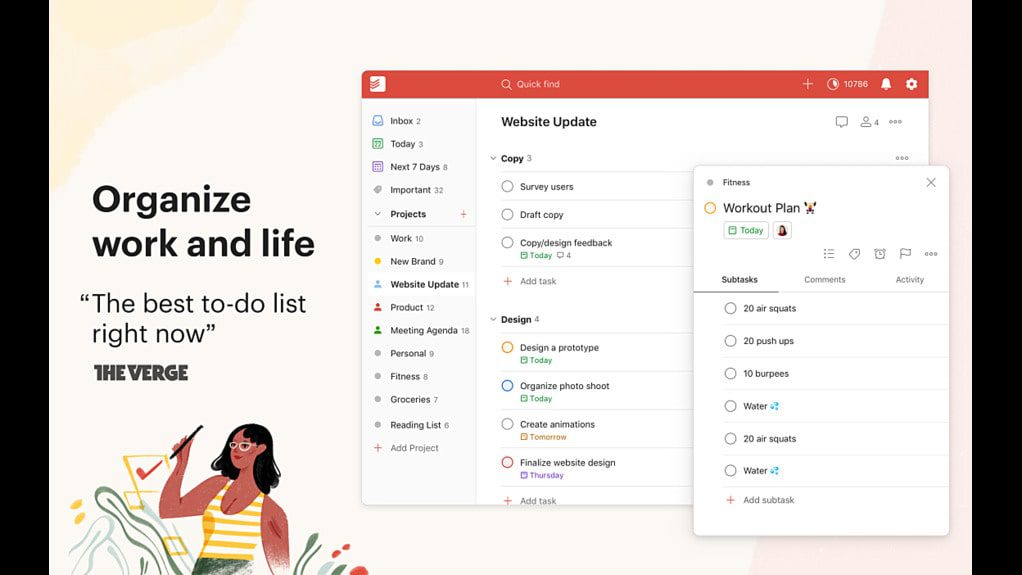
Todoist is the number one to-do list app that millions already use. It is an AI-powered task management tool that helps you organize your life and work. Todoist is a simple yet effective productivity app that assists you become more focused and organized.
Best for
It is best for those who are looking for a tool to easily manage to-do lists, set reminders, create different projects, and track progress.
Key features
- You can access your to-do list across all your devices, including desktop, IOS, and Android.
- Switch between list, calendar, or board view to see your whole week at a glance.
- It is easy to divide your projects, give tasks to others, set deadlines, add files, and leave comments.
- Todoist also has a shared workspace so your team can work together and keep everything organized.
- It provides you with productivity visualizations by week and month to ensure you achieve your goals.
- You can quickly add tasks in Todoist or from other tools thanks to the +80 integrations.
- There are numerous templates for work and life.
Pricing and reviews
Pricing:
- Free plan: Available
- Pro: $4/month per user
- Business: $6/month per user
Reviews:
- G2: 4.4/5 (750+ reviews)
- ProductHunt: 4.8/5 (170+ reviews)
If you want a deeper look, read this full Todoist review.
ClickUp
Best project management app to organize your projects

ClickUp is a project management tool with extensive feature set. It allows you to track your projects and tasks while providing many collaboration features to enhance teamwork.
Best for
ClickUp is best for agile or remote teams.
Key features
- ClickUp’s unique customization options allow you to tailor your workflows and dashboard to your specific needs.
- Its dashboard provides an overview of your tasks, projects, due dates, etc.
- With ClickUp AI Brain, you can make your life easier by automating repetitive tasks like project summaries and updates.
- ClickUp’s AI Brain feature allows you to ask questions and get answers regarding documents, tasks, and projects.
- You can create documents, add comments for others, give them tasks and milestones, and even turn text into items you can keep track of.
- ClickUp has a real-time chat to improve productivity, efficiency, and team communication.
- It allows you to add targets and track progress, whether numerical, monetary, or true/false milestones.
Pricing and reviews
Pricing:
- Free plan: Available
- Team: $7/month per user
- Business: $12/month per user
- Enterprise: Contact for pricing
Reviews:
- G2: 4.7/5 (9400+ reviews)
- ProductHunt: 4.5/5 (950+ reviews)
If you want a deeper take, read this full ClickUp review.
Reclaim AI
Best calendar app for keeping track of your tasks and maintain work-life balance

Recl