


18 Best Team Productivity Tools To Enhance Collaboration
Collaboration is the key to success for any team. However, boosting collaboration could be a real challenge. It is about using the proper techniques and tools. With the right methods, team productivity tools can make collaboration more efficient and effective.
Whether you work with a remote team or a team physically located in the same office, these productivity tools will make it easier for you to collaborate, stay organized, and achieve your goals.
With so many tools available in the market, it can be overwhelming to choose the one that fits you the best. That is why I have compiled a list of the 16 best team productivity tools that will help enhance collaboration and streamline workflows.
Let’s get started!
Team productivity tools vs. regular productivity tools
Team productivity tools are specifically designed to help teams work together more efficiently. These tools often include collaboration features like real-time chat, file sharing, etc. As a result, team productivity tools make the whole team more efficient and not just individuals.
Regular productivity tools help you stay organized and get your work done faster. They are useful when you are working alone without any team collaboration. For instance, you can use apps like an email or AI writing assistant to be more productive. These tools can help you work more efficiently without affecting your team collaboration.
Ultimately, the main difference between team productivity and regular productivity tools is that team productivity tools focus on facilitating collaboration and communication among team members. In contrast, regular productivity tools are designed to help individuals manage their own work more effectively.
How do you choose the best team productivity tool?
When deciding which team productivity tool to use, consider the following aspects:
- Features: Look for a tool that offers the features your team needs to improve productivity. For this, it makes sense to evaluate your workflows and find the ones you need to fix. For example, investing in an AI note-taking app makes sense if your team spends too much time in online meetings. However, you may need a project management tool if your team regularly misses deadlines or has difficulty tracking projects and relating responsibilities.
- Reviews: Ratings and reviews represent a good starting point when comparing one productivity tool to another.
- Integrations: Consider the tools you already use and look for a productivity tool that integrates with them. It will help you to streamline your workflow and avoid duplication of efforts.
- Pricing: Look for a tool that fits your budget and offers a pricing plan that aligns with your needs. Some tools offer a free version with limited features, while others require a subscription.
- User experience: Choose a tool that is easy to use and intuitive. Also, you must be aware of your team’s skills and their familiarity with similar tools. A tool that is too complex or has a long learning curve may frustrate your team and decrease productivity.
The best team productivity tools
Here are the best team productivity tools in 2026!
Project management tools
These tools are the heart of efficiency and productivity within a team and the whole organization. Project management tools are a central hub where you can manage, track, streamline workflows, allocate resources, and collaborate with your team members in real-time.
With the right project management tools, businesses can save time, reduce costs, and boost overall productivity.
ClickUp
A project manager app for agile and remote teams
Key features
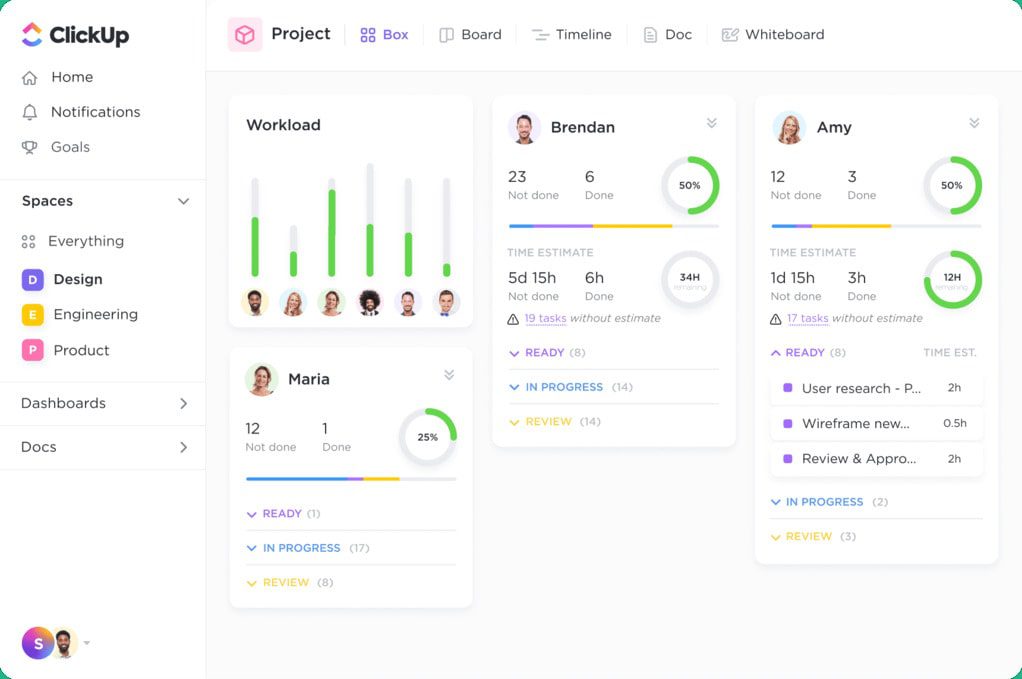
- Unique personalization options: ClickUp has over 15 visualization possibilities, from Gantt charts to calendar views.
- Task management: You can comment under each task and project, assign team members action items, and convert text into trackable tasks.
- Automation: You can automate repetitive tasks like project summaries and updates with ClickUp AI Brain.
- AI support: ClickUp’s AI Brain feature helps users get answers to questions about documents, tasks, and projects by simply asking.
- Writing assistant: The AI feature also works as a writing assistant that automatically checks your spelling and replies to messages with your tone.
- Real-time chat: The real-time chat function ensures immediate and responsive collaboration with teammates, enhancing productivity and efficiency.
- Progress tracking: ClickUp allows you to add targets and track progress, whether numerical, monetary, or true/false milestones.
- Integrations: You can easily integrate ClickUp with 8000+ apps like Slack, Zoom, Gmail or Dropbox.
Pricing
- Free plan: Available
- Team: $7/month per user
- Business: $12/month per user
- Enterprise: Contact for pricing
Reviews
- G2: 4.7/5 (11,000+ reviews)
- ProductHunt: 4.5/5 (950+ reviews)
Wrike
A productivity app for teams who have more complex projects but need an easy-to-use tool

Key features
- Wrike Dashboard: You can get a detailed overview of project progress and team performance using personalized dashboards.
- Advances project resource planning: Wrike helps accelerate resource planning, provides insights on resource demands, and optimizes team workload.
- Automate repetitive work: You can create rules across all projects and automate reminders, custom fields, work structures, status transitions, etc.
- Request forms: Wrike helps you to build forms that include checkboxes, dropdowns, priority, due dates, etc, so you can make requests quickly.
- AI feature: Wrike’s AI helps identify historical patterns and recurring issues, providing an overview of the project’s risk factors.
- Detailed analytics: Wrike has one of the most advanced analytics when it comes to project management.
- Integrations: Wrike allows integration with more than 400 apps.
Pricing
- Free plan: Available
- Team plan: $9.8/month per user
- Business plan: $24.8/month per user
- Enterprise plan: Contact for pricing
- Pinnacle plan: Contact for pricing
Reviews
- G2: 4.2/5 (3600+ reviews)
- Capterra: 4.3/5 (2500+ reviews)
Hive
A project management tool to organize projects, tasks, files, and forms in a single platform

Key features
- Centralized workspace for project management: Hive creates a space to see your team’s tasks, projects, and campaigns together in one place.
- Views options: With Hive, you can see your projects from different angles using Kanban, Gantt, Table, Portfolio, Calendar, and List views.
- Time tracking software: You can track your time spent on different projects and send the timesheet to your team leaders weekly.
- Chat and video meetings: You can chat with your teammates or just simply jump in video calls using Zoom and Google Meet shortcuts.
- Goals and analytics: Hive allows you to set, track, and monitor goals across your team and provides you with key insights on productivity and KPIs.
- AI feature: Hive’s AI assistant helps you to write content and brainstorm ideas.
- Integrations: Hive has over 1000+ integrations.
Pricing
- Free plan