


Quo Review 2026: What Happened to OpenPhone?
Choosing the right business phone system isn’t just about getting a second number. You also need to consider how well it handles calls, messages, teamwork, and everything that happens after a conversation ends.
In this Quo review, I tested the platform to see how all of these pieces work together and whether it’s as easy to use as it looks.
TL;DR
Here’s the quick verdict if you don’t want to read the full review:
🎯 Best for: Small businesses and teams that need a modern, all-in-one business phone system
🚫 Not ideal for: Businesses that need local phone numbers outside the US and Canada
⭐ Biggest strength: A polished combination of calling, messaging, AI, and team collaboration
⚠️ Biggest weakness: Some useful features are locked behind higher-tier plans
⚖️ Verdict: Quo is a feature-rich and easy-to-use business phone system that delivers a genuinely polished experience, especially for US- and Canada-focused teams.
🏆 Score: 4.5/5
✅ Tested with our review & scoring methodology ✅ Real-world testing ✅ Unbiased evaluation
What is Quo?
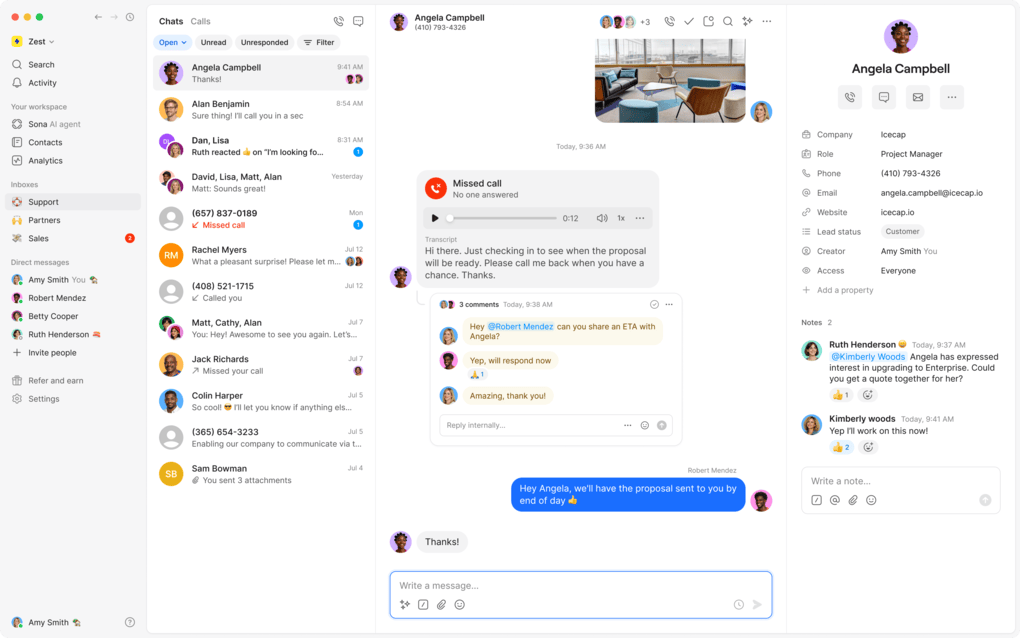
Quo is a business communication platform that brings a VoIP phone system, business messaging, shared inbox, and AI-powered features together in one workspace.
The company was founded in 2018 as OpenPhone, with the goal of giving small businesses a simpler and more modern alternative to traditional business phone systems.
In September 2025, OpenPhone rebranded as Quo, reflecting a broader focus on managing business communications beyond phone numbers alone.
Today, the platform serves more than 90,000 businesses and offers everything from calls, texts, and shared numbers to call routing, analytics, integrations, and its Sona AI agent.
What I Liked (and Didn’t) After Using Quo
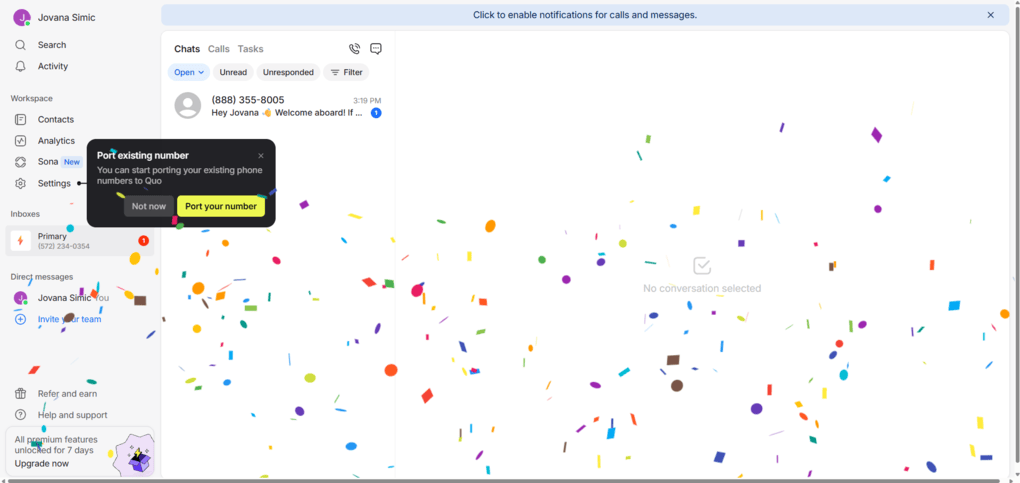
After spending time with Quo, I found it to be a well-rounded business phone system that manages to pack a lot of functionality into a relatively simple interface.
The calling features were one of the strongest parts of my experience. Call recording, transcripts, AI summaries, call quality metrics, transfers, and shared conversations give you plenty of control.
I was also impressed by how much Quo has built around AI, particularly Sona, Quo’s AI receptionist feature,and its knowledge-building process.
The biggest drawbacks are its focus on US and Canadian phone numbers, the extra steps required for US texting verification (which is standard for any business texting VoIP), and the fact that some of its more useful features are reserved for higher-tier plans.
For businesses that fit its target market, though, Quo offers a genuinely polished experience.
Key points I found
Quo gets a lot right, but it also has a few limitations worth knowing before you decide if it’s the right fit for your business.
What Quo Does Really Well
The Tradeoffs to Know About
Who should use Quo
- Small businesses and startups that need a professional business phone system without setting up traditional phone infrastructure
- Sales and support teams that need shared numbers, call routing, messaging, and conversation history in one place
- Remote and distributed teams that need to manage calls and messages from anywhere
- Teams that rely on AI for call summaries, transcripts, lead capture, and automated customer interactions
- Businesses already using CRMs and automation tools such as HubSpot, Salesforce, Slack, Zapier, or Make
Who should consider alternatives
- Businesses outside the US and Canada that need local phone numbers in their own country
- Teams looking for a free business phone solution rather than a paid subscription
- Businesses that need advanced features on a lower-cost plan, since some of Quo’s more useful features require Business or Scale
- Companies with heavy international calling needs, since international calls and messages are billed separately
What Pushed Quo to a 4.5/5?
Quo earns 4.5/5 for its clean interface, strong calling features, useful AI tools, and flexible team collaboration. The main drawbacks are its North America-focused phone numbers and the fact that some features require higher-tier plans.
Using Quo: Feature by Feature
Here’s a closer look at the features I tested in Quo and how they performed in real-world use.
Business phone numbers and contacts
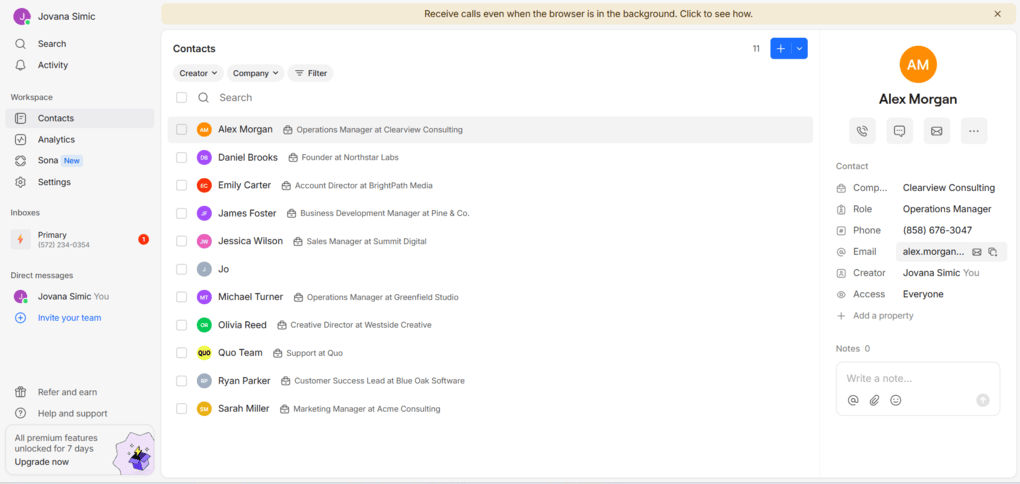
Quo starts with a business phone number that you can use for calls and messages without relying on your personal number. It supports local US and Canadian numbers as well as North American toll-free numbers, while existing numbers can also be ported into the service.
The contact management tools are straightforward. I could create contacts manually and import multiple contacts through a CSV file, with fields for names, companies, roles, phone numbers, and email addresses.
The contact’s profile gives you quick actions for calling, messaging, and emailing them, while also showing their conversation history and other relevant details. Quo also lets teams share numbers and manage who has access to them.
Calling and call management
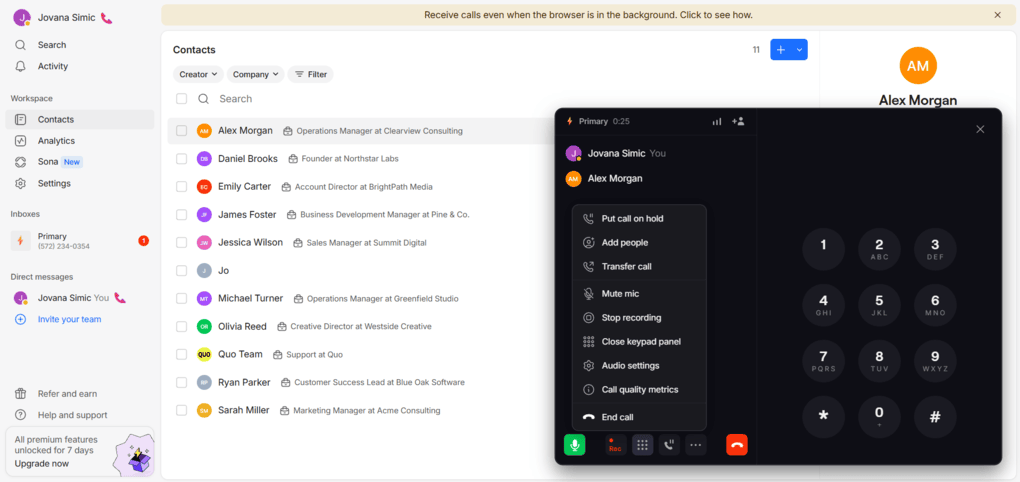
You can start a call from a contact, conversation, or dial pad, and the active call screen keeps the main controls within easy reach. Quo also supports business caller ID, call forwarding, voicemail, business hours, and shared numbers.
During a call, Quo puts all the essential controls right at your fingertips, including the microphone, keypad, recording, hold, and options to add or transfer callers.
I could add another participant by searching through team members, inboxes, contacts, or phone numbers. The transfer option was just as flexible, letting me choose where to send the call while staying on the line until I decided to leave.
I also found a few useful controls, including audio settings and call quality metrics.
After ending a call, Quo keeps the conversation in the inbox, so you don’t have to search through a separate call history to find it. You can see when the call took place and how long it lasted, while recordings, transcripts, and AI summaries can appear directly in the conversation.
One thing I noticed during testing is that the call interface is designed with team workflows in mind. You can add another person to an active call or transfer it to someone else, while Quo also supports shared numbers and team-based routing.
Messaging and shared conversations
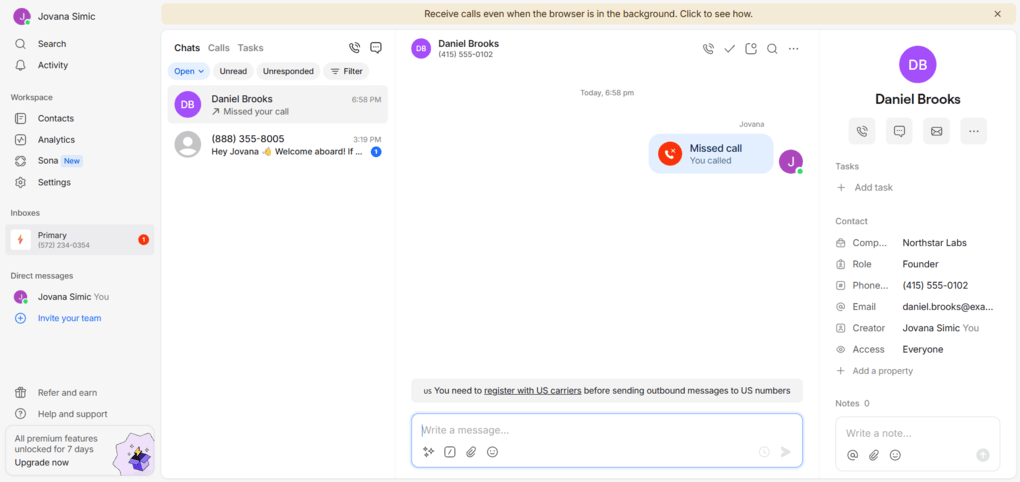
Quo brings business messaging into the same workspace as your calls, keeping conversations, missed calls, voicemails, and other customer interactions in one place. It supports both SMS and MMS, along with handy features such as snippets, scheduled messages, and auto-replies.
The shared inbox makes Quo more practical for teams.
Multiple team members can work from the same business number and access customer conversations, while features such as group messaging, internal comments, presence indicators, and inbox viewers help everyone stay on the same page.
AI call summaries, transcripts, and recordings
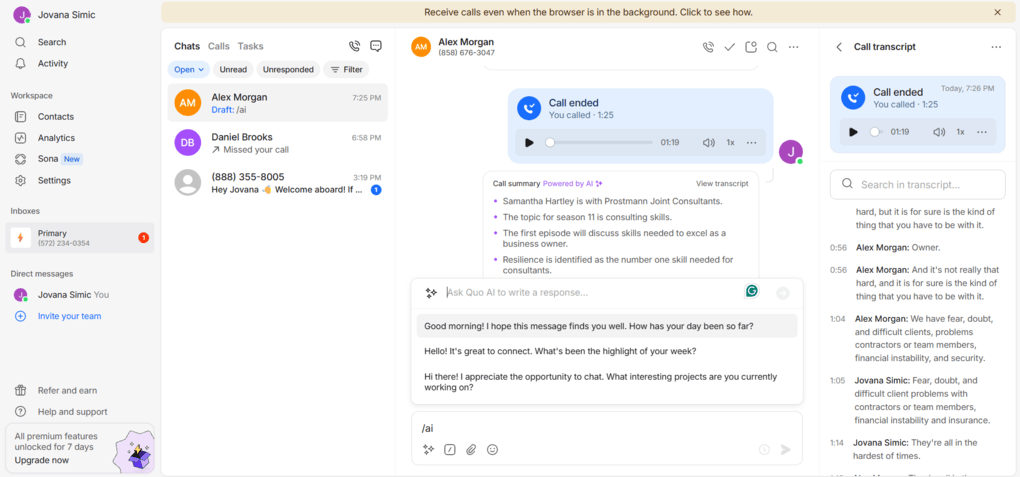
After testing calls, I could see how Quo handles everything that happens after you hang up. When call recording is enabled, the recording is saved directly to the conversation, where I could play it back without having to look for it somewhere else.
Quo also generated an AI summary of my call, including the main points discussed and suggested next steps. The summary was paired with a full transcript, with timestamps and speaker labels, so I could go back directly to a specific part of the conversation.
Quo also offers searchable conversation content and dedicated call views, so teams can filter and dig into previous calls. Instead of relying on someone’s notes after every call, Quo can turn the conversation into a searchable record with the important details already pulled out.
Tasks and analytics
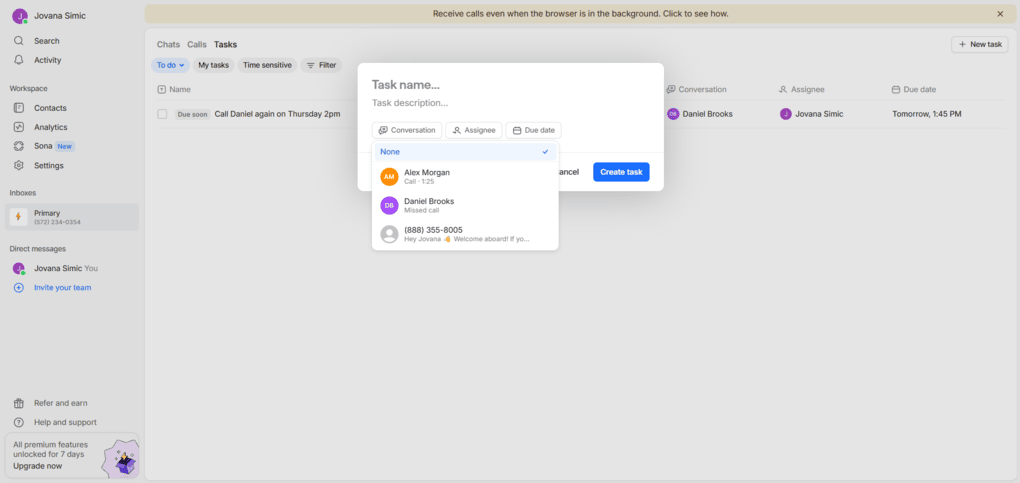
Quo also gives you a few tools for keeping track of what needs to happen after a call or message. I could create a task directly from a conversation, assign it, add a due date, and link it to the relevant contact.
Quo’s current analytics go beyond basic call counts. The platform offers per-teammate performance, call outcomes, busy-time patterns, searchable conversations, call views, and CSV exports with more than 24 call and conversation data points.
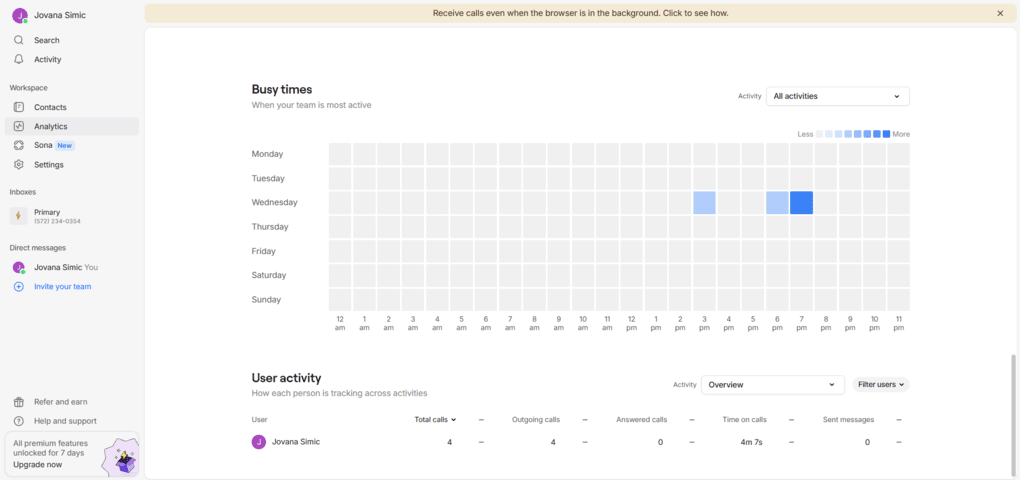
I liked that the analytics aren’t limited to a few headline numbers. You can also look at individual user activity and export the data as a CSV.
For a team using Quo for sales or customer support, this could make it easier to spot patterns in call volume and see how much activity is actually happening in the workspace.
Sona, the AI Agent
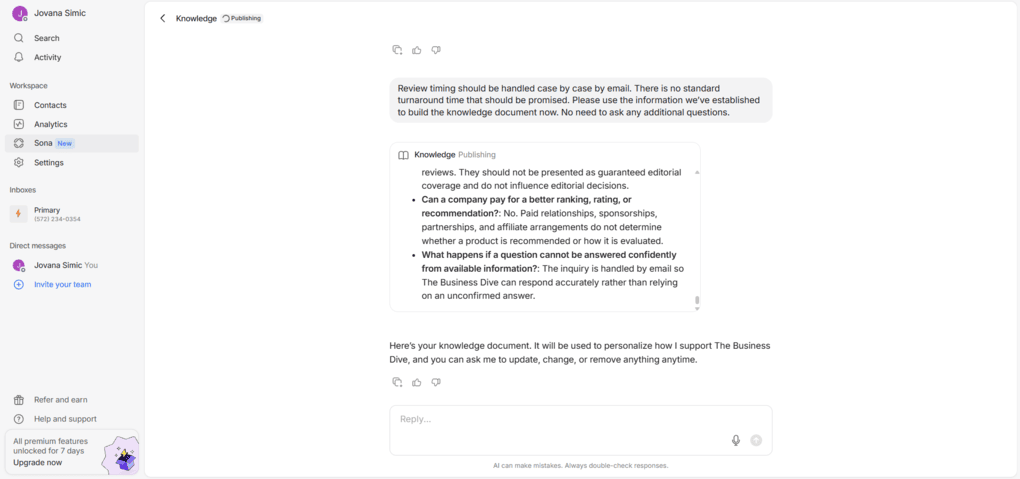
Sona is Quo’s AI agent for handling calls and messages, and this was one of the more interesting features to explore. Rather than simply turning on an AI assistant and hoping it knows what to do, Quo first walks you through a training process.
I tested Sona by giving it The Business Dive’s website and letting it pull the basic information it could find. It then asked me a series of follow-up questions about things that weren’t clear from the site, and how to handle questions about reviews, affiliate links, and editorial independence.
Once I answered the questions, Sona turned everything into a knowledge document.
Sona can use this knowledge to answer common questions, capture lead details, take messages, and ask follow-up questions when it needs more information from a caller.
It can also be placed at different points in a call flow, including after business hours or when a team member doesn’t answer.
And Sona now works for SMS, so it can text back and forth to answer questions and gather details.
Sona’s conversations also stay inside the Quo workspace, with transcripts, summaries, and messages available for the team to review afterward.
I didn’t test a live Sona call, so I can’t judge how well it actually handles a customer conversation. But the training and knowledge-building workflow was straightforward, and I could see why it would be useful for businesses that get a lot of repetitive questions or new leads.
Call flows and routing
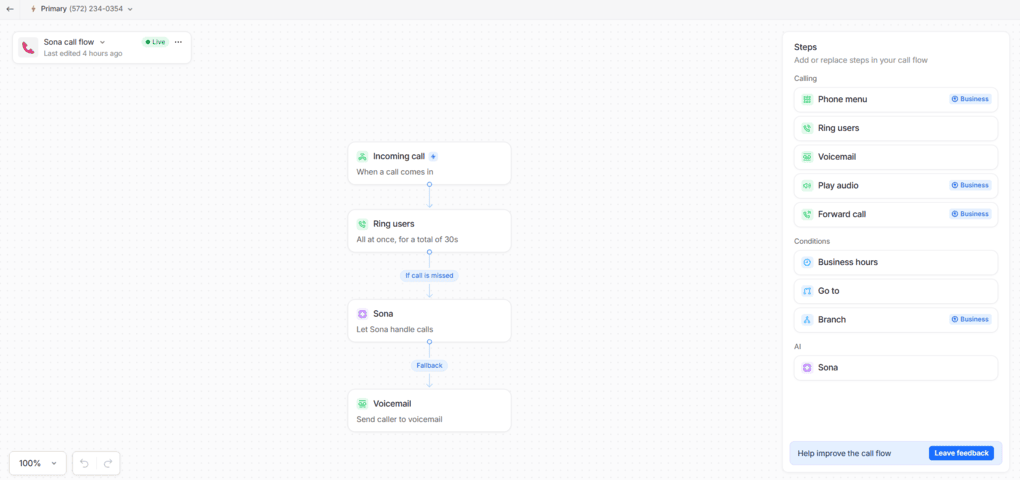
If you need more control over how incoming calls are handled, Quo lets you build custom call flows instead of sending every caller straight to the same person or voicemail. The visual builder makes it possible to connect different steps and create a flow that fits the way your team handles calls.
A flow can start with an incoming call and then route it to your team, Sona, voicemail, or another step. I found options for phone menus, forwarding calls, playing audio, business hours, and branching, giving you plenty of ways to create different paths depending on who’s calling and what they need.
Quo integrations
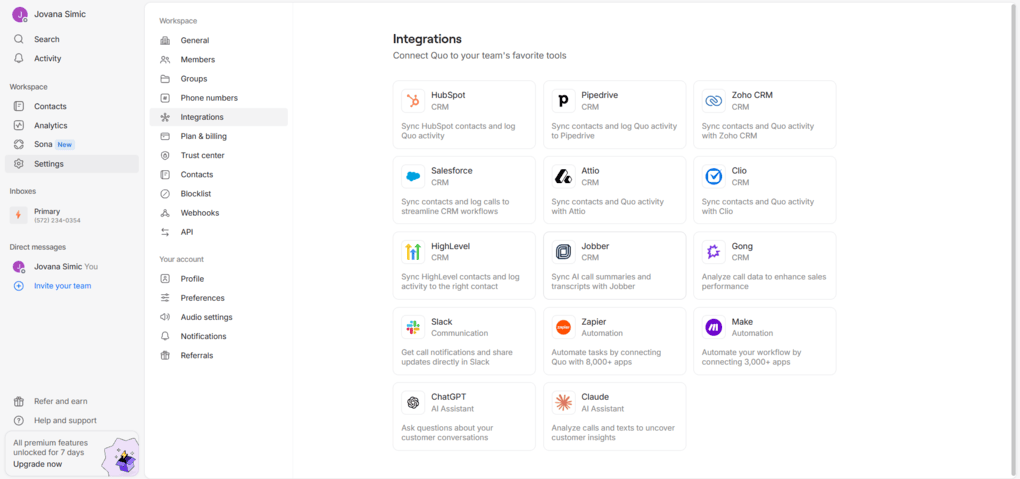
Quo offers a solid range of integrations. It integrates with popular CRMs, including HubSpot, Salesforce, Jobber, Pipedrive, and Zoho CRM, as well as tools such as Slack, Zapier, Make, Gong, and HighLevel.
Quo also integrates with ChatGPT and Claude so you can pull insights from conversations, which is a nice addition if you’re already using AI tools alongside your business communications.
The main limitation is that some integrations are only available on higher-tier plans, so you’ll want to check your plan before assuming a particular CRM integration is included.
User experience
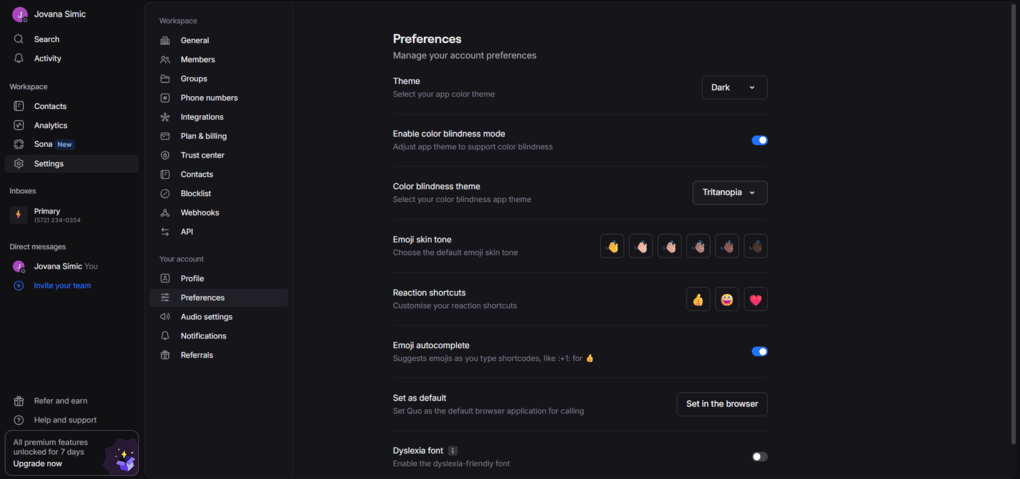
Quo has a clean, modern, and intuitive interface. The main workspace keeps Chats, Calls, and Tasks easy to access, while conversations, contacts, and call activity are neatly organized. I also liked how many actions are available directly from a conversation.
There are also some thoughtful customization options tucked into Preferences, including color-blindness settings and a Dyslexia-friendly font, which aren’t features you see in every business phone platform.
Overall, Quo manages to pack quite a few features into an interface that is clean and easy to navigate.
Quo pricing plans
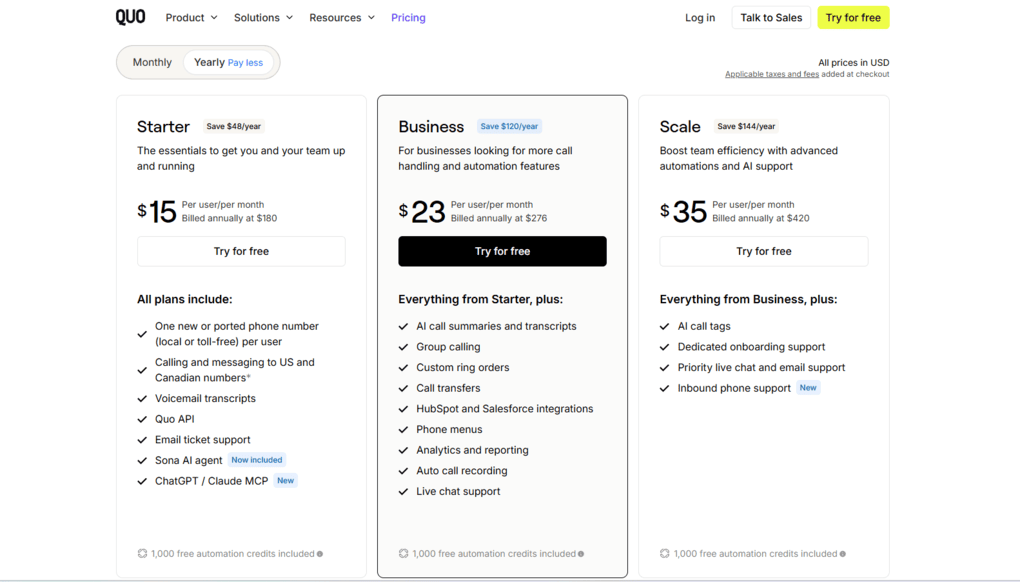
Quo doesn’t offer a free plan, but you can try the platform with a 7-day free trial. After that, if you want to upgrade, you can choose between three paid plans: Starter, Business, and Scale.
The Starter plan costs $15 per user/month when billed annually. It includes one new or ported local or toll-free number per user, calling and messaging to US and Canadian numbers, voicemail transcripts, the Quo API, email support, Sona AI, and ChatGPT/Claude MCP.
The Business plan includes everything in Starter, but adds several features aimed at teams that need more advanced call handling. It costs $23 per user/month with annual billing.
At the top is Scale, which costs $35 per user/month when billed annually. It includes everything in Business, along with AI call tags, dedicated onboarding, priority live chat and email support, and inbound phone support.
Each plan also comes with 1,000 free automation credits to handle ~10 Sona calls monthly, if preferred.
Final thoughts
I hope this Quo review helped you get a better idea of what the platform offers, where it shines, and where it may fall short. Quo has a lot going for it, especially if you want calls, messaging, AI, and team collaboration in one place.
If you’re still on the fence, I’d suggest giving the seven-day trial a try and seeing how it fits into your own workflow. After all, the best way to know if Quo is right for your business is to put it to the test yourself.
Why you can trust our reviews
At thebusinessdive.com, our team tests, reviews, and compares hundreds of productivity apps every year — from project management tools to note-taking apps. We dive deep into real-world use cases to help you find the right tools that actually improve your workflow, not just add noise.
Our mission? No fluff, no shortcuts—just honest, hands-on insights from productivity pros.
Discover how we stay transparent, read our review methodology, and let us know about any tools we missed.
Frequently asked questions
Is Quo a good option for small teams?
Yes. Quo works particularly well for small teams and growing teams that want a simple solution for business phone calls, text messages, and other communication channels without investing in traditional desk phones. Its mobile apps and desktop apps make it easy to stay reachable and answer calls from almost anywhere, as long as you have a reliable Wi-Fi or internet connection.
Does Quo offer unlimited calling and priority support?
Quo includes unlimited calling to US and Canadian numbers on its paid plans, subject to fair-use limits. However, international calls and messages are billed separately.
Priority support is available on the Scale plan, while lower plans offer email or live chat support depending on the subscription.
Quo also offers API access and additional features for businesses that need to connect their phone system with other tools.
How does Quo compare with Google Voice and other VoIP providers?
Quo, formerly OpenPhone, is a strong choice if you need more than basic business calling. It combines phone numbers, messaging, shared conversations, AI features, call routing, analytics, and integrations in one platform.
However, it lacks some advanced features found with certain VoIP providers, such as auto-dialers and video conferencing. If your business depends on those features, Google Voice or another provider may be a better fit.

Hey! I’m Jovana, a content writer who loves writing, researching, and testing new productivity apps. With a background in philosophy, I bring a thoughtful but no-bullshit approach to everything I do. Let’s connect on Linkedin!
