


My Honest PDFgear Review 2026 | What They Don’t Tell You
There are many PDF editors, but only a few are completely free. And PDFgear is one of them.
If you are reading this PDFgear review, you probably have questions about its privacy (mostly), features, and the real pros and cons.
Stay here because I will honestly share what I found during my PDFgear review & testing, including its safety, features, and strengths & limitations.
Let’s dive in!
Verdict
Here’s the quick verdict if you don’t want to read the full review:
🎯 Best for: If you need a completely free PDF editor with reliable core tools
🚫 Not ideal for: User seeking advanced editing controls or more robust security/privacy options
⭐ Biggest strength: 100% free
⚠️ Biggest weakness: Concerns about privacy
⚖️ Verdict: A completely free PDF editor that offers all the essential features, but has debates about privacy
🏆 Score: 4.1 / 5
✅ Tested with our review & scoring methodology ✅ Real-world testing ✅ Unbiased evaluation
PDFgear Review
Summary
PDFgear is currently one of the best completely free PDF editors on the market. It offers strong editing, annotation, conversion, OCR, and AI tools without any subscription cost. While it lacks some advanced editing and security options, and there’s still ongoing debate about privacy, its performance and feature set make it an excellent choice for personal use.
|
|
A completely free PDF editor without hidden costs
|
|
|
Super performance even when working with larger files
|
|
|
Solid AI features
|
|
|
A simple PDF editor
|
|
|
Works on multiple devices
|
|
|
Lacks some advanced features
|
|
|
Ongoing debate on security
|
How We Test PDF Editors
To keep our reviews and final scores fair and consistent, we evaluate every PDF editor using a standardized testing framework built on over 3 years of hands-on experience testing these tools in real-world scenarios.
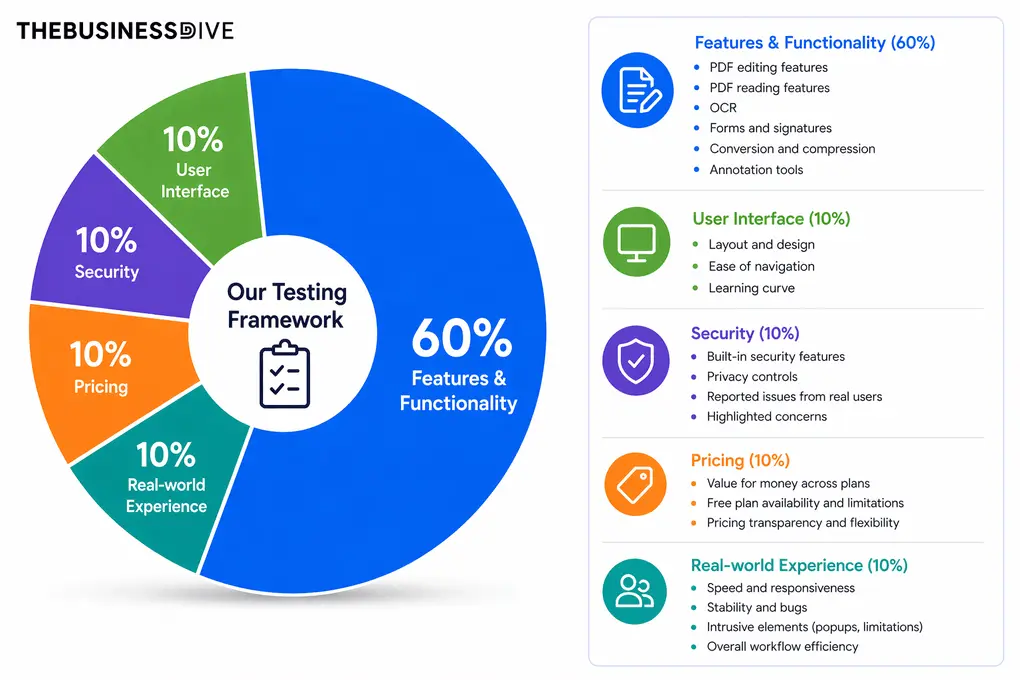
Our scoring breakdown after testing 30+ PDF editors:
🛠️ Features & functionality — 60%
🖥️ User interface — 10%
🔐 Security — 10%
💰 Pricing — 10%
👥 Real-world experience — 10%
Want a detailed breakdown of how we test each category?
Learn exactly how we test tools → Review methodology
Short on time? Here’s a quick overview of PDFgear
What is PDFgear?
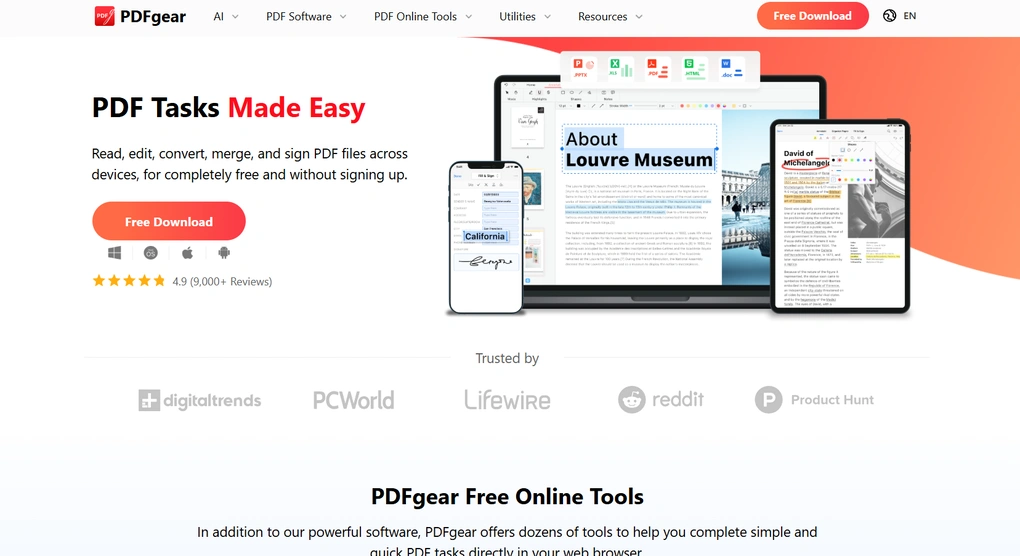
PDFgear is a free PDF editor that works on multiple platforms, including Windows and Mac. Also, you can use it on mobile devices (iOS and Android).
Once it is downloaded, PDFgear works offline and operates locally, letting users edit, annotate, convert, compress, and sign PDF documents without internet connections.
It was launched in 2022 by PDF GEAR TECH PTE. LTD., a software company registered in Singapore. PDFgear positions itself as the free alternative to Adobe Acrobat.
My experience with PDFgear in the past 3 years
Straight to the point: PDFgear is currently the best free PDF editor. It offers solid editing, annotation, AI, and conversion features for free, while these features are normally included in paid plans.
During my PDFgear review, I experienced smooth performance, and especially enjoyed using the PDFgear Copilot feature that works like a personal assistant.
As for drawbacks, I would appreciate more powerful editing features or password protection. Furthermore, there is still debate about PDFgear’s security, which poses a potential privacy risk (more information on the debate below).
While I think it’s a safe PDF editor based on my experience, since I used it numerous times in the past three years, there is a data risk, particularly if you use it in your business.
Would I recommend it to my friend?
Yes, if he wants to use it as an individual. If he were to use it for business purposes, I would recommend safer alternatives such as EaseUS PDF Editor or Xodo PDF Studio.
Why PDFgear scored 4.1 out of 5
PDFgear offers decent features for managing your files, such as 4 stars for PDF reading, annotation, and OCR, and 4.5 stars for conversion.
Where PDFgear falls short is in data safety and form & signature features, which ultimately results in a total score of 4.1 out of 5.
Who should use PDFgear
Who should NOT use PDFgear
Key Features
Let’s dive into PDFgear’s key features!
PDF reading
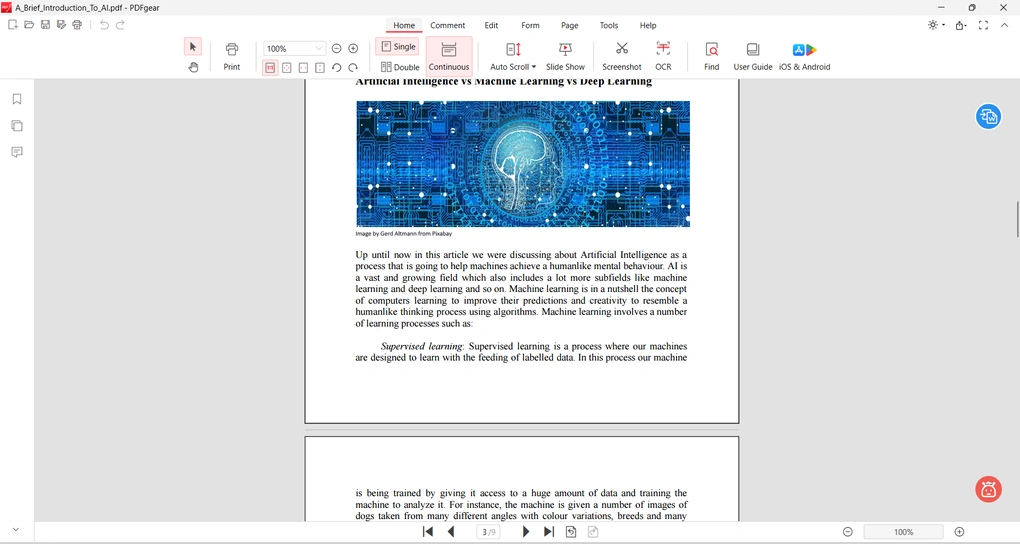
PDFgear offers solid PDF reading features. You can choose single- or double-page views and zoom in and out.
Furthermore, you can use its auto-scroll feature, which moves pages up or down at the selected speed. Lastly, you can use its slideshow tool to read the pages in slide form.
During my PDFgear review, I also discovered that it offers three themes and five background colors for maximum eye comfort. This one is especially useful when you read documents at night and want to minimize the light.
PDF editor
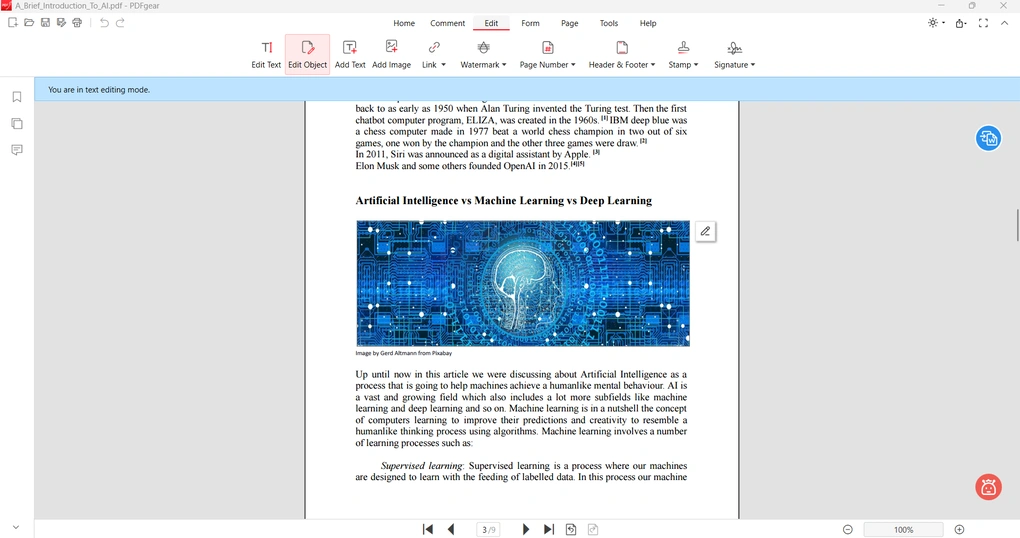
With PDFgear, you can edit text and images easily. If you select the “edit object” option, you only need to click on the item you want to edit, including images. Otherwise, just hit edit text, and you can modify the text boxes.
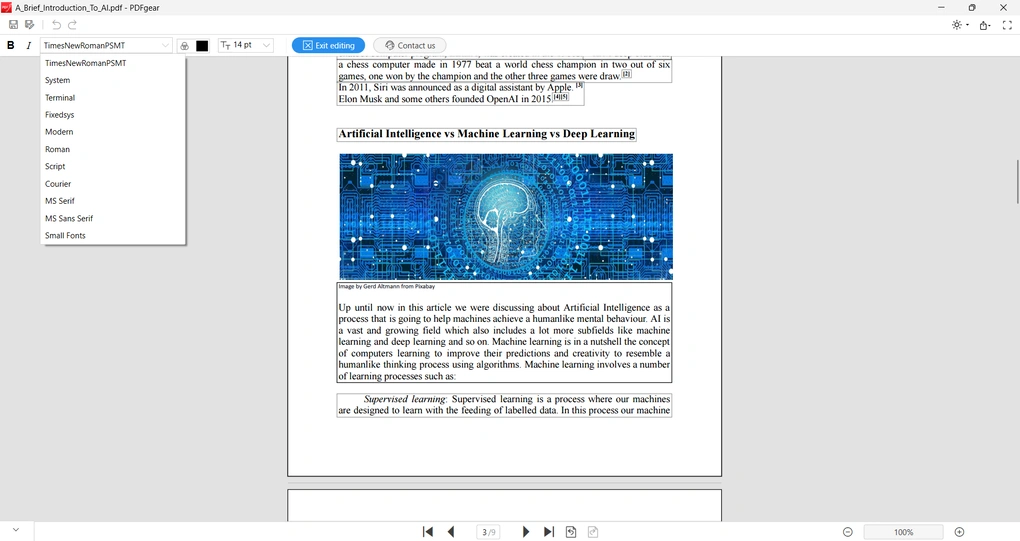
When editing text, you can choose from numerous font types, and PDFgear lets you adjust the size and color. The PDF editing worked smoothly, so it was easy to select the text boxes I wanted to edit, and I did not find any bugs.
Besides editing text and images, you can also add new images and text boxes. It works similarly to when editing existing text with PDFgear.
Overall, PDFgear has useful PDF editing features, although I missed some more advanced tools like determining the alignment of the text, spacing, and more. So, compared to EaseUS PDF Editor, Tenorshare PDNob, or other software I tested, the PDF editing tools are more limited.
Nevertheless, these features should be sufficient for many of you who need a free PDF editor for personal use.
Annotation tools
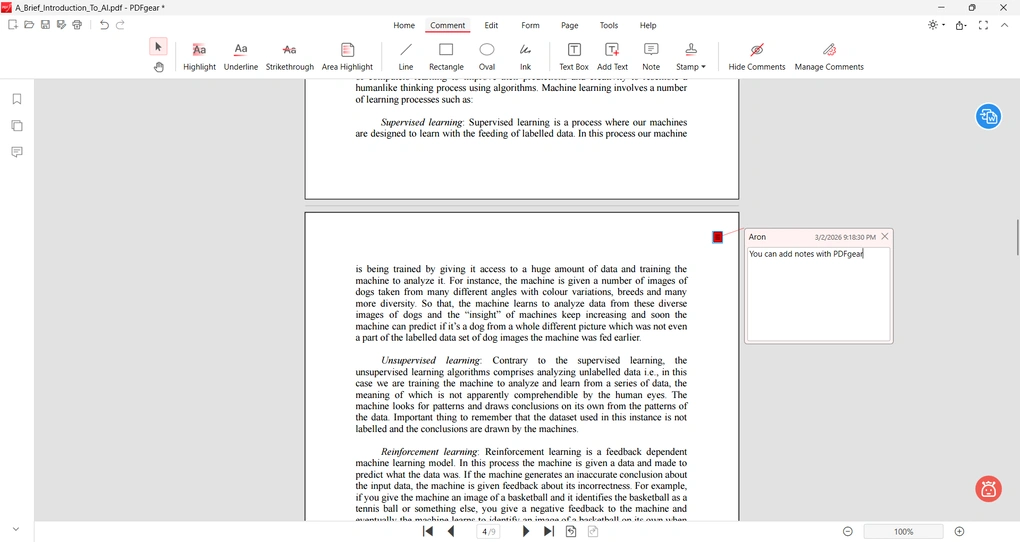
If you click on the “Comment” tab, you will access PDFgear annotation tools. You can highlight, add notes, underline, and strikethrough text. Moreover, PDFgear lets you add some shapes and stamps as well.
Ultimately, PDFgear provides all the necessary annotation tools.
PDF organization
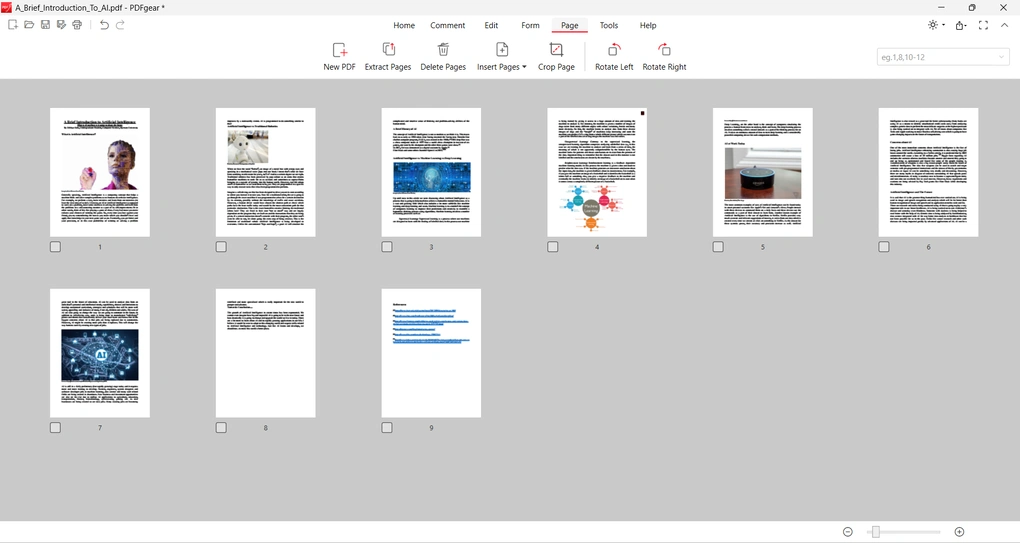
With PDFgear, you can organize pages in your PDF documents. You can insert, rotate, crop, delete, and extract pages with a few clicks.
In the course of my PDFgear review, I found the PDF organization tools straightforward.
Forms and electronic signatures
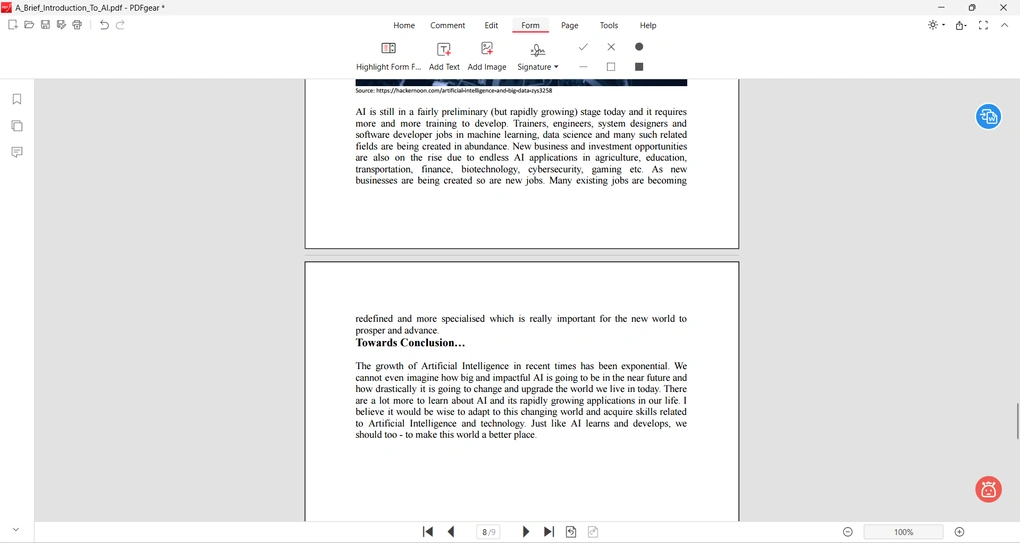
PDFgear’s features are ideal for filing forms, as you can add images, text boxes, and shapes. However, if you want to use it for complex form creation, its features are limited.
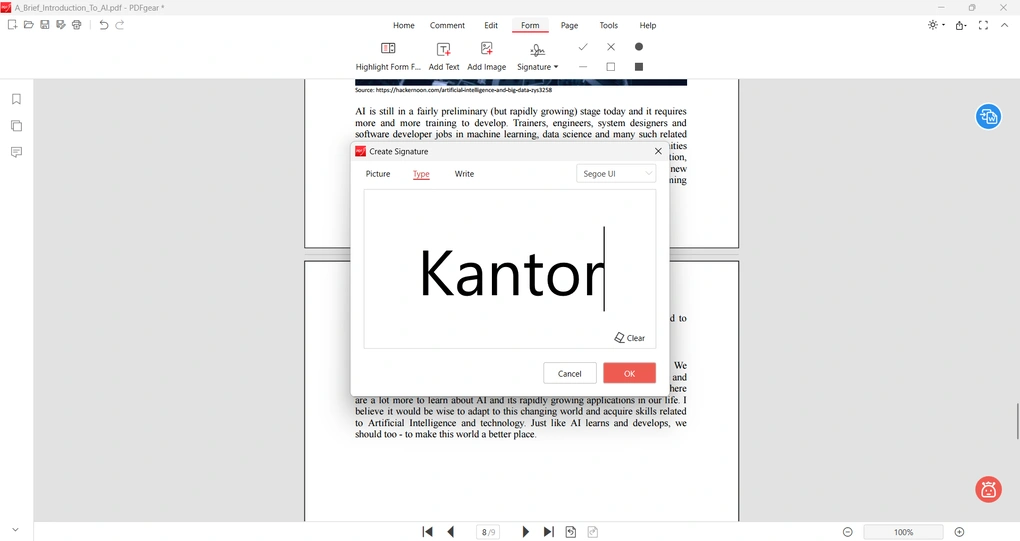
PDFgear provides options to draw, type, or upload an image for a signature. After you create your signature, you can easily sign PDFs by dragging and dropping your signature.
PDF security
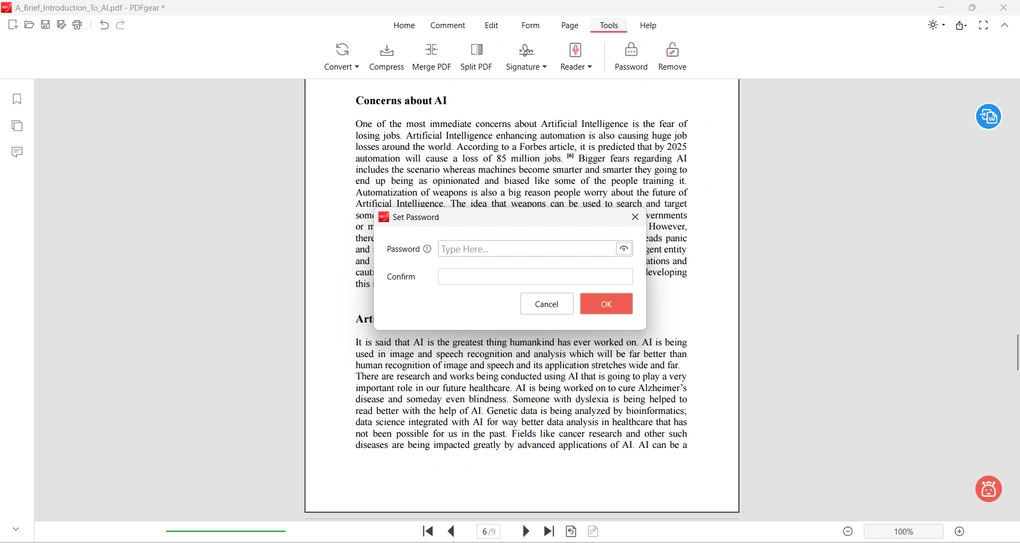
PDFgear offers password protection for your PDF files. You only need to type the password, confirm, and that’s it.
One thing I missed here is to restrict not only who can access the PDF document, but also who can print it. Also, some other editors provide more options on what type of AES PDF protection method you want to use.
Conversion features
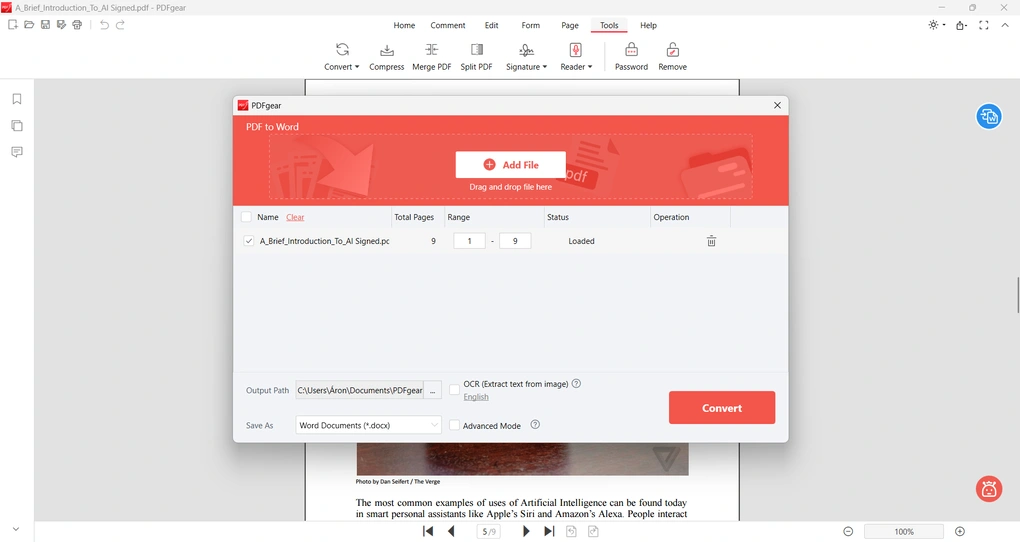
Using PDFgear, you can convert PDF files into Word, Excel, images, text, and more. Also, the conversion works both ways.
The conversion is quite fast (5-10 seconds), and I did not encounter any bugs during file conversions, so I was satisfied, and PDFgear earned its place among the best PDF converters.
Compressing tools
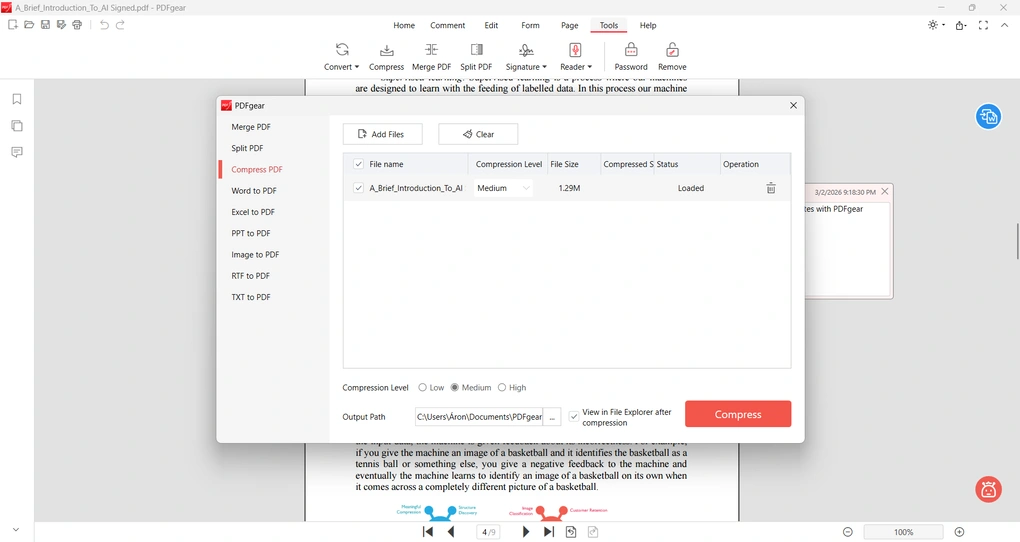
If you need to reduce the size of your PDF for free, PDFgear could be a good option. When using the low compression level, it approximately reduces the size with 50%.
After compressing a few files during my PDFgear review, I noticed that it does not significantly degrade document quality.
OCR
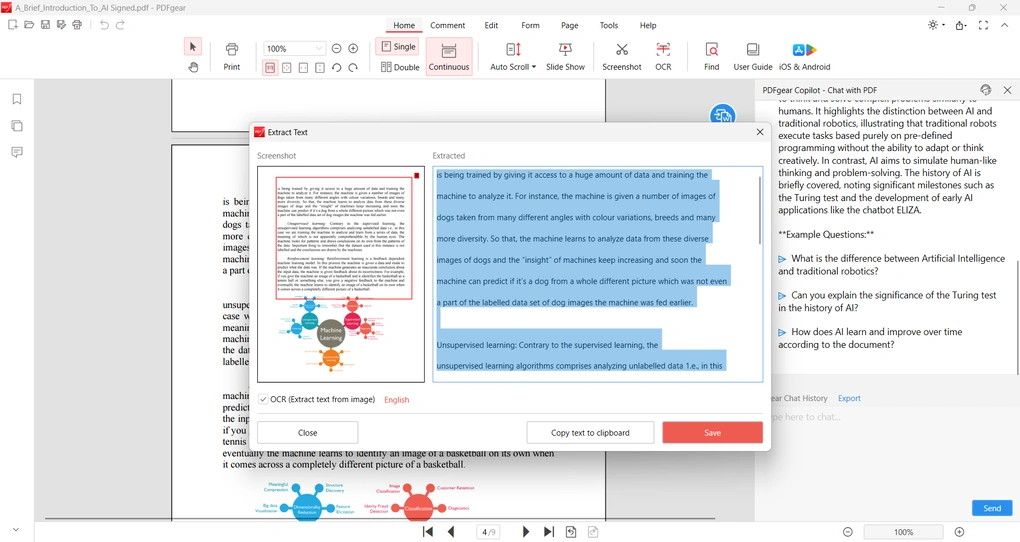
PDFgear is a free app that you can use to convert scanned images or documents into searchable and editable text. It supports OCR for over 30 languages, with over 10 options for specific area extraction.
Personally, I experienced that it has a mostly accurate OCR feature, but not perfect. So, it can struggle with more complex layouts or tables. Nonetheless, if you need a free PDF editor with OCR, PDFgear is still among the best.
Related articles:
AI features
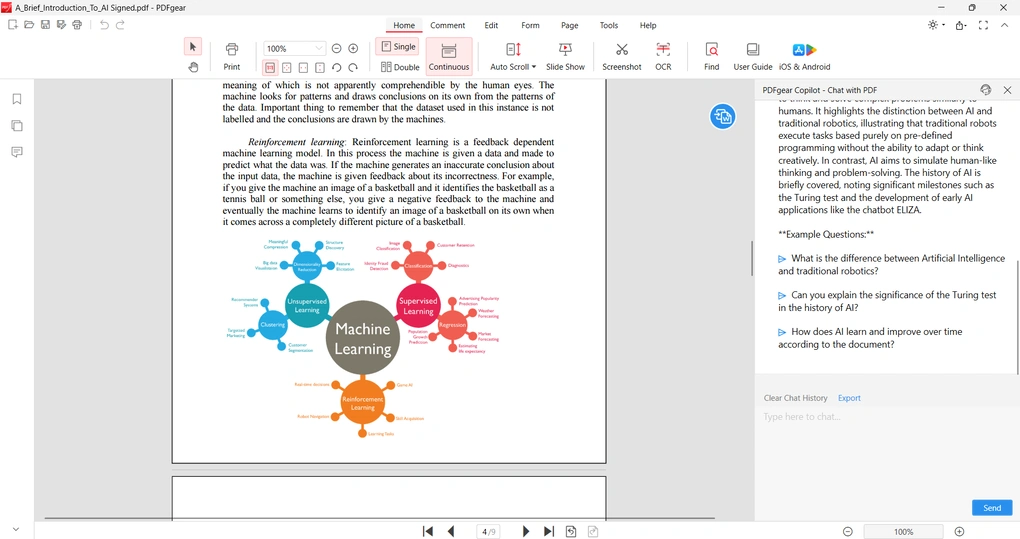
During my PDFgear review, the most exciting feature was the PDFgear Copilot. It’s powered by ChatGPT, and helps you to summarize documents, answer questions, but you can also give commands like convert a PDF to PPT or add password protection.
While it is not the most advanced built-in AI feature I tested in PDF editors, it is still a solid tool for managing and understanding PDF documents faster. You get the answers fast, within 3-6 seconds, which is faster than most of the other paid tools’ AI reply time.
So, I had a positive experience with the PDFgear Copilot feature during testing, and it’s a great tool overall for your PDF management.
Explore our Apps directory
A curated directory of software tools we’ve independently reviewed, with links to full reviews, comparisons, and category guides.
PDFgear user interface
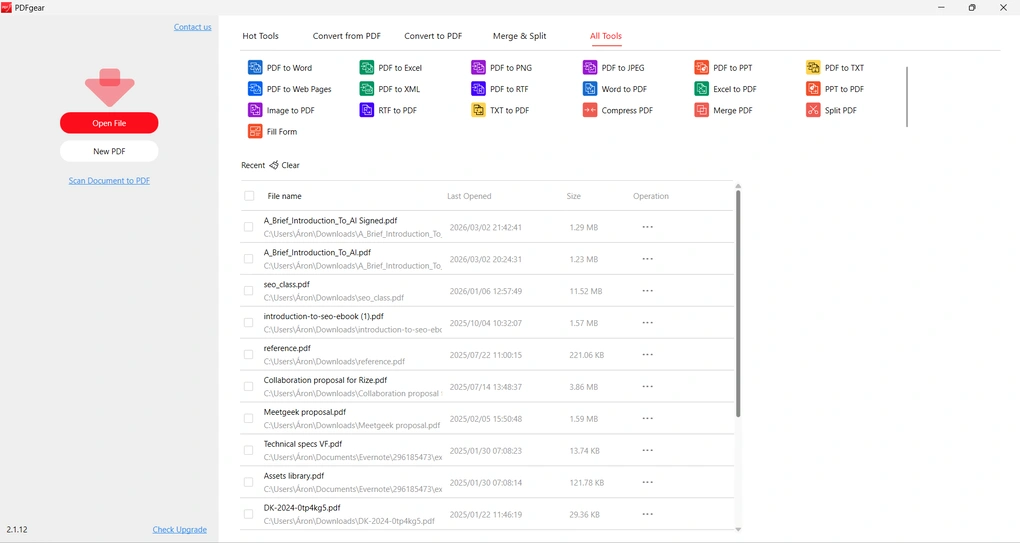
PDFgear offers a simple user interface. Honestly, it’s not beautiful, but useful. That said, it is easy to find the features you are looking for, and it has a short learning curve overall if you are switching from Adobe Acrobat.
On its homepage, you can see all the features provided by PDFgear, which makes it easy to find the tool you need.
PDFgear pricing
PDFgear is a 100% free PDF software. Based on the company’s communication, they plan to release the paid version in the future, and some advanced features will be locked behind the paywall.
However, as for now, PDFgear is a completely free PDF editor. But at this stage, the question comes: what about PDFgear’s security?
PDFgear security
To make this the most comprehensive PDFgear review you can find, I took a deep dive into PDFgear’s security.
PDFgear’s privacy policy states that the software does not collect sensitive personal data, and many PDF processes happen locally on the user’s device. However, when browsing through the Reddit channels, I saw this post:
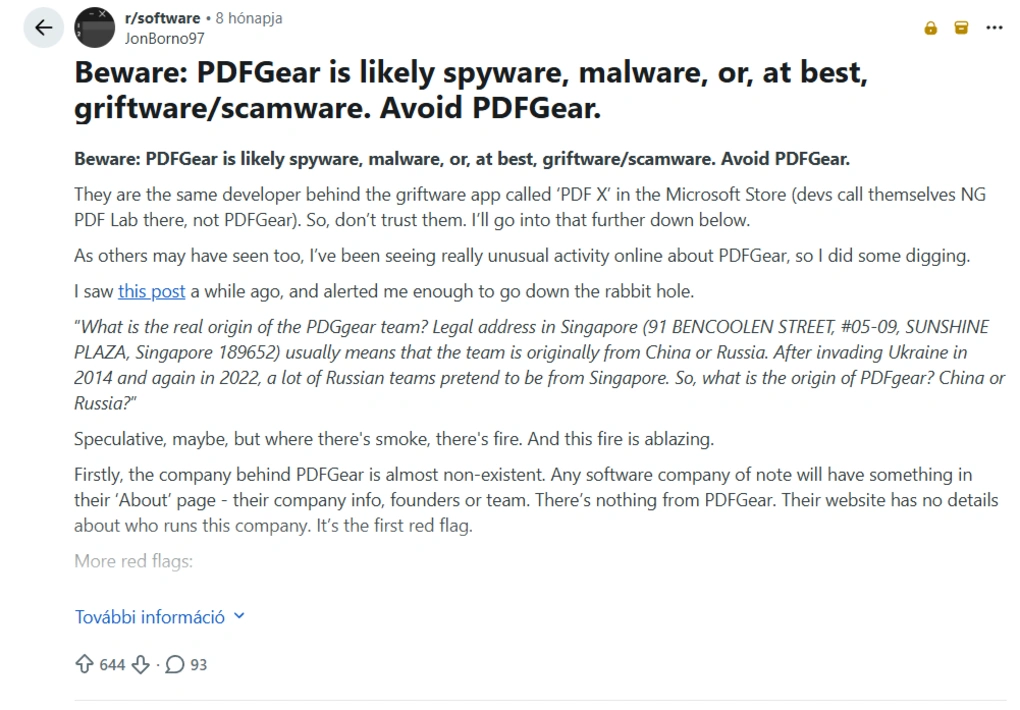
It’s quite a long one about some red flags this user noticed when using PDFgear. I will be honest, to decide if they are fair or not, I don’t have enough technical skills in programming. But to summarize, there was a lot of back and forth, but in the end, there was no evidence that PDFgear contains malware or spyware.
Following this incident on Reddit, PDFgear released its official statement about the security concerns:
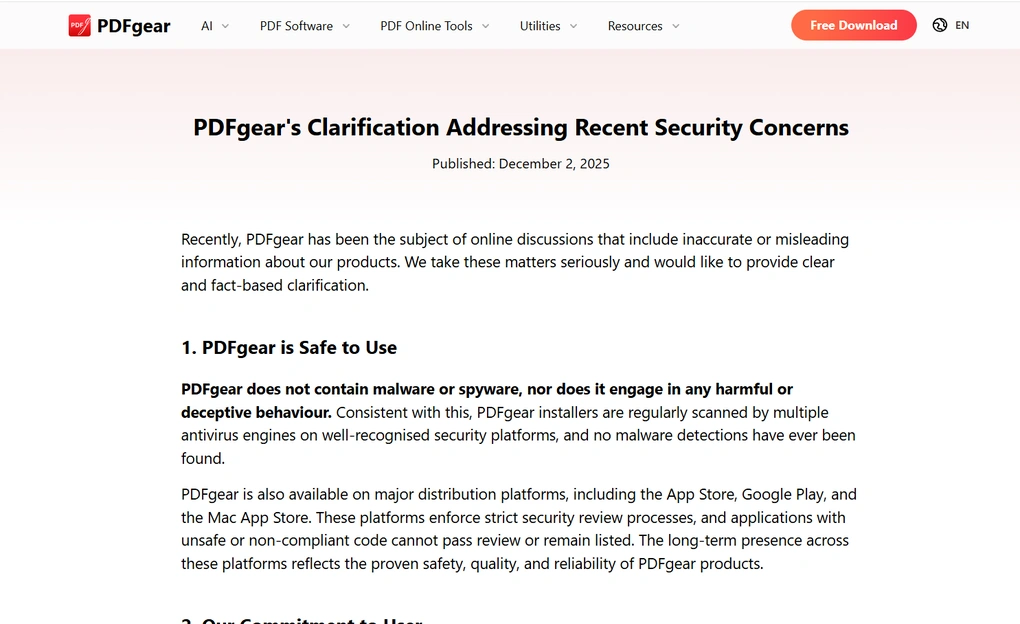
Here, PDFgear claims that it is safe to use a PDF editor and that it does not engage in any harmful or deceptive behaviour. Also, I saw comments from the developer of PDFgear in the Reddit threads explaining how they handle user data.
Additionally, I found that PDFgear’s Windows installer has been scanned via VirusTotal, showing zero detections across dozens of antivirus engines.
I did not encounter any privacy issues with this free PDF editor, although I installed PDFgear a year ago. The debate still goes on Reddit about PDFgear’s safety, so you never know, but my current take is that PDFgear is a safe PDF editor based on the information I found and my own experience.
Pros and cons I discovered during my PDFgear review
After my PDFgear review, I found these pros and cons you should know about this PDF software.
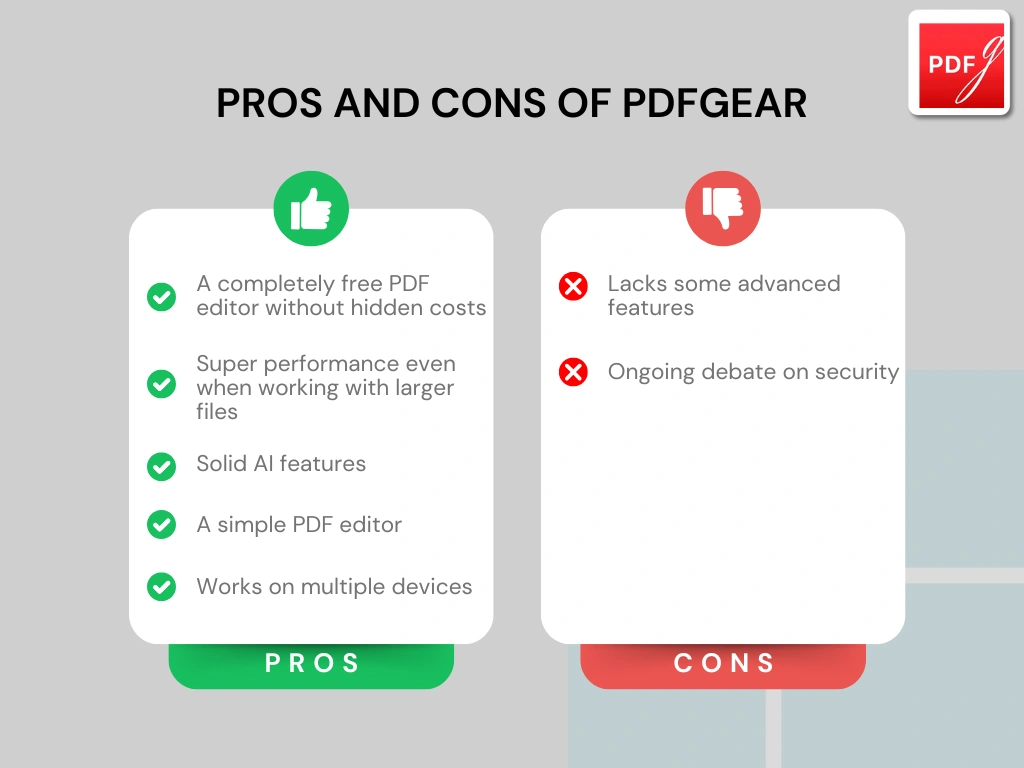
PDFgear’s pros
PDFgear’s cons
PDFgear alternatives
If you feel like PDFgear is not the perfect one for you, here are the best alternatives:
|
App |
Best for |
Description |
|---|---|---|
|
Foxit |
Best affordable alternative to Adobe Acrobat |
A PDF editor with an intuitive user interface at an affordable price for Mac and Windows users. |
|
EaseUS PDF Editor |
Best all-in-one PDF editor for beginners |
It is an all-in-one PDF software to read, edit, annotate, and convert your documents. Full EaseUS PDF Editor review | Quick EaseUS PDF Editor overview |
|
Tenorshare PDNob |
Best for AI-powered PDF editing |
It is an easy-to-use AI-powered PDF editor that offers many features to edit, read, organize, and annotate your documents. Full Tenorshare PDNob review | Quick Tenorshare PDNob overview |
|
PDF Expert |
Best for Mac users |
A PDF editor for Mac, iPhone, and iPad users that offers all the tools you need to manage your PDF files, from annotation tools to signing PDFs. |
|
Xodo PDF Studio |
Best offline PDF editor |
A straightforward offline desktop PDF editor for Windows, Linux, and iOS devices, with great PDF reading and editing tools. Full Xodo PDF Studio review | Quick Xodo PDF Studio overview |
|
ONLYOFFICE PDF Editor |
Best for collaboration and team editing |
A versatile tool that combines PDF editing with document collaboration features. It lets you to edit text, add visual elements, and create fillable forms. |
|
UPDF |
Best value PDF editor with AI features |
One of my favorite PDF editors with advanced AI features and budget-friendly pricing. |
|
Nitro |
Best for business PDF workflows |
A feature-rich PDF editor with a strong focus on PDF editing. |
|
Smallpdf |
Best online PDF tool |
An online PDF software with numerous tools to convert, compress, and edit PDF files for free. |
|
Adobe Acrobat |
Most popular PDF editor |
The most popular PDF editor with solid features, but an extremely high price. |
|
pdfFiller |
Best for e-signatures and document workflows |
It offers a signing and editing solution that lets users sign and edit documents, send them for signature, and manage the full electronic document workflow in one place. |
|
LightPDF |
Best for AI PDF productivity |
An AI-powered PDF editor that lets you edit, convert, OCR, sign, annotate, chat with PDFs, and more. |
|
PDF-XChange |
Best advanced PDF editor for Windows |
A powerful Windows-based PDF editor with advanced editing, annotation, security, and conversion tools. |
|
Sejda PDF Editor |
Best for simple, everyday PDF tasks |
An intuitive and simple PDF software best suited for personal use for those who need a PDF editor for basic PDF tasks. |
|
Soda PDF |
Best for security and file conversion |
A user-friendly PDF editor with solid core features, strong security tools, and broad file conversion options, but its advanced features come at a relatively high price. |
|
PDF Candy |
Best PDF toolkit with multiple tools |
A very practical PDF toolkit with a large number of useful tools, solid performance, and affordable pricing. |
|
Tungsten Power PDF |
Best enterprise-grade PDF solution |
A powerful PDF editor and document management tool designed for businesses, offering advanced editing, security, OCR, and collaboration features. Full Tungsten Power PDF review | Quick Tungsten Power PDF overview |
|
ABBYY FineReader |
Best for OCR and document digitization |
A powerful OCR-focused PDF tool with strong layout detection, flexible conversion, and an efficient workflow. Full ABBYY FineReader review | Quick ABBYY FineReader overview |
|
PDFelement |
Best balance of features and ease of use |
An easy-to-use PDF editor with valuable features for a reasonable price. |
|
WPS Office |
Best easy-to-use office suite and PDF editor |
WPS Office is an easy-to-use office suite with solid PDF editing and AI-powered productivity tools, though its free plan is quite limited. |
Wrap-up: PDFgear review
After testing 30+ PDF editors, I normally highlight PDFgear as the best free PDF editor. If you don’t want to spend money on PDF editors and don’t need advanced PDF editing functionality, PDFgear can be a top choice for you.
As for the privacy aspect, I did not find evidence of the claims on Reddit. The truth is that regardless of whether you use free or paid alternatives, there is always a risk of how they use your data.
Related articles:
- The 8 Best Adobe Acrobat Alternatives: 30+ PDF Editors Tested
- The 10 Best PDF Editors In 2026 | 30+ Personally Tested PDF Tools
- The 6 Best PDF Readers For 2025 (Only FREE Options)
- 6 Best OCR Software For 2026 | 30+ Personally Tested Tools
- 6 Best PDF Converter For 2026 | 30+ Personally Tested Tools
Hope I was able to help you find the best PDF editor for you. As always, I will update this PDFgear review over time so you guys have up-to-date information about this PDF software.
Looking for similar tools?
Visit our PDF editor library to explore other apps we’ve reviewed in this space and how they compare.
Why you can trust our reviews
At thebusinessdive.com, our team tests, reviews, and compares hundreds of productivity apps every year — from project management tools to note-taking apps. We dive deep into real-world use cases to help you find the right tools that actually improve your workflow, not just add noise.
Our mission? No fluff, no shortcuts—just honest, hands-on insights from productivity pros.
Discover how we stay transparent, read our review methodology, and let us know about any tools we missed.
Frequently asked questions
Is PDFgear really free?
Yes, PDFgear is a 100% free PDF editor. Nevertheless, they plan to introduce the paid version in the future, and some advanced features will be locked behind a paywall.
What is the world’s most trusted free PDF viewer?
Adobe Acrobat is the most trusted PDF editor & viewer. However, I normally recommend people to avoid Adobe Acrobat due to its extremely high price.
Who makes PDFgear?
It was launched in 2022 by PDF GEAR TECH PTE. LTD., a software company registered in Singapore.
Is PDFgear better than Adobe?
I would not call PDFgear a better PDF editor than Adobe Acrobat, but rather see it as the most reasonable choice. While Adobe Acrobat has solid features, it is overpriced, and I did not see its price justified. On the other hand, PDFgear has fewer powerful features, but offers these tools for free.

Hey there! I am Aron, the founder of Thebusinessdive. I have been testing productivity apps for almost three years now. I reach 25.000 -50.000 people monthly with the mission to help you find the perfect productivity apps. Subscribe to my YouTube channel, newsletter, and social media to hear more about the best productivity tools. Let’s dive in!