


Virtualworkforce.ai Review: My Experience Building AI Email Agents
Want to see a thorough Virtualworkforce.ai review and see how it performs in practice?
I tested it by building my own AI agent, connecting data sources, creating workflows, and running real email scenarios. Long story short, Virtualworkforce.ai impressed me.
It generated draft replies, categorized emails, extracted records, and completed other automated actions within seconds during my tests, and the quality was better than I expected.
Let’s dive in!
Verdict
Here’s the quick verdict if you don’t want to read the full review:
🎯 Best for: Businesses that want to automate repetitive email workflows with customizable AI agents
🚫 Not ideal for: Users who only need a simple AI email writer or occasional help drafting messages
⭐ Biggest strength: Powerful AI automation that combines email handling, knowledge retrieval, data extraction, and integrations
⚠️ Biggest weakness: The quality of AI agents depends heavily on how well you configure instructions and data sources
⚖️ Verdict: Virtualworkforce.ai is one of the most capable AI agent platforms I tested, turning email automation into complete workflows rather than just generating AI replies.
🏆 Score: 4.4/5
✅ Tested with our review & scoring methodology ✅ Real-world testing ✅ Unbiased evaluation
Virtualworkforce.ai review
Summary
Virtualworkforce.ai is an AI agent platform designed to automate email-based workflows. It allows businesses to create AI agents that can read incoming emails, generate draft replies, classify messages, retrieve information from connected knowledge sources, and extract structured data from emails and attachments. My experience with Virtualworkforce.ai was very positive, and I actually enjoyed testing the platform.
|
|
Intuitive interface
|
|
|
Fast email drafting, labeling, and data extraction
|
|
|
Strong knowledge base and document retrieval capabilities
|
|
|
Detailed testing and activity tracking tools
|
|
|
Flexible integrations and workflow automation options
|
|
|
Free plan and 14-day free trial available
|
|
|
Competitively priced
|
|
|
Dashboard could provide more operational metrics
|
How We Test Email Apps
To keep our reviews & final score for each email app fair and consistent, we evaluate every tool using the same testing framework based on real-world usage, feature depth, and overall value.
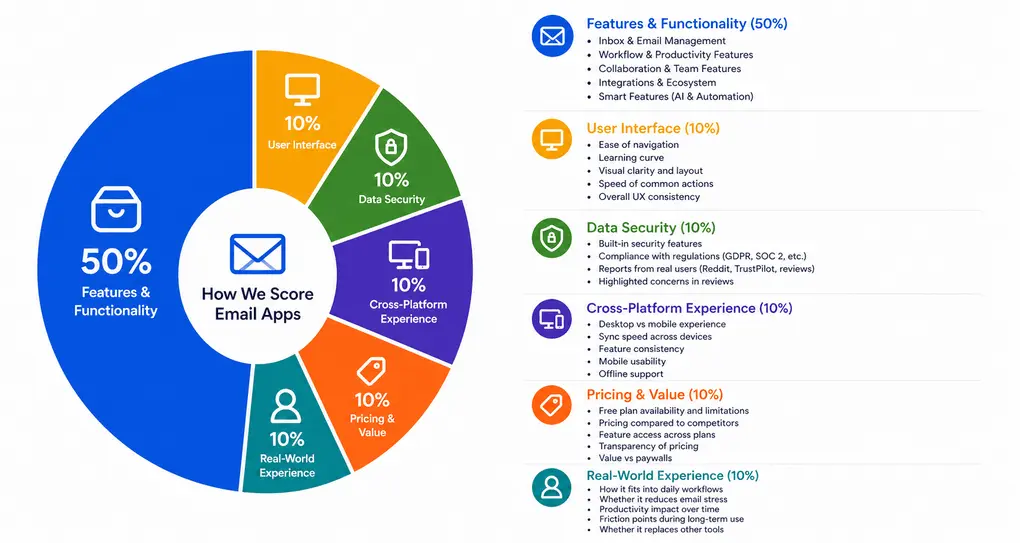
Our scoring breakdown after testing 10+ email apps:
⚙️ Features & functionality → 50%
🖥️ User interface → 10%
🛡️ Data security → 10%
📱 Cross-platform experience → 10%
💰 Pricing & value → 10%
👥 Real-world experience → 10%
Want a detailed breakdown of how we test each category?
Learn exactly how we test tools → Review methodology
Short on time? Here’s a quick overview of Virtualworkforce.ai
What is Virtualworkforce.ai?
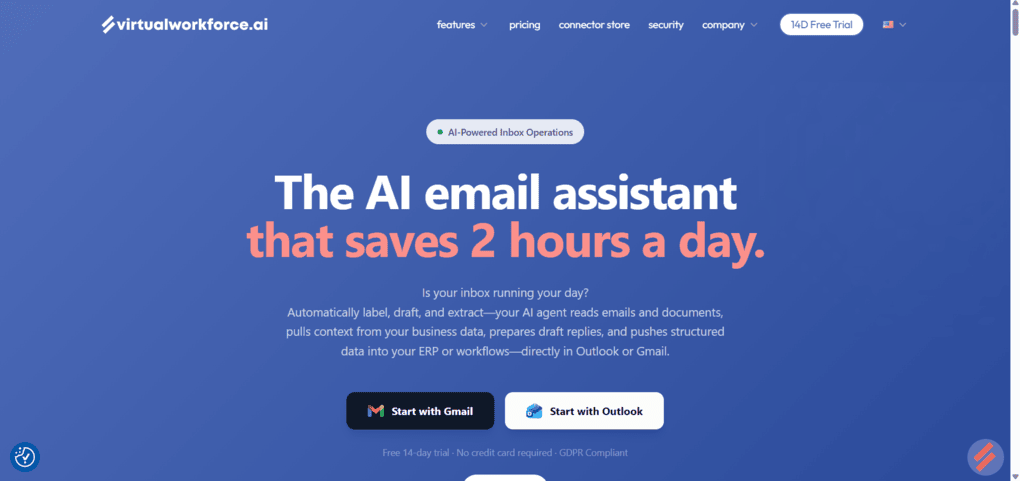
Virtualworkforce.ai is an AI agent platform designed to automate email-based workflows. It allows businesses to create AI agents that can read incoming emails, generate draft replies, classify messages, retrieve information from connected knowledge sources, and extract structured data from emails and attachments.
The platform is developed by Frontier Group, a Netherlands-based company founded in 2020 and headquartered in Rotterdam, that focuses on AI-driven business automation.
How Virtualworkforce.ai performed during testing
My experience with Virtualworkforce.ai was very positive, and I actually enjoyed testing the platform.
I spent a lot of time using the Email Testing feature, and that is where I made the most progress in shaping the AI agent into what I wanted it to be. Much of that comes down to the platform’s transparency.
I could see what happened behind every interaction, including why the agent generated a response, why it didn’t, which data sources it used, and which actions were triggered. That made it possible to continuously refine the agent’s instructions and configuration based on real results.
I was also surprised by how quickly the agent processed incoming emails. Draft replies, labels, records, and other actions were typically generated within seconds.
At no point did the platform automatically send responses on my behalf; every draft remained under my control and required approval before being sent.
Of course, the quality of the agent ultimately depends on how well you configure it. The platform provides the tools, but the results will reflect the instructions, workflows, and knowledge sources you put in place.
One area that could be improved is visibility at the dashboard level. While the platform provides detailed logs and activity history, I would have liked to see more operational metrics surfaced directly on the dashboard.
Other than that (and it is a fairly minor point), I found Virtualworkforce.ai to be a genuinely well-designed and capable platform.
Why Virtualworkforce.ai got a 4.4/5 score?
Virtualworkforce.ai earned an impressive 4.4/5 rating because every major feature I tested worked as expected.
From email drafting and classification to knowledge retrieval and structured data extraction, the platform consistently delivered accurate results and provided enough transparency to understand how those results were produced.
While the dashboard could surface more operational data and some advanced workflows require a brief learning period, neither issue had a meaningful impact on the overall experience.
Who would I recommend Virtualworkforce.ai to
Who Virtualworkforce.ai is probably not for
Virtualworkforce.ai features overview
Here are the functions I tried when using Virtualworkforce.ai in day-to-day work.
AI Agent Setup and Control
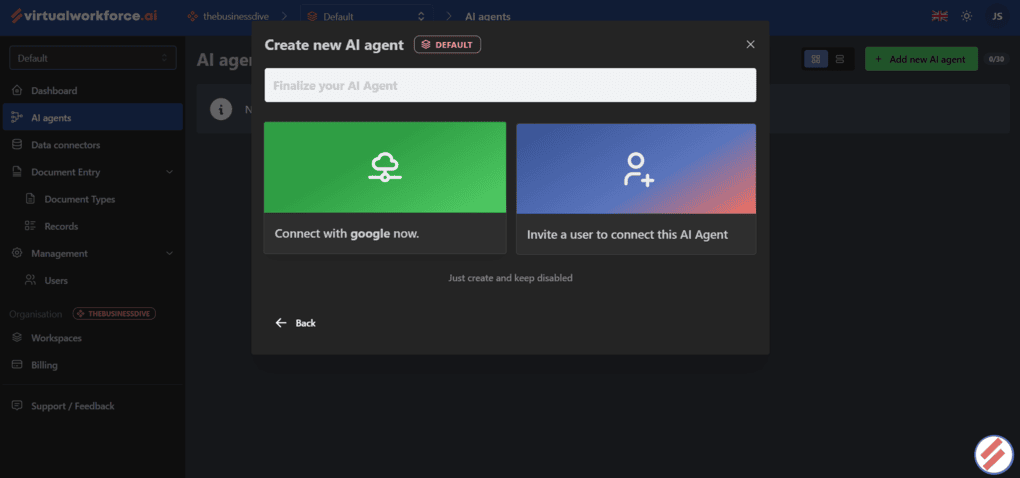
After creating a workspace, the first thing I had to do was set up an AI agent. Virtualworkforce.ai organizes everything around agents, so this is where most of the configuration happens.
The setup process starts in the AI Agents section, where you can create a new agent and configure how it handles incoming emails. The interface is split into several tabs: Overview, Settings, Linked Connectors, Actions, History, Email Testing, Chat, and User Access.
The Overview tab serves as a central hub for the agent, while Settings is where you define the agent’s instructions and behavior.
Linked Connectors lets you connect email accounts and other data sources, which is essential because the agent cannot process real emails until a mailbox is connected.
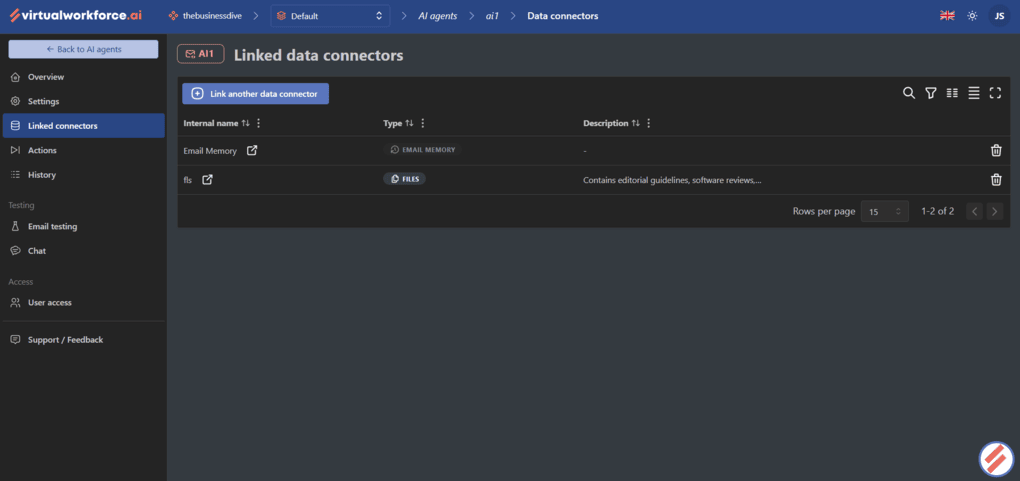
Virtualworkforce.ai keeps most agent-related functionality in a single place, so I could configure the agent, connect knowledge sources, test responses, review activity logs, and manage access from the same section.
The User Access tab is particularly useful for teams because it allows administrators to control who can interact with or manage specific agents. For organizations running multiple workflows, this provides an additional layer of governance without requiring separate workspaces.
Email Automation Actions
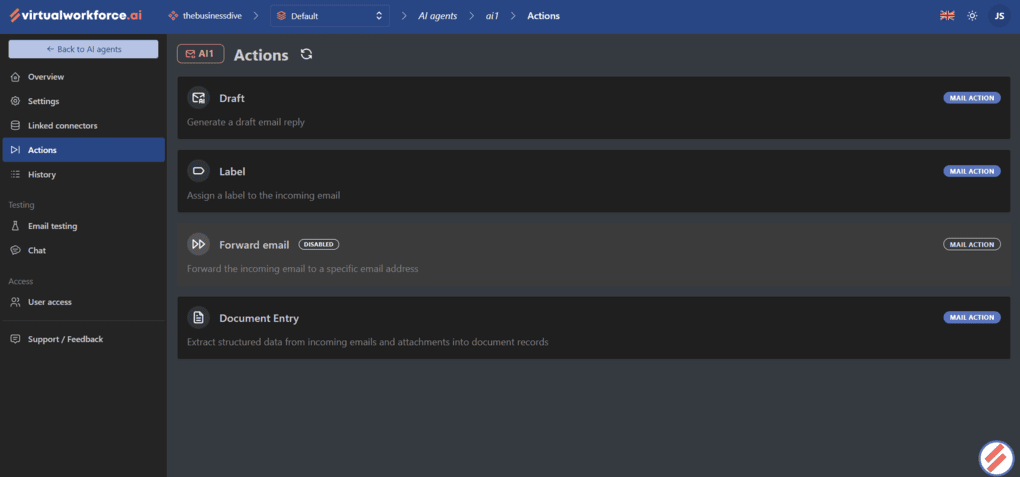
There are four core automation options: Draft, Label, Forward Email, and Document Entry.
The Draft action automatically generates email replies based on the agent’s instructions, connected knowledge sources, and the content of incoming messages.
After connecting my mailbox, I tested the feature with several inquiries and found that draft responses were typically generated within seconds.
The quality of the responses was consistently strong, particularly when the agent had access to relevant documents.
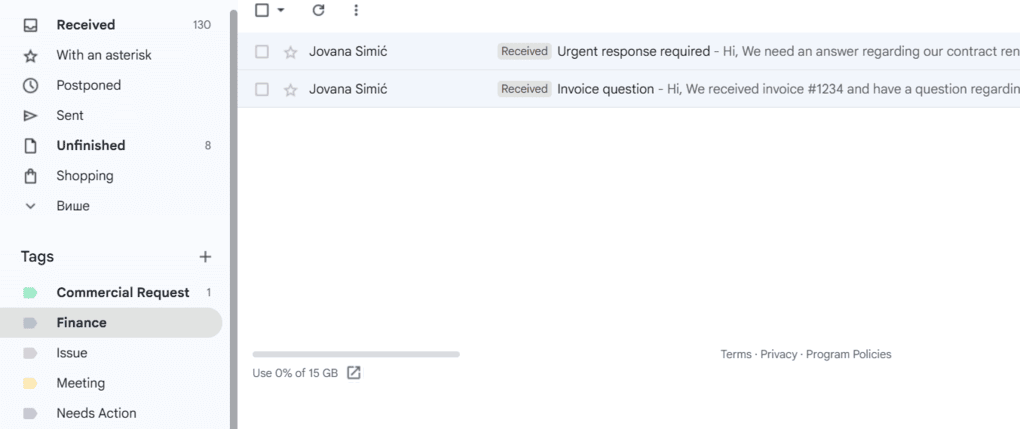
The Label action adds categories directly inside your email client, such as Needs Action, Commercial Request, Meeting, Finance, and Issue.
When I enabled this feature and sent multiple test emails covering different scenarios, the system categorized them almost immediately, and the assigned labels appeared directly in Gmail.
However, the feature can go beyond basic email classification. Since the Label action can access connected data sources, it can assign labels based on company-specific information.
For example, teams managing a shared inbox could connect customer or order data and automatically label emails based on the responsible account manager, customer service representative, order status, or other internal criteria.
Forward Email allows agents to automatically route messages to another recipient based on configured rules. While I did not extensively test this feature, it is easy to see how it could be used for escalation workflows, sales handoffs, or support requests that need human review.
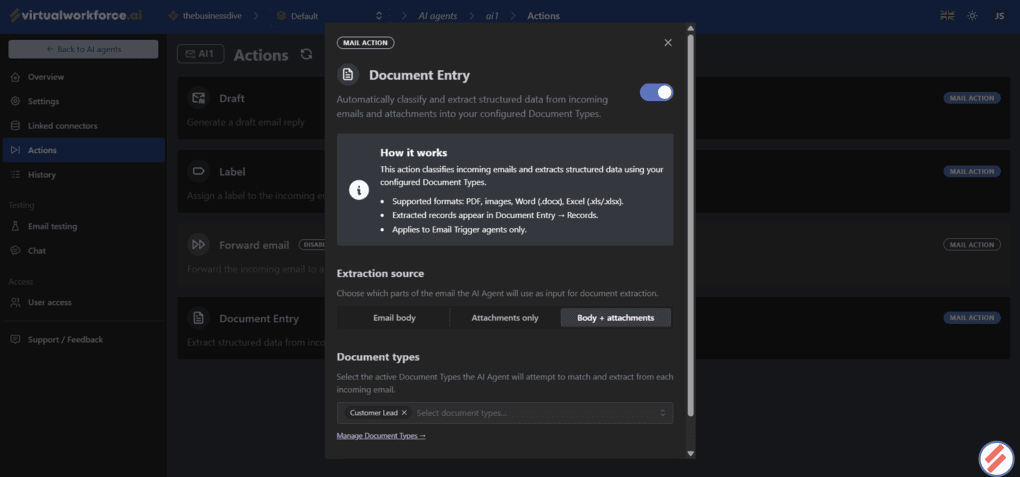
The most advanced option is Document Entry, which combines email automation with structured data extraction. Instead of simply reading an email, the agent can identify predefined information and save it as a structured record.
One of the ways I tested this feature was by creating a custom document type for customer leads with fields such as Full Name, Company, Email Address, and Budget.
After sending a sample sales inquiry, Virtualworkforce.ai automatically extracted the relevant information and saved it as a structured record in the Records section.
What makes this feature even more powerful is that the extracted data does not have to remain in the app. Using API connections, you can push these records into external systems such as CRMs, ERPs, or other platforms.
This can be especially valuable for industries like logistics, trading, and manufacturing, where teams often spend significant time manually transferring information from emails and documents into internal systems.
Instead of entering this data by hand, companies can automate large parts of the process while keeping information structured and accessible.
Knowledge Base and Data Sources
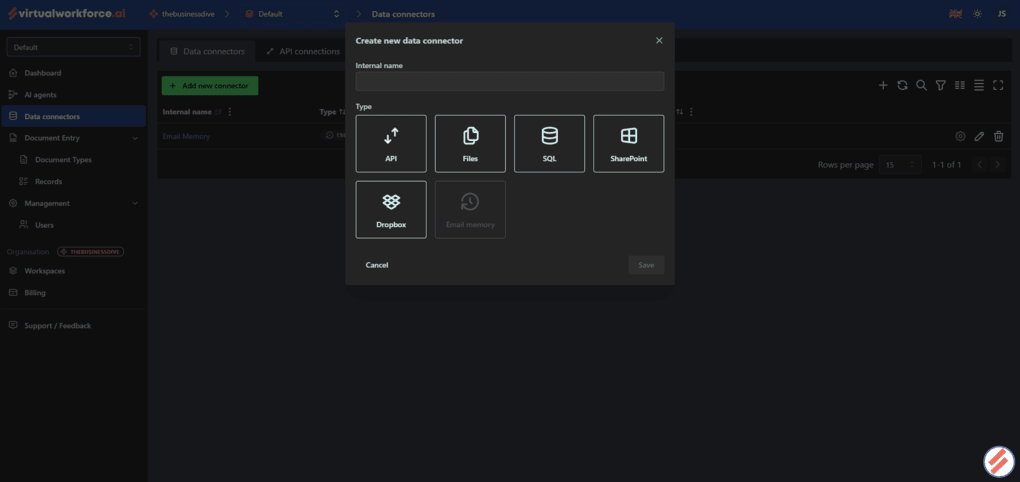
One of the most important parts of Virtualworkforce.ai is its ability to ground responses in external data rather than relying solely on the underlying AI model.
The platform handles this through Data Connectors, which allow you to connect various knowledge sources (API, Files, SQL, SharePoint, Dropbox, and Email memory) to an AI agent.
During testing, I used the Files connector to upload several software reviews and comparison articles and then linked those documents to my agent.
The setup process was straightforward. After creating a connector, I uploaded the files, waited for them to be indexed, and connected the knowledge base to the agent.
Once indexing was complete, the agent could reference the uploaded content when generating responses.
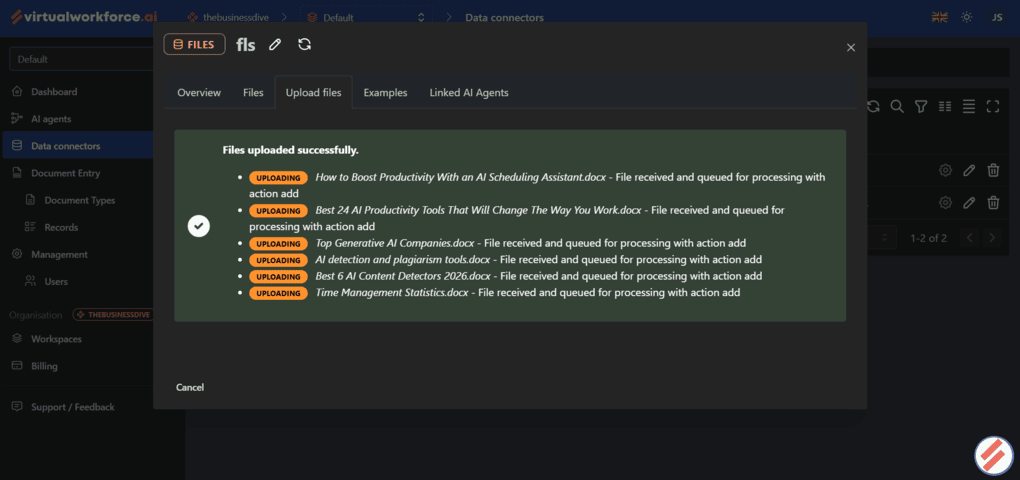
To test the retrieval capabilities, I asked questions about specific information in the uploaded files, and the agent correctly identified the answers from the source material rather than generating generic responses.
I was also able to verify when the agent used connected documents because Virtualworkforce.ai displays the data sources used for each interaction.
I also tested the platform’s multilingual retrieval capabilities by asking questions in Serbian based on documents that had been uploaded in English.
The agent was able to retrieve the correct information and generate accurate responses, suggesting that the retrieval system relies on semantic understanding rather than simple keyword matching.
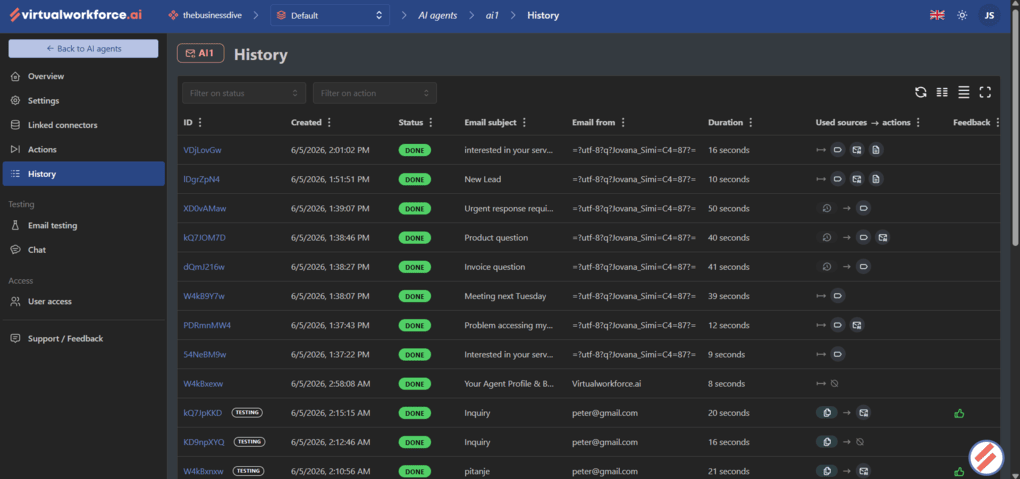
Another useful aspect of the implementation is transparency. Through the History view, I could see whether a response used connected data sources, relied solely on the model, or triggered additional actions. This made it much easier to troubleshoot any unexpected behavior.
Overall, the knowledge base functionality proved to be one of the strongest parts of the platform. It transforms the agent from a generic AI assistant into a system that can respond using company-specific information, internal documentation, and uploaded content.
Testing, History, and Feedback
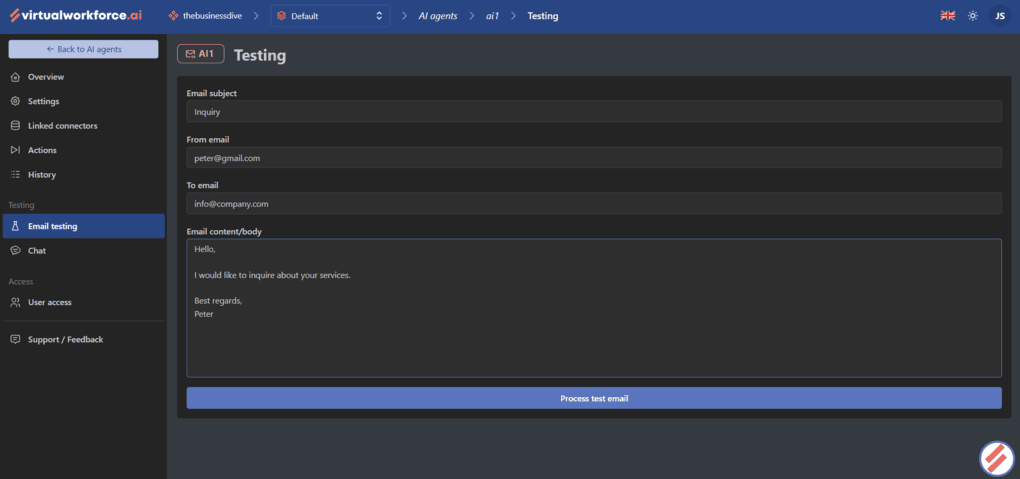
Virtualworkforce.ai includes several built-in tools to validate an agent’s behavior before relying on it in a real inbox.
The Email Testing tab allows you to simulate incoming emails by defining the sender, recipient, subject line, and message content.
I used this feature extensively while testing different scenarios because it provided a quick way to see how the agent would classify messages, generate replies, use connected knowledge sources, and trigger actions without sending real emails.
For more direct interaction, there is also a Chat tab where you can communicate with the agent and evaluate its responses.
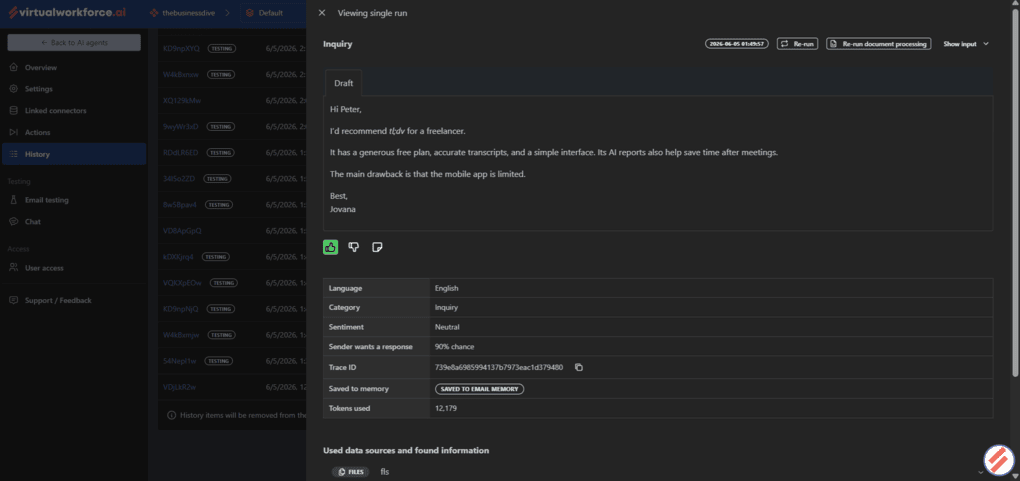
The History tab logs every interaction, including generated drafts, assigned labels, extracted records, and other actions performed by the agent.
I often referred back to this view to verify whether a response had used connected data sources, triggered a workflow, or generated a specific action.
Virtualworkforce.ai also includes a feedback system that lets you rate individual responses using positive feedback, negative feedback, or a neutral (needs context/explanation) option.
While the feedback is intended for review rather than direct model training, it provides a simple way for teams to evaluate AI-generated responses and identify areas that may require adjustments.
Document Entry and Structured Data Extraction
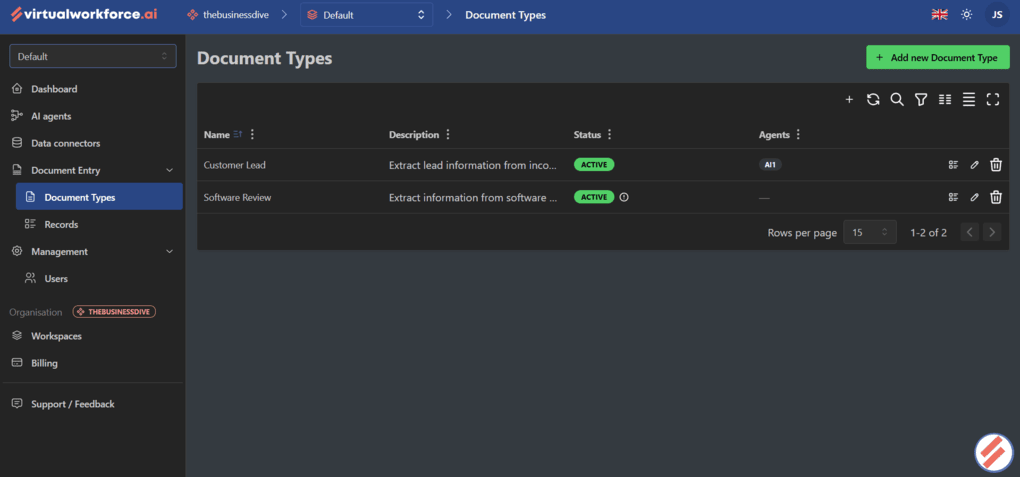
While draft generation and email classification were useful, the most advanced feature I tested was Document Entry.
This functionality allows agents to extract structured information from incoming emails and store it as records inside the platform. Instead of simply reading a message and generating a response, the agent can identify predefined data points and automatically organize them into a structured format.
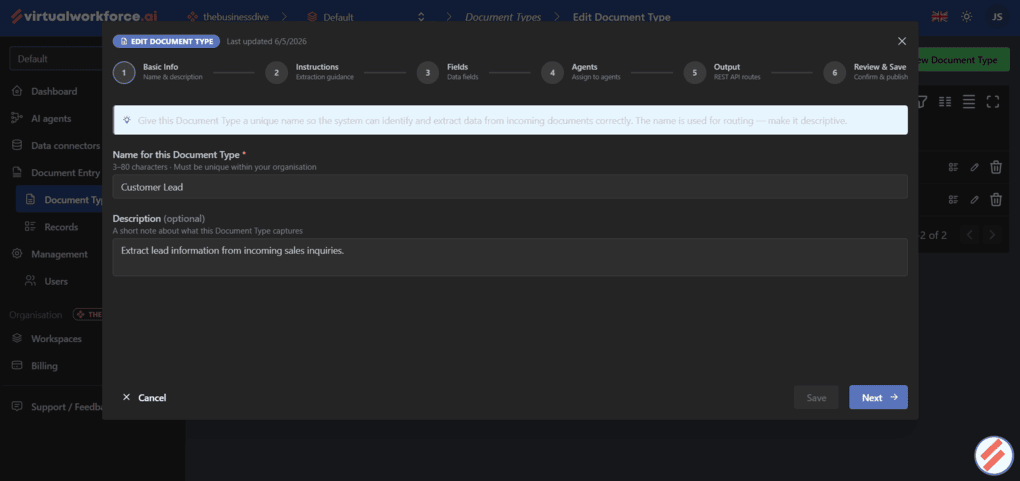
The setup process starts by creating a Document Type. Each document type acts as a template that defines what information should be extracted.
Once the document type was configured, I connected it to my AI agent. From there, the workflow was fully automated. Whenever a matching email arrived, the agent analyzed the message, extracted the relevant information, and created a new record.
The platform also supports more advanced document structures through repeatable groups and object groups, so you can use even more complex data.
In addition, extracted records can be routed to external systems through output routes, so it’s possible to integrate the workflow with other business applications.
Security
I really appreciated the level of transparency around security. Rather than limiting information to a brief compliance statement, Virtualworkforce.ai maintains a public Trust Center where users can review its security posture, privacy practices, and compliance commitments in one place.
Virtualworkforce.ai places a strong emphasis on security, privacy, and compliance. It is ISO 27001 and ISO 9001 certified, complies with GDPR and NIS2 requirements, and is currently working toward SOC 2 Type II certification.
For businesses handling customer emails, documents, and other sensitive information, these certifications provide an additional layer of confidence that security processes are formally documented and regularly reviewed.
Integrations
The platform supports integrations with Gmail, Outlook, ERP systems, CRM platforms, SQL databases, SharePoint, Google Drive, Dropbox, and custom APIs.
For operational teams, Virtualworkforce.ai also offers connectors for TMS, WMS, and other industry-specific platforms.
Virtualworkforce.ai user interface
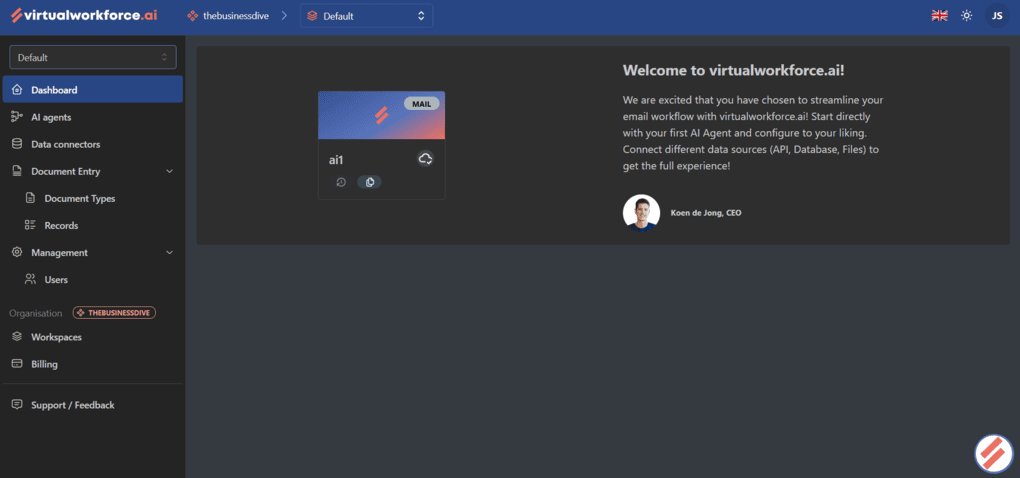
I had a very positive experience with Virtualworkforce.ai’s interface. It’s clean, intuitive, and easy to navigate, despite offering a wide range of features and configuration options.
I also liked the overall visual design. Everything is organized and easy to follow, and the dark mode was a particular highlight for me during testing.
Virtualworkforce.ai plans and pricing
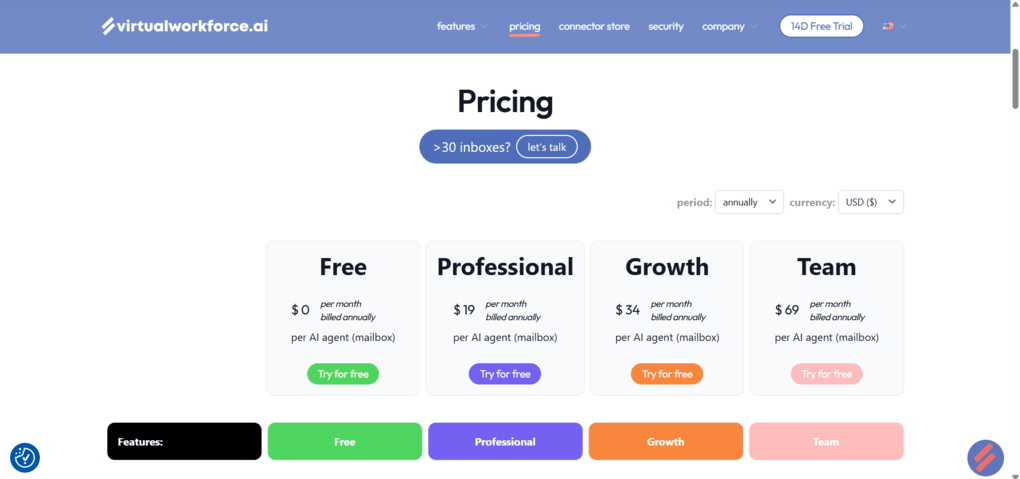
Virtualworkforce.ai offers a free plan, a 14-day free trial of its paid plans, and three paid tiers.
The free plan is generous and gives users access to one AI agent, one user seat, AI-powered drafting, email labeling, forwarding, chat with your data, API integrations, and support for 59 languages. It also includes one data source integration and enough storage to build a small knowledge base.
Paid plans start with Professional at $29 per month ($19/month when billed annually). This tier is aimed at individuals and small teams and expands the number of agents, users, tokens, and integrations while adding SharePoint and Google Drive support.
Growth costs $45 per month ($34/month annually) and is designed for larger teams. It introduces shared mailboxes, SQL database integrations, unlimited users, usage analytics, and additional data sources, making it a better fit for organizations that want to deploy multiple AI agents across departments.
The highest tier, Team, costs $89 per month ($69/month annually) and includes up to 30 AI agents, unlimited data source integrations, document processing capabilities, larger storage limits, and a dedicated account manager.
For organizations that need to manage more than 30 AI agents (mailboxes), Virtualworkforce.ai also offers custom enterprise pricing.
What works well in Virtualworkforce.ai and what could improve
Here is a quick breakdown of what I found after testing this email app.
Strengths
Limitations
Virtualworkforce.ai alternatives
If you feel Virtualworkforce.ai is not the right pick for you, here are some of the alternatives:
|
App |
Best for |
Description |
|---|---|---|
|
Clean Email |
Best for inbox cleanup |
A reliable and transparent inbox management tool that gives you full control over email cleanup, but most advanced features require a paid plan. |
|
Cleanfox |
Best free unsubscribe tool |
A free tool designed to help users remove unwanted marketing emails and unsubscribe from newsletters. Like Unroll.me, it relies on data monetization rather than a paid subscription model. |
|
Spark |
Best AI email client |
A popular email client with built-in AI features, smart inbox organization, and collaboration tools. Unlike Clean Email, Spark focuses more on AI assistance and email productivity than long-term inbox cleanup. |
|
Missive |
Best for team collaboration |
A collaborative email client designed for teams, with shared inboxes and task assignment. It’s more of a productivity workspace than a cleanup tool, but useful if you need collaboration plus email management. |
|
Sanebox |
Best for automatic email filtering |
An email organizer that filters unimportant messages into separate folders automatically. It works with any email provider and focuses on a clean inbox, though its feature set and pricing differ from Clean Email. |
|
Unroll.me |
Best for simple unsubscribing |
One of the more popular free apps for unsubscribing from marketing emails. However, it monetizes user data, which may raise security concerns. |
|
Kai |
Best for AI assistance |
Kai is an excellent AI executive assistant for managing emails, meetings, and scheduling, though it’s still in beta and occasionally runs into small workflow issues. |
Final thoughts on Virtualworkforce.ai
I hope this Virtualworkforce.ai review gave you a clear picture of what it can do and what it is like to use in practice.
Rather than relying on product demos or marketing materials, I tested the platform’s core features myself, including email drafting, classification, knowledge retrieval, and structured data extraction.
Based on that experience, I believe the 4.4/5 rating is well deserved and that Virtualworkforce.ai proved itself to be a capable platform.
Related articles:
- The 7 Best Unsubscribe Apps in 2026 | My Honest List
- 8 Best Email Apps in 2026 | My Thoughts After Testing +15 Apps
Explore our Apps directory
A curated directory of software tools we’ve independently reviewed, with links to full reviews, comparisons, and category guides.
Why you can trust our reviews
At thebusinessdive.com, our team tests, reviews, and compares hundreds of productivity apps every year — from project management tools to note-taking apps. We dive deep into real-world use cases to help you find the right tools that actually improve your workflow, not just add noise.
Our mission? No fluff, no shortcuts—just honest, hands-on insights from productivity pros.
Discover how we stay transparent, read our review methodology, and let us know about any tools we missed.
Frequently asked questions
Does Virtualworkforce.ai offer a free plan?
Yes. Virtualworkforce.ai offers a free plan that includes one AI agent, one user seat, email drafting, labeling, forwarding, chat with your data, and one data source integration. The platform also offers a 14-day free trial of its paid plans.
Is Virtualworkforce.ai secure?
Virtualworkforce.ai is GDPR-compliant and holds ISO 27001, ISO 9001, and NIS2 certifications. Data is encrypted both in transit and at rest, and customer data is never used to train external AI models.
The company also maintains a public Trust Center where users can review its security and compliance practices.
What are Virtualworkforce.ai‘s agent templates and extra instructions?
In addition to custom AI agents, Virtualworkforce.ai offers pre-trained virtual employees for specific business functions. Available options include Customer Service, Sales, Bookkeeping, Logistics, Ticketing, and Internal Knowledge assistants.
These agents come preconfigured for common business workflows and can be further customized to fit an organization’s specific requirements.

Hey! I’m Jovana, a content writer who loves writing, researching, and testing new productivity apps. With a background in philosophy, I bring a thoughtful but no-bullshit approach to everything I do. Let’s connect on Linkedin!