


Papermark Review 2026: Here’s What I Liked (And What I Didn’t)
Most people still share important documents through email attachments or basic Google Drive links, even though those methods offer very little control or insight into what happens after the file is sent.
Papermark is a secure document-sharing and virtual data room platform focused on trackable links, viewer analytics, and access controls for sensitive files. But is it actually worth using over more traditional file-sharing tools?
For this review, I tested Papermark’s free plan to see how well it handles document sharing, analytics, permissions, versioning, and overall usability.
Let’s dive in!
Verdict
Here’s the quick verdict if you don’t want to read the full review:
🎯 Best for: Startups, freelancers, and smaller teams that want secure document sharing with detailed analytics
🚫 Not ideal for: Users looking for a fully free VDR solution or very basic file sharing
⭐ Biggest strength: Excellent page-by-page analytics and intuitive document-sharing experience
⚠️ Biggest weakness: Many advanced security and branding features require paid plan
⚖️ Verdict: Papermark is one of the most approachable and modern document-sharing platforms, especially for tracking engagement and managing sensitive files, but the free plan becomes limiting once you need more advanced controls.
🏆 Score: 4.4 / 5
✅ Tested with our review & scoring methodology ✅ Real-world testing ✅ Unbiased evaluation
Papermark
Summary
Papermark is a modern and beginner-friendly document-sharing platform with excellent analytics. It stands out for its page-by-page viewer tracking, clean interface, and strong document management features, though many advanced controls are limited to paid plans. Overall, I had a very positive experience with Papermark, especially when it comes to usability and analytics.
|
|
Very intuitive and beginner-friendly interface
|
|
|
Excellent page-by-page analytics and viewer tracking
|
|
|
Real-time email notifications
|
|
|
Clean and well-organized analytics dashboard
|
|
|
Good range of sharing permissions and security controls
|
|
|
Many advanced features are locked behind paid plans
|
What is Papermark?
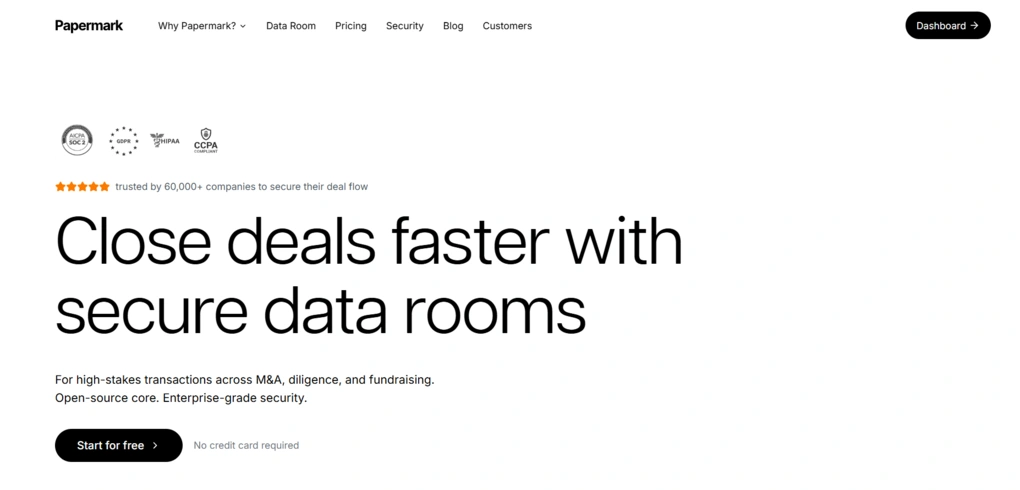
Papermark is a secure document-sharing and virtual data room platform designed for sharing sensitive files through trackable links instead of traditional email attachments.
It allows users to upload documents, control access permissions, monitor viewer activity with page-by-page analytics, and organize files inside virtual data rooms for workflows like fundraising, client proposals, sales, and due diligence.
Positioned as an open-source alternative to DocSend, Papermark has already attracted more than 60,000 companies and gained attention on platforms like GitHub and Product Hunt.
One of the things that makes it stand out is its combination of modern document-sharing features, detailed analytics, and a much cleaner, more approachable experience than many traditional VDR tools, especially for startups, agencies, and smaller teams looking for a more flexible and affordable solution.
My overall experience with Papermark
My experience with Papermark was very positive overall.
The feature I liked the most was the analytics. I could track document views almost in real time, see how long someone spent on each page, and everything was presented in a very clear and organized way. I also liked how easy it was to manage multiple document versions.
The biggest downside is that many advanced features are tied to paid plans. While Papermark does offer a 7-day Data Rooms trial, many features are still limited unless you upgrade. Still, I think the free version would be more than enough for freelancers, smaller teams, or anyone who only needs basic secure document sharing and analytics.
Why Papermark got this score?
Papermark gave me a very positive experience overall. It offers a clean and beginner-friendly experience with strong document-sharing and analytics features.
It’s easy to upload files, create shareable links, manage document versions, and track viewer activity through detailed page-by-page analytics.
Another strong point is how organized and intuitive the interface is overall.
The main reason Papermark did not get a higher score is that many of its best features are locked behind paid plans.
Things like custom branding, screenshot protection, and some advanced permissions are limited on the free plan, while full Data Room functionality is available through a separate 7-day trial.
Who I’d recommend Papermark to
Who Papermark probably won’t work well for
How Paperwork’s features performed during testing
Now that I’ve covered the basics, let’s take a closer look at the key features it offers and how they performed during my Papermark review.
Document Upload and Link Sharing
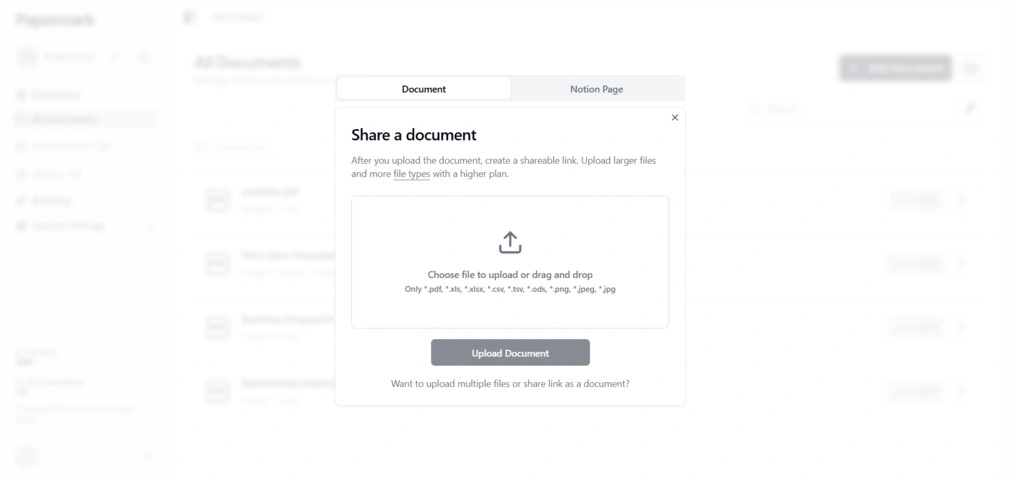
The first step is uploading a document, and Papermark gives you two ways to do it: from your computer or directly from Notion.
The Notion option is especially convenient if you already use it. Papermark simply asks you to paste a public Notion page link, and once you submit it, the platform generates a shareable link and copies it to your clipboard automatically. It works much the same way as uploading a PDF.
If you upload a file from your device instead, the free plan supports a decent range of formats, including PDF, XLS, XLSX, CSV, TSV, ODS, PNG, JPEG, and JPG.
Paid plans expand that list quite a bit, adding support for video files, presentations, CAD files, geographic data, and ZIP archives. They also allow larger file uploads and batch uploads.
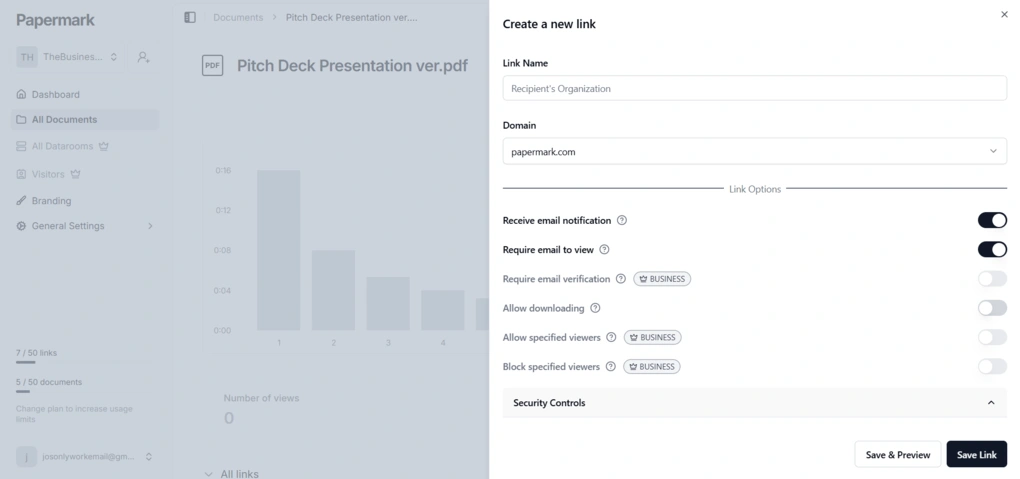
Once the document is uploaded, its page opens right away. From there, you can create a shareable link by clicking Create Link in the top-right corner. This opens a separate settings panel where you can customize the link before sharing it.
You can name the link, choose a domain, add a custom domain, and adjust several sharing and security settings, such as email notifications, requiring email to view, download permissions, viewer restrictions, branding, tags, and advanced controls. After saving the link, it is ready to be copied and sent.
Page-by-Page Analytics
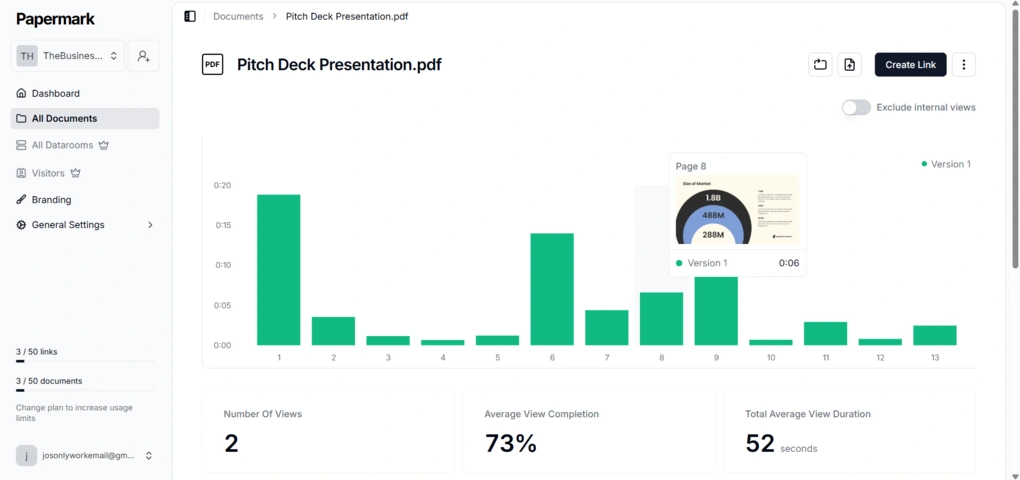
One of Papermark’s strongest features during my testing was its analytics dashboard. Every time I sent a document link to my secondary email address and opened it, I immediately received an email notification letting me know the document had been viewed.
At the same time, on the Papermark dashboard itself, I could follow the activity almost in real time while browsing through the document.
The platform visualizes viewer engagement through a bar chart that shows how much time was spent on each page. What I really liked was that hovering over each bar displayed a thumbnail preview of the corresponding page, and it made the analytics much easier to interpret at a glance.
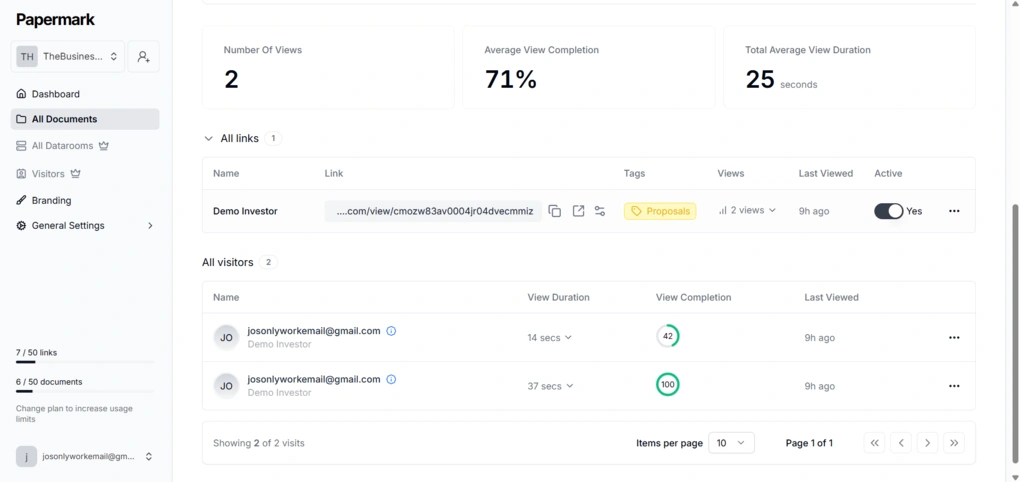
Below the chart, Papermark also displays additional engagement metrics, including the number of views, average view completion, and total average view duration. There is even an option to exclude internal views from the analytics if you do not want your own testing activity affecting the data.
The dashboard also includes separate sections for all links and all visitors, where you can see detailed information for each viewer individually, such as view duration, view completion, and last viewed activity.
Overall, I found the analytics very well organized, easy to understand, and useful. Everything was laid out clearly, with just the right amount of detail.
Document Versioning
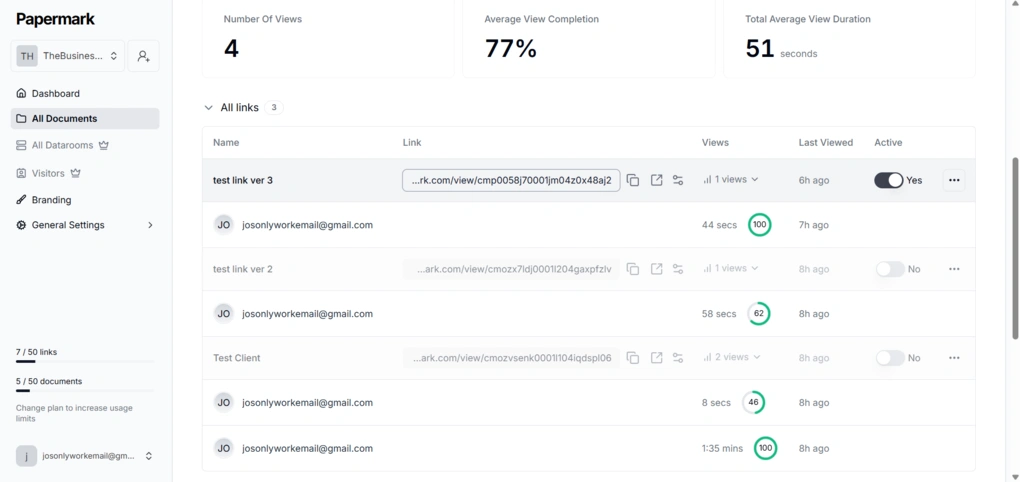
You can add several versions of the same document and create a separate link for each one. In the bar chart, the analytics for each version are shown side by side, and each version is marked with a different color, so it is easy to tell them apart.
The same hover behavior is there too, so you can still see the thumbnail of the corresponding page when you move over a bar.
Under ‘All links’, each version appears as a separate link, and you can activate or deactivate them individually.
This means that, instead of deleting older links entirely, Papermark archives them, allowing users to keep previous analytics and reactivate links later if needed. I found this much cleaner and more practical than manually managing multiple document versions.
Link Permissions & Access Controls
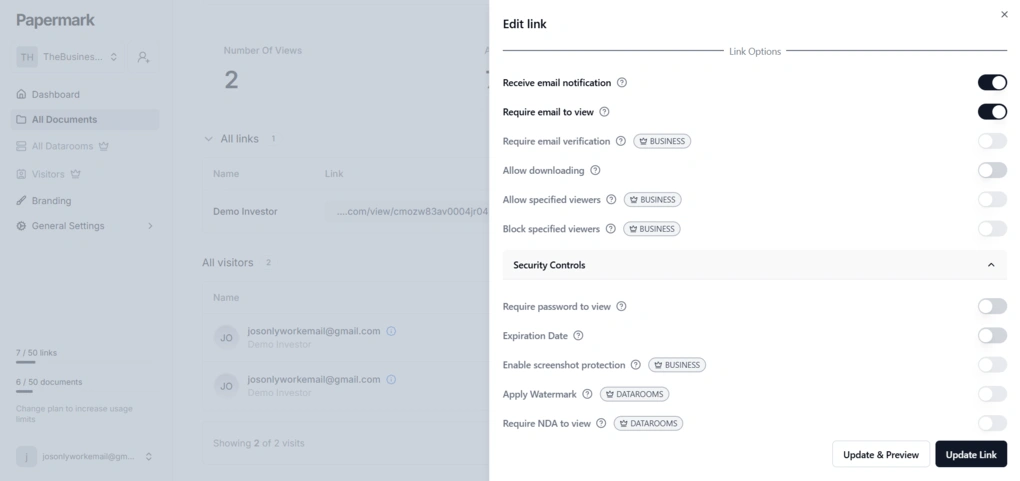
Papermark offers a solid set of link permissions and security controls when you create a shareable document link. In the link settings, you can enable email notifications, require an email to view the document, require email verification, allow downloading, allow or block specific viewers, and manage everything through a fairly clear setup flow.
On top of that, Papermark also includes several security controls such as password protection, expiration dates, screenshot protection, watermarking, NDA requirements, and custom form fields.
However, only some of these options are available on the free plan, while others are reserved for higher tiers. Also, if your document contains embedded links, Papermark detects them and disables clickable in-document links on the free plan, which is a fairly clear reminder that the free version is more limited than the paid one.
Custom branding
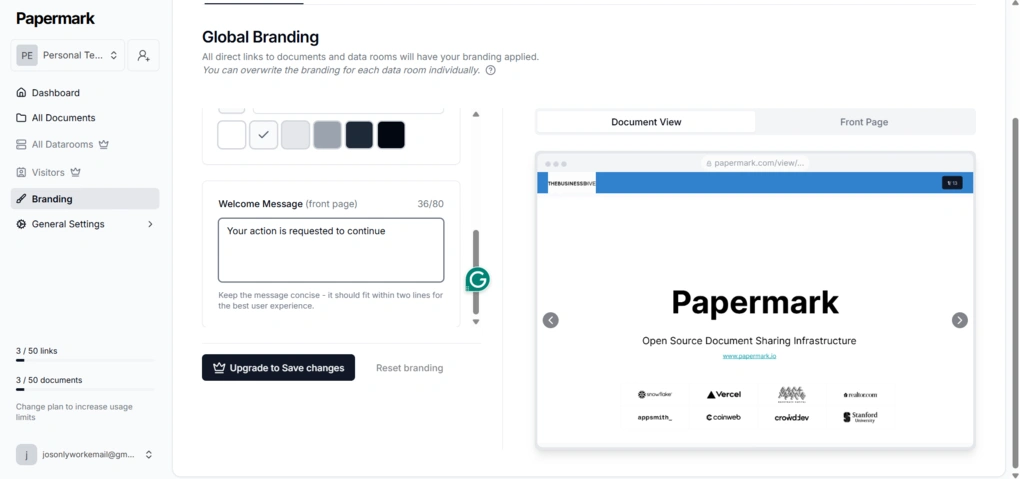
Papermark also offers custom branding features, so you can make shared documents look more professional and more in line with your brand by adding things like custom domains, logos, and branded pages.
However, these branding options are not available on the free plan, you can only preview them.
Virtual Data Rooms
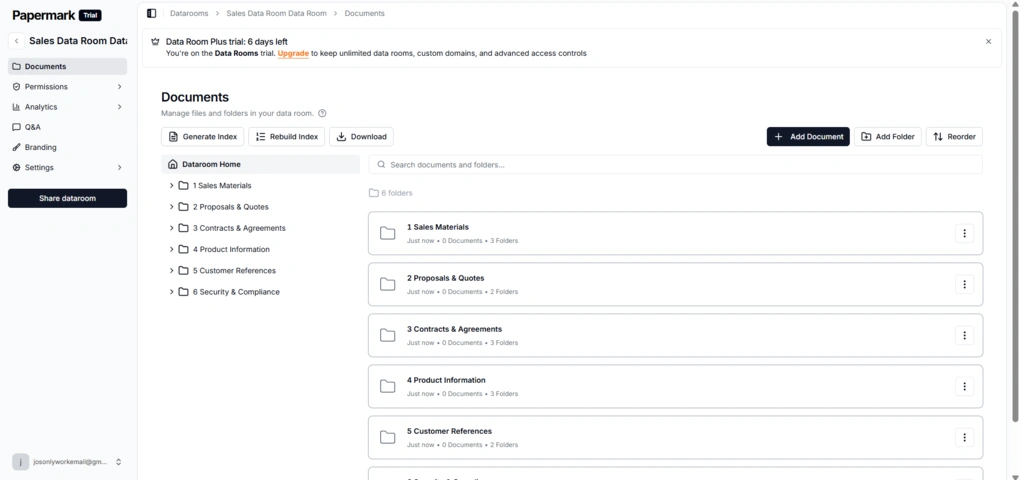
Papermark’s Data Rooms were one of the strongest parts of the platform during my testing, and I was able to explore them through the 7-day free trial the company offers. The setup is simple, even if you have never used a virtual data room before. You can start from scratch, choose a premade template for workflows like fundraising, sales, M&A, or project management, or let Papermark generate the structure automatically with AI.
Once inside the data room, documents and folders are organized in a clean sidebar layout. Uploading files, creating nested folders, and reorganizing everything is simple. I also liked that you can create multiple shareable links for the same data room and control permissions separately for each one.
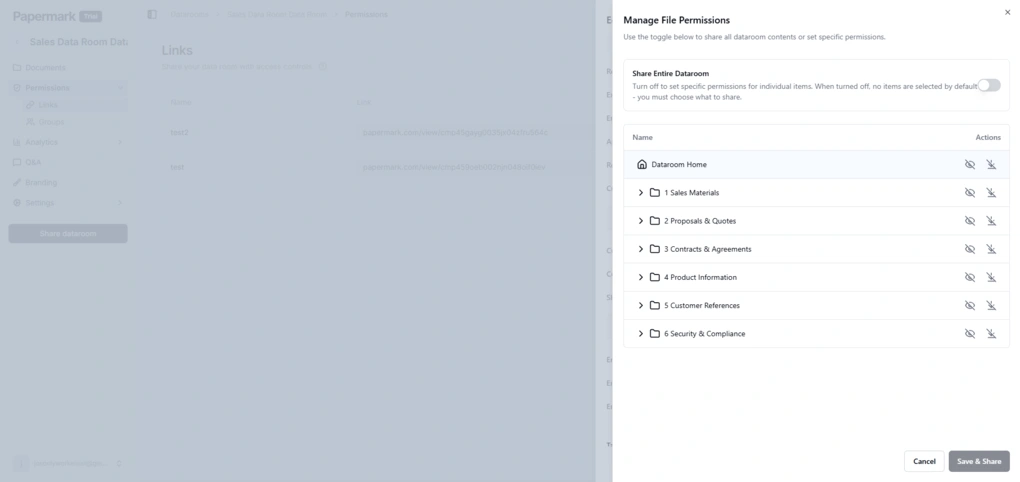
One feature that stood out during testing was the file-level permission system. Instead of only sharing the entire data room, Papermark lets you choose exactly which folders or documents each link can access. This way, it’s much easier to share only specific parts of a data room with clients, investors, or collaborators.
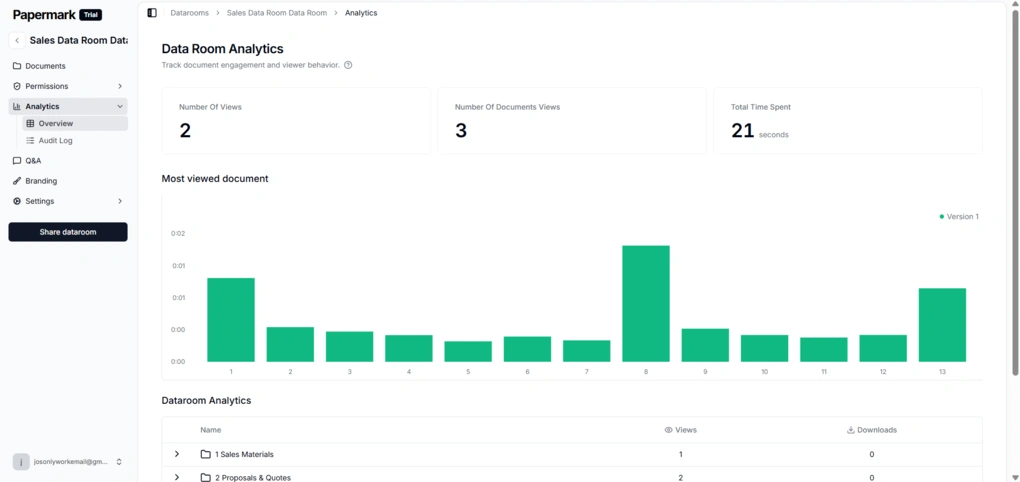
The analytics inside Data Rooms are also very useful. Papermark tracks total views, document views, time spent inside the room, and engagement for individual folders and files. Everything is presented in a very visual and easy-to-understand way.
Papermark also includes branding customization for data rooms. You can upload your own logo and banner, change brand colors, customize backgrounds, and add welcome messages to create a more professional client-facing experience.
Papermark user interface
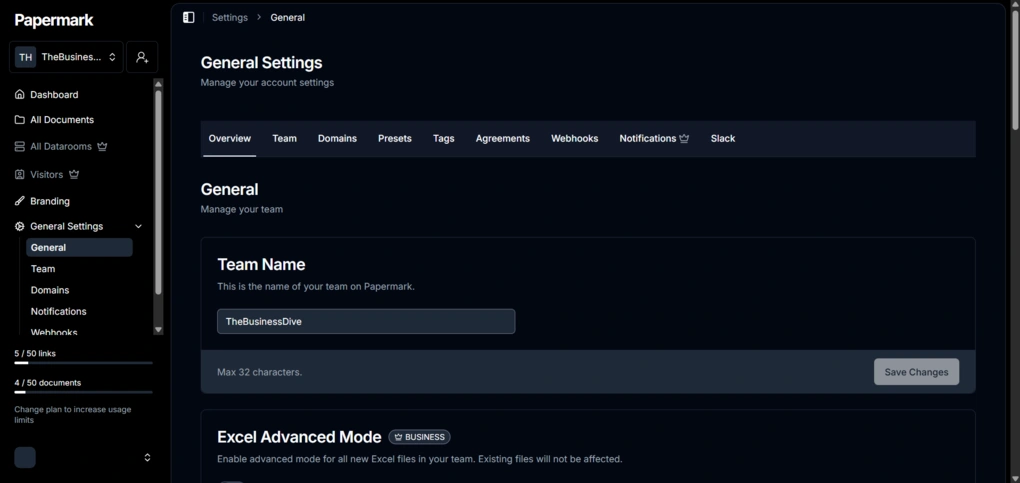
Papermark has a very intuitive and easy-to-use interface. Everything is laid out clearly, and throughout my testing I had no problems navigating the platform.
The dashboard gives you exactly as much information as you need, so the overall experience is smooth even if you are completely new to this type of software.
Explore our Apps directory
A curated directory of software tools we’ve independently reviewed, with links to full reviews, comparisons, and category guides.
Breaking down Papermark’s pricing
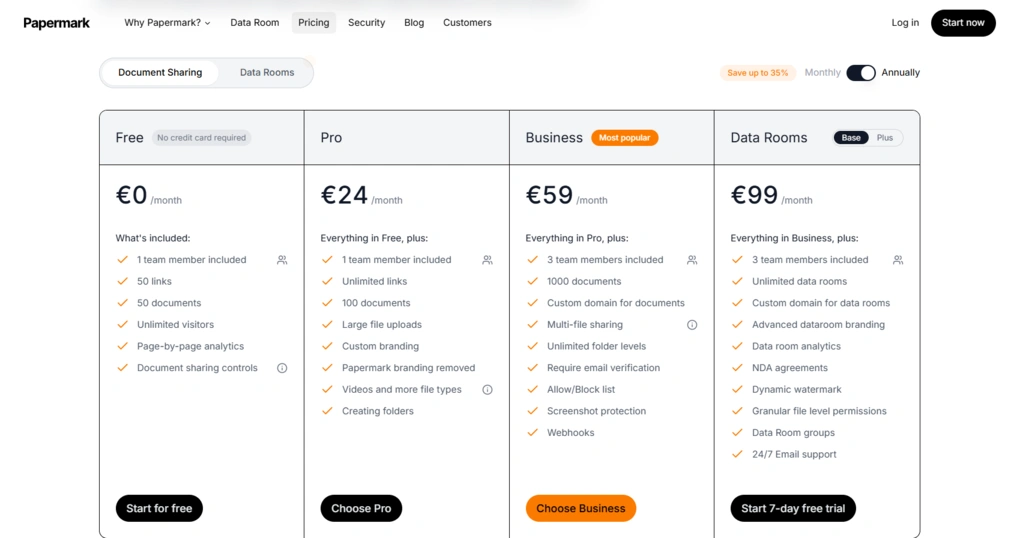
Papermark offers a free plan and several paid plans. The free plan includes 50 links, 50 documents, unlimited visitors, page-by-page analytics, and basic document sharing controls, which I found surprisingly usable for testing and lighter workflows.
The Pro plan, which costs €24/month when billed annually, adds larger file uploads, custom branding, folder creation, support for additional file types, and video uploads.
The Business plan costs €59/month and includes more advanced controls like screenshot protection, email verification, allow/block lists, multi-file sharing, and webhooks.
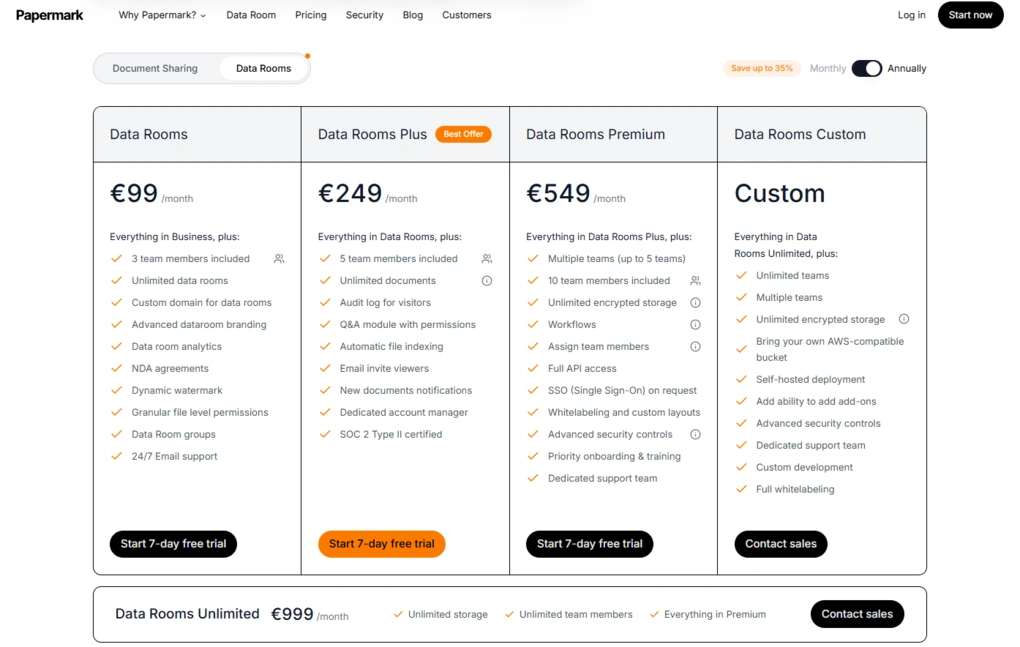
For users who need full virtual data room features, Papermark also offers dedicated Data Rooms plans. The base Data Rooms plan starts at €99/month and includes unlimited data rooms, custom domains, NDA agreements, dynamic watermarking, granular file permissions, and advanced analytics.
Higher-tier plans become significantly more expensive, with Data Rooms Plus costing €249/month, Data Rooms Premium €549/month, and Data Rooms Unlimited €999/month. However, they are still relatively affordable compared to many traditional enterprise VDR providers. There is also a custom enterprise option with custom pricing.
What I liked (and what could be improved)
After my Papermark review, I summed up the things I liked most and one area that could be improved.
What I liked about Papermark
What could be improved
Papermark review: Final verdict
If you regularly send important documents to clients, investors, or collaborators and want something more professional than email attachments or Google Drive links, Papermark is definitely worth checking out.
It manages to make document sharing modern, organized, and surprisingly easy to manage, even if you have never used a VDR platform before.
Hopefully, this Papermark review gave you a clearer picture of how the platform works in practice and what you can realistically expect from the free plan. As always, I will regularly update this review to make sure it reflects the reality.
Looking for similar tools?
Visit the link to explore other apps we’ve reviewed in this space and how they compare.
Why you can trust our reviews
At thebusinessdive.com, our team tests, reviews, and compares hundreds of productivity apps every year — from project management tools to note-taking apps. We dive deep into real-world use cases to help you find the right tools that actually improve your workflow, not just add noise.
Our mission? No fluff, no shortcuts—just honest, hands-on insights from productivity pros.
Discover how we stay transparent, read our review methodology, and let us know about any tools we missed.
Frequently asked questions
Is Papermark a good DocSend alternative?
Yes, Papermark is a very solid DocSend alternative, especially for startups, freelancers, agencies, and smaller teams that want secure document sharing, page by page analytics, document tracking, and access controls without the complexity of many traditional virtual data room platforms.
One of the things that makes Papermark stand out is that it is also an open source document sharing platform, and it even offers a self hosting option in addition to its hosted version.
Can I use Papermark for sharing sensitive documents?
Yes, Papermark is designed for sharing sensitive documents securely through trackable links instead of regular email attachments.
The platform includes features like password protection, email notifications, access controls, permissions, custom branding, custom domains, and detailed engagement analytics.
Paid plans also add more advanced security features such as screenshot protection, NDA requirements, security verification, and additional data room functionality for fundraising, investors, sales documents, and other business workflows.
Does Papermark offer a free plan?
Yes, Papermark offers a free plan that includes many of its essential features, including document upload, document sharing, page by page analytics, email notifications, viewer tracking, and basic access control settings.
During my Papermark review and test, I found the free version useful enough for one user, freelancers, and smaller teams that mainly need secure document sharing and analytics.
However, many advanced features and custom branding tools are limited to paid plans, while Virtual Data Rooms can be tested separately through Papermark’s 7-day free trial.
Disclosure: I only recommend products I would use myself, and all opinions expressed here are my own. This post may contain affiliate links that, at no additional cost to you, may earn a small commission. Read the full privacy policy here.

Hey there! I am Aron, the founder of Thebusinessdive. I have been testing productivity apps for almost three years now. I reach 25.000 -50.000 people monthly with the mission to help you find the perfect productivity apps. Subscribe to my YouTube channel, newsletter, and social media to hear more about the best productivity tools. Let’s dive in!