


Tactiq Review 2026: 5 Pros & 6 Cons — Is It Actually Worth It?
Here’s my honest take: Tactiq is not worth it — at least based on my experience testing 25+ AI note-taking tools.
In this Tactiq review, I’ll walk you through 5 key pros and 6 real cons I found during testing over 5 meetings. Some of the biggest downsides include inconsistent real-time transcription, missing meeting recording features, and limited AI credits unless you’re on a higher-tier plan.
That said, it’s not all bad, and there are a few areas where Tactiq can still be useful, depending on your workflow.
Stay here, because in this Tactiq review, I’ll break down its features, pricing, pros and cons, and where it actually makes sense.
Let’s dive in!
Verdict
Here’s the quick verdict if you don’t want to read the full review:
🎯 Best for: Individuals who want workflow automation and post-meeting insights
🚫 Not ideal for: Teams, sales use cases, or users who need recording and a strong free plan
⭐ Biggest strength: AI workflows & action item extraction
⚠️ Biggest weakness: No meeting recording + limited AI credits
⚖️ Verdict: A promising AI note-taker with strong workflows and summaries, but inconsistent live transcription and missing core features limit its overall value.
🏆 Score: 3.6 / 5
✅ Tested with our review & scoring methodology ✅ Real-world testing ✅ Unbiased evaluation
Tactiq Review
Summary
Tactiq is a solid AI meeting assistant with useful features like customizable summaries, strong AI workflows, and reliable integrations. However, inconsistent real-time transcription, the lack of meeting recording, and strict AI credit limits hold it back. Overall, it’s a decent option for individuals, but not the best choice for teams or heavy users.
|
|
The real-time transcription feature is useful if it works
|
|
|
The AI workflows help automate numerous processes related to your online meetings
|
|
|
It pulls out the action items from the smart summaries effectively
|
|
|
Outstanding Ask AI feature
|
|
|
A safe AI note-taker
|
|
|
Live transcription did not work for multiple meetings
|
|
|
You need AI credits for the meeting notes
|
|
|
The Pro plan does not include unlimited AI credits
|
|
|
No meeting recorder function
|
|
|
Limited team management features
|
|
|
It does not have a mobile app, which makes it less ideal for in-person meetings
|
How We Test AI Note-Takers
To keep our reviews and final scores fair and consistent, we evaluate every AI note-taking tool using a standardized testing framework built on real-world usage and hands-on experience.
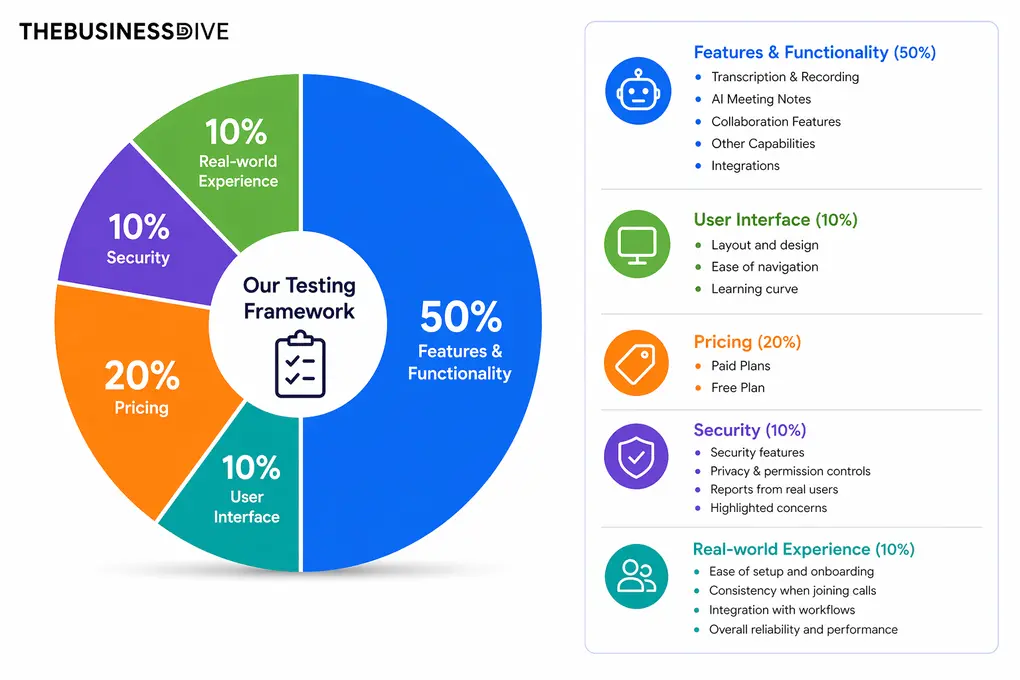
Our scoring breakdown after testing 20+ AI note-takers:
🤖 Features & functionality — 50%
🖥️ User interface — 10%
💰 Pricing — 20%
🔐 Security — 10%
👥 Real-world experience — 10%
Want a detailed breakdown of how we test each category?
Learn exactly how we test tools → Review methodology
Short on time? Here’s a quick overview of Tactiq
What is Tactiq?
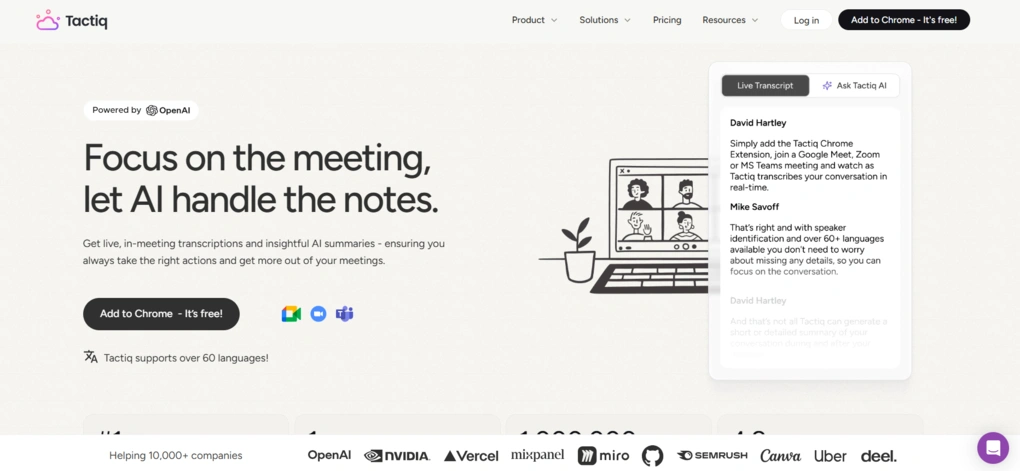
Tactiq is an AI-powered meeting assistant that transcribes and summarizes meetings on Google Meet, Zoom, and Microsoft Teams. Unlike most AI note-taking tools, Tactiq does not require bots to transcribe meetings.
It supports 60+ languages for transcription and captures your words in real time, so you can follow along without taking notes.
My hands-on experience with Tactiq
When testing Tactiq, I found that it offers an average accuracy 85%-90% for the meeting transcriptions. But my main issue was not the accuracy, but live transcription.
I had to try numerous times to access the real-time transcription during a call. Honestly, it was a bit frustrating, since it would be one of Tactiq’s most crucial features, and it didn’t work across multiple meetings.
Moreover, you have to spend credits for prompts to get your AI meeting notes. And you only get unlimited AI credits with the Team plan, so the Free and Pro plans are limited for those who want to use the AI tools in depth.
Although I am not a big fan of this solution, it is great that you can use your own prompts for AI summaries and build your own meeting templates for project updates, one-on-one calls, and more.
Another important feature I missed is the capability to record meetings. For sales calls, it would be important to rewatch the meeting recordings (at least for me) to better understand what clients feel & think. And unfortunately, Tactiq is not ideal for this use case.
As for the other features, it made a good impression on me with its AI workflows, file uploads, and wide range of integrations.
To summarize, it has some great features on paper, but some of them did not deliver during my Tactiq review. While I can see its place in some of your software stacks, for me, other bot-less AI note-takers worked out better, like Bluedot or Krisp.
Why Tactiq earned a 3.6 / 5
Tactiq delivers outstanding AI workflows and solid summaries, which is why it scores well in other capabilities criteria (4/5) and AI meeting notes (4/5). Its ability to extract action items and automate post-meeting workflows is one of the best parts of the tool.
However, the biggest issue is inconsistency in core features. Tactiq only gets 3.5 out of 5 for transcription & recording because of the inconsistent real-time transcription and the complete lack of meeting recording.
Pricing (3/5) and the free plan (2.5/5) further reduce its final score due to AI credit limits, even on paid plans.
Who should use Tactiq?
Who should NOT use Tactiq?
Key features
In this part, I will guide you through the key features I tried during my Tactiq review!
Before jumping right in the middle, an important note that is crucial for probably most of you. You can not record meetings with Tactiq, and it only offers transcription and AI summaries.
Bot-free meeting transcription
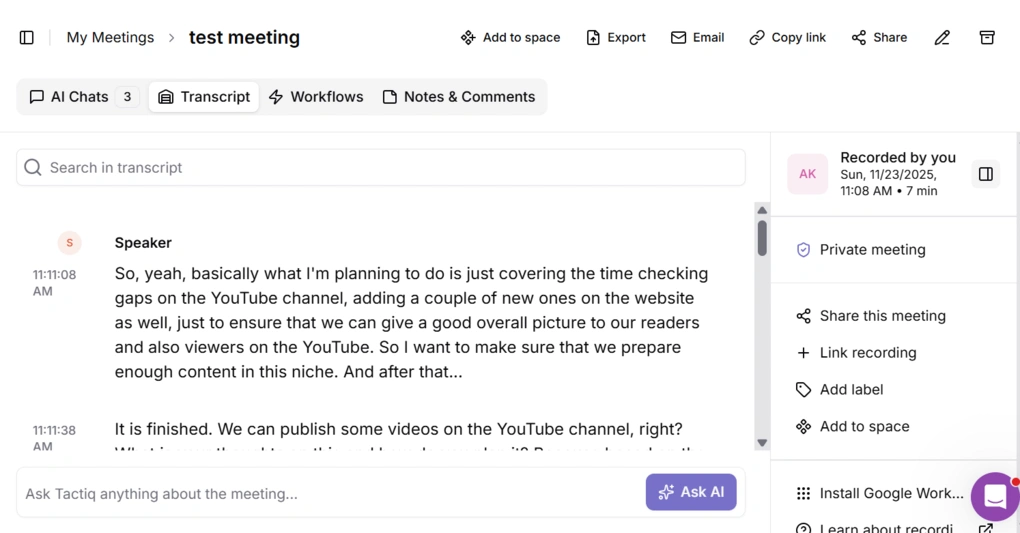
During your meetings, Tactiq offers real-time transcription on the right widget. You can also highlight key points with emojis when you are in a meeting.
Maybe it’s just me, but I had a hard time using the real-time transcription feature. Even after setting up Tactiq numerous times and testing it across numerous meetings, I did not see the real-time transcription feature.
After your meetings, Tactiq will generate a transcription. I utilized it for numerous meetings on Google Meet and received around 85% transcription accuracy.
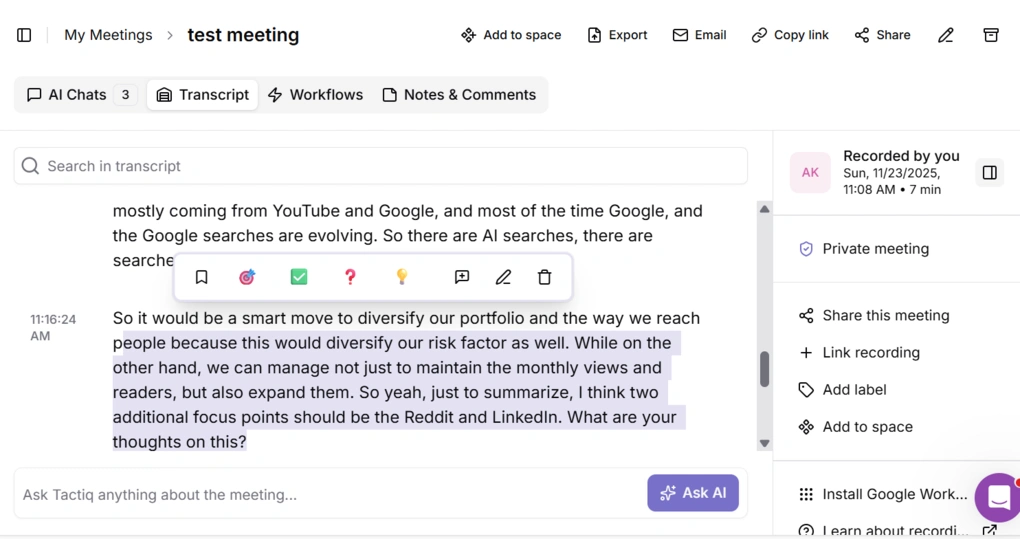
Based on my experience after testing almost all the AI note-takers, the average transcription accuracy is between 85%-90%, so Tactiq offers a decent result. However, compared to what I saw during my Fellow testing, which I use for my meetings, Tactiq has lower accuracy, as I experience 95%+ accuracy with Fellow.
Tactiq allows you to edit your meeting transcription with a few clicks. Also, you can add icons, bookmarks, and comments.
Moreover, you can remove specific parts of the meeting transcripts if you want. However, after the removal, there is no way to restore the deleted part, so use it carefully.
In addition, you can upload audio, video, or even YouTube links to transcribe and summarize them. It is also a useful feature for many of you, and only a few AI note-taking apps offer the ability to transcribe YouTube videos.
Overall, the meeting transcripts were decent. Tactiq supports multiple languages, offers the essential features, and the transcription accuracy is fine.
AI summaries
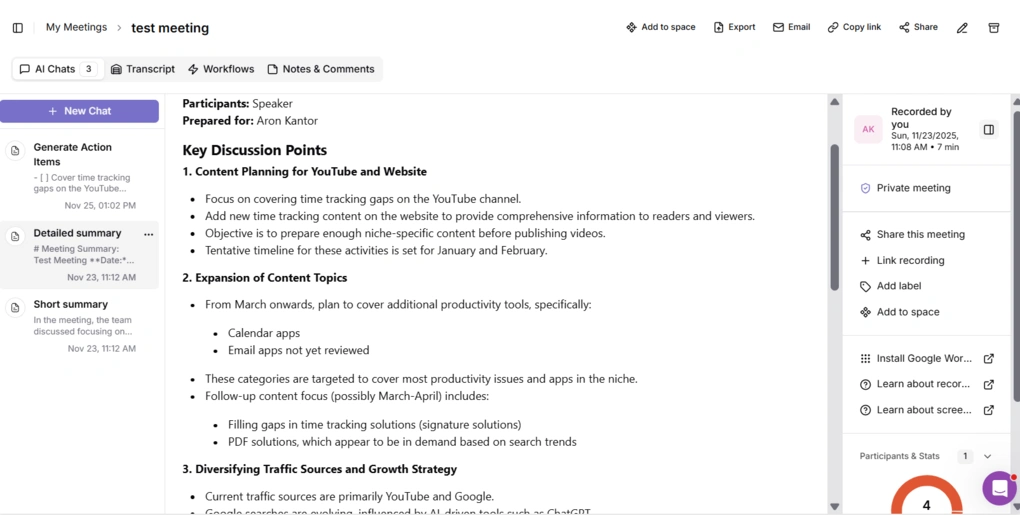
You can create meeting notes using prompts. Here, you can ask for shorter or longer summaries, or create your own prompt to organize your notes in a way that is perfect for you. Once you hit on the prompt, Tactiq provides you with instant meeting summaries.
On one hand, I loved the flexibility to only create what you actually need, and you don’t have to go through long AI summaries that you don’t need for that specific case.
On the other hand, all the prompts require AI credits, and the free plan includes 5, while the Pro plan includes 10 credits. So, even with a paid plan, you can use the meeting notes with limits.
When generating summaries, it took around 15-30 seconds to get the requested format. The AI summaries are well-organized, and you can edit them if you double-click on the text.
What I noticed during my Tactiq review is that it is solid in identifying and highlighting action items. This platform is very good at highlighting action items. Once an action item is identified, it is automatically added to a task list, tagged with the speaker’s name.
To wrap up my experience with the AI meeting notes of Tactiq, I was satisfied. It was great to see that it offers more options for what you want, whether you want detailed AI meeting notes or just a short summary with citations.
AI chat
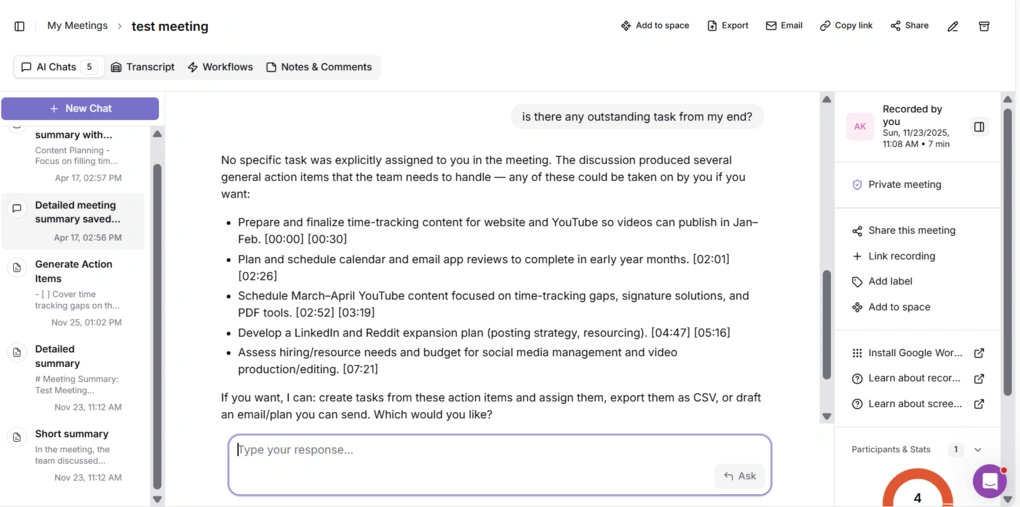
When testing Tactiq for 5 meetings, I also tried its AI assistant a few times. It took between 5 and 10 seconds to get answers, and the responses included timestamps.
If you hit the AI Chat option on the left, you can ask Tactiq AI to pull out the answers from numerous past calls’ meeting data. This way, you can analyze and gather information from more meetings in the same time.
Ultimately, Tactiq has a great Ask AI feature, and it surprised me how accurately it answers questions.
AI workflows
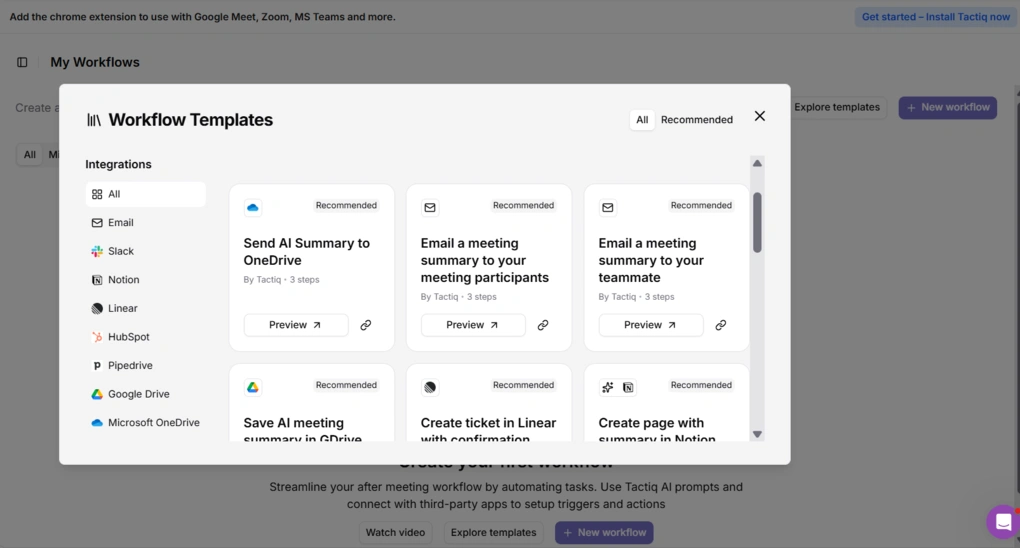
The AI workflows are automated, customizable, post-meeting processes that convert live meeting transcripts into actionable insights. Essentially, it reduces the manual work by updating your project management apps, CRMs, or sharing tools via Slack or Notion.
You can create an AI workflow for project updates, and after your transcript is processed, it generates a ready-to-send update automatically. Tactiq lets you create AI workflows from scratch or use pre-made workflows to automate meeting tasks.
It’s great that you can build AI workflows even on the free plan. I appreciated Tactiq’s focus on post-meeting workflows, and this feature makes it one of the best AI note-taking tools for this purpose. I tried only one AI note-taker with more advanced post-meeting & task management features, and it is Radiant.
Spaces
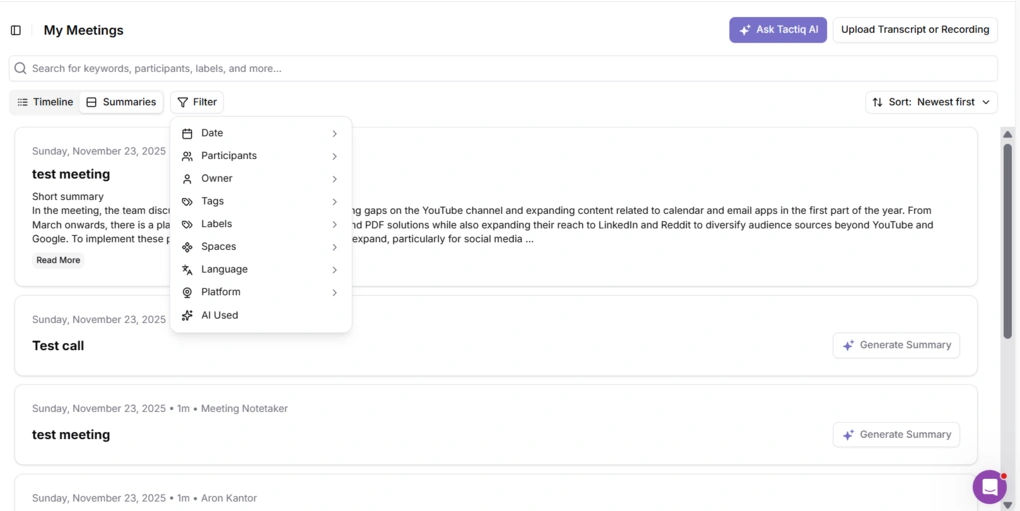
Under the “My Meetings” tab, you can access your past conversations. You can apply filters like date, participants, owners, tag, and more.
Personally, I prefer it when you can structure meeting notes in folders, since it makes your past meetings more scannable & lets you personalize access rules in more depth.
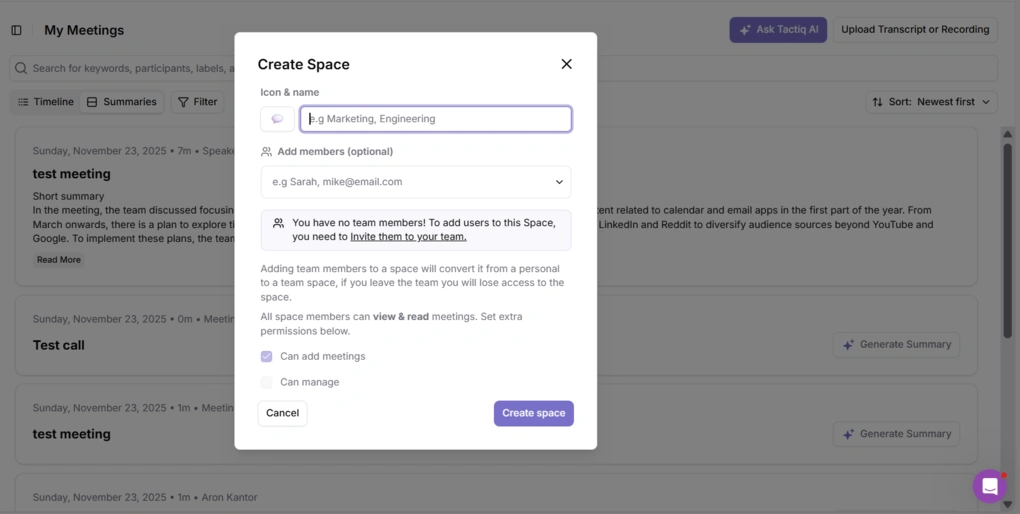
In case of Tactiq, you can create spaces for your team members to share meeting notes & transcriptions. When adding spaces, you can select whether the team members can add meetings, manage them, or only view them.
Compared to Fellow or other AI note-takers, Tactiq offers fewer options for creating access and permissions rules, making it more suitable for individuals than teams.
Tactiq integrations
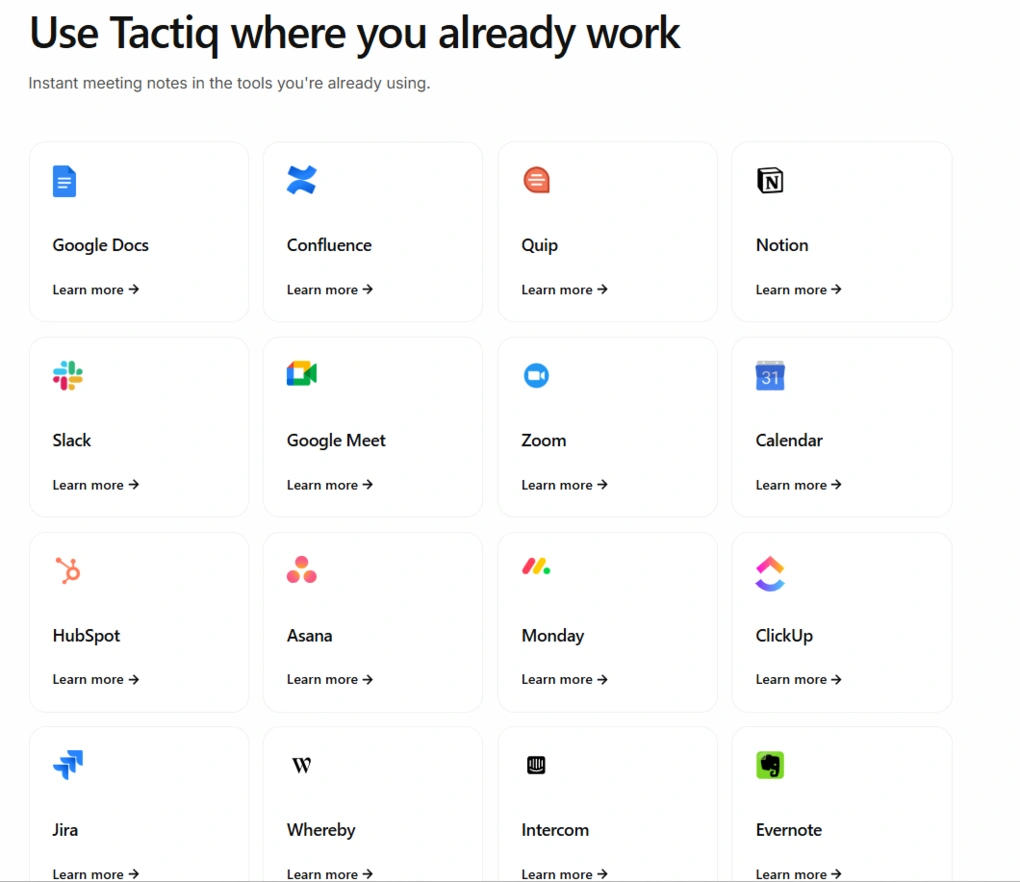
Tactiq is quite solid in terms of integrations, and you can connect it to numerous productivity apps, making your AI workflows more efficient.
That said, you can integrate Tactiq with Google Docs, ClickUp, Evernote, Asana, and more.
Tactiq user interface
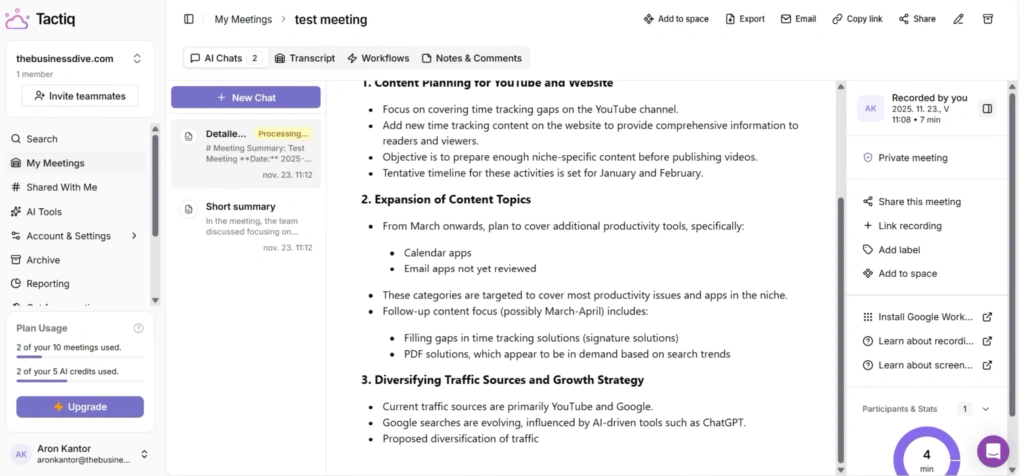
Tactiq’s design is straightforward, and you can easily navigate its pages. Fortunately, the features are not hidden, and you can find all the functions you need relatively fast.
Explore our Apps directory
A curated directory of software tools we’ve independently reviewed, with links to full reviews, comparisons, and category guides.
Tactiq pricing plans
Free plan
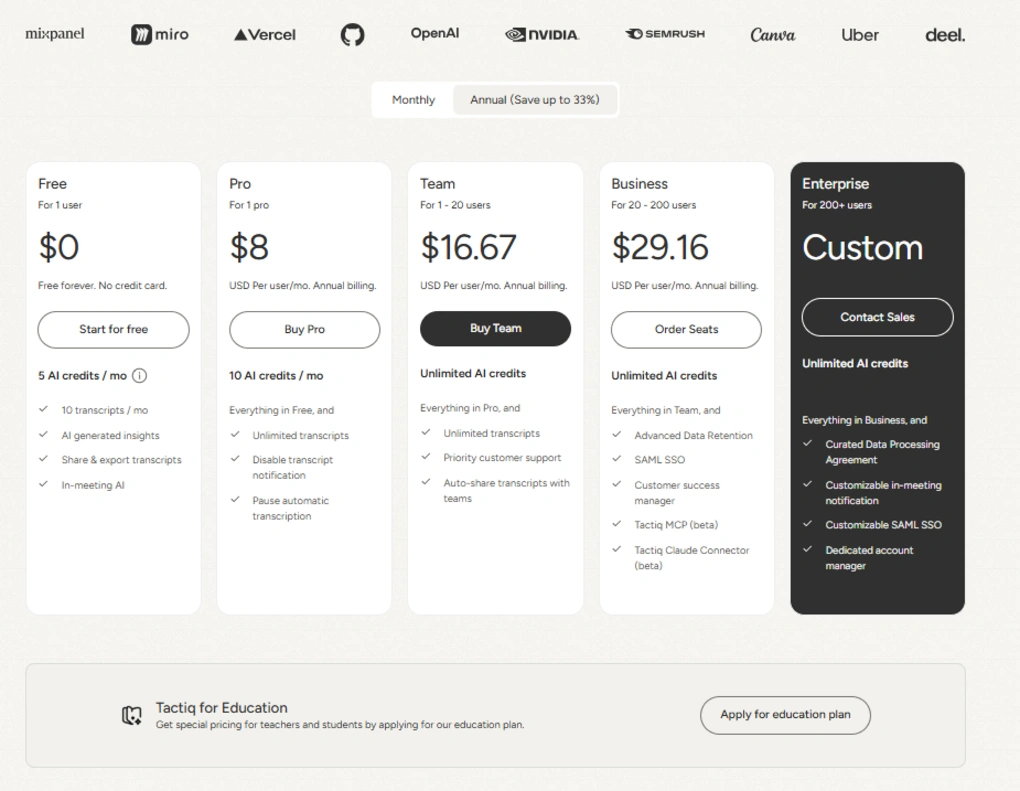
The Free forever plan gets you just 10 meetings per month and only 5 AI credits that you can use for summaries, notes, questions, and more. You can access the AI workflows as well with the free plan.
Tactiq’s Free plan is nowhere near what I see in Fathom or tl;dv’s free version, but it can work for individuals with a few meetings.
Pro plan
The Pro plan provides unlimited transcripts but still limits AI credits to 10 per month. It is $8 per user per month with annual billing, and you have access to additional features such as pausing automatic transcription or disabling transcription notifications.
The limited AI credits make the Pro plan ideal only for those with a limited number of meetings per month. So, I would not recommend this plan for professionals or freelancers.
Team plan
The Team plan is where you unlock unlimited AI credits and get priority customer support for $16.67 per month with annual billing.
This plan is designed for professionals and small teams.
Business plan
If you have more than 20 users, Tactiq offers its business plan for $29.16 per month, billed annually, which gives you access to additional advanced features. With the Business plan, you get advanced data retention, single sign-on, and a customer success manager.
Enterprise plan
Finally, Tactiq has an Enterprise plan for larger organizations with custom pricing. It comes with a dedicated account manager, customizable single sign-on, and in-meeting notifications.
Tactiq’s security
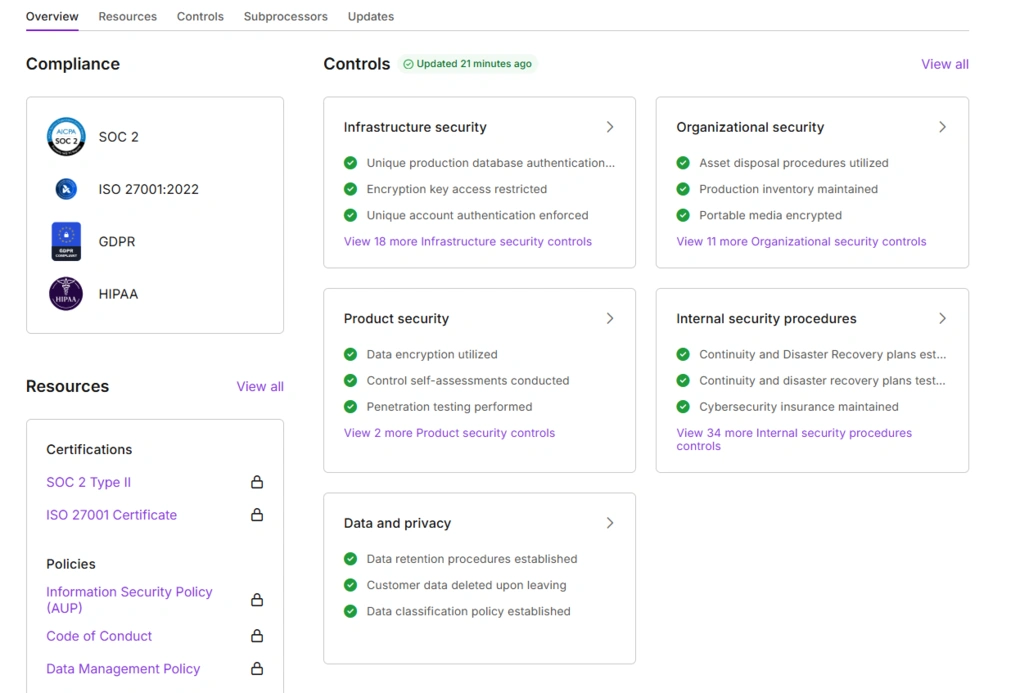
Tactiq holds security certifications, including SOC 2, PCI, and HIPAA. During my Tactiq review, I also checked for any red flags regarding Tactiq’s privacy and safety.
It was a great sign that they just updated the safety controls 21 minutes ago when checking this AI note-taker security. I also scanned Trustpilot and Reddit to see if anyone had a negative experience with safety, but did not find any negative reports on this matter.
Furthermore, I did not encounter any issues or red flags during my testing, so we can consider Tactiq a safe app.
Pros and cons I found during my Tactiq review
Now, let’s break down Tactiq’s strengths and limitations.
Pros of Tactiq
Cons of Tactiq
Who would be a good fit for Tactiq?
Tactiq is ideal for individuals and the higher-tier plans for professionals who need a safe AI note-taker with live transcription and focus on workflows.
Who would be a bad fit for Tactiq?
Tactiq lacks advanced team management features, making it unsuitable for teams. And particularly for sales teams, since it does not offer meeting recorder capabilities.
Furthermore, if you are looking for a free AI note-taker, you will hit limitations quickly with Tactiq, as its Free plan includes only 10 meetings per month and 5 AI credits.
Tactiq alternatives
If you don’t know whether Tactiq is the best AI note-taker for you, check out these alternatives we have tested:
|
App |
Best for |
Description |
|---|---|---|
|
Fellow |
Best overall |
A top AI note-taker for professionals and teams. This is the one I use for online meetings. |
|
Notta |
Best for multi-language transcription |
A unique AI note-taker that allows multi-language transcription, enabling people to speak two different languages during online meetings. |
|
MeetGeek |
Best for multi-language transcription |
A versatile AI note-taking app with the best AI meeting summaries. |
|
tl;dv |
Best simple AI note-taker |
A simple option for individuals with a feature-rich free plan. |
|
Fathom |
Best free AI note-taker |
An accurate AI note-taker with an extensive free plan. |
|
Radiant |
Best free AI note-taker for Mac |
It is a 100% free AI bot-less note-taker for Mac users for in-person and online meetings. |
|
Otter AI |
A popular AI note-taker |
One of the most popular AI note-takers for Google Meet, Zoom, and Microsoft Teams. |
|
Granola |
Best for users need a simple bot-less AI note-taker |
Granola is a lightweight AI note-taking app that transcribes and summarizes meetings without bots, with a generous free tier, but it’s basic and lacks advanced features. |
|
Krisp |
Best bot-less AI note-taker supporting high audio quality |
Krisp is a Voice AI platform for clearer communication and more productive meetings, combining real-time audio enhancements with AI note-taking. |
|
Fireflies AI |
Best budget-friendly option |
A popular and budget-friendly AI meeting assistant for individuals and teams. |
|
Bluedot |
An easy-to-use bot-less AI note-taker |
Bluedot is a straightforward and easy-to-use bot-free AI note-taker. |
|
Zoom AI Companion |
Best for Zoom users needing built-in AI note-taking |
A solid built-in AI assistant for Zoom that offers meeting summaries, basic transcription, and action items, but lacks advanced features. Full Zoom AI Companion review | Quick Zoom AI Companion overview |
|
Read AI |
Best for teams & individuals who want an all-in-one AI meeting assistant |
Read AI is an AI meeting assistant with solid transcription, summaries, and search, but limited features on lower plans and privacy concerns make it hard to rely on. |
Wrap up: Tactiq review
After testing Tactiq for 5 calls, I noticed both outstanding and frustrating things. The idea behind Tactiq’s features is super cool, and I love the focus on workflows and post-meeting actions.
However, the execution was off sometimes, and I missed a few must-have features I tried when testing other AI note-takers.
That said, at this stage of this AI note-taker and given the advancement of AI note-takers, I can’t really recommend Tactiq right now. However, if they address the majority of my identified cons, it can quickly become a top AI note-taking tool.
Related articles:
- Best 5 Otter AI Alternatives | 20+ Personally Tested Apps (2026)
- 5 Best Bot-Free AI Note-Takers In 2026 (NOT What You’d Think)
- Best 9 AI Note-Takers | My Top Picks After +2 Years Testing (2026)
- 7 Best Zoom Note-Taker Apps: My Findings After 2 Years (2026)
Hope I was able to help you find the best AI note-taker for you. As always, I will update this Tactiq review over time so you guys have up-to-date information about this AI note-taking app.
Looking for similar tools?
Visit our AI note-takers library to explore other apps we’ve reviewed in this space and how they compare.
Why you can trust our reviews
At thebusinessdive.com, our team tests, reviews, and compares hundreds of productivity apps every year — from project management tools to note-taking apps. We dive deep into real-world use cases to help you find the right tools that actually improve your workflow, not just add noise.
Our mission? No fluff, no shortcuts—just honest, hands-on insights from productivity pros.
Have a question or suggestion? I’d love to hear from you. Feel free to reach out anytime at aronkantor@thebusinessdive.com.
Frequently Asked Questions
Is Tactiq AI good?
Tactiq is an exciting AI note-taker, but it failed to outperform more popular options during my testing. If it can implement a meeting recorder, launch a mobile app, and introduce additional team features, it can become a solid AI note-taker.
Is Tactiq completely free?
No. Tactiq offers a Free plan with 10 meetings per month and 5 AI credits for summaries, notes, questions, and more. Compared to other AI note-takers, this free version is limited.
If you want a more solid free plan, check out Fathom, tl;dv, and Radiant.
Does Tactiq use a bot?
No, Tactiq offers botless AI note-taking for your meetings on Zoom, Google Meet, and MS Teams.
Disclosure: I only recommend products I would use myself, and all opinions expressed here are our own. This post may contain affiliate links that, at no additional cost to you, may earn a small commission. Read the full privacy policy here.

Hey there! I am Aron, the founder of Thebusinessdive. I have been testing productivity apps for almost three years now. I reach 25.000 -50.000 people monthly with the mission to help you find the perfect productivity apps. Subscribe to my YouTube channel, newsletter, and social media to hear more about the best productivity tools. Let’s dive in!